Blogs
The most popular free blog websites include:

                                http://www.blogr.com
                             http://www.wordpress.com
                               http://www.tumblr.com

Tumbler explicitly allows you to keep copyrights to your content which means your
uploaded material is your own.

Opening An Account
To open an account on Tumblr, make sure to have the following ready: an e-mail
address, a password, and a list of potential names to call your blog. Tumblr will ask
you to create a URL address, which is simply the address for a webpage. For
example, my blog is

                          http://iheartmeaning.tumblr.com

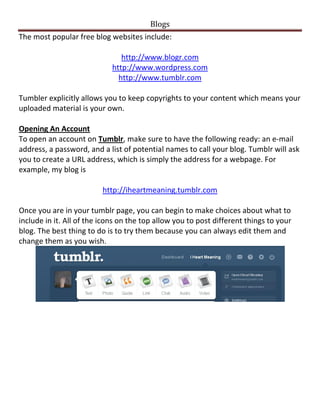
Once you are in your tumblr page, you can begin to make choices about what to
include in it. All of the icons on the top allow you to post different things to your
blog. The best thing to do is to try them because you can always edit them and
change them as you wish.
Blogs
Customizing Your Blog
To customize the look of your blog, select the “Customize appearance” button
located on the right column on your page.
Your page may look generic, but at the top of the screen you will find a series of
selections including “Themes.” If you select that option you will be able to select
from a variety of looks for your page.


Changing Settings
To change the picture on your blog (the one located on the top left), just go to the
settings and upload a photo. There are also other options you should review. For
example, this page allows you to allow people to ask questions, which will allow
people to respond to your blog. If you have a question, there is a small “question
mark” icon for some of the selections or you can go to the “help center”, found on
the page you use for edits.
Blogs
Sharing Your Blog
To share your blog you can use the URL that you found in your settings as
described above. In my case, my URL is http://www.iheartmeaning.tumblr.com
Send that URL in an e-mail to your friends and they will be able to see your page.


Posting to a blog can be a very rewarding experience. The more you use it, the
more you will learn about the different options that you have. Remember, you can
always edit any posts. Good luck!

Blogs

  • 1.
    Blogs The most popularfree blog websites include: http://www.blogr.com http://www.wordpress.com http://www.tumblr.com Tumbler explicitly allows you to keep copyrights to your content which means your uploaded material is your own. Opening An Account To open an account on Tumblr, make sure to have the following ready: an e-mail address, a password, and a list of potential names to call your blog. Tumblr will ask you to create a URL address, which is simply the address for a webpage. For example, my blog is http://iheartmeaning.tumblr.com Once you are in your tumblr page, you can begin to make choices about what to include in it. All of the icons on the top allow you to post different things to your blog. The best thing to do is to try them because you can always edit them and change them as you wish.
  • 2.
    Blogs Customizing Your Blog Tocustomize the look of your blog, select the “Customize appearance” button located on the right column on your page. Your page may look generic, but at the top of the screen you will find a series of selections including “Themes.” If you select that option you will be able to select from a variety of looks for your page. Changing Settings To change the picture on your blog (the one located on the top left), just go to the settings and upload a photo. There are also other options you should review. For example, this page allows you to allow people to ask questions, which will allow people to respond to your blog. If you have a question, there is a small “question mark” icon for some of the selections or you can go to the “help center”, found on the page you use for edits.
  • 3.
    Blogs Sharing Your Blog Toshare your blog you can use the URL that you found in your settings as described above. In my case, my URL is http://www.iheartmeaning.tumblr.com Send that URL in an e-mail to your friends and they will be able to see your page. Posting to a blog can be a very rewarding experience. The more you use it, the more you will learn about the different options that you have. Remember, you can always edit any posts. Good luck!