How To Make A Slideshare Presentation
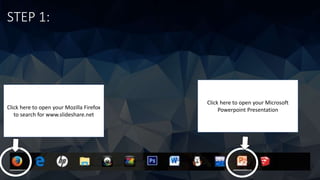
STEP 1:
Click here to open your Microsoft
Powerpoint PresentationClick here to open your Mozilla Firefox
to search for www.slideshare.net
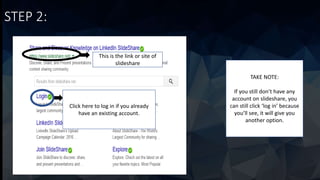
STEP 2:
This is the link or site of
slideshare
Click here to log in if you already
have an existing account.
TAKE NOTE:
If you still don’t have any
account on slideshare, you
can still click ‘log in’ because
you’ll see, it will give you
another option.
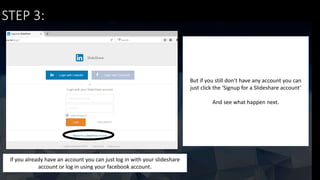
STEP 3:
If you already have an account you can just log in with your slideshare
account or log in using your facebook account.
But if you still don’t have any account you can
just click the ‘Signup for a Slideshare account’
And see what happen next.
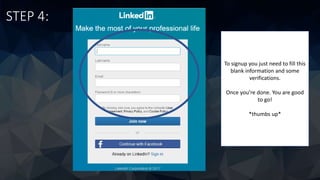
STEP 4:
To signup you just need to fill this
blank information and some
verifications.
Once you’re done. You are good
to go!
*thumbs up*
STEP 5:
This is what you’ll see once
you successfully logged in
slideshare.
Click upload to continue to
the next step.
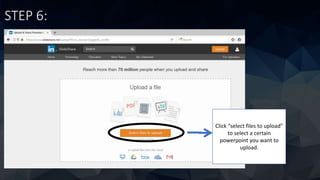
STEP 6:
Click “select files to upload”
to select a certain
powerpoint you want to
upload.
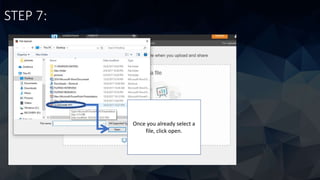
STEP 7:
Once you already select a
file, click open.
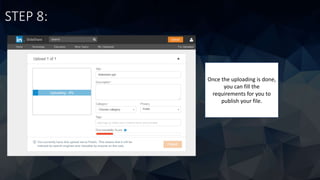
STEP 8:
Once the uploading is done,
you can fill the
requirements for you to
publish your file.
STEP 9:
This will be the your final
output. Once you upload it
anybody can see it based
on the privacy that you
choose.
THAT’S ALL THANK YOU 

HOW TO MAKE A SLIDESHARE PRESENTATION

  • 1.
    How To MakeA Slideshare Presentation
  • 2.
    STEP 1: Click hereto open your Microsoft Powerpoint PresentationClick here to open your Mozilla Firefox to search for www.slideshare.net
  • 3.
    STEP 2: This isthe link or site of slideshare Click here to log in if you already have an existing account. TAKE NOTE: If you still don’t have any account on slideshare, you can still click ‘log in’ because you’ll see, it will give you another option.
  • 4.
    STEP 3: If youalready have an account you can just log in with your slideshare account or log in using your facebook account. But if you still don’t have any account you can just click the ‘Signup for a Slideshare account’ And see what happen next.
  • 5.
    STEP 4: To signupyou just need to fill this blank information and some verifications. Once you’re done. You are good to go! *thumbs up*
  • 6.
    STEP 5: This iswhat you’ll see once you successfully logged in slideshare. Click upload to continue to the next step.
  • 7.
    STEP 6: Click “selectfiles to upload” to select a certain powerpoint you want to upload.
  • 8.
    STEP 7: Once youalready select a file, click open.
  • 9.
    STEP 8: Once theuploading is done, you can fill the requirements for you to publish your file.
  • 10.
    STEP 9: This willbe the your final output. Once you upload it anybody can see it based on the privacy that you choose.
  • 11.