High Level Software Applications
for
Machine Control
Presented by
Shannon Krause
September 30, 2009
Outline of Experience with Control System Software Development
• Very Large Array Radio Astronomy Observatory
– 1991 to 1995
• Thomas Jefferson National Accelerator Facility
– 1995 - 2001
• MIT Bates Linear Accelerator Center
– 2001 - 2005
• NSCL Coupled Cyclotron Facility
– 2005 - Present
• NSCL’s ReA3 and FRIB
– The Future
Concepts in High Level Software Applications
•High Level Apps are the point of contact between the human and machine.
•Who uses them?
•Operators
•Engineers
•Technicians
•Machine Physicists
•Experimenters
•Controls People
•The users don’t care about low level apps as long as the high level apps are fast,
reliable, intuitive to use, and effective at producing the desired result.
•The USERS, not the hardware, are the most important consideration when
designing the control system software.
•Therefore, in the best control systems, the requirements of the High Level
Software Applications drive the low level software development.
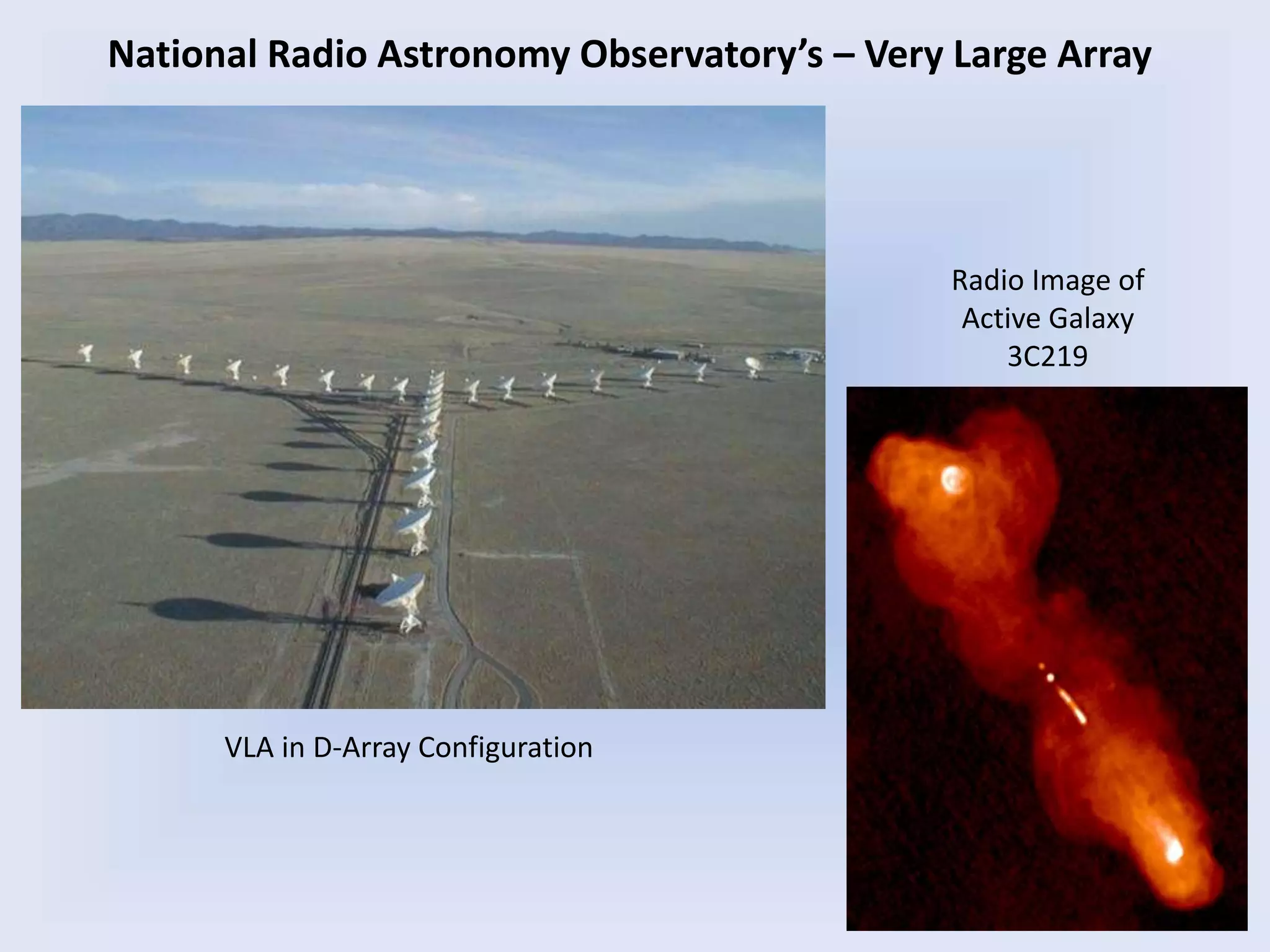
Radio Image of
Active Galaxy
3C219
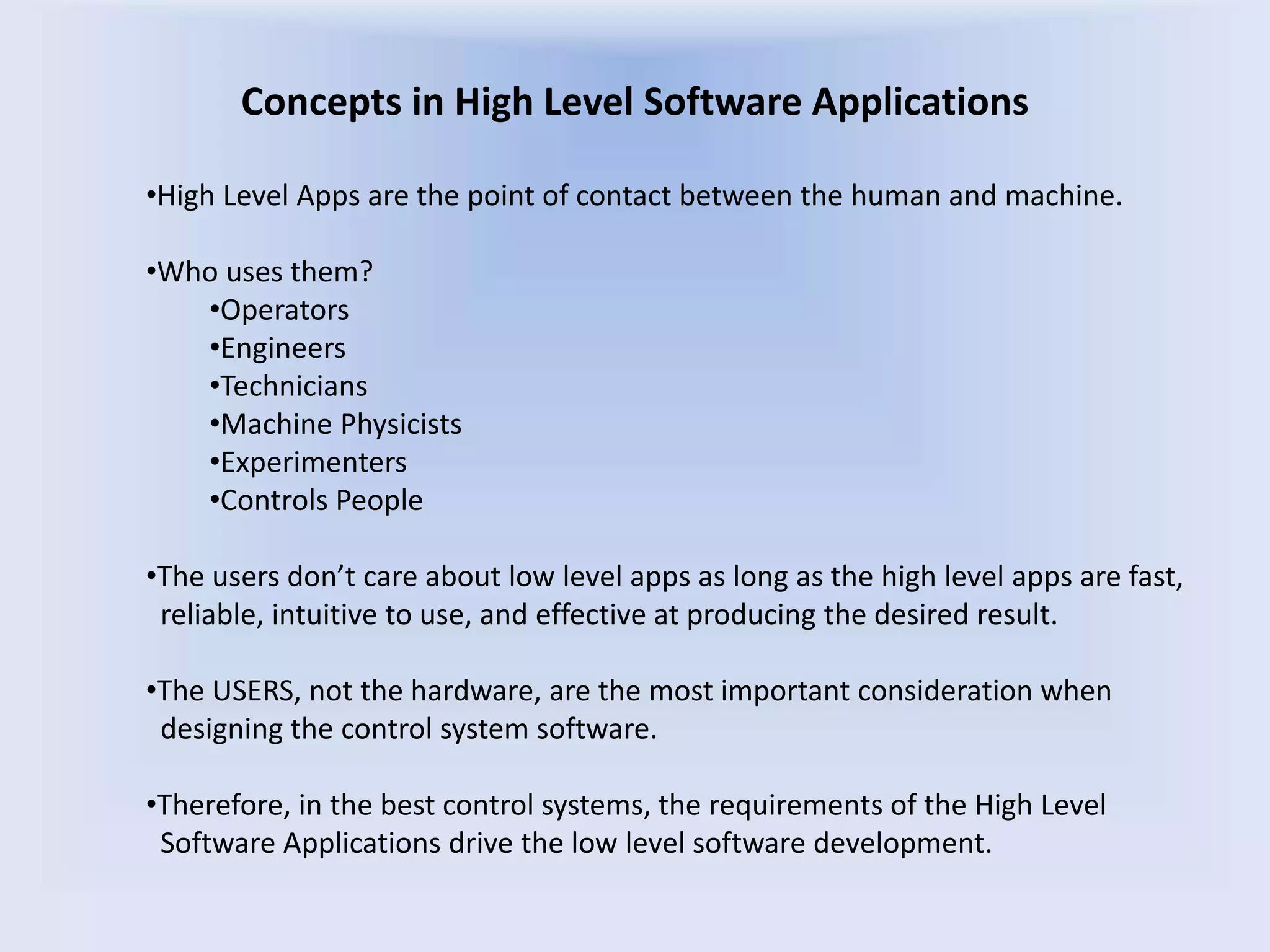
VLA in D-Array Configuration
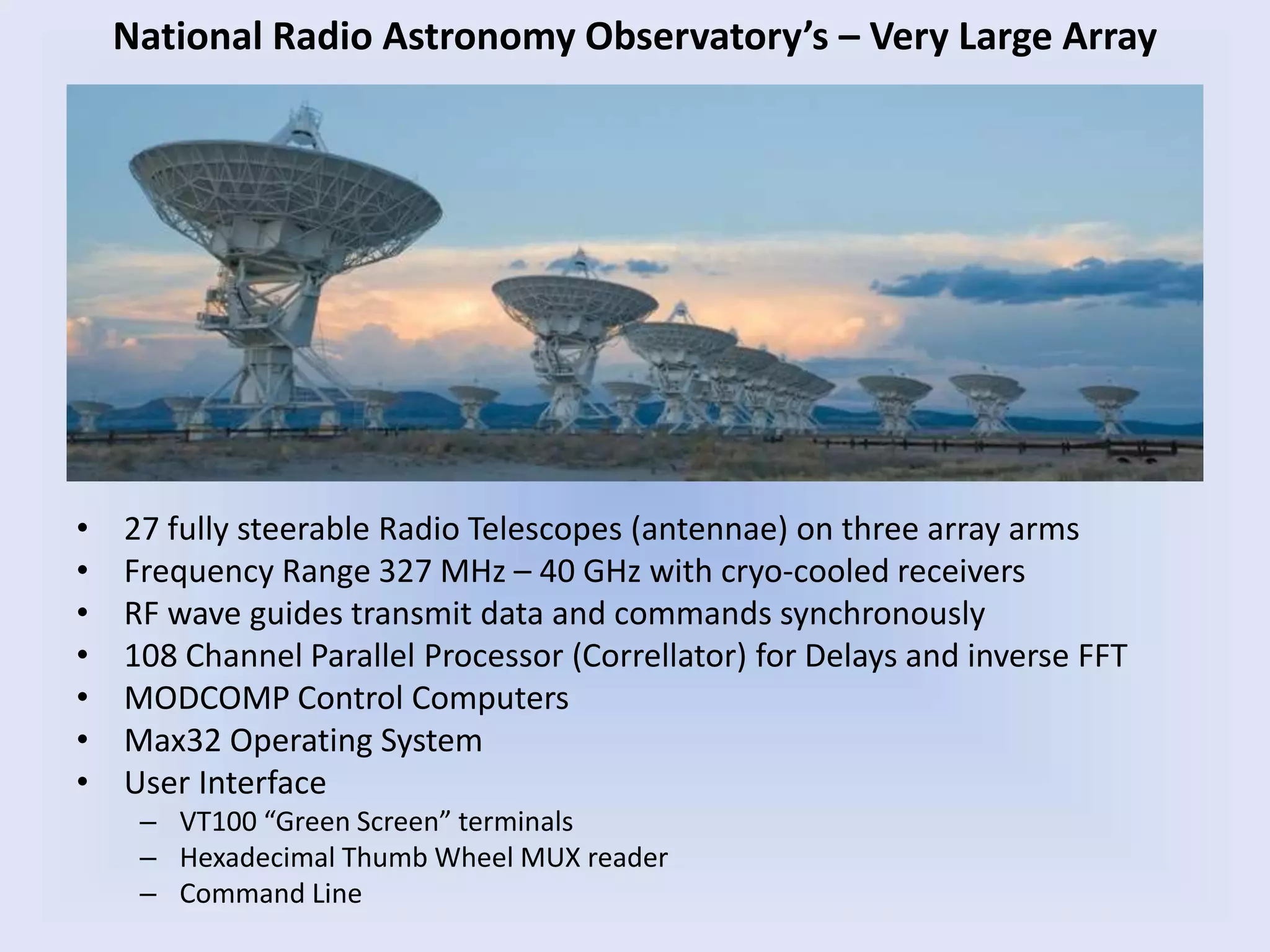
National Radio Astronomy Observatory’s – Very Large Array
• 27 fully steerable Radio Telescopes (antennae) on three array arms
• Frequency Range 327 MHz – 40 GHz with cryo-cooled receivers
• RF wave guides transmit data and commands synchronously
• 108 Channel Parallel Processor (Correllator) for Delays and inverse FFT
• MODCOMP Control Computers
• Max32 Operating System
• User Interface
– VT100 “Green Screen” terminals
– Hexadecimal Thumb Wheel MUX reader
– Command Line
National Radio Astronomy Observatory’s – Very Large Array
Thomas Jefferson National Accelerator Facility (JLAB)
• CEBA - Continuous Electron Beam Accelerator
• Three, laser driven photo-injectors producing polarized electrons at 150 kV
• 6 GeV CW electron beams up to 220 uA with 80% polarization
• 5 Pass Reciculator and bunch to bunch RF separator system
• Two SRF standing wave linacs of 20 cryomodules each, operating at 1.497 GHz
• Simultaneous beam delivery to 3 End Stations, Halls A, B, and C
•Each Hall receives a different energy
•Each Hall has a different current
•Each Hall sees a 499 MHz pulse rate
• FEL – Free Electron Laser
• One laser driven photo-injector operating at 350 kV and several mAmps
• 45 MeV CW electron beam
• 1.7 kiloWatt IR laser in the 1-14 um range
• One cryomodule
• Energy recovery linac
• 6 target areas supporting multiple simultaneous users through beam splitters
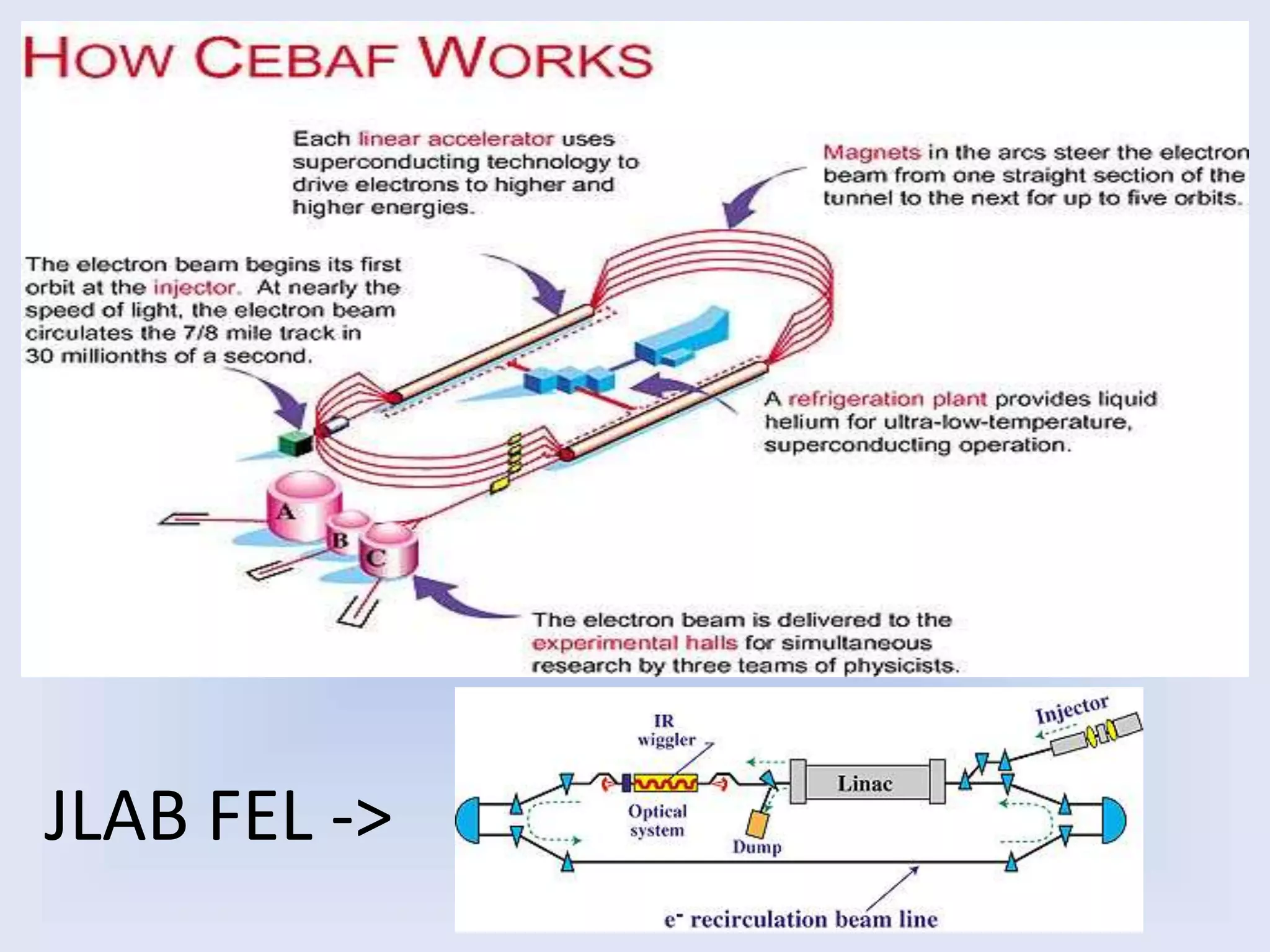
JLAB FEL ->
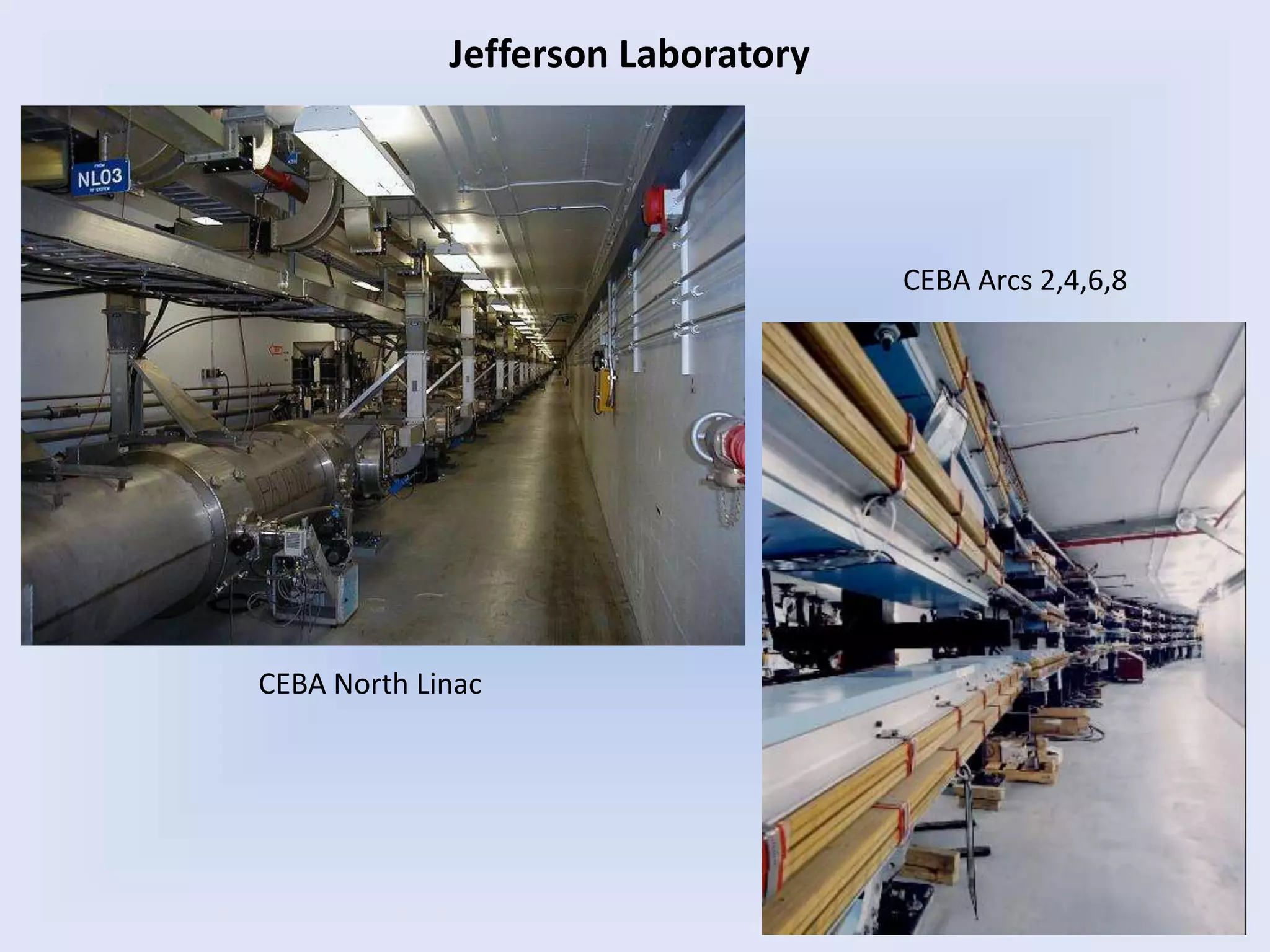
CEBA North Linac
CEBA Arcs 2,4,6,8
Jefferson Laboratory
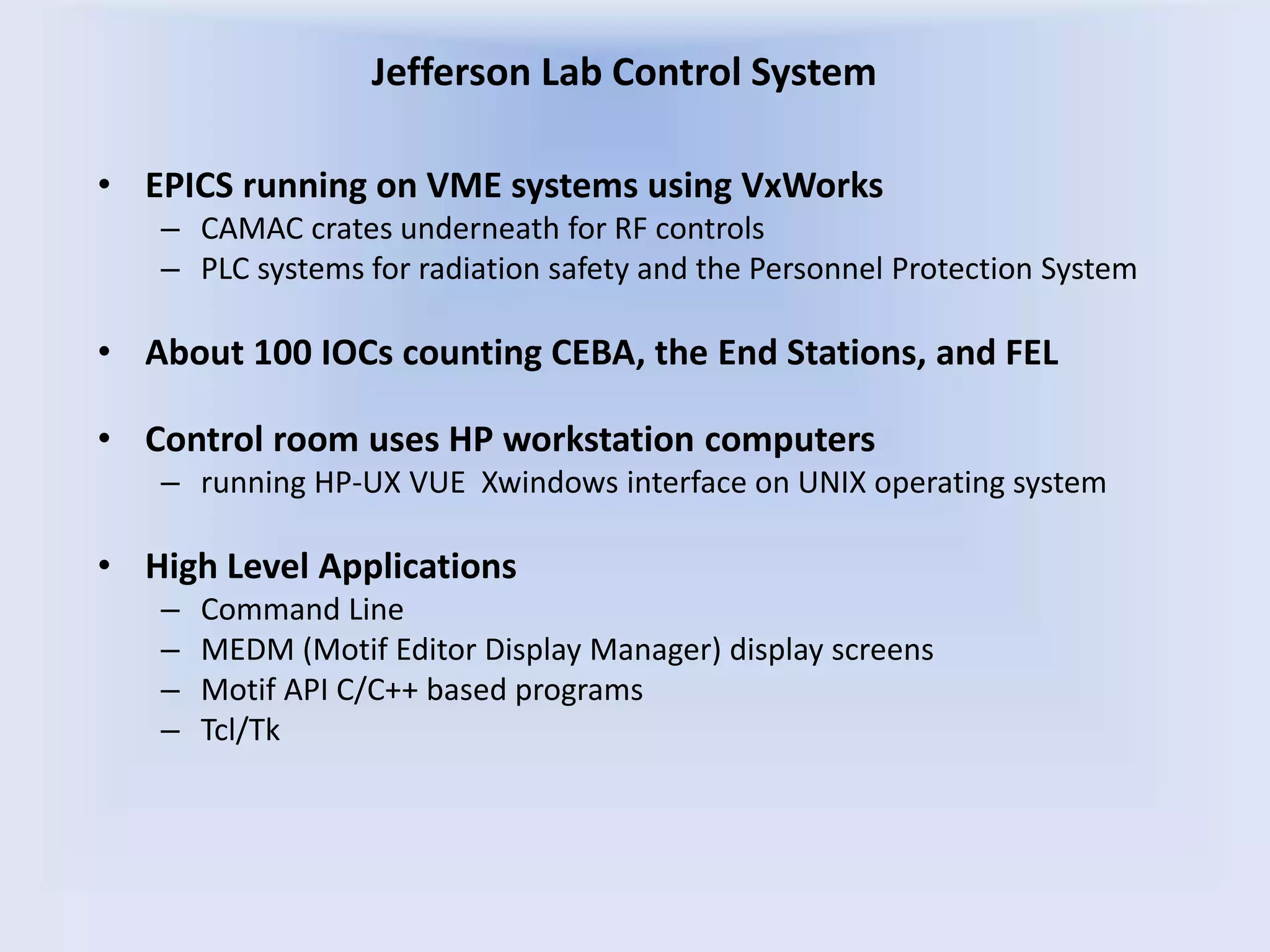
• EPICS running on VME systems using VxWorks
– CAMAC crates underneath for RF controls
– PLC systems for radiation safety and the Personnel Protection System
• About 100 IOCs counting CEBA, the End Stations, and FEL
• Control room uses HP workstation computers
– running HP-UX VUE Xwindows interface on UNIX operating system
• High Level Applications
– Command Line
– MEDM (Motif Editor Display Manager) display screens
– Motif API C/C++ based programs
– Tcl/Tk
Jefferson Lab Control System
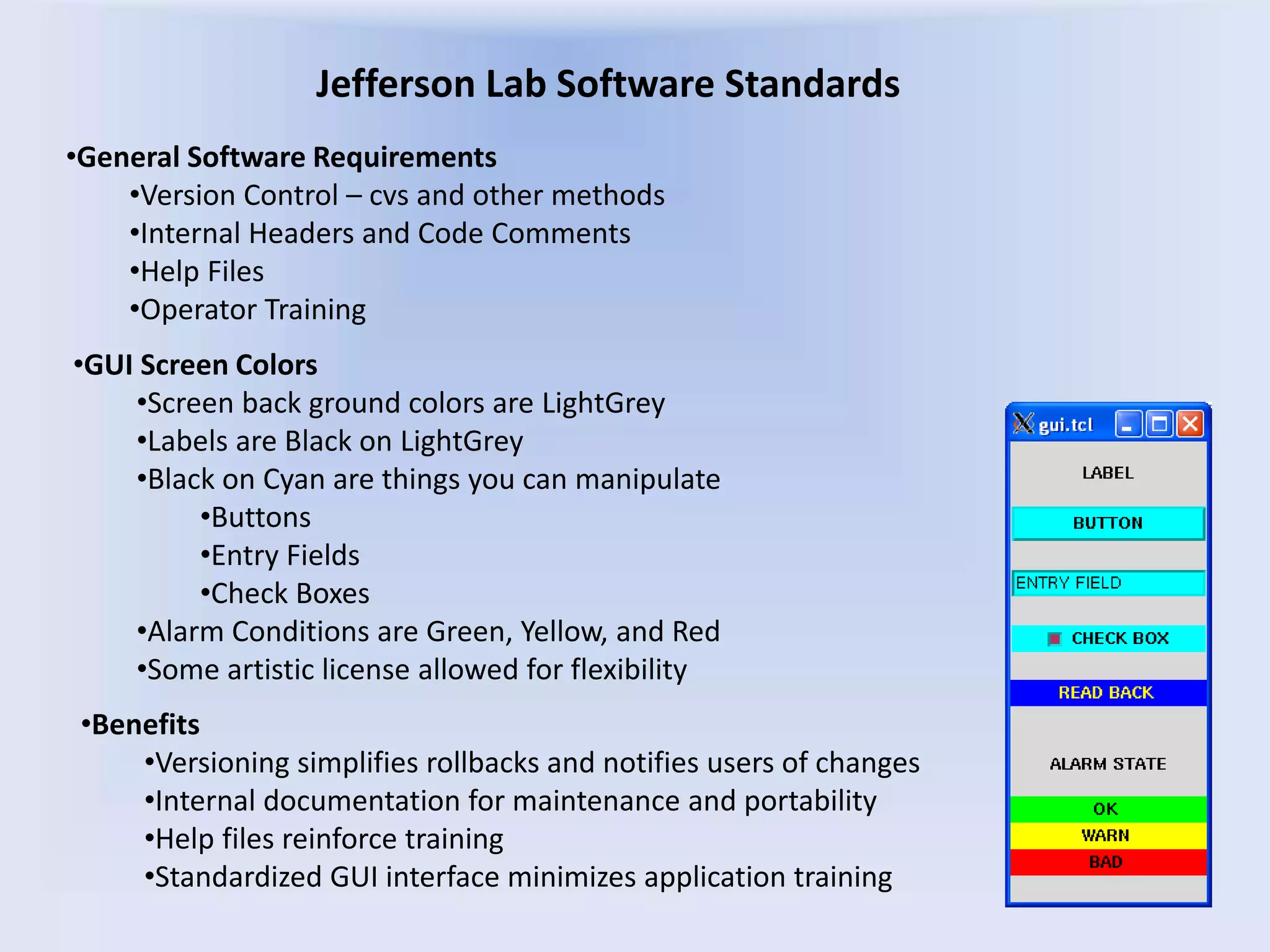
Jefferson Lab Software Standards
•GUI Screen Colors
•Screen back ground colors are LightGrey
•Labels are Black on LightGrey
•Black on Cyan are things you can manipulate
•Buttons
•Entry Fields
•Check Boxes
•Alarm Conditions are Green, Yellow, and Red
•Some artistic license allowed for flexibility
•General Software Requirements
•Version Control – cvs and other methods
•Internal Headers and Code Comments
•Help Files
•Operator Training
•Benefits
•Versioning simplifies rollbacks and notifies users of changes
•Internal documentation for maintenance and portability
•Help files reinforce training
•Standardized GUI interface minimizes application training
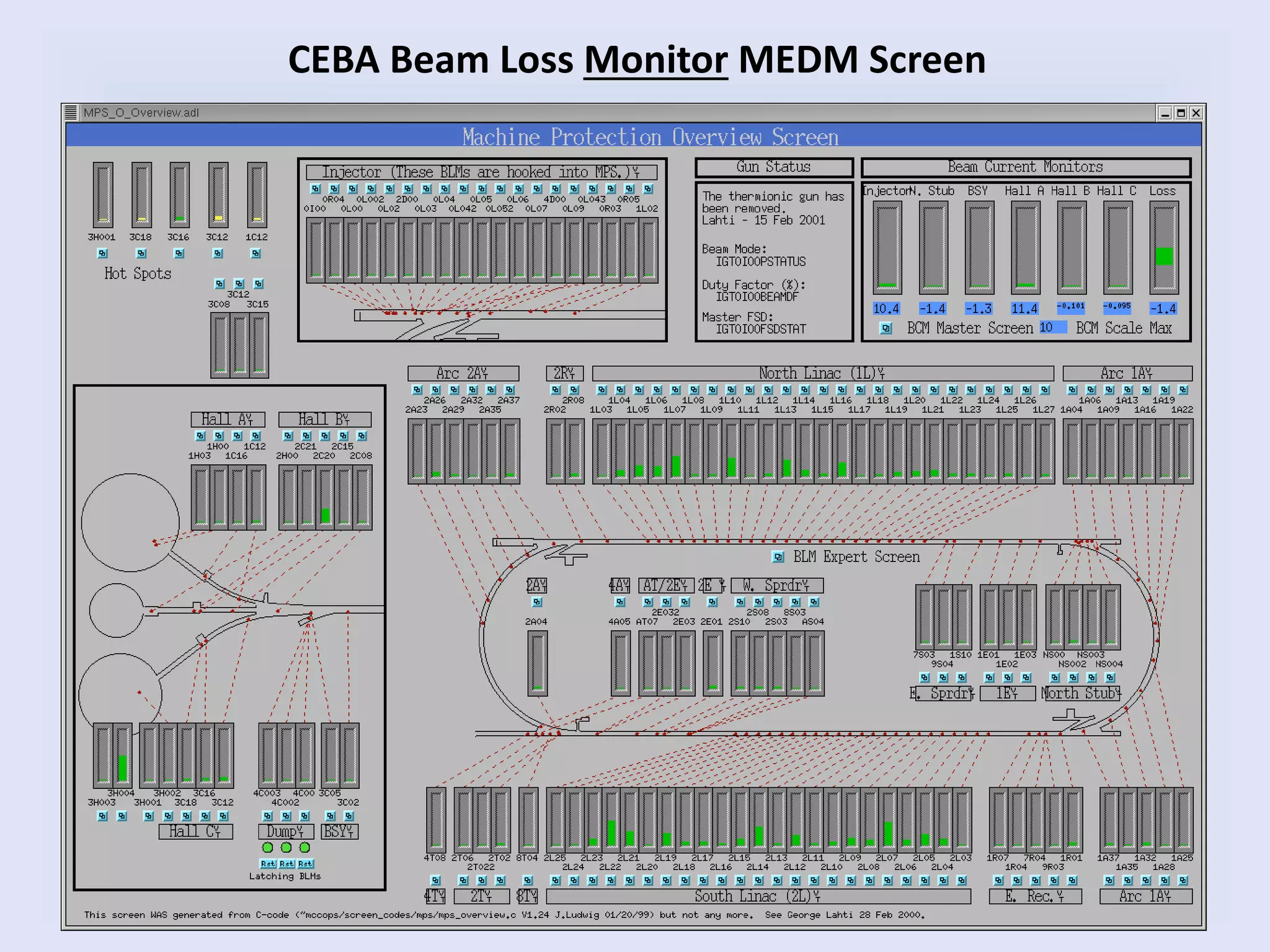
CEBA Beam Loss Monitor MEDM Screen
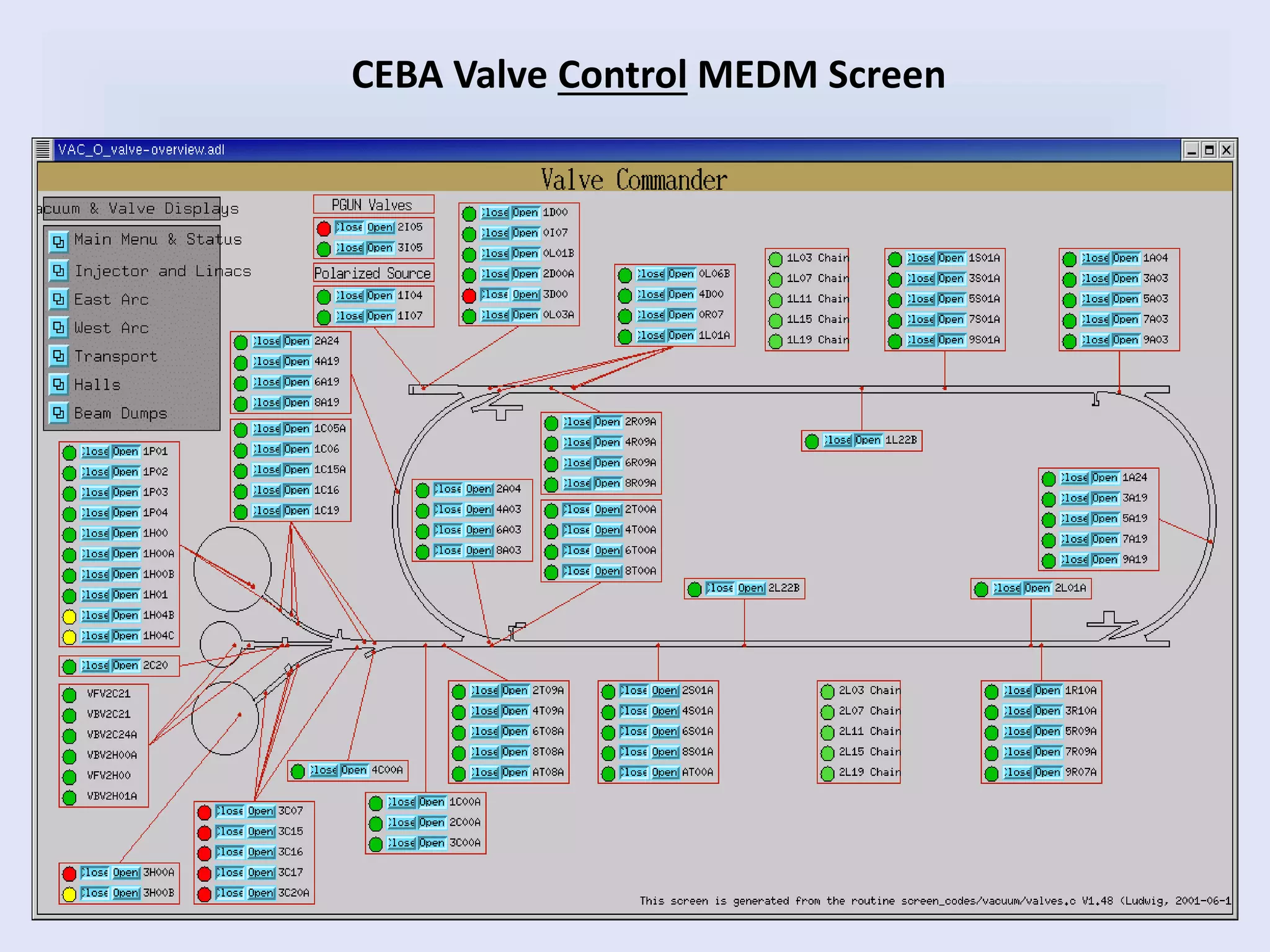
CEBA Valve Control MEDM Screen
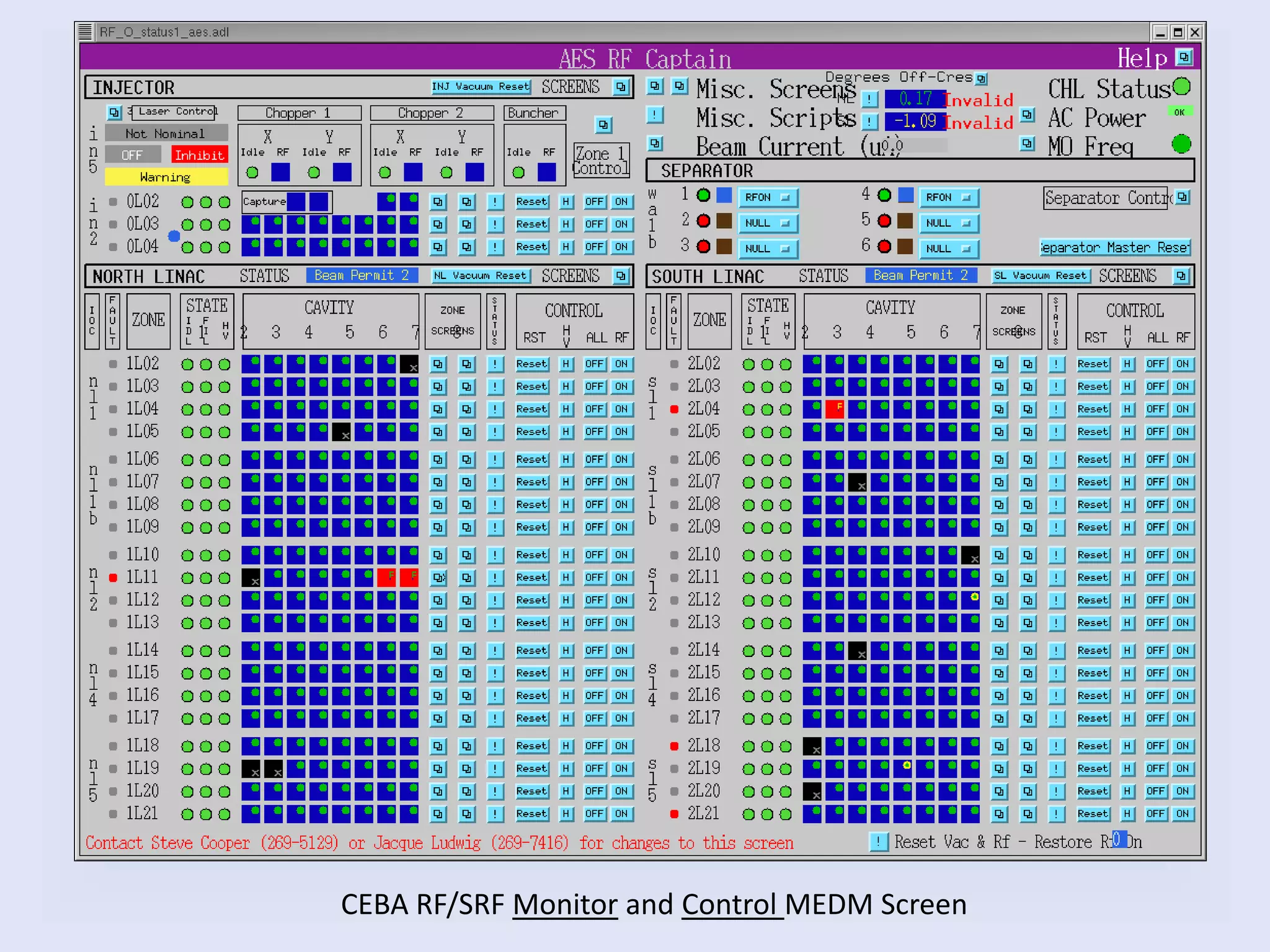
CEBA RF/SRF Monitor and Control MEDM Screen
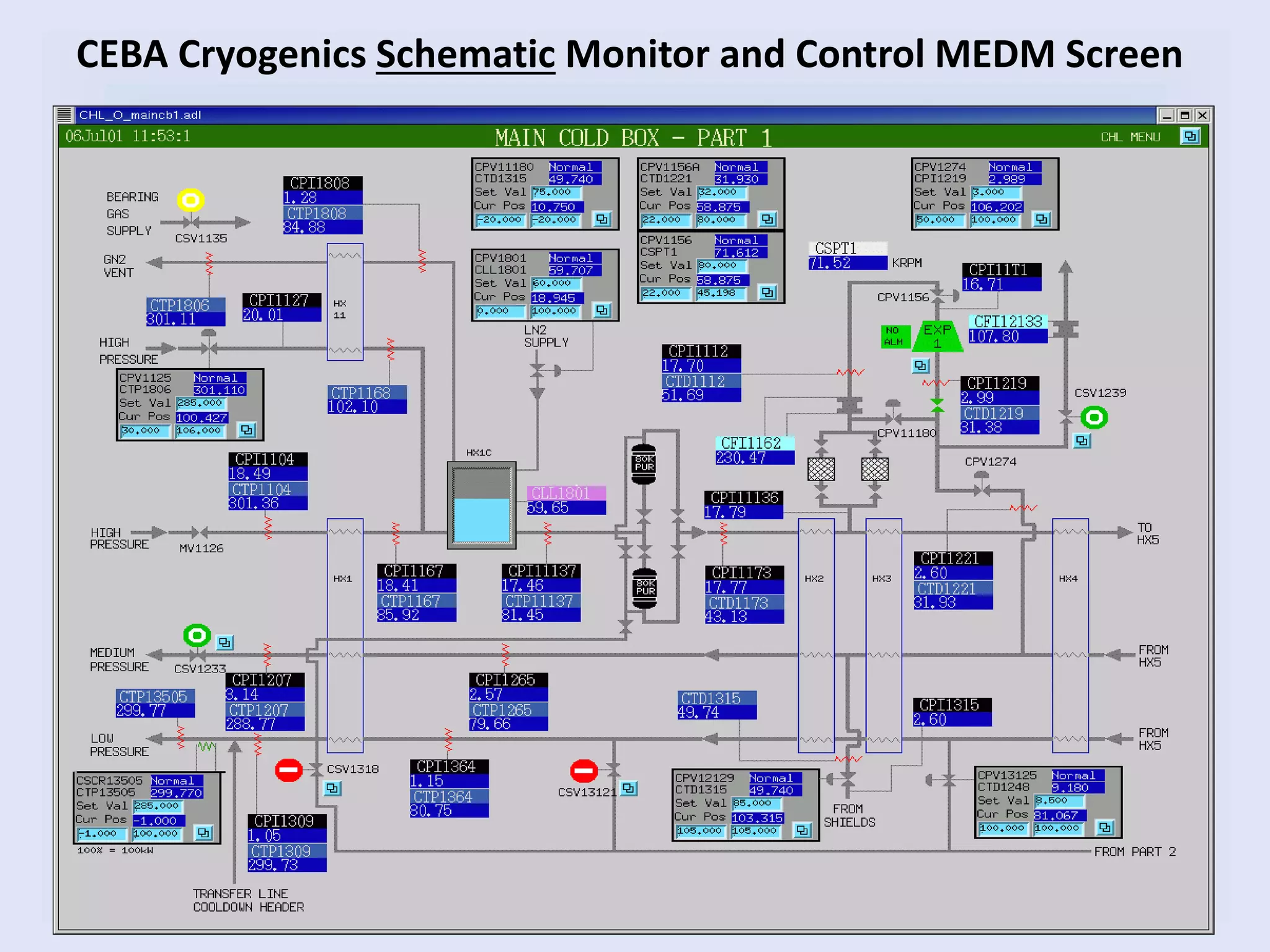
CEBA Cryogenics Schematic Monitor and Control MEDM Screen
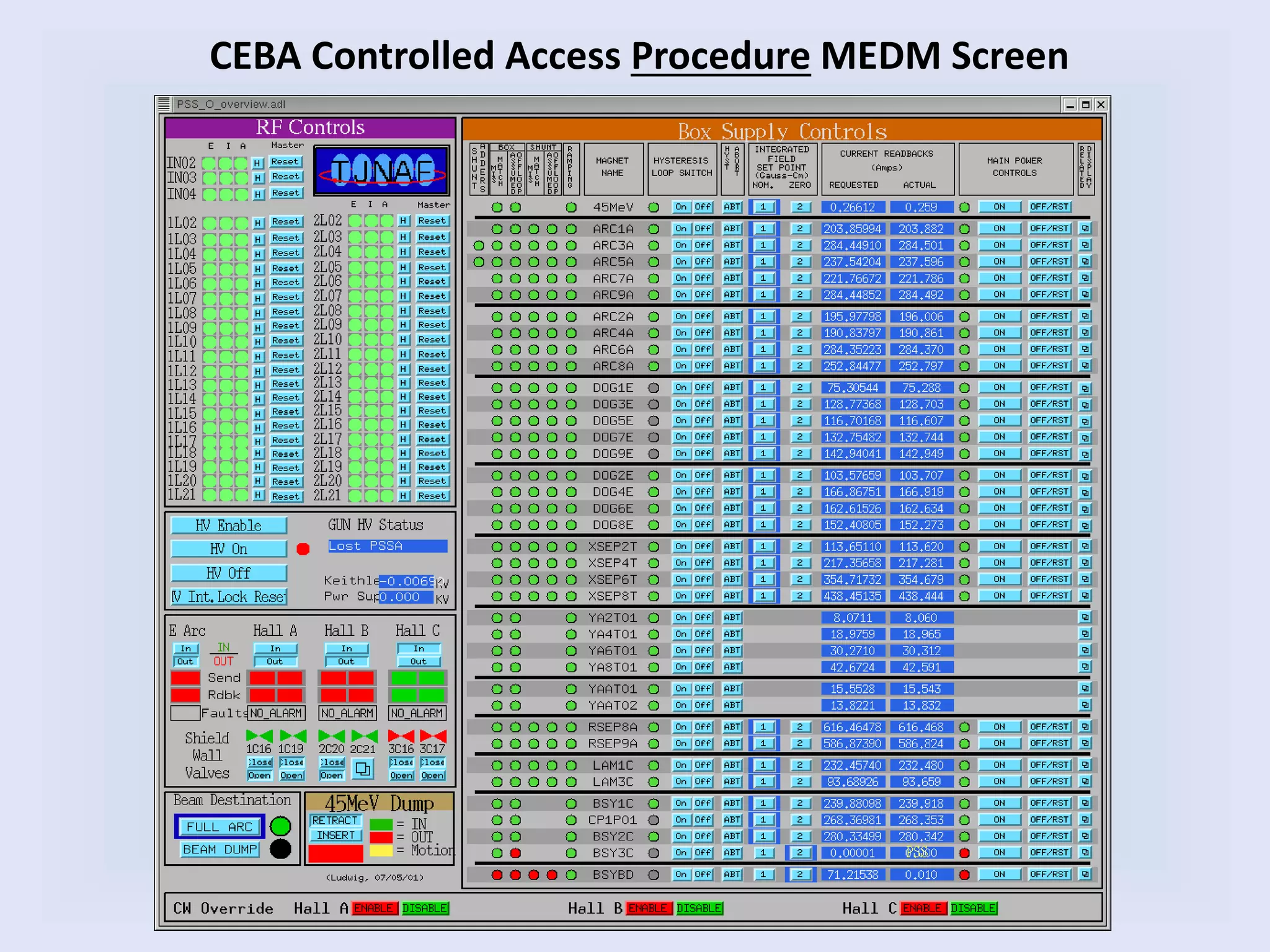
CEBA Controlled Access Procedure MEDM Screen
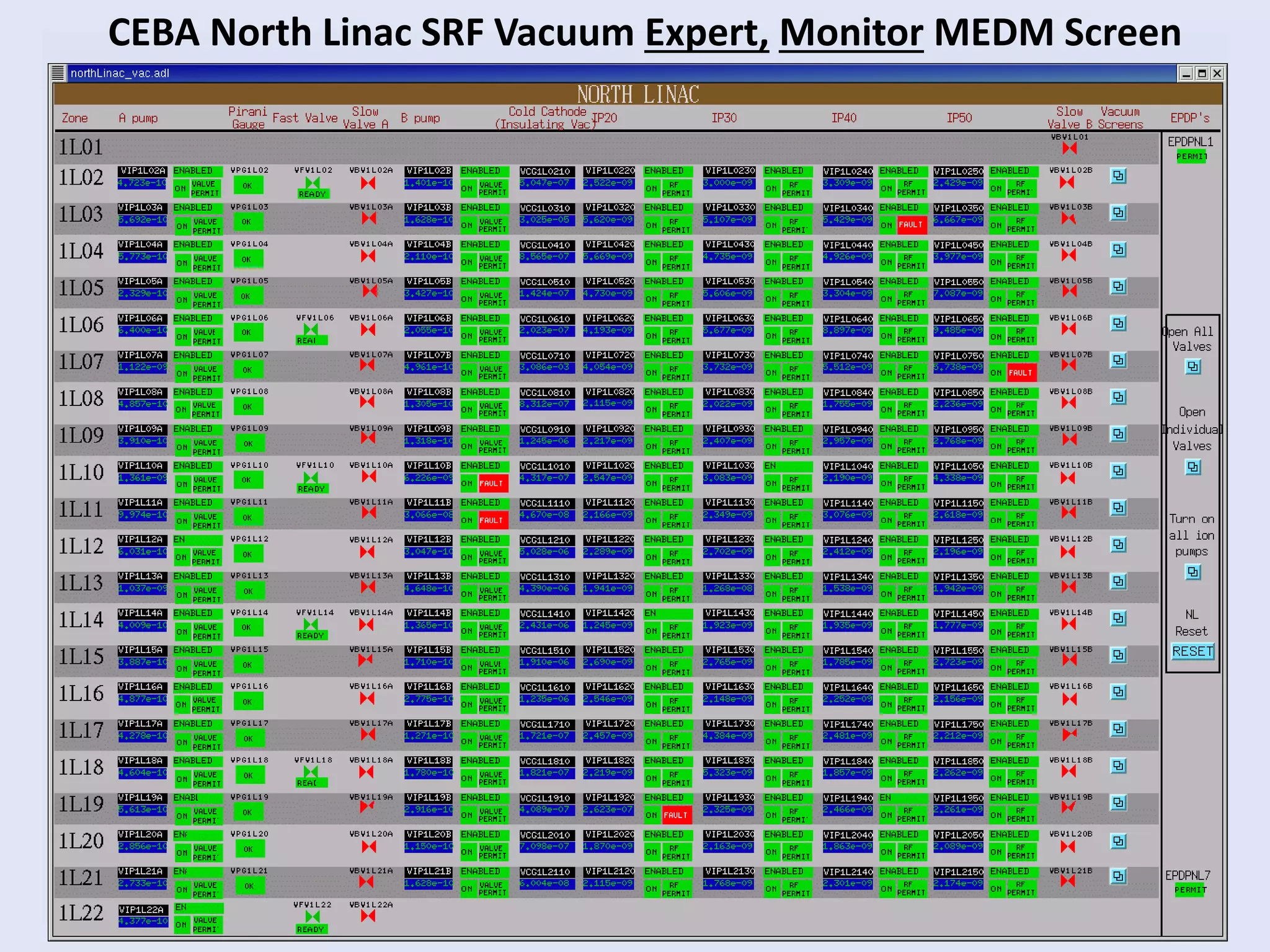
CEBA North Linac SRF Vacuum Expert, Monitor MEDM Screen
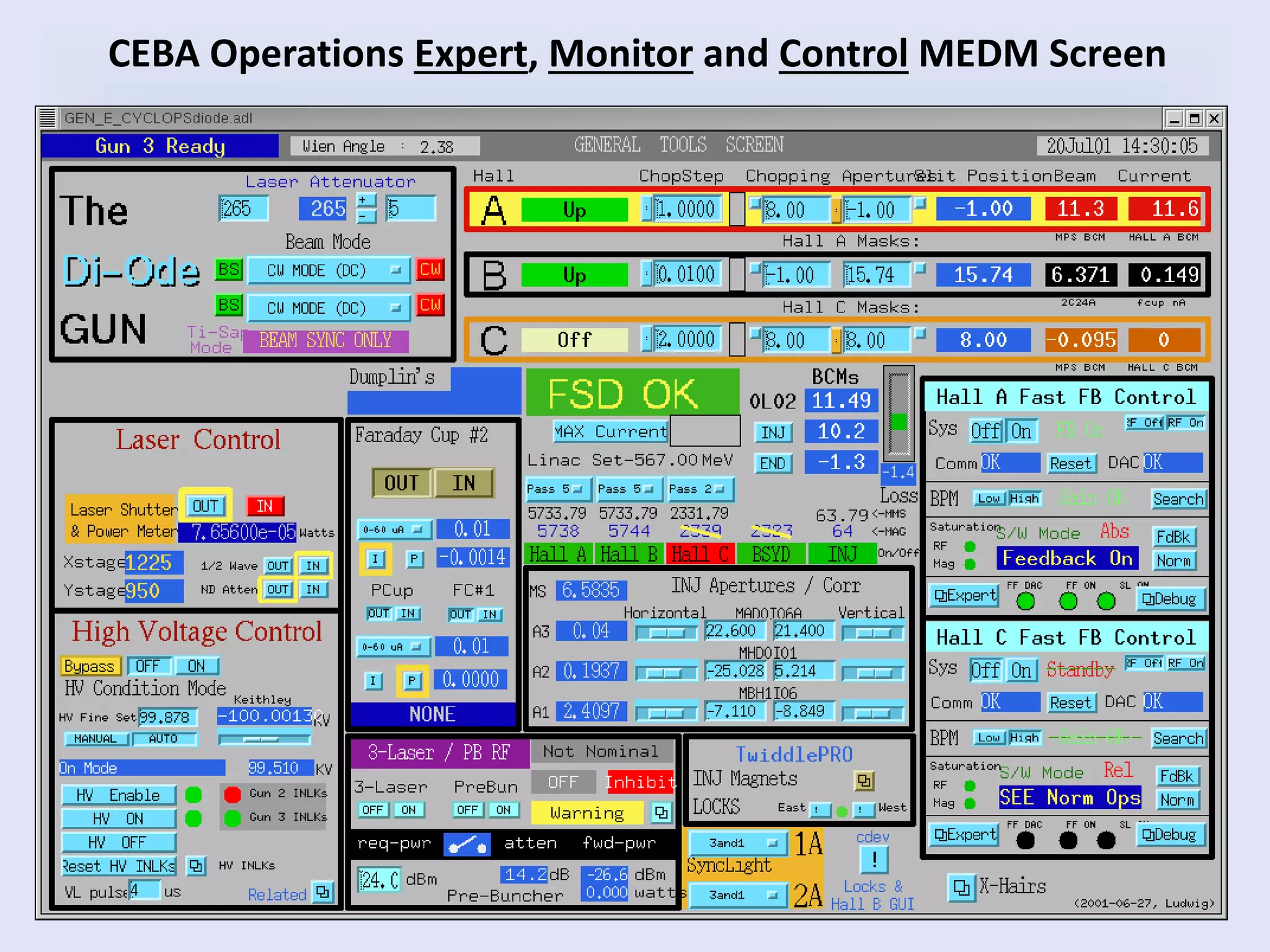
CEBA Operations Expert, Monitor and Control MEDM Screen
Summary of MEDM Screens
• Screen Types:
– Monitor
– Control
– Monitor and Control
– Schematic
– Procedural
– Expert
• Limitations
– Screens have no logic.
– All logic is on the IOC so a reboot is required for changes
– Very time consuming to create and maintain.
– Prone to implementation and reconfiguration errors
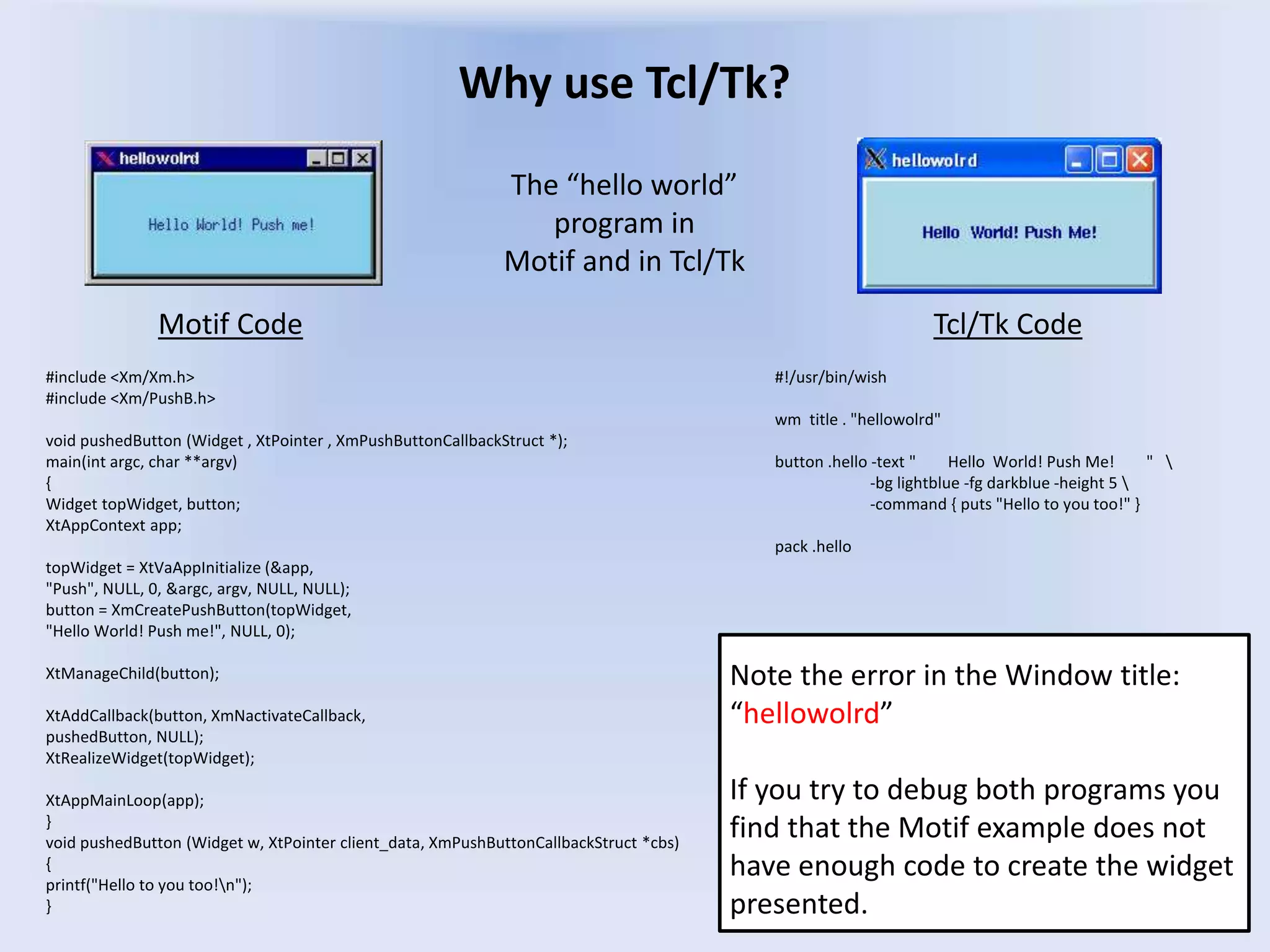
Why use Tcl/Tk?
#include <Xm/Xm.h>
#include <Xm/PushB.h>
void pushedButton (Widget , XtPointer , XmPushButtonCallbackStruct *);
main(int argc, char **argv)
{
Widget topWidget, button;
XtAppContext app;
topWidget = XtVaAppInitialize (&app,
"Push", NULL, 0, &argc, argv, NULL, NULL);
button = XmCreatePushButton(topWidget,
"Hello World! Push me!", NULL, 0);
XtManageChild(button);
XtAddCallback(button, XmNactivateCallback,
pushedButton, NULL);
XtRealizeWidget(topWidget);
XtAppMainLoop(app);
}
void pushedButton (Widget w, XtPointer client_data, XmPushButtonCallbackStruct *cbs)
{
printf("Hello to you too!n");
}
Motif Code Tcl/Tk Code
#!/usr/bin/wish
wm title . "hellowolrd"
button .hello -text " Hello World! Push Me! " 
-bg lightblue -fg darkblue -height 5 
-command { puts "Hello to you too!" }
pack .hello
Note the error in the Window title:
“hellowolrd”
If you try to debug both programs you
find that the Motif example does not
have enough code to create the widget
presented.
The “hello world”
program in
Motif and in Tcl/Tk
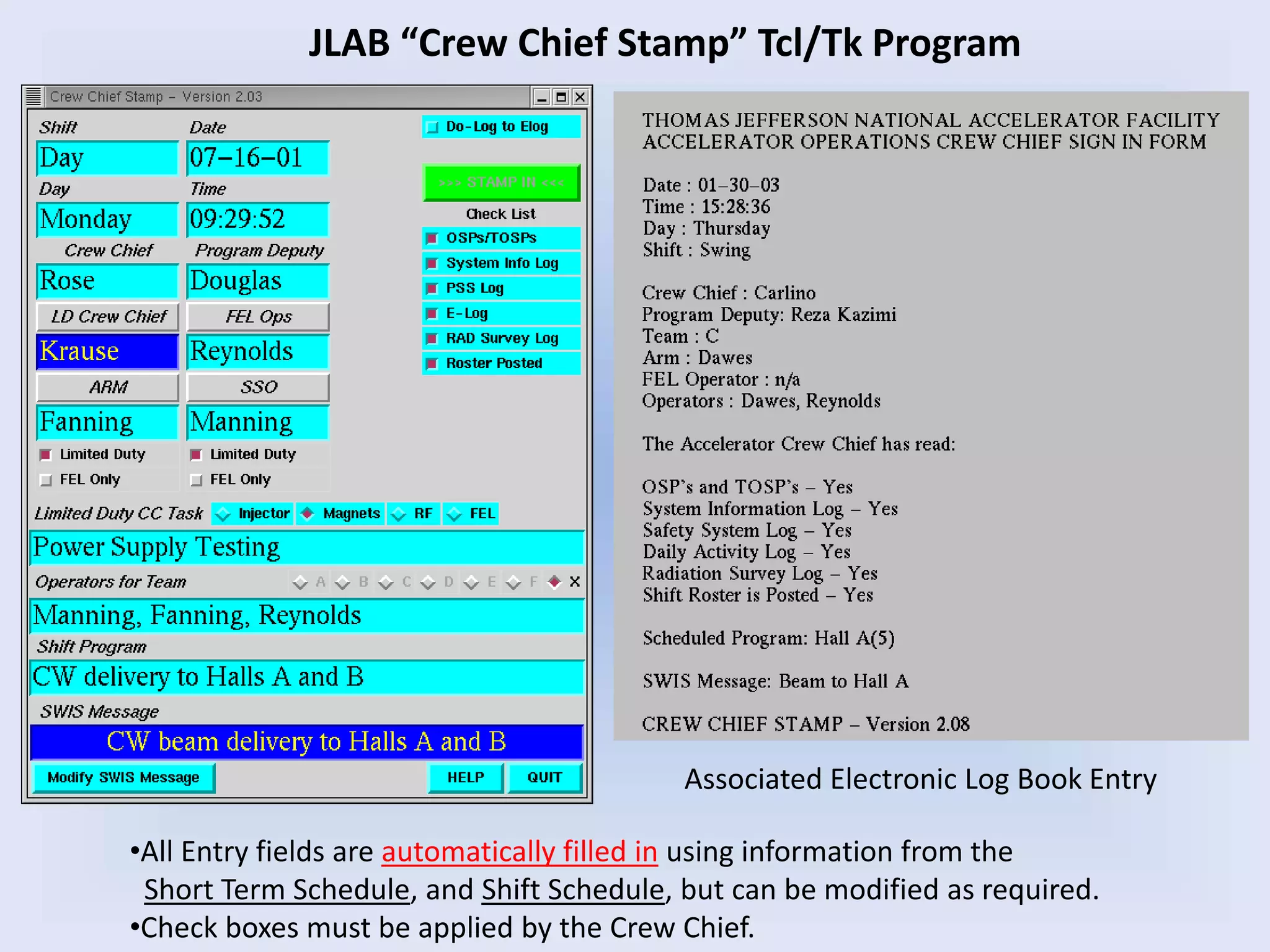
JLAB “Crew Chief Stamp” Tcl/Tk Program
Associated Electronic Log Book Entry
•All Entry fields are automatically filled in using information from the
Short Term Schedule, and Shift Schedule, but can be modified as required.
•Check boxes must be applied by the Crew Chief.
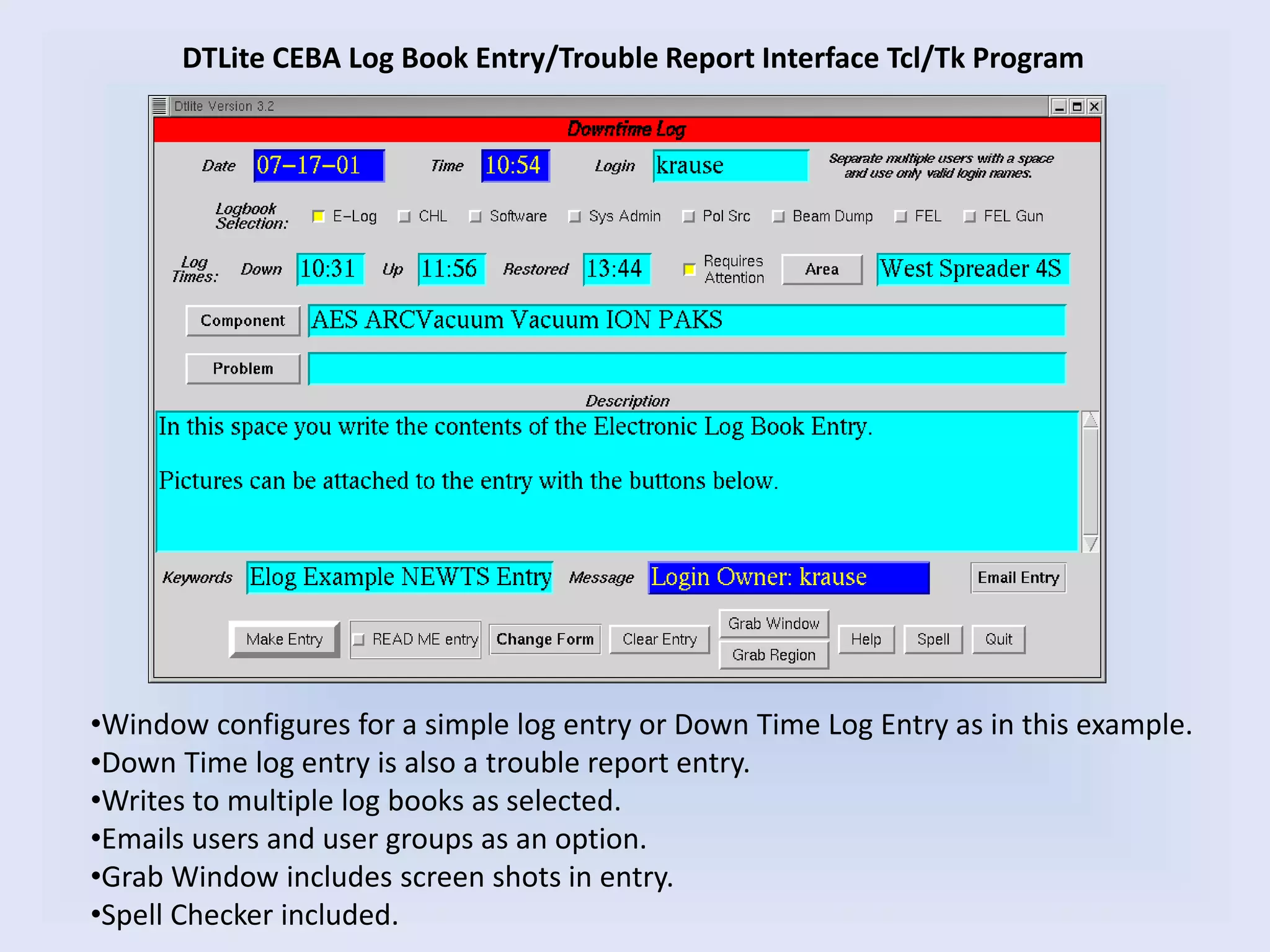
DTLite CEBA Log Book Entry/Trouble Report Interface Tcl/Tk Program
•Window configures for a simple log entry or Down Time Log Entry as in this example.
•Down Time log entry is also a trouble report entry.
•Writes to multiple log books as selected.
•Emails users and user groups as an option.
•Grab Window includes screen shots in entry.
•Spell Checker included.
JLAB’s “BOOM” – Beam Operations Objective Monitor
• Satisfies DOE beam delivery monitoring requirements
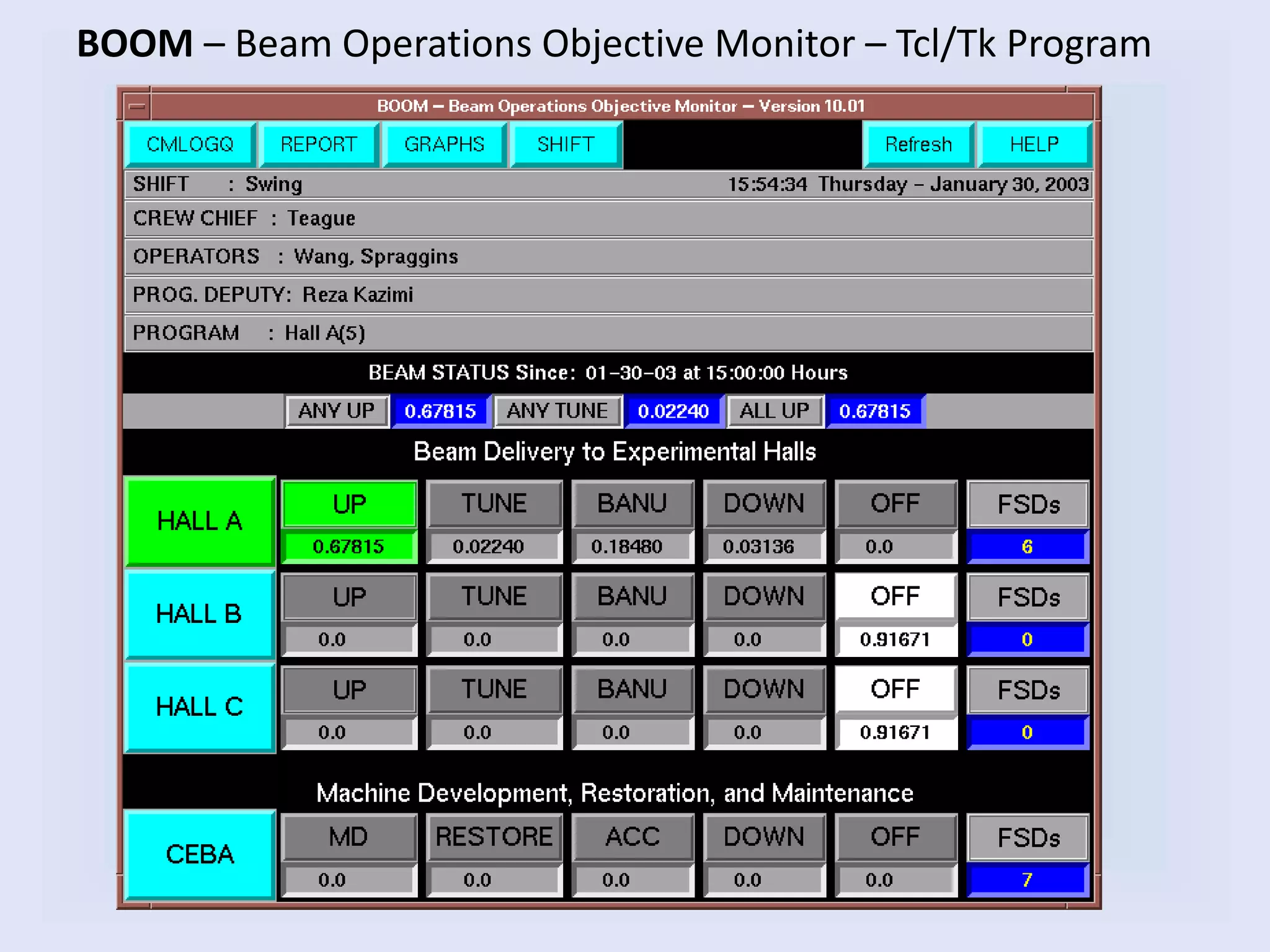
• Monitors simultaneous beam delivery status in all 3 Endstations
• Determines experimental beam state: UP, DOWN, TUNE, OFF
• Redundant system monitoring to insure correct status
• Manual over ride for monitor status
• Counts applicable FSD (Fast Shut Down) events
• Automatically reads beam objectives from Short Term Schedule
• Automatically reads shift staff from the Crew Chief Stamp
• Logs all events to a database (cmlog)
• Generates end of shift form for Crew Chief to verify/modify times
• Logs end of shift information to Log Book and database
• Generates availability graphs: daily, weekly, monthly
• Emails interested parties the end of shift reports
BOOM – Beam Operations Objective Monitor – Tcl/Tk Program
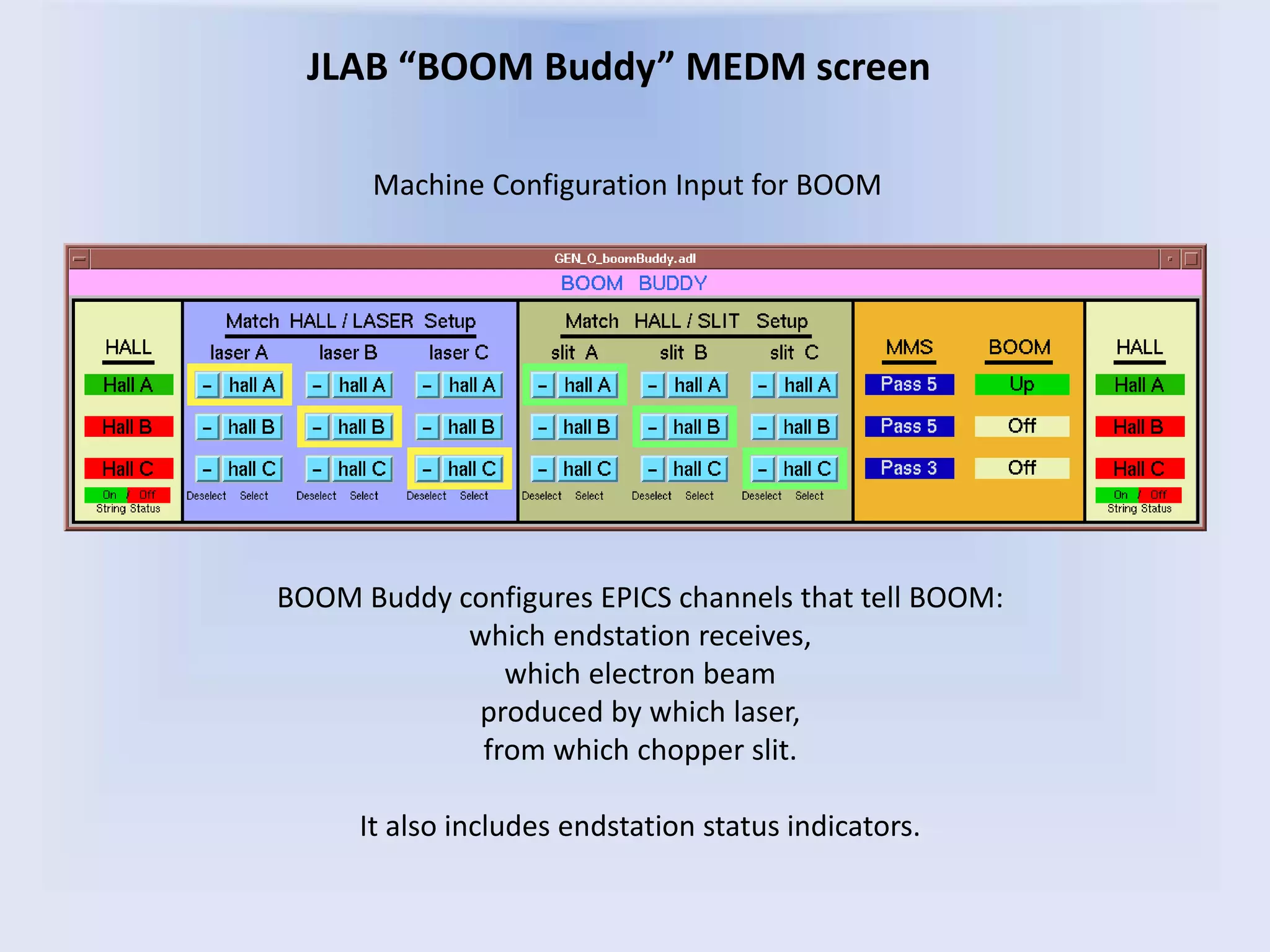
JLAB “BOOM Buddy” MEDM screen
BOOM Buddy configures EPICS channels that tell BOOM:
which endstation receives,
which electron beam
produced by which laser,
from which chopper slit.
It also includes endstation status indicators.
Machine Configuration Input for BOOM
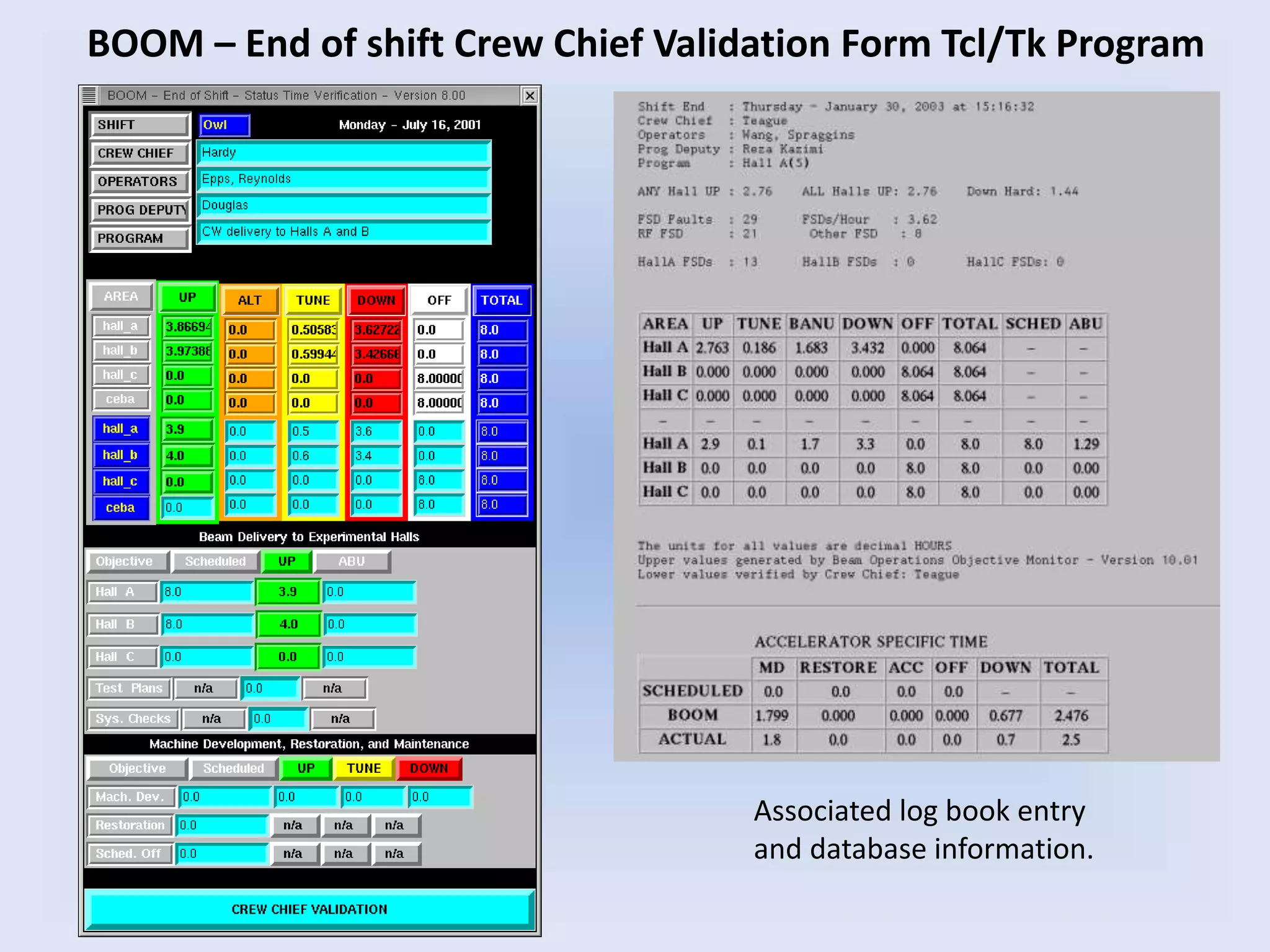
Associated log book entry
and database information.
BOOM – End of shift Crew Chief Validation Form Tcl/Tk Program
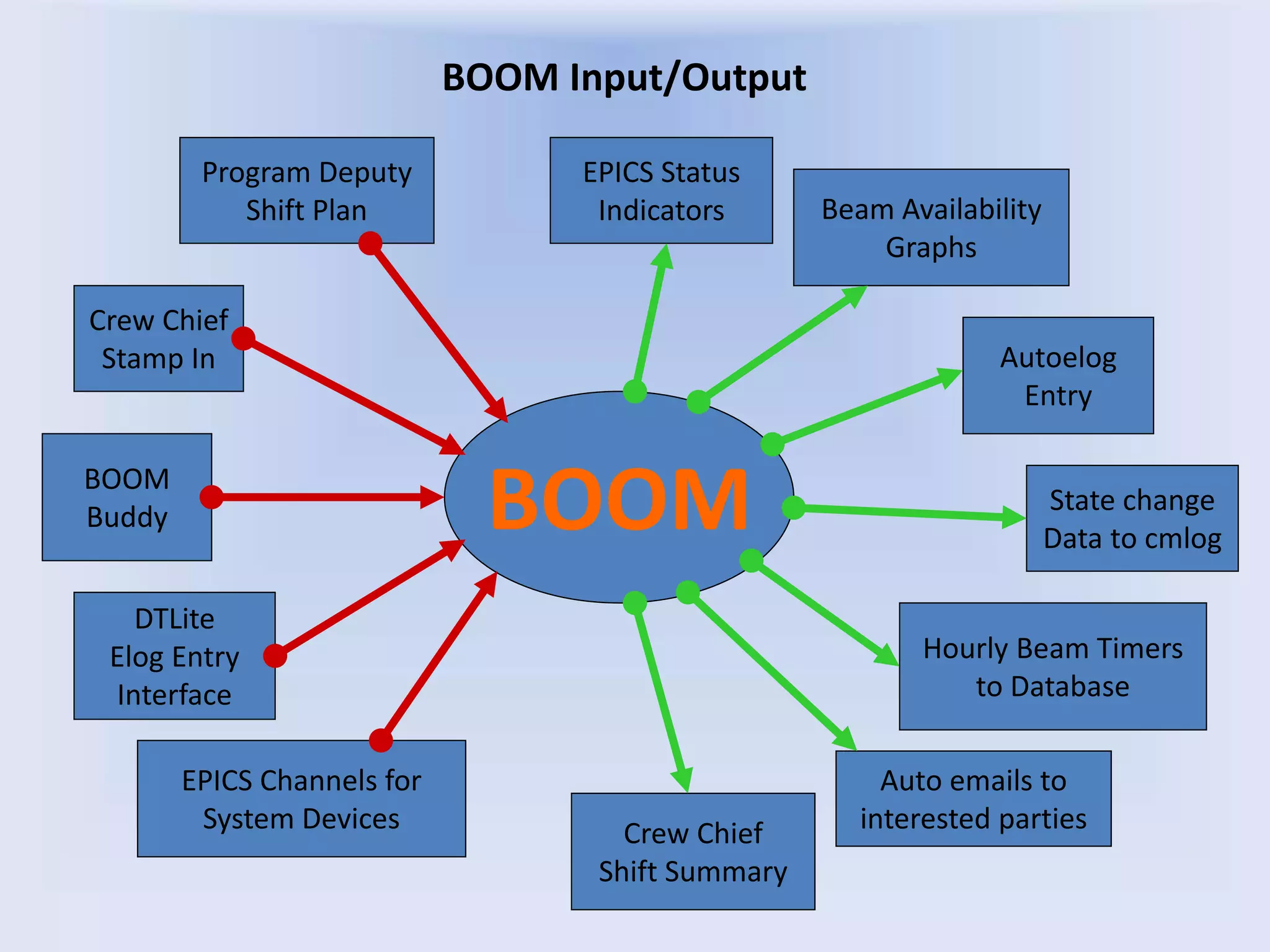
BOOM Input/Output
BOOM
Crew Chief
Stamp In
Program Deputy
Shift Plan
BOOM
Buddy
Autoelog
Entry
Beam Availability
Graphs
State change
Data to cmlog
Hourly Beam Timers
to Database
Crew Chief
Shift Summary
Auto emails to
interested parties
EPICS Channels for
System Devices
EPICS Status
Indicators
DTLite
Elog Entry
Interface
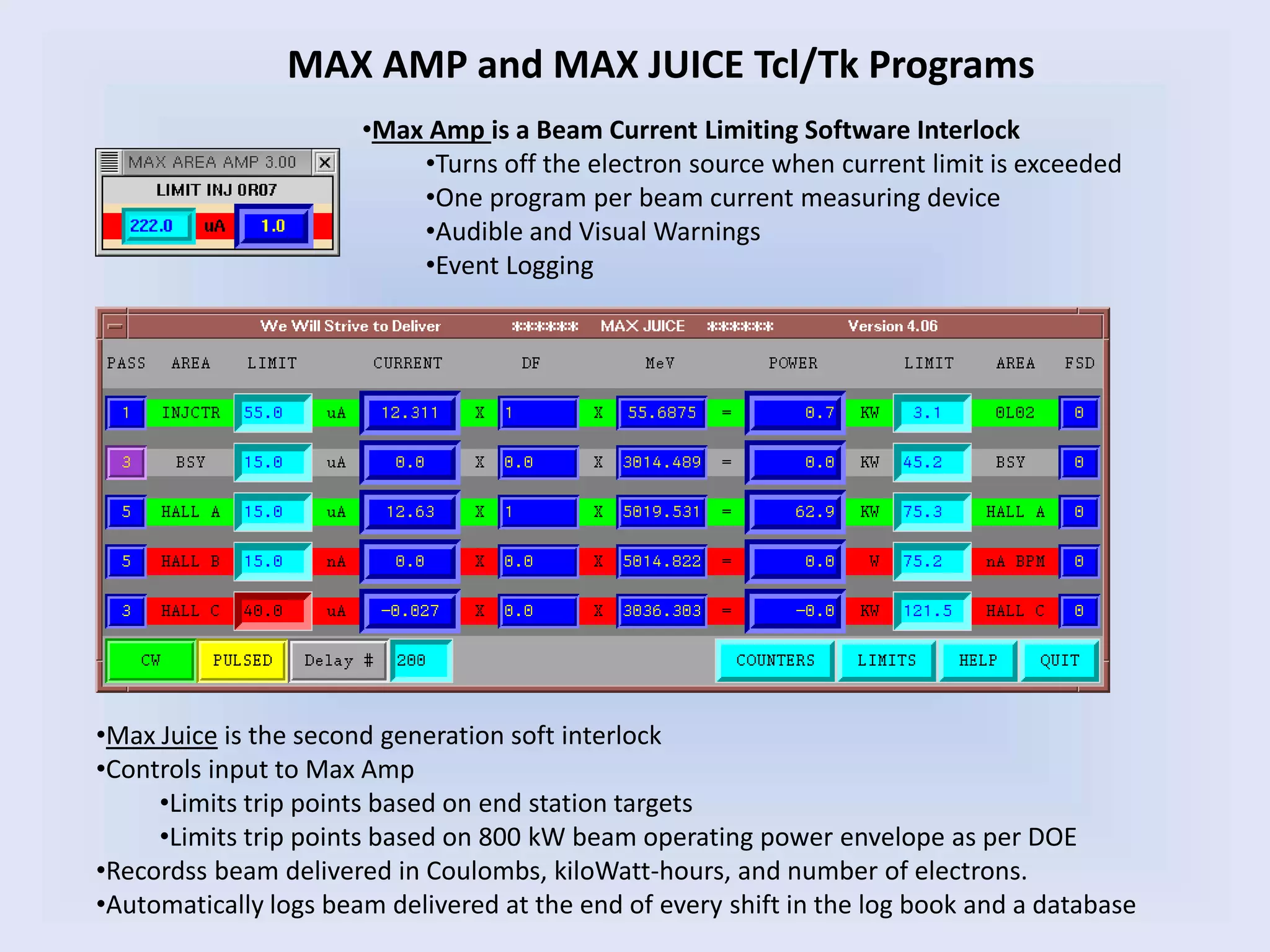
MAX AMP and MAX JUICE Tcl/Tk Programs
•Max Amp is a Beam Current Limiting Software Interlock
•Turns off the electron source when current limit is exceeded
•One program per beam current measuring device
•Audible and Visual Warnings
•Event Logging
•Max Juice is the second generation soft interlock
•Controls input to Max Amp
•Limits trip points based on end station targets
•Limits trip points based on 800 kW beam operating power envelope as per DOE
•Recordss beam delivered in Coulombs, kiloWatt-hours, and number of electrons.
•Automatically logs beam delivered at the end of every shift in the log book and a database
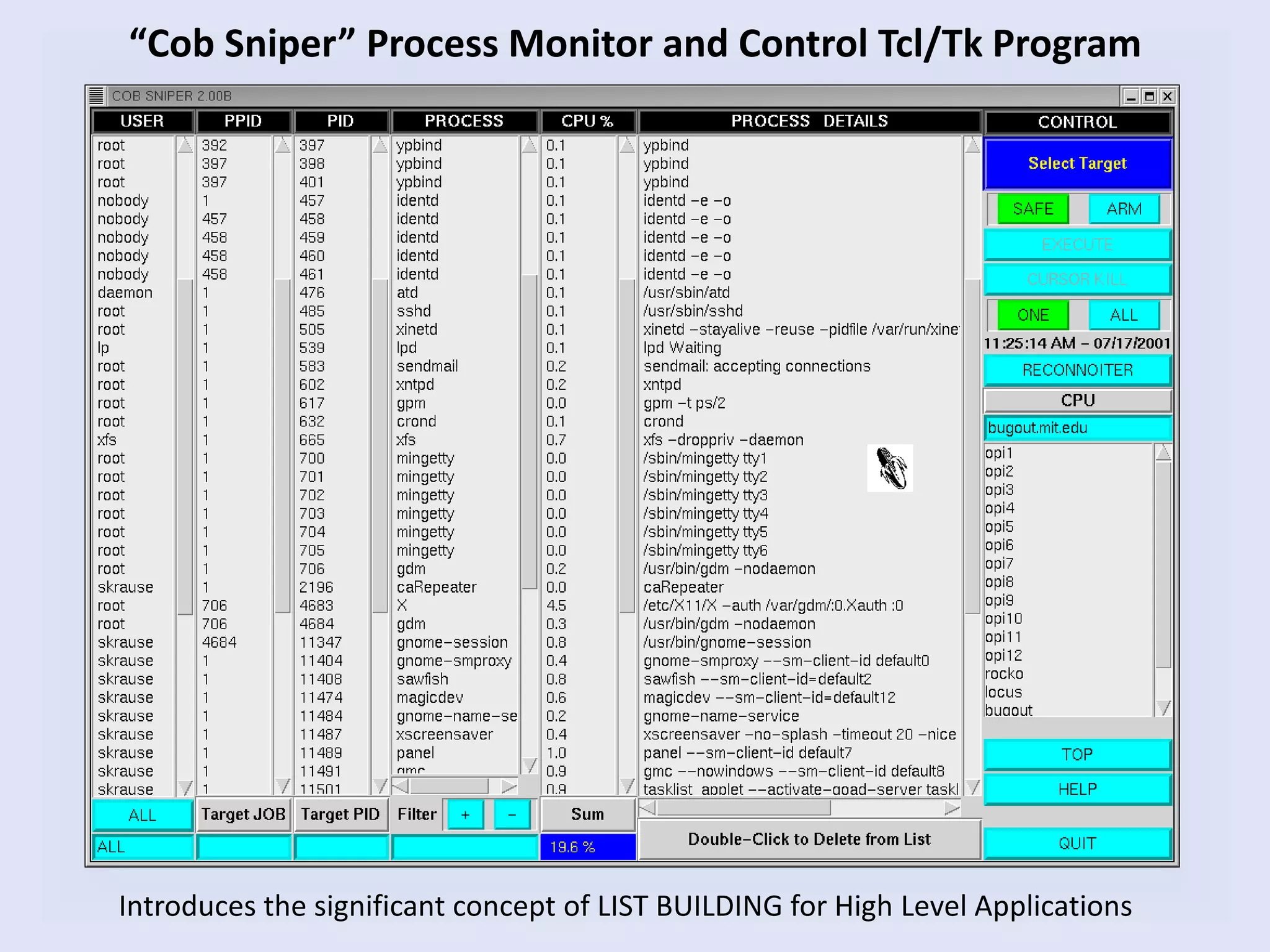
“Cob Sniper” Process Monitor and Control Tcl/Tk Program
Introduces the significant concept of LIST BUILDING for High Level Applications
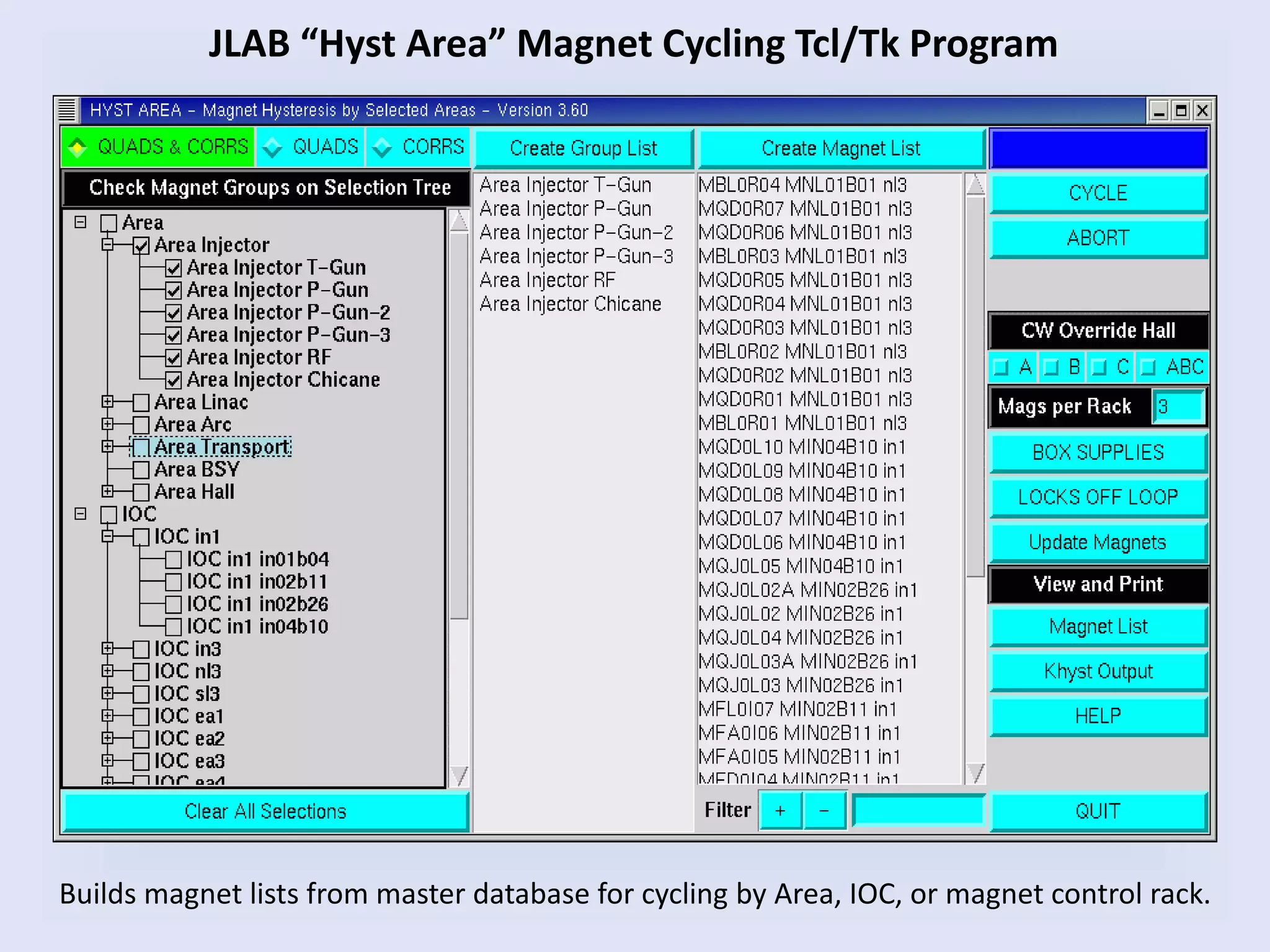
JLAB “Hyst Area” Magnet Cycling Tcl/Tk Program
Builds magnet lists from master database for cycling by Area, IOC, or magnet control rack.
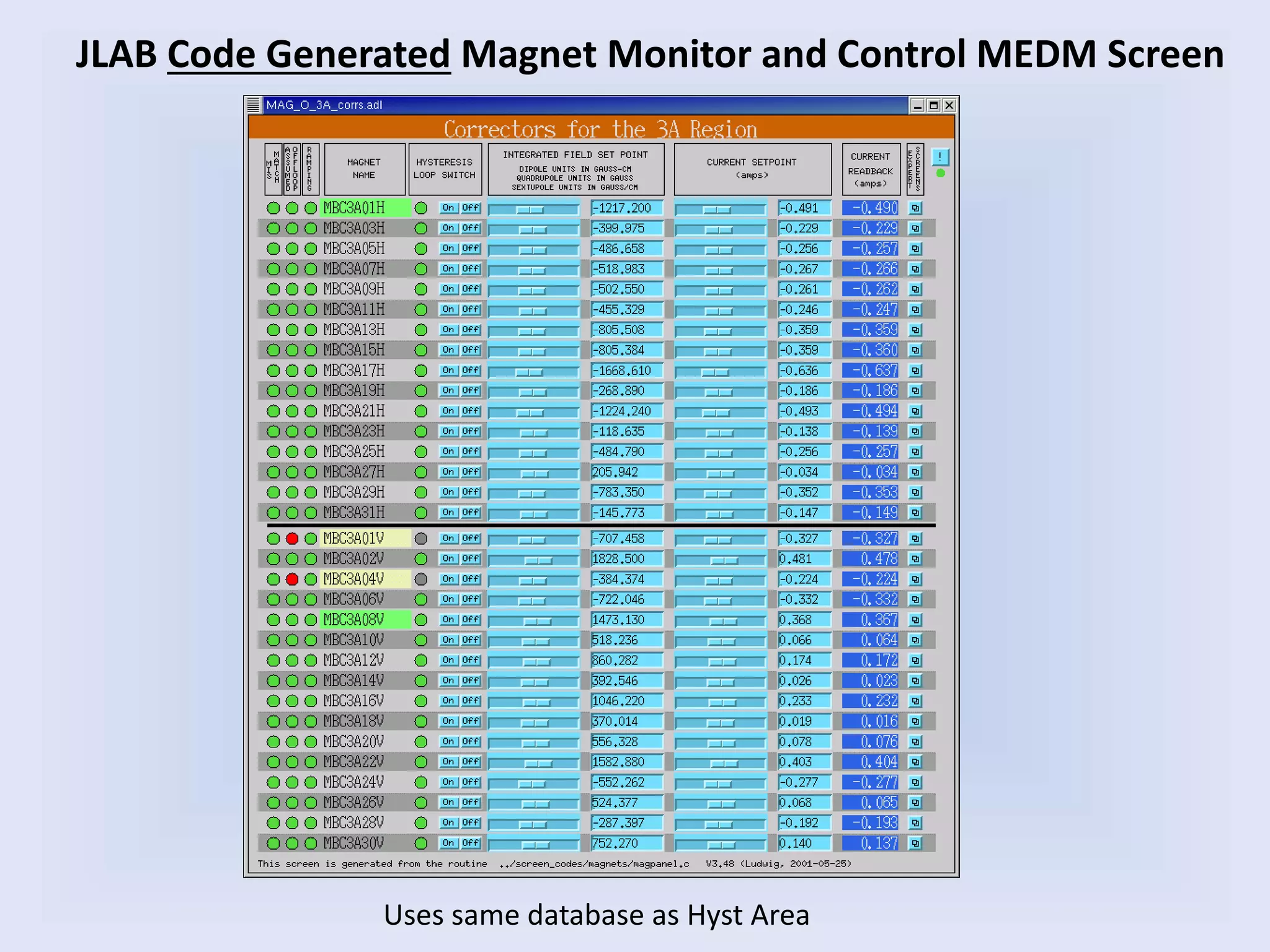
JLAB Code Generated Magnet Monitor and Control MEDM Screen
Uses same database as Hyst Area
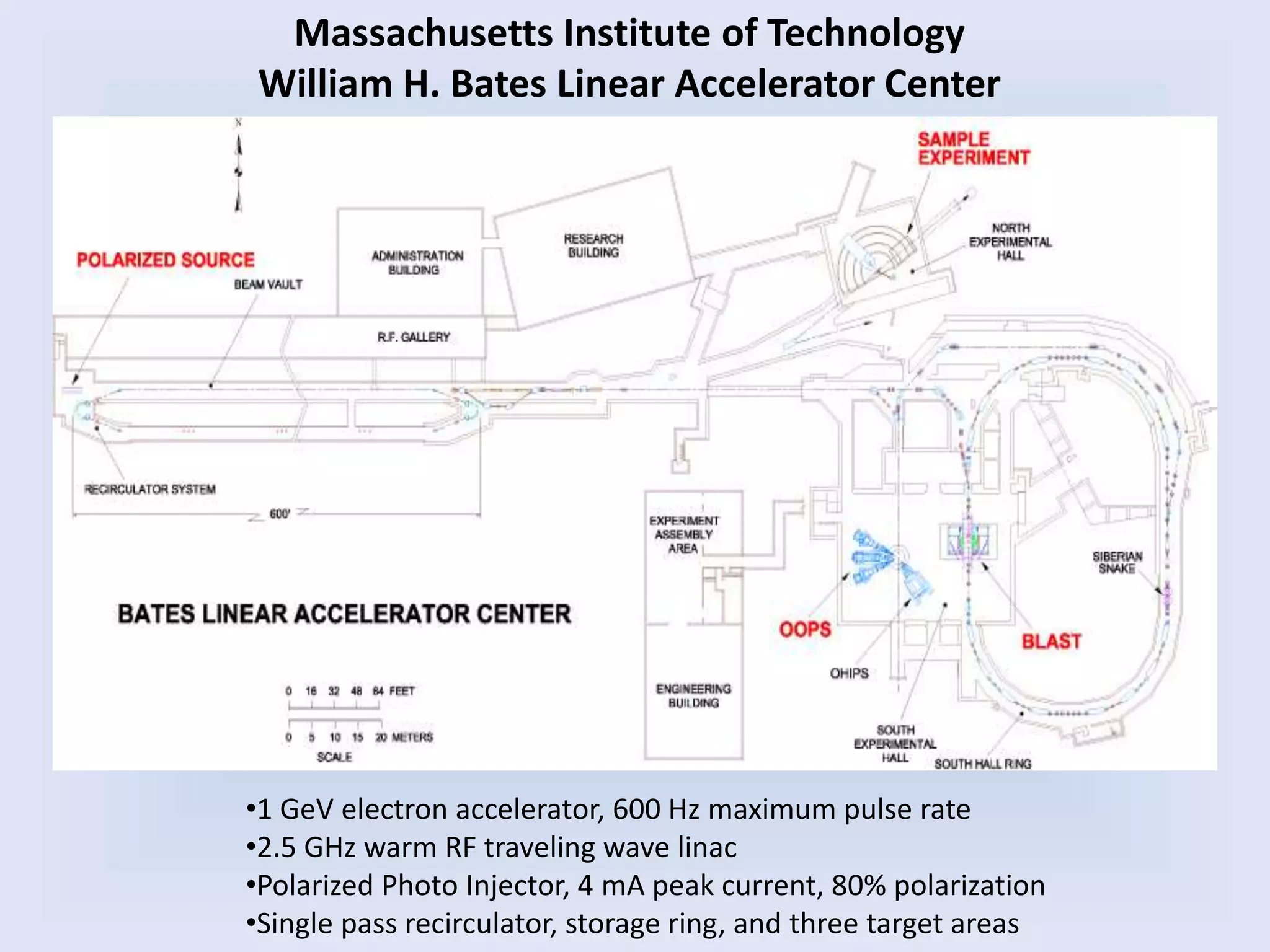
Massachusetts Institute of Technology
William H. Bates Linear Accelerator Center
•1 GeV electron accelerator, 600 Hz maximum pulse rate
•2.5 GHz warm RF traveling wave linac
•Polarized Photo Injector, 4 mA peak current, 80% polarization
•Single pass recirculator, storage ring, and three target areas
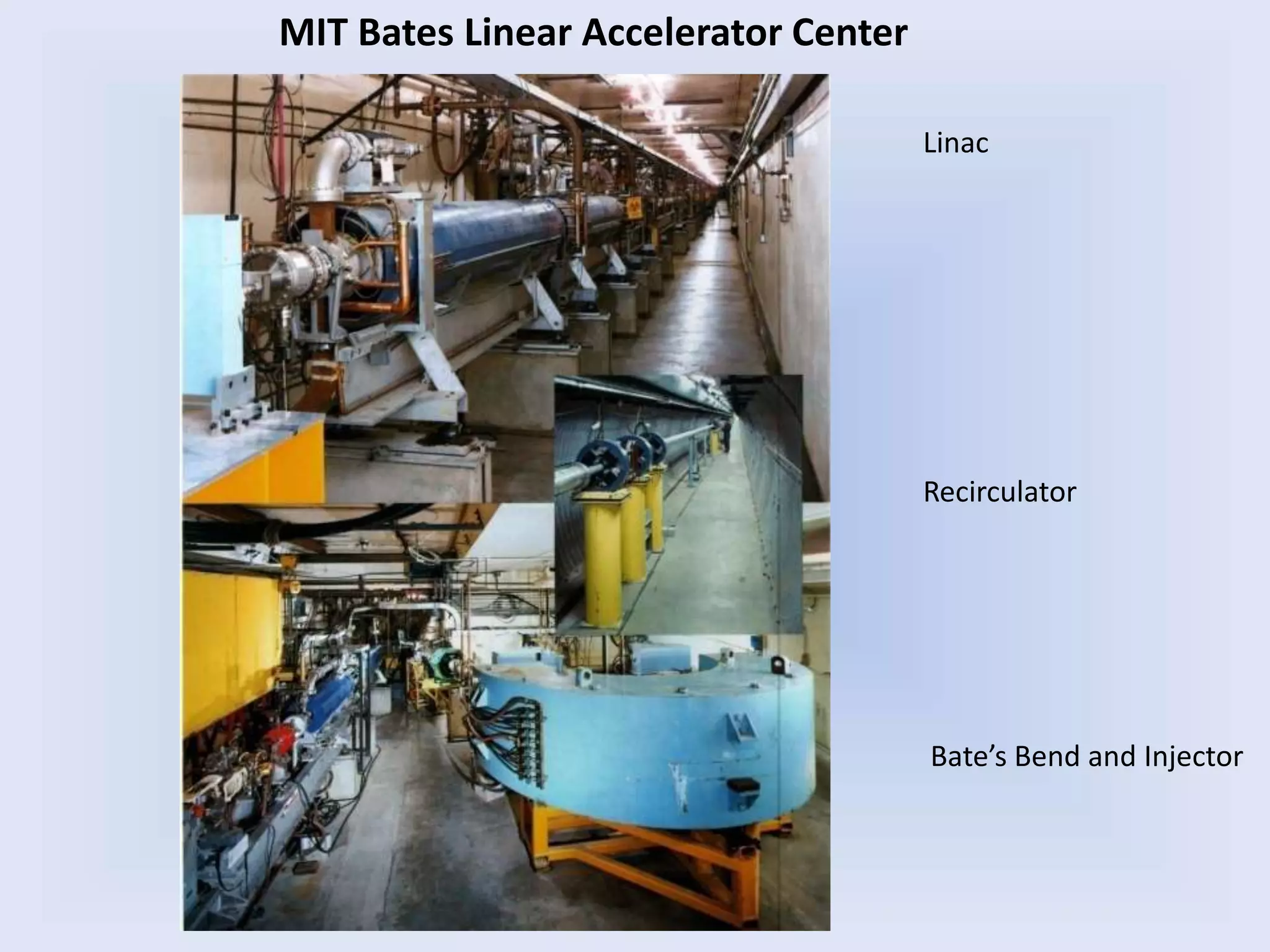
Linac
Recirculator
Bate’s Bend and Injector
MIT Bates Linear Accelerator Center
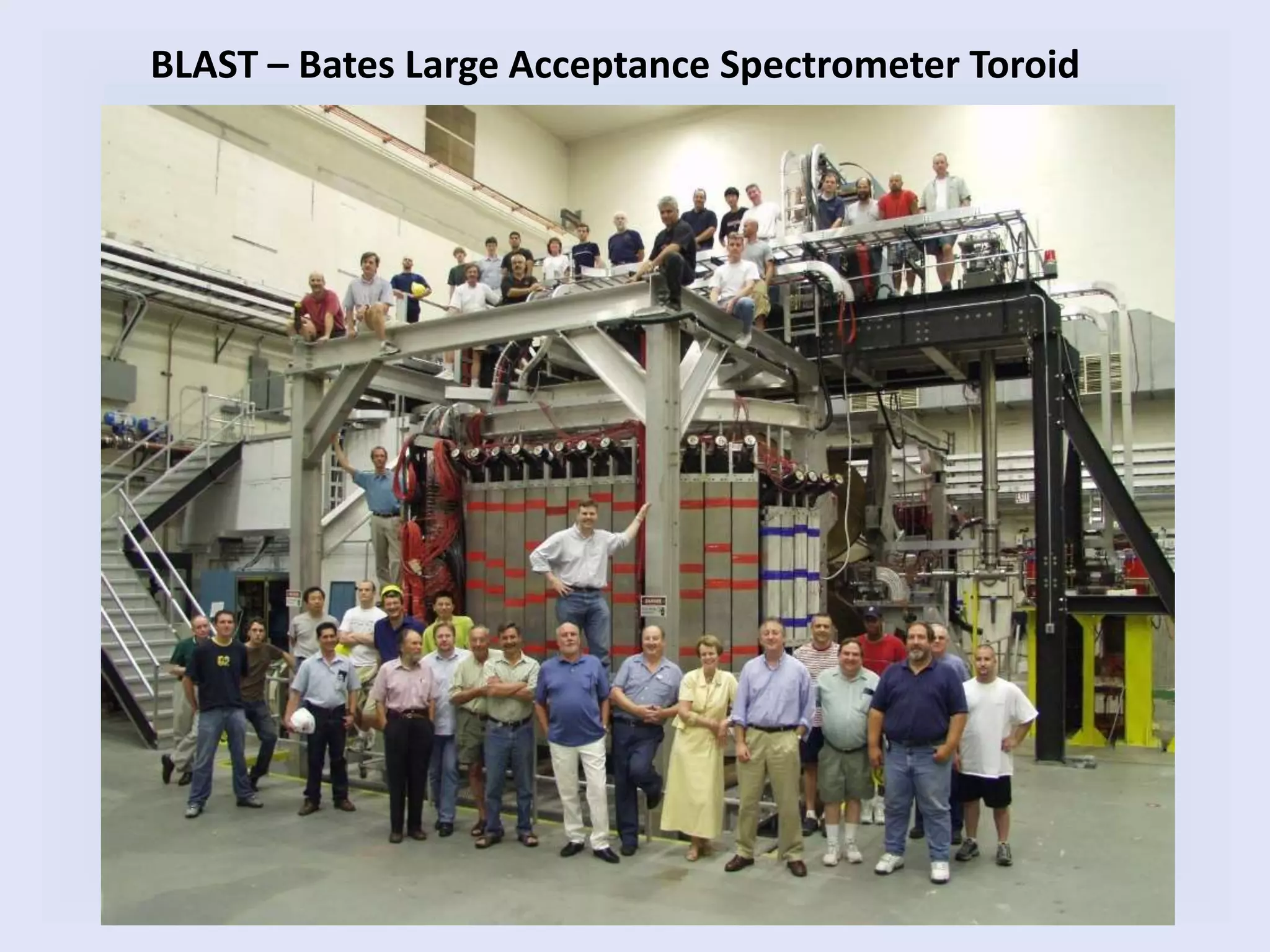
BLAST – Bates Large Acceptance Spectrometer Toroid
• Legacy Hardware Controls
– Continuous upgrade to EPICS controls for most accelerator systems
– All analog radiation safety system with no upgrade path
• EPICS running on VME systems using VxWorks
– BitBus for magnet control
– PLC systems for LCW regulation
• About 20 IOCs including the BLAST experiment
• Control room uses PC computers
– running an GNU Xwindows interface on a LINUX operating system
• High Level Applications
– Command Line
– MEDM (Motif Editor Display Manager) display screens
– Motif API C/C++ based programs
– Tcl/Tk
MIT Bates Control System
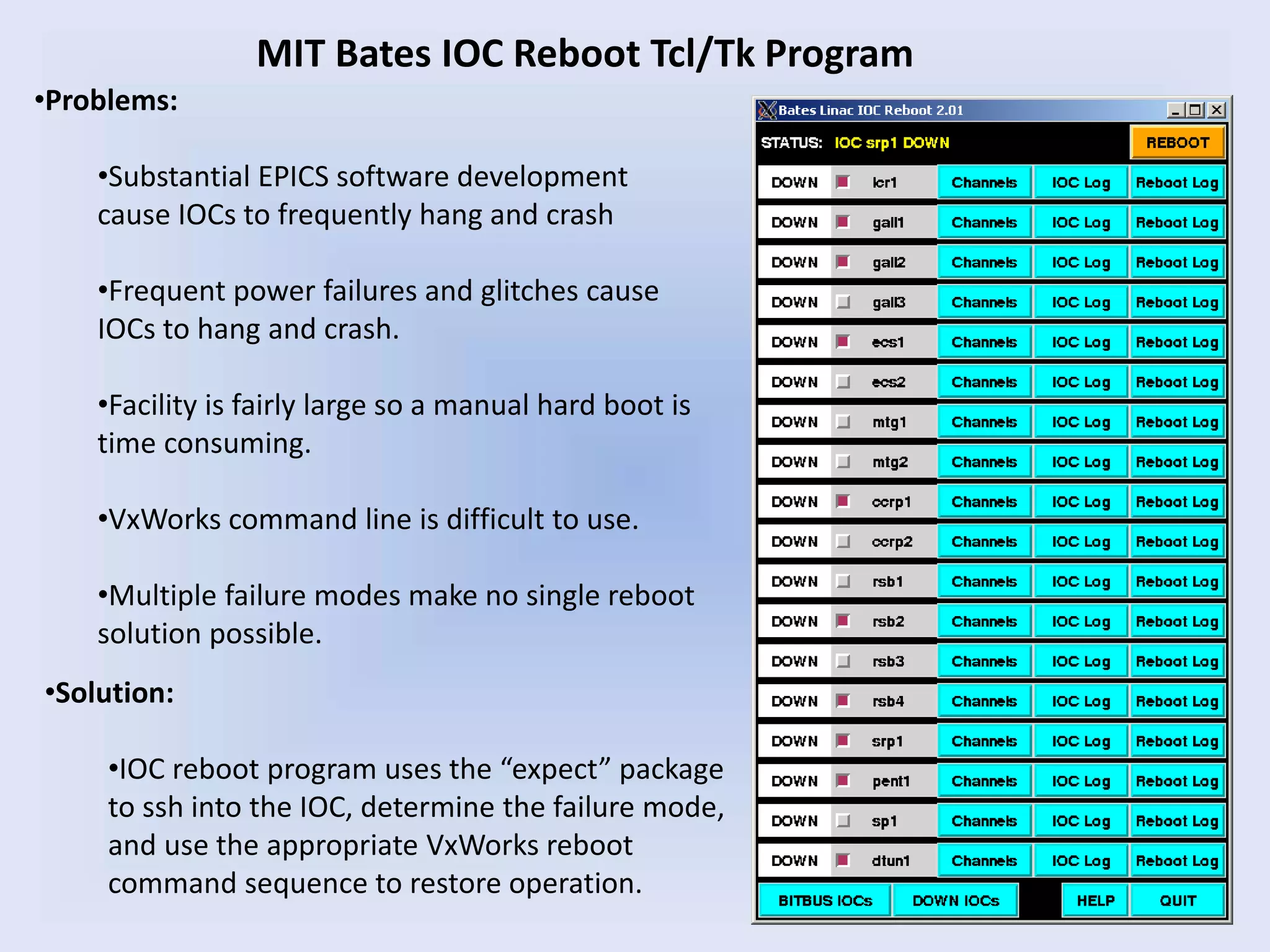
MIT Bates IOC Reboot Tcl/Tk Program
•Problems:
•Substantial EPICS software development
cause IOCs to frequently hang and crash
•Frequent power failures and glitches cause
IOCs to hang and crash.
•Facility is fairly large so a manual hard boot is
time consuming.
•VxWorks command line is difficult to use.
•Multiple failure modes make no single reboot
solution possible.
•Solution:
•IOC reboot program uses the “expect” package
to ssh into the IOC, determine the failure mode,
and use the appropriate VxWorks reboot
command sequence to restore operation.
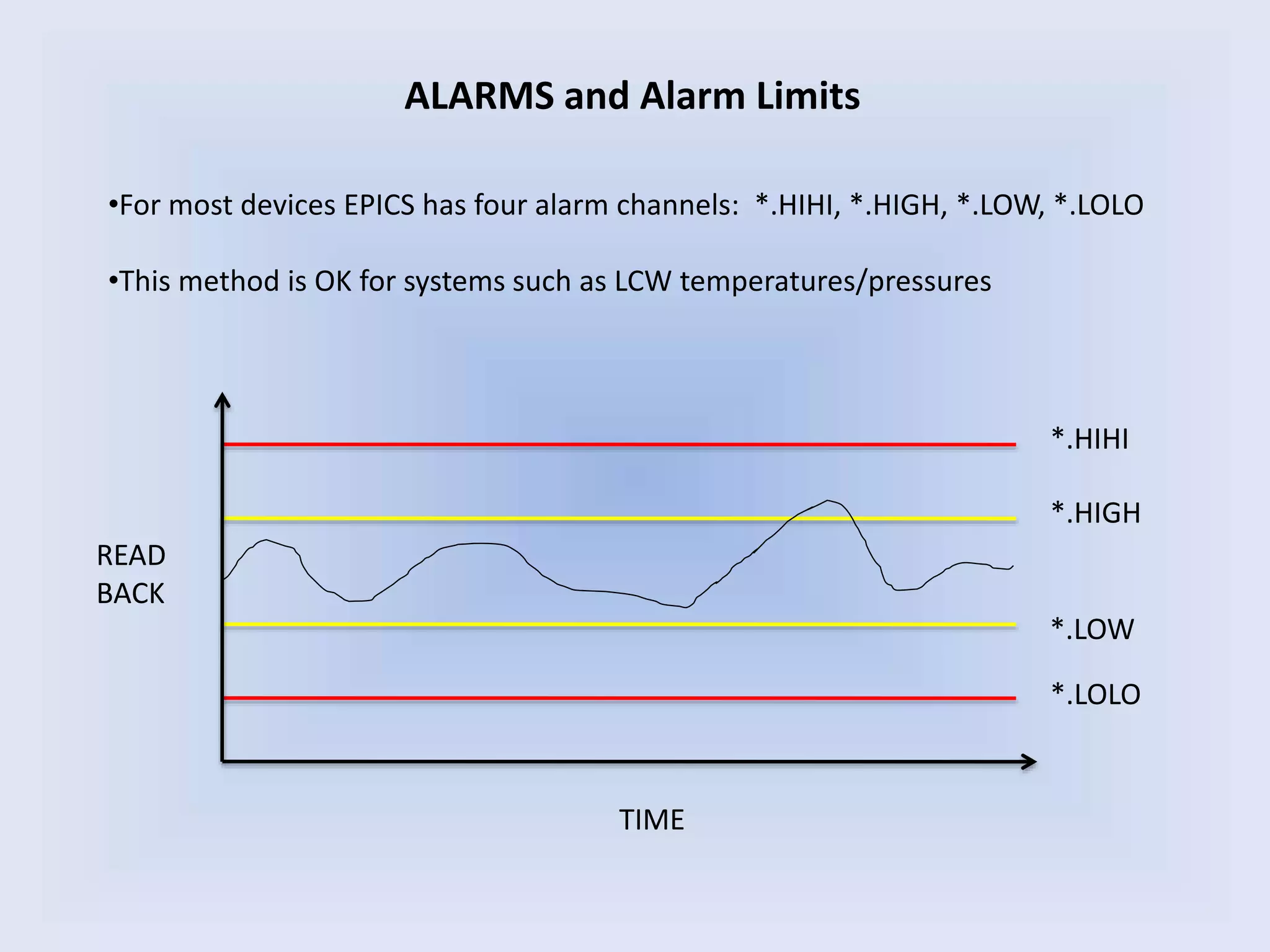
ALARMS and Alarm Limits
READ
BACK
TIME
*.HIHI
*.HIGH
*.LOW
*.LOLO
•For most devices EPICS has four alarm channels: *.HIHI, *.HIGH, *.LOW, *.LOLO
•This method is OK for systems such as LCW temperatures/pressures
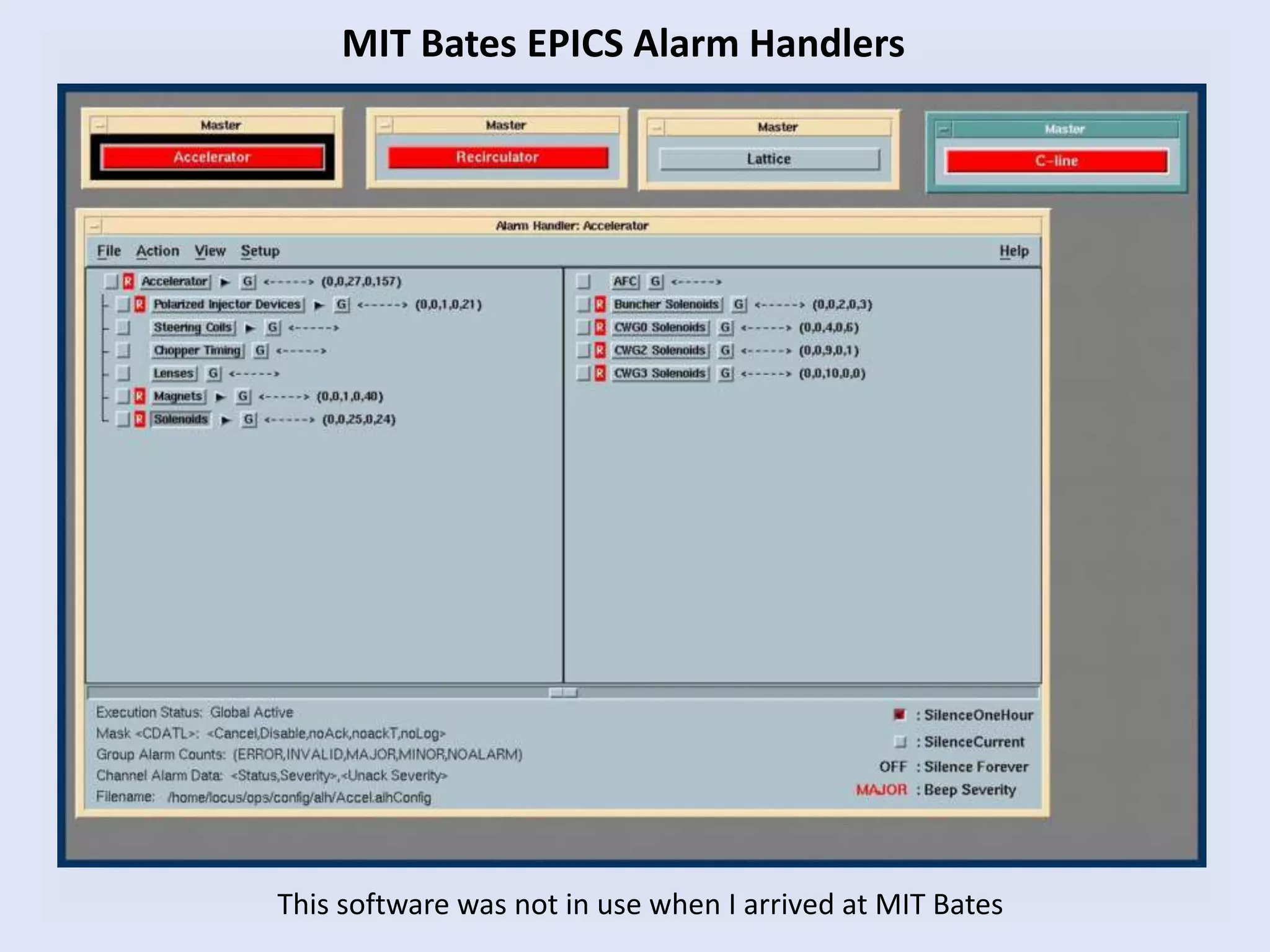
MIT Bates EPICS Alarm Handlers
This software was not in use when I arrived at MIT Bates
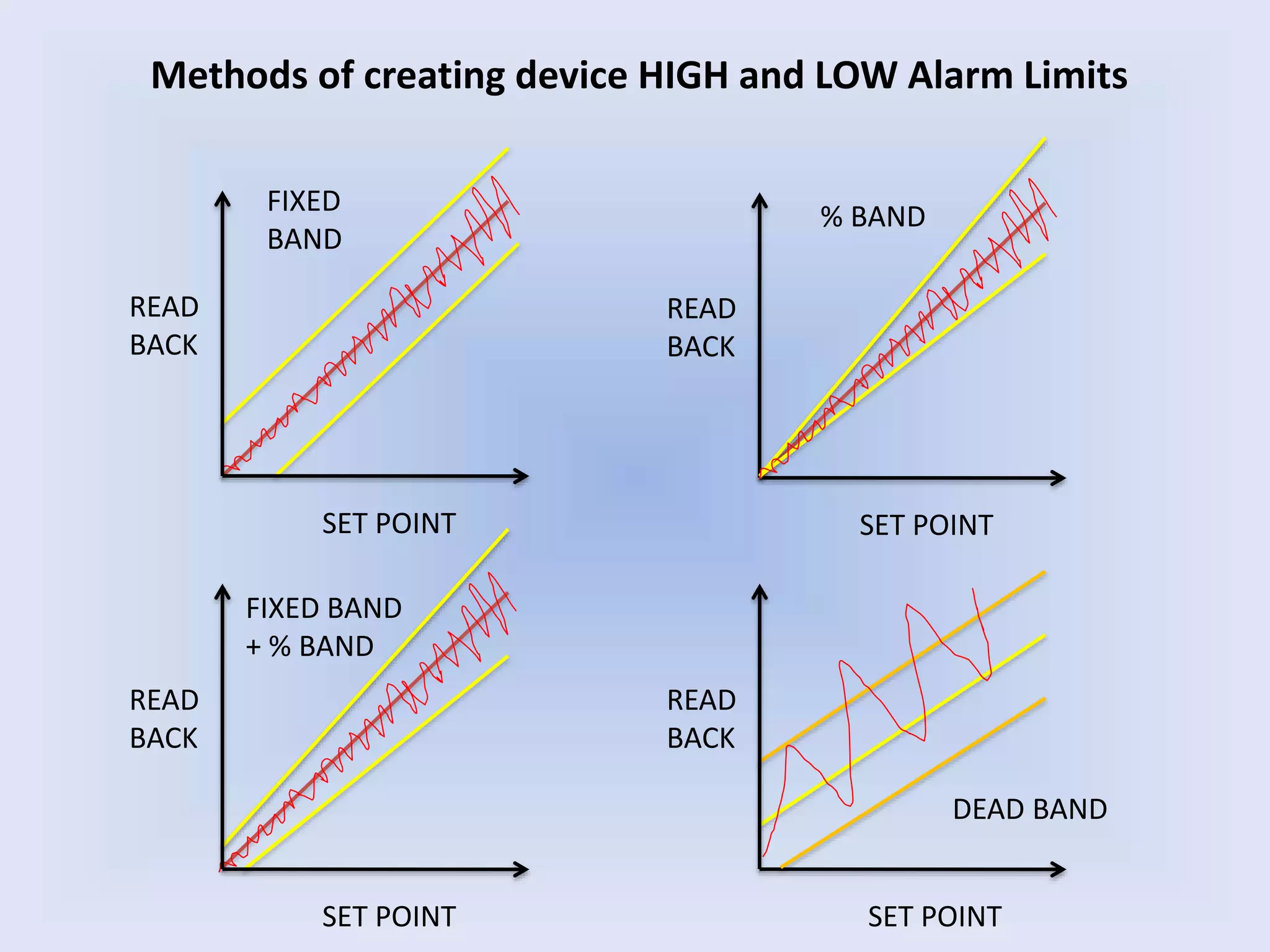
Methods of creating device HIGH and LOW Alarm Limits
SET POINT
READ
BACK
SET POINT
READ
BACK
SET POINT
READ
BACK
SET POINT
READ
BACK
% BANDFIXED
BAND
FIXED BAND
+ % BAND
DEAD BAND
SET POINT
READ
BACK
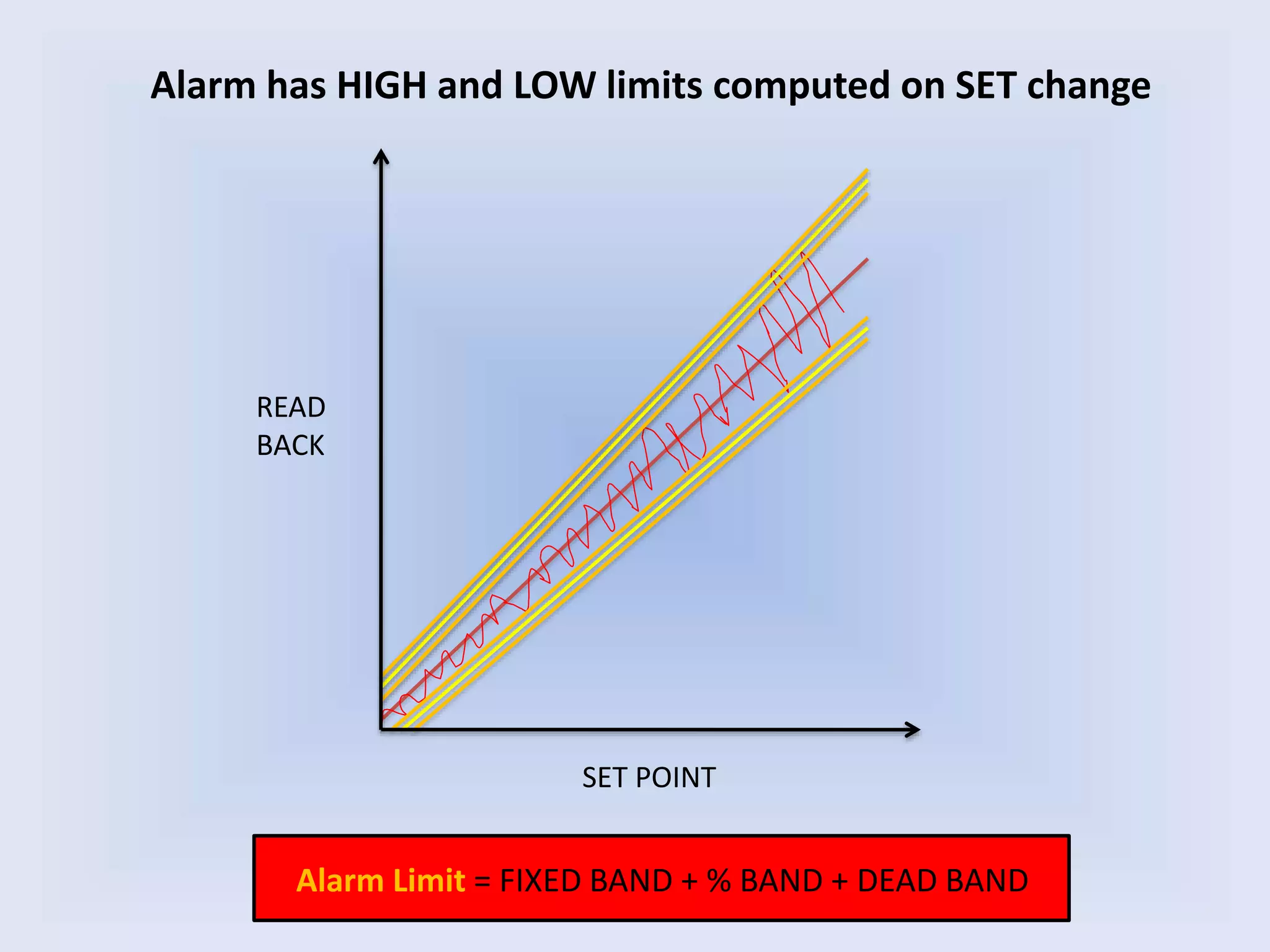
Alarm has HIGH and LOW limits computed on SET change
Alarm Limit = FIXED BAND + % BAND + DEAD BAND
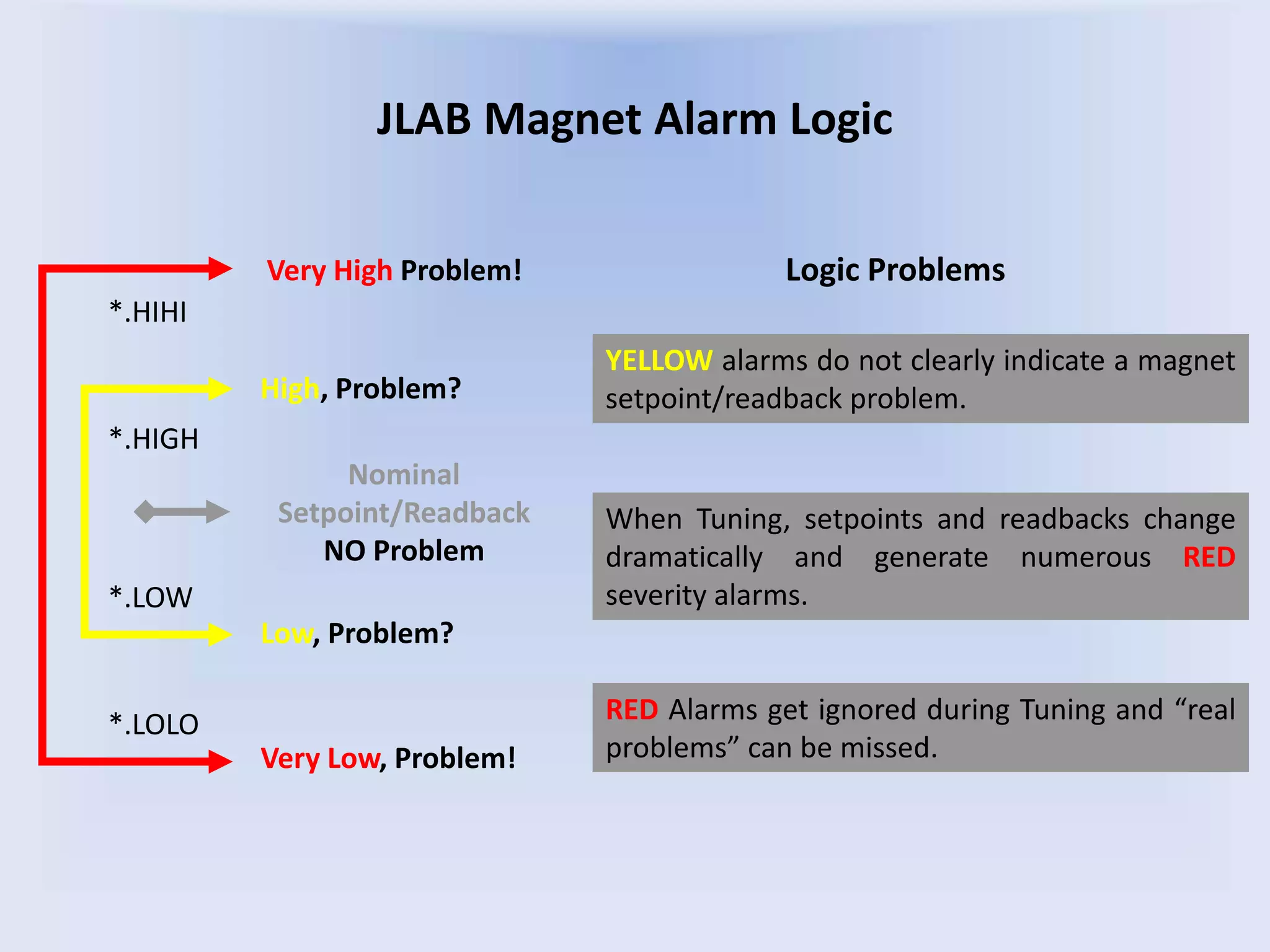
JLAB Magnet Alarm Logic
Nominal
Setpoint/Readback
NO Problem
Low, Problem?
High, Problem?
Very High Problem!
Very Low, Problem!
When Tuning, setpoints and readbacks change
dramatically and generate numerous RED
severity alarms.
YELLOW alarms do not clearly indicate a magnet
setpoint/readback problem.
Logic Problems
RED Alarms get ignored during Tuning and “real
problems” can be missed.
*.HIHI
*.LOLO
*.LOW
*.HIGH
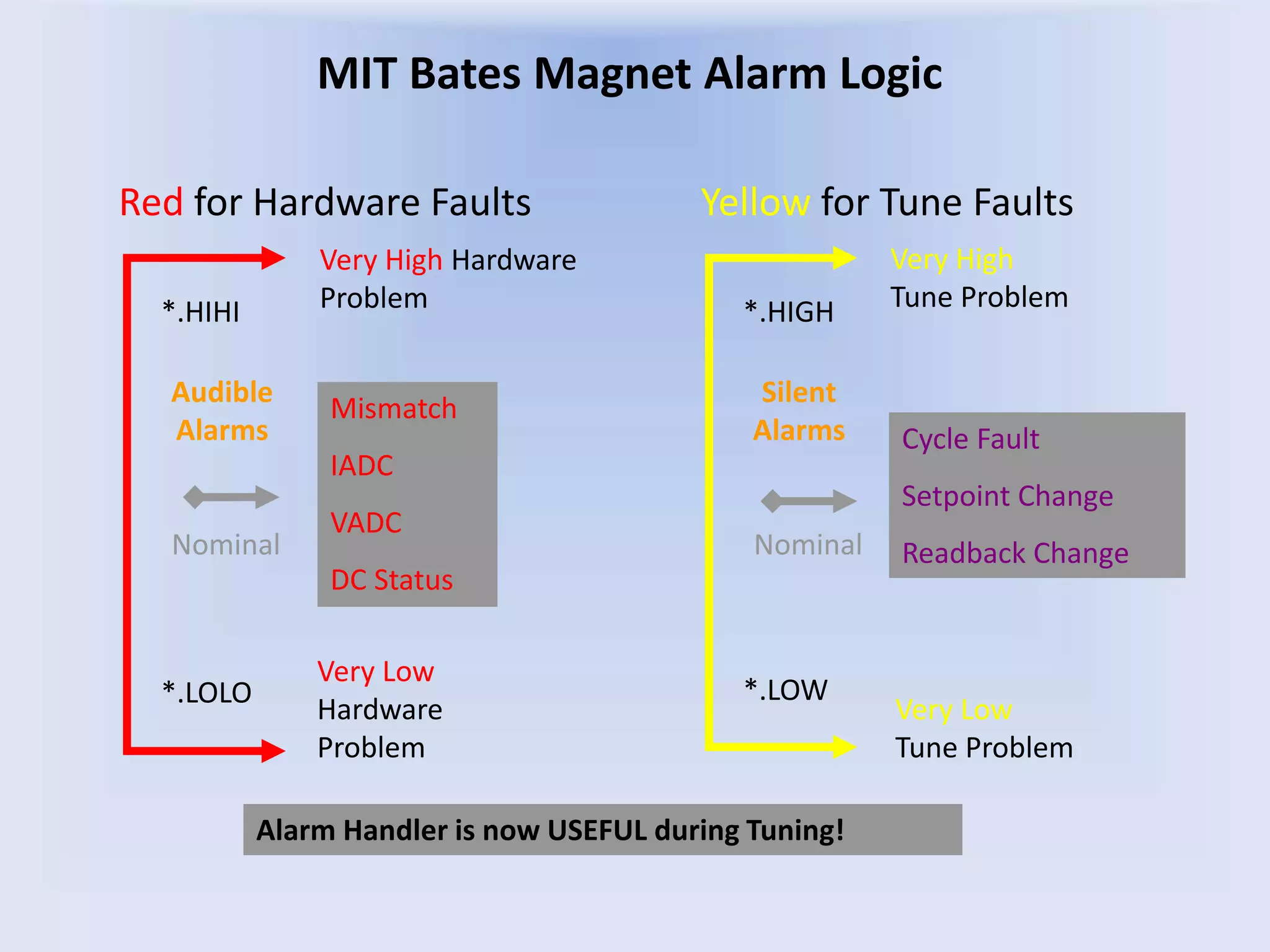
MIT Bates Magnet Alarm Logic
Nominal
Very Low
Tune Problem
Very High
Tune Problem
Very High Hardware
Problem
Alarm Handler is now USEFUL during Tuning!
Very Low
Hardware
Problem
Nominal
Red for Hardware Faults Yellow for Tune Faults
Audible
Alarms
Silent
Alarms
*.HIHI *.HIGH
*.LOLO *.LOW
Cycle Fault
Setpoint Change
Readback Change
Mismatch
IADC
VADC
DC Status
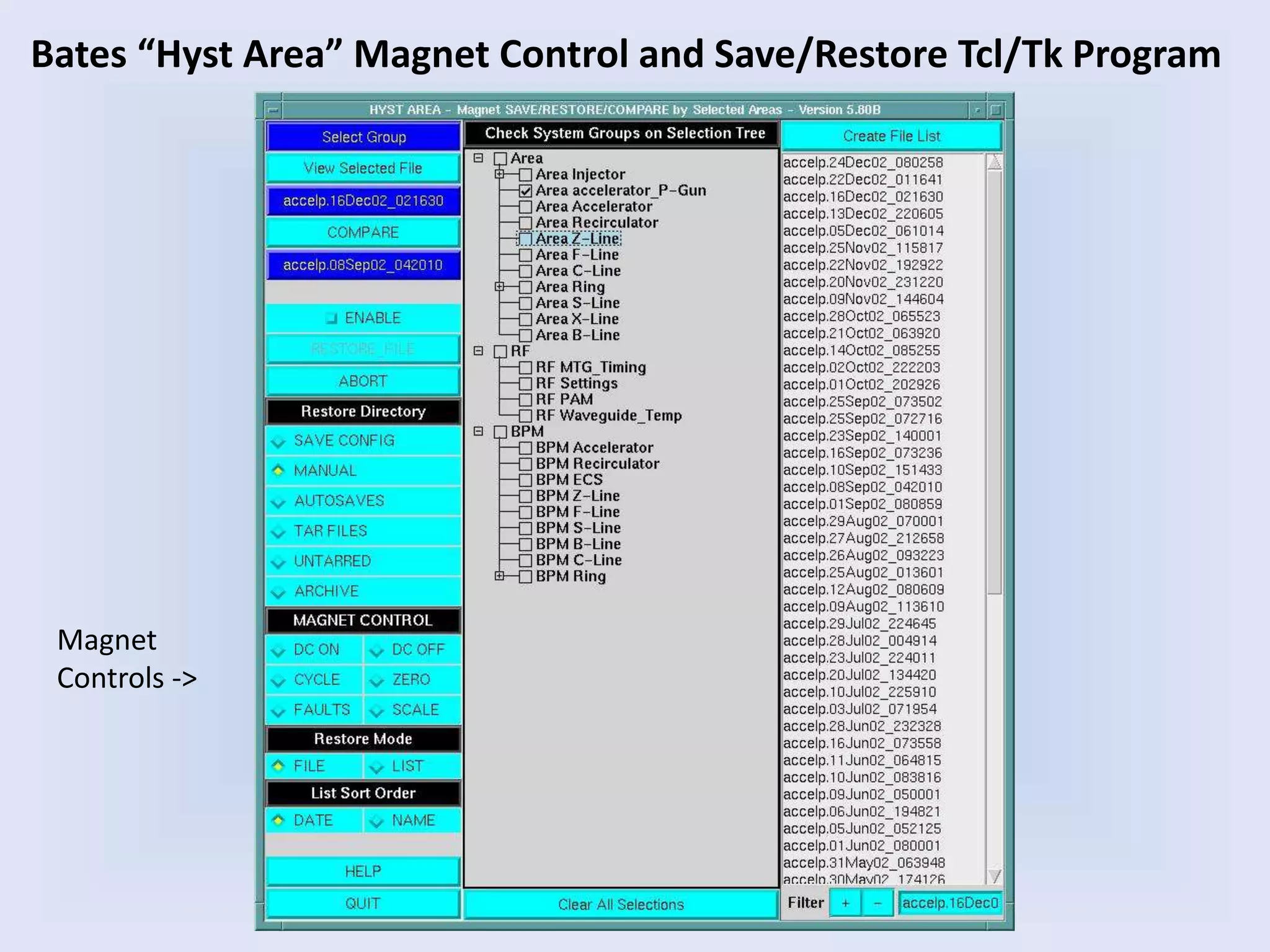
Bates “Hyst Area” Magnet Control and Save/Restore Tcl/Tk Program
Magnet
Controls ->
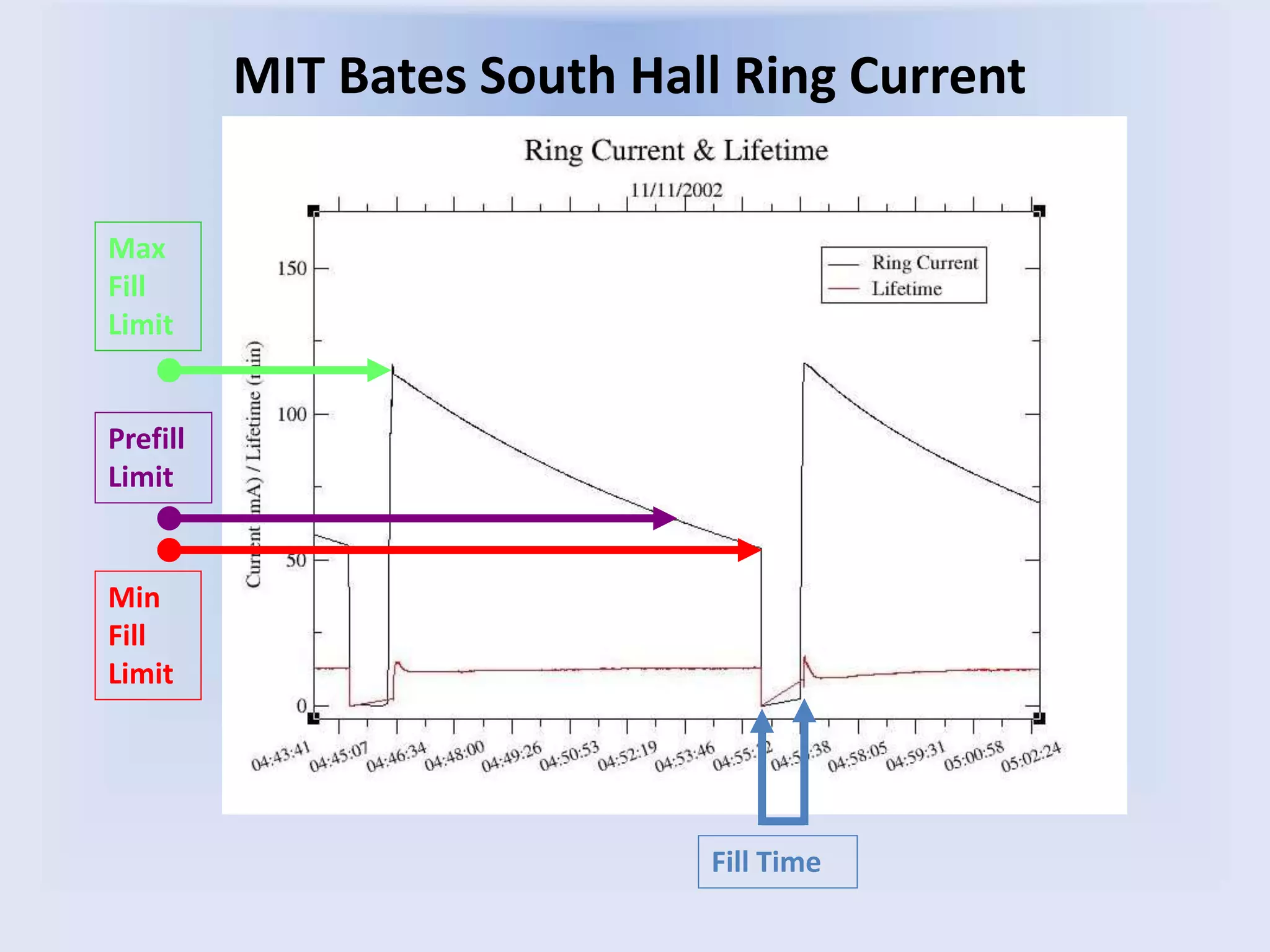
MIT Bates South Hall Ring Current
Max
Fill
Limit
Prefill
Limit
Min
Fill
Limit
Fill Time
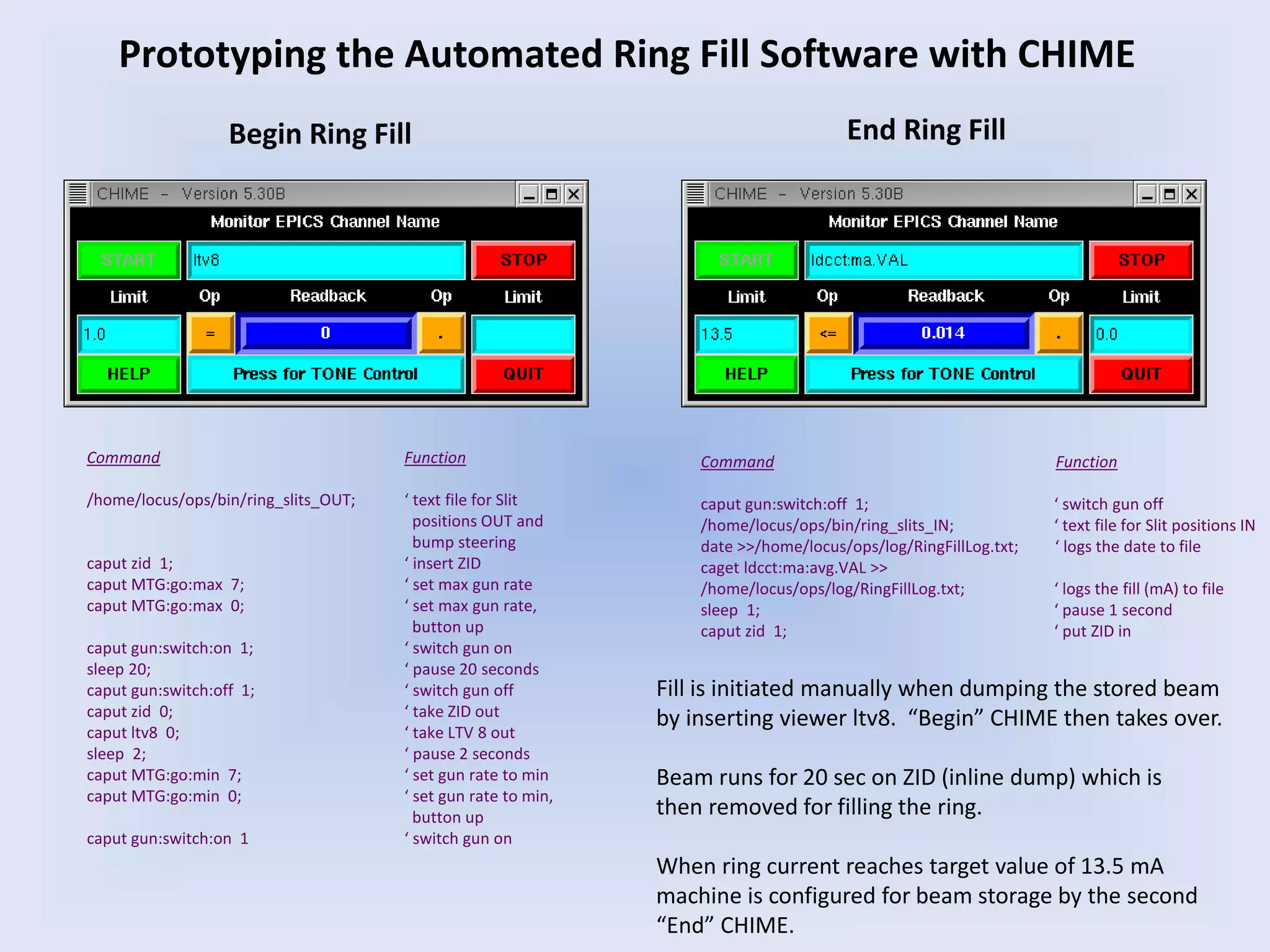
Command Function
/home/locus/ops/bin/ring_slits_OUT; ‘ text file for Slit
positions OUT and
bump steering
caput zid 1; ‘ insert ZID
caput MTG:go:max 7; ‘ set max gun rate
caput MTG:go:max 0; ‘ set max gun rate,
button up
caput gun:switch:on 1; ‘ switch gun on
sleep 20; ‘ pause 20 seconds
caput gun:switch:off 1; ‘ switch gun off
caput zid 0; ‘ take ZID out
caput ltv8 0; ‘ take LTV 8 out
sleep 2; ‘ pause 2 seconds
caput MTG:go:min 7; ‘ set gun rate to min
caput MTG:go:min 0; ‘ set gun rate to min,
button up
caput gun:switch:on 1 ‘ switch gun on
Begin Ring Fill End Ring Fill
Command Function
caput gun:switch:off 1; ‘ switch gun off
/home/locus/ops/bin/ring_slits_IN; ‘ text file for Slit positions IN
date >>/home/locus/ops/log/RingFillLog.txt; ‘ logs the date to file
caget ldcct:ma:avg.VAL >>
/home/locus/ops/log/RingFillLog.txt; ‘ logs the fill (mA) to file
sleep 1; ‘ pause 1 second
caput zid 1; ‘ put ZID in
Prototyping the Automated Ring Fill Software with CHIME
Fill is initiated manually when dumping the stored beam
by inserting viewer ltv8. “Begin” CHIME then takes over.
Beam runs for 20 sec on ZID (inline dump) which is
then removed for filling the ring.
When ring current reaches target value of 13.5 mA
machine is configured for beam storage by the second
“End” CHIME.
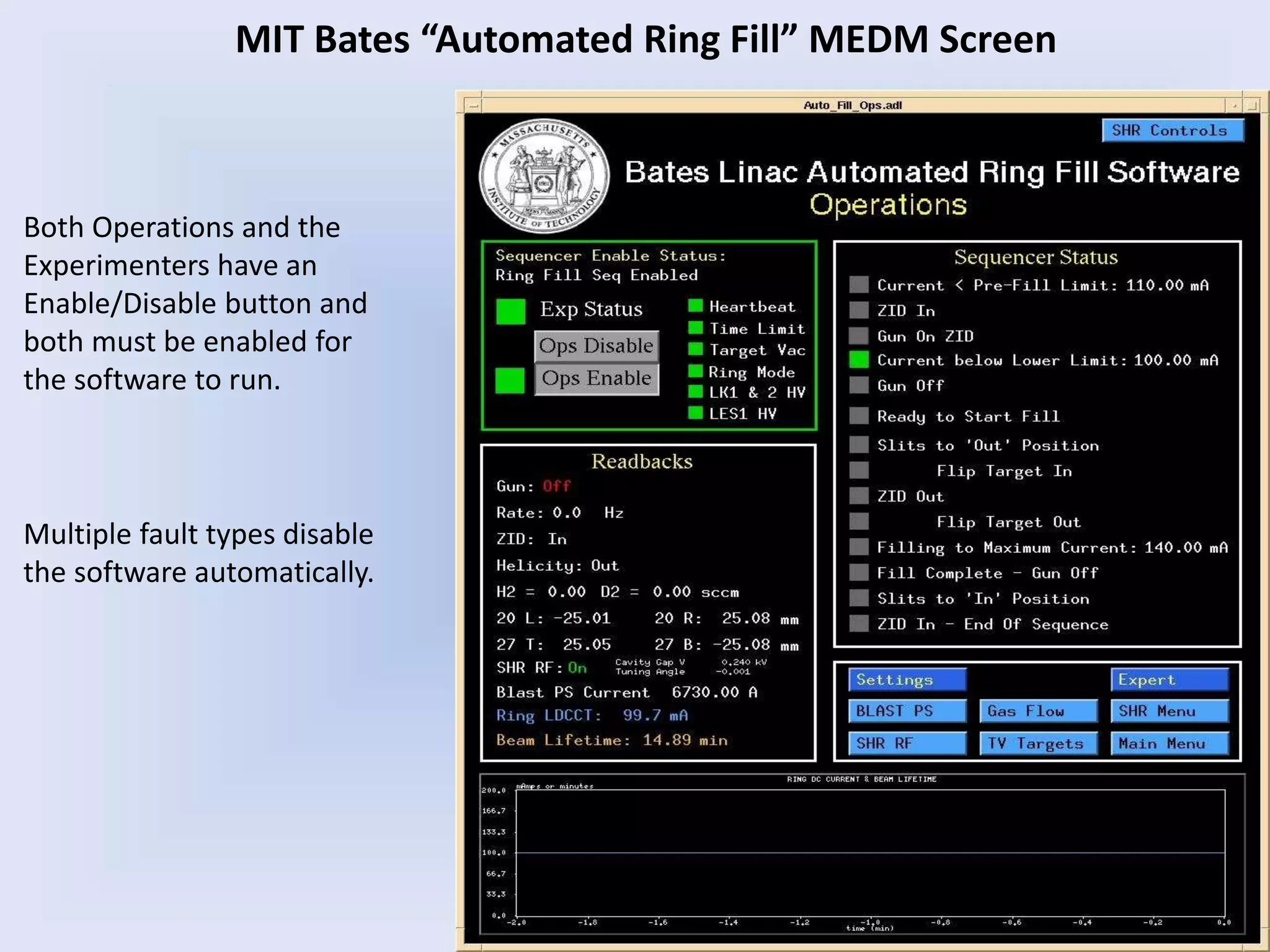
Both Operations and the
Experimenters have an
Enable/Disable button and
both must be enabled for
the software to run.
MIT Bates “Automated Ring Fill” MEDM Screen
Multiple fault types disable
the software automatically.
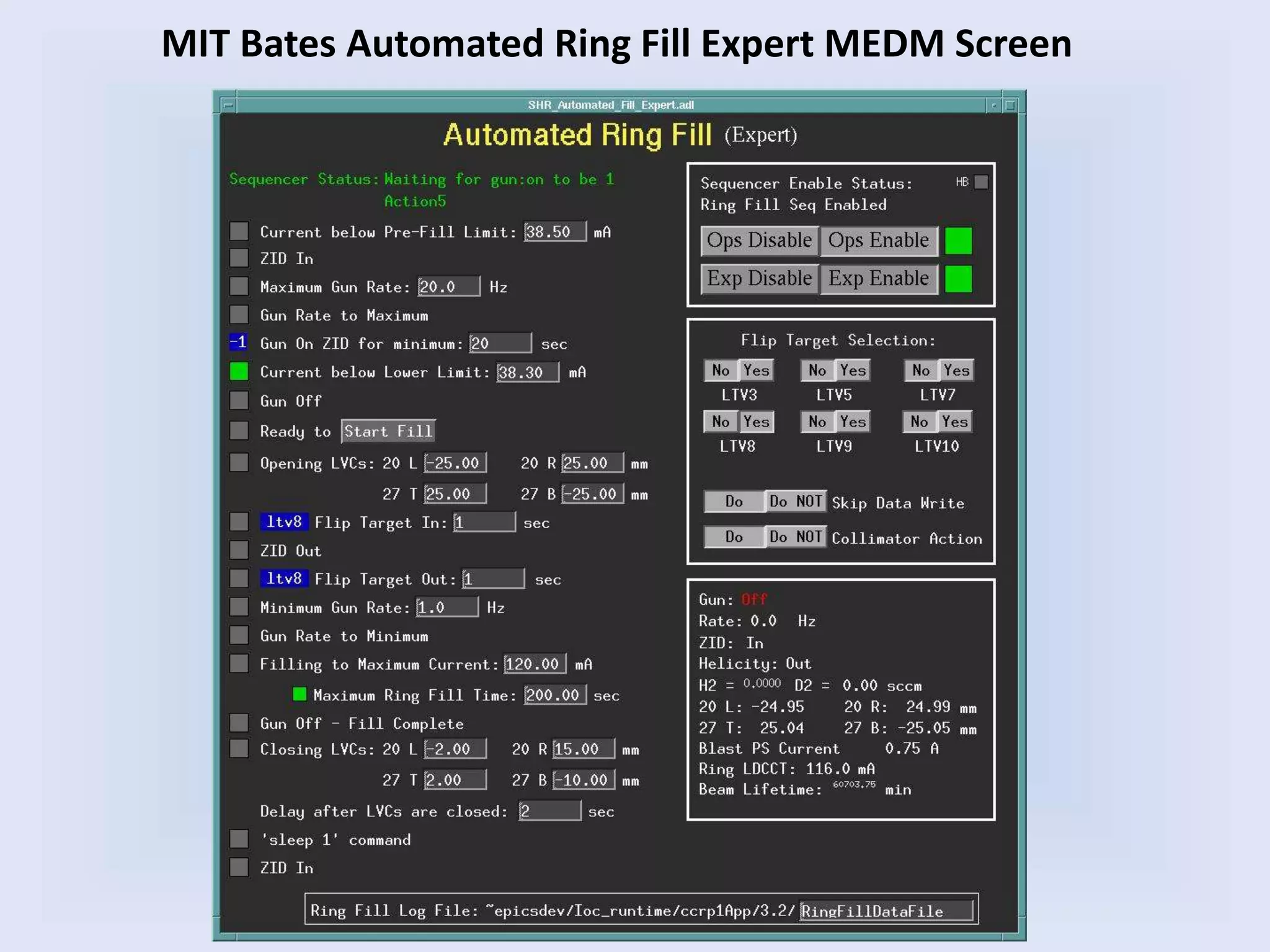
MIT Bates Automated Ring Fill Expert MEDM Screen
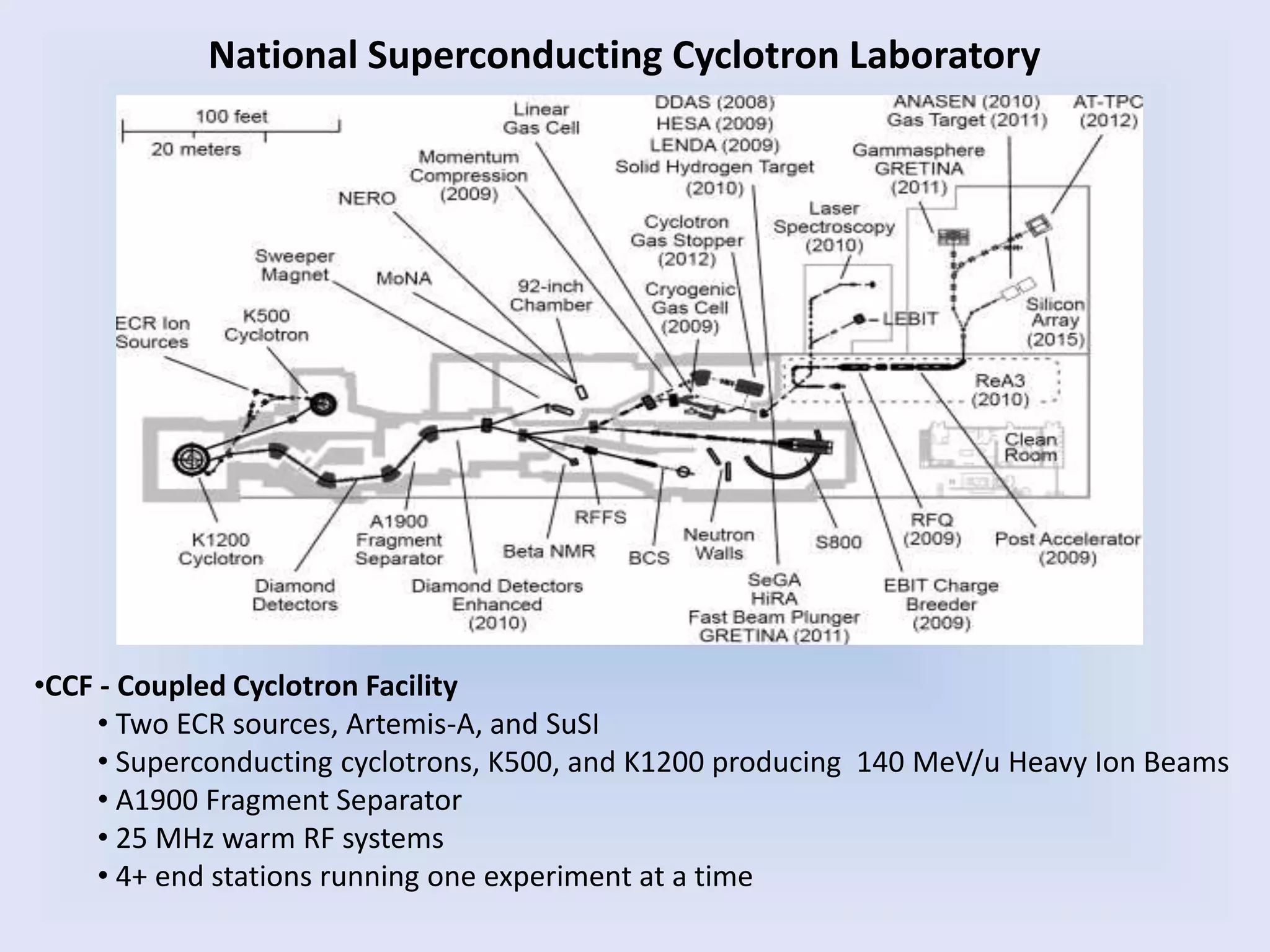
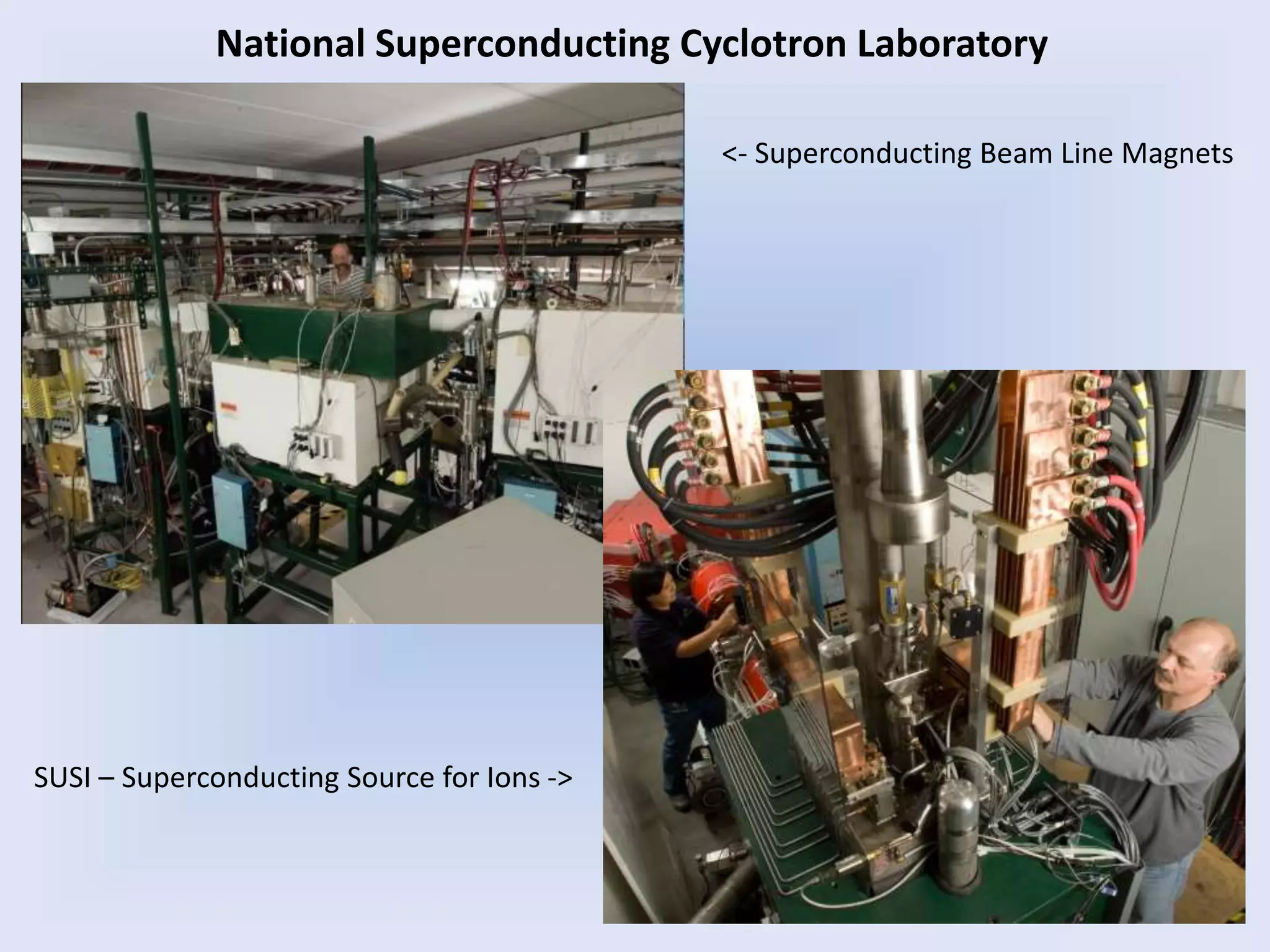
National Superconducting Cyclotron Laboratory
•CCF - Coupled Cyclotron Facility
• Two ECR sources, Artemis-A, and SuSI
• Superconducting cyclotrons, K500, and K1200 producing 140 MeV/u Heavy Ion Beams
• A1900 Fragment Separator
• 25 MHz warm RF systems
• 4+ end stations running one experiment at a time
A1900
SUSI – Superconducting Source for Ions ->
<- Superconducting Beam Line Magnets
National Superconducting Cyclotron Laboratory
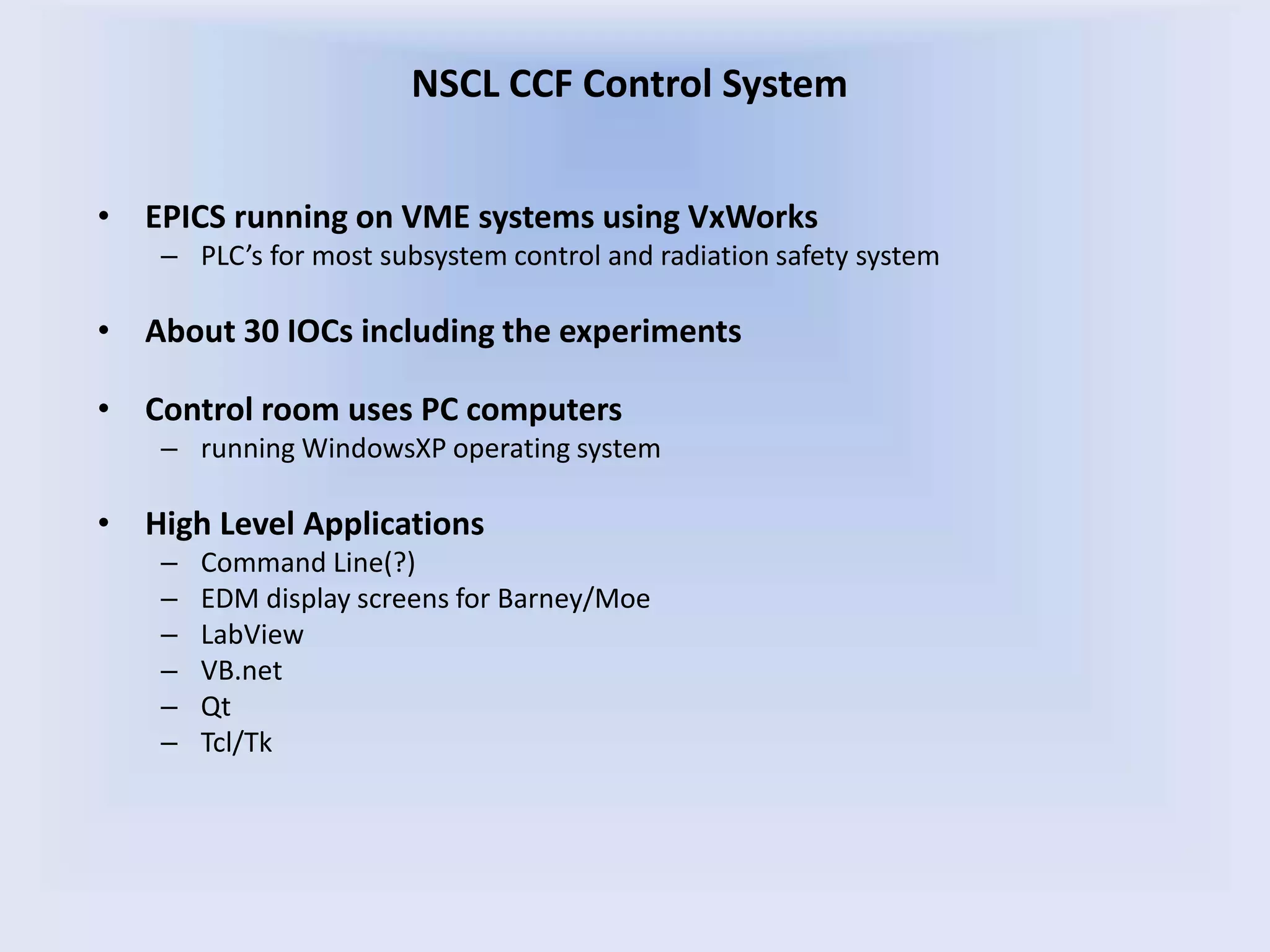
• EPICS running on VME systems using VxWorks
– PLC’s for most subsystem control and radiation safety system
• About 30 IOCs including the experiments
• Control room uses PC computers
– running WindowsXP operating system
• High Level Applications
– Command Line(?)
– EDM display screens for Barney/Moe
– LabView
– VB.net
– Qt
– Tcl/Tk
NSCL CCF Control System
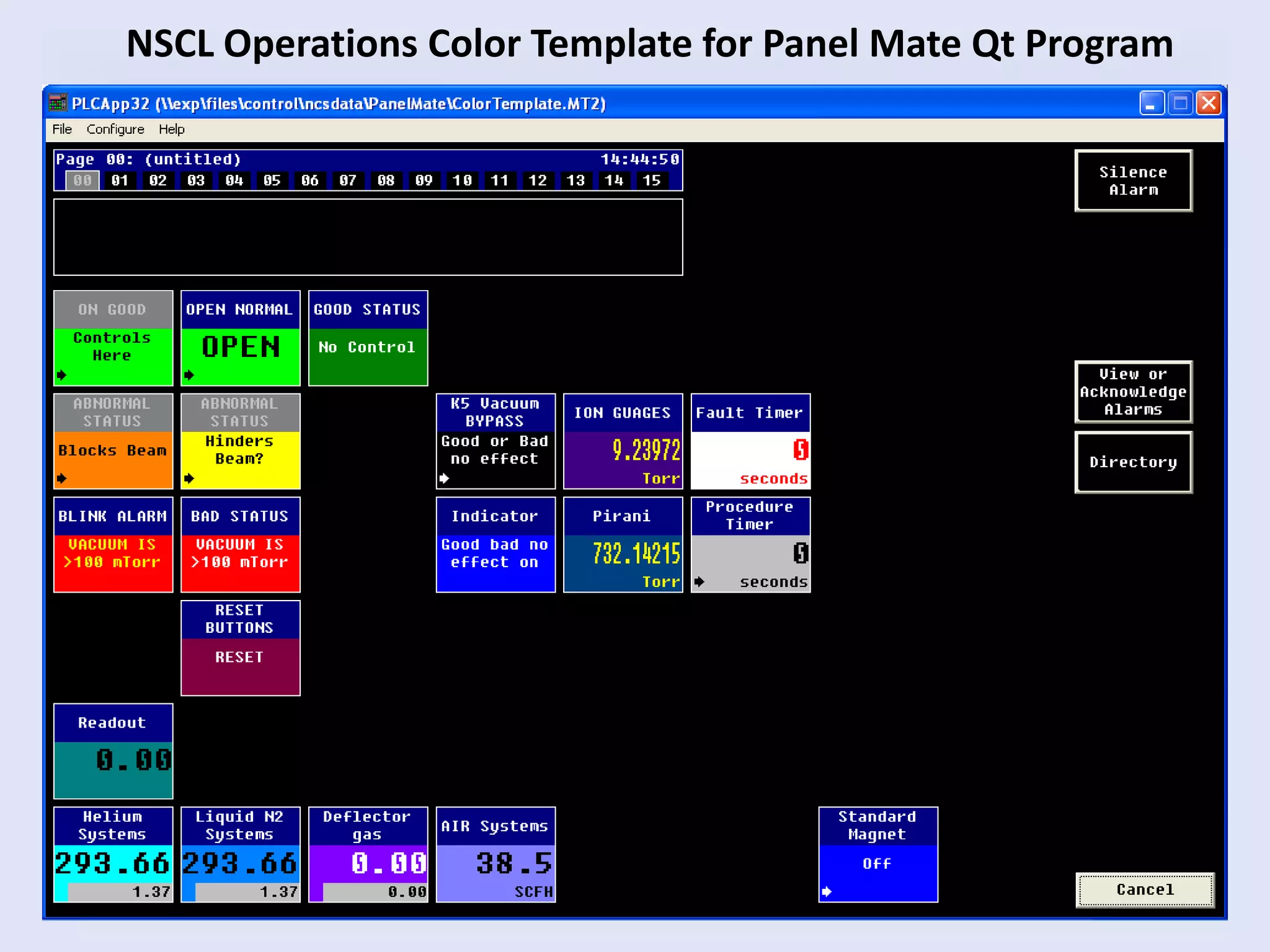
NSCL Operations Color Template for Panel Mate Qt Program
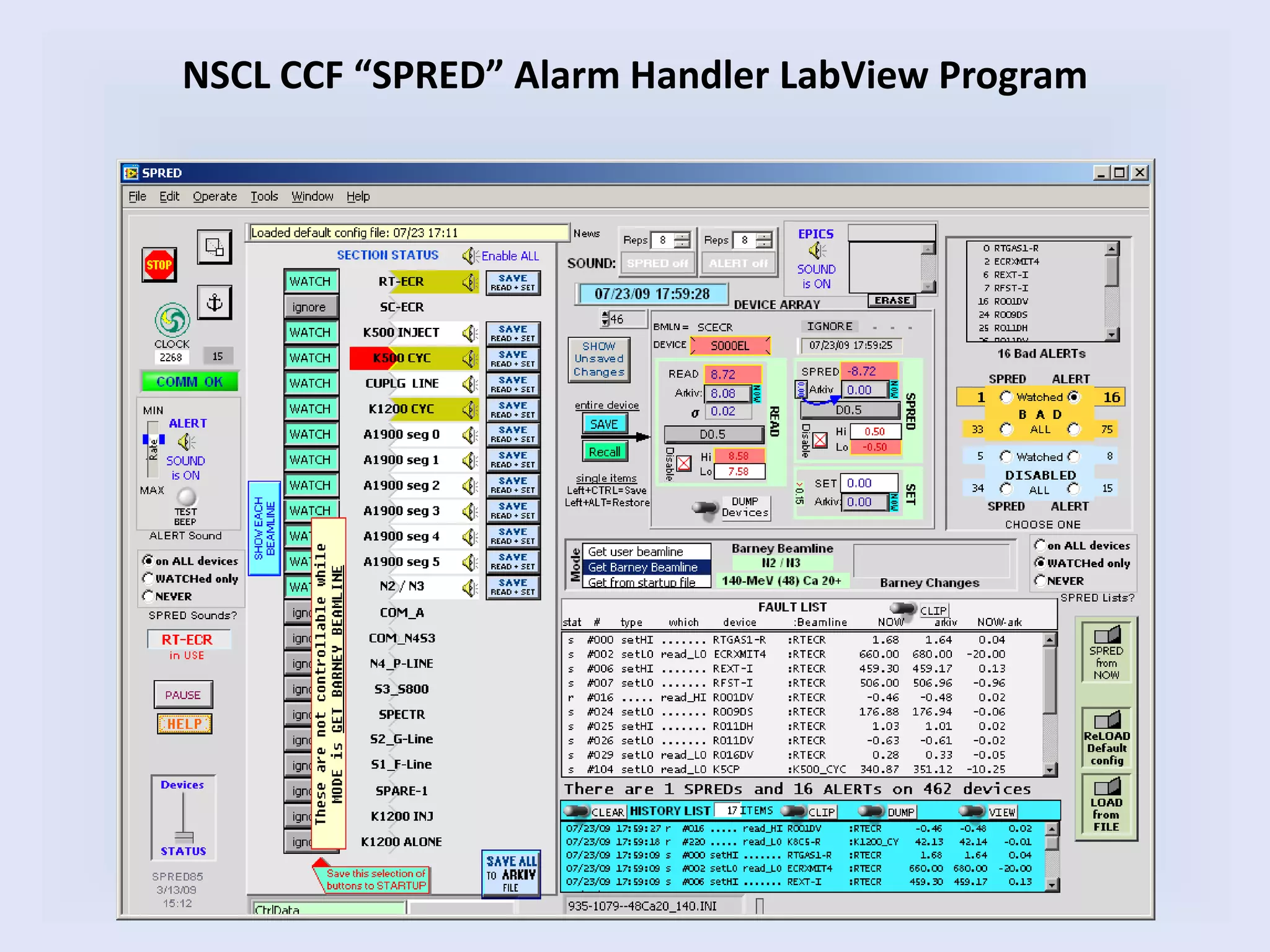
NSCL CCF “SPRED” Alarm Handler LabView Program
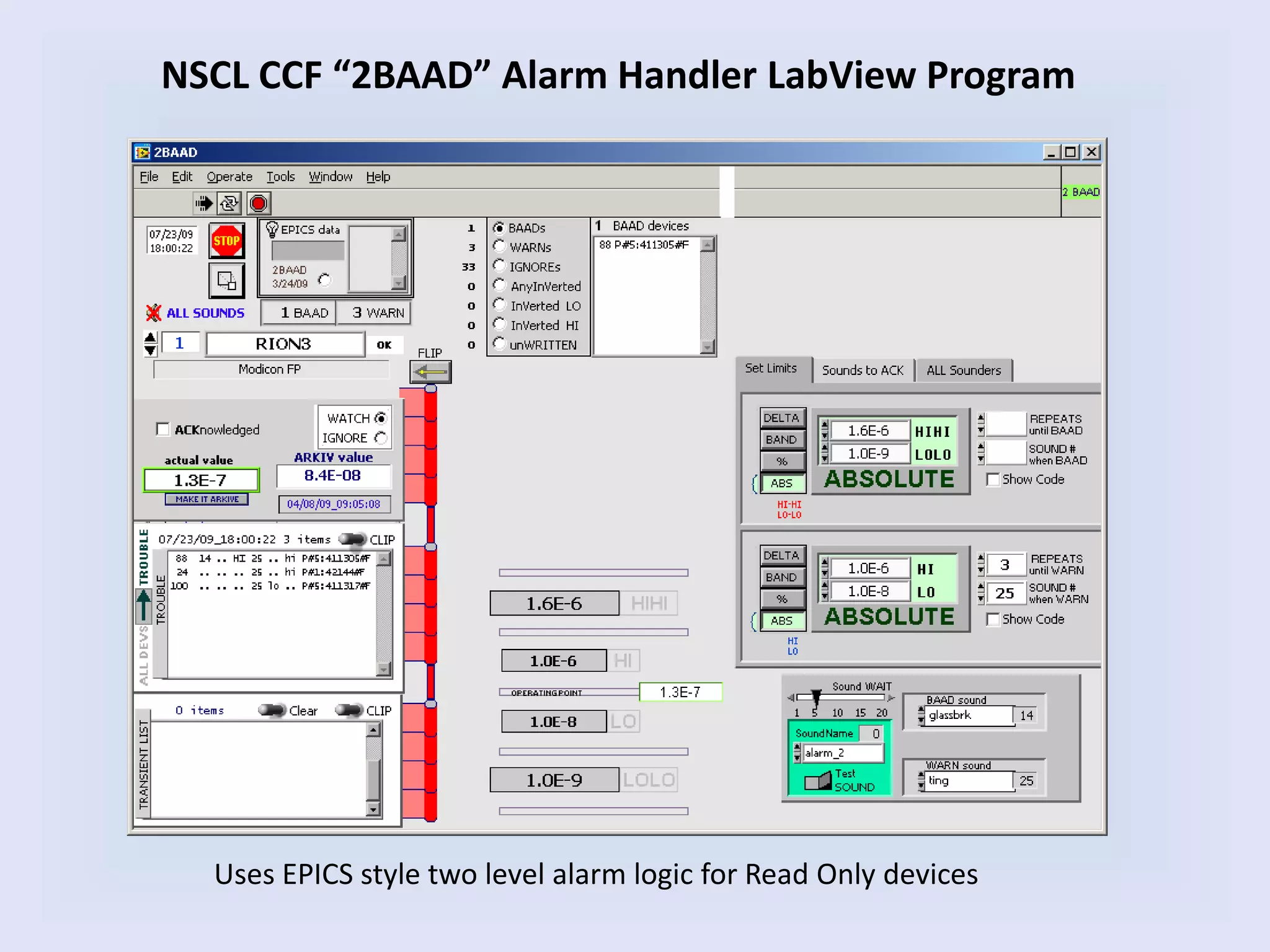
NSCL CCF “2BAAD” Alarm Handler LabView Program
Uses EPICS style two level alarm logic for Read Only devices
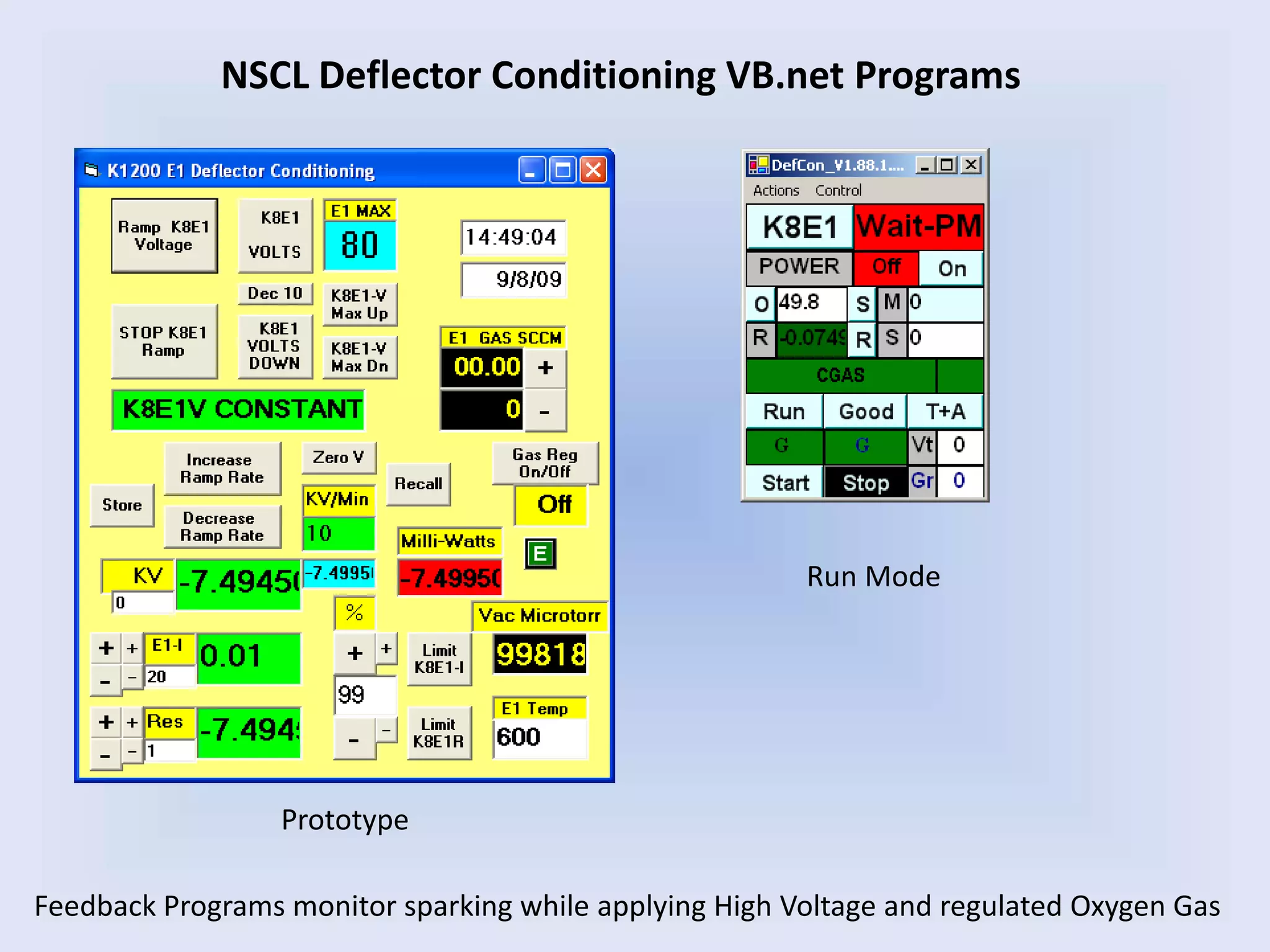
NSCL Deflector Conditioning VB.net Programs
Feedback Programs monitor sparking while applying High Voltage and regulated Oxygen Gas
Prototype
Run Mode
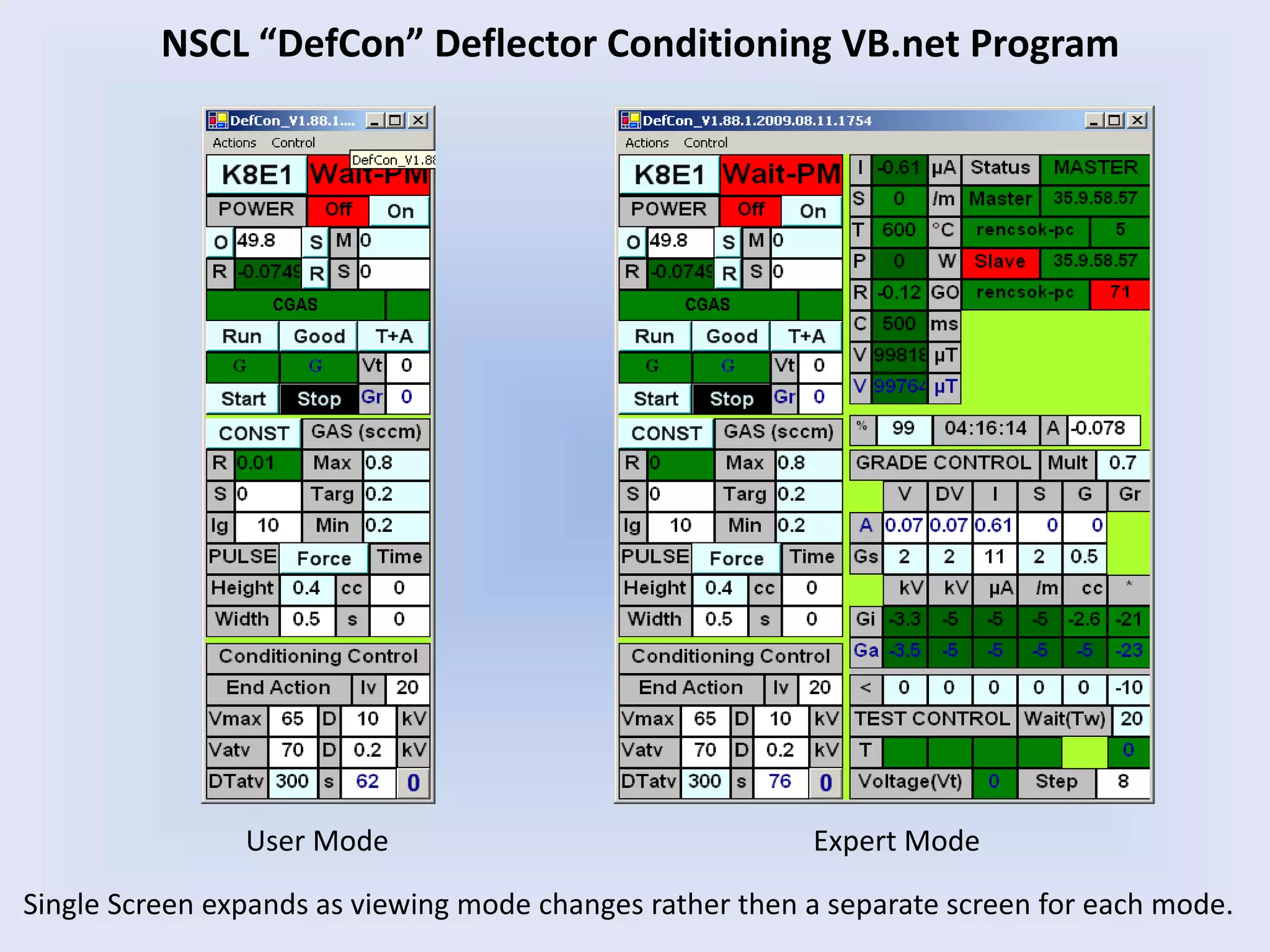
NSCL “DefCon” Deflector Conditioning VB.net Program
User Mode Expert Mode
Single Screen expands as viewing mode changes rather then a separate screen for each mode.
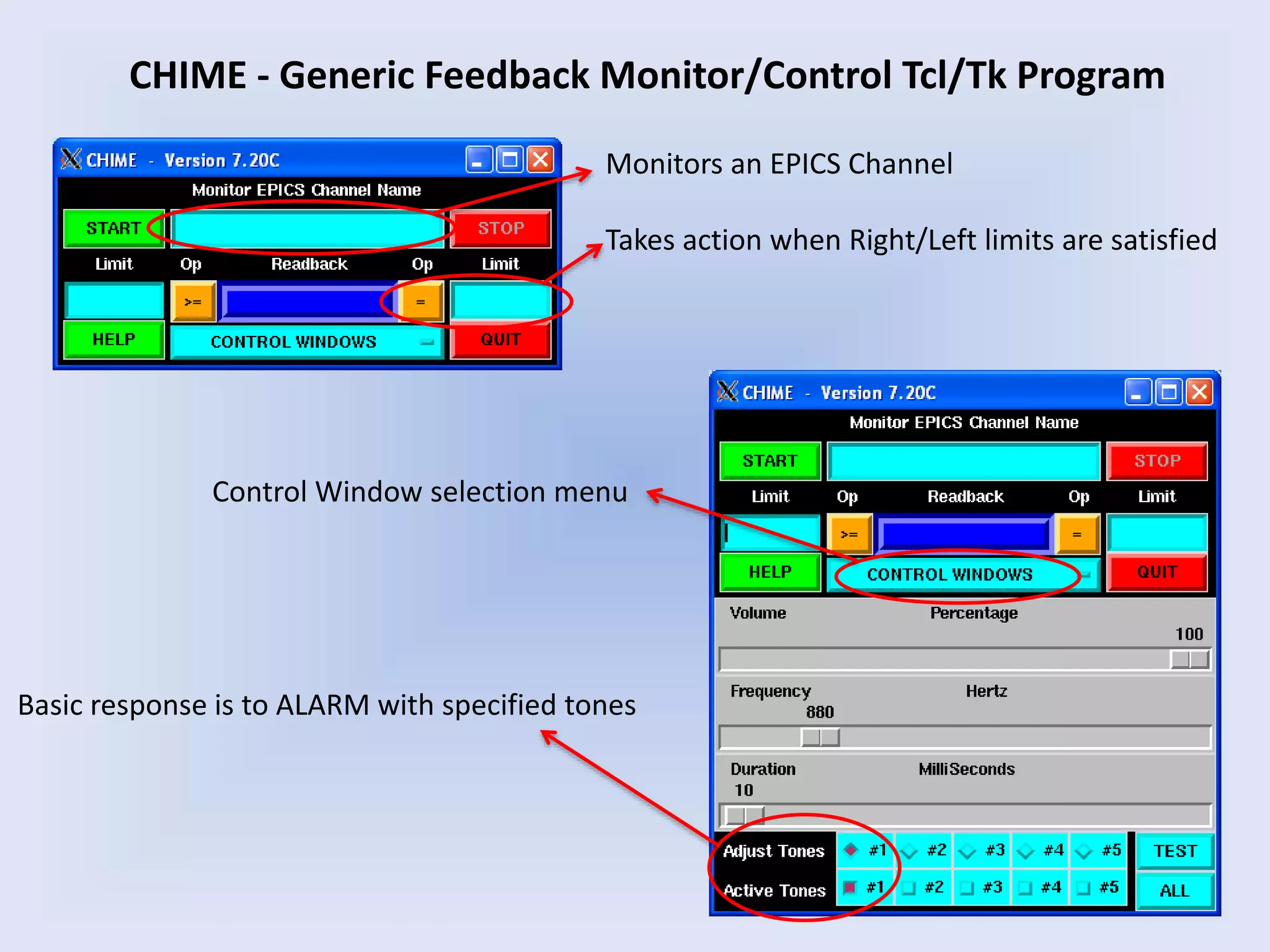
CHIME - Generic Feedback Monitor/Control Tcl/Tk Program
Monitors an EPICS Channel
Takes action when Right/Left limits are satisfied
Basic response is to ALARM with specified tones
Control Window selection menu
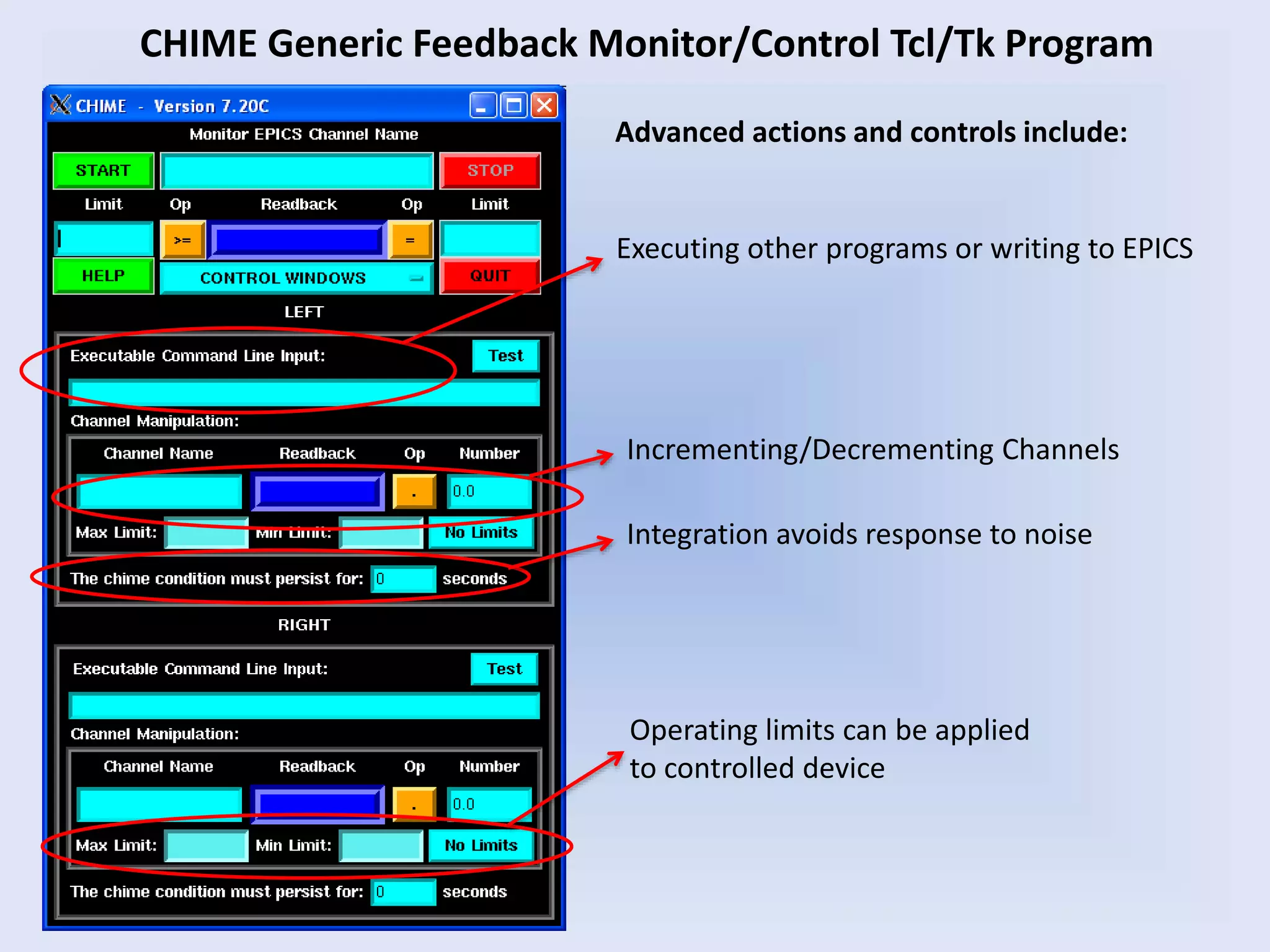
CHIME Generic Feedback Monitor/Control Tcl/Tk Program
Executing other programs or writing to EPICS
Advanced actions and controls include:
Incrementing/Decrementing Channels
Operating limits can be applied
to controlled device
Integration avoids response to noise
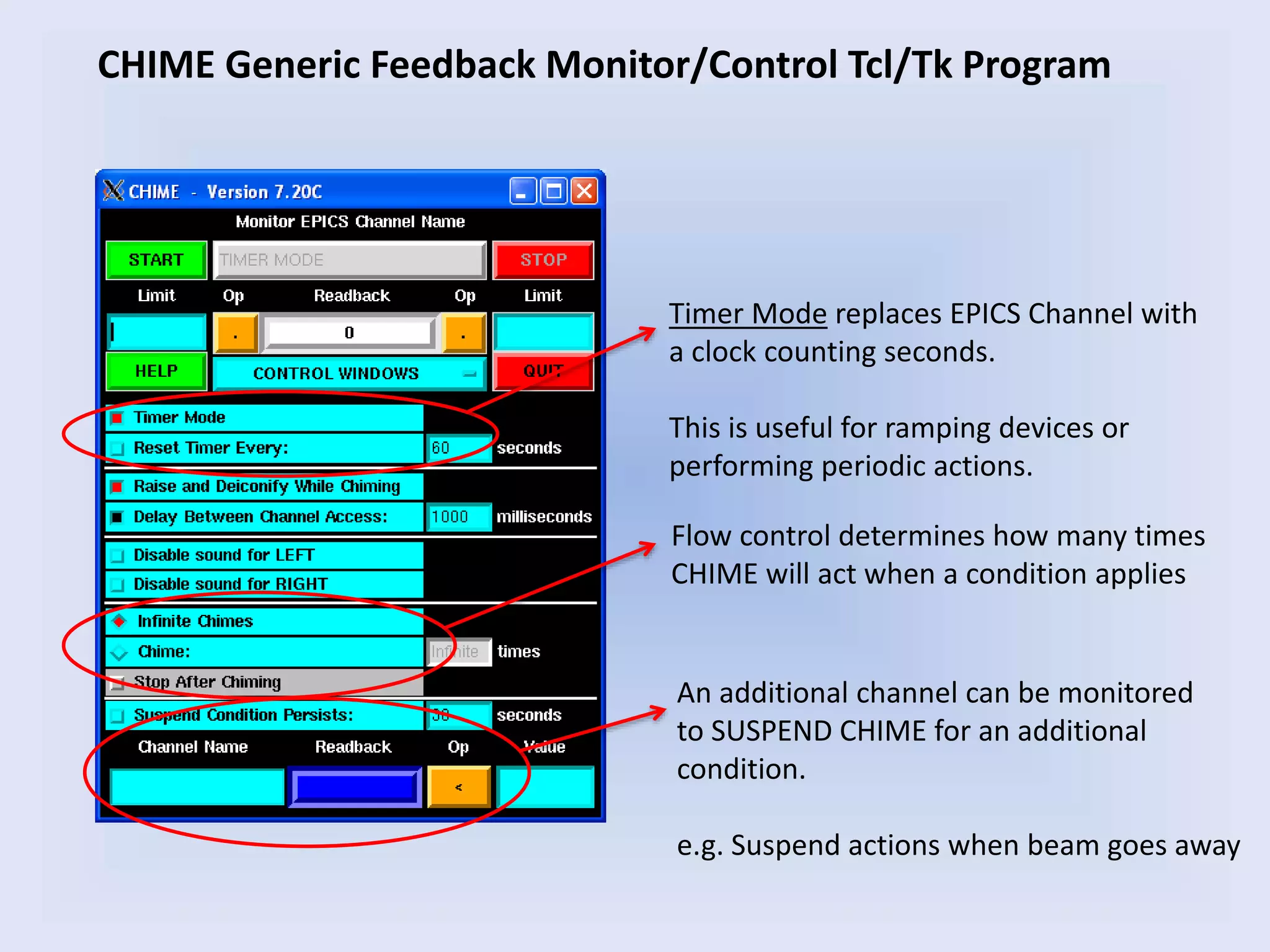
CHIME Generic Feedback Monitor/Control Tcl/Tk Program
Timer Mode replaces EPICS Channel with
a clock counting seconds.
This is useful for ramping devices or
performing periodic actions.
Flow control determines how many times
CHIME will act when a condition applies
An additional channel can be monitored
to SUSPEND CHIME for an additional
condition.
e.g. Suspend actions when beam goes away
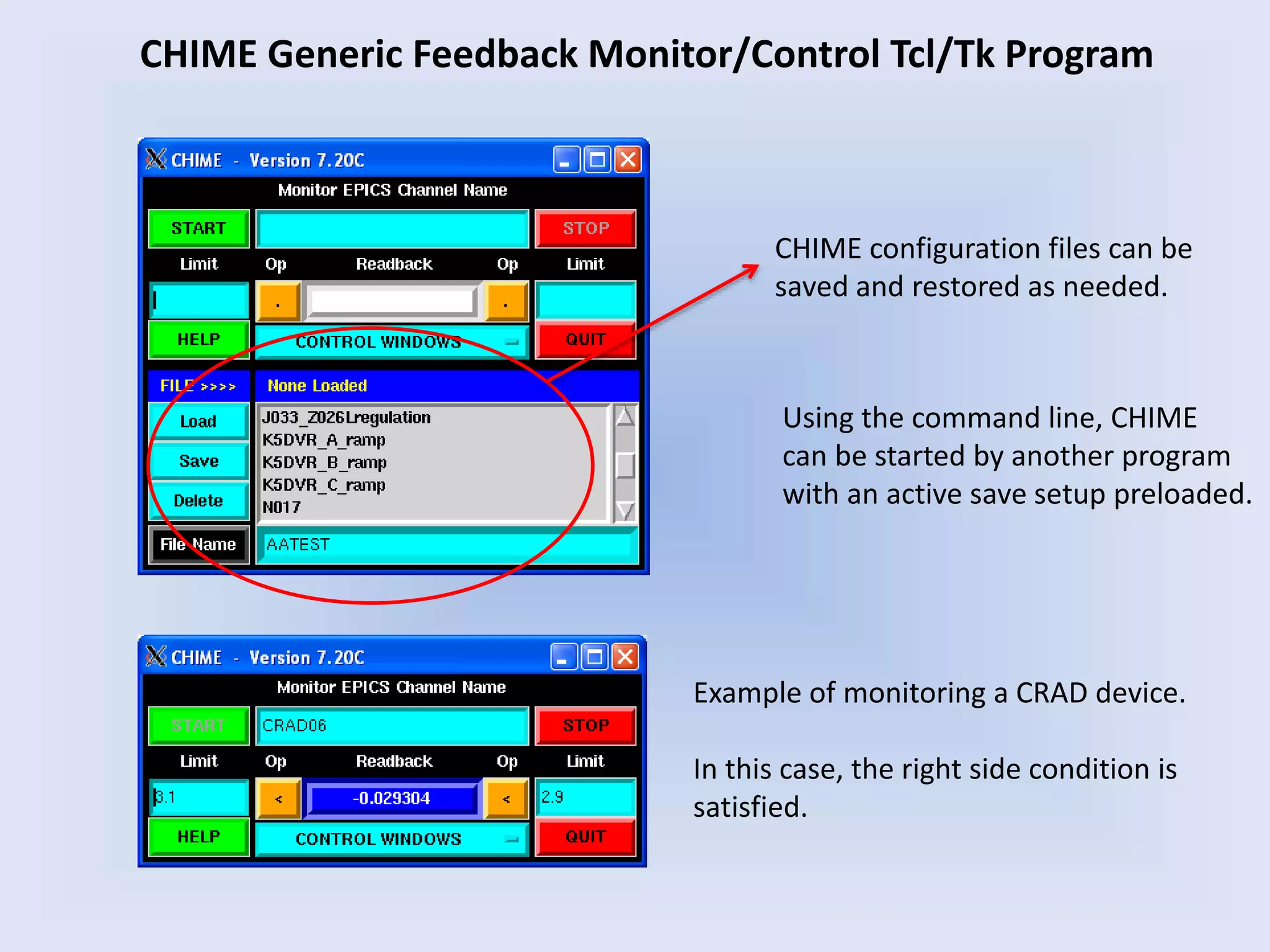
CHIME Generic Feedback Monitor/Control Tcl/Tk Program
Example of monitoring a CRAD device.
In this case, the right side condition is
satisfied.
CHIME configuration files can be
saved and restored as needed.
Using the command line, CHIME
can be started by another program
with an active save setup preloaded.
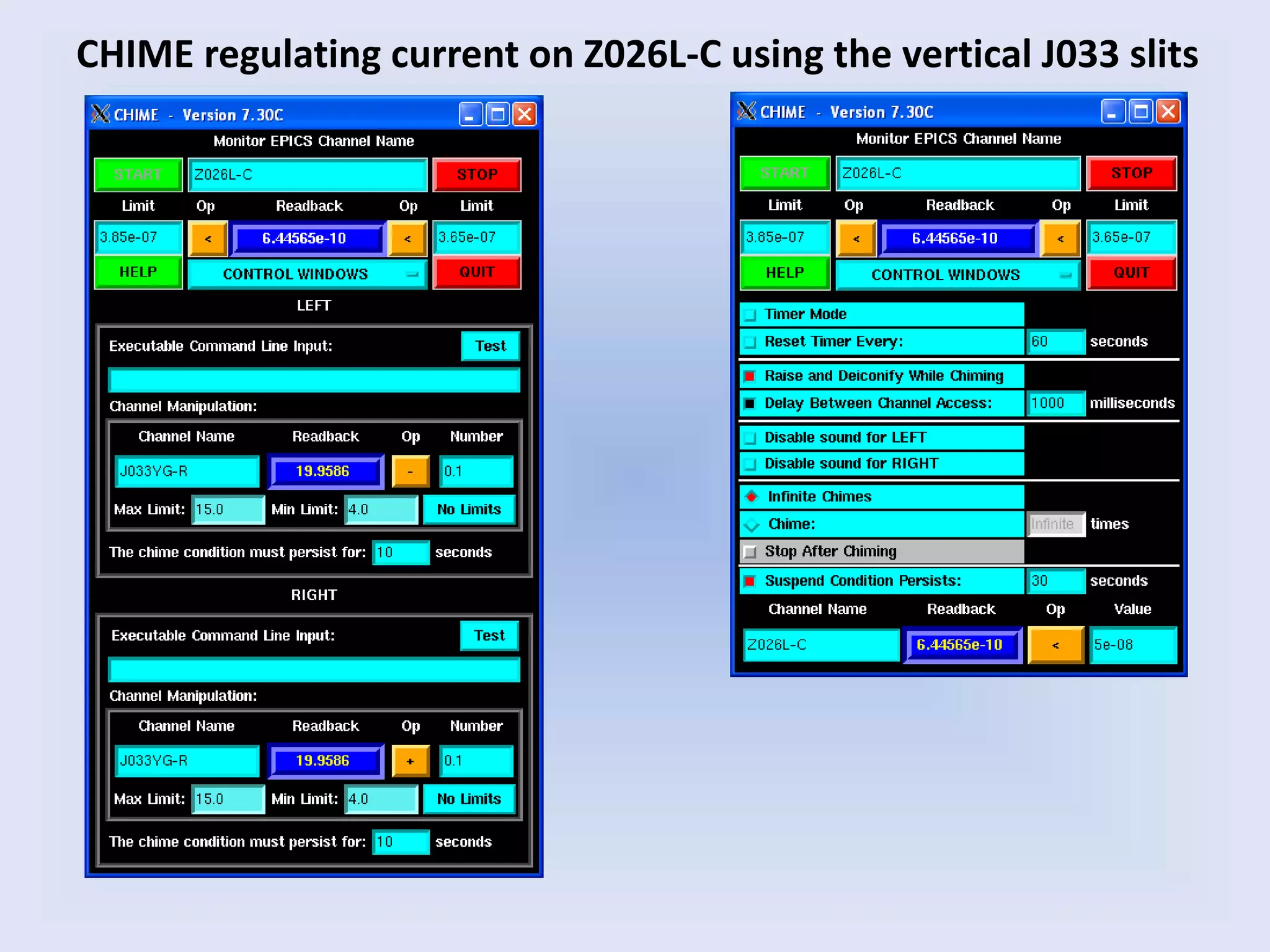
CHIME regulating current on Z026L-C using the vertical J033 slits
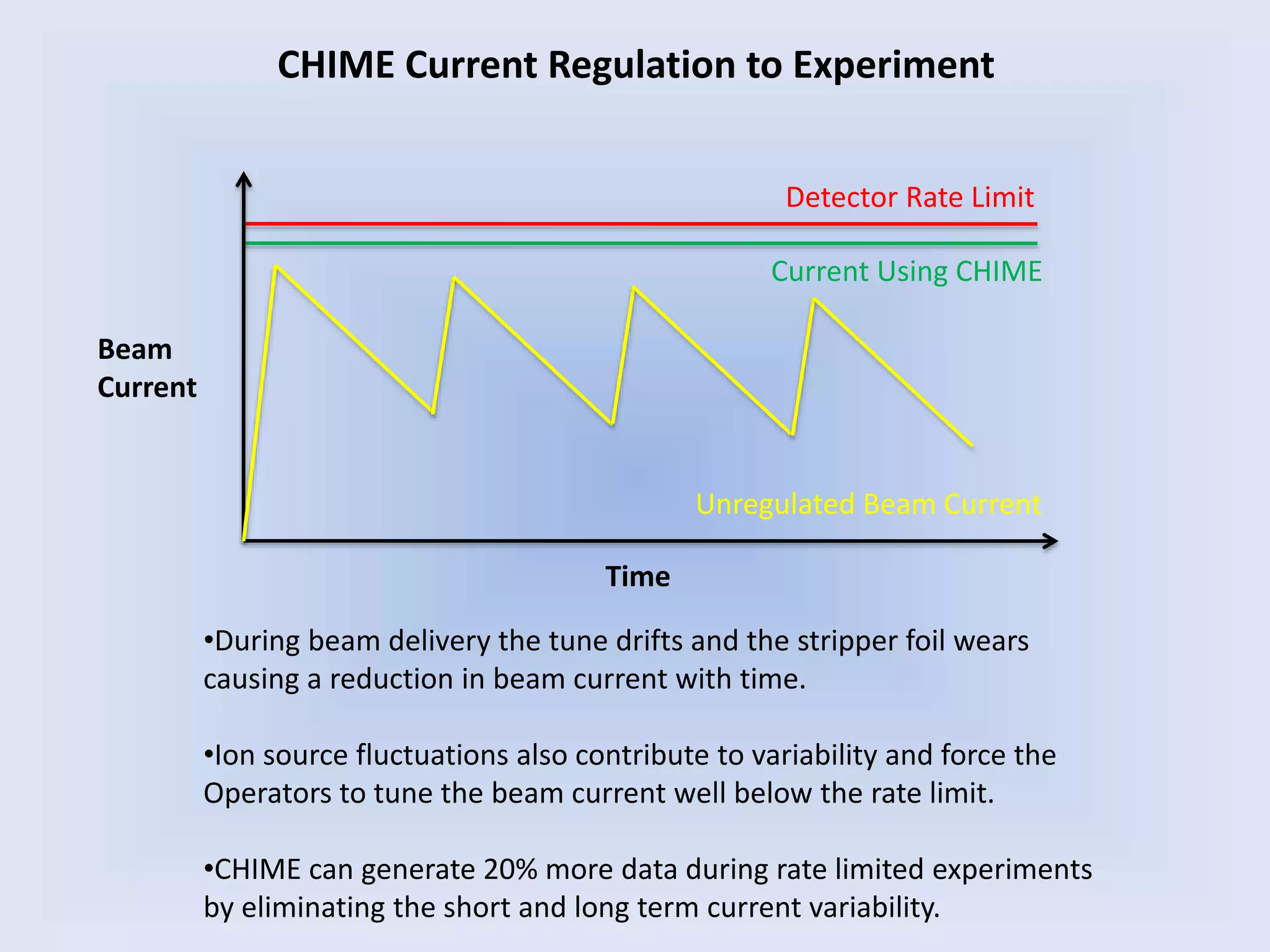
CHIME Current Regulation to Experiment
Detector Rate Limit
Beam
Current
Time
Current Using CHIME
Unregulated Beam Current
•During beam delivery the tune drifts and the stripper foil wears
causing a reduction in beam current with time.
•Ion source fluctuations also contribute to variability and force the
Operators to tune the beam current well below the rate limit.
•CHIME can generate 20% more data during rate limited experiments
by eliminating the short and long term current variability.
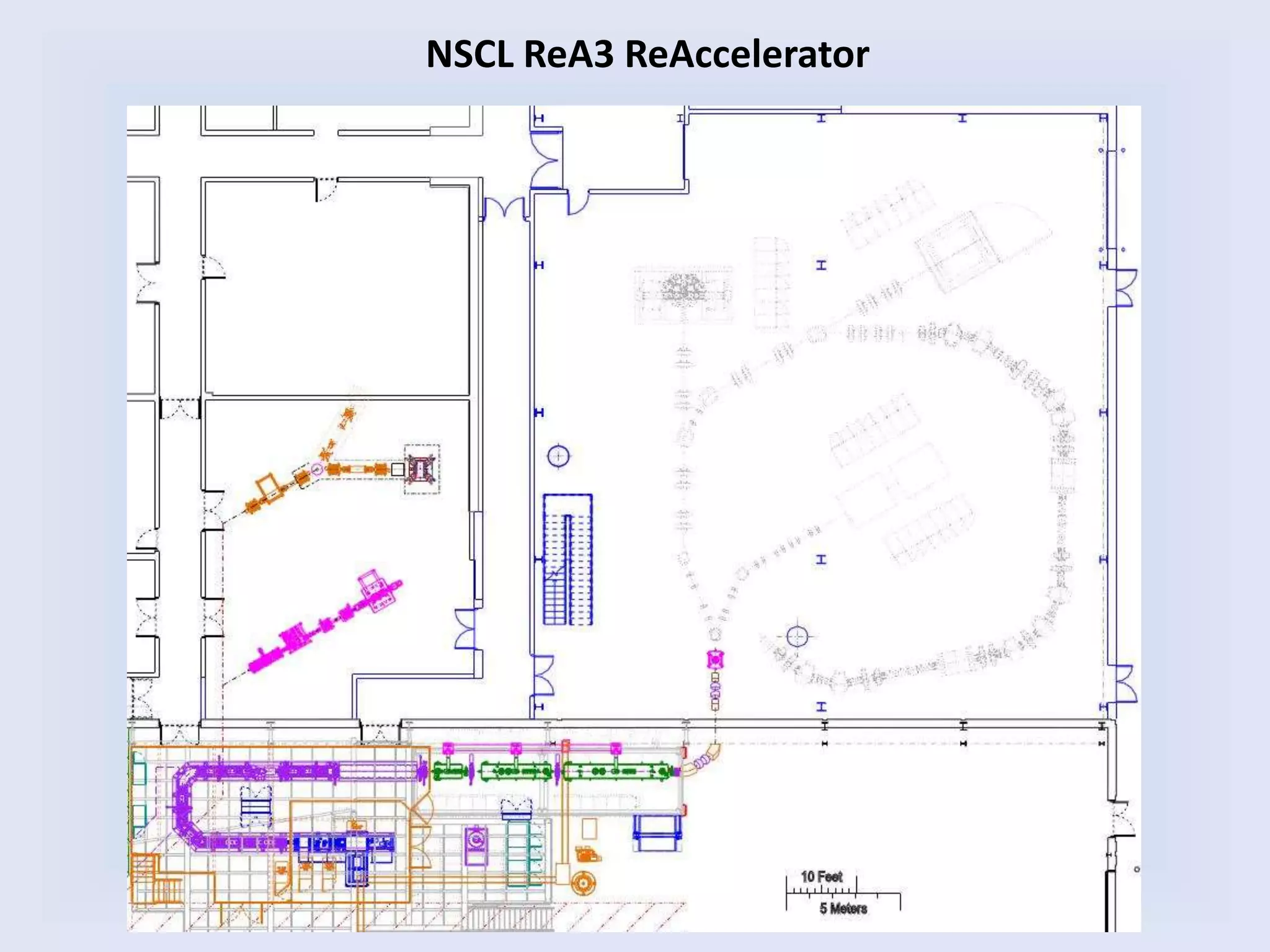
NSCL ReA3 ReAccelerator
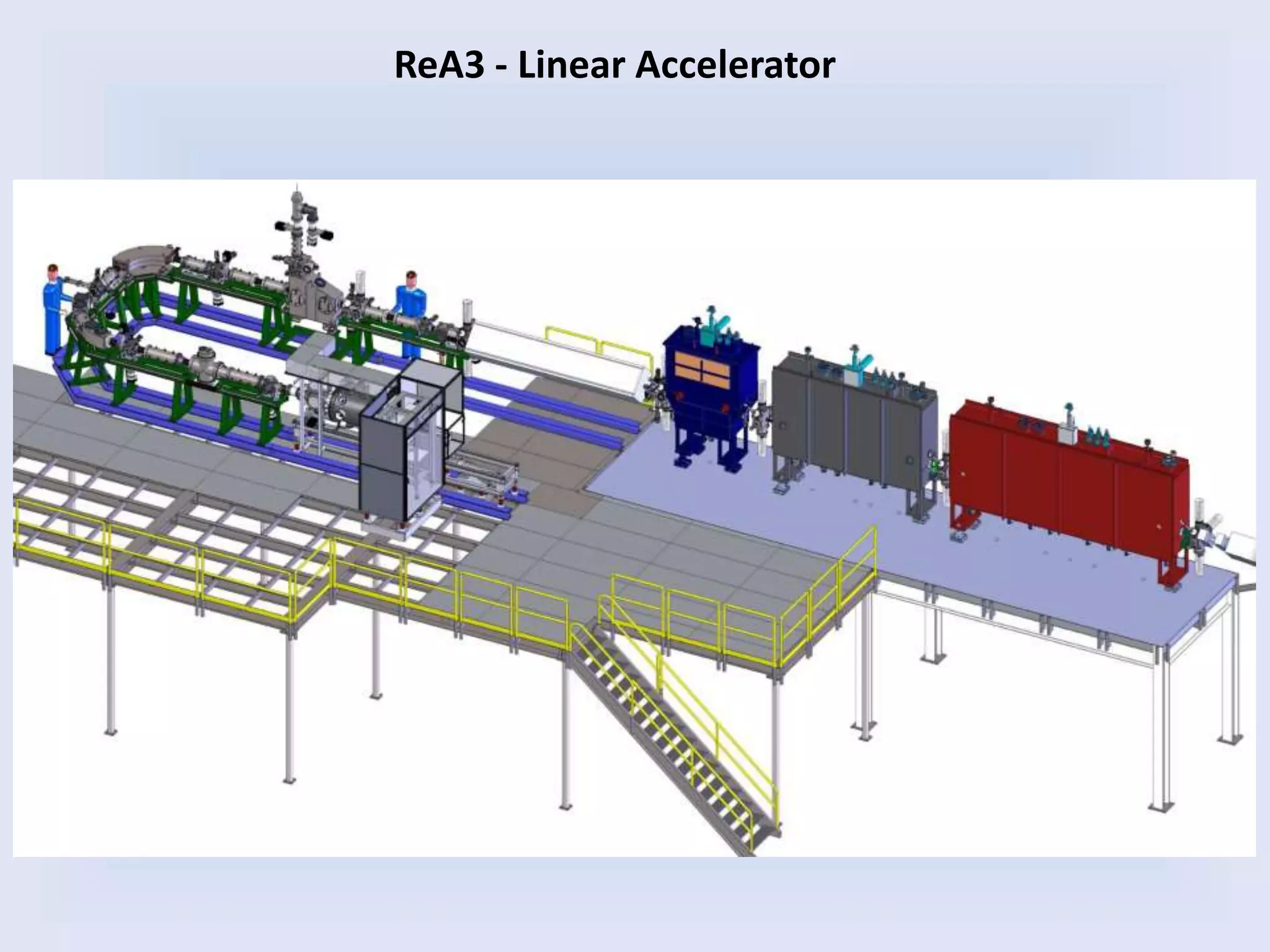
ReA3 - Linear Accelerator
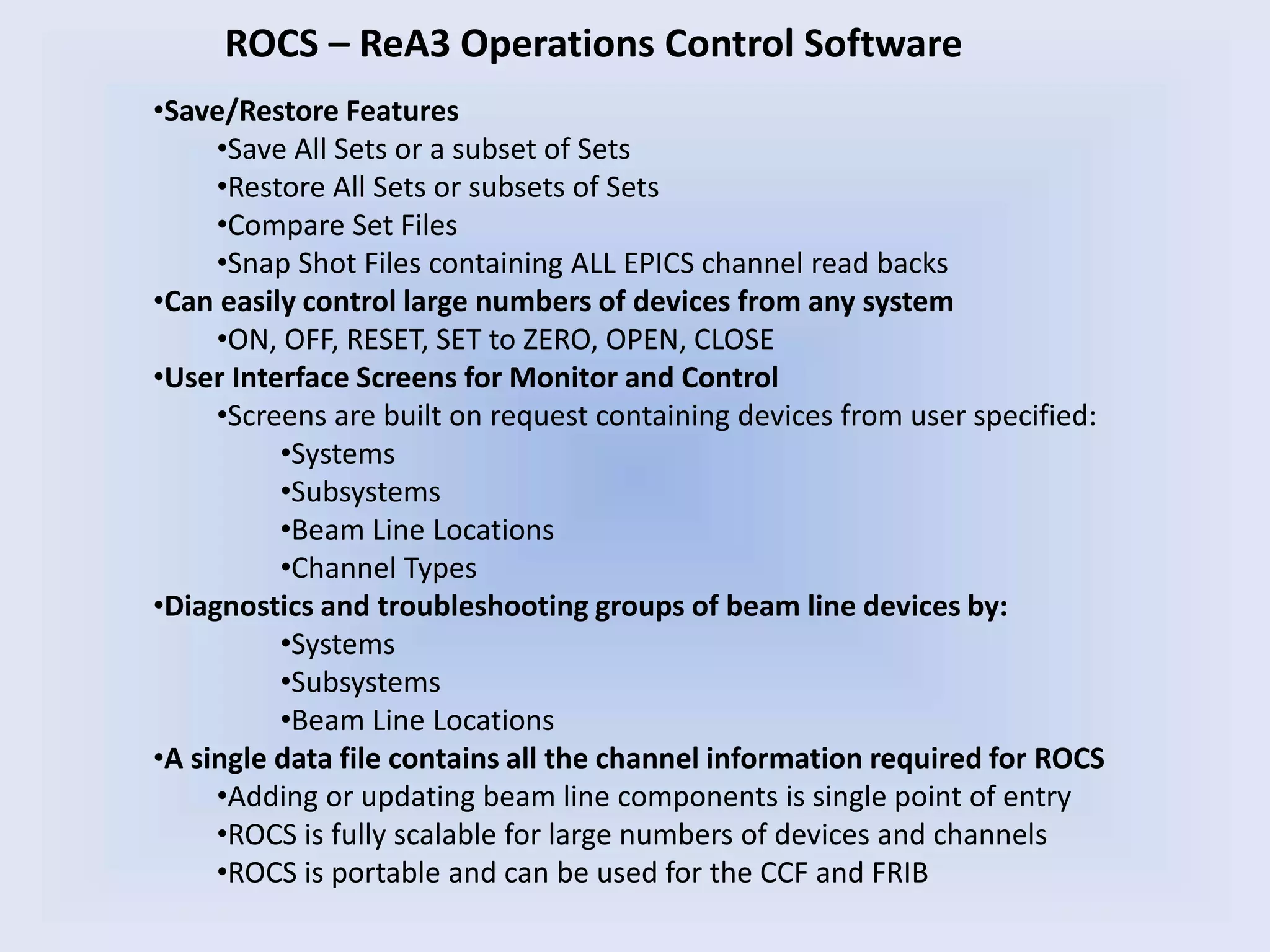
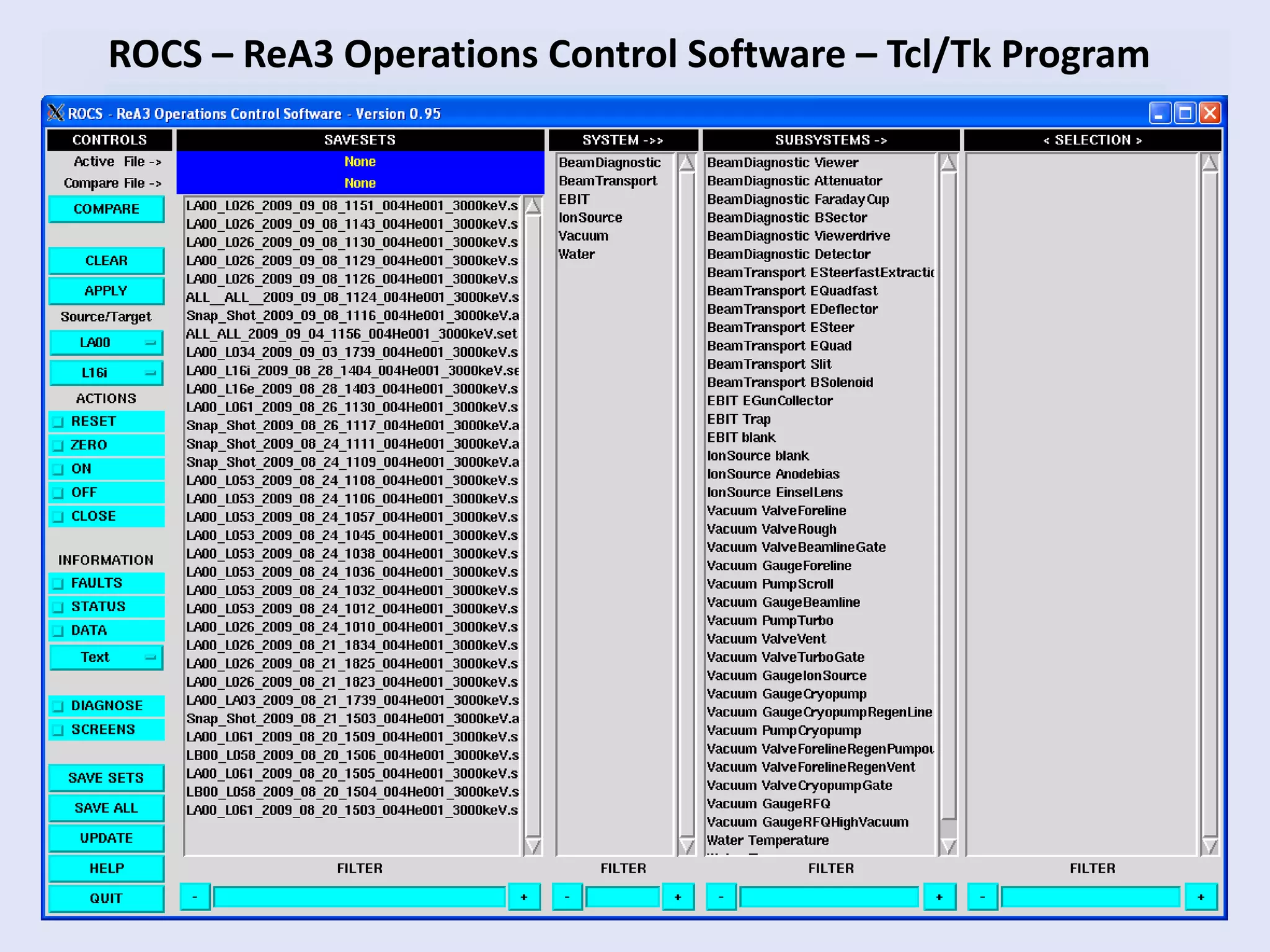
ROCS – ReA3 Operations Control Software
•Save/Restore Features
•Save All Sets or a subset of Sets
•Restore All Sets or subsets of Sets
•Compare Set Files
•Snap Shot Files containing ALL EPICS channel read backs
•Can easily control large numbers of devices from any system
•ON, OFF, RESET, SET to ZERO, OPEN, CLOSE
•User Interface Screens for Monitor and Control
•Screens are built on request containing devices from user specified:
•Systems
•Subsystems
•Beam Line Locations
•Channel Types
•Diagnostics and troubleshooting groups of beam line devices by:
•Systems
•Subsystems
•Beam Line Locations
•A single data file contains all the channel information required for ROCS
•Adding or updating beam line components is single point of entry
•ROCS is fully scalable for large numbers of devices and channels
•ROCS is portable and can be used for the CCF and FRIB
ROCS – ReA3 Operations Control Software – Tcl/Tk Program
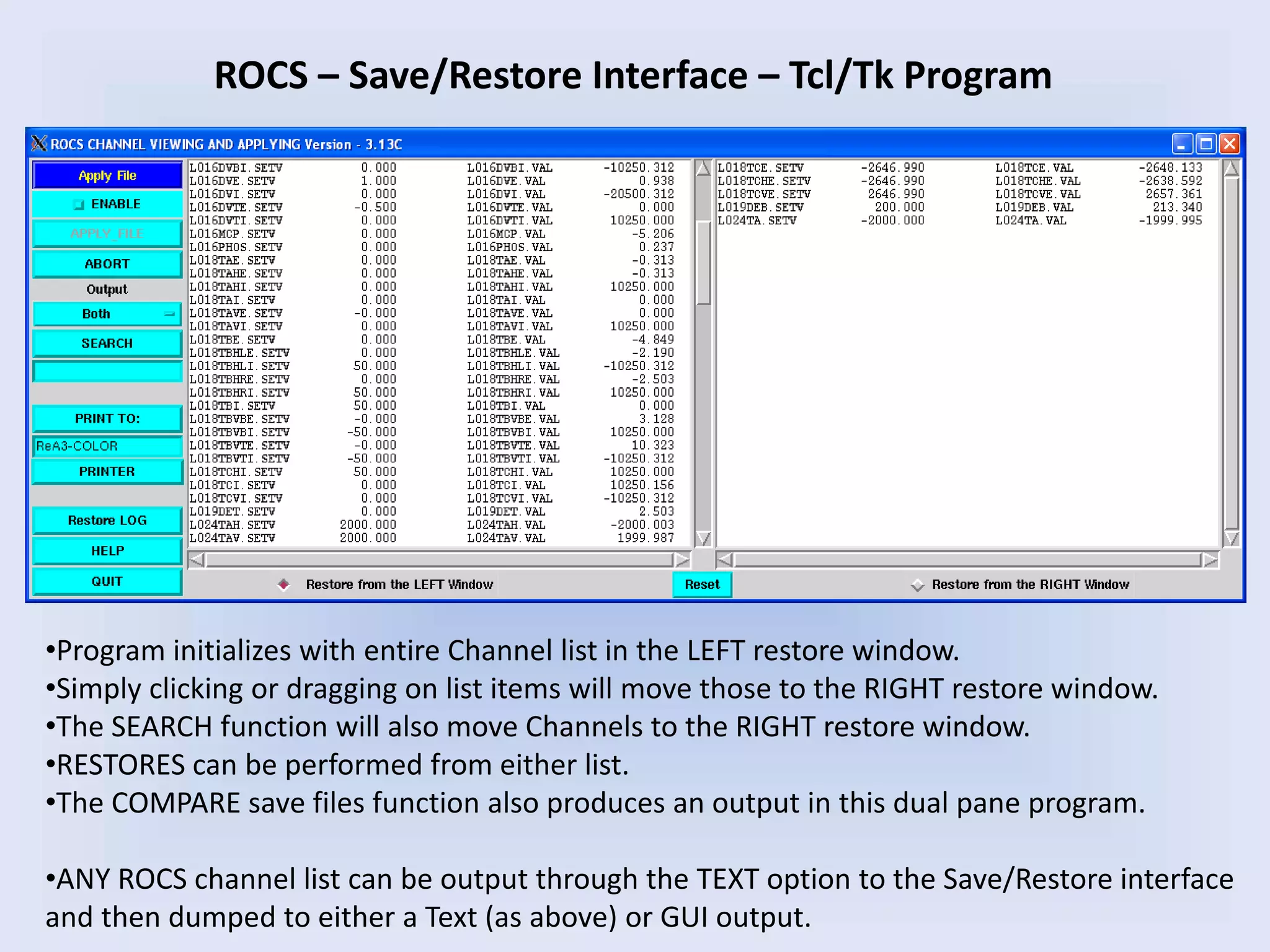
ROCS – Save/Restore Interface – Tcl/Tk Program
•Program initializes with entire Channel list in the LEFT restore window.
•Simply clicking or dragging on list items will move those to the RIGHT restore window.
•The SEARCH function will also move Channels to the RIGHT restore window.
•RESTORES can be performed from either list.
•The COMPARE save files function also produces an output in this dual pane program.
•ANY ROCS channel list can be output through the TEXT option to the Save/Restore interface
and then dumped to either a Text (as above) or GUI output.
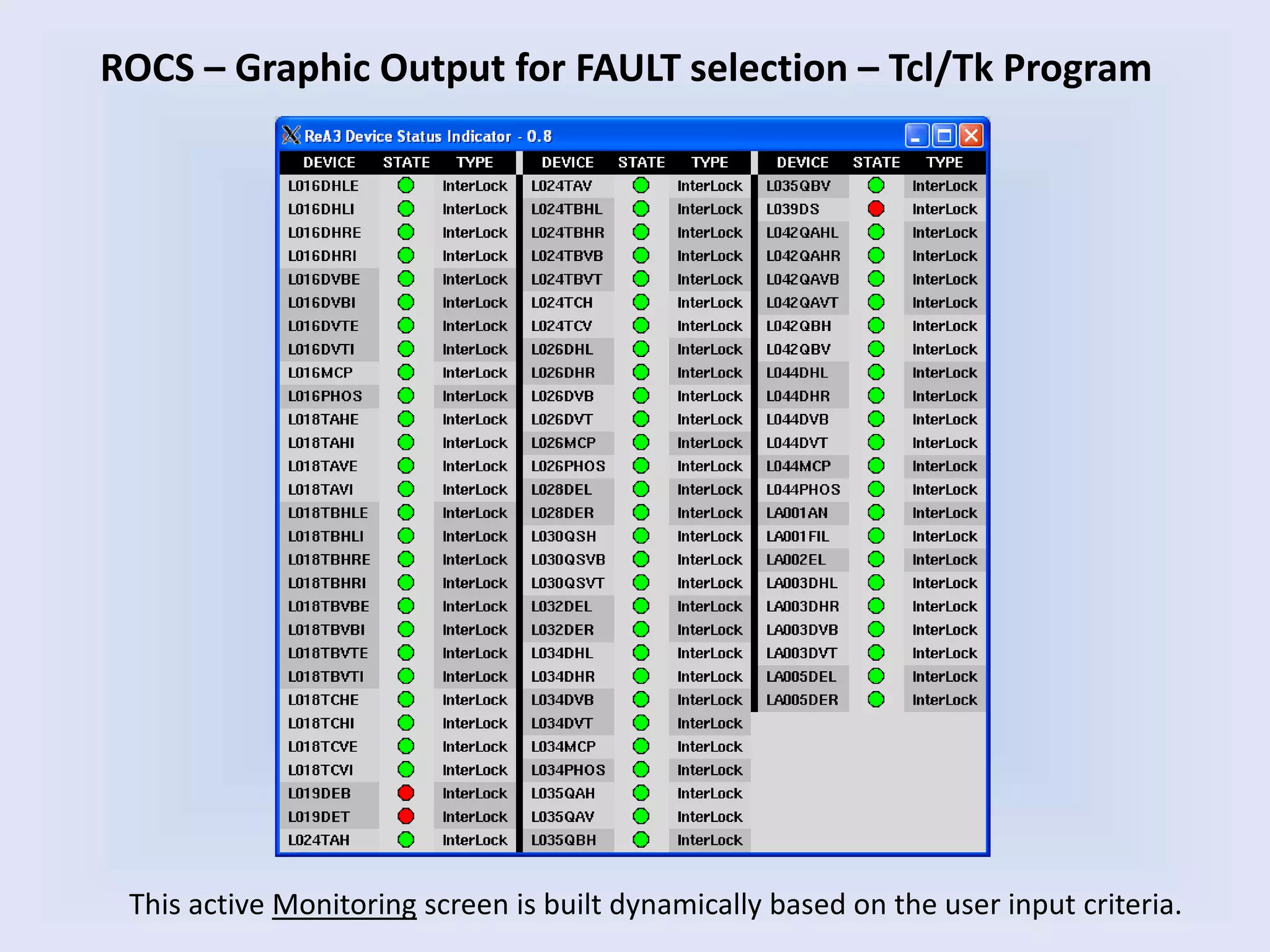
ROCS – Graphic Output for FAULT selection – Tcl/Tk Program
This active Monitoring screen is built dynamically based on the user input criteria.
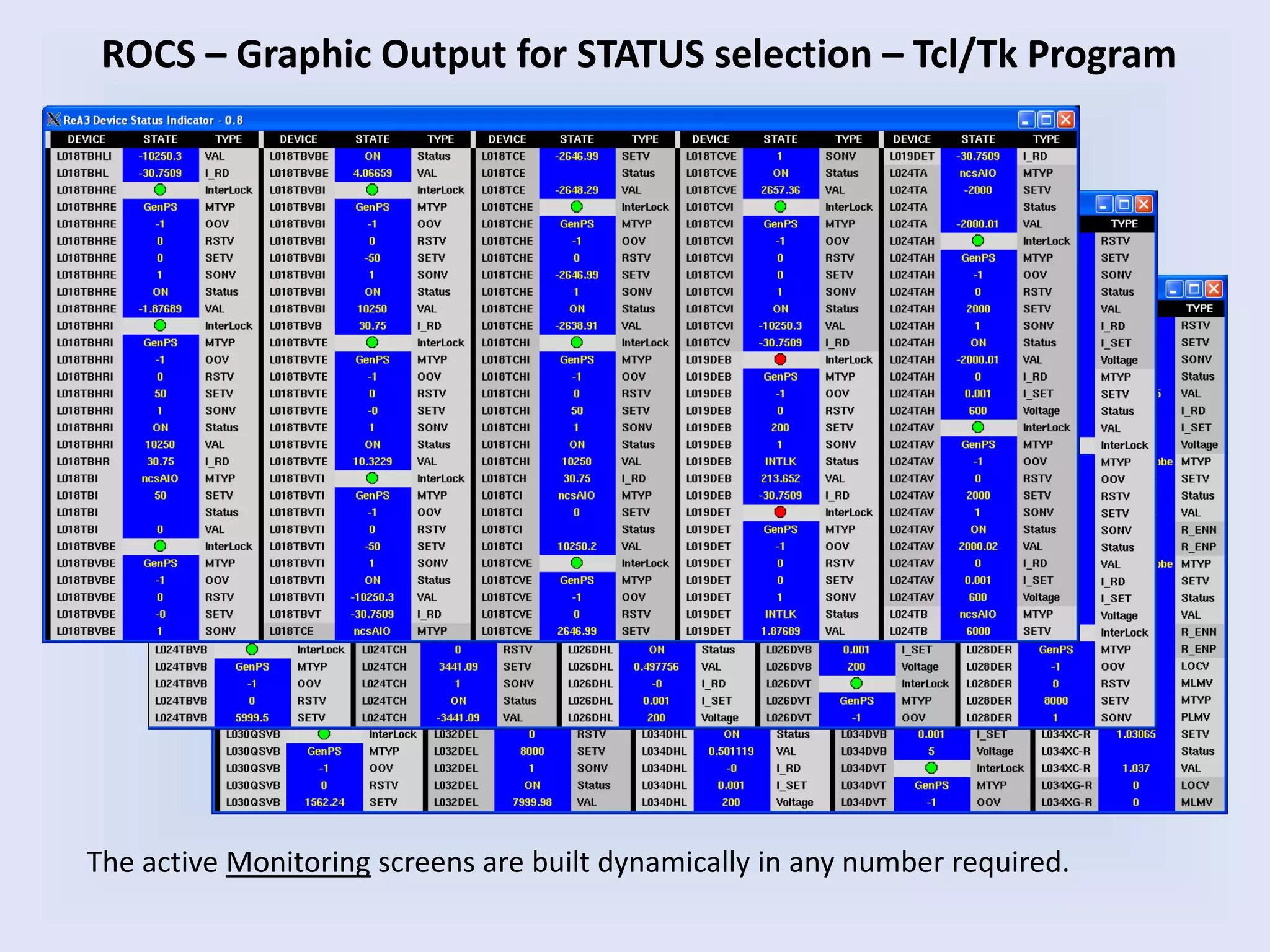
ROCS – Graphic Output for STATUS selection – Tcl/Tk Program
The active Monitoring screens are built dynamically in any number required.
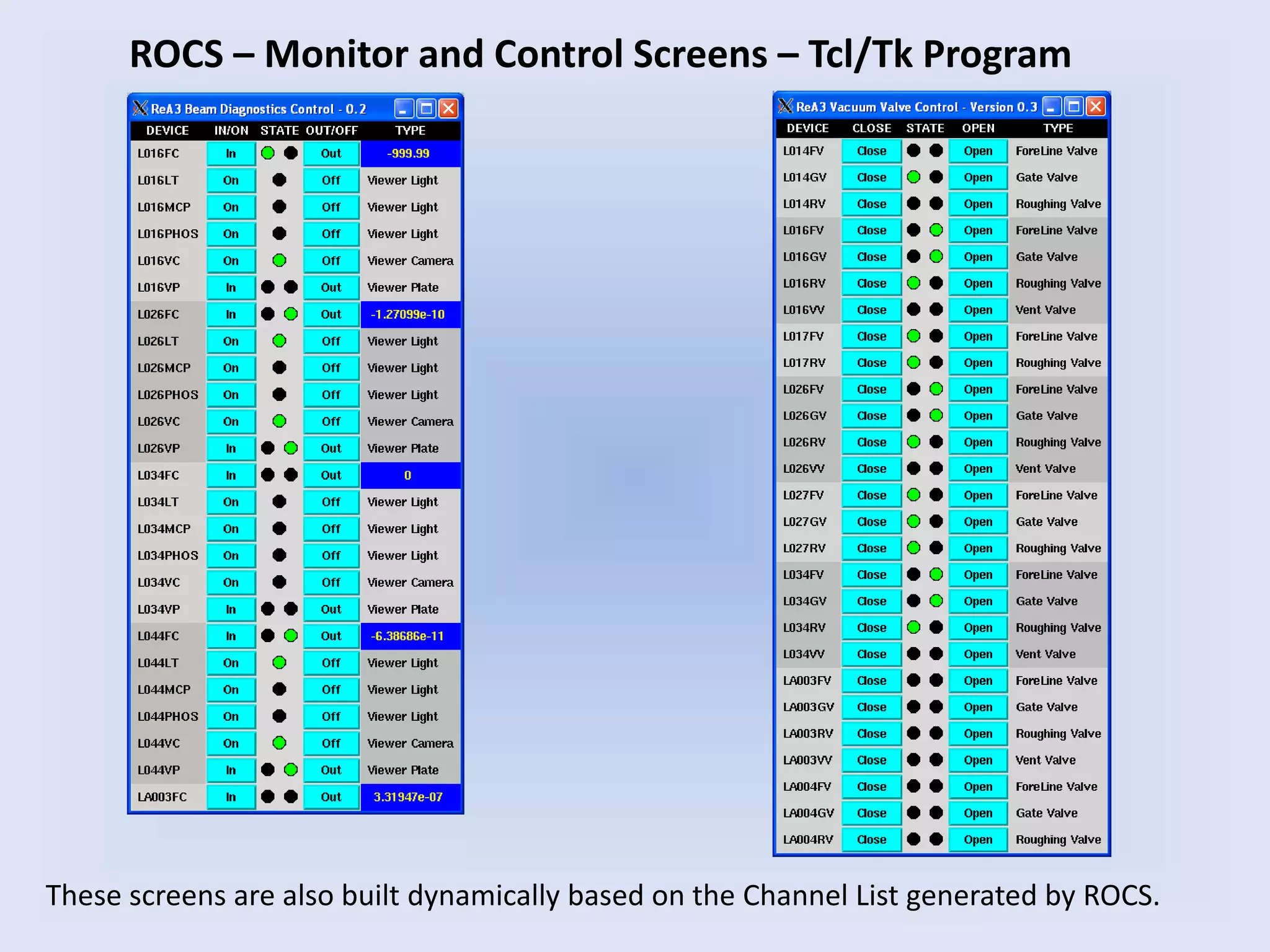
ROCS – Monitor and Control Screens – Tcl/Tk Program
These screens are also built dynamically based on the Channel List generated by ROCS.
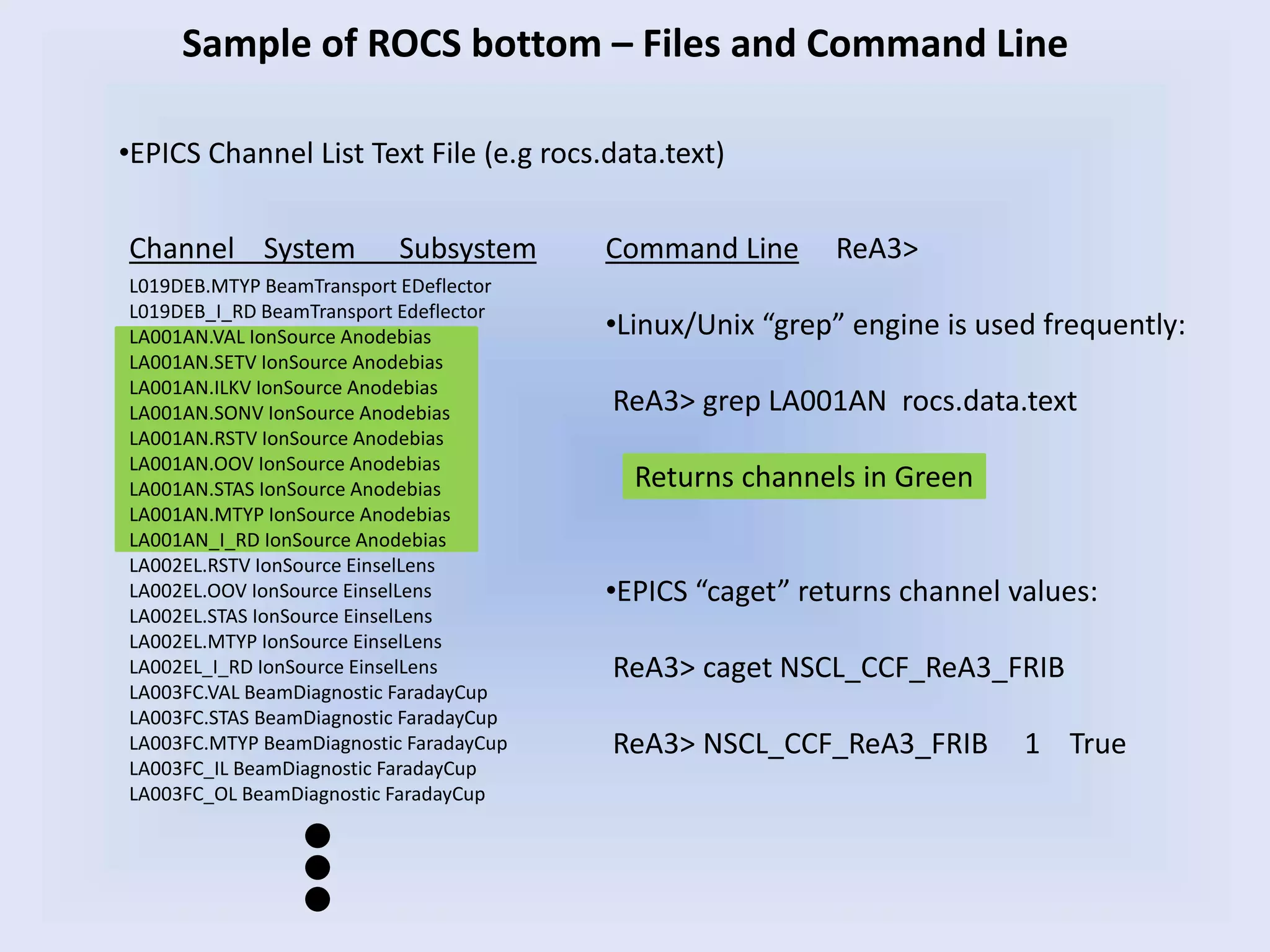
Command Line ReA3>
•Linux/Unix “grep” engine is used frequently:
ReA3> grep LA001AN rocs.data.text
Returns channels in Green
•EPICS “caget” returns channel values:
ReA3> caget NSCL_CCF_ReA3_FRIB
ReA3> NSCL_CCF_ReA3_FRIB 1 True
Sample of ROCS bottom – Files and Command Line
Channel System Subsystem
L019DEB.MTYP BeamTransport EDeflector
L019DEB_I_RD BeamTransport Edeflector
LA001AN.VAL IonSource Anodebias
LA001AN.SETV IonSource Anodebias
LA001AN.ILKV IonSource Anodebias
LA001AN.SONV IonSource Anodebias
LA001AN.RSTV IonSource Anodebias
LA001AN.OOV IonSource Anodebias
LA001AN.STAS IonSource Anodebias
LA001AN.MTYP IonSource Anodebias
LA001AN_I_RD IonSource Anodebias
LA002EL.RSTV IonSource EinselLens
LA002EL.OOV IonSource EinselLens
LA002EL.STAS IonSource EinselLens
LA002EL.MTYP IonSource EinselLens
LA002EL_I_RD IonSource EinselLens
LA003FC.VAL BeamDiagnostic FaradayCup
LA003FC.STAS BeamDiagnostic FaradayCup
LA003FC.MTYP BeamDiagnostic FaradayCup
LA003FC_IL BeamDiagnostic FaradayCup
LA003FC_OL BeamDiagnostic FaradayCup
•EPICS Channel List Text File (e.g rocs.data.text)
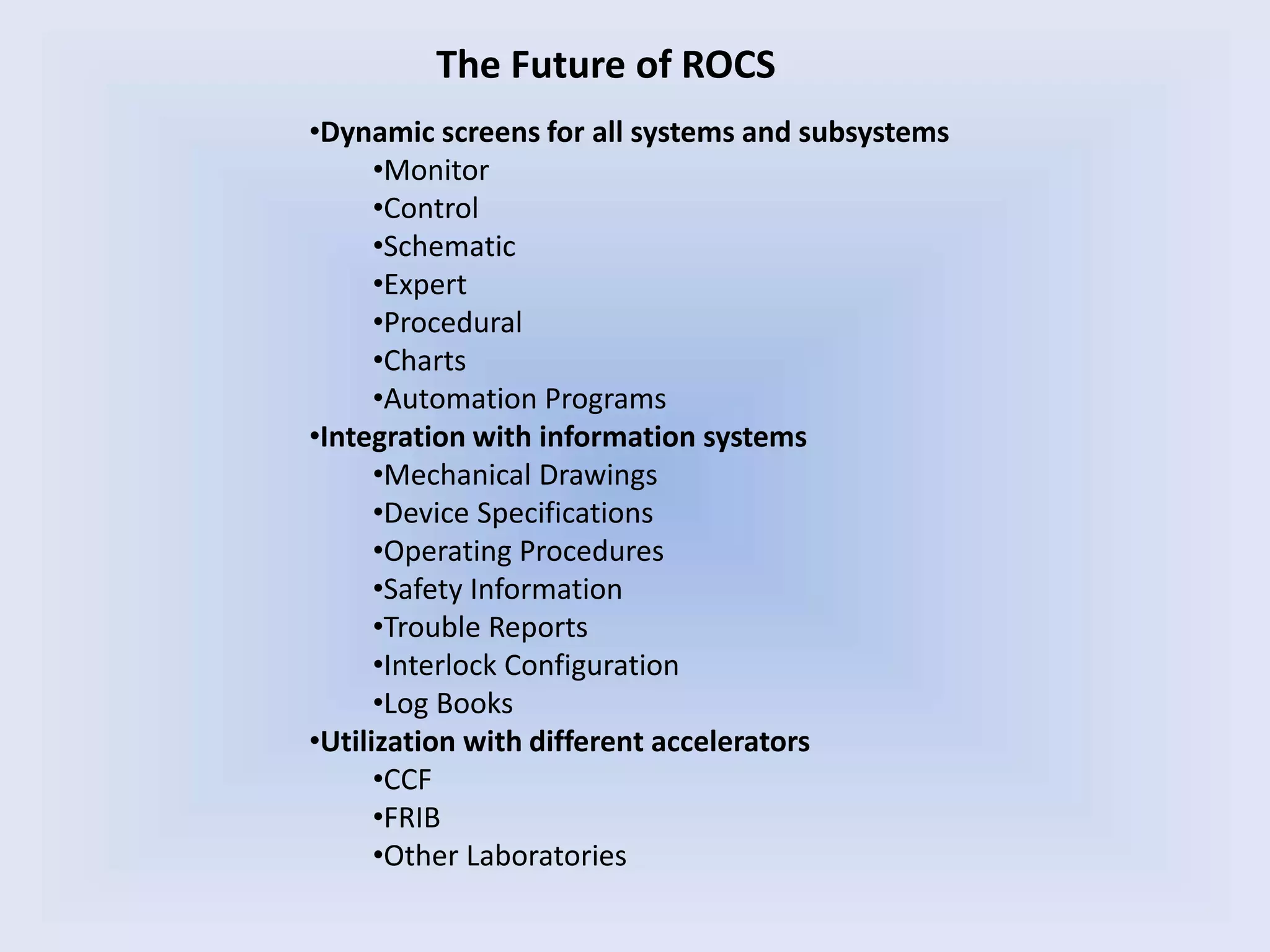
The Future of ROCS
•Dynamic screens for all systems and subsystems
•Monitor
•Control
•Schematic
•Expert
•Procedural
•Charts
•Automation Programs
•Integration with information systems
•Mechanical Drawings
•Device Specifications
•Operating Procedures
•Safety Information
•Trouble Reports
•Interlock Configuration
•Log Books
•Utilization with different accelerators
•CCF
•FRIB
•Other Laboratories
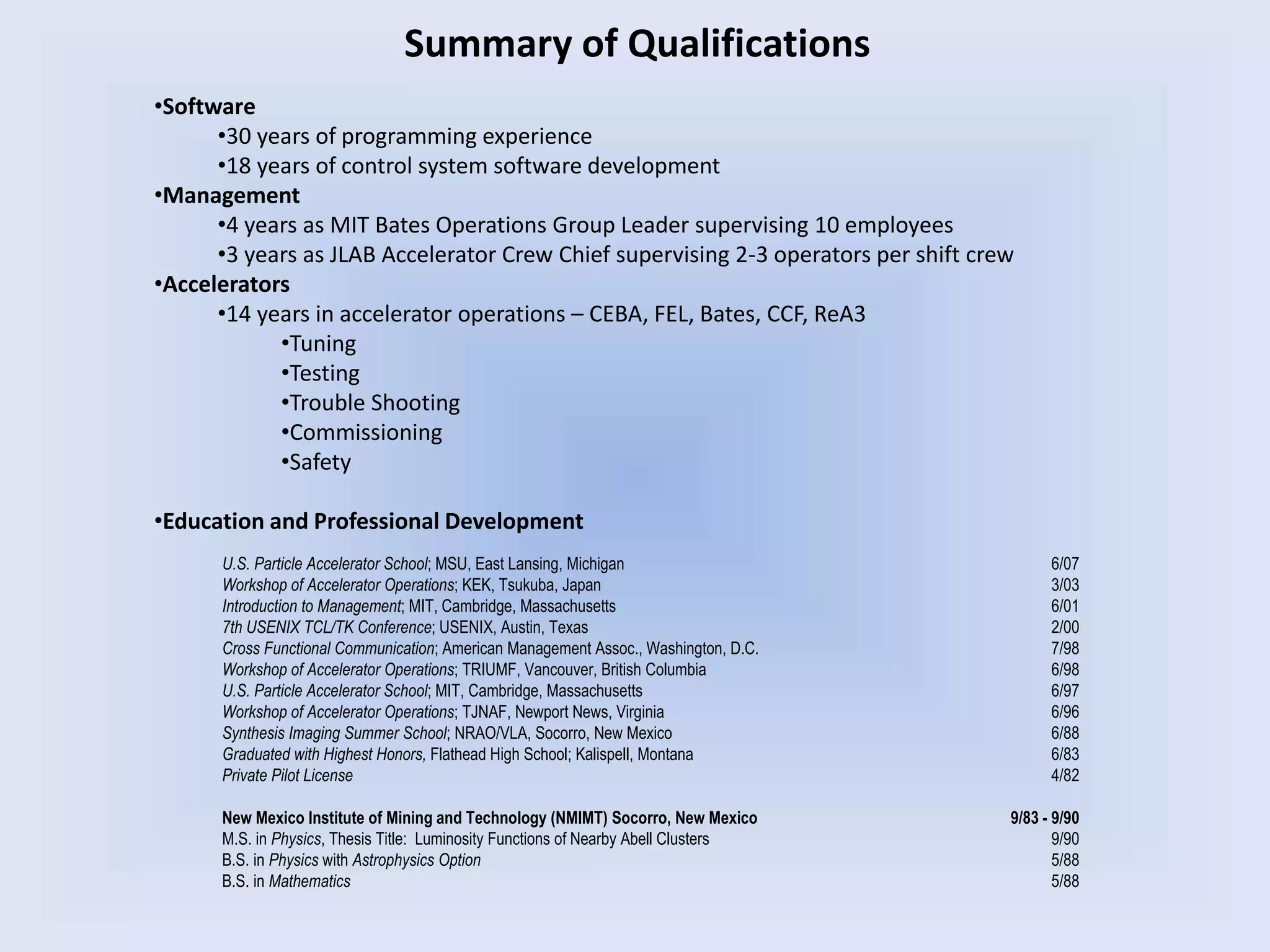
Summary of Qualifications
•Software
•30 years of programming experience
•18 years of control system software development
•Management
•4 years as MIT Bates Operations Group Leader supervising 10 employees
•3 years as JLAB Accelerator Crew Chief supervising 2-3 operators per shift crew
•Accelerators
•14 years in accelerator operations – CEBA, FEL, Bates, CCF, ReA3
•Tuning
•Testing
•Trouble Shooting
•Commissioning
•Safety
•Education and Professional Development
U.S. Particle Accelerator School; MSU, East Lansing, Michigan 6/07
Workshop of Accelerator Operations; KEK, Tsukuba, Japan 3/03
Introduction to Management; MIT, Cambridge, Massachusetts 6/01
7th USENIX TCL/TK Conference; USENIX, Austin, Texas 2/00
Cross Functional Communication; American Management Assoc., Washington, D.C. 7/98
Workshop of Accelerator Operations; TRIUMF, Vancouver, British Columbia 6/98
U.S. Particle Accelerator School; MIT, Cambridge, Massachusetts 6/97
Workshop of Accelerator Operations; TJNAF, Newport News, Virginia 6/96
Synthesis Imaging Summer School; NRAO/VLA, Socorro, New Mexico 6/88
Graduated with Highest Honors, Flathead High School; Kalispell, Montana 6/83
Private Pilot License 4/82
New Mexico Institute of Mining and Technology (NMIMT) Socorro, New Mexico 9/83 - 9/90
M.S. in Physics, Thesis Title: Luminosity Functions of Nearby Abell Clusters 9/90
B.S. in Physics with Astrophysics Option 5/88
B.S. in Mathematics 5/88

HighLevelSoftwareAppsforAccelerators_ShannonKrause_2009_09_30

  • 1.
    High Level SoftwareApplications for Machine Control Presented by Shannon Krause September 30, 2009
  • 2.
    Outline of Experiencewith Control System Software Development • Very Large Array Radio Astronomy Observatory – 1991 to 1995 • Thomas Jefferson National Accelerator Facility – 1995 - 2001 • MIT Bates Linear Accelerator Center – 2001 - 2005 • NSCL Coupled Cyclotron Facility – 2005 - Present • NSCL’s ReA3 and FRIB – The Future
  • 3.
    Concepts in HighLevel Software Applications •High Level Apps are the point of contact between the human and machine. •Who uses them? •Operators •Engineers •Technicians •Machine Physicists •Experimenters •Controls People •The users don’t care about low level apps as long as the high level apps are fast, reliable, intuitive to use, and effective at producing the desired result. •The USERS, not the hardware, are the most important consideration when designing the control system software. •Therefore, in the best control systems, the requirements of the High Level Software Applications drive the low level software development.
  • 4.
    Radio Image of ActiveGalaxy 3C219 VLA in D-Array Configuration National Radio Astronomy Observatory’s – Very Large Array
  • 5.
    • 27 fullysteerable Radio Telescopes (antennae) on three array arms • Frequency Range 327 MHz – 40 GHz with cryo-cooled receivers • RF wave guides transmit data and commands synchronously • 108 Channel Parallel Processor (Correllator) for Delays and inverse FFT • MODCOMP Control Computers • Max32 Operating System • User Interface – VT100 “Green Screen” terminals – Hexadecimal Thumb Wheel MUX reader – Command Line National Radio Astronomy Observatory’s – Very Large Array
  • 6.
    Thomas Jefferson NationalAccelerator Facility (JLAB) • CEBA - Continuous Electron Beam Accelerator • Three, laser driven photo-injectors producing polarized electrons at 150 kV • 6 GeV CW electron beams up to 220 uA with 80% polarization • 5 Pass Reciculator and bunch to bunch RF separator system • Two SRF standing wave linacs of 20 cryomodules each, operating at 1.497 GHz • Simultaneous beam delivery to 3 End Stations, Halls A, B, and C •Each Hall receives a different energy •Each Hall has a different current •Each Hall sees a 499 MHz pulse rate • FEL – Free Electron Laser • One laser driven photo-injector operating at 350 kV and several mAmps • 45 MeV CW electron beam • 1.7 kiloWatt IR laser in the 1-14 um range • One cryomodule • Energy recovery linac • 6 target areas supporting multiple simultaneous users through beam splitters
  • 7.
  • 8.
    CEBA North Linac CEBAArcs 2,4,6,8 Jefferson Laboratory
  • 9.
    • EPICS runningon VME systems using VxWorks – CAMAC crates underneath for RF controls – PLC systems for radiation safety and the Personnel Protection System • About 100 IOCs counting CEBA, the End Stations, and FEL • Control room uses HP workstation computers – running HP-UX VUE Xwindows interface on UNIX operating system • High Level Applications – Command Line – MEDM (Motif Editor Display Manager) display screens – Motif API C/C++ based programs – Tcl/Tk Jefferson Lab Control System
  • 10.
    Jefferson Lab SoftwareStandards •GUI Screen Colors •Screen back ground colors are LightGrey •Labels are Black on LightGrey •Black on Cyan are things you can manipulate •Buttons •Entry Fields •Check Boxes •Alarm Conditions are Green, Yellow, and Red •Some artistic license allowed for flexibility •General Software Requirements •Version Control – cvs and other methods •Internal Headers and Code Comments •Help Files •Operator Training •Benefits •Versioning simplifies rollbacks and notifies users of changes •Internal documentation for maintenance and portability •Help files reinforce training •Standardized GUI interface minimizes application training
  • 11.
    CEBA Beam LossMonitor MEDM Screen
  • 12.
    CEBA Valve ControlMEDM Screen
  • 13.
    CEBA RF/SRF Monitorand Control MEDM Screen
  • 14.
    CEBA Cryogenics SchematicMonitor and Control MEDM Screen
  • 15.
    CEBA Controlled AccessProcedure MEDM Screen
  • 16.
    CEBA North LinacSRF Vacuum Expert, Monitor MEDM Screen
  • 17.
    CEBA Operations Expert,Monitor and Control MEDM Screen
  • 18.
    Summary of MEDMScreens • Screen Types: – Monitor – Control – Monitor and Control – Schematic – Procedural – Expert • Limitations – Screens have no logic. – All logic is on the IOC so a reboot is required for changes – Very time consuming to create and maintain. – Prone to implementation and reconfiguration errors
  • 19.
    Why use Tcl/Tk? #include<Xm/Xm.h> #include <Xm/PushB.h> void pushedButton (Widget , XtPointer , XmPushButtonCallbackStruct *); main(int argc, char **argv) { Widget topWidget, button; XtAppContext app; topWidget = XtVaAppInitialize (&app, "Push", NULL, 0, &argc, argv, NULL, NULL); button = XmCreatePushButton(topWidget, "Hello World! Push me!", NULL, 0); XtManageChild(button); XtAddCallback(button, XmNactivateCallback, pushedButton, NULL); XtRealizeWidget(topWidget); XtAppMainLoop(app); } void pushedButton (Widget w, XtPointer client_data, XmPushButtonCallbackStruct *cbs) { printf("Hello to you too!n"); } Motif Code Tcl/Tk Code #!/usr/bin/wish wm title . "hellowolrd" button .hello -text " Hello World! Push Me! " -bg lightblue -fg darkblue -height 5 -command { puts "Hello to you too!" } pack .hello Note the error in the Window title: “hellowolrd” If you try to debug both programs you find that the Motif example does not have enough code to create the widget presented. The “hello world” program in Motif and in Tcl/Tk
  • 20.
    JLAB “Crew ChiefStamp” Tcl/Tk Program Associated Electronic Log Book Entry •All Entry fields are automatically filled in using information from the Short Term Schedule, and Shift Schedule, but can be modified as required. •Check boxes must be applied by the Crew Chief.
  • 21.
    DTLite CEBA LogBook Entry/Trouble Report Interface Tcl/Tk Program •Window configures for a simple log entry or Down Time Log Entry as in this example. •Down Time log entry is also a trouble report entry. •Writes to multiple log books as selected. •Emails users and user groups as an option. •Grab Window includes screen shots in entry. •Spell Checker included.
  • 22.
    JLAB’s “BOOM” –Beam Operations Objective Monitor • Satisfies DOE beam delivery monitoring requirements • Monitors simultaneous beam delivery status in all 3 Endstations • Determines experimental beam state: UP, DOWN, TUNE, OFF • Redundant system monitoring to insure correct status • Manual over ride for monitor status • Counts applicable FSD (Fast Shut Down) events • Automatically reads beam objectives from Short Term Schedule • Automatically reads shift staff from the Crew Chief Stamp • Logs all events to a database (cmlog) • Generates end of shift form for Crew Chief to verify/modify times • Logs end of shift information to Log Book and database • Generates availability graphs: daily, weekly, monthly • Emails interested parties the end of shift reports
  • 23.
    BOOM – BeamOperations Objective Monitor – Tcl/Tk Program
  • 24.
    JLAB “BOOM Buddy”MEDM screen BOOM Buddy configures EPICS channels that tell BOOM: which endstation receives, which electron beam produced by which laser, from which chopper slit. It also includes endstation status indicators. Machine Configuration Input for BOOM
  • 25.
    Associated log bookentry and database information. BOOM – End of shift Crew Chief Validation Form Tcl/Tk Program
  • 26.
    BOOM Input/Output BOOM Crew Chief StampIn Program Deputy Shift Plan BOOM Buddy Autoelog Entry Beam Availability Graphs State change Data to cmlog Hourly Beam Timers to Database Crew Chief Shift Summary Auto emails to interested parties EPICS Channels for System Devices EPICS Status Indicators DTLite Elog Entry Interface
  • 27.
    MAX AMP andMAX JUICE Tcl/Tk Programs •Max Amp is a Beam Current Limiting Software Interlock •Turns off the electron source when current limit is exceeded •One program per beam current measuring device •Audible and Visual Warnings •Event Logging •Max Juice is the second generation soft interlock •Controls input to Max Amp •Limits trip points based on end station targets •Limits trip points based on 800 kW beam operating power envelope as per DOE •Recordss beam delivered in Coulombs, kiloWatt-hours, and number of electrons. •Automatically logs beam delivered at the end of every shift in the log book and a database
  • 28.
    “Cob Sniper” ProcessMonitor and Control Tcl/Tk Program Introduces the significant concept of LIST BUILDING for High Level Applications
  • 29.
    JLAB “Hyst Area”Magnet Cycling Tcl/Tk Program Builds magnet lists from master database for cycling by Area, IOC, or magnet control rack.
  • 30.
    JLAB Code GeneratedMagnet Monitor and Control MEDM Screen Uses same database as Hyst Area
  • 31.
    Massachusetts Institute ofTechnology William H. Bates Linear Accelerator Center •1 GeV electron accelerator, 600 Hz maximum pulse rate •2.5 GHz warm RF traveling wave linac •Polarized Photo Injector, 4 mA peak current, 80% polarization •Single pass recirculator, storage ring, and three target areas
  • 32.
    Linac Recirculator Bate’s Bend andInjector MIT Bates Linear Accelerator Center
  • 33.
    BLAST – BatesLarge Acceptance Spectrometer Toroid
  • 34.
    • Legacy HardwareControls – Continuous upgrade to EPICS controls for most accelerator systems – All analog radiation safety system with no upgrade path • EPICS running on VME systems using VxWorks – BitBus for magnet control – PLC systems for LCW regulation • About 20 IOCs including the BLAST experiment • Control room uses PC computers – running an GNU Xwindows interface on a LINUX operating system • High Level Applications – Command Line – MEDM (Motif Editor Display Manager) display screens – Motif API C/C++ based programs – Tcl/Tk MIT Bates Control System
  • 35.
    MIT Bates IOCReboot Tcl/Tk Program •Problems: •Substantial EPICS software development cause IOCs to frequently hang and crash •Frequent power failures and glitches cause IOCs to hang and crash. •Facility is fairly large so a manual hard boot is time consuming. •VxWorks command line is difficult to use. •Multiple failure modes make no single reboot solution possible. •Solution: •IOC reboot program uses the “expect” package to ssh into the IOC, determine the failure mode, and use the appropriate VxWorks reboot command sequence to restore operation.
  • 36.
    ALARMS and AlarmLimits READ BACK TIME *.HIHI *.HIGH *.LOW *.LOLO •For most devices EPICS has four alarm channels: *.HIHI, *.HIGH, *.LOW, *.LOLO •This method is OK for systems such as LCW temperatures/pressures
  • 37.
    MIT Bates EPICSAlarm Handlers This software was not in use when I arrived at MIT Bates
  • 38.
    Methods of creatingdevice HIGH and LOW Alarm Limits SET POINT READ BACK SET POINT READ BACK SET POINT READ BACK SET POINT READ BACK % BANDFIXED BAND FIXED BAND + % BAND DEAD BAND
  • 39.
    SET POINT READ BACK Alarm hasHIGH and LOW limits computed on SET change Alarm Limit = FIXED BAND + % BAND + DEAD BAND
  • 40.
    JLAB Magnet AlarmLogic Nominal Setpoint/Readback NO Problem Low, Problem? High, Problem? Very High Problem! Very Low, Problem! When Tuning, setpoints and readbacks change dramatically and generate numerous RED severity alarms. YELLOW alarms do not clearly indicate a magnet setpoint/readback problem. Logic Problems RED Alarms get ignored during Tuning and “real problems” can be missed. *.HIHI *.LOLO *.LOW *.HIGH
  • 41.
    MIT Bates MagnetAlarm Logic Nominal Very Low Tune Problem Very High Tune Problem Very High Hardware Problem Alarm Handler is now USEFUL during Tuning! Very Low Hardware Problem Nominal Red for Hardware Faults Yellow for Tune Faults Audible Alarms Silent Alarms *.HIHI *.HIGH *.LOLO *.LOW Cycle Fault Setpoint Change Readback Change Mismatch IADC VADC DC Status
  • 42.
    Bates “Hyst Area”Magnet Control and Save/Restore Tcl/Tk Program Magnet Controls ->
  • 43.
    MIT Bates SouthHall Ring Current Max Fill Limit Prefill Limit Min Fill Limit Fill Time
  • 44.
    Command Function /home/locus/ops/bin/ring_slits_OUT; ‘text file for Slit positions OUT and bump steering caput zid 1; ‘ insert ZID caput MTG:go:max 7; ‘ set max gun rate caput MTG:go:max 0; ‘ set max gun rate, button up caput gun:switch:on 1; ‘ switch gun on sleep 20; ‘ pause 20 seconds caput gun:switch:off 1; ‘ switch gun off caput zid 0; ‘ take ZID out caput ltv8 0; ‘ take LTV 8 out sleep 2; ‘ pause 2 seconds caput MTG:go:min 7; ‘ set gun rate to min caput MTG:go:min 0; ‘ set gun rate to min, button up caput gun:switch:on 1 ‘ switch gun on Begin Ring Fill End Ring Fill Command Function caput gun:switch:off 1; ‘ switch gun off /home/locus/ops/bin/ring_slits_IN; ‘ text file for Slit positions IN date >>/home/locus/ops/log/RingFillLog.txt; ‘ logs the date to file caget ldcct:ma:avg.VAL >> /home/locus/ops/log/RingFillLog.txt; ‘ logs the fill (mA) to file sleep 1; ‘ pause 1 second caput zid 1; ‘ put ZID in Prototyping the Automated Ring Fill Software with CHIME Fill is initiated manually when dumping the stored beam by inserting viewer ltv8. “Begin” CHIME then takes over. Beam runs for 20 sec on ZID (inline dump) which is then removed for filling the ring. When ring current reaches target value of 13.5 mA machine is configured for beam storage by the second “End” CHIME.
  • 45.
    Both Operations andthe Experimenters have an Enable/Disable button and both must be enabled for the software to run. MIT Bates “Automated Ring Fill” MEDM Screen Multiple fault types disable the software automatically.
  • 46.
    MIT Bates AutomatedRing Fill Expert MEDM Screen
  • 47.
    National Superconducting CyclotronLaboratory •CCF - Coupled Cyclotron Facility • Two ECR sources, Artemis-A, and SuSI • Superconducting cyclotrons, K500, and K1200 producing 140 MeV/u Heavy Ion Beams • A1900 Fragment Separator • 25 MHz warm RF systems • 4+ end stations running one experiment at a time A1900
  • 48.
    SUSI – SuperconductingSource for Ions -> <- Superconducting Beam Line Magnets National Superconducting Cyclotron Laboratory
  • 49.
    • EPICS runningon VME systems using VxWorks – PLC’s for most subsystem control and radiation safety system • About 30 IOCs including the experiments • Control room uses PC computers – running WindowsXP operating system • High Level Applications – Command Line(?) – EDM display screens for Barney/Moe – LabView – VB.net – Qt – Tcl/Tk NSCL CCF Control System
  • 50.
    NSCL Operations ColorTemplate for Panel Mate Qt Program
  • 51.
    NSCL CCF “SPRED”Alarm Handler LabView Program
  • 52.
    NSCL CCF “2BAAD”Alarm Handler LabView Program Uses EPICS style two level alarm logic for Read Only devices
  • 53.
    NSCL Deflector ConditioningVB.net Programs Feedback Programs monitor sparking while applying High Voltage and regulated Oxygen Gas Prototype Run Mode
  • 54.
    NSCL “DefCon” DeflectorConditioning VB.net Program User Mode Expert Mode Single Screen expands as viewing mode changes rather then a separate screen for each mode.
  • 55.
    CHIME - GenericFeedback Monitor/Control Tcl/Tk Program Monitors an EPICS Channel Takes action when Right/Left limits are satisfied Basic response is to ALARM with specified tones Control Window selection menu
  • 56.
    CHIME Generic FeedbackMonitor/Control Tcl/Tk Program Executing other programs or writing to EPICS Advanced actions and controls include: Incrementing/Decrementing Channels Operating limits can be applied to controlled device Integration avoids response to noise
  • 57.
    CHIME Generic FeedbackMonitor/Control Tcl/Tk Program Timer Mode replaces EPICS Channel with a clock counting seconds. This is useful for ramping devices or performing periodic actions. Flow control determines how many times CHIME will act when a condition applies An additional channel can be monitored to SUSPEND CHIME for an additional condition. e.g. Suspend actions when beam goes away
  • 58.
    CHIME Generic FeedbackMonitor/Control Tcl/Tk Program Example of monitoring a CRAD device. In this case, the right side condition is satisfied. CHIME configuration files can be saved and restored as needed. Using the command line, CHIME can be started by another program with an active save setup preloaded.
  • 59.
    CHIME regulating currenton Z026L-C using the vertical J033 slits
  • 60.
    CHIME Current Regulationto Experiment Detector Rate Limit Beam Current Time Current Using CHIME Unregulated Beam Current •During beam delivery the tune drifts and the stripper foil wears causing a reduction in beam current with time. •Ion source fluctuations also contribute to variability and force the Operators to tune the beam current well below the rate limit. •CHIME can generate 20% more data during rate limited experiments by eliminating the short and long term current variability.
  • 61.
  • 62.
    ReA3 - LinearAccelerator
  • 63.
    ROCS – ReA3Operations Control Software •Save/Restore Features •Save All Sets or a subset of Sets •Restore All Sets or subsets of Sets •Compare Set Files •Snap Shot Files containing ALL EPICS channel read backs •Can easily control large numbers of devices from any system •ON, OFF, RESET, SET to ZERO, OPEN, CLOSE •User Interface Screens for Monitor and Control •Screens are built on request containing devices from user specified: •Systems •Subsystems •Beam Line Locations •Channel Types •Diagnostics and troubleshooting groups of beam line devices by: •Systems •Subsystems •Beam Line Locations •A single data file contains all the channel information required for ROCS •Adding or updating beam line components is single point of entry •ROCS is fully scalable for large numbers of devices and channels •ROCS is portable and can be used for the CCF and FRIB
  • 64.
    ROCS – ReA3Operations Control Software – Tcl/Tk Program
  • 65.
    ROCS – Save/RestoreInterface – Tcl/Tk Program •Program initializes with entire Channel list in the LEFT restore window. •Simply clicking or dragging on list items will move those to the RIGHT restore window. •The SEARCH function will also move Channels to the RIGHT restore window. •RESTORES can be performed from either list. •The COMPARE save files function also produces an output in this dual pane program. •ANY ROCS channel list can be output through the TEXT option to the Save/Restore interface and then dumped to either a Text (as above) or GUI output.
  • 66.
    ROCS – GraphicOutput for FAULT selection – Tcl/Tk Program This active Monitoring screen is built dynamically based on the user input criteria.
  • 67.
    ROCS – GraphicOutput for STATUS selection – Tcl/Tk Program The active Monitoring screens are built dynamically in any number required.
  • 68.
    ROCS – Monitorand Control Screens – Tcl/Tk Program These screens are also built dynamically based on the Channel List generated by ROCS.
  • 69.
    Command Line ReA3> •Linux/Unix“grep” engine is used frequently: ReA3> grep LA001AN rocs.data.text Returns channels in Green •EPICS “caget” returns channel values: ReA3> caget NSCL_CCF_ReA3_FRIB ReA3> NSCL_CCF_ReA3_FRIB 1 True Sample of ROCS bottom – Files and Command Line Channel System Subsystem L019DEB.MTYP BeamTransport EDeflector L019DEB_I_RD BeamTransport Edeflector LA001AN.VAL IonSource Anodebias LA001AN.SETV IonSource Anodebias LA001AN.ILKV IonSource Anodebias LA001AN.SONV IonSource Anodebias LA001AN.RSTV IonSource Anodebias LA001AN.OOV IonSource Anodebias LA001AN.STAS IonSource Anodebias LA001AN.MTYP IonSource Anodebias LA001AN_I_RD IonSource Anodebias LA002EL.RSTV IonSource EinselLens LA002EL.OOV IonSource EinselLens LA002EL.STAS IonSource EinselLens LA002EL.MTYP IonSource EinselLens LA002EL_I_RD IonSource EinselLens LA003FC.VAL BeamDiagnostic FaradayCup LA003FC.STAS BeamDiagnostic FaradayCup LA003FC.MTYP BeamDiagnostic FaradayCup LA003FC_IL BeamDiagnostic FaradayCup LA003FC_OL BeamDiagnostic FaradayCup •EPICS Channel List Text File (e.g rocs.data.text)
  • 70.
    The Future ofROCS •Dynamic screens for all systems and subsystems •Monitor •Control •Schematic •Expert •Procedural •Charts •Automation Programs •Integration with information systems •Mechanical Drawings •Device Specifications •Operating Procedures •Safety Information •Trouble Reports •Interlock Configuration •Log Books •Utilization with different accelerators •CCF •FRIB •Other Laboratories
  • 71.
    Summary of Qualifications •Software •30years of programming experience •18 years of control system software development •Management •4 years as MIT Bates Operations Group Leader supervising 10 employees •3 years as JLAB Accelerator Crew Chief supervising 2-3 operators per shift crew •Accelerators •14 years in accelerator operations – CEBA, FEL, Bates, CCF, ReA3 •Tuning •Testing •Trouble Shooting •Commissioning •Safety •Education and Professional Development U.S. Particle Accelerator School; MSU, East Lansing, Michigan 6/07 Workshop of Accelerator Operations; KEK, Tsukuba, Japan 3/03 Introduction to Management; MIT, Cambridge, Massachusetts 6/01 7th USENIX TCL/TK Conference; USENIX, Austin, Texas 2/00 Cross Functional Communication; American Management Assoc., Washington, D.C. 7/98 Workshop of Accelerator Operations; TRIUMF, Vancouver, British Columbia 6/98 U.S. Particle Accelerator School; MIT, Cambridge, Massachusetts 6/97 Workshop of Accelerator Operations; TJNAF, Newport News, Virginia 6/96 Synthesis Imaging Summer School; NRAO/VLA, Socorro, New Mexico 6/88 Graduated with Highest Honors, Flathead High School; Kalispell, Montana 6/83 Private Pilot License 4/82 New Mexico Institute of Mining and Technology (NMIMT) Socorro, New Mexico 9/83 - 9/90 M.S. in Physics, Thesis Title: Luminosity Functions of Nearby Abell Clusters 9/90 B.S. in Physics with Astrophysics Option 5/88 B.S. in Mathematics 5/88