CSS Introduction What is CSS? CSS stands for Cascading Style Sheets
Styles define how to display HTML elements
Styles were added to HTML 4.0 to solve a  problem
External Style Sheets can save a lot of work
External Style Sheets are stored in CSS files
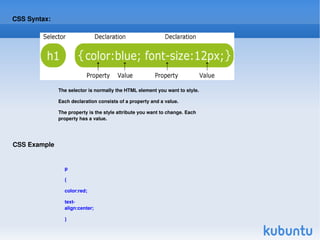
CSS Syntax: The selector is normally the HTML element you want to style. Each declaration consists of a property and a value. The property is the style attribute you want to change. Each property has a value. CSS Example p { color:red; text-align:center; }
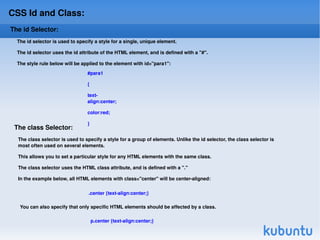
CSS Id and Class: The id Selector: The id selector is used to specify a style for a single, unique element. The id selector uses the id attribute of the HTML element, and is defined with a "#". The style rule below will be applied to the element with id="para1": #para1 { text-align:center; color:red; }  The class Selector: The class selector is used to specify a style for a group of elements. Unlike the id selector, the class selector is most often used on several elements.  This allows you to set a particular style for any HTML elements with the same class.  The class selector uses the HTML class attribute, and is defined with a "." In the example below, all HTML elements with class="center" will be center-aligned: .center {text-align:center;}  You can also specify that only specific HTML elements should be affected by a class. p.center {text-align:center;}
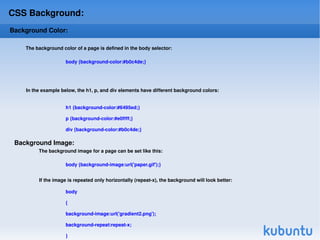
CSS Background: Background Color: body {background-color:#b0c4de;}  In the example below, the h1, p, and div elements have different background colors: The background color of a page is defined in the body selector: h1 {background-color:#6495ed;} p {background-color:#e0ffff;} div {background-color:#b0c4de;} Background Image: The background image for a page can be set like this: body {background-image:url('paper.gif');}  body { background-image:url('gradient2.png'); background-repeat:repeat-x; }  If the image is repeated only horizontally (repeat-x), the background will look better:
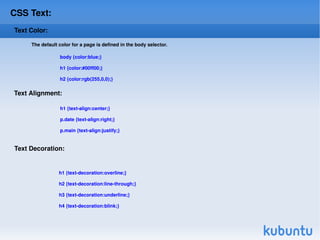
CSS Text: Text Color: The default color for a page is defined in the body selector. body {color:blue;} h1 {color:#00ff00;} h2 {color:rgb(255,0,0);} Text Alignment: h1 {text-align:center;} p.date {text-align:right;} p.main {text-align:justify;}  h1 {text-decoration:overline;} h2 {text-decoration:line-through;} h3 {text-decoration:underline;} h4 {text-decoration:blink;} Text Decoration:

Css

  • 1.
    CSS Introduction Whatis CSS? CSS stands for Cascading Style Sheets
  • 2.
    Styles define howto display HTML elements
  • 3.
    Styles were addedto HTML 4.0 to solve a problem
  • 4.
    External Style Sheetscan save a lot of work
  • 5.
    External Style Sheetsare stored in CSS files
  • 6.
    CSS Syntax: Theselector is normally the HTML element you want to style. Each declaration consists of a property and a value. The property is the style attribute you want to change. Each property has a value. CSS Example p { color:red; text-align:center; }
  • 7.
    CSS Id andClass: The id Selector: The id selector is used to specify a style for a single, unique element. The id selector uses the id attribute of the HTML element, and is defined with a "#". The style rule below will be applied to the element with id="para1": #para1 { text-align:center; color:red; } The class Selector: The class selector is used to specify a style for a group of elements. Unlike the id selector, the class selector is most often used on several elements. This allows you to set a particular style for any HTML elements with the same class. The class selector uses the HTML class attribute, and is defined with a "." In the example below, all HTML elements with class="center" will be center-aligned: .center {text-align:center;} You can also specify that only specific HTML elements should be affected by a class. p.center {text-align:center;}
  • 8.
    CSS Background: BackgroundColor: body {background-color:#b0c4de;} In the example below, the h1, p, and div elements have different background colors: The background color of a page is defined in the body selector: h1 {background-color:#6495ed;} p {background-color:#e0ffff;} div {background-color:#b0c4de;} Background Image: The background image for a page can be set like this: body {background-image:url('paper.gif');} body { background-image:url('gradient2.png'); background-repeat:repeat-x; } If the image is repeated only horizontally (repeat-x), the background will look better:
  • 9.
    CSS Text: TextColor: The default color for a page is defined in the body selector. body {color:blue;} h1 {color:#00ff00;} h2 {color:rgb(255,0,0);} Text Alignment: h1 {text-align:center;} p.date {text-align:right;} p.main {text-align:justify;} h1 {text-decoration:overline;} h2 {text-decoration:line-through;} h3 {text-decoration:underline;} h4 {text-decoration:blink;} Text Decoration: