
R.D.SIVAKUMAR, M.Sc.,M.Phil.,M.Tech.,
Assistant Professor of Computer Science &
Assistant Professor and Head, Department of M.Com.(CA),
Ayya Nadar Janaki Ammal College,
Sivakasi – 626 124.
Mobile: 099440-42243
e-mail : sivamsccsit@gmail.com
website: www.rdsivakumar.blogspot.in
Heading Section
Heading Section
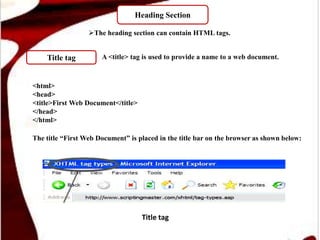
Title tag
The heading section can contain HTML tags.
<html>
<head>
<title>First Web Document</title>
</head>
</html>
The title “First Web Document” is placed in the title bar on the browser as shown below:
A <title> tag is used to provide a name to a web document.
Title tag
Heading Section
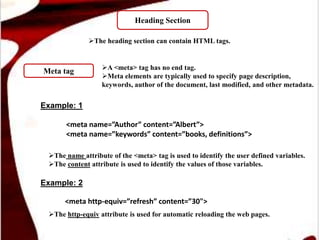
Meta tag
The heading section can contain HTML tags.
A <meta> tag has no end tag.
Meta elements are typically used to specify page description,
keywords, author of the document, last modified, and other metadata.
Example: 1
<meta name=”Author” content=”Albert”>
<meta name=”keywords” content=”books, definitions”>
<meta http-equiv=”refresh” content=”30">
The name attribute of the <meta> tag is used to identify the user defined variables.
The content attribute is used to identify the values of those variables.
Example: 2
The http-equiv attribute is used for automatic reloading the web pages.
Heading Section
Style tag
The heading section can contain HTML tags.
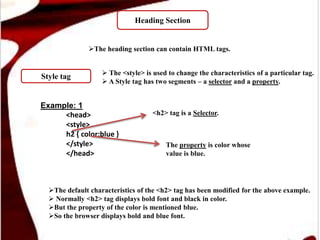
 The <style> is used to change the characteristics of a particular tag.
 A Style tag has two segments – a selector and a property.
Example: 1
<head>
<style>
h2 { color:blue }
</style>
</head>
The default characteristics of the <h2> tag has been modified for the above example.
 Normally <h2> tag displays bold font and black in color.
But the property of the color is mentioned blue.
So the browser displays bold and blue font.
<h2> tag is a Selector.
The property is color whose
value is blue.
Body Section
Body tag
A pair of body tags <body> and </body> is used to identify the body section.
 Some tags are used to insert in body section like images, tables, and forms and links.
The opening body tag is <body> and closing tag is </body>.
The body tag contains several attributes.
 To change the background color of a web page, the bgcolor attribute
is used.
Example: 1
<body bgcolor =#FFFFFF>
</body>
<body bgcolor=blue></body>
The color values range from 0 to 255 .
The ranges is 00(decimal) to FF(hexadecimal)
It should be mentioned six digits like FFFFFF, 000000, 99BDFF.
The # symbol is predetermined like #FFFFFF, #000000, #99BDFF.
Example: 2
The RBG values indicate some basic colors.
For example black, red, blue, pink, green is a RBG values.
Value
attribute
Thank you..!!

Heading Section in HTML - R.D.Sivakumar

  • 1.
    R.D.SIVAKUMAR, M.Sc.,M.Phil.,M.Tech., Assistant Professorof Computer Science & Assistant Professor and Head, Department of M.Com.(CA), Ayya Nadar Janaki Ammal College, Sivakasi – 626 124. Mobile: 099440-42243 e-mail : sivamsccsit@gmail.com website: www.rdsivakumar.blogspot.in Heading Section
  • 2.
    Heading Section Title tag Theheading section can contain HTML tags. <html> <head> <title>First Web Document</title> </head> </html> The title “First Web Document” is placed in the title bar on the browser as shown below: A <title> tag is used to provide a name to a web document. Title tag
  • 3.
    Heading Section Meta tag Theheading section can contain HTML tags. A <meta> tag has no end tag. Meta elements are typically used to specify page description, keywords, author of the document, last modified, and other metadata. Example: 1 <meta name=”Author” content=”Albert”> <meta name=”keywords” content=”books, definitions”> <meta http-equiv=”refresh” content=”30"> The name attribute of the <meta> tag is used to identify the user defined variables. The content attribute is used to identify the values of those variables. Example: 2 The http-equiv attribute is used for automatic reloading the web pages.
  • 4.
    Heading Section Style tag Theheading section can contain HTML tags.  The <style> is used to change the characteristics of a particular tag.  A Style tag has two segments – a selector and a property. Example: 1 <head> <style> h2 { color:blue } </style> </head> The default characteristics of the <h2> tag has been modified for the above example.  Normally <h2> tag displays bold font and black in color. But the property of the color is mentioned blue. So the browser displays bold and blue font. <h2> tag is a Selector. The property is color whose value is blue.
  • 5.
    Body Section Body tag Apair of body tags <body> and </body> is used to identify the body section.  Some tags are used to insert in body section like images, tables, and forms and links. The opening body tag is <body> and closing tag is </body>. The body tag contains several attributes.  To change the background color of a web page, the bgcolor attribute is used. Example: 1 <body bgcolor =#FFFFFF> </body> <body bgcolor=blue></body> The color values range from 0 to 255 . The ranges is 00(decimal) to FF(hexadecimal) It should be mentioned six digits like FFFFFF, 000000, 99BDFF. The # symbol is predetermined like #FFFFFF, #000000, #99BDFF. Example: 2 The RBG values indicate some basic colors. For example black, red, blue, pink, green is a RBG values. Value attribute
  • 6.