HARDWARE,
SOFTWARE &
FIRMWARE
…..The core components of a computer…..
ABSTRACT
This short note includes the differences between
hardware, software, firmware & differences between
system software and application software, and also
details about device driver.
Supervised By
Pranab Bandhu Nath
(Senior Lecturer)
CSE Department
City University, Dhaka
Submitted By
Shamima Akther| ID – 1834902616
CSE 317 : Computer Networks
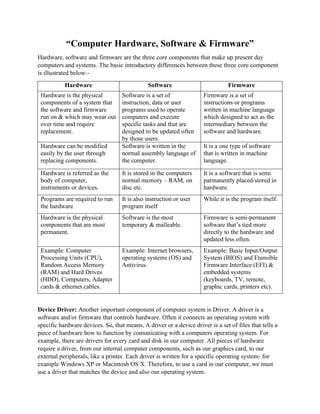
“Computer Hardware, Software & Firmware”
Hardware, software and firmware are the three core components that make up present day
computers and systems. The basic introductory differences between these three core component
is illustrated below:-
Hardware Software Firmware
Hardware is the physical
components of a system that
the software and firmware
run on & which may wear out
over time and require
replacement.
Software is a set of
instruction, data or user
programs used to operate
computers and execute
specific tasks and that are
designed to be updated often
by those users.
Firmware is a set of
instructions or programs
written in machine language
which designed to act as the
intermediary between the
software and hardware.
Hardware can be modified
easily by the user through
replacing components.
Software is written in the
normal assembly language of
the computer.
It is a one type of software
that is written in machine
language.
Hardware is referred as the
body of computer,
instruments or devices.
It is stored in the computers
normal memory – RAM, on
disc etc.
It is a software that is semi
parmanently placed/stored in
hardware.
Programs are required to run
the hardware
It is also instruction or user
program itself
While it is the program itself.
Hardware is the physical
components that are most
permanent.
Software is the most
temporary & malleable.
Firmware is semi-permanent
software that’s tied more
directly to the hardware and
updated less often.
Example: Computer
Processing Units (CPU),
Random Access Memory
(RAM) and Hard Drives
(HDD), Computers, Adapter
cards & ethernet cables.
Example: Internet browsers,
operating systems (OS) and
Antivirus.
Example: Basic Input/Output
System (BIOS) and Etensible
Firmware Interface (EFI) &
embedded systems
(keyboards, TV, remote,
graphic cards, printers etc).
Device Driver: Another important component of computer system is Driver. A driver is a
software and/or firmware that controls hardware. Often it connects an operating system with
specific hardware devices. So, that means, A driver or a device driver is a set of files that tells a
piece of hardware how to function by comunicating with a computers operating system. For
example, there are drivers for every card and disk in our computer. All pieces of hardware
require a driver, from our internal computer components, such as our graphics card, to our
external peripherals, like a printer. Each driver is written for a specific operating system- for
example Windows XP or Macintosh OS X. Therefore, to use a card in our computer, we must
use a driver that matches the device and also our operating system.
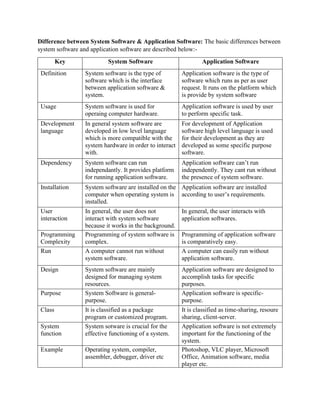
Difference between System Software & Application Software: The basic differences between
system software and application software are described below:-
Key System Software Application Software
Definition System software is the type of
software which is the interface
between application software &
system.
Application software is the type of
software which runs as per as user
request. It runs on the platform which
is provide by system software
Usage System software is used for
operaing computer hardware.
Application software is used by user
to perform specific task.
Development
language
In general system software are
developed in low level language
which is more compatible with the
system hardware in order to interact
with.
For development of Application
software high level language is used
for their development as they are
developed as some specific purpose
software.
Dependency System software can run
independantly. It provides platform
for running application software.
Application software can’t run
independently. They cant run without
the presence of system software.
Installation System software are installed on the
computer when operating system is
installed.
Application software are installed
according to user’s requirements.
User
interaction
In general, the user does not
interact with system software
because it works in the background.
In general, the user interacts with
application softwares.
Programming
Complexity
Programming of system software is
complex.
Programming of application software
is comparatively easy.
Run A computer cannot run without
system software.
A computer can easily run without
application software.
Design System software are mainly
designed for managing system
resources.
Application software are designed to
accomplish tasks for specific
purposes.
Purpose System Software is general-
purpose.
Application software is specific-
purpose.
Class It is classified as a package
program or customized program.
It is classified as time-sharing, resoure
sharing, client-server.
System
function
System sotware is crucial for the
effective functioning of a system.
Application software is not extremely
important for the functioning of the
system.
Example Operating system, compiler,
assembler, debugger, driver etc
Photoshop, VLC player, Microsoft
Office, Animation software, media
player etc.

Hardware, Software & Firmware

  • 1.
    HARDWARE, SOFTWARE & FIRMWARE …..The corecomponents of a computer….. ABSTRACT This short note includes the differences between hardware, software, firmware & differences between system software and application software, and also details about device driver. Supervised By Pranab Bandhu Nath (Senior Lecturer) CSE Department City University, Dhaka Submitted By Shamima Akther| ID – 1834902616 CSE 317 : Computer Networks
  • 2.
    “Computer Hardware, Software& Firmware” Hardware, software and firmware are the three core components that make up present day computers and systems. The basic introductory differences between these three core component is illustrated below:- Hardware Software Firmware Hardware is the physical components of a system that the software and firmware run on & which may wear out over time and require replacement. Software is a set of instruction, data or user programs used to operate computers and execute specific tasks and that are designed to be updated often by those users. Firmware is a set of instructions or programs written in machine language which designed to act as the intermediary between the software and hardware. Hardware can be modified easily by the user through replacing components. Software is written in the normal assembly language of the computer. It is a one type of software that is written in machine language. Hardware is referred as the body of computer, instruments or devices. It is stored in the computers normal memory – RAM, on disc etc. It is a software that is semi parmanently placed/stored in hardware. Programs are required to run the hardware It is also instruction or user program itself While it is the program itself. Hardware is the physical components that are most permanent. Software is the most temporary & malleable. Firmware is semi-permanent software that’s tied more directly to the hardware and updated less often. Example: Computer Processing Units (CPU), Random Access Memory (RAM) and Hard Drives (HDD), Computers, Adapter cards & ethernet cables. Example: Internet browsers, operating systems (OS) and Antivirus. Example: Basic Input/Output System (BIOS) and Etensible Firmware Interface (EFI) & embedded systems (keyboards, TV, remote, graphic cards, printers etc). Device Driver: Another important component of computer system is Driver. A driver is a software and/or firmware that controls hardware. Often it connects an operating system with specific hardware devices. So, that means, A driver or a device driver is a set of files that tells a piece of hardware how to function by comunicating with a computers operating system. For example, there are drivers for every card and disk in our computer. All pieces of hardware require a driver, from our internal computer components, such as our graphics card, to our external peripherals, like a printer. Each driver is written for a specific operating system- for example Windows XP or Macintosh OS X. Therefore, to use a card in our computer, we must use a driver that matches the device and also our operating system.
  • 3.
    Difference between SystemSoftware & Application Software: The basic differences between system software and application software are described below:- Key System Software Application Software Definition System software is the type of software which is the interface between application software & system. Application software is the type of software which runs as per as user request. It runs on the platform which is provide by system software Usage System software is used for operaing computer hardware. Application software is used by user to perform specific task. Development language In general system software are developed in low level language which is more compatible with the system hardware in order to interact with. For development of Application software high level language is used for their development as they are developed as some specific purpose software. Dependency System software can run independantly. It provides platform for running application software. Application software can’t run independently. They cant run without the presence of system software. Installation System software are installed on the computer when operating system is installed. Application software are installed according to user’s requirements. User interaction In general, the user does not interact with system software because it works in the background. In general, the user interacts with application softwares. Programming Complexity Programming of system software is complex. Programming of application software is comparatively easy. Run A computer cannot run without system software. A computer can easily run without application software. Design System software are mainly designed for managing system resources. Application software are designed to accomplish tasks for specific purposes. Purpose System Software is general- purpose. Application software is specific- purpose. Class It is classified as a package program or customized program. It is classified as time-sharing, resoure sharing, client-server. System function System sotware is crucial for the effective functioning of a system. Application software is not extremely important for the functioning of the system. Example Operating system, compiler, assembler, debugger, driver etc Photoshop, VLC player, Microsoft Office, Animation software, media player etc.