HARDWARE
&
SOFTWARE
DANIELA POPESCU
HNDCSD Level 4
Batch 2
Computer Systems
UPGRADE
process of increasing the
system’s performance
and be up to date with new
technologies
on minimum costs
Why UPGRADING ?
Security
• Protection against threats: viruses, theft,
hackers, natural disasters
• Old software are much more vulnerable
Productivity & Efficiency
• More tasks in less time
• More quality
Decrease costs
• Upgrading a hardware/software component
means less costs than replacing the system
Tasks to be done BEFORE UPGRADING
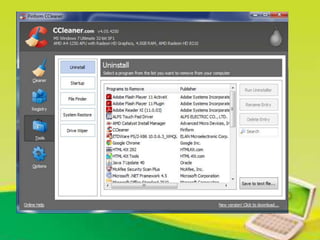
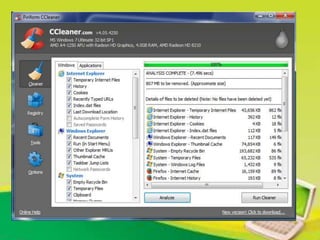
• Uninstall unused programs, Remove
temporary files, cookies etc
• Remove viruses, spyware, malware
• Defragmenting harddisk
UPGRADING HARDWARE
• RAM
• HARD DRIVE
• PROCESSOR
• KEYBOARD
• MOUSE
• PRINTER
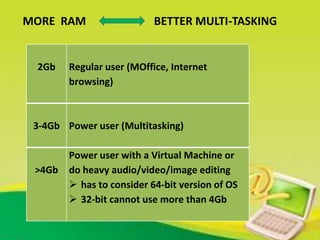
MORE RAM BETTER MULTI-TASKING
2Gb Regular user (MOffice, Internet
browsing)
3-4Gb Power user (Multitasking)
>4Gb
Power user with a Virtual Machine or
do heavy audio/video/image editing
 has to consider 64-bit version of OS
 32-bit cannot use more than 4Gb
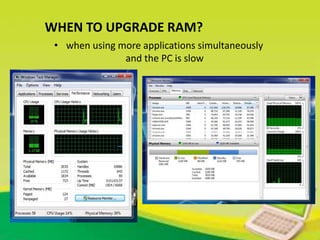
WHEN TO UPGRADE RAM?
• when using more applications simultaneously
and the PC is slow
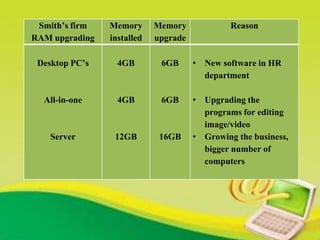
Smith’s firm
RAM upgrading
Memory
installed
Memory
upgrade
Reason
Desktop PC’s
All-in-one
Server
4GB
4GB
12GB
6GB
6GB
16GB
• New software in HR
department
• Upgrading the
programs for editing
image/video
• Growing the business,
bigger number of
computers
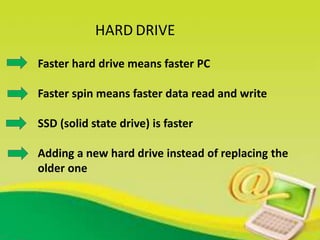
HARD DRIVE
Faster hard drive means faster PC
Faster spin means faster data read and write
SSD (solid state drive) is faster
Adding a new hard drive instead of replacing the
older one
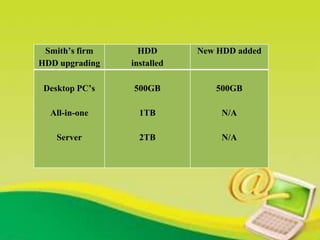
Smith’s firm
HDD upgrading
HDD
installed
New HDD added
Desktop PC’s
All-in-one
Server
500GB
1TB
2TB
500GB
N/A
N/A
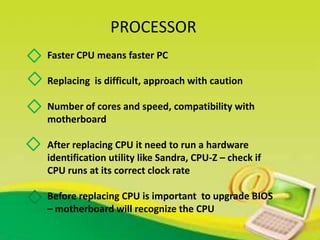
PROCESSOR
Faster CPU means faster PC
Replacing is difficult, approach with caution
Number of cores and speed, compatibility with
motherboard
After replacing CPU it need to run a hardware
identification utility like Sandra, CPU-Z – check if
CPU runs at its correct clock rate
Before replacing CPU is important to upgrade BIOS
– motherboard will recognize the CPU
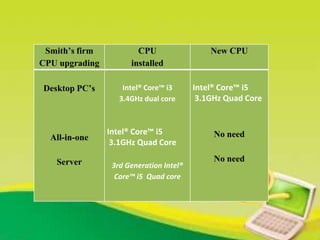
Smith’s firm
CPU upgrading
CPU
installed
New CPU
Desktop PC’s
All-in-one
Server
Intel® Core™ i3
3.4GHz dual core
Intel® Core™ i5
3.1GHz Quad Core
3rd Generation Intel®
Core™ i5 Quad core
Intel® Core™ i5
3.1GHz Quad Core
No need
No need
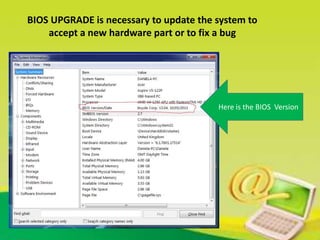
BIOS UPGRADE is necessary to update the system to
accept a new hardware part or to fix a bug
Here is the BIOS Version
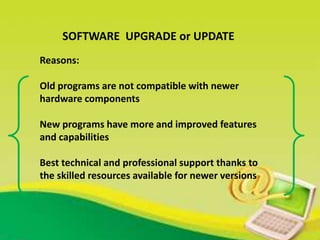
SOFTWARE UPGRADE or UPDATE
Reasons:
Old programs are not compatible with newer
hardware components
New programs have more and improved features
and capabilities
Best technical and professional support thanks to
the skilled resources available for newer versions
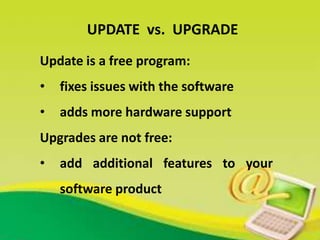
Update is a free program:
• fixes issues with the software
• adds more hardware support
Upgrades are not free:
• add additional features to your
software product
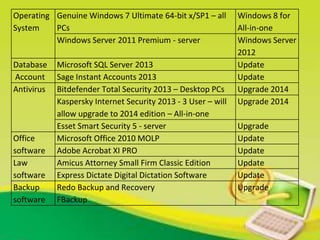
UPDATE vs. UPGRADE
Operating
System
Genuine Windows 7 Ultimate 64-bit x/SP1 – all
PCs
Windows 8 for
All-in-one
Windows Server 2011 Premium - server Windows Server
2012
Database Microsoft SQL Server 2013 Update
Account Sage Instant Accounts 2013 Update
Antivirus Bitdefender Total Security 2013 – Desktop PCs Upgrade 2014
Kaspersky Internet Security 2013 - 3 User – will
allow upgrade to 2014 edition – All-in-one
Upgrade 2014
Esset Smart Security 5 - server Upgrade
Office
software
Microsoft Office 2010 MOLP Update
Adobe Acrobat XI PRO Update
Law
software
Amicus Attorney Small Firm Classic Edition Update
Express Dictate Digital Dictation Software Update
Backup
software
Redo Backup and Recovery
FBackup
Upgrade
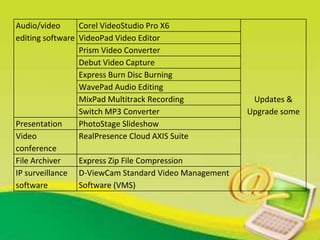
Audio/video
editing software
Corel VideoStudio Pro X6
Updates &
Upgrade some
VideoPad Video Editor
Prism Video Converter
Debut Video Capture
Express Burn Disc Burning
WavePad Audio Editing
MixPad Multitrack Recording
Switch MP3 Converter
Presentation PhotoStage Slideshow
Video
conference
RealPresence Cloud AXIS Suite
File Archiver Express Zip File Compression
IP surveillance
software
D-ViewCam Standard Video Management
Software (VMS)
hardware and software upgrade

hardware and software upgrade

  • 1.
  • 2.
    DANIELA POPESCU HNDCSD Level4 Batch 2 Computer Systems
  • 3.
    UPGRADE process of increasingthe system’s performance and be up to date with new technologies on minimum costs
  • 4.
  • 5.
    Security • Protection againstthreats: viruses, theft, hackers, natural disasters • Old software are much more vulnerable Productivity & Efficiency • More tasks in less time • More quality Decrease costs • Upgrading a hardware/software component means less costs than replacing the system
  • 6.
    Tasks to bedone BEFORE UPGRADING • Uninstall unused programs, Remove temporary files, cookies etc • Remove viruses, spyware, malware • Defragmenting harddisk
  • 9.
    UPGRADING HARDWARE • RAM •HARD DRIVE • PROCESSOR • KEYBOARD • MOUSE • PRINTER
  • 10.
    MORE RAM BETTERMULTI-TASKING 2Gb Regular user (MOffice, Internet browsing) 3-4Gb Power user (Multitasking) >4Gb Power user with a Virtual Machine or do heavy audio/video/image editing  has to consider 64-bit version of OS  32-bit cannot use more than 4Gb
  • 11.
    WHEN TO UPGRADERAM? • when using more applications simultaneously and the PC is slow
  • 12.
    Smith’s firm RAM upgrading Memory installed Memory upgrade Reason DesktopPC’s All-in-one Server 4GB 4GB 12GB 6GB 6GB 16GB • New software in HR department • Upgrading the programs for editing image/video • Growing the business, bigger number of computers
  • 13.
    HARD DRIVE Faster harddrive means faster PC Faster spin means faster data read and write SSD (solid state drive) is faster Adding a new hard drive instead of replacing the older one
  • 14.
    Smith’s firm HDD upgrading HDD installed NewHDD added Desktop PC’s All-in-one Server 500GB 1TB 2TB 500GB N/A N/A
  • 15.
    PROCESSOR Faster CPU meansfaster PC Replacing is difficult, approach with caution Number of cores and speed, compatibility with motherboard After replacing CPU it need to run a hardware identification utility like Sandra, CPU-Z – check if CPU runs at its correct clock rate Before replacing CPU is important to upgrade BIOS – motherboard will recognize the CPU
  • 16.
    Smith’s firm CPU upgrading CPU installed NewCPU Desktop PC’s All-in-one Server Intel® Core™ i3 3.4GHz dual core Intel® Core™ i5 3.1GHz Quad Core 3rd Generation Intel® Core™ i5 Quad core Intel® Core™ i5 3.1GHz Quad Core No need No need
  • 17.
    BIOS UPGRADE isnecessary to update the system to accept a new hardware part or to fix a bug Here is the BIOS Version
  • 18.
    SOFTWARE UPGRADE orUPDATE Reasons: Old programs are not compatible with newer hardware components New programs have more and improved features and capabilities Best technical and professional support thanks to the skilled resources available for newer versions
  • 19.
    Update is afree program: • fixes issues with the software • adds more hardware support Upgrades are not free: • add additional features to your software product UPDATE vs. UPGRADE
  • 20.
    Operating System Genuine Windows 7Ultimate 64-bit x/SP1 – all PCs Windows 8 for All-in-one Windows Server 2011 Premium - server Windows Server 2012 Database Microsoft SQL Server 2013 Update Account Sage Instant Accounts 2013 Update Antivirus Bitdefender Total Security 2013 – Desktop PCs Upgrade 2014 Kaspersky Internet Security 2013 - 3 User – will allow upgrade to 2014 edition – All-in-one Upgrade 2014 Esset Smart Security 5 - server Upgrade Office software Microsoft Office 2010 MOLP Update Adobe Acrobat XI PRO Update Law software Amicus Attorney Small Firm Classic Edition Update Express Dictate Digital Dictation Software Update Backup software Redo Backup and Recovery FBackup Upgrade
  • 21.
    Audio/video editing software Corel VideoStudioPro X6 Updates & Upgrade some VideoPad Video Editor Prism Video Converter Debut Video Capture Express Burn Disc Burning WavePad Audio Editing MixPad Multitrack Recording Switch MP3 Converter Presentation PhotoStage Slideshow Video conference RealPresence Cloud AXIS Suite File Archiver Express Zip File Compression IP surveillance software D-ViewCam Standard Video Management Software (VMS)