-By : Sagar Gor
Hardware Addressing
A hardware address is used to uniquely identify a host within a local
network. Hardware addressing is a function of the Data-Link layer of the
OSI model (Layer-2).
Ethernet utilizes the 48-bit MAC address as its hardware address. The
MAC address is often hardcoded on physical network interfaces, though
some interfaces support changing the MAC address using special utilities. In
virtualization environments, dynamically assigning MAC addresses is very
common.
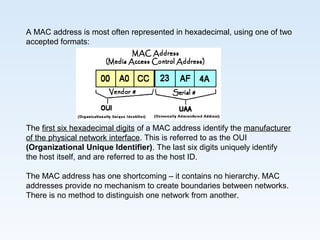
A MAC address is most often represented in hexadecimal, using one of two
accepted formats:
The first six hexadecimal digits of a MAC address identify the manufacturer
of the physical network interface. This is referred to as the OUI
(Organizational Unique Identifier). The last six digits uniquely identify
the host itself, and are referred to as the host ID.
The MAC address has one shortcoming – it contains no hierarchy. MAC
addresses provide no mechanism to create boundaries between networks.
There is no method to distinguish one network from another.
This lack of hierarchy poses significant difficulties to network scalability. If
only Layer-2 hardware addressing existed, all hosts would technically exist
on the same network. Internetworks like the Internet could not exist, as it
would be impossible to separate my network from your network.
Imagine if the entire Internet existed purely as a single Layer-2 switched
network. Switches, as a rule, will forward a broadcast out every port. With
billions of hosts on the Internet, the resulting broadcast storms would be
devastating. The Internet would simply collapse.
The scalability limitations of Layer-2 hardware addresses are mitigated
using logical addresses
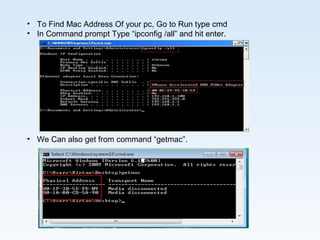
• To Find Mac Address Of your pc, Go to Run type cmd
• In Command prompt Type “ipconfig /all” and hit enter.
• We Can also get from command “getmac”.
Thank YouThank You
Thank YouThank You

hardware addressing

  • 1.
  • 2.
    Hardware Addressing A hardwareaddress is used to uniquely identify a host within a local network. Hardware addressing is a function of the Data-Link layer of the OSI model (Layer-2). Ethernet utilizes the 48-bit MAC address as its hardware address. The MAC address is often hardcoded on physical network interfaces, though some interfaces support changing the MAC address using special utilities. In virtualization environments, dynamically assigning MAC addresses is very common.
  • 3.
    A MAC addressis most often represented in hexadecimal, using one of two accepted formats: The first six hexadecimal digits of a MAC address identify the manufacturer of the physical network interface. This is referred to as the OUI (Organizational Unique Identifier). The last six digits uniquely identify the host itself, and are referred to as the host ID. The MAC address has one shortcoming – it contains no hierarchy. MAC addresses provide no mechanism to create boundaries between networks. There is no method to distinguish one network from another.
  • 4.
    This lack ofhierarchy poses significant difficulties to network scalability. If only Layer-2 hardware addressing existed, all hosts would technically exist on the same network. Internetworks like the Internet could not exist, as it would be impossible to separate my network from your network. Imagine if the entire Internet existed purely as a single Layer-2 switched network. Switches, as a rule, will forward a broadcast out every port. With billions of hosts on the Internet, the resulting broadcast storms would be devastating. The Internet would simply collapse. The scalability limitations of Layer-2 hardware addresses are mitigated using logical addresses
  • 5.
    • To FindMac Address Of your pc, Go to Run type cmd • In Command prompt Type “ipconfig /all” and hit enter. • We Can also get from command “getmac”.
  • 6.
  • 7.