Network simulator 2T S PRADEEP KUMARurl : http://www.pradeepkumar.orgEmail: tspembedded@gmail.comSocial : http://www.facebook.com/tspradeep
Overview	Installation of NS2Introduction to OTCL/C++Recompiling NS2ModificationAdding a new module
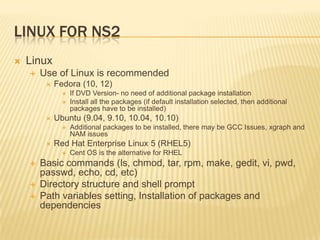
Linux for Ns2LinuxUse of Linux is recommendedFedora (10, 12)If DVD Version- no need of additional package installationInstall all the packages (if default installation selected, then additional packages have to be installed)Ubuntu (9.04, 9.10, 10.04, 10.10)Additional packages to be installed, there may be GCC Issues, xgraph and NAM issuesRed Hat Enterprise Linux 5 (RHEL5)Cent OS is the alternative for RHELBasic commands (ls, chmod, tar, rpm, make, gedit, vi, pwd, passwd, echo, cd, etc)Directory structure and shell promptPath variables setting, Installation of packages and dependencies
Installation of ns2Download from http://isi.edu/nsnam/ns/ns-build.html#allinoneCopy the file under /home/pradeep(if your username is “abcdef” then home folder will be /home/abcdef)Extract it using “tar zxvf ns-allinone-2.34.tar.gz”“cd ns-allinone-2.34”“./install “ (if any errors, please correct it)Setting of paths in “.bash_profile”or “.bashrc”
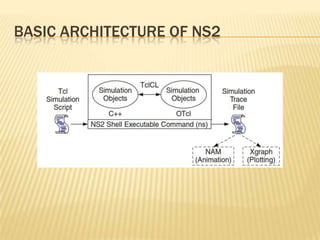
Basic architecture of ns2
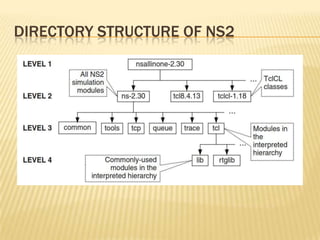
Directory structure of ns2
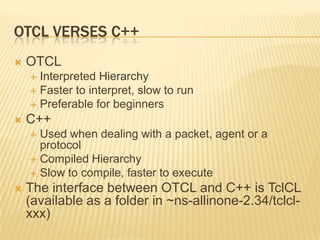
OTCL Verses C++OTCLInterpreted HierarchyFaster to interpret, slow to runPreferable for beginnersC++Used when dealing with a packet, agent or a protocolCompiled HierarchySlow to compile, faster to executeThe interface between OTCL and C++ is TclCL (available as a folder in ~ns-allinone-2.34/tclcl-xxx)
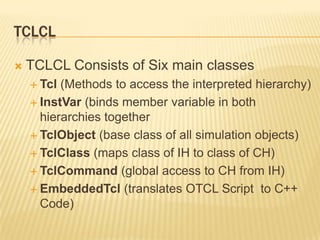
TclCLTCLCL Consists of Six main classesTcl(Methods to access the interpreted hierarchy)InstVar(binds member variable in both hierarchies togetherTclObject (base class of all simulation objects)TclClass(maps class of IH to class of CH)TclCommand(global access to CH from IH)EmbeddedTcl (translates OTCL Script  to C++ Code)
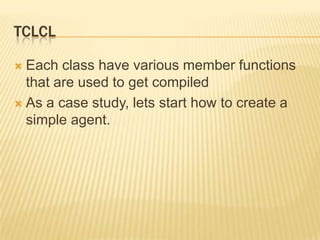
TclCLEach class have various member functions that are used to get compiledAs a case study, lets start how to create a simple agent.
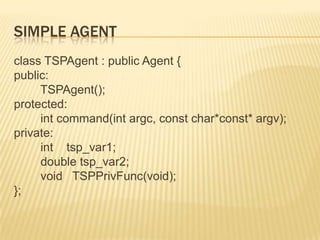
Simple Agentclass TSPAgent : public Agent {public:TSPAgent();protected:int command(intargc, const char*const* argv);private:int    tsp_var1;        double tsp_var2;        void   TSPPrivFunc(void);};
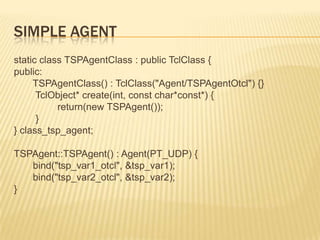
Simple Agentstatic class TSPAgentClass : public TclClass {public:TSPAgentClass() : TclClass("Agent/TSPAgentOtcl") {}TclObject* create(int, const char*const*) {                return(new TSPAgent());        }} class_tsp_agent;TSPAgent::TSPAgent() : Agent(PT_UDP) {       bind("tsp_var1_otcl", &tsp_var1);       bind("tsp_var2_otcl", &tsp_var2);}
Simple AgentintTSPAgent::command(intargc, const char*const* argv) {      if(argc == 2) {           if(strcmp(argv[1], "call-tsp-priv-func") == 0) {TSPPrivFunc();                  return(TCL_OK);           }      }     return(Agent::command(argc, argv));}
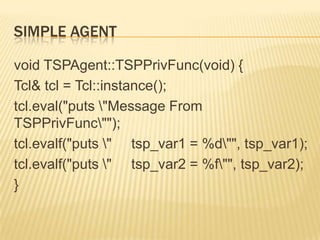
Simple Agentvoid TSPAgent::TSPPrivFunc(void) {Tcl& tcl = Tcl::instance();tcl.eval("puts \"Message From TSPPrivFunc\"");tcl.evalf("puts \"     tsp_var1 = %d\"", tsp_var1);tcl.evalf("puts \"     tsp_var2 = %f\"", tsp_var2);}
Simple Agent to Test#name it as .tcl file# Create TSPAgentset myagent [new Agent/TSPAgentOtcl]# Set configurable parameters of TSPAgent$myagent set tsp_var1_otcl 2$myagent set tsp_var2_otcl 3.14# Give a command to TSPAgent$myagent call-tsp-priv-fun
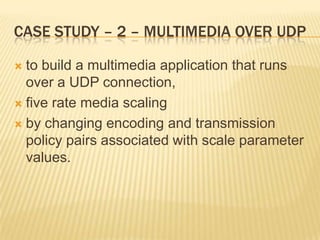
Case study – 2 – Multimedia over udpto build a multimedia application that runs over a UDP connection, five rate media scalingby changing encoding and transmission policy pairs associated with scale parameter values.
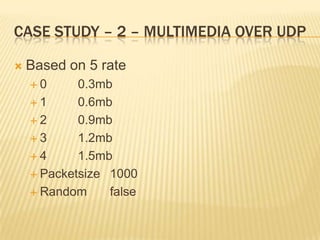
Case study – 2 – Multimedia over udpBased on 5 rate0 	0.3mb1	0.6mb2	0.9mb3	1.2mb4	1.5mbPacketsize 	1000Random	false
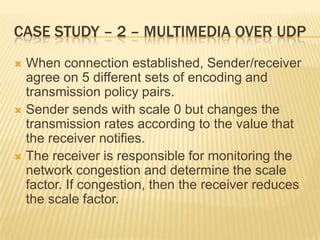
Case study – 2 – Multimedia over udpWhen connection established, Sender/receiver agree on 5 different sets of encoding and transmission policy pairs.Sender sends with scale 0 but changes the transmission rates according to the value that the receiver notifies.The receiver is responsible for monitoring the network congestion and determine the scale factor. If congestion, then the receiver reduces the scale factor.
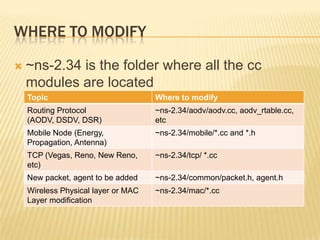
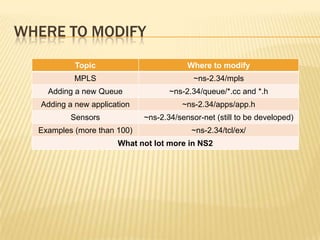
Where to modify~ns-2.34 is the folder where all the cc modules are located
Where to modify
Thank you!!!

Network simulator 2

  • 1.
    Network simulator 2TS PRADEEP KUMARurl : http://www.pradeepkumar.orgEmail: tspembedded@gmail.comSocial : http://www.facebook.com/tspradeep
  • 2.
    Overview Installation of NS2Introductionto OTCL/C++Recompiling NS2ModificationAdding a new module
  • 3.
    Linux for Ns2LinuxUseof Linux is recommendedFedora (10, 12)If DVD Version- no need of additional package installationInstall all the packages (if default installation selected, then additional packages have to be installed)Ubuntu (9.04, 9.10, 10.04, 10.10)Additional packages to be installed, there may be GCC Issues, xgraph and NAM issuesRed Hat Enterprise Linux 5 (RHEL5)Cent OS is the alternative for RHELBasic commands (ls, chmod, tar, rpm, make, gedit, vi, pwd, passwd, echo, cd, etc)Directory structure and shell promptPath variables setting, Installation of packages and dependencies
  • 4.
    Installation of ns2Downloadfrom http://isi.edu/nsnam/ns/ns-build.html#allinoneCopy the file under /home/pradeep(if your username is “abcdef” then home folder will be /home/abcdef)Extract it using “tar zxvf ns-allinone-2.34.tar.gz”“cd ns-allinone-2.34”“./install “ (if any errors, please correct it)Setting of paths in “.bash_profile”or “.bashrc”
  • 5.
  • 6.
  • 7.
    OTCL Verses C++OTCLInterpretedHierarchyFaster to interpret, slow to runPreferable for beginnersC++Used when dealing with a packet, agent or a protocolCompiled HierarchySlow to compile, faster to executeThe interface between OTCL and C++ is TclCL (available as a folder in ~ns-allinone-2.34/tclcl-xxx)
  • 8.
    TclCLTCLCL Consists ofSix main classesTcl(Methods to access the interpreted hierarchy)InstVar(binds member variable in both hierarchies togetherTclObject (base class of all simulation objects)TclClass(maps class of IH to class of CH)TclCommand(global access to CH from IH)EmbeddedTcl (translates OTCL Script to C++ Code)
  • 9.
    TclCLEach class havevarious member functions that are used to get compiledAs a case study, lets start how to create a simple agent.
  • 10.
    Simple Agentclass TSPAgent: public Agent {public:TSPAgent();protected:int command(intargc, const char*const* argv);private:int tsp_var1; double tsp_var2; void TSPPrivFunc(void);};
  • 11.
    Simple Agentstatic classTSPAgentClass : public TclClass {public:TSPAgentClass() : TclClass("Agent/TSPAgentOtcl") {}TclObject* create(int, const char*const*) { return(new TSPAgent()); }} class_tsp_agent;TSPAgent::TSPAgent() : Agent(PT_UDP) { bind("tsp_var1_otcl", &tsp_var1); bind("tsp_var2_otcl", &tsp_var2);}
  • 12.
    Simple AgentintTSPAgent::command(intargc, constchar*const* argv) { if(argc == 2) { if(strcmp(argv[1], "call-tsp-priv-func") == 0) {TSPPrivFunc(); return(TCL_OK); } } return(Agent::command(argc, argv));}
  • 13.
    Simple Agentvoid TSPAgent::TSPPrivFunc(void){Tcl& tcl = Tcl::instance();tcl.eval("puts \"Message From TSPPrivFunc\"");tcl.evalf("puts \" tsp_var1 = %d\"", tsp_var1);tcl.evalf("puts \" tsp_var2 = %f\"", tsp_var2);}
  • 14.
    Simple Agent toTest#name it as .tcl file# Create TSPAgentset myagent [new Agent/TSPAgentOtcl]# Set configurable parameters of TSPAgent$myagent set tsp_var1_otcl 2$myagent set tsp_var2_otcl 3.14# Give a command to TSPAgent$myagent call-tsp-priv-fun
  • 15.
    Case study –2 – Multimedia over udpto build a multimedia application that runs over a UDP connection, five rate media scalingby changing encoding and transmission policy pairs associated with scale parameter values.
  • 16.
    Case study –2 – Multimedia over udpBased on 5 rate0 0.3mb1 0.6mb2 0.9mb3 1.2mb4 1.5mbPacketsize 1000Random false
  • 17.
    Case study –2 – Multimedia over udpWhen connection established, Sender/receiver agree on 5 different sets of encoding and transmission policy pairs.Sender sends with scale 0 but changes the transmission rates according to the value that the receiver notifies.The receiver is responsible for monitoring the network congestion and determine the scale factor. If congestion, then the receiver reduces the scale factor.
  • 18.
    Where to modify~ns-2.34is the folder where all the cc modules are located
  • 19.
  • 20.