CCNA
CISCO CERTIFIED NETWORK ASSOCIATE
Neelotpal Dey
JK-EN-VNS-0394
Welcome
Introduction to
Networking
Working with
Cisco Devices
Switching
Concepts
Routing
Concepts
IP Services
INTRODUCTION
TO
NETWORKING
What is Network ?
A Network is a collection of devices and end
systems connected to each other via a
medium for the purpose of sharing
resources.
What is Networking ?
Networking is the practice of communicating
group of computing devices with each other.
Types Of Computer Networks
Configurational
Network
Peer to Peer
Network
Server to Client
Geographical
Network
LAN
(Local Area
Network)
PAN(Personal
Area Network)
CAN (Campus
Area Network)
MAN
(Metropolitan
Area Network)
WAN
(Wide Area
Network)
What is Network Topology ?
Network Topology is the Architecture which
defines the arrangement of devices in a
Network.
TypesofTopology
Physical Topology
Bus Topology
Star Topology
Ring Topology
Mesh Topology
Tree Topology
Hybrid Topology
Logical Topology
Mode of Transmission
Simplex Half Duplex Full Duplex
What is OSI Model?
Open Systems Interconnection Basic Reference
Model (OSI Reference Model or OSI Model) is an
abstract description for layered communications
and computer network protocol design.
It was developed by ISO(International
Organization for Standardization).
It divides network architecture into seven layers
which, from top to bottom, are the Application,
Presentation, Session, Transport, Network, Data-
Link, and Physical Layers.
What is TCP/IP ?
 The Internet Protocol Suite (commonly known
as TCP/IP) is the set of communications
protocols used for the Internet and other similar
networks.
 It is named from two of the most important
protocols in it:
 the Transmission Control Protocol (TCP) and
 the Internet Protocol (IP), which were the first two
networking protocols defined in this standard
Application Layer
 Application Layer, contains those protocols which provides
services to users.
 Web browsing, e-mail, encryption, session establishment
all these things happen in application Layer which uses
protocols such as,
 HTTP, SMTP, DNS, TELNET, FTP, NFS, DFS, IMAP4, POP3,
NNTP, SSH, SSL, GOPHER.
 Application Layer, defines network application services like
file transfer, network management.
 Identification of services is done using port numbers.
 Application layer, Presentation layer, Session layer of OSI
model.
 Responsible for converting data into standard format.
 Encoding-decoding, encryption-decryption and
compression.
Transport Layer
 Transport layer, deals with actual manipulation of data and
prepares it for delivery through network.
 Two important protocols are used in Transport layer are
TCP and UDP.
 If data is too large for the single frame, then it breaks it into
smaller pieces and assigns sequence number.
 It ensures that all the data is received in the right order
than it was sent.
 It is responsible for ensuring data is sent and received
successfully and verifying delivery of packets.
 Identification services, sequencing, flow control, error
correction, segmentation, reassembling is done here
Internet Layer
 Internet layer deals with, finding the way to the
destination.
 Internet layer defines, IP addressing, routing, switching.
 It determines where the data should go on the physical
network.
 It is responsible for routing each packet to its destination.
 Defines network address.
 Protocols that are used in this layer are routing protocol-
OSPF, RIP, IGRP, EIGRP Routed protocols-IP, IPX, Appletalk.
And DDP (datagram delivery protocol), ICMP, IPSec.
 This layer is also known as network layer in OSI model.
 IL provides best path to the data to reach destination.
 Device working in this layer is Router.
Network Access Layer
 It is responsible for putting frames (packets) on the wire.
 Responsible for setting bits & bytes, electrical signals and
impulses back and forth across the wire (coaxial or twisted
pair).
 “Doors between worlds” connecting physical aspect of
network (cables & Digital pulses).
 Describes specifications for topology.
 Devices used here are- HUB, Switch, Repeater, Bridges, and
NIC.
 Wan protocols like PPP, HDLC, and frame relay are used.
 Responsible for error detection.
Network Devices
NIC
 Network Interface Card connects computer to
network.
 It works on Physical Layer of OSI Model
HUB
 It is a central memory-
less networking device
with multiple ports used
for connecting
Segments of LAN.
 It works on Physical
Layer of OSI Model.
 Type of Hub-
 Passive Hub
 Active Hub
 Intelligent Hub
SWITCH
 It is a central networking
device that connects
devices together in a
network by using packet
switching techniques.
 It has memory and it
works on Data Link Layer
of OSI Model.
ROUTER
 It is a networking device
that connects two or
more networks together.
 It works on Network
Layer of OSI Model
 Types of Router
 Wired
 Wireless
Networking Devices & OSI Layer
Association
What is Ethernet?
Ethernet is a family of computer networking
technologies and architectures for local area
networks (LANs) and metropolitan area
networks (MANs).
It was standardized as IEEE 802.
ETHERNET EVOLUTION
STANDARD
ETHERNET
10Mbps
FAST
ETHERNET
100Mbps
GIGABIT
ETHERNET
1Gbps
10 GIGABIT
ETHERNET
10Gbps
STANDARD ETHERNET
COMMON
IMPLEMENTATION
10 Base5
Bus,
thick coaxial
10Base2
Bus,
thin coaxial
10Base-T
Star,
UTP
10Base-F
Star,
fiber
COMMON
FAST ETHERNET
IMPLEMENTATION
100Base-TX
Two wires
Cat 5UTP
100Base-FX
Two wires
fiber
10Base-T4
Four wires
category 3UTP
GIGABIT ETHERNET
IMPLEMENTATION
1000
Base-SX
Two wire
Shortwave
fiber
1000
Base-LX
Two-wire
Long –wave
fiber
1000
Base-CX
Two-wire
Copper(STP)
1000
Base-T
Four-wire
UTP
IP Addresses
 An IP address is an address used to uniquely identify a
device on an IP network.
 The IPV4 address is made up of 32 binary.
 32 binary bits are broken into four octets (1 octet = 8 bits)
 Dotted decimal format (for example, 172.16.81.100)
 The IPV6 address is made up of 128 binary bits which can
be divisible into a network portion and host portion with
the help of a subnet mask.
 128 binary bits are broken into six octets (1 octet = 8 bits)
 Colon Hexadecimal format (for example,
1A2:16:2C:B1:00:2A)
IPV4 Address Classes
IP Address Classes
Class A: The first octet is the network
portion. Octets 2, 3, and 4 are for
subnets/hosts
Class B: The first two octets are the network
portion. Octets 3 and 4 are for subnets/hosts
Class C: The first three octets are the network
portion. Octet 4 is for subnets/hosts
Types Of Special IP Address
Loop Back IP: This IP range is used to check
the NIC card. 127.0.0.1 - 127.255.255.255
Link Local IP: This IP range is provided when
Services are not provided by Router.
169.254.0.1 - 169.254.255.255
Private IP: This IP range are used in private
network.
Address Class Reserved Address Space
Class A 10.0.0.0 - 10.255.255.255
Class B 172.16.0.0 - 172.31.255.255
Class C 192.168.0.0 - 192.168.255.255
Network Subnet Masks
Distinguishes which portion of the
address identifies the network and which
portion of the address identifies the
node.
Default masks:
Class A: 255.0.0.0
Class B: 255.255.0.0
Class C: 255.255.255.0
Subnetting
 Creates multiple logical networks that exist
within a single Class A, B, or C network.
 Reduced network traffic
 Optimized network performance
 Simplified management
 Facilitated spanning of large geographical
distances
VLSM
 Variable Length Subnet Mask is a better way
of subnetting a network with lesser wastage
of IP Address.
WORKING
WITH
CISCO DEVICES
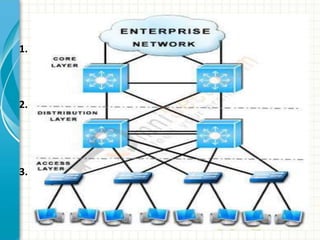
3 Level Hierarchy Cisco Router
1. Core Layer
 Routers that are used by the Global ISPs and are also known as
backbone routers.
 Core layer routers are best routers than all and are costly
routers
2. Distribution Layer
 Routers which are used by ISP’s and are also known as ISP layer
routers.
 Distribution layer routers are batter in speed, processing and
RAM than access layer routers.
 These routers are costly than access layer routers.
3. Access Layer
 Routers which are used by the small organizations and are also
known as Desktop routers or company layer routers.
 Access layer routers are of low speed, low processing power,
low RAM and lower no of ports and are also low price
Cisco Router
Router is a device which makes connection
possible between two or more different
networks present at same or different
geographical locations.
It works on 3rd layer of OSI Model (i.e. on
network layer)
It does two basic things:
Select the best path from the routing table.
Forward the packet on that path.
Routers are classified in two classes:
Manageable
Unmanageable
Internal Components Of Router
ROM
POST
IOS (Internetwork Operating System)
RAM
Flash Memory
NVRAM
Ports on Router
LAN Ports(RJ-45)
Ethernet ports
Fast Ethernet ports
Giga Ethernet ports
10gbpsEthernet ports
Console Port(RJ-45)
Auxiliary Port(RJ-45)
Serial Ports
NETWORK SWITCH
A network switch is a device used to connect
network segments or network devices.
Network switch receive messages and send
them to the targeted audience.
It is a telecommunication device that uses
the packet switching to receive, process and
forward data to the destination address.
Contd..
Network switch forwards data to one or
multiple devices that need to receive it.
Switches are the multiport network bridges
that process and forward data at the data link
layer(layer 2 of OSI model).
The switches that process data at the
network layer or above it, known as layer 3
switches or multi-layer switches.
1. Setup Mode
– Continue with configuration dialog?[Yes/No]
2. User Mode
– No
– Router>
3. Privileged Mode
– Router>enable
– Router#
4. Global Configuration Mode
– Router#configure terminal
– Enter configuration commands, one per line. End with CNTL/Z.
– Router(config)#
5. Interface Mode
– Router(config)#interface [port name] [port number]
– Router(config-if)#
Eg.Router(config)# interface FastEthernet0/0
Modes Of The Router and Switches
Basic Configuration of Router and
Switch
Changing Hostname:
Syntax: Router(config)#hostname xyz
Status:
Syntax: Router #show running-config
Saving Data To NVRAM:
Syntax: Router #copy running-config startup-config
Applying Password
1. User Mode Password
(Used in both Router and Switch)
Syntax:
Router(config)#line console 0
Router(config-line)#password 1234
Router(config-line)#login
Router(config-line)#exit
2. Privilege Mode Password
(Used in both Router and Switch)
Syntax:
Router(config)#enable password 123
Router(config)#exit
3. Secret Password
(Used in both Router and Switch)
Syntax:
Router(config)#enable secret 123456
Router(config)#exit
4. Telnet Password
(Used in both Router and Switch)
Syntax:
Router(config)#line vty 0
Router(config-line)#password 0000
Router(config-line)#login
Router(config-line)#exit
5. Auxiliary Password
(Used in Router)
Syntax:
Router(config)#line aux 0
Router(config-line)#password 8520
Router(config-line)#login
Router(config-line)#exit
Password Recovery
SWITCHING
CONCEPTS
VLAN and Assigning Port
Router on Stick
Multilayer Switch
STP(Spanning Tree Protocol)
To avoid the loop back this by-default
protocol is used by switches.
A root bridge is selected which controls the
whole circuit.
Process:
Selecting root-bridge(on the basis of MAC
address)
Selecting root port
Select designated port and non-designated ports
PVRST(Per VLAN Rapid Spanning Tree
Protocol)
It a upgraded version of STP
It has faster port status
When any port stops working it changes the
Blocked Port to a Forwarding Port
ROUTING
CONCEPTS
is the process that a
router uses to forward packets
toward the destination network.
Routing
Types Of Routing
1. Static routing
2. Default routing
3. Dynamic routing
Static Routing
In static routing,
The Administrator must configure all possible
routes to each and every router to ensure full
connectivity.
Default Routing
In default routing,
It is used when No specific rote can be
determined for a given IP destination address.
Dynamic Routing
It allows routing tables to automatically
propagate routing information using different
protocols.
3. Dynamic Routing
Distance Vector
Routing Protocol
RIP, RIP 2, IGRP
Link State
Routing Protocol
OSPF, IS-IS
Hybrid or
Advanced
Routing Protocol
EIGRP
Distance Vector Protocol
 It works with Bellman Ford Algorithm.
 Performs periodic updates
 Uses class-full routing protocol
 Full routing tables are exchanged
 Updates are through Broadcast.
Also known as “ Routing by Rumor”
Example: RIP, RIP2, IGRP
RIP V1 & V2
Update Timer: 30 sec
Invalid/Hold Timer: 180 sec
Route Flush Timer: 240 sec
IGRP
Update Timer: 90 sec
Invalid/Hold Timer: 270 sec
Route Flush Timer: 630 sec
Hold Down Timer: 280 sec
Link State Protocol
It works with Dijkstra Algorithm
Performs link state updates
Uses classless routing protocol
Missing routes are exchanged
Updates are through multicast
Also known as “Routing by Intelligence”
Example: OSPF, IS-IS
OSPF
It broadcasts out its entire routing table every
30 sec regardless of whether outer wants to
heart it or not.
Hello Packet Timer: 10 sec
Multicast IP: 224.0.0.5
Hybrid Protocol or Advanced
Distance Vector
It uses Dual Algorithm
Performs classless routing protocol
Missing routes are exchanged
Updates are through multicast
Also known as “Routing by Intelligence”
Example: EIGRP
EIGRP
Hello Packet Timer: 5 sec
Multicast IP address: 224.0.0.10
Update- Send- Update
SSH and Telnet
This Protocols provides a direct control to
Router from a connected PC.
Secure Shell is more secured then Telnet.
Frame Relay
Frame Relay is a packet-switching high
performance protocol telecommunication
service designed for cost-efficient
transmission for traffic between LAN and
between end points in WAN
IP
SERVICES
IP Services provides client support
services in the areas of Anti-Piracy, Fraud
Prevention, Legal Compliance and
Program Management.
Important Feature Sets are:
 NAT(Network Address Translation)
 PAT(Port Address Translation)
 DHCP(Dynamic Host Configuration
Protocol)
 HSRP(Hot Standby Router Protocol)
Access Control List(ACL)
It is collection of permit and deny conditions.
It provide security by blocking unauthorized
users and allowing authorized users.
It filters unknown packets
Types of ACLs:
Standard ACL
Extended ACL
Named ACL
ACL Standard
Filter based on source
Permits or denies the entire TCP/IP protocol
suite
The Normal Range: 1 to 99
The Expanded Range: 1300 to 1999
ACL Extended
Filter based on source and destination
Permits or denies the specific IP protocol and
port number
The Normal Range: 100 to 199
The Expanded Range: 2000 to 2699
Network Address Translation(NAT) is
used to translate a private IP address
to a Public IP address.
Whenever private IP users need
internet access, NAT is used to map it
to a corresponding Public IP
Static NAT
Dynamic NAT
PAT(Port Address Translation)
It is an extension to NAT that permits
multiple devices on a LAN to be mapped to a
single public IP address.
DHCP
Dynamic Host Configuration Protocol is a
standardized network protocol used by IP
networks.
It is controlled by a DHCP Server that
dynamically distributes IP address to the
computer connected in range.
HDLC
High-Level Data Link Control is a group of
protocols or rules for transmitting data
between network points
PPP
The Point-To-Point Protocol provides a
standard method for transporting multi-
protocol datagrams over point-to-point links.
PAP
Password Authentication Protocol is a
password based authentication protocol used
by Point-To-Point(PPP) to validate users.
• Introduction to Networking1
• Working with Cisco Devices2
•Switching Concepts3
•Routing Concepts4
• IP Services5
Today’s Overview
CCNA

CCNA

  • 1.
    CCNA CISCO CERTIFIED NETWORKASSOCIATE Neelotpal Dey JK-EN-VNS-0394
  • 2.
  • 3.
  • 4.
  • 5.
  • 6.
  • 7.
  • 8.
  • 9.
    What is Network? A Network is a collection of devices and end systems connected to each other via a medium for the purpose of sharing resources.
  • 10.
    What is Networking? Networking is the practice of communicating group of computing devices with each other.
  • 11.
    Types Of ComputerNetworks Configurational Network Peer to Peer Network Server to Client Geographical Network LAN (Local Area Network) PAN(Personal Area Network) CAN (Campus Area Network) MAN (Metropolitan Area Network) WAN (Wide Area Network)
  • 12.
    What is NetworkTopology ? Network Topology is the Architecture which defines the arrangement of devices in a Network.
  • 13.
    TypesofTopology Physical Topology Bus Topology StarTopology Ring Topology Mesh Topology Tree Topology Hybrid Topology Logical Topology
  • 14.
    Mode of Transmission SimplexHalf Duplex Full Duplex
  • 15.
    What is OSIModel? Open Systems Interconnection Basic Reference Model (OSI Reference Model or OSI Model) is an abstract description for layered communications and computer network protocol design. It was developed by ISO(International Organization for Standardization). It divides network architecture into seven layers which, from top to bottom, are the Application, Presentation, Session, Transport, Network, Data- Link, and Physical Layers.
  • 16.
    What is TCP/IP?  The Internet Protocol Suite (commonly known as TCP/IP) is the set of communications protocols used for the Internet and other similar networks.  It is named from two of the most important protocols in it:  the Transmission Control Protocol (TCP) and  the Internet Protocol (IP), which were the first two networking protocols defined in this standard
  • 17.
    Application Layer  ApplicationLayer, contains those protocols which provides services to users.  Web browsing, e-mail, encryption, session establishment all these things happen in application Layer which uses protocols such as,  HTTP, SMTP, DNS, TELNET, FTP, NFS, DFS, IMAP4, POP3, NNTP, SSH, SSL, GOPHER.  Application Layer, defines network application services like file transfer, network management.  Identification of services is done using port numbers.  Application layer, Presentation layer, Session layer of OSI model.  Responsible for converting data into standard format.  Encoding-decoding, encryption-decryption and compression.
  • 18.
    Transport Layer  Transportlayer, deals with actual manipulation of data and prepares it for delivery through network.  Two important protocols are used in Transport layer are TCP and UDP.  If data is too large for the single frame, then it breaks it into smaller pieces and assigns sequence number.  It ensures that all the data is received in the right order than it was sent.  It is responsible for ensuring data is sent and received successfully and verifying delivery of packets.  Identification services, sequencing, flow control, error correction, segmentation, reassembling is done here
  • 19.
    Internet Layer  Internetlayer deals with, finding the way to the destination.  Internet layer defines, IP addressing, routing, switching.  It determines where the data should go on the physical network.  It is responsible for routing each packet to its destination.  Defines network address.  Protocols that are used in this layer are routing protocol- OSPF, RIP, IGRP, EIGRP Routed protocols-IP, IPX, Appletalk. And DDP (datagram delivery protocol), ICMP, IPSec.  This layer is also known as network layer in OSI model.  IL provides best path to the data to reach destination.  Device working in this layer is Router.
  • 20.
    Network Access Layer It is responsible for putting frames (packets) on the wire.  Responsible for setting bits & bytes, electrical signals and impulses back and forth across the wire (coaxial or twisted pair).  “Doors between worlds” connecting physical aspect of network (cables & Digital pulses).  Describes specifications for topology.  Devices used here are- HUB, Switch, Repeater, Bridges, and NIC.  Wan protocols like PPP, HDLC, and frame relay are used.  Responsible for error detection.
  • 21.
  • 22.
    NIC  Network InterfaceCard connects computer to network.  It works on Physical Layer of OSI Model
  • 23.
    HUB  It isa central memory- less networking device with multiple ports used for connecting Segments of LAN.  It works on Physical Layer of OSI Model.  Type of Hub-  Passive Hub  Active Hub  Intelligent Hub
  • 24.
    SWITCH  It isa central networking device that connects devices together in a network by using packet switching techniques.  It has memory and it works on Data Link Layer of OSI Model.
  • 25.
    ROUTER  It isa networking device that connects two or more networks together.  It works on Network Layer of OSI Model  Types of Router  Wired  Wireless
  • 26.
    Networking Devices &OSI Layer Association
  • 27.
    What is Ethernet? Ethernetis a family of computer networking technologies and architectures for local area networks (LANs) and metropolitan area networks (MANs). It was standardized as IEEE 802.
  • 28.
  • 29.
    STANDARD ETHERNET COMMON IMPLEMENTATION 10 Base5 Bus, thickcoaxial 10Base2 Bus, thin coaxial 10Base-T Star, UTP 10Base-F Star, fiber
  • 30.
    COMMON FAST ETHERNET IMPLEMENTATION 100Base-TX Two wires Cat5UTP 100Base-FX Two wires fiber 10Base-T4 Four wires category 3UTP
  • 31.
    GIGABIT ETHERNET IMPLEMENTATION 1000 Base-SX Two wire Shortwave fiber 1000 Base-LX Two-wire Long–wave fiber 1000 Base-CX Two-wire Copper(STP) 1000 Base-T Four-wire UTP
  • 32.
    IP Addresses  AnIP address is an address used to uniquely identify a device on an IP network.  The IPV4 address is made up of 32 binary.  32 binary bits are broken into four octets (1 octet = 8 bits)  Dotted decimal format (for example, 172.16.81.100)  The IPV6 address is made up of 128 binary bits which can be divisible into a network portion and host portion with the help of a subnet mask.  128 binary bits are broken into six octets (1 octet = 8 bits)  Colon Hexadecimal format (for example, 1A2:16:2C:B1:00:2A)
  • 33.
  • 34.
    IP Address Classes ClassA: The first octet is the network portion. Octets 2, 3, and 4 are for subnets/hosts Class B: The first two octets are the network portion. Octets 3 and 4 are for subnets/hosts Class C: The first three octets are the network portion. Octet 4 is for subnets/hosts
  • 35.
    Types Of SpecialIP Address Loop Back IP: This IP range is used to check the NIC card. 127.0.0.1 - 127.255.255.255 Link Local IP: This IP range is provided when Services are not provided by Router. 169.254.0.1 - 169.254.255.255 Private IP: This IP range are used in private network. Address Class Reserved Address Space Class A 10.0.0.0 - 10.255.255.255 Class B 172.16.0.0 - 172.31.255.255 Class C 192.168.0.0 - 192.168.255.255
  • 36.
    Network Subnet Masks Distinguisheswhich portion of the address identifies the network and which portion of the address identifies the node. Default masks: Class A: 255.0.0.0 Class B: 255.255.0.0 Class C: 255.255.255.0
  • 37.
    Subnetting  Creates multiplelogical networks that exist within a single Class A, B, or C network.  Reduced network traffic  Optimized network performance  Simplified management  Facilitated spanning of large geographical distances
  • 38.
    VLSM  Variable LengthSubnet Mask is a better way of subnetting a network with lesser wastage of IP Address.
  • 39.
  • 40.
    3 Level HierarchyCisco Router 1. Core Layer  Routers that are used by the Global ISPs and are also known as backbone routers.  Core layer routers are best routers than all and are costly routers 2. Distribution Layer  Routers which are used by ISP’s and are also known as ISP layer routers.  Distribution layer routers are batter in speed, processing and RAM than access layer routers.  These routers are costly than access layer routers. 3. Access Layer  Routers which are used by the small organizations and are also known as Desktop routers or company layer routers.  Access layer routers are of low speed, low processing power, low RAM and lower no of ports and are also low price
  • 41.
    Cisco Router Router isa device which makes connection possible between two or more different networks present at same or different geographical locations. It works on 3rd layer of OSI Model (i.e. on network layer) It does two basic things: Select the best path from the routing table. Forward the packet on that path. Routers are classified in two classes: Manageable Unmanageable
  • 42.
    Internal Components OfRouter ROM POST IOS (Internetwork Operating System) RAM Flash Memory NVRAM
  • 43.
    Ports on Router LANPorts(RJ-45) Ethernet ports Fast Ethernet ports Giga Ethernet ports 10gbpsEthernet ports Console Port(RJ-45) Auxiliary Port(RJ-45) Serial Ports
  • 44.
    NETWORK SWITCH A networkswitch is a device used to connect network segments or network devices. Network switch receive messages and send them to the targeted audience. It is a telecommunication device that uses the packet switching to receive, process and forward data to the destination address.
  • 45.
    Contd.. Network switch forwardsdata to one or multiple devices that need to receive it. Switches are the multiport network bridges that process and forward data at the data link layer(layer 2 of OSI model). The switches that process data at the network layer or above it, known as layer 3 switches or multi-layer switches.
  • 46.
    1. Setup Mode –Continue with configuration dialog?[Yes/No] 2. User Mode – No – Router> 3. Privileged Mode – Router>enable – Router# 4. Global Configuration Mode – Router#configure terminal – Enter configuration commands, one per line. End with CNTL/Z. – Router(config)# 5. Interface Mode – Router(config)#interface [port name] [port number] – Router(config-if)# Eg.Router(config)# interface FastEthernet0/0 Modes Of The Router and Switches
  • 47.
    Basic Configuration ofRouter and Switch Changing Hostname: Syntax: Router(config)#hostname xyz Status: Syntax: Router #show running-config Saving Data To NVRAM: Syntax: Router #copy running-config startup-config
  • 48.
  • 49.
    1. User ModePassword (Used in both Router and Switch) Syntax: Router(config)#line console 0 Router(config-line)#password 1234 Router(config-line)#login Router(config-line)#exit
  • 50.
    2. Privilege ModePassword (Used in both Router and Switch) Syntax: Router(config)#enable password 123 Router(config)#exit
  • 51.
    3. Secret Password (Usedin both Router and Switch) Syntax: Router(config)#enable secret 123456 Router(config)#exit
  • 52.
    4. Telnet Password (Usedin both Router and Switch) Syntax: Router(config)#line vty 0 Router(config-line)#password 0000 Router(config-line)#login Router(config-line)#exit
  • 53.
    5. Auxiliary Password (Usedin Router) Syntax: Router(config)#line aux 0 Router(config-line)#password 8520 Router(config-line)#login Router(config-line)#exit
  • 54.
  • 55.
  • 56.
  • 57.
  • 58.
  • 59.
    STP(Spanning Tree Protocol) Toavoid the loop back this by-default protocol is used by switches. A root bridge is selected which controls the whole circuit. Process: Selecting root-bridge(on the basis of MAC address) Selecting root port Select designated port and non-designated ports
  • 60.
    PVRST(Per VLAN RapidSpanning Tree Protocol) It a upgraded version of STP It has faster port status When any port stops working it changes the Blocked Port to a Forwarding Port
  • 61.
  • 62.
    is the processthat a router uses to forward packets toward the destination network. Routing Types Of Routing 1. Static routing 2. Default routing 3. Dynamic routing
  • 63.
    Static Routing In staticrouting, The Administrator must configure all possible routes to each and every router to ensure full connectivity.
  • 64.
    Default Routing In defaultrouting, It is used when No specific rote can be determined for a given IP destination address.
  • 65.
    Dynamic Routing It allowsrouting tables to automatically propagate routing information using different protocols. 3. Dynamic Routing Distance Vector Routing Protocol RIP, RIP 2, IGRP Link State Routing Protocol OSPF, IS-IS Hybrid or Advanced Routing Protocol EIGRP
  • 66.
    Distance Vector Protocol It works with Bellman Ford Algorithm.  Performs periodic updates  Uses class-full routing protocol  Full routing tables are exchanged  Updates are through Broadcast. Also known as “ Routing by Rumor” Example: RIP, RIP2, IGRP
  • 67.
    RIP V1 &V2 Update Timer: 30 sec Invalid/Hold Timer: 180 sec Route Flush Timer: 240 sec
  • 68.
    IGRP Update Timer: 90sec Invalid/Hold Timer: 270 sec Route Flush Timer: 630 sec Hold Down Timer: 280 sec
  • 69.
    Link State Protocol Itworks with Dijkstra Algorithm Performs link state updates Uses classless routing protocol Missing routes are exchanged Updates are through multicast Also known as “Routing by Intelligence” Example: OSPF, IS-IS
  • 70.
    OSPF It broadcasts outits entire routing table every 30 sec regardless of whether outer wants to heart it or not. Hello Packet Timer: 10 sec Multicast IP: 224.0.0.5
  • 71.
    Hybrid Protocol orAdvanced Distance Vector It uses Dual Algorithm Performs classless routing protocol Missing routes are exchanged Updates are through multicast Also known as “Routing by Intelligence” Example: EIGRP
  • 72.
    EIGRP Hello Packet Timer:5 sec Multicast IP address: 224.0.0.10 Update- Send- Update
  • 73.
    SSH and Telnet ThisProtocols provides a direct control to Router from a connected PC. Secure Shell is more secured then Telnet.
  • 74.
    Frame Relay Frame Relayis a packet-switching high performance protocol telecommunication service designed for cost-efficient transmission for traffic between LAN and between end points in WAN
  • 75.
  • 76.
    IP Services providesclient support services in the areas of Anti-Piracy, Fraud Prevention, Legal Compliance and Program Management. Important Feature Sets are:  NAT(Network Address Translation)  PAT(Port Address Translation)  DHCP(Dynamic Host Configuration Protocol)  HSRP(Hot Standby Router Protocol)
  • 77.
    Access Control List(ACL) Itis collection of permit and deny conditions. It provide security by blocking unauthorized users and allowing authorized users. It filters unknown packets Types of ACLs: Standard ACL Extended ACL Named ACL
  • 78.
    ACL Standard Filter basedon source Permits or denies the entire TCP/IP protocol suite The Normal Range: 1 to 99 The Expanded Range: 1300 to 1999
  • 79.
    ACL Extended Filter basedon source and destination Permits or denies the specific IP protocol and port number The Normal Range: 100 to 199 The Expanded Range: 2000 to 2699
  • 80.
    Network Address Translation(NAT)is used to translate a private IP address to a Public IP address. Whenever private IP users need internet access, NAT is used to map it to a corresponding Public IP
  • 81.
  • 82.
  • 83.
    PAT(Port Address Translation) Itis an extension to NAT that permits multiple devices on a LAN to be mapped to a single public IP address.
  • 84.
    DHCP Dynamic Host ConfigurationProtocol is a standardized network protocol used by IP networks. It is controlled by a DHCP Server that dynamically distributes IP address to the computer connected in range.
  • 85.
    HDLC High-Level Data LinkControl is a group of protocols or rules for transmitting data between network points
  • 86.
    PPP The Point-To-Point Protocolprovides a standard method for transporting multi- protocol datagrams over point-to-point links.
  • 87.
    PAP Password Authentication Protocolis a password based authentication protocol used by Point-To-Point(PPP) to validate users.
  • 88.
    • Introduction toNetworking1 • Working with Cisco Devices2 •Switching Concepts3 •Routing Concepts4 • IP Services5 Today’s Overview