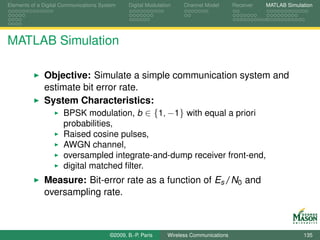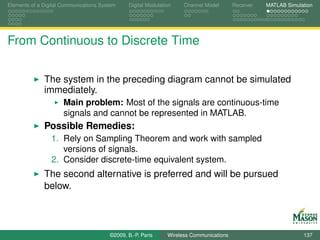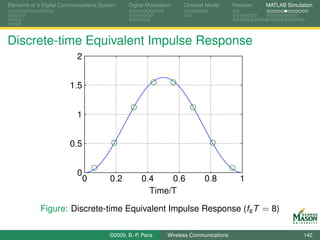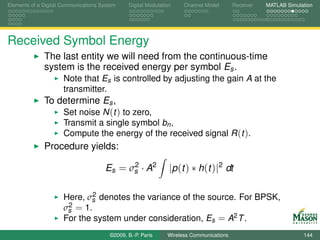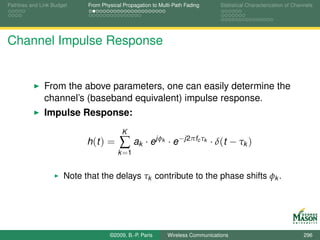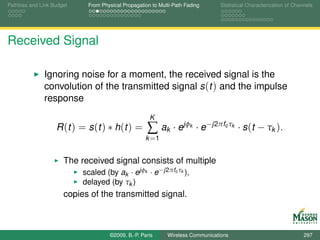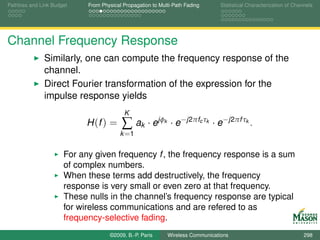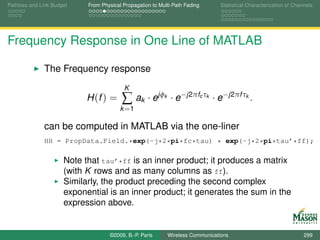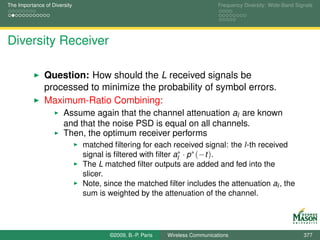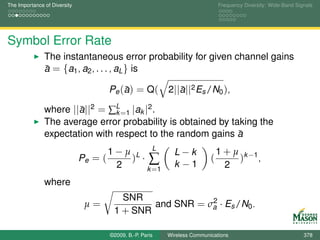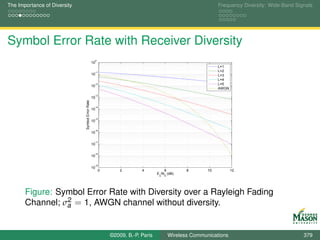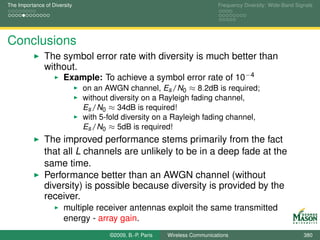






Modeling of Wireless Communication
      Systems using MATLAB

                Dr. B.-P. Paris
   Dept. Electrical and Comp. Engineering
          George Mason University


      last updated September 23, 2009


          ©2009, B.-P. Paris   Wireless Communications   1
Approach

     This course aims to cover both
           theory and practice of wireless commuication systems, and
           the simulation of such systems using MATLAB.
     Both topics are given approximately equal treatment.
           After a brief introduction to MATLAB, theory and MATLAB
           simulation are pursued in parallel.
           This approach allows us to make concepts concrete and/or
           to visualize relevant signals.
     In the process, a toolbox of MATLAB functions is
     constructed.
           Hopefully, the toolbox will be useful for your own projects.
           Illustrates good MATLAB practices.


                       ©2009, B.-P. Paris   Wireless Communications       2
Outline - Prologue: Just Enough MATLAB to ...


   Prologue: Learning Objectives

   User Interface

   Working with Vectors

   Visualization


                      ©2009, B.-P. Paris   Wireless Communications   3
Outline - Part I: From Theory to Simulation

   Part I: Learning Objectives

   Elements of a Digital Communications System

   Digital Modulation

   Channel Model

   Receiver

   MATLAB Simulation


                        ©2009, B.-P. Paris   Wireless Communications   4
Outline - Part II: Digital Modulation and Spectrum

   Part II: Learning Objectives

   Linear Modulation Formats and their Spectra

   Spectrum Estimation in MATLAB

   Non-linear Modulation

   Wide-Band Modulation


                       ©2009, B.-P. Paris   Wireless Communications   5
Outline - Part III: The Wireless Channel


   Part III: Learning Objectives

   Pathloss and Link Budget

   From Physical Propagation to Multi-Path Fading

   Statistical Characterization of Channels


                       ©2009, B.-P. Paris   Wireless Communications   6
Outline - Part IV: Mitigating the Wireless Channel


   Part IV: Learning Objectives

   The Importance of Diversity

   Frequency Diversity: Wide-Band Signals


                      ©2009, B.-P. Paris   Wireless Communications   7
User Interface                       Working with Vectors                  Visualization


                                        Part I

                 Prologue: Just Enough MATLAB to ...


                          ©2009, B.-P. Paris     Wireless Communications              8
User Interface                              Working with Vectors                  Visualization


Prologue: Just Enough MATLAB to ...

                 MATLAB will be used throughout this course to illustrate
                 theory and key concepts.
                 MATLAB is very well suited to model communications
                 systems:
                     Signals are naturally represented in MATLAB,
                     MATLAB has a very large library of functions for processing
                     signals,
                     Visualization of signals is very well supported in MATLAB.
                 MATLAB is used interactively.
                     Eliminates code, compile, run cycle.
                     Great for rapid prototyping and what-if analysis.


                                 ©2009, B.-P. Paris     Wireless Communications              9
User Interface                       Working with Vectors                  Visualization


Outline


       Prologue: Learning Objectives

       User Interface

       Working with Vectors

       Visualization


                          ©2009, B.-P. Paris     Wireless Communications             10
User Interface                              Working with Vectors                  Visualization


Learning Objectives


                 Getting around in MATLAB
                     The user interface,
                     Getting help.
                 Modeling signals in MATLAB
                     Using vectors to model signals,
                     Creating and manipulating vectors,
                     Visualizing vectors: plotting.


                                 ©2009, B.-P. Paris     Wireless Communications             11
User Interface                       Working with Vectors                  Visualization


Outline


       Prologue: Learning Objectives

       User Interface

       Working with Vectors

       Visualization


                          ©2009, B.-P. Paris     Wireless Communications             12
User Interface              Working with Vectors                  Visualization


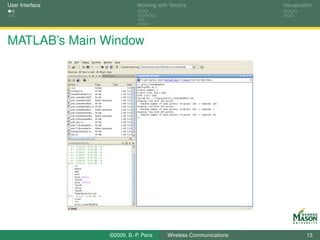
MATLAB’s Main Window


                 ©2009, B.-P. Paris     Wireless Communications             13
User Interface              Working with Vectors                  Visualization


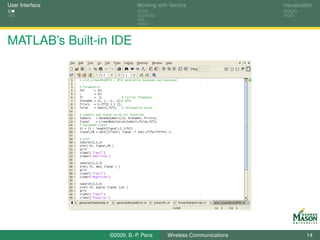
MATLAB’s Built-in IDE


                 ©2009, B.-P. Paris     Wireless Communications             14
User Interface                              Working with Vectors                  Visualization


MATLAB’s Built-in Help System

                 MATLAB has an extensive built-in help system.
                     On-line documentation reader:
                     contains detailed documentation for entire MATLAB system,
                     is invoked by
                          typing doc at command line
                          clicking “Question Mark” in tool bar of main window,
                          via “Help” menu.
                     Command-line help provides access to documentation
                     inside command window.
                     Helpful commands include:
                          help function-name, e.g., help fft.
                          lookfor keyword, e.g., lookfor inverse.

                 We will learn how to tie into the built-in help system.


                                 ©2009, B.-P. Paris     Wireless Communications             15
User Interface                             Working with Vectors                  Visualization


Interacting with MATLAB
                 You interact with MATLAB by typing commands at the
                 command prompt (» ) in the command window.
                 MATLAB’s response depends on whether a semicolon is
                 appended after the command or not.
                     If a semicolon is not appended, then MATLAB displays the
                     result of the command.
                     With a semicolon, the result is not displayed.
                 Examples:
                     The command xx = 1:3 produces
                     xx =
                              1        2       3
                     The command xx = 1:3; produces no output. The variable
                     xx still stores the result.
                     Do use a semicolon with xx = 1:30000000;

                                ©2009, B.-P. Paris     Wireless Communications             16
User Interface                       Working with Vectors                  Visualization


Outline


       Prologue: Learning Objectives

       User Interface

       Working with Vectors

       Visualization


                          ©2009, B.-P. Paris     Wireless Communications             17
User Interface                             Working with Vectors                  Visualization


Signals and Vectors
                 Our objective is to simulate communication systems in
                 MATLAB.
                     This includes the signals that occur in such systems, and
                     processing applied to these signals.
                 In MATLAB (and any other digital system) signals must be
                 represented by samples.
                     Well-founded theory exists regarding sampling (Nyquist’s
                     sampling theorem).
                     Result: Signals are represented as a sequence of numbers.
                 MATLAB is ideally suited to process sequences of
                 numbers.
                     MATLAB’s basic data types: vectors (and matrices).
                     Vectors are just sequence of numbers.


                                ©2009, B.-P. Paris     Wireless Communications             18
User Interface                              Working with Vectors                  Visualization


Illustration: Generating a Sinusoidal Signal

                 The following, simple task illustrates key benefits from
                 MATLAB’s use of vectors.
                 Task: Generate samples of the sinusoidal signal
                                                                          π
                                 x (t ) = 3 · cos(2π440t −                  )
                                                                          4
                 for t ranging from 0 to 10 ms. The sampling rate is 20 KHz.
                 Objective: Compare how this task is accomplished
                     using MATLAB’s vector function,
                     traditional (C-style) for or while loops.


                                 ©2009, B.-P. Paris     Wireless Communications             19
User Interface                             Working with Vectors                  Visualization


Illustration: Generating a Sinusoidal Signal

                 For both approaches, we begin by defining a few
                 parameters.
                     This increases readability and makes it easier to change
                     parameters.

       %% Set Parameters
       A   = 3;     % amplitude
       f   = 440;   % frequency
       phi = -pi/4; % phase
  7
       fs = 20e3;        % sampling rate
       Ts = 0;           % start time
       Te = 10e-3;       % end time


                                ©2009, B.-P. Paris     Wireless Communications             20
User Interface                               Working with Vectors                  Visualization


Using Loops
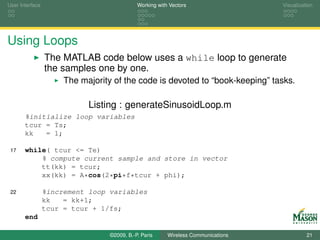
                 The MATLAB code below uses a while loop to generate
                 the samples one by one.
                      The majority of the code is devoted to “book-keeping” tasks.

                            Listing : generateSinusoidLoop.m
       %initialize loop variables
       tcur = Ts;
       kk   = 1;

 17    while( tcur <= Te)
           % compute current sample and store in vector
           tt(kk) = tcur;
           xx(kk) = A*cos(2*pi*f*tcur + phi);

 22              %increment loop variables
                 kk   = kk+1;
                 tcur = tcur + 1/fs;
       end

                                  ©2009, B.-P. Paris     Wireless Communications             21
User Interface                             Working with Vectors                  Visualization


Vectorized Code

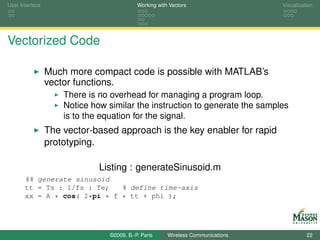
                 Much more compact code is possible with MATLAB’s
                 vector functions.
                     There is no overhead for managing a program loop.
                     Notice how similar the instruction to generate the samples
                     is to the equation for the signal.
                 The vector-based approach is the key enabler for rapid
                 prototyping.

                              Listing : generateSinusoid.m
       %% generate sinusoid
       tt = Ts : 1/fs : Te;   % define time-axis
       xx = A * cos( 2*pi * f * tt + phi );


                                ©2009, B.-P. Paris     Wireless Communications             22
User Interface                             Working with Vectors                  Visualization


Commands for Creating Vectors


                 The following commands all create useful vectors.
                 [ ]: the sequence of samples is explicitly specified.
                     Example: xx = [ 1 3 2 ] produces xx = 1 3 2.
                 :(colon operator): creates a vector of equally spaced
                 samples.
                     Example: tt = 0:2:9 produces tt = 0 2 4 6 8.
                     Example: tt = 1:3 produces tt = 1 2 3.
                     Idiom: tt = ts:1/fs:te creates a vector of sampling times
                     between ts and te with sampling period 1/fs (i.e., the
                     sampling rate is fs).


                                ©2009, B.-P. Paris     Wireless Communications             23
User Interface                                   Working with Vectors                  Visualization


Creating Vectors of Constants

                 ones(n,m):    creates an n × m matrix with all elements equal
                 to 1.
                         Example: xx = ones(1,5) produces xx = 1 1 1 1 1.
                         Example: xx = 4*ones(1,5) produces xx = 4 4 4 4 4.
                 zeros(n,m):     creates an n × m matrix with all elements equal
                 to 0.
                         Often used for initializing a vector.
                         Usage identical to ones.
                 Note: throughout we adopt the convention that signals are
                 represented as row vectors.
                         The first (column) dimension equals 1.


                                      ©2009, B.-P. Paris     Wireless Communications             24
User Interface                              Working with Vectors                  Visualization


Creating Random Vectors

                 We will often need to create vectors of random numbers.
                     E.g., to simulate noise.
                 The following two functions create random vectors.
                     randn(n,m): creates an n × m matrix of independent
                     Gaussian random numbers with mean zero and variance
                     one.
                          Example: xx = randn(1,5) may produce xx = -0.4326
                          -1.6656 0.1253 0.2877 -1.1465.
                     rand(n,m): creates an n × m matrix of independent
                     uniformly distributed random numbers between zero and
                     one.
                          Example: xx = rand(1,5) may produce xx = 0.1576
                          0.9706 0.9572 0.4854 0.8003.


                                 ©2009, B.-P. Paris     Wireless Communications             25
User Interface                              Working with Vectors                    Visualization


Addition and Subtraction
                 The standard + and - operators are used to add and
                 subtract vectors.
                 One of two conditions must hold for this operation to
                 succeed.
                     Both vectors must have exactly the same size.
                          In this case, corresponding elements in the two vectors are
                          added and the result is another vector of the same size.
                          Example: [1 3 2] + 1:3 produces 2 5 5.
                          A prominent error message indicates when this condition is
                          violated.
                     One of the operands is a scalar, i.e., a 1 × 1 (degenerate)
                     vector.
                          In this case, each element of the vector has the scalar added
                          to it.
                          The result is a vector of the same size as the vector operand.
                          Example: [1 3 2] + 2 produces 3 5 4.

                                 ©2009, B.-P. Paris     Wireless Communications               26
User Interface                              Working with Vectors                    Visualization


Element-wise Multiplication and Division
                 The operators .* and ./ operators multiply or divide two
                 vectors element by element.
                 One of two conditions must hold for this operation to
                 succeed.
                     Both vectors must have exactly the same size.
                         In this case, corresponding elements in the two vectors are
                         multiplied and the result is another vector of the same size.
                         Example: [1 3 2] .* 1:3 produces 1 6 6.
                         An error message indicates when this condition is violated.
                     One of the operands is a scalar.
                         In this case, each element of the vector is multiplied by the
                         scalar.
                         The result is a vector of the same size as the vector operand.
                         Example: [1 3 2] .* 2 produces 2 6 4.
                         If one operand is a scalar the ’.’ may be omitted, i.e.,
                         [1 3 2] * 2 also produces 2 6 4.

                                 ©2009, B.-P. Paris     Wireless Communications               27
User Interface                              Working with Vectors                  Visualization


Inner Product
                 The operator * with two vector arguments computes the
                 inner product (dot product) of the vectors.
                     Recall the inner product of two vectors is defined as
                                                         N
                                           x ·y =       ∑ x (n ) · y (n ).
                                                       n =1

                     This implies that the result of the operation is a scalar!
                 The inner product is a useful and important signal
                 processing operation.
                     It is very different from element-wise multiplication.
                     The second dimension of the first operand must equal the
                     first dimension of the second operand.
                          MATLAB error message: Inner matrix dimensions
                          must agree.
                     Example: [1 3 2] * (1:3)’ = 13.
                          The single quote (’) transposes a vector.
                                 ©2009, B.-P. Paris     Wireless Communications             28
User Interface                              Working with Vectors                  Visualization


Powers
                 To raise a vector to some power use the .^ operator.
                     Example: [1 3 2].^2 yields 1 9 4.
                     The operator ^ exists but is generally not what you need.
                          Example: [1 3 2]^2 is equivalent to [1 3 2] * [1 3 2]
                          which produces an error.
                 Similarly, to use a vector as the exponent for a scalar base
                 use the .^ operator.
                     Example: 2.^[1 3 2] yields 2 8 4.
                 Finally, to raise a vector of bases to a vector of exponents
                 use the .^ operator.
                     Example: [1 3 2].^(1:3) yields 1 9 8.
                     The two vectors must have the same dimensions.
                 The .^ operator is (nearly) always the right operator.

                                 ©2009, B.-P. Paris     Wireless Communications             29
User Interface                              Working with Vectors                  Visualization


Complex Arithmetic
                 MATLAB support complex numbers fully and naturally.
                                          √
                    The imaginary unit i = −1 is a built-in constant named i
                     and j.
                     Creating complex vectors:
                          Example: xx = randn(1,5) + j*randn(1,5) creates a
                          vector of complex Gaussian random numbers.
                 A couple of “gotchas” in connection with complex
                 arithmetic:
                     Never use i and j as variables!
                          Example: After invoking j=2, the above command will
                          produce very unexpected results.
                     Transposition operator (’) transposes and forms conjugate
                     complex.
                          That is very often the right thing to do.
                          Transpose only is performed with .’ operator.

                                 ©2009, B.-P. Paris     Wireless Communications             30
User Interface                              Working with Vectors                  Visualization


Vector Functions

                 MATLAB has literally hundreds of built-in functions for
                 manipulating vectors and matrices.
                 The following will come up repeatedly:
                     yy=cos(xx), yy=sin(xx),          and yy=exp(xx):
                          compute the cosine, sine, and exponential for each element
                          of vector xx,
                          the result yy is a vector of the same size as xx.
                     XX=fft(xx), xx=ifft(XX):
                          Forward and inverse discrete Fourier transform (DFT),
                          computed via an efficient FFT algorithm.
                     Many algebraic functions are available, including log10,
                     sqrt, abs, and round.
                          Try help elfun for a complete list.


                                 ©2009, B.-P. Paris     Wireless Communications             31
User Interface                                Working with Vectors                     Visualization


Functions Returning a Scalar Result


                 Many other functions accept a vector as its input and
                 return a scalar value as the result.
                 Examples include
                     min and max,
                     mean and var or std,
                     sum computes the sum of            the elements of a vector,
                     norm provides the square           root of the sum of the squares of
                     the elements of a vector.
                            The norm of a vector is related to power and energy.
                 Try help   datafun   for an extensive list.


                                   ©2009, B.-P. Paris     Wireless Communications                32
User Interface                              Working with Vectors                  Visualization


Accessing Elements of a Vector


                 Frequently it is necessary to modify or extract a subset of
                 the elements of a vector.
                     Accessing a single element of a vector:
                          Example: Let xx = [1 3 2], change the third element to 4.
                          Solution: xx(3) = 4; produces xx = 1 3 4.
                     Single elements are accessed by providing the index of the
                     element of interest in parentheses.


                                 ©2009, B.-P. Paris     Wireless Communications             33
User Interface                              Working with Vectors                   Visualization


Accessing Elements of a Vector
                 Accessing a range of elements of a vector:
                     Example: Let xx = ones(1,10);, change the first five
                     elements to −1.
                     Solution: xx(1:5) = -1*ones(1,5); Note, xx(1:5) = -1
                     works as well.
                     Example: Change every other element of xx to 2.
                     Solution: xx(2:2:end) = 2;;
                          Note that end may be use to denote the index of a vector’s
                          last element.
                          This is handy if the length of the vector is not known.
                     Example: Change third and seventh element to 3.
                     Solution: xx([3 7]) = 3;;
                 A set of elements of a vector is accessed by providing a
                 vector of indices in parentheses.

                                 ©2009, B.-P. Paris     Wireless Communications              34
User Interface                              Working with Vectors                  Visualization


Accessing Elements that Meet a Condition
                 Frequently one needs to access all elements of a vector
                 that meet a given condition.
                     Clearly, that could be accomplished by writing a loop that
                     examines and processes one element at a time.
                     Such loops are easily avoided.
                 Example: “Poor man’s absolute value”
                     Assume vector xx contains both positive and negative
                     numbers. (e.g., xx = randn(1,10);).
                     Objective: Multiply all negative elements of xx by −1; thus
                     compute the absolute value of all elements of xx.
                     Solution: proceeds in two steps
                          isNegative = (xx < 0);
                          xx(isNegative) = -xx(isNegative);
                     The vector isNegative consists of logical (boolean) values;
                     1’s appear wherever an element of xx is negative.

                                 ©2009, B.-P. Paris     Wireless Communications             35
User Interface                       Working with Vectors                  Visualization


Outline


       Prologue: Learning Objectives

       User Interface

       Working with Vectors

       Visualization


                          ©2009, B.-P. Paris     Wireless Communications             36
User Interface                             Working with Vectors                  Visualization


Visualization and Graphics


                 MATLAB has powerful, built-in functions for plotting
                 functions in two and three dimensions.
                 Publication quality graphs are easily produced in a variety
                 of standard graphics formats.
                 MATLAB provides fine-grained control over all aspects of
                 the final graph.


                                ©2009, B.-P. Paris     Wireless Communications             37
User Interface                              Working with Vectors                  Visualization


A Basic Plot

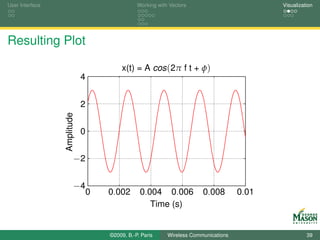
                 The sinusoidal signal, we generated earlier is easily plotted
                 via the following sequence of commands:
                 Try help plot for more information about the capabilities of
                 the plot command.
       %% Plot
       plot(tt, xx, ’r’)      % xy-plot, specify red line
       xlabel( ’Time (s)’ )   % labels for x and y axis
       ylabel( ’Amplitude’ )
 10    title( ’x(t) = A cos(2pi f t + phi)’)
       grid                   % create a grid
       axis([0 10e-3 -4 4])   % tweak the range for the axes


                                 ©2009, B.-P. Paris     Wireless Communications             38
User Interface                                  Working with Vectors                         Visualization


Resulting Plot

                                          x(t) = A cos (2π f t + φ)
                             4


                             2
                 Amplitude


                             0


                         −2

                         −4
                                 0   0.002       0.004 0.006             0.008        0.01
                                                    Time (s)


                                     ©2009, B.-P. Paris     Wireless Communications                    39
User Interface                             Working with Vectors                  Visualization


Multiple Plots in One Figure

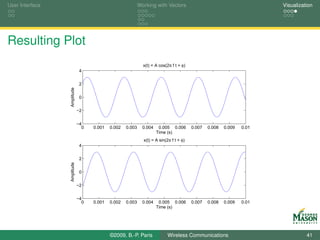
                 MATLAB can either put multiple graphs in the same plot or
                 put multiple plots side by side.
                 The latter is accomplished with the subplot command.
       subplot(2,1,1)
       plot(tt, xx )          % xy-plot
       xlabel( ’Time (s)’ )   % labels for x and y axis
       ylabel( ’Amplitude’ )
 12    title( ’x(t) = A cos(2pi f t + phi)’)

       subplot(2,1,2)
       plot(tt, yy )          % xy-plot
       xlabel( ’Time (s)’ )   % labels for x and y axis
 17    ylabel( ’Amplitude’ )
       title( ’x(t) = A sin(2pi f t + phi)’)


                                ©2009, B.-P. Paris     Wireless Communications             40
User Interface                                             Working with Vectors                                        Visualization


Resulting Plot
                                                             x(t) = A cos(2π f t + φ)
                              4


                              2
                 Amplitude


                              0


                             −2


                             −4
                               0   0.001   0.002   0.003     0.004    0.005 0.006       0.007   0.008   0.009   0.01
                                                                     Time (s)
                                                             x(t) = A sin(2π f t + φ)
                              4


                              2
                 Amplitude


                              0


                             −2


                             −4
                               0   0.001   0.002   0.003     0.004    0.005 0.006       0.007   0.008   0.009   0.01
                                                                     Time (s)


                                           ©2009, B.-P. Paris             Wireless Communications                                41
User Interface                              Working with Vectors                  Visualization


3-D Graphics

                 MATLAB provides several functions that create high-quality
                 three-dimensional graphics.
                 The most important are:
                     plot3(x,y,z): plots a function of two variables.
                     mesh(x,y,Z): plots a mesh of the values stored in matrix Z
                     over the plane spanned by vectors x and y.
                     surf(x,y,Z): plots a surface from the values stored in
                     matrix Z over the plane spanned by vectors x and y.
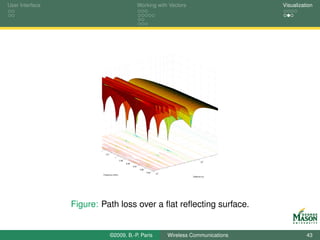
                 A relevant example is shown on the next slide.
                     The path loss in a two-ray propagation environment over a
                     flat, reflecting surface is shown as a function of distance
                     and frequency.


                                 ©2009, B.-P. Paris     Wireless Communications             42
User Interface                                                        Working with Vectors                          Visualization


                        1.02
                                1.01
                                          1
                                                 0.99                                                        2
                                                                                                           10
                                                        0.98
                                                               0.97
                                                                       0.96
                                                                              0.95    1
                                                                                     10
                               Frequency (GHz)
                                                                                                   Distance (m)


                 Figure: Path loss over a flat reflecting surface.


                                       ©2009, B.-P. Paris                                 Wireless Communications             43
User Interface                             Working with Vectors                  Visualization


Summary

                 We have taken a brief look at the capabilities of MATLAB.
                 Specifically, we discussed
                     Vectors as the basic data unit used in MATLAB,
                     Arithmetic with vectors,
                     Prominent vector functions,
                     Visualization in MATLAB.
                 We will build on this basis as we continue and apply
                 MATLAB to the simulation of communication systems.
                 To probe further:
                     Read the built-in documentation.
                     Recommended MATLAB book: D. Hanselman and
                     B. Littlefield, Mastering MATLAB, Prentice-Hall.


                                ©2009, B.-P. Paris     Wireless Communications             44
Elements of a Digital Communications System    Digital Modulation    Channel Model       Receiver   MATLAB Simulation


                                                      Part II

                Introduction: From Theory to Simulation


                                        ©2009, B.-P. Paris     Wireless Communications                            45
Elements of a Digital Communications System    Digital Modulation    Channel Model       Receiver   MATLAB Simulation


Introduction: From Theory to Simulation

      Introduction to digital communications and simulation of digital
      communications systems.
              A simple digital communication system and its theoretical
              underpinnings
                      Introduction to digital modulation
                      Baseband and passband signals: complex envelope
                      Noise and Randomness
                      The matched filter receiver
                      Bit-error rate
              Example: BPSK over AWGN, simulation in MATLAB


                                        ©2009, B.-P. Paris     Wireless Communications                            46
Elements of a Digital Communications System    Digital Modulation    Channel Model       Receiver   MATLAB Simulation


Outline

      Part I: Learning Objectives

      Elements of a Digital Communications System

      Digital Modulation

      Channel Model

      Receiver

      MATLAB Simulation


                                        ©2009, B.-P. Paris     Wireless Communications                            47
Elements of a Digital Communications System    Digital Modulation    Channel Model       Receiver   MATLAB Simulation


Learning Objectives


              Theory of Digital Communications.
                      Principles of Digital modulation.
                      Communications Channel Model: Additive, White Gaussian
                      Noise.
                      The Matched Filter Receiver.
                      Finding the Probability of Error.
              Modeling a Digital Communications System in MATLAB.
                      Representing Signals and Noise in MATLAB.
                      Simulating a Communications System.
                      Measuring Probability of Error via MATLAB Simulation.


                                        ©2009, B.-P. Paris     Wireless Communications                            48
Elements of a Digital Communications System    Digital Modulation    Channel Model       Receiver   MATLAB Simulation


Outline

      Part I: Learning Objectives

      Elements of a Digital Communications System

      Digital Modulation

      Channel Model

      Receiver

      MATLAB Simulation


                                        ©2009, B.-P. Paris     Wireless Communications                            49
Elements of a Digital Communications System    Digital Modulation    Channel Model       Receiver   MATLAB Simulation


Elements of a Digital Communications System
             Source: produces a sequence of information symbols b.
      Transmitter: maps bit sequence to analog signal s (t ).
           Channel: models corruption of transmitted signal s (t ).
          Receiver: produces reconstructed sequence of information
                            ˆ
                    symbols b from observed signal R (t ).


                        b                         s (t )                 R (t )                        ˆ
                                                                                                       b
        Source                 Transmitter                   Channel                 Receiver


        Figure: Block Diagram of a Generic Digital Communications System


                                        ©2009, B.-P. Paris     Wireless Communications                            50
Elements of a Digital Communications System     Digital Modulation    Channel Model       Receiver   MATLAB Simulation


The Source
              The source models the statistical properties of the digital
              information source.
              Three main parameters:
              Source Alphabet: list of the possible information symbols
                          the source produces.
                               Example: A = {0, 1}; symbols are called
                                              bits.
                                              Alphabet for a source with M (typically, a
                                              power of 2) symbols: A = {0, 1, . . . , M − 1}
                                              or A = {±1, ±3, . . . , ±(M − 1)}.
                                              Alphabet with positive and negative symbols
                                              is often more convenient.
                                              Symbols may be complex valued; e.g.,
                                              A = {±1, ±j }.

                                        ©2009, B.-P. Paris      Wireless Communications                            51
Elements of a Digital Communications System    Digital Modulation    Channel Model       Receiver   MATLAB Simulation


      A priori Probability: relative frequencies with which the source
                   produces each of the symbols.
                         Example: a binary source that produces (on
                         average) equal numbers of 0 and 1 bits has
                                        1
                         π0 = π1 = 2 .
                         Notation: πn denotes the probability of
                         observing the n-th symbol.
                         Typically, a-priori probabilities are all equal,
                                      1
                         i.e., πn = M .
                         A source with M symbols is called an M-ary
                         source.
                               binary (M = 2)
                               ternary (M = 3)
                               quaternary (M = 4)


                                        ©2009, B.-P. Paris     Wireless Communications                            52
Elements of a Digital Communications System    Digital Modulation     Channel Model      Receiver   MATLAB Simulation


      Symbol Rate: The number of information symbols the source
                 produces per second. Also called the baud rate R.

                                    Closely related: information rate Rb indicates
                                    the number of bits the source produces per
                                    second.
                                    Relationship: Rb = R · log2 (M ).
                                    Also, T = 1/R is the symbol period.

                                         Bit 1       Bit 2          Symbol
                                          0           0               0
                                          0           1               1
                                          1           0               2
                                          1           1               3
            Table: Two bits can be represented in one quaternary symbol.

                                        ©2009, B.-P. Paris     Wireless Communications                            53
Elements of a Digital Communications System    Digital Modulation    Channel Model       Receiver   MATLAB Simulation


Remarks


              This view of the source is simplified.
              We have omitted important functionality normally found in
              the source, including
                      error correction coding and interleaving, and
                      mapping bits to symbols.
              This simplified view is sufficient for our initial discussions.
              Missing functionality will be revisited when needed.


                                        ©2009, B.-P. Paris     Wireless Communications                            54
Elements of a Digital Communications System    Digital Modulation    Channel Model       Receiver   MATLAB Simulation


Modeling the Source in MATLAB
              Objective: Write a MATLAB function to be invoked as:
              Symbols = RandomSymbols( N, Alphabet, Priors);

              The input parameters are
                      N: number of input symbols to be produced.
                      Alphabet: source alphabet to draw symbols from.
                             Example: Alphabet = [1 -1];
                      Priors:     a priori probabilities for the input symbols.
                             Example:
                             Priors = ones(size(Alphabet))/length(Alphabet);
              The output Symbols is a vector
                      with N elements,
                      drawn from Alphabet, and
                      the number of times each symbol occurs is (approximately)
                      proportional to the corresponding element in Priors.

                                        ©2009, B.-P. Paris     Wireless Communications                            55
Elements of a Digital Communications System    Digital Modulation    Channel Model       Receiver   MATLAB Simulation


Reminders

              MATLAB’s basic data units are vectors and matrices.
                      Vectors are best thought of as lists of numbers; vectors
                      often contain samples of a signal.
                      There are many ways to create vectors, including
                             Explicitly: Alphabet = [1 -1];
                             Colon operator: nn = 1:10;
                             Via a function: Priors=ones(1,5)/5;
                      This leads to very concise programs; for-loops are rarely
                      needed.
              MATLAB has a very large number of available functions.
                      Reduces programming to combining existing building
                      blocks.
                      Difficulty: find out what is available; use built-in help.


                                        ©2009, B.-P. Paris     Wireless Communications                            56
Elements of a Digital Communications System    Digital Modulation    Channel Model       Receiver   MATLAB Simulation


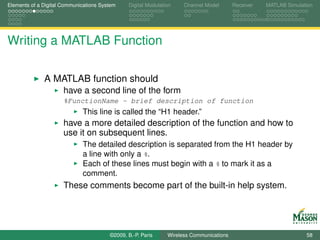
Writing a MATLAB Function


              A MATLAB function must
                      begin with a line of the form
                      function [out1,out2] = FunctionName(in1, in2, in3)
                      be stored in a file with the same name as the function name
                      and extension ’.m’.
                      For our symbol generator, the file name must be
                      RandomSymbols.m and
                      the first line must be
                      function Symbols = RandomSymbols(N, Alphabet, Priors)


                                        ©2009, B.-P. Paris     Wireless Communications                            57
Elements of a Digital Communications System    Digital Modulation    Channel Model       Receiver   MATLAB Simulation


Writing a MATLAB Function

              A MATLAB function should
                      have a second line of the form
                      %FunctionName - brief description of function
                             This line is called the “H1 header.”
                      have a more detailed description of the function and how to
                      use it on subsequent lines.
                             The detailed description is separated from the H1 header by
                             a line with only a %.
                             Each of these lines must begin with a % to mark it as a
                             comment.
                      These comments become part of the built-in help system.


                                        ©2009, B.-P. Paris     Wireless Communications                            58
Elements of a Digital Communications System    Digital Modulation    Channel Model       Receiver   MATLAB Simulation


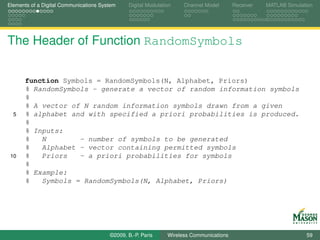
The Header of Function RandomSymbols


      function Symbols = RandomSymbols(N, Alphabet, Priors)
      % RandomSymbols - generate a vector of random information symbols
      %
      % A vector of N random information symbols drawn from a given
  5   % alphabet and with specified a priori probabilities is produced.
      %
      % Inputs:
      %   N        - number of symbols to be generated
      %   Alphabet - vector containing permitted symbols
 10   %   Priors   - a priori probabilities for symbols
      %
      % Example:
      %   Symbols = RandomSymbols(N, Alphabet, Priors)


                                        ©2009, B.-P. Paris     Wireless Communications                            59
Elements of a Digital Communications System    Digital Modulation    Channel Model       Receiver   MATLAB Simulation


Algorithm for Generating Random Symbols
              For each of the symbols to be generated we use the
              following algorithm:
                      Begin by computing the cumulative sum over the priors.
                             Example: Let Priors = [0.25 0.25 0.5], then the
                             cumulative sum equals CPriors = [0 0.25 0.5 1].
                      For each symbol, generate a uniform random number
                      between zero and one.
                             The MATLAB function rand does that.
                      Determine between which elements of the cumulative sum
                      the random number falls and select the corresponding
                      symbol from the alphabet.
                             Example: Assume the random number generated is 0.3.
                             This number falls between the second and third element of
                             CPriors.
                             The second symbol from the alphabet is selected.


                                        ©2009, B.-P. Paris     Wireless Communications                            60
Elements of a Digital Communications System    Digital Modulation    Channel Model       Receiver   MATLAB Simulation


MATLAB Implementation


              In MATLAB, the above algorithm can be “vectorized” to
              work on the entire sequence at once.
      CPriors = [0 cumsum( Priors )];
      rr = rand(1, N);

      for kk=1:length(Alphabet)
 42       Matches = rr > CPriors(kk) & rr <= CPriors(kk+1);
          Symbols( Matches ) = Alphabet( kk );
      end


                                        ©2009, B.-P. Paris     Wireless Communications                            61
Elements of a Digital Communications System    Digital Modulation    Channel Model       Receiver   MATLAB Simulation


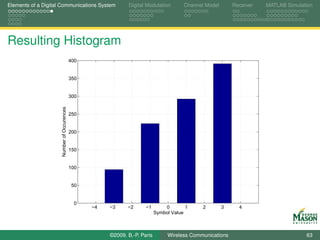
Testing Function RandomSymols
              We can invoke and test the function RandomSymbols as
              shown below.
              A histogram of the generated symbols should reflect the
              specified a priori probabilities.
      %% set parameters
      N        = 1000;
      Alphabet = [-3 -1 1 3];
      Priors   = [0.1 0.2 0.3 0.4];
 10
      %% generate symbols and plot histogram
      Symbols = RandomSymbols( N, Alphabet, Priors );
      hist(Symbols, -4:4 );
      grid
 15   xlabel(’Symbol Value’)
      ylabel(’Number of Occurences’)


                                        ©2009, B.-P. Paris     Wireless Communications                            62
Elements of a Digital Communications System                   Digital Modulation        Channel Model       Receiver   MATLAB Simulation


Resulting Histogram
                                            400


                                            350


                                            300
                     Number of Occurences


                                            250


                                            200


                                            150


                                            100


                                            50


                                             0
                                                  −4   −3     −2      −1        0        1     2        3     4
                                                                            Symbol Value


                                                       ©2009, B.-P. Paris        Wireless Communications                             63
Elements of a Digital Communications System    Digital Modulation    Channel Model       Receiver   MATLAB Simulation


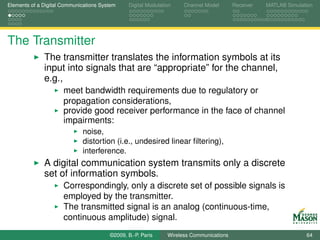
The Transmitter
              The transmitter translates the information symbols at its
              input into signals that are “appropriate” for the channel,
              e.g.,
                      meet bandwidth requirements due to regulatory or
                      propagation considerations,
                      provide good receiver performance in the face of channel
                      impairments:
                             noise,
                             distortion (i.e., undesired linear filtering),
                             interference.
              A digital communication system transmits only a discrete
              set of information symbols.
                      Correspondingly, only a discrete set of possible signals is
                      employed by the transmitter.
                      The transmitted signal is an analog (continuous-time,
                      continuous amplitude) signal.
                                        ©2009, B.-P. Paris     Wireless Communications                            64
Elements of a Digital Communications System    Digital Modulation     Channel Model       Receiver   MATLAB Simulation


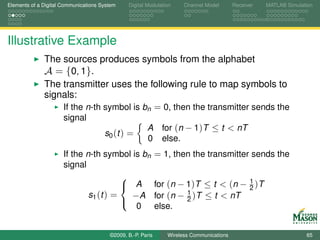
Illustrative Example
              The sources produces symbols from the alphabet
              A = {0, 1}.
              The transmitter uses the following rule to map symbols to
              signals:
                  If the n-th symbol is bn = 0, then the transmitter sends the
                      signal
                                                       A for (n − 1)T ≤ t < nT
                                      s0 (t ) =
                                                       0 else.
                      If the n-th symbol is bn               = 1, then the transmitter sends the
                      signal

                                                             for (n − 1)T ≤ t < (n − 1 )T
                                        
                                         A                                          2
                              s1 (t ) =   −A                 for (n − 1 )T ≤ t < nT
                                                                      2
                                           0                 else.
                                        


                                        ©2009, B.-P. Paris      Wireless Communications                            65
Elements of a Digital Communications System       Digital Modulation    Channel Model       Receiver   MATLAB Simulation


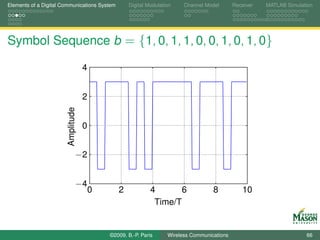
Symbol Sequence b = {1, 0, 1, 1, 0, 0, 1, 0, 1, 0}

                                   4


                                   2
                       Amplitude


                                   0


                               −2


                               −4
                                       0      2             4       6              8           10
                                                             Time/T


                                           ©2009, B.-P. Paris     Wireless Communications                            66
Elements of a Digital Communications System    Digital Modulation    Channel Model       Receiver   MATLAB Simulation


MATLAB Code for Example

                                 Listing : plot_TxExampleOrth.m
      b = [ 1 0 1 1 0 0 1 0 1 0];                             %symbol sequence
      fsT = 20;                                               % samples per symbol period
      A = 3;
  6
      Signals = A*[ ones(1,fsT);       % signals, one per row
                    ones(1,fsT/2) -ones(1,fsT/2)];

      tt = 0:1/fsT:length(b)-1/fsT;                           % time axis for plotting
 11
      %% generate signal ...
      TXSignal = [];
      for kk=1:length(b)
          TXSignal = [ TXSignal Signals( b(kk)+1, : ) ];
 16   end


                                        ©2009, B.-P. Paris     Wireless Communications                            67
Elements of a Digital Communications System    Digital Modulation    Channel Model       Receiver   MATLAB Simulation


MATLAB Code for Example


                                 Listing : plot_TxExampleOrth.m

      %% ... and plot
      plot(tt, TXSignal)
 20   axis([0 length(b) -(A+1) (A+1)]);
      grid
      xlabel(’Time/T’)


                                        ©2009, B.-P. Paris     Wireless Communications                            68
Elements of a Digital Communications System    Digital Modulation    Channel Model       Receiver   MATLAB Simulation


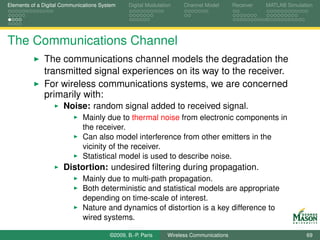
The Communications Channel
              The communications channel models the degradation the
              transmitted signal experiences on its way to the receiver.
              For wireless communications systems, we are concerned
              primarily with:
                      Noise: random signal added to received signal.
                             Mainly due to thermal noise from electronic components in
                             the receiver.
                             Can also model interference from other emitters in the
                             vicinity of the receiver.
                             Statistical model is used to describe noise.
                      Distortion: undesired filtering during propagation.
                             Mainly due to multi-path propagation.
                             Both deterministic and statistical models are appropriate
                             depending on time-scale of interest.
                             Nature and dynamics of distortion is a key difference to
                             wired systems.

                                        ©2009, B.-P. Paris     Wireless Communications                            69
Elements of a Digital Communications System    Digital Modulation    Channel Model       Receiver   MATLAB Simulation


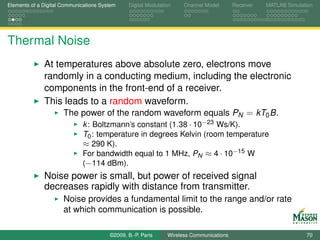
Thermal Noise
              At temperatures above absolute zero, electrons move
              randomly in a conducting medium, including the electronic
              components in the front-end of a receiver.
              This leads to a random waveform.
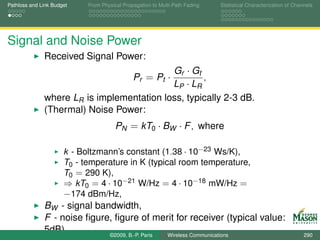
                   The power of the random waveform equals PN = kT0 B.
                             k : Boltzmann’s constant (1.38 · 10−23 Ws/K).
                             T0 : temperature in degrees Kelvin (room temperature
                             ≈ 290 K).
                             For bandwidth equal to 1 MHz, PN ≈ 4 · 10−15 W
                             (−114 dBm).
              Noise power is small, but power of received signal
              decreases rapidly with distance from transmitter.
                      Noise provides a fundamental limit to the range and/or rate
                      at which communication is possible.

                                        ©2009, B.-P. Paris     Wireless Communications                            70
Elements of a Digital Communications System    Digital Modulation    Channel Model       Receiver   MATLAB Simulation


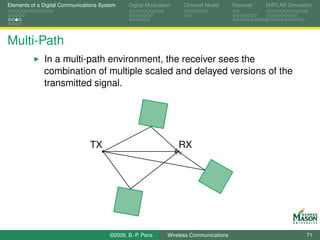
Multi-Path
              In a multi-path environment, the receiver sees the
              combination of multiple scaled and delayed versions of the
              transmitted signal.


                                TX                                  RX


                                        ©2009, B.-P. Paris     Wireless Communications                            71
Elements of a Digital Communications System    Digital Modulation       Channel Model       Receiver   MATLAB Simulation


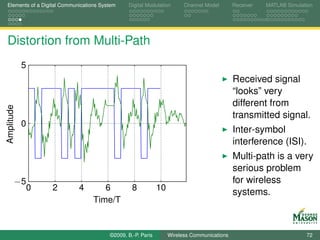
Distortion from Multi-Path
            5
                                                                                            Received signal
                                                                                            “looks” very
                                                                                            different from
Amplitude


                                                                                            transmitted signal.
            0
                                                                                            Inter-symbol
                                                                                            interference (ISI).
                                                                                            Multi-path is a very
                                                                                            serious problem
        −5                                                                                  for wireless
                0   2       4        6           8           10
                                                                                            systems.
                                  Time/T


                                        ©2009, B.-P. Paris        Wireless Communications                            72
Elements of a Digital Communications System    Digital Modulation    Channel Model       Receiver   MATLAB Simulation


The Receiver
              The receiver is designed to reconstruct the original
              information sequence b.
              Towards this objective, the receiver uses
                   the received signal R (t ),
                      knowledge about how the transmitter works,
                             Specifically, the receiver knows how symbols are mapped to
                             signals.
                      the a-priori probability and rate of the source.
              The transmitted signal typically contains information that
              allows the receiver to gain information about the channel,
              including
                      training sequences to estimate the impulse response of the
                      channel,
                      synchronization preambles to determine symbol locations
                      and adjust amplifier gains.
                                        ©2009, B.-P. Paris     Wireless Communications                            73
Elements of a Digital Communications System    Digital Modulation    Channel Model       Receiver   MATLAB Simulation


The Receiver

              The receiver input is an analog signal and it’s output is a
              sequence of discrete information symbols.
                      Consequently, the receiver must perform analog-to-digital
                      conversion (sampling).
              Correspondingly, the receiver can be divided into an
              analog front-end followed by digital processing.
                      Modern receivers have simple front-ends and sophisticated
                      digital processing stages.
                      Digital processing is performed on standard digital
                      hardware (from ASICs to general purpose processors).
                      Moore’s law can be relied on to boost the performance of
                      digital communications systems.


                                        ©2009, B.-P. Paris     Wireless Communications                            74
Elements of a Digital Communications System    Digital Modulation    Channel Model       Receiver   MATLAB Simulation


Measures of Performance

              The receiver is expected to perform its function optimally.
              Question: optimal in what sense?
                      Measure of performance must be statistical in nature.
                             observed signal is random, and
                             transmitted symbol sequence is random.
                      Metric must reflect the reliability with which information is
                      reconstructed at the receiver.
              Objective: Design the receiver that minimizes the
              probability of a symbol error.
                      Also referred to as symbol error rate.
                      Closely related to bit error rate (BER).


                                        ©2009, B.-P. Paris     Wireless Communications                            75
Elements of a Digital Communications System    Digital Modulation    Channel Model       Receiver   MATLAB Simulation


Summary


              We have taken a brief look at the elements of a
              communication system.
                      Source,
                      Transmitter,
                      Channel, and
                      Receiver.
              We will revisit each of these elements for a more rigorous
              analysis.
                      Intention: Provide enough detail to allow simulation of a
                      communication system.


                                        ©2009, B.-P. Paris     Wireless Communications                            76
Elements of a Digital Communications System    Digital Modulation    Channel Model       Receiver   MATLAB Simulation


Outline

      Part I: Learning Objectives

      Elements of a Digital Communications System

      Digital Modulation

      Channel Model

      Receiver

      MATLAB Simulation


                                        ©2009, B.-P. Paris     Wireless Communications                            77
Elements of a Digital Communications System    Digital Modulation    Channel Model       Receiver   MATLAB Simulation


Digital Modulation

              Digital modulation is performed by the transmitter.
              It refers to the process of converting a sequence of
              information symbols into a transmitted (analog) signal.
              The possibilities for performing this process are virtually
              without limits, including
                      varying, the amplitude, frequency, and/or phase of a
                      sinusoidal signal depending on the information sequence,
                      making the currently transmitted signal on some or all of the
                      previously transmitted symbols (modulation with memory).
              Initially, we focus on a simple, yet rich, class of modulation
              formats referred to as linear modulation.


                                        ©2009, B.-P. Paris     Wireless Communications                            78
Elements of a Digital Communications System      Digital Modulation    Channel Model       Receiver   MATLAB Simulation


Linear Modulation
              Linear modulation may be thought of as the digital
              equivalent of amplitude modulation.
                      The instantaneous amplitude of the transmitted signal is
                      proportional to the current information symbol.
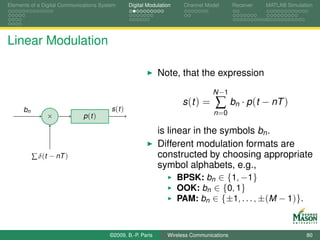
              Specifically, a linearly modulated signal may be written as
                                                         N −1
                                              s (t ) =    ∑     bn · p (t − nT )
                                                         n =0

              where,
                      bn denotes the n-th information symbol, and
                      p (t ) denotes a pulse of finite duration.
                      Recall that T is the duration of a symbol.


                                        ©2009, B.-P. Paris       Wireless Communications                            79
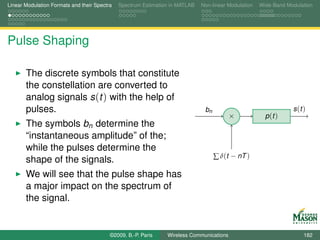
Elements of a Digital Communications System       Digital Modulation    Channel Model       Receiver   MATLAB Simulation


Linear Modulation

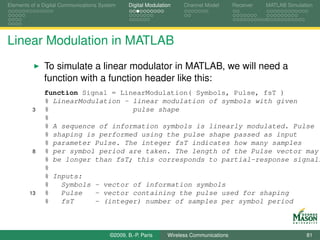
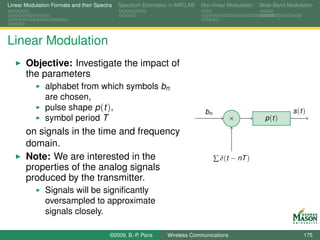
                                                              Note, that the expression
                                                                                   N −1

      bn                                 s (t )
                                                                       s (t ) =     ∑       bn · p (t − nT )
                ×             p (t )                                               n =0

                                                              is linear in the symbols bn .
                                                              Different modulation formats are
           ∑ δ(t − nT )                                       constructed by choosing appropriate
                                                              symbol alphabets, e.g.,
                                                                    BPSK: bn ∈ {1, −1}
                                                                    OOK: bn ∈ {0, 1}
                                                                    PAM: bn ∈ {±1, . . . , ±(M − 1)}.


                                        ©2009, B.-P. Paris        Wireless Communications                            80
Elements of a Digital Communications System    Digital Modulation    Channel Model       Receiver   MATLAB Simulation


Linear Modulation in MATLAB
              To simulate a linear modulator in MATLAB, we will need a
              function with a function header like this:
              function Signal = LinearModulation( Symbols, Pulse, fsT )
              % LinearModulation - linear modulation of symbols with given
         3    %                    pulse shape
              %
              % A sequence of information symbols is linearly modulated. Pulse
              % shaping is performed using the pulse shape passed as input
              % parameter Pulse. The integer fsT indicates how many samples
         8    % per symbol period are taken. The length of the Pulse vector may
              % be longer than fsT; this corresponds to partial-response signali
              %
              % Inputs:
              %   Symbols - vector of information symbols
        13    %   Pulse   - vector containing the pulse used for shaping
              %   fsT     - (integer) number of samples per symbol period


                                        ©2009, B.-P. Paris     Wireless Communications                            81
Elements of a Digital Communications System    Digital Modulation    Channel Model       Receiver   MATLAB Simulation


Linear Modulation in MATLAB

              In the body of the function, the sum of the pulses is
              computed.
              There are two issues that require some care:
                      Each pulse must be inserted in the correct position in the
                      output signal.
                             Recall that the expression for the output signal s (t ) contains
                             the terms p (t − nT ).
                             The term p (t − nT ) reflects pulses delayed by nT .
                      Pulses may overlap.
                             If the duration of a pulse is longer than T , then pulses
                             overlap.
                             Such overlapping pulses are added.
                             This situation is called partial response signaling.


                                        ©2009, B.-P. Paris     Wireless Communications                            82
Elements of a Digital Communications System    Digital Modulation    Channel Model       Receiver   MATLAB Simulation


Body of Function LinearModulation


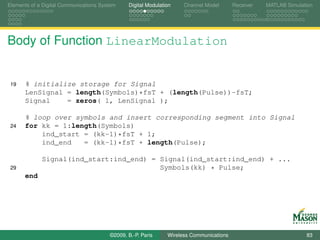
 19   % initialize storage for Signal
      LenSignal = length(Symbols)*fsT + (length(Pulse))-fsT;
      Signal    = zeros( 1, LenSignal );

      % loop over symbols and insert corresponding segment into Signal
 24   for kk = 1:length(Symbols)
          ind_start = (kk-1)*fsT + 1;
          ind_end   = (kk-1)*fsT + length(Pulse);

             Signal(ind_start:ind_end) = Signal(ind_start:ind_end) + ...
 29                                      Symbols(kk) * Pulse;
      end


                                        ©2009, B.-P. Paris     Wireless Communications                            83
Elements of a Digital Communications System    Digital Modulation    Channel Model       Receiver   MATLAB Simulation


Testing Function LinearModulation
                                  Listing : plot_LinearModRect.m

      %% Parameters:
      fsT      = 20;
      Alphabet = [1,-1];
  6   Priors   = 0.5*[1 1];
      Pulse    = ones(1,fsT);                     % rectangular pulse

      %% symbols and Signal using our functions
      Symbols = RandomSymbols(10, Alphabet, Priors);
 11   Signal = LinearModulation(Symbols,Pulse,fsT);
      %% plot
      tt = (0 : length(Signal)-1 )/fsT;
      plot(tt, Signal)
      axis([0 length(Signal)/fsT -1.5 1.5])
 16   grid
      xlabel(’Time/T’)
      ylabel(’Amplitude’)


                                        ©2009, B.-P. Paris     Wireless Communications                            84
Elements of a Digital Communications System         Digital Modulation    Channel Model       Receiver   MATLAB Simulation


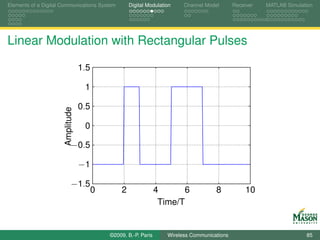
Linear Modulation with Rectangular Pulses

                                  1.5

                                   1

                                  0.5
                      Amplitude


                                   0

                            −0.5

                                  −1

                            −1.5
                                        0       2                4       6            8            10
                                                                  Time/T


                                            ©2009, B.-P. Paris      Wireless Communications                            85
Elements of a Digital Communications System    Digital Modulation    Channel Model       Receiver   MATLAB Simulation


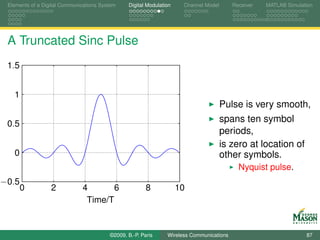
Linear Modulation with sinc-Pulses
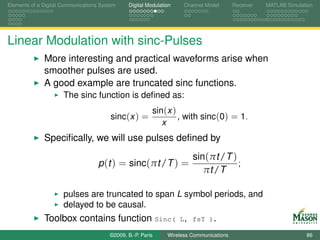
              More interesting and practical waveforms arise when
              smoother pulses are used.
              A good example are truncated sinc functions.
                      The sinc function is defined as:
                                                         sin(x )
                                         sinc(x ) =              , with sinc(0) = 1.
                                                            x
              Specifically, we will use pulses defined by
                                                                        sin(πt /T )
                                    p (t ) = sinc(πt /T ) =                         ;
                                                                           πt /T

                      pulses are truncated to span L symbol periods, and
                      delayed to be causal.
              Toolbox contains function Sinc(                       L, fsT ).

                                        ©2009, B.-P. Paris     Wireless Communications                            86
Elements of a Digital Communications System    Digital Modulation    Channel Model       Receiver   MATLAB Simulation


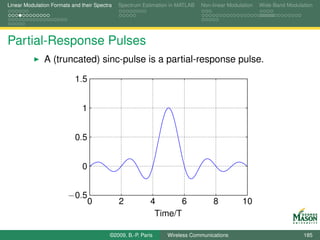
 A Truncated Sinc Pulse
 1.5


   1
                                                                                      Pulse is very smooth,
 0.5
                                                                                      spans ten symbol
                                                                                      periods,
                                                                                      is zero at location of
   0                                                                                  other symbols.
                                                                                            Nyquist pulse.
−0.5
       0          2           4       6                 8            10
                               Time/T


                                         ©2009, B.-P. Paris     Wireless Communications                            87
Elements of a Digital Communications System    Digital Modulation    Channel Model       Receiver   MATLAB Simulation


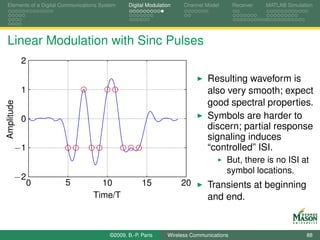
Linear Modulation with Sinc Pulses
            2

                                                                              Resulting waveform is
            1                                                                 also very smooth; expect
                                                                              good spectral properties.
Amplitude


            0                                                                 Symbols are harder to
                                                                              discern; partial response
                                                                              signaling induces
        −1                                                                    “controlled” ISI.
                                                                                     But, there is no ISI at
                                                                                     symbol locations.
        −2
                0      5            10               15             20        Transients at beginning
                                  Time/T                                      and end.


                                        ©2009, B.-P. Paris     Wireless Communications                            88
Elements of a Digital Communications System    Digital Modulation    Channel Model       Receiver   MATLAB Simulation


Passband Signals

              So far, all modulated signals we considered are baseband
              signals.
                      Baseband signals have frequency spectra concentrated
                      near zero frequency.
              However, for wireless communications passband signals
              must be used.
                      Passband signals have frequency spectra concentrated
                      around a carrier frequency fc .
              Baseband signals can be converted to passband signals
              through up-conversion.
              Passband signals can be converted to baseband signals
              through down-conversion.


                                        ©2009, B.-P. Paris     Wireless Communications                            89
Elements of a Digital Communications System    Digital Modulation    Channel Model       Receiver   MATLAB Simulation


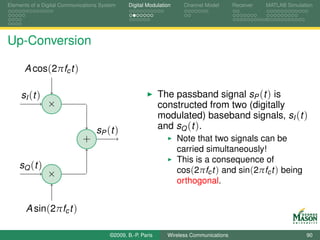
Up-Conversion

      A cos(2πfc t )

     sI (t )                                                 The passband signal sP (t ) is
                ×                                            constructed from two (digitally
                                                             modulated) baseband signals, sI (t )
                                   sP ( t )                  and sQ (t ).
                             +                                      Note that two signals can be
                                                                    carried simultaneously!
                                                                    This is a consequence of
    sQ (t )                                                         cos(2πfc t ) and sin(2πfc t ) being
                ×
                                                                    orthogonal.


       A sin(2πfc t )

                                        ©2009, B.-P. Paris     Wireless Communications                            90
Elements of a Digital Communications System    Digital Modulation    Channel Model       Receiver   MATLAB Simulation


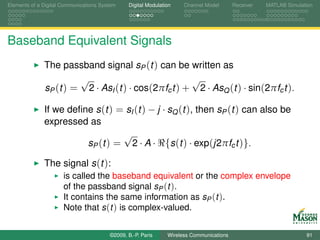
Baseband Equivalent Signals
              The passband signal sP (t ) can be written as
                       √                             √
              sP (t ) = 2 · AsI (t ) · cos(2πfc t ) + 2 · AsQ (t ) · sin(2πfc t ).

              If we define s (t ) = sI (t ) − j · sQ (t ), then sP (t ) can also be
              expressed as
                                  √
                        sP (t ) = 2 · A · {s (t ) · exp(j2πfc t )}.

              The signal s (t ):
                      is called the baseband equivalent or the complex envelope
                      of the passband signal sP (t ).
                      It contains the same information as sP (t ).
                      Note that s (t ) is complex-valued.


                                        ©2009, B.-P. Paris     Wireless Communications                            91
Elements of a Digital Communications System                           Digital Modulation        Channel Model     Receiver   MATLAB Simulation


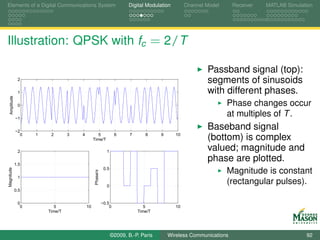
Illustration: QPSK with fc = 2/T

                                                                                                        Passband signal (top):
               2                                                                                        segments of sinusoids
               1                                                                                        with different phases.
  Amplitude


               0                                                                                                Phase changes occur
              −1
                                                                                                                at multiples of T .
              −2
                                                                                                        Baseband signal
                0   1    2       3   4           5              6      7      8     9      10
                                              Time/T                                                    (bottom) is complex
               2                                          1
                                                                                                        valued; magnitude and
              1.5
                                                                                                        phase are plotted.
                                                         0.5
                                                                                                                Magnitude is constant
Magnitude


                                              Phase/π


               1

                                                          0
                                                                                                                (rectangular pulses).
              0.5


               0                                        −0.5
                0          5             10                 0                 5            10
                        Time/T                                             Time/T


                                                               ©2009, B.-P. Paris       Wireless Communications                            92
Elements of a Digital Communications System    Digital Modulation    Channel Model       Receiver   MATLAB Simulation


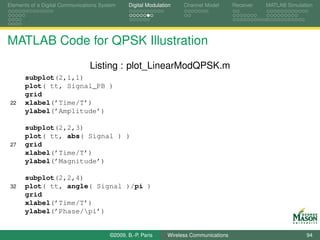
MATLAB Code for QPSK Illustration

                                Listing : plot_LinearModQPSK.m
      %% Parameters:
      fsT      = 20;
      L        = 10;
      fc       = 2;              % carrier frequency
  7   Alphabet = [1, j, -j, -1];% QPSK
      Priors   = 0.25*[1 1 1 1];
      Pulse    = ones(1,fsT);    % rectangular pulse

      %% symbols and Signal using our functions
 12   Symbols   = RandomSymbols(10, Alphabet, Priors);
      Signal    = LinearModulation(Symbols,Pulse,fsT);
      %% passband signal
      tt = (0 : length(Signal)-1 )/fsT;
      Signal_PB = sqrt(2)*real( Signal .* exp(-j*2*pi*fc*tt) );


                                        ©2009, B.-P. Paris     Wireless Communications                            93
Elements of a Digital Communications System    Digital Modulation    Channel Model       Receiver   MATLAB Simulation


MATLAB Code for QPSK Illustration
                                Listing : plot_LinearModQPSK.m
      subplot(2,1,1)
      plot( tt, Signal_PB )
      grid
 22   xlabel(’Time/T’)
      ylabel(’Amplitude’)

      subplot(2,2,3)
      plot( tt, abs( Signal ) )
 27   grid
      xlabel(’Time/T’)
      ylabel(’Magnitude’)

      subplot(2,2,4)
 32   plot( tt, angle( Signal )/pi )
      grid
      xlabel(’Time/T’)
      ylabel(’Phase/pi’)


                                        ©2009, B.-P. Paris     Wireless Communications                            94
Elements of a Digital Communications System    Digital Modulation      Channel Model       Receiver        MATLAB Simulation


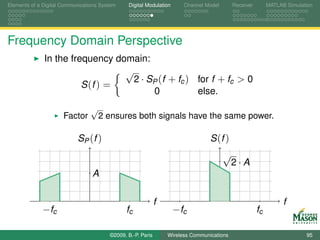
Frequency Domain Perspective
              In the frequency domain:
                                 √
                                   2 · SP (f + fc ) for f + fc > 0
                        S (f ) =
                                        0           else.
                                 √
                      Factor         2 ensures both signals have the same power.

                           SP (f )                                               S (f )
                                                                                       √
                                                                                           2·A
                                 A

                                                             f                                                   f
             − fc                             fc                    − fc                              fc

                                        ©2009, B.-P. Paris       Wireless Communications                                 95
Elements of a Digital Communications System    Digital Modulation    Channel Model       Receiver   MATLAB Simulation


Baseband Equivalent System


              The baseband description of the transmitted signal is very
              convenient:
                      it is more compact than the passband signal as it does not
                      include the carrier component,
                      while retaining all relevant information.
              However, we are also concerned what happens to the
              signal as it propagates to the receiver.
                      Question: Do baseband techniques extend to other parts
                      of a passband communications system?


                                        ©2009, B.-P. Paris     Wireless Communications                            96
Elements of a Digital Communications System       Digital Modulation      Channel Model         Receiver      MATLAB Simulation


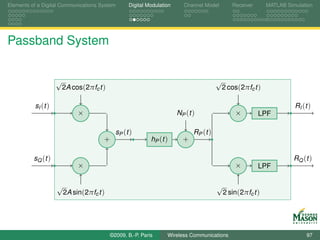
Passband System


                    √                                                                    √
                        2A cos(2πfc t )                                                      2 cos(2πfc t )

          sI (t )                                                                                                       RI (t )
                             ×                                         NP ( t )                  ×         LPF

                                            sP ( t )                          RP ( t )
                                      +                    hP (t )       +

          sQ (t )                                                                                                       RQ (t )
                             ×                                                                   ×         LPF

                    √                                                                    √
                        2A sin(2πfc t )                                                      2 sin(2πfc t )


                                          ©2009, B.-P. Paris      Wireless Communications                                    97
Elements of a Digital Communications System       Digital Modulation        Channel Model   Receiver   MATLAB Simulation


Baseband Equivalent System
                                                                       N (t )


                                         s (t )                                 R (t )
                                                    h (t )              +


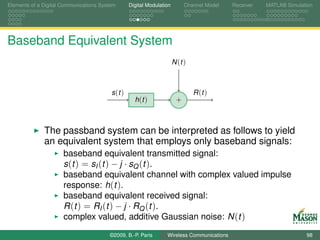
              The passband system can be interpreted as follows to yield
              an equivalent system that employs only baseband signals:
                      baseband equivalent transmitted signal:
                      s (t ) = sI (t ) − j · sQ (t ).
                      baseband equivalent channel with complex valued impulse
                      response: h(t ).
                      baseband equivalent received signal:
                      R ( t ) = RI ( t ) − j · RQ ( t ) .
                      complex valued, additive Gaussian noise: N (t )
                                        ©2009, B.-P. Paris        Wireless Communications                            98
Elements of a Digital Communications System    Digital Modulation    Channel Model       Receiver     MATLAB Simulation


Baseband Equivalent Channel
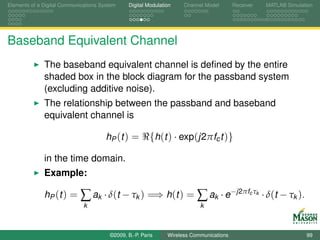
              The baseband equivalent channel is defined by the entire
              shaded box in the block diagram for the passband system
              (excluding additive noise).
              The relationship between the passband and baseband
              equivalent channel is

                                       hP (t ) =        {h(t ) · exp(j2πfc t )}

              in the time domain.
              Example:

              hP ( t ) =     ∑ ak · δ(t − τk ) =⇒ h(t ) = ∑ ak · e−j2πf τ                      c k
                                                                                                     · δ(t − τk ).
                              k                                            k


                                        ©2009, B.-P. Paris     Wireless Communications                               99
Elements of a Digital Communications System    Digital Modulation      Channel Model       Receiver        MATLAB Simulation


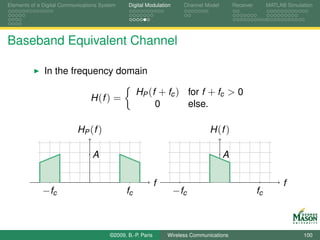
Baseband Equivalent Channel

              In the frequency domain

                                                   HP (f + fc ) for f + fc > 0
                                 H (f ) =
                                                        0       else.

                           HP (f )                                              H (f )

                                 A                                                     A

                                                             f                                                   f
             − fc                             fc                    − fc                              fc


                                        ©2009, B.-P. Paris       Wireless Communications                                100
Elements of a Digital Communications System    Digital Modulation    Channel Model       Receiver   MATLAB Simulation


Summary
              The baseband equivalent channel is much simpler than the
              passband model.
                      Up and down conversion are eliminated.
                      Expressions for signals do not contain carrier terms.
              The baseband equivalent signals are easier to represent
              for simulation.
                      Since they are low-pass signals, they are easily sampled.
              No information is lost when using baseband equivalent
              signals, instead of passband signals.
              Standard, linear system equations hold:

                R (t ) = s (t ) ∗ h(t ) + n(t ) and R (f ) = S (f ) · H (f ) + N (f ).

              Conclusion: Use baseband equivalent signals and
              systems.
                                        ©2009, B.-P. Paris     Wireless Communications                           101
Elements of a Digital Communications System    Digital Modulation    Channel Model       Receiver   MATLAB Simulation


Outline

      Part I: Learning Objectives

      Elements of a Digital Communications System

      Digital Modulation

      Channel Model

      Receiver

      MATLAB Simulation


                                        ©2009, B.-P. Paris     Wireless Communications                           102
Elements of a Digital Communications System    Digital Modulation    Channel Model       Receiver   MATLAB Simulation


Channel Model


              The channel describes how the transmitted signal is
              corrupted between transmitter and receiver.
              The received signal is corrupted by:
                      noise,
                      distortion, due to multi-path propagation,
                      interference.
              Interference is not considered in detail.
                      Is easily added to simulations,
                      Frequent assumption: interference can be lumped in with
                      noise.


                                        ©2009, B.-P. Paris     Wireless Communications                           103
Elements of a Digital Communications System    Digital Modulation    Channel Model       Receiver   MATLAB Simulation


Additive White Gaussian Noise


              A standard assumption in most communication systems is
              that noise is well modeled as additive, white Gaussian
              noise (AWGN).
                      additive: channel adds noise to the transmitted signal.
                      white: describes the temporal correlation of the noise.
                      Gaussian: probability distribution is a Normal or Gaussian
                      distribution.
              Baseband equivalent noise is complex valued.
                 In-phase NI (t ) and quadrature NQ (t ) noise signals are
                      modeled as independent (circular symmetric noise).


                                        ©2009, B.-P. Paris     Wireless Communications                           104
Elements of a Digital Communications System    Digital Modulation     Channel Model       Receiver   MATLAB Simulation


White Noise
              The term white means specifically that
                      the mean of the noise is zero,

                                                             E[N (t )] = 0,

                      the autocorrelation function of the noise is

                                      ρN (τ ) = E[N (t ) · N ∗ (t + τ )] = N0 δ(τ ).

                      This means that any distinct noise samples are
                      independent.
                      The autocorrelation function also indicates that noise
                      samples have infinite variance.
                             Insight: noise must be filtered before it can be sampled.
              In-phase and quadrature noise each have autocorrelation
              N0
               2 δ ( τ ).

                                        ©2009, B.-P. Paris      Wireless Communications                           105
Elements of a Digital Communications System    Digital Modulation    Channel Model       Receiver   MATLAB Simulation


White Noise


              The term “white” refers to the spectral properties of the
              noise.
              Specifically, the power spectral density of white noise is
              constant over all frequencies:

                                               SN (f ) = N0 for all f .


                      White light consists of equal components of the visible
                      spectrum.


                                        ©2009, B.-P. Paris     Wireless Communications                           106
Elements of a Digital Communications System    Digital Modulation    Channel Model       Receiver   MATLAB Simulation


Generating Gaussian Noise Samples


              For simulating additive noise, Gaussian noise samples
              must be generated.
              MATLAB idiom for generating a vector of N independent,
              complex, Gaussian random numbers with variance
              VarNoise:
              Noise = sqrt(VarNoise/2) * ( randn(1,N) + j * randn(1,N));
                      Note, that real and imaginary part each have variance
                      VarNoise/2.
                      This causes the total noise variance to equal VarNoise.


                                        ©2009, B.-P. Paris     Wireless Communications                           107
Elements of a Digital Communications System    Digital Modulation    Channel Model       Receiver   MATLAB Simulation


Toolbox Function addNoise

              We will frequently simulate additive, white Gaussian noise.
              To perform this task, a function with the following header is
              helpful:
      function NoisySignal = addNoise( CleanSignal, VarNoise )
      % addNoise - simulate additive, white Gaussian noise channel
      %
      % Independent Gaussian noise of variance specified by the second
  5   % input parameter is added to the (vector or matrix) signal passed
      % as the first input. The result is returned in a vector or matrix
      % of the same size as the input signal.
      %
      % The function determines if the signal is real or complex valued
 10   % and generates noise samples accordingly. In either case the total
      % variance is equal to the second input.


                                        ©2009, B.-P. Paris     Wireless Communications                           108
Elements of a Digital Communications System    Digital Modulation    Channel Model       Receiver   MATLAB Simulation


The Body of Function addNoise


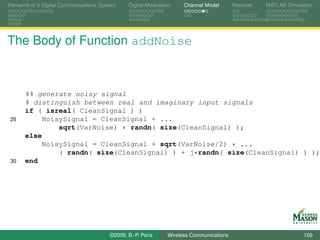
      %% generate noisy signal
      % distinguish between real and imaginary input signals
      if ( isreal( CleanSignal ) )
 25        NoisySignal = CleanSignal + ...
               sqrt(VarNoise) * randn( size(CleanSignal) );
      else
           NoisySignal = CleanSignal + sqrt(VarNoise/2) * ...
               ( randn( size(CleanSignal) ) + j*randn( size(CleanSignal) ) );
 30   end


                                        ©2009, B.-P. Paris     Wireless Communications                           109
Elements of a Digital Communications System      Digital Modulation    Channel Model       Receiver   MATLAB Simulation


                                  4

                                  2
                      Amplitude

                                  0

                              −2

                              −4

                              −6
                                      0        5             10              15              20
                                                           Time/T
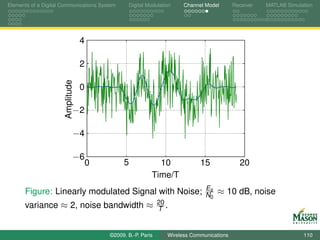
                                                                               Es
      Figure: Linearly modulated Signal with Noise;                            N0   ≈ 10 dB, noise
                                                               20
      variance ≈ 2, noise bandwidth ≈                          T .


                                          ©2009, B.-P. Paris     Wireless Communications                           110
Elements of a Digital Communications System    Digital Modulation    Channel Model       Receiver   MATLAB Simulation


Multi-path Fading Channels


              In addition to corruption by additive noise, transmitted
              signals are distorted during propagation from transmitter to
              receiver.
              The distortion is due to multi-path propagation.
                      The transmitted signal travels to the receiver along multiple
                      paths, each with different attenuation and delay.
                      The receiver observes the sum of these signals.
                      Effect: undesired filtering of transmitted signal.


                                        ©2009, B.-P. Paris     Wireless Communications                           111
Elements of a Digital Communications System    Digital Modulation    Channel Model       Receiver   MATLAB Simulation


Multi-path Fading Channels


              In mobile communications, the characteristics of the
              multi-path channel vary quite rapidly; this is referred to as
              fading.
                      Fading is due primarily to phase changes due to changes in
                      the delays for the different propagation paths.
              Multi-path fading channels will be studied in detail later in
              the course.
                      In particular, the impact of multi-path fading on system
                      performance will be investigated.


                                        ©2009, B.-P. Paris     Wireless Communications                           112
Elements of a Digital Communications System    Digital Modulation    Channel Model       Receiver   MATLAB Simulation


Outline

      Part I: Learning Objectives

      Elements of a Digital Communications System

      Digital Modulation

      Channel Model

      Receiver

      MATLAB Simulation


                                        ©2009, B.-P. Paris     Wireless Communications                           113
Elements of a Digital Communications System    Digital Modulation    Channel Model       Receiver   MATLAB Simulation


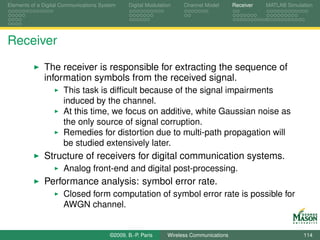
Receiver

              The receiver is responsible for extracting the sequence of
              information symbols from the received signal.
                      This task is difficult because of the signal impairments
                      induced by the channel.
                      At this time, we focus on additive, white Gaussian noise as
                      the only source of signal corruption.
                      Remedies for distortion due to multi-path propagation will
                      be studied extensively later.
              Structure of receivers for digital communication systems.
                      Analog front-end and digital post-processing.
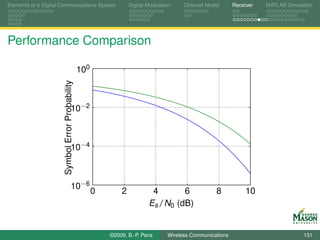
              Performance analysis: symbol error rate.
                      Closed form computation of symbol error rate is possible for
                      AWGN channel.


                                        ©2009, B.-P. Paris     Wireless Communications                           114
Elements of a Digital Communications System        Digital Modulation     Channel Model       Receiver   MATLAB Simulation


Matched Filter
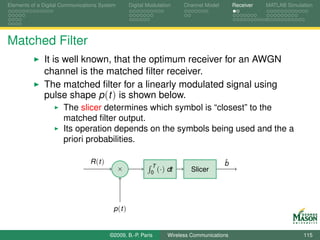
              It is well known, that the optimum receiver for an AWGN
              channel is the matched filter receiver.
              The matched filter for a linearly modulated signal using
              pulse shape p (t ) is shown below.
                      The slicer determines which symbol is “closest” to the
                      matched filter output.
                      Its operation depends on the symbols being used and the a
                      priori probabilities.

                                R (t )                                                    ˆ
                                                                                          b
                                                            T
                                              ×             0 (·)   dt      Slicer


                                          p (t )


                                         ©2009, B.-P. Paris         Wireless Communications                           115
Elements of a Digital Communications System    Digital Modulation    Channel Model       Receiver   MATLAB Simulation


Shortcomings of The Matched Filter

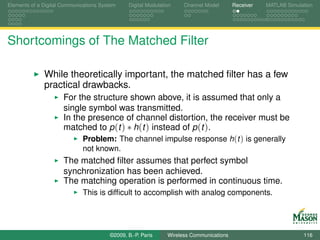
              While theoretically important, the matched filter has a few
              practical drawbacks.
                      For the structure shown above, it is assumed that only a
                      single symbol was transmitted.
                      In the presence of channel distortion, the receiver must be
                      matched to p (t ) ∗ h(t ) instead of p (t ).
                             Problem: The channel impulse response h(t ) is generally
                             not known.
                      The matched filter assumes that perfect symbol
                      synchronization has been achieved.
                      The matching operation is performed in continuous time.
                             This is difficult to accomplish with analog components.


                                        ©2009, B.-P. Paris     Wireless Communications                           116
Elements of a Digital Communications System    Digital Modulation    Channel Model       Receiver   MATLAB Simulation


Analog Front-end and Digital Back-end
              As an alternative, modern digital receivers employ a
              different structure consisting of
                      an analog receiver front-end, and
                      a digital signal processing back-end.
              The analog front-end is little more than a filter and a
              sampler.
                      The theoretical underpinning for the analog front-end is
                      Nyquist’s sampling theorem.
                      The front-end may either work on a baseband signal or a
                      passband signal at an intermediate frequency (IF).
              The digital back-end performs sophisticated processing,
              including
                      digital matched filtering,
                      equalization, and
                      synchronization.

                                        ©2009, B.-P. Paris     Wireless Communications                           117
Elements of a Digital Communications System    Digital Modulation    Channel Model       Receiver   MATLAB Simulation


Analog Front-end

              Several, roughly equivalent, alternatives exist for the
              analog front-end.
              Two common approaches for the analog front-end will be
              considered briefly.
              Primarily, the analog front-end is responsible for converting
              the continuous-time received signal R (t ) into a
              discrete-time signal R [n].
                      Care must be taken with the conversion: (ideal) sampling
                      would admit too much noise.
                      Modeling the front-end faithfully is important for accurate
                      simulation.


                                        ©2009, B.-P. Paris     Wireless Communications                           118
Elements of a Digital Communications System    Digital Modulation    Channel Model       Receiver   MATLAB Simulation


Analog Front-end: Low-pass and Whitening Filter

              The first structure contains
                      a low-pass filter (LPF) with bandwidth equal to the signal
                      bandwidth,
                      a sampler followed by a whitening filter (WF).
                             The low-pass filter creates correlated noise,
                             the whitening filter removes this correlation.

                                                             Sampler,
                                                              rate fs


                        R (t )                                                       R [n] to
                                  LPF                                         WF
                                                                                           DSP


                                        ©2009, B.-P. Paris     Wireless Communications                           119
Elements of a Digital Communications System     Digital Modulation    Channel Model       Receiver   MATLAB Simulation


Analog Front-end: Integrate-and-Dump
              An alternative front-end has the structure shown below.
                  Here, ΠTs (t ) indicates a filter with an impulse response that
                  is a rectangular pulse of length Ts = 1/fs and amplitude
                      1/Ts .
                      The entire system is often called an integrate-and-dump
                      sampler.
                      Most analog-to-digital converters (ADC) operate like this.
                      A whitening filter is not required since noise samples are
                      uncorrelated.

                                                                     Sampler,
                                                                      rate fs


                                R (t )                                       R [n ]   to
                                         ΠTs (t )
                                                                                      DSP


                                         ©2009, B.-P. Paris     Wireless Communications                           120
Elements of a Digital Communications System    Digital Modulation    Channel Model       Receiver   MATLAB Simulation


Output from Analog Front-end
              The second of the analog front-ends is simpler
              conceptually and widely used in practice;
              it will be assumed for the remainder of the course.
              For simulation purposes, we need to characterize the
              output from the front-end.
                    To begin, assume that the received signal R (t ) consists of
                    a deterministic signal s (t ) and (AWGN) noise N (t ):

                                                     R (t ) = s (t ) + N (t ).

                      The signal R [n] is a discrete-time signal.
                             The front-end generates one sample every Ts seconds.
                      The discrete-time signal R [n] also consists of signal and
                      noise
                                          R [n ] = s [n ] + N [n ].

                                        ©2009, B.-P. Paris     Wireless Communications                           121
Elements of a Digital Communications System      Digital Modulation    Channel Model       Receiver   MATLAB Simulation


Output from Analog Front-end
              Consider the signal and noise component of the front-end
              output separately.
                      This can be done because the front-end is linear.
              The n-th sample of the signal component is given by:
                                         1        (n+1)Ts
                         s [n ] =           ·                  s (t ) dt ≈ s ((n + 1/2)Ts ).
                                         Ts     nTs

                      The approximation is valid if fs = 1/Ts is much greater than
                      the signal band-width.
                                                                      Sampler,
                                                                       rate fs


                                R (t )                                        R [n ]   to
                                          ΠTs (t )
                                                                                       DSP

                                          ©2009, B.-P. Paris     Wireless Communications                           122
Elements of a Digital Communications System    Digital Modulation    Channel Model       Receiver   MATLAB Simulation


Output from Analog Front-end
              The noise samples N [n] at the output of the front-end:
                      are independent, complex Gaussian random variables, with
                      zero mean, and
                      variance equal to N0 /Ts .
              The variance of the noise samples is proportional to 1/Ts .
                      Interpretations:
                             Noise is averaged over Ts seconds: variance decreases with
                             length of averager.
                             Bandwidth of front-end filter is approximately 1/Ts and
                             power of filtered noise is proportional to bandwidth (noise
                             bandwidth).
              It will be convenient to express the noise variance as
              N0 /T · T /Ts .
                    The factor T /Ts = fs T is the number of samples per
                      symbol period.

                                        ©2009, B.-P. Paris     Wireless Communications                           123
Elements of a Digital Communications System    Digital Modulation    Channel Model       Receiver   MATLAB Simulation


Receiver Performance
              Our primary measure of performance is the symbol error
              probability.
              For AWGN channels, it is possible to express the symbol
              error probability in closed form for many digital modulation
              formats.
              To fix ideas, we employ the following concrete signaling
              format:
                      BPSK modulation; symbols are drawn equally likely from
                      the alphabet {1, −1},
                      Pulse shaping:
                                                 2             2πt
                                  p (t ) =         · (1 − cos(     )) for 0 ≤ t ≤ T .
                                                 3              T

                             This is a smooth, full-response pulse; it is referred to as a
                             raised cosine pulse.
                                        ©2009, B.-P. Paris     Wireless Communications                           124
Elements of a Digital Communications System       Digital Modulation    Channel Model       Receiver   MATLAB Simulation


BPSK Modulation with Raised Cosine Pulses

                                   2


                                   1
                       Amplitude


                                   0


                               −1


                               −2
                                       0      2             4       6              8           10
                                                             Time/T


                                           ©2009, B.-P. Paris     Wireless Communications                           125
Elements of a Digital Communications System    Digital Modulation    Channel Model       Receiver   MATLAB Simulation


Signal Model

              In each symbol period, the received signal is of the form:

                              R (t ) = b · A · p (t ) + N (t ) for 0 ≤ t < T .

              where
                      b ∈ {1, −1} is a BPSK symbol (with equal a priori
                      probabilities),
                      A is the amplitude of the received signal,
                      p (t ) is the raised cosine pulse, and
                      N (t ) is (complex) white Gaussian noise with spectral height
                      N0 .


                                        ©2009, B.-P. Paris     Wireless Communications                           126
Elements of a Digital Communications System    Digital Modulation    Channel Model       Receiver   MATLAB Simulation


Performance of Matched Filter Receiver

              With these assumptions, the symbol error rate is

                                                             2A2 T                   2Es
                                  Pe,min = Q(                      ) = Q(                ).
                                                              N0                     N0

                      Es = A2 T is the symbol energy.
                             We used the fact that             p2 (t ) dt = T .
                                     ∞ 1
                      Q(x ) =       x
                                      √        exp(−y 2 /2) dy is the Gaussian error
                                        2π
                      function.
              No receiver can achieve a symbol error rate smaller than
              Pe,min .


                                        ©2009, B.-P. Paris     Wireless Communications                           127
Elements of a Digital Communications System    Digital Modulation    Channel Model       Receiver   MATLAB Simulation


Suboptimum Receivers
              We discussed earlier that it is often not possible to use an
              exact matched filter in practice.
              Practical receivers can often be modeled as matching with
              a pulse shape g (t ) that is (slightly) different than the
              transmitted pulse shape p (t ).
                      Such receivers are called linear receivers; note that the
                      matched filter is also a linear receiver.
                      Example: Assume that we are using the
                      integrate-and-dump front-end and sample once per bit
                      period.
                      This corresponds to matching with a pulse
                                                              1
                                                              T     for 0 ≤ t ≤ T
                                              g (t ) =
                                                              0     else.


                                        ©2009, B.-P. Paris     Wireless Communications                           128
Elements of a Digital Communications System     Digital Modulation       Channel Model     Receiver   MATLAB Simulation


Performance with Suboptimum Receivers

              The symbol error rate of linear receivers can be expressed
              in closed form:
                                               2ρ2 Es
                                                 g
                                  Pe = Q(             )
                                                N0
              where
                      ρg captures the mismatch between the transmitted pulse
                      p (t ) and the pulse g (t ) used by the receiver.
                      Specifically

                                                                     p (t )g (t ) dt
                                              ρ2 =
                                               g                                                .
                                                             p2 (t ) dt ·         g 2 (t ) dt


                                        ©2009, B.-P. Paris       Wireless Communications                           129
Elements of a Digital Communications System    Digital Modulation    Channel Model       Receiver   MATLAB Simulation


Performance with Suboptimum Receivers
              For our example with raised cosine pulses p (t ) and
              rectangular pulses g (t ), we find

                                                        ρ2 = 2/3
                                                         g

              and
                                                                    4Es
                                                  Pe = Q (              ).
                                                                    3N0
              Comparing with the error probability for the matched filter:
                      The term 3Ns replaces 2Es .
                                4E
                                             N0
                                   0
                      Interpretation: to make both terms equal, the suboptimum
                      receiver must spend 1.5 times more energy (1.7 dB loss in
                      performance).

                                        ©2009, B.-P. Paris     Wireless Communications                           130
Elements of a Digital Communications System                         Digital Modulation    Channel Model       Receiver   MATLAB Simulation


Performance Comparison

                      Symbol Error Probability   100


                                       10−2


                                       10−4


                                       10−6
                                                       0        2            4       6                8            10
                                                                            Es /N0 (dB)


                                                           ©2009, B.-P. Paris       Wireless Communications                           131
Elements of a Digital Communications System    Digital Modulation    Channel Model       Receiver   MATLAB Simulation


MATLAB Code for Performance Comparison

                                              Listing : plot_Q.m
      %% Set parameters
      EsN0dB = 0:0.1:10;          % range of Es over N0 values on dB scale
      EsN0lin = dB2lin( EsN0dB ); % convert to linear scale

  7   %% compute Pe
      PeMf = Q( sqrt( 2 * EsN0lin ) );
      PeSo = Q( sqrt( 4/3 * EsN0lin ) );

      %% plot
 12   semilogy( EsN0dB, PeMf, EsN0dB, PeSo)
      xlabel( ’E_s/N_0 (dB)’)
      ylabel( ’Symbol Error Probability’ );
      grid


                                        ©2009, B.-P. Paris     Wireless Communications                           132
Elements of a Digital Communications System    Digital Modulation    Channel Model       Receiver   MATLAB Simulation


Summary


              We introduced the matched filter as the receiver that
              minimizes the probability of a symbol error.
              Practical considerations lead to implementing receivers
              with simple analog front-ends followed by digital
              post-processing.
                      Integrate-and-dump front-ends found in typical A-to-D
                      converters were analyzed in some detail.
              Computed the error probability for the matched filter
              receiver and provided expressions for the error rate of
              linear receivers in AWGN channels.


                                        ©2009, B.-P. Paris     Wireless Communications                           133
Elements of a Digital Communications System    Digital Modulation    Channel Model       Receiver   MATLAB Simulation


Outline

      Part I: Learning Objectives

      Elements of a Digital Communications System

      Digital Modulation

      Channel Model

      Receiver

      MATLAB Simulation


                                        ©2009, B.-P. Paris     Wireless Communications                           134
Elements of a Digital Communications System    Digital Modulation    Channel Model       Receiver   MATLAB Simulation


MATLAB Simulation

              Objective: Simulate a simple communication system and
              estimate bit error rate.
              System Characteristics:
                   BPSK modulation, b ∈ {1, −1} with equal a priori
                      probabilities,
                      Raised cosine pulses,
                      AWGN channel,
                      oversampled integrate-and-dump receiver front-end,
                      digital matched filter.
              Measure: Bit-error rate as a function of Es /N0 and
              oversampling rate.


                                        ©2009, B.-P. Paris     Wireless Communications                           135
Elements of a Digital Communications System       Digital Modulation      Channel Model          Receiver   MATLAB Simulation


System to be Simulated


                                                                                                            Sampler,
                                                                       N (t )
                                                                                                             rate fs

           bn                                     s (t )                     R (t )                               R [n] to
                   ×          p (t )          ×            h (t )        +            ΠTs (t )
                                                                                                                        DSP


             ∑ δ(t − nT )                     A


                  Figure: Baseband Equivalent System to be Simulated.


                                        ©2009, B.-P. Paris          Wireless Communications                              136
Elements of a Digital Communications System    Digital Modulation    Channel Model       Receiver   MATLAB Simulation


From Continuous to Discrete Time

              The system in the preceding diagram cannot be simulated
              immediately.
                      Main problem: Most of the signals are continuous-time
                      signals and cannot be represented in MATLAB.
              Possible Remedies:
                 1. Rely on Sampling Theorem and work with sampled
                    versions of signals.
                 2. Consider discrete-time equivalent system.
              The second alternative is preferred and will be pursued
              below.


                                        ©2009, B.-P. Paris     Wireless Communications                           137
Elements of a Digital Communications System       Digital Modulation      Channel Model          Receiver   MATLAB Simulation


Towards the Discrete-Time Equivalent System
              The shaded portion of the system has a discrete-time input
              and a discrete-time output.
                       Can be considered as a discrete-time system.
                       Minor problem: input and output operate at different rates.


                                                                                                            Sampler,
                                                                       N (t )
                                                                                                             rate fs

           bn                                     s (t )                     R (t )                               R [n] to
                   ×          p (t )          ×            h (t )        +            ΠTs (t )
                                                                                                                        DSP


             ∑ δ(t − nT )                     A


                                        ©2009, B.-P. Paris          Wireless Communications                              138
Elements of a Digital Communications System    Digital Modulation       Channel Model        Receiver     MATLAB Simulation


Discrete-Time Equivalent System
              The discrete-time equivalent system
                      is equivalent to the original system, and
                      contains only discrete-time signals and components.
              Input signal is up-sampled by factor fs T to make input and
              output rates equal.
                  Insert fs T − 1 zeros between input samples.

                                                                               N [n ]


                          bn                                                            R [n ]
                                  ×            ↑ fs T          h [n ]           +                to DSP


                                   A


                                        ©2009, B.-P. Paris     Wireless Communications                                 139
Elements of a Digital Communications System       Digital Modulation      Channel Model          Receiver   MATLAB Simulation


Components of Discrete-Time Equivalent System

              Question: What is the relationship between the
              components of the original and discrete-time equivalent
              system?


                                                                                                            Sampler,
                                                                       N (t )
                                                                                                             rate fs

           bn                                     s (t )                     R (t )                               R [n] to
                   ×          p (t )          ×            h (t )        +            ΠTs (t )
                                                                                                                        DSP


             ∑ δ(t − nT )                     A


                                        ©2009, B.-P. Paris          Wireless Communications                              140
Elements of a Digital Communications System      Digital Modulation         Channel Model   Receiver   MATLAB Simulation


Discrete-time Equivalent Impulse Response
              To determine the impulse response h[n] of the
              discrete-time equivalent system:
                      Set noise signal Nt to zero,
                      set input signal bn to unit impulse signal δ[n],
                      output signal is impulse response h[n].
              Procedure yields:

                                                  1          ( n + 1 ) Ts
                                     h [n ] =                               p (t ) ∗ h(t ) dt
                                                  Ts      nTs

              For high sampling rates (fs T 1), the impulse response is
              closely approximated by sampling p (t ) ∗ h(t ):

                                              h[n] ≈ p (t ) ∗ h(t )|(n+ 1 )Ts
                                                                                    2


                                        ©2009, B.-P. Paris        Wireless Communications                           141
Elements of a Digital Communications System    Digital Modulation    Channel Model       Receiver   MATLAB Simulation


Discrete-time Equivalent Impulse Response
                           2


                        1.5


                           1


                        0.5


                           0
                               0        0.2          0.4    0.6              0.8           1
                                                       Time/T

             Figure: Discrete-time Equivalent Impulse Response (fs T = 8)

                                        ©2009, B.-P. Paris     Wireless Communications                           142
Elements of a Digital Communications System    Digital Modulation    Channel Model       Receiver   MATLAB Simulation


Discrete-Time Equivalent Noise


              To determine the properties of the additive noise N [n] in
              the discrete-time equivalent system,
                      Set input signal to zero,
                      let continuous-time noise be complex, white, Gaussian with
                      power spectral density N0 ,
                      output signal is discrete-time equivalent noise.
              Procedure yields: The noise samples N [n]
                      are independent, complex Gaussian random variables, with
                      zero mean, and
                      variance equal to N0 /Ts .


                                        ©2009, B.-P. Paris     Wireless Communications                           143
Elements of a Digital Communications System    Digital Modulation    Channel Model       Receiver   MATLAB Simulation


Received Symbol Energy
              The last entity we will need from the continuous-time
              system is the received energy per symbol Es .
                      Note that Es is controlled by adjusting the gain A at the
                      transmitter.
              To determine Es ,
                  Set noise N (t ) to zero,
                      Transmit a single symbol bn ,
                      Compute the energy of the received signal R (t ).
              Procedure yields:
                                            2
                                      Es = σs · A2              |p (t ) ∗ h(t )|2 dt

                              2
                      Here, σs denotes the variance of the source. For BPSK,
                       2 = 1.
                      σs
                      For the system under consideration, Es = A2 T .
                                        ©2009, B.-P. Paris     Wireless Communications                           144
Elements of a Digital Communications System    Digital Modulation    Channel Model       Receiver   MATLAB Simulation


Simulating Transmission of Symbols


              We are now in position to simulate the transmission of a
              sequence of symbols.
                      The MATLAB functions previously introduced will be used
                      for that purpose.
              We proceed in three steps:
                 1. Establish parameters describing the system,
                             By parameterizing the simulation, other scenarios are easily
                             accommodated.
                 2. Simulate discrete-time equivalent system,
                 3. Collect statistics from repeated simulation.


                                        ©2009, B.-P. Paris     Wireless Communications                           145
Elements of a Digital Communications System    Digital Modulation    Channel Model       Receiver   MATLAB Simulation


                                Listing : SimpleSetParameters.m
      % This script sets a structure named Parameters to be used by
      % the system simulator.

      %% Parameters
  7   % construct structure of parameters to be passed to system simulator
      % communications parameters
      Parameters.T   = 1/10000;     % symbol period
      Parameters.fsT = 8;           % samples per symbol
      Parameters.Es = 1;            % normalize received symbol energy to 1
 12   Parameters.EsOverN0 = 6;      % Signal-to-noise ratio (Es/N0)
      Parameters.Alphabet = [1 -1]; % BPSK
      Parameters.NSymbols = 1000;   % number of Symbols

      % discrete-time equivalent impulse response (raised cosine pulse)
 17   fsT = Parameters.fsT;
      tts = ( (0:fsT-1) + 1/2 )/fsT;
      Parameters.hh = sqrt(2/3) * ( 1 - cos(2*pi*tts)*sin(pi/fsT)/(pi/fsT));


                                        ©2009, B.-P. Paris     Wireless Communications                           146
Elements of a Digital Communications System    Digital Modulation    Channel Model       Receiver   MATLAB Simulation


Simulating the Discrete-Time Equivalent System


              The actual system simulation is carried out in MATLAB
              function MCSimple which has the function signature below.
                      The parameters set in the controlling script are passed as
                      inputs.
                      The body of the function simulates the transmission of the
                      signal and subsequent demodulation.
                      The number of incorrect decisions is determined and
                      returned.

      function [NumErrors, ResultsStruct] = MCSimple( ParametersStruct )


                                        ©2009, B.-P. Paris     Wireless Communications                           147
Elements of a Digital Communications System    Digital Modulation    Channel Model       Receiver   MATLAB Simulation


Simulating the Discrete-Time Equivalent System
              The simulation of the discrete-time equivalent system uses
              toolbox functions RandomSymbols, LinearModulation, and
              addNoise.

      A               =   sqrt(Es/T);             %   transmitter gain
      N0              =   Es/EsOverN0;            %   noise PSD (complex noise)
      NoiseVar        =   N0/T*fsT;               %   corresponding noise variance N0/Ts
      Scale           =   A*hh*hh’;               %   gain through signal chain
 34
      %% simulate discrete-time equivalent system
      % transmitter and channel via toolbox functions
      Symbols = RandomSymbols( NSymbols, Alphabet, Priors );
      Signal = A * LinearModulation( Symbols, hh, fsT );
 39   if ( isreal(Signal) )
          Signal = complex(Signal);% ensure Signal is complex-valued
      end
      Received = addNoise( Signal, NoiseVar );


                                        ©2009, B.-P. Paris     Wireless Communications                           148
Elements of a Digital Communications System    Digital Modulation    Channel Model       Receiver   MATLAB Simulation


Digital Matched Filter

              The vector Received contains the noisy output samples from
              the analog front-end.
              In a real system, these samples would be processed by
              digital hardware to recover the transmitted bits.
                      Such digital hardware may be an ASIC, FPGA, or DSP chip.
              The first function performed there is digital matched
              filtering.
                      This is a discrete-time implementation of the matched filter
                      discussed before.
                      The matched filter is the best possible processor for
                      enhancing the signal-to-noise ratio of the received signal.


                                        ©2009, B.-P. Paris     Wireless Communications                           149
Elements of a Digital Communications System    Digital Modulation       Channel Model        Receiver   MATLAB Simulation


Digital Matched Filter


              In our simulator, the vector Received is passed through a
              discrete-time matched filter and down-sampled to the
              symbol rate.
                      The impulse response of the matched filter is the conjugate
                      complex of the time-reversed, discrete-time channel
                      response h[n].

                               R [n ]                                                   ˆ
                                                                                        bn
                                        h∗ [−n]          ↓ fs T           Slicer


                                        ©2009, B.-P. Paris        Wireless Communications                            150
Elements of a Digital Communications System    Digital Modulation    Channel Model       Receiver   MATLAB Simulation


MATLAB Code for Digital Matched Filter

              The signature line for the MATLAB function implementing
              the matched filter is:
              function MFOut = DMF( Received, Pulse, fsT )

              The body of the function is a direct implementation of the
              structure in the block diagram above.
      % convolve received signal with conjugate complex of
      % time-reversed pulse (matched filter)
      Temp = conv( Received, conj( fliplr(Pulse) ) );
 21
      % down sample, at the end of each pulse period
      MFOut = Temp( length(Pulse) : fsT : end );


                                        ©2009, B.-P. Paris     Wireless Communications                           151
Elements of a Digital Communications System    Digital Modulation         Channel Model     Receiver        MATLAB Simulation


DMF Input and Output Signal
                                                             DMF Input
                       400


                       200


                         0


                      −200


                      −400
                          0      1      2      3       4         5        6     7     8      9         10
                                                             Time (1/T)
                                                           DMF Output
                      1500

                      1000

                       500

                         0

                      −500

                    −1000
                         0       1      2      3       4         5        6     7     8      9         10
                                                             Time (1/T)


                                        ©2009, B.-P. Paris        Wireless Communications                                152
Elements of a Digital Communications System                Digital Modulation        Channel Model         Receiver   MATLAB Simulation


IQ-Scatter Plot of DMF Input and Output
                                                                        DMF Input
                                   300

                                   200
                     Imag. Part


                                   100

                                     0

                                  −100

                                  −200

                                         −800   −600    −400    −200       0       200      400      600      800
                                                                         Real Part
                                                                        DMF Output

                                   500
                     Imag. Part


                                     0


                                  −500

                                     −2000      −1500   −1000   −500        0        500    1000     1500      2000
                                                                         Real Part


                                                   ©2009, B.-P. Paris       Wireless Communications                                153
Elements of a Digital Communications System    Digital Modulation    Channel Model       Receiver   MATLAB Simulation


Slicer
              The final operation to be performed by the receiver is
              deciding which symbol was transmitted.
                      This function is performed by the slicer.
              The operation of the slicer is best understood in terms of
              the IQ-scatter plot on the previous slide.
                      The red circles in the plot indicate the noise-free signal
                      locations for each of the possibly transmitted signals.
                      For each output from the matched filter, the slicer
                      determines the nearest noise-free signal location.
                      The decision is made in favor of the symbol that
                      corresponds to the noise-free signal nearest the matched
                      filter output.
              Some adjustments to the above procedure are needed
              when symbols are not equally likely.

                                        ©2009, B.-P. Paris     Wireless Communications                           154
Elements of a Digital Communications System    Digital Modulation    Channel Model       Receiver   MATLAB Simulation


MATLAB Function SimpleSlicer
              The procedure above is implemented in a function with
              signature
              function [Decisions, MSE] = SimpleSlicer( MFOut, Alphabet, Scale )


      %% Loop over symbols to find symbol closest to MF output
      for kk = 1:length( Alphabet )
          % noise-free signal location
 28       NoisefreeSig = Scale*Alphabet(kk);
          % Euclidean distance between each observation and constellation po
          Dist         = abs( MFOut - NoisefreeSig );
          % find locations for which distance is smaller than previous best
          ChangedDec   = ( Dist < MinDist );
 33
             % store new min distances and update decisions
             MinDist( ChangedDec)    = Dist( ChangedDec );
             Decisions( ChangedDec ) = Alphabet(kk);
      end


                                        ©2009, B.-P. Paris     Wireless Communications                           155
Elements of a Digital Communications System    Digital Modulation    Channel Model       Receiver   MATLAB Simulation


Entire System

              The addition of functions for the digital matched filter
              completes the simulator for the communication system.
              The functionality of the simulator is encapsulated in a
              function with signature
              function [NumErrors, ResultsStruct] = MCSimple( ParametersStruct )

                      The function simulates the transmission of a sequence of
                      symbols and determines how many symbol errors occurred.
                      The operation of the simulator is controlled via the
                      parameters passed in the input structure.
                      The body of the function is shown on the next slide; it
                      consists mainly of calls to functions in our toolbox.


                                        ©2009, B.-P. Paris     Wireless Communications                           156
Elements of a Digital Communications System    Digital Modulation    Channel Model       Receiver    MATLAB Simulation


                                          Listing : MCSimple.m
      %% simulate discrete-time equivalent system
      % transmitter and channel via toolbox functions
      Symbols = RandomSymbols( NSymbols, Alphabet, Priors );
 38   Signal = A * LinearModulation( Symbols, hh, fsT );
      if ( isreal(Signal) )
          Signal = complex(Signal);% ensure Signal is complex-valued
      end
      Received = addNoise( Signal, NoiseVar );
 43
      % digital matched filter and slicer
      MFOut     = DMF( Received, hh, fsT );
      Decisions = SimpleSlicer( MFOut(1:NSymbols), Alphabet,                                        Scale );

 48   %% Count errors
      NumErrors = sum( Decisions ~= Symbols );


                                        ©2009, B.-P. Paris     Wireless Communications                            157
Elements of a Digital Communications System    Digital Modulation    Channel Model       Receiver   MATLAB Simulation


Monte Carlo Simulation

              The system simulator will be the work horse of the Monte
              Carlo simulation.
              The objective of the Monte Carlo simulation is to estimate
              the symbol error rate our system can achieve.
              The idea behind a Monte Carlo simulation is simple:
                      Simulate the system repeatedly,
                      for each simulation count the number of transmitted
                      symbols and symbol errors,
                      estimate the symbol error rate as the ratio of the total
                      number of observed errors and the total number of
                      transmitted bits.


                                        ©2009, B.-P. Paris     Wireless Communications                           158
Elements of a Digital Communications System    Digital Modulation    Channel Model       Receiver   MATLAB Simulation


Monte Carlo Simulation

              The above suggests a relatively simple structure for a
              Monte Carlo simulator.
              Inside a programming loop:
                      perform a system simulation, and
                      accumulate counts for the quantities of interest
        43           while ( ~Done )
                         NumErrors(kk) = NumErrors(kk) + MCSimple( Parameters );
                         NumSymbols(kk) = NumSymbols(kk) + Parameters.NSymbols;

                            % compute Stop condition
        48                  Done = NumErrors(kk) > MinErrors || NumSymbols(kk) > MaxSy
                     end


                                        ©2009, B.-P. Paris     Wireless Communications                           159
Elements of a Digital Communications System    Digital Modulation    Channel Model       Receiver   MATLAB Simulation


Confidence Intervals

              Question: How many times should the loop be executed?
              Answer: It depends
                      on the desired level of accuracy (confidence), and
                      (most importantly) on the symbol error rate.
              Confidence Intervals:
                      Assume we form an estimate of the symbol error rate Pe as
                      described above.
                                                 ˆ
                      Then, the true error rate Pe is (hopefully) close to our
                      estimate.
                      Put differently, we would like to be reasonably sure that the
                                            ˆ
                      absolute difference |Pe − Pe | is small.


                                        ©2009, B.-P. Paris     Wireless Communications                           160
Elements of a Digital Communications System     Digital Modulation    Channel Model       Receiver   MATLAB Simulation


Confidence Intervals
              More specifically, we want a high probability pc (e.g.,
                              ˆ
              pc =95%) that |Pe − Pe | < sc .
                      The parameter sc is called the confidence interval;
                      it depends on the confidence level pc , the error probability
                      Pe , and the number of transmitted symbols N.
              It can be shown, that

                                                                 Pe (1 − Pe )
                                              sc = zc ·                       ,
                                                                      N
              where zc depends on the confidence level pc .
                  Specifically: Q (zc ) = (1 − pc )/2.
                  Example: for pc =95%, zc = 1.96.
              Question: How is the number of simulations determined
              from the above considerations?
                                        ©2009, B.-P. Paris      Wireless Communications                           161
Elements of a Digital Communications System    Digital Modulation    Channel Model       Receiver   MATLAB Simulation


Choosing the Number of Simulations
              For a Monte Carlo simulation, a stop criterion can be
              formulated from
                      a desired confidence level pc (and, thus, zc )
                      an acceptable confidence interval sc ,
                      the error rate Pe .
              Solving the equation for the confidence interval for N, we
              obtain
                             N = Pe · (1 − Pe ) · (zc /sc )2 .

                      A Monte Carlo simulation can be stopped after simulating N
                      transmissions.
                      Example: For pc =95%, Pe = 10−3 , and sc = 10−4 , we
                      find N ≈ 400, 000.


                                        ©2009, B.-P. Paris     Wireless Communications                           162
Elements of a Digital Communications System    Digital Modulation    Channel Model       Receiver   MATLAB Simulation


A Better Stop-Criterion
              When simulating communications systems, the error rate is
              often very small.
              Then, it is desirable to specify the confidence interval as a
              fraction of the error rate.
                   The confidence interval has the form sc = αc · Pe (e.g.,
                   αc = 0.1 for a 10% acceptable estimation error).
              Inserting into the expression for N and rearranging terms,
                              Pe · N = (1 − Pe ) · (zc /αc )2 ≈ (zc /αc )2 .

                      Recognize that Pe · N is the expected number of errors!
                      Interpretation: Stop when the number of errors reaches
                      (zc /αc )2 .
              Rule of thumb: Simulate until 400 errors are found
              (pc =95%, α =10%).
                                        ©2009, B.-P. Paris     Wireless Communications                           163
Elements of a Digital Communications System    Digital Modulation    Channel Model       Receiver   MATLAB Simulation


                                     Listing : MCSimpleDriver.m
  9   % comms parameters delegated to script SimpleSetParameters
      SimpleSetParameters;

      % simulation parameters
      EsOverN0dB = 0:0.5:9; % vary SNR between 0 and 9dB
 14   MaxSymbols = 1e6;     % simulate at most 1000000 symbols

      % desired confidence level an size of confidence interval
      ConfLevel   = 0.95;
      ZValue      = Qinv( ( 1-ConfLevel )/2 );
 19   ConfIntSize = 0.1; % confidence interval size is 10% of estimate
      % For the desired accuracy, we need to find this many errors.
      MinErrors = ( ZValue/ConfIntSize )^2;

      Verbose            = true;        % control progress output
 24
      %% simulation loops
      % initialize loop variables
      NumErrors = zeros( size( EsOverN0dB ) );
      NumSymbols = zeros( size( EsOverN0dB ) );

                                        ©2009, B.-P. Paris     Wireless Communications                           164
Elements of a Digital Communications System    Digital Modulation    Channel Model       Receiver   MATLAB Simulation


                                     Listing : MCSimpleDriver.m
      for kk = 1:length( EsOverN0dB )
 32       % set Es/N0 for this iteration
          Parameters.EsOverN0 = dB2lin( EsOverN0dB(kk) );
          % reset stop condition for inner loop
          Done = false;

 37          % progress output
             if (Verbose)
                disp( sprintf( ’Es/N0: %0.3g dB’,                           EsOverN0dB(kk) ) );
             end

 42          % inner loop iterates until enough errors have been found
             while ( ~Done )
                 NumErrors(kk) = NumErrors(kk) + MCSimple( Parameters );
                 NumSymbols(kk) = NumSymbols(kk) + Parameters.NSymbols;

 47                 % compute Stop condition
                    Done = NumErrors(kk) > MinErrors || NumSymbols(kk) > MaxSymbol
             end


                                        ©2009, B.-P. Paris     Wireless Communications                           165
Elements of a Digital Communications System                   Digital Modulation         Channel Model       Receiver        MATLAB Simulation


Simulation Results
                                          −1
                                         10


                                          −2
                                         10
                     Symbol Error Rate


                                          −3
                                         10


                                          −4
                                         10


                                          −5
                                         10
                                              −2   0              2             4            6           8              10
                                                                            Es/N0 (dB)


                                                       ©2009, B.-P. Paris        Wireless Communications                                  166
Elements of a Digital Communications System    Digital Modulation    Channel Model       Receiver   MATLAB Simulation


Summary

              Introduced discrete-time equivalent systems suitable for
              simulation in MATLAB.
                      Relationship between original, continuous-time system and
                      discrete-time equivalent was established.
              Digital post-processing: digital matched filter and slicer.
              Monte Carlo simulation of a simple communication system
              was performed.
                      Close attention was paid to the accuracy of simulation
                      results via confidence levels and intervals.
                      Derived simple rule of thumb for stop-criterion.


                                        ©2009, B.-P. Paris     Wireless Communications                           167
Elements of a Digital Communications System    Digital Modulation    Channel Model       Receiver   MATLAB Simulation


Where we are ...
              Laid out a structure for describing and analyzing
              communication systems in general and wireless systems
              in particular.
              Saw a lot of MATLAB examples for modeling diverse
              aspects of such systems.
              Conducted a simulation to estimate the error rate of a
              communication system and compared to theoretical
              results.
              To do: consider selected aspects of wireless
              communication systems in more detail, including:
                      modulation and bandwidth,
                      wireless channels,
                      advanced techniques for wireless communications.

                                        ©2009, B.-P. Paris     Wireless Communications                           168
Linear Modulation Formats and their Spectra   Spectrum Estimation in MATLAB   Non-linear Modulation   Wide-Band Modulation


                                                       Part III

                         Digital Modulation and Spectrum


                                          ©2009, B.-P. Paris    Wireless Communications                               169
Linear Modulation Formats and their Spectra   Spectrum Estimation in MATLAB   Non-linear Modulation   Wide-Band Modulation


Digital Modulation and Spectrum

       Digital modulation formats and their spectra.
               Linear, narrow-band modulation (including B/QPSK, PSK,
               QAM, and variants OQPSK, π/4 DQPSK)
               Non-linear modulation (including CPM, CPFSK, MSK,
               GMSK)
               Wide-band modulation (CDMA and OFDM)
               The use of pulse-shaping to control the spectrum of
               modulated signals.
               Spectrum estimation of digitally modulated signals in
               MATLAB.


                                          ©2009, B.-P. Paris    Wireless Communications                               170
Linear Modulation Formats and their Spectra   Spectrum Estimation in MATLAB   Non-linear Modulation   Wide-Band Modulation


Outline

       Part II: Learning Objectives

       Linear Modulation Formats and their Spectra

       Spectrum Estimation in MATLAB

       Non-linear Modulation

       Wide-Band Modulation


                                          ©2009, B.-P. Paris    Wireless Communications                               171
Linear Modulation Formats and their Spectra   Spectrum Estimation in MATLAB   Non-linear Modulation   Wide-Band Modulation


Learning Objectives

               Understand choices and trade-offs for digital modulation.
                       Linear modulation: principles and parameters.
                       Non-linear modulation: benefits and construction.
                               The importance of constant-envelope characteristics.
                       Wide-band modulation: DS/SS and OFDM.
                       Visualization of digitally modulated signals.
               Spectra of digitally modulated signals.
                       Closed-form expressions for the spectrum of linearly
                       modulated signals.
                       Numerical estimation of the spectrum of digitally modulated
                       signals.


                                          ©2009, B.-P. Paris    Wireless Communications                               172
Linear Modulation Formats and their Spectra   Spectrum Estimation in MATLAB   Non-linear Modulation   Wide-Band Modulation


Outline

       Part II: Learning Objectives

       Linear Modulation Formats and their Spectra

       Spectrum Estimation in MATLAB

       Non-linear Modulation

       Wide-Band Modulation


                                          ©2009, B.-P. Paris    Wireless Communications                               173
Linear Modulation Formats and their Spectra   Spectrum Estimation in MATLAB   Non-linear Modulation   Wide-Band Modulation


Linear Modulation
               We have already introduced Linear Modulation as the
               digital equivalent of amplitude modulation.
               Recall that a linearly modulated signal may be written as
                                                         N −1
                                              s (t ) =    ∑      bn · p (t − nT )
                                                          n =0

               where,
                       bn denotes the n-th information symbol, and
                       p (t ) denotes a pulse of finite duration.
                       T is the duration of a symbol.
               We will work with baseband equivalent signals throughout.
                       Symbols bn will generally be complex valued.

                                          ©2009, B.-P. Paris     Wireless Communications                              174
Linear Modulation Formats and their Spectra   Spectrum Estimation in MATLAB   Non-linear Modulation   Wide-Band Modulation


Linear Modulation
       Objective: Investigate the impact of
       the parameters
               alphabet from which symbols bn
               are chosen,
               pulse shape p (t ),                                             bn                                 s (t )
               symbol period T                                                            ×             p (t )

       on signals in the time and frequency
       domain.
       Note: We are interested in the                                               ∑ δ(t − nT )
       properties of the analog signals
       produced by the transmitter.
               Signals will be significantly
               oversampled to approximate
               signals closely.

                                          ©2009, B.-P. Paris    Wireless Communications                                175
Linear Modulation Formats and their Spectra   Spectrum Estimation in MATLAB             Non-linear Modulation      Wide-Band Modulation


Signal Constellations

       The influence of the alphabet
       from which symbols bn are                                             1000


       chosen is well captured by the
                                                                              500
       signal constellation.
       The signal constellation is


                                                               Imag. Part
                                                                                0

       simply a plot indicating the
       location of all possible                                             −500


       symbols in the complex plane.
                                                                            −1000
       The signal constellation is the
                                                                              −1500   −1000   −500       0          500    1000    1500
       noise-free output of the                                                                        Real Part


       (digital) matched filter.


                                          ©2009, B.-P. Paris          Wireless Communications                                      176
Linear Modulation Formats and their Spectra    Spectrum Estimation in MATLAB   Non-linear Modulation   Wide-Band Modulation


Characteristics of Signals Constellations
               Three key characteristics of a signal constellation:
                  1. Number of symbols M in constellation determines
                     number of bits transmitted per symbol;

                                                           Nb = log2 (M ).

                  2. Average symbol energy is computed as
                                                           M
                                                     1
                                              Es =
                                                     M    ∑ |bk |2 · A2          |p (t )|2 dt;
                                                         k =1

                     we will assume that |p (t )|2 dt = 1.
                  3. Shortest distance dmin between points in constellation
                     has major impact on probability of symbol error.
                               Often expressed in terms of Es .


                                          ©2009, B.-P. Paris     Wireless Communications                               177
Linear Modulation Formats and their Spectra   Spectrum Estimation in MATLAB     Non-linear Modulation   Wide-Band Modulation


Example: BPSK
            A


                                                                                   BPSK: Binary Phase
                                                                                   Shift Keying
                                                                                        Nb = 1 bit per
                                                                                          symbol,
Imaginary


            0                                                                             Es = A2 ,    √
                                                                                          dmin = 2A = 2 Es .
                                                                                   Recall that symbol error
                                                                                   rate is √
                                                                                   Pe = Q (√ 2Es /N0 ) =
            −A
                                                                                   Q (dmin / 2N0 ).
                 −A                  0                          A
                                    Real


                                           ©2009, B.-P. Paris       Wireless Communications                             178
Linear Modulation Formats and their Spectra   Spectrum Estimation in MATLAB     Non-linear Modulation   Wide-Band Modulation


Example: QPSK
            A


                                                                                   QPSK: Quaternary
                                                                                   Phase Shift Keying
Imaginary


            0
                                                                                      Nb = 2 bits per
                                                                                          symbol,
                                                                                          Es = A2 ,
                                                                                                √    √
                                                                                          dmin = 2A = 2Es .


            −A
                 −A                  0                          A
                                    Real


                                           ©2009, B.-P. Paris       Wireless Communications                             179
Linear Modulation Formats and their Spectra   Spectrum Estimation in MATLAB     Non-linear Modulation   Wide-Band Modulation


Example: 8-PSK
            A


                                                                                   8-PSK: Eight Phase
                                                                                   Shift Keying
                                                                                        Nb = 3 bit per
Imaginary


            0                                                                             symbol,
                                                                                          Es = A2 ,  √
                                                                                          dmin = (2 − 2)A =
                                                                                               √ √
                                                                                          (2 − 2) Es .
                                                                                                        √
                                                                                                  2−        2 ≈ 0.6
            −A
                 −A                  0                          A
                                    Real


                                           ©2009, B.-P. Paris       Wireless Communications                             180
Linear Modulation Formats and their Spectra      Spectrum Estimation in MATLAB   Non-linear Modulation   Wide-Band Modulation


Example: 16-QAM

            3A
                                                                         16-QAM: 16-Quadrature
            2A                                                           Amplitude Modulation
                                                                             Nb = 4 bit per symbol,
             A
                                                                             Es = 10TA2 ,
                                                                                               √
                                                                             dmin = 2A = 2 Es .
Imaginary


             0
                                                                                             5

            −A
                                                                         Note that symbols don’t all
                                                                         have the same energy; this is
            −2A
                                                                         potentially problematic.
            −3A
                  −3A   −2A   −A    0     A       2A      3A
                                                                         16-QAM is not commonly used
                                   Real
                                                                         for wireless communications.


                                              ©2009, B.-P. Paris   Wireless Communications                               181
Linear Modulation Formats and their Spectra   Spectrum Estimation in MATLAB   Non-linear Modulation   Wide-Band Modulation


Pulse Shaping

       The discrete symbols that constitute
       the constellation are converted to
       analog signals s (t ) with the help of
       pulses.                                                                 bn                                 s (t )
                                                                                          ×             p (t )
       The symbols bn determine the
       “instantaneous amplitude” of the;
       while the pulses determine the
                                                                                    ∑ δ(t − nT )
       shape of the signals.
       We will see that the pulse shape has
       a major impact on the spectrum of
       the signal.


                                          ©2009, B.-P. Paris    Wireless Communications                                182
Linear Modulation Formats and their Spectra    Spectrum Estimation in MATLAB   Non-linear Modulation   Wide-Band Modulation


Full-Response Pulses
               Full-response pulses span exactly one symbol period.

                             2


                          1.5


                             1


                          0.5


                             0
                                 0            0.2       0.4    0.6               0.8           1
                                                          Time/T

                                          ©2009, B.-P. Paris     Wireless Communications                               183
Linear Modulation Formats and their Spectra   Spectrum Estimation in MATLAB   Non-linear Modulation   Wide-Band Modulation


Partial-Response Pulses

               Partial-response pulses are of duration longer than one
               symbol period.
               The main benefit that partial-response pulse can provide
               are better spectral properties.
                       The extreme case, is an infinitely long sinc-pulse which
                       produces a strictly band-limited spectrum.
               On the negative side, partial-response pulses (can)
               introduce intersymbol-interference that affects negatively
               the demodulation of received signals.
                       The special class of Nyquist pulses avoids, in principle,
                       intersymbol interference.
                       In practice, multi-path propagation foils the benefits of
                       Nyquist pulses.


                                          ©2009, B.-P. Paris    Wireless Communications                               184
Linear Modulation Formats and their Spectra   Spectrum Estimation in MATLAB   Non-linear Modulation   Wide-Band Modulation


Partial-Response Pulses
               A (truncated) sinc-pulse is a partial-response pulse.

                           1.5


                              1


                           0.5


                              0


                        −0.5
                                  0           2            4       6               8          10
                                                            Time/T

                                          ©2009, B.-P. Paris    Wireless Communications                               185
Linear Modulation Formats and their Spectra   Spectrum Estimation in MATLAB   Non-linear Modulation   Wide-Band Modulation


Raised Cosine Nyquist Pulses

               The sinc-pulse is a special case in a class of important
               pulse shapes.
               We will see that raised cosine Nyquist pulses have very
               good spectral properties and meet the Nyquist condition
               for avoiding intersymbol interference.
               Raised cosine Nyquist pulses are given by

                                                  sin(πt /T ) cos( βπt /T )
                                     p (t ) =                ·
                                                     πt /T     1 − (2βt /T )2

               The parameter β is called the roll-off factor and determines
               how quickly the pulses dampens out.


                                          ©2009, B.-P. Paris    Wireless Communications                               186
Linear Modulation Formats and their Spectra    Spectrum Estimation in MATLAB     Non-linear Modulation          Wide-Band Modulation


Raised Cosine Nyquist Pulses
                      1.5
                                                                                                   β=0
                                                                                                   β=0.3
                                                                                                   β=0.5
                                                                                                   β=1

                        1


                      0.5


                        0


                     −0.5
                         0       1      2         3       4         5     6     7      8       9           10
                                                                 Time/T


                                            ©2009, B.-P. Paris       Wireless Communications                                    187
Linear Modulation Formats and their Spectra   Spectrum Estimation in MATLAB   Non-linear Modulation   Wide-Band Modulation


Visualizing Linearly Modulated Signals
               To understand the time-domain properties of a linearly
               modulated signal one would like to plot the signal.
               However, since baseband-equivalent signals are generally
               complex valued, this is not straightforward.
                       Plotting the real and imaginary parts of the signal
                       separately does not provide much insight.
               Useful alternatives for visualizing the modulated signal are
                       Plot the magnitude and phase of the signal; useful because
                       information is generally encoded in magnitude and phase.
                       Plot signal trajectory in the complex plane, i.e., plot real
                       versus imaginary part.
                               Shows how modulated signal moves between constellation
                               points.
                       Plot the up-converted signal (at a low IF frequency).

                                          ©2009, B.-P. Paris    Wireless Communications                               188
Linear Modulation Formats and their Spectra   Spectrum Estimation in MATLAB   Non-linear Modulation   Wide-Band Modulation


MATLAB function LinearModulation

               All examples, rely on the toolbox function
               LinearModulation to generate the
               baseband-equivalent transmitted signal.
 19    % initialize storage for Signal
       LenSignal = length(Symbols)*fsT + (length(Pulse))-fsT;
       Signal    = zeros( 1, LenSignal );

       % loop over symbols and insert corresponding segment into Signal
 24    for kk = 1:length(Symbols)
           ind_start = (kk-1)*fsT + 1;
           ind_end   = (kk-1)*fsT + length(Pulse);

              Signal(ind_start:ind_end) = Signal(ind_start:ind_end) + ...
 29                                       Symbols(kk) * Pulse;
       end


                                          ©2009, B.-P. Paris    Wireless Communications                               189
Linear Modulation Formats and their Spectra                Spectrum Estimation in MATLAB        Non-linear Modulation   Wide-Band Modulation


Example: QPSK with Raised Cosine Nyquist Pulses
                                              1.5


                                               1

                                  Magnitude
                                              0.5


                                               0
                                                5   6        7     8     9     10     11   12     13    14    15
                                                                             Time/T


                                               1

                                              0.5
                              Phase/π


                                               0

                                         −0.5

                                              −1
                                                5   6        7     8     9     10     11   12     13    14    15
                                                                             Time/T


       Figure: Magnitude and Phase; QPSK, Raised Cosine Nyquist Pulse
       (β = 0.5)


                                                        ©2009, B.-P. Paris      Wireless Communications                                 190
Linear Modulation Formats and their Spectra              Spectrum Estimation in MATLAB        Non-linear Modulation   Wide-Band Modulation


Example: QPSK with Raised Cosine Nyquist Pulses
                                           1.5


                                            1


                                           0.5
                              Amplitude


                                            0


                                          −0.5


                                           −1


                                          −1.5
                                              5   6        7     8     9     10     11   12     13    14    15
                                                                           Time/T


       Figure: Up-converted signal, fc = 2/T ; QPSK, Raised Cosine
       Nyquist Pulse (β = 0.5)


                                                      ©2009, B.-P. Paris      Wireless Communications                                 191
Linear Modulation Formats and their Spectra                Spectrum Estimation in MATLAB   Non-linear Modulation   Wide-Band Modulation


Example: QPSK with Raised Cosine Nyquist Pulses

                                            1


                                           0.5
                              Imaginary


                                            0


                                          −0.5


                                           −1


                                                 −1.5        −1      −0.5     0      0.5     1      1.5
                                                                             Real


       Figure: Complex Plane Signal Trajectory; QPSK, Raised Cosine
       Nyquist Pulse (β = 0.5)


                                                        ©2009, B.-P. Paris     Wireless Communications                             192
Linear Modulation Formats and their Spectra   Spectrum Estimation in MATLAB   Non-linear Modulation   Wide-Band Modulation


Constant Envelope Signals

               It is desirable for digitally modulated signals to have
               constant magnitude.
               This permits the use of non-linear power amplifiers:
                       Non-linear power amplifiers are more energy efficient;
                               more of the energy they consume is used to amplify the
                               signal.
                       Non-linear: the gain of the amplifier varies with the
                       magnitude of the input signal.
                               This leads to non-linear distortions of the signal — the pulse
                               shape is altered.
               Constant envelope signals do not experience distortion
               from non-linear power amplifiers.


                                          ©2009, B.-P. Paris    Wireless Communications                               193
Linear Modulation Formats and their Spectra   Spectrum Estimation in MATLAB   Non-linear Modulation   Wide-Band Modulation


Towards Constant Envelope Signals

               The preceding examples show that it is not sufficient for
               the symbols to have constant magnitude to create constant
               envelope signals.
                       In particular, abrupt phase changes of 180o lead to signal
                       trajectories through the origin of the complex plane.
               To reduce the variation of the signal magnitude, one can
               encode symbols such that 180o phase changes are
               eliminated.
                       Generally, it is necessary to encode multiple symbols at the
                       same time.
                       We refer to such encoding strategies as linear modulation
                       with memory.


                                          ©2009, B.-P. Paris    Wireless Communications                               194
Linear Modulation Formats and their Spectra   Spectrum Estimation in MATLAB   Non-linear Modulation   Wide-Band Modulation


Example: OQPSK
               OQPSK stands for Offset QPSK.
               One can think of OQPSK as a modulation format that
               alternates between using two constellations:
                       each of the two alphabets contains two symbols — one bit
                       is transmitted per symbol period T ,
                       in odd-numbered symbol periods, the alphabet
                       A = {1, −1} is used, and
                       in even-numbered symbol periods, the alphabet
                       A = {j, −j } is used.
               Note that only phase changes of ±90o are possible and,
               thus, transitions through the origin are avoided.
               Despite its name, OQPSK has largely the same        √
               characteristics as BPSK. (Nb = 1, Es = A2 , dmin = 2 Es )

                                          ©2009, B.-P. Paris    Wireless Communications                               195
Linear Modulation Formats and their Spectra   Spectrum Estimation in MATLAB   Non-linear Modulation   Wide-Band Modulation


Toolbox function OQPSK


               The toolbox function OQPSK accepts a vector of BPSK
               symbols and converts them to OQPSK symbols:
               function OQPSKSymbols = OQPSK( BPSKSymbols )


       %% BPSK -> OQPSK
       % keep odd-numbered samples, phase-shift even numbered samples
       OQPSKSymbols          = BPSKSymbols;
 21    % phase shift even samples
       OQPSKSymbols(2:2:end) = j*BPSKSymbols(2:2:end);


                                          ©2009, B.-P. Paris    Wireless Communications                               196
Linear Modulation Formats and their Spectra   Spectrum Estimation in MATLAB   Non-linear Modulation   Wide-Band Modulation


Using the Toolbox Function OQPSK


               Calls to the toolbox function OQPSK are inserted between
                       the function RandomSymbols for generating BPSK
                       symbols, and
                       the function LinearModulation for creating
                       baseband-equivalent modulated signals.
               %% symbols and Signal using our functions
               Symbols = RandomSymbols(Ns, Alphabet, Priors);
         13    Symbols = OQPSK(Symbols);
               Signal = LinearModulation(Symbols,Pulse,fsT);


                                          ©2009, B.-P. Paris    Wireless Communications                               197
Linear Modulation Formats and their Spectra                Spectrum Estimation in MATLAB        Non-linear Modulation   Wide-Band Modulation


Example: OQPSK with Raised Cosine Nyquist Pulses
                                              1.5


                                               1

                                  Magnitude
                                              0.5


                                               0
                                                5   6        7     8     9     10     11   12     13    14    15
                                                                             Time/T


                                               1

                                              0.5
                              Phase/π


                                               0

                                         −0.5

                                              −1
                                                5   6        7     8     9     10     11   12     13    14    15
                                                                             Time/T


       Figure: Magnitude and Phase; OQPSK, Raised Cosine Nyquist Pulse
       (β = 0.5)


                                                        ©2009, B.-P. Paris      Wireless Communications                                 198
Linear Modulation Formats and their Spectra              Spectrum Estimation in MATLAB        Non-linear Modulation   Wide-Band Modulation


Example: OQPSK with Raised Cosine Nyquist Pulses
                                           1.5


                                            1


                                           0.5
                              Amplitude


                                            0


                                          −0.5


                                           −1


                                          −1.5
                                              5   6        7     8     9     10     11   12     13    14    15
                                                                           Time/T


       Figure: Up-converted signal, fc = 2/T ; OQPSK, Raised Cosine
       Nyquist Pulse (β = 0.5)


                                                      ©2009, B.-P. Paris      Wireless Communications                                 199
Linear Modulation Formats and their Spectra           Spectrum Estimation in MATLAB     Non-linear Modulation   Wide-Band Modulation


Example: OQPSK with Raised Cosine Nyquist Pulses
                                            1

                                           0.8

                                           0.6

                                           0.4

                                           0.2
                              Imaginary


                                            0

                                          −0.2

                                          −0.4

                                          −0.6

                                          −0.8

                                           −1
                                                 −1         −0.5        0         0.5           1
                                                                       Real


       Figure: Complex Plane Signal Trajectory; OQPSK, Raised Cosine
       Nyquist Pulse (β = 0.5)


                                                  ©2009, B.-P. Paris     Wireless Communications                                200
Linear Modulation Formats and their Spectra           Spectrum Estimation in MATLAB             Non-linear Modulation   Wide-Band Modulation


QPSK vs OQPSK

                                                                                      1

                                                                                     0.8
              1
                                                                                     0.6

                                                                                     0.4
             0.5

                                                                                     0.2
Imaginary


                                                                        Imaginary
              0                                                                       0

                                                                                    −0.2

            −0.5
                                                                                    −0.4

                                                                                    −0.6
             −1
                                                                                    −0.8

                                                                                     −1
                   −1.5   −1   −0.5    0     0.5         1      1.5                        −1        −0.5        0         0.5       1
                                      Real                                                                      Real


                                                   ©2009, B.-P. Paris         Wireless Communications                                    201
Linear Modulation Formats and their Spectra   Spectrum Estimation in MATLAB         Non-linear Modulation         Wide-Band Modulation


OQPSK with Half-Sine Pulses


       An important special case                                1


       arises when OQPSK is used                               0.8
       in conjunction with pulses of
       the form                                                0.6


                           πt
       p (t ) = sin(          ) for 0 ≤ t ≤ 2T .               0.4

                           2T
                                                               0.2


               Note, that these pulse span
                                                                0
               two symbol periods.                               0    0.2     0.4      0.6   0.8      1
                                                                                                   Time/T
                                                                                                            1.2     1.4   1.6   1.8     2


                                          ©2009, B.-P. Paris     Wireless Communications                                              202
Linear Modulation Formats and their Spectra           Spectrum Estimation in MATLAB     Non-linear Modulation   Wide-Band Modulation


OQPSK with Half-Sine Pulses
                                            1

                                           0.8

                                           0.6

                                           0.4

                                           0.2
                              Imaginary


                                            0

                                          −0.2

                                          −0.4

                                          −0.6

                                          −0.8

                                           −1
                                                 −1        −0.5         0         0.5            1
                                                                       Real


       Figure: Complex Plane Signal Trajectory; OQPSK with Half-Sine
       Pulses

                                                  ©2009, B.-P. Paris     Wireless Communications                                203
Linear Modulation Formats and their Spectra   Spectrum Estimation in MATLAB   Non-linear Modulation   Wide-Band Modulation


OQPSK with Half-Sine Pulses


               The resulting modulated signal is a perfectly constant
               envelope signal.
                       Very well suited for energy efficient, non-linear amplifiers.
               It can be shown that the resulting signal is equivalent to
               Minimum Shift Keying (MSK).
                       MSK will be considered in detail later.
                       Relationship is important in practice to generate and
                       demodulate MSK signals.


                                          ©2009, B.-P. Paris    Wireless Communications                               204
Linear Modulation Formats and their Spectra   Spectrum Estimation in MATLAB   Non-linear Modulation   Wide-Band Modulation


Differential Phase Encoding


               So far, we have considered only modulation formats where
               information symbols are mapped directly to a set of
               phases.
               Alternatively, it is possible to encode information in the
               phase difference between consecutive symbols.
                       Example: In Differential-BPSK (D-BPSK), the phase
                       difference between the n-th and (n − 1)-th symbol period is
                       either 0 or π.
                       Thus, one bit of information can be conveyed.


                                          ©2009, B.-P. Paris    Wireless Communications                               205
Linear Modulation Formats and their Spectra   Spectrum Estimation in MATLAB   Non-linear Modulation   Wide-Band Modulation


Differential Phase Encoding
               Formally, one can can represent differential encoding with
               reference to the phase difference ∆θn = θn − θn−1 :

                                                       ∆θn = φ0 · xn .

               where
                       φ0 indicates the phase increment (e.g., φ0 = π for D-BPSK)
                       xn is drawn from an alphabet of real-valued integers (e.g.,
                       xn ∈ {0, 1} for D-BPSK)
               The symbols generated by differential phase encoders are
               of the form bn = exp(jθn ), where

                                   θn = θn−1 + ∆θn = θ0 + ∑n =1 ∆θk
                                                           k
                                      = θ0 + φ0 ∑n =1 xn
                                                 k


                                          ©2009, B.-P. Paris    Wireless Communications                               206
Linear Modulation Formats and their Spectra   Spectrum Estimation in MATLAB   Non-linear Modulation   Wide-Band Modulation


Toolbox function DPSK


               The toolbox function DPSK with the following function
               signature provides generic differential phase encoding:
          1    function DPSKSymbols = DPSK( PAMSymbols, phi0, theta0 )

               The body of DPSK computes differentially encoded
               symbols as follows:
               %% accumulate phase differences, then convert to complex symbols
               Phases      = cumsum( [theta0 phi0*PAMSymbols] );
               DPSKSymbols = exp( j*Phases );


                                          ©2009, B.-P. Paris    Wireless Communications                               207
Linear Modulation Formats and their Spectra   Spectrum Estimation in MATLAB   Non-linear Modulation   Wide-Band Modulation


Example: π/4-DQPSK

               An important modulation format, referred to as
               π/4-DQPSK results when we choose:
                   φ0 = π/4, and
                   xn ∈ {±1, ±3}.
               Note that with this choice, the phase difference between
               consecutive symbols is ±π/4 or ±3π/4.
                       Phase differences of π (180o do not occur — no transitions
                       through origin.
               The resulting signal has many of the same characteristics
               as QPSK but has less magnitude variation.
                       Signal is also easier to synchronize, since phase transitions
                       occur in every symbol period.


                                          ©2009, B.-P. Paris    Wireless Communications                               208
Linear Modulation Formats and their Spectra   Spectrum Estimation in MATLAB   Non-linear Modulation   Wide-Band Modulation


Generating π/4-DQPSK Signals

               Using our toolbox function, π/4-DQPSK are easily
               generated.
                       To begin, we define the appropriate alphabet of symbols for
                       differential encoding:
                       Alphabet = -3:2:3;                                                        % 4-PAM

                       Then, the baseband-equivalent signal is generated via calls
                       to the appropriate toolbox functions.
                       %% symbols and Signal using our functions
                       Symbols = RandomSymbols(Ns, Alphabet, Priors);
                       Symbols = DPSK(Symbols, pi/4);
                 14    Signal = LinearModulation(Symbols,Pulse,fsT);


                                          ©2009, B.-P. Paris    Wireless Communications                               209
Linear Modulation Formats and their Spectra            Spectrum Estimation in MATLAB    Non-linear Modulation   Wide-Band Modulation


π/4-DQPSK with Raised Cosine Nyquist Pulses.
                                            1


                                           0.5
                              Imaginary


                                            0


                                          −0.5


                                           −1


                                             −1.5      −1       −0.5      0       0.5       1        1.5
                                                                         Real


       Figure: Complex Plane Signal Trajectory; π/4-DQPSK with Raised
       Cosine Nyquist Pulses (β = 0.5)


                                                    ©2009, B.-P. Paris     Wireless Communications                              210
Linear Modulation Formats and their Spectra   Spectrum Estimation in MATLAB   Non-linear Modulation   Wide-Band Modulation


Spectrum of Linearly Modulated Signals

               Having investigated the time-domain properties of linearly
               modulated signals, we turn now to their spectral properties.
               Technically, the modulated signals are random processes
               and the appropriate spectral measure is the power spectral
               density.
                       Modulated signals are random because the information
                       symbols are random.
                       Specifically, we compute the power spectral density of the
                       baseband-equivalent signals.
               The computation of the power spectral density for a
               modulated signal is lengthy and quite involved.
                       Focus on highlights of results.


                                          ©2009, B.-P. Paris    Wireless Communications                               211
Linear Modulation Formats and their Spectra   Spectrum Estimation in MATLAB   Non-linear Modulation   Wide-Band Modulation


Spectrum of Linearly Modulated Signals
               The power spectral density is greatly simplified with the
               following (reasonable) assumptions:
                       Symbols have zero mean, and
                       are uncorrelated.
                       Full-response pulse shaping.
               Then, the power spectral density depends only on the
               Fourier transform of the pulse-shape and is given by

                                                 Ps (f ) = Es · |H (f )|2 .

               Note, that the power spectral density does not depend on
               the modulation format!
               We will rely on numerical techniques to find the spectrum
               of signals for which this expression does not apply.

                                          ©2009, B.-P. Paris    Wireless Communications                               212
Linear Modulation Formats and their Spectra   Spectrum Estimation in MATLAB   Non-linear Modulation   Wide-Band Modulation


Example: Rectangular Pulse


               Assume, a rectangular pulse is used for pulse shaping:

                                                           1 for 0 ≤ t < T
                                         p (t ) =
                                                           0 else.

               Then, with the assumptions above, the power spectral
               density of the transmitted signals equals

                                                                   sin(πfT ) 2
                                              Ps (f ) = Es · (              ) .
                                                                      πfT


                                          ©2009, B.-P. Paris    Wireless Communications                               213
Linear Modulation Formats and their Spectra                       Spectrum Estimation in MATLAB   Non-linear Modulation   Wide-Band Modulation


Example: Rectangular Pulse

             0


           −10

                                                                                          Spectral characteristics:
           −20

                                                                                             Normalization: Es = 1
           −30
                                                                                                  Zero-to-zero Bandwidth:
PSD (dB)


           −40
                                                                                                  2/T
                                                                                                  Side-lobe decay ∼ 1/f 2
           −50

                                                                                          Smoother pulses provide
           −60
                                                                                          much better spectrum.
           −70
            −10   −8   −6   −4     −2        0      2         4     6    8    10
                                 Normalized Frequency (fT)


                                                             ©2009, B.-P. Paris     Wireless Communications                               214
Linear Modulation Formats and their Spectra   Spectrum Estimation in MATLAB   Non-linear Modulation   Wide-Band Modulation


Summary

               Detailed discussion of linearly modulated signals and their
               simulation in MATLAB.
                       Pulse-shaping: full and partial response,
                       Modulation formats with and without memory.
               Constant envelope characteristics
                       Rationale for constant envelope signals (non-linear power
                       amplifiers)
                       Improving the envelope characteristics through offset
                       constellations.
               Power Spectral Density of Modulated Signals
                       Closed form expressions for simple cases.
                       Next: numerical estimation of power spectral density.


                                          ©2009, B.-P. Paris    Wireless Communications                               215
Linear Modulation Formats and their Spectra   Spectrum Estimation in MATLAB   Non-linear Modulation   Wide-Band Modulation


Outline

       Part II: Learning Objectives

       Linear Modulation Formats and their Spectra

       Spectrum Estimation in MATLAB

       Non-linear Modulation

       Wide-Band Modulation


                                          ©2009, B.-P. Paris    Wireless Communications                               216
Linear Modulation Formats and their Spectra   Spectrum Estimation in MATLAB   Non-linear Modulation   Wide-Band Modulation


Spectrum Estimation in MATLAB


               Closed form expressions for the power spectral density are
               not always easy to obtain, particularly for
                       Partial-response pulse-shaping,
                       non-linear modulation formats.
               Objective: Develop a simple procedure for estimating the
               power spectral density of a digitally modulated signal.
                       Start with samples of a digitally modulated waveform,
                       Estimate the PSD from these samples.
               With a little care, the above objective is easily achieved.


                                          ©2009, B.-P. Paris    Wireless Communications                               217
Linear Modulation Formats and their Spectra   Spectrum Estimation in MATLAB   Non-linear Modulation   Wide-Band Modulation


First Attempt

               One may be tempted to estimate the spectrum as follows:
                       Generate a vector of samples of the signal of interest:
                               N random symbols,
                               fs T samples per symbol period,
                               for the modulation format and pulse shape of interest.
                       Compute the Discrete Fourier Transform (DFT) of the
                       samples:
                               This is easily done using the MATLAB function fft.
                               A smoothing window improves the estimate.
                       Estimate the PSD as the squared magnitude of the DFT.
               This estimate is referred to as the periodogram.


                                          ©2009, B.-P. Paris    Wireless Communications                               218
Linear Modulation Formats and their Spectra   Spectrum Estimation in MATLAB   Non-linear Modulation   Wide-Band Modulation


Periodogram
               Question: How should the number of symbols N and the
               normalized sampling rate fs T be chosen?
               Normalized sampling rate fs T determines the observable
               frequency range:
                   Observable frequencies range from −fs/2 to fs /2.
                       In terms of normalized frequencies fT , highest observable
                       frequency is fs T /2 · 1/T .
                       Chose fs T large enough to cover frequencies of interest.
                       Typical: fs T = 20
               Number of Symbols N determines the frequency
               resolution.
                       The PSD will be sampled N times for each frequency
                       interval of length 1/T .
                       Frequency sampling period: 1/(Nfs T ).
                       Typical: N = 100
                                          ©2009, B.-P. Paris    Wireless Communications                               219
Linear Modulation Formats and their Spectra   Spectrum Estimation in MATLAB   Non-linear Modulation   Wide-Band Modulation


Toolbox function Periodogram
       function Ps = Periodogram( Signal )
       % Periodogram - Periodogram estimate for PSD of the input signal.
       %
       % Input:
  5    %   Signal - samples of signal of interest
       %
       % Output:
       %   Ps - estimated PSD
       %
 10    % Example:
       %   Ps = Periodogram( Signal )

       %% compute periodogram
       % window eliminates effects due to abrupt onset and end of signal
 15    Window = blackman( length(Signal) )’;
       Ps = fft( Signal.*Window, length(Signal) );
       % swap left and right half, to get freqs from -fs/2 to fs/2
       Ps = fftshift( Ps );
       % return squared magnitude, normalized to account for window
 20    Ps = abs(Ps).^2 / norm(Window)^2;

                                          ©2009, B.-P. Paris    Wireless Communications                               220
Linear Modulation Formats and their Spectra          Spectrum Estimation in MATLAB             Non-linear Modulation   Wide-Band Modulation


Example: Rectangular Pulses
                                       10


                                        0


                                      −10


                                      −20
                           PSD (dB)


                                      −30


                                      −40


                                      −50


                                      −60


                                      −70
                                       −10   −8     −6    −4     −2        0      2        4       6     8     10
                                                               Normalized Frequency (fT)


        Figure: Periodogram estimate of PSD for rectangular pulse-shaping


                                                  ©2009, B.-P. Paris        Wireless Communications                                    221
Linear Modulation Formats and their Spectra   Spectrum Estimation in MATLAB   Non-linear Modulation   Wide-Band Modulation


Improving the Periodogram Estimate

               The periodogram estimate is extremely noisy.
                                                    ˆ
                   It is known that the periodogram Ps (f ) has a Gaussian
                       distribution and
                                                           ˆ
                               is an unbiased estimate E[Ps (f )] = Ps (f ),
                                                 ˆ
                               has variance Var[Ps (f )] = Ps (f ).
                       The variance of the periodogram is too high for the estimate
                       to be useful.
               Fortunately, the variance is easily reduced through
               averaging:
                       Generate M realizations of the modulated signal, and
                       average the periodograms for the signals.
                       Reduces variance by factor M.


                                          ©2009, B.-P. Paris    Wireless Communications                               222
Linear Modulation Formats and their Spectra   Spectrum Estimation in MATLAB   Non-linear Modulation   Wide-Band Modulation


Variance Reduction through Averaging

               The MATLAB fragment below illustrates how reliable
               estimates of the power spectral density are formed.
       for kk=1:M
           % generate signal
           Symbols = RandomSymbols(Ns, Alphabet, Priors);
           Signal   = LinearModulation(Symbols,Pulse,fsT);
 20
              % accumulate periodogram
              Ps = Ps + Periodogram( Signal );

       end
 25
       %average
       Ps = Ps/M;


                                          ©2009, B.-P. Paris    Wireless Communications                               223
Linear Modulation Formats and their Spectra             Spectrum Estimation in MATLAB              Non-linear Modulation   Wide-Band Modulation


Averaged Periodogram
                                           5

                                           0

                                         −5

                                         −10

                                         −15
                              PSD (dB)


                                         −20

                                         −25

                                         −30

                                         −35

                                         −40

                                         −45

                                         −50
                                          −10   −8      −6    −4     −2        0      2        4     6     8     10
                                                                   Normalized Frequency (fT)


       Figure: Averaged Periodogram for a QPSK signal with Rectangular
       Pulses; M = 500.


                                                     ©2009, B.-P. Paris         Wireless Communications                                    224
Linear Modulation Formats and their Spectra   Spectrum Estimation in MATLAB   Non-linear Modulation   Wide-Band Modulation


Remaining Issues

               The resulting estimate is not perfect.
                       Near the band-edges, the power spectral density is
                       consistently over-estimated.
                       This is due to aliasing.
               To improve the estimate, one can
                       increase the normalized sampling rate fs T .
               For pulses with better spectral properties, aliasing is
               significantly reduced.
               Additionally,
                       center of band is of most interest — to assess bandwidth,
                       simplicity of estimator is very attractive.


                                          ©2009, B.-P. Paris    Wireless Communications                               225
Linear Modulation Formats and their Spectra   Spectrum Estimation in MATLAB   Non-linear Modulation   Wide-Band Modulation


Spectrum Estimation for Linearly Modulated Signals


               We apply our estimation technique to illustrate the spectral
               characteristics of a few of the modulation formats
               considered earlier.
                       Comparison of BPSK and π/4-DQPSK with rectangular
                       pulses,
                       Influence of the roll-off factor β of raised cosine pulses,
                       OQPSK with rectangular pulses and half-sine pulses
                       (MSK).


                                          ©2009, B.-P. Paris    Wireless Communications                               226
Linear Modulation Formats and their Spectra             Spectrum Estimation in MATLAB              Non-linear Modulation   Wide-Band Modulation


BPSK and π/4-DQPSK Spectrum
                                           5
                                                                                                         BPSK
                                           0                                                             π/4−DQPSK

                                         −5

                                         −10

                                         −15
                              PSD (dB)


                                         −20

                                         −25

                                         −30

                                         −35

                                         −40

                                         −45

                                         −50
                                          −10   −8      −6    −4     −2        0      2        4     6      8        10
                                                                   Normalized Frequency (fT)


       Figure: Spectrum of BPSK and π/4-DQPSK modulated signals with
       rectangular pulses: Spectrum depends only on pulse shape.


                                                     ©2009, B.-P. Paris         Wireless Communications                                    227
Linear Modulation Formats and their Spectra              Spectrum Estimation in MATLAB             Non-linear Modulation   Wide-Band Modulation


Raised Cosine Pulses - Influence of β
                                              0                                                             β=0
                                                                                                            β=0.3
                                            −10                                                             β=0.5
                                                                                                            β=1
                                            −20

                                            −30

                                            −40
                                PSD (dB)


                                            −50

                                            −60

                                            −70

                                            −80

                                            −90

                                           −100
                                              −4    −3       −2     −1         0        1      2        3           4
                                                                   Normalized Frequency (fT)


       Figure: QPSK modulated signals with Raised Cosine Pulse Shaping.
       Width of main-lobe increases with roll-off factor β. Side-lobes are due
       to truncation of pulses.


                                                   ©2009, B.-P. Paris           Wireless Communications                                    228
Linear Modulation Formats and their Spectra             Spectrum Estimation in MATLAB              Non-linear Modulation    Wide-Band Modulation


OQPSK with Rectangular and Half-Sine Pulses
                                                                                                         Rectangular
                                           0                                                             Half−sine


                                         −10


                                         −20
                              PSD (dB)


                                         −30


                                         −40


                                         −50


                                         −60


                                         −70
                                          −10   −8      −6    −4     −2        0      2        4     6       8         10
                                                                   Normalized Frequency (fT)


       Figure: OQPSK modulated signals with rectangular and half-sine
       pulses (MSK). Pulse shape affects the spectrum dramatically.


                                                     ©2009, B.-P. Paris         Wireless Communications                                     229
Linear Modulation Formats and their Spectra   Spectrum Estimation in MATLAB   Non-linear Modulation   Wide-Band Modulation


Summary

               A numerical method for estimating the spectrum of digitally
               modulated signals was presented.
                       Relies on the periodogram estimate,
                       variance reduction through averaging.
                       Simple and widely applicable.
               Applied method to several linear modulation formats.
                       Confirmed that spectrum of linearly modulated signals
                       depends mainly on pulse shape; constellation does not
                       affect spectrum.
                       Significant improvements of spectrum possible with
                       pulse-shaping.
                       Partial-response pulses (in particular, raised cosine Nyquist
                       pulses) have excellent spectral properties.


                                          ©2009, B.-P. Paris    Wireless Communications                               230
Linear Modulation Formats and their Spectra   Spectrum Estimation in MATLAB   Non-linear Modulation   Wide-Band Modulation


Outline

       Part II: Learning Objectives

       Linear Modulation Formats and their Spectra

       Spectrum Estimation in MATLAB

       Non-linear Modulation

       Wide-Band Modulation


                                          ©2009, B.-P. Paris    Wireless Communications                               231
Linear Modulation Formats and their Spectra   Spectrum Estimation in MATLAB   Non-linear Modulation   Wide-Band Modulation


Non-linear Modulation

               Linear modulation formats were investigated and two
               characteristics were emphasized:
                  1. spectral properties - width of main-lobe and decay of
                     side-lobes;
                  2. magnitude variations - constant envelope characteristic is
                     desired but difficult to achieve.
               A broad class of (non-linear) modulation formats will be
               introduced with
                  1. excellent spectral characteristics - achieved by eliminating
                     abrupt phase and amplitude changes;
                  2. constant envelope characteristic.
               More difficult to demodulate in general.


                                          ©2009, B.-P. Paris    Wireless Communications                               232
Linear Modulation Formats and their Spectra   Spectrum Estimation in MATLAB   Non-linear Modulation   Wide-Band Modulation


Reminder: Analog Frequency Modulation
               We will present a broad class of non-linear modulation
               formats with desirable properties.
               These formats are best understood by establishing an
               analogy to analog frequency modulation (FM).
               Recall: a message signal m (t ) is frequency modulated by
               constructing the baseband-equivalent signal
                                                                         t
                                    s (t ) = A · exp(j2πfd                    m (τ ) dτ ).
                                                                        −∞


                       Signal is constant envelope,
                       signal is a non-linear function of message m (t ),
                       instantaneous frequency: fd · m (t ), where fd is called the
                       frequency deviation constant.

                                          ©2009, B.-P. Paris    Wireless Communications                               233
Linear Modulation Formats and their Spectra   Spectrum Estimation in MATLAB       Non-linear Modulation   Wide-Band Modulation


Continuous Phase Modulation
               The class of modulation formats described here is referred
               to as continuous-phase modulation (CPM).
               CPM signals are constructed by frequency modulating a
               pulse-amplitude modulated (PAM) signal:
                       PAM signal: is a linearly modulated signal of the
                       information symbols bn ∈ {±1, . . . , ±(M − 1)}:

                                                               N
                                              m (t ) =     ∑ hn · bn · pf (t − nT ).
                                                          n =0

                       CPM signal: FM of m (t )
                                                                              t
                                              s (t ) = A · exp(j2π                m (τ ) dτ ).
                                                                              0


                                          ©2009, B.-P. Paris       Wireless Communications                                234
Linear Modulation Formats and their Spectra   Spectrum Estimation in MATLAB   Non-linear Modulation   Wide-Band Modulation


Parameters of CPM Signals
               The following parameters of CPM signals can be used to
               create a broad class of modulation formats.
                       Alphabet size M: PAM symbols are drawn form the
                       alphabet A = {±1, . . . , ±(M − 1)}; generally M = 2K .
                       Modulation indices hn : play the role of frequency
                       deviation constant fd ;
                               Often hn = h, constant modulation index,
                               periodic hn possible, multi-h CPM.
                       Frequency shaping function pf (t ): pulse shape of PAM
                       signal.
                               Pulse length L symbol periods.
                               L = 1: full-response CPM,
                               L > 1: partial response CPM.
                               Normalization: pf (t ) dt = 1/2.


                                          ©2009, B.-P. Paris    Wireless Communications                               235
Linear Modulation Formats and their Spectra   Spectrum Estimation in MATLAB   Non-linear Modulation   Wide-Band Modulation


Generating CPM Signals in MATLAB
               We have enough information to write a toolbox function to
               generate CPM signal; it has the signature
               function [CPMSignal, PAMSignal] = CPM(Symbols, A, h, Pulse, fsT)

               The body of the function
                       calls LinearModulation to generate the PAM signal,
                       performs numerical integration through a suitable IIR filter
               %% Generate PAM signal, using function LinearModulation
               PAMSignal = LinearModulation( Symbols, Pulse, fsT );

               %% Integrate PAM signal using a filter with difference equation
         30    % y(n) = y(n-1) + x(n)/fsT and multiply with 2*pi*h
               a = [1 -1];
               b = 1/fsT;
               Phase = 2*pi*h*filter(b, a, PAMSignal);

         35    %% Baseband equivalent signal
               CPMSignal = A*exp(j*Phase);

                                          ©2009, B.-P. Paris    Wireless Communications                               236
Linear Modulation Formats and their Spectra   Spectrum Estimation in MATLAB   Non-linear Modulation   Wide-Band Modulation


Using Toolbox Function CPM

               A typical invocation of the function CPM is as follows:
       %% Parameters:
       fsT      = 20;
       Alphabet = [1,-1];                          % 2-PAM
  6    Priors   = ones( size( Alphabet) ) / length(Alphabet);
       Ns       = 20;                              % number of symbols
       Pulse    = RectPulse( fsT);                 % Rectangular pulse
       A        = 1;                               % amplitude
       h        = 0.75;                            % modulation index
 11
       %% symbols and Signal using our functions
       Symbols = RandomSymbols(Ns, Alphabet, Priors);
       Signal = CPM(Symbols, A, h, Pulse,fsT);


                                          ©2009, B.-P. Paris    Wireless Communications                               237
Linear Modulation Formats and their Spectra            Spectrum Estimation in MATLAB        Non-linear Modulation   Wide-Band Modulation


Example: CPM with Rectangular Pulses and h = 3/4
                                          1.5


                                           1

                              Magnitude
                                          0.5


                                           0
                                            5   6       7     8     9      10     11   12     13    14    15
                                                                         Time/T

                                           1

                                           0
                               Phase/π


                                          −1

                                          −2

                                          −3

                                          −4
                                            5   6       7     8     9      10     11   12     13    14    15
                                                                         Time/T


       Figure: Magnitude and Phase; CPM, M = 2, h = 3/4, full-response
       rectangular pulses.


                                                    ©2009, B.-P. Paris       Wireless Communications                                238
Linear Modulation Formats and their Spectra              Spectrum Estimation in MATLAB        Non-linear Modulation   Wide-Band Modulation


Example: CPM with Rectangular Pulses and h = 3/4
                                           1.5


                                            1


                                           0.5
                              Amplitude


                                            0


                                          −0.5


                                           −1


                                          −1.5
                                              5   6        7     8     9     10     11   12     13    14    15
                                                                           Time/T


       Figure: Up-converted signal, fc = 2/T ; M = 2, h = 3/4,
       full-response rectangular pulses.


                                                      ©2009, B.-P. Paris      Wireless Communications                                 239
Linear Modulation Formats and their Spectra           Spectrum Estimation in MATLAB     Non-linear Modulation   Wide-Band Modulation


Example: CPM with Rectangular Pulses and h = 3/4
                                            1

                                           0.8

                                           0.6

                                           0.4

                                           0.2
                              Imaginary


                                            0

                                          −0.2

                                          −0.4

                                          −0.6

                                          −0.8

                                           −1
                                                 −1        −0.5         0         0.5            1
                                                                       Real


       Figure: Complex Plane Signal Trajectory; M = 2, h = 3/4,
       full-response rectangular pulses.


                                                  ©2009, B.-P. Paris     Wireless Communications                                240
Linear Modulation Formats and their Spectra   Spectrum Estimation in MATLAB    Non-linear Modulation   Wide-Band Modulation


Excess Phase
               The excess phase or instantaneous phase of a CPM signal
               is given by
                                                         t
                          Φ(t, b ) =             2π 0 m (τ ) dτ
                                                     t
                                   =             2π 0 ∑N=0 hn · bn · pf (τ − nT ) dτ
                                                       n
                                                     N              t
                                   =             2π ∑n=0 hn · bn · 0 pf (τ − nT ) dτ
                                   =             2π ∑N=0 hn · bn · β(t − nT ),
                                                     n
                                         t
               where β(t ) =             0
                                              pf (τ ) dτ.

                      pf (t )                                         β (t )

               1/2T                                                1/2
                                                               t                                            t
                                         T             2T                             T                2T

                                          ©2009, B.-P. Paris       Wireless Communications                             241
Linear Modulation Formats and their Spectra   Spectrum Estimation in MATLAB       Non-linear Modulation   Wide-Band Modulation


Excess Phase
               The excess phase
                                                                N
                                    Φ(t, b ) = 2π              ∑ hn · bn · β(t − nT )
                                                               n =0

               explains some of the features of CPM.
                   The excess phase Φ(t, b ) is a continuous function of time:
                               due to integration,
                               Consequence: no abrupt phase changes,
                               expect good spectral properties.
                       Excess phase Φ(t, b ) has memory:
                               phase depends on all preceding symbols,
                               similar to differential encoding but with continuous phase
                               changes.


                                          ©2009, B.-P. Paris          Wireless Communications                             242
Linear Modulation Formats and their Spectra   Spectrum Estimation in MATLAB   Non-linear Modulation   Wide-Band Modulation


Excess Phase for Full-Response CPM
               For full-response CPM signals, the excess phase for the
               n-th symbol period, nT ≤ t < (n + 1)T , can be expressed
               as
                                                        n −1
                                Φ(t, b ) = πh           ∑ bk + 2πhbn β(t − nT ).
                                                        k =0

               The two terms in the sums are easily interpreted:
                1. The term θn−1 = πh ∑n−1 bk accounts for the accumulated
                                       k =0
                       phase from preceding symbols.
                               We saw a similar term in connection with differential phase
                               encoding.
                  2. The second term, 2πhbn β(t − nT ), describes the
                     (continuous) phase change due to the current symbol bn .
                               This term goes from 0 to πh over the current symbol period
               Similar analysis is possible for partial response CPM.
                                          ©2009, B.-P. Paris    Wireless Communications                               243
Linear Modulation Formats and their Spectra   Spectrum Estimation in MATLAB   Non-linear Modulation   Wide-Band Modulation


CPFSK

               Continuous-Phase Frequency Shift Keying (CPFSK) is a
               special case of CPM.
                       CPFSK is CPM with full-response rectangular pulses.
               The rectangular pulses cause the excess phase to change
               linearly in each symbol period.
                       A linearly changing phase is equivalent to a frequency shift
                       relative to the carrier frequency).
                       Specifically, the instantaneous frequency in the n-th symbol
                       period equals fc + bn · (πh)/(2T ).
               Consequently, information is encoded in the frequency of
               the signal (FSK).
                       Additionally, the phase is guaranteed to be continuous.


                                          ©2009, B.-P. Paris    Wireless Communications                               244
Linear Modulation Formats and their Spectra                    Spectrum Estimation in MATLAB       Non-linear Modulation   Wide-Band Modulation


Phase Tree for Binary CPFSK
                                                  4h


                                                  3h


                                                  2h


                                                   h
                                Excess Phase/π


                                                   0


                                                  −h


                                                 −2h


                                                 −3h


                                                 −4h
                                                    0    0.5       1     1.5      2     2.5    3       3.5     4
                                                                               Time/T


       Figure: Phase Tree for a binary CPFSK signal; CPM with
       bn ∈ {1, −1}, full-response rectangular pulses. Slope of phase
       trajectories equals frequency offset.


                                                        ©2009, B.-P. Paris         Wireless Communications                                 245
Linear Modulation Formats and their Spectra   Spectrum Estimation in MATLAB   Non-linear Modulation   Wide-Band Modulation


Example: MSK

               Minimum Shift Keying (MSK) is CPFSK with modulation
               index h = 1/2.
                   Instantaneous frequency: fc ± 1/4T .
               Transmitted signals in each symbol period are of the form

                                   s (t ) = A cos(2π (fc ± 1/4T )t + θn ).


                       The two signals comprising the signal set are orthogonal.
                               Enables simple non-coherent reception.
                       Orthogonality is not possible for smaller frequency shifts
                       (⇒ minimum shift keying).


                                          ©2009, B.-P. Paris    Wireless Communications                               246
Linear Modulation Formats and their Spectra           Spectrum Estimation in MATLAB        Non-linear Modulation   Wide-Band Modulation


MSK: Magnitude and Phase
                                       1.5


                           Magnitude    1


                                       0.5


                                        0
                                         5     6      7     8      9      10     11   12      13     14    15
                                                                        Time/T

                                        1


                                        0
                            Phase/π


                                       −1


                                       −2


                                       −3
                                         5     6      7     8      9      10     11   12      13     14    15
                                                                        Time/T


                                             Figure: Magnitude and Phase; MSK.

                                                   ©2009, B.-P. Paris      Wireless Communications                                 247
Linear Modulation Formats and their Spectra           Spectrum Estimation in MATLAB        Non-linear Modulation   Wide-Band Modulation


MSK: Up-converted Signal
                                        1.5


                                         1


                                        0.5
                           Amplitude


                                         0


                                       −0.5


                                        −1


                                       −1.5
                                           5   6      7      8     9      10     11   12      13     14    15
                                                                        Time/T


                          Figure: Up-converted signal, fc = 2/T ; MSK.


                                                   ©2009, B.-P. Paris      Wireless Communications                                 248
Linear Modulation Formats and their Spectra           Spectrum Estimation in MATLAB     Non-linear Modulation   Wide-Band Modulation


MSK: Complex Plane Signal Trajectory
                                         1

                                        0.8

                                        0.6

                                        0.4

                                        0.2
                           Imaginary


                                         0

                                       −0.2

                                       −0.4

                                       −0.6

                                       −0.8

                                        −1
                                              −1            −0.5         0            0.5          1
                                                                        Real


                         Figure: Complex Plane Signal Trajectory; MSK.

                                                   ©2009, B.-P. Paris    Wireless Communications                                249
Linear Modulation Formats and their Spectra   Spectrum Estimation in MATLAB   Non-linear Modulation   Wide-Band Modulation


MSK

               MSK is in many respects a nearly ideal waveform for
               wireless communications:
                       constant envelope,
                       easily generated,
                       easy to demodulate,
                               either non-coherently, or
                               coherently via interpretation as OQPSK with half-sine
                               pulses.
               Except: spectrum could be a little better.
                       Remedy: use smoother pulses
                       Gaussian MSK (GMSK).


                                          ©2009, B.-P. Paris    Wireless Communications                               250
Linear Modulation Formats and their Spectra   Spectrum Estimation in MATLAB    Non-linear Modulation   Wide-Band Modulation


GMSK
               To improve the spectral properties, while maintaining the
               other benefits of MSK, one can lowpass-filter the PAM
               signal before FM.
                       A filter with impulse response equal to a Gaussian pdf is
                       used to produce a Gaussian MSK (GMSK) signal.
               Equivalently, frequency shaping with the following pulse:
                                         1      t /T + 1/2        t /T − 1/2
                         pf (t ) =         (Q (            ) − Q(            )),
                                        2T           σ                 σ
               where,
                                                                    ln(2)
                                                        σ=
                                                                   2πBT
               and
                                              1                    ∞
                                    Q (x ) = √                         exp(−z 2 /2) dz.
                                               2π              x


                                          ©2009, B.-P. Paris       Wireless Communications                             251
Linear Modulation Formats and their Spectra       Spectrum Estimation in MATLAB         Non-linear Modulation   Wide-Band Modulation


Frequency-Shaping Pulse for GMSK
               The parameter BT is called the time-bandwidth product of
               the pulse.
                    It controls the shape of the pulse (Typical value: BT ≈ 0.3).
                       The toolbox function GaussPulse generates this pulse.

                                                                                          BT=0.3
                                                                                          BT=0.5
                                                                                          BT=1
                                     0.5


                                     0.4


                                     0.3


                                     0.2


                                     0.1


                                      0
                                       0      1     2    3   4      5      6    7   8     9        10
                                                                 Time/T


                                           ©2009, B.-P. Paris             Wireless Communications                               252
Linear Modulation Formats and their Spectra         Spectrum Estimation in MATLAB        Non-linear Modulation   Wide-Band Modulation


GMSK: Magnitude and Phase
                                       1.5


                           Magnitude    1


                                       0.5


                                        0
                                         5   6      7     8      9      10     11   12      13     14    15
                                                                      Time/T

                                        1


                                        0
                            Phase/π


                                       −1


                                       −2


                                       −3
                                         5   6      7     8      9      10     11   12      13     14    15
                                                                      Time/T


                      Figure: Magnitude and Phase; GMSK (BT = 0.3).

                                                 ©2009, B.-P. Paris      Wireless Communications                                 253
Linear Modulation Formats and their Spectra           Spectrum Estimation in MATLAB        Non-linear Modulation   Wide-Band Modulation


GMSK: Up-converted Signal
                                        1.5


                                         1


                                        0.5
                           Amplitude


                                         0


                                       −0.5


                                        −1


                                       −1.5
                                           5   6      7      8     9      10     11   12      13     14    15
                                                                        Time/T


               Figure: Up-converted signal, fc = 2/T ; GMSK (BT = 0.3).


                                                   ©2009, B.-P. Paris      Wireless Communications                                 254
Linear Modulation Formats and their Spectra           Spectrum Estimation in MATLAB     Non-linear Modulation   Wide-Band Modulation


GMSK: Complex Plane Signal Trajectory

                                        0.8

                                        0.6

                                        0.4

                                        0.2
                           Imaginary


                                         0

                                       −0.2

                                       −0.4

                                       −0.6

                                       −0.8


                                              −1            −0.5         0            0.5          1
                                                                        Real


              Figure: Complex Plane Signal Trajectory; GMSK (BT = 0.3).


                                                   ©2009, B.-P. Paris    Wireless Communications                                255
Linear Modulation Formats and their Spectra   Spectrum Estimation in MATLAB   Non-linear Modulation   Wide-Band Modulation


GMSK compared to MSK
               Both MSK and GMSK are constant envelope signals.
               GMSK has smoother phase than MSK.
                       In particular, direction changes are smooth rather than
                       abrupt.
                       Due to use of smooth pulses.
                       Expect better spectral properties for GMSK.
               For GMSK, phase does not change by exactly ±π/2 in
               each symbol period.
                       GMSK is partial response CPM; effect is akin to ISI.
                       Complicates receiver design; sequence estimation.
                       For BT    0.25, effect is moderate and can be safely
                       ignored; use linear receiver.
               Next, we will compare the spectra of MSK and GMSK.

                                          ©2009, B.-P. Paris    Wireless Communications                               256
Linear Modulation Formats and their Spectra   Spectrum Estimation in MATLAB   Non-linear Modulation   Wide-Band Modulation


Spectrum of CPM Signals


               The periodogram-based tools for computing the power
               spectral density of digitally modulated signals can be
               applied to CPM signals.
               We will use these tools to
                       compare the spectrum of MSK and GMSK,
                       assess the influence of BT on the spectrum of a GMSK
                       signal,
                       compare the spectrum of full-response and partial
                       response CPM signals.


                                          ©2009, B.-P. Paris    Wireless Communications                               257
Linear Modulation Formats and their Spectra           Spectrum Estimation in MATLAB              Non-linear Modulation    Wide-Band Modulation


Spectrum of MSK and GMSK
                                         0                                                           MSK
                                                                                                     GMSK (BT=0.3)


                                      −20


                                      −40
                           PSD (dB)


                                      −60


                                      −80


                                      −100


                                      −120
                                        −10   −8      −6    −4     −2        0      2        4       6      8        10
                                                                 Normalized Frequency (fT)


                 Figure: Spectrum of MSK and GMSK modulated signals.


                                                   ©2009, B.-P. Paris        Wireless Communications                                      258
Linear Modulation Formats and their Spectra           Spectrum Estimation in MATLAB              Non-linear Modulation   Wide-Band Modulation


Influence of BT on GMSK Spectrum
                                           20
                                                                                                          BT=0.2
                                                                                                          BT=0.3
                                                                                                          BT=0.5
                                            0
                                                                                                          BT=1


                                          −20


                                          −40
                              PSD (dB)


                                          −60


                                          −80


                                         −100


                                         −120
                                            −5   −4   −3    −2     −1        0      1        2      3     4        5
                                                                 Normalized Frequency (fT)


       Figure: Spectrum of GMSK modulated signals as a function of
       time-bandwidth product BT .


                                                  ©2009, B.-P. Paris         Wireless Communications                                     259
Linear Modulation Formats and their Spectra             Spectrum Estimation in MATLAB              Non-linear Modulation   Wide-Band Modulation


Spectrum of Partial Response CPM Signals
                                          20
                                                                                                                L=1
                                                                                                                L=2
                                          10                                                                    L=3
                                                                                                                L=4

                                           0


                                         −10
                              PSD (dB)


                                         −20


                                         −30


                                         −40


                                         −50


                                         −60
                                           −5   −4      −3    −2     −1        0      1        2      3     4         5
                                                                   Normalized Frequency (fT)


       Figure: Spectrum of CPM signals as a function of pulse-width;
       rectangular pulses spanning L symbol periods, h = 1/2.


                                                     ©2009, B.-P. Paris         Wireless Communications                                    260
Linear Modulation Formats and their Spectra   Spectrum Estimation in MATLAB   Non-linear Modulation   Wide-Band Modulation


Summary
               CPM: a broad class of digitally modulated signals.
                       Obtained by frequency modulating a PAM signal.
                       CPM signals are constant envelope signals.
                       Investigated properties of excess phase.
               MSK and GMSK:
                       MSK is binary CPM with full-response rectangular pulses
                       and modulation index h = 1/2.
                       Spectral properties of MSK can be improved by using
                       smooth, partial response pulses: GMSK.
               Experimented with the spectrum of CPM signals:
                       GMSK with small BT has very good spectral properties.
                       Smooth pulses improve spectrum.
                       Partial-response pulses lead to small improvements of
                       spectrum.
               Demodulating CPM signals can be difficult.
                                          ©2009, B.-P. Paris    Wireless Communications                               261
Linear Modulation Formats and their Spectra   Spectrum Estimation in MATLAB   Non-linear Modulation   Wide-Band Modulation


Outline

       Part II: Learning Objectives

       Linear Modulation Formats and their Spectra

       Spectrum Estimation in MATLAB

       Non-linear Modulation

       Wide-Band Modulation


                                          ©2009, B.-P. Paris    Wireless Communications                               262
Linear Modulation Formats and their Spectra   Spectrum Estimation in MATLAB   Non-linear Modulation   Wide-Band Modulation


Wide-band Signals
               Up to this point, we considered modulation methods
               generally referred to as narrow-band modulation.
                       The bandwith of the modulated signals is approximately to
                       the symbol rate.
               In contrast, spread-spectrum modulation produces signals
               with bandwidth much larger than the symbol rate.
                       Power spectral density is decreased proportionally.
                       Useful for co-existence scenarios or for low probability of
                       detection.
               OFDM achieves simultaneously high data rate and long
               symbol periods.
                       Long symbol periods are beneficial in ISI channels.
                       Achieved by clever multiplexing of many narrow-band
                       signals.

                                          ©2009, B.-P. Paris    Wireless Communications                               263
Linear Modulation Formats and their Spectra      Spectrum Estimation in MATLAB          Non-linear Modulation   Wide-Band Modulation


Direct-Sequence Spread Spectrum
               Conceptually, direct-sequence spread spectrum (DS/SS)
               modulation is simply linear modulation using wide-band
               pulses.

                                  1

                                 0.8

                                 0.6

                                 0.4

                                 0.2

                                  0

                                −0.2

                                −0.4

                                −0.6

                                −0.8
                                         DS/SS Pulse
                                 −1      Narrowband Pulse
                                   0    0.1      0.2   0.3   0.4     0.5    0.6   0.7   0.8   0.9   1
                                                                   Time/T


                                              ©2009, B.-P. Paris        Wireless Communications                                 264
Linear Modulation Formats and their Spectra   Spectrum Estimation in MATLAB   Non-linear Modulation   Wide-Band Modulation


Direct-Sequence Spread Spectrum
               The effect of employing a wide-band pulse is that the
               spectrum of the transmitted signal is much wider than the
               symbol rate.
                       Signal bandwidth is determined by bandwidth of pulse.
               The purpose of spreading is to distribute signal power over
               a larger bandwidth, to achieve:
                       channel sharing with other narrow-band and wide-band
                       users,
                       robustness to jamming or interference,
                       low probability of detection.
               Wide-band-pulse is generally generated from a
               pseudo-random sequence.
                       Spreading sequence has M chips per symbol.
                       Spreading sequence may be periodic or not.
                       Then, bandwidth increase is M-fold.
                                          ©2009, B.-P. Paris    Wireless Communications                               265
Linear Modulation Formats and their Spectra             Spectrum Estimation in MATLAB             Non-linear Modulation   Wide-Band Modulation


Spectrum of DS/SS Signals
                                             5
                                                                                                           BPSK
                                             0                                                             DS/SS

                                           −5

                                           −10

                                           −15
                                PSD (dB)


                                           −20

                                           −25

                                           −30

                                           −35

                                           −40

                                           −45

                                           −50
                                            −20   −15      −10    −5         0        5      10       15           20
                                                                 Normalized Frequency (fT)


       Figure: Spectrum of a DS/SS signal; pseudo-random spreading
       sequence of length M = 15. Same data rate narrow-band waveform
       (BPSK with rectangular pulses) shown for comparison.


                                                  ©2009, B.-P. Paris          Wireless Communications                                     266
Linear Modulation Formats and their Spectra   Spectrum Estimation in MATLAB   Non-linear Modulation   Wide-Band Modulation


Demodulating DS/SS Signals

               Principally, demodulation of DS/SS signals employs a
               matched filter for the wide-band pulse.
               Practically, the receiver front-end consists of an A-to-D
               converter operating at the chip rate (or higher).
                       The subsequent digital matched filter for the Spreading
                       sequence is called a de-spreader.
               In additive, white Gaussian noise a DS/SS waveform
               performs identical to a narrow-band waveform with the
               same symbol energy.
               However, in environments with interference a DS/SS
               waveform is more robust.
                       This includes interference from other emitters and ISI.


                                          ©2009, B.-P. Paris    Wireless Communications                               267
Linear Modulation Formats and their Spectra   Spectrum Estimation in MATLAB   Non-linear Modulation   Wide-Band Modulation


OFDM


               Orthogonal Frequency Division Multiplexing (OFDM) is a
               modulation format that combines the benefits of
               narrow-band and wide-band signals.
                       Narrow-band signals are easy to demodulate.
                       Wide-band signals can support high data rates and are
                       robust to multi-path fading.
               In essence, OFDM signals are constructed by clever
               multiplexing of many narrow-band signals.
                       Computationally efficient via FFT.


                                          ©2009, B.-P. Paris    Wireless Communications                               268
Linear Modulation Formats and their Spectra   Spectrum Estimation in MATLAB   Non-linear Modulation   Wide-Band Modulation


Digital Synthesis of a Carrier Modulated Signal
               To start, assume we wanted to generate the samples for a
               linearly modulated signal:
                    symbol for the m-th symbol period bm (k ),
                       N samples per symbol period,
                       rectangular pulses,
                       up-conversion to digital frequency k /N (physical frequency
                       fs · k /N).
               The resulting samples in the m-th symbol period are

                  sm,k [n] = bm (k ) · exp(j2πkn/N ) for n = 0, 1, . . . , N − 1.

               If these samples were passed through a D-to-A converter,
               we would observe a signal spectrum
                     centered at frequency fs · k /N, and
                       bandwidth 2fs /N.

                                          ©2009, B.-P. Paris    Wireless Communications                               269
Linear Modulation Formats and their Spectra   Spectrum Estimation in MATLAB   Non-linear Modulation   Wide-Band Modulation


Combining Carriers
               The single carrier occupies only a small fraction of the
               bandwidth fs the A-to-D converter can process.
               The remaining bandwidth can be used for additional
               signals.
                       Specifically, we can combine N such signals.
                       Carrier frequencies: fs · k /N for k = 0, 1, . . . N − 1.
                       Resulting carriers are all orthogonal.
               Samples of the combined signal in the m-th symbol period
               are
                                      N −1                     N −1
                       sm [ n ] =      ∑      sm,k [n] =       ∑      bm (k ) · exp(j2πkn/N ).
                                      k =0                     k =0

                       The signal sm [n] represents N orthogonal narrow-band
                       signals multiplexed in the frequency domain (OFDM).
                                          ©2009, B.-P. Paris    Wireless Communications                               270
Linear Modulation Formats and their Spectra   Spectrum Estimation in MATLAB   Non-linear Modulation   Wide-Band Modulation


Constructing an OFDM Signal

               The expression
                                                  N −1
                                   sm [ n ] =      ∑     bm (k ) · exp(j2πkn/N ).
                                                  k =0

               represents the inverse DFT of the symbols bm (k ).
               Direct evaluation of this equation requires N 2
               multiplications and additions.
               However, the structure of the expression permits
               computationally efficient construction of sm [n] through an
               FFT algorithm.
                       MATLAB’s function ifft can be used.


                                          ©2009, B.-P. Paris    Wireless Communications                               271
Linear Modulation Formats and their Spectra   Spectrum Estimation in MATLAB   Non-linear Modulation   Wide-Band Modulation


Constructing an OFDM Signal
               The above considerations suggest the following procedure
               for constructing an OFDM signal from a sequence of
               information symbols b:
                  1. Serial-to-parallel conversion: break the sequence of
                     information symbols b into blocks of length N;
                               denote the k -th symbol in the m-th block as bm (k ).
                  2. Inverse DFT: Take the inverse FFT of each block m;
                               The output are length-N blocks of complex signal samples
                               denoted sm [n].
                  3. Cyclic prefix: Prepend the final L samples from each block
                     to the beginning of each block.
                               Cyclic protects against ISI.
                  4. Parallel-to-serial conversion: Concatenate the blocks to
                     form the OFDM signal.


                                          ©2009, B.-P. Paris    Wireless Communications                               272
Linear Modulation Formats and their Spectra   Spectrum Estimation in MATLAB   Non-linear Modulation   Wide-Band Modulation


Properties of OFDM Signals
               The signal resulting from the above construction has the
               following parameters properties:
                       Bandwidth: fs (e.g., 10 MHz)
                       Number of subcarriers: N, should be a power of 2 (e.g.,
                       256)
                       Length of Prefix: L, depends on properties of channel
                       (e.g., 8)
                       Number of blocks: M (e.g., 64)
                       Subcarrier bandwidth: fs/N (e.g., 40 KHz)
                       Frame duration: M · (N + L)/fs (e.g., 1.7 ms)
                       Number of symbols in frame: M · N (e.g., 16,896)
                       Baud rate: N/(N + L) · fs (e.g. 9.7 MHz)
               OFDM signals are not constant envelope signals.
                       Signals look like complex Gaussian noise.


                                          ©2009, B.-P. Paris    Wireless Communications                               273
Linear Modulation Formats and their Spectra   Spectrum Estimation in MATLAB   Non-linear Modulation   Wide-Band Modulation


OFDM Signals in MATLAB


               The toolbox contains functions for modulating and
               demodulating OFDM signals.
               Their respective signatures are:
                  1. function Signal = OFDMMod( Symbols, NCarriers, LPrefix )

                       function SymbolEst = OFDMDemod( Signal, NCarriers, LPrefix, N

          2. The bodies of these functions reflect the algorithm above.


                                          ©2009, B.-P. Paris    Wireless Communications                               274
Linear Modulation Formats and their Spectra   Spectrum Estimation in MATLAB   Non-linear Modulation   Wide-Band Modulation


Toolbox Function OFDMMod
       %% Serial-to-parallel conversion
       NBlocks = ceil( length(Symbols) / NCarriers );
       % zero-pad, if needed
 33    Blocks = zeros( 1, NBlocks*NCarriers );
       Blocks(1:length(Symbols)) = Symbols;
       % serial-to-parallel
       Blocks = reshape( Blocks, NCarriers, NBlocks );

 38    %% IFFT
       % ifft works column-wise by default
       Blocks = ifft( Blocks );

       %% cyclic prefix
 43    % copy last LPrefix samples of each column and prepend
       Blocks = [ Blocks( end-LPrefix+1 : end, : ) ; Blocks ];

       %% Parallel-to-serial conversion
       Signal = reshape( Blocks, 1, NBlocks*(NCarriers+LPrefix) ) * ...
 48        sqrt(NCarriers); % makes "gain" of ifft equal to 1.


                                          ©2009, B.-P. Paris    Wireless Communications                               275
Linear Modulation Formats and their Spectra   Spectrum Estimation in MATLAB   Non-linear Modulation   Wide-Band Modulation


Toolbox Function OFDMDemod
       %% Serial-to-parallel conversion
 32    NBlocks = ceil( length(Signal) / (NCarriers+LPrefix) );
       if ( (NCarriers+LPrefix)*NBlocks ~= length(Signal) )
           error(’Length of Signal must be a multiple of (NCarriers+LPrefix)’
       end
       % serial-to-parallel
 37    Blocks = reshape( Signal/sqrt(NCarriers), NCarriers+LPrefix, NBlocks )

       %% remove cyclic prefix
       % remove first LPrefix samples of each column
       Blocks( 1:LPrefix, : ) = [ ];
 42
       %% FFT
       % fft works column-wise by default
       Blocks = fft( Blocks );

 47    %% Parallel-to-serial conversion
       SymbolEst = reshape( Blocks, 1, NBlocks*NCarriers );
       % remove zero-padding
       SymbolEst = SymbolEst(1:NSymbols);

                                          ©2009, B.-P. Paris    Wireless Communications                               276
Linear Modulation Formats and their Spectra    Spectrum Estimation in MATLAB   Non-linear Modulation   Wide-Band Modulation


Using the OFDM functions

               The code fragment below illustrates a typical use for the
               OFDM functions in the toolbox.

                                              Listing : ’MCOFDM.m’
       %% simulate OFDM system
       % transmitter and channel via toolbox functions
       Symbols = RandomSymbols( NSymbols, Alphabet, Priors );
       Signal = A * OFDMMod( Symbols, Nc, Lp );
 39    Received = addNoise( Signal, NoiseVar );

       % OFDM Receiver
       MFOut     = OFDMDemod( Received, Nc, Lp, NSymbols );
       Decisions = SimpleSlicer( MFOut, Alphabet, Scale );


                                          ©2009, B.-P. Paris     Wireless Communications                               277
Linear Modulation Formats and their Spectra                    Spectrum Estimation in MATLAB          Non-linear Modulation   Wide-Band Modulation


Monte Carlo Simulation with OFDM
                                                   −1
                                                  10


                                                   −2
                                                  10
                              Symbol Error Rate


                                                   −3
                                                  10


                                                   −4
                                                  10


                                                   −5
                                                  10
                                                       −2     0         2            4            6        8        10
                                                                                 E /N (dB)
                                                                                  s   0


       Figure: Monte Carlo Simulation with OFDM Signals; BPSK Symbols,
       256 subcarriers, prefix length 8.

                                                            ©2009, B.-P. Paris            Wireless Communications                             278
Linear Modulation Formats and their Spectra   Spectrum Estimation in MATLAB   Non-linear Modulation   Wide-Band Modulation


Where we are ...

               Considered wide variety of digital modulation techniques.
                       Linear modulation with pulse shaping,
                       Non-linear modulation: CPM and CPFSK, including MSK
                       and GMSK,
                       Wide-band modulation: DS/SS and OFDM.
               Spectral properties of digitally modulated signals.
                       Numerical estimation of the spectrum via the periodogram.
                       Evaluation of spectrum for various representative
                       modulation formats.
               The importance of constant envelope characteristics.
               Next: characterizing the mobile channel.


                                          ©2009, B.-P. Paris    Wireless Communications                               279
Pathloss and Link Budget   From Physical Propagation to Multi-Path Fading      Statistical Characterization of Channels


                                                Part IV

                              The Wireless Channel


                                   ©2009, B.-P. Paris      Wireless Communications                                 280
Pathloss and Link Budget    From Physical Propagation to Multi-Path Fading      Statistical Characterization of Channels


The Wireless Channel
       Characterization of the wireless channel and its impact on
       digitally modulated signals.
              From the physics of propagation to multi-path fading
              channels.
              Statistical characterization of wireless channels:
                      Doppler spectrum,
                      Delay spread
                      Coherence time
                      Coherence bandwidth
              Simulating multi-path, fading channels in MATLAB.
              Lumped-parameter models:
                      discrete-time equivalent channel.
              Path loss models, link budgets, shadowing.

                                    ©2009, B.-P. Paris      Wireless Communications                                 281
Pathloss and Link Budget   From Physical Propagation to Multi-Path Fading      Statistical Characterization of Channels


Outline


       Part III: Learning Objectives

       Pathloss and Link Budget

       From Physical Propagation to Multi-Path Fading

       Statistical Characterization of Channels


                                   ©2009, B.-P. Paris      Wireless Communications                                 282
Pathloss and Link Budget    From Physical Propagation to Multi-Path Fading      Statistical Characterization of Channels


Learning Objectives

              Understand models describing the nature of typical
              wireless communication channels.
                      The origin of multi-path and fading.
                      Concise characterization of multi-path and fading in both
                      the time and frequency domain.
                           Doppler spectrum and time-coherence
                           Multi-path delay spread and frequency coherence
              Appreciate the impact of wireless channels on transmitted
              signals.
                      Distortion from multi-path: frequency-selective fading and
                      inter-symbol interference.
                      The consequences of time-varying channels.


                                    ©2009, B.-P. Paris      Wireless Communications                                 283
Pathloss and Link Budget   From Physical Propagation to Multi-Path Fading      Statistical Characterization of Channels


Outline


       Part III: Learning Objectives

       Pathloss and Link Budget

       From Physical Propagation to Multi-Path Fading

       Statistical Characterization of Channels


                                   ©2009, B.-P. Paris      Wireless Communications                                 284
Pathloss and Link Budget    From Physical Propagation to Multi-Path Fading      Statistical Characterization of Channels


Path Loss


              Path loss LP relates the received signal power Pr to the
              transmitted signal power Pt :

                                                               Gr · Gt
                                              Pr = Pt ·                ,
                                                                 LP

              where Gt and Gr are antenna gains.
              Path loss is very important for cell and frequency planning
              or range predictions.
                      Not needed when designing signal sets, receiver, etc.


                                    ©2009, B.-P. Paris      Wireless Communications                                 285
Pathloss and Link Budget    From Physical Propagation to Multi-Path Fading      Statistical Characterization of Channels


Path Loss


              Path loss modeling is “more an art than a science.”
                      Standard approach: fit model to empirical data.
                      Parameters of model:
                           d - distance between transmitter and receiver,
                           fc - carrier frequency,
                           hb , hm - antenna heights,
                           Terrain type, building density, . . ..


                                    ©2009, B.-P. Paris      Wireless Communications                                 286
Pathloss and Link Budget    From Physical Propagation to Multi-Path Fading      Statistical Characterization of Channels


Example: Free Space Propagation
              In free space, path loss LP is given by Friis’s formula:
                                                           2                      2
                                                4πd                   4πfc d
                                   LP =                        =                      .
                                                 λc                     c

                      Path loss increases proportional to the square of distance d
                      and frequency fc .
              In dB:
                                                   c
                   LP (dB ) = −20 log10 (            ) + 20 log10 (fc ) + 20 log10 (d ).
                                                  4π

                      Example: fc = 1GHz and d = 1km

                            LP (dB ) = −146 dB + 180 dB + 60 dB = 94 dB.

                                    ©2009, B.-P. Paris      Wireless Communications                                 287
Pathloss and Link Budget     From Physical Propagation to Multi-Path Fading       Statistical Characterization of Channels


Example: Two-Ray Channel
              Antenna heights: hb and hm .
              Two propagation paths:
                 1. direct path, free space propagation,
                 2. reflected path, free space with perfect reflection.
              Depending on distance d, the signals received along the
              two paths will add constructively or destructively.
              Path loss:
                                                             2                               2
                                1             4πfc d                          1
                            LP = ·                               ·                               .
                                4               c                    sin( 2πchd hm )
                                                                            fc
                                                                               b


              For d        hb hm , path loss is approximately equal to:
                                                                          2
                                                               d2
                                                LP ≈
                                                              hb hm
                      Path loss proportional to d 4 is typical for urban
                      environment.©2009, B.-P. Paris Wireless Communications                                          288
Pathloss and Link Budget    From Physical Propagation to Multi-Path Fading      Statistical Characterization of Channels


Okumura-Hata Model for Urban Area
              Okumura and Hata derived empirical path loss models
              from extensive path loss measurements.
                      Models differ between urban, suburban, and open areas,
                      large, medium, and small cities, etc.
              Illustrative example: Model for Urban area (small or
              medium city)

                                        LP (dB ) = A + B log10 (d ),

              where
                  A    = 69.55 + 26.16 log10 (fc ) − 13.82 log10 (hb ) − a(hm )
                  B    = 44.9 − 6.55 log10 (hb )
                a(hm ) = (1.1 log10 (fc ) − 0.7) · hm − (1.56 log10 (fc ) − 0.8)

                                    ©2009, B.-P. Paris      Wireless Communications                                 289
Pathloss and Link Budget    From Physical Propagation to Multi-Path Fading   Statistical Characterization of Channels


Signal and Noise Power
              Received Signal Power:
                                           Gr · Gt
                                              Pr = Pt ·
                                                   ,
                                           LP · LR
              where LR is implementation loss, typically 2-3 dB.
              (Thermal) Noise Power:
                                       PN = kT0 · BW · F , where

                      k - Boltzmann’s constant (1.38 · 10−23 Ws/K),
                      T0 - temperature in K (typical room temperature,
                      T0 = 290 K),
                      ⇒ kT0 = 4 · 10−21 W/Hz = 4 · 10−18 mW/Hz =
                      −174 dBm/Hz,
              BW - signal bandwidth,
              F - noise figure, figure of merit for receiver (typical value:
              5dB).          ©2009, B.-P. Paris Wireless Communications                                          290
Pathloss and Link Budget    From Physical Propagation to Multi-Path Fading      Statistical Characterization of Channels


Signal-to-Noise Ratio

              The ratio of received signal power and noise power is
              denoted by SNR.
              From the above, SNR equals:

                                                        Pt Gr · Gt
                                   SNR =                                 .
                                                  kT0 · BW · F · LP · LR

                      SNR increases with transmitted power Pt and antenna
                      gains.
                      SNR decreases with bandwidth BW , noise figure F , and
                      path loss LP .


                                    ©2009, B.-P. Paris      Wireless Communications                                 291
Pathloss and Link Budget   From Physical Propagation to Multi-Path Fading      Statistical Characterization of Channels


Es /N0


              For the symbol error rate performance of communications
              system the ratio of signal energy Es and noise power
              spectral density N0 is more relevant than SNR.
                                              Pr
              Since Es = Pr · Ts =            Rs   and N0 = kT0 · F = PN /BW , it
              follows that
                                              Es        B
                                                 = SNR · W ,
                                              N0        Rs
              where Ts and Rs denote the symbol period and symbol
              rate, respectively.


                                   ©2009, B.-P. Paris      Wireless Communications                                 292
Pathloss and Link Budget   From Physical Propagation to Multi-Path Fading      Statistical Characterization of Channels


Es /N0


              Thus, Es /N0 is given by:

                                     Es         Pt Gr · Gt
                                        =                        .
                                     N0   kT0 · Rs · F · LP · LR
              in dB:
                   E
                 ( Ns )(dB ) = Pt (dBm) + Gt (dB ) + Gr (dB )
                     0
                               −(kT0 )(dBm/Hz ) − Rs(dBHz ) − F(dB ) − LR (dB ) .


                                   ©2009, B.-P. Paris      Wireless Communications                                 293
Pathloss and Link Budget   From Physical Propagation to Multi-Path Fading      Statistical Characterization of Channels


Outline


       Part III: Learning Objectives

       Pathloss and Link Budget

       From Physical Propagation to Multi-Path Fading

       Statistical Characterization of Channels


                                   ©2009, B.-P. Paris      Wireless Communications                                 294
Pathloss and Link Budget    From Physical Propagation to Multi-Path Fading      Statistical Characterization of Channels


Multi-path Propagation
       The transmitted signal
       propagates from the
       transmitter to the receiver
       along many different paths.
       These paths have different
               path attenuation ak ,
               path delay τk ,                               TX                                RX
               phase shift φk ,
               angle of arrival θk .
                      For simplicity, we assume
                      a 2-D model, so that the
                      angle of arrival is the
                      azimuth.
                      In 3-D models, the
                      elevation angle of arrival
                      is an additional parameter.
                                    ©2009, B.-P. Paris      Wireless Communications                                 295
Pathloss and Link Budget    From Physical Propagation to Multi-Path Fading        Statistical Characterization of Channels


Channel Impulse Response


              From the above parameters, one can easily determine the
              channel’s (baseband equivalent) impulse response.
              Impulse Response:
                                         K
                            h (t ) =    ∑ ak · ejφ        k   · e−j2πfc τk · δ(t − τk )
                                        k =1


                      Note that the delays τk contribute to the phase shifts φk .


                                    ©2009, B.-P. Paris        Wireless Communications                                 296
Pathloss and Link Budget    From Physical Propagation to Multi-Path Fading       Statistical Characterization of Channels


Received Signal

              Ignoring noise for a moment, the received signal is the
              convolution of the transmitted signal s (t ) and the impulse
              response
                                                     K
                   R (t ) = s (t ) ∗ h (t ) =       ∑ ak · ejφ        k   · e−j2πfc τk · s (t − τk ).
                                                   k =1


                      The received signal consists of multiple
                           scaled (by ak · ejφk · e −j2πfc τk ),
                           delayed (by τk )
                      copies of the transmitted signal.


                                    ©2009, B.-P. Paris      Wireless Communications                                  297
Pathloss and Link Budget    From Physical Propagation to Multi-Path Fading         Statistical Characterization of Channels


Channel Frequency Response
              Similarly, one can compute the frequency response of the
              channel.
              Direct Fourier transformation of the expression for the
              impulse response yields
                                          K
                           H (f ) =      ∑ ak · ejφ        k    · e−j2πfc τk · e−j2πf τk .
                                         k =1


                      For any given frequency f , the frequency response is a sum
                      of complex numbers.
                      When these terms add destructively, the frequency
                      response is very small or even zero at that frequency.
                      These nulls in the channel’s frequency response are typical
                      for wireless communications and are refered to as
                      frequency-selective fading.
                                    ©2009, B.-P. Paris         Wireless Communications                                 298
Pathloss and Link Budget    From Physical Propagation to Multi-Path Fading         Statistical Characterization of Channels


Frequency Response in One Line of MATLAB

              The Frequency response
                                          K
                            H (f ) =     ∑ ak · ejφ        k    · e−j2πfc τk · e−j2πf τk .
                                         k =1

              can be computed in MATLAB via the one-liner
              HH = PropData.Field.*exp(-j*2*pi*fc*tau) * exp(-j*2*pi*tau’*ff);

                      Note that tau’*ff is an inner product; it produces a matrix
                      (with K rows and as many columns as ff).
                      Similarly, the product preceding the second complex
                      exponential is an inner product; it generates the sum in the
                      expression above.


                                    ©2009, B.-P. Paris         Wireless Communications                                 299
Pathloss and Link Budget    From Physical Propagation to Multi-Path Fading                                     Statistical Characterization of Channels


Example: Ray Tracing
                                   1300

                                   1250

                                   1200

                                   1150
                                                         Transmitter

                                   1100

                                   1050
                           y (m)


                                   1000

                                   950                        Receiver

                                   900

                                   850

                                   800

                                   750
                                          450     500   550      600     650    700    750   800   850   900    950
                                                                               x (m)


       Figure: All propagation paths between the transmitter and receiver in
       the indicated located were determined through ray tracing.


                                                ©2009, B.-P. Paris               Wireless Communications                                           300
Pathloss and Link Budget        From Physical Propagation to Multi-Path Fading                                   Statistical Characterization of Channels


Impulse Response
                                                         −5
                                                      x 10
                                                  4


                                                  3


                                    Attenuation
                                                  2


                                                  1


                                                  0
                                                               0.8      1          1.2        1.4   1.6    1.8       2
                                                                                     Delay (µs)

                                                  4


                                                  2
                           Phase Shift/π


                                                  0


                                            −2


                                            −4
                                                               0.8      1          1.2        1.4   1.6    1.8       2
                                                                                     Delay (µs)


       Figure: (Baseband equivalent) Impulse response shows attenuation,
       delay, and phase for each of the paths between receiver and
       transmitter.

                                                              ©2009, B.-P. Paris           Wireless Communications                                   301
Pathloss and Link Budget                                From Physical Propagation to Multi-Path Fading          Statistical Characterization of Channels


Frequency Response
                                                       −78

                                                       −80

                                                       −82

                                                       −84
                           |Frequency Response| (dB)


                                                       −86

                                                       −88

                                                       −90

                                                       −92

                                                       −94

                                                       −96

                                                       −98
                                                         −5   −4      −3    −2     −1      0      1   2    3     4     5
                                                                                    Frequency (MHz)


       Figure: (Baseband equivalent) Frequency response for a multi-path
       channel is characterized by deep “notches”.


                                                                   ©2009, B.-P. Paris       Wireless Communications                                 302
Pathloss and Link Budget    From Physical Propagation to Multi-Path Fading      Statistical Characterization of Channels


Implications of Multi-path

              Multi-path leads to signal distortion.
                      The received signal “looks different” from the transmitted
                      signal.
                      This is true, in particular, for wide-band signals.
              Multi-path propagation is equivalent to undesired filtering
              with a linear filter.
                      The impulse response of this undesired filter is the impulse
                      response h(t ) of the channel.
              The effects of multi-path can be described in terms of both
              time-domain and frequency-domain concepts.
                      In either case, it is useful to distinguish between
                      narrow-band and wide-band signals.


                                    ©2009, B.-P. Paris      Wireless Communications                                 303
Pathloss and Link Budget    From Physical Propagation to Multi-Path Fading      Statistical Characterization of Channels


Example: Transmission of a Linearly Modulated Signal
              Transmission of a linearly modulated signal through the
              above channel is simulated.
                      BPSK,
                      (full response) raised-cosine pulse.
              Symbol period is varied; the following values are
              considered
                  Ts = 30µs ( bandwidth approximately 60 KHz)
                  Ts = 3µs ( bandwidth approximately 600 KHz)
                  Ts = 0.3µs ( bandwidth approximately 6 MHz)
              For each case, the transmitted and (suitably scaled)
              received signal is plotted.
                      Look for distortion.
                      Note that the received signal is complex valued; real and
                      imaginary part are plotted.

                                    ©2009, B.-P. Paris      Wireless Communications                                 304
Pathloss and Link Budget                From Physical Propagation to Multi-Path Fading          Statistical Characterization of Channels


Example: Transmission of a Linearly Modulated Signal
                                         2
                                                                                         Transmitted
                                                                                         Real(Received)
                                        1.5                                              Imag(Received)


                                         1


                                        0.5
                           Amplitude


                                         0


                                       −0.5


                                        −1


                                       −1.5


                                        −2
                                          0        50       100         150      200      250         300
                                                                     Time (µs)


       Figure: Transmitted and received signal; Ts = 30µs. No distortion is
       evident.


                                                ©2009, B.-P. Paris        Wireless Communications                                   305
Pathloss and Link Budget                From Physical Propagation to Multi-Path Fading             Statistical Characterization of Channels


Example: Transmission of a Linearly Modulated Signal
                                         2
                                                                                           Transmitted
                                                                                           Real(Received)
                                        1.5                                                Imag(Received)


                                         1


                                        0.5
                           Amplitude


                                         0


                                       −0.5


                                        −1


                                       −1.5


                                        −2
                                          0       5       10         15         20    25      30            35
                                                                       Time (µs)


       Figure: Transmitted and received signal; Ts = 3µs. Some distortion is
       visible near the symbol boundaries.


                                                ©2009, B.-P. Paris          Wireless Communications                                    306
Pathloss and Link Budget                From Physical Propagation to Multi-Path Fading           Statistical Characterization of Channels


Example: Transmission of a Linearly Modulated Signal
                                         2
                                                                                           Transmitted
                                                                                           Real(Received)
                                        1.5                                                Imag(Received)


                                         1


                                        0.5
                           Amplitude


                                         0


                                       −0.5


                                        −1


                                       −1.5


                                        −2
                                          0    0.5     1     1.5     2      2.5   3      3.5     4          4.5
                                                                     Time (µs)


       Figure: Transmitted and received signal; Ts = 0.3µs. Distortion is
       clearly visible and spans multiple symbol periods.


                                                ©2009, B.-P. Paris        Wireless Communications                                    307
Pathloss and Link Budget     From Physical Propagation to Multi-Path Fading      Statistical Characterization of Channels


Eye Diagrams for Visualizing Distortion
              An eye diagram is a simple but useful tool for quickly
              gaining an appreciation for the amount of distortion present
              in a received signal.
              An eye diagram is obtained by plotting many segments of
              the received signal on top of each other.
                      The segments span two symbol periods.
              This can be accomplished in MATLAB via the command
              plot( tt(1:2*fsT), real(reshape(Received(1:Ns*fsT), 2*fsT, [ ])))


                      Ns - number of symbols; should be large (e.g., 1000),
                      Received - vector of received samples.
                      The reshape command turns the vector into a matrix with
                      2*fsT rows, and
                      the plot command plots each column of the resulting matrix
                      individually.
                                      ©2009, B.-P. Paris     Wireless Communications                                 308
Pathloss and Link Budget                From Physical Propagation to Multi-Path Fading         Statistical Characterization of Channels


Eye Diagram without Distortion
                                        0.5


                           Amplitude     0


                                       −0.5
                                           0       10        20         30       40       50         60
                                                                     Time (µs)

                                         1


                                        0.5
                           Amplitude


                                         0


                                       −0.5


                                        −1
                                          0        10        20         30       40       50         60
                                                                     Time (µs)


       Figure: Eye diagram for received signal; Ts = 30µs. No distortion:
       “the eye is fully open”.


                                                ©2009, B.-P. Paris        Wireless Communications                                  309
Pathloss and Link Budget                From Physical Propagation to Multi-Path Fading           Statistical Characterization of Channels


Eye Diagram with Distortion
                                        2


                                        1


                           Amplitude    0


                                       −1


                                       −2
                                         0      0.1      0.2     0.3         0.4   0.5     0.6         0.7
                                                                    Time (µs)

                                        2


                                        1
                           Amplitude


                                        0


                                       −1


                                       −2
                                         0      0.1      0.2     0.3         0.4   0.5     0.6         0.7
                                                                    Time (µs)


       Figure: Eye diagram for received signal; Ts = 0.3µs. Significant
       distortion: “the eye is partially open”.

                                                ©2009, B.-P. Paris        Wireless Communications                                    310
Pathloss and Link Budget    From Physical Propagation to Multi-Path Fading      Statistical Characterization of Channels


Inter-Symbol Interference


              The distortion described above is referred to as
              inter-symbol interference (ISI).
                      As the name implies, the undesired filtering by the channel
                      causes energy to be spread from one transmitted symbol
                      across several adjacent symbols.
              This interference makes detection mored difficult and must
              be compensated for at the receiver.
                      Devices that perform this compensation are called
                      equalizers.


                                    ©2009, B.-P. Paris      Wireless Communications                                 311
Pathloss and Link Budget    From Physical Propagation to Multi-Path Fading      Statistical Characterization of Channels


Inter-Symbol Interference
              Question: Under what conditions does ISI occur?
              Answer: depends on the channel and the symbol rate.
                      The difference between the longest and the shortest delay
                      of the channel is called the delay spread Td of the channel.
                      The delay spread indicates the length of the impulse
                      response of the channel.
                      Consequently, a transmitted symbol of length Ts will be
                      spread out by the channel.
                      When received, its length will be the symbol period plus the
                      delay spread, Ts + Td .
              Rule of thumb:
                      if the delay spread is much smaller than the symbol period
                      (Td     Ts ), then ISI is negligible.
                      If delay is similar to or greater than the symbol period, then
                      ISI must be compensated at the receiver.

                                    ©2009, B.-P. Paris      Wireless Communications                                 312
Pathloss and Link Budget    From Physical Propagation to Multi-Path Fading      Statistical Characterization of Channels


Frequency-Domain Perspective
              It is interesting to compare the bandwidth of the transmitted
              signals to the frequency response of the channel.
                      In particular, the bandwidth of the transmitted signal relative
                      to variations in the frequency response is important.
                      The bandwidth over which the channel’s frequency
                      response remains approximately constant is called the
                      coherence bandwidth.
              When the frequency response of the channel remains
              approximately constant over the bandwidth of the
              transmitted signal, the channel is said to be flat fading.
              Conversely, if the channel’s frequency response varies
              significantly over the bandwidth of the signal, the channel
              is called a frequency-selective fading channel.

                                    ©2009, B.-P. Paris      Wireless Communications                                 313
Pathloss and Link Budget               From Physical Propagation to Multi-Path Fading                      Statistical Characterization of Channels


Example: Narrow-Band Signal
                                                       −75


                                                       −80

                           |Frequency Response| (dB)

                                                       −85


                                                       −90


                                                       −95


                                                       −100


                                                         −5   −4   −3    −2    −1      0      1   2   3   4
                                                                                Frequency (MHz)


       Figure: Frequency Response of Channel and bandwidth of signal;
       Ts = 30µs, Bandwidth ≈ 60 KHz; the channel’s frequency response
       is approximately constant over the bandwidth of the signal.


                                                              ©2009, B.-P. Paris       Wireless Communications                                 314
Pathloss and Link Budget               From Physical Propagation to Multi-Path Fading                      Statistical Characterization of Channels


Example: Wide-Band Signal
                                                       −75


                                                       −80

                           |Frequency Response| (dB)

                                                       −85


                                                       −90


                                                       −95


                                                       −100


                                                         −5   −4   −3    −2    −1      0      1   2   3   4
                                                                                Frequency (MHz)


       Figure: Frequency Response of Channel and bandwidth of signal;
       Ts = 0.3µs, Bandwidth ≈ 6 MHz; the channel’s frequency response
       varies significantly over the bandwidth of the channel.


                                                              ©2009, B.-P. Paris       Wireless Communications                                 315
Pathloss and Link Budget    From Physical Propagation to Multi-Path Fading      Statistical Characterization of Channels


Frequency-Selective Fading and ISI
              Frequency-selective fading and ISI are dual concepts.
                      ISI is a time-domain characterization for significant
                      distortion.
                      Frequency-selective fading captures the same idea in the
                      frequency domain.
              Wide-band signals experience ISI and
              frequency-selective fading.
                      Such signals require an equalizer in the receiver.
                      Wide-band signals provide built-in diversity.
                           Not the entire signal will be subject to fading.
              Narrow-band signals experience flat fading (no ISI).
                      Simple receiver; no equalizer required.
                      Entire signal may be in a deep fade; no diversity.


                                    ©2009, B.-P. Paris      Wireless Communications                                 316
Pathloss and Link Budget     From Physical Propagation to Multi-Path Fading      Statistical Characterization of Channels


Time-Varying Channel

              Beyond multi-path propagation, a second characteristic of
              many wireless communication channels is their time
              variability.
                      The channel is time-varying primarily because users are
                      mobile.
              As mobile users change their position, the characteristics
              of each propagation path changes correspondingly.
                      Consider the impact a change in position has on
                           path gain,
                           path delay.
                      Will see that angle of arrival θk for k -th path is a factor.


                                     ©2009, B.-P. Paris      Wireless Communications                                 317
Pathloss and Link Budget   From Physical Propagation to Multi-Path Fading         Statistical Characterization of Channels


Path-Changes Induced by Mobility
              Mobile moves by ∆d from old position to new position.
                  distance: |∆d |
                  angle: ∠∆d = δ
              Angle between k -th ray and ∆d is denoted ψk = θk − δ.
              Length of k -th path increases by |∆d | cos(ψk ).


                              k -th ray                             k -th ray

                                            |∆d | sin(ψk )
                                                                            |∆d | cos(ψk )
                             ψk
                                                        ∆d
                             Old Position                          New Position

                                   ©2009, B.-P. Paris        Wireless Communications                                  318
Pathloss and Link Budget    From Physical Propagation to Multi-Path Fading      Statistical Characterization of Channels


Impact of Change in Path Length
              We conclude that the length of each path changes by
              |∆d | cos(ψk ), where
                      ψk denotes the angle between the direction of the mobile
                      and the k -th incoming ray.
              Question: how large is a typical distance |∆d | between
              the old and new position is?
                      The distance depends on
                           the velocity v of the mobile, and
                           the time-scale ∆T of interest.
              In many modern communication system, the transmission
              of a frame of symbols takes on the order of 1 to 10 ms.
              Typical velocities in mobile systems range from pedestrian
              speeds (≈ 1m/s) to vehicle speeds of 150km/h( ≈ 40m/s).
              Distances of interest |∆d | range from 1mm to 400mm.
                                    ©2009, B.-P. Paris      Wireless Communications                                 319
Pathloss and Link Budget    From Physical Propagation to Multi-Path Fading      Statistical Characterization of Channels


Impact of Change in Path Length

              Question: What is the impact of this change in path length
              on the parameters of each path?
                      We denote the length of the path to the old position by dk .
                      Clearly, dk = c · τk , where c denotes the speed of light.
                      Typically, dk is much larger than |∆d |.
              Path gain ak : Assume that path gain ak decays inversely
                                                                  −
              proportional with the square of the distance, ak ∼ dk 2 .
              Then, the relative change in path gain is proportional to
              (|∆d |/dk )2 (e.g., |∆d | = 0.1m and dk = 100m, then path
              gain changes by approximately 0.0001%).
                      Conclusion: The change in path gain is generally small
                      enough to be negligible.


                                    ©2009, B.-P. Paris      Wireless Communications                                 320
Pathloss and Link Budget    From Physical Propagation to Multi-Path Fading      Statistical Characterization of Channels


Impact of Change in Path Length


              Delay τk : By similar arguments, the delay for the k -th path
              changes by at most |∆d |/c.
              The relative change in delay is |∆d |/dk (e.g., 0.1% with the
              values above.)
                      Question: Is this change in delay also negligible?


                                    ©2009, B.-P. Paris      Wireless Communications                                 321
Pathloss and Link Budget   From Physical Propagation to Multi-Path Fading        Statistical Characterization of Channels


Relating Delay Changes to Phase Changes


              Recall: the impulse response of the multi-path channel is
                                        K
                           h (t ) =    ∑ ak · ejφ        k   · e−j2πfc τk · δ(t − τk )
                                       k =1

              Note that the delays, and thus any delay changes, are
              multiplied by the carrier frequency fc to produce phase
              shifts.


                                   ©2009, B.-P. Paris        Wireless Communications                                 322
Pathloss and Link Budget    From Physical Propagation to Multi-Path Fading      Statistical Characterization of Channels


Relating Delay Changes to Phase Changes

              Consequently, the phase change arising from the
              movement of the mobile is

                  ∆φk = −2πfc /c |∆d | cos(ψk ) = −2π |∆d |/λc cos(ψk ),

              where
                      λc = c/fc - denotes the wave-length at the carrier
                      frequency (e.g., at fc = 1GHz, λc ≈ 0.3m),
                      ψk - angle between direction of mobile and k -th arriving
                      path.
              Conclusion: These phase changes are significant and
              lead to changes in the channel properties over short
              time-scales (fast fading).


                                    ©2009, B.-P. Paris      Wireless Communications                                 323
Pathloss and Link Budget        From Physical Propagation to Multi-Path Fading      Statistical Characterization of Channels


Illustration
              To quantify these effects, compute the phase change over
              a time interval ∆T = 1ms as a function of velocity.
                   Assume ψk = 0, and, thus, cos(ψk ) = 1.
                   fc = 1GHz.
                     v (m/s)       |∆d | (mm)         ∆φ (degrees)           Comment
                        1               1                  1.2               Pedestrian; negligible
                                                                             phase change.
                           10           10                    12             Residential area vehi-
                                                                             cle speed.
                       100             100                   120             High-way        speed;
                                                                             phase change signifi-
                                                                             cant.
                      1000            1000                   1200            High-speed train or
                                                                             low-flying      aircraft;
                                                                             receiver must track
                                                                             phase changes.

                                        ©2009, B.-P. Paris      Wireless Communications                                 324
Pathloss and Link Budget    From Physical Propagation to Multi-Path Fading      Statistical Characterization of Channels


Doppler Shift and Doppler Spread
              If a mobile is moving at a constant velocity v , then the
              distance between an old position and the new position is a
              function of time, |∆d | = vt.
              Consequently, the phase change for the k -th path is
                  ∆φk (t ) = −2πv /λc cos(ψk )t = −2πv /c · fc cos(ψk )t.

                      The phase is a linear function of t.
                      Hence, along this path the signal experiences a frequency
                      shift fd ,k = v /c · fc · cos(ψk ) = v /λc · cos(ψk ).
                      This frequency shift is called Doppler shift.
              Each path experiences a different Doppler shift.
                      Angles of arrival θk are different.
                      Consequently, instead of a single Doppler shift a number of
                      shifts create a Doppler Spectrum.
                                    ©2009, B.-P. Paris      Wireless Communications                                 325
Pathloss and Link Budget                From Physical Propagation to Multi-Path Fading                                  Statistical Characterization of Channels


Illustration: Time-Varying Frequency Response

                                                       −70

                           |Frequency Response| (dB)   −80

                                                       −90

                                                       −100

                                                       −110

                                                       −120

                                                       −130
                                                        200
                                                              150                                                            5
                                                                        100
                                                                                                         0
                                                                                50

                                                                    Time (ms)        0   −5
                                                                                                      Frequency (MHz)


       Figure: Time-varying Frequency Response for Ray-Tracing Data;
       velocity v = 10m/s, fc = 1GHz, maximum Doppler frequency
       ≈ 33Hz.


                                                               ©2009, B.-P. Paris             Wireless Communications                                       326
Pathloss and Link Budget          From Physical Propagation to Multi-Path Fading                           Statistical Characterization of Channels


Illustration: Time-varying Response to a Sinusoidal
Input
                                             −80


                           Magnitude (dB)
                                            −100


                                            −120


                                            −140
                                                0   0.1   0.2   0.3   0.4     0.5      0.6   0.7   0.8   0.9   1
                                                                            Time (s)

                                              10


                                               0
                                  Phase/π


                                             −10


                                             −20


                                             −30
                                                0   0.1   0.2   0.3   0.4     0.5      0.6   0.7   0.8   0.9   1
                                                                            Time (s)


       Figure: Response of channel to sinusoidal input signal; base-band
       equivalent input signal s (t ) = 1, velocity v = 10m/s, fc = 1GHz,
       maximum Doppler frequency ≈ 33Hz.
                                                    ©2009, B.-P. Paris          Wireless Communications                                        327
Pathloss and Link Budget    From Physical Propagation to Multi-Path Fading      Statistical Characterization of Channels


Doppler Spread and Coherence Time
              The time over which the channel remains approximately
              constant is called the coherence time of the channel.
              Coherence time and Doppler spectrum are dual
              characterizations of the time-varying channel.
                      Doppler spectrum provides frequency-domain
                      interpretation:
                           It indicates the range of frequency shifts induced by the
                           time-varying channel.
                           Frequency shifts due to Doppler range from −fd to fd , where
                           fd = v /c · fc .
                      The coherence time Tc of the channel provides a
                      time-domain characterization:
                           It indicates how long the channel can be assumed to be
                           approximately constant.
              Maximum Doppler shift fd and coherence time Tc are
              related to each through an inverse relationship Tc ≈ 1/fd .
                                    ©2009, B.-P. Paris      Wireless Communications                                 328
Pathloss and Link Budget    From Physical Propagation to Multi-Path Fading      Statistical Characterization of Channels


System Considerations
              The time-varying nature of the channel must be accounted
              for in the design of the system.
              Transmissions are shorter than the coherence time:
                      Many systems are designed to use frames that are shorter
                      than the coherence time.
                      Example: GSM TDMA structure employs time-slots of
                      duration 4.6ms.
                      Consequence: During each time-slot, channel may be
                      treated as constant.
                      From one time-slot to the next, channel varies significantly;
                      this provides opportunities for diversity.
              Transmission are longer than the coherence time:
                      Channel variations must be tracked by receiver.
                      Example: use recent symbol decisions to estimate current
                      channel impulse response.
                                    ©2009, B.-P. Paris      Wireless Communications                                 329
Pathloss and Link Budget          From Physical Propagation to Multi-Path Fading                              Statistical Characterization of Channels


Illustration: Time-varying Channel and TDMA
                                            −80


                                            −90


                                            −100
                           Magnitude (dB)


                                            −110


                                            −120


                                            −130


                                            −140

                                               0   0.05   0.1   0.15   0.2     0.25     0.3   0.35   0.4   0.45   0.5
                                                                             Time (s)


       Figure: Time varying channel response and TDMA time-slots;
       time-slot duration 4.6ms, 8 TDMA users, velocity v = 10m/s,
       fc = 1GHz, maximum Doppler frequency ≈ 33Hz.


                                                   ©2009, B.-P. Paris             Wireless Communications                                         330
Pathloss and Link Budget    From Physical Propagation to Multi-Path Fading      Statistical Characterization of Channels


Summary
              Illustrated by means of a concrete example the two main
              impairments from a mobile, wireless channel.
                      Multi-path propagation,
                      Doppler spread due to time-varying channel.
              Multi-path propagation induces ISI if the symbol duration
              exceeds the delay spread of the channel.
                      In frequency-domain terms, frequency-selective fading
                      occurs if the signal bandwidth exceeds the coherence
                      band-width of the channel.
              Doppler Spreading results from time-variations of the
              channel due to mobility.
                  The maximum Doppler shift fd = v /c · fc is proportional to
                      the speed of the mobile.
                      In time-domain terms, the channel remains approximately
                      constant over the coherence-time of the channel.
                                    ©2009, B.-P. Paris      Wireless Communications                                 331
Pathloss and Link Budget   From Physical Propagation to Multi-Path Fading      Statistical Characterization of Channels


Outline


       Part III: Learning Objectives

       Pathloss and Link Budget

       From Physical Propagation to Multi-Path Fading

       Statistical Characterization of Channels


                                   ©2009, B.-P. Paris      Wireless Communications                                 332
Pathloss and Link Budget    From Physical Propagation to Multi-Path Fading      Statistical Characterization of Channels


Statistical Characterization of Channel
              We have looked at the characterization of a concrete
              realization of a mobile, wire-less channel.
              For different locations, the properties of the channel will
              likely be very different.
              Objective: develop statistical models that capture the
              salient features of the wireless channel for areas of
              interest.
                      Models must capture multi-path and time-varying nature of
                      channel.
              Approach: Models reflect correlations of the time-varying
              channel impulse response or frequency response.
                      Time-varying descriptions of channel are functions of two
                      parameters:
                           Time t when channel is measured,
                           Frequency f or delay τ.

                                    ©2009, B.-P. Paris      Wireless Communications                                 333
Pathloss and Link Budget    From Physical Propagation to Multi-Path Fading      Statistical Characterization of Channels


Power Delay Profile
              The impulse response of a wireless channel is
              time-varying, h(t, τ ).
                      The parameter t indicates when the channel is used,
                      The parameter τ reflects time since the input was applied
                      (delay).
                      Time-varying convolution: r (t ) = h(t, τ ) · s (t − τ )dτ.
              The power-delay profile measures the average power in
              the impulse response over delay τ.
                      Thought experiment: Send impulse through channel at
                      time t0 and measure response h(t0 , τ ).
                      Repeat K times, measuring h(tk , τ ).
                      Power delay profile:
                                                                 K
                                                           1
                                         Ψh (τ ) =              ∑ |h(tk , τ )|2 .
                                                         K + 1 k =0

                                    ©2009, B.-P. Paris      Wireless Communications                                 334
Pathloss and Link Budget    From Physical Propagation to Multi-Path Fading      Statistical Characterization of Channels


Power Delay Profile

              The power delay profile captures the statistics of the
              multi-path effects of the channel.
              The underlying, physical model assumes a large number
              of propagation paths:
                      each path has a an associated delay τ,
                      the gain for a path is modeled as a complex Gaussian
                      random variable with second moment equal to Ψh (τ ).
                           If the mean of the path loss is zero, the path is said to be
                           Rayleigh fading.
                           Otherwise, it is Ricean.
                      The channel gains associated with different delays are
                      assumed to be uncorrelated.


                                    ©2009, B.-P. Paris      Wireless Communications                                 335
Pathloss and Link Budget            From Physical Propagation to Multi-Path Fading                                       Statistical Characterization of Channels


Example
                                                  1                                               2

                                                 0.9                                             1.5


                                                                                   |h(τ)|2
                                                 0.8                                              1

                           Power Delay Profile   0.7                                             0.5

                                                 0.6
                                                                                                  0
                                                                                                   0     2           4       6
                                                 0.5                                                      Delay τ (µs)

                                                                                                  1
                                                 0.4

                                                 0.3                                             0.5


                                                                                Phase of h(τ)
                                                 0.2                                              0


                                                 0.1                                            −0.5


                                                  0                                              −1
                                                   0     2           4      6                      0     2           4       6
                                                          Delay τ (µs)                                    Delay τ (µs)


       Figure: Power Delay Profile and Channel Impulse Response; the
       power delay profile (left) equals Ψh (τ ) = exp(−τ/Th ) with Th = 1µs;
       realization of magnitude and phase of impulse response (left).

                                                       ©2009, B.-P. Paris                       Wireless Communications                                      336
Pathloss and Link Budget     From Physical Propagation to Multi-Path Fading         Statistical Characterization of Channels


RMS Delay Spread
              From a systems perspective, the extent (spread) of the
              delays is most significant.
                      The length of the impulse response of the channel
                      determines how much ISI will be introduced by the channel.
              The spread of delays is measured concisely by the RMS
              delay spread Td :
                                        ∞                                   ∞
                            2                (n )                                (n )
                           Td =             Ψh (τ )τ 2 dτ − (                   Ψh (τ )τdτ )2 ,
                                    0                                   0

              where                                                ∞
                                             (n )
                                            Ψh      = Ψh /             Ψh (τ )dτ.
                                                               0
              Example: For Ψh (τ ) = exp(−τ/Th ), RMS delay spread
              equals Th .
                      In urban environments, typical delay spreads are a few µs.
                                     ©2009, B.-P. Paris      Wireless Communications                                    337
Pathloss and Link Budget    From Physical Propagation to Multi-Path Fading      Statistical Characterization of Channels


Frequency Coherence Function
              The Fourier transform of the Power Delay Spread Ψh (τ ) is
              called the Frequency Coherence Function ΨH (∆f )

                                              Ψh (τ ) ↔ ΨH (∆f ).

              The frequency coherence function measures the
              correlation of the channel’s frequency response.
                      Thought Experiment: Transmit two sinusoidal signal of
                      frequencies f1 and f2 , such that f1 − f2 = ∆f .
                      The gain each of these signals experiences is H (t, f1 ) and
                      H (t, f2 ), respectively.
                      Repeat the experiment many times and average the
                      products H (t, f1 ) · H ∗ (t, f2 ).
                      ΨH (∆f ) indicates how similar the gain is that two sinusoids
                      separated by ∆f experience.

                                    ©2009, B.-P. Paris      Wireless Communications                                 338
Pathloss and Link Budget    From Physical Propagation to Multi-Path Fading      Statistical Characterization of Channels


Coherence Bandwidth
              The width of the main lobe of the frequency coherence
              function is the coherence bandwidth Bc of the channel.
                      Two signals with frequencies separated by less than the
                      coherence bandwidth will experience very similar gains.
              Because of the Fourier transform relationship between the
              power delay profile and the frequency coherence function:
                                                               1
                                                     Bc ≈         .
                                                               Td
              Example: Fourier transform of Ψh (τ ) = exp(−τ/Th )
                                                                Th
                                        ΨH (∆f ) =                     ;
                                                           1 + j2π∆fTh
              the 3-dB bandwidth of ΨH (∆f ) is Bc = 1/(2π · Th ).
                      For urban channels, coherence bandwidth is a few 100KHz.
                                    ©2009, B.-P. Paris      Wireless Communications                                 339
Pathloss and Link Budget    From Physical Propagation to Multi-Path Fading      Statistical Characterization of Channels


Time Coherence
              The time-coherence function ΨH (∆t ) captures the
              time-varying nature of the channel.
                      Thought experiment: Transmit a sinusoidal signal of
                      frequency f through the channel and measure the output at
                      times t1 and t1 + ∆t.
                      The gains the signal experiences are H (t1 , f ) and
                      H (t1 + ∆t, f ), respectively.
                      Repeat experiment and average the products
                      H (tk , f ) · H ∗ (tk + ∆t, f ).
              Time coherence function measures, how quickly the gain
              of the channel varies.
                      The width of the time coherence function is called the
                      coherence-time Tc of the channel.
                      The channel remains approximately constant over the
                      coherence time of the channel.

                                    ©2009, B.-P. Paris      Wireless Communications                                 340
Pathloss and Link Budget   From Physical Propagation to Multi-Path Fading         Statistical Characterization of Channels


Example: Isotropic Scatterer
              Old location: H (t1 , f = 0) = ak · exp(−j2πfc τk ).
              At new location: the gain ak is unchanged; phase changes
              by fd cos(ψk )∆t:
              H (t1 + ∆t, f = 0) = ak · exp(−j2π (fc τk + fd cos(ψk )∆t )).


                              k -th ray                             k -th ray

                                            |∆d | sin(ψk )
                                                                            |∆d | cos(ψk )
                             ψk
                                                        ∆d
                             Old Position                          New Position


                                   ©2009, B.-P. Paris        Wireless Communications                                  341
Pathloss and Link Budget    From Physical Propagation to Multi-Path Fading      Statistical Characterization of Channels


Example: Isotropic Scatterer


              The average of H (t1 , 0) · H ∗ (t1 + ∆t, 0) yields the
              time-coherence function.
              Assume that the angle of arrival ψk is uniformly distributed.

                      This allows computation of the average (isotropic scatterer
                      assumption:

                                           ΨH (∆t ) = |ak |2 · J0 (2πfd ∆t )


                                    ©2009, B.-P. Paris      Wireless Communications                                 342
Pathloss and Link Budget      From Physical Propagation to Multi-Path Fading                Statistical Characterization of Channels


Time-Coherence Function for Isotropic Scatterer
                                      1


                                     0.5
                           Ψ (∆t)
                               H


                                      0


                                    −0.5
                                        0       50       100         150        200   250      300
                                                                 Time ∆t (ms)


       Figure: Time-Coherence Function for Isotropic Scatterer; velocity
       v = 10m/s, fc = 1GHz, maximum Doppler frequency fd ≈ 33Hz. First
       zero at ∆t ≈ 0.4/fd .


                                            ©2009, B.-P. Paris         Wireless Communications                                  343
Pathloss and Link Budget    From Physical Propagation to Multi-Path Fading      Statistical Characterization of Channels


Doppler Spread Function

              The Fourier transform of the time coherence function
              ΨH (∆t ) is the Doppler Spread Function Ψd (fd )

                                              ΨH (∆t ) ↔ Ψd (fd ).

              The Doppler spread function indicates the range of
              frequencies observed at the output of the channel when
              the input is a sinusoidal signal.
                   Maximum Doppler shift fd ,max = v /c · fc .
              Thought experiment:
                      Send a sinusoidal signal of
                      The PSD of the received signal is the Doppler spread
                      function.


                                    ©2009, B.-P. Paris      Wireless Communications                                 344
Pathloss and Link Budget    From Physical Propagation to Multi-Path Fading      Statistical Characterization of Channels


Doppler Spread Function for Isotropic Scatterer


              Example: The Doppler spread function for the isotropic
              scatterer is
                                           |ak |2              1
                           Ψd (fd ) =                                        for |f | < fd .
                                           4πfd          1 − (f /fd )2


                                    ©2009, B.-P. Paris      Wireless Communications                                 345
Pathloss and Link Budget     From Physical Propagation to Multi-Path Fading                Statistical Characterization of Channels


Doppler Spread Function for Isotropic Scatterer
                                    7


                                    6


                                    5


                                    4
                           Ψd(fd)


                                    3


                                    2


                                    1


                                     0
                                    −40   −30   −20    −10         0       10    20   30       40
                                                        Doppler Frequency (Hz)


       Figure: Doppler Spread Function for Isotropic Scatterer; velocity
       v = 10m/s, fc = 1GHz, maximum Doppler frequency fd ≈ 33Hz. First
       zero at ∆t ≈ 0.4/fd .

                                          ©2009, B.-P. Paris        Wireless Communications                                    346
Pathloss and Link Budget    From Physical Propagation to Multi-Path Fading      Statistical Characterization of Channels


Simulation of Multi-Path Fading Channels

              We would like to be able to simulate the effects of
              time-varying, multi-path channels.
              Approach:
                      The simulator operates in discrete-time; the sampling rate
                      is given by the sampling rate for the input signal.
                      The multi-path effects can be well modeled by an FIR
                      (tapped delay-line)filter.
                           The number of taps for the filter is given by the product of
                           delay spread and sampling rate.
                           Example: With a delay spread of 2µs and a sampling rate of
                           2MHz, four taps are required.
                           The taps should be random with a Gaussian distribution.
                           The magnitude of the tap weights should reflect the
                           power-delay profile.


                                    ©2009, B.-P. Paris      Wireless Communications                                 347
Pathloss and Link Budget    From Physical Propagation to Multi-Path Fading      Statistical Characterization of Channels


Simulation of Multi-Path Fading Channels


              Approach (cont’d):
                      The time-varying nature of the channel can be captured by
                      allowing the taps to be time-varying.
                           The time-variations should reflect the Doppler Spectrum.


                                    ©2009, B.-P. Paris      Wireless Communications                                 348
Pathloss and Link Budget        From Physical Propagation to Multi-Path Fading       Statistical Characterization of Channels


Simulation of Multi-Path Fading Channels
              The taps are modeled as
                      Gaussian random processes
                      with variances given by the power delay profile, and
                      power spectral density given by the Doppler spectrum.

                       s [n ]
                                              D                                  D


             a0 (t )            ×          a1 ( t )           ×            a2 (t )         ×

                                                                                                   r [n ]
                                                              +                            +


                                        ©2009, B.-P. Paris      Wireless Communications                                  349
Pathloss and Link Budget    From Physical Propagation to Multi-Path Fading      Statistical Characterization of Channels


Channel Model Parameters

              Concrete parameters for models of the above form have
              been proposed by various standards bodies.
                      For example, the following table is an excerpt from a
                      document produced by the COST 259 study group.


         Tap number        Relative Time (µs)              Relative Power (dB)             Doppler Spectrum
              1                     0                              -5.7                         Class
              2                   0.217                            -7.6                         Class
              3                   0.512                           -10.1                         Class
              .
              .                     .
                                    .                                .
                                                                     .                             .
                                                                                                   .
              .                     .                                .                             .
             20                   2.140                           -24.3                         Class


                                    ©2009, B.-P. Paris      Wireless Communications                                 350
Pathloss and Link Budget    From Physical Propagation to Multi-Path Fading      Statistical Characterization of Channels


Channel Model Parameters
              The table provides a concise, statistical description of a
              time-varying multi-path environment.
              Each row corresponds to a path and is characterized by
                      the delay beyond the delay for the shortest path,
                      the average power of this path;
                           this parameter provides the variance of the Gaussian path
                           gain.
                      the Doppler spectrum for this path;
                           The notation Class denotes the classical Doppler spectrum
                           for the isotropic scatterer.
              The delay and power column specify the power-delay
              profile.
              The Doppler spectrum is given directly.
                      The Doppler frequency fd is an additional parameter.

                                    ©2009, B.-P. Paris      Wireless Communications                                 351
Pathloss and Link Budget   From Physical Propagation to Multi-Path Fading      Statistical Characterization of Channels


Toolbox Function SimulateCOSTChannel

              The result of our efforts will be a toolbox function for
              simulating time-varying multi-path channels:
              function OutSig = SimulateCOSTChannel( InSig, ChannelParams, fs)

              Its input arguments are
              % Inputs:
              %   InSig                  - baseband equivalent input signal
              %   ChannelParams          - structure ChannelParams must have fields
        11    %                           Delay   - relative delay
              %                           Power   - relative power in dB
              %                           Doppler - type of Dopller spectrum
              %                           fd      - max. Doppler shift
              %   fs                     - sampling rate


                                   ©2009, B.-P. Paris      Wireless Communications                                 352
Pathloss and Link Budget    From Physical Propagation to Multi-Path Fading      Statistical Characterization of Channels


Discrete-Time Considerations
              The delays in the above table assume a continuous time
              axis; our time-varying FIR will operate in discrete time.
              To convert the model to discrete-time:
                      Continuous-time is divided into consecutive “bins” of width
                      equal to the sampling period, 1/fs.
                      For all paths arriving in same “bin,” powers are added.
                           This approach reflects that paths arriving closer together
                           than the sampling period cannot be resolved;
                           their effect is combined in the receiver front-end.
                      The result is a reduced description of the multi-path
                      channel:
                           Power for each tap reflects the combined power of paths
                           arriving in the corresponding “bin”.
                           This power will be used to set the variance of the random
                           process for the corresponding tap.

                                    ©2009, B.-P. Paris      Wireless Communications                                 353
Pathloss and Link Budget   From Physical Propagation to Multi-Path Fading      Statistical Characterization of Channels


Converting to a Discrete-Time Model in MATLAB


       %% convert powers to linear scale
       Power_lin = dB2lin( ChannelParams.Power);

       %% Bin the delays according to the sample rate
 29    QDelay = floor( ChannelParams.Delay*fs );

       % set surrogate delay for each bin, then sum up the power in each bin
       Delays = ( ( 0:QDelay(end) ) + 0.5 ) / fs;
       Powers = zeros( size(Delays) );
 34    for kk = 1:length(Delays)
           Powers( kk ) = sum( Power_lin( QDelay == kk-1 ) );
       end


                                   ©2009, B.-P. Paris      Wireless Communications                                 354
Pathloss and Link Budget    From Physical Propagation to Multi-Path Fading      Statistical Characterization of Channels


Generating Time-Varying Filter Taps
              The time-varying taps of the FIR filter must be Gaussian
              random processes with specified variance and power
              spectral density.
              To accomplish this, we proceed in two steps:
                 1. Create a filter to shape the power spectral density of the
                    random processes for the tap weights.
                 2. Create the random processes for the tap weights by
                    passing complex, white Gaussian noise through the filter.
                           Variance is adjusted in this step.
              Generating the spectrum shaping filter:
                     % desired frequency response of filter:
                     HH   = sqrt( ClassDoppler( ff, ChannelParams.fd ) );
                     % design filter with desired frequency response
        77           hh = Persistent_firpm( NH-1, 0:1/(NH-1):1, HH );
                     hh = hh/norm(hh);   % ensure filter has unit norm


                                    ©2009, B.-P. Paris      Wireless Communications                                 355
Pathloss and Link Budget    From Physical Propagation to Multi-Path Fading      Statistical Characterization of Channels


Generating Time-Varying Filter Taps
              The spectrum shaping filter is used to filter a complex
              white noise process.
                      Care is taken to avoid transients at the beginning of the
                      output signal.
                      Also, filtering is performed at a lower rate with subsequent
                      interpolation to avoid numerical problems.
                           Recall that fd is quite small relative to fs .

             % generate a white Gaussian random process
 93          ww = sqrt( Powers( kk )/2)*...
                 ( randn( 1, NSamples) + j*randn( 1, NSamples) );
             % filter so that spectrum equals Doppler spectrum
             ww = conv( ww, hh );
             ww = ww( length( hh )+1:NSamples ).’;
 98          % interpolate to a higher sampling rate
             % ww = interp( ww, Down );
             ww = interpft(ww, Down*length(ww));
             % store time-varying filter taps for later use

                                    ©2009, B.-P. Paris      Wireless Communications                                 356
Pathloss and Link Budget    From Physical Propagation to Multi-Path Fading      Statistical Characterization of Channels


Time-Varying Filtering
              The final step in the simulator is filtering the input signal
              with the time-varying filter taps.
                      MATLAB’s filtering functions conv or filter cannot be used
                      (directly) for this purpose.
              The simulator breaks the input signal into short segments
              for which the channel is nearly constant.
                      Each segment is filtered with a slightly different set of taps.

              while ( Start < length(InSig) )
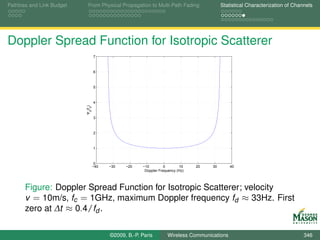
                  EndIn = min( Start+QDeltaH, length(InSig) );
                  EndOut = EndIn + length(Powers)-1;
       118        OutSig(Start:EndOut) = OutSig(Start:EndOut) + ...
                      conv( Taps(kk,:), InSig(Start:EndIn) );

                     kk = kk+1;
                     Start = EndIn+1;


                                    ©2009, B.-P. Paris      Wireless Communications                                 357
Pathloss and Link Budget       From Physical Propagation to Multi-Path Fading      Statistical Characterization of Channels


Testing SimulateCOSTChannel

              A simple test for the channel simulator consists of
              “transmitting” a baseband equivalent sinusoid.
       %% Initialization
       ChannelParameters    = tux();                               % COST model parameters
  6    ChannelParameters.fd = 10;                                  % Doppler frequency

       fs                                = 1e5;                    % sampling rate
       SigDur                            = 1;                      % duration of signal

 11    %% generate input signal and simulate channel
       tt         = 0:1/fs:SigDur;    % time axis
       Sig        = ones( size(tt) ); % baseband-equivalent carrier

       Received            =   SimulateCOSTChannel(Sig, ChannelParameters, fs);


                                       ©2009, B.-P. Paris      Wireless Communications                                 358
Pathloss and Link Budget       From Physical Propagation to Multi-Path Fading                       Statistical Characterization of Channels


Testing SimulateCOSTChannel
                                       1.8


                                       1.6


                                       1.4


                                       1.2
                           Magnitude


                                        1


                                       0.8


                                       0.6


                                       0.4


                                       0.2


                                        0
                                         0   0.1   0.2   0.3   0.4     0.5      0.6   0.7   0.8   0.9   1
                                                                     Time (s)


       Figure: Simulated Response to a Sinusoidal Signal; fd = 10Hz,
       baseband equivalent frequency f = 0.


                                             ©2009, B.-P. Paris           Wireless Communications                                       359
Pathloss and Link Budget    From Physical Propagation to Multi-Path Fading      Statistical Characterization of Channels


Summary

              Highlighted unique aspects of mobile, wireless channels:
                      time-varying, multi-path channels.
              Statistical characterization of channels via
                      power-delay profile (RMS delay spread),
                      frequency coherence function (coherence bandwidth),
                      time coherence function (coherence time), and
                      Doppler spread function (Doppler spread).
              Relating channel parameters to system parameters:
                      signal bandwidth and coherence bandwidth,
                      frame duration and coherence time.
              Channel simulator in MATLAB.


                                    ©2009, B.-P. Paris      Wireless Communications                                 360
Pathloss and Link Budget    From Physical Propagation to Multi-Path Fading      Statistical Characterization of Channels


Where we are ...


              Having characterized the nature of mobile, wireless
              channels, we can now look for ways to overcome the
              detrimental effects of the channel.
                      The importance of diversity to overcome fading.
                      Sources of diversity:
                           Time,
                           Frequency,
                           Space.
              Equalizers for overcoming frequency-selective fading.
                      Equalizers also exploit freqeuncy diversity.


                                    ©2009, B.-P. Paris      Wireless Communications                                 361
The Importance of Diversity                                           Frequency Diversity: Wide-Band Signals


                                           Part V

          Mitigating the Impact of the Wireless Channel


                              ©2009, B.-P. Paris   Wireless Communications                              362
The Importance of Diversity                                           Frequency Diversity: Wide-Band Signals


Mitigating the Impact of the Wireless Channel


       Description and analysis of techniques to overcome the
       detrimental influence of the wireless channel through various
       forms of diversity.
               The importance of diversity.
               Sources of diversity: time, frequency, and space.
               Equalization: overcoming ISI and exploiting diversity


                              ©2009, B.-P. Paris   Wireless Communications                              363
The Importance of Diversity                                           Frequency Diversity: Wide-Band Signals


Outline


       Part IV: Learning Objectives

       The Importance of Diversity

       Frequency Diversity: Wide-Band Signals


                              ©2009, B.-P. Paris   Wireless Communications                              364
The Importance of Diversity                                                  Frequency Diversity: Wide-Band Signals


Learning Objectives

               The Importance of Diversity.
                       BER performance in a Rayleigh fading channel without
                       diversity.
                       Diversity to the rescue ...
                              What is diversity?
                              Acceptable performance in Rayleigh fading channels
                              requires diversity.
               Creating and Exploiting Diversity.
                       spatial diversity through multiple antennas,
                       frequency diversity through wide-band signaling.
                              Equalization


                                     ©2009, B.-P. Paris   Wireless Communications                              365
The Importance of Diversity                                           Frequency Diversity: Wide-Band Signals


Outline


       Part IV: Learning Objectives

       The Importance of Diversity

       Frequency Diversity: Wide-Band Signals


                              ©2009, B.-P. Paris   Wireless Communications                              366
The Importance of Diversity                                                Frequency Diversity: Wide-Band Signals


The Importance of Diversity

               We have taken a detailed look at the detrimental effects of
               time-varying multi-path channels.
               Question: How do time-varying multi-path channels affect
               the performance of mobile, wireless communications
               channels?
                       In particular, how is the symbol error rate affected by these
                       channels?
               Example: Analyze the simple communication system
               analyzed before in a time-varying multi-path environment.
                       BPSK
                       raised-cosine pulses,
                       low data rate, i.e., narrow-band signals.


                                   ©2009, B.-P. Paris   Wireless Communications                              367
The Importance of Diversity                                                            Frequency Diversity: Wide-Band Signals


System to be Analyzed
               The simple communication system in the diagram below
               will be analyzed.
                     Focus on the effects of the multi-path channel h(t ).
                        Assumption: low baud rate, i.e., narrow-band signal.


                                                                                                          Sampler,
                                                                    N (t )
                                                                                                           rate fs

            bn                                 s (t )                     R (t )                                 R [n] to
                    ×         p (t )      ×             h (t )        +            ΠTs (t )
                                                                                                                       DSP


              ∑ δ(t − nT )                 A


                                       ©2009, B.-P. Paris        Wireless Communications                                 368
The Importance of Diversity                                                  Frequency Diversity: Wide-Band Signals


Assumptions and Implications
               For our analysis, we make the following specific
               assumptions:
                  1. Narrow-band signals:
                              The symbol period T is assumed to be much smaller than
                              the delay spread of the channel.
                              Implication: ISI is negligible; flat-fading channel.
                              The delay spread of our channel is approximately 2µs;
                              choose symbol period T = 40µs (Baud rate 25KHz).
                  2. Slow fading:
                              The duration of each transmission is much shorter than the
                              coherence-time of the channel.
                              Implication: the channel remains approximately constant for
                              each transmission.
                              Assuming a Doppler frequency of 30Hz, the coherence time
                              is approximately 20ms;
                              transmitting 60 symbols per frame leads to frame durations
                              of 60 · 40µs = 2.4ms.

                                     ©2009, B.-P. Paris   Wireless Communications                              369
The Importance of Diversity                                                        Frequency Diversity: Wide-Band Signals


Implications on Channel Model
               With the above assumptions, the multi-path channel
               reduces effectively to attenuation by a factor a.
                        a is complex Gaussian (multiplicative noise),
                        The magnitude |a| is Rayleigh distributed (Rayleigh fading).
                        Short frame duration implies a is constant during a frame.


                                                                                                      Sampler,
                                                                N (t )
                                                                                                       rate fs

            bn                                  s (t )                R (t )                                 R [n] to
                    ×         p (t )      ×              ×        +            ΠTs (t )
                                                                                                                   DSP


              ∑ δ(t − nT )                 A             a


                                       ©2009, B.-P. Paris    Wireless Communications                                 370
The Importance of Diversity                                                Frequency Diversity: Wide-Band Signals


Modifications to the Receiver

               For the narrow-band channel model, only a minor
               modification to the receiver is required.
               The effective impulse response of the system is a · p (t ).
                    Hence, the receiver should match with a · p (t ) instead of
                    just p (t ).
                       Most importantly, this reverses any phase rotations
                       introduced by the channel.
               Problem: The channel attenuation a is unknown and must
               be estimated.
                       This is accomplished with the help of a training sequence
                       embedded in the signal.
                       To be discussed shortly.


                                   ©2009, B.-P. Paris   Wireless Communications                              371
The Importance of Diversity                                            Frequency Diversity: Wide-Band Signals


Instantaneous Symbol Error Rate
               Assuming that we have successfully determined, the
               channel attenuation a, the symbol error rate for a given a is
               easily determined.
               The attenuation a changes the received energy per symbol
               to |a|2 · Es .
               Consequently, the instantaneous symbol error rate for our
               BPSK system is

                                                       2|a|2 · Es
                                 Pe (a) = Q(                      ).
                                                          N0

               Note that for each frame, the system experiences a
               different channel attenuation a and, thus, a different
               instantaneous symbol error rate.
                               ©2009, B.-P. Paris   Wireless Communications                              372
The Importance of Diversity                                               Frequency Diversity: Wide-Band Signals


Average Symbol Error Rate
               The instantaneous symbol error rate varies from frame to
               frame and depends on a.
               The average symbol error rate provides a measure of
               performance that is independent of the attenuation a.
               It is obtained by averaging over a:

                              Pe = E[Pe (a)] =            Pe (a) · PA (a) da,

               where PA (a) is the pdf for the attenuation a.
               For a complex Gaussian attenuation a with zero mean and
                         2
               variance σa :
                                              1              SNR
                                    Pe =        (1 −               ),
                                              2            1 + SNR
                            2
               where SNR = σa · Es /N0 .
                                  ©2009, B.-P. Paris   Wireless Communications                              373
The Importance of Diversity                                                                               Frequency Diversity: Wide-Band Signals


Symbol Error Rate with Rayleigh Fading
                                                   0
                                                  10
                                                                                                         Rayleigh
                                                                                                         AWGN
                                                   −1
                                                  10


                                                   −2
                                                  10
                              Symbol Error Rate


                                                   −3
                                                  10


                                                   −4
                                                  10


                                                   −5
                                                  10


                                                   −6
                                                  10
                                                       0   1     2    3     4       5        6   7   8    9         10
                                                                                E /N0 (dB)
                                                                                 s


                                                                     2
        Figure: Symbol Error Rate with and without Rayleigh Fading; σa = 1


                                                           ©2009, B.-P. Paris         Wireless Communications                               374
The Importance of Diversity                                                  Frequency Diversity: Wide-Band Signals


Conclusions

               The symbol error rate over a Rayleigh fading channel is
               much worse than for an AWGN channel.
                       Example: To achieve a symbol error rate of 10−4
                              on an AWGN channel, Es /N0 ≈ 8.2dB is required;
                              on a Rayleigh fading channel, Es /N0 ≈ 34dB is required!
               The poor performance results from the fact that the
               probability that channel is in a deep fade is significant:

                                                                         1
                                    Pr(|a|2 Es /N0 < 1) ≈                    .
                                                                      Es /N0

               Question: What can be done to improve performance?


                                     ©2009, B.-P. Paris   Wireless Communications                              375
The Importance of Diversity                                                   Frequency Diversity: Wide-Band Signals


Diversity
               Diversity refers to the ability to observe the transmitted
               signal over multiple, independent Rayleigh fading
               channels.
               Example: Multiple receiver antennas
                       Assume the receiver is equipped with L separate antennas
                       and corresponding receiver front-ends.
                       The antennas are spaced sufficiently to ensure that the
                       channels from transmitter to each of the receiver antennas
                       is independent.
                              Antenna spacing approximately equal to the wavelength of
                              the carrier is sufficient.
                       Then, the receiver observes L versions of the transmitted
                       signal,
                              each with a different attenuation al and a different additive
                              noise Nl (t ).

                                      ©2009, B.-P. Paris   Wireless Communications                              376
The Importance of Diversity                                                   Frequency Diversity: Wide-Band Signals


Diversity Receiver

               Question: How should the L received signals be
               processed to minimize the probability of symbol errors.
               Maximum-Ratio Combining:
                       Assume again that the channel attenuation al are known
                       and that the noise PSD is equal on all channels.
                       Then, the optimum receiver performs
                              matched filtering for each received signal: the l-th received
                              signal is filtered with filter al∗ · p ∗ (−t ).
                              The L matched filter outputs are added and fed into the
                              slicer.
                              Note, since the matched filter includes the attenuation al , the
                              sum is weighted by the attenuation of the channel.


                                      ©2009, B.-P. Paris   Wireless Communications                              377
The Importance of Diversity                                                     Frequency Diversity: Wide-Band Signals


Symbol Error Rate
               The instantaneous error probability for given channel gains
               a = {a1 , a2 , . . . , aL } is
               ¯

                                            ¯
                                       Pe ( a ) = Q (       2||a||2 Es /N0 ),
                                                               ¯

               where ||a||2 = ∑L =1 |ak |2 .
                       ¯        k
               The average error probability is obtained by taking the
               expectation with respect to the random gains a ¯
                                       1−µ L L                L−k               1 + µ k −1
                              Pe = (      ) ·∑                              (        ) ,
                                        2    k =1
                                                              k −1                2
               where
                                          SNR              2
                               µ=               and SNR = σa · Es /N0 .
                                        1 + SNR

                                       ©2009, B.-P. Paris   Wireless Communications                               378
The Importance of Diversity                                                                               Frequency Diversity: Wide-Band Signals


Symbol Error Rate with Receiver Diversity
                                                   0
                                                  10
                                                                                                          L=1
                                                   −1                                                     L=2
                                                  10                                                      L=3
                                                                                                          L=4
                                                   −2                                                     L=5
                                                  10
                                                                                                          AWGN
                                                   −3
                                                  10
                              Symbol Error Rate


                                                   −4
                                                  10

                                                   −5
                                                  10

                                                   −6
                                                  10

                                                   −7
                                                  10

                                                   −8
                                                  10

                                                   −9
                                                  10
                                                       0       2        4           6        8       10          12
                                                                                E /N0 (dB)
                                                                                 s


       Figure: Symbol Error Rate with Diversity over a Rayleigh Fading
                 2
       Channel; σa = 1, AWGN channel without diversity.


                                                           ©2009, B.-P. Paris         Wireless Communications                               379
The Importance of Diversity                                                  Frequency Diversity: Wide-Band Signals


Conclusions
               The symbol error rate with diversity is much better than
               without.
                       Example: To achieve a symbol error rate of 10−4
                              on an AWGN channel, Es /N0 ≈ 8.2dB is required;
                              without diversity on a Rayleigh fading channel,
                              Es /N0 ≈ 34dB is required!
                              with 5-fold diversity on a Rayleigh fading channel,
                              Es /N0 ≈ 5dB is required!
               The improved performance stems primarily from the fact
               that all L channels are unlikely to be in a deep fade at the
               same time.
               Performance better than an AWGN channel (without
               diversity) is possible because diversity is provided by the
               receiver.
                       multiple receiver antennas exploit the same transmitted
                       energy - array gain.
                                     ©2009, B.-P. Paris   Wireless Communications                              380
The Importance of Diversity                                                                                  Frequency Diversity: Wide-Band Signals


Symbol Error Rate with Transmitter Diversity
               If diversity is provided by the transmitter, e.g., the signal is
               transmitted multiple times, then each transmission can only
               use symbol energy Es /L.
                                                   0
                                                  10

                                                   −1
                                                  10

                                                   −2
                                                  10

                                                   −3
                                                  10
                              Symbol Error Rate


                                                   −4
                                                  10

                                                   −5
                                                  10

                                                   −6
                                                  10

                                                   −7      L=1
                                                  10
                                                           L=2
                                                           L=3
                                                   −8      L=4
                                                  10
                                                           L=5
                                                           AWGN
                                                   −9
                                                  10
                                                       0       2        4           6           8       10         12
                                                                                E /N (dB)
                                                                                 s   0


                                                           ©2009, B.-P. Paris            Wireless Communications                               381
The Importance of Diversity                                              Frequency Diversity: Wide-Band Signals


MATLAB Simulation

               Objective: Perform a Monte Carlo simulation of a
               narrow-band communication system with diversity and
               time-varying multi-path.
               Approach: As before, we break the simulation into three
               parts
                  1. System parameters are set with the script file
                     NarrowBandSetParameters.
                  2. The simulation is controlled with the driver script
                     MCNarrowBandDriver.
                  3. The actual system simulation is carried out in the function
                     MCNarrowBand.

               All three files are in the toolbox.


                                 ©2009, B.-P. Paris   Wireless Communications                              382
The Importance of Diversity                                               Frequency Diversity: Wide-Band Signals


MATLAB Simulation

               The simulation begins with the generation of the
               transmitted signal.
                       New facet: a known training sequence is inserted in the
                       middle of the frame.
               %% simulate discrete-time equivalent system
               % transmitter and channel via toolbox functions
               InfoSymbols = RandomSymbols( NSymbols, Alphabet, Priors );
               % insert training sequence
         45    Symbols = [ InfoSymbols(1:TrainLoc) TrainingSeq ...
                   InfoSymbols(TrainLoc+1:end)];
               % linear modulation


                                  ©2009, B.-P. Paris   Wireless Communications                              383
The Importance of Diversity                                               Frequency Diversity: Wide-Band Signals


MATLAB Simulation
               To simulate a diversity system, L received signals are
               generated.
                       Each is sent over a different multi-path channel and
                       experiences different noise.
                       Each received signal is matched filtered and the channel
                       gain is estimated via the training sequence.

       % loop over diversity channels
       for kk = 1:L
 52        % time-varying multi-path channels and additive noise
           Received(kk,:) = SimulateCOSTChannel( Signal, ChannelParams, fs);
           Received(kk,:) = addNoise( Received(kk,:), NoiseVar );

              % digital matched filter, gain estimation
 57           MFOut(kk,:)     = DMF( Received(kk,:), hh, fsT );
              GainEst(kk)     = 1/TrainLength * ...
                  MFOut( kk, TrainLoc+1 : TrainLoc+TrainLength) * TrainingSeq’;


                                  ©2009, B.-P. Paris   Wireless Communications                              384
The Importance of Diversity                                                  Frequency Diversity: Wide-Band Signals


MATLAB Simulation

               The final processing step is maximum-ratio combining.
                       The matched filter outputs are multiplied with the conjugate
                       complex of the channel gains and added.
                       Multiplying with the conjugate complex of the channel gains
                              reverses phase rotations by the channel, and
                              gives more weight to strong channels.
         61
               % delete traning, MRC, and slicer
               MFOut(:, TrainLoc+1 : TrainLoc+TrainLength) = [ ];
               MRC = conj(GainEst)*MFOut;
               Decisions = SimpleSlicer( MRC(1:NSymbols), Alphabet,                               ...


                                     ©2009, B.-P. Paris   Wireless Communications                              385
The Importance of Diversity                                                                                   Frequency Diversity: Wide-Band Signals


Simulated Symbol Error Rate with Transmitter
Diversity
                                                   −1
                                                  10


                                                   −2
                                                  10


                                                   −3
                                                  10
                              Symbol Error Rate


                                                   −4
                                                  10


                                                   −5
                                                  10


                                                   −6
                                                  10        Simulated L=2
                                                            L=1
                                                            L=2
                                                   −7       L=3
                                                  10
                                                            L=4
                                                            L=5
                                                   −8
                                                            AWGN
                                                  10
                                                        0        2          4        6           8       10         12
                                                                                 E /N (dB)
                                                                                  s   0


       Figure: Symbol Error Rate with Diversity over a Rayleigh Fading
                 2
       Channel; σa = 1, simulated system has diversity of order L = 2.

                                                            ©2009, B.-P. Paris            Wireless Communications                               386
The Importance of Diversity                                                Frequency Diversity: Wide-Band Signals


Summary

               The strong, detrimental impact of mobile, wireless
               channels on the error rate performance of narrow-band
               systems was demonstrated.
                       Narrow-band system do not have inherent diversity and are
                       subject to flat Rayleigh fading.
               To mitigate Rayleigh fading, diversity is required.
                       Quantified the benefits of diversity.
                       Illustrated diversity through antenna (spatial) diversity at the
                       receiver.
               A complete system, including time-varying multi-path
               channel and diversity was simulated.
                       Good agreement between theory and simulation.


                                   ©2009, B.-P. Paris   Wireless Communications                              387
The Importance of Diversity                                           Frequency Diversity: Wide-Band Signals


Outline


       Part IV: Learning Objectives

       The Importance of Diversity

       Frequency Diversity: Wide-Band Signals


                              ©2009, B.-P. Paris   Wireless Communications                              388
The Importance of Diversity                                               Frequency Diversity: Wide-Band Signals


Frequency Diversity through Wide-Band Signals
               We have seen above that narrow-band systems do not
               have built-in diversity.
                       Narrow-band signals are susceptible to have the entire
                       signal affected by a deep fade.
               In contrast, wide-band signals cover a bandwidth that is
               wider than the coherence bandwidth.
                       Benefit: Only portions of the transmitted signal will be
                       affected by deep fades (frequency-selective fading).
                       Disadvantage: Short symbol duration induces ISI; receiver
                       is more complex.
               The benefits, far outweigh the disadvantages and
               wide-band signaling is used in most modern wireless
               systems.


                                  ©2009, B.-P. Paris   Wireless Communications                              389
The Importance of Diversity                                                  Frequency Diversity: Wide-Band Signals


Illustration: Built-in Diversity of Wide-band Signals
               We illustrate that wide-band signals do provide diversity by
               means of a simple thought experiments.
               Thought experiment:
                       Recall that in discrete time a multi-path channel can be
                       modeled by an FIR filter.
                              Assume filter operates at symbol rate Ts .
                              The delay spread determines the number of taps L.
                       Our hypothetical system transmits one information symbol
                       in every L-th symbol period and is silent in between.
                       At the receiver, each transmission will produce L non-zero
                       observations.
                              This is due to multi-path.
                              Observation from consecutive symbols don’t overlap (no ISI)
                       Thus, for each symbol we have L independent
                       observations, i.e., we have L-fold diversity.

                                     ©2009, B.-P. Paris   Wireless Communications                              390
The Importance of Diversity                                                   Frequency Diversity: Wide-Band Signals


Illustration: Built-in Diversity of Wide-band Signals
               We will demonstrate shortly that it is not necessary to
               leave gaps in the transmissions.
                       The point was merely to eliminate ISI.
               Two insights from the thought experiment:
                       Wide-band signals provide built-in diversity.
                              The receiver gets to look at multiple versions of the
                              transmitted signal.
                       The order of diversity depends on the ratio of delay spread
                       and symbol duration.
                              Equivalently, on the ratio of signal bandwidth and coherence
                              bandwidth.
               We are looking for receivers that both exploit the built-in
               diversity and remove ISI.
                       Such receiver elements are called equalizers.

                                      ©2009, B.-P. Paris   Wireless Communications                              391
The Importance of Diversity                                                   Frequency Diversity: Wide-Band Signals


Equalization

               Equalization is obviously a very important and well
               researched problem.
               Equalizers can be broadly classified into three categories:
                  1. Linear Equalizers: use an inverse filter to compensate for
                     the variations in the frequency response.
                              Simple, but not very effective with deep fades.
                  2. Decision Feedback Equalizers: attempt to reconstruct ISI
                     from past symbol decisions.
                              Simple, but have potential for error propagation.
                  3. ML Sequence Estimation: find the most likely sequence
                     of symbols given the received signal.
                              Most powerful and robust, but computationally complex.


                                      ©2009, B.-P. Paris   Wireless Communications                              392
The Importance of Diversity                                                Frequency Diversity: Wide-Band Signals


Maximum Likelihood Sequence Estimation


               Maximum Likelihood Sequence Estimation provides the
               most powerful equalizers.
               Unfortunately, the computational complexity grows
               exponentially with the ratio of delay spread and symbol
               duration.
                       I.e., with the number of taps in the discrete-time equivalent
                       FIR channel.


                                   ©2009, B.-P. Paris   Wireless Communications                              393
The Importance of Diversity                                                  Frequency Diversity: Wide-Band Signals


Maximum Likelihood Sequence Estimation

               The principle behind MLSE is simple.
                       Given a received sequence of samples R [n], e.g., matched
                       filter outputs, and
                       a model for the output of the multi-path channel:
                       r [n] = s [n] ∗ h[n], where
                       ˆ
                              s [n] denotes the symbol sequence, and
                              h[n] denotes the discrete-time channel impulse response,
                              i.e., the channel taps.
                       Find the sequence of information symbol s [n] that
                       minimizes
                                                     N
                                          D2 =      ∑ |r [n] − s[n] ∗ h[n]|2 .
                                                     n


                                     ©2009, B.-P. Paris   Wireless Communications                              394
The Importance of Diversity                                                Frequency Diversity: Wide-Band Signals


Maximum Likelihood Sequence Estimation
               The criterion
                                              N
                                   D2 =      ∑ |r [n] − s[n] ∗ h[n]|2 .
                                              n


                       performs diversity combining (via s [n] ∗ h[n]), and
                       removes ISI.
               The minimization of the above metric is difficult because it
               is a discrete optimization problem.
                    The symbols s [n] are from a discrete alphabet.
               A computationally efficient algorithm exists to solve the
               minimization problem:
                       The Viterbi Algorithm.
                       The toolbox contains an implementation of the Viterbi
                       Algorithm in function va.
                                   ©2009, B.-P. Paris   Wireless Communications                              395
The Importance of Diversity                                                Frequency Diversity: Wide-Band Signals


MATLAB Simulation


               A Monte Carlo simulation of a wide-band signal with an
               equalizer is conducted
                       to illustrate that diversity gains are possible, and
                       to measure the symbol error rate.
               As before, the Monte Carlo simulation is broken into
                       set simulation parameter (script VASetParameters),
                       simulation control (script MCVADriver), and
                       system simulation (function MCVA).


                                   ©2009, B.-P. Paris   Wireless Communications                              396
The Importance of Diversity                                             Frequency Diversity: Wide-Band Signals


MATLAB Simulation: System Parameters

                              Listing : VASetParameters.m
       Parameters.T   = 1/1e6;                    % symbol period
       Parameters.fsT = 8;                       % samples per symbol
       Parameters.Es = 1;                        % normalize received symbol energy to 1
       Parameters.EsOverN0 = 6;                  % Signal-to-noise ratio (Es/N0)
 13    Parameters.Alphabet = [1 -1];             % BPSK
       Parameters.NSymbols = 500;                % number of Symbols per frame

       Parameters.TrainLoc    = floor(Parameters.NSymbols/2); % location of t
       Parameters.TrainLength = 40;
 18    Parameters.TrainingSeq = RandomSymbols( Parameters.TrainLength, ...
                                               Parameters.Alphabet, [0.5 0.5]

       % channel
       Parameters.ChannelParams = tux(); % channel model
 23    Parameters.fd            = 3;     % Doppler
       Parameters.L             = 6;     % channel order


                                ©2009, B.-P. Paris   Wireless Communications                              397
The Importance of Diversity                                                Frequency Diversity: Wide-Band Signals


MATLAB Simulation
               The first step in the system simulation is the simulation of
               the transmitter functionality.
                       This is identical to the narrow-band case, except that the
                       baud rate is 1 MHz and 500 symbols are transmitted per
                       frame.
                       There are 40 training symbols.

                                        Listing : MCVA.m
 41    % transmitter and channel via toolbox functions
       InfoSymbols = RandomSymbols( NSymbols, Alphabet, Priors );
       % insert training sequence
       Symbols = [ InfoSymbols(1:TrainLoc) TrainingSeq ...
           InfoSymbols(TrainLoc+1:end)];
 46    % linear modulation
       Signal = A * LinearModulation( Symbols, hh, fsT );


                                   ©2009, B.-P. Paris   Wireless Communications                              398
The Importance of Diversity                                               Frequency Diversity: Wide-Band Signals


MATLAB Simulation


               The channel is simulated without spatial diversity.
                       To focus on the frequency diversity gained by wide-band
                       signaling.
               The channel simulation invokes the time-varying multi-path
               simulator and the AWGN function.
       % time-varying multi-path channels and additive noise
       Received = SimulateCOSTChannel( Signal, ChannelParams, fs);
 51    Received = addNoise( Received, NoiseVar );


                                  ©2009, B.-P. Paris   Wireless Communications                              399
The Importance of Diversity                                                Frequency Diversity: Wide-Band Signals


MATLAB Simulation
               The receiver proceeds as follows:
                       Digital matched filtering with the pulse shape; followed by
                       down-sampling to 2 samples per symbol.
                       Estimation of the coefficients of the FIR channel model.
                       Equalization with the Viterbi algorithm; followed by removal
                       of the training sequence.

       % is long enough so that VA below produces the right number of symbols
       MFOut     = zeros( 1, 2*length(Symbols)+L-1 );
       Temp      = DMF( Received, hh, fsT/2 );
 57    MFOut( 1:length(Temp) ) = Temp;

       % channel estimation
       MFOutTraining = MFOut( 2*TrainLoc+1 : 2*(TrainLoc+TrainLength) );
       ChannelEst = EstChannel( MFOutTraining, TrainingSeq, L, 2);
 62
       % VA over MFOut using ChannelEst


                                   ©2009, B.-P. Paris   Wireless Communications                              400
The Importance of Diversity                                                Frequency Diversity: Wide-Band Signals


Channel Estimation
               Channel Estimate:

                                            h = (S S)−1 · S r,
                                            ˆ

               where
                       S is a Toeplitz matrix constructed from the training
                       sequence, and
                       r is the corresponding received signal.

       TrainingSPS            = zeros(1, length(Received) );
 14    TrainingSPS(1:SpS:end) = Training;

       % make into a Toepliz matrix, such that T*h is convolution
       TrainMatrix = toeplitz( TrainingSPS, [Training(1) zeros(1, Order-1)]);

 19    ChannelEst = Received * conj( TrainMatrix) * ...
           inv(TrainMatrix’ * TrainMatrix);

                                   ©2009, B.-P. Paris   Wireless Communications                              401
The Importance of Diversity                                                                                   Frequency Diversity: Wide-Band Signals


Simulated Symbol Error Rate with MLSE Equalizer
                                                   −1
                                                  10


                                                   −2
                                                  10


                                                   −3
                              Symbol Error Rate   10


                                                   −4
                                                  10


                                                   −5
                                                  10


                                                   −6
                                                  10        Simulated VA
                                                            L=1
                                                            L=2
                                                   −7       L=3
                                                  10
                                                            L=4
                                                            L=5
                                                   −8
                                                            AWGN
                                                  10
                                                        0        2         4         6           8       10         12
                                                                                 E /N (dB)
                                                                                  s   0


       Figure: Symbol Error Rate with Viterbi Equalizer over Multi-path
       Fading Channel; Rayleigh channels with transmitter diversity shown
       for comparison. Baud rate 1MHz, Delay spread ≈ 2µs.


                                                            ©2009, B.-P. Paris            Wireless Communications                               402
The Importance of Diversity                                               Frequency Diversity: Wide-Band Signals


Conclusions
               The simulation indicates that the wide-band system with
               equalizer achieves a diversity gain similar to a system with
               transmitter diversity of order 2.
                       The ratio of delay spread to symbol rate is 2.
                       comparison to systems with transmitter diversity is
                       appropriate as the total average power in the channel taps
                       is normalized to 1.
                       Performance at very low SNR suffers, probably, from
                       inaccurate estimates.
               Higher gains can be achieved by increasing bandwidth.
                       This incurs more complexity in the equalizer, and
                       potential problems due to a larger number of channel
                       coefficients to be estimated.
               Alternatively, this technique can be combined with
               additional diversity techniques (e.g., spatial diversity).
                                  ©2009, B.-P. Paris   Wireless Communications                              403
The Importance of Diversity                                            Frequency Diversity: Wide-Band Signals


More Ways to Create Diversity


               A quick look at three additional ways to create and exploit
               diversity.
                  1. Time diversity.
                  2. Frequency Diversity through OFDM.
                  3. Multi-antenna systems (MIMO)


                               ©2009, B.-P. Paris   Wireless Communications                              404
The Importance of Diversity                                                  Frequency Diversity: Wide-Band Signals


Time Diversity
               Time diversity: is created by sending information multiple
               times in different frames.
                       This is often done through coding and interleaving.
                       This technique relies on the channel to change sufficiently
                       between transmissions.
                              The channel’s coherence time should be much smaller than
                              the time between transmissions.
                       If this condition cannot be met (e.g., for slow-moving
                       mobiles), frequency hopping can be used to ensure that the
                       channel changes sufficiently.
               The diversity gain is (at most) equal to the number of
               time-slots used for repeating information.
               Time diversity can be easily combined with frequency
               diversity as discussed above.
                       The combined diversity gain is the product of the individual
                       diversity gains.
                                     ©2009, B.-P. Paris   Wireless Communications                              405
The Importance of Diversity                                                  Frequency Diversity: Wide-Band Signals


OFDM

               OFDM has received a lot of interest recently.
               OFDM can elegantly combine the benefits of narrow-band
               signals and wide-band signals.
                       Like for narrow-band signaling, an equalizer is not required;
                       merely the gain for each subcarier is needed.
                              Very low-complexity receivers.
                       OFDM signals are inherently wide-band; frequency
                       diversity is easily achieved by repeating information (really
                       coding and interleaving) on widely separated subcarriers.
                              Bandwidth is not limited by complexity of equalizer;
                              High signal bandwidth to coherence bandwidth is possible;
                              high diversity.


                                     ©2009, B.-P. Paris   Wireless Communications                              406
The Importance of Diversity                                                Frequency Diversity: Wide-Band Signals


MIMO
               We have already seen that multiple antennas at the
               receiver can provide both diversity and array gain.
                       The diversity gain ensures that the likelihood that there is
                       no good channel from transmitter to receiver is small.
                       The array gain exploits the benefits from observing the
                       transmitted energy multiple times.
               If the system is equipped with multiple transmitter
               antennas, then the number of channels equals the product
               of the number of antennas.
                       Very high diversity.
               Recently, it has been found that multiple streams can be
               transmitted in parallel to achieve high data rates.
                       Multiplexing gain
               The combination of multi-antenna techniques and OFDM
               appears particularly promising.
                                   ©2009, B.-P. Paris   Wireless Communications                              407
The Importance of Diversity                                                Frequency Diversity: Wide-Band Signals


Summary
               A close look at the detrimental effect of typical wireless
               channels.
                       Narrow-band signals without diversity suffer poor
                       performance (Rayleigh fading).
                       Simulated narrow-band system.
               To remedy this problem, diversity is required.
                       Analyzed systems with antenna diversity at the receiver.
                       Verified analysis through simulation.
               Frequency diversity and equalization.
                       Introduced MLSE and the Viterbi algorithm for equalizing
                       wide-band signals in multi-path channels.
                       Simulated system and verified diversity.
               A brief look at other diversity techniques.

                                   ©2009, B.-P. Paris   Wireless Communications                              408

Simulation of Wireless Communication Systems

  • 1.
    Modeling of WirelessCommunication Systems using MATLAB Dr. B.-P. Paris Dept. Electrical and Comp. Engineering George Mason University last updated September 23, 2009 ©2009, B.-P. Paris Wireless Communications 1
  • 2.
    Approach This course aims to cover both theory and practice of wireless commuication systems, and the simulation of such systems using MATLAB. Both topics are given approximately equal treatment. After a brief introduction to MATLAB, theory and MATLAB simulation are pursued in parallel. This approach allows us to make concepts concrete and/or to visualize relevant signals. In the process, a toolbox of MATLAB functions is constructed. Hopefully, the toolbox will be useful for your own projects. Illustrates good MATLAB practices. ©2009, B.-P. Paris Wireless Communications 2
  • 3.
    Outline - Prologue:Just Enough MATLAB to ... Prologue: Learning Objectives User Interface Working with Vectors Visualization ©2009, B.-P. Paris Wireless Communications 3
  • 4.
    Outline - PartI: From Theory to Simulation Part I: Learning Objectives Elements of a Digital Communications System Digital Modulation Channel Model Receiver MATLAB Simulation ©2009, B.-P. Paris Wireless Communications 4
  • 5.
    Outline - PartII: Digital Modulation and Spectrum Part II: Learning Objectives Linear Modulation Formats and their Spectra Spectrum Estimation in MATLAB Non-linear Modulation Wide-Band Modulation ©2009, B.-P. Paris Wireless Communications 5
  • 6.
    Outline - PartIII: The Wireless Channel Part III: Learning Objectives Pathloss and Link Budget From Physical Propagation to Multi-Path Fading Statistical Characterization of Channels ©2009, B.-P. Paris Wireless Communications 6
  • 7.
    Outline - PartIV: Mitigating the Wireless Channel Part IV: Learning Objectives The Importance of Diversity Frequency Diversity: Wide-Band Signals ©2009, B.-P. Paris Wireless Communications 7
  • 8.
    User Interface Working with Vectors Visualization Part I Prologue: Just Enough MATLAB to ... ©2009, B.-P. Paris Wireless Communications 8
  • 9.
    User Interface Working with Vectors Visualization Prologue: Just Enough MATLAB to ... MATLAB will be used throughout this course to illustrate theory and key concepts. MATLAB is very well suited to model communications systems: Signals are naturally represented in MATLAB, MATLAB has a very large library of functions for processing signals, Visualization of signals is very well supported in MATLAB. MATLAB is used interactively. Eliminates code, compile, run cycle. Great for rapid prototyping and what-if analysis. ©2009, B.-P. Paris Wireless Communications 9
  • 10.
    User Interface Working with Vectors Visualization Outline Prologue: Learning Objectives User Interface Working with Vectors Visualization ©2009, B.-P. Paris Wireless Communications 10
  • 11.
    User Interface Working with Vectors Visualization Learning Objectives Getting around in MATLAB The user interface, Getting help. Modeling signals in MATLAB Using vectors to model signals, Creating and manipulating vectors, Visualizing vectors: plotting. ©2009, B.-P. Paris Wireless Communications 11
  • 12.
    User Interface Working with Vectors Visualization Outline Prologue: Learning Objectives User Interface Working with Vectors Visualization ©2009, B.-P. Paris Wireless Communications 12
  • 13.
    User Interface Working with Vectors Visualization MATLAB’s Main Window ©2009, B.-P. Paris Wireless Communications 13
  • 14.
    User Interface Working with Vectors Visualization MATLAB’s Built-in IDE ©2009, B.-P. Paris Wireless Communications 14
  • 15.
    User Interface Working with Vectors Visualization MATLAB’s Built-in Help System MATLAB has an extensive built-in help system. On-line documentation reader: contains detailed documentation for entire MATLAB system, is invoked by typing doc at command line clicking “Question Mark” in tool bar of main window, via “Help” menu. Command-line help provides access to documentation inside command window. Helpful commands include: help function-name, e.g., help fft. lookfor keyword, e.g., lookfor inverse. We will learn how to tie into the built-in help system. ©2009, B.-P. Paris Wireless Communications 15
  • 16.
    User Interface Working with Vectors Visualization Interacting with MATLAB You interact with MATLAB by typing commands at the command prompt (» ) in the command window. MATLAB’s response depends on whether a semicolon is appended after the command or not. If a semicolon is not appended, then MATLAB displays the result of the command. With a semicolon, the result is not displayed. Examples: The command xx = 1:3 produces xx = 1 2 3 The command xx = 1:3; produces no output. The variable xx still stores the result. Do use a semicolon with xx = 1:30000000; ©2009, B.-P. Paris Wireless Communications 16
  • 17.
    User Interface Working with Vectors Visualization Outline Prologue: Learning Objectives User Interface Working with Vectors Visualization ©2009, B.-P. Paris Wireless Communications 17
  • 18.
    User Interface Working with Vectors Visualization Signals and Vectors Our objective is to simulate communication systems in MATLAB. This includes the signals that occur in such systems, and processing applied to these signals. In MATLAB (and any other digital system) signals must be represented by samples. Well-founded theory exists regarding sampling (Nyquist’s sampling theorem). Result: Signals are represented as a sequence of numbers. MATLAB is ideally suited to process sequences of numbers. MATLAB’s basic data types: vectors (and matrices). Vectors are just sequence of numbers. ©2009, B.-P. Paris Wireless Communications 18
  • 19.
    User Interface Working with Vectors Visualization Illustration: Generating a Sinusoidal Signal The following, simple task illustrates key benefits from MATLAB’s use of vectors. Task: Generate samples of the sinusoidal signal π x (t ) = 3 · cos(2π440t − ) 4 for t ranging from 0 to 10 ms. The sampling rate is 20 KHz. Objective: Compare how this task is accomplished using MATLAB’s vector function, traditional (C-style) for or while loops. ©2009, B.-P. Paris Wireless Communications 19
  • 20.
    User Interface Working with Vectors Visualization Illustration: Generating a Sinusoidal Signal For both approaches, we begin by defining a few parameters. This increases readability and makes it easier to change parameters. %% Set Parameters A = 3; % amplitude f = 440; % frequency phi = -pi/4; % phase 7 fs = 20e3; % sampling rate Ts = 0; % start time Te = 10e-3; % end time ©2009, B.-P. Paris Wireless Communications 20
  • 21.
    User Interface Working with Vectors Visualization Using Loops The MATLAB code below uses a while loop to generate the samples one by one. The majority of the code is devoted to “book-keeping” tasks. Listing : generateSinusoidLoop.m %initialize loop variables tcur = Ts; kk = 1; 17 while( tcur <= Te) % compute current sample and store in vector tt(kk) = tcur; xx(kk) = A*cos(2*pi*f*tcur + phi); 22 %increment loop variables kk = kk+1; tcur = tcur + 1/fs; end ©2009, B.-P. Paris Wireless Communications 21
  • 22.
    User Interface Working with Vectors Visualization Vectorized Code Much more compact code is possible with MATLAB’s vector functions. There is no overhead for managing a program loop. Notice how similar the instruction to generate the samples is to the equation for the signal. The vector-based approach is the key enabler for rapid prototyping. Listing : generateSinusoid.m %% generate sinusoid tt = Ts : 1/fs : Te; % define time-axis xx = A * cos( 2*pi * f * tt + phi ); ©2009, B.-P. Paris Wireless Communications 22
  • 23.
    User Interface Working with Vectors Visualization Commands for Creating Vectors The following commands all create useful vectors. [ ]: the sequence of samples is explicitly specified. Example: xx = [ 1 3 2 ] produces xx = 1 3 2. :(colon operator): creates a vector of equally spaced samples. Example: tt = 0:2:9 produces tt = 0 2 4 6 8. Example: tt = 1:3 produces tt = 1 2 3. Idiom: tt = ts:1/fs:te creates a vector of sampling times between ts and te with sampling period 1/fs (i.e., the sampling rate is fs). ©2009, B.-P. Paris Wireless Communications 23
  • 24.
    User Interface Working with Vectors Visualization Creating Vectors of Constants ones(n,m): creates an n × m matrix with all elements equal to 1. Example: xx = ones(1,5) produces xx = 1 1 1 1 1. Example: xx = 4*ones(1,5) produces xx = 4 4 4 4 4. zeros(n,m): creates an n × m matrix with all elements equal to 0. Often used for initializing a vector. Usage identical to ones. Note: throughout we adopt the convention that signals are represented as row vectors. The first (column) dimension equals 1. ©2009, B.-P. Paris Wireless Communications 24
  • 25.
    User Interface Working with Vectors Visualization Creating Random Vectors We will often need to create vectors of random numbers. E.g., to simulate noise. The following two functions create random vectors. randn(n,m): creates an n × m matrix of independent Gaussian random numbers with mean zero and variance one. Example: xx = randn(1,5) may produce xx = -0.4326 -1.6656 0.1253 0.2877 -1.1465. rand(n,m): creates an n × m matrix of independent uniformly distributed random numbers between zero and one. Example: xx = rand(1,5) may produce xx = 0.1576 0.9706 0.9572 0.4854 0.8003. ©2009, B.-P. Paris Wireless Communications 25
  • 26.
    User Interface Working with Vectors Visualization Addition and Subtraction The standard + and - operators are used to add and subtract vectors. One of two conditions must hold for this operation to succeed. Both vectors must have exactly the same size. In this case, corresponding elements in the two vectors are added and the result is another vector of the same size. Example: [1 3 2] + 1:3 produces 2 5 5. A prominent error message indicates when this condition is violated. One of the operands is a scalar, i.e., a 1 × 1 (degenerate) vector. In this case, each element of the vector has the scalar added to it. The result is a vector of the same size as the vector operand. Example: [1 3 2] + 2 produces 3 5 4. ©2009, B.-P. Paris Wireless Communications 26
  • 27.
    User Interface Working with Vectors Visualization Element-wise Multiplication and Division The operators .* and ./ operators multiply or divide two vectors element by element. One of two conditions must hold for this operation to succeed. Both vectors must have exactly the same size. In this case, corresponding elements in the two vectors are multiplied and the result is another vector of the same size. Example: [1 3 2] .* 1:3 produces 1 6 6. An error message indicates when this condition is violated. One of the operands is a scalar. In this case, each element of the vector is multiplied by the scalar. The result is a vector of the same size as the vector operand. Example: [1 3 2] .* 2 produces 2 6 4. If one operand is a scalar the ’.’ may be omitted, i.e., [1 3 2] * 2 also produces 2 6 4. ©2009, B.-P. Paris Wireless Communications 27
  • 28.
    User Interface Working with Vectors Visualization Inner Product The operator * with two vector arguments computes the inner product (dot product) of the vectors. Recall the inner product of two vectors is defined as N x ·y = ∑ x (n ) · y (n ). n =1 This implies that the result of the operation is a scalar! The inner product is a useful and important signal processing operation. It is very different from element-wise multiplication. The second dimension of the first operand must equal the first dimension of the second operand. MATLAB error message: Inner matrix dimensions must agree. Example: [1 3 2] * (1:3)’ = 13. The single quote (’) transposes a vector. ©2009, B.-P. Paris Wireless Communications 28
  • 29.
    User Interface Working with Vectors Visualization Powers To raise a vector to some power use the .^ operator. Example: [1 3 2].^2 yields 1 9 4. The operator ^ exists but is generally not what you need. Example: [1 3 2]^2 is equivalent to [1 3 2] * [1 3 2] which produces an error. Similarly, to use a vector as the exponent for a scalar base use the .^ operator. Example: 2.^[1 3 2] yields 2 8 4. Finally, to raise a vector of bases to a vector of exponents use the .^ operator. Example: [1 3 2].^(1:3) yields 1 9 8. The two vectors must have the same dimensions. The .^ operator is (nearly) always the right operator. ©2009, B.-P. Paris Wireless Communications 29
  • 30.
    User Interface Working with Vectors Visualization Complex Arithmetic MATLAB support complex numbers fully and naturally. √ The imaginary unit i = −1 is a built-in constant named i and j. Creating complex vectors: Example: xx = randn(1,5) + j*randn(1,5) creates a vector of complex Gaussian random numbers. A couple of “gotchas” in connection with complex arithmetic: Never use i and j as variables! Example: After invoking j=2, the above command will produce very unexpected results. Transposition operator (’) transposes and forms conjugate complex. That is very often the right thing to do. Transpose only is performed with .’ operator. ©2009, B.-P. Paris Wireless Communications 30
  • 31.
    User Interface Working with Vectors Visualization Vector Functions MATLAB has literally hundreds of built-in functions for manipulating vectors and matrices. The following will come up repeatedly: yy=cos(xx), yy=sin(xx), and yy=exp(xx): compute the cosine, sine, and exponential for each element of vector xx, the result yy is a vector of the same size as xx. XX=fft(xx), xx=ifft(XX): Forward and inverse discrete Fourier transform (DFT), computed via an efficient FFT algorithm. Many algebraic functions are available, including log10, sqrt, abs, and round. Try help elfun for a complete list. ©2009, B.-P. Paris Wireless Communications 31
  • 32.
    User Interface Working with Vectors Visualization Functions Returning a Scalar Result Many other functions accept a vector as its input and return a scalar value as the result. Examples include min and max, mean and var or std, sum computes the sum of the elements of a vector, norm provides the square root of the sum of the squares of the elements of a vector. The norm of a vector is related to power and energy. Try help datafun for an extensive list. ©2009, B.-P. Paris Wireless Communications 32
  • 33.
    User Interface Working with Vectors Visualization Accessing Elements of a Vector Frequently it is necessary to modify or extract a subset of the elements of a vector. Accessing a single element of a vector: Example: Let xx = [1 3 2], change the third element to 4. Solution: xx(3) = 4; produces xx = 1 3 4. Single elements are accessed by providing the index of the element of interest in parentheses. ©2009, B.-P. Paris Wireless Communications 33
  • 34.
    User Interface Working with Vectors Visualization Accessing Elements of a Vector Accessing a range of elements of a vector: Example: Let xx = ones(1,10);, change the first five elements to −1. Solution: xx(1:5) = -1*ones(1,5); Note, xx(1:5) = -1 works as well. Example: Change every other element of xx to 2. Solution: xx(2:2:end) = 2;; Note that end may be use to denote the index of a vector’s last element. This is handy if the length of the vector is not known. Example: Change third and seventh element to 3. Solution: xx([3 7]) = 3;; A set of elements of a vector is accessed by providing a vector of indices in parentheses. ©2009, B.-P. Paris Wireless Communications 34
  • 35.
    User Interface Working with Vectors Visualization Accessing Elements that Meet a Condition Frequently one needs to access all elements of a vector that meet a given condition. Clearly, that could be accomplished by writing a loop that examines and processes one element at a time. Such loops are easily avoided. Example: “Poor man’s absolute value” Assume vector xx contains both positive and negative numbers. (e.g., xx = randn(1,10);). Objective: Multiply all negative elements of xx by −1; thus compute the absolute value of all elements of xx. Solution: proceeds in two steps isNegative = (xx < 0); xx(isNegative) = -xx(isNegative); The vector isNegative consists of logical (boolean) values; 1’s appear wherever an element of xx is negative. ©2009, B.-P. Paris Wireless Communications 35
  • 36.
    User Interface Working with Vectors Visualization Outline Prologue: Learning Objectives User Interface Working with Vectors Visualization ©2009, B.-P. Paris Wireless Communications 36
  • 37.
    User Interface Working with Vectors Visualization Visualization and Graphics MATLAB has powerful, built-in functions for plotting functions in two and three dimensions. Publication quality graphs are easily produced in a variety of standard graphics formats. MATLAB provides fine-grained control over all aspects of the final graph. ©2009, B.-P. Paris Wireless Communications 37
  • 38.
    User Interface Working with Vectors Visualization A Basic Plot The sinusoidal signal, we generated earlier is easily plotted via the following sequence of commands: Try help plot for more information about the capabilities of the plot command. %% Plot plot(tt, xx, ’r’) % xy-plot, specify red line xlabel( ’Time (s)’ ) % labels for x and y axis ylabel( ’Amplitude’ ) 10 title( ’x(t) = A cos(2pi f t + phi)’) grid % create a grid axis([0 10e-3 -4 4]) % tweak the range for the axes ©2009, B.-P. Paris Wireless Communications 38
  • 39.
    User Interface Working with Vectors Visualization Resulting Plot x(t) = A cos (2π f t + φ) 4 2 Amplitude 0 −2 −4 0 0.002 0.004 0.006 0.008 0.01 Time (s) ©2009, B.-P. Paris Wireless Communications 39
  • 40.
    User Interface Working with Vectors Visualization Multiple Plots in One Figure MATLAB can either put multiple graphs in the same plot or put multiple plots side by side. The latter is accomplished with the subplot command. subplot(2,1,1) plot(tt, xx ) % xy-plot xlabel( ’Time (s)’ ) % labels for x and y axis ylabel( ’Amplitude’ ) 12 title( ’x(t) = A cos(2pi f t + phi)’) subplot(2,1,2) plot(tt, yy ) % xy-plot xlabel( ’Time (s)’ ) % labels for x and y axis 17 ylabel( ’Amplitude’ ) title( ’x(t) = A sin(2pi f t + phi)’) ©2009, B.-P. Paris Wireless Communications 40
  • 41.
    User Interface Working with Vectors Visualization Resulting Plot x(t) = A cos(2π f t + φ) 4 2 Amplitude 0 −2 −4 0 0.001 0.002 0.003 0.004 0.005 0.006 0.007 0.008 0.009 0.01 Time (s) x(t) = A sin(2π f t + φ) 4 2 Amplitude 0 −2 −4 0 0.001 0.002 0.003 0.004 0.005 0.006 0.007 0.008 0.009 0.01 Time (s) ©2009, B.-P. Paris Wireless Communications 41
  • 42.
    User Interface Working with Vectors Visualization 3-D Graphics MATLAB provides several functions that create high-quality three-dimensional graphics. The most important are: plot3(x,y,z): plots a function of two variables. mesh(x,y,Z): plots a mesh of the values stored in matrix Z over the plane spanned by vectors x and y. surf(x,y,Z): plots a surface from the values stored in matrix Z over the plane spanned by vectors x and y. A relevant example is shown on the next slide. The path loss in a two-ray propagation environment over a flat, reflecting surface is shown as a function of distance and frequency. ©2009, B.-P. Paris Wireless Communications 42
  • 43.
    User Interface Working with Vectors Visualization 1.02 1.01 1 0.99 2 10 0.98 0.97 0.96 0.95 1 10 Frequency (GHz) Distance (m) Figure: Path loss over a flat reflecting surface. ©2009, B.-P. Paris Wireless Communications 43
  • 44.
    User Interface Working with Vectors Visualization Summary We have taken a brief look at the capabilities of MATLAB. Specifically, we discussed Vectors as the basic data unit used in MATLAB, Arithmetic with vectors, Prominent vector functions, Visualization in MATLAB. We will build on this basis as we continue and apply MATLAB to the simulation of communication systems. To probe further: Read the built-in documentation. Recommended MATLAB book: D. Hanselman and B. Littlefield, Mastering MATLAB, Prentice-Hall. ©2009, B.-P. Paris Wireless Communications 44
  • 45.
    Elements of aDigital Communications System Digital Modulation Channel Model Receiver MATLAB Simulation Part II Introduction: From Theory to Simulation ©2009, B.-P. Paris Wireless Communications 45
  • 46.
    Elements of aDigital Communications System Digital Modulation Channel Model Receiver MATLAB Simulation Introduction: From Theory to Simulation Introduction to digital communications and simulation of digital communications systems. A simple digital communication system and its theoretical underpinnings Introduction to digital modulation Baseband and passband signals: complex envelope Noise and Randomness The matched filter receiver Bit-error rate Example: BPSK over AWGN, simulation in MATLAB ©2009, B.-P. Paris Wireless Communications 46
  • 47.
    Elements of aDigital Communications System Digital Modulation Channel Model Receiver MATLAB Simulation Outline Part I: Learning Objectives Elements of a Digital Communications System Digital Modulation Channel Model Receiver MATLAB Simulation ©2009, B.-P. Paris Wireless Communications 47
  • 48.
    Elements of aDigital Communications System Digital Modulation Channel Model Receiver MATLAB Simulation Learning Objectives Theory of Digital Communications. Principles of Digital modulation. Communications Channel Model: Additive, White Gaussian Noise. The Matched Filter Receiver. Finding the Probability of Error. Modeling a Digital Communications System in MATLAB. Representing Signals and Noise in MATLAB. Simulating a Communications System. Measuring Probability of Error via MATLAB Simulation. ©2009, B.-P. Paris Wireless Communications 48
  • 49.
    Elements of aDigital Communications System Digital Modulation Channel Model Receiver MATLAB Simulation Outline Part I: Learning Objectives Elements of a Digital Communications System Digital Modulation Channel Model Receiver MATLAB Simulation ©2009, B.-P. Paris Wireless Communications 49
  • 50.
    Elements of aDigital Communications System Digital Modulation Channel Model Receiver MATLAB Simulation Elements of a Digital Communications System Source: produces a sequence of information symbols b. Transmitter: maps bit sequence to analog signal s (t ). Channel: models corruption of transmitted signal s (t ). Receiver: produces reconstructed sequence of information ˆ symbols b from observed signal R (t ). b s (t ) R (t ) ˆ b Source Transmitter Channel Receiver Figure: Block Diagram of a Generic Digital Communications System ©2009, B.-P. Paris Wireless Communications 50
  • 51.
    Elements of aDigital Communications System Digital Modulation Channel Model Receiver MATLAB Simulation The Source The source models the statistical properties of the digital information source. Three main parameters: Source Alphabet: list of the possible information symbols the source produces. Example: A = {0, 1}; symbols are called bits. Alphabet for a source with M (typically, a power of 2) symbols: A = {0, 1, . . . , M − 1} or A = {±1, ±3, . . . , ±(M − 1)}. Alphabet with positive and negative symbols is often more convenient. Symbols may be complex valued; e.g., A = {±1, ±j }. ©2009, B.-P. Paris Wireless Communications 51
  • 52.
    Elements of aDigital Communications System Digital Modulation Channel Model Receiver MATLAB Simulation A priori Probability: relative frequencies with which the source produces each of the symbols. Example: a binary source that produces (on average) equal numbers of 0 and 1 bits has 1 π0 = π1 = 2 . Notation: πn denotes the probability of observing the n-th symbol. Typically, a-priori probabilities are all equal, 1 i.e., πn = M . A source with M symbols is called an M-ary source. binary (M = 2) ternary (M = 3) quaternary (M = 4) ©2009, B.-P. Paris Wireless Communications 52
  • 53.
    Elements of aDigital Communications System Digital Modulation Channel Model Receiver MATLAB Simulation Symbol Rate: The number of information symbols the source produces per second. Also called the baud rate R. Closely related: information rate Rb indicates the number of bits the source produces per second. Relationship: Rb = R · log2 (M ). Also, T = 1/R is the symbol period. Bit 1 Bit 2 Symbol 0 0 0 0 1 1 1 0 2 1 1 3 Table: Two bits can be represented in one quaternary symbol. ©2009, B.-P. Paris Wireless Communications 53
  • 54.
    Elements of aDigital Communications System Digital Modulation Channel Model Receiver MATLAB Simulation Remarks This view of the source is simplified. We have omitted important functionality normally found in the source, including error correction coding and interleaving, and mapping bits to symbols. This simplified view is sufficient for our initial discussions. Missing functionality will be revisited when needed. ©2009, B.-P. Paris Wireless Communications 54
  • 55.
    Elements of aDigital Communications System Digital Modulation Channel Model Receiver MATLAB Simulation Modeling the Source in MATLAB Objective: Write a MATLAB function to be invoked as: Symbols = RandomSymbols( N, Alphabet, Priors); The input parameters are N: number of input symbols to be produced. Alphabet: source alphabet to draw symbols from. Example: Alphabet = [1 -1]; Priors: a priori probabilities for the input symbols. Example: Priors = ones(size(Alphabet))/length(Alphabet); The output Symbols is a vector with N elements, drawn from Alphabet, and the number of times each symbol occurs is (approximately) proportional to the corresponding element in Priors. ©2009, B.-P. Paris Wireless Communications 55
  • 56.
    Elements of aDigital Communications System Digital Modulation Channel Model Receiver MATLAB Simulation Reminders MATLAB’s basic data units are vectors and matrices. Vectors are best thought of as lists of numbers; vectors often contain samples of a signal. There are many ways to create vectors, including Explicitly: Alphabet = [1 -1]; Colon operator: nn = 1:10; Via a function: Priors=ones(1,5)/5; This leads to very concise programs; for-loops are rarely needed. MATLAB has a very large number of available functions. Reduces programming to combining existing building blocks. Difficulty: find out what is available; use built-in help. ©2009, B.-P. Paris Wireless Communications 56
  • 57.
    Elements of aDigital Communications System Digital Modulation Channel Model Receiver MATLAB Simulation Writing a MATLAB Function A MATLAB function must begin with a line of the form function [out1,out2] = FunctionName(in1, in2, in3) be stored in a file with the same name as the function name and extension ’.m’. For our symbol generator, the file name must be RandomSymbols.m and the first line must be function Symbols = RandomSymbols(N, Alphabet, Priors) ©2009, B.-P. Paris Wireless Communications 57
  • 58.
    Elements of aDigital Communications System Digital Modulation Channel Model Receiver MATLAB Simulation Writing a MATLAB Function A MATLAB function should have a second line of the form %FunctionName - brief description of function This line is called the “H1 header.” have a more detailed description of the function and how to use it on subsequent lines. The detailed description is separated from the H1 header by a line with only a %. Each of these lines must begin with a % to mark it as a comment. These comments become part of the built-in help system. ©2009, B.-P. Paris Wireless Communications 58
  • 59.
    Elements of aDigital Communications System Digital Modulation Channel Model Receiver MATLAB Simulation The Header of Function RandomSymbols function Symbols = RandomSymbols(N, Alphabet, Priors) % RandomSymbols - generate a vector of random information symbols % % A vector of N random information symbols drawn from a given 5 % alphabet and with specified a priori probabilities is produced. % % Inputs: % N - number of symbols to be generated % Alphabet - vector containing permitted symbols 10 % Priors - a priori probabilities for symbols % % Example: % Symbols = RandomSymbols(N, Alphabet, Priors) ©2009, B.-P. Paris Wireless Communications 59
  • 60.
    Elements of aDigital Communications System Digital Modulation Channel Model Receiver MATLAB Simulation Algorithm for Generating Random Symbols For each of the symbols to be generated we use the following algorithm: Begin by computing the cumulative sum over the priors. Example: Let Priors = [0.25 0.25 0.5], then the cumulative sum equals CPriors = [0 0.25 0.5 1]. For each symbol, generate a uniform random number between zero and one. The MATLAB function rand does that. Determine between which elements of the cumulative sum the random number falls and select the corresponding symbol from the alphabet. Example: Assume the random number generated is 0.3. This number falls between the second and third element of CPriors. The second symbol from the alphabet is selected. ©2009, B.-P. Paris Wireless Communications 60
  • 61.
    Elements of aDigital Communications System Digital Modulation Channel Model Receiver MATLAB Simulation MATLAB Implementation In MATLAB, the above algorithm can be “vectorized” to work on the entire sequence at once. CPriors = [0 cumsum( Priors )]; rr = rand(1, N); for kk=1:length(Alphabet) 42 Matches = rr > CPriors(kk) & rr <= CPriors(kk+1); Symbols( Matches ) = Alphabet( kk ); end ©2009, B.-P. Paris Wireless Communications 61
  • 62.
    Elements of aDigital Communications System Digital Modulation Channel Model Receiver MATLAB Simulation Testing Function RandomSymols We can invoke and test the function RandomSymbols as shown below. A histogram of the generated symbols should reflect the specified a priori probabilities. %% set parameters N = 1000; Alphabet = [-3 -1 1 3]; Priors = [0.1 0.2 0.3 0.4]; 10 %% generate symbols and plot histogram Symbols = RandomSymbols( N, Alphabet, Priors ); hist(Symbols, -4:4 ); grid 15 xlabel(’Symbol Value’) ylabel(’Number of Occurences’) ©2009, B.-P. Paris Wireless Communications 62
  • 63.
    Elements of aDigital Communications System Digital Modulation Channel Model Receiver MATLAB Simulation Resulting Histogram 400 350 300 Number of Occurences 250 200 150 100 50 0 −4 −3 −2 −1 0 1 2 3 4 Symbol Value ©2009, B.-P. Paris Wireless Communications 63
  • 64.
    Elements of aDigital Communications System Digital Modulation Channel Model Receiver MATLAB Simulation The Transmitter The transmitter translates the information symbols at its input into signals that are “appropriate” for the channel, e.g., meet bandwidth requirements due to regulatory or propagation considerations, provide good receiver performance in the face of channel impairments: noise, distortion (i.e., undesired linear filtering), interference. A digital communication system transmits only a discrete set of information symbols. Correspondingly, only a discrete set of possible signals is employed by the transmitter. The transmitted signal is an analog (continuous-time, continuous amplitude) signal. ©2009, B.-P. Paris Wireless Communications 64
  • 65.
    Elements of aDigital Communications System Digital Modulation Channel Model Receiver MATLAB Simulation Illustrative Example The sources produces symbols from the alphabet A = {0, 1}. The transmitter uses the following rule to map symbols to signals: If the n-th symbol is bn = 0, then the transmitter sends the signal A for (n − 1)T ≤ t < nT s0 (t ) = 0 else. If the n-th symbol is bn = 1, then the transmitter sends the signal for (n − 1)T ≤ t < (n − 1 )T   A 2 s1 (t ) = −A for (n − 1 )T ≤ t < nT 2 0 else.  ©2009, B.-P. Paris Wireless Communications 65
  • 66.
    Elements of aDigital Communications System Digital Modulation Channel Model Receiver MATLAB Simulation Symbol Sequence b = {1, 0, 1, 1, 0, 0, 1, 0, 1, 0} 4 2 Amplitude 0 −2 −4 0 2 4 6 8 10 Time/T ©2009, B.-P. Paris Wireless Communications 66
  • 67.
    Elements of aDigital Communications System Digital Modulation Channel Model Receiver MATLAB Simulation MATLAB Code for Example Listing : plot_TxExampleOrth.m b = [ 1 0 1 1 0 0 1 0 1 0]; %symbol sequence fsT = 20; % samples per symbol period A = 3; 6 Signals = A*[ ones(1,fsT); % signals, one per row ones(1,fsT/2) -ones(1,fsT/2)]; tt = 0:1/fsT:length(b)-1/fsT; % time axis for plotting 11 %% generate signal ... TXSignal = []; for kk=1:length(b) TXSignal = [ TXSignal Signals( b(kk)+1, : ) ]; 16 end ©2009, B.-P. Paris Wireless Communications 67
  • 68.
    Elements of aDigital Communications System Digital Modulation Channel Model Receiver MATLAB Simulation MATLAB Code for Example Listing : plot_TxExampleOrth.m %% ... and plot plot(tt, TXSignal) 20 axis([0 length(b) -(A+1) (A+1)]); grid xlabel(’Time/T’) ©2009, B.-P. Paris Wireless Communications 68
  • 69.
    Elements of aDigital Communications System Digital Modulation Channel Model Receiver MATLAB Simulation The Communications Channel The communications channel models the degradation the transmitted signal experiences on its way to the receiver. For wireless communications systems, we are concerned primarily with: Noise: random signal added to received signal. Mainly due to thermal noise from electronic components in the receiver. Can also model interference from other emitters in the vicinity of the receiver. Statistical model is used to describe noise. Distortion: undesired filtering during propagation. Mainly due to multi-path propagation. Both deterministic and statistical models are appropriate depending on time-scale of interest. Nature and dynamics of distortion is a key difference to wired systems. ©2009, B.-P. Paris Wireless Communications 69
  • 70.
    Elements of aDigital Communications System Digital Modulation Channel Model Receiver MATLAB Simulation Thermal Noise At temperatures above absolute zero, electrons move randomly in a conducting medium, including the electronic components in the front-end of a receiver. This leads to a random waveform. The power of the random waveform equals PN = kT0 B. k : Boltzmann’s constant (1.38 · 10−23 Ws/K). T0 : temperature in degrees Kelvin (room temperature ≈ 290 K). For bandwidth equal to 1 MHz, PN ≈ 4 · 10−15 W (−114 dBm). Noise power is small, but power of received signal decreases rapidly with distance from transmitter. Noise provides a fundamental limit to the range and/or rate at which communication is possible. ©2009, B.-P. Paris Wireless Communications 70
  • 71.
    Elements of aDigital Communications System Digital Modulation Channel Model Receiver MATLAB Simulation Multi-Path In a multi-path environment, the receiver sees the combination of multiple scaled and delayed versions of the transmitted signal. TX RX ©2009, B.-P. Paris Wireless Communications 71
  • 72.
    Elements of aDigital Communications System Digital Modulation Channel Model Receiver MATLAB Simulation Distortion from Multi-Path 5 Received signal “looks” very different from Amplitude transmitted signal. 0 Inter-symbol interference (ISI). Multi-path is a very serious problem −5 for wireless 0 2 4 6 8 10 systems. Time/T ©2009, B.-P. Paris Wireless Communications 72
  • 73.
    Elements of aDigital Communications System Digital Modulation Channel Model Receiver MATLAB Simulation The Receiver The receiver is designed to reconstruct the original information sequence b. Towards this objective, the receiver uses the received signal R (t ), knowledge about how the transmitter works, Specifically, the receiver knows how symbols are mapped to signals. the a-priori probability and rate of the source. The transmitted signal typically contains information that allows the receiver to gain information about the channel, including training sequences to estimate the impulse response of the channel, synchronization preambles to determine symbol locations and adjust amplifier gains. ©2009, B.-P. Paris Wireless Communications 73
  • 74.
    Elements of aDigital Communications System Digital Modulation Channel Model Receiver MATLAB Simulation The Receiver The receiver input is an analog signal and it’s output is a sequence of discrete information symbols. Consequently, the receiver must perform analog-to-digital conversion (sampling). Correspondingly, the receiver can be divided into an analog front-end followed by digital processing. Modern receivers have simple front-ends and sophisticated digital processing stages. Digital processing is performed on standard digital hardware (from ASICs to general purpose processors). Moore’s law can be relied on to boost the performance of digital communications systems. ©2009, B.-P. Paris Wireless Communications 74
  • 75.
    Elements of aDigital Communications System Digital Modulation Channel Model Receiver MATLAB Simulation Measures of Performance The receiver is expected to perform its function optimally. Question: optimal in what sense? Measure of performance must be statistical in nature. observed signal is random, and transmitted symbol sequence is random. Metric must reflect the reliability with which information is reconstructed at the receiver. Objective: Design the receiver that minimizes the probability of a symbol error. Also referred to as symbol error rate. Closely related to bit error rate (BER). ©2009, B.-P. Paris Wireless Communications 75
  • 76.
    Elements of aDigital Communications System Digital Modulation Channel Model Receiver MATLAB Simulation Summary We have taken a brief look at the elements of a communication system. Source, Transmitter, Channel, and Receiver. We will revisit each of these elements for a more rigorous analysis. Intention: Provide enough detail to allow simulation of a communication system. ©2009, B.-P. Paris Wireless Communications 76
  • 77.
    Elements of aDigital Communications System Digital Modulation Channel Model Receiver MATLAB Simulation Outline Part I: Learning Objectives Elements of a Digital Communications System Digital Modulation Channel Model Receiver MATLAB Simulation ©2009, B.-P. Paris Wireless Communications 77
  • 78.
    Elements of aDigital Communications System Digital Modulation Channel Model Receiver MATLAB Simulation Digital Modulation Digital modulation is performed by the transmitter. It refers to the process of converting a sequence of information symbols into a transmitted (analog) signal. The possibilities for performing this process are virtually without limits, including varying, the amplitude, frequency, and/or phase of a sinusoidal signal depending on the information sequence, making the currently transmitted signal on some or all of the previously transmitted symbols (modulation with memory). Initially, we focus on a simple, yet rich, class of modulation formats referred to as linear modulation. ©2009, B.-P. Paris Wireless Communications 78
  • 79.
    Elements of aDigital Communications System Digital Modulation Channel Model Receiver MATLAB Simulation Linear Modulation Linear modulation may be thought of as the digital equivalent of amplitude modulation. The instantaneous amplitude of the transmitted signal is proportional to the current information symbol. Specifically, a linearly modulated signal may be written as N −1 s (t ) = ∑ bn · p (t − nT ) n =0 where, bn denotes the n-th information symbol, and p (t ) denotes a pulse of finite duration. Recall that T is the duration of a symbol. ©2009, B.-P. Paris Wireless Communications 79
  • 80.
    Elements of aDigital Communications System Digital Modulation Channel Model Receiver MATLAB Simulation Linear Modulation Note, that the expression N −1 bn s (t ) s (t ) = ∑ bn · p (t − nT ) × p (t ) n =0 is linear in the symbols bn . Different modulation formats are ∑ δ(t − nT ) constructed by choosing appropriate symbol alphabets, e.g., BPSK: bn ∈ {1, −1} OOK: bn ∈ {0, 1} PAM: bn ∈ {±1, . . . , ±(M − 1)}. ©2009, B.-P. Paris Wireless Communications 80
  • 81.
    Elements of aDigital Communications System Digital Modulation Channel Model Receiver MATLAB Simulation Linear Modulation in MATLAB To simulate a linear modulator in MATLAB, we will need a function with a function header like this: function Signal = LinearModulation( Symbols, Pulse, fsT ) % LinearModulation - linear modulation of symbols with given 3 % pulse shape % % A sequence of information symbols is linearly modulated. Pulse % shaping is performed using the pulse shape passed as input % parameter Pulse. The integer fsT indicates how many samples 8 % per symbol period are taken. The length of the Pulse vector may % be longer than fsT; this corresponds to partial-response signali % % Inputs: % Symbols - vector of information symbols 13 % Pulse - vector containing the pulse used for shaping % fsT - (integer) number of samples per symbol period ©2009, B.-P. Paris Wireless Communications 81
  • 82.
    Elements of aDigital Communications System Digital Modulation Channel Model Receiver MATLAB Simulation Linear Modulation in MATLAB In the body of the function, the sum of the pulses is computed. There are two issues that require some care: Each pulse must be inserted in the correct position in the output signal. Recall that the expression for the output signal s (t ) contains the terms p (t − nT ). The term p (t − nT ) reflects pulses delayed by nT . Pulses may overlap. If the duration of a pulse is longer than T , then pulses overlap. Such overlapping pulses are added. This situation is called partial response signaling. ©2009, B.-P. Paris Wireless Communications 82
  • 83.
    Elements of aDigital Communications System Digital Modulation Channel Model Receiver MATLAB Simulation Body of Function LinearModulation 19 % initialize storage for Signal LenSignal = length(Symbols)*fsT + (length(Pulse))-fsT; Signal = zeros( 1, LenSignal ); % loop over symbols and insert corresponding segment into Signal 24 for kk = 1:length(Symbols) ind_start = (kk-1)*fsT + 1; ind_end = (kk-1)*fsT + length(Pulse); Signal(ind_start:ind_end) = Signal(ind_start:ind_end) + ... 29 Symbols(kk) * Pulse; end ©2009, B.-P. Paris Wireless Communications 83
  • 84.
    Elements of aDigital Communications System Digital Modulation Channel Model Receiver MATLAB Simulation Testing Function LinearModulation Listing : plot_LinearModRect.m %% Parameters: fsT = 20; Alphabet = [1,-1]; 6 Priors = 0.5*[1 1]; Pulse = ones(1,fsT); % rectangular pulse %% symbols and Signal using our functions Symbols = RandomSymbols(10, Alphabet, Priors); 11 Signal = LinearModulation(Symbols,Pulse,fsT); %% plot tt = (0 : length(Signal)-1 )/fsT; plot(tt, Signal) axis([0 length(Signal)/fsT -1.5 1.5]) 16 grid xlabel(’Time/T’) ylabel(’Amplitude’) ©2009, B.-P. Paris Wireless Communications 84
  • 85.
    Elements of aDigital Communications System Digital Modulation Channel Model Receiver MATLAB Simulation Linear Modulation with Rectangular Pulses 1.5 1 0.5 Amplitude 0 −0.5 −1 −1.5 0 2 4 6 8 10 Time/T ©2009, B.-P. Paris Wireless Communications 85
  • 86.
    Elements of aDigital Communications System Digital Modulation Channel Model Receiver MATLAB Simulation Linear Modulation with sinc-Pulses More interesting and practical waveforms arise when smoother pulses are used. A good example are truncated sinc functions. The sinc function is defined as: sin(x ) sinc(x ) = , with sinc(0) = 1. x Specifically, we will use pulses defined by sin(πt /T ) p (t ) = sinc(πt /T ) = ; πt /T pulses are truncated to span L symbol periods, and delayed to be causal. Toolbox contains function Sinc( L, fsT ). ©2009, B.-P. Paris Wireless Communications 86
  • 87.
    Elements of aDigital Communications System Digital Modulation Channel Model Receiver MATLAB Simulation A Truncated Sinc Pulse 1.5 1 Pulse is very smooth, 0.5 spans ten symbol periods, is zero at location of 0 other symbols. Nyquist pulse. −0.5 0 2 4 6 8 10 Time/T ©2009, B.-P. Paris Wireless Communications 87
  • 88.
    Elements of aDigital Communications System Digital Modulation Channel Model Receiver MATLAB Simulation Linear Modulation with Sinc Pulses 2 Resulting waveform is 1 also very smooth; expect good spectral properties. Amplitude 0 Symbols are harder to discern; partial response signaling induces −1 “controlled” ISI. But, there is no ISI at symbol locations. −2 0 5 10 15 20 Transients at beginning Time/T and end. ©2009, B.-P. Paris Wireless Communications 88
  • 89.
    Elements of aDigital Communications System Digital Modulation Channel Model Receiver MATLAB Simulation Passband Signals So far, all modulated signals we considered are baseband signals. Baseband signals have frequency spectra concentrated near zero frequency. However, for wireless communications passband signals must be used. Passband signals have frequency spectra concentrated around a carrier frequency fc . Baseband signals can be converted to passband signals through up-conversion. Passband signals can be converted to baseband signals through down-conversion. ©2009, B.-P. Paris Wireless Communications 89
  • 90.
    Elements of aDigital Communications System Digital Modulation Channel Model Receiver MATLAB Simulation Up-Conversion A cos(2πfc t ) sI (t ) The passband signal sP (t ) is × constructed from two (digitally modulated) baseband signals, sI (t ) sP ( t ) and sQ (t ). + Note that two signals can be carried simultaneously! This is a consequence of sQ (t ) cos(2πfc t ) and sin(2πfc t ) being × orthogonal. A sin(2πfc t ) ©2009, B.-P. Paris Wireless Communications 90
  • 91.
    Elements of aDigital Communications System Digital Modulation Channel Model Receiver MATLAB Simulation Baseband Equivalent Signals The passband signal sP (t ) can be written as √ √ sP (t ) = 2 · AsI (t ) · cos(2πfc t ) + 2 · AsQ (t ) · sin(2πfc t ). If we define s (t ) = sI (t ) − j · sQ (t ), then sP (t ) can also be expressed as √ sP (t ) = 2 · A · {s (t ) · exp(j2πfc t )}. The signal s (t ): is called the baseband equivalent or the complex envelope of the passband signal sP (t ). It contains the same information as sP (t ). Note that s (t ) is complex-valued. ©2009, B.-P. Paris Wireless Communications 91
  • 92.
    Elements of aDigital Communications System Digital Modulation Channel Model Receiver MATLAB Simulation Illustration: QPSK with fc = 2/T Passband signal (top): 2 segments of sinusoids 1 with different phases. Amplitude 0 Phase changes occur −1 at multiples of T . −2 Baseband signal 0 1 2 3 4 5 6 7 8 9 10 Time/T (bottom) is complex 2 1 valued; magnitude and 1.5 phase are plotted. 0.5 Magnitude is constant Magnitude Phase/π 1 0 (rectangular pulses). 0.5 0 −0.5 0 5 10 0 5 10 Time/T Time/T ©2009, B.-P. Paris Wireless Communications 92
  • 93.
    Elements of aDigital Communications System Digital Modulation Channel Model Receiver MATLAB Simulation MATLAB Code for QPSK Illustration Listing : plot_LinearModQPSK.m %% Parameters: fsT = 20; L = 10; fc = 2; % carrier frequency 7 Alphabet = [1, j, -j, -1];% QPSK Priors = 0.25*[1 1 1 1]; Pulse = ones(1,fsT); % rectangular pulse %% symbols and Signal using our functions 12 Symbols = RandomSymbols(10, Alphabet, Priors); Signal = LinearModulation(Symbols,Pulse,fsT); %% passband signal tt = (0 : length(Signal)-1 )/fsT; Signal_PB = sqrt(2)*real( Signal .* exp(-j*2*pi*fc*tt) ); ©2009, B.-P. Paris Wireless Communications 93
  • 94.
    Elements of aDigital Communications System Digital Modulation Channel Model Receiver MATLAB Simulation MATLAB Code for QPSK Illustration Listing : plot_LinearModQPSK.m subplot(2,1,1) plot( tt, Signal_PB ) grid 22 xlabel(’Time/T’) ylabel(’Amplitude’) subplot(2,2,3) plot( tt, abs( Signal ) ) 27 grid xlabel(’Time/T’) ylabel(’Magnitude’) subplot(2,2,4) 32 plot( tt, angle( Signal )/pi ) grid xlabel(’Time/T’) ylabel(’Phase/pi’) ©2009, B.-P. Paris Wireless Communications 94
  • 95.
    Elements of aDigital Communications System Digital Modulation Channel Model Receiver MATLAB Simulation Frequency Domain Perspective In the frequency domain: √ 2 · SP (f + fc ) for f + fc > 0 S (f ) = 0 else. √ Factor 2 ensures both signals have the same power. SP (f ) S (f ) √ 2·A A f f − fc fc − fc fc ©2009, B.-P. Paris Wireless Communications 95
  • 96.
    Elements of aDigital Communications System Digital Modulation Channel Model Receiver MATLAB Simulation Baseband Equivalent System The baseband description of the transmitted signal is very convenient: it is more compact than the passband signal as it does not include the carrier component, while retaining all relevant information. However, we are also concerned what happens to the signal as it propagates to the receiver. Question: Do baseband techniques extend to other parts of a passband communications system? ©2009, B.-P. Paris Wireless Communications 96
  • 97.
    Elements of aDigital Communications System Digital Modulation Channel Model Receiver MATLAB Simulation Passband System √ √ 2A cos(2πfc t ) 2 cos(2πfc t ) sI (t ) RI (t ) × NP ( t ) × LPF sP ( t ) RP ( t ) + hP (t ) + sQ (t ) RQ (t ) × × LPF √ √ 2A sin(2πfc t ) 2 sin(2πfc t ) ©2009, B.-P. Paris Wireless Communications 97
  • 98.
    Elements of aDigital Communications System Digital Modulation Channel Model Receiver MATLAB Simulation Baseband Equivalent System N (t ) s (t ) R (t ) h (t ) + The passband system can be interpreted as follows to yield an equivalent system that employs only baseband signals: baseband equivalent transmitted signal: s (t ) = sI (t ) − j · sQ (t ). baseband equivalent channel with complex valued impulse response: h(t ). baseband equivalent received signal: R ( t ) = RI ( t ) − j · RQ ( t ) . complex valued, additive Gaussian noise: N (t ) ©2009, B.-P. Paris Wireless Communications 98
  • 99.
    Elements of aDigital Communications System Digital Modulation Channel Model Receiver MATLAB Simulation Baseband Equivalent Channel The baseband equivalent channel is defined by the entire shaded box in the block diagram for the passband system (excluding additive noise). The relationship between the passband and baseband equivalent channel is hP (t ) = {h(t ) · exp(j2πfc t )} in the time domain. Example: hP ( t ) = ∑ ak · δ(t − τk ) =⇒ h(t ) = ∑ ak · e−j2πf τ c k · δ(t − τk ). k k ©2009, B.-P. Paris Wireless Communications 99
  • 100.
    Elements of aDigital Communications System Digital Modulation Channel Model Receiver MATLAB Simulation Baseband Equivalent Channel In the frequency domain HP (f + fc ) for f + fc > 0 H (f ) = 0 else. HP (f ) H (f ) A A f f − fc fc − fc fc ©2009, B.-P. Paris Wireless Communications 100
  • 101.
    Elements of aDigital Communications System Digital Modulation Channel Model Receiver MATLAB Simulation Summary The baseband equivalent channel is much simpler than the passband model. Up and down conversion are eliminated. Expressions for signals do not contain carrier terms. The baseband equivalent signals are easier to represent for simulation. Since they are low-pass signals, they are easily sampled. No information is lost when using baseband equivalent signals, instead of passband signals. Standard, linear system equations hold: R (t ) = s (t ) ∗ h(t ) + n(t ) and R (f ) = S (f ) · H (f ) + N (f ). Conclusion: Use baseband equivalent signals and systems. ©2009, B.-P. Paris Wireless Communications 101
  • 102.
    Elements of aDigital Communications System Digital Modulation Channel Model Receiver MATLAB Simulation Outline Part I: Learning Objectives Elements of a Digital Communications System Digital Modulation Channel Model Receiver MATLAB Simulation ©2009, B.-P. Paris Wireless Communications 102
  • 103.
    Elements of aDigital Communications System Digital Modulation Channel Model Receiver MATLAB Simulation Channel Model The channel describes how the transmitted signal is corrupted between transmitter and receiver. The received signal is corrupted by: noise, distortion, due to multi-path propagation, interference. Interference is not considered in detail. Is easily added to simulations, Frequent assumption: interference can be lumped in with noise. ©2009, B.-P. Paris Wireless Communications 103
  • 104.
    Elements of aDigital Communications System Digital Modulation Channel Model Receiver MATLAB Simulation Additive White Gaussian Noise A standard assumption in most communication systems is that noise is well modeled as additive, white Gaussian noise (AWGN). additive: channel adds noise to the transmitted signal. white: describes the temporal correlation of the noise. Gaussian: probability distribution is a Normal or Gaussian distribution. Baseband equivalent noise is complex valued. In-phase NI (t ) and quadrature NQ (t ) noise signals are modeled as independent (circular symmetric noise). ©2009, B.-P. Paris Wireless Communications 104
  • 105.
    Elements of aDigital Communications System Digital Modulation Channel Model Receiver MATLAB Simulation White Noise The term white means specifically that the mean of the noise is zero, E[N (t )] = 0, the autocorrelation function of the noise is ρN (τ ) = E[N (t ) · N ∗ (t + τ )] = N0 δ(τ ). This means that any distinct noise samples are independent. The autocorrelation function also indicates that noise samples have infinite variance. Insight: noise must be filtered before it can be sampled. In-phase and quadrature noise each have autocorrelation N0 2 δ ( τ ). ©2009, B.-P. Paris Wireless Communications 105
  • 106.
    Elements of aDigital Communications System Digital Modulation Channel Model Receiver MATLAB Simulation White Noise The term “white” refers to the spectral properties of the noise. Specifically, the power spectral density of white noise is constant over all frequencies: SN (f ) = N0 for all f . White light consists of equal components of the visible spectrum. ©2009, B.-P. Paris Wireless Communications 106
  • 107.
    Elements of aDigital Communications System Digital Modulation Channel Model Receiver MATLAB Simulation Generating Gaussian Noise Samples For simulating additive noise, Gaussian noise samples must be generated. MATLAB idiom for generating a vector of N independent, complex, Gaussian random numbers with variance VarNoise: Noise = sqrt(VarNoise/2) * ( randn(1,N) + j * randn(1,N)); Note, that real and imaginary part each have variance VarNoise/2. This causes the total noise variance to equal VarNoise. ©2009, B.-P. Paris Wireless Communications 107
  • 108.
    Elements of aDigital Communications System Digital Modulation Channel Model Receiver MATLAB Simulation Toolbox Function addNoise We will frequently simulate additive, white Gaussian noise. To perform this task, a function with the following header is helpful: function NoisySignal = addNoise( CleanSignal, VarNoise ) % addNoise - simulate additive, white Gaussian noise channel % % Independent Gaussian noise of variance specified by the second 5 % input parameter is added to the (vector or matrix) signal passed % as the first input. The result is returned in a vector or matrix % of the same size as the input signal. % % The function determines if the signal is real or complex valued 10 % and generates noise samples accordingly. In either case the total % variance is equal to the second input. ©2009, B.-P. Paris Wireless Communications 108
  • 109.
    Elements of aDigital Communications System Digital Modulation Channel Model Receiver MATLAB Simulation The Body of Function addNoise %% generate noisy signal % distinguish between real and imaginary input signals if ( isreal( CleanSignal ) ) 25 NoisySignal = CleanSignal + ... sqrt(VarNoise) * randn( size(CleanSignal) ); else NoisySignal = CleanSignal + sqrt(VarNoise/2) * ... ( randn( size(CleanSignal) ) + j*randn( size(CleanSignal) ) ); 30 end ©2009, B.-P. Paris Wireless Communications 109
  • 110.
    Elements of aDigital Communications System Digital Modulation Channel Model Receiver MATLAB Simulation 4 2 Amplitude 0 −2 −4 −6 0 5 10 15 20 Time/T Es Figure: Linearly modulated Signal with Noise; N0 ≈ 10 dB, noise 20 variance ≈ 2, noise bandwidth ≈ T . ©2009, B.-P. Paris Wireless Communications 110
  • 111.
    Elements of aDigital Communications System Digital Modulation Channel Model Receiver MATLAB Simulation Multi-path Fading Channels In addition to corruption by additive noise, transmitted signals are distorted during propagation from transmitter to receiver. The distortion is due to multi-path propagation. The transmitted signal travels to the receiver along multiple paths, each with different attenuation and delay. The receiver observes the sum of these signals. Effect: undesired filtering of transmitted signal. ©2009, B.-P. Paris Wireless Communications 111
  • 112.
    Elements of aDigital Communications System Digital Modulation Channel Model Receiver MATLAB Simulation Multi-path Fading Channels In mobile communications, the characteristics of the multi-path channel vary quite rapidly; this is referred to as fading. Fading is due primarily to phase changes due to changes in the delays for the different propagation paths. Multi-path fading channels will be studied in detail later in the course. In particular, the impact of multi-path fading on system performance will be investigated. ©2009, B.-P. Paris Wireless Communications 112
  • 113.
    Elements of aDigital Communications System Digital Modulation Channel Model Receiver MATLAB Simulation Outline Part I: Learning Objectives Elements of a Digital Communications System Digital Modulation Channel Model Receiver MATLAB Simulation ©2009, B.-P. Paris Wireless Communications 113
  • 114.
    Elements of aDigital Communications System Digital Modulation Channel Model Receiver MATLAB Simulation Receiver The receiver is responsible for extracting the sequence of information symbols from the received signal. This task is difficult because of the signal impairments induced by the channel. At this time, we focus on additive, white Gaussian noise as the only source of signal corruption. Remedies for distortion due to multi-path propagation will be studied extensively later. Structure of receivers for digital communication systems. Analog front-end and digital post-processing. Performance analysis: symbol error rate. Closed form computation of symbol error rate is possible for AWGN channel. ©2009, B.-P. Paris Wireless Communications 114
  • 115.
    Elements of aDigital Communications System Digital Modulation Channel Model Receiver MATLAB Simulation Matched Filter It is well known, that the optimum receiver for an AWGN channel is the matched filter receiver. The matched filter for a linearly modulated signal using pulse shape p (t ) is shown below. The slicer determines which symbol is “closest” to the matched filter output. Its operation depends on the symbols being used and the a priori probabilities. R (t ) ˆ b T × 0 (·) dt Slicer p (t ) ©2009, B.-P. Paris Wireless Communications 115
  • 116.
    Elements of aDigital Communications System Digital Modulation Channel Model Receiver MATLAB Simulation Shortcomings of The Matched Filter While theoretically important, the matched filter has a few practical drawbacks. For the structure shown above, it is assumed that only a single symbol was transmitted. In the presence of channel distortion, the receiver must be matched to p (t ) ∗ h(t ) instead of p (t ). Problem: The channel impulse response h(t ) is generally not known. The matched filter assumes that perfect symbol synchronization has been achieved. The matching operation is performed in continuous time. This is difficult to accomplish with analog components. ©2009, B.-P. Paris Wireless Communications 116
  • 117.
    Elements of aDigital Communications System Digital Modulation Channel Model Receiver MATLAB Simulation Analog Front-end and Digital Back-end As an alternative, modern digital receivers employ a different structure consisting of an analog receiver front-end, and a digital signal processing back-end. The analog front-end is little more than a filter and a sampler. The theoretical underpinning for the analog front-end is Nyquist’s sampling theorem. The front-end may either work on a baseband signal or a passband signal at an intermediate frequency (IF). The digital back-end performs sophisticated processing, including digital matched filtering, equalization, and synchronization. ©2009, B.-P. Paris Wireless Communications 117
  • 118.
    Elements of aDigital Communications System Digital Modulation Channel Model Receiver MATLAB Simulation Analog Front-end Several, roughly equivalent, alternatives exist for the analog front-end. Two common approaches for the analog front-end will be considered briefly. Primarily, the analog front-end is responsible for converting the continuous-time received signal R (t ) into a discrete-time signal R [n]. Care must be taken with the conversion: (ideal) sampling would admit too much noise. Modeling the front-end faithfully is important for accurate simulation. ©2009, B.-P. Paris Wireless Communications 118
  • 119.
    Elements of aDigital Communications System Digital Modulation Channel Model Receiver MATLAB Simulation Analog Front-end: Low-pass and Whitening Filter The first structure contains a low-pass filter (LPF) with bandwidth equal to the signal bandwidth, a sampler followed by a whitening filter (WF). The low-pass filter creates correlated noise, the whitening filter removes this correlation. Sampler, rate fs R (t ) R [n] to LPF WF DSP ©2009, B.-P. Paris Wireless Communications 119
  • 120.
    Elements of aDigital Communications System Digital Modulation Channel Model Receiver MATLAB Simulation Analog Front-end: Integrate-and-Dump An alternative front-end has the structure shown below. Here, ΠTs (t ) indicates a filter with an impulse response that is a rectangular pulse of length Ts = 1/fs and amplitude 1/Ts . The entire system is often called an integrate-and-dump sampler. Most analog-to-digital converters (ADC) operate like this. A whitening filter is not required since noise samples are uncorrelated. Sampler, rate fs R (t ) R [n ] to ΠTs (t ) DSP ©2009, B.-P. Paris Wireless Communications 120
  • 121.
    Elements of aDigital Communications System Digital Modulation Channel Model Receiver MATLAB Simulation Output from Analog Front-end The second of the analog front-ends is simpler conceptually and widely used in practice; it will be assumed for the remainder of the course. For simulation purposes, we need to characterize the output from the front-end. To begin, assume that the received signal R (t ) consists of a deterministic signal s (t ) and (AWGN) noise N (t ): R (t ) = s (t ) + N (t ). The signal R [n] is a discrete-time signal. The front-end generates one sample every Ts seconds. The discrete-time signal R [n] also consists of signal and noise R [n ] = s [n ] + N [n ]. ©2009, B.-P. Paris Wireless Communications 121
  • 122.
    Elements of aDigital Communications System Digital Modulation Channel Model Receiver MATLAB Simulation Output from Analog Front-end Consider the signal and noise component of the front-end output separately. This can be done because the front-end is linear. The n-th sample of the signal component is given by: 1 (n+1)Ts s [n ] = · s (t ) dt ≈ s ((n + 1/2)Ts ). Ts nTs The approximation is valid if fs = 1/Ts is much greater than the signal band-width. Sampler, rate fs R (t ) R [n ] to ΠTs (t ) DSP ©2009, B.-P. Paris Wireless Communications 122
  • 123.
    Elements of aDigital Communications System Digital Modulation Channel Model Receiver MATLAB Simulation Output from Analog Front-end The noise samples N [n] at the output of the front-end: are independent, complex Gaussian random variables, with zero mean, and variance equal to N0 /Ts . The variance of the noise samples is proportional to 1/Ts . Interpretations: Noise is averaged over Ts seconds: variance decreases with length of averager. Bandwidth of front-end filter is approximately 1/Ts and power of filtered noise is proportional to bandwidth (noise bandwidth). It will be convenient to express the noise variance as N0 /T · T /Ts . The factor T /Ts = fs T is the number of samples per symbol period. ©2009, B.-P. Paris Wireless Communications 123
  • 124.
    Elements of aDigital Communications System Digital Modulation Channel Model Receiver MATLAB Simulation Receiver Performance Our primary measure of performance is the symbol error probability. For AWGN channels, it is possible to express the symbol error probability in closed form for many digital modulation formats. To fix ideas, we employ the following concrete signaling format: BPSK modulation; symbols are drawn equally likely from the alphabet {1, −1}, Pulse shaping: 2 2πt p (t ) = · (1 − cos( )) for 0 ≤ t ≤ T . 3 T This is a smooth, full-response pulse; it is referred to as a raised cosine pulse. ©2009, B.-P. Paris Wireless Communications 124
  • 125.
    Elements of aDigital Communications System Digital Modulation Channel Model Receiver MATLAB Simulation BPSK Modulation with Raised Cosine Pulses 2 1 Amplitude 0 −1 −2 0 2 4 6 8 10 Time/T ©2009, B.-P. Paris Wireless Communications 125
  • 126.
    Elements of aDigital Communications System Digital Modulation Channel Model Receiver MATLAB Simulation Signal Model In each symbol period, the received signal is of the form: R (t ) = b · A · p (t ) + N (t ) for 0 ≤ t < T . where b ∈ {1, −1} is a BPSK symbol (with equal a priori probabilities), A is the amplitude of the received signal, p (t ) is the raised cosine pulse, and N (t ) is (complex) white Gaussian noise with spectral height N0 . ©2009, B.-P. Paris Wireless Communications 126
  • 127.
    Elements of aDigital Communications System Digital Modulation Channel Model Receiver MATLAB Simulation Performance of Matched Filter Receiver With these assumptions, the symbol error rate is 2A2 T 2Es Pe,min = Q( ) = Q( ). N0 N0 Es = A2 T is the symbol energy. We used the fact that p2 (t ) dt = T . ∞ 1 Q(x ) = x √ exp(−y 2 /2) dy is the Gaussian error 2π function. No receiver can achieve a symbol error rate smaller than Pe,min . ©2009, B.-P. Paris Wireless Communications 127
  • 128.
    Elements of aDigital Communications System Digital Modulation Channel Model Receiver MATLAB Simulation Suboptimum Receivers We discussed earlier that it is often not possible to use an exact matched filter in practice. Practical receivers can often be modeled as matching with a pulse shape g (t ) that is (slightly) different than the transmitted pulse shape p (t ). Such receivers are called linear receivers; note that the matched filter is also a linear receiver. Example: Assume that we are using the integrate-and-dump front-end and sample once per bit period. This corresponds to matching with a pulse 1 T for 0 ≤ t ≤ T g (t ) = 0 else. ©2009, B.-P. Paris Wireless Communications 128
  • 129.
    Elements of aDigital Communications System Digital Modulation Channel Model Receiver MATLAB Simulation Performance with Suboptimum Receivers The symbol error rate of linear receivers can be expressed in closed form: 2ρ2 Es g Pe = Q( ) N0 where ρg captures the mismatch between the transmitted pulse p (t ) and the pulse g (t ) used by the receiver. Specifically p (t )g (t ) dt ρ2 = g . p2 (t ) dt · g 2 (t ) dt ©2009, B.-P. Paris Wireless Communications 129
  • 130.
    Elements of aDigital Communications System Digital Modulation Channel Model Receiver MATLAB Simulation Performance with Suboptimum Receivers For our example with raised cosine pulses p (t ) and rectangular pulses g (t ), we find ρ2 = 2/3 g and 4Es Pe = Q ( ). 3N0 Comparing with the error probability for the matched filter: The term 3Ns replaces 2Es . 4E N0 0 Interpretation: to make both terms equal, the suboptimum receiver must spend 1.5 times more energy (1.7 dB loss in performance). ©2009, B.-P. Paris Wireless Communications 130
  • 131.
    Elements of aDigital Communications System Digital Modulation Channel Model Receiver MATLAB Simulation Performance Comparison Symbol Error Probability 100 10−2 10−4 10−6 0 2 4 6 8 10 Es /N0 (dB) ©2009, B.-P. Paris Wireless Communications 131
  • 132.
    Elements of aDigital Communications System Digital Modulation Channel Model Receiver MATLAB Simulation MATLAB Code for Performance Comparison Listing : plot_Q.m %% Set parameters EsN0dB = 0:0.1:10; % range of Es over N0 values on dB scale EsN0lin = dB2lin( EsN0dB ); % convert to linear scale 7 %% compute Pe PeMf = Q( sqrt( 2 * EsN0lin ) ); PeSo = Q( sqrt( 4/3 * EsN0lin ) ); %% plot 12 semilogy( EsN0dB, PeMf, EsN0dB, PeSo) xlabel( ’E_s/N_0 (dB)’) ylabel( ’Symbol Error Probability’ ); grid ©2009, B.-P. Paris Wireless Communications 132
  • 133.
    Elements of aDigital Communications System Digital Modulation Channel Model Receiver MATLAB Simulation Summary We introduced the matched filter as the receiver that minimizes the probability of a symbol error. Practical considerations lead to implementing receivers with simple analog front-ends followed by digital post-processing. Integrate-and-dump front-ends found in typical A-to-D converters were analyzed in some detail. Computed the error probability for the matched filter receiver and provided expressions for the error rate of linear receivers in AWGN channels. ©2009, B.-P. Paris Wireless Communications 133
  • 134.
    Elements of aDigital Communications System Digital Modulation Channel Model Receiver MATLAB Simulation Outline Part I: Learning Objectives Elements of a Digital Communications System Digital Modulation Channel Model Receiver MATLAB Simulation ©2009, B.-P. Paris Wireless Communications 134
  • 135.
    Elements of aDigital Communications System Digital Modulation Channel Model Receiver MATLAB Simulation MATLAB Simulation Objective: Simulate a simple communication system and estimate bit error rate. System Characteristics: BPSK modulation, b ∈ {1, −1} with equal a priori probabilities, Raised cosine pulses, AWGN channel, oversampled integrate-and-dump receiver front-end, digital matched filter. Measure: Bit-error rate as a function of Es /N0 and oversampling rate. ©2009, B.-P. Paris Wireless Communications 135
  • 136.
    Elements of aDigital Communications System Digital Modulation Channel Model Receiver MATLAB Simulation System to be Simulated Sampler, N (t ) rate fs bn s (t ) R (t ) R [n] to × p (t ) × h (t ) + ΠTs (t ) DSP ∑ δ(t − nT ) A Figure: Baseband Equivalent System to be Simulated. ©2009, B.-P. Paris Wireless Communications 136
  • 137.
    Elements of aDigital Communications System Digital Modulation Channel Model Receiver MATLAB Simulation From Continuous to Discrete Time The system in the preceding diagram cannot be simulated immediately. Main problem: Most of the signals are continuous-time signals and cannot be represented in MATLAB. Possible Remedies: 1. Rely on Sampling Theorem and work with sampled versions of signals. 2. Consider discrete-time equivalent system. The second alternative is preferred and will be pursued below. ©2009, B.-P. Paris Wireless Communications 137
  • 138.
    Elements of aDigital Communications System Digital Modulation Channel Model Receiver MATLAB Simulation Towards the Discrete-Time Equivalent System The shaded portion of the system has a discrete-time input and a discrete-time output. Can be considered as a discrete-time system. Minor problem: input and output operate at different rates. Sampler, N (t ) rate fs bn s (t ) R (t ) R [n] to × p (t ) × h (t ) + ΠTs (t ) DSP ∑ δ(t − nT ) A ©2009, B.-P. Paris Wireless Communications 138
  • 139.
    Elements of aDigital Communications System Digital Modulation Channel Model Receiver MATLAB Simulation Discrete-Time Equivalent System The discrete-time equivalent system is equivalent to the original system, and contains only discrete-time signals and components. Input signal is up-sampled by factor fs T to make input and output rates equal. Insert fs T − 1 zeros between input samples. N [n ] bn R [n ] × ↑ fs T h [n ] + to DSP A ©2009, B.-P. Paris Wireless Communications 139
  • 140.
    Elements of aDigital Communications System Digital Modulation Channel Model Receiver MATLAB Simulation Components of Discrete-Time Equivalent System Question: What is the relationship between the components of the original and discrete-time equivalent system? Sampler, N (t ) rate fs bn s (t ) R (t ) R [n] to × p (t ) × h (t ) + ΠTs (t ) DSP ∑ δ(t − nT ) A ©2009, B.-P. Paris Wireless Communications 140
  • 141.
    Elements of aDigital Communications System Digital Modulation Channel Model Receiver MATLAB Simulation Discrete-time Equivalent Impulse Response To determine the impulse response h[n] of the discrete-time equivalent system: Set noise signal Nt to zero, set input signal bn to unit impulse signal δ[n], output signal is impulse response h[n]. Procedure yields: 1 ( n + 1 ) Ts h [n ] = p (t ) ∗ h(t ) dt Ts nTs For high sampling rates (fs T 1), the impulse response is closely approximated by sampling p (t ) ∗ h(t ): h[n] ≈ p (t ) ∗ h(t )|(n+ 1 )Ts 2 ©2009, B.-P. Paris Wireless Communications 141
  • 142.
    Elements of aDigital Communications System Digital Modulation Channel Model Receiver MATLAB Simulation Discrete-time Equivalent Impulse Response 2 1.5 1 0.5 0 0 0.2 0.4 0.6 0.8 1 Time/T Figure: Discrete-time Equivalent Impulse Response (fs T = 8) ©2009, B.-P. Paris Wireless Communications 142
  • 143.
    Elements of aDigital Communications System Digital Modulation Channel Model Receiver MATLAB Simulation Discrete-Time Equivalent Noise To determine the properties of the additive noise N [n] in the discrete-time equivalent system, Set input signal to zero, let continuous-time noise be complex, white, Gaussian with power spectral density N0 , output signal is discrete-time equivalent noise. Procedure yields: The noise samples N [n] are independent, complex Gaussian random variables, with zero mean, and variance equal to N0 /Ts . ©2009, B.-P. Paris Wireless Communications 143
  • 144.
    Elements of aDigital Communications System Digital Modulation Channel Model Receiver MATLAB Simulation Received Symbol Energy The last entity we will need from the continuous-time system is the received energy per symbol Es . Note that Es is controlled by adjusting the gain A at the transmitter. To determine Es , Set noise N (t ) to zero, Transmit a single symbol bn , Compute the energy of the received signal R (t ). Procedure yields: 2 Es = σs · A2 |p (t ) ∗ h(t )|2 dt 2 Here, σs denotes the variance of the source. For BPSK, 2 = 1. σs For the system under consideration, Es = A2 T . ©2009, B.-P. Paris Wireless Communications 144
  • 145.
    Elements of aDigital Communications System Digital Modulation Channel Model Receiver MATLAB Simulation Simulating Transmission of Symbols We are now in position to simulate the transmission of a sequence of symbols. The MATLAB functions previously introduced will be used for that purpose. We proceed in three steps: 1. Establish parameters describing the system, By parameterizing the simulation, other scenarios are easily accommodated. 2. Simulate discrete-time equivalent system, 3. Collect statistics from repeated simulation. ©2009, B.-P. Paris Wireless Communications 145
  • 146.
    Elements of aDigital Communications System Digital Modulation Channel Model Receiver MATLAB Simulation Listing : SimpleSetParameters.m % This script sets a structure named Parameters to be used by % the system simulator. %% Parameters 7 % construct structure of parameters to be passed to system simulator % communications parameters Parameters.T = 1/10000; % symbol period Parameters.fsT = 8; % samples per symbol Parameters.Es = 1; % normalize received symbol energy to 1 12 Parameters.EsOverN0 = 6; % Signal-to-noise ratio (Es/N0) Parameters.Alphabet = [1 -1]; % BPSK Parameters.NSymbols = 1000; % number of Symbols % discrete-time equivalent impulse response (raised cosine pulse) 17 fsT = Parameters.fsT; tts = ( (0:fsT-1) + 1/2 )/fsT; Parameters.hh = sqrt(2/3) * ( 1 - cos(2*pi*tts)*sin(pi/fsT)/(pi/fsT)); ©2009, B.-P. Paris Wireless Communications 146
  • 147.
    Elements of aDigital Communications System Digital Modulation Channel Model Receiver MATLAB Simulation Simulating the Discrete-Time Equivalent System The actual system simulation is carried out in MATLAB function MCSimple which has the function signature below. The parameters set in the controlling script are passed as inputs. The body of the function simulates the transmission of the signal and subsequent demodulation. The number of incorrect decisions is determined and returned. function [NumErrors, ResultsStruct] = MCSimple( ParametersStruct ) ©2009, B.-P. Paris Wireless Communications 147
  • 148.
    Elements of aDigital Communications System Digital Modulation Channel Model Receiver MATLAB Simulation Simulating the Discrete-Time Equivalent System The simulation of the discrete-time equivalent system uses toolbox functions RandomSymbols, LinearModulation, and addNoise. A = sqrt(Es/T); % transmitter gain N0 = Es/EsOverN0; % noise PSD (complex noise) NoiseVar = N0/T*fsT; % corresponding noise variance N0/Ts Scale = A*hh*hh’; % gain through signal chain 34 %% simulate discrete-time equivalent system % transmitter and channel via toolbox functions Symbols = RandomSymbols( NSymbols, Alphabet, Priors ); Signal = A * LinearModulation( Symbols, hh, fsT ); 39 if ( isreal(Signal) ) Signal = complex(Signal);% ensure Signal is complex-valued end Received = addNoise( Signal, NoiseVar ); ©2009, B.-P. Paris Wireless Communications 148
  • 149.
    Elements of aDigital Communications System Digital Modulation Channel Model Receiver MATLAB Simulation Digital Matched Filter The vector Received contains the noisy output samples from the analog front-end. In a real system, these samples would be processed by digital hardware to recover the transmitted bits. Such digital hardware may be an ASIC, FPGA, or DSP chip. The first function performed there is digital matched filtering. This is a discrete-time implementation of the matched filter discussed before. The matched filter is the best possible processor for enhancing the signal-to-noise ratio of the received signal. ©2009, B.-P. Paris Wireless Communications 149
  • 150.
    Elements of aDigital Communications System Digital Modulation Channel Model Receiver MATLAB Simulation Digital Matched Filter In our simulator, the vector Received is passed through a discrete-time matched filter and down-sampled to the symbol rate. The impulse response of the matched filter is the conjugate complex of the time-reversed, discrete-time channel response h[n]. R [n ] ˆ bn h∗ [−n] ↓ fs T Slicer ©2009, B.-P. Paris Wireless Communications 150
  • 151.
    Elements of aDigital Communications System Digital Modulation Channel Model Receiver MATLAB Simulation MATLAB Code for Digital Matched Filter The signature line for the MATLAB function implementing the matched filter is: function MFOut = DMF( Received, Pulse, fsT ) The body of the function is a direct implementation of the structure in the block diagram above. % convolve received signal with conjugate complex of % time-reversed pulse (matched filter) Temp = conv( Received, conj( fliplr(Pulse) ) ); 21 % down sample, at the end of each pulse period MFOut = Temp( length(Pulse) : fsT : end ); ©2009, B.-P. Paris Wireless Communications 151
  • 152.
    Elements of aDigital Communications System Digital Modulation Channel Model Receiver MATLAB Simulation DMF Input and Output Signal DMF Input 400 200 0 −200 −400 0 1 2 3 4 5 6 7 8 9 10 Time (1/T) DMF Output 1500 1000 500 0 −500 −1000 0 1 2 3 4 5 6 7 8 9 10 Time (1/T) ©2009, B.-P. Paris Wireless Communications 152
  • 153.
    Elements of aDigital Communications System Digital Modulation Channel Model Receiver MATLAB Simulation IQ-Scatter Plot of DMF Input and Output DMF Input 300 200 Imag. Part 100 0 −100 −200 −800 −600 −400 −200 0 200 400 600 800 Real Part DMF Output 500 Imag. Part 0 −500 −2000 −1500 −1000 −500 0 500 1000 1500 2000 Real Part ©2009, B.-P. Paris Wireless Communications 153
  • 154.
    Elements of aDigital Communications System Digital Modulation Channel Model Receiver MATLAB Simulation Slicer The final operation to be performed by the receiver is deciding which symbol was transmitted. This function is performed by the slicer. The operation of the slicer is best understood in terms of the IQ-scatter plot on the previous slide. The red circles in the plot indicate the noise-free signal locations for each of the possibly transmitted signals. For each output from the matched filter, the slicer determines the nearest noise-free signal location. The decision is made in favor of the symbol that corresponds to the noise-free signal nearest the matched filter output. Some adjustments to the above procedure are needed when symbols are not equally likely. ©2009, B.-P. Paris Wireless Communications 154
  • 155.
    Elements of aDigital Communications System Digital Modulation Channel Model Receiver MATLAB Simulation MATLAB Function SimpleSlicer The procedure above is implemented in a function with signature function [Decisions, MSE] = SimpleSlicer( MFOut, Alphabet, Scale ) %% Loop over symbols to find symbol closest to MF output for kk = 1:length( Alphabet ) % noise-free signal location 28 NoisefreeSig = Scale*Alphabet(kk); % Euclidean distance between each observation and constellation po Dist = abs( MFOut - NoisefreeSig ); % find locations for which distance is smaller than previous best ChangedDec = ( Dist < MinDist ); 33 % store new min distances and update decisions MinDist( ChangedDec) = Dist( ChangedDec ); Decisions( ChangedDec ) = Alphabet(kk); end ©2009, B.-P. Paris Wireless Communications 155
  • 156.
    Elements of aDigital Communications System Digital Modulation Channel Model Receiver MATLAB Simulation Entire System The addition of functions for the digital matched filter completes the simulator for the communication system. The functionality of the simulator is encapsulated in a function with signature function [NumErrors, ResultsStruct] = MCSimple( ParametersStruct ) The function simulates the transmission of a sequence of symbols and determines how many symbol errors occurred. The operation of the simulator is controlled via the parameters passed in the input structure. The body of the function is shown on the next slide; it consists mainly of calls to functions in our toolbox. ©2009, B.-P. Paris Wireless Communications 156
  • 157.
    Elements of aDigital Communications System Digital Modulation Channel Model Receiver MATLAB Simulation Listing : MCSimple.m %% simulate discrete-time equivalent system % transmitter and channel via toolbox functions Symbols = RandomSymbols( NSymbols, Alphabet, Priors ); 38 Signal = A * LinearModulation( Symbols, hh, fsT ); if ( isreal(Signal) ) Signal = complex(Signal);% ensure Signal is complex-valued end Received = addNoise( Signal, NoiseVar ); 43 % digital matched filter and slicer MFOut = DMF( Received, hh, fsT ); Decisions = SimpleSlicer( MFOut(1:NSymbols), Alphabet, Scale ); 48 %% Count errors NumErrors = sum( Decisions ~= Symbols ); ©2009, B.-P. Paris Wireless Communications 157
  • 158.
    Elements of aDigital Communications System Digital Modulation Channel Model Receiver MATLAB Simulation Monte Carlo Simulation The system simulator will be the work horse of the Monte Carlo simulation. The objective of the Monte Carlo simulation is to estimate the symbol error rate our system can achieve. The idea behind a Monte Carlo simulation is simple: Simulate the system repeatedly, for each simulation count the number of transmitted symbols and symbol errors, estimate the symbol error rate as the ratio of the total number of observed errors and the total number of transmitted bits. ©2009, B.-P. Paris Wireless Communications 158
  • 159.
    Elements of aDigital Communications System Digital Modulation Channel Model Receiver MATLAB Simulation Monte Carlo Simulation The above suggests a relatively simple structure for a Monte Carlo simulator. Inside a programming loop: perform a system simulation, and accumulate counts for the quantities of interest 43 while ( ~Done ) NumErrors(kk) = NumErrors(kk) + MCSimple( Parameters ); NumSymbols(kk) = NumSymbols(kk) + Parameters.NSymbols; % compute Stop condition 48 Done = NumErrors(kk) > MinErrors || NumSymbols(kk) > MaxSy end ©2009, B.-P. Paris Wireless Communications 159
  • 160.
    Elements of aDigital Communications System Digital Modulation Channel Model Receiver MATLAB Simulation Confidence Intervals Question: How many times should the loop be executed? Answer: It depends on the desired level of accuracy (confidence), and (most importantly) on the symbol error rate. Confidence Intervals: Assume we form an estimate of the symbol error rate Pe as described above. ˆ Then, the true error rate Pe is (hopefully) close to our estimate. Put differently, we would like to be reasonably sure that the ˆ absolute difference |Pe − Pe | is small. ©2009, B.-P. Paris Wireless Communications 160
  • 161.
    Elements of aDigital Communications System Digital Modulation Channel Model Receiver MATLAB Simulation Confidence Intervals More specifically, we want a high probability pc (e.g., ˆ pc =95%) that |Pe − Pe | < sc . The parameter sc is called the confidence interval; it depends on the confidence level pc , the error probability Pe , and the number of transmitted symbols N. It can be shown, that Pe (1 − Pe ) sc = zc · , N where zc depends on the confidence level pc . Specifically: Q (zc ) = (1 − pc )/2. Example: for pc =95%, zc = 1.96. Question: How is the number of simulations determined from the above considerations? ©2009, B.-P. Paris Wireless Communications 161
  • 162.
    Elements of aDigital Communications System Digital Modulation Channel Model Receiver MATLAB Simulation Choosing the Number of Simulations For a Monte Carlo simulation, a stop criterion can be formulated from a desired confidence level pc (and, thus, zc ) an acceptable confidence interval sc , the error rate Pe . Solving the equation for the confidence interval for N, we obtain N = Pe · (1 − Pe ) · (zc /sc )2 . A Monte Carlo simulation can be stopped after simulating N transmissions. Example: For pc =95%, Pe = 10−3 , and sc = 10−4 , we find N ≈ 400, 000. ©2009, B.-P. Paris Wireless Communications 162
  • 163.
    Elements of aDigital Communications System Digital Modulation Channel Model Receiver MATLAB Simulation A Better Stop-Criterion When simulating communications systems, the error rate is often very small. Then, it is desirable to specify the confidence interval as a fraction of the error rate. The confidence interval has the form sc = αc · Pe (e.g., αc = 0.1 for a 10% acceptable estimation error). Inserting into the expression for N and rearranging terms, Pe · N = (1 − Pe ) · (zc /αc )2 ≈ (zc /αc )2 . Recognize that Pe · N is the expected number of errors! Interpretation: Stop when the number of errors reaches (zc /αc )2 . Rule of thumb: Simulate until 400 errors are found (pc =95%, α =10%). ©2009, B.-P. Paris Wireless Communications 163
  • 164.
    Elements of aDigital Communications System Digital Modulation Channel Model Receiver MATLAB Simulation Listing : MCSimpleDriver.m 9 % comms parameters delegated to script SimpleSetParameters SimpleSetParameters; % simulation parameters EsOverN0dB = 0:0.5:9; % vary SNR between 0 and 9dB 14 MaxSymbols = 1e6; % simulate at most 1000000 symbols % desired confidence level an size of confidence interval ConfLevel = 0.95; ZValue = Qinv( ( 1-ConfLevel )/2 ); 19 ConfIntSize = 0.1; % confidence interval size is 10% of estimate % For the desired accuracy, we need to find this many errors. MinErrors = ( ZValue/ConfIntSize )^2; Verbose = true; % control progress output 24 %% simulation loops % initialize loop variables NumErrors = zeros( size( EsOverN0dB ) ); NumSymbols = zeros( size( EsOverN0dB ) ); ©2009, B.-P. Paris Wireless Communications 164
  • 165.
    Elements of aDigital Communications System Digital Modulation Channel Model Receiver MATLAB Simulation Listing : MCSimpleDriver.m for kk = 1:length( EsOverN0dB ) 32 % set Es/N0 for this iteration Parameters.EsOverN0 = dB2lin( EsOverN0dB(kk) ); % reset stop condition for inner loop Done = false; 37 % progress output if (Verbose) disp( sprintf( ’Es/N0: %0.3g dB’, EsOverN0dB(kk) ) ); end 42 % inner loop iterates until enough errors have been found while ( ~Done ) NumErrors(kk) = NumErrors(kk) + MCSimple( Parameters ); NumSymbols(kk) = NumSymbols(kk) + Parameters.NSymbols; 47 % compute Stop condition Done = NumErrors(kk) > MinErrors || NumSymbols(kk) > MaxSymbol end ©2009, B.-P. Paris Wireless Communications 165
  • 166.
    Elements of aDigital Communications System Digital Modulation Channel Model Receiver MATLAB Simulation Simulation Results −1 10 −2 10 Symbol Error Rate −3 10 −4 10 −5 10 −2 0 2 4 6 8 10 Es/N0 (dB) ©2009, B.-P. Paris Wireless Communications 166
  • 167.
    Elements of aDigital Communications System Digital Modulation Channel Model Receiver MATLAB Simulation Summary Introduced discrete-time equivalent systems suitable for simulation in MATLAB. Relationship between original, continuous-time system and discrete-time equivalent was established. Digital post-processing: digital matched filter and slicer. Monte Carlo simulation of a simple communication system was performed. Close attention was paid to the accuracy of simulation results via confidence levels and intervals. Derived simple rule of thumb for stop-criterion. ©2009, B.-P. Paris Wireless Communications 167
  • 168.
    Elements of aDigital Communications System Digital Modulation Channel Model Receiver MATLAB Simulation Where we are ... Laid out a structure for describing and analyzing communication systems in general and wireless systems in particular. Saw a lot of MATLAB examples for modeling diverse aspects of such systems. Conducted a simulation to estimate the error rate of a communication system and compared to theoretical results. To do: consider selected aspects of wireless communication systems in more detail, including: modulation and bandwidth, wireless channels, advanced techniques for wireless communications. ©2009, B.-P. Paris Wireless Communications 168
  • 169.
    Linear Modulation Formatsand their Spectra Spectrum Estimation in MATLAB Non-linear Modulation Wide-Band Modulation Part III Digital Modulation and Spectrum ©2009, B.-P. Paris Wireless Communications 169
  • 170.
    Linear Modulation Formatsand their Spectra Spectrum Estimation in MATLAB Non-linear Modulation Wide-Band Modulation Digital Modulation and Spectrum Digital modulation formats and their spectra. Linear, narrow-band modulation (including B/QPSK, PSK, QAM, and variants OQPSK, π/4 DQPSK) Non-linear modulation (including CPM, CPFSK, MSK, GMSK) Wide-band modulation (CDMA and OFDM) The use of pulse-shaping to control the spectrum of modulated signals. Spectrum estimation of digitally modulated signals in MATLAB. ©2009, B.-P. Paris Wireless Communications 170
  • 171.
    Linear Modulation Formatsand their Spectra Spectrum Estimation in MATLAB Non-linear Modulation Wide-Band Modulation Outline Part II: Learning Objectives Linear Modulation Formats and their Spectra Spectrum Estimation in MATLAB Non-linear Modulation Wide-Band Modulation ©2009, B.-P. Paris Wireless Communications 171
  • 172.
    Linear Modulation Formatsand their Spectra Spectrum Estimation in MATLAB Non-linear Modulation Wide-Band Modulation Learning Objectives Understand choices and trade-offs for digital modulation. Linear modulation: principles and parameters. Non-linear modulation: benefits and construction. The importance of constant-envelope characteristics. Wide-band modulation: DS/SS and OFDM. Visualization of digitally modulated signals. Spectra of digitally modulated signals. Closed-form expressions for the spectrum of linearly modulated signals. Numerical estimation of the spectrum of digitally modulated signals. ©2009, B.-P. Paris Wireless Communications 172
  • 173.
    Linear Modulation Formatsand their Spectra Spectrum Estimation in MATLAB Non-linear Modulation Wide-Band Modulation Outline Part II: Learning Objectives Linear Modulation Formats and their Spectra Spectrum Estimation in MATLAB Non-linear Modulation Wide-Band Modulation ©2009, B.-P. Paris Wireless Communications 173
  • 174.
    Linear Modulation Formatsand their Spectra Spectrum Estimation in MATLAB Non-linear Modulation Wide-Band Modulation Linear Modulation We have already introduced Linear Modulation as the digital equivalent of amplitude modulation. Recall that a linearly modulated signal may be written as N −1 s (t ) = ∑ bn · p (t − nT ) n =0 where, bn denotes the n-th information symbol, and p (t ) denotes a pulse of finite duration. T is the duration of a symbol. We will work with baseband equivalent signals throughout. Symbols bn will generally be complex valued. ©2009, B.-P. Paris Wireless Communications 174
  • 175.
    Linear Modulation Formatsand their Spectra Spectrum Estimation in MATLAB Non-linear Modulation Wide-Band Modulation Linear Modulation Objective: Investigate the impact of the parameters alphabet from which symbols bn are chosen, pulse shape p (t ), bn s (t ) symbol period T × p (t ) on signals in the time and frequency domain. Note: We are interested in the ∑ δ(t − nT ) properties of the analog signals produced by the transmitter. Signals will be significantly oversampled to approximate signals closely. ©2009, B.-P. Paris Wireless Communications 175
  • 176.
    Linear Modulation Formatsand their Spectra Spectrum Estimation in MATLAB Non-linear Modulation Wide-Band Modulation Signal Constellations The influence of the alphabet from which symbols bn are 1000 chosen is well captured by the 500 signal constellation. The signal constellation is Imag. Part 0 simply a plot indicating the location of all possible −500 symbols in the complex plane. −1000 The signal constellation is the −1500 −1000 −500 0 500 1000 1500 noise-free output of the Real Part (digital) matched filter. ©2009, B.-P. Paris Wireless Communications 176
  • 177.
    Linear Modulation Formatsand their Spectra Spectrum Estimation in MATLAB Non-linear Modulation Wide-Band Modulation Characteristics of Signals Constellations Three key characteristics of a signal constellation: 1. Number of symbols M in constellation determines number of bits transmitted per symbol; Nb = log2 (M ). 2. Average symbol energy is computed as M 1 Es = M ∑ |bk |2 · A2 |p (t )|2 dt; k =1 we will assume that |p (t )|2 dt = 1. 3. Shortest distance dmin between points in constellation has major impact on probability of symbol error. Often expressed in terms of Es . ©2009, B.-P. Paris Wireless Communications 177
  • 178.
    Linear Modulation Formatsand their Spectra Spectrum Estimation in MATLAB Non-linear Modulation Wide-Band Modulation Example: BPSK A BPSK: Binary Phase Shift Keying Nb = 1 bit per symbol, Imaginary 0 Es = A2 , √ dmin = 2A = 2 Es . Recall that symbol error rate is √ Pe = Q (√ 2Es /N0 ) = −A Q (dmin / 2N0 ). −A 0 A Real ©2009, B.-P. Paris Wireless Communications 178
  • 179.
    Linear Modulation Formatsand their Spectra Spectrum Estimation in MATLAB Non-linear Modulation Wide-Band Modulation Example: QPSK A QPSK: Quaternary Phase Shift Keying Imaginary 0 Nb = 2 bits per symbol, Es = A2 , √ √ dmin = 2A = 2Es . −A −A 0 A Real ©2009, B.-P. Paris Wireless Communications 179
  • 180.
    Linear Modulation Formatsand their Spectra Spectrum Estimation in MATLAB Non-linear Modulation Wide-Band Modulation Example: 8-PSK A 8-PSK: Eight Phase Shift Keying Nb = 3 bit per Imaginary 0 symbol, Es = A2 , √ dmin = (2 − 2)A = √ √ (2 − 2) Es . √ 2− 2 ≈ 0.6 −A −A 0 A Real ©2009, B.-P. Paris Wireless Communications 180
  • 181.
    Linear Modulation Formatsand their Spectra Spectrum Estimation in MATLAB Non-linear Modulation Wide-Band Modulation Example: 16-QAM 3A 16-QAM: 16-Quadrature 2A Amplitude Modulation Nb = 4 bit per symbol, A Es = 10TA2 , √ dmin = 2A = 2 Es . Imaginary 0 5 −A Note that symbols don’t all have the same energy; this is −2A potentially problematic. −3A −3A −2A −A 0 A 2A 3A 16-QAM is not commonly used Real for wireless communications. ©2009, B.-P. Paris Wireless Communications 181
  • 182.
    Linear Modulation Formatsand their Spectra Spectrum Estimation in MATLAB Non-linear Modulation Wide-Band Modulation Pulse Shaping The discrete symbols that constitute the constellation are converted to analog signals s (t ) with the help of pulses. bn s (t ) × p (t ) The symbols bn determine the “instantaneous amplitude” of the; while the pulses determine the ∑ δ(t − nT ) shape of the signals. We will see that the pulse shape has a major impact on the spectrum of the signal. ©2009, B.-P. Paris Wireless Communications 182
  • 183.
    Linear Modulation Formatsand their Spectra Spectrum Estimation in MATLAB Non-linear Modulation Wide-Band Modulation Full-Response Pulses Full-response pulses span exactly one symbol period. 2 1.5 1 0.5 0 0 0.2 0.4 0.6 0.8 1 Time/T ©2009, B.-P. Paris Wireless Communications 183
  • 184.
    Linear Modulation Formatsand their Spectra Spectrum Estimation in MATLAB Non-linear Modulation Wide-Band Modulation Partial-Response Pulses Partial-response pulses are of duration longer than one symbol period. The main benefit that partial-response pulse can provide are better spectral properties. The extreme case, is an infinitely long sinc-pulse which produces a strictly band-limited spectrum. On the negative side, partial-response pulses (can) introduce intersymbol-interference that affects negatively the demodulation of received signals. The special class of Nyquist pulses avoids, in principle, intersymbol interference. In practice, multi-path propagation foils the benefits of Nyquist pulses. ©2009, B.-P. Paris Wireless Communications 184
  • 185.
    Linear Modulation Formatsand their Spectra Spectrum Estimation in MATLAB Non-linear Modulation Wide-Band Modulation Partial-Response Pulses A (truncated) sinc-pulse is a partial-response pulse. 1.5 1 0.5 0 −0.5 0 2 4 6 8 10 Time/T ©2009, B.-P. Paris Wireless Communications 185
  • 186.
    Linear Modulation Formatsand their Spectra Spectrum Estimation in MATLAB Non-linear Modulation Wide-Band Modulation Raised Cosine Nyquist Pulses The sinc-pulse is a special case in a class of important pulse shapes. We will see that raised cosine Nyquist pulses have very good spectral properties and meet the Nyquist condition for avoiding intersymbol interference. Raised cosine Nyquist pulses are given by sin(πt /T ) cos( βπt /T ) p (t ) = · πt /T 1 − (2βt /T )2 The parameter β is called the roll-off factor and determines how quickly the pulses dampens out. ©2009, B.-P. Paris Wireless Communications 186
  • 187.
    Linear Modulation Formatsand their Spectra Spectrum Estimation in MATLAB Non-linear Modulation Wide-Band Modulation Raised Cosine Nyquist Pulses 1.5 β=0 β=0.3 β=0.5 β=1 1 0.5 0 −0.5 0 1 2 3 4 5 6 7 8 9 10 Time/T ©2009, B.-P. Paris Wireless Communications 187
  • 188.
    Linear Modulation Formatsand their Spectra Spectrum Estimation in MATLAB Non-linear Modulation Wide-Band Modulation Visualizing Linearly Modulated Signals To understand the time-domain properties of a linearly modulated signal one would like to plot the signal. However, since baseband-equivalent signals are generally complex valued, this is not straightforward. Plotting the real and imaginary parts of the signal separately does not provide much insight. Useful alternatives for visualizing the modulated signal are Plot the magnitude and phase of the signal; useful because information is generally encoded in magnitude and phase. Plot signal trajectory in the complex plane, i.e., plot real versus imaginary part. Shows how modulated signal moves between constellation points. Plot the up-converted signal (at a low IF frequency). ©2009, B.-P. Paris Wireless Communications 188
  • 189.
    Linear Modulation Formatsand their Spectra Spectrum Estimation in MATLAB Non-linear Modulation Wide-Band Modulation MATLAB function LinearModulation All examples, rely on the toolbox function LinearModulation to generate the baseband-equivalent transmitted signal. 19 % initialize storage for Signal LenSignal = length(Symbols)*fsT + (length(Pulse))-fsT; Signal = zeros( 1, LenSignal ); % loop over symbols and insert corresponding segment into Signal 24 for kk = 1:length(Symbols) ind_start = (kk-1)*fsT + 1; ind_end = (kk-1)*fsT + length(Pulse); Signal(ind_start:ind_end) = Signal(ind_start:ind_end) + ... 29 Symbols(kk) * Pulse; end ©2009, B.-P. Paris Wireless Communications 189
  • 190.
    Linear Modulation Formatsand their Spectra Spectrum Estimation in MATLAB Non-linear Modulation Wide-Band Modulation Example: QPSK with Raised Cosine Nyquist Pulses 1.5 1 Magnitude 0.5 0 5 6 7 8 9 10 11 12 13 14 15 Time/T 1 0.5 Phase/π 0 −0.5 −1 5 6 7 8 9 10 11 12 13 14 15 Time/T Figure: Magnitude and Phase; QPSK, Raised Cosine Nyquist Pulse (β = 0.5) ©2009, B.-P. Paris Wireless Communications 190
  • 191.
    Linear Modulation Formatsand their Spectra Spectrum Estimation in MATLAB Non-linear Modulation Wide-Band Modulation Example: QPSK with Raised Cosine Nyquist Pulses 1.5 1 0.5 Amplitude 0 −0.5 −1 −1.5 5 6 7 8 9 10 11 12 13 14 15 Time/T Figure: Up-converted signal, fc = 2/T ; QPSK, Raised Cosine Nyquist Pulse (β = 0.5) ©2009, B.-P. Paris Wireless Communications 191
  • 192.
    Linear Modulation Formatsand their Spectra Spectrum Estimation in MATLAB Non-linear Modulation Wide-Band Modulation Example: QPSK with Raised Cosine Nyquist Pulses 1 0.5 Imaginary 0 −0.5 −1 −1.5 −1 −0.5 0 0.5 1 1.5 Real Figure: Complex Plane Signal Trajectory; QPSK, Raised Cosine Nyquist Pulse (β = 0.5) ©2009, B.-P. Paris Wireless Communications 192
  • 193.
    Linear Modulation Formatsand their Spectra Spectrum Estimation in MATLAB Non-linear Modulation Wide-Band Modulation Constant Envelope Signals It is desirable for digitally modulated signals to have constant magnitude. This permits the use of non-linear power amplifiers: Non-linear power amplifiers are more energy efficient; more of the energy they consume is used to amplify the signal. Non-linear: the gain of the amplifier varies with the magnitude of the input signal. This leads to non-linear distortions of the signal — the pulse shape is altered. Constant envelope signals do not experience distortion from non-linear power amplifiers. ©2009, B.-P. Paris Wireless Communications 193
  • 194.
    Linear Modulation Formatsand their Spectra Spectrum Estimation in MATLAB Non-linear Modulation Wide-Band Modulation Towards Constant Envelope Signals The preceding examples show that it is not sufficient for the symbols to have constant magnitude to create constant envelope signals. In particular, abrupt phase changes of 180o lead to signal trajectories through the origin of the complex plane. To reduce the variation of the signal magnitude, one can encode symbols such that 180o phase changes are eliminated. Generally, it is necessary to encode multiple symbols at the same time. We refer to such encoding strategies as linear modulation with memory. ©2009, B.-P. Paris Wireless Communications 194
  • 195.
    Linear Modulation Formatsand their Spectra Spectrum Estimation in MATLAB Non-linear Modulation Wide-Band Modulation Example: OQPSK OQPSK stands for Offset QPSK. One can think of OQPSK as a modulation format that alternates between using two constellations: each of the two alphabets contains two symbols — one bit is transmitted per symbol period T , in odd-numbered symbol periods, the alphabet A = {1, −1} is used, and in even-numbered symbol periods, the alphabet A = {j, −j } is used. Note that only phase changes of ±90o are possible and, thus, transitions through the origin are avoided. Despite its name, OQPSK has largely the same √ characteristics as BPSK. (Nb = 1, Es = A2 , dmin = 2 Es ) ©2009, B.-P. Paris Wireless Communications 195
  • 196.
    Linear Modulation Formatsand their Spectra Spectrum Estimation in MATLAB Non-linear Modulation Wide-Band Modulation Toolbox function OQPSK The toolbox function OQPSK accepts a vector of BPSK symbols and converts them to OQPSK symbols: function OQPSKSymbols = OQPSK( BPSKSymbols ) %% BPSK -> OQPSK % keep odd-numbered samples, phase-shift even numbered samples OQPSKSymbols = BPSKSymbols; 21 % phase shift even samples OQPSKSymbols(2:2:end) = j*BPSKSymbols(2:2:end); ©2009, B.-P. Paris Wireless Communications 196
  • 197.
    Linear Modulation Formatsand their Spectra Spectrum Estimation in MATLAB Non-linear Modulation Wide-Band Modulation Using the Toolbox Function OQPSK Calls to the toolbox function OQPSK are inserted between the function RandomSymbols for generating BPSK symbols, and the function LinearModulation for creating baseband-equivalent modulated signals. %% symbols and Signal using our functions Symbols = RandomSymbols(Ns, Alphabet, Priors); 13 Symbols = OQPSK(Symbols); Signal = LinearModulation(Symbols,Pulse,fsT); ©2009, B.-P. Paris Wireless Communications 197
  • 198.
    Linear Modulation Formatsand their Spectra Spectrum Estimation in MATLAB Non-linear Modulation Wide-Band Modulation Example: OQPSK with Raised Cosine Nyquist Pulses 1.5 1 Magnitude 0.5 0 5 6 7 8 9 10 11 12 13 14 15 Time/T 1 0.5 Phase/π 0 −0.5 −1 5 6 7 8 9 10 11 12 13 14 15 Time/T Figure: Magnitude and Phase; OQPSK, Raised Cosine Nyquist Pulse (β = 0.5) ©2009, B.-P. Paris Wireless Communications 198
  • 199.
    Linear Modulation Formatsand their Spectra Spectrum Estimation in MATLAB Non-linear Modulation Wide-Band Modulation Example: OQPSK with Raised Cosine Nyquist Pulses 1.5 1 0.5 Amplitude 0 −0.5 −1 −1.5 5 6 7 8 9 10 11 12 13 14 15 Time/T Figure: Up-converted signal, fc = 2/T ; OQPSK, Raised Cosine Nyquist Pulse (β = 0.5) ©2009, B.-P. Paris Wireless Communications 199
  • 200.
    Linear Modulation Formatsand their Spectra Spectrum Estimation in MATLAB Non-linear Modulation Wide-Band Modulation Example: OQPSK with Raised Cosine Nyquist Pulses 1 0.8 0.6 0.4 0.2 Imaginary 0 −0.2 −0.4 −0.6 −0.8 −1 −1 −0.5 0 0.5 1 Real Figure: Complex Plane Signal Trajectory; OQPSK, Raised Cosine Nyquist Pulse (β = 0.5) ©2009, B.-P. Paris Wireless Communications 200
  • 201.
    Linear Modulation Formatsand their Spectra Spectrum Estimation in MATLAB Non-linear Modulation Wide-Band Modulation QPSK vs OQPSK 1 0.8 1 0.6 0.4 0.5 0.2 Imaginary Imaginary 0 0 −0.2 −0.5 −0.4 −0.6 −1 −0.8 −1 −1.5 −1 −0.5 0 0.5 1 1.5 −1 −0.5 0 0.5 1 Real Real ©2009, B.-P. Paris Wireless Communications 201
  • 202.
    Linear Modulation Formatsand their Spectra Spectrum Estimation in MATLAB Non-linear Modulation Wide-Band Modulation OQPSK with Half-Sine Pulses An important special case 1 arises when OQPSK is used 0.8 in conjunction with pulses of the form 0.6 πt p (t ) = sin( ) for 0 ≤ t ≤ 2T . 0.4 2T 0.2 Note, that these pulse span 0 two symbol periods. 0 0.2 0.4 0.6 0.8 1 Time/T 1.2 1.4 1.6 1.8 2 ©2009, B.-P. Paris Wireless Communications 202
  • 203.
    Linear Modulation Formatsand their Spectra Spectrum Estimation in MATLAB Non-linear Modulation Wide-Band Modulation OQPSK with Half-Sine Pulses 1 0.8 0.6 0.4 0.2 Imaginary 0 −0.2 −0.4 −0.6 −0.8 −1 −1 −0.5 0 0.5 1 Real Figure: Complex Plane Signal Trajectory; OQPSK with Half-Sine Pulses ©2009, B.-P. Paris Wireless Communications 203
  • 204.
    Linear Modulation Formatsand their Spectra Spectrum Estimation in MATLAB Non-linear Modulation Wide-Band Modulation OQPSK with Half-Sine Pulses The resulting modulated signal is a perfectly constant envelope signal. Very well suited for energy efficient, non-linear amplifiers. It can be shown that the resulting signal is equivalent to Minimum Shift Keying (MSK). MSK will be considered in detail later. Relationship is important in practice to generate and demodulate MSK signals. ©2009, B.-P. Paris Wireless Communications 204
  • 205.
    Linear Modulation Formatsand their Spectra Spectrum Estimation in MATLAB Non-linear Modulation Wide-Band Modulation Differential Phase Encoding So far, we have considered only modulation formats where information symbols are mapped directly to a set of phases. Alternatively, it is possible to encode information in the phase difference between consecutive symbols. Example: In Differential-BPSK (D-BPSK), the phase difference between the n-th and (n − 1)-th symbol period is either 0 or π. Thus, one bit of information can be conveyed. ©2009, B.-P. Paris Wireless Communications 205
  • 206.
    Linear Modulation Formatsand their Spectra Spectrum Estimation in MATLAB Non-linear Modulation Wide-Band Modulation Differential Phase Encoding Formally, one can can represent differential encoding with reference to the phase difference ∆θn = θn − θn−1 : ∆θn = φ0 · xn . where φ0 indicates the phase increment (e.g., φ0 = π for D-BPSK) xn is drawn from an alphabet of real-valued integers (e.g., xn ∈ {0, 1} for D-BPSK) The symbols generated by differential phase encoders are of the form bn = exp(jθn ), where θn = θn−1 + ∆θn = θ0 + ∑n =1 ∆θk k = θ0 + φ0 ∑n =1 xn k ©2009, B.-P. Paris Wireless Communications 206
  • 207.
    Linear Modulation Formatsand their Spectra Spectrum Estimation in MATLAB Non-linear Modulation Wide-Band Modulation Toolbox function DPSK The toolbox function DPSK with the following function signature provides generic differential phase encoding: 1 function DPSKSymbols = DPSK( PAMSymbols, phi0, theta0 ) The body of DPSK computes differentially encoded symbols as follows: %% accumulate phase differences, then convert to complex symbols Phases = cumsum( [theta0 phi0*PAMSymbols] ); DPSKSymbols = exp( j*Phases ); ©2009, B.-P. Paris Wireless Communications 207
  • 208.
    Linear Modulation Formatsand their Spectra Spectrum Estimation in MATLAB Non-linear Modulation Wide-Band Modulation Example: π/4-DQPSK An important modulation format, referred to as π/4-DQPSK results when we choose: φ0 = π/4, and xn ∈ {±1, ±3}. Note that with this choice, the phase difference between consecutive symbols is ±π/4 or ±3π/4. Phase differences of π (180o do not occur — no transitions through origin. The resulting signal has many of the same characteristics as QPSK but has less magnitude variation. Signal is also easier to synchronize, since phase transitions occur in every symbol period. ©2009, B.-P. Paris Wireless Communications 208
  • 209.
    Linear Modulation Formatsand their Spectra Spectrum Estimation in MATLAB Non-linear Modulation Wide-Band Modulation Generating π/4-DQPSK Signals Using our toolbox function, π/4-DQPSK are easily generated. To begin, we define the appropriate alphabet of symbols for differential encoding: Alphabet = -3:2:3; % 4-PAM Then, the baseband-equivalent signal is generated via calls to the appropriate toolbox functions. %% symbols and Signal using our functions Symbols = RandomSymbols(Ns, Alphabet, Priors); Symbols = DPSK(Symbols, pi/4); 14 Signal = LinearModulation(Symbols,Pulse,fsT); ©2009, B.-P. Paris Wireless Communications 209
  • 210.
    Linear Modulation Formatsand their Spectra Spectrum Estimation in MATLAB Non-linear Modulation Wide-Band Modulation π/4-DQPSK with Raised Cosine Nyquist Pulses. 1 0.5 Imaginary 0 −0.5 −1 −1.5 −1 −0.5 0 0.5 1 1.5 Real Figure: Complex Plane Signal Trajectory; π/4-DQPSK with Raised Cosine Nyquist Pulses (β = 0.5) ©2009, B.-P. Paris Wireless Communications 210
  • 211.
    Linear Modulation Formatsand their Spectra Spectrum Estimation in MATLAB Non-linear Modulation Wide-Band Modulation Spectrum of Linearly Modulated Signals Having investigated the time-domain properties of linearly modulated signals, we turn now to their spectral properties. Technically, the modulated signals are random processes and the appropriate spectral measure is the power spectral density. Modulated signals are random because the information symbols are random. Specifically, we compute the power spectral density of the baseband-equivalent signals. The computation of the power spectral density for a modulated signal is lengthy and quite involved. Focus on highlights of results. ©2009, B.-P. Paris Wireless Communications 211
  • 212.
    Linear Modulation Formatsand their Spectra Spectrum Estimation in MATLAB Non-linear Modulation Wide-Band Modulation Spectrum of Linearly Modulated Signals The power spectral density is greatly simplified with the following (reasonable) assumptions: Symbols have zero mean, and are uncorrelated. Full-response pulse shaping. Then, the power spectral density depends only on the Fourier transform of the pulse-shape and is given by Ps (f ) = Es · |H (f )|2 . Note, that the power spectral density does not depend on the modulation format! We will rely on numerical techniques to find the spectrum of signals for which this expression does not apply. ©2009, B.-P. Paris Wireless Communications 212
  • 213.
    Linear Modulation Formatsand their Spectra Spectrum Estimation in MATLAB Non-linear Modulation Wide-Band Modulation Example: Rectangular Pulse Assume, a rectangular pulse is used for pulse shaping: 1 for 0 ≤ t < T p (t ) = 0 else. Then, with the assumptions above, the power spectral density of the transmitted signals equals sin(πfT ) 2 Ps (f ) = Es · ( ) . πfT ©2009, B.-P. Paris Wireless Communications 213
  • 214.
    Linear Modulation Formatsand their Spectra Spectrum Estimation in MATLAB Non-linear Modulation Wide-Band Modulation Example: Rectangular Pulse 0 −10 Spectral characteristics: −20 Normalization: Es = 1 −30 Zero-to-zero Bandwidth: PSD (dB) −40 2/T Side-lobe decay ∼ 1/f 2 −50 Smoother pulses provide −60 much better spectrum. −70 −10 −8 −6 −4 −2 0 2 4 6 8 10 Normalized Frequency (fT) ©2009, B.-P. Paris Wireless Communications 214
  • 215.
    Linear Modulation Formatsand their Spectra Spectrum Estimation in MATLAB Non-linear Modulation Wide-Band Modulation Summary Detailed discussion of linearly modulated signals and their simulation in MATLAB. Pulse-shaping: full and partial response, Modulation formats with and without memory. Constant envelope characteristics Rationale for constant envelope signals (non-linear power amplifiers) Improving the envelope characteristics through offset constellations. Power Spectral Density of Modulated Signals Closed form expressions for simple cases. Next: numerical estimation of power spectral density. ©2009, B.-P. Paris Wireless Communications 215
  • 216.
    Linear Modulation Formatsand their Spectra Spectrum Estimation in MATLAB Non-linear Modulation Wide-Band Modulation Outline Part II: Learning Objectives Linear Modulation Formats and their Spectra Spectrum Estimation in MATLAB Non-linear Modulation Wide-Band Modulation ©2009, B.-P. Paris Wireless Communications 216
  • 217.
    Linear Modulation Formatsand their Spectra Spectrum Estimation in MATLAB Non-linear Modulation Wide-Band Modulation Spectrum Estimation in MATLAB Closed form expressions for the power spectral density are not always easy to obtain, particularly for Partial-response pulse-shaping, non-linear modulation formats. Objective: Develop a simple procedure for estimating the power spectral density of a digitally modulated signal. Start with samples of a digitally modulated waveform, Estimate the PSD from these samples. With a little care, the above objective is easily achieved. ©2009, B.-P. Paris Wireless Communications 217
  • 218.
    Linear Modulation Formatsand their Spectra Spectrum Estimation in MATLAB Non-linear Modulation Wide-Band Modulation First Attempt One may be tempted to estimate the spectrum as follows: Generate a vector of samples of the signal of interest: N random symbols, fs T samples per symbol period, for the modulation format and pulse shape of interest. Compute the Discrete Fourier Transform (DFT) of the samples: This is easily done using the MATLAB function fft. A smoothing window improves the estimate. Estimate the PSD as the squared magnitude of the DFT. This estimate is referred to as the periodogram. ©2009, B.-P. Paris Wireless Communications 218
  • 219.
    Linear Modulation Formatsand their Spectra Spectrum Estimation in MATLAB Non-linear Modulation Wide-Band Modulation Periodogram Question: How should the number of symbols N and the normalized sampling rate fs T be chosen? Normalized sampling rate fs T determines the observable frequency range: Observable frequencies range from −fs/2 to fs /2. In terms of normalized frequencies fT , highest observable frequency is fs T /2 · 1/T . Chose fs T large enough to cover frequencies of interest. Typical: fs T = 20 Number of Symbols N determines the frequency resolution. The PSD will be sampled N times for each frequency interval of length 1/T . Frequency sampling period: 1/(Nfs T ). Typical: N = 100 ©2009, B.-P. Paris Wireless Communications 219
  • 220.
    Linear Modulation Formatsand their Spectra Spectrum Estimation in MATLAB Non-linear Modulation Wide-Band Modulation Toolbox function Periodogram function Ps = Periodogram( Signal ) % Periodogram - Periodogram estimate for PSD of the input signal. % % Input: 5 % Signal - samples of signal of interest % % Output: % Ps - estimated PSD % 10 % Example: % Ps = Periodogram( Signal ) %% compute periodogram % window eliminates effects due to abrupt onset and end of signal 15 Window = blackman( length(Signal) )’; Ps = fft( Signal.*Window, length(Signal) ); % swap left and right half, to get freqs from -fs/2 to fs/2 Ps = fftshift( Ps ); % return squared magnitude, normalized to account for window 20 Ps = abs(Ps).^2 / norm(Window)^2; ©2009, B.-P. Paris Wireless Communications 220
  • 221.
    Linear Modulation Formatsand their Spectra Spectrum Estimation in MATLAB Non-linear Modulation Wide-Band Modulation Example: Rectangular Pulses 10 0 −10 −20 PSD (dB) −30 −40 −50 −60 −70 −10 −8 −6 −4 −2 0 2 4 6 8 10 Normalized Frequency (fT) Figure: Periodogram estimate of PSD for rectangular pulse-shaping ©2009, B.-P. Paris Wireless Communications 221
  • 222.
    Linear Modulation Formatsand their Spectra Spectrum Estimation in MATLAB Non-linear Modulation Wide-Band Modulation Improving the Periodogram Estimate The periodogram estimate is extremely noisy. ˆ It is known that the periodogram Ps (f ) has a Gaussian distribution and ˆ is an unbiased estimate E[Ps (f )] = Ps (f ), ˆ has variance Var[Ps (f )] = Ps (f ). The variance of the periodogram is too high for the estimate to be useful. Fortunately, the variance is easily reduced through averaging: Generate M realizations of the modulated signal, and average the periodograms for the signals. Reduces variance by factor M. ©2009, B.-P. Paris Wireless Communications 222
  • 223.
    Linear Modulation Formatsand their Spectra Spectrum Estimation in MATLAB Non-linear Modulation Wide-Band Modulation Variance Reduction through Averaging The MATLAB fragment below illustrates how reliable estimates of the power spectral density are formed. for kk=1:M % generate signal Symbols = RandomSymbols(Ns, Alphabet, Priors); Signal = LinearModulation(Symbols,Pulse,fsT); 20 % accumulate periodogram Ps = Ps + Periodogram( Signal ); end 25 %average Ps = Ps/M; ©2009, B.-P. Paris Wireless Communications 223
  • 224.
    Linear Modulation Formatsand their Spectra Spectrum Estimation in MATLAB Non-linear Modulation Wide-Band Modulation Averaged Periodogram 5 0 −5 −10 −15 PSD (dB) −20 −25 −30 −35 −40 −45 −50 −10 −8 −6 −4 −2 0 2 4 6 8 10 Normalized Frequency (fT) Figure: Averaged Periodogram for a QPSK signal with Rectangular Pulses; M = 500. ©2009, B.-P. Paris Wireless Communications 224
  • 225.
    Linear Modulation Formatsand their Spectra Spectrum Estimation in MATLAB Non-linear Modulation Wide-Band Modulation Remaining Issues The resulting estimate is not perfect. Near the band-edges, the power spectral density is consistently over-estimated. This is due to aliasing. To improve the estimate, one can increase the normalized sampling rate fs T . For pulses with better spectral properties, aliasing is significantly reduced. Additionally, center of band is of most interest — to assess bandwidth, simplicity of estimator is very attractive. ©2009, B.-P. Paris Wireless Communications 225
  • 226.
    Linear Modulation Formatsand their Spectra Spectrum Estimation in MATLAB Non-linear Modulation Wide-Band Modulation Spectrum Estimation for Linearly Modulated Signals We apply our estimation technique to illustrate the spectral characteristics of a few of the modulation formats considered earlier. Comparison of BPSK and π/4-DQPSK with rectangular pulses, Influence of the roll-off factor β of raised cosine pulses, OQPSK with rectangular pulses and half-sine pulses (MSK). ©2009, B.-P. Paris Wireless Communications 226
  • 227.
    Linear Modulation Formatsand their Spectra Spectrum Estimation in MATLAB Non-linear Modulation Wide-Band Modulation BPSK and π/4-DQPSK Spectrum 5 BPSK 0 π/4−DQPSK −5 −10 −15 PSD (dB) −20 −25 −30 −35 −40 −45 −50 −10 −8 −6 −4 −2 0 2 4 6 8 10 Normalized Frequency (fT) Figure: Spectrum of BPSK and π/4-DQPSK modulated signals with rectangular pulses: Spectrum depends only on pulse shape. ©2009, B.-P. Paris Wireless Communications 227
  • 228.
    Linear Modulation Formatsand their Spectra Spectrum Estimation in MATLAB Non-linear Modulation Wide-Band Modulation Raised Cosine Pulses - Influence of β 0 β=0 β=0.3 −10 β=0.5 β=1 −20 −30 −40 PSD (dB) −50 −60 −70 −80 −90 −100 −4 −3 −2 −1 0 1 2 3 4 Normalized Frequency (fT) Figure: QPSK modulated signals with Raised Cosine Pulse Shaping. Width of main-lobe increases with roll-off factor β. Side-lobes are due to truncation of pulses. ©2009, B.-P. Paris Wireless Communications 228
  • 229.
    Linear Modulation Formatsand their Spectra Spectrum Estimation in MATLAB Non-linear Modulation Wide-Band Modulation OQPSK with Rectangular and Half-Sine Pulses Rectangular 0 Half−sine −10 −20 PSD (dB) −30 −40 −50 −60 −70 −10 −8 −6 −4 −2 0 2 4 6 8 10 Normalized Frequency (fT) Figure: OQPSK modulated signals with rectangular and half-sine pulses (MSK). Pulse shape affects the spectrum dramatically. ©2009, B.-P. Paris Wireless Communications 229
  • 230.
    Linear Modulation Formatsand their Spectra Spectrum Estimation in MATLAB Non-linear Modulation Wide-Band Modulation Summary A numerical method for estimating the spectrum of digitally modulated signals was presented. Relies on the periodogram estimate, variance reduction through averaging. Simple and widely applicable. Applied method to several linear modulation formats. Confirmed that spectrum of linearly modulated signals depends mainly on pulse shape; constellation does not affect spectrum. Significant improvements of spectrum possible with pulse-shaping. Partial-response pulses (in particular, raised cosine Nyquist pulses) have excellent spectral properties. ©2009, B.-P. Paris Wireless Communications 230
  • 231.
    Linear Modulation Formatsand their Spectra Spectrum Estimation in MATLAB Non-linear Modulation Wide-Band Modulation Outline Part II: Learning Objectives Linear Modulation Formats and their Spectra Spectrum Estimation in MATLAB Non-linear Modulation Wide-Band Modulation ©2009, B.-P. Paris Wireless Communications 231
  • 232.
    Linear Modulation Formatsand their Spectra Spectrum Estimation in MATLAB Non-linear Modulation Wide-Band Modulation Non-linear Modulation Linear modulation formats were investigated and two characteristics were emphasized: 1. spectral properties - width of main-lobe and decay of side-lobes; 2. magnitude variations - constant envelope characteristic is desired but difficult to achieve. A broad class of (non-linear) modulation formats will be introduced with 1. excellent spectral characteristics - achieved by eliminating abrupt phase and amplitude changes; 2. constant envelope characteristic. More difficult to demodulate in general. ©2009, B.-P. Paris Wireless Communications 232
  • 233.
    Linear Modulation Formatsand their Spectra Spectrum Estimation in MATLAB Non-linear Modulation Wide-Band Modulation Reminder: Analog Frequency Modulation We will present a broad class of non-linear modulation formats with desirable properties. These formats are best understood by establishing an analogy to analog frequency modulation (FM). Recall: a message signal m (t ) is frequency modulated by constructing the baseband-equivalent signal t s (t ) = A · exp(j2πfd m (τ ) dτ ). −∞ Signal is constant envelope, signal is a non-linear function of message m (t ), instantaneous frequency: fd · m (t ), where fd is called the frequency deviation constant. ©2009, B.-P. Paris Wireless Communications 233
  • 234.
    Linear Modulation Formatsand their Spectra Spectrum Estimation in MATLAB Non-linear Modulation Wide-Band Modulation Continuous Phase Modulation The class of modulation formats described here is referred to as continuous-phase modulation (CPM). CPM signals are constructed by frequency modulating a pulse-amplitude modulated (PAM) signal: PAM signal: is a linearly modulated signal of the information symbols bn ∈ {±1, . . . , ±(M − 1)}: N m (t ) = ∑ hn · bn · pf (t − nT ). n =0 CPM signal: FM of m (t ) t s (t ) = A · exp(j2π m (τ ) dτ ). 0 ©2009, B.-P. Paris Wireless Communications 234
  • 235.
    Linear Modulation Formatsand their Spectra Spectrum Estimation in MATLAB Non-linear Modulation Wide-Band Modulation Parameters of CPM Signals The following parameters of CPM signals can be used to create a broad class of modulation formats. Alphabet size M: PAM symbols are drawn form the alphabet A = {±1, . . . , ±(M − 1)}; generally M = 2K . Modulation indices hn : play the role of frequency deviation constant fd ; Often hn = h, constant modulation index, periodic hn possible, multi-h CPM. Frequency shaping function pf (t ): pulse shape of PAM signal. Pulse length L symbol periods. L = 1: full-response CPM, L > 1: partial response CPM. Normalization: pf (t ) dt = 1/2. ©2009, B.-P. Paris Wireless Communications 235
  • 236.
    Linear Modulation Formatsand their Spectra Spectrum Estimation in MATLAB Non-linear Modulation Wide-Band Modulation Generating CPM Signals in MATLAB We have enough information to write a toolbox function to generate CPM signal; it has the signature function [CPMSignal, PAMSignal] = CPM(Symbols, A, h, Pulse, fsT) The body of the function calls LinearModulation to generate the PAM signal, performs numerical integration through a suitable IIR filter %% Generate PAM signal, using function LinearModulation PAMSignal = LinearModulation( Symbols, Pulse, fsT ); %% Integrate PAM signal using a filter with difference equation 30 % y(n) = y(n-1) + x(n)/fsT and multiply with 2*pi*h a = [1 -1]; b = 1/fsT; Phase = 2*pi*h*filter(b, a, PAMSignal); 35 %% Baseband equivalent signal CPMSignal = A*exp(j*Phase); ©2009, B.-P. Paris Wireless Communications 236
  • 237.
    Linear Modulation Formatsand their Spectra Spectrum Estimation in MATLAB Non-linear Modulation Wide-Band Modulation Using Toolbox Function CPM A typical invocation of the function CPM is as follows: %% Parameters: fsT = 20; Alphabet = [1,-1]; % 2-PAM 6 Priors = ones( size( Alphabet) ) / length(Alphabet); Ns = 20; % number of symbols Pulse = RectPulse( fsT); % Rectangular pulse A = 1; % amplitude h = 0.75; % modulation index 11 %% symbols and Signal using our functions Symbols = RandomSymbols(Ns, Alphabet, Priors); Signal = CPM(Symbols, A, h, Pulse,fsT); ©2009, B.-P. Paris Wireless Communications 237
  • 238.
    Linear Modulation Formatsand their Spectra Spectrum Estimation in MATLAB Non-linear Modulation Wide-Band Modulation Example: CPM with Rectangular Pulses and h = 3/4 1.5 1 Magnitude 0.5 0 5 6 7 8 9 10 11 12 13 14 15 Time/T 1 0 Phase/π −1 −2 −3 −4 5 6 7 8 9 10 11 12 13 14 15 Time/T Figure: Magnitude and Phase; CPM, M = 2, h = 3/4, full-response rectangular pulses. ©2009, B.-P. Paris Wireless Communications 238
  • 239.
    Linear Modulation Formatsand their Spectra Spectrum Estimation in MATLAB Non-linear Modulation Wide-Band Modulation Example: CPM with Rectangular Pulses and h = 3/4 1.5 1 0.5 Amplitude 0 −0.5 −1 −1.5 5 6 7 8 9 10 11 12 13 14 15 Time/T Figure: Up-converted signal, fc = 2/T ; M = 2, h = 3/4, full-response rectangular pulses. ©2009, B.-P. Paris Wireless Communications 239
  • 240.
    Linear Modulation Formatsand their Spectra Spectrum Estimation in MATLAB Non-linear Modulation Wide-Band Modulation Example: CPM with Rectangular Pulses and h = 3/4 1 0.8 0.6 0.4 0.2 Imaginary 0 −0.2 −0.4 −0.6 −0.8 −1 −1 −0.5 0 0.5 1 Real Figure: Complex Plane Signal Trajectory; M = 2, h = 3/4, full-response rectangular pulses. ©2009, B.-P. Paris Wireless Communications 240
  • 241.
    Linear Modulation Formatsand their Spectra Spectrum Estimation in MATLAB Non-linear Modulation Wide-Band Modulation Excess Phase The excess phase or instantaneous phase of a CPM signal is given by t Φ(t, b ) = 2π 0 m (τ ) dτ t = 2π 0 ∑N=0 hn · bn · pf (τ − nT ) dτ n N t = 2π ∑n=0 hn · bn · 0 pf (τ − nT ) dτ = 2π ∑N=0 hn · bn · β(t − nT ), n t where β(t ) = 0 pf (τ ) dτ. pf (t ) β (t ) 1/2T 1/2 t t T 2T T 2T ©2009, B.-P. Paris Wireless Communications 241
  • 242.
    Linear Modulation Formatsand their Spectra Spectrum Estimation in MATLAB Non-linear Modulation Wide-Band Modulation Excess Phase The excess phase N Φ(t, b ) = 2π ∑ hn · bn · β(t − nT ) n =0 explains some of the features of CPM. The excess phase Φ(t, b ) is a continuous function of time: due to integration, Consequence: no abrupt phase changes, expect good spectral properties. Excess phase Φ(t, b ) has memory: phase depends on all preceding symbols, similar to differential encoding but with continuous phase changes. ©2009, B.-P. Paris Wireless Communications 242
  • 243.
    Linear Modulation Formatsand their Spectra Spectrum Estimation in MATLAB Non-linear Modulation Wide-Band Modulation Excess Phase for Full-Response CPM For full-response CPM signals, the excess phase for the n-th symbol period, nT ≤ t < (n + 1)T , can be expressed as n −1 Φ(t, b ) = πh ∑ bk + 2πhbn β(t − nT ). k =0 The two terms in the sums are easily interpreted: 1. The term θn−1 = πh ∑n−1 bk accounts for the accumulated k =0 phase from preceding symbols. We saw a similar term in connection with differential phase encoding. 2. The second term, 2πhbn β(t − nT ), describes the (continuous) phase change due to the current symbol bn . This term goes from 0 to πh over the current symbol period Similar analysis is possible for partial response CPM. ©2009, B.-P. Paris Wireless Communications 243
  • 244.
    Linear Modulation Formatsand their Spectra Spectrum Estimation in MATLAB Non-linear Modulation Wide-Band Modulation CPFSK Continuous-Phase Frequency Shift Keying (CPFSK) is a special case of CPM. CPFSK is CPM with full-response rectangular pulses. The rectangular pulses cause the excess phase to change linearly in each symbol period. A linearly changing phase is equivalent to a frequency shift relative to the carrier frequency). Specifically, the instantaneous frequency in the n-th symbol period equals fc + bn · (πh)/(2T ). Consequently, information is encoded in the frequency of the signal (FSK). Additionally, the phase is guaranteed to be continuous. ©2009, B.-P. Paris Wireless Communications 244
  • 245.
    Linear Modulation Formatsand their Spectra Spectrum Estimation in MATLAB Non-linear Modulation Wide-Band Modulation Phase Tree for Binary CPFSK 4h 3h 2h h Excess Phase/π 0 −h −2h −3h −4h 0 0.5 1 1.5 2 2.5 3 3.5 4 Time/T Figure: Phase Tree for a binary CPFSK signal; CPM with bn ∈ {1, −1}, full-response rectangular pulses. Slope of phase trajectories equals frequency offset. ©2009, B.-P. Paris Wireless Communications 245
  • 246.
    Linear Modulation Formatsand their Spectra Spectrum Estimation in MATLAB Non-linear Modulation Wide-Band Modulation Example: MSK Minimum Shift Keying (MSK) is CPFSK with modulation index h = 1/2. Instantaneous frequency: fc ± 1/4T . Transmitted signals in each symbol period are of the form s (t ) = A cos(2π (fc ± 1/4T )t + θn ). The two signals comprising the signal set are orthogonal. Enables simple non-coherent reception. Orthogonality is not possible for smaller frequency shifts (⇒ minimum shift keying). ©2009, B.-P. Paris Wireless Communications 246
  • 247.
    Linear Modulation Formatsand their Spectra Spectrum Estimation in MATLAB Non-linear Modulation Wide-Band Modulation MSK: Magnitude and Phase 1.5 Magnitude 1 0.5 0 5 6 7 8 9 10 11 12 13 14 15 Time/T 1 0 Phase/π −1 −2 −3 5 6 7 8 9 10 11 12 13 14 15 Time/T Figure: Magnitude and Phase; MSK. ©2009, B.-P. Paris Wireless Communications 247
  • 248.
    Linear Modulation Formatsand their Spectra Spectrum Estimation in MATLAB Non-linear Modulation Wide-Band Modulation MSK: Up-converted Signal 1.5 1 0.5 Amplitude 0 −0.5 −1 −1.5 5 6 7 8 9 10 11 12 13 14 15 Time/T Figure: Up-converted signal, fc = 2/T ; MSK. ©2009, B.-P. Paris Wireless Communications 248
  • 249.
    Linear Modulation Formatsand their Spectra Spectrum Estimation in MATLAB Non-linear Modulation Wide-Band Modulation MSK: Complex Plane Signal Trajectory 1 0.8 0.6 0.4 0.2 Imaginary 0 −0.2 −0.4 −0.6 −0.8 −1 −1 −0.5 0 0.5 1 Real Figure: Complex Plane Signal Trajectory; MSK. ©2009, B.-P. Paris Wireless Communications 249
  • 250.
    Linear Modulation Formatsand their Spectra Spectrum Estimation in MATLAB Non-linear Modulation Wide-Band Modulation MSK MSK is in many respects a nearly ideal waveform for wireless communications: constant envelope, easily generated, easy to demodulate, either non-coherently, or coherently via interpretation as OQPSK with half-sine pulses. Except: spectrum could be a little better. Remedy: use smoother pulses Gaussian MSK (GMSK). ©2009, B.-P. Paris Wireless Communications 250
  • 251.
    Linear Modulation Formatsand their Spectra Spectrum Estimation in MATLAB Non-linear Modulation Wide-Band Modulation GMSK To improve the spectral properties, while maintaining the other benefits of MSK, one can lowpass-filter the PAM signal before FM. A filter with impulse response equal to a Gaussian pdf is used to produce a Gaussian MSK (GMSK) signal. Equivalently, frequency shaping with the following pulse: 1 t /T + 1/2 t /T − 1/2 pf (t ) = (Q ( ) − Q( )), 2T σ σ where, ln(2) σ= 2πBT and 1 ∞ Q (x ) = √ exp(−z 2 /2) dz. 2π x ©2009, B.-P. Paris Wireless Communications 251
  • 252.
    Linear Modulation Formatsand their Spectra Spectrum Estimation in MATLAB Non-linear Modulation Wide-Band Modulation Frequency-Shaping Pulse for GMSK The parameter BT is called the time-bandwidth product of the pulse. It controls the shape of the pulse (Typical value: BT ≈ 0.3). The toolbox function GaussPulse generates this pulse. BT=0.3 BT=0.5 BT=1 0.5 0.4 0.3 0.2 0.1 0 0 1 2 3 4 5 6 7 8 9 10 Time/T ©2009, B.-P. Paris Wireless Communications 252
  • 253.
    Linear Modulation Formatsand their Spectra Spectrum Estimation in MATLAB Non-linear Modulation Wide-Band Modulation GMSK: Magnitude and Phase 1.5 Magnitude 1 0.5 0 5 6 7 8 9 10 11 12 13 14 15 Time/T 1 0 Phase/π −1 −2 −3 5 6 7 8 9 10 11 12 13 14 15 Time/T Figure: Magnitude and Phase; GMSK (BT = 0.3). ©2009, B.-P. Paris Wireless Communications 253
  • 254.
    Linear Modulation Formatsand their Spectra Spectrum Estimation in MATLAB Non-linear Modulation Wide-Band Modulation GMSK: Up-converted Signal 1.5 1 0.5 Amplitude 0 −0.5 −1 −1.5 5 6 7 8 9 10 11 12 13 14 15 Time/T Figure: Up-converted signal, fc = 2/T ; GMSK (BT = 0.3). ©2009, B.-P. Paris Wireless Communications 254
  • 255.
    Linear Modulation Formatsand their Spectra Spectrum Estimation in MATLAB Non-linear Modulation Wide-Band Modulation GMSK: Complex Plane Signal Trajectory 0.8 0.6 0.4 0.2 Imaginary 0 −0.2 −0.4 −0.6 −0.8 −1 −0.5 0 0.5 1 Real Figure: Complex Plane Signal Trajectory; GMSK (BT = 0.3). ©2009, B.-P. Paris Wireless Communications 255
  • 256.
    Linear Modulation Formatsand their Spectra Spectrum Estimation in MATLAB Non-linear Modulation Wide-Band Modulation GMSK compared to MSK Both MSK and GMSK are constant envelope signals. GMSK has smoother phase than MSK. In particular, direction changes are smooth rather than abrupt. Due to use of smooth pulses. Expect better spectral properties for GMSK. For GMSK, phase does not change by exactly ±π/2 in each symbol period. GMSK is partial response CPM; effect is akin to ISI. Complicates receiver design; sequence estimation. For BT 0.25, effect is moderate and can be safely ignored; use linear receiver. Next, we will compare the spectra of MSK and GMSK. ©2009, B.-P. Paris Wireless Communications 256
  • 257.
    Linear Modulation Formatsand their Spectra Spectrum Estimation in MATLAB Non-linear Modulation Wide-Band Modulation Spectrum of CPM Signals The periodogram-based tools for computing the power spectral density of digitally modulated signals can be applied to CPM signals. We will use these tools to compare the spectrum of MSK and GMSK, assess the influence of BT on the spectrum of a GMSK signal, compare the spectrum of full-response and partial response CPM signals. ©2009, B.-P. Paris Wireless Communications 257
  • 258.
    Linear Modulation Formatsand their Spectra Spectrum Estimation in MATLAB Non-linear Modulation Wide-Band Modulation Spectrum of MSK and GMSK 0 MSK GMSK (BT=0.3) −20 −40 PSD (dB) −60 −80 −100 −120 −10 −8 −6 −4 −2 0 2 4 6 8 10 Normalized Frequency (fT) Figure: Spectrum of MSK and GMSK modulated signals. ©2009, B.-P. Paris Wireless Communications 258
  • 259.
    Linear Modulation Formatsand their Spectra Spectrum Estimation in MATLAB Non-linear Modulation Wide-Band Modulation Influence of BT on GMSK Spectrum 20 BT=0.2 BT=0.3 BT=0.5 0 BT=1 −20 −40 PSD (dB) −60 −80 −100 −120 −5 −4 −3 −2 −1 0 1 2 3 4 5 Normalized Frequency (fT) Figure: Spectrum of GMSK modulated signals as a function of time-bandwidth product BT . ©2009, B.-P. Paris Wireless Communications 259
  • 260.
    Linear Modulation Formatsand their Spectra Spectrum Estimation in MATLAB Non-linear Modulation Wide-Band Modulation Spectrum of Partial Response CPM Signals 20 L=1 L=2 10 L=3 L=4 0 −10 PSD (dB) −20 −30 −40 −50 −60 −5 −4 −3 −2 −1 0 1 2 3 4 5 Normalized Frequency (fT) Figure: Spectrum of CPM signals as a function of pulse-width; rectangular pulses spanning L symbol periods, h = 1/2. ©2009, B.-P. Paris Wireless Communications 260
  • 261.
    Linear Modulation Formatsand their Spectra Spectrum Estimation in MATLAB Non-linear Modulation Wide-Band Modulation Summary CPM: a broad class of digitally modulated signals. Obtained by frequency modulating a PAM signal. CPM signals are constant envelope signals. Investigated properties of excess phase. MSK and GMSK: MSK is binary CPM with full-response rectangular pulses and modulation index h = 1/2. Spectral properties of MSK can be improved by using smooth, partial response pulses: GMSK. Experimented with the spectrum of CPM signals: GMSK with small BT has very good spectral properties. Smooth pulses improve spectrum. Partial-response pulses lead to small improvements of spectrum. Demodulating CPM signals can be difficult. ©2009, B.-P. Paris Wireless Communications 261
  • 262.
    Linear Modulation Formatsand their Spectra Spectrum Estimation in MATLAB Non-linear Modulation Wide-Band Modulation Outline Part II: Learning Objectives Linear Modulation Formats and their Spectra Spectrum Estimation in MATLAB Non-linear Modulation Wide-Band Modulation ©2009, B.-P. Paris Wireless Communications 262
  • 263.
    Linear Modulation Formatsand their Spectra Spectrum Estimation in MATLAB Non-linear Modulation Wide-Band Modulation Wide-band Signals Up to this point, we considered modulation methods generally referred to as narrow-band modulation. The bandwith of the modulated signals is approximately to the symbol rate. In contrast, spread-spectrum modulation produces signals with bandwidth much larger than the symbol rate. Power spectral density is decreased proportionally. Useful for co-existence scenarios or for low probability of detection. OFDM achieves simultaneously high data rate and long symbol periods. Long symbol periods are beneficial in ISI channels. Achieved by clever multiplexing of many narrow-band signals. ©2009, B.-P. Paris Wireless Communications 263
  • 264.
    Linear Modulation Formatsand their Spectra Spectrum Estimation in MATLAB Non-linear Modulation Wide-Band Modulation Direct-Sequence Spread Spectrum Conceptually, direct-sequence spread spectrum (DS/SS) modulation is simply linear modulation using wide-band pulses. 1 0.8 0.6 0.4 0.2 0 −0.2 −0.4 −0.6 −0.8 DS/SS Pulse −1 Narrowband Pulse 0 0.1 0.2 0.3 0.4 0.5 0.6 0.7 0.8 0.9 1 Time/T ©2009, B.-P. Paris Wireless Communications 264
  • 265.
    Linear Modulation Formatsand their Spectra Spectrum Estimation in MATLAB Non-linear Modulation Wide-Band Modulation Direct-Sequence Spread Spectrum The effect of employing a wide-band pulse is that the spectrum of the transmitted signal is much wider than the symbol rate. Signal bandwidth is determined by bandwidth of pulse. The purpose of spreading is to distribute signal power over a larger bandwidth, to achieve: channel sharing with other narrow-band and wide-band users, robustness to jamming or interference, low probability of detection. Wide-band-pulse is generally generated from a pseudo-random sequence. Spreading sequence has M chips per symbol. Spreading sequence may be periodic or not. Then, bandwidth increase is M-fold. ©2009, B.-P. Paris Wireless Communications 265
  • 266.
    Linear Modulation Formatsand their Spectra Spectrum Estimation in MATLAB Non-linear Modulation Wide-Band Modulation Spectrum of DS/SS Signals 5 BPSK 0 DS/SS −5 −10 −15 PSD (dB) −20 −25 −30 −35 −40 −45 −50 −20 −15 −10 −5 0 5 10 15 20 Normalized Frequency (fT) Figure: Spectrum of a DS/SS signal; pseudo-random spreading sequence of length M = 15. Same data rate narrow-band waveform (BPSK with rectangular pulses) shown for comparison. ©2009, B.-P. Paris Wireless Communications 266
  • 267.
    Linear Modulation Formatsand their Spectra Spectrum Estimation in MATLAB Non-linear Modulation Wide-Band Modulation Demodulating DS/SS Signals Principally, demodulation of DS/SS signals employs a matched filter for the wide-band pulse. Practically, the receiver front-end consists of an A-to-D converter operating at the chip rate (or higher). The subsequent digital matched filter for the Spreading sequence is called a de-spreader. In additive, white Gaussian noise a DS/SS waveform performs identical to a narrow-band waveform with the same symbol energy. However, in environments with interference a DS/SS waveform is more robust. This includes interference from other emitters and ISI. ©2009, B.-P. Paris Wireless Communications 267
  • 268.
    Linear Modulation Formatsand their Spectra Spectrum Estimation in MATLAB Non-linear Modulation Wide-Band Modulation OFDM Orthogonal Frequency Division Multiplexing (OFDM) is a modulation format that combines the benefits of narrow-band and wide-band signals. Narrow-band signals are easy to demodulate. Wide-band signals can support high data rates and are robust to multi-path fading. In essence, OFDM signals are constructed by clever multiplexing of many narrow-band signals. Computationally efficient via FFT. ©2009, B.-P. Paris Wireless Communications 268
  • 269.
    Linear Modulation Formatsand their Spectra Spectrum Estimation in MATLAB Non-linear Modulation Wide-Band Modulation Digital Synthesis of a Carrier Modulated Signal To start, assume we wanted to generate the samples for a linearly modulated signal: symbol for the m-th symbol period bm (k ), N samples per symbol period, rectangular pulses, up-conversion to digital frequency k /N (physical frequency fs · k /N). The resulting samples in the m-th symbol period are sm,k [n] = bm (k ) · exp(j2πkn/N ) for n = 0, 1, . . . , N − 1. If these samples were passed through a D-to-A converter, we would observe a signal spectrum centered at frequency fs · k /N, and bandwidth 2fs /N. ©2009, B.-P. Paris Wireless Communications 269
  • 270.
    Linear Modulation Formatsand their Spectra Spectrum Estimation in MATLAB Non-linear Modulation Wide-Band Modulation Combining Carriers The single carrier occupies only a small fraction of the bandwidth fs the A-to-D converter can process. The remaining bandwidth can be used for additional signals. Specifically, we can combine N such signals. Carrier frequencies: fs · k /N for k = 0, 1, . . . N − 1. Resulting carriers are all orthogonal. Samples of the combined signal in the m-th symbol period are N −1 N −1 sm [ n ] = ∑ sm,k [n] = ∑ bm (k ) · exp(j2πkn/N ). k =0 k =0 The signal sm [n] represents N orthogonal narrow-band signals multiplexed in the frequency domain (OFDM). ©2009, B.-P. Paris Wireless Communications 270
  • 271.
    Linear Modulation Formatsand their Spectra Spectrum Estimation in MATLAB Non-linear Modulation Wide-Band Modulation Constructing an OFDM Signal The expression N −1 sm [ n ] = ∑ bm (k ) · exp(j2πkn/N ). k =0 represents the inverse DFT of the symbols bm (k ). Direct evaluation of this equation requires N 2 multiplications and additions. However, the structure of the expression permits computationally efficient construction of sm [n] through an FFT algorithm. MATLAB’s function ifft can be used. ©2009, B.-P. Paris Wireless Communications 271
  • 272.
    Linear Modulation Formatsand their Spectra Spectrum Estimation in MATLAB Non-linear Modulation Wide-Band Modulation Constructing an OFDM Signal The above considerations suggest the following procedure for constructing an OFDM signal from a sequence of information symbols b: 1. Serial-to-parallel conversion: break the sequence of information symbols b into blocks of length N; denote the k -th symbol in the m-th block as bm (k ). 2. Inverse DFT: Take the inverse FFT of each block m; The output are length-N blocks of complex signal samples denoted sm [n]. 3. Cyclic prefix: Prepend the final L samples from each block to the beginning of each block. Cyclic protects against ISI. 4. Parallel-to-serial conversion: Concatenate the blocks to form the OFDM signal. ©2009, B.-P. Paris Wireless Communications 272
  • 273.
    Linear Modulation Formatsand their Spectra Spectrum Estimation in MATLAB Non-linear Modulation Wide-Band Modulation Properties of OFDM Signals The signal resulting from the above construction has the following parameters properties: Bandwidth: fs (e.g., 10 MHz) Number of subcarriers: N, should be a power of 2 (e.g., 256) Length of Prefix: L, depends on properties of channel (e.g., 8) Number of blocks: M (e.g., 64) Subcarrier bandwidth: fs/N (e.g., 40 KHz) Frame duration: M · (N + L)/fs (e.g., 1.7 ms) Number of symbols in frame: M · N (e.g., 16,896) Baud rate: N/(N + L) · fs (e.g. 9.7 MHz) OFDM signals are not constant envelope signals. Signals look like complex Gaussian noise. ©2009, B.-P. Paris Wireless Communications 273
  • 274.
    Linear Modulation Formatsand their Spectra Spectrum Estimation in MATLAB Non-linear Modulation Wide-Band Modulation OFDM Signals in MATLAB The toolbox contains functions for modulating and demodulating OFDM signals. Their respective signatures are: 1. function Signal = OFDMMod( Symbols, NCarriers, LPrefix ) function SymbolEst = OFDMDemod( Signal, NCarriers, LPrefix, N 2. The bodies of these functions reflect the algorithm above. ©2009, B.-P. Paris Wireless Communications 274
  • 275.
    Linear Modulation Formatsand their Spectra Spectrum Estimation in MATLAB Non-linear Modulation Wide-Band Modulation Toolbox Function OFDMMod %% Serial-to-parallel conversion NBlocks = ceil( length(Symbols) / NCarriers ); % zero-pad, if needed 33 Blocks = zeros( 1, NBlocks*NCarriers ); Blocks(1:length(Symbols)) = Symbols; % serial-to-parallel Blocks = reshape( Blocks, NCarriers, NBlocks ); 38 %% IFFT % ifft works column-wise by default Blocks = ifft( Blocks ); %% cyclic prefix 43 % copy last LPrefix samples of each column and prepend Blocks = [ Blocks( end-LPrefix+1 : end, : ) ; Blocks ]; %% Parallel-to-serial conversion Signal = reshape( Blocks, 1, NBlocks*(NCarriers+LPrefix) ) * ... 48 sqrt(NCarriers); % makes "gain" of ifft equal to 1. ©2009, B.-P. Paris Wireless Communications 275
  • 276.
    Linear Modulation Formatsand their Spectra Spectrum Estimation in MATLAB Non-linear Modulation Wide-Band Modulation Toolbox Function OFDMDemod %% Serial-to-parallel conversion 32 NBlocks = ceil( length(Signal) / (NCarriers+LPrefix) ); if ( (NCarriers+LPrefix)*NBlocks ~= length(Signal) ) error(’Length of Signal must be a multiple of (NCarriers+LPrefix)’ end % serial-to-parallel 37 Blocks = reshape( Signal/sqrt(NCarriers), NCarriers+LPrefix, NBlocks ) %% remove cyclic prefix % remove first LPrefix samples of each column Blocks( 1:LPrefix, : ) = [ ]; 42 %% FFT % fft works column-wise by default Blocks = fft( Blocks ); 47 %% Parallel-to-serial conversion SymbolEst = reshape( Blocks, 1, NBlocks*NCarriers ); % remove zero-padding SymbolEst = SymbolEst(1:NSymbols); ©2009, B.-P. Paris Wireless Communications 276
  • 277.
    Linear Modulation Formatsand their Spectra Spectrum Estimation in MATLAB Non-linear Modulation Wide-Band Modulation Using the OFDM functions The code fragment below illustrates a typical use for the OFDM functions in the toolbox. Listing : ’MCOFDM.m’ %% simulate OFDM system % transmitter and channel via toolbox functions Symbols = RandomSymbols( NSymbols, Alphabet, Priors ); Signal = A * OFDMMod( Symbols, Nc, Lp ); 39 Received = addNoise( Signal, NoiseVar ); % OFDM Receiver MFOut = OFDMDemod( Received, Nc, Lp, NSymbols ); Decisions = SimpleSlicer( MFOut, Alphabet, Scale ); ©2009, B.-P. Paris Wireless Communications 277
  • 278.
    Linear Modulation Formatsand their Spectra Spectrum Estimation in MATLAB Non-linear Modulation Wide-Band Modulation Monte Carlo Simulation with OFDM −1 10 −2 10 Symbol Error Rate −3 10 −4 10 −5 10 −2 0 2 4 6 8 10 E /N (dB) s 0 Figure: Monte Carlo Simulation with OFDM Signals; BPSK Symbols, 256 subcarriers, prefix length 8. ©2009, B.-P. Paris Wireless Communications 278
  • 279.
    Linear Modulation Formatsand their Spectra Spectrum Estimation in MATLAB Non-linear Modulation Wide-Band Modulation Where we are ... Considered wide variety of digital modulation techniques. Linear modulation with pulse shaping, Non-linear modulation: CPM and CPFSK, including MSK and GMSK, Wide-band modulation: DS/SS and OFDM. Spectral properties of digitally modulated signals. Numerical estimation of the spectrum via the periodogram. Evaluation of spectrum for various representative modulation formats. The importance of constant envelope characteristics. Next: characterizing the mobile channel. ©2009, B.-P. Paris Wireless Communications 279
  • 280.
    Pathloss and LinkBudget From Physical Propagation to Multi-Path Fading Statistical Characterization of Channels Part IV The Wireless Channel ©2009, B.-P. Paris Wireless Communications 280
  • 281.
    Pathloss and LinkBudget From Physical Propagation to Multi-Path Fading Statistical Characterization of Channels The Wireless Channel Characterization of the wireless channel and its impact on digitally modulated signals. From the physics of propagation to multi-path fading channels. Statistical characterization of wireless channels: Doppler spectrum, Delay spread Coherence time Coherence bandwidth Simulating multi-path, fading channels in MATLAB. Lumped-parameter models: discrete-time equivalent channel. Path loss models, link budgets, shadowing. ©2009, B.-P. Paris Wireless Communications 281
  • 282.
    Pathloss and LinkBudget From Physical Propagation to Multi-Path Fading Statistical Characterization of Channels Outline Part III: Learning Objectives Pathloss and Link Budget From Physical Propagation to Multi-Path Fading Statistical Characterization of Channels ©2009, B.-P. Paris Wireless Communications 282
  • 283.
    Pathloss and LinkBudget From Physical Propagation to Multi-Path Fading Statistical Characterization of Channels Learning Objectives Understand models describing the nature of typical wireless communication channels. The origin of multi-path and fading. Concise characterization of multi-path and fading in both the time and frequency domain. Doppler spectrum and time-coherence Multi-path delay spread and frequency coherence Appreciate the impact of wireless channels on transmitted signals. Distortion from multi-path: frequency-selective fading and inter-symbol interference. The consequences of time-varying channels. ©2009, B.-P. Paris Wireless Communications 283
  • 284.
    Pathloss and LinkBudget From Physical Propagation to Multi-Path Fading Statistical Characterization of Channels Outline Part III: Learning Objectives Pathloss and Link Budget From Physical Propagation to Multi-Path Fading Statistical Characterization of Channels ©2009, B.-P. Paris Wireless Communications 284
  • 285.
    Pathloss and LinkBudget From Physical Propagation to Multi-Path Fading Statistical Characterization of Channels Path Loss Path loss LP relates the received signal power Pr to the transmitted signal power Pt : Gr · Gt Pr = Pt · , LP where Gt and Gr are antenna gains. Path loss is very important for cell and frequency planning or range predictions. Not needed when designing signal sets, receiver, etc. ©2009, B.-P. Paris Wireless Communications 285
  • 286.
    Pathloss and LinkBudget From Physical Propagation to Multi-Path Fading Statistical Characterization of Channels Path Loss Path loss modeling is “more an art than a science.” Standard approach: fit model to empirical data. Parameters of model: d - distance between transmitter and receiver, fc - carrier frequency, hb , hm - antenna heights, Terrain type, building density, . . .. ©2009, B.-P. Paris Wireless Communications 286
  • 287.
    Pathloss and LinkBudget From Physical Propagation to Multi-Path Fading Statistical Characterization of Channels Example: Free Space Propagation In free space, path loss LP is given by Friis’s formula: 2 2 4πd 4πfc d LP = = . λc c Path loss increases proportional to the square of distance d and frequency fc . In dB: c LP (dB ) = −20 log10 ( ) + 20 log10 (fc ) + 20 log10 (d ). 4π Example: fc = 1GHz and d = 1km LP (dB ) = −146 dB + 180 dB + 60 dB = 94 dB. ©2009, B.-P. Paris Wireless Communications 287
  • 288.
    Pathloss and LinkBudget From Physical Propagation to Multi-Path Fading Statistical Characterization of Channels Example: Two-Ray Channel Antenna heights: hb and hm . Two propagation paths: 1. direct path, free space propagation, 2. reflected path, free space with perfect reflection. Depending on distance d, the signals received along the two paths will add constructively or destructively. Path loss: 2 2 1 4πfc d 1 LP = · · . 4 c sin( 2πchd hm ) fc b For d hb hm , path loss is approximately equal to: 2 d2 LP ≈ hb hm Path loss proportional to d 4 is typical for urban environment.©2009, B.-P. Paris Wireless Communications 288
  • 289.
    Pathloss and LinkBudget From Physical Propagation to Multi-Path Fading Statistical Characterization of Channels Okumura-Hata Model for Urban Area Okumura and Hata derived empirical path loss models from extensive path loss measurements. Models differ between urban, suburban, and open areas, large, medium, and small cities, etc. Illustrative example: Model for Urban area (small or medium city) LP (dB ) = A + B log10 (d ), where A = 69.55 + 26.16 log10 (fc ) − 13.82 log10 (hb ) − a(hm ) B = 44.9 − 6.55 log10 (hb ) a(hm ) = (1.1 log10 (fc ) − 0.7) · hm − (1.56 log10 (fc ) − 0.8) ©2009, B.-P. Paris Wireless Communications 289
  • 290.
    Pathloss and LinkBudget From Physical Propagation to Multi-Path Fading Statistical Characterization of Channels Signal and Noise Power Received Signal Power: Gr · Gt Pr = Pt · , LP · LR where LR is implementation loss, typically 2-3 dB. (Thermal) Noise Power: PN = kT0 · BW · F , where k - Boltzmann’s constant (1.38 · 10−23 Ws/K), T0 - temperature in K (typical room temperature, T0 = 290 K), ⇒ kT0 = 4 · 10−21 W/Hz = 4 · 10−18 mW/Hz = −174 dBm/Hz, BW - signal bandwidth, F - noise figure, figure of merit for receiver (typical value: 5dB). ©2009, B.-P. Paris Wireless Communications 290
  • 291.
    Pathloss and LinkBudget From Physical Propagation to Multi-Path Fading Statistical Characterization of Channels Signal-to-Noise Ratio The ratio of received signal power and noise power is denoted by SNR. From the above, SNR equals: Pt Gr · Gt SNR = . kT0 · BW · F · LP · LR SNR increases with transmitted power Pt and antenna gains. SNR decreases with bandwidth BW , noise figure F , and path loss LP . ©2009, B.-P. Paris Wireless Communications 291
  • 292.
    Pathloss and LinkBudget From Physical Propagation to Multi-Path Fading Statistical Characterization of Channels Es /N0 For the symbol error rate performance of communications system the ratio of signal energy Es and noise power spectral density N0 is more relevant than SNR. Pr Since Es = Pr · Ts = Rs and N0 = kT0 · F = PN /BW , it follows that Es B = SNR · W , N0 Rs where Ts and Rs denote the symbol period and symbol rate, respectively. ©2009, B.-P. Paris Wireless Communications 292
  • 293.
    Pathloss and LinkBudget From Physical Propagation to Multi-Path Fading Statistical Characterization of Channels Es /N0 Thus, Es /N0 is given by: Es Pt Gr · Gt = . N0 kT0 · Rs · F · LP · LR in dB: E ( Ns )(dB ) = Pt (dBm) + Gt (dB ) + Gr (dB ) 0 −(kT0 )(dBm/Hz ) − Rs(dBHz ) − F(dB ) − LR (dB ) . ©2009, B.-P. Paris Wireless Communications 293
  • 294.
    Pathloss and LinkBudget From Physical Propagation to Multi-Path Fading Statistical Characterization of Channels Outline Part III: Learning Objectives Pathloss and Link Budget From Physical Propagation to Multi-Path Fading Statistical Characterization of Channels ©2009, B.-P. Paris Wireless Communications 294
  • 295.
    Pathloss and LinkBudget From Physical Propagation to Multi-Path Fading Statistical Characterization of Channels Multi-path Propagation The transmitted signal propagates from the transmitter to the receiver along many different paths. These paths have different path attenuation ak , path delay τk , TX RX phase shift φk , angle of arrival θk . For simplicity, we assume a 2-D model, so that the angle of arrival is the azimuth. In 3-D models, the elevation angle of arrival is an additional parameter. ©2009, B.-P. Paris Wireless Communications 295
  • 296.
    Pathloss and LinkBudget From Physical Propagation to Multi-Path Fading Statistical Characterization of Channels Channel Impulse Response From the above parameters, one can easily determine the channel’s (baseband equivalent) impulse response. Impulse Response: K h (t ) = ∑ ak · ejφ k · e−j2πfc τk · δ(t − τk ) k =1 Note that the delays τk contribute to the phase shifts φk . ©2009, B.-P. Paris Wireless Communications 296
  • 297.
    Pathloss and LinkBudget From Physical Propagation to Multi-Path Fading Statistical Characterization of Channels Received Signal Ignoring noise for a moment, the received signal is the convolution of the transmitted signal s (t ) and the impulse response K R (t ) = s (t ) ∗ h (t ) = ∑ ak · ejφ k · e−j2πfc τk · s (t − τk ). k =1 The received signal consists of multiple scaled (by ak · ejφk · e −j2πfc τk ), delayed (by τk ) copies of the transmitted signal. ©2009, B.-P. Paris Wireless Communications 297
  • 298.
    Pathloss and LinkBudget From Physical Propagation to Multi-Path Fading Statistical Characterization of Channels Channel Frequency Response Similarly, one can compute the frequency response of the channel. Direct Fourier transformation of the expression for the impulse response yields K H (f ) = ∑ ak · ejφ k · e−j2πfc τk · e−j2πf τk . k =1 For any given frequency f , the frequency response is a sum of complex numbers. When these terms add destructively, the frequency response is very small or even zero at that frequency. These nulls in the channel’s frequency response are typical for wireless communications and are refered to as frequency-selective fading. ©2009, B.-P. Paris Wireless Communications 298
  • 299.
    Pathloss and LinkBudget From Physical Propagation to Multi-Path Fading Statistical Characterization of Channels Frequency Response in One Line of MATLAB The Frequency response K H (f ) = ∑ ak · ejφ k · e−j2πfc τk · e−j2πf τk . k =1 can be computed in MATLAB via the one-liner HH = PropData.Field.*exp(-j*2*pi*fc*tau) * exp(-j*2*pi*tau’*ff); Note that tau’*ff is an inner product; it produces a matrix (with K rows and as many columns as ff). Similarly, the product preceding the second complex exponential is an inner product; it generates the sum in the expression above. ©2009, B.-P. Paris Wireless Communications 299
  • 300.
    Pathloss and LinkBudget From Physical Propagation to Multi-Path Fading Statistical Characterization of Channels Example: Ray Tracing 1300 1250 1200 1150 Transmitter 1100 1050 y (m) 1000 950 Receiver 900 850 800 750 450 500 550 600 650 700 750 800 850 900 950 x (m) Figure: All propagation paths between the transmitter and receiver in the indicated located were determined through ray tracing. ©2009, B.-P. Paris Wireless Communications 300
  • 301.
    Pathloss and LinkBudget From Physical Propagation to Multi-Path Fading Statistical Characterization of Channels Impulse Response −5 x 10 4 3 Attenuation 2 1 0 0.8 1 1.2 1.4 1.6 1.8 2 Delay (µs) 4 2 Phase Shift/π 0 −2 −4 0.8 1 1.2 1.4 1.6 1.8 2 Delay (µs) Figure: (Baseband equivalent) Impulse response shows attenuation, delay, and phase for each of the paths between receiver and transmitter. ©2009, B.-P. Paris Wireless Communications 301
  • 302.
    Pathloss and LinkBudget From Physical Propagation to Multi-Path Fading Statistical Characterization of Channels Frequency Response −78 −80 −82 −84 |Frequency Response| (dB) −86 −88 −90 −92 −94 −96 −98 −5 −4 −3 −2 −1 0 1 2 3 4 5 Frequency (MHz) Figure: (Baseband equivalent) Frequency response for a multi-path channel is characterized by deep “notches”. ©2009, B.-P. Paris Wireless Communications 302
  • 303.
    Pathloss and LinkBudget From Physical Propagation to Multi-Path Fading Statistical Characterization of Channels Implications of Multi-path Multi-path leads to signal distortion. The received signal “looks different” from the transmitted signal. This is true, in particular, for wide-band signals. Multi-path propagation is equivalent to undesired filtering with a linear filter. The impulse response of this undesired filter is the impulse response h(t ) of the channel. The effects of multi-path can be described in terms of both time-domain and frequency-domain concepts. In either case, it is useful to distinguish between narrow-band and wide-band signals. ©2009, B.-P. Paris Wireless Communications 303
  • 304.
    Pathloss and LinkBudget From Physical Propagation to Multi-Path Fading Statistical Characterization of Channels Example: Transmission of a Linearly Modulated Signal Transmission of a linearly modulated signal through the above channel is simulated. BPSK, (full response) raised-cosine pulse. Symbol period is varied; the following values are considered Ts = 30µs ( bandwidth approximately 60 KHz) Ts = 3µs ( bandwidth approximately 600 KHz) Ts = 0.3µs ( bandwidth approximately 6 MHz) For each case, the transmitted and (suitably scaled) received signal is plotted. Look for distortion. Note that the received signal is complex valued; real and imaginary part are plotted. ©2009, B.-P. Paris Wireless Communications 304
  • 305.
    Pathloss and LinkBudget From Physical Propagation to Multi-Path Fading Statistical Characterization of Channels Example: Transmission of a Linearly Modulated Signal 2 Transmitted Real(Received) 1.5 Imag(Received) 1 0.5 Amplitude 0 −0.5 −1 −1.5 −2 0 50 100 150 200 250 300 Time (µs) Figure: Transmitted and received signal; Ts = 30µs. No distortion is evident. ©2009, B.-P. Paris Wireless Communications 305
  • 306.
    Pathloss and LinkBudget From Physical Propagation to Multi-Path Fading Statistical Characterization of Channels Example: Transmission of a Linearly Modulated Signal 2 Transmitted Real(Received) 1.5 Imag(Received) 1 0.5 Amplitude 0 −0.5 −1 −1.5 −2 0 5 10 15 20 25 30 35 Time (µs) Figure: Transmitted and received signal; Ts = 3µs. Some distortion is visible near the symbol boundaries. ©2009, B.-P. Paris Wireless Communications 306
  • 307.
    Pathloss and LinkBudget From Physical Propagation to Multi-Path Fading Statistical Characterization of Channels Example: Transmission of a Linearly Modulated Signal 2 Transmitted Real(Received) 1.5 Imag(Received) 1 0.5 Amplitude 0 −0.5 −1 −1.5 −2 0 0.5 1 1.5 2 2.5 3 3.5 4 4.5 Time (µs) Figure: Transmitted and received signal; Ts = 0.3µs. Distortion is clearly visible and spans multiple symbol periods. ©2009, B.-P. Paris Wireless Communications 307
  • 308.
    Pathloss and LinkBudget From Physical Propagation to Multi-Path Fading Statistical Characterization of Channels Eye Diagrams for Visualizing Distortion An eye diagram is a simple but useful tool for quickly gaining an appreciation for the amount of distortion present in a received signal. An eye diagram is obtained by plotting many segments of the received signal on top of each other. The segments span two symbol periods. This can be accomplished in MATLAB via the command plot( tt(1:2*fsT), real(reshape(Received(1:Ns*fsT), 2*fsT, [ ]))) Ns - number of symbols; should be large (e.g., 1000), Received - vector of received samples. The reshape command turns the vector into a matrix with 2*fsT rows, and the plot command plots each column of the resulting matrix individually. ©2009, B.-P. Paris Wireless Communications 308
  • 309.
    Pathloss and LinkBudget From Physical Propagation to Multi-Path Fading Statistical Characterization of Channels Eye Diagram without Distortion 0.5 Amplitude 0 −0.5 0 10 20 30 40 50 60 Time (µs) 1 0.5 Amplitude 0 −0.5 −1 0 10 20 30 40 50 60 Time (µs) Figure: Eye diagram for received signal; Ts = 30µs. No distortion: “the eye is fully open”. ©2009, B.-P. Paris Wireless Communications 309
  • 310.
    Pathloss and LinkBudget From Physical Propagation to Multi-Path Fading Statistical Characterization of Channels Eye Diagram with Distortion 2 1 Amplitude 0 −1 −2 0 0.1 0.2 0.3 0.4 0.5 0.6 0.7 Time (µs) 2 1 Amplitude 0 −1 −2 0 0.1 0.2 0.3 0.4 0.5 0.6 0.7 Time (µs) Figure: Eye diagram for received signal; Ts = 0.3µs. Significant distortion: “the eye is partially open”. ©2009, B.-P. Paris Wireless Communications 310
  • 311.
    Pathloss and LinkBudget From Physical Propagation to Multi-Path Fading Statistical Characterization of Channels Inter-Symbol Interference The distortion described above is referred to as inter-symbol interference (ISI). As the name implies, the undesired filtering by the channel causes energy to be spread from one transmitted symbol across several adjacent symbols. This interference makes detection mored difficult and must be compensated for at the receiver. Devices that perform this compensation are called equalizers. ©2009, B.-P. Paris Wireless Communications 311
  • 312.
    Pathloss and LinkBudget From Physical Propagation to Multi-Path Fading Statistical Characterization of Channels Inter-Symbol Interference Question: Under what conditions does ISI occur? Answer: depends on the channel and the symbol rate. The difference between the longest and the shortest delay of the channel is called the delay spread Td of the channel. The delay spread indicates the length of the impulse response of the channel. Consequently, a transmitted symbol of length Ts will be spread out by the channel. When received, its length will be the symbol period plus the delay spread, Ts + Td . Rule of thumb: if the delay spread is much smaller than the symbol period (Td Ts ), then ISI is negligible. If delay is similar to or greater than the symbol period, then ISI must be compensated at the receiver. ©2009, B.-P. Paris Wireless Communications 312
  • 313.
    Pathloss and LinkBudget From Physical Propagation to Multi-Path Fading Statistical Characterization of Channels Frequency-Domain Perspective It is interesting to compare the bandwidth of the transmitted signals to the frequency response of the channel. In particular, the bandwidth of the transmitted signal relative to variations in the frequency response is important. The bandwidth over which the channel’s frequency response remains approximately constant is called the coherence bandwidth. When the frequency response of the channel remains approximately constant over the bandwidth of the transmitted signal, the channel is said to be flat fading. Conversely, if the channel’s frequency response varies significantly over the bandwidth of the signal, the channel is called a frequency-selective fading channel. ©2009, B.-P. Paris Wireless Communications 313
  • 314.
    Pathloss and LinkBudget From Physical Propagation to Multi-Path Fading Statistical Characterization of Channels Example: Narrow-Band Signal −75 −80 |Frequency Response| (dB) −85 −90 −95 −100 −5 −4 −3 −2 −1 0 1 2 3 4 Frequency (MHz) Figure: Frequency Response of Channel and bandwidth of signal; Ts = 30µs, Bandwidth ≈ 60 KHz; the channel’s frequency response is approximately constant over the bandwidth of the signal. ©2009, B.-P. Paris Wireless Communications 314
  • 315.
    Pathloss and LinkBudget From Physical Propagation to Multi-Path Fading Statistical Characterization of Channels Example: Wide-Band Signal −75 −80 |Frequency Response| (dB) −85 −90 −95 −100 −5 −4 −3 −2 −1 0 1 2 3 4 Frequency (MHz) Figure: Frequency Response of Channel and bandwidth of signal; Ts = 0.3µs, Bandwidth ≈ 6 MHz; the channel’s frequency response varies significantly over the bandwidth of the channel. ©2009, B.-P. Paris Wireless Communications 315
  • 316.
    Pathloss and LinkBudget From Physical Propagation to Multi-Path Fading Statistical Characterization of Channels Frequency-Selective Fading and ISI Frequency-selective fading and ISI are dual concepts. ISI is a time-domain characterization for significant distortion. Frequency-selective fading captures the same idea in the frequency domain. Wide-band signals experience ISI and frequency-selective fading. Such signals require an equalizer in the receiver. Wide-band signals provide built-in diversity. Not the entire signal will be subject to fading. Narrow-band signals experience flat fading (no ISI). Simple receiver; no equalizer required. Entire signal may be in a deep fade; no diversity. ©2009, B.-P. Paris Wireless Communications 316
  • 317.
    Pathloss and LinkBudget From Physical Propagation to Multi-Path Fading Statistical Characterization of Channels Time-Varying Channel Beyond multi-path propagation, a second characteristic of many wireless communication channels is their time variability. The channel is time-varying primarily because users are mobile. As mobile users change their position, the characteristics of each propagation path changes correspondingly. Consider the impact a change in position has on path gain, path delay. Will see that angle of arrival θk for k -th path is a factor. ©2009, B.-P. Paris Wireless Communications 317
  • 318.
    Pathloss and LinkBudget From Physical Propagation to Multi-Path Fading Statistical Characterization of Channels Path-Changes Induced by Mobility Mobile moves by ∆d from old position to new position. distance: |∆d | angle: ∠∆d = δ Angle between k -th ray and ∆d is denoted ψk = θk − δ. Length of k -th path increases by |∆d | cos(ψk ). k -th ray k -th ray |∆d | sin(ψk ) |∆d | cos(ψk ) ψk ∆d Old Position New Position ©2009, B.-P. Paris Wireless Communications 318
  • 319.
    Pathloss and LinkBudget From Physical Propagation to Multi-Path Fading Statistical Characterization of Channels Impact of Change in Path Length We conclude that the length of each path changes by |∆d | cos(ψk ), where ψk denotes the angle between the direction of the mobile and the k -th incoming ray. Question: how large is a typical distance |∆d | between the old and new position is? The distance depends on the velocity v of the mobile, and the time-scale ∆T of interest. In many modern communication system, the transmission of a frame of symbols takes on the order of 1 to 10 ms. Typical velocities in mobile systems range from pedestrian speeds (≈ 1m/s) to vehicle speeds of 150km/h( ≈ 40m/s). Distances of interest |∆d | range from 1mm to 400mm. ©2009, B.-P. Paris Wireless Communications 319
  • 320.
    Pathloss and LinkBudget From Physical Propagation to Multi-Path Fading Statistical Characterization of Channels Impact of Change in Path Length Question: What is the impact of this change in path length on the parameters of each path? We denote the length of the path to the old position by dk . Clearly, dk = c · τk , where c denotes the speed of light. Typically, dk is much larger than |∆d |. Path gain ak : Assume that path gain ak decays inversely − proportional with the square of the distance, ak ∼ dk 2 . Then, the relative change in path gain is proportional to (|∆d |/dk )2 (e.g., |∆d | = 0.1m and dk = 100m, then path gain changes by approximately 0.0001%). Conclusion: The change in path gain is generally small enough to be negligible. ©2009, B.-P. Paris Wireless Communications 320
  • 321.
    Pathloss and LinkBudget From Physical Propagation to Multi-Path Fading Statistical Characterization of Channels Impact of Change in Path Length Delay τk : By similar arguments, the delay for the k -th path changes by at most |∆d |/c. The relative change in delay is |∆d |/dk (e.g., 0.1% with the values above.) Question: Is this change in delay also negligible? ©2009, B.-P. Paris Wireless Communications 321
  • 322.
    Pathloss and LinkBudget From Physical Propagation to Multi-Path Fading Statistical Characterization of Channels Relating Delay Changes to Phase Changes Recall: the impulse response of the multi-path channel is K h (t ) = ∑ ak · ejφ k · e−j2πfc τk · δ(t − τk ) k =1 Note that the delays, and thus any delay changes, are multiplied by the carrier frequency fc to produce phase shifts. ©2009, B.-P. Paris Wireless Communications 322
  • 323.
    Pathloss and LinkBudget From Physical Propagation to Multi-Path Fading Statistical Characterization of Channels Relating Delay Changes to Phase Changes Consequently, the phase change arising from the movement of the mobile is ∆φk = −2πfc /c |∆d | cos(ψk ) = −2π |∆d |/λc cos(ψk ), where λc = c/fc - denotes the wave-length at the carrier frequency (e.g., at fc = 1GHz, λc ≈ 0.3m), ψk - angle between direction of mobile and k -th arriving path. Conclusion: These phase changes are significant and lead to changes in the channel properties over short time-scales (fast fading). ©2009, B.-P. Paris Wireless Communications 323
  • 324.
    Pathloss and LinkBudget From Physical Propagation to Multi-Path Fading Statistical Characterization of Channels Illustration To quantify these effects, compute the phase change over a time interval ∆T = 1ms as a function of velocity. Assume ψk = 0, and, thus, cos(ψk ) = 1. fc = 1GHz. v (m/s) |∆d | (mm) ∆φ (degrees) Comment 1 1 1.2 Pedestrian; negligible phase change. 10 10 12 Residential area vehi- cle speed. 100 100 120 High-way speed; phase change signifi- cant. 1000 1000 1200 High-speed train or low-flying aircraft; receiver must track phase changes. ©2009, B.-P. Paris Wireless Communications 324
  • 325.
    Pathloss and LinkBudget From Physical Propagation to Multi-Path Fading Statistical Characterization of Channels Doppler Shift and Doppler Spread If a mobile is moving at a constant velocity v , then the distance between an old position and the new position is a function of time, |∆d | = vt. Consequently, the phase change for the k -th path is ∆φk (t ) = −2πv /λc cos(ψk )t = −2πv /c · fc cos(ψk )t. The phase is a linear function of t. Hence, along this path the signal experiences a frequency shift fd ,k = v /c · fc · cos(ψk ) = v /λc · cos(ψk ). This frequency shift is called Doppler shift. Each path experiences a different Doppler shift. Angles of arrival θk are different. Consequently, instead of a single Doppler shift a number of shifts create a Doppler Spectrum. ©2009, B.-P. Paris Wireless Communications 325
  • 326.
    Pathloss and LinkBudget From Physical Propagation to Multi-Path Fading Statistical Characterization of Channels Illustration: Time-Varying Frequency Response −70 |Frequency Response| (dB) −80 −90 −100 −110 −120 −130 200 150 5 100 0 50 Time (ms) 0 −5 Frequency (MHz) Figure: Time-varying Frequency Response for Ray-Tracing Data; velocity v = 10m/s, fc = 1GHz, maximum Doppler frequency ≈ 33Hz. ©2009, B.-P. Paris Wireless Communications 326
  • 327.
    Pathloss and LinkBudget From Physical Propagation to Multi-Path Fading Statistical Characterization of Channels Illustration: Time-varying Response to a Sinusoidal Input −80 Magnitude (dB) −100 −120 −140 0 0.1 0.2 0.3 0.4 0.5 0.6 0.7 0.8 0.9 1 Time (s) 10 0 Phase/π −10 −20 −30 0 0.1 0.2 0.3 0.4 0.5 0.6 0.7 0.8 0.9 1 Time (s) Figure: Response of channel to sinusoidal input signal; base-band equivalent input signal s (t ) = 1, velocity v = 10m/s, fc = 1GHz, maximum Doppler frequency ≈ 33Hz. ©2009, B.-P. Paris Wireless Communications 327
  • 328.
    Pathloss and LinkBudget From Physical Propagation to Multi-Path Fading Statistical Characterization of Channels Doppler Spread and Coherence Time The time over which the channel remains approximately constant is called the coherence time of the channel. Coherence time and Doppler spectrum are dual characterizations of the time-varying channel. Doppler spectrum provides frequency-domain interpretation: It indicates the range of frequency shifts induced by the time-varying channel. Frequency shifts due to Doppler range from −fd to fd , where fd = v /c · fc . The coherence time Tc of the channel provides a time-domain characterization: It indicates how long the channel can be assumed to be approximately constant. Maximum Doppler shift fd and coherence time Tc are related to each through an inverse relationship Tc ≈ 1/fd . ©2009, B.-P. Paris Wireless Communications 328
  • 329.
    Pathloss and LinkBudget From Physical Propagation to Multi-Path Fading Statistical Characterization of Channels System Considerations The time-varying nature of the channel must be accounted for in the design of the system. Transmissions are shorter than the coherence time: Many systems are designed to use frames that are shorter than the coherence time. Example: GSM TDMA structure employs time-slots of duration 4.6ms. Consequence: During each time-slot, channel may be treated as constant. From one time-slot to the next, channel varies significantly; this provides opportunities for diversity. Transmission are longer than the coherence time: Channel variations must be tracked by receiver. Example: use recent symbol decisions to estimate current channel impulse response. ©2009, B.-P. Paris Wireless Communications 329
  • 330.
    Pathloss and LinkBudget From Physical Propagation to Multi-Path Fading Statistical Characterization of Channels Illustration: Time-varying Channel and TDMA −80 −90 −100 Magnitude (dB) −110 −120 −130 −140 0 0.05 0.1 0.15 0.2 0.25 0.3 0.35 0.4 0.45 0.5 Time (s) Figure: Time varying channel response and TDMA time-slots; time-slot duration 4.6ms, 8 TDMA users, velocity v = 10m/s, fc = 1GHz, maximum Doppler frequency ≈ 33Hz. ©2009, B.-P. Paris Wireless Communications 330
  • 331.
    Pathloss and LinkBudget From Physical Propagation to Multi-Path Fading Statistical Characterization of Channels Summary Illustrated by means of a concrete example the two main impairments from a mobile, wireless channel. Multi-path propagation, Doppler spread due to time-varying channel. Multi-path propagation induces ISI if the symbol duration exceeds the delay spread of the channel. In frequency-domain terms, frequency-selective fading occurs if the signal bandwidth exceeds the coherence band-width of the channel. Doppler Spreading results from time-variations of the channel due to mobility. The maximum Doppler shift fd = v /c · fc is proportional to the speed of the mobile. In time-domain terms, the channel remains approximately constant over the coherence-time of the channel. ©2009, B.-P. Paris Wireless Communications 331
  • 332.
    Pathloss and LinkBudget From Physical Propagation to Multi-Path Fading Statistical Characterization of Channels Outline Part III: Learning Objectives Pathloss and Link Budget From Physical Propagation to Multi-Path Fading Statistical Characterization of Channels ©2009, B.-P. Paris Wireless Communications 332
  • 333.
    Pathloss and LinkBudget From Physical Propagation to Multi-Path Fading Statistical Characterization of Channels Statistical Characterization of Channel We have looked at the characterization of a concrete realization of a mobile, wire-less channel. For different locations, the properties of the channel will likely be very different. Objective: develop statistical models that capture the salient features of the wireless channel for areas of interest. Models must capture multi-path and time-varying nature of channel. Approach: Models reflect correlations of the time-varying channel impulse response or frequency response. Time-varying descriptions of channel are functions of two parameters: Time t when channel is measured, Frequency f or delay τ. ©2009, B.-P. Paris Wireless Communications 333
  • 334.
    Pathloss and LinkBudget From Physical Propagation to Multi-Path Fading Statistical Characterization of Channels Power Delay Profile The impulse response of a wireless channel is time-varying, h(t, τ ). The parameter t indicates when the channel is used, The parameter τ reflects time since the input was applied (delay). Time-varying convolution: r (t ) = h(t, τ ) · s (t − τ )dτ. The power-delay profile measures the average power in the impulse response over delay τ. Thought experiment: Send impulse through channel at time t0 and measure response h(t0 , τ ). Repeat K times, measuring h(tk , τ ). Power delay profile: K 1 Ψh (τ ) = ∑ |h(tk , τ )|2 . K + 1 k =0 ©2009, B.-P. Paris Wireless Communications 334
  • 335.
    Pathloss and LinkBudget From Physical Propagation to Multi-Path Fading Statistical Characterization of Channels Power Delay Profile The power delay profile captures the statistics of the multi-path effects of the channel. The underlying, physical model assumes a large number of propagation paths: each path has a an associated delay τ, the gain for a path is modeled as a complex Gaussian random variable with second moment equal to Ψh (τ ). If the mean of the path loss is zero, the path is said to be Rayleigh fading. Otherwise, it is Ricean. The channel gains associated with different delays are assumed to be uncorrelated. ©2009, B.-P. Paris Wireless Communications 335
  • 336.
    Pathloss and LinkBudget From Physical Propagation to Multi-Path Fading Statistical Characterization of Channels Example 1 2 0.9 1.5 |h(τ)|2 0.8 1 Power Delay Profile 0.7 0.5 0.6 0 0 2 4 6 0.5 Delay τ (µs) 1 0.4 0.3 0.5 Phase of h(τ) 0.2 0 0.1 −0.5 0 −1 0 2 4 6 0 2 4 6 Delay τ (µs) Delay τ (µs) Figure: Power Delay Profile and Channel Impulse Response; the power delay profile (left) equals Ψh (τ ) = exp(−τ/Th ) with Th = 1µs; realization of magnitude and phase of impulse response (left). ©2009, B.-P. Paris Wireless Communications 336
  • 337.
    Pathloss and LinkBudget From Physical Propagation to Multi-Path Fading Statistical Characterization of Channels RMS Delay Spread From a systems perspective, the extent (spread) of the delays is most significant. The length of the impulse response of the channel determines how much ISI will be introduced by the channel. The spread of delays is measured concisely by the RMS delay spread Td : ∞ ∞ 2 (n ) (n ) Td = Ψh (τ )τ 2 dτ − ( Ψh (τ )τdτ )2 , 0 0 where ∞ (n ) Ψh = Ψh / Ψh (τ )dτ. 0 Example: For Ψh (τ ) = exp(−τ/Th ), RMS delay spread equals Th . In urban environments, typical delay spreads are a few µs. ©2009, B.-P. Paris Wireless Communications 337
  • 338.
    Pathloss and LinkBudget From Physical Propagation to Multi-Path Fading Statistical Characterization of Channels Frequency Coherence Function The Fourier transform of the Power Delay Spread Ψh (τ ) is called the Frequency Coherence Function ΨH (∆f ) Ψh (τ ) ↔ ΨH (∆f ). The frequency coherence function measures the correlation of the channel’s frequency response. Thought Experiment: Transmit two sinusoidal signal of frequencies f1 and f2 , such that f1 − f2 = ∆f . The gain each of these signals experiences is H (t, f1 ) and H (t, f2 ), respectively. Repeat the experiment many times and average the products H (t, f1 ) · H ∗ (t, f2 ). ΨH (∆f ) indicates how similar the gain is that two sinusoids separated by ∆f experience. ©2009, B.-P. Paris Wireless Communications 338
  • 339.
    Pathloss and LinkBudget From Physical Propagation to Multi-Path Fading Statistical Characterization of Channels Coherence Bandwidth The width of the main lobe of the frequency coherence function is the coherence bandwidth Bc of the channel. Two signals with frequencies separated by less than the coherence bandwidth will experience very similar gains. Because of the Fourier transform relationship between the power delay profile and the frequency coherence function: 1 Bc ≈ . Td Example: Fourier transform of Ψh (τ ) = exp(−τ/Th ) Th ΨH (∆f ) = ; 1 + j2π∆fTh the 3-dB bandwidth of ΨH (∆f ) is Bc = 1/(2π · Th ). For urban channels, coherence bandwidth is a few 100KHz. ©2009, B.-P. Paris Wireless Communications 339
  • 340.
    Pathloss and LinkBudget From Physical Propagation to Multi-Path Fading Statistical Characterization of Channels Time Coherence The time-coherence function ΨH (∆t ) captures the time-varying nature of the channel. Thought experiment: Transmit a sinusoidal signal of frequency f through the channel and measure the output at times t1 and t1 + ∆t. The gains the signal experiences are H (t1 , f ) and H (t1 + ∆t, f ), respectively. Repeat experiment and average the products H (tk , f ) · H ∗ (tk + ∆t, f ). Time coherence function measures, how quickly the gain of the channel varies. The width of the time coherence function is called the coherence-time Tc of the channel. The channel remains approximately constant over the coherence time of the channel. ©2009, B.-P. Paris Wireless Communications 340
  • 341.
    Pathloss and LinkBudget From Physical Propagation to Multi-Path Fading Statistical Characterization of Channels Example: Isotropic Scatterer Old location: H (t1 , f = 0) = ak · exp(−j2πfc τk ). At new location: the gain ak is unchanged; phase changes by fd cos(ψk )∆t: H (t1 + ∆t, f = 0) = ak · exp(−j2π (fc τk + fd cos(ψk )∆t )). k -th ray k -th ray |∆d | sin(ψk ) |∆d | cos(ψk ) ψk ∆d Old Position New Position ©2009, B.-P. Paris Wireless Communications 341
  • 342.
    Pathloss and LinkBudget From Physical Propagation to Multi-Path Fading Statistical Characterization of Channels Example: Isotropic Scatterer The average of H (t1 , 0) · H ∗ (t1 + ∆t, 0) yields the time-coherence function. Assume that the angle of arrival ψk is uniformly distributed. This allows computation of the average (isotropic scatterer assumption: ΨH (∆t ) = |ak |2 · J0 (2πfd ∆t ) ©2009, B.-P. Paris Wireless Communications 342
  • 343.
    Pathloss and LinkBudget From Physical Propagation to Multi-Path Fading Statistical Characterization of Channels Time-Coherence Function for Isotropic Scatterer 1 0.5 Ψ (∆t) H 0 −0.5 0 50 100 150 200 250 300 Time ∆t (ms) Figure: Time-Coherence Function for Isotropic Scatterer; velocity v = 10m/s, fc = 1GHz, maximum Doppler frequency fd ≈ 33Hz. First zero at ∆t ≈ 0.4/fd . ©2009, B.-P. Paris Wireless Communications 343
  • 344.
    Pathloss and LinkBudget From Physical Propagation to Multi-Path Fading Statistical Characterization of Channels Doppler Spread Function The Fourier transform of the time coherence function ΨH (∆t ) is the Doppler Spread Function Ψd (fd ) ΨH (∆t ) ↔ Ψd (fd ). The Doppler spread function indicates the range of frequencies observed at the output of the channel when the input is a sinusoidal signal. Maximum Doppler shift fd ,max = v /c · fc . Thought experiment: Send a sinusoidal signal of The PSD of the received signal is the Doppler spread function. ©2009, B.-P. Paris Wireless Communications 344
  • 345.
    Pathloss and LinkBudget From Physical Propagation to Multi-Path Fading Statistical Characterization of Channels Doppler Spread Function for Isotropic Scatterer Example: The Doppler spread function for the isotropic scatterer is |ak |2 1 Ψd (fd ) = for |f | < fd . 4πfd 1 − (f /fd )2 ©2009, B.-P. Paris Wireless Communications 345
  • 346.
    Pathloss and LinkBudget From Physical Propagation to Multi-Path Fading Statistical Characterization of Channels Doppler Spread Function for Isotropic Scatterer 7 6 5 4 Ψd(fd) 3 2 1 0 −40 −30 −20 −10 0 10 20 30 40 Doppler Frequency (Hz) Figure: Doppler Spread Function for Isotropic Scatterer; velocity v = 10m/s, fc = 1GHz, maximum Doppler frequency fd ≈ 33Hz. First zero at ∆t ≈ 0.4/fd . ©2009, B.-P. Paris Wireless Communications 346
  • 347.
    Pathloss and LinkBudget From Physical Propagation to Multi-Path Fading Statistical Characterization of Channels Simulation of Multi-Path Fading Channels We would like to be able to simulate the effects of time-varying, multi-path channels. Approach: The simulator operates in discrete-time; the sampling rate is given by the sampling rate for the input signal. The multi-path effects can be well modeled by an FIR (tapped delay-line)filter. The number of taps for the filter is given by the product of delay spread and sampling rate. Example: With a delay spread of 2µs and a sampling rate of 2MHz, four taps are required. The taps should be random with a Gaussian distribution. The magnitude of the tap weights should reflect the power-delay profile. ©2009, B.-P. Paris Wireless Communications 347
  • 348.
    Pathloss and LinkBudget From Physical Propagation to Multi-Path Fading Statistical Characterization of Channels Simulation of Multi-Path Fading Channels Approach (cont’d): The time-varying nature of the channel can be captured by allowing the taps to be time-varying. The time-variations should reflect the Doppler Spectrum. ©2009, B.-P. Paris Wireless Communications 348
  • 349.
    Pathloss and LinkBudget From Physical Propagation to Multi-Path Fading Statistical Characterization of Channels Simulation of Multi-Path Fading Channels The taps are modeled as Gaussian random processes with variances given by the power delay profile, and power spectral density given by the Doppler spectrum. s [n ] D D a0 (t ) × a1 ( t ) × a2 (t ) × r [n ] + + ©2009, B.-P. Paris Wireless Communications 349
  • 350.
    Pathloss and LinkBudget From Physical Propagation to Multi-Path Fading Statistical Characterization of Channels Channel Model Parameters Concrete parameters for models of the above form have been proposed by various standards bodies. For example, the following table is an excerpt from a document produced by the COST 259 study group. Tap number Relative Time (µs) Relative Power (dB) Doppler Spectrum 1 0 -5.7 Class 2 0.217 -7.6 Class 3 0.512 -10.1 Class . . . . . . . . . . . . 20 2.140 -24.3 Class ©2009, B.-P. Paris Wireless Communications 350
  • 351.
    Pathloss and LinkBudget From Physical Propagation to Multi-Path Fading Statistical Characterization of Channels Channel Model Parameters The table provides a concise, statistical description of a time-varying multi-path environment. Each row corresponds to a path and is characterized by the delay beyond the delay for the shortest path, the average power of this path; this parameter provides the variance of the Gaussian path gain. the Doppler spectrum for this path; The notation Class denotes the classical Doppler spectrum for the isotropic scatterer. The delay and power column specify the power-delay profile. The Doppler spectrum is given directly. The Doppler frequency fd is an additional parameter. ©2009, B.-P. Paris Wireless Communications 351
  • 352.
    Pathloss and LinkBudget From Physical Propagation to Multi-Path Fading Statistical Characterization of Channels Toolbox Function SimulateCOSTChannel The result of our efforts will be a toolbox function for simulating time-varying multi-path channels: function OutSig = SimulateCOSTChannel( InSig, ChannelParams, fs) Its input arguments are % Inputs: % InSig - baseband equivalent input signal % ChannelParams - structure ChannelParams must have fields 11 % Delay - relative delay % Power - relative power in dB % Doppler - type of Dopller spectrum % fd - max. Doppler shift % fs - sampling rate ©2009, B.-P. Paris Wireless Communications 352
  • 353.
    Pathloss and LinkBudget From Physical Propagation to Multi-Path Fading Statistical Characterization of Channels Discrete-Time Considerations The delays in the above table assume a continuous time axis; our time-varying FIR will operate in discrete time. To convert the model to discrete-time: Continuous-time is divided into consecutive “bins” of width equal to the sampling period, 1/fs. For all paths arriving in same “bin,” powers are added. This approach reflects that paths arriving closer together than the sampling period cannot be resolved; their effect is combined in the receiver front-end. The result is a reduced description of the multi-path channel: Power for each tap reflects the combined power of paths arriving in the corresponding “bin”. This power will be used to set the variance of the random process for the corresponding tap. ©2009, B.-P. Paris Wireless Communications 353
  • 354.
    Pathloss and LinkBudget From Physical Propagation to Multi-Path Fading Statistical Characterization of Channels Converting to a Discrete-Time Model in MATLAB %% convert powers to linear scale Power_lin = dB2lin( ChannelParams.Power); %% Bin the delays according to the sample rate 29 QDelay = floor( ChannelParams.Delay*fs ); % set surrogate delay for each bin, then sum up the power in each bin Delays = ( ( 0:QDelay(end) ) + 0.5 ) / fs; Powers = zeros( size(Delays) ); 34 for kk = 1:length(Delays) Powers( kk ) = sum( Power_lin( QDelay == kk-1 ) ); end ©2009, B.-P. Paris Wireless Communications 354
  • 355.
    Pathloss and LinkBudget From Physical Propagation to Multi-Path Fading Statistical Characterization of Channels Generating Time-Varying Filter Taps The time-varying taps of the FIR filter must be Gaussian random processes with specified variance and power spectral density. To accomplish this, we proceed in two steps: 1. Create a filter to shape the power spectral density of the random processes for the tap weights. 2. Create the random processes for the tap weights by passing complex, white Gaussian noise through the filter. Variance is adjusted in this step. Generating the spectrum shaping filter: % desired frequency response of filter: HH = sqrt( ClassDoppler( ff, ChannelParams.fd ) ); % design filter with desired frequency response 77 hh = Persistent_firpm( NH-1, 0:1/(NH-1):1, HH ); hh = hh/norm(hh); % ensure filter has unit norm ©2009, B.-P. Paris Wireless Communications 355
  • 356.
    Pathloss and LinkBudget From Physical Propagation to Multi-Path Fading Statistical Characterization of Channels Generating Time-Varying Filter Taps The spectrum shaping filter is used to filter a complex white noise process. Care is taken to avoid transients at the beginning of the output signal. Also, filtering is performed at a lower rate with subsequent interpolation to avoid numerical problems. Recall that fd is quite small relative to fs . % generate a white Gaussian random process 93 ww = sqrt( Powers( kk )/2)*... ( randn( 1, NSamples) + j*randn( 1, NSamples) ); % filter so that spectrum equals Doppler spectrum ww = conv( ww, hh ); ww = ww( length( hh )+1:NSamples ).’; 98 % interpolate to a higher sampling rate % ww = interp( ww, Down ); ww = interpft(ww, Down*length(ww)); % store time-varying filter taps for later use ©2009, B.-P. Paris Wireless Communications 356
  • 357.
    Pathloss and LinkBudget From Physical Propagation to Multi-Path Fading Statistical Characterization of Channels Time-Varying Filtering The final step in the simulator is filtering the input signal with the time-varying filter taps. MATLAB’s filtering functions conv or filter cannot be used (directly) for this purpose. The simulator breaks the input signal into short segments for which the channel is nearly constant. Each segment is filtered with a slightly different set of taps. while ( Start < length(InSig) ) EndIn = min( Start+QDeltaH, length(InSig) ); EndOut = EndIn + length(Powers)-1; 118 OutSig(Start:EndOut) = OutSig(Start:EndOut) + ... conv( Taps(kk,:), InSig(Start:EndIn) ); kk = kk+1; Start = EndIn+1; ©2009, B.-P. Paris Wireless Communications 357
  • 358.
    Pathloss and LinkBudget From Physical Propagation to Multi-Path Fading Statistical Characterization of Channels Testing SimulateCOSTChannel A simple test for the channel simulator consists of “transmitting” a baseband equivalent sinusoid. %% Initialization ChannelParameters = tux(); % COST model parameters 6 ChannelParameters.fd = 10; % Doppler frequency fs = 1e5; % sampling rate SigDur = 1; % duration of signal 11 %% generate input signal and simulate channel tt = 0:1/fs:SigDur; % time axis Sig = ones( size(tt) ); % baseband-equivalent carrier Received = SimulateCOSTChannel(Sig, ChannelParameters, fs); ©2009, B.-P. Paris Wireless Communications 358
  • 359.
    Pathloss and LinkBudget From Physical Propagation to Multi-Path Fading Statistical Characterization of Channels Testing SimulateCOSTChannel 1.8 1.6 1.4 1.2 Magnitude 1 0.8 0.6 0.4 0.2 0 0 0.1 0.2 0.3 0.4 0.5 0.6 0.7 0.8 0.9 1 Time (s) Figure: Simulated Response to a Sinusoidal Signal; fd = 10Hz, baseband equivalent frequency f = 0. ©2009, B.-P. Paris Wireless Communications 359
  • 360.
    Pathloss and LinkBudget From Physical Propagation to Multi-Path Fading Statistical Characterization of Channels Summary Highlighted unique aspects of mobile, wireless channels: time-varying, multi-path channels. Statistical characterization of channels via power-delay profile (RMS delay spread), frequency coherence function (coherence bandwidth), time coherence function (coherence time), and Doppler spread function (Doppler spread). Relating channel parameters to system parameters: signal bandwidth and coherence bandwidth, frame duration and coherence time. Channel simulator in MATLAB. ©2009, B.-P. Paris Wireless Communications 360
  • 361.
    Pathloss and LinkBudget From Physical Propagation to Multi-Path Fading Statistical Characterization of Channels Where we are ... Having characterized the nature of mobile, wireless channels, we can now look for ways to overcome the detrimental effects of the channel. The importance of diversity to overcome fading. Sources of diversity: Time, Frequency, Space. Equalizers for overcoming frequency-selective fading. Equalizers also exploit freqeuncy diversity. ©2009, B.-P. Paris Wireless Communications 361
  • 362.
    The Importance ofDiversity Frequency Diversity: Wide-Band Signals Part V Mitigating the Impact of the Wireless Channel ©2009, B.-P. Paris Wireless Communications 362
  • 363.
    The Importance ofDiversity Frequency Diversity: Wide-Band Signals Mitigating the Impact of the Wireless Channel Description and analysis of techniques to overcome the detrimental influence of the wireless channel through various forms of diversity. The importance of diversity. Sources of diversity: time, frequency, and space. Equalization: overcoming ISI and exploiting diversity ©2009, B.-P. Paris Wireless Communications 363
  • 364.
    The Importance ofDiversity Frequency Diversity: Wide-Band Signals Outline Part IV: Learning Objectives The Importance of Diversity Frequency Diversity: Wide-Band Signals ©2009, B.-P. Paris Wireless Communications 364
  • 365.
    The Importance ofDiversity Frequency Diversity: Wide-Band Signals Learning Objectives The Importance of Diversity. BER performance in a Rayleigh fading channel without diversity. Diversity to the rescue ... What is diversity? Acceptable performance in Rayleigh fading channels requires diversity. Creating and Exploiting Diversity. spatial diversity through multiple antennas, frequency diversity through wide-band signaling. Equalization ©2009, B.-P. Paris Wireless Communications 365
  • 366.
    The Importance ofDiversity Frequency Diversity: Wide-Band Signals Outline Part IV: Learning Objectives The Importance of Diversity Frequency Diversity: Wide-Band Signals ©2009, B.-P. Paris Wireless Communications 366
  • 367.
    The Importance ofDiversity Frequency Diversity: Wide-Band Signals The Importance of Diversity We have taken a detailed look at the detrimental effects of time-varying multi-path channels. Question: How do time-varying multi-path channels affect the performance of mobile, wireless communications channels? In particular, how is the symbol error rate affected by these channels? Example: Analyze the simple communication system analyzed before in a time-varying multi-path environment. BPSK raised-cosine pulses, low data rate, i.e., narrow-band signals. ©2009, B.-P. Paris Wireless Communications 367
  • 368.
    The Importance ofDiversity Frequency Diversity: Wide-Band Signals System to be Analyzed The simple communication system in the diagram below will be analyzed. Focus on the effects of the multi-path channel h(t ). Assumption: low baud rate, i.e., narrow-band signal. Sampler, N (t ) rate fs bn s (t ) R (t ) R [n] to × p (t ) × h (t ) + ΠTs (t ) DSP ∑ δ(t − nT ) A ©2009, B.-P. Paris Wireless Communications 368
  • 369.
    The Importance ofDiversity Frequency Diversity: Wide-Band Signals Assumptions and Implications For our analysis, we make the following specific assumptions: 1. Narrow-band signals: The symbol period T is assumed to be much smaller than the delay spread of the channel. Implication: ISI is negligible; flat-fading channel. The delay spread of our channel is approximately 2µs; choose symbol period T = 40µs (Baud rate 25KHz). 2. Slow fading: The duration of each transmission is much shorter than the coherence-time of the channel. Implication: the channel remains approximately constant for each transmission. Assuming a Doppler frequency of 30Hz, the coherence time is approximately 20ms; transmitting 60 symbols per frame leads to frame durations of 60 · 40µs = 2.4ms. ©2009, B.-P. Paris Wireless Communications 369
  • 370.
    The Importance ofDiversity Frequency Diversity: Wide-Band Signals Implications on Channel Model With the above assumptions, the multi-path channel reduces effectively to attenuation by a factor a. a is complex Gaussian (multiplicative noise), The magnitude |a| is Rayleigh distributed (Rayleigh fading). Short frame duration implies a is constant during a frame. Sampler, N (t ) rate fs bn s (t ) R (t ) R [n] to × p (t ) × × + ΠTs (t ) DSP ∑ δ(t − nT ) A a ©2009, B.-P. Paris Wireless Communications 370
  • 371.
    The Importance ofDiversity Frequency Diversity: Wide-Band Signals Modifications to the Receiver For the narrow-band channel model, only a minor modification to the receiver is required. The effective impulse response of the system is a · p (t ). Hence, the receiver should match with a · p (t ) instead of just p (t ). Most importantly, this reverses any phase rotations introduced by the channel. Problem: The channel attenuation a is unknown and must be estimated. This is accomplished with the help of a training sequence embedded in the signal. To be discussed shortly. ©2009, B.-P. Paris Wireless Communications 371
  • 372.
    The Importance ofDiversity Frequency Diversity: Wide-Band Signals Instantaneous Symbol Error Rate Assuming that we have successfully determined, the channel attenuation a, the symbol error rate for a given a is easily determined. The attenuation a changes the received energy per symbol to |a|2 · Es . Consequently, the instantaneous symbol error rate for our BPSK system is 2|a|2 · Es Pe (a) = Q( ). N0 Note that for each frame, the system experiences a different channel attenuation a and, thus, a different instantaneous symbol error rate. ©2009, B.-P. Paris Wireless Communications 372
  • 373.
    The Importance ofDiversity Frequency Diversity: Wide-Band Signals Average Symbol Error Rate The instantaneous symbol error rate varies from frame to frame and depends on a. The average symbol error rate provides a measure of performance that is independent of the attenuation a. It is obtained by averaging over a: Pe = E[Pe (a)] = Pe (a) · PA (a) da, where PA (a) is the pdf for the attenuation a. For a complex Gaussian attenuation a with zero mean and 2 variance σa : 1 SNR Pe = (1 − ), 2 1 + SNR 2 where SNR = σa · Es /N0 . ©2009, B.-P. Paris Wireless Communications 373
  • 374.
    The Importance ofDiversity Frequency Diversity: Wide-Band Signals Symbol Error Rate with Rayleigh Fading 0 10 Rayleigh AWGN −1 10 −2 10 Symbol Error Rate −3 10 −4 10 −5 10 −6 10 0 1 2 3 4 5 6 7 8 9 10 E /N0 (dB) s 2 Figure: Symbol Error Rate with and without Rayleigh Fading; σa = 1 ©2009, B.-P. Paris Wireless Communications 374
  • 375.
    The Importance ofDiversity Frequency Diversity: Wide-Band Signals Conclusions The symbol error rate over a Rayleigh fading channel is much worse than for an AWGN channel. Example: To achieve a symbol error rate of 10−4 on an AWGN channel, Es /N0 ≈ 8.2dB is required; on a Rayleigh fading channel, Es /N0 ≈ 34dB is required! The poor performance results from the fact that the probability that channel is in a deep fade is significant: 1 Pr(|a|2 Es /N0 < 1) ≈ . Es /N0 Question: What can be done to improve performance? ©2009, B.-P. Paris Wireless Communications 375
  • 376.
    The Importance ofDiversity Frequency Diversity: Wide-Band Signals Diversity Diversity refers to the ability to observe the transmitted signal over multiple, independent Rayleigh fading channels. Example: Multiple receiver antennas Assume the receiver is equipped with L separate antennas and corresponding receiver front-ends. The antennas are spaced sufficiently to ensure that the channels from transmitter to each of the receiver antennas is independent. Antenna spacing approximately equal to the wavelength of the carrier is sufficient. Then, the receiver observes L versions of the transmitted signal, each with a different attenuation al and a different additive noise Nl (t ). ©2009, B.-P. Paris Wireless Communications 376
  • 377.
    The Importance ofDiversity Frequency Diversity: Wide-Band Signals Diversity Receiver Question: How should the L received signals be processed to minimize the probability of symbol errors. Maximum-Ratio Combining: Assume again that the channel attenuation al are known and that the noise PSD is equal on all channels. Then, the optimum receiver performs matched filtering for each received signal: the l-th received signal is filtered with filter al∗ · p ∗ (−t ). The L matched filter outputs are added and fed into the slicer. Note, since the matched filter includes the attenuation al , the sum is weighted by the attenuation of the channel. ©2009, B.-P. Paris Wireless Communications 377
  • 378.
    The Importance ofDiversity Frequency Diversity: Wide-Band Signals Symbol Error Rate The instantaneous error probability for given channel gains a = {a1 , a2 , . . . , aL } is ¯ ¯ Pe ( a ) = Q ( 2||a||2 Es /N0 ), ¯ where ||a||2 = ∑L =1 |ak |2 . ¯ k The average error probability is obtained by taking the expectation with respect to the random gains a ¯ 1−µ L L L−k 1 + µ k −1 Pe = ( ) ·∑ ( ) , 2 k =1 k −1 2 where SNR 2 µ= and SNR = σa · Es /N0 . 1 + SNR ©2009, B.-P. Paris Wireless Communications 378
  • 379.
    The Importance ofDiversity Frequency Diversity: Wide-Band Signals Symbol Error Rate with Receiver Diversity 0 10 L=1 −1 L=2 10 L=3 L=4 −2 L=5 10 AWGN −3 10 Symbol Error Rate −4 10 −5 10 −6 10 −7 10 −8 10 −9 10 0 2 4 6 8 10 12 E /N0 (dB) s Figure: Symbol Error Rate with Diversity over a Rayleigh Fading 2 Channel; σa = 1, AWGN channel without diversity. ©2009, B.-P. Paris Wireless Communications 379
  • 380.
    The Importance ofDiversity Frequency Diversity: Wide-Band Signals Conclusions The symbol error rate with diversity is much better than without. Example: To achieve a symbol error rate of 10−4 on an AWGN channel, Es /N0 ≈ 8.2dB is required; without diversity on a Rayleigh fading channel, Es /N0 ≈ 34dB is required! with 5-fold diversity on a Rayleigh fading channel, Es /N0 ≈ 5dB is required! The improved performance stems primarily from the fact that all L channels are unlikely to be in a deep fade at the same time. Performance better than an AWGN channel (without diversity) is possible because diversity is provided by the receiver. multiple receiver antennas exploit the same transmitted energy - array gain. ©2009, B.-P. Paris Wireless Communications 380
  • 381.
    The Importance ofDiversity Frequency Diversity: Wide-Band Signals Symbol Error Rate with Transmitter Diversity If diversity is provided by the transmitter, e.g., the signal is transmitted multiple times, then each transmission can only use symbol energy Es /L. 0 10 −1 10 −2 10 −3 10 Symbol Error Rate −4 10 −5 10 −6 10 −7 L=1 10 L=2 L=3 −8 L=4 10 L=5 AWGN −9 10 0 2 4 6 8 10 12 E /N (dB) s 0 ©2009, B.-P. Paris Wireless Communications 381
  • 382.
    The Importance ofDiversity Frequency Diversity: Wide-Band Signals MATLAB Simulation Objective: Perform a Monte Carlo simulation of a narrow-band communication system with diversity and time-varying multi-path. Approach: As before, we break the simulation into three parts 1. System parameters are set with the script file NarrowBandSetParameters. 2. The simulation is controlled with the driver script MCNarrowBandDriver. 3. The actual system simulation is carried out in the function MCNarrowBand. All three files are in the toolbox. ©2009, B.-P. Paris Wireless Communications 382
  • 383.
    The Importance ofDiversity Frequency Diversity: Wide-Band Signals MATLAB Simulation The simulation begins with the generation of the transmitted signal. New facet: a known training sequence is inserted in the middle of the frame. %% simulate discrete-time equivalent system % transmitter and channel via toolbox functions InfoSymbols = RandomSymbols( NSymbols, Alphabet, Priors ); % insert training sequence 45 Symbols = [ InfoSymbols(1:TrainLoc) TrainingSeq ... InfoSymbols(TrainLoc+1:end)]; % linear modulation ©2009, B.-P. Paris Wireless Communications 383
  • 384.
    The Importance ofDiversity Frequency Diversity: Wide-Band Signals MATLAB Simulation To simulate a diversity system, L received signals are generated. Each is sent over a different multi-path channel and experiences different noise. Each received signal is matched filtered and the channel gain is estimated via the training sequence. % loop over diversity channels for kk = 1:L 52 % time-varying multi-path channels and additive noise Received(kk,:) = SimulateCOSTChannel( Signal, ChannelParams, fs); Received(kk,:) = addNoise( Received(kk,:), NoiseVar ); % digital matched filter, gain estimation 57 MFOut(kk,:) = DMF( Received(kk,:), hh, fsT ); GainEst(kk) = 1/TrainLength * ... MFOut( kk, TrainLoc+1 : TrainLoc+TrainLength) * TrainingSeq’; ©2009, B.-P. Paris Wireless Communications 384
  • 385.
    The Importance ofDiversity Frequency Diversity: Wide-Band Signals MATLAB Simulation The final processing step is maximum-ratio combining. The matched filter outputs are multiplied with the conjugate complex of the channel gains and added. Multiplying with the conjugate complex of the channel gains reverses phase rotations by the channel, and gives more weight to strong channels. 61 % delete traning, MRC, and slicer MFOut(:, TrainLoc+1 : TrainLoc+TrainLength) = [ ]; MRC = conj(GainEst)*MFOut; Decisions = SimpleSlicer( MRC(1:NSymbols), Alphabet, ... ©2009, B.-P. Paris Wireless Communications 385
  • 386.
    The Importance ofDiversity Frequency Diversity: Wide-Band Signals Simulated Symbol Error Rate with Transmitter Diversity −1 10 −2 10 −3 10 Symbol Error Rate −4 10 −5 10 −6 10 Simulated L=2 L=1 L=2 −7 L=3 10 L=4 L=5 −8 AWGN 10 0 2 4 6 8 10 12 E /N (dB) s 0 Figure: Symbol Error Rate with Diversity over a Rayleigh Fading 2 Channel; σa = 1, simulated system has diversity of order L = 2. ©2009, B.-P. Paris Wireless Communications 386
  • 387.
    The Importance ofDiversity Frequency Diversity: Wide-Band Signals Summary The strong, detrimental impact of mobile, wireless channels on the error rate performance of narrow-band systems was demonstrated. Narrow-band system do not have inherent diversity and are subject to flat Rayleigh fading. To mitigate Rayleigh fading, diversity is required. Quantified the benefits of diversity. Illustrated diversity through antenna (spatial) diversity at the receiver. A complete system, including time-varying multi-path channel and diversity was simulated. Good agreement between theory and simulation. ©2009, B.-P. Paris Wireless Communications 387
  • 388.
    The Importance ofDiversity Frequency Diversity: Wide-Band Signals Outline Part IV: Learning Objectives The Importance of Diversity Frequency Diversity: Wide-Band Signals ©2009, B.-P. Paris Wireless Communications 388
  • 389.
    The Importance ofDiversity Frequency Diversity: Wide-Band Signals Frequency Diversity through Wide-Band Signals We have seen above that narrow-band systems do not have built-in diversity. Narrow-band signals are susceptible to have the entire signal affected by a deep fade. In contrast, wide-band signals cover a bandwidth that is wider than the coherence bandwidth. Benefit: Only portions of the transmitted signal will be affected by deep fades (frequency-selective fading). Disadvantage: Short symbol duration induces ISI; receiver is more complex. The benefits, far outweigh the disadvantages and wide-band signaling is used in most modern wireless systems. ©2009, B.-P. Paris Wireless Communications 389
  • 390.
    The Importance ofDiversity Frequency Diversity: Wide-Band Signals Illustration: Built-in Diversity of Wide-band Signals We illustrate that wide-band signals do provide diversity by means of a simple thought experiments. Thought experiment: Recall that in discrete time a multi-path channel can be modeled by an FIR filter. Assume filter operates at symbol rate Ts . The delay spread determines the number of taps L. Our hypothetical system transmits one information symbol in every L-th symbol period and is silent in between. At the receiver, each transmission will produce L non-zero observations. This is due to multi-path. Observation from consecutive symbols don’t overlap (no ISI) Thus, for each symbol we have L independent observations, i.e., we have L-fold diversity. ©2009, B.-P. Paris Wireless Communications 390
  • 391.
    The Importance ofDiversity Frequency Diversity: Wide-Band Signals Illustration: Built-in Diversity of Wide-band Signals We will demonstrate shortly that it is not necessary to leave gaps in the transmissions. The point was merely to eliminate ISI. Two insights from the thought experiment: Wide-band signals provide built-in diversity. The receiver gets to look at multiple versions of the transmitted signal. The order of diversity depends on the ratio of delay spread and symbol duration. Equivalently, on the ratio of signal bandwidth and coherence bandwidth. We are looking for receivers that both exploit the built-in diversity and remove ISI. Such receiver elements are called equalizers. ©2009, B.-P. Paris Wireless Communications 391
  • 392.
    The Importance ofDiversity Frequency Diversity: Wide-Band Signals Equalization Equalization is obviously a very important and well researched problem. Equalizers can be broadly classified into three categories: 1. Linear Equalizers: use an inverse filter to compensate for the variations in the frequency response. Simple, but not very effective with deep fades. 2. Decision Feedback Equalizers: attempt to reconstruct ISI from past symbol decisions. Simple, but have potential for error propagation. 3. ML Sequence Estimation: find the most likely sequence of symbols given the received signal. Most powerful and robust, but computationally complex. ©2009, B.-P. Paris Wireless Communications 392
  • 393.
    The Importance ofDiversity Frequency Diversity: Wide-Band Signals Maximum Likelihood Sequence Estimation Maximum Likelihood Sequence Estimation provides the most powerful equalizers. Unfortunately, the computational complexity grows exponentially with the ratio of delay spread and symbol duration. I.e., with the number of taps in the discrete-time equivalent FIR channel. ©2009, B.-P. Paris Wireless Communications 393
  • 394.
    The Importance ofDiversity Frequency Diversity: Wide-Band Signals Maximum Likelihood Sequence Estimation The principle behind MLSE is simple. Given a received sequence of samples R [n], e.g., matched filter outputs, and a model for the output of the multi-path channel: r [n] = s [n] ∗ h[n], where ˆ s [n] denotes the symbol sequence, and h[n] denotes the discrete-time channel impulse response, i.e., the channel taps. Find the sequence of information symbol s [n] that minimizes N D2 = ∑ |r [n] − s[n] ∗ h[n]|2 . n ©2009, B.-P. Paris Wireless Communications 394
  • 395.
    The Importance ofDiversity Frequency Diversity: Wide-Band Signals Maximum Likelihood Sequence Estimation The criterion N D2 = ∑ |r [n] − s[n] ∗ h[n]|2 . n performs diversity combining (via s [n] ∗ h[n]), and removes ISI. The minimization of the above metric is difficult because it is a discrete optimization problem. The symbols s [n] are from a discrete alphabet. A computationally efficient algorithm exists to solve the minimization problem: The Viterbi Algorithm. The toolbox contains an implementation of the Viterbi Algorithm in function va. ©2009, B.-P. Paris Wireless Communications 395
  • 396.
    The Importance ofDiversity Frequency Diversity: Wide-Band Signals MATLAB Simulation A Monte Carlo simulation of a wide-band signal with an equalizer is conducted to illustrate that diversity gains are possible, and to measure the symbol error rate. As before, the Monte Carlo simulation is broken into set simulation parameter (script VASetParameters), simulation control (script MCVADriver), and system simulation (function MCVA). ©2009, B.-P. Paris Wireless Communications 396
  • 397.
    The Importance ofDiversity Frequency Diversity: Wide-Band Signals MATLAB Simulation: System Parameters Listing : VASetParameters.m Parameters.T = 1/1e6; % symbol period Parameters.fsT = 8; % samples per symbol Parameters.Es = 1; % normalize received symbol energy to 1 Parameters.EsOverN0 = 6; % Signal-to-noise ratio (Es/N0) 13 Parameters.Alphabet = [1 -1]; % BPSK Parameters.NSymbols = 500; % number of Symbols per frame Parameters.TrainLoc = floor(Parameters.NSymbols/2); % location of t Parameters.TrainLength = 40; 18 Parameters.TrainingSeq = RandomSymbols( Parameters.TrainLength, ... Parameters.Alphabet, [0.5 0.5] % channel Parameters.ChannelParams = tux(); % channel model 23 Parameters.fd = 3; % Doppler Parameters.L = 6; % channel order ©2009, B.-P. Paris Wireless Communications 397
  • 398.
    The Importance ofDiversity Frequency Diversity: Wide-Band Signals MATLAB Simulation The first step in the system simulation is the simulation of the transmitter functionality. This is identical to the narrow-band case, except that the baud rate is 1 MHz and 500 symbols are transmitted per frame. There are 40 training symbols. Listing : MCVA.m 41 % transmitter and channel via toolbox functions InfoSymbols = RandomSymbols( NSymbols, Alphabet, Priors ); % insert training sequence Symbols = [ InfoSymbols(1:TrainLoc) TrainingSeq ... InfoSymbols(TrainLoc+1:end)]; 46 % linear modulation Signal = A * LinearModulation( Symbols, hh, fsT ); ©2009, B.-P. Paris Wireless Communications 398
  • 399.
    The Importance ofDiversity Frequency Diversity: Wide-Band Signals MATLAB Simulation The channel is simulated without spatial diversity. To focus on the frequency diversity gained by wide-band signaling. The channel simulation invokes the time-varying multi-path simulator and the AWGN function. % time-varying multi-path channels and additive noise Received = SimulateCOSTChannel( Signal, ChannelParams, fs); 51 Received = addNoise( Received, NoiseVar ); ©2009, B.-P. Paris Wireless Communications 399
  • 400.
    The Importance ofDiversity Frequency Diversity: Wide-Band Signals MATLAB Simulation The receiver proceeds as follows: Digital matched filtering with the pulse shape; followed by down-sampling to 2 samples per symbol. Estimation of the coefficients of the FIR channel model. Equalization with the Viterbi algorithm; followed by removal of the training sequence. % is long enough so that VA below produces the right number of symbols MFOut = zeros( 1, 2*length(Symbols)+L-1 ); Temp = DMF( Received, hh, fsT/2 ); 57 MFOut( 1:length(Temp) ) = Temp; % channel estimation MFOutTraining = MFOut( 2*TrainLoc+1 : 2*(TrainLoc+TrainLength) ); ChannelEst = EstChannel( MFOutTraining, TrainingSeq, L, 2); 62 % VA over MFOut using ChannelEst ©2009, B.-P. Paris Wireless Communications 400
  • 401.
    The Importance ofDiversity Frequency Diversity: Wide-Band Signals Channel Estimation Channel Estimate: h = (S S)−1 · S r, ˆ where S is a Toeplitz matrix constructed from the training sequence, and r is the corresponding received signal. TrainingSPS = zeros(1, length(Received) ); 14 TrainingSPS(1:SpS:end) = Training; % make into a Toepliz matrix, such that T*h is convolution TrainMatrix = toeplitz( TrainingSPS, [Training(1) zeros(1, Order-1)]); 19 ChannelEst = Received * conj( TrainMatrix) * ... inv(TrainMatrix’ * TrainMatrix); ©2009, B.-P. Paris Wireless Communications 401
  • 402.
    The Importance ofDiversity Frequency Diversity: Wide-Band Signals Simulated Symbol Error Rate with MLSE Equalizer −1 10 −2 10 −3 Symbol Error Rate 10 −4 10 −5 10 −6 10 Simulated VA L=1 L=2 −7 L=3 10 L=4 L=5 −8 AWGN 10 0 2 4 6 8 10 12 E /N (dB) s 0 Figure: Symbol Error Rate with Viterbi Equalizer over Multi-path Fading Channel; Rayleigh channels with transmitter diversity shown for comparison. Baud rate 1MHz, Delay spread ≈ 2µs. ©2009, B.-P. Paris Wireless Communications 402
  • 403.
    The Importance ofDiversity Frequency Diversity: Wide-Band Signals Conclusions The simulation indicates that the wide-band system with equalizer achieves a diversity gain similar to a system with transmitter diversity of order 2. The ratio of delay spread to symbol rate is 2. comparison to systems with transmitter diversity is appropriate as the total average power in the channel taps is normalized to 1. Performance at very low SNR suffers, probably, from inaccurate estimates. Higher gains can be achieved by increasing bandwidth. This incurs more complexity in the equalizer, and potential problems due to a larger number of channel coefficients to be estimated. Alternatively, this technique can be combined with additional diversity techniques (e.g., spatial diversity). ©2009, B.-P. Paris Wireless Communications 403
  • 404.
    The Importance ofDiversity Frequency Diversity: Wide-Band Signals More Ways to Create Diversity A quick look at three additional ways to create and exploit diversity. 1. Time diversity. 2. Frequency Diversity through OFDM. 3. Multi-antenna systems (MIMO) ©2009, B.-P. Paris Wireless Communications 404
  • 405.
    The Importance ofDiversity Frequency Diversity: Wide-Band Signals Time Diversity Time diversity: is created by sending information multiple times in different frames. This is often done through coding and interleaving. This technique relies on the channel to change sufficiently between transmissions. The channel’s coherence time should be much smaller than the time between transmissions. If this condition cannot be met (e.g., for slow-moving mobiles), frequency hopping can be used to ensure that the channel changes sufficiently. The diversity gain is (at most) equal to the number of time-slots used for repeating information. Time diversity can be easily combined with frequency diversity as discussed above. The combined diversity gain is the product of the individual diversity gains. ©2009, B.-P. Paris Wireless Communications 405
  • 406.
    The Importance ofDiversity Frequency Diversity: Wide-Band Signals OFDM OFDM has received a lot of interest recently. OFDM can elegantly combine the benefits of narrow-band signals and wide-band signals. Like for narrow-band signaling, an equalizer is not required; merely the gain for each subcarier is needed. Very low-complexity receivers. OFDM signals are inherently wide-band; frequency diversity is easily achieved by repeating information (really coding and interleaving) on widely separated subcarriers. Bandwidth is not limited by complexity of equalizer; High signal bandwidth to coherence bandwidth is possible; high diversity. ©2009, B.-P. Paris Wireless Communications 406
  • 407.
    The Importance ofDiversity Frequency Diversity: Wide-Band Signals MIMO We have already seen that multiple antennas at the receiver can provide both diversity and array gain. The diversity gain ensures that the likelihood that there is no good channel from transmitter to receiver is small. The array gain exploits the benefits from observing the transmitted energy multiple times. If the system is equipped with multiple transmitter antennas, then the number of channels equals the product of the number of antennas. Very high diversity. Recently, it has been found that multiple streams can be transmitted in parallel to achieve high data rates. Multiplexing gain The combination of multi-antenna techniques and OFDM appears particularly promising. ©2009, B.-P. Paris Wireless Communications 407
  • 408.
    The Importance ofDiversity Frequency Diversity: Wide-Band Signals Summary A close look at the detrimental effect of typical wireless channels. Narrow-band signals without diversity suffer poor performance (Rayleigh fading). Simulated narrow-band system. To remedy this problem, diversity is required. Analyzed systems with antenna diversity at the receiver. Verified analysis through simulation. Frequency diversity and equalization. Introduced MLSE and the Viterbi algorithm for equalizing wide-band signals in multi-path channels. Simulated system and verified diversity. A brief look at other diversity techniques. ©2009, B.-P. Paris Wireless Communications 408