PRESENTATION ON MATLAB
contents
•Introduction to matlab
• Availability of matlab
•Difference between c and matlab
•Introduction to simulink
•Desktop Tools
•Variables
•3 Dimensional Plot
•Simple operations on vector and matrices
•Usage of if,for and while loops in matlab
•Functions and generating vectors from function
• Simulating a source
•Simple program to plot a sine wave
•Matlab application in commercially available nao robots.
•List of companies working on matlab
•Applications of matlab
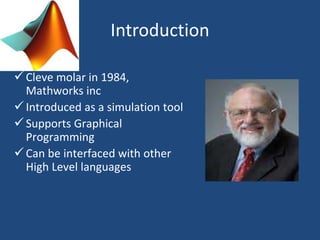
Introduction
Cleve molar in 1984,
Mathworks inc
Introduced as a simulation tool
Supports Graphical
Programming
Can be interfaced with other
High Level languages
MATLAB INTRODUCTION
• Matlab is both computer programming
language and software environment for using
that language effectively.
• Matlab is matrix-oriented, so what would take
several statements in c or fortran can usually be
accomplished in just a few lines using matlab's
built-in matrix and vector operations
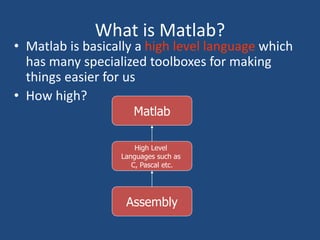
What is Matlab?
• Matlab is basically a high level language which
has many specialized toolboxes for making
things easier for us
• How high?
Assembly
High Level
Languages such as
C, Pascal etc.
Matlab
AVAILABILITY OF MATLAB
• Matlab is available for ms windows,
Macintosh personal computer, Unix and other
operating systems.
• MATLAB,which stands for MATRIX
LABORATPORY, is a powerful, general-purpose
system or environment for doing mathematics,
scientific and engireeng calculations.
Introduction to simulink
– Used to model, analyze and simulate dynamic
systems using block diagrams.
– Fully integrated with MATLAB , easy and fast to
learn and flexible.
– It has comprehensive block library which can be
used to simulate linear, non–linear or discrete
systems – excellent research tools.
– C codes can be generated from Simulink models for
embedded applications and rapid prototyping of
control systems.
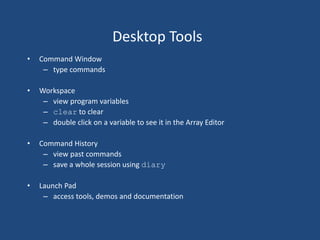
Desktop Tools
• Command Window
– type commands
• Workspace
– view program variables
– clear to clear
– double click on a variable to see it in the Array Editor
• Command History
– view past commands
– save a whole session using diary
• Launch Pad
– access tools, demos and documentation
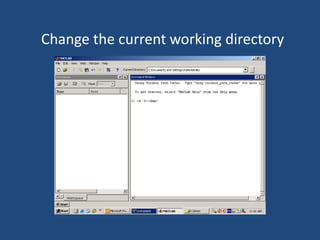
Change the current working directory
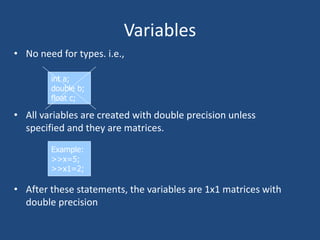
Variables
• No need for types. i.e.,
• All variables are created with double precision unless
specified and they are matrices.
• After these statements, the variables are 1x1 matrices with
double precision
int a;
double b;
float c;
Example:
>>x=5;
>>x1=2;
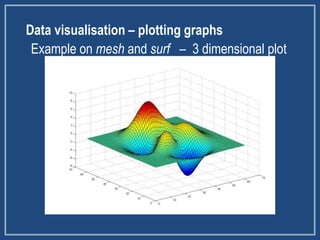
Data visualisation – plotting graphs
Example on mesh and surf – 3 dimensional plot
Vectors
a = [1 2 3 4 5 6 9 8 7] ;
t = 0:2:20
t = 0 2 4 6 8 10 12 14 16 18 20
b = a + 2
b = 3 4 5 6 7 8 11 10 9
c = a + b
c = 4 6 8 10 12 14 20 18 16
Matrices
B = [1 2 3 4;5 6 7 8;9 10 11 12] ;
B = 1 2 3 4
5 6 7 8
9 10 11 12
C = B'
C = 1 5 9
2 6 10
3 7 11
4 8 12
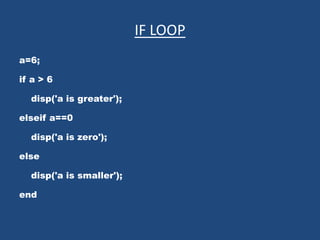
IF LOOP
a=6;
if a > 6
disp('a is greater');
elseif a==0
disp('a is zero');
else
disp('a is smaller');
end
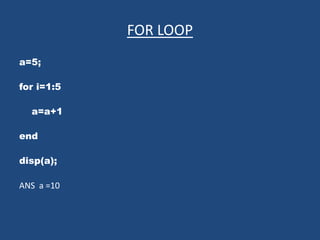
FOR LOOP
a=5;
for i=1:5
a=a+1
end
disp(a);
ANS a =10
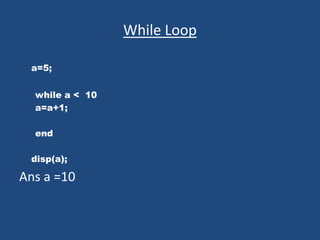
While Loop
a=5;
while a < 10
a=a+1;
end
disp(a);
Ans a =10
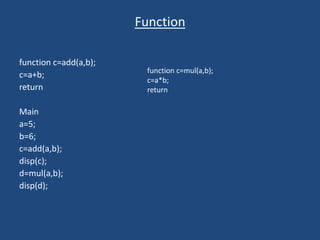
Function
function c=add(a,b);
c=a+b;
return
Main
a=5;
b=6;
c=add(a,b);
disp(c);
d=mul(a,b);
disp(d);
function c=mul(a,b);
c=a*b;
return
Generating Vectors from functions
• zeros(M,N) MxN matrix of zeros
• ones(M,N) MxN matrix of ones
• rand(M,N) MxN matrix of uniformly
distributed random
numbers on (0,1)
x = zeros(1,3)
x =
0 0 0
x = ones(1,3)
x =
1 1 1
x = rand(1,3)
x =
0.9501 0.2311 0.6068
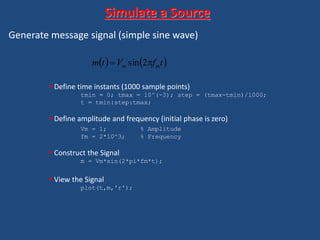
Generate message signal (simple sine wave)
 Define time instants (1000 sample points)
tmin = 0; tmax = 10^(-3); step = (tmax-tmin)/1000;
t = tmin:step:tmax;
 Define amplitude and frequency (initial phase is zero)
Vm = 1; % Amplitude
fm = 2*10^3; % Frequency
 Construct the Signal
m = Vm*sin(2*pi*fm*t);
 View the Signal
plot(t,m,'r');
Simulate a Source
   tfVtm mm  2sin
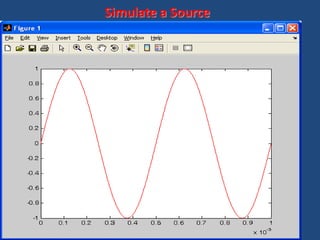
Complete MATLAB Script [Prog1.m]
tmin = 0; tmax = 10^(-3); step = (tmax-tmin)/1000;
t = tmin:step:tmax;
fm = 2*10^3;
Vm = 1;
m = Vm*sin(2*pi*fm*t);
plot(t,m,'r');
Simulate a Source
Simulate a Source
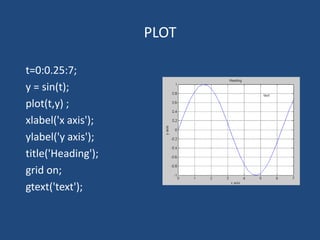
PLOT
t=0:0.25:7;
y = sin(t);
plot(t,y) ;
xlabel('x axis');
ylabel('y axis');
title('Heading');
grid on;
gtext('text');
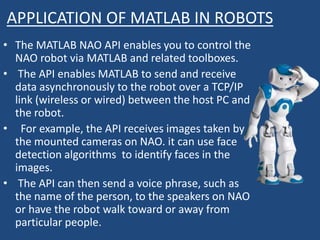
APPLICATION OF MATLAB IN ROBOTS
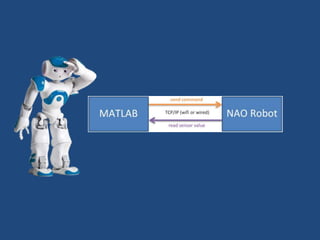
• The MATLAB NAO API enables you to control the
NAO robot via MATLAB and related toolboxes.
• The API enables MATLAB to send and receive
data asynchronously to the robot over a TCP/IP
link (wireless or wired) between the host PC and
the robot.
• For example, the API receives images taken by
the mounted cameras on NAO. it can use face
detection algorithms to identify faces in the
images.
• The API can then send a voice phrase, such as
the name of the person, to the speakers on NAO
or have the robot walk toward or away from
particular people.
• Programming NAO robot with just MATLAB
• Expand capabilities at any time with additional
toolboxes
• Work in the MATLAB environment for interactive
development and debugging
• Develop programs using NAO’s sensors (inputs) and
actuators (outputs) such as microphone, camera,
accelerometer, touch sensors, joint DC motors,
LEDs, and speakers
• Introduce electronics, mathematics, mechanics,
control, image processing, voice recognition,
navigation and more using MATLAB
List of Companies
• ADOBE (Photoshop)
• NASA
• GE
• L&T
• ROBERT BOSCH
Applications
• Aerospace
• Biometrics
• Medical
• Signal,Image,Audio and Video
• Neural networks,Fuzzy logic
• Animation
Matlab

Matlab

  • 1.
  • 2.
    contents •Introduction to matlab •Availability of matlab •Difference between c and matlab •Introduction to simulink •Desktop Tools •Variables •3 Dimensional Plot •Simple operations on vector and matrices •Usage of if,for and while loops in matlab •Functions and generating vectors from function • Simulating a source •Simple program to plot a sine wave •Matlab application in commercially available nao robots. •List of companies working on matlab •Applications of matlab
  • 3.
    Introduction Cleve molar in1984, Mathworks inc Introduced as a simulation tool Supports Graphical Programming Can be interfaced with other High Level languages
  • 4.
    MATLAB INTRODUCTION • Matlabis both computer programming language and software environment for using that language effectively. • Matlab is matrix-oriented, so what would take several statements in c or fortran can usually be accomplished in just a few lines using matlab's built-in matrix and vector operations
  • 5.
    What is Matlab? •Matlab is basically a high level language which has many specialized toolboxes for making things easier for us • How high? Assembly High Level Languages such as C, Pascal etc. Matlab
  • 6.
    AVAILABILITY OF MATLAB •Matlab is available for ms windows, Macintosh personal computer, Unix and other operating systems. • MATLAB,which stands for MATRIX LABORATPORY, is a powerful, general-purpose system or environment for doing mathematics, scientific and engireeng calculations.
  • 7.
    Introduction to simulink –Used to model, analyze and simulate dynamic systems using block diagrams. – Fully integrated with MATLAB , easy and fast to learn and flexible. – It has comprehensive block library which can be used to simulate linear, non–linear or discrete systems – excellent research tools. – C codes can be generated from Simulink models for embedded applications and rapid prototyping of control systems.
  • 8.
    Desktop Tools • CommandWindow – type commands • Workspace – view program variables – clear to clear – double click on a variable to see it in the Array Editor • Command History – view past commands – save a whole session using diary • Launch Pad – access tools, demos and documentation
  • 9.
    Change the currentworking directory
  • 10.
    Variables • No needfor types. i.e., • All variables are created with double precision unless specified and they are matrices. • After these statements, the variables are 1x1 matrices with double precision int a; double b; float c; Example: >>x=5; >>x1=2;
  • 11.
    Data visualisation –plotting graphs Example on mesh and surf – 3 dimensional plot
  • 12.
    Vectors a = [12 3 4 5 6 9 8 7] ; t = 0:2:20 t = 0 2 4 6 8 10 12 14 16 18 20 b = a + 2 b = 3 4 5 6 7 8 11 10 9 c = a + b c = 4 6 8 10 12 14 20 18 16
  • 13.
    Matrices B = [12 3 4;5 6 7 8;9 10 11 12] ; B = 1 2 3 4 5 6 7 8 9 10 11 12 C = B' C = 1 5 9 2 6 10 3 7 11 4 8 12
  • 14.
    IF LOOP a=6; if a> 6 disp('a is greater'); elseif a==0 disp('a is zero'); else disp('a is smaller'); end
  • 15.
  • 16.
    While Loop a=5; while a< 10 a=a+1; end disp(a); Ans a =10
  • 17.
  • 18.
    Generating Vectors fromfunctions • zeros(M,N) MxN matrix of zeros • ones(M,N) MxN matrix of ones • rand(M,N) MxN matrix of uniformly distributed random numbers on (0,1) x = zeros(1,3) x = 0 0 0 x = ones(1,3) x = 1 1 1 x = rand(1,3) x = 0.9501 0.2311 0.6068
  • 19.
    Generate message signal(simple sine wave)  Define time instants (1000 sample points) tmin = 0; tmax = 10^(-3); step = (tmax-tmin)/1000; t = tmin:step:tmax;  Define amplitude and frequency (initial phase is zero) Vm = 1; % Amplitude fm = 2*10^3; % Frequency  Construct the Signal m = Vm*sin(2*pi*fm*t);  View the Signal plot(t,m,'r'); Simulate a Source    tfVtm mm  2sin
  • 20.
    Complete MATLAB Script[Prog1.m] tmin = 0; tmax = 10^(-3); step = (tmax-tmin)/1000; t = tmin:step:tmax; fm = 2*10^3; Vm = 1; m = Vm*sin(2*pi*fm*t); plot(t,m,'r'); Simulate a Source
  • 21.
  • 22.
    PLOT t=0:0.25:7; y = sin(t); plot(t,y); xlabel('x axis'); ylabel('y axis'); title('Heading'); grid on; gtext('text');
  • 24.
    APPLICATION OF MATLABIN ROBOTS • The MATLAB NAO API enables you to control the NAO robot via MATLAB and related toolboxes. • The API enables MATLAB to send and receive data asynchronously to the robot over a TCP/IP link (wireless or wired) between the host PC and the robot. • For example, the API receives images taken by the mounted cameras on NAO. it can use face detection algorithms to identify faces in the images. • The API can then send a voice phrase, such as the name of the person, to the speakers on NAO or have the robot walk toward or away from particular people.
  • 25.
    • Programming NAOrobot with just MATLAB • Expand capabilities at any time with additional toolboxes • Work in the MATLAB environment for interactive development and debugging • Develop programs using NAO’s sensors (inputs) and actuators (outputs) such as microphone, camera, accelerometer, touch sensors, joint DC motors, LEDs, and speakers • Introduce electronics, mathematics, mechanics, control, image processing, voice recognition, navigation and more using MATLAB
  • 27.
    List of Companies •ADOBE (Photoshop) • NASA • GE • L&T • ROBERT BOSCH
  • 28.
    Applications • Aerospace • Biometrics •Medical • Signal,Image,Audio and Video • Neural networks,Fuzzy logic • Animation