(not so) Big Data with R
GUR Fltaur
Matthieu Cornec
Matthieu.cornec@cdiscount.com
10/09/2013
Cdiscount.com - Commark
Outline
2
• A- Intro
• B- Problem setup
• C- 3 strategies
• D- Packages : Rsqlite, ff and biglm, data.sample
• E- Conclusion
Cdiscount.com - Commark
1 – Intro
3Cdiscount.com - Commark
Problem setup
- Your csv file is too big to import into R. Say multiple of
10GO,
- Typically, your first read.table ends up with an error
message
« Cannot allocate a vector of size XXX »
How to fix it?
It depends on:
- What you want to do (data management sql like queries,
datamining,…)
- Your environnment (Corporate with a Datawarehouse?)
- The size of your data
Three basic strategies
4Cdiscount.com - Commark
• Buy memory in a cloud environnement
- Can handle multiple 10Go
- Cheap (1,5 euro per hour for 60Go)
- No need to rewrite all your code
But you need to configure it (see for example )
 Preferred strategy in most cases
• Try packages for SQL-like needs, try ff, rsqlite
- Not limited to RAM (multiple 10Go)
But no advanced datamining libraries
And you need to rewrite your code….
• Sampling :data.sample package
Dataset
5Cdiscount.com - Commark
• http://stat-computing.org/dataexpo/2009/the-data.html
• More 100 million observations, 12 G0
The data comes originally from RITA where it is described in detail. You can
download the data there, or from the bzipped csv files listed below. These
files have derivable variables removed, are packaged in yearly chunks and
have been more heavily compressed than the originals.
Download individual years:
1987, 1988, 1989, 1990, 1991, 1992, 1993, 1994, 1995, 1996, 1997, 1998,
1999, 2000, 2001,2002, 2003, 2004, 2005, 2006, 2007, 2008
29 variables
Name Description
1 Year 1987-2008
2 Month 1-12
3 DayofMonth 1-31
4 DayOfWeek 1 (Monday) - 7 (Sunday)
5 DepTime actual departure time (local, hhmm)
6 ….
1 Import the data files and create one unique large csv file
6Cdiscount.com - Commark
##import the data from http://stat-computing.org/dataexpo/2009/the-data.html
for (year in 1987:2008) {
file.name <- paste(year, "csv.bz2", sep = ".")
if ( !file.exists(file.name) ) {
url.text <- paste("http://stat-computing.org/dataexpo/2009/",
year, ".csv.bz2", sep = "")
cat("Downloading missing data file ", file.name, "n", sep = "")
download.file(url.text, file.name)
}
}
##create a unique large data file named airlines.csv by
first <- TRUE
csv.file <- "airlines.csv" # Write combined integer-only data to this file
csv.con <- file(csv.file, open = "w")
system.time(
for (year in 1987:2008) {
file.name <- paste(year, "csv.bz2", sep = ".")
cat("Processing ", file.name, "n", sep = "")
d <- read.csv(file.name)
## Convert the strings to integers
write.table(d, file = csv.con, sep = ",",
row.names = FALSE, col.names = first)
first <- FALSE
}
)
close(csv.con)
BigMemory Package
7Cdiscount.com - Commark
##09/09/2013: does not seem to exist on windows for R.3.0.0
install.packages("bigmemory", repos="http://R-Forge.R-
project.org")
install.packages("biganalytics", repos="http://R-Forge.R-
project.org")
#library(bigmemory)
#x <-read.big.matrix("airlines.csv", type ="integer", header = TRUE
,backingfile ="airline.bin",
# descriptorfile ="airline.desc",extraCols ="Age")
#library(biganalytics)
#blm <- biglm.big.matrix(ArrDelay~Age+Year,data=x)
ff package
8Cdiscount.com - Commark
library(ffbase)
system.time(hhp <- read.table.ffdf(file="airlines.csv",
FUN = "read.csv", na.strings = "NA",
nrows=10000000))
#takes 1min40sec
#with no nrows arguement, message error,
# ffbase does not support char type
class(hhp)
dim(hhp)
str(hhp[1:10,])
result <- list()
## Some basic showoff
result$UniqueCarrier <- unique(hhp$UniqueCarrier)
#15 sec
## Basic example of operators is.na.ff, the ! operator and sum.ff
sum(!is.na(hhp$ArrDelay ))
## all and any
any(is.na(hhp$ArrDelay))
all(!is.na(hhp$ArrDelay))
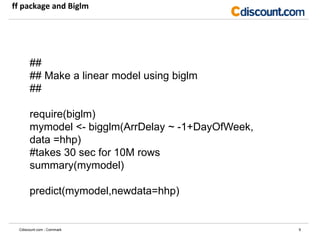
ff package and Biglm
9Cdiscount.com - Commark
##
## Make a linear model using biglm
##
require(biglm)
mymodel <- bigglm(ArrDelay ~ -1+DayOfWeek,
data =hhp)
#takes 30 sec for 10M rows
summary(mymodel)
predict(mymodel,newdata=hhp)
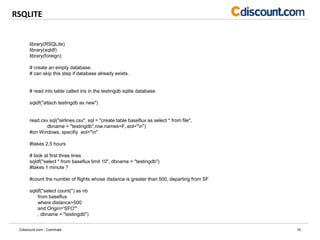
RSQLITE
10Cdiscount.com - Commark
library(RSQLite)
library(sqldf)
library(foreign)
# create an empty database.
# can skip this step if database already exists.
# read into table called iris in the testingdb sqlite database
sqldf("attach testingdb as new")
read.csv.sql("airlines.csv", sql = "create table baseflux as select * from file",
dbname = "testingdb",row.names=F, eol="n")
#on Windows, specifiy eol="n"
#takes 2,5 hours
# look at first three lines
sqldf("select * from baseflux limit 10", dbname = "testingdb")
#takes 1 minute ?
#count the number of flights whose distance is greater than 500, departing from SF
sqldf("select count(*) as nb
from baseflux
where distance>500
and Origin='SFO'"
, dbname = "testingdb")
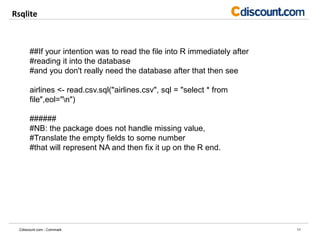
Rsqlite
11Cdiscount.com - Commark
##If your intention was to read the file into R immediately after
#reading it into the database
#and you don't really need the database after that then see
airlines <- read.csv.sql("airlines.csv", sql = "select * from
file",eol="n")
######
#NB: the package does not handle missing value,
#Translate the empty fields to some number
#that will represent NA and then fix it up on the R end.
Sampling is bad for...
12Cdiscount.com - Commark
• Reporting
The boss wants to know the accurate growth rate, not a statistical
estimation...
• Data management
You will not be able to access the role of this particular customer
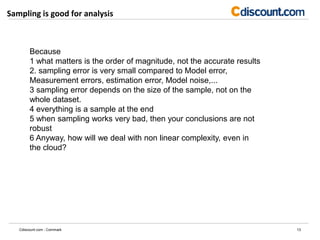
Sampling is good for analysis
13Cdiscount.com - Commark
Because
1 what matters is the order of magnitude, not the accurate results
2. sampling error is very small compared to Model error,
Measurement errors, estimation error, Model noise,...
3 sampling error depends on the size of the sample, not on the
whole dataset.
4 everything is a sample at the end
5 when sampling works very bad, then your conclusions are not
robust
6 Anyway, how will we deal with non linear complexity, even in
the cloud?
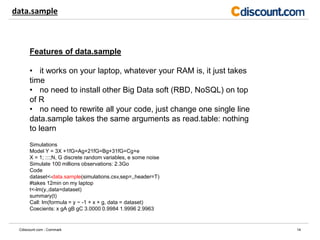
data.sample
14Cdiscount.com - Commark
Features of data.sample
• it works on your laptop, whatever your RAM is, it just takes
time
• no need to install other Big Data soft (RBD, NoSQL) on top
of R
• no need to rewrite all your code, just change one single line
data.sample takes the same arguments as read.table: nothing
to learn
Simulations
Model Y = 3X +1fG=Ag+21fG=Bg+31fG=Cg+e
X = 1; :::;N, G discrete random variables, e some noise
Simulate 100 millions observations: 2.3Go
Code
dataset<-data.sample(simulations.csv,sep=,,header=T)
#takes 12min on my laptop
t<-lm(y.,data=dataset)
summary(t)
Call: lm(formula = y ~ -1 + x + g, data = dataset)
Coecients: x gA gB gC 3.0000 0.9984 1.9996 2.9963
data.sample package
15Cdiscount.com - Commark
install.packages("D:/U/Data.sample/data.s
ample_1.0.zip", repos = NULL)
library(data.sample)
system.time(resultsample<-
data.sample(file="airlines.csv",header=T,s
ep=",")$df)
#takes 52 minutes on my laptop if you
don’t know the number of records
# this step is done only once!
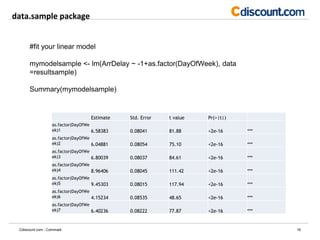
data.sample package
16Cdiscount.com - Commark
#fit your linear model
mymodelsample <- lm(ArrDelay ~ -1+as.factor(DayOfWeek), data
=resultsample)
Summary(mymodelsample)
Estimate Std. Error t value Pr(>|t|)
as.factor(DayOfWe
ek)1 6.58383 0.08041 81.88 <2e-16 ***
as.factor(DayOfWe
ek)2 6.04881 0.08054 75.10 <2e-16 ***
as.factor(DayOfWe
ek)3 6.80039 0.08037 84.61 <2e-16 ***
as.factor(DayOfWe
ek)4 8.96406 0.08045 111.42 <2e-16 ***
as.factor(DayOfWe
ek)5 9.45303 0.08015 117.94 <2e-16 ***
as.factor(DayOfWe
ek)6 4.15234 0.08535 48.65 <2e-16 ***
as.factor(DayOfWe
ek)7 6.40236 0.08222 77.87 <2e-16 ***
data.sample package
17Cdiscount.com - Commark
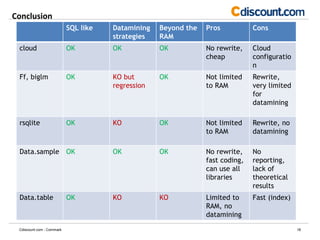
Conclusion
18Cdiscount.com - Commark
SQL like Datamining
strategies
Beyond the
RAM
Pros Cons
cloud OK OK OK No rewrite,
cheap
Cloud
configuratio
n
Ff, biglm OK KO but
regression
OK Not limited
to RAM
Rewrite,
very limited
for
datamining
rsqlite OK KO OK Not limited
to RAM
Rewrite, no
datamining
Data.sample OK OK OK No rewrite,
fast coding,
can use all
libraries
No
reporting,
lack of
theoretical
results
Data.table OK KO KO Limited to
RAM, no
datamining
Fast (index)

Gur1009

  • 1.
    (not so) BigData with R GUR Fltaur Matthieu Cornec Matthieu.cornec@cdiscount.com 10/09/2013 Cdiscount.com - Commark
  • 2.
    Outline 2 • A- Intro •B- Problem setup • C- 3 strategies • D- Packages : Rsqlite, ff and biglm, data.sample • E- Conclusion Cdiscount.com - Commark
  • 3.
    1 – Intro 3Cdiscount.com- Commark Problem setup - Your csv file is too big to import into R. Say multiple of 10GO, - Typically, your first read.table ends up with an error message « Cannot allocate a vector of size XXX » How to fix it? It depends on: - What you want to do (data management sql like queries, datamining,…) - Your environnment (Corporate with a Datawarehouse?) - The size of your data
  • 4.
    Three basic strategies 4Cdiscount.com- Commark • Buy memory in a cloud environnement - Can handle multiple 10Go - Cheap (1,5 euro per hour for 60Go) - No need to rewrite all your code But you need to configure it (see for example )  Preferred strategy in most cases • Try packages for SQL-like needs, try ff, rsqlite - Not limited to RAM (multiple 10Go) But no advanced datamining libraries And you need to rewrite your code…. • Sampling :data.sample package
  • 5.
    Dataset 5Cdiscount.com - Commark •http://stat-computing.org/dataexpo/2009/the-data.html • More 100 million observations, 12 G0 The data comes originally from RITA where it is described in detail. You can download the data there, or from the bzipped csv files listed below. These files have derivable variables removed, are packaged in yearly chunks and have been more heavily compressed than the originals. Download individual years: 1987, 1988, 1989, 1990, 1991, 1992, 1993, 1994, 1995, 1996, 1997, 1998, 1999, 2000, 2001,2002, 2003, 2004, 2005, 2006, 2007, 2008 29 variables Name Description 1 Year 1987-2008 2 Month 1-12 3 DayofMonth 1-31 4 DayOfWeek 1 (Monday) - 7 (Sunday) 5 DepTime actual departure time (local, hhmm) 6 ….
  • 6.
    1 Import thedata files and create one unique large csv file 6Cdiscount.com - Commark ##import the data from http://stat-computing.org/dataexpo/2009/the-data.html for (year in 1987:2008) { file.name <- paste(year, "csv.bz2", sep = ".") if ( !file.exists(file.name) ) { url.text <- paste("http://stat-computing.org/dataexpo/2009/", year, ".csv.bz2", sep = "") cat("Downloading missing data file ", file.name, "n", sep = "") download.file(url.text, file.name) } } ##create a unique large data file named airlines.csv by first <- TRUE csv.file <- "airlines.csv" # Write combined integer-only data to this file csv.con <- file(csv.file, open = "w") system.time( for (year in 1987:2008) { file.name <- paste(year, "csv.bz2", sep = ".") cat("Processing ", file.name, "n", sep = "") d <- read.csv(file.name) ## Convert the strings to integers write.table(d, file = csv.con, sep = ",", row.names = FALSE, col.names = first) first <- FALSE } ) close(csv.con)
  • 7.
    BigMemory Package 7Cdiscount.com -Commark ##09/09/2013: does not seem to exist on windows for R.3.0.0 install.packages("bigmemory", repos="http://R-Forge.R- project.org") install.packages("biganalytics", repos="http://R-Forge.R- project.org") #library(bigmemory) #x <-read.big.matrix("airlines.csv", type ="integer", header = TRUE ,backingfile ="airline.bin", # descriptorfile ="airline.desc",extraCols ="Age") #library(biganalytics) #blm <- biglm.big.matrix(ArrDelay~Age+Year,data=x)
  • 8.
    ff package 8Cdiscount.com -Commark library(ffbase) system.time(hhp <- read.table.ffdf(file="airlines.csv", FUN = "read.csv", na.strings = "NA", nrows=10000000)) #takes 1min40sec #with no nrows arguement, message error, # ffbase does not support char type class(hhp) dim(hhp) str(hhp[1:10,]) result <- list() ## Some basic showoff result$UniqueCarrier <- unique(hhp$UniqueCarrier) #15 sec ## Basic example of operators is.na.ff, the ! operator and sum.ff sum(!is.na(hhp$ArrDelay )) ## all and any any(is.na(hhp$ArrDelay)) all(!is.na(hhp$ArrDelay))
  • 9.
    ff package andBiglm 9Cdiscount.com - Commark ## ## Make a linear model using biglm ## require(biglm) mymodel <- bigglm(ArrDelay ~ -1+DayOfWeek, data =hhp) #takes 30 sec for 10M rows summary(mymodel) predict(mymodel,newdata=hhp)
  • 10.
    RSQLITE 10Cdiscount.com - Commark library(RSQLite) library(sqldf) library(foreign) #create an empty database. # can skip this step if database already exists. # read into table called iris in the testingdb sqlite database sqldf("attach testingdb as new") read.csv.sql("airlines.csv", sql = "create table baseflux as select * from file", dbname = "testingdb",row.names=F, eol="n") #on Windows, specifiy eol="n" #takes 2,5 hours # look at first three lines sqldf("select * from baseflux limit 10", dbname = "testingdb") #takes 1 minute ? #count the number of flights whose distance is greater than 500, departing from SF sqldf("select count(*) as nb from baseflux where distance>500 and Origin='SFO'" , dbname = "testingdb")
  • 11.
    Rsqlite 11Cdiscount.com - Commark ##Ifyour intention was to read the file into R immediately after #reading it into the database #and you don't really need the database after that then see airlines <- read.csv.sql("airlines.csv", sql = "select * from file",eol="n") ###### #NB: the package does not handle missing value, #Translate the empty fields to some number #that will represent NA and then fix it up on the R end.
  • 12.
    Sampling is badfor... 12Cdiscount.com - Commark • Reporting The boss wants to know the accurate growth rate, not a statistical estimation... • Data management You will not be able to access the role of this particular customer
  • 13.
    Sampling is goodfor analysis 13Cdiscount.com - Commark Because 1 what matters is the order of magnitude, not the accurate results 2. sampling error is very small compared to Model error, Measurement errors, estimation error, Model noise,... 3 sampling error depends on the size of the sample, not on the whole dataset. 4 everything is a sample at the end 5 when sampling works very bad, then your conclusions are not robust 6 Anyway, how will we deal with non linear complexity, even in the cloud?
  • 14.
    data.sample 14Cdiscount.com - Commark Featuresof data.sample • it works on your laptop, whatever your RAM is, it just takes time • no need to install other Big Data soft (RBD, NoSQL) on top of R • no need to rewrite all your code, just change one single line data.sample takes the same arguments as read.table: nothing to learn Simulations Model Y = 3X +1fG=Ag+21fG=Bg+31fG=Cg+e X = 1; :::;N, G discrete random variables, e some noise Simulate 100 millions observations: 2.3Go Code dataset<-data.sample(simulations.csv,sep=,,header=T) #takes 12min on my laptop t<-lm(y.,data=dataset) summary(t) Call: lm(formula = y ~ -1 + x + g, data = dataset) Coecients: x gA gB gC 3.0000 0.9984 1.9996 2.9963
  • 15.
    data.sample package 15Cdiscount.com -Commark install.packages("D:/U/Data.sample/data.s ample_1.0.zip", repos = NULL) library(data.sample) system.time(resultsample<- data.sample(file="airlines.csv",header=T,s ep=",")$df) #takes 52 minutes on my laptop if you don’t know the number of records # this step is done only once!
  • 16.
    data.sample package 16Cdiscount.com -Commark #fit your linear model mymodelsample <- lm(ArrDelay ~ -1+as.factor(DayOfWeek), data =resultsample) Summary(mymodelsample) Estimate Std. Error t value Pr(>|t|) as.factor(DayOfWe ek)1 6.58383 0.08041 81.88 <2e-16 *** as.factor(DayOfWe ek)2 6.04881 0.08054 75.10 <2e-16 *** as.factor(DayOfWe ek)3 6.80039 0.08037 84.61 <2e-16 *** as.factor(DayOfWe ek)4 8.96406 0.08045 111.42 <2e-16 *** as.factor(DayOfWe ek)5 9.45303 0.08015 117.94 <2e-16 *** as.factor(DayOfWe ek)6 4.15234 0.08535 48.65 <2e-16 *** as.factor(DayOfWe ek)7 6.40236 0.08222 77.87 <2e-16 ***
  • 17.
  • 18.
    Conclusion 18Cdiscount.com - Commark SQLlike Datamining strategies Beyond the RAM Pros Cons cloud OK OK OK No rewrite, cheap Cloud configuratio n Ff, biglm OK KO but regression OK Not limited to RAM Rewrite, very limited for datamining rsqlite OK KO OK Not limited to RAM Rewrite, no datamining Data.sample OK OK OK No rewrite, fast coding, can use all libraries No reporting, lack of theoretical results Data.table OK KO KO Limited to RAM, no datamining Fast (index)