Charlie Murtaugh
EIHG 4420B
801-581-5958
murtaugh@genetics.utah.edu
Welcome to the Tidyverse
https://twitter.com/mostbiggestdata/status/
Recommended reading
• R for Data Science – full text is free
on web, but book is easier to read
• H. Wickham (2014) Tidy Data. J.
Stat. Software. v59.
http://dx.doi.org/10.18637/jss.v059
.i10
• K.W. Broman and K.H. Woo (2018)
Data Organization in Spreadsheets.
Am. Statistician, v72.
https://doi.org/10.1080/00031305.2
017.1375989
Outline
• Introduction to tidy data and the Tidyverse –
why bother?
• Getting started with Tidyverse functions –
playing with toy data sets
• Using Tidyverse in a real biology context –
proliferation timelapse data
What is the tidyverse?
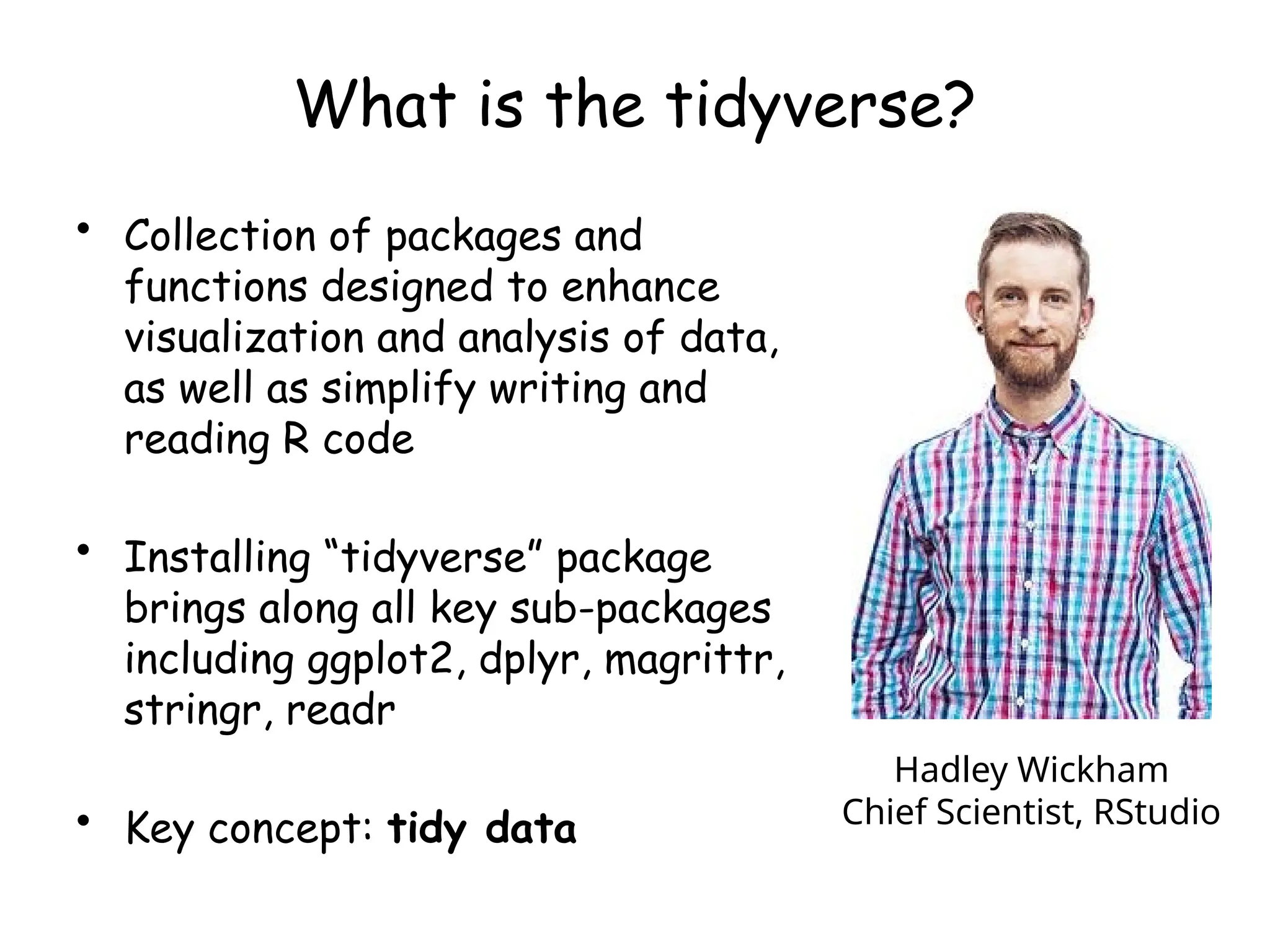
• Collection of packages and
functions designed to enhance
visualization and analysis of data,
as well as simplify writing and
reading R code
• Installing “tidyverse” package
brings along all key sub-packages
including ggplot2, dplyr, magrittr,
stringr, readr
• Key concept: tidy data
Hadley Wickham
Chief Scientist, RStudio
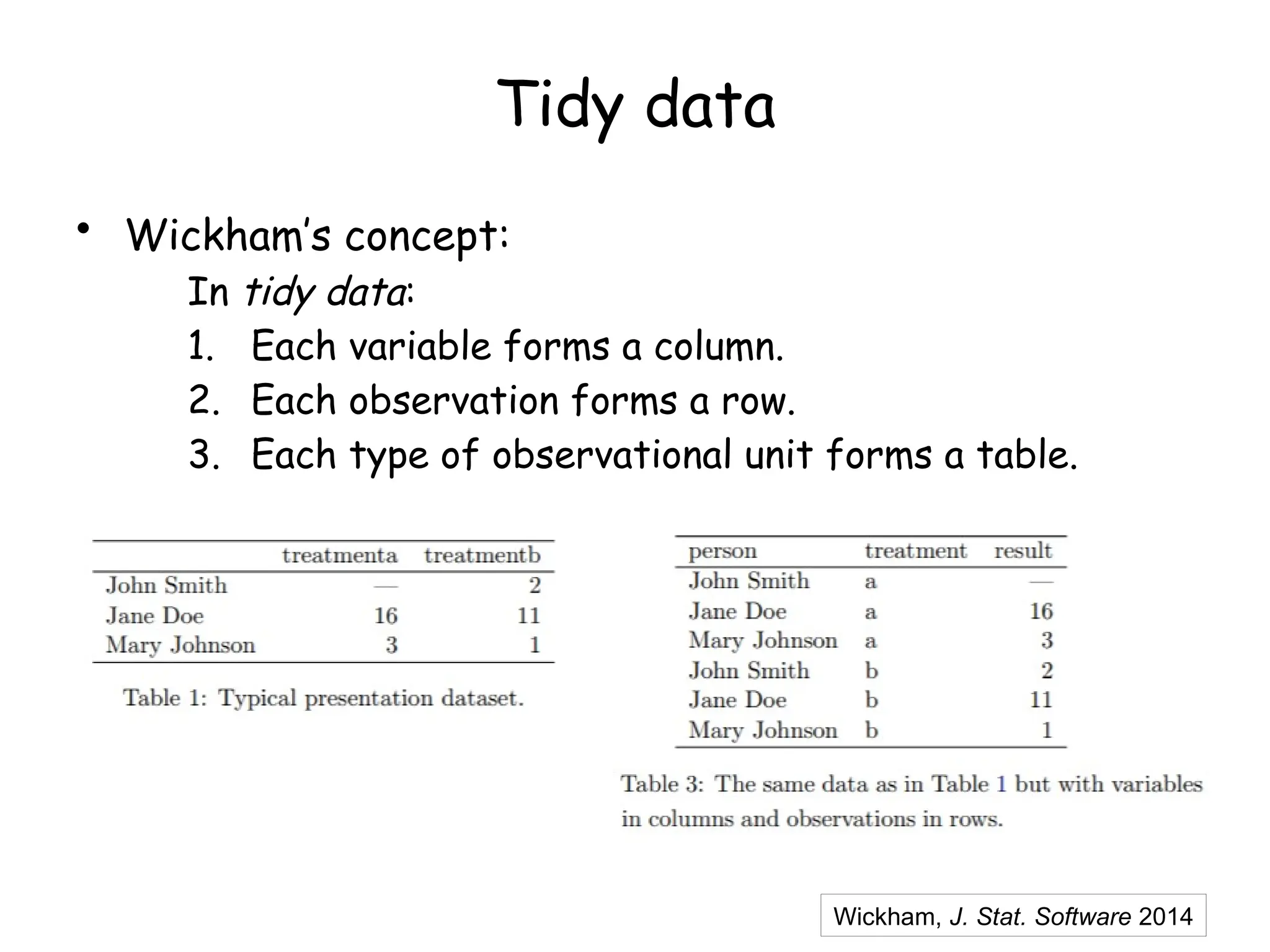
Tidy data
• Wickham’s concept:
In tidy data:
1. Each variable forms a column.
2. Each observation forms a row.
3. Each type of observational unit forms a table.
Wickham, J. Stat. Software 2014
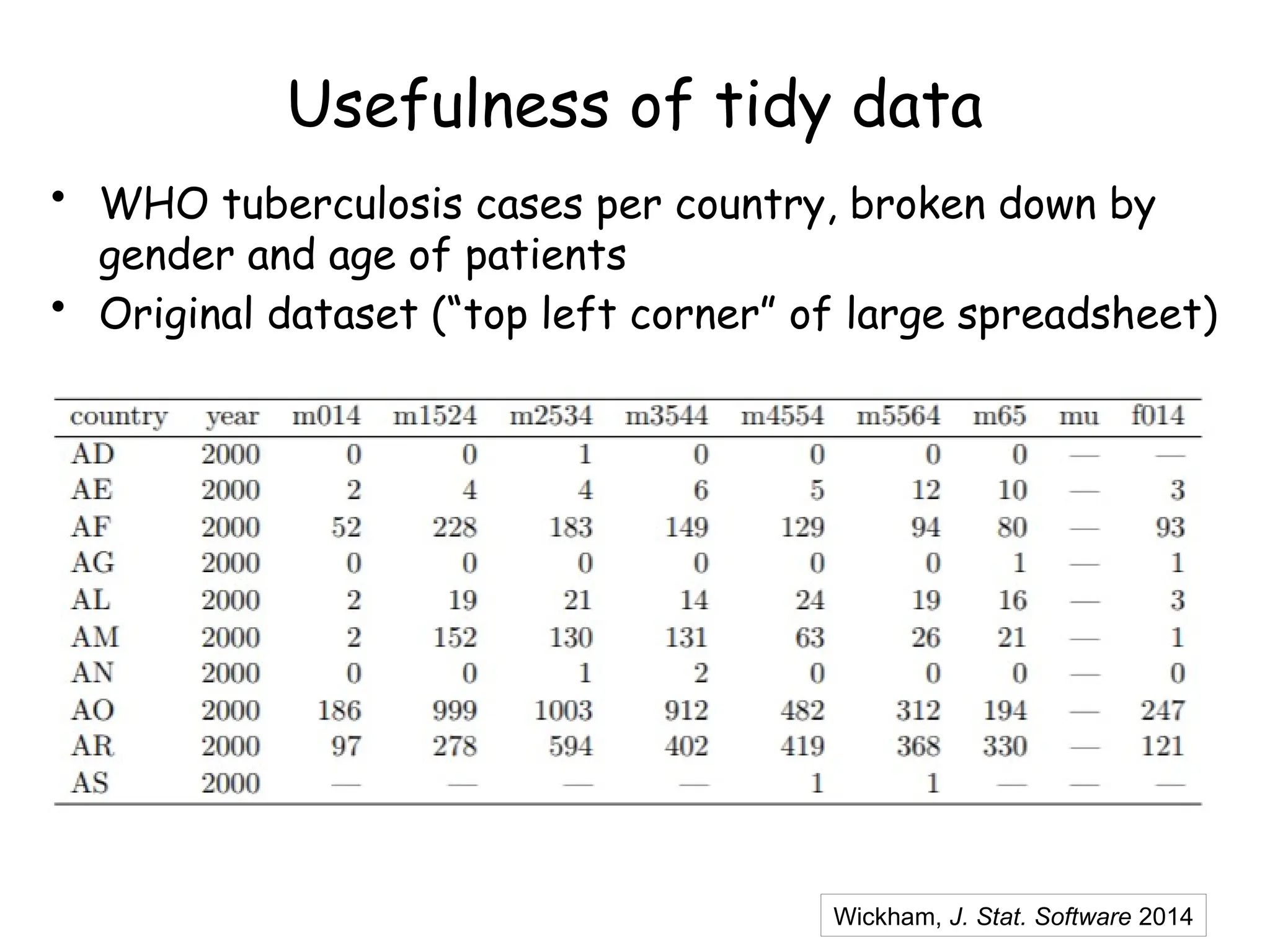
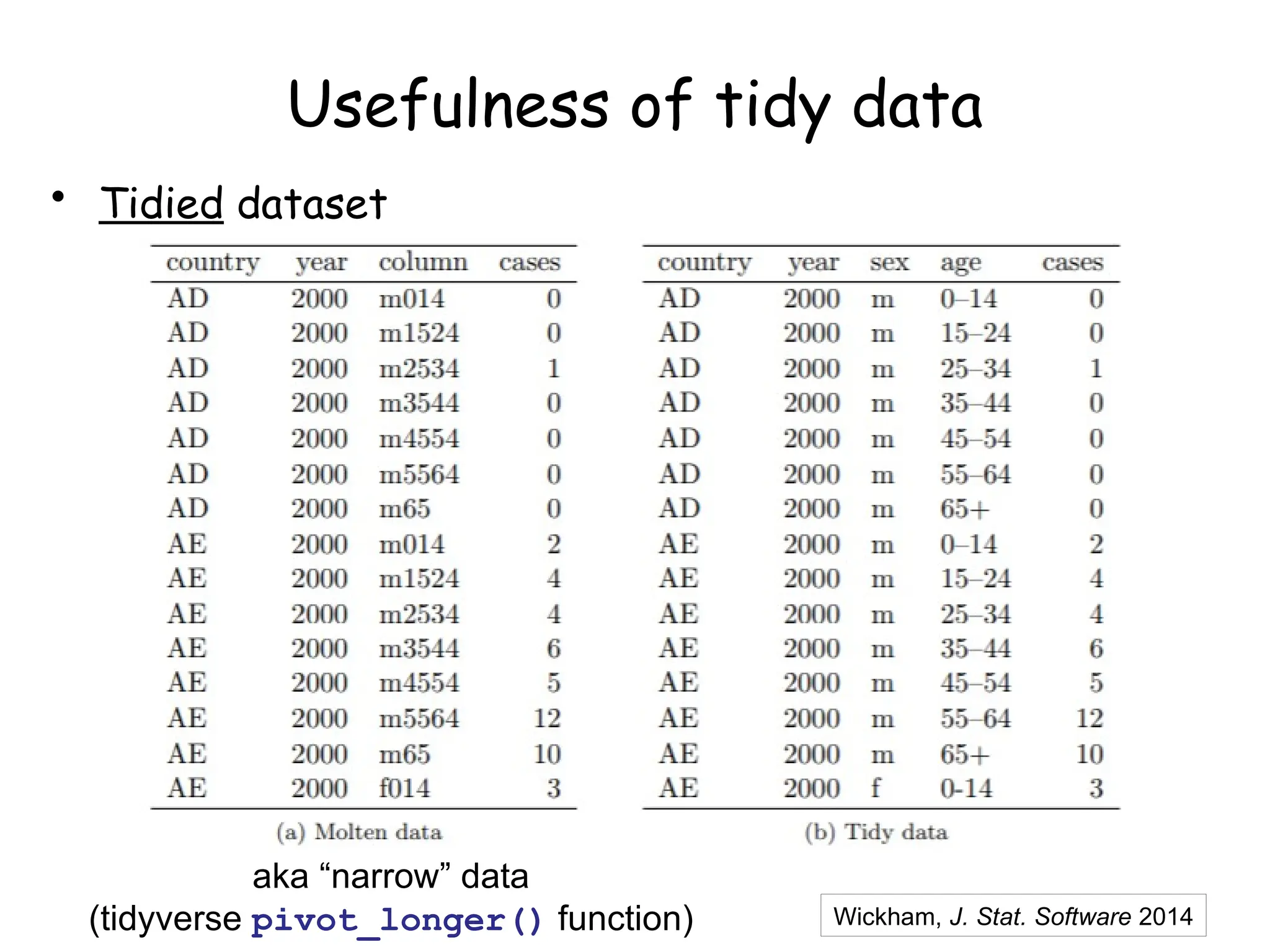
Usefulness of tidy data
• WHO tuberculosis cases per country, broken down by
gender and age of patients
• Original dataset (“top left corner” of large spreadsheet)
Wickham, J. Stat. Software 2014
Usefulness of tidy data
• Tidied dataset
Wickham, J. Stat. Software 2014
aka “narrow” data
(tidyverse pivot_longer() function)
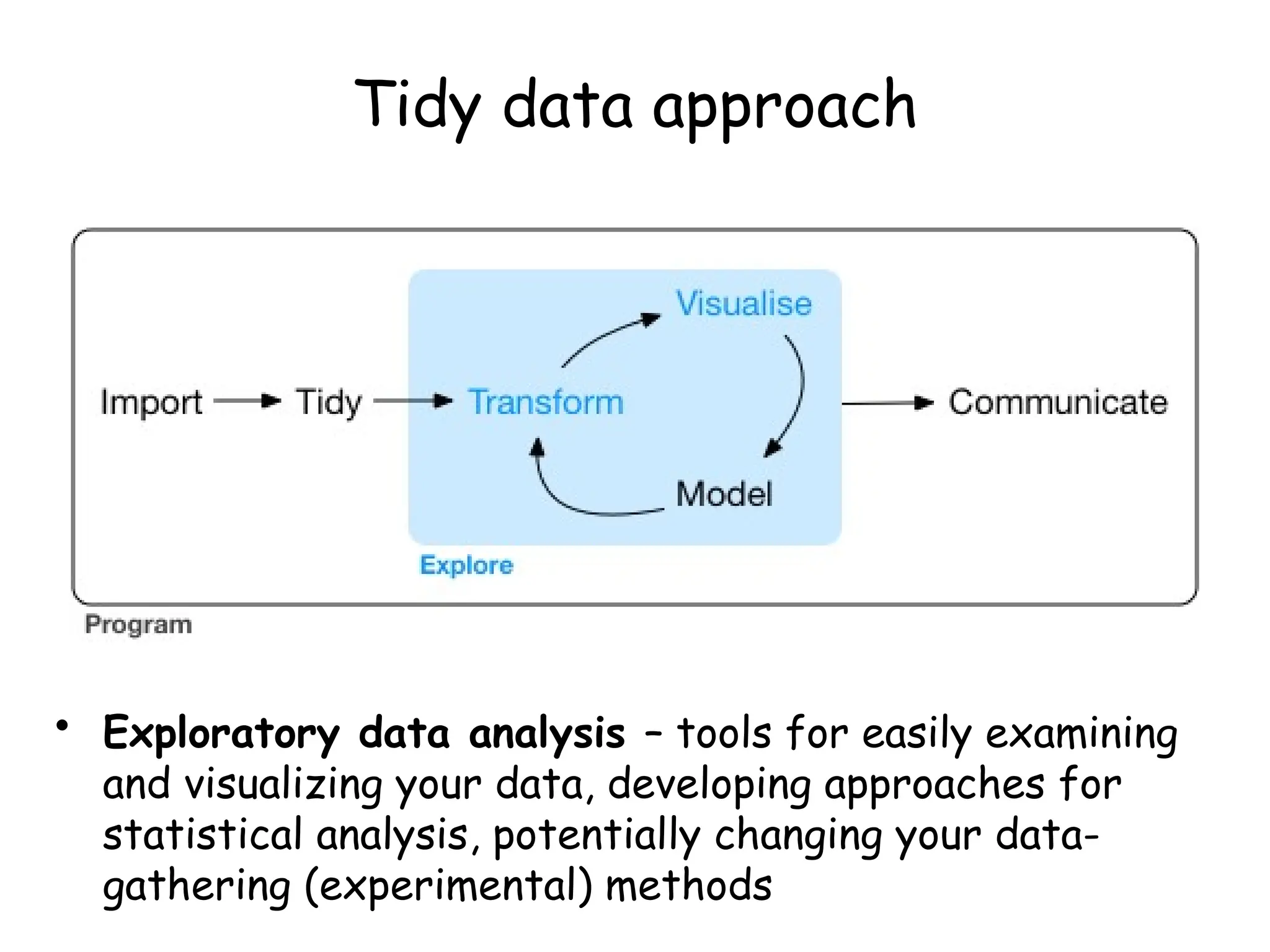
Tidy data approach
• Exploratory data analysis – tools for easily examining
and visualizing your data, developing approaches for
statistical analysis, potentially changing your data-
gathering (experimental) methods
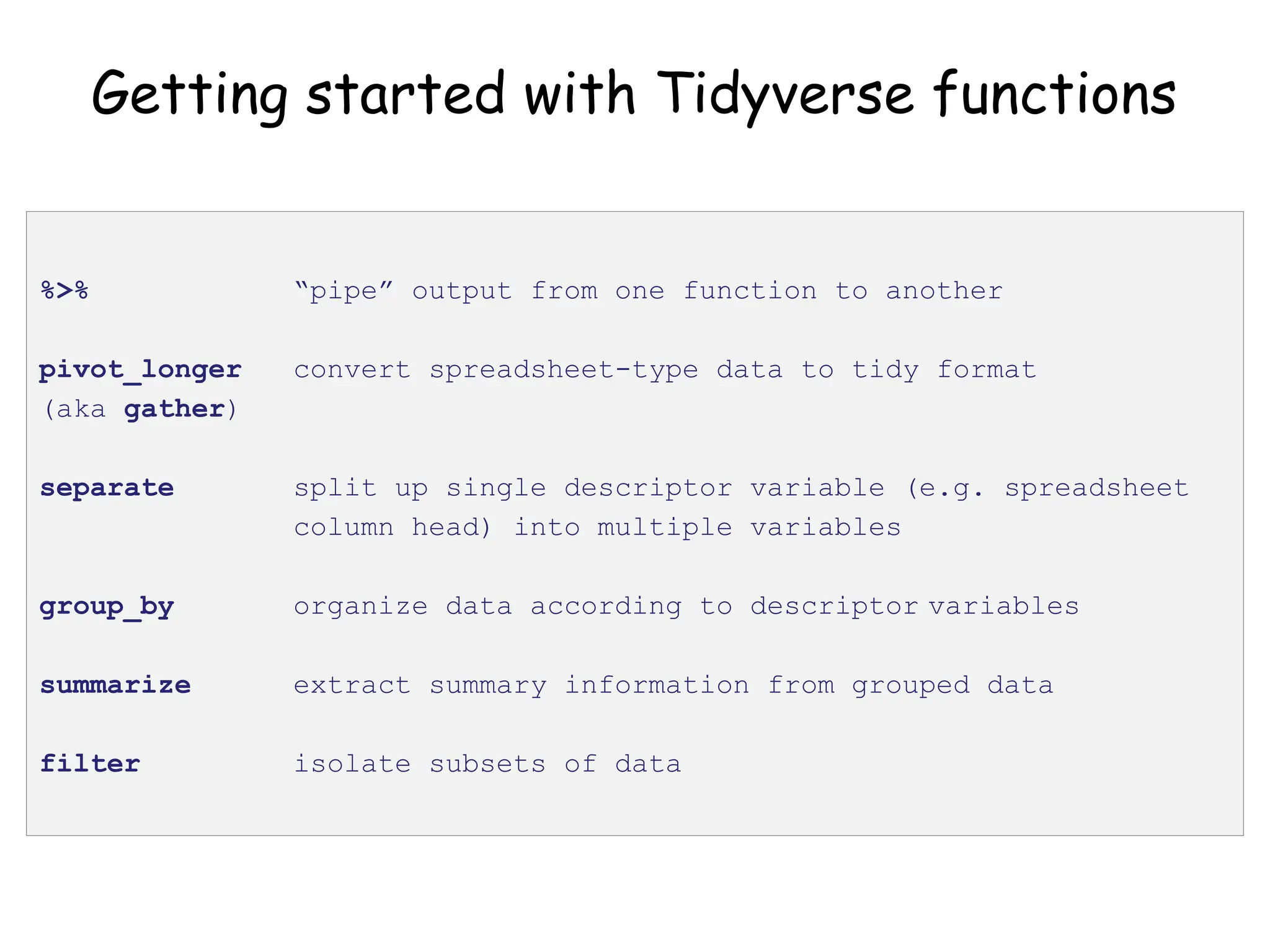
Getting started with Tidyverse functions
%>% “pipe” output from one function to another
pivot_longer convert spreadsheet-type data to tidy format
(aka gather)
separate split up single descriptor variable (e.g. spreadsheet
column head) into multiple variables
group_by organize data according to descriptor variables
summarize extract summary information from grouped data
filter isolate subsets of data
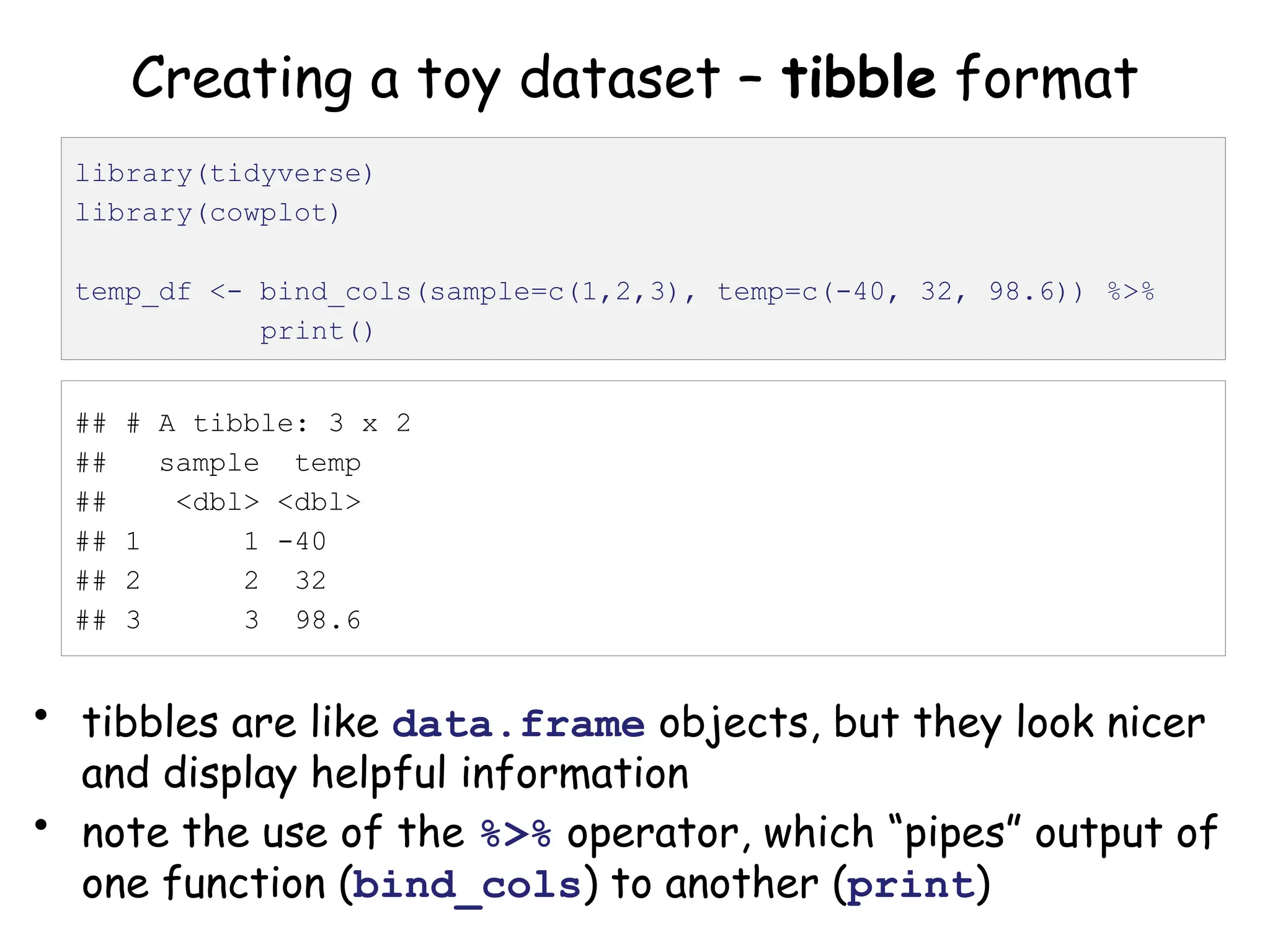
Creating a toy dataset – tibble format
• tibbles are like data.frame objects, but they look nicer
and display helpful information
• note the use of the %>% operator, which “pipes” output of
one function (bind_cols) to another (print)
library(tidyverse)
library(cowplot)
temp_df <- bind_cols(sample=c(1,2,3), temp=c(-40, 32, 98.6)) %>%
print()
## # A tibble: 3 x 2
## sample temp
## <dbl> <dbl>
## 1 1 -40
## 2 2 32
## 3 3 98.6
Piping your code for easier writing and reading
• Code involving sequential operations on the same data
can be much more readable with pipes
• Of particular use: %>% print() at the end of a line
of code will show you what that code produced
# same result, different ways to get there
test <- c(1, 2, 3, 4)
test_sqrt <- sqrt(test)
print(test_sqrt)
c(1, 2, 3, 4) %>% sqrt() %>% print()
[1] 1.000000 1.414214 1.732051 2.000000
Piping your code for easier writing and reading
• Code involving sequential operations on the same data
can be much more readable with pipes
• Of particular use: %>% print() at the end of a line
of code will show you what that code produced
# same result, different ways to get there
test <- c(1, 2, 3, 4)
test_sqrt <- sqrt(test)
print(test_sqrt)
c(1, 2, 3, 4) %>% sqrt() %>% print()
[1] 1.000000 1.414214 1.732051 2.000000
https://twitter.com/strnr/status/1047203915232661505
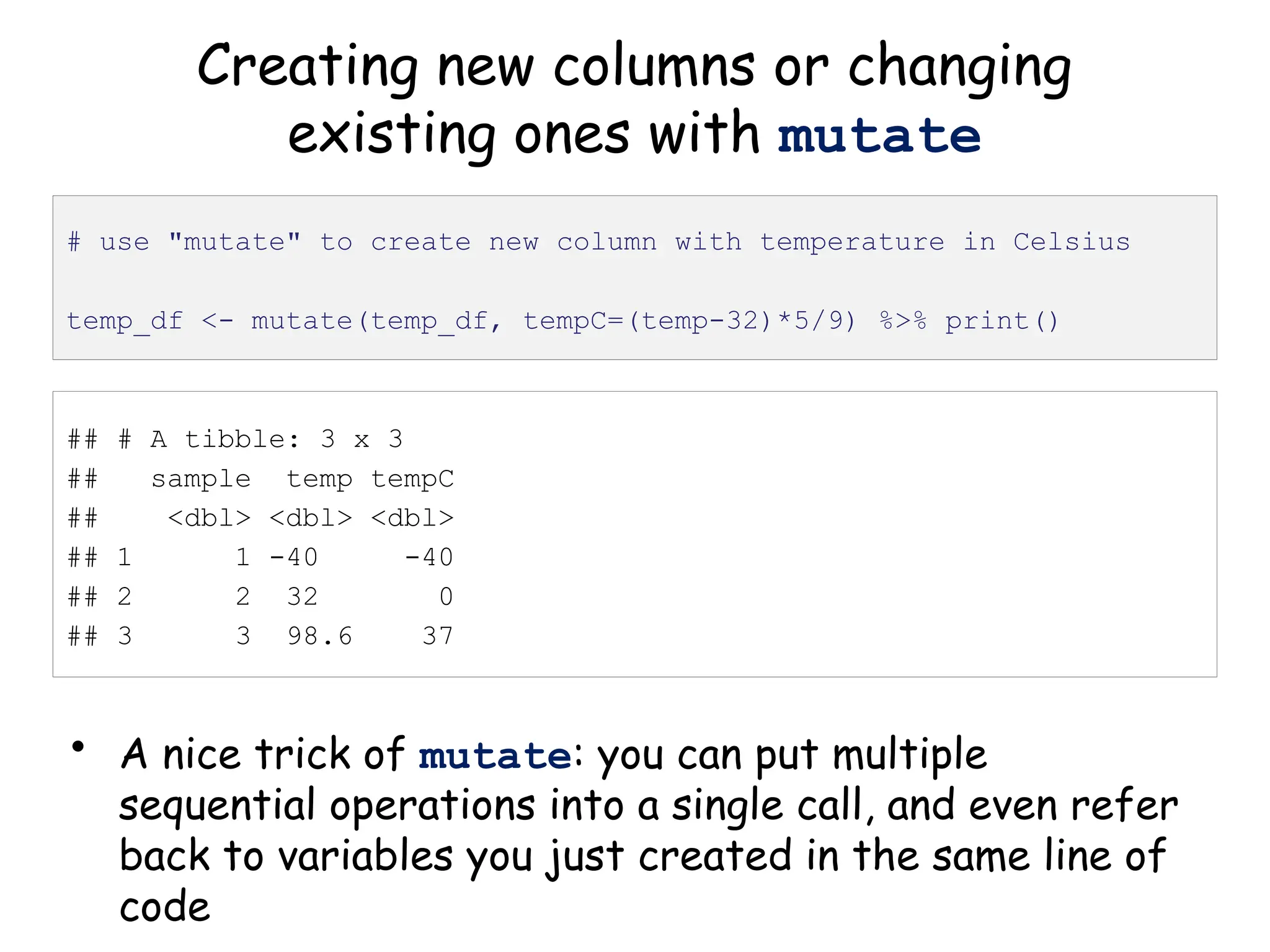
Creating new columns or changing
existing ones with mutate
• A nice trick of mutate: you can put multiple
sequential operations into a single call, and even refer
back to variables you just created in the same line of
code
# use "mutate" to create new column with temperature in Celsius
temp_df <- mutate(temp_df, tempC=(temp-32)*5/9) %>% print()
## # A tibble: 3 x 3
## sample temp tempC
## <dbl> <dbl> <dbl>
## 1 1 -40 -40
## 2 2 32 0
## 3 3 98.6 37
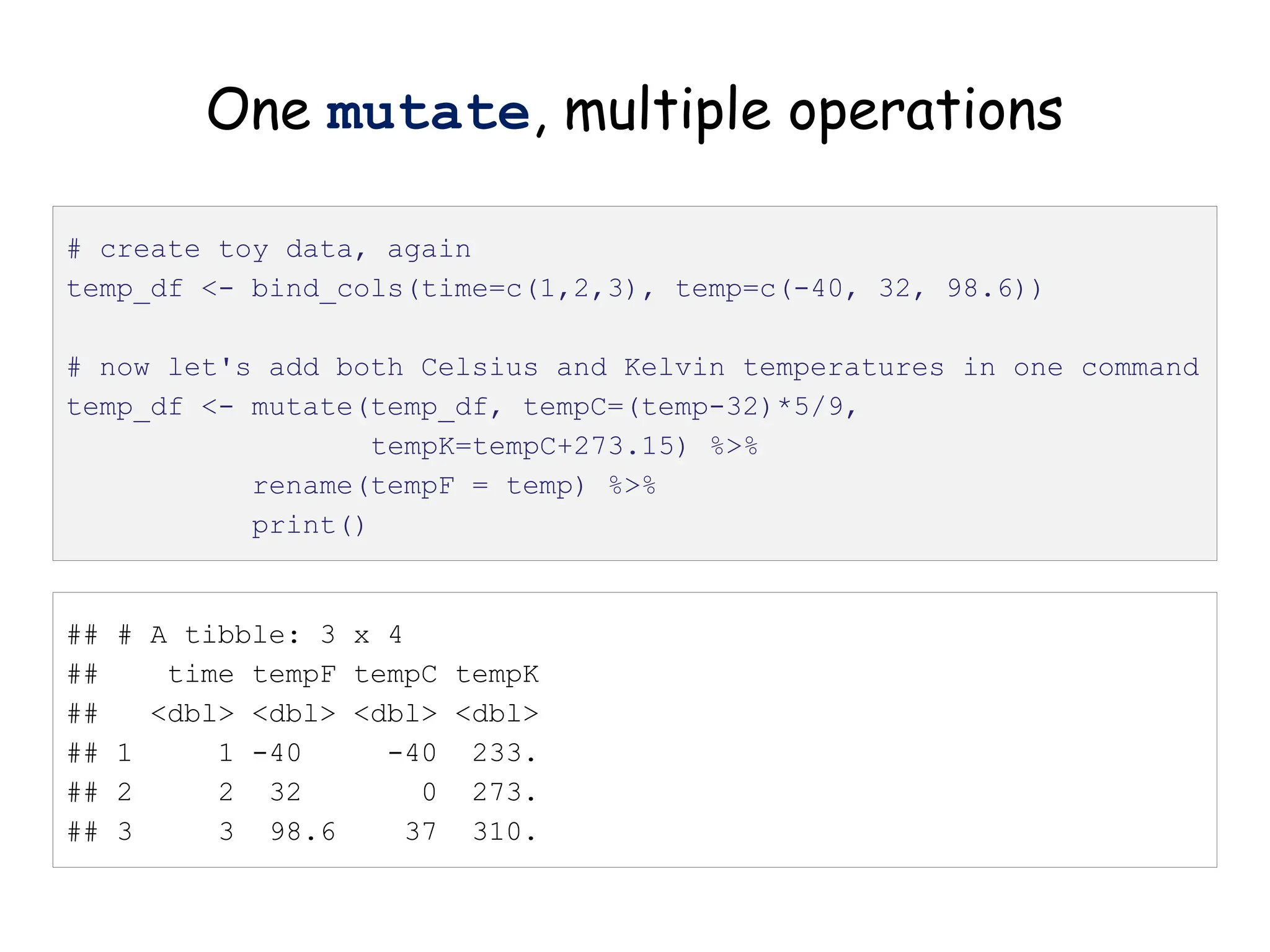
One mutate, multiple operations
# create toy data, again
temp_df <- bind_cols(time=c(1,2,3), temp=c(-40, 32, 98.6))
# now let's add both Celsius and Kelvin temperatures in one command
temp_df <- mutate(temp_df, tempC=(temp-32)*5/9,
tempK=tempC+273.15) %>%
rename(tempF = temp) %>%
print()
## # A tibble: 3 x 4
## time tempF tempC tempK
## <dbl> <dbl> <dbl> <dbl>
## 1 1 -40 -40 233.
## 2 2 32 0 273.
## 3 3 98.6 37 310.
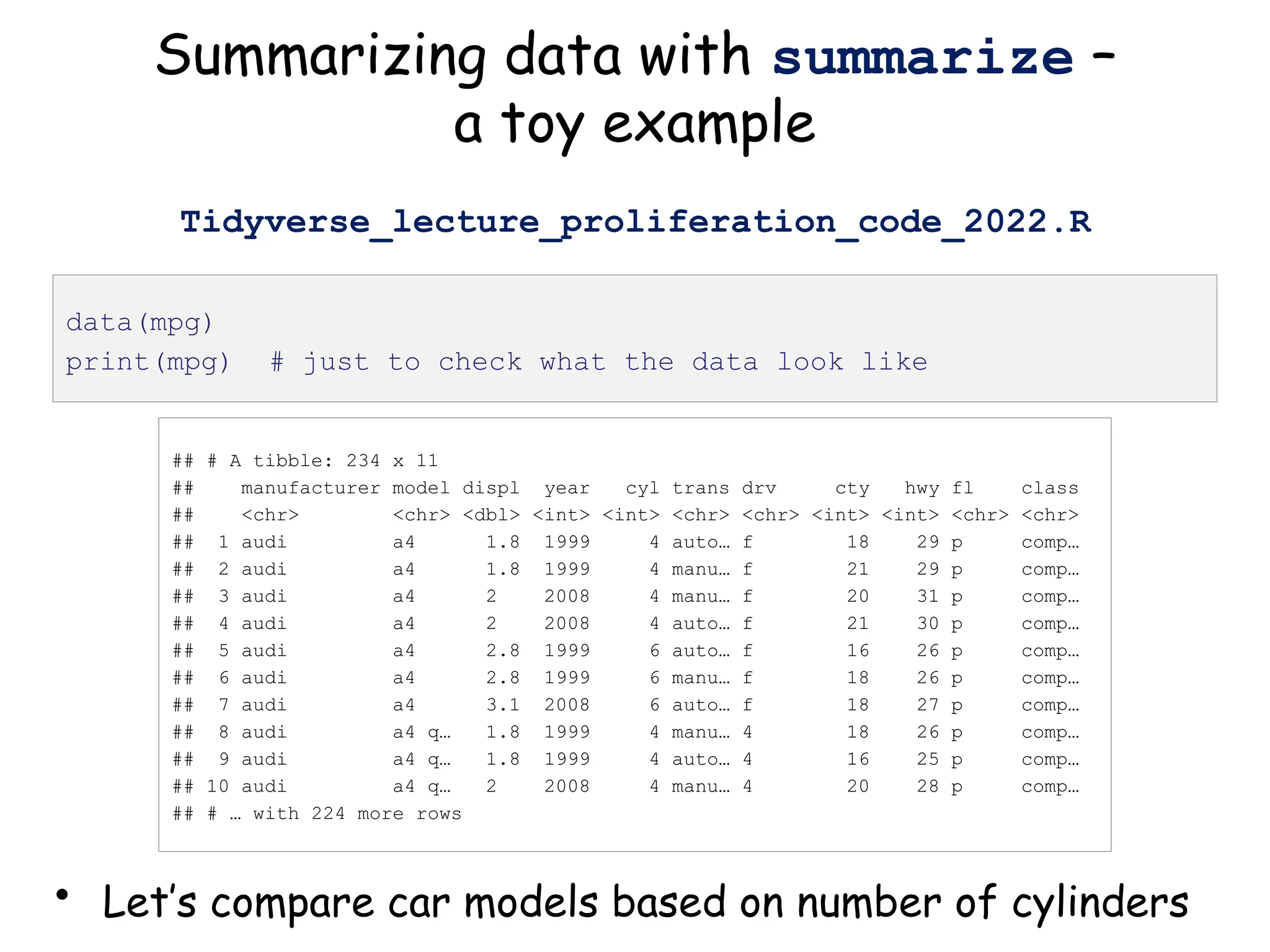
Summarizing data with summarize –
a toy example
• Let’s compare car models based on number of cylinders
data(mpg)
print(mpg) # just to check what the data look like
## # A tibble: 234 x 11
## manufacturer model displ year cyl trans drv cty hwy fl class
## <chr> <chr> <dbl> <int> <int> <chr> <chr> <int> <int> <chr> <chr>
## 1 audi a4 1.8 1999 4 auto… f 18 29 p comp…
## 2 audi a4 1.8 1999 4 manu… f 21 29 p comp…
## 3 audi a4 2 2008 4 manu… f 20 31 p comp…
## 4 audi a4 2 2008 4 auto… f 21 30 p comp…
## 5 audi a4 2.8 1999 6 auto… f 16 26 p comp…
## 6 audi a4 2.8 1999 6 manu… f 18 26 p comp…
## 7 audi a4 3.1 2008 6 auto… f 18 27 p comp…
## 8 audi a4 q… 1.8 1999 4 manu… 4 18 26 p comp…
## 9 audi a4 q… 1.8 1999 4 auto… 4 16 25 p comp…
## 10 audi a4 q… 2 2008 4 manu… 4 20 28 p comp…
## # … with 224 more rows
Tidyverse_lecture_proliferation_code_2022.R
## # A tibble: 234 x 11
## # Groups: cyl [4]
## manufacturer model displ year cyl trans drv cty hwy fl class
## <chr> <chr> <dbl> <int> <int> <chr> <chr> <int> <int> <chr> <chr>
## 1 audi a4 1.8 1999 4 auto… f 18 29 p comp…
## 2 audi a4 1.8 1999 4 manu… f 21 29 p comp…
## 3 audi a4 2 2008 4 manu… f 20 31 p comp…
## 4 audi a4 2 2008 4 auto… f 21 30 p comp…
## 5 audi a4 2.8 1999 6 auto… f 16 26 p comp…
## 6 audi a4 2.8 1999 6 manu… f 18 26 p comp…
## 7 audi a4 3.1 2008 6 auto… f 18 27 p comp…
## 8 audi a4 q… 1.8 1999 4 manu… 4 18 26 p comp…
## 9 audi a4 q… 1.8 1999 4 auto… 4 16 25 p comp…
## 10 audi a4 q… 2 2008 4 manu… 4 20 28 p comp…
## # … with 224 more rows
group_by: organize data based on
descriptor variable
• Can group data by as many variables as you have
mpg_by_cyl <- group_by(mpg, cyl) %>% print()
## # A tibble: 4 x 6
## cyl n hwy_mean hwy_sd displ_mean displ_sd
## <int> <int> <dbl> <dbl> <dbl> <dbl>
## 1 4 81 28.8 4.52 2.15 0.315
## 2 5 4 28.8 0.5 2.5 0
## 3 6 79 22.8 3.69 3.41 0.472
## 4 8 70 17.6 3.26 5.13 0.589
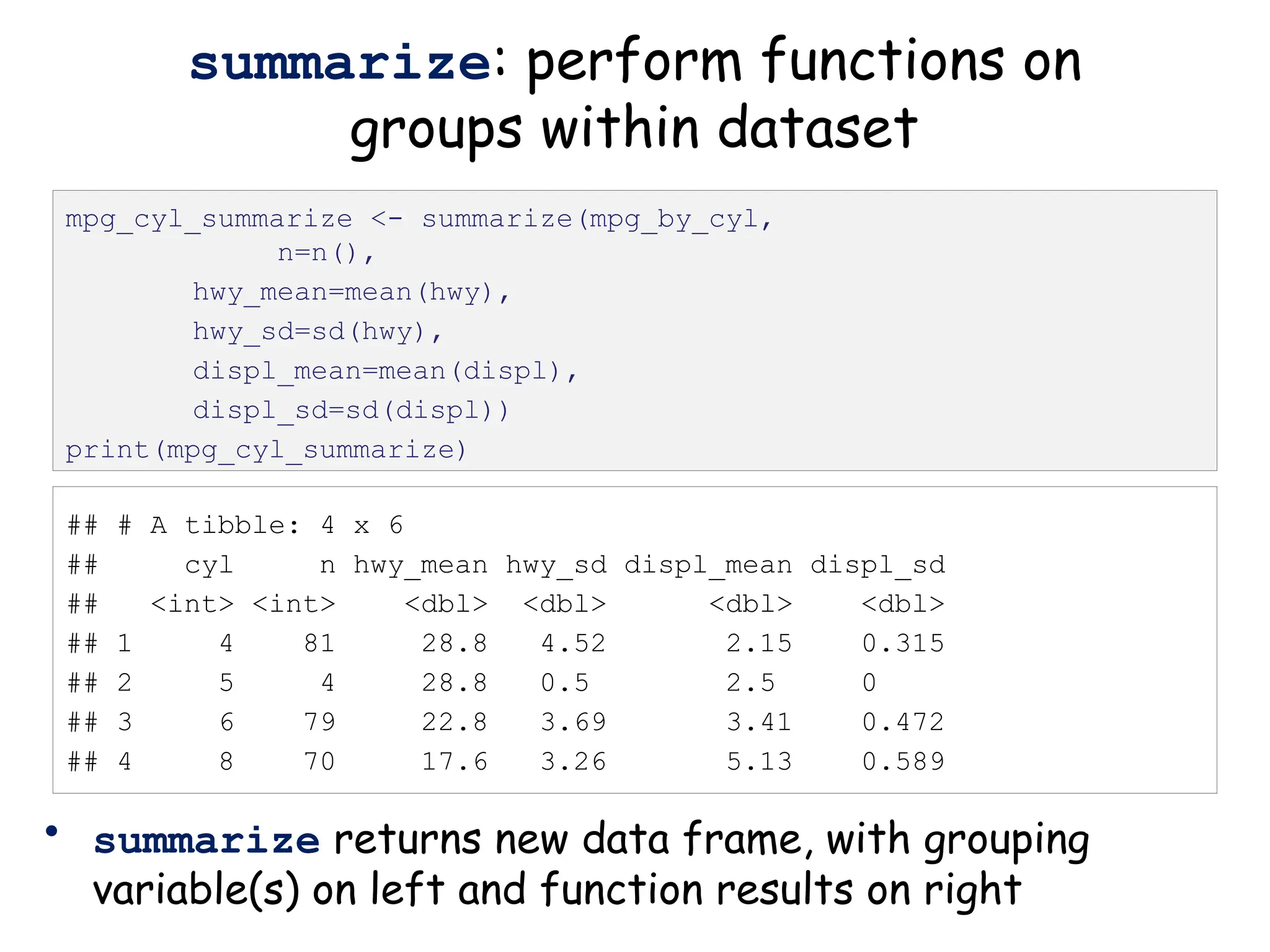
summarize: perform functions on
groups within dataset
• summarize returns new data frame, with grouping
variable(s) on left and function results on right
mpg_cyl_summarize <- summarize(mpg_by_cyl,
n=n(),
hwy_mean=mean(hwy),
hwy_sd=sd(hwy),
displ_mean=mean(displ),
displ_sd=sd(displ))
print(mpg_cyl_summarize)
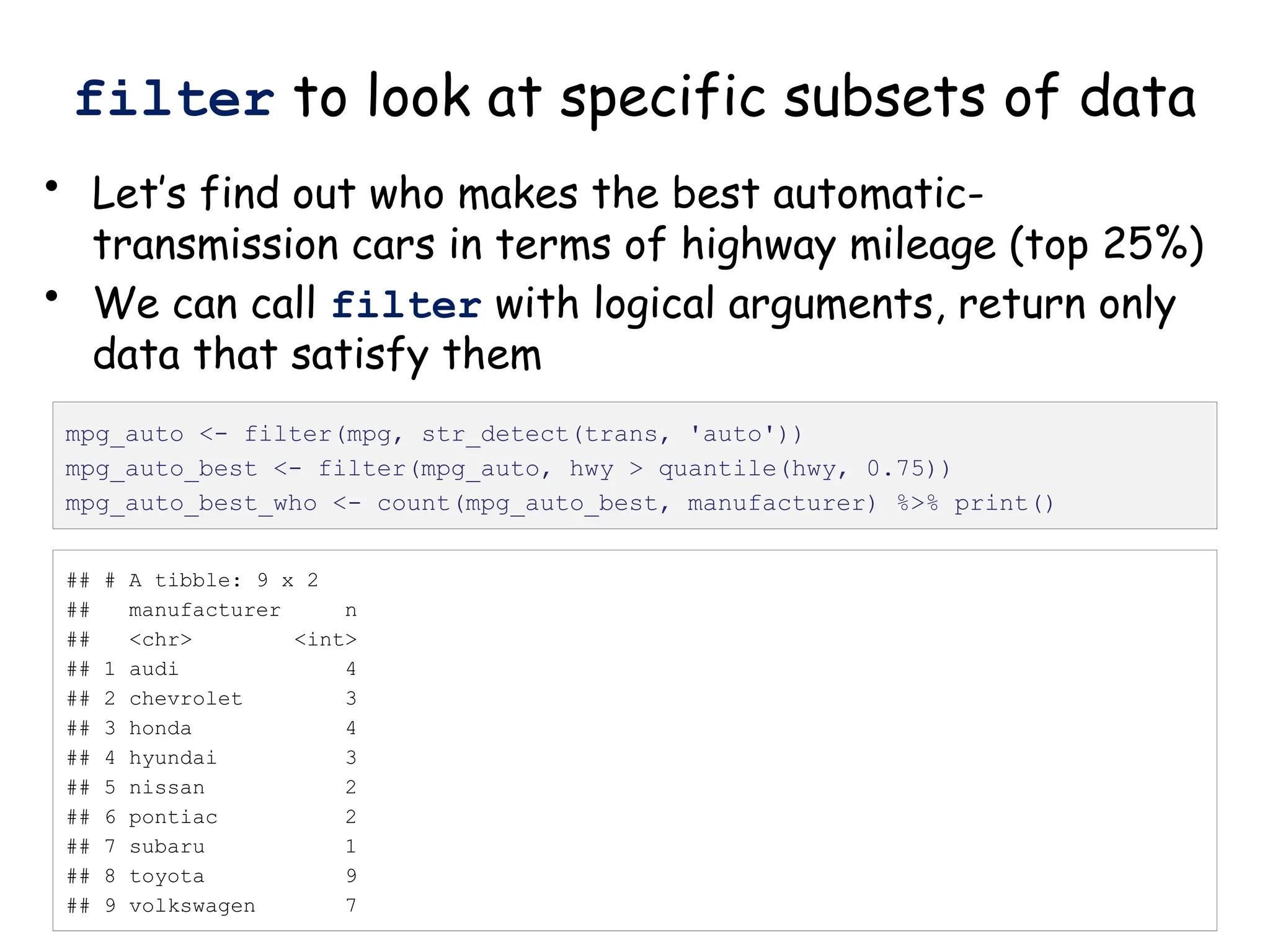
filter to look at specific subsets of data
• Let’s find out who makes the best automatic-
transmission cars in terms of highway mileage (top 25%)
• We can call filter with logical arguments, return only
data that satisfy them
mpg_auto <- filter(mpg, str_detect(trans, 'auto'))
mpg_auto_best <- filter(mpg_auto, hwy > quantile(hwy, 0.75))
mpg_auto_best_who <- count(mpg_auto_best, manufacturer) %>% print()
## # A tibble: 9 x 2
## manufacturer n
## <chr> <int>
## 1 audi 4
## 2 chevrolet 3
## 3 honda 4
## 4 hyundai 3
## 5 nissan 2
## 6 pontiac 2
## 7 subaru 1
## 8 toyota 9
## 9 volkswagen 7
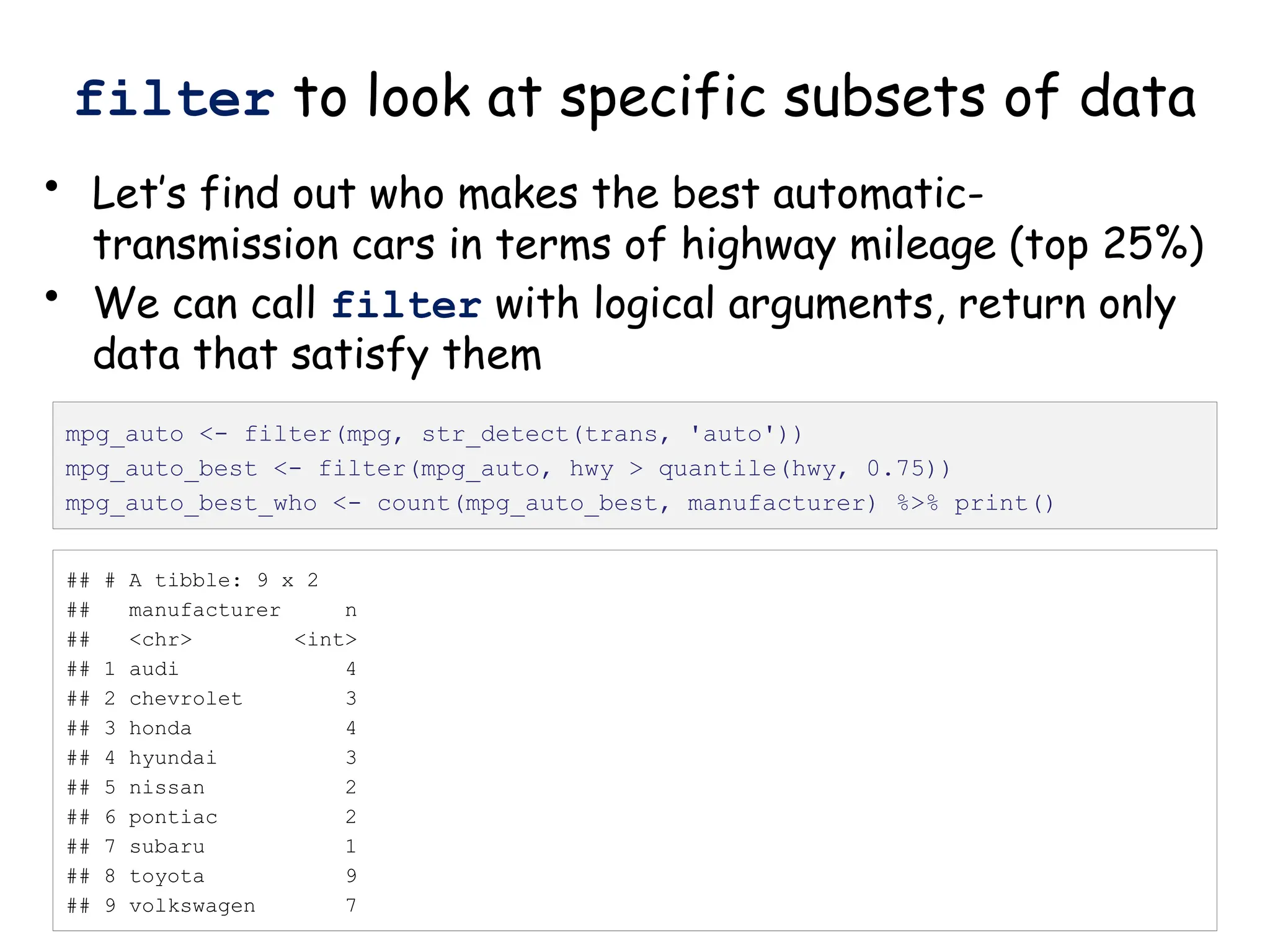
filter to look at specific subsets of data
• Let’s find out who makes the best automatic-
transmission cars in terms of highway mileage (top 25%)
• We can call filter with logical arguments, return only
data that satisfy them
mpg_auto <- filter(mpg, str_detect(trans, 'auto'))
mpg_auto_best <- filter(mpg_auto, hwy > quantile(hwy, 0.75))
mpg_auto_best_who <- count(mpg_auto_best, manufacturer) %>% print()
## # A tibble: 9 x 2
## manufacturer n
## <chr> <int>
## 1 audi 4
## 2 chevrolet 3
## 3 honda 4
## 4 hyundai 3
## 5 nissan 2
## 6 pontiac 2
## 7 subaru 1
## 8 toyota 9
## 9 volkswagen 7
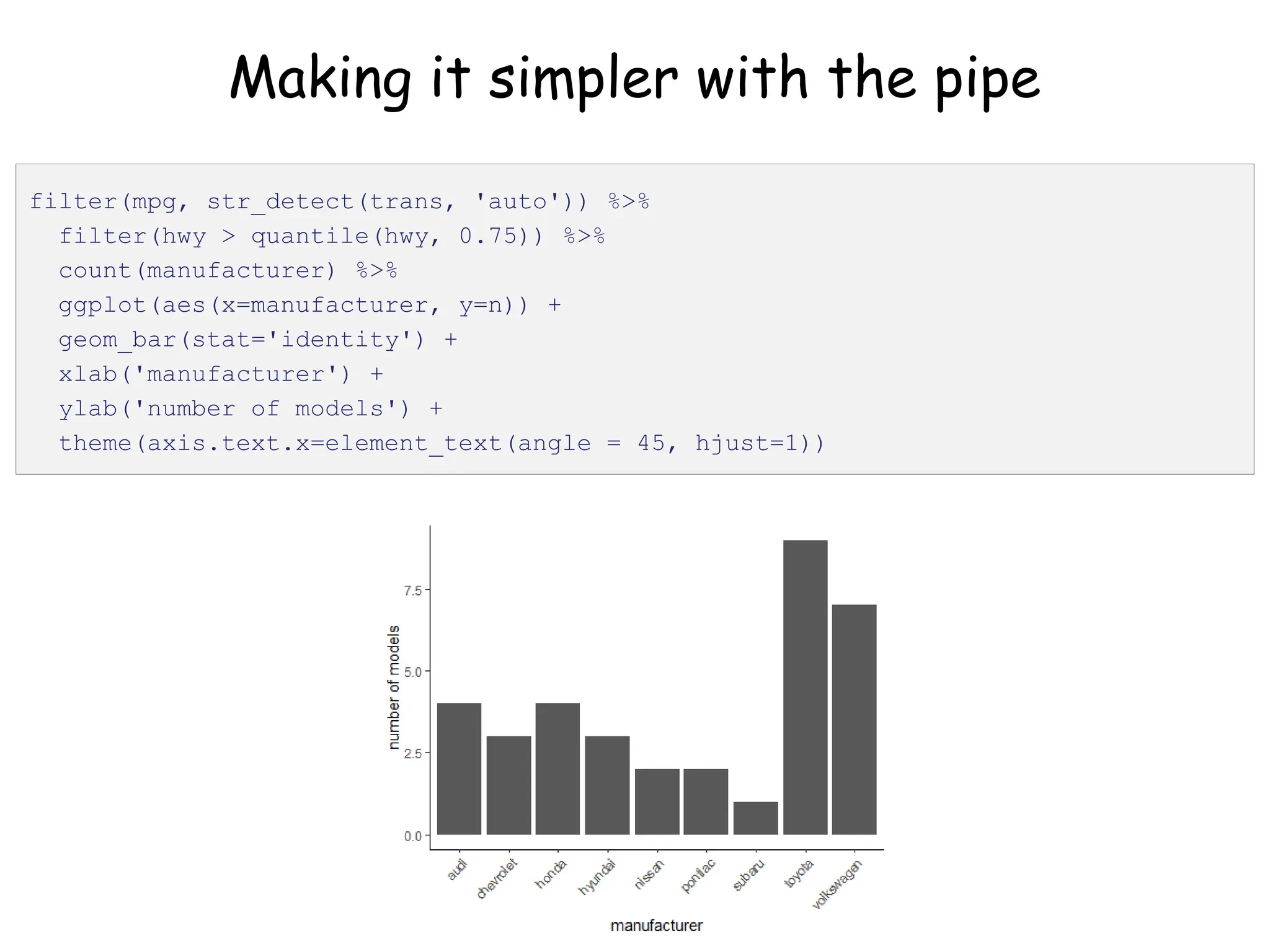
Making it simpler with the pipe
filter(mpg, str_detect(trans, 'auto')) %>%
filter(hwy > quantile(hwy, 0.75)) %>%
count(manufacturer) %>%
ggplot(aes(x=manufacturer, y=n)) +
geom_bar(stat='identity') +
xlab('manufacturer') +
ylab('number of models') +
theme(axis.text.x=element_text(angle = 45, hjust=1))
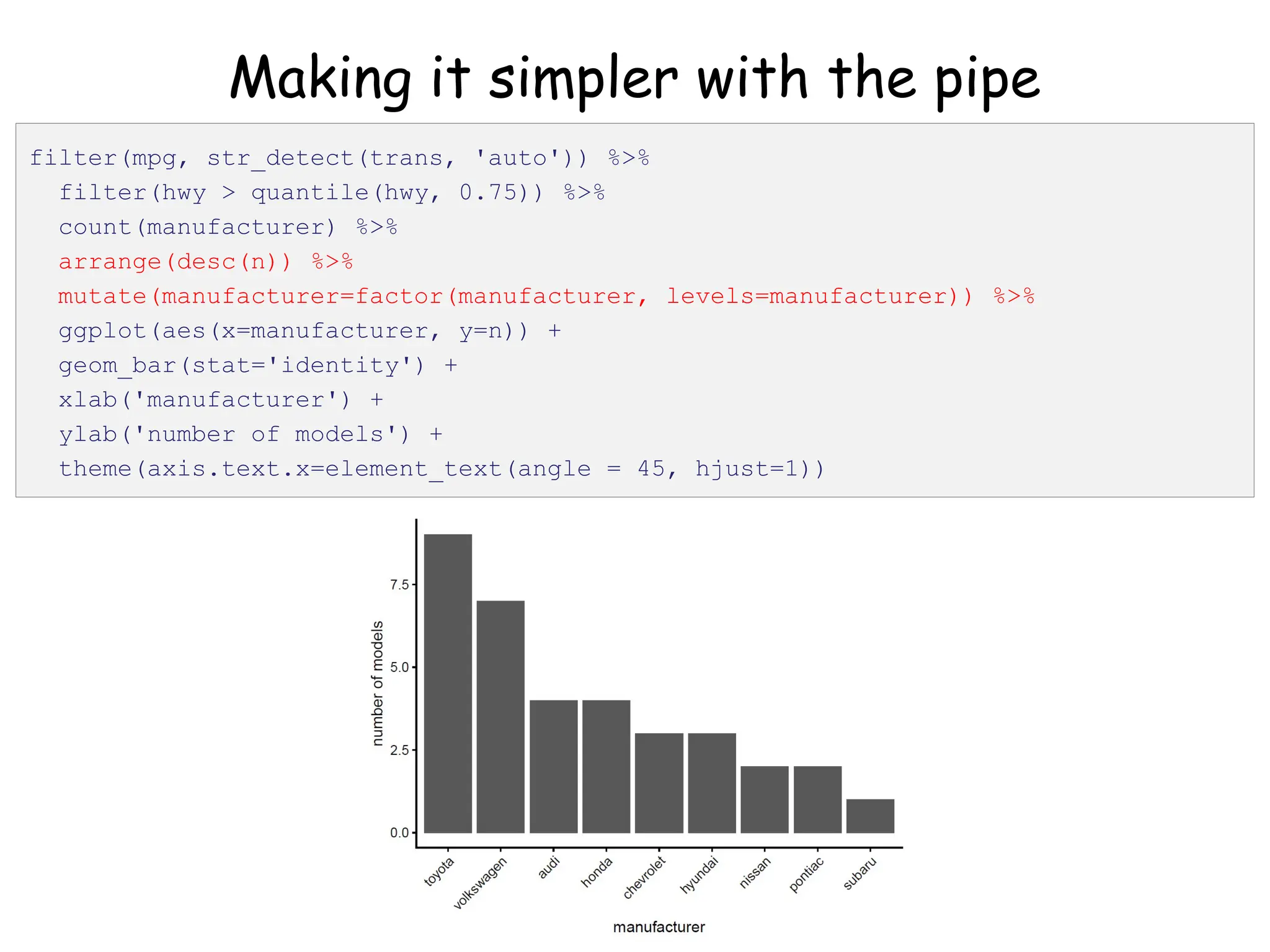
Making it simpler with the pipe
filter(mpg, str_detect(trans, 'auto')) %>%
filter(hwy > quantile(hwy, 0.75)) %>%
count(manufacturer) %>%
arrange(desc(n)) %>%
mutate(manufacturer=factor(manufacturer, levels=manufacturer)) %>%
ggplot(aes(x=manufacturer, y=n)) +
geom_bar(stat='identity') +
xlab('manufacturer') +
ylab('number of models') +
theme(axis.text.x=element_text(angle = 45, hjust=1))
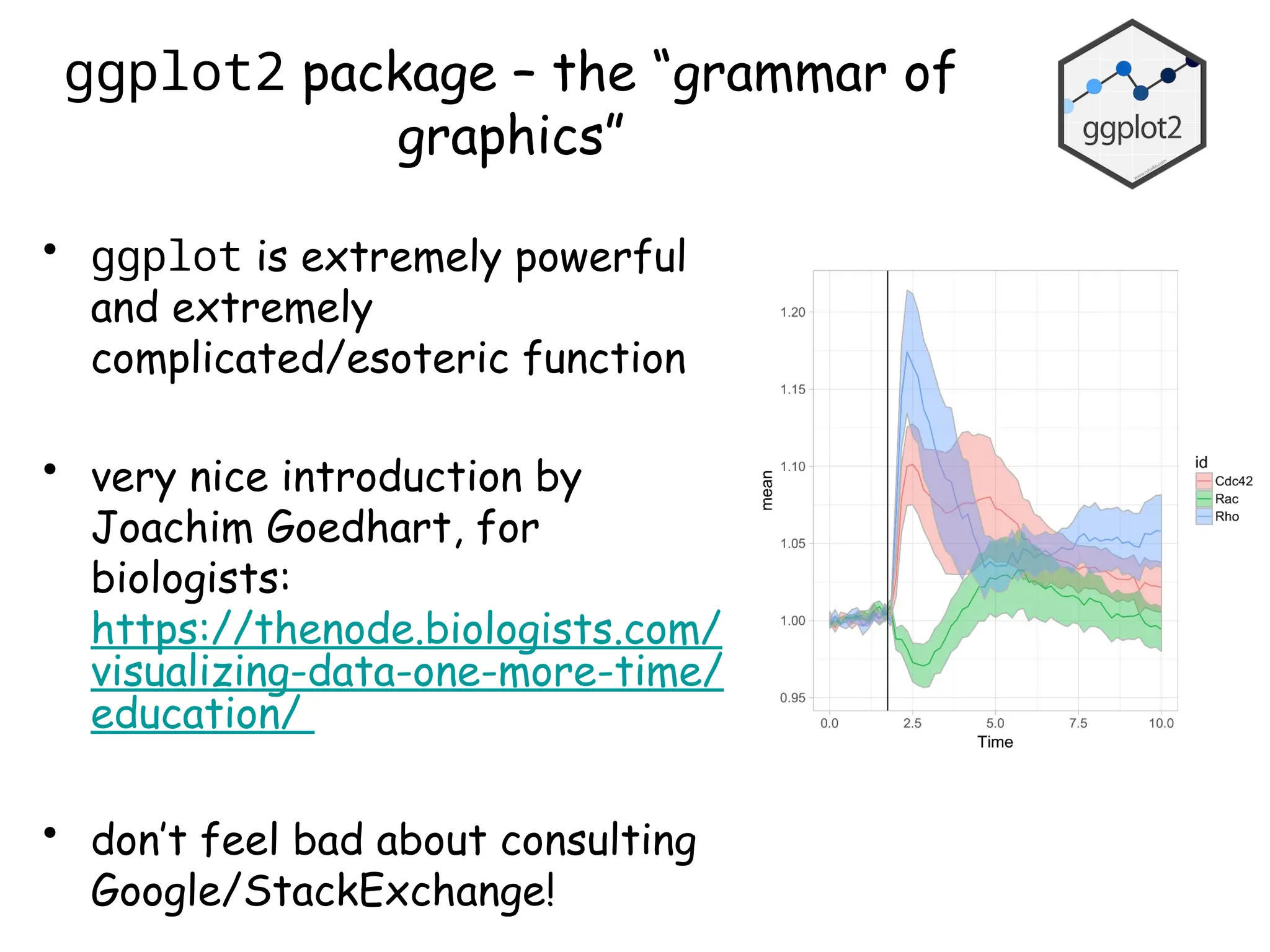
ggplot2 package – the “grammar of
graphics”
• ggplot is extremely powerful
and extremely
complicated/esoteric function
• very nice introduction by
Joachim Goedhart, for
biologists:
https://thenode.biologists.com/
visualizing-data-one-more-time/
education/
• don’t feel bad about consulting
Google/StackExchange!
Analyzing proliferation data – wrangling,
transforming and visualizing
• Cell counting and replating assay (long-term
proliferation) of human pancreatic cancer cell lines:
Tidyverse_lecture_proliferation_code_2022.R
PDAC_3T3_data_simplified.xlsx
• Key points of this experiment are as follows:
– Data consists of counts of cells plated into 35 mm tissue
culture dish on day 0, and counts of cells harvested 3 days
later – repeated over 4-5 passages total
– Four cell lines total: Panc1, MiaPaCa2, Su8686, SW1990
– Cells express either EGFP (negative control) or Ptf1a, a TF
that we hypothesize will inhibit their proliferation, inducible
with doxycycline (DOX); untreated cells used as controls
– 2-3 independent experiments per line
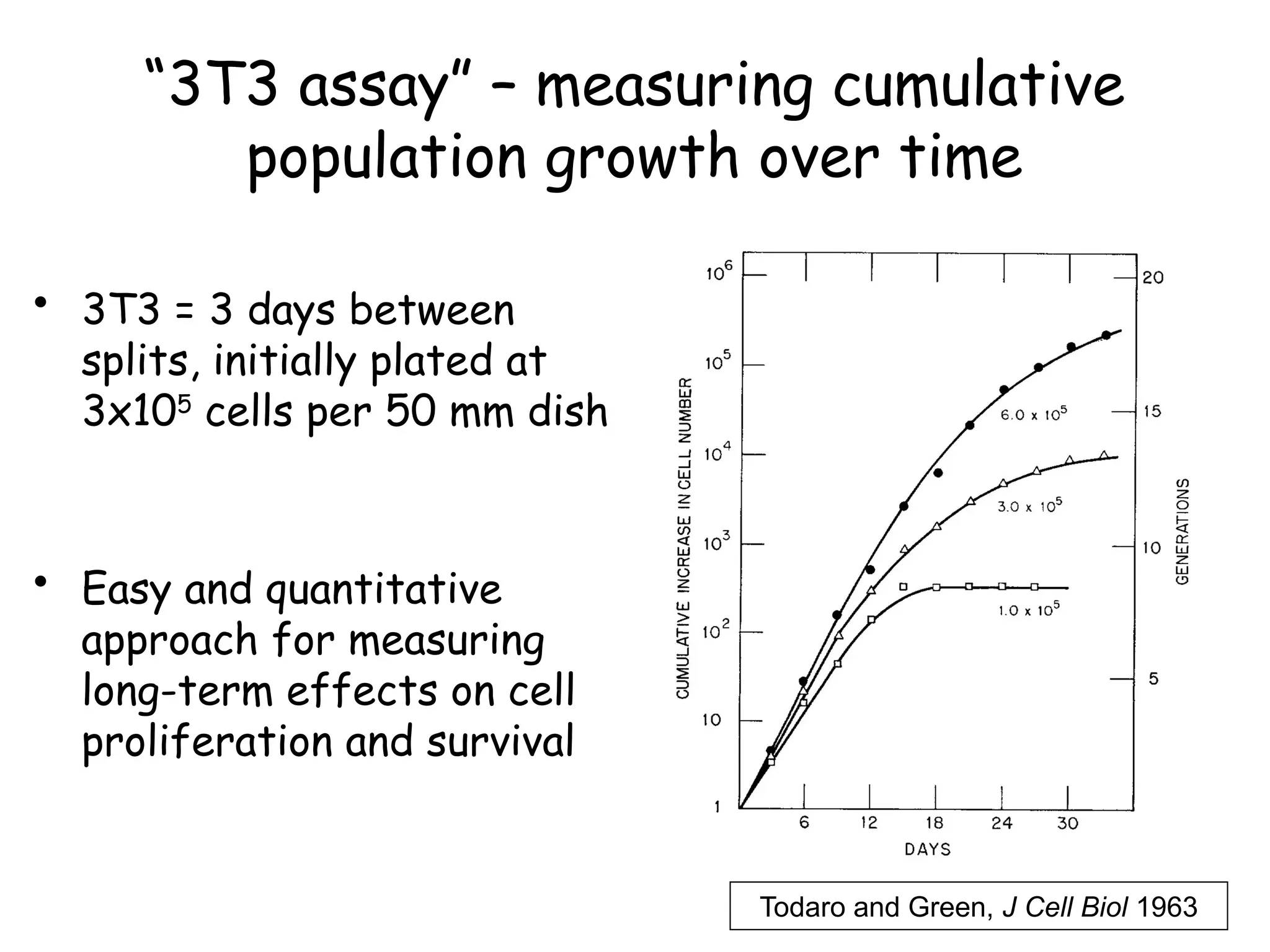
“3T3 assay” – measuring cumulative
population growth over time
• 3T3 = 3 days between
splits, initially plated at
3x10⁵
cells per 50 mm dish
• Easy and quantitative
approach for measuring
long-term effects on cell
proliferation and survival
Todaro and Green, J Cell Biol 1963
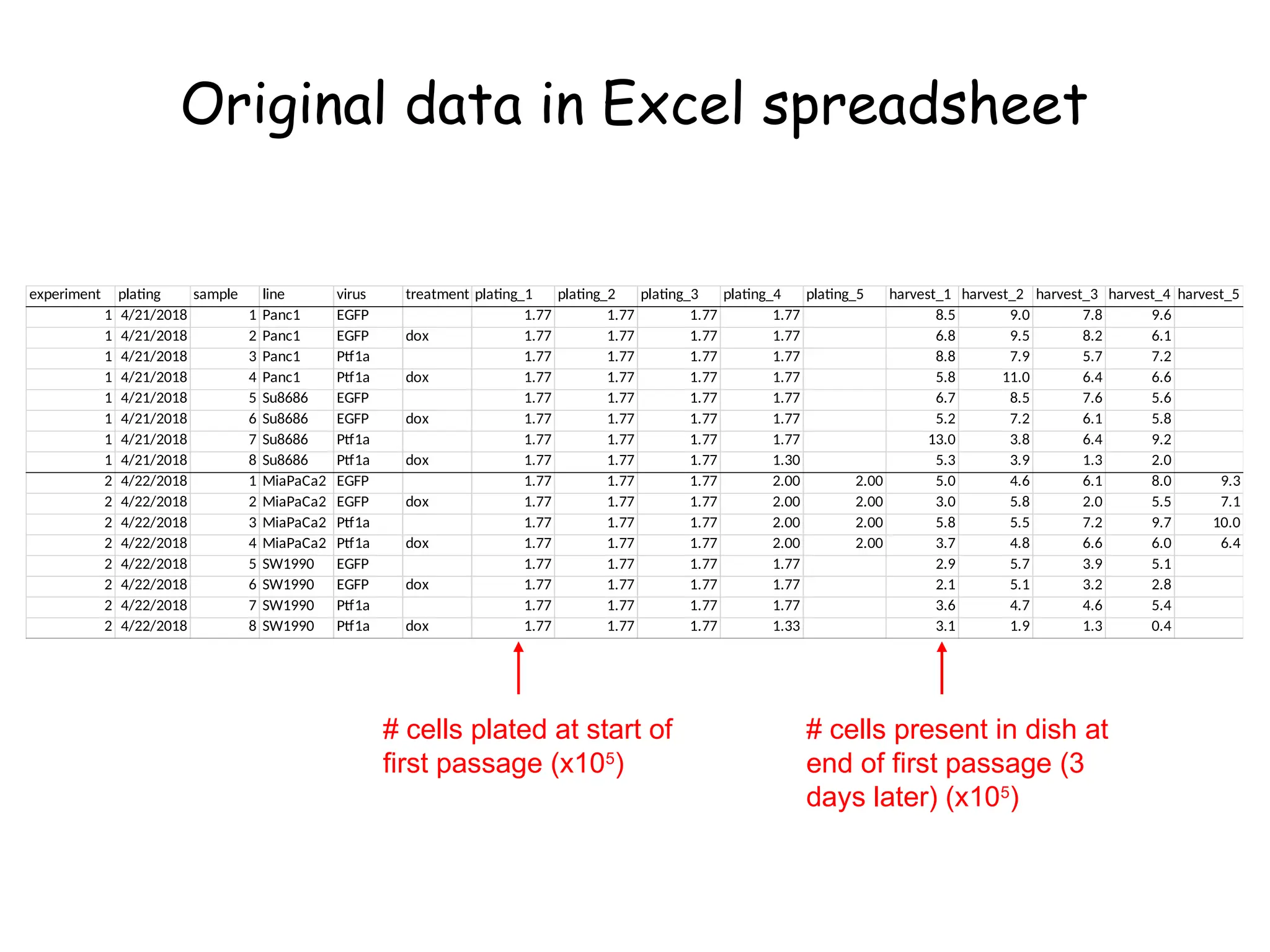
Original data in Excel spreadsheet
experiment plating sample line virus treatment plating_1 plating_2 plating_3 plating_4 plating_5 harvest_1 harvest_2 harvest_3 harvest_4 harvest_5
1 4/21/2018 1 Panc1 EGFP 1.77 1.77 1.77 1.77 8.5 9.0 7.8 9.6
1 4/21/2018 2 Panc1 EGFP dox 1.77 1.77 1.77 1.77 6.8 9.5 8.2 6.1
1 4/21/2018 3 Panc1 Ptf1a 1.77 1.77 1.77 1.77 8.8 7.9 5.7 7.2
1 4/21/2018 4 Panc1 Ptf1a dox 1.77 1.77 1.77 1.77 5.8 11.0 6.4 6.6
1 4/21/2018 5 Su8686 EGFP 1.77 1.77 1.77 1.77 6.7 8.5 7.6 5.6
1 4/21/2018 6 Su8686 EGFP dox 1.77 1.77 1.77 1.77 5.2 7.2 6.1 5.8
1 4/21/2018 7 Su8686 Ptf1a 1.77 1.77 1.77 1.77 13.0 3.8 6.4 9.2
1 4/21/2018 8 Su8686 Ptf1a dox 1.77 1.77 1.77 1.30 5.3 3.9 1.3 2.0
2 4/22/2018 1 MiaPaCa2 EGFP 1.77 1.77 1.77 2.00 2.00 5.0 4.6 6.1 8.0 9.3
2 4/22/2018 2 MiaPaCa2 EGFP dox 1.77 1.77 1.77 2.00 2.00 3.0 5.8 2.0 5.5 7.1
2 4/22/2018 3 MiaPaCa2 Ptf1a 1.77 1.77 1.77 2.00 2.00 5.8 5.5 7.2 9.7 10.0
2 4/22/2018 4 MiaPaCa2 Ptf1a dox 1.77 1.77 1.77 2.00 2.00 3.7 4.8 6.6 6.0 6.4
2 4/22/2018 5 SW1990 EGFP 1.77 1.77 1.77 1.77 2.9 5.7 3.9 5.1
2 4/22/2018 6 SW1990 EGFP dox 1.77 1.77 1.77 1.77 2.1 5.1 3.2 2.8
2 4/22/2018 7 SW1990 Ptf1a 1.77 1.77 1.77 1.77 3.6 4.7 4.6 5.4
2 4/22/2018 8 SW1990 Ptf1a dox 1.77 1.77 1.77 1.33 3.1 1.9 1.3 0.4
# cells plated at start of
first passage (x105
)
# cells present in dish at
end of first passage (3
days later) (x105
)
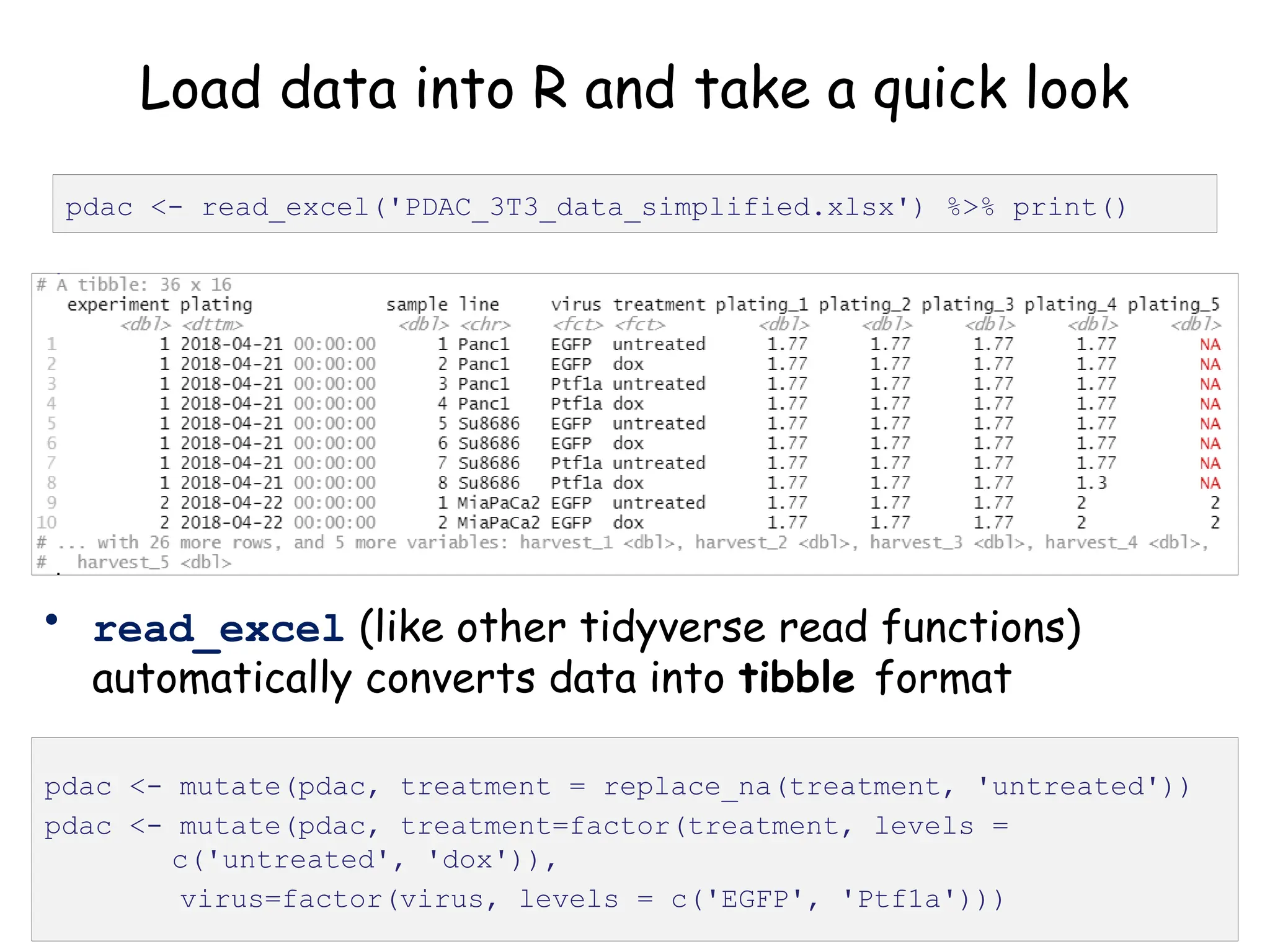
Load data into R and take a quick look
pdac <- read_excel('PDAC_3T3_data_simplified.xlsx') %>% print()
• read_excel (like other tidyverse read functions)
automatically converts data into tibble format
pdac <- mutate(pdac, treatment = replace_na(treatment, 'untreated'))
pdac <- mutate(pdac, treatment=factor(treatment, levels =
c('untreated', 'dox')),
virus=factor(virus, levels = c('EGFP', 'Ptf1a')))
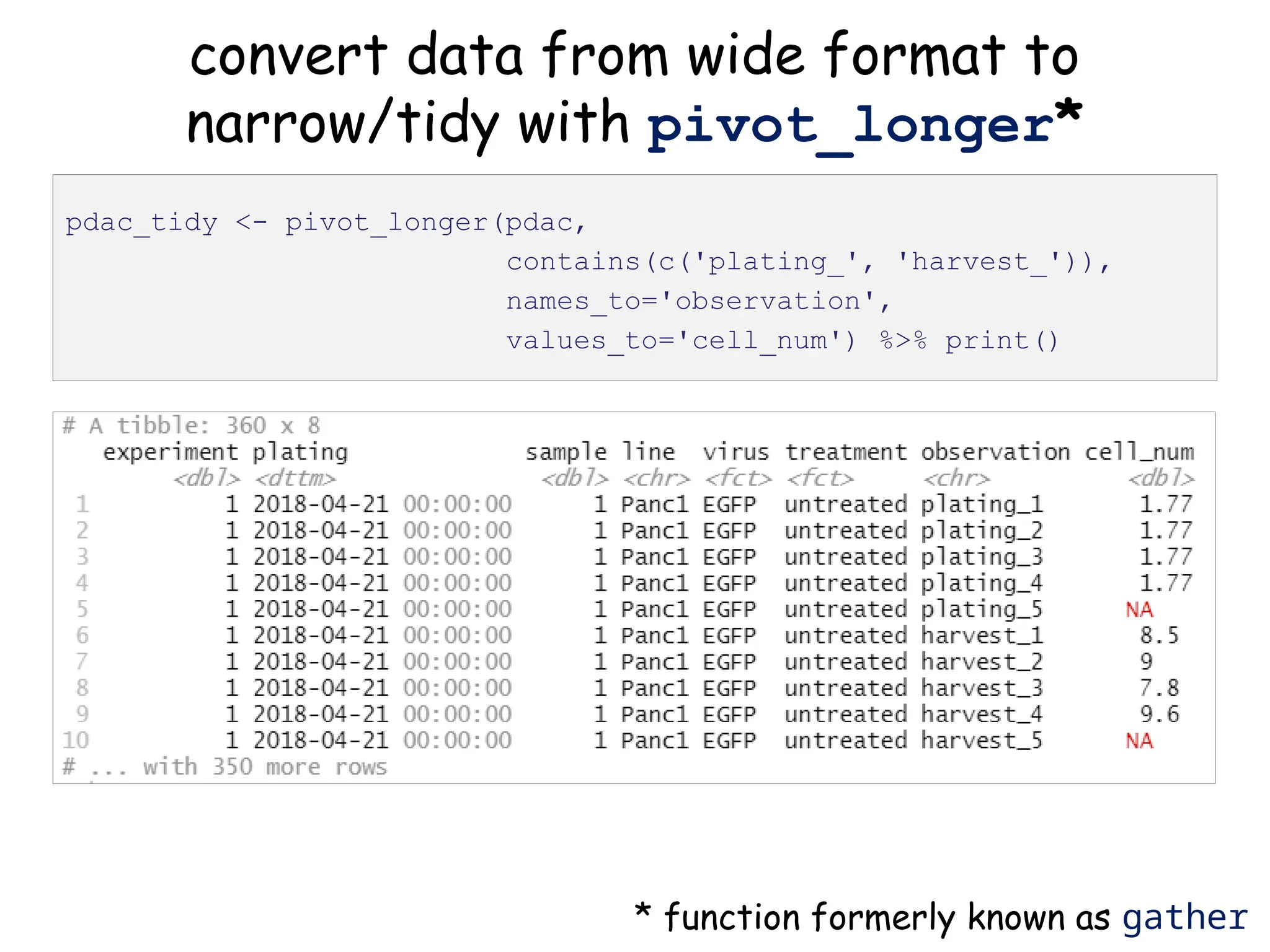
convert data from wide format to
narrow/tidy with pivot_longer*
pdac_tidy <- pivot_longer(pdac,
contains(c('plating_', 'harvest_')),
names_to='observation',
values_to='cell_num') %>% print()
* function formerly known as gather
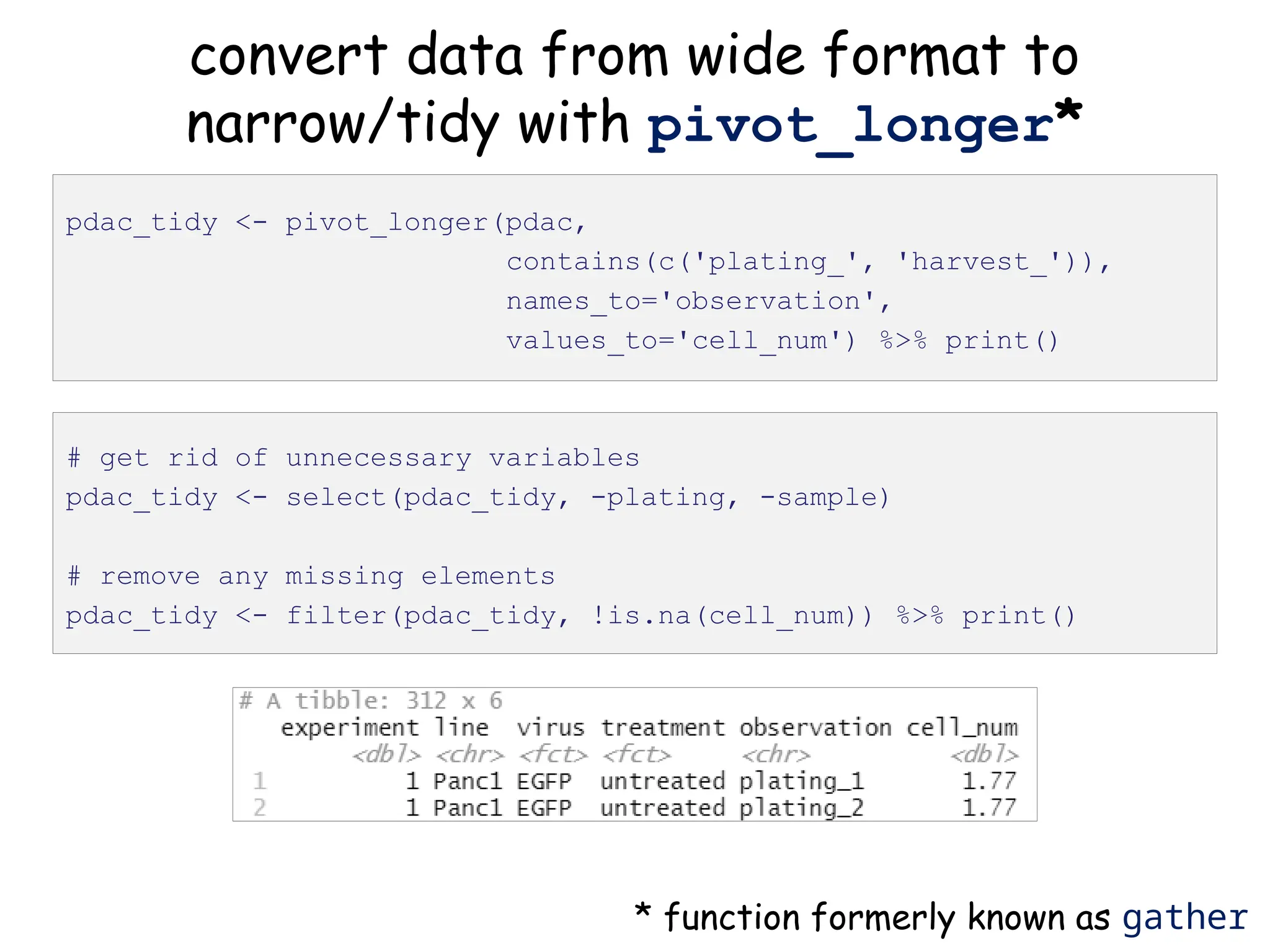
convert data from wide format to
narrow/tidy with pivot_longer*
pdac_tidy <- pivot_longer(pdac,
contains(c('plating_', 'harvest_')),
names_to='observation',
values_to='cell_num') %>% print()
* function formerly known as gather
# get rid of unnecessary variables
pdac_tidy <- select(pdac_tidy, -plating, -sample)
# remove any missing elements
pdac_tidy <- filter(pdac_tidy, !is.na(cell_num)) %>% print()
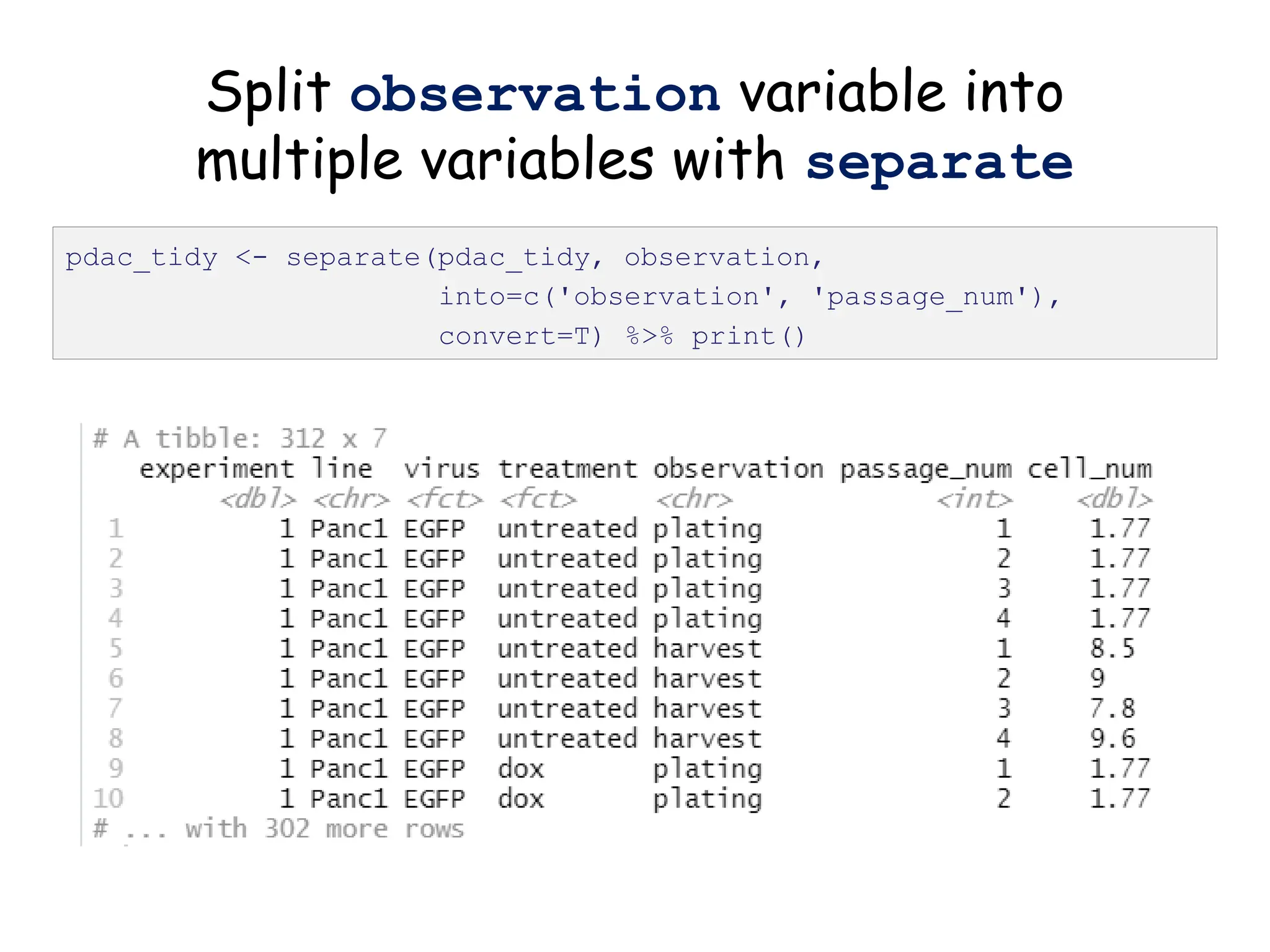
Split observation variable into
multiple variables with separate
pdac_tidy <- separate(pdac_tidy, observation,
into=c('observation', 'passage_num'),
convert=T) %>% print()
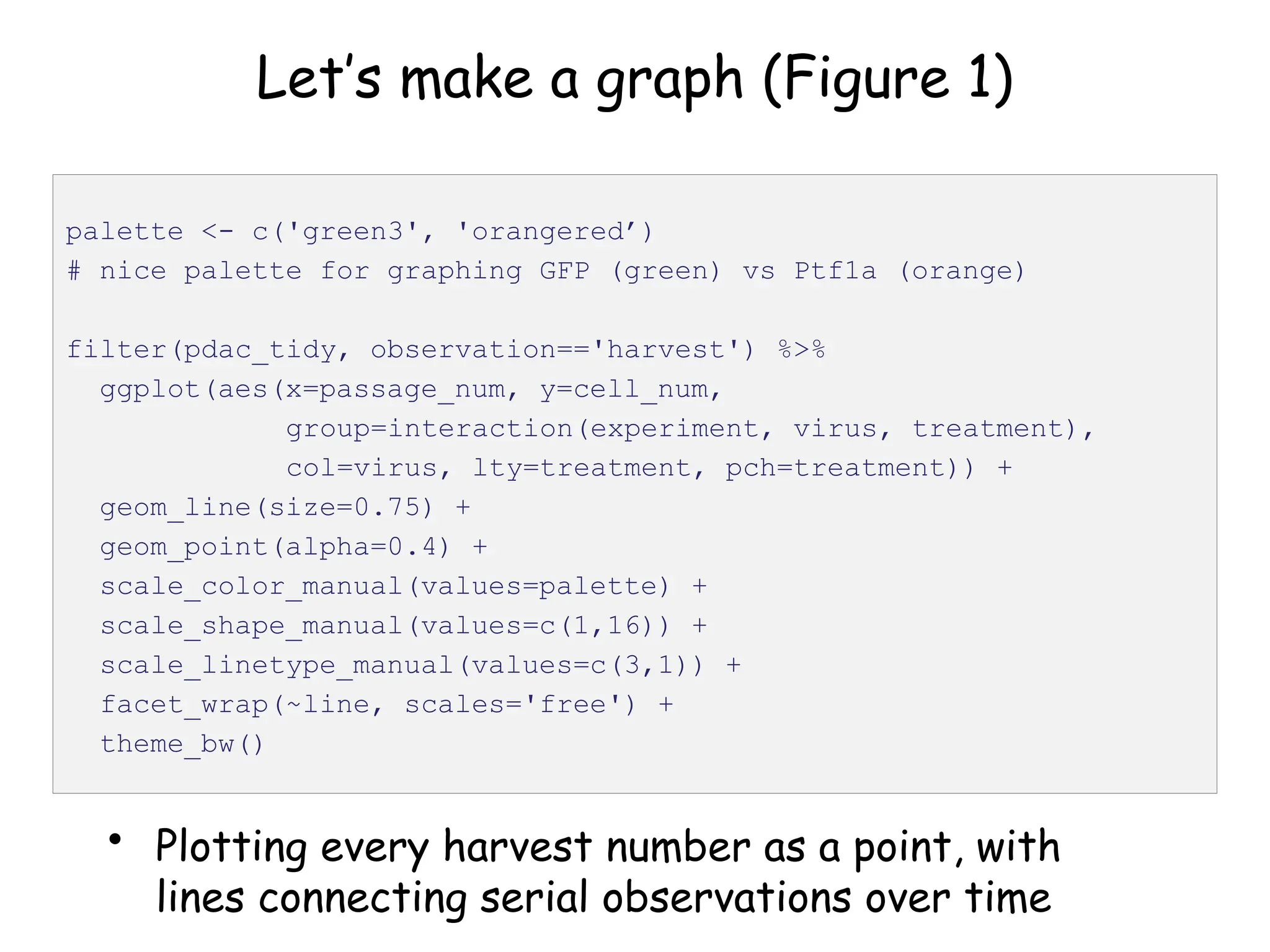
Let’s make a graph (Figure 1)
• Plotting every harvest number as a point, with
lines connecting serial observations over time
palette <- c('green3', 'orangered’)
# nice palette for graphing GFP (green) vs Ptf1a (orange)
filter(pdac_tidy, observation=='harvest') %>%
ggplot(aes(x=passage_num, y=cell_num,
group=interaction(experiment, virus, treatment),
col=virus, lty=treatment, pch=treatment)) +
geom_line(size=0.75) +
geom_point(alpha=0.4) +
scale_color_manual(values=palette) +
scale_shape_manual(values=c(1,16)) +
scale_linetype_manual(values=c(3,1)) +
facet_wrap(~line, scales='free') +
theme_bw()
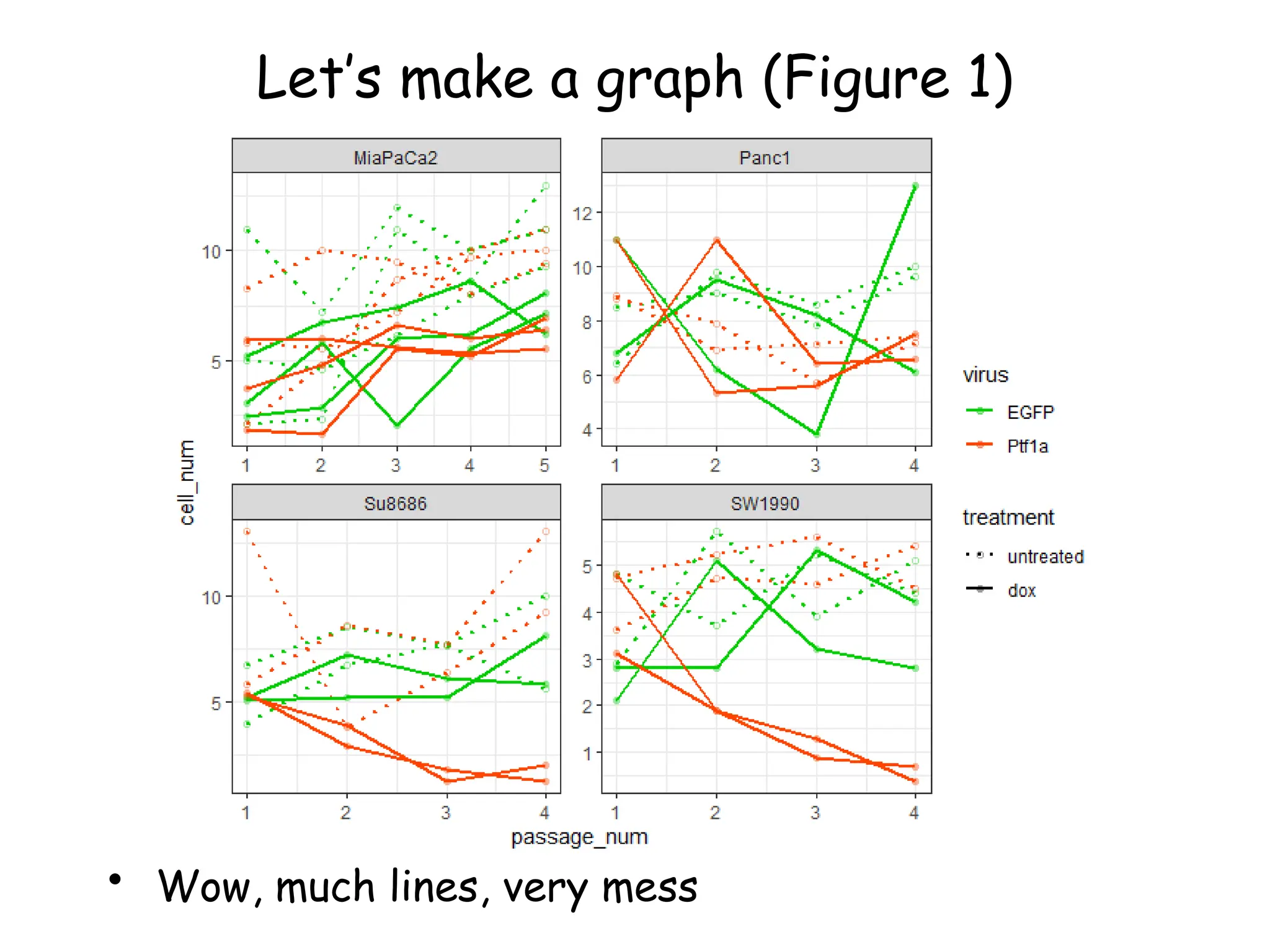
Let’s make a graph (Figure 1)
• Wow, much lines, very mess
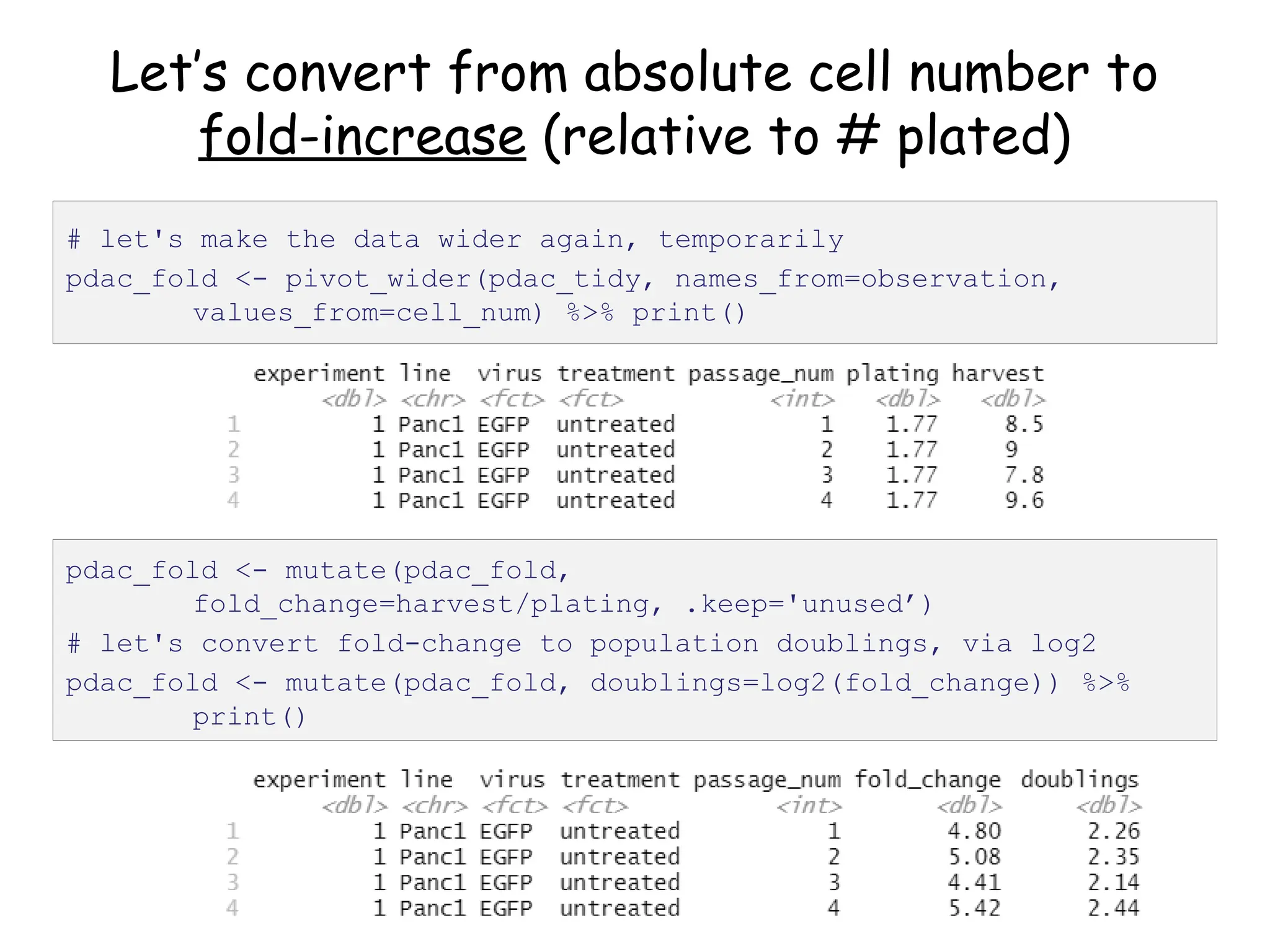
Let’s convert from absolute cell number to
fold-increase (relative to # plated)
# let's make the data wider again, temporarily
pdac_fold <- pivot_wider(pdac_tidy, names_from=observation,
values_from=cell_num) %>% print()
pdac_fold <- mutate(pdac_fold,
fold_change=harvest/plating, .keep='unused’)
# let's convert fold-change to population doublings, via log2
pdac_fold <- mutate(pdac_fold, doublings=log2(fold_change)) %>%
print()
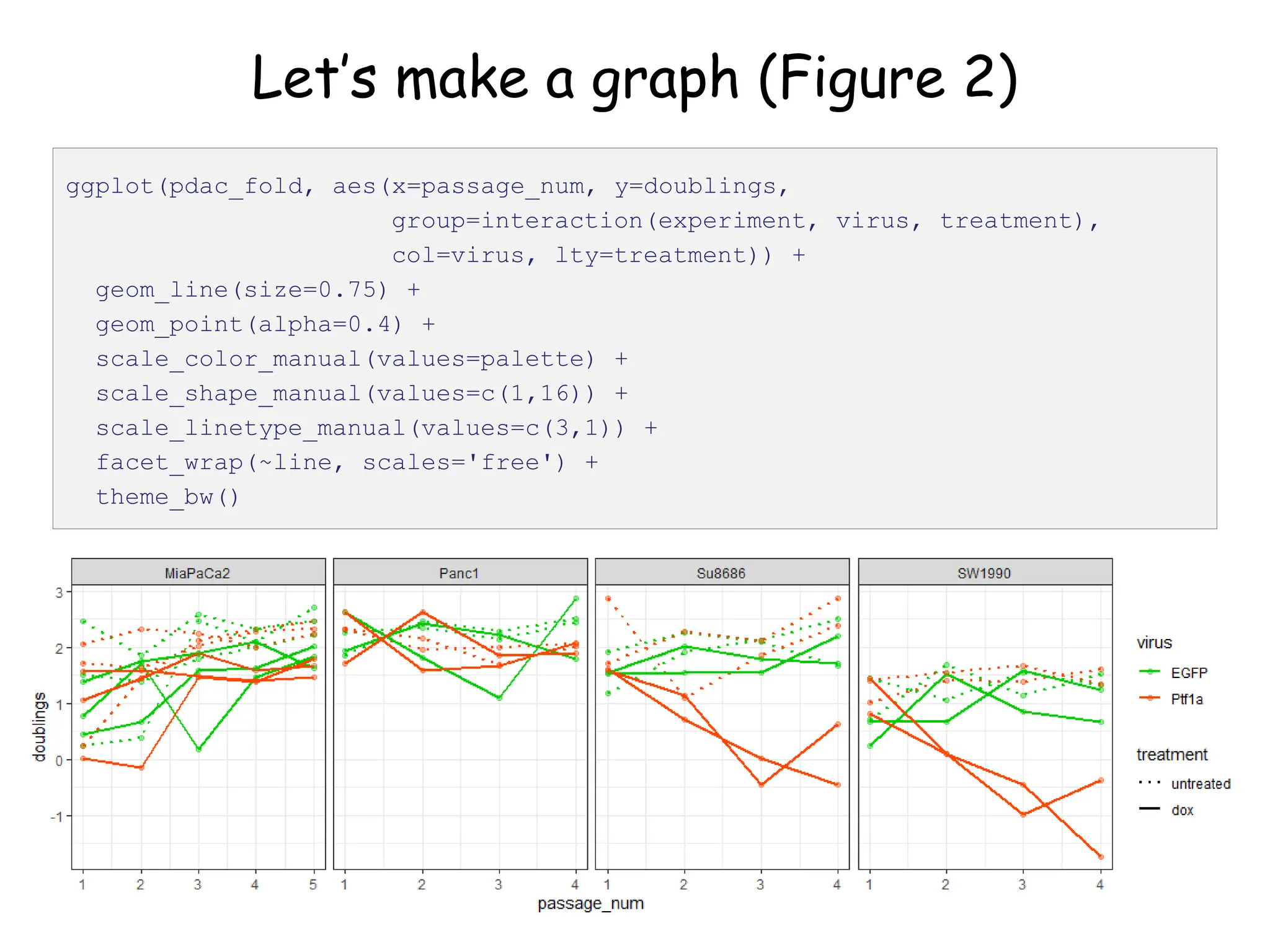
Let’s make a graph (Figure 2)
ggplot(pdac_fold, aes(x=passage_num, y=doublings,
group=interaction(experiment, virus, treatment),
col=virus, lty=treatment)) +
geom_line(size=0.75) +
geom_point(alpha=0.4) +
scale_color_manual(values=palette) +
scale_shape_manual(values=c(1,16)) +
scale_linetype_manual(values=c(3,1)) +
facet_wrap(~line, scales='free') +
theme_bw()
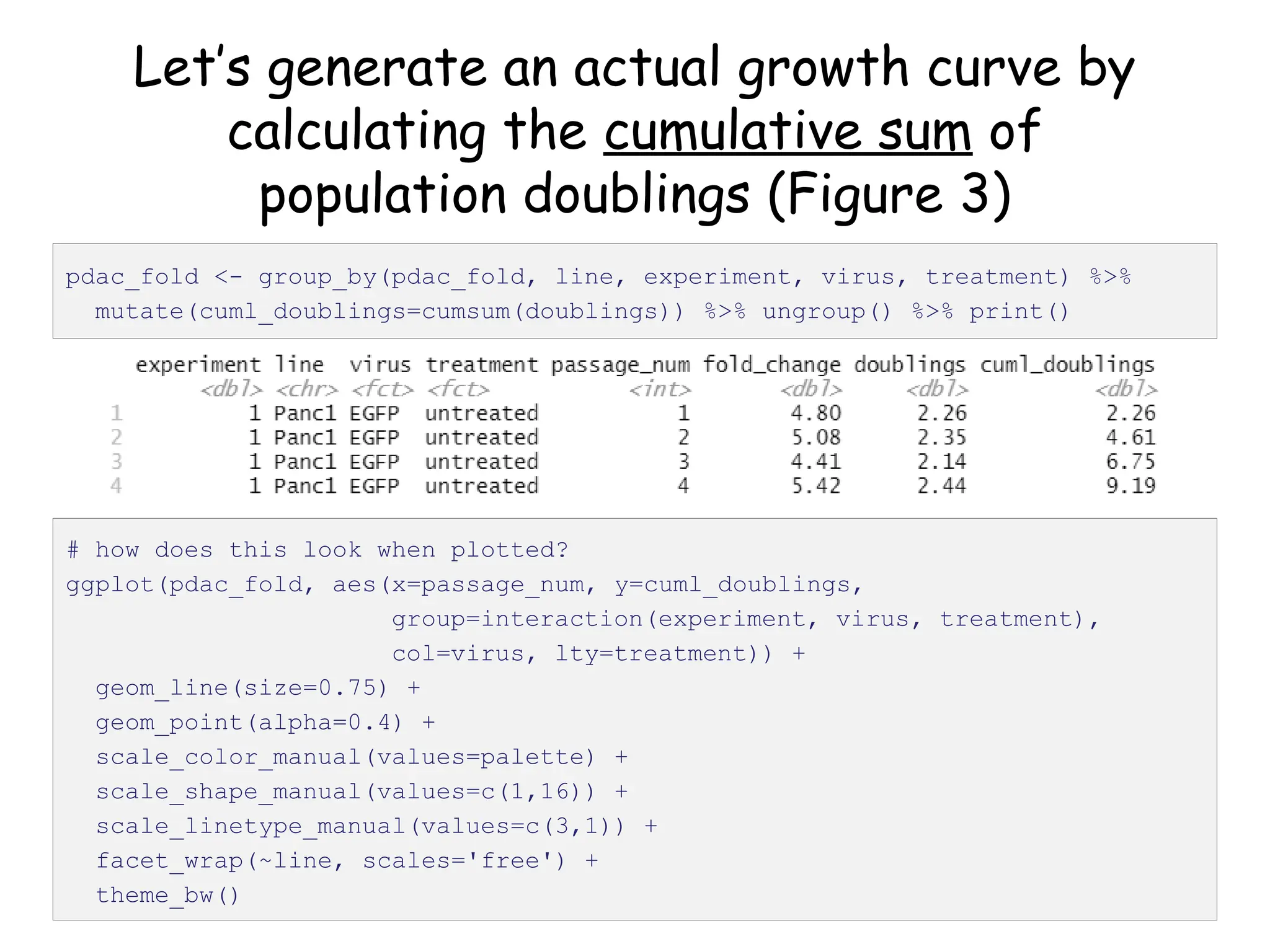
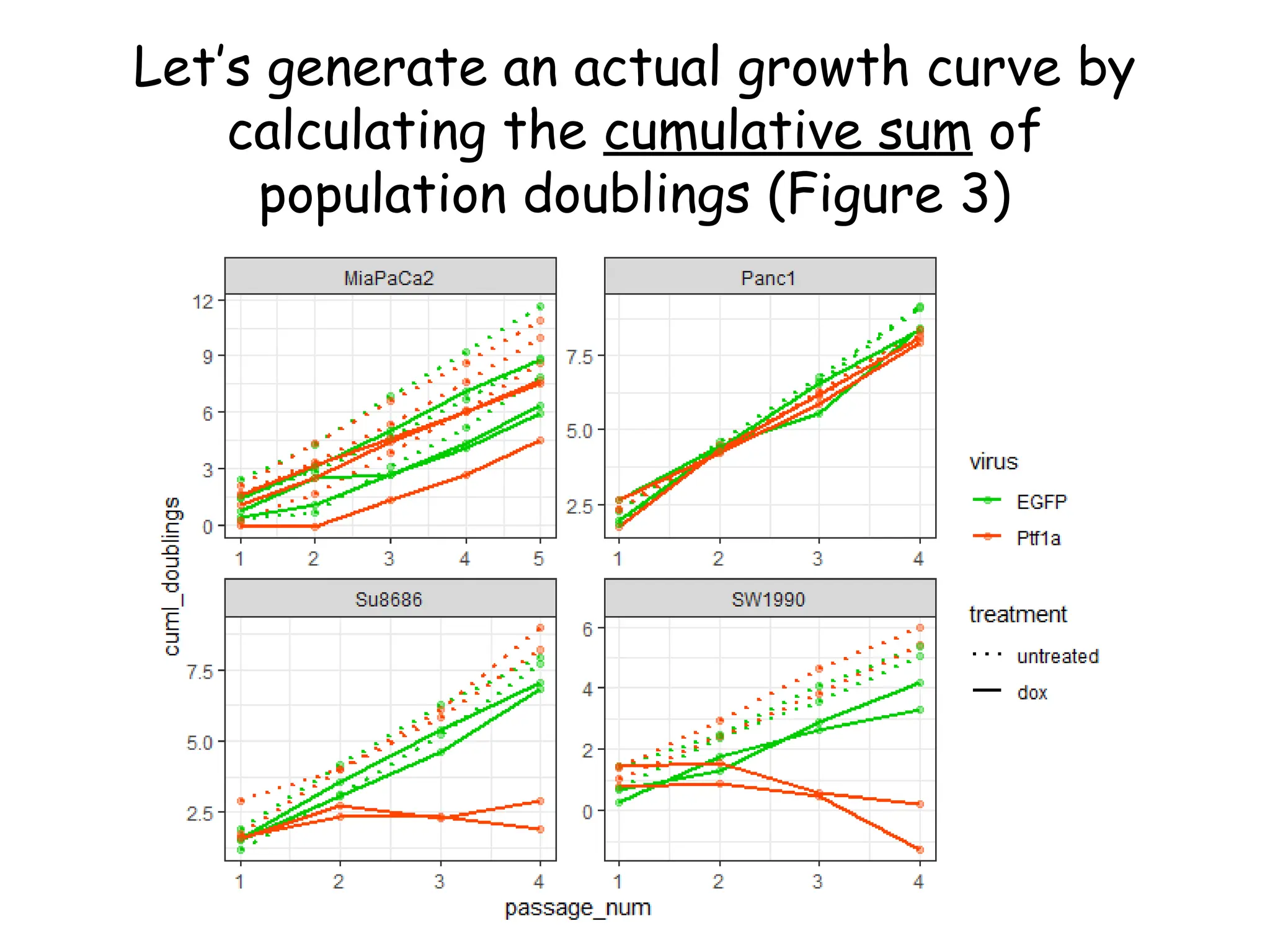
Let’s generate an actual growth curve by
calculating the cumulative sum of
population doublings (Figure 3)
pdac_fold <- group_by(pdac_fold, line, experiment, virus, treatment) %>%
mutate(cuml_doublings=cumsum(doublings)) %>% ungroup() %>% print()
# how does this look when plotted?
ggplot(pdac_fold, aes(x=passage_num, y=cuml_doublings,
group=interaction(experiment, virus, treatment),
col=virus, lty=treatment)) +
geom_line(size=0.75) +
geom_point(alpha=0.4) +
scale_color_manual(values=palette) +
scale_shape_manual(values=c(1,16)) +
scale_linetype_manual(values=c(3,1)) +
facet_wrap(~line, scales='free') +
theme_bw()
Let’s generate an actual growth curve by
calculating the cumulative sum of
population doublings (Figure 3)
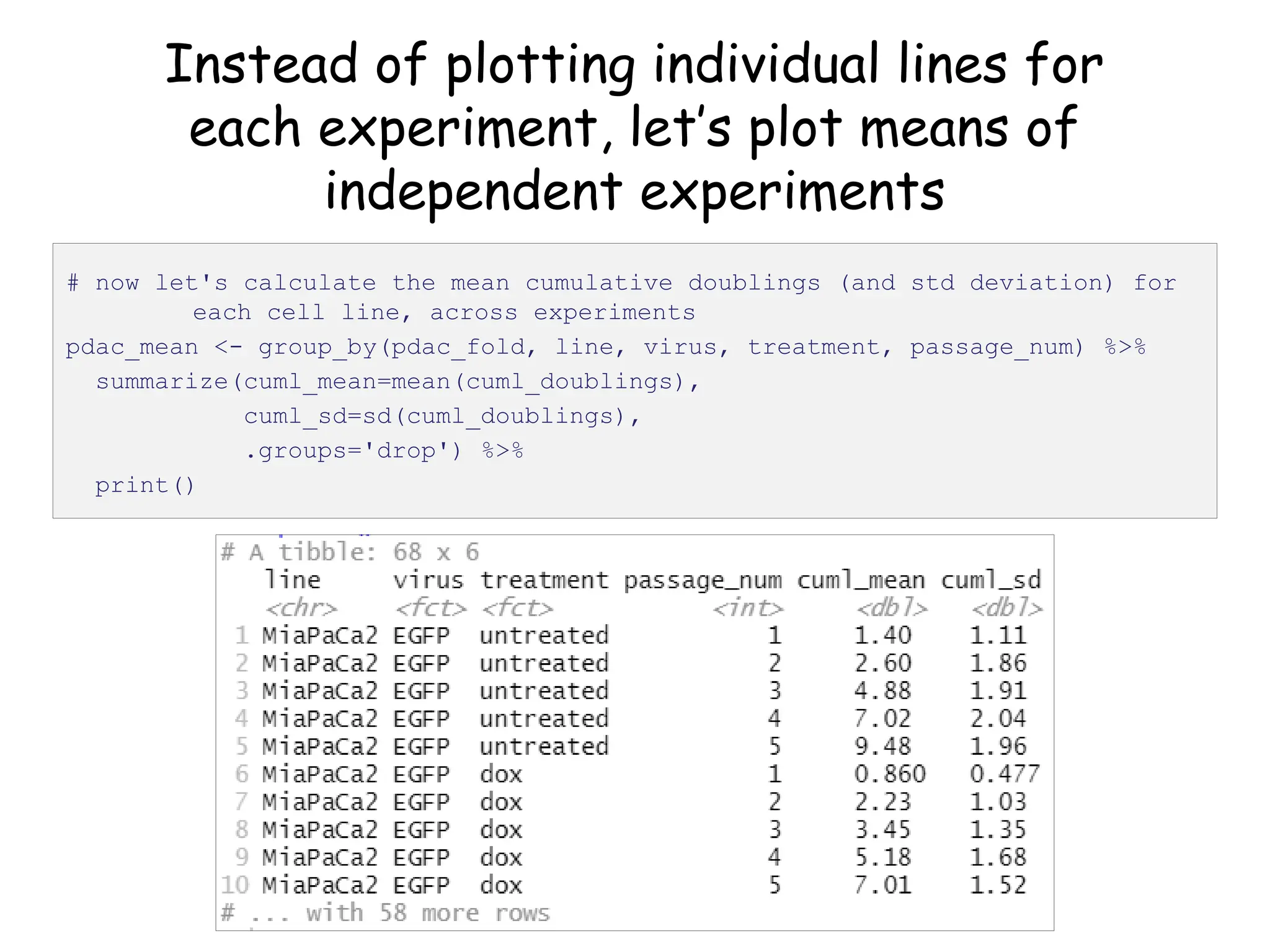
Instead of plotting individual lines for
each experiment, let’s plot means of
independent experiments
# now let's calculate the mean cumulative doublings (and std deviation) for
each cell line, across experiments
pdac_mean <- group_by(pdac_fold, line, virus, treatment, passage_num) %>%
summarize(cuml_mean=mean(cuml_doublings),
cuml_sd=sd(cuml_doublings),
.groups='drop') %>%
print()
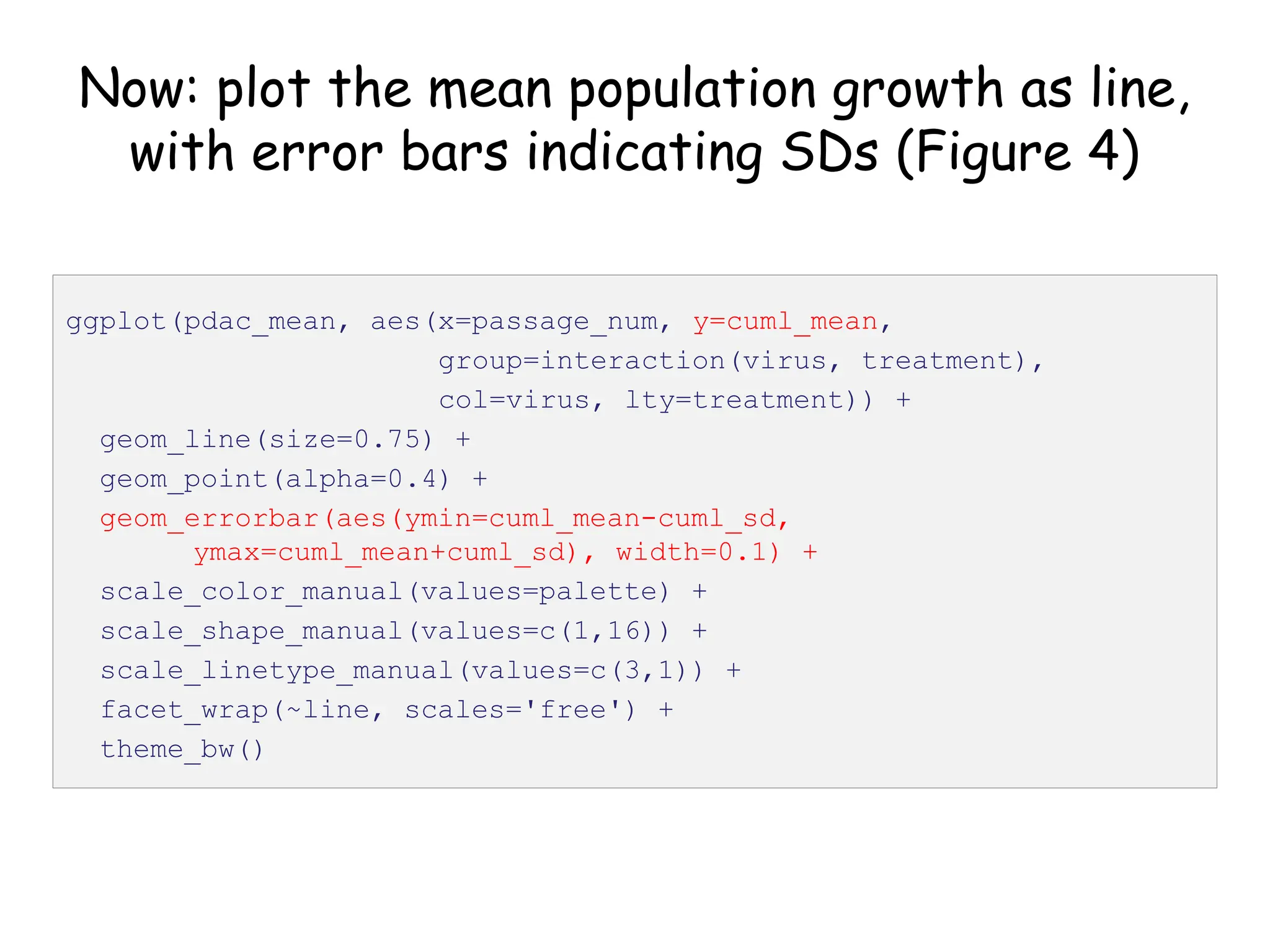
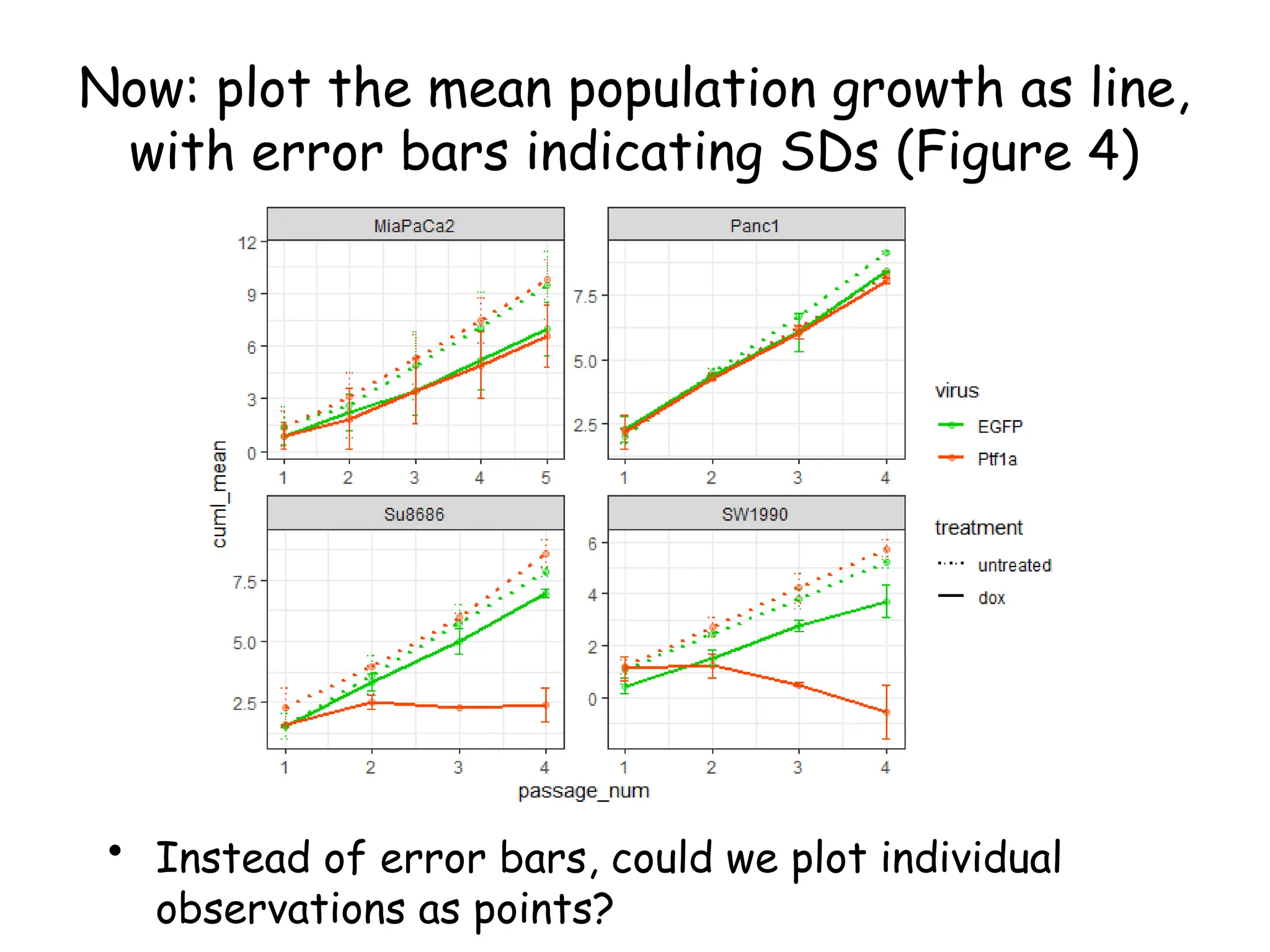
Now: plot the mean population growth as line,
with error bars indicating SDs (Figure 4)
ggplot(pdac_mean, aes(x=passage_num, y=cuml_mean,
group=interaction(virus, treatment),
col=virus, lty=treatment)) +
geom_line(size=0.75) +
geom_point(alpha=0.4) +
geom_errorbar(aes(ymin=cuml_mean-cuml_sd,
ymax=cuml_mean+cuml_sd), width=0.1) +
scale_color_manual(values=palette) +
scale_shape_manual(values=c(1,16)) +
scale_linetype_manual(values=c(3,1)) +
facet_wrap(~line, scales='free') +
theme_bw()
Now: plot the mean population growth as line,
with error bars indicating SDs (Figure 4)
• Instead of error bars, could we plot individual
observations as points?
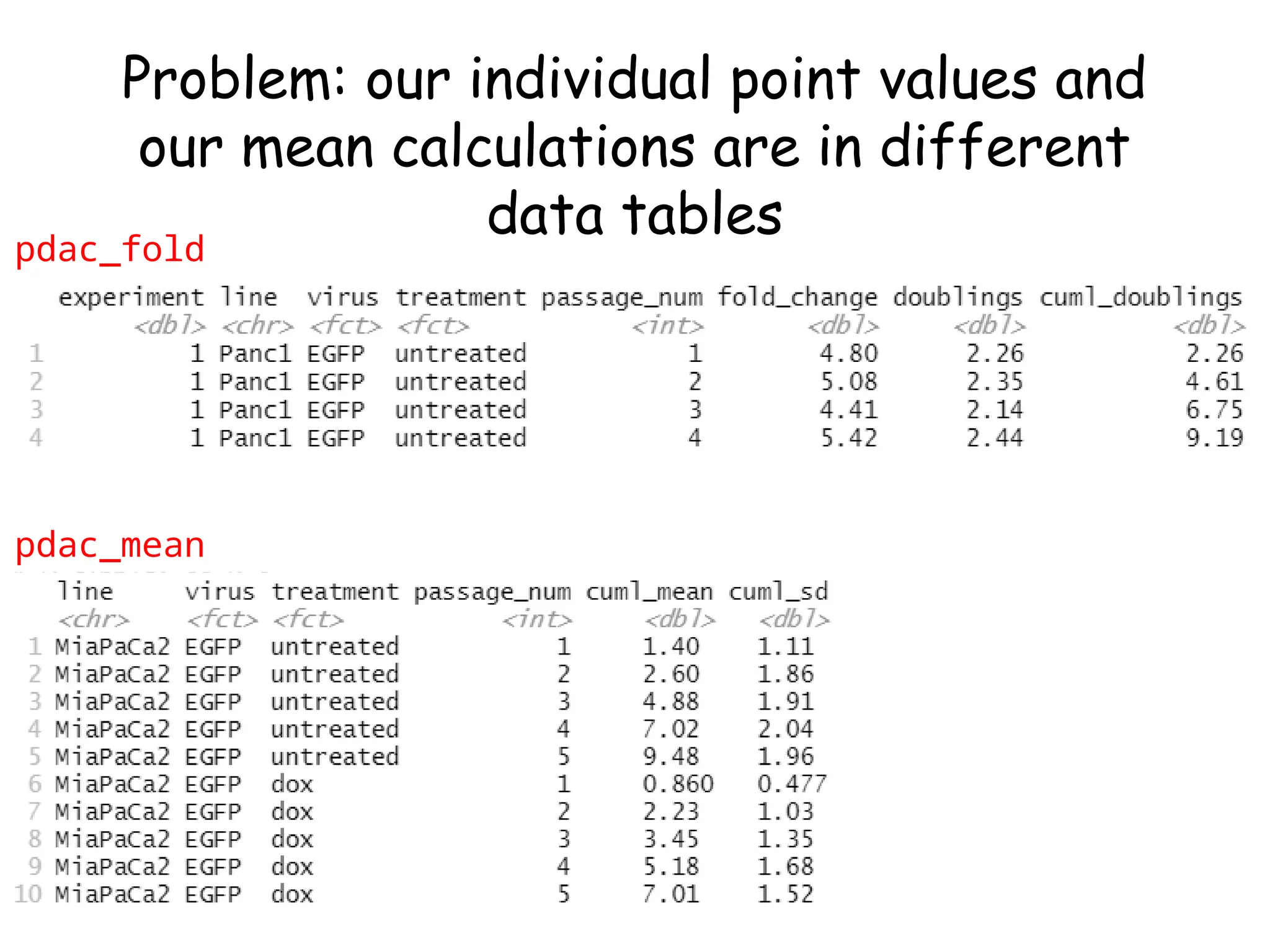
Problem: our individual point values and
our mean calculations are in different
data tables
pdac_mean
pdac_fold
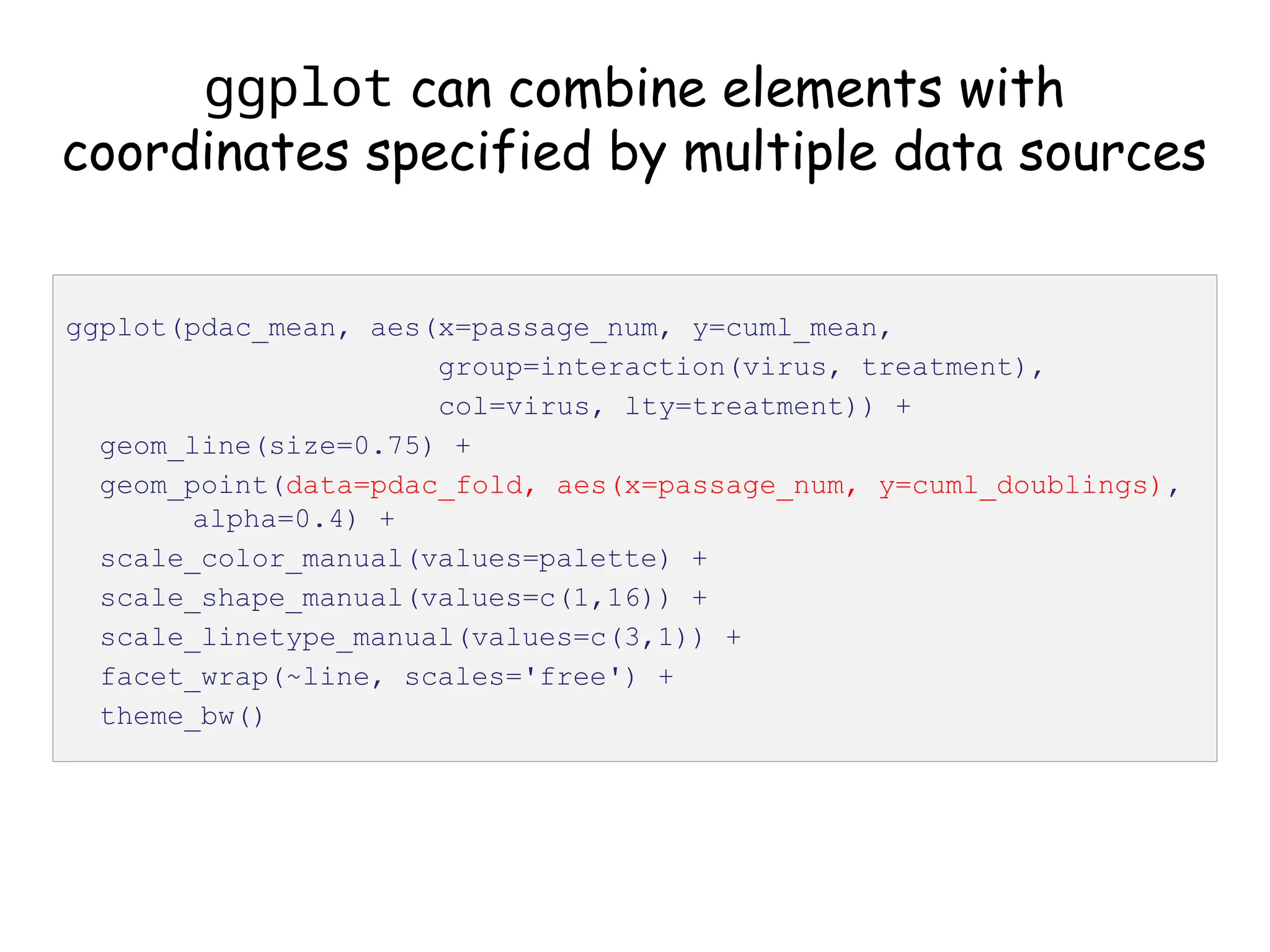
ggplot can combine elements with
coordinates specified by multiple data sources
ggplot(pdac_mean, aes(x=passage_num, y=cuml_mean,
group=interaction(virus, treatment),
col=virus, lty=treatment)) +
geom_line(size=0.75) +
geom_point(data=pdac_fold, aes(x=passage_num, y=cuml_doublings),
alpha=0.4) +
scale_color_manual(values=palette) +
scale_shape_manual(values=c(1,16)) +
scale_linetype_manual(values=c(3,1)) +
facet_wrap(~line, scales='free') +
theme_bw()
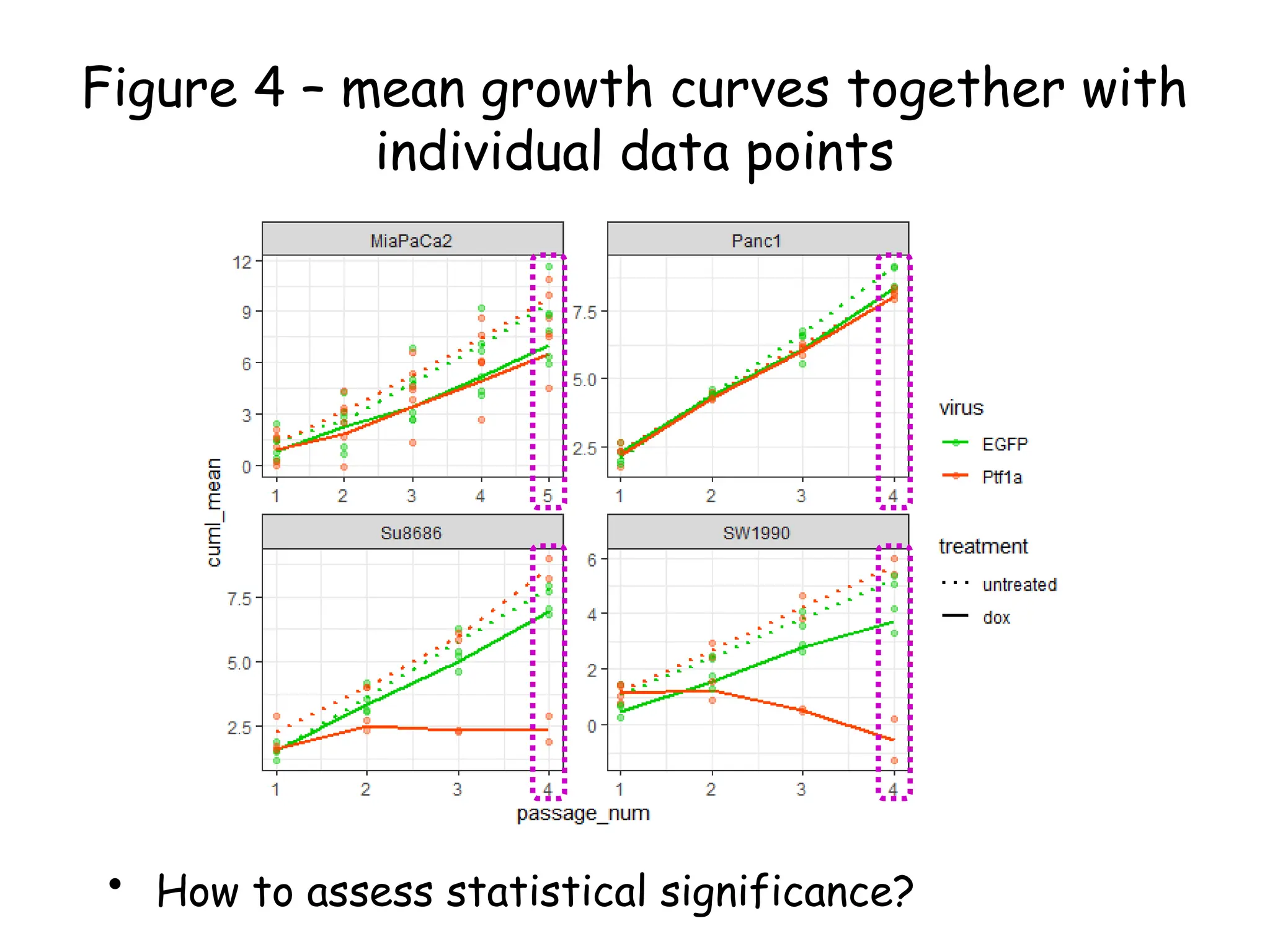
Figure 4 – mean growth curves together with
individual data points
• How to assess statistical significance?
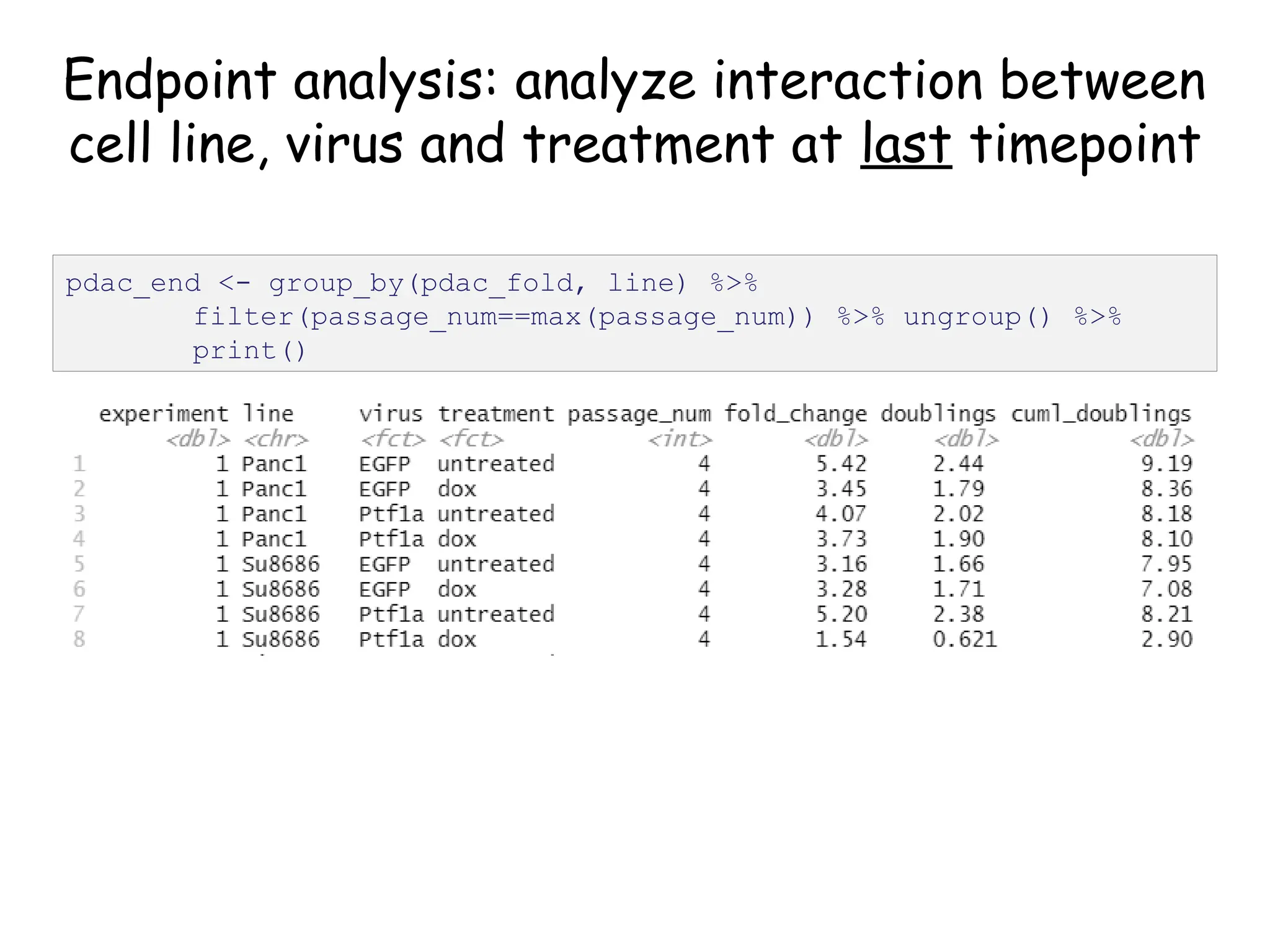
Endpoint analysis: analyze interaction between
cell line, virus and treatment at last timepoint
pdac_end <- group_by(pdac_fold, line) %>%
filter(passage_num==max(passage_num)) %>% ungroup() %>%
print()
Create nested tibble with each cell line’s data
separated out
pdac_fold_nest <- group_by(pdac_end, line) %>% nest() %>%
ungroup() %>% print()
# look inside the first one (Panc1)
print(pdac_fold_nest$data[[1]])
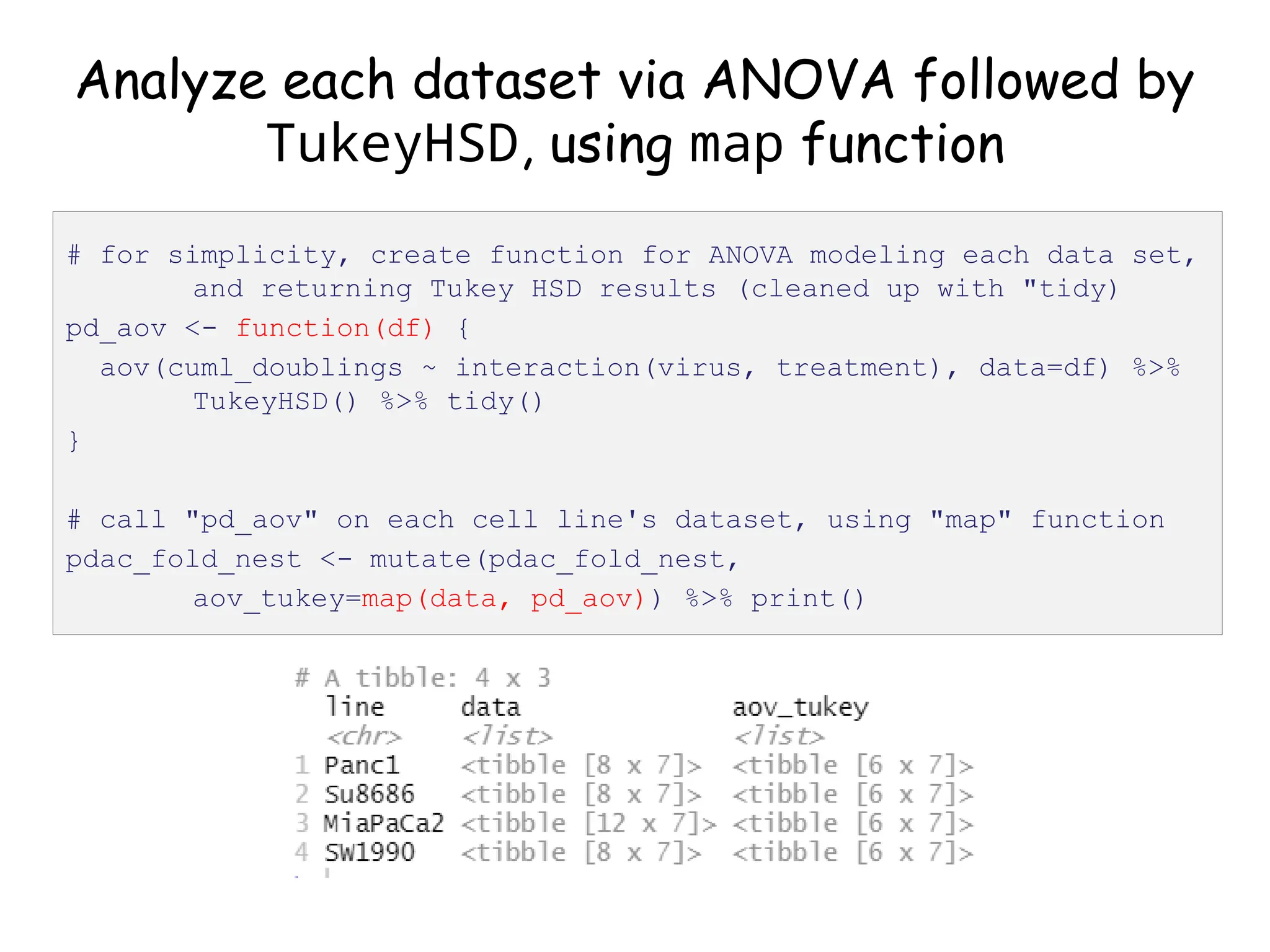
Analyze each dataset via ANOVA followed by
TukeyHSD, using map function
# for simplicity, create function for ANOVA modeling each data set,
and returning Tukey HSD results (cleaned up with "tidy)
pd_aov <- function(df) {
aov(cuml_doublings ~ interaction(virus, treatment), data=df) %>%
TukeyHSD() %>% tidy()
}
# call "pd_aov" on each cell line's dataset, using "map" function
pdac_fold_nest <- mutate(pdac_fold_nest,
aov_tukey=map(data, pd_aov)) %>% print()
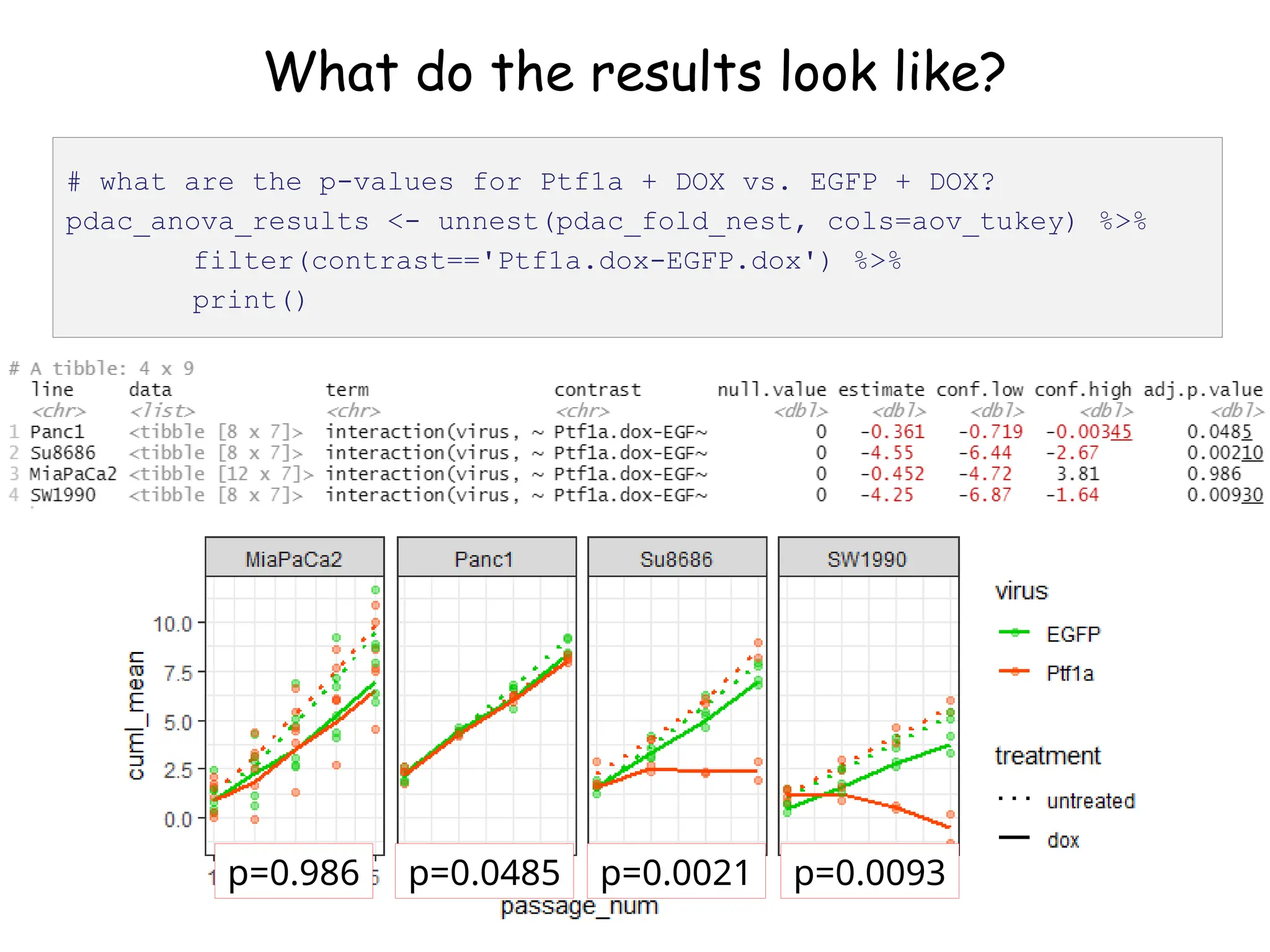
What do the results look like?
# let's look at the first one (Panc1)
pdac_fold_nest$aov_tukey[[1]]
What do the results look like?
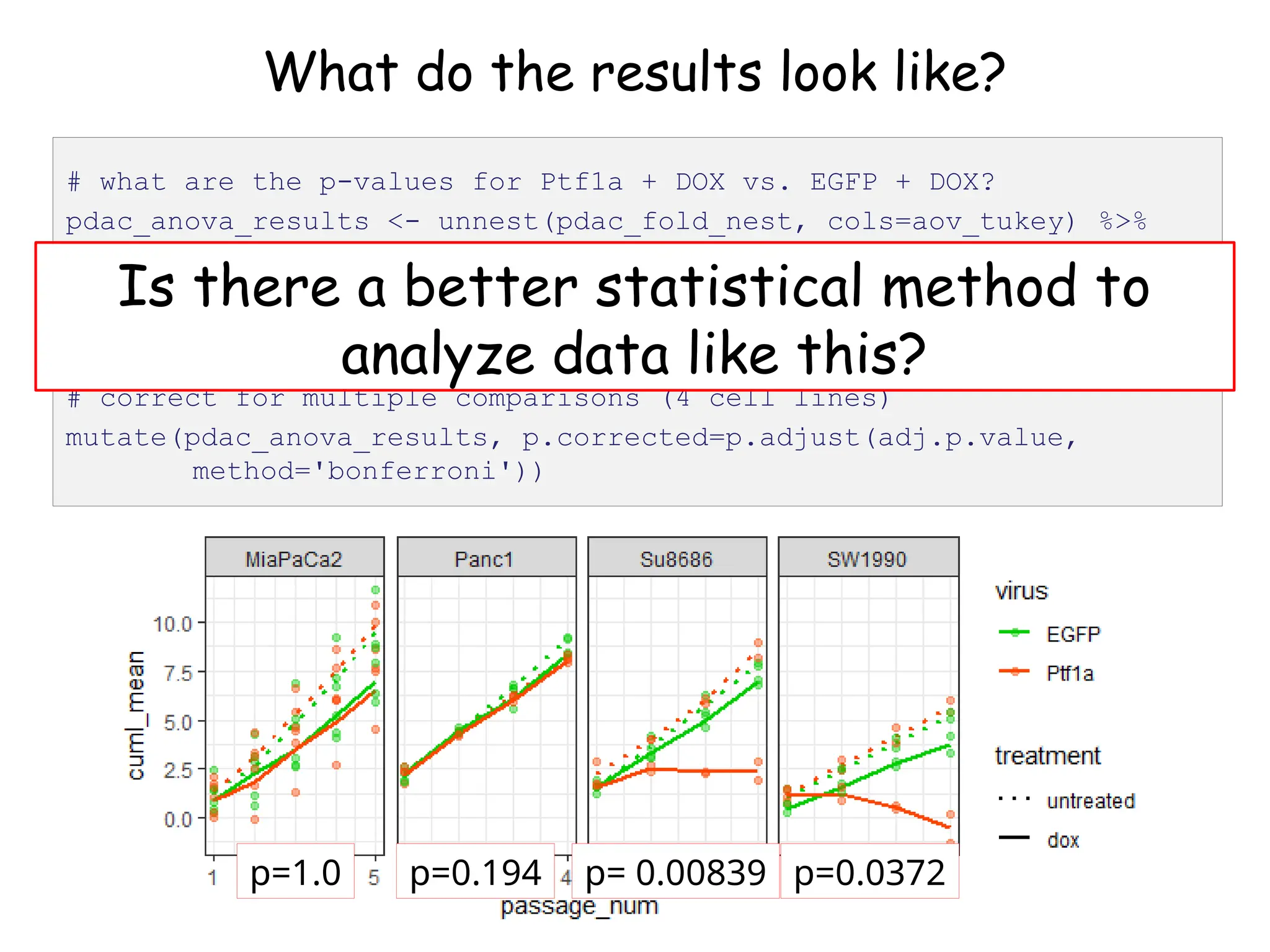
# what are the p-values for Ptf1a + DOX vs. EGFP + DOX?
pdac_anova_results <- unnest(pdac_fold_nest, cols=aov_tukey) %>%
filter(contrast=='Ptf1a.dox-EGFP.dox') %>%
print()
p=0.986 p=0.0485 p=0.0021 p=0.0093
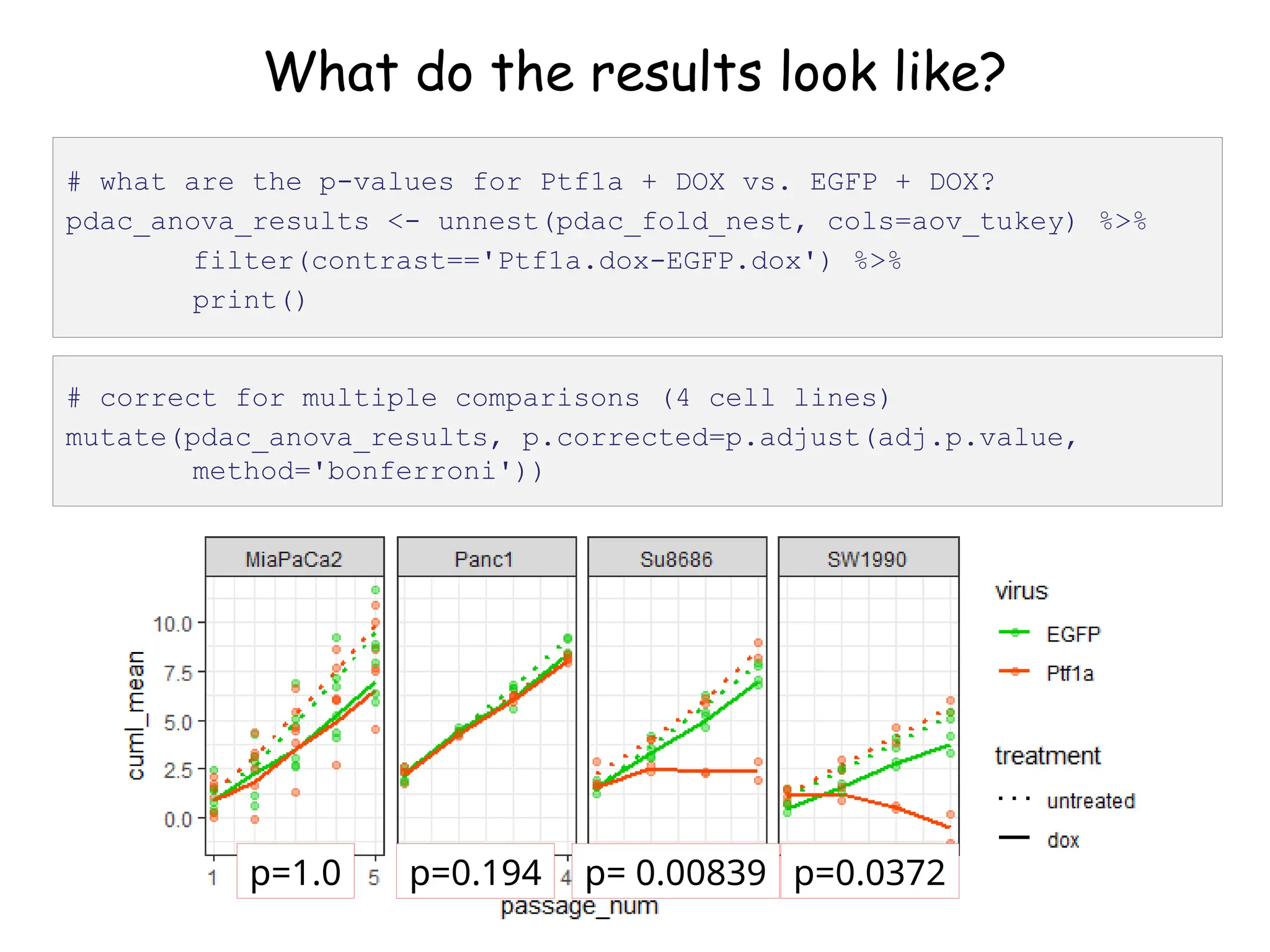
What do the results look like?
# correct for multiple comparisons (4 cell lines)
mutate(pdac_anova_results, p.corrected=p.adjust(adj.p.value,
method='bonferroni'))
p=1.0 p=0.194 p= 0.00839 p=0.0372
# what are the p-values for Ptf1a + DOX vs. EGFP + DOX?
pdac_anova_results <- unnest(pdac_fold_nest, cols=aov_tukey) %>%
filter(contrast=='Ptf1a.dox-EGFP.dox') %>%
print()
What do the results look like?
# correct for multiple comparisons (4 cell lines)
mutate(pdac_anova_results, p.corrected=p.adjust(adj.p.value,
method='bonferroni'))
p=1.0 p=0.194 p= 0.00839 p=0.0372
# what are the p-values for Ptf1a + DOX vs. EGFP + DOX?
pdac_anova_results <- unnest(pdac_fold_nest, cols=aov_tukey) %>%
filter(contrast=='Ptf1a.dox-EGFP.dox') %>%
print()
Is there a better statistical method to
analyze data like this?

Murtaugh 2022 Appl Comp Genomics Tidyverse lecture.pptx-1.pptx

  • 1.
    Charlie Murtaugh EIHG 4420B 801-581-5958 murtaugh@genetics.utah.edu Welcometo the Tidyverse https://twitter.com/mostbiggestdata/status/
  • 2.
    Recommended reading • Rfor Data Science – full text is free on web, but book is easier to read • H. Wickham (2014) Tidy Data. J. Stat. Software. v59. http://dx.doi.org/10.18637/jss.v059 .i10 • K.W. Broman and K.H. Woo (2018) Data Organization in Spreadsheets. Am. Statistician, v72. https://doi.org/10.1080/00031305.2 017.1375989
  • 3.
    Outline • Introduction totidy data and the Tidyverse – why bother? • Getting started with Tidyverse functions – playing with toy data sets • Using Tidyverse in a real biology context – proliferation timelapse data
  • 4.
    What is thetidyverse? • Collection of packages and functions designed to enhance visualization and analysis of data, as well as simplify writing and reading R code • Installing “tidyverse” package brings along all key sub-packages including ggplot2, dplyr, magrittr, stringr, readr • Key concept: tidy data Hadley Wickham Chief Scientist, RStudio
  • 5.
    Tidy data • Wickham’sconcept: In tidy data: 1. Each variable forms a column. 2. Each observation forms a row. 3. Each type of observational unit forms a table. Wickham, J. Stat. Software 2014
  • 6.
    Usefulness of tidydata • WHO tuberculosis cases per country, broken down by gender and age of patients • Original dataset (“top left corner” of large spreadsheet) Wickham, J. Stat. Software 2014
  • 7.
    Usefulness of tidydata • Tidied dataset Wickham, J. Stat. Software 2014 aka “narrow” data (tidyverse pivot_longer() function)
  • 8.
    Tidy data approach •Exploratory data analysis – tools for easily examining and visualizing your data, developing approaches for statistical analysis, potentially changing your data- gathering (experimental) methods
  • 9.
    Getting started withTidyverse functions %>% “pipe” output from one function to another pivot_longer convert spreadsheet-type data to tidy format (aka gather) separate split up single descriptor variable (e.g. spreadsheet column head) into multiple variables group_by organize data according to descriptor variables summarize extract summary information from grouped data filter isolate subsets of data
  • 10.
    Creating a toydataset – tibble format • tibbles are like data.frame objects, but they look nicer and display helpful information • note the use of the %>% operator, which “pipes” output of one function (bind_cols) to another (print) library(tidyverse) library(cowplot) temp_df <- bind_cols(sample=c(1,2,3), temp=c(-40, 32, 98.6)) %>% print() ## # A tibble: 3 x 2 ## sample temp ## <dbl> <dbl> ## 1 1 -40 ## 2 2 32 ## 3 3 98.6
  • 11.
    Piping your codefor easier writing and reading • Code involving sequential operations on the same data can be much more readable with pipes • Of particular use: %>% print() at the end of a line of code will show you what that code produced # same result, different ways to get there test <- c(1, 2, 3, 4) test_sqrt <- sqrt(test) print(test_sqrt) c(1, 2, 3, 4) %>% sqrt() %>% print() [1] 1.000000 1.414214 1.732051 2.000000
  • 12.
    Piping your codefor easier writing and reading • Code involving sequential operations on the same data can be much more readable with pipes • Of particular use: %>% print() at the end of a line of code will show you what that code produced # same result, different ways to get there test <- c(1, 2, 3, 4) test_sqrt <- sqrt(test) print(test_sqrt) c(1, 2, 3, 4) %>% sqrt() %>% print() [1] 1.000000 1.414214 1.732051 2.000000 https://twitter.com/strnr/status/1047203915232661505
  • 13.
    Creating new columnsor changing existing ones with mutate • A nice trick of mutate: you can put multiple sequential operations into a single call, and even refer back to variables you just created in the same line of code # use "mutate" to create new column with temperature in Celsius temp_df <- mutate(temp_df, tempC=(temp-32)*5/9) %>% print() ## # A tibble: 3 x 3 ## sample temp tempC ## <dbl> <dbl> <dbl> ## 1 1 -40 -40 ## 2 2 32 0 ## 3 3 98.6 37
  • 14.
    One mutate, multipleoperations # create toy data, again temp_df <- bind_cols(time=c(1,2,3), temp=c(-40, 32, 98.6)) # now let's add both Celsius and Kelvin temperatures in one command temp_df <- mutate(temp_df, tempC=(temp-32)*5/9, tempK=tempC+273.15) %>% rename(tempF = temp) %>% print() ## # A tibble: 3 x 4 ## time tempF tempC tempK ## <dbl> <dbl> <dbl> <dbl> ## 1 1 -40 -40 233. ## 2 2 32 0 273. ## 3 3 98.6 37 310.
  • 15.
    Summarizing data withsummarize – a toy example • Let’s compare car models based on number of cylinders data(mpg) print(mpg) # just to check what the data look like ## # A tibble: 234 x 11 ## manufacturer model displ year cyl trans drv cty hwy fl class ## <chr> <chr> <dbl> <int> <int> <chr> <chr> <int> <int> <chr> <chr> ## 1 audi a4 1.8 1999 4 auto… f 18 29 p comp… ## 2 audi a4 1.8 1999 4 manu… f 21 29 p comp… ## 3 audi a4 2 2008 4 manu… f 20 31 p comp… ## 4 audi a4 2 2008 4 auto… f 21 30 p comp… ## 5 audi a4 2.8 1999 6 auto… f 16 26 p comp… ## 6 audi a4 2.8 1999 6 manu… f 18 26 p comp… ## 7 audi a4 3.1 2008 6 auto… f 18 27 p comp… ## 8 audi a4 q… 1.8 1999 4 manu… 4 18 26 p comp… ## 9 audi a4 q… 1.8 1999 4 auto… 4 16 25 p comp… ## 10 audi a4 q… 2 2008 4 manu… 4 20 28 p comp… ## # … with 224 more rows Tidyverse_lecture_proliferation_code_2022.R
  • 16.
    ## # Atibble: 234 x 11 ## # Groups: cyl [4] ## manufacturer model displ year cyl trans drv cty hwy fl class ## <chr> <chr> <dbl> <int> <int> <chr> <chr> <int> <int> <chr> <chr> ## 1 audi a4 1.8 1999 4 auto… f 18 29 p comp… ## 2 audi a4 1.8 1999 4 manu… f 21 29 p comp… ## 3 audi a4 2 2008 4 manu… f 20 31 p comp… ## 4 audi a4 2 2008 4 auto… f 21 30 p comp… ## 5 audi a4 2.8 1999 6 auto… f 16 26 p comp… ## 6 audi a4 2.8 1999 6 manu… f 18 26 p comp… ## 7 audi a4 3.1 2008 6 auto… f 18 27 p comp… ## 8 audi a4 q… 1.8 1999 4 manu… 4 18 26 p comp… ## 9 audi a4 q… 1.8 1999 4 auto… 4 16 25 p comp… ## 10 audi a4 q… 2 2008 4 manu… 4 20 28 p comp… ## # … with 224 more rows group_by: organize data based on descriptor variable • Can group data by as many variables as you have mpg_by_cyl <- group_by(mpg, cyl) %>% print()
  • 17.
    ## # Atibble: 4 x 6 ## cyl n hwy_mean hwy_sd displ_mean displ_sd ## <int> <int> <dbl> <dbl> <dbl> <dbl> ## 1 4 81 28.8 4.52 2.15 0.315 ## 2 5 4 28.8 0.5 2.5 0 ## 3 6 79 22.8 3.69 3.41 0.472 ## 4 8 70 17.6 3.26 5.13 0.589 summarize: perform functions on groups within dataset • summarize returns new data frame, with grouping variable(s) on left and function results on right mpg_cyl_summarize <- summarize(mpg_by_cyl, n=n(), hwy_mean=mean(hwy), hwy_sd=sd(hwy), displ_mean=mean(displ), displ_sd=sd(displ)) print(mpg_cyl_summarize)
  • 18.
    filter to lookat specific subsets of data • Let’s find out who makes the best automatic- transmission cars in terms of highway mileage (top 25%) • We can call filter with logical arguments, return only data that satisfy them mpg_auto <- filter(mpg, str_detect(trans, 'auto')) mpg_auto_best <- filter(mpg_auto, hwy > quantile(hwy, 0.75)) mpg_auto_best_who <- count(mpg_auto_best, manufacturer) %>% print() ## # A tibble: 9 x 2 ## manufacturer n ## <chr> <int> ## 1 audi 4 ## 2 chevrolet 3 ## 3 honda 4 ## 4 hyundai 3 ## 5 nissan 2 ## 6 pontiac 2 ## 7 subaru 1 ## 8 toyota 9 ## 9 volkswagen 7
  • 19.
    filter to lookat specific subsets of data • Let’s find out who makes the best automatic- transmission cars in terms of highway mileage (top 25%) • We can call filter with logical arguments, return only data that satisfy them mpg_auto <- filter(mpg, str_detect(trans, 'auto')) mpg_auto_best <- filter(mpg_auto, hwy > quantile(hwy, 0.75)) mpg_auto_best_who <- count(mpg_auto_best, manufacturer) %>% print() ## # A tibble: 9 x 2 ## manufacturer n ## <chr> <int> ## 1 audi 4 ## 2 chevrolet 3 ## 3 honda 4 ## 4 hyundai 3 ## 5 nissan 2 ## 6 pontiac 2 ## 7 subaru 1 ## 8 toyota 9 ## 9 volkswagen 7
  • 20.
    Making it simplerwith the pipe filter(mpg, str_detect(trans, 'auto')) %>% filter(hwy > quantile(hwy, 0.75)) %>% count(manufacturer) %>% ggplot(aes(x=manufacturer, y=n)) + geom_bar(stat='identity') + xlab('manufacturer') + ylab('number of models') + theme(axis.text.x=element_text(angle = 45, hjust=1))
  • 21.
    Making it simplerwith the pipe filter(mpg, str_detect(trans, 'auto')) %>% filter(hwy > quantile(hwy, 0.75)) %>% count(manufacturer) %>% arrange(desc(n)) %>% mutate(manufacturer=factor(manufacturer, levels=manufacturer)) %>% ggplot(aes(x=manufacturer, y=n)) + geom_bar(stat='identity') + xlab('manufacturer') + ylab('number of models') + theme(axis.text.x=element_text(angle = 45, hjust=1))
  • 22.
    ggplot2 package –the “grammar of graphics” • ggplot is extremely powerful and extremely complicated/esoteric function • very nice introduction by Joachim Goedhart, for biologists: https://thenode.biologists.com/ visualizing-data-one-more-time/ education/ • don’t feel bad about consulting Google/StackExchange!
  • 23.
    Analyzing proliferation data– wrangling, transforming and visualizing • Cell counting and replating assay (long-term proliferation) of human pancreatic cancer cell lines: Tidyverse_lecture_proliferation_code_2022.R PDAC_3T3_data_simplified.xlsx • Key points of this experiment are as follows: – Data consists of counts of cells plated into 35 mm tissue culture dish on day 0, and counts of cells harvested 3 days later – repeated over 4-5 passages total – Four cell lines total: Panc1, MiaPaCa2, Su8686, SW1990 – Cells express either EGFP (negative control) or Ptf1a, a TF that we hypothesize will inhibit their proliferation, inducible with doxycycline (DOX); untreated cells used as controls – 2-3 independent experiments per line
  • 24.
    “3T3 assay” –measuring cumulative population growth over time • 3T3 = 3 days between splits, initially plated at 3x10⁵ cells per 50 mm dish • Easy and quantitative approach for measuring long-term effects on cell proliferation and survival Todaro and Green, J Cell Biol 1963
  • 25.
    Original data inExcel spreadsheet experiment plating sample line virus treatment plating_1 plating_2 plating_3 plating_4 plating_5 harvest_1 harvest_2 harvest_3 harvest_4 harvest_5 1 4/21/2018 1 Panc1 EGFP 1.77 1.77 1.77 1.77 8.5 9.0 7.8 9.6 1 4/21/2018 2 Panc1 EGFP dox 1.77 1.77 1.77 1.77 6.8 9.5 8.2 6.1 1 4/21/2018 3 Panc1 Ptf1a 1.77 1.77 1.77 1.77 8.8 7.9 5.7 7.2 1 4/21/2018 4 Panc1 Ptf1a dox 1.77 1.77 1.77 1.77 5.8 11.0 6.4 6.6 1 4/21/2018 5 Su8686 EGFP 1.77 1.77 1.77 1.77 6.7 8.5 7.6 5.6 1 4/21/2018 6 Su8686 EGFP dox 1.77 1.77 1.77 1.77 5.2 7.2 6.1 5.8 1 4/21/2018 7 Su8686 Ptf1a 1.77 1.77 1.77 1.77 13.0 3.8 6.4 9.2 1 4/21/2018 8 Su8686 Ptf1a dox 1.77 1.77 1.77 1.30 5.3 3.9 1.3 2.0 2 4/22/2018 1 MiaPaCa2 EGFP 1.77 1.77 1.77 2.00 2.00 5.0 4.6 6.1 8.0 9.3 2 4/22/2018 2 MiaPaCa2 EGFP dox 1.77 1.77 1.77 2.00 2.00 3.0 5.8 2.0 5.5 7.1 2 4/22/2018 3 MiaPaCa2 Ptf1a 1.77 1.77 1.77 2.00 2.00 5.8 5.5 7.2 9.7 10.0 2 4/22/2018 4 MiaPaCa2 Ptf1a dox 1.77 1.77 1.77 2.00 2.00 3.7 4.8 6.6 6.0 6.4 2 4/22/2018 5 SW1990 EGFP 1.77 1.77 1.77 1.77 2.9 5.7 3.9 5.1 2 4/22/2018 6 SW1990 EGFP dox 1.77 1.77 1.77 1.77 2.1 5.1 3.2 2.8 2 4/22/2018 7 SW1990 Ptf1a 1.77 1.77 1.77 1.77 3.6 4.7 4.6 5.4 2 4/22/2018 8 SW1990 Ptf1a dox 1.77 1.77 1.77 1.33 3.1 1.9 1.3 0.4 # cells plated at start of first passage (x105 ) # cells present in dish at end of first passage (3 days later) (x105 )
  • 26.
    Load data intoR and take a quick look pdac <- read_excel('PDAC_3T3_data_simplified.xlsx') %>% print() • read_excel (like other tidyverse read functions) automatically converts data into tibble format pdac <- mutate(pdac, treatment = replace_na(treatment, 'untreated')) pdac <- mutate(pdac, treatment=factor(treatment, levels = c('untreated', 'dox')), virus=factor(virus, levels = c('EGFP', 'Ptf1a')))
  • 27.
    convert data fromwide format to narrow/tidy with pivot_longer* pdac_tidy <- pivot_longer(pdac, contains(c('plating_', 'harvest_')), names_to='observation', values_to='cell_num') %>% print() * function formerly known as gather
  • 28.
    convert data fromwide format to narrow/tidy with pivot_longer* pdac_tidy <- pivot_longer(pdac, contains(c('plating_', 'harvest_')), names_to='observation', values_to='cell_num') %>% print() * function formerly known as gather # get rid of unnecessary variables pdac_tidy <- select(pdac_tidy, -plating, -sample) # remove any missing elements pdac_tidy <- filter(pdac_tidy, !is.na(cell_num)) %>% print()
  • 29.
    Split observation variableinto multiple variables with separate pdac_tidy <- separate(pdac_tidy, observation, into=c('observation', 'passage_num'), convert=T) %>% print()
  • 30.
    Let’s make agraph (Figure 1) • Plotting every harvest number as a point, with lines connecting serial observations over time palette <- c('green3', 'orangered’) # nice palette for graphing GFP (green) vs Ptf1a (orange) filter(pdac_tidy, observation=='harvest') %>% ggplot(aes(x=passage_num, y=cell_num, group=interaction(experiment, virus, treatment), col=virus, lty=treatment, pch=treatment)) + geom_line(size=0.75) + geom_point(alpha=0.4) + scale_color_manual(values=palette) + scale_shape_manual(values=c(1,16)) + scale_linetype_manual(values=c(3,1)) + facet_wrap(~line, scales='free') + theme_bw()
  • 31.
    Let’s make agraph (Figure 1) • Wow, much lines, very mess
  • 32.
    Let’s convert fromabsolute cell number to fold-increase (relative to # plated) # let's make the data wider again, temporarily pdac_fold <- pivot_wider(pdac_tidy, names_from=observation, values_from=cell_num) %>% print() pdac_fold <- mutate(pdac_fold, fold_change=harvest/plating, .keep='unused’) # let's convert fold-change to population doublings, via log2 pdac_fold <- mutate(pdac_fold, doublings=log2(fold_change)) %>% print()
  • 33.
    Let’s make agraph (Figure 2) ggplot(pdac_fold, aes(x=passage_num, y=doublings, group=interaction(experiment, virus, treatment), col=virus, lty=treatment)) + geom_line(size=0.75) + geom_point(alpha=0.4) + scale_color_manual(values=palette) + scale_shape_manual(values=c(1,16)) + scale_linetype_manual(values=c(3,1)) + facet_wrap(~line, scales='free') + theme_bw()
  • 34.
    Let’s generate anactual growth curve by calculating the cumulative sum of population doublings (Figure 3) pdac_fold <- group_by(pdac_fold, line, experiment, virus, treatment) %>% mutate(cuml_doublings=cumsum(doublings)) %>% ungroup() %>% print() # how does this look when plotted? ggplot(pdac_fold, aes(x=passage_num, y=cuml_doublings, group=interaction(experiment, virus, treatment), col=virus, lty=treatment)) + geom_line(size=0.75) + geom_point(alpha=0.4) + scale_color_manual(values=palette) + scale_shape_manual(values=c(1,16)) + scale_linetype_manual(values=c(3,1)) + facet_wrap(~line, scales='free') + theme_bw()
  • 35.
    Let’s generate anactual growth curve by calculating the cumulative sum of population doublings (Figure 3)
  • 36.
    Instead of plottingindividual lines for each experiment, let’s plot means of independent experiments # now let's calculate the mean cumulative doublings (and std deviation) for each cell line, across experiments pdac_mean <- group_by(pdac_fold, line, virus, treatment, passage_num) %>% summarize(cuml_mean=mean(cuml_doublings), cuml_sd=sd(cuml_doublings), .groups='drop') %>% print()
  • 37.
    Now: plot themean population growth as line, with error bars indicating SDs (Figure 4) ggplot(pdac_mean, aes(x=passage_num, y=cuml_mean, group=interaction(virus, treatment), col=virus, lty=treatment)) + geom_line(size=0.75) + geom_point(alpha=0.4) + geom_errorbar(aes(ymin=cuml_mean-cuml_sd, ymax=cuml_mean+cuml_sd), width=0.1) + scale_color_manual(values=palette) + scale_shape_manual(values=c(1,16)) + scale_linetype_manual(values=c(3,1)) + facet_wrap(~line, scales='free') + theme_bw()
  • 38.
    Now: plot themean population growth as line, with error bars indicating SDs (Figure 4) • Instead of error bars, could we plot individual observations as points?
  • 39.
    Problem: our individualpoint values and our mean calculations are in different data tables pdac_mean pdac_fold
  • 40.
    ggplot can combineelements with coordinates specified by multiple data sources ggplot(pdac_mean, aes(x=passage_num, y=cuml_mean, group=interaction(virus, treatment), col=virus, lty=treatment)) + geom_line(size=0.75) + geom_point(data=pdac_fold, aes(x=passage_num, y=cuml_doublings), alpha=0.4) + scale_color_manual(values=palette) + scale_shape_manual(values=c(1,16)) + scale_linetype_manual(values=c(3,1)) + facet_wrap(~line, scales='free') + theme_bw()
  • 41.
    Figure 4 –mean growth curves together with individual data points • How to assess statistical significance?
  • 42.
    Endpoint analysis: analyzeinteraction between cell line, virus and treatment at last timepoint pdac_end <- group_by(pdac_fold, line) %>% filter(passage_num==max(passage_num)) %>% ungroup() %>% print()
  • 43.
    Create nested tibblewith each cell line’s data separated out pdac_fold_nest <- group_by(pdac_end, line) %>% nest() %>% ungroup() %>% print() # look inside the first one (Panc1) print(pdac_fold_nest$data[[1]])
  • 44.
    Analyze each datasetvia ANOVA followed by TukeyHSD, using map function # for simplicity, create function for ANOVA modeling each data set, and returning Tukey HSD results (cleaned up with "tidy) pd_aov <- function(df) { aov(cuml_doublings ~ interaction(virus, treatment), data=df) %>% TukeyHSD() %>% tidy() } # call "pd_aov" on each cell line's dataset, using "map" function pdac_fold_nest <- mutate(pdac_fold_nest, aov_tukey=map(data, pd_aov)) %>% print()
  • 45.
    What do theresults look like? # let's look at the first one (Panc1) pdac_fold_nest$aov_tukey[[1]]
  • 46.
    What do theresults look like? # what are the p-values for Ptf1a + DOX vs. EGFP + DOX? pdac_anova_results <- unnest(pdac_fold_nest, cols=aov_tukey) %>% filter(contrast=='Ptf1a.dox-EGFP.dox') %>% print() p=0.986 p=0.0485 p=0.0021 p=0.0093
  • 47.
    What do theresults look like? # correct for multiple comparisons (4 cell lines) mutate(pdac_anova_results, p.corrected=p.adjust(adj.p.value, method='bonferroni')) p=1.0 p=0.194 p= 0.00839 p=0.0372 # what are the p-values for Ptf1a + DOX vs. EGFP + DOX? pdac_anova_results <- unnest(pdac_fold_nest, cols=aov_tukey) %>% filter(contrast=='Ptf1a.dox-EGFP.dox') %>% print()
  • 48.
    What do theresults look like? # correct for multiple comparisons (4 cell lines) mutate(pdac_anova_results, p.corrected=p.adjust(adj.p.value, method='bonferroni')) p=1.0 p=0.194 p= 0.00839 p=0.0372 # what are the p-values for Ptf1a + DOX vs. EGFP + DOX? pdac_anova_results <- unnest(pdac_fold_nest, cols=aov_tukey) %>% filter(contrast=='Ptf1a.dox-EGFP.dox') %>% print() Is there a better statistical method to analyze data like this?