Building your own Data Science
     platform in the cloud

   GUR FlautR – Paris, November 14th 2012
Who Am I
• Co-founder and Data Scientist at Dataiku

• Long-time data hacker
      –      Telco (Orange)
      –      Retail (Catalina Marketing, all major French retailers)
      –      High Tech (Apple)
      –      Social Gaming (Is Cool Entertainment)
      –      Data Provider (qunb)

• I love data and blending innovative technologies and methods
  to get the most out of a dataset.


03/12/2012                      Build Your Data Science Platform in the Cloud   2
Agenda

• Introducing Dataiku

• Motivations & building blocks

• Setting up the Data Science stack

• Annexes (with step-by-step tutorial)


03/12/2012          Build Your Data Science Platform in the Cloud   3
Your data lab accelerator
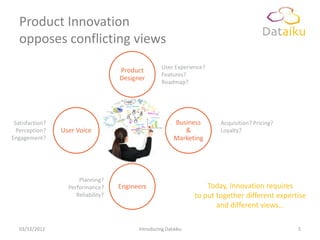
Product Innovation
   opposes conflicting views
                                                     User Experience?
                                     Product
                                                     Features?
                                     Designer
                                                     Roadmap?


 Satisfaction?                                            Business       Acquisition? Pricing?
                                       New
  Perception?    User Voice          Product ?
                                                             &           Loyalty?
Engagement?                                               Marketing


                       Planning?
                   Performance?      Engineers                       Today, Innovation requires
                      Reliability?                               to put together different expertise
                                                                        and different views…

   03/12/2012                              Introducing Dataiku                                   5
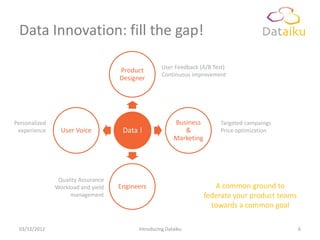
Data Innovation: fill the gap!

                                                    User Feedback (A/B Test)
                                    Product
                                                    Continuous improvement
                                    Designer


Personalized                                             Business         Targeted campaings
 experience      User Voice          Data !                 &             Price optimization
                                                         Marketing


                Quality Assurance
               Workload and yield   Engineers                           A common ground to
                    management                                       federate your product teams
                                                                       towards a common goal

 03/12/2012                               Introducing Dataiku                                      6
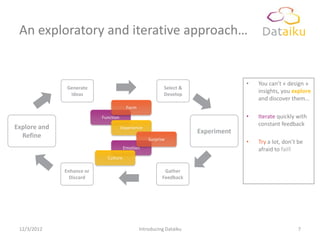
An exploratory and iterative approach…


                                                                                  •   You can’t « design »
              Generate                                    Select &
               Ideas                                      Develop
                                                                                      insights, you explore
                                                                                      and discover them…
                                        Form
                           Function                                               •   Iterate quickly with
                                                                                      constant feedback
Explore and                           Experience
                                                                     Experiment
  Refine                                           Surprise
                                                                                  •   Try a lot, don’t be
                                       Emotion                                        afraid to fail!
                             Culture

              Enhance or                                  Gather
                Discard                                  Feedback


 12/3/2012                                     Introducing Dataiku                                    7
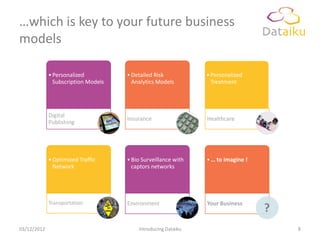
…which is key to your future business
models

             • Personalized          • Detailed Risk           • Personalized
               Subscription Models     Analytics Models          Treatment


             Digital
                                     Insurance                 Healthcare
             Publishing


             • Optimized Traffic     • Bio Surveillance with   • … to imagine !
               Network                 captors networks


             Transportation          Environment               Your Business
                                                                                  ?
03/12/2012                               Introducing Dataiku                          8
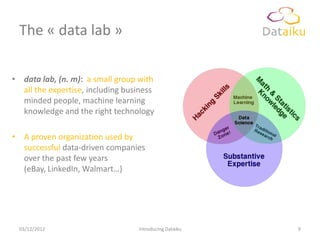
The « data lab »

• data lab, (n. m): a small group with
  all the expertise, including business
  minded people, machine learning
  knowledge and the right technology

• A proven organization used by
  successful data-driven companies
  over the past few years
  (eBay, LinkedIn, Walmart…)


 03/12/2012                       Introducing Dataiku   9
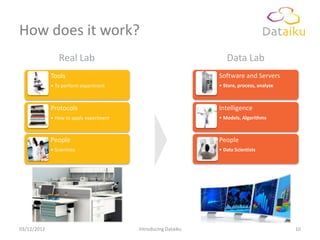
How does it work?
                 Real Lab                                         Data Lab
             Tools                                             Software and Servers
             • To perform experiment                           • Store, process, analyze


             Protocols                                         Intelligence
             • How to apply experiment                         • Models, Algorithms


             People                                            People
             • Scientists                                      • Data Scientists


03/12/2012                               Introducing Dataiku                               10
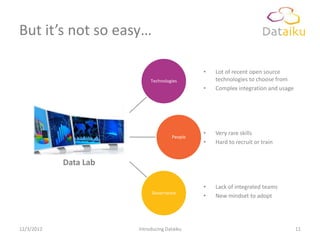
But it’s not so easy…

                                              •   Lot of recent open source
                            Technologies          technologies to choose from
                                              •   Complex integration and usage


                                              •   Very rare skills
                                     People
                                              •   Hard to recruit or train


            Data Lab

                                              •   Lack of integrated teams
                            Governance
                                              •   New mindset to adopt


12/3/2012              Introducing Dataiku                                        11
Our mission


                   Dataiku help you find your path to


             ‟          Data-Driven Innovation,
                 building (or accelerating) your own lab


03/12/2012                    Introducing Dataiku
                                                           ”   12
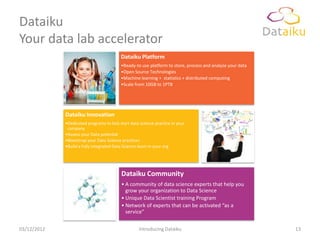
Dataiku
Your data lab accelerator
                                          Dataiku Platform
                                          •Ready-to use platform to store, process and analyze your data
                                          •Open Source Technologies
                                          •Machine learning + statistics + distributed computing
                                          •Scale from 10GB to 1PTB


             Dataiku Innovation
             •Dedicated programs to kick start data science practice in your
              company
             •Assess your Data potential
             •Bootstrap your Data Science practices
             •Build a fully integrated Data Science team in your org


                                          Dataiku Community
                                          • A community of data science experts that help you
                                            grow your organization to Data Science
                                          • Unique Data Scientist training Program
                                          • Network of experts that can be activated “as a
                                            service”

03/12/2012                                         Introducing Dataiku                                     13
A Data Science Platform

   MOTIVATIONS & BUILDING BLOCKS


03/12/2012               Build Your Data Science Platform in the Cloud   14
Motivations
• I often face situations where I need a lot of flexibility and
  computing resources to address my day-to-day work, while
  being on a budget.

• There are a lot of (new, and often open source) technologies
  out there to deal with data, but sometimes poor
  documentation make them hard to use.

• To address this issue, I am going to detail the set up of a data
  science platform with some of these technologies.
      – There are a lot of other options of course, but this one proved to work
        very well.


03/12/2012                 Build Your Data Science Platform in the Cloud      15
A new framework to process data
• Cloud Computing offers a new paradigm vs. computation
  power and flexibility
      – Ideal when a lot of processing power is required temporarily (think, a
        lot of RAM for R…)
      – When building a prototype or when you don’t have internal resources
        available


• Open Source brings in best-of-breed technologies and
  analytical capabilities

• Together, they allow to experiment in a whole new way with
  data.

03/12/2012                Build Your Data Science Platform in the Cloud      16
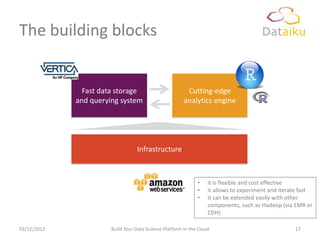
The building blocks


               Fast data storage                         Cutting-edge
             and querying system                        analytics engine


                                  Infrastructure


                                                              •    it is flexible and cost effective
                                                              •    it allows to experiment and iterate fast
                                                              •    it can be extended easily with other
                                                                   components, such as Hadoop (via EMR or
                                                                   CDH)

03/12/2012             Build Your Data Science Platform in the Cloud                                17
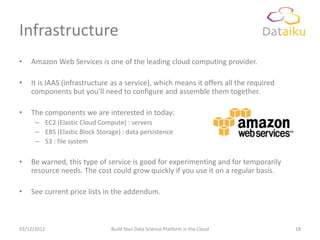
Infrastructure
•   Amazon Web Services is one of the leading cloud computing provider.

•   It is IAAS (infrastructure as a service), which means it offers all the required
    components but you’ll need to configure and assemble them together.

•   The components we are interested in today:
      – EC2 (Elastic Cloud Compute) : servers
      – EBS (Elastic Block Storage) : data persistence
      – S3 : file system

•   Be warned, this type of service is good for experimenting and for temporarily
    resource needs. The cost could grow quickly if you use it on a regular basis.

•   See current price lists in the addendum.


03/12/2012                      Build Your Data Science Platform in the Cloud          18
Data Storage and Querying
•   Vertica is a very fast, column-oriented database, specialized in analytical workloads (large
    scans / joins / aggregations).

•   It offers fast data loading, is SQL-99 compliant (“analytical” queries), and can be extended
    using User-Defined Functions, including R.

•   Vertica is not an open source technology, but provides with a Community Edition, for free
      –      Paid version is massively parallel (scale out architecture) among other things
      –      Community Edition could use up to 3 nodes

•   There are a few other options in this space, open source or not:
     – InfiniDB / Infobright (MySQL based, less practical “analytical” wise)
     – Greenplum, Aster Data
     – Netezza, Teradata, Oracle Exadata…
     – “Big Data” alternatives: Cloudera’s Impala (relying on Hive), the incubating Apache Drill
        (open source version of Google’s Dremel’s, accessible today via Google Big Query)


03/12/2012                             Build Your Data Science Platform in the Cloud               19
Analytical Engine
• Well, I guess you all know it…

• We’ll be using R Studio here, in Server version
      – Access the IDE in a web browser


      – Has a lot of nice features, like Git integration, the “Shiny”
        project…


03/12/2012                Build Your Data Science Platform in the Cloud   20
SETTING UP THE DATA SCIENCE
   STACK

03/12/2012   Build Your Data Science Platform in the Cloud   21
Preamble
• This is not as easy as it sounds

• It is a bit techy, and some optimizations in the following
  process might exist.

• The very detailed step-by-step tutorial can be found in the
  addendum part of this deck, or at
      http://dataiku.com/blog/setting-up-a-cool-data-science-platform-
      for-cheap/


03/12/2012              Build Your Data Science Platform in the Cloud   22
Requirements
• Create an Amazon Web Services at
      – http://aws.amazon.com/fr/
      – Payment info required if your organization does not have an account
        yet, but it’s worth it

• Register for the Vertica Community Edition at
      – http://my.vertica.com/
      – Free, but might take a few days before your registration is approved

• Make sure you have a terminal client available (like iTerm on
  Mac OS X or Putty on Windows)


03/12/2012                Build Your Data Science Platform in the Cloud        23
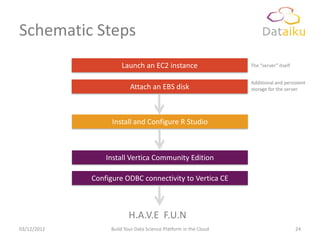
Schematic Steps
                      Launch an EC2 instance                      The “server” itself


                                                                  Additional and persistent
                          Attach an EBS disk                      storage for the server


                   Install and Configure R Studio


                 Install Vertica Community Edition

             Configure ODBC connectivity to Vertica CE


                         H.A.V.E F.U.N
03/12/2012        Build Your Data Science Platform in the Cloud                         24
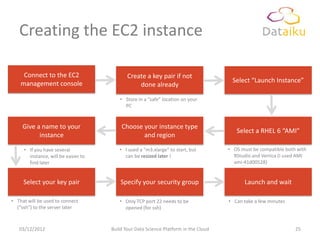
Creating the EC2 instance

     Connect to the EC2                     Create a key pair if not
    management console                                                                Select “Launch Instance”
                                                done already

                                         • Store in a “safe” location on your
                                           PC


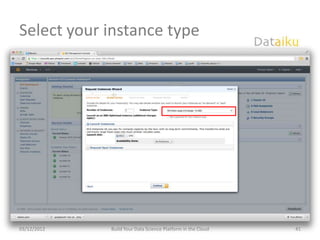
     Give a name to your                 Choose your instance type
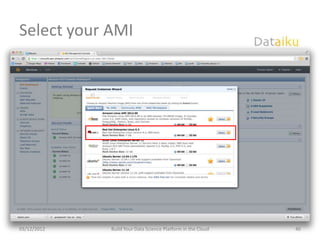
                                                                                        Select a RHEL 6 “AMI”
           instance                             and region

     • If you have several              • I used a “m3.xlarge” to start, but         • OS must be compatible both with
       instance, will be easier to        can be resized later !                       RStudio and Vertica (I used AMI
       find later                                                                      ami-41d00528)


     Select your key pair                Specify your security group                        Launch and wait

• That will be used to connect          • Only TCP port 22 needs to be               • Can take a few minutes
  (“ssh”) to the server later             opened (for ssh)


   03/12/2012                        Build Your Data Science Platform in the Cloud                               25
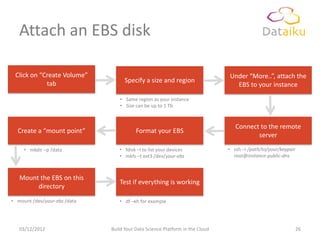
Attach an EBS disk

 Click on “Create Volume”                                                     Under “More..”, attach the
            tab                     Specify a size and region
                                                                                EBS to your instance

                                  • Same region as your instance
                                  • Size can be up to 1 Tb


                                                                                 Connect to the remote
  Create a “mount point”                 Format your EBS
                                                                                        server

     • mkdir –p /data            • fdisk –l to list your devices              • ssh –i /path/to/your/keypair
                                 • mkfs –t ext3 /dev/your-ebs                   root@instance-public-dns


   Mount the EBS on this
                                 Test if everything is working
        directory
• mount /dev/your-ebs /data      • df –kh for example


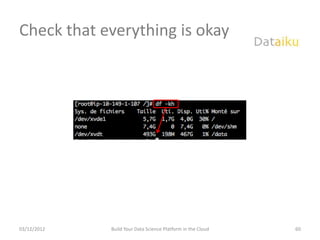
   03/12/2012                 Build Your Data Science Platform in the Cloud                                    26
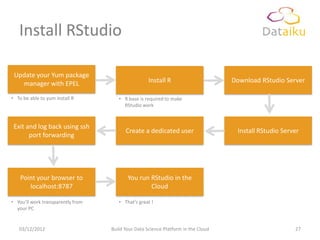
Install RStudio

 Update your Yum package
   manager with EPEL                                Install R                      Download RStudio Server

• To be able to yum install R         • R base is required to make
                                        RStudio work


 Exit and log back using ssh
                                         Create a dedicated user                    Install RStudio Server
       port forwarding


    Point your browser to                 You run RStudio in the
       localhost:8787                             Cloud

• You’ll work transparently from      • That’s great !
  your PC


   03/12/2012                      Build Your Data Science Platform in the Cloud                        27
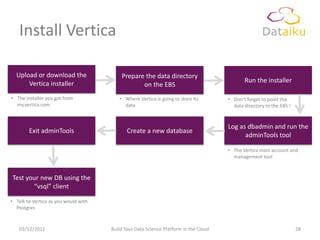
Install Vertica

  Upload or download the                  Prepare the data directory
      Vertica installer                                                                      Run the installer
                                                 on the EBS
• The installer you got from             • Where Vertica is going to store its        • Don’t forget to point the
  my.vertica.com                           data                                         data directory to the EBS !


                                                                                      Log as dbadmin and run the
        Exit adminTools                      Create a new database
                                                                                            adminTools tool

                                                                                      • The Vertica main account and
                                                                                        management tool


Test your new DB using the
       “vsql” client

• Talk to Vertica as you would with
  Postgres


   03/12/2012                         Build Your Data Science Platform in the Cloud                                   28
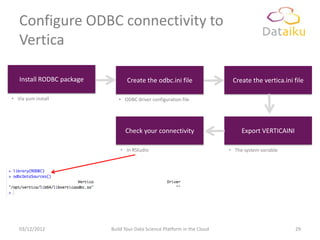
Configure ODBC connectivity to
   Vertica

   Install RODBC package          Create the odbc.ini file                  Create the vertica.ini file

• Via yum install             • ODBC driver configuration file


                                 Check your connectivity                        Export VERTICAINI

                               • In RStudio                                • The system variable


   03/12/2012              Build Your Data Science Platform in the Cloud                            29
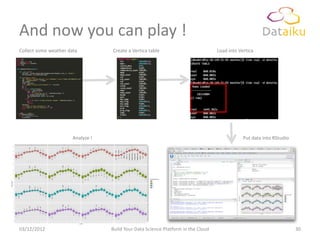
And now you can play !
Collect some weather data          Create a Vertica table                          Load into Vertica


                       Analyze !                                                               Put data into RStudio


03/12/2012                         Build Your Data Science Platform in the Cloud                                       30
Thank You
                         Thomas Cabrol
            thomas.cabrol@dataiku.com
                   +33 (0)7 86 42 62 81
                       @ThomasCabrol
                     http://dataiku.com
ANNEXES


03/12/2012   Build Your Data Science Platform in the Cloud   32
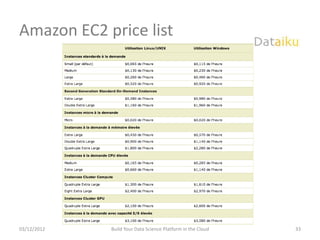
Amazon EC2 price list


03/12/2012   Build Your Data Science Platform in the Cloud   33
http://dataiku.com/setting-up-a-cool-data-science-platform-for-cheap/

   STEP-BY-STEP INSTALLATION


03/12/2012               Build Your Data Science Platform in the Cloud     34
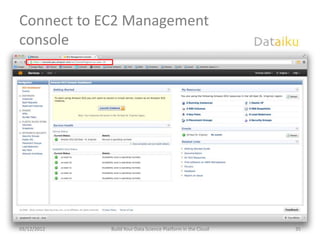
Connect to EC2 Management
console


03/12/2012   Build Your Data Science Platform in the Cloud   35
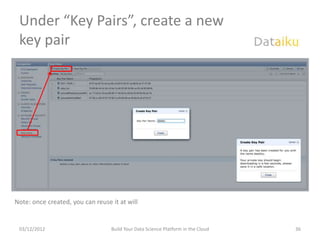
Under “Key Pairs”, create a new
 key pair


Note: once created, you can reuse it at will


 03/12/2012                       Build Your Data Science Platform in the Cloud   36
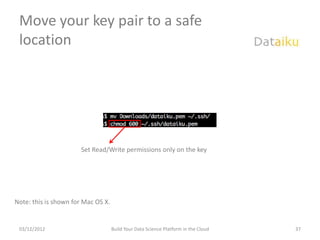
Move your key pair to a safe
 location


                      Set Read/Write permissions only on the key


Note: this is shown for Mac OS X.


 03/12/2012                         Build Your Data Science Platform in the Cloud   37
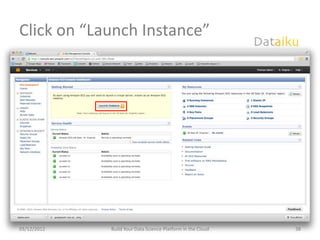
Click on “Launch Instance”


03/12/2012   Build Your Data Science Platform in the Cloud   38
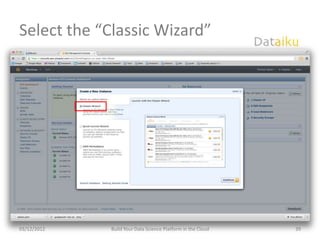
Select the “Classic Wizard”


03/12/2012   Build Your Data Science Platform in the Cloud   39
Select your AMI


03/12/2012   Build Your Data Science Platform in the Cloud   40
Select your instance type


03/12/2012   Build Your Data Science Platform in the Cloud   41
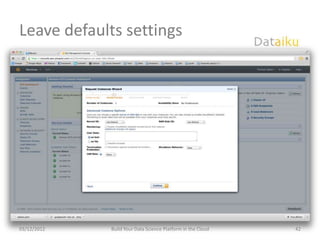
Leave defaults settings


03/12/2012   Build Your Data Science Platform in the Cloud   42
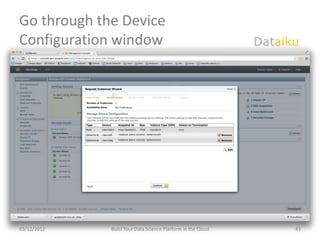
Go through the Device
Configuration window


03/12/2012   Build Your Data Science Platform in the Cloud   43
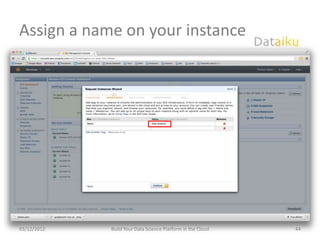
Assign a name on your instance


03/12/2012   Build Your Data Science Platform in the Cloud   44
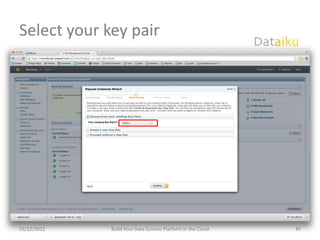
Select your key pair


03/12/2012   Build Your Data Science Platform in the Cloud   45
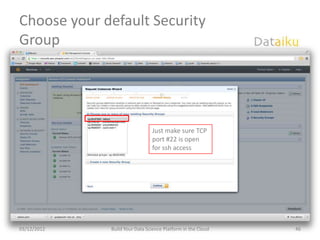
Choose your default Security
Group


                               Just make sure TCP
                               port #22 is open
                               for ssh access


03/12/2012   Build Your Data Science Platform in the Cloud   46
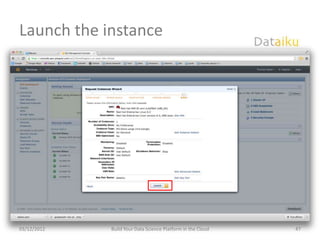
Launch the instance


03/12/2012   Build Your Data Science Platform in the Cloud   47
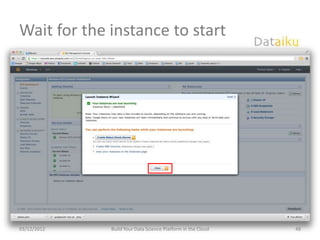
Wait for the instance to start


03/12/2012   Build Your Data Science Platform in the Cloud   48
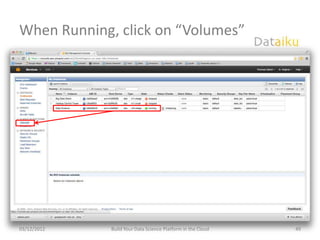
When Running, click on “Volumes”


03/12/2012   Build Your Data Science Platform in the Cloud   49
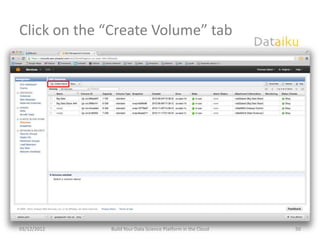
Click on the “Create Volume” tab


03/12/2012   Build Your Data Science Platform in the Cloud   50
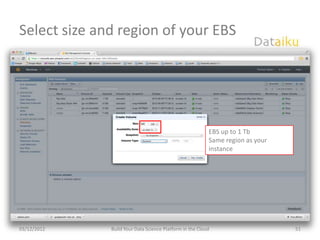
Select size and region of your EBS


                                                          EBS up to 1 Tb
                                                          Same region as your
                                                          instance


03/12/2012    Build Your Data Science Platform in the Cloud                     51
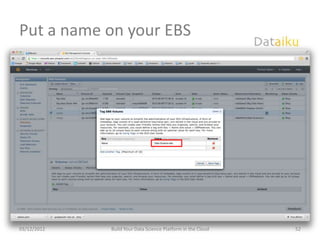
Put a name on your EBS


03/12/2012   Build Your Data Science Platform in the Cloud   52
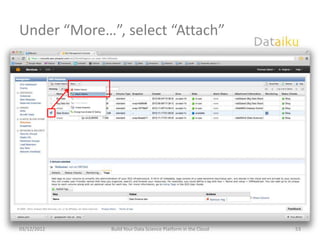
Under “More…”, select “Attach”


03/12/2012   Build Your Data Science Platform in the Cloud   53
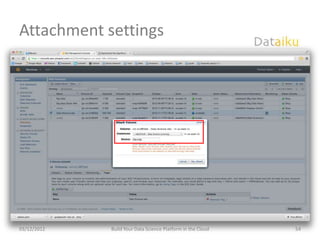
Attachment settings


03/12/2012   Build Your Data Science Platform in the Cloud   54
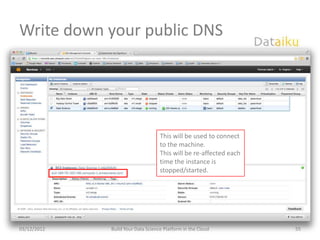
Write down your public DNS


                                   This will be used to connect
                                   to the machine.
                                   This will be re-affected each
                                   time the instance is
                                   stopped/started.


03/12/2012   Build Your Data Science Platform in the Cloud         55
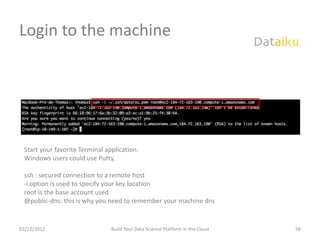
Login to the machine


 Start your favorite Terminal application.
 Windows users could use Putty.

 ssh : secured connection to a remote host
 -i option is used to specify your key location
 root is the base account used
 @public-dns: this is why you need to remember your machine dns


03/12/2012                      Build Your Data Science Platform in the Cloud   56
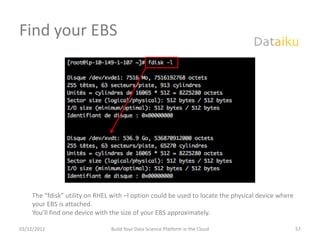
Find your EBS


     The “fdisk” utility on RHEL with –l option could be used to locate the physical device where
     your EBS is attached.
     You’ll find one device with the size of your EBS approximately.

03/12/2012                      Build Your Data Science Platform in the Cloud                       57
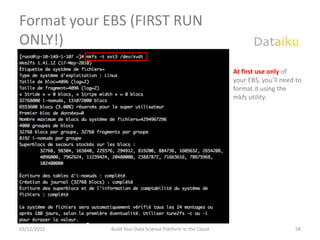
Format your EBS (FIRST RUN
ONLY!)
                                                             At first use only of
                                                             your EBS, you’ll need to
                                                             format it using the
                                                             mkfs utility.


03/12/2012   Build Your Data Science Platform in the Cloud                        58
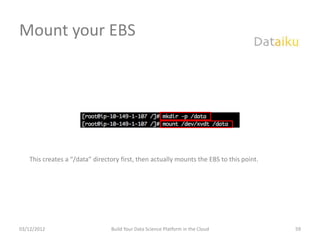
Mount your EBS


   This creates a “/data” directory first, then actually mounts the EBS to this point.


03/12/2012                      Build Your Data Science Platform in the Cloud            59
Check that everything is okay


03/12/2012   Build Your Data Science Platform in the Cloud   60
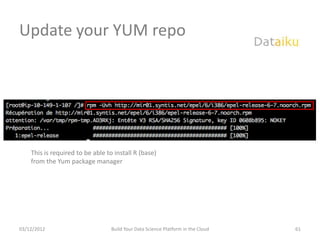
Update your YUM repo


    This is required to be able to install R (base)
    from the Yum package manager


03/12/2012                        Build Your Data Science Platform in the Cloud   61
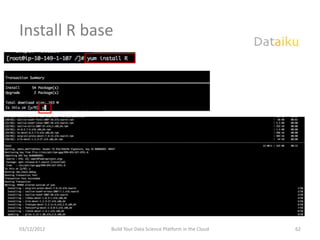
Install R base


03/12/2012   Build Your Data Science Platform in the Cloud   62
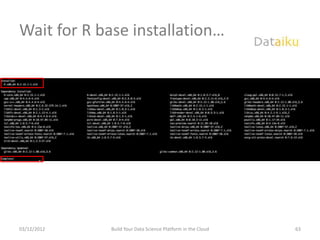
Wait for R base installation…


03/12/2012   Build Your Data Science Platform in the Cloud   63
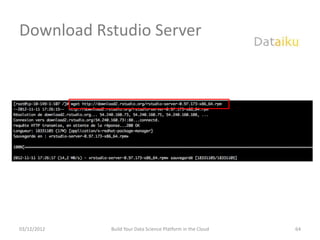
Download Rstudio Server


03/12/2012   Build Your Data Science Platform in the Cloud   64
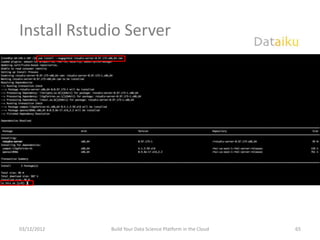
Install Rstudio Server


03/12/2012   Build Your Data Science Platform in the Cloud   65
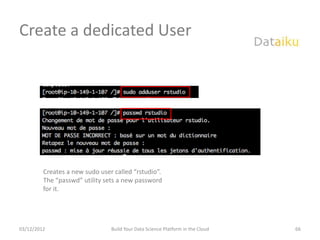
Create a dedicated User


         Creates a new sudo user called “rstudio”.
         The “passwd” utility sets a new password
         for it.


03/12/2012                      Build Your Data Science Platform in the Cloud   66
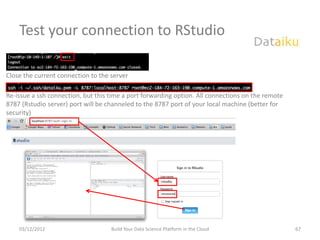
Test your connection to RStudio

Close the current connection to the server

Re-issue a ssh connection, but this time a port forwarding option. All connections on the remote
8787 (Rstudio server) port will be channeled to the 8787 port of your local machine (better for
security)


    03/12/2012                      Build Your Data Science Platform in the Cloud                  67
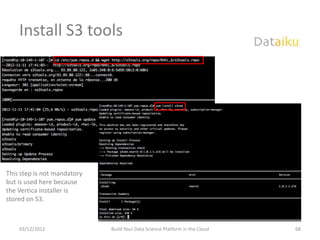
Install S3 tools


This step is not mandatory
but is used here because
the Vertica installer is
stored on S3.


    03/12/2012               Build Your Data Science Platform in the Cloud   68
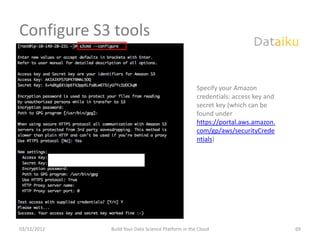
Configure S3 tools


                                                    Specify your Amazon
                                                    credentials: access key and
                                                    secret key (which can be
                                                    found under
                                                    https://portal.aws.amazon.
                                                    com/gp/aws/securityCrede
                                                    ntials)


03/12/2012   Build Your Data Science Platform in the Cloud                        69
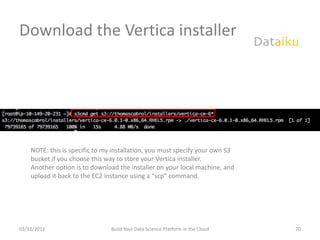
Download the Vertica installer


    NOTE: this is specific to my installation, you must specify your own S3
    bucket if you choose this way to store your Vertica installer.
    Another option is to download the installer on your local machine, and
    upload it back to the EC2 instance using a “scp” command.


03/12/2012                      Build Your Data Science Platform in the Cloud   70
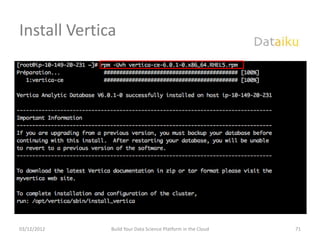
Install Vertica


03/12/2012    Build Your Data Science Platform in the Cloud   71
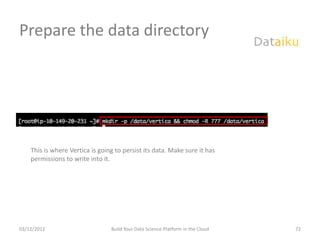
Prepare the data directory


    This is where Vertica is going to persist its data. Make sure it has
    permissions to write into it.


03/12/2012                       Build Your Data Science Platform in the Cloud   72
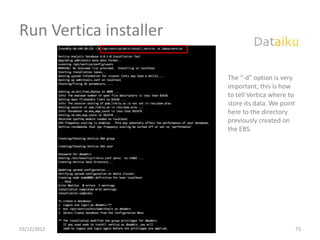
Run Vertica installer

                                                             The “-d” option is very
                                                             important, this is how
                                                             to tell Vertica where to
                                                             store its data. We point
                                                             here to the directory
                                                             previously created on
                                                             the EBS.


03/12/2012   Build Your Data Science Platform in the Cloud                              73
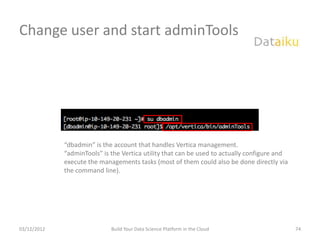
Change user and start adminTools


             “dbadmin” is the account that handles Vertica management.
             “adminTools” is the Vertica utility that can be used to actually configure and
             execute the managements tasks (most of them could also be done directly via
             the command line).


03/12/2012                   Build Your Data Science Platform in the Cloud                    74
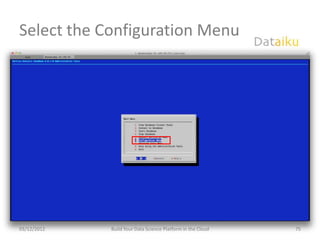
Select the Configuration Menu


03/12/2012   Build Your Data Science Platform in the Cloud   75
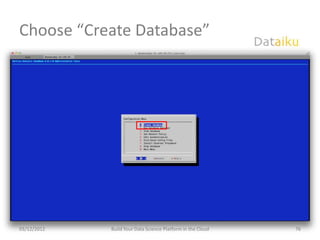
Choose “Create Database”


03/12/2012   Build Your Data Science Platform in the Cloud   76
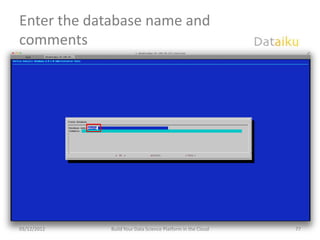
Enter the database name and
comments


03/12/2012   Build Your Data Science Platform in the Cloud   77
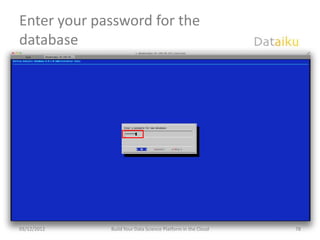
Enter your password for the
database


03/12/2012   Build Your Data Science Platform in the Cloud   78
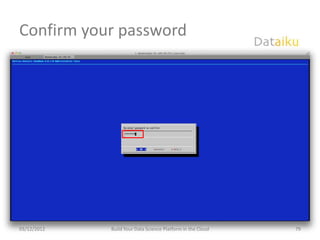
Confirm your password


03/12/2012   Build Your Data Science Platform in the Cloud   79
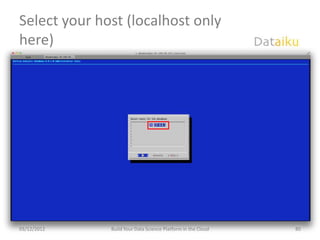
Select your host (localhost only
here)


03/12/2012    Build Your Data Science Platform in the Cloud   80
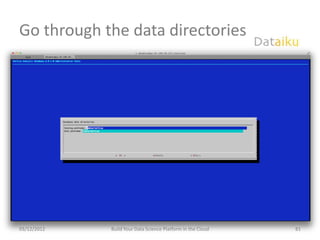
Go through the data directories


03/12/2012   Build Your Data Science Platform in the Cloud   81
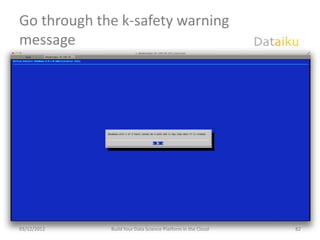
Go through the k-safety warning
message


03/12/2012   Build Your Data Science Platform in the Cloud   82
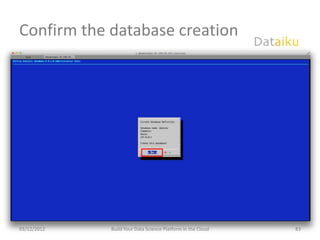
Confirm the database creation


03/12/2012   Build Your Data Science Platform in the Cloud   83
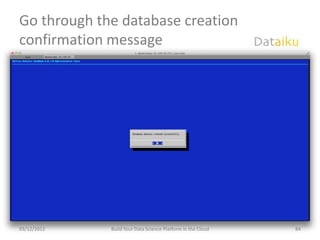
Go through the database creation
confirmation message


03/12/2012   Build Your Data Science Platform in the Cloud   84
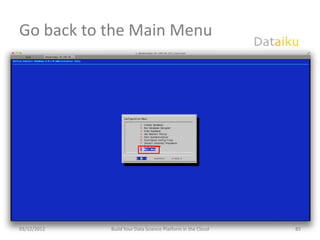
Go back to the Main Menu


03/12/2012   Build Your Data Science Platform in the Cloud   85
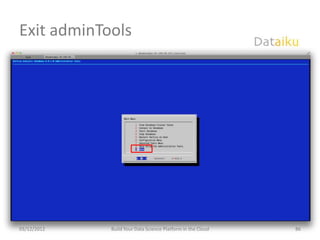
Exit adminTools


03/12/2012   Build Your Data Science Platform in the Cloud   86
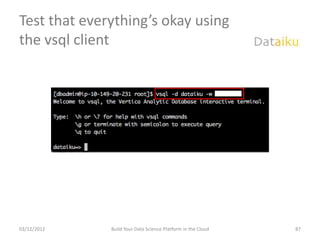
Test that everything’s okay using
the vsql client


03/12/2012    Build Your Data Science Platform in the Cloud   87
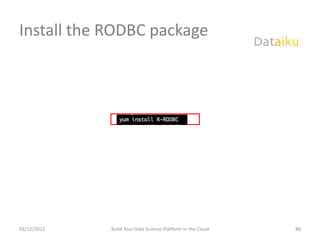
Install the RODBC package


03/12/2012   Build Your Data Science Platform in the Cloud   88
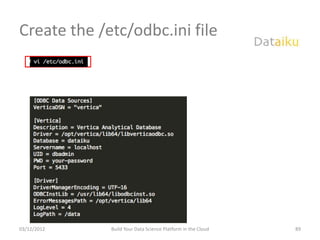
Create the /etc/odbc.ini file


03/12/2012   Build Your Data Science Platform in the Cloud   89
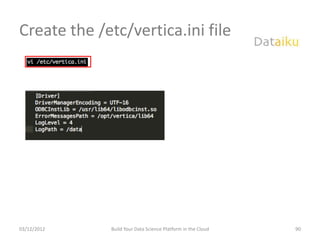
Create the /etc/vertica.ini file


03/12/2012   Build Your Data Science Platform in the Cloud   90
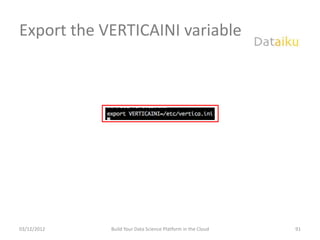
Export the VERTICAINI variable


03/12/2012   Build Your Data Science Platform in the Cloud   91
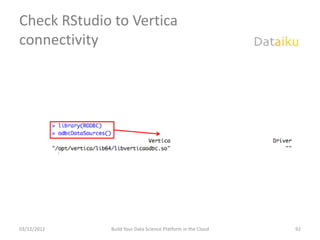
Check RStudio to Vertica
connectivity


03/12/2012   Build Your Data Science Platform in the Cloud   92

Dataiku r users group v2

  • 1.
    Building your ownData Science platform in the cloud GUR FlautR – Paris, November 14th 2012
  • 2.
    Who Am I •Co-founder and Data Scientist at Dataiku • Long-time data hacker – Telco (Orange) – Retail (Catalina Marketing, all major French retailers) – High Tech (Apple) – Social Gaming (Is Cool Entertainment) – Data Provider (qunb) • I love data and blending innovative technologies and methods to get the most out of a dataset. 03/12/2012 Build Your Data Science Platform in the Cloud 2
  • 3.
    Agenda • Introducing Dataiku •Motivations & building blocks • Setting up the Data Science stack • Annexes (with step-by-step tutorial) 03/12/2012 Build Your Data Science Platform in the Cloud 3
  • 4.
    Your data labaccelerator
  • 5.
    Product Innovation opposes conflicting views User Experience? Product Features? Designer Roadmap? Satisfaction? Business Acquisition? Pricing? New Perception? User Voice Product ? & Loyalty? Engagement? Marketing Planning? Performance? Engineers Today, Innovation requires Reliability? to put together different expertise and different views… 03/12/2012 Introducing Dataiku 5
  • 6.
    Data Innovation: fillthe gap! User Feedback (A/B Test) Product Continuous improvement Designer Personalized Business Targeted campaings experience User Voice Data ! & Price optimization Marketing Quality Assurance Workload and yield Engineers A common ground to management federate your product teams towards a common goal 03/12/2012 Introducing Dataiku 6
  • 7.
    An exploratory anditerative approach… • You can’t « design » Generate Select & Ideas Develop insights, you explore and discover them… Form Function • Iterate quickly with constant feedback Explore and Experience Experiment Refine Surprise • Try a lot, don’t be Emotion afraid to fail! Culture Enhance or Gather Discard Feedback 12/3/2012 Introducing Dataiku 7
  • 8.
    …which is keyto your future business models • Personalized • Detailed Risk • Personalized Subscription Models Analytics Models Treatment Digital Insurance Healthcare Publishing • Optimized Traffic • Bio Surveillance with • … to imagine ! Network captors networks Transportation Environment Your Business ? 03/12/2012 Introducing Dataiku 8
  • 9.
    The « datalab » • data lab, (n. m): a small group with all the expertise, including business minded people, machine learning knowledge and the right technology • A proven organization used by successful data-driven companies over the past few years (eBay, LinkedIn, Walmart…) 03/12/2012 Introducing Dataiku 9
  • 10.
    How does itwork? Real Lab Data Lab Tools Software and Servers • To perform experiment • Store, process, analyze Protocols Intelligence • How to apply experiment • Models, Algorithms People People • Scientists • Data Scientists 03/12/2012 Introducing Dataiku 10
  • 11.
    But it’s notso easy… • Lot of recent open source Technologies technologies to choose from • Complex integration and usage • Very rare skills People • Hard to recruit or train Data Lab • Lack of integrated teams Governance • New mindset to adopt 12/3/2012 Introducing Dataiku 11
  • 12.
    Our mission Dataiku help you find your path to ‟ Data-Driven Innovation, building (or accelerating) your own lab 03/12/2012 Introducing Dataiku ” 12
  • 13.
    Dataiku Your data labaccelerator Dataiku Platform •Ready-to use platform to store, process and analyze your data •Open Source Technologies •Machine learning + statistics + distributed computing •Scale from 10GB to 1PTB Dataiku Innovation •Dedicated programs to kick start data science practice in your company •Assess your Data potential •Bootstrap your Data Science practices •Build a fully integrated Data Science team in your org Dataiku Community • A community of data science experts that help you grow your organization to Data Science • Unique Data Scientist training Program • Network of experts that can be activated “as a service” 03/12/2012 Introducing Dataiku 13
  • 14.
    A Data SciencePlatform MOTIVATIONS & BUILDING BLOCKS 03/12/2012 Build Your Data Science Platform in the Cloud 14
  • 15.
    Motivations • I oftenface situations where I need a lot of flexibility and computing resources to address my day-to-day work, while being on a budget. • There are a lot of (new, and often open source) technologies out there to deal with data, but sometimes poor documentation make them hard to use. • To address this issue, I am going to detail the set up of a data science platform with some of these technologies. – There are a lot of other options of course, but this one proved to work very well. 03/12/2012 Build Your Data Science Platform in the Cloud 15
  • 16.
    A new frameworkto process data • Cloud Computing offers a new paradigm vs. computation power and flexibility – Ideal when a lot of processing power is required temporarily (think, a lot of RAM for R…) – When building a prototype or when you don’t have internal resources available • Open Source brings in best-of-breed technologies and analytical capabilities • Together, they allow to experiment in a whole new way with data. 03/12/2012 Build Your Data Science Platform in the Cloud 16
  • 17.
    The building blocks Fast data storage Cutting-edge and querying system analytics engine Infrastructure • it is flexible and cost effective • it allows to experiment and iterate fast • it can be extended easily with other components, such as Hadoop (via EMR or CDH) 03/12/2012 Build Your Data Science Platform in the Cloud 17
  • 18.
    Infrastructure • Amazon Web Services is one of the leading cloud computing provider. • It is IAAS (infrastructure as a service), which means it offers all the required components but you’ll need to configure and assemble them together. • The components we are interested in today: – EC2 (Elastic Cloud Compute) : servers – EBS (Elastic Block Storage) : data persistence – S3 : file system • Be warned, this type of service is good for experimenting and for temporarily resource needs. The cost could grow quickly if you use it on a regular basis. • See current price lists in the addendum. 03/12/2012 Build Your Data Science Platform in the Cloud 18
  • 19.
    Data Storage andQuerying • Vertica is a very fast, column-oriented database, specialized in analytical workloads (large scans / joins / aggregations). • It offers fast data loading, is SQL-99 compliant (“analytical” queries), and can be extended using User-Defined Functions, including R. • Vertica is not an open source technology, but provides with a Community Edition, for free – Paid version is massively parallel (scale out architecture) among other things – Community Edition could use up to 3 nodes • There are a few other options in this space, open source or not: – InfiniDB / Infobright (MySQL based, less practical “analytical” wise) – Greenplum, Aster Data – Netezza, Teradata, Oracle Exadata… – “Big Data” alternatives: Cloudera’s Impala (relying on Hive), the incubating Apache Drill (open source version of Google’s Dremel’s, accessible today via Google Big Query) 03/12/2012 Build Your Data Science Platform in the Cloud 19
  • 20.
    Analytical Engine • Well,I guess you all know it… • We’ll be using R Studio here, in Server version – Access the IDE in a web browser – Has a lot of nice features, like Git integration, the “Shiny” project… 03/12/2012 Build Your Data Science Platform in the Cloud 20
  • 21.
    SETTING UP THEDATA SCIENCE STACK 03/12/2012 Build Your Data Science Platform in the Cloud 21
  • 22.
    Preamble • This isnot as easy as it sounds • It is a bit techy, and some optimizations in the following process might exist. • The very detailed step-by-step tutorial can be found in the addendum part of this deck, or at http://dataiku.com/blog/setting-up-a-cool-data-science-platform- for-cheap/ 03/12/2012 Build Your Data Science Platform in the Cloud 22
  • 23.
    Requirements • Create anAmazon Web Services at – http://aws.amazon.com/fr/ – Payment info required if your organization does not have an account yet, but it’s worth it • Register for the Vertica Community Edition at – http://my.vertica.com/ – Free, but might take a few days before your registration is approved • Make sure you have a terminal client available (like iTerm on Mac OS X or Putty on Windows) 03/12/2012 Build Your Data Science Platform in the Cloud 23
  • 24.
    Schematic Steps Launch an EC2 instance The “server” itself Additional and persistent Attach an EBS disk storage for the server Install and Configure R Studio Install Vertica Community Edition Configure ODBC connectivity to Vertica CE H.A.V.E F.U.N 03/12/2012 Build Your Data Science Platform in the Cloud 24
  • 25.
    Creating the EC2instance Connect to the EC2 Create a key pair if not management console Select “Launch Instance” done already • Store in a “safe” location on your PC Give a name to your Choose your instance type Select a RHEL 6 “AMI” instance and region • If you have several • I used a “m3.xlarge” to start, but • OS must be compatible both with instance, will be easier to can be resized later ! RStudio and Vertica (I used AMI find later ami-41d00528) Select your key pair Specify your security group Launch and wait • That will be used to connect • Only TCP port 22 needs to be • Can take a few minutes (“ssh”) to the server later opened (for ssh) 03/12/2012 Build Your Data Science Platform in the Cloud 25
  • 26.
    Attach an EBSdisk Click on “Create Volume” Under “More..”, attach the tab Specify a size and region EBS to your instance • Same region as your instance • Size can be up to 1 Tb Connect to the remote Create a “mount point” Format your EBS server • mkdir –p /data • fdisk –l to list your devices • ssh –i /path/to/your/keypair • mkfs –t ext3 /dev/your-ebs root@instance-public-dns Mount the EBS on this Test if everything is working directory • mount /dev/your-ebs /data • df –kh for example 03/12/2012 Build Your Data Science Platform in the Cloud 26
  • 27.
    Install RStudio Updateyour Yum package manager with EPEL Install R Download RStudio Server • To be able to yum install R • R base is required to make RStudio work Exit and log back using ssh Create a dedicated user Install RStudio Server port forwarding Point your browser to You run RStudio in the localhost:8787 Cloud • You’ll work transparently from • That’s great ! your PC 03/12/2012 Build Your Data Science Platform in the Cloud 27
  • 28.
    Install Vertica Upload or download the Prepare the data directory Vertica installer Run the installer on the EBS • The installer you got from • Where Vertica is going to store its • Don’t forget to point the my.vertica.com data data directory to the EBS ! Log as dbadmin and run the Exit adminTools Create a new database adminTools tool • The Vertica main account and management tool Test your new DB using the “vsql” client • Talk to Vertica as you would with Postgres 03/12/2012 Build Your Data Science Platform in the Cloud 28
  • 29.
    Configure ODBC connectivityto Vertica Install RODBC package Create the odbc.ini file Create the vertica.ini file • Via yum install • ODBC driver configuration file Check your connectivity Export VERTICAINI • In RStudio • The system variable 03/12/2012 Build Your Data Science Platform in the Cloud 29
  • 30.
    And now youcan play ! Collect some weather data Create a Vertica table Load into Vertica Analyze ! Put data into RStudio 03/12/2012 Build Your Data Science Platform in the Cloud 30
  • 31.
    Thank You Thomas Cabrol thomas.cabrol@dataiku.com +33 (0)7 86 42 62 81 @ThomasCabrol http://dataiku.com
  • 32.
    ANNEXES 03/12/2012 Build Your Data Science Platform in the Cloud 32
  • 33.
    Amazon EC2 pricelist 03/12/2012 Build Your Data Science Platform in the Cloud 33
  • 34.
    http://dataiku.com/setting-up-a-cool-data-science-platform-for-cheap/ STEP-BY-STEP INSTALLATION 03/12/2012 Build Your Data Science Platform in the Cloud 34
  • 35.
    Connect to EC2Management console 03/12/2012 Build Your Data Science Platform in the Cloud 35
  • 36.
    Under “Key Pairs”,create a new key pair Note: once created, you can reuse it at will 03/12/2012 Build Your Data Science Platform in the Cloud 36
  • 37.
    Move your keypair to a safe location Set Read/Write permissions only on the key Note: this is shown for Mac OS X. 03/12/2012 Build Your Data Science Platform in the Cloud 37
  • 38.
    Click on “LaunchInstance” 03/12/2012 Build Your Data Science Platform in the Cloud 38
  • 39.
    Select the “ClassicWizard” 03/12/2012 Build Your Data Science Platform in the Cloud 39
  • 40.
    Select your AMI 03/12/2012 Build Your Data Science Platform in the Cloud 40
  • 41.
    Select your instancetype 03/12/2012 Build Your Data Science Platform in the Cloud 41
  • 42.
    Leave defaults settings 03/12/2012 Build Your Data Science Platform in the Cloud 42
  • 43.
    Go through theDevice Configuration window 03/12/2012 Build Your Data Science Platform in the Cloud 43
  • 44.
    Assign a nameon your instance 03/12/2012 Build Your Data Science Platform in the Cloud 44
  • 45.
    Select your keypair 03/12/2012 Build Your Data Science Platform in the Cloud 45
  • 46.
    Choose your defaultSecurity Group Just make sure TCP port #22 is open for ssh access 03/12/2012 Build Your Data Science Platform in the Cloud 46
  • 47.
    Launch the instance 03/12/2012 Build Your Data Science Platform in the Cloud 47
  • 48.
    Wait for theinstance to start 03/12/2012 Build Your Data Science Platform in the Cloud 48
  • 49.
    When Running, clickon “Volumes” 03/12/2012 Build Your Data Science Platform in the Cloud 49
  • 50.
    Click on the“Create Volume” tab 03/12/2012 Build Your Data Science Platform in the Cloud 50
  • 51.
    Select size andregion of your EBS EBS up to 1 Tb Same region as your instance 03/12/2012 Build Your Data Science Platform in the Cloud 51
  • 52.
    Put a nameon your EBS 03/12/2012 Build Your Data Science Platform in the Cloud 52
  • 53.
    Under “More…”, select“Attach” 03/12/2012 Build Your Data Science Platform in the Cloud 53
  • 54.
    Attachment settings 03/12/2012 Build Your Data Science Platform in the Cloud 54
  • 55.
    Write down yourpublic DNS This will be used to connect to the machine. This will be re-affected each time the instance is stopped/started. 03/12/2012 Build Your Data Science Platform in the Cloud 55
  • 56.
    Login to themachine Start your favorite Terminal application. Windows users could use Putty. ssh : secured connection to a remote host -i option is used to specify your key location root is the base account used @public-dns: this is why you need to remember your machine dns 03/12/2012 Build Your Data Science Platform in the Cloud 56
  • 57.
    Find your EBS The “fdisk” utility on RHEL with –l option could be used to locate the physical device where your EBS is attached. You’ll find one device with the size of your EBS approximately. 03/12/2012 Build Your Data Science Platform in the Cloud 57
  • 58.
    Format your EBS(FIRST RUN ONLY!) At first use only of your EBS, you’ll need to format it using the mkfs utility. 03/12/2012 Build Your Data Science Platform in the Cloud 58
  • 59.
    Mount your EBS This creates a “/data” directory first, then actually mounts the EBS to this point. 03/12/2012 Build Your Data Science Platform in the Cloud 59
  • 60.
    Check that everythingis okay 03/12/2012 Build Your Data Science Platform in the Cloud 60
  • 61.
    Update your YUMrepo This is required to be able to install R (base) from the Yum package manager 03/12/2012 Build Your Data Science Platform in the Cloud 61
  • 62.
    Install R base 03/12/2012 Build Your Data Science Platform in the Cloud 62
  • 63.
    Wait for Rbase installation… 03/12/2012 Build Your Data Science Platform in the Cloud 63
  • 64.
    Download Rstudio Server 03/12/2012 Build Your Data Science Platform in the Cloud 64
  • 65.
    Install Rstudio Server 03/12/2012 Build Your Data Science Platform in the Cloud 65
  • 66.
    Create a dedicatedUser Creates a new sudo user called “rstudio”. The “passwd” utility sets a new password for it. 03/12/2012 Build Your Data Science Platform in the Cloud 66
  • 67.
    Test your connectionto RStudio Close the current connection to the server Re-issue a ssh connection, but this time a port forwarding option. All connections on the remote 8787 (Rstudio server) port will be channeled to the 8787 port of your local machine (better for security) 03/12/2012 Build Your Data Science Platform in the Cloud 67
  • 68.
    Install S3 tools Thisstep is not mandatory but is used here because the Vertica installer is stored on S3. 03/12/2012 Build Your Data Science Platform in the Cloud 68
  • 69.
    Configure S3 tools Specify your Amazon credentials: access key and secret key (which can be found under https://portal.aws.amazon. com/gp/aws/securityCrede ntials) 03/12/2012 Build Your Data Science Platform in the Cloud 69
  • 70.
    Download the Verticainstaller NOTE: this is specific to my installation, you must specify your own S3 bucket if you choose this way to store your Vertica installer. Another option is to download the installer on your local machine, and upload it back to the EC2 instance using a “scp” command. 03/12/2012 Build Your Data Science Platform in the Cloud 70
  • 71.
    Install Vertica 03/12/2012 Build Your Data Science Platform in the Cloud 71
  • 72.
    Prepare the datadirectory This is where Vertica is going to persist its data. Make sure it has permissions to write into it. 03/12/2012 Build Your Data Science Platform in the Cloud 72
  • 73.
    Run Vertica installer The “-d” option is very important, this is how to tell Vertica where to store its data. We point here to the directory previously created on the EBS. 03/12/2012 Build Your Data Science Platform in the Cloud 73
  • 74.
    Change user andstart adminTools “dbadmin” is the account that handles Vertica management. “adminTools” is the Vertica utility that can be used to actually configure and execute the managements tasks (most of them could also be done directly via the command line). 03/12/2012 Build Your Data Science Platform in the Cloud 74
  • 75.
    Select the ConfigurationMenu 03/12/2012 Build Your Data Science Platform in the Cloud 75
  • 76.
    Choose “Create Database” 03/12/2012 Build Your Data Science Platform in the Cloud 76
  • 77.
    Enter the databasename and comments 03/12/2012 Build Your Data Science Platform in the Cloud 77
  • 78.
    Enter your passwordfor the database 03/12/2012 Build Your Data Science Platform in the Cloud 78
  • 79.
    Confirm your password 03/12/2012 Build Your Data Science Platform in the Cloud 79
  • 80.
    Select your host(localhost only here) 03/12/2012 Build Your Data Science Platform in the Cloud 80
  • 81.
    Go through thedata directories 03/12/2012 Build Your Data Science Platform in the Cloud 81
  • 82.
    Go through thek-safety warning message 03/12/2012 Build Your Data Science Platform in the Cloud 82
  • 83.
    Confirm the databasecreation 03/12/2012 Build Your Data Science Platform in the Cloud 83
  • 84.
    Go through thedatabase creation confirmation message 03/12/2012 Build Your Data Science Platform in the Cloud 84
  • 85.
    Go back tothe Main Menu 03/12/2012 Build Your Data Science Platform in the Cloud 85
  • 86.
    Exit adminTools 03/12/2012 Build Your Data Science Platform in the Cloud 86
  • 87.
    Test that everything’sokay using the vsql client 03/12/2012 Build Your Data Science Platform in the Cloud 87
  • 88.
    Install the RODBCpackage 03/12/2012 Build Your Data Science Platform in the Cloud 88
  • 89.
    Create the /etc/odbc.inifile 03/12/2012 Build Your Data Science Platform in the Cloud 89
  • 90.
    Create the /etc/vertica.inifile 03/12/2012 Build Your Data Science Platform in the Cloud 90
  • 91.
    Export the VERTICAINIvariable 03/12/2012 Build Your Data Science Platform in the Cloud 91
  • 92.
    Check RStudio toVertica connectivity 03/12/2012 Build Your Data Science Platform in the Cloud 92