Gagnez du temp en parall´lisant sous R
                        e

              Maxime Tˆ
                      o


             June 12, 2012
Parall´liser sous R
      e


       On utilise ici le package SNOW:
       http://www.sfu.ca/~sblay/R/snow.html
This presentation is based on my own practice of R. I do not know
if it is optimal, but it made me gain a lot of time...
Parall´liser sous R
      e
   How does parallel computing work?
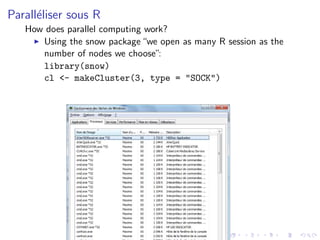
      Using the snow package “we open as many R session as the
      number of nodes we choose”:
      library(snow)
      cl <- makeCluster(3, type = "SOCK")
Parall´liser sous R
      e

       The clusterEvalQ() function allows to execute R code on all
       sessions:

    clusterEvalQ(cl, ls())
   > clusterEvalQ(cl, 1 + 1)
   [[1]]
   [1] 2
   [[2]]
   [1] 2
   [[3]]
   [1] 2
Parall´liser sous R
      e

       Nodes may be called independently:

   > clusterEvalQ(cl[1], a <- 1)
   > clusterEvalQ(cl[2], a <- 2)
   > clusterEvalQ(cl[3], a <- 3)
   > clusterEvalQ(cl, a)
   [[1]]
   [1] 1

   [[2]]
   [1] 2

   [[3]]
   [1] 3
Parall´liser sous R
      e


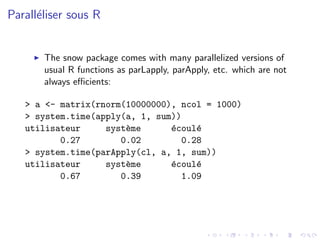
       The snow package comes with many parallelized versions of
       usual R functions as parLapply, parApply, etc. which are not
       always efficients:

   > a <- matrix(rnorm(10000000), ncol = 1000)
   > system.time(apply(a, 1, sum))
   utilisateur     syst`me
                       e        e
                                ´coul´
                                     e
          0.27        0.02        0.28
   > system.time(parApply(cl, a, 1, sum))
   utilisateur     syst`me
                       e        e
                                ´coul´
                                     e
          0.67        0.39        1.09
Parall´liser sous R
      e


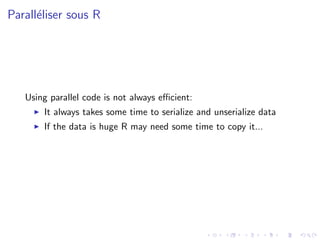
   Using parallel code is not always efficient:
       It always takes some time to serialize and unserialize data
       If the data is huge R may need some time to copy it...
Parall´liser sous R
      e

       One solution is to first export data to all nodes and then
       execute the code on each node:

   > #### First Export:
   > columns <- clusterSplit(cl, 1:10000)
   > for (cc in 1:3){
   + aa <- a[columns[[cc]],]
   + clusterExport(cl[cc], "aa")
   + }
   > #### Then execute
   >
   > system.time(do.call("c",
   clusterEvalQ(cl, apply(aa, 1, sum))))
   utilisateur     syst`me
                       e        e
                                ´coul´
                                     e
          0.00        0.00        0.16
Parall´liser sous R
      e


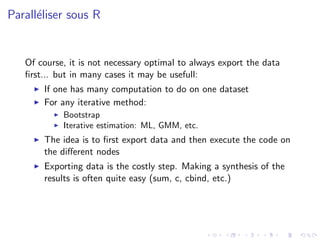
   Of course, it is not necessary optimal to always export the data
   first... but in many cases it may be usefull:
       If one has many computation to do on one dataset
       For any iterative method:
            Bootstrap
            Iterative estimation: ML, GMM, etc.
       The idea is to first export data and then execute the code on
       the different nodes
       Exporting data is the costly step. Making a synthesis of the
       results is often quite easy (sum, c, cbind, etc.)
We simple problem


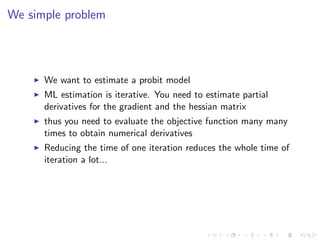
      We want to estimate a probit model
      ML estimation is iterative. You need to estimate partial
      derivatives for the gradient and the hessian matrix
      thus you need to evaluate the objective function many many
      times to obtain numerical derivatives
      Reducing the time of one iteration reduces the whole time of
      iteration a lot...
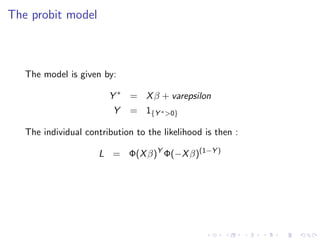
The probit model


   The model is given by:

                        Y ∗ = X β + varepsilon
                         Y    = 1{Y ∗ >0}

   The individual contribution to the likelihood is then :

                      L = Φ(X β)Y Φ(−X β)(1−Y )
A very simple problem

   > n       <- 5000000
   > param   <- c(1,2,-.5)
   > X1      <- rnorm(n)
   > X2      <- rnorm(n, mean = 1, sd = 2)
   > Ys      <- param[1] + param[2] * X1 +
   + param[3] * X2 + rnorm(n)
   > Y <- Ys > 0
   > probit <- function(para, y, x1, x2){
   + mu <- para[1] + para[2] * x1 + para[3] * x2
   + sum(pnorm(mu, log = T)*y + pnorm(-mu, log = T)*(1 - y))
   + }
   >
   > system.time(test1 <- probit(param, Y, X1, X2))
   utilisateur     syst`me
                       e        e
                                ´coul´
                                     e
          1.72        0.08        1.80
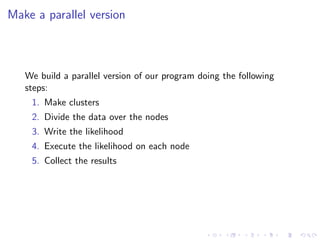
Make a parallel version


   We build a parallel version of our program doing the following
   steps:
    1. Make clusters
    2. Divide the data over the nodes
    3. Write the likelihood
    4. Execute the likelihood on each node
    5. Collect the results
Divide data:
> nn <- clusterSplit(cl, 1:n)
> for (cc in 1:3){
+ YY <- Y[nn[[cc]]]
+ XX1 <- X1[nn[[cc]]]
+ XX2 <- X2[nn[[cc]]]
+ clusterExport(cl[cc], c("YY", "XX1", "XX2"))
+ }
> clusterExport(cl, "probit")
> clusterEvalQ(cl, ls())
[[1]]
[1] "probit" "XX1"    "XX2"    "YY"

[[2]]
[1] "probit" "XX1"   "XX2"    "YY"

[[3]]
[1] "probit" "XX1"   "XX2"    "YY"
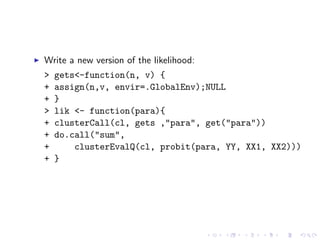
Write a new version of the likelihood:
>   gets<-function(n, v) {
+   assign(n,v, envir=.GlobalEnv);NULL
+   }
>   lik <- function(para){
+   clusterCall(cl, gets ,"para", get("para"))
+   do.call("sum",
+       clusterEvalQ(cl, probit(para, YY, XX1, XX2)))
+   }
Execute and compare theg results:
> system.time(test2 <- lik(param)) ## 1.5 sec
utilisateur     syst`me
                    e        e
                             ´coul´
                                  e
       0.00        0.00        0.78
> c(test1, test2) ## Same results
[1] -1432674 -1432674
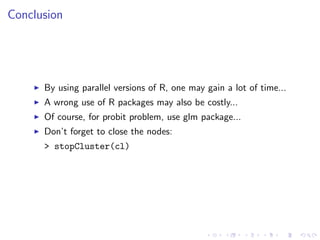
Conclusion


      By using parallel versions of R, one may gain a lot of time...
      A wrong use of R packages may also be costly...
      Of course, for probit problem, use glm package...
      Don’t forget to close the nodes:
      > stopCluster(cl)

Parallel R in snow (english after 2nd slide)

  • 1.
    Gagnez du tempen parall´lisant sous R e Maxime Tˆ o June 12, 2012
  • 2.
    Parall´liser sous R e On utilise ici le package SNOW: http://www.sfu.ca/~sblay/R/snow.html
  • 3.
    This presentation isbased on my own practice of R. I do not know if it is optimal, but it made me gain a lot of time...
  • 4.
    Parall´liser sous R e How does parallel computing work? Using the snow package “we open as many R session as the number of nodes we choose”: library(snow) cl <- makeCluster(3, type = "SOCK")
  • 5.
    Parall´liser sous R e The clusterEvalQ() function allows to execute R code on all sessions: clusterEvalQ(cl, ls()) > clusterEvalQ(cl, 1 + 1) [[1]] [1] 2 [[2]] [1] 2 [[3]] [1] 2
  • 6.
    Parall´liser sous R e Nodes may be called independently: > clusterEvalQ(cl[1], a <- 1) > clusterEvalQ(cl[2], a <- 2) > clusterEvalQ(cl[3], a <- 3) > clusterEvalQ(cl, a) [[1]] [1] 1 [[2]] [1] 2 [[3]] [1] 3
  • 7.
    Parall´liser sous R e The snow package comes with many parallelized versions of usual R functions as parLapply, parApply, etc. which are not always efficients: > a <- matrix(rnorm(10000000), ncol = 1000) > system.time(apply(a, 1, sum)) utilisateur syst`me e e ´coul´ e 0.27 0.02 0.28 > system.time(parApply(cl, a, 1, sum)) utilisateur syst`me e e ´coul´ e 0.67 0.39 1.09
  • 8.
    Parall´liser sous R e Using parallel code is not always efficient: It always takes some time to serialize and unserialize data If the data is huge R may need some time to copy it...
  • 9.
    Parall´liser sous R e One solution is to first export data to all nodes and then execute the code on each node: > #### First Export: > columns <- clusterSplit(cl, 1:10000) > for (cc in 1:3){ + aa <- a[columns[[cc]],] + clusterExport(cl[cc], "aa") + } > #### Then execute > > system.time(do.call("c", clusterEvalQ(cl, apply(aa, 1, sum)))) utilisateur syst`me e e ´coul´ e 0.00 0.00 0.16
  • 10.
    Parall´liser sous R e Of course, it is not necessary optimal to always export the data first... but in many cases it may be usefull: If one has many computation to do on one dataset For any iterative method: Bootstrap Iterative estimation: ML, GMM, etc. The idea is to first export data and then execute the code on the different nodes Exporting data is the costly step. Making a synthesis of the results is often quite easy (sum, c, cbind, etc.)
  • 11.
    We simple problem We want to estimate a probit model ML estimation is iterative. You need to estimate partial derivatives for the gradient and the hessian matrix thus you need to evaluate the objective function many many times to obtain numerical derivatives Reducing the time of one iteration reduces the whole time of iteration a lot...
  • 12.
    The probit model The model is given by: Y ∗ = X β + varepsilon Y = 1{Y ∗ >0} The individual contribution to the likelihood is then : L = Φ(X β)Y Φ(−X β)(1−Y )
  • 13.
    A very simpleproblem > n <- 5000000 > param <- c(1,2,-.5) > X1 <- rnorm(n) > X2 <- rnorm(n, mean = 1, sd = 2) > Ys <- param[1] + param[2] * X1 + + param[3] * X2 + rnorm(n) > Y <- Ys > 0 > probit <- function(para, y, x1, x2){ + mu <- para[1] + para[2] * x1 + para[3] * x2 + sum(pnorm(mu, log = T)*y + pnorm(-mu, log = T)*(1 - y)) + } > > system.time(test1 <- probit(param, Y, X1, X2)) utilisateur syst`me e e ´coul´ e 1.72 0.08 1.80
  • 14.
    Make a parallelversion We build a parallel version of our program doing the following steps: 1. Make clusters 2. Divide the data over the nodes 3. Write the likelihood 4. Execute the likelihood on each node 5. Collect the results
  • 15.
    Divide data: > nn<- clusterSplit(cl, 1:n) > for (cc in 1:3){ + YY <- Y[nn[[cc]]] + XX1 <- X1[nn[[cc]]] + XX2 <- X2[nn[[cc]]] + clusterExport(cl[cc], c("YY", "XX1", "XX2")) + } > clusterExport(cl, "probit") > clusterEvalQ(cl, ls()) [[1]] [1] "probit" "XX1" "XX2" "YY" [[2]] [1] "probit" "XX1" "XX2" "YY" [[3]] [1] "probit" "XX1" "XX2" "YY"
  • 16.
    Write a newversion of the likelihood: > gets<-function(n, v) { + assign(n,v, envir=.GlobalEnv);NULL + } > lik <- function(para){ + clusterCall(cl, gets ,"para", get("para")) + do.call("sum", + clusterEvalQ(cl, probit(para, YY, XX1, XX2))) + }
  • 17.
    Execute and comparetheg results: > system.time(test2 <- lik(param)) ## 1.5 sec utilisateur syst`me e e ´coul´ e 0.00 0.00 0.78 > c(test1, test2) ## Same results [1] -1432674 -1432674
  • 18.
    Conclusion By using parallel versions of R, one may gain a lot of time... A wrong use of R packages may also be costly... Of course, for probit problem, use glm package... Don’t forget to close the nodes: > stopCluster(cl)