www.postgrespro.ru
In-core compression
Anastasia Lubennikova
Postgres Pro
● Russian PostgreSQL vendor
• Tecnical support
• Database migration
• Core PostgreSQL development
● Postgres Pro and Postgres Pro EE forks
● Contacts
• postgrespro.com
• info@postgrespro.ru
Agenda
● What does Postgres store?
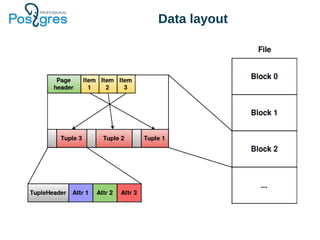
• A couple of words about storage internals
● Check list for your schema
• A set of tricks to optimize database size
● In-core block level compression
• Out-of-box feature of Postgres Pro EE
What this talk doesn’t cover
● MVCC bloat
• Tune autovacuum properly
• Drop unused indexes
• Use pg_repack
• Try pg_squeeze
● WAL-log size
• Enable wal_compression
Data layout
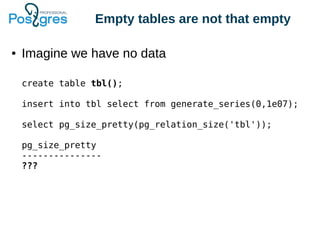
Empty tables are not that empty
● Imagine we have no data
create table tbl();
insert into tbl select from generate_series(0,1e07);
select pg_size_pretty(pg_relation_size('tbl'));
pg_size_pretty
---------------
???
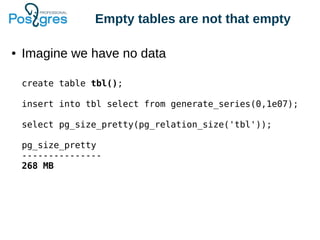
Empty tables are not that empty
● Imagine we have no data
create table tbl();
insert into tbl select from generate_series(0,1e07);
select pg_size_pretty(pg_relation_size('tbl'));
pg_size_pretty
---------------
268 MB
Meta information
db=# select * from heap_page_items(get_raw_page('tbl',0));
-[ RECORD 1 ]-------------------
lp | 1
lp_off | 8160
lp_flags | 1
lp_len | 32
t_xmin | 720
t_xmax | 0
t_field3 | 0
t_ctid | (0,1)
t_infomask2 | 2
t_infomask | 2048
t_hoff | 24
t_bits |
t_oid |
t_data |
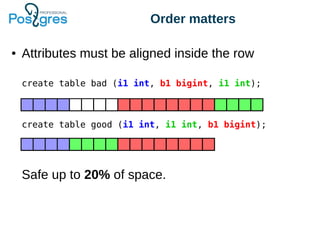
Order matters
● Attributes must be aligned inside the row
Safe up to 20% of space.
create table bad (i1 int, b1 bigint, i1 int);
create table good (i1 int, i1 int, b1 bigint);
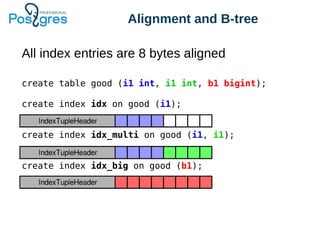
Alignment and B-tree
All index entries are 8 bytes aligned
create table good (i1 int, i1 int, b1 bigint);
create index idx on good (i1);
create index idx_multi on good (i1, i1);
create index idx_big on good (b1);
Alignment and B-tree
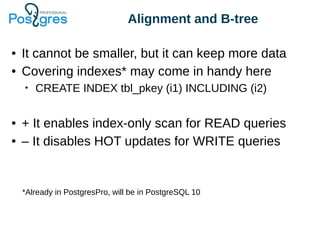
● It cannot be smaller, but it can keep more data
● Covering indexes* may come in handy here
• CREATE INDEX tbl_pkey (i1) INCLUDING (i2)
● + It enables index-only scan for READ queries
● – It disables HOT updates for WRITE queries
*Already in PostgresPro, will be in PostgreSQL 10
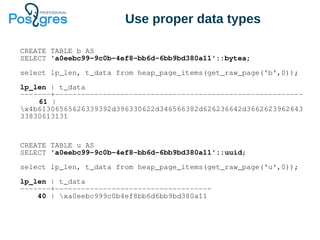
Use proper data types
CREATE TABLE b AS
SELECT 'a0eebc99-9c0b-4ef8-bb6d-6bb9bd380a11'::bytea;
select lp_len, t_data from heap_page_items(get_raw_page('b',0));
lp_len | t_data
-------+---------------------------------------------------------
61 |
x4b61306565626339392d396330622d346566382d626236642d3662623962643
33830613131
CREATE TABLE u AS
SELECT 'a0eebc99-9c0b-4ef8-bb6d-6bb9bd380a11'::uuid;
select lp_len, t_data from heap_page_items(get_raw_page('u',0));
lp_len | t_data
-------+------------------------------------
40 | xa0eebc999c0b4ef8bb6d6bb9bd380a11
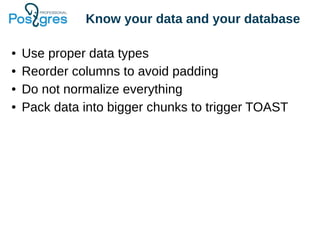
Know your data and your database
● Use proper data types
● Reorder columns to avoid padding
● Do not normalize everything
● Pack data into bigger chunks to trigger TOAST
Know your data and your database
● Use proper data types
● Reorder columns to avoid padding
● Do not normalize everything
● Pack data into bigger chunks to trigger TOAST
CFS
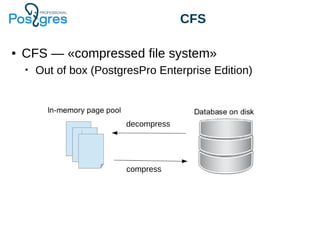
● CFS — «compressed file system»
• Out of box (PostgresPro Enterprise Edition)
decompress
compress
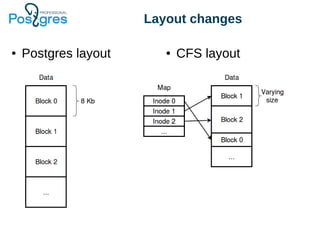
Layout changes
● Postgres layout ● CFS layout
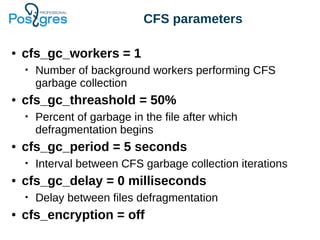
CFS parameters
● cfs_gc_workers = 1
• Number of background workers performing CFS
garbage collection
● cfs_gc_threashold = 50%
• Percent of garbage in the file after which
defragmentation begins
● cfs_gc_period = 5 seconds
• Interval between CFS garbage collection iterations
● cfs_gc_delay = 0 milliseconds
• Delay between files defragmentation
● cfs_encryption = off
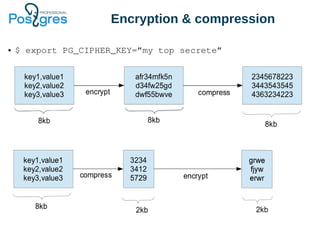
Encryption & compression
● $ export PG_CIPHER_KEY=”my top secrete”
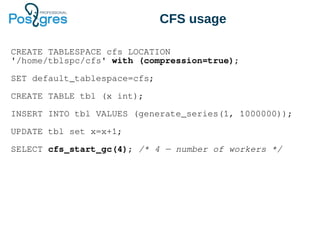
CFS usage
CREATE TABLESPACE cfs LOCATION
'/home/tblspc/cfs' with (compression=true);
SET default_tablespace=cfs;
CREATE TABLE tbl (x int);
INSERT INTO tbl VALUES (generate_series(1, 1000000));
UPDATE tbl set x=x+1;
SELECT cfs_start_gc(4); /* 4 — number of workers */
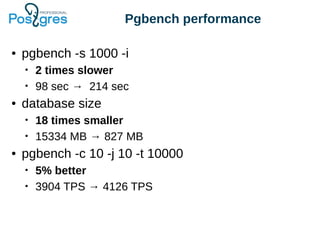
Pgbench performance
● pgbench -s 1000 -i
• 2 times slower
• 98 sec → 214 sec
● database size
• 18 times smaller
• 15334 MB → 827 MB
● pgbench -c 10 -j 10 -t 10000
• 5% better
• 3904 TPS → 4126 TPS
Comparison of
compression algoritms
Configuration Size (Gb) Time (sec)
no compression 15.31 92
snappy 5.18 99
lz4 4.12 91
postgres internal lz 3.89 214
lzfse 2.80 1099
zlib (best speed) 2.43 191
zlib (default level) 2.37 284
zstd 1.69 125
pgbench -i -s 1000
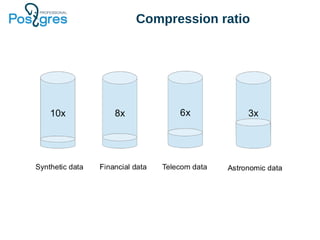
Compression ratio
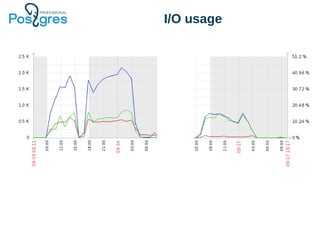
I/O usage
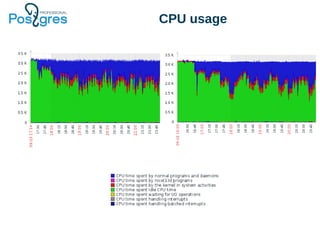
CPU usage
CFS pros
● Good compression rate:
• All information on the page is compressed including
headers
● Better locality:
• CFS always writes new pages sequentially
● Minimal changes in Postgres core:
• CFS works at the lowest level
● Flexibility:
• Easy to use various compression algorithms
CFS cons
● Shared buffers utilization:
• Buffer cache keeps pages incompressed
● Inefficient WAL and replication:
• Replica has to perform compression and GC itself
● Fragmentation
• CFS needs its own garbage collector
Roadmap
● CFS
• Compression of already existing tables
• Support of multiple compression algorithms
• Optimizations for append only tables
● Postgres data layout
• Alternative storages for specific use-cases
www.postgrespro.ru
Thank you for your attention!
Any questions?
• postgrespro.com
• info@postgrespro.ru
• a.lubennikova@postgrespro.ru

PgconfSV compression

  • 1.
  • 2.
    Postgres Pro ● RussianPostgreSQL vendor • Tecnical support • Database migration • Core PostgreSQL development ● Postgres Pro and Postgres Pro EE forks ● Contacts • postgrespro.com • info@postgrespro.ru
  • 3.
    Agenda ● What doesPostgres store? • A couple of words about storage internals ● Check list for your schema • A set of tricks to optimize database size ● In-core block level compression • Out-of-box feature of Postgres Pro EE
  • 4.
    What this talkdoesn’t cover ● MVCC bloat • Tune autovacuum properly • Drop unused indexes • Use pg_repack • Try pg_squeeze ● WAL-log size • Enable wal_compression
  • 5.
  • 6.
    Empty tables arenot that empty ● Imagine we have no data create table tbl(); insert into tbl select from generate_series(0,1e07); select pg_size_pretty(pg_relation_size('tbl')); pg_size_pretty --------------- ???
  • 7.
    Empty tables arenot that empty ● Imagine we have no data create table tbl(); insert into tbl select from generate_series(0,1e07); select pg_size_pretty(pg_relation_size('tbl')); pg_size_pretty --------------- 268 MB
  • 8.
    Meta information db=# select* from heap_page_items(get_raw_page('tbl',0)); -[ RECORD 1 ]------------------- lp | 1 lp_off | 8160 lp_flags | 1 lp_len | 32 t_xmin | 720 t_xmax | 0 t_field3 | 0 t_ctid | (0,1) t_infomask2 | 2 t_infomask | 2048 t_hoff | 24 t_bits | t_oid | t_data |
  • 9.
    Order matters ● Attributesmust be aligned inside the row Safe up to 20% of space. create table bad (i1 int, b1 bigint, i1 int); create table good (i1 int, i1 int, b1 bigint);
  • 10.
    Alignment and B-tree Allindex entries are 8 bytes aligned create table good (i1 int, i1 int, b1 bigint); create index idx on good (i1); create index idx_multi on good (i1, i1); create index idx_big on good (b1);
  • 11.
    Alignment and B-tree ●It cannot be smaller, but it can keep more data ● Covering indexes* may come in handy here • CREATE INDEX tbl_pkey (i1) INCLUDING (i2) ● + It enables index-only scan for READ queries ● – It disables HOT updates for WRITE queries *Already in PostgresPro, will be in PostgreSQL 10
  • 12.
    Use proper datatypes CREATE TABLE b AS SELECT 'a0eebc99-9c0b-4ef8-bb6d-6bb9bd380a11'::bytea; select lp_len, t_data from heap_page_items(get_raw_page('b',0)); lp_len | t_data -------+--------------------------------------------------------- 61 | x4b61306565626339392d396330622d346566382d626236642d3662623962643 33830613131 CREATE TABLE u AS SELECT 'a0eebc99-9c0b-4ef8-bb6d-6bb9bd380a11'::uuid; select lp_len, t_data from heap_page_items(get_raw_page('u',0)); lp_len | t_data -------+------------------------------------ 40 | xa0eebc999c0b4ef8bb6d6bb9bd380a11
  • 13.
    Know your dataand your database ● Use proper data types ● Reorder columns to avoid padding ● Do not normalize everything ● Pack data into bigger chunks to trigger TOAST
  • 14.
    Know your dataand your database ● Use proper data types ● Reorder columns to avoid padding ● Do not normalize everything ● Pack data into bigger chunks to trigger TOAST
  • 15.
    CFS ● CFS —«compressed file system» • Out of box (PostgresPro Enterprise Edition) decompress compress
  • 16.
    Layout changes ● Postgreslayout ● CFS layout
  • 17.
    CFS parameters ● cfs_gc_workers= 1 • Number of background workers performing CFS garbage collection ● cfs_gc_threashold = 50% • Percent of garbage in the file after which defragmentation begins ● cfs_gc_period = 5 seconds • Interval between CFS garbage collection iterations ● cfs_gc_delay = 0 milliseconds • Delay between files defragmentation ● cfs_encryption = off
  • 18.
    Encryption & compression ●$ export PG_CIPHER_KEY=”my top secrete”
  • 19.
    CFS usage CREATE TABLESPACEcfs LOCATION '/home/tblspc/cfs' with (compression=true); SET default_tablespace=cfs; CREATE TABLE tbl (x int); INSERT INTO tbl VALUES (generate_series(1, 1000000)); UPDATE tbl set x=x+1; SELECT cfs_start_gc(4); /* 4 — number of workers */
  • 20.
    Pgbench performance ● pgbench-s 1000 -i • 2 times slower • 98 sec → 214 sec ● database size • 18 times smaller • 15334 MB → 827 MB ● pgbench -c 10 -j 10 -t 10000 • 5% better • 3904 TPS → 4126 TPS
  • 21.
    Comparison of compression algoritms ConfigurationSize (Gb) Time (sec) no compression 15.31 92 snappy 5.18 99 lz4 4.12 91 postgres internal lz 3.89 214 lzfse 2.80 1099 zlib (best speed) 2.43 191 zlib (default level) 2.37 284 zstd 1.69 125 pgbench -i -s 1000
  • 22.
  • 23.
  • 24.
  • 25.
    CFS pros ● Goodcompression rate: • All information on the page is compressed including headers ● Better locality: • CFS always writes new pages sequentially ● Minimal changes in Postgres core: • CFS works at the lowest level ● Flexibility: • Easy to use various compression algorithms
  • 26.
    CFS cons ● Sharedbuffers utilization: • Buffer cache keeps pages incompressed ● Inefficient WAL and replication: • Replica has to perform compression and GC itself ● Fragmentation • CFS needs its own garbage collector
  • 27.
    Roadmap ● CFS • Compressionof already existing tables • Support of multiple compression algorithms • Optimizations for append only tables ● Postgres data layout • Alternative storages for specific use-cases
  • 28.
    www.postgrespro.ru Thank you foryour attention! Any questions? • postgrespro.com • info@postgrespro.ru • a.lubennikova@postgrespro.ru