#UE4 | @UNREALENGINE
コード1/2
import unreal
import numpy as np
import sklearn
from sklearn.cluster import KMeans
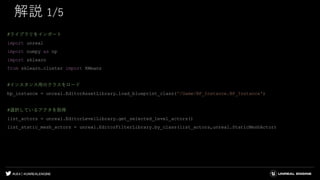
bp_instance = unreal.EditorAssetLibrary.load_blueprint_class('/Game/BP_Instance.BP_Instance')
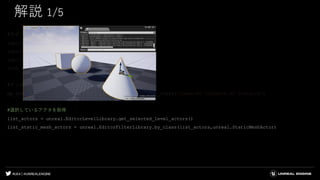
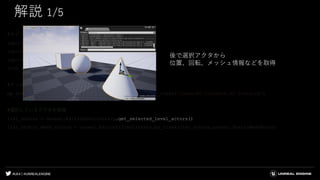
list_actors = unreal.EditorLevelLibrary.get_selected_level_actors()
list_static_mesh_actors = unreal.EditorFilterLibrary.by_class(list_actors,unreal.StaticMeshActor)
list_unique = np.array([])
for lsm in list_static_mesh_actors:
static_mesh = lsm.get_component_by_class(unreal.StaticMeshComponent).get_editor_property("StaticMesh")
list_unique = np.append(list_unique,static_mesh)
list_unique = np.unique(list_unique)
for lu in list_unique:
list_transform = np.array([])
list_locations = np.array([[0,0,0]])
80.
#UE4 | @UNREALENGINE
コード2/2
for lsm in list_static_mesh_actors:
if lsm.get_component_by_class(unreal.StaticMeshComponent).get_editor_property("StaticMesh") == lu:
list_transform = np.append(list_transform,lsm.get_actor_transform())
location = np.array([[lsm.get_actor_location().x,lsm.get_actor_location().y,lsm.get_actor_location().z]])
list_locations = np.append(list_locations,location,axis=0)
list_locations = np.delete(list_locations,0,axis=0)
num_clusters = 3
pred = KMeans(n_clusters=num_clusters).fit_predict(list_locations)
instanced_components = np.array([])
for i in range(num_clusters):
instanced_actor = unreal.EditorLevelLibrary.spawn_actor_from_class(bp_instance,(0,0,0),(0,0,0))
instanced_component = instanced_actor.get_component_by_class(unreal.InstancedStaticMeshComponent)
instanced_components = np.append(instanced_components,instanced_component)
for j, pd in enumerate(pred):
instanced_components[pd].add_instance(list_transform[j])
for k in range(num_clusters):
instanced_components[k].set_editor_property("StaticMesh",lu)
for lsm in list_static_mesh_actors:
lsm.destroy_actor()
#UE4 | @UNREALENGINE
解説4/5
#コンポーネントのリストを作成
instanced_components = np.array([])
#クラスタ毎にアクタをスポーン、コンポーネントをリストに入れる
for i in range(num_clusters):
instanced_actor = unreal.EditorLevelLibrary.spawn_actor_from_class(bp_instance,(0,0,0),(0,0,0))
instanced_component = instanced_actor.get_component_by_class(unreal.InstancedStaticMeshComponent)
instanced_components = np.append(instanced_components,instanced_component)
98.
#UE4 | @UNREALENGINE
解説4/5
#コンポーネントのリストを作成
instanced_components = np.array([])
#クラスタ毎にアクタをスポーン、コンポーネントをリストに入れる
for i in range(num_clusters):
instanced_actor = unreal.EditorLevelLibrary.spawn_actor_from_class(bp_instance,(0,0,0),(0,0,0))
instanced_component = instanced_actor.get_component_by_class(unreal.InstancedStaticMeshComponent)
instanced_components = np.append(instanced_components,instanced_component)
99.
#UE4 | @UNREALENGINE
解説4/5
#コンポーネントのリストを作成
instanced_components = np.array([])
#クラスタ毎にアクタをスポーン、コンポーネントをリストに入れる
for i in range(num_clusters):
instanced_actor = unreal.EditorLevelLibrary.spawn_actor_from_class(bp_instance,(0,0,0),(0,0,0))
instanced_component = instanced_actor.get_component_by_class(unreal.InstancedStaticMeshComponent)
instanced_components = np.append(instanced_components,instanced_component)
100.
#UE4 | @UNREALENGINE
解説4/5
#コンポーネントのリストを作成
instanced_components = np.array([])
#クラスタ毎にアクタをスポーン、コンポーネントをリストに入れる
for i in range(num_clusters):
instanced_actor = unreal.EditorLevelLibrary.spawn_actor_from_class(bp_instance,(0,0,0),(0,0,0))
instanced_component = instanced_actor.get_component_by_class(unreal.InstancedStaticMeshComponent)
instanced_components = np.append(instanced_components,instanced_component)
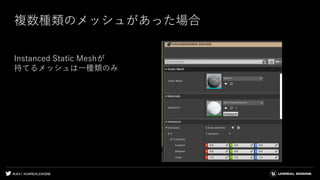
スポーンするアクタは
あらかじめ用意しておく
Blueprintを作成し
Instanced Static Meshを追加
101.
#UE4 | @UNREALENGINE
解説4/5
#コンポーネントのリストを作成
instanced_components = np.array([])
#クラスタ毎にアクタをスポーン、コンポーネントをリストに入れる
for i in range(num_clusters):
instanced_actor = unreal.EditorLevelLibrary.spawn_actor_from_class(bp_instance,(0,0,0),(0,0,0))
instanced_component = instanced_actor.get_component_by_class(unreal.InstancedStaticMeshComponent)
instanced_components = np.append(instanced_components,instanced_component)
102.
#UE4 | @UNREALENGINE
解説5/5
#クラスタ番号を元に親となるインスタンスを選択し、トランスフォームを追加
for j, pd in enumerate(pred):
instanced_components[pd].add_instance(list_transform[j])
#スタティックメッシュを割り当て
for k in range(num_clusters):
instanced_components[k].set_editor_property("StaticMesh",lu)
#最初に選択していたアクタを削除
for lsm in list_static_mesh_actors:
lsm.destroy_actor()
103.
#UE4 | @UNREALENGINE
解説5/5
#クラスタ番号を元に親となるインスタンスを選択し、トランスフォームを追加
for j, pd in enumerate(pred):
instanced_components[pd].add_instance(list_transform[j])
#スタティックメッシュを割り当て
for k in range(num_clusters):
instanced_components[k].set_editor_property("StaticMesh",lu)
#最初に選択していたアクタを削除
for lsm in list_static_mesh_actors:
lsm.destroy_actor()
104.
#UE4 | @UNREALENGINE
解説5/5
#クラスタ番号を元に親となるインスタンスを選択し、トランスフォームを追加
for j, pd in enumerate(pred):
instanced_components[pd].add_instance(list_transform[j])
#スタティックメッシュを割り当て
for k in range(num_clusters):
instanced_components[k].set_editor_property("StaticMesh",lu)
#最初に選択していたアクタを削除
for lsm in list_static_mesh_actors:
lsm.destroy_actor()
空のインスタンス
105.
#UE4 | @UNREALENGINE
解説5/5
#クラスタ番号を元に親となるインスタンスを選択し、トランスフォームを追加
for j, pd in enumerate(pred):
instanced_components[pd].add_instance(list_transform[j])
#スタティックメッシュを割り当て
for k in range(num_clusters):
instanced_components[k].set_editor_property("StaticMesh",lu)
#最初に選択していたアクタを削除
for lsm in list_static_mesh_actors:
lsm.destroy_actor()
106.
#UE4 | @UNREALENGINE
解説5/5
#クラスタ番号を元に親となるインスタンスを選択し、トランスフォームを追加
for j, pd in enumerate(pred):
instanced_components[pd].add_instance(list_transform[j])
#スタティックメッシュを割り当て
for k in range(num_clusters):
instanced_components[k].set_editor_property("StaticMesh",lu)
#最初に選択していたアクタを削除
for lsm in list_static_mesh_actors:
lsm.destroy_actor()
107.
#UE4 | @UNREALENGINE
解説5/5
#クラスタ番号を元に親となるインスタンスを選択し、トランスフォームを追加
for j, pd in enumerate(pred):
instanced_components[pd].add_instance(list_transform[j])
#スタティックメッシュを割り当て
for k in range(num_clusters):
instanced_components[k].set_editor_property("StaticMesh",lu)
#最初に選択していたアクタを削除
for lsm in list_static_mesh_actors:
lsm.destroy_actor()
#UE4 | @UNREALENGINE
コード
importunreal
import numpy as np
selected_actors = unreal.EditorLevelLibrary.get_selected_level_actors()
for sa in selected_actors:
instanced_components = np.array([])
instanced_component = sa.get_components_by_class(unreal.InstancedStaticMeshComponent)
instanced_components = np.append(instanced_components,instanced_component)
for ic in instanced_components:
instance_transform = np.array([])
instance_count = ic.get_instance_count()
for j in range(instance_count):
instance_transform = np.append(instance_transform,ic.get_instance_transform(j,1))
spawned_actor = unreal.EditorLevelLibrary.spawn_actor_from_class(unreal.StaticMeshActor,(0,0,0),(0,0,0))
spawned_actor.set_actor_transform(instance_transform[j],0,0)
smc = spawned_actor.get_component_by_class(unreal.StaticMeshComponent)
smc.set_editor_property("StaticMesh",ic.get_editor_property("StaticMesh"))
for sa in selected_actors:
sa.destroy_actor()
#UE4 | @UNREALENGINE
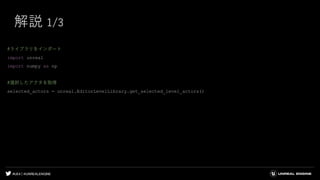
解説2/3
#インスタンスコンポーネントを配列に入れる
for sa in selected_actors:
instanced_components = np.array([])
instanced_component = sa.get_components_by_class(unreal.InstancedStaticMeshComponent)
instanced_components = np.append(instanced_components,instanced_component)
#インスタンス数を取得
for ic in instanced_components:
instance_transform = np.array([])
instance_count = ic.get_instance_count()
116.
#UE4 | @UNREALENGINE
解説2/3
#インスタンスコンポーネントを配列に入れる
for sa in selected_actors:
instanced_components = np.array([])
instanced_component = sa.get_components_by_class(unreal.InstancedStaticMeshComponent)
instanced_components = np.append(instanced_components,instanced_component)
#インスタンス数を取得
for ic in instanced_components:
instance_transform = np.array([])
instance_count = ic.get_instance_count()
117.
#UE4 | @UNREALENGINE
解説2/3
#インスタンスコンポーネントを配列に入れる
for sa in selected_actors:
instanced_components = np.array([])
instanced_component = sa.get_components_by_class(unreal.InstancedStaticMeshComponent)
instanced_components = np.append(instanced_components,instanced_component)
#インスタンス数を取得
for ic in instanced_components:
instance_transform = np.array([])
instance_count = ic.get_instance_count()
118.
#UE4 | @UNREALENGINE
解説2/3
#インスタンスコンポーネントを配列に入れる
for sa in selected_actors:
instanced_components = np.array([])
instanced_component = sa.get_components_by_class(unreal.InstancedStaticMeshComponent)
instanced_components = np.append(instanced_components,instanced_component)
#インスタンス数を取得
for ic in instanced_components:
instance_transform = np.array([])
instance_count = ic.get_instance_count()
インスタンスがいくつあるか取得し、
その数分新たにアクタをスポーンしていく
119.
#UE4 | @UNREALENGINE
解説3/3
#インスタンス数の分だけトランスフォーム値を取得
for j in range(instance_count):
instance_transform = np.append(instance_transform,ic.get_instance_transform(j,1))
#スポーンしてトランスフォームを適用
spawned_actor = unreal.EditorLevelLibrary.spawn_actor_from_class(unreal.StaticMeshActor,(0,0,0),(0,0,0))
spawned_actor.set_actor_transform(instance_transform[j],0,0)
smc = spawned_actor.get_component_by_class(unreal.StaticMeshComponent)
#スタティックメッシュを割り当て
smc.set_editor_property("StaticMesh",ic.get_editor_property("StaticMesh"))
#最初に選択していたアクタを削除
for sa in selected_actors:
sa.destroy_actor()
120.
#UE4 | @UNREALENGINE
解説3/3
#インスタンス数の分だけトランスフォーム値を取得
for j in range(instance_count):
instance_transform = np.append(instance_transform,ic.get_instance_transform(j,1))
#スポーンしてトランスフォームを適用
spawned_actor = unreal.EditorLevelLibrary.spawn_actor_from_class(unreal.StaticMeshActor,(0,0,0),(0,0,0))
spawned_actor.set_actor_transform(instance_transform[j],0,0)
smc = spawned_actor.get_component_by_class(unreal.StaticMeshComponent)
#スタティックメッシュを割り当て
smc.set_editor_property("StaticMesh",ic.get_editor_property("StaticMesh"))
#最初に選択していたアクタを削除
for sa in selected_actors:
sa.destroy_actor()
121.
#UE4 | @UNREALENGINE
解説3/3
#インスタンス数の分だけトランスフォーム値を取得
for j in range(instance_count):
instance_transform = np.append(instance_transform,ic.get_instance_transform(j,1))
#スポーンしてトランスフォームを適用
spawned_actor = unreal.EditorLevelLibrary.spawn_actor_from_class(unreal.StaticMeshActor,(0,0,0),(0,0,0))
spawned_actor.set_actor_transform(instance_transform[j],0,0)
#スタティックメッシュを割り当て
smc = spawned_actor.get_component_by_class(unreal.StaticMeshComponent)
smc.set_editor_property("StaticMesh",ic.get_editor_property("StaticMesh"))
#最初に選択していたアクタを削除
for sa in selected_actors:
sa.destroy_actor()
122.
#UE4 | @UNREALENGINE
解説3/3
#インスタンス数の分だけトランスフォーム値を取得
for j in range(instance_count):
instance_transform = np.append(instance_transform,ic.get_instance_transform(j,1))
#スポーンしてトランスフォームを適用
spawned_actor = unreal.EditorLevelLibrary.spawn_actor_from_class(unreal.StaticMeshActor,(0,0,0),(0,0,0))
spawned_actor.set_actor_transform(instance_transform[j],0,0)
#スタティックメッシュを割り当て
smc = spawned_actor.get_component_by_class(unreal.StaticMeshComponent)
smc.set_editor_property("StaticMesh",ic.get_editor_property("StaticMesh"))
#最初に選択していたアクタを削除
for sa in selected_actors:
sa.destroy_actor()
123.
#UE4 | @UNREALENGINE
解説3/3
#インスタンス数の分だけトランスフォーム値を取得
for j in range(instance_count):
instance_transform = np.append(instance_transform,ic.get_instance_transform(j,1))
#スポーンしてトランスフォームを適用
spawned_actor = unreal.EditorLevelLibrary.spawn_actor_from_class(unreal.StaticMeshActor,(0,0,0),(0,0,0))
spawned_actor.set_actor_transform(instance_transform[j],0,0)
#スタティックメッシュを割り当て
smc = spawned_actor.get_component_by_class(unreal.StaticMeshComponent)
smc.set_editor_property("StaticMesh",ic.get_editor_property("StaticMesh"))
#最初に選択していたアクタを削除
for sa in selected_actors:
sa.destroy_actor()





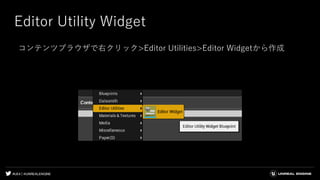
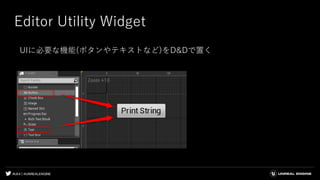
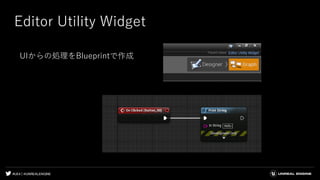
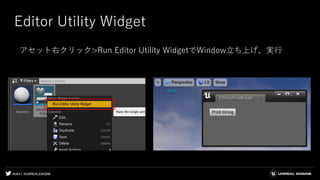
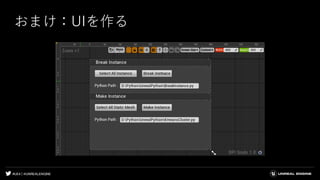
![#UE4 | @UNREALENGINE
Editor Utility Widget
EGJ 岡田による解説記事
[UE4]エディタ上で動作するツール・エディタ拡張をUMGで簡単に作れる
Editor Utility Widget について
https://qiita.com/EGJ-Kaz_Okada/items/9f530db3b53d0fde3f20
[UE4]Editor Utility Widgetでツール・エディタ拡張を作る際のUndo/Redo
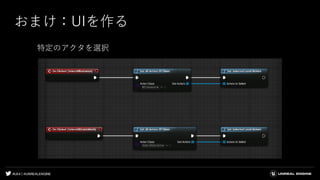
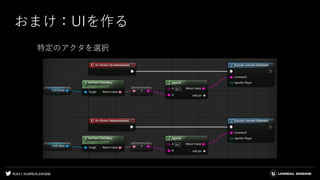
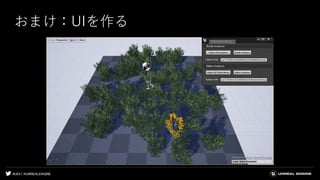
の実装方法について
https://qiita.com/EGJ-Kaz_Okada/items/985b98fb934d751f4f69](https://image.slidesharecdn.com/gtmf2019-190717090215/85/GTMF2019-Python-Blueprint-Unreal-Engine-24-320.jpg)

![#UE4 | @UNREALENGINE
コード 1/2
import unreal
import numpy as np
import sklearn
from sklearn.cluster import KMeans
bp_instance = unreal.EditorAssetLibrary.load_blueprint_class('/Game/BP_Instance.BP_Instance')
list_actors = unreal.EditorLevelLibrary.get_selected_level_actors()
list_static_mesh_actors = unreal.EditorFilterLibrary.by_class(list_actors,unreal.StaticMeshActor)
list_unique = np.array([])
for lsm in list_static_mesh_actors:
static_mesh = lsm.get_component_by_class(unreal.StaticMeshComponent).get_editor_property("StaticMesh")
list_unique = np.append(list_unique,static_mesh)
list_unique = np.unique(list_unique)
for lu in list_unique:
list_transform = np.array([])
list_locations = np.array([[0,0,0]])](https://image.slidesharecdn.com/gtmf2019-190717090215/85/GTMF2019-Python-Blueprint-Unreal-Engine-79-320.jpg)
![#UE4 | @UNREALENGINE
コード 2/2
for lsm in list_static_mesh_actors:
if lsm.get_component_by_class(unreal.StaticMeshComponent).get_editor_property("StaticMesh") == lu:
list_transform = np.append(list_transform,lsm.get_actor_transform())
location = np.array([[lsm.get_actor_location().x,lsm.get_actor_location().y,lsm.get_actor_location().z]])
list_locations = np.append(list_locations,location,axis=0)
list_locations = np.delete(list_locations,0,axis=0)
num_clusters = 3
pred = KMeans(n_clusters=num_clusters).fit_predict(list_locations)
instanced_components = np.array([])
for i in range(num_clusters):
instanced_actor = unreal.EditorLevelLibrary.spawn_actor_from_class(bp_instance,(0,0,0),(0,0,0))
instanced_component = instanced_actor.get_component_by_class(unreal.InstancedStaticMeshComponent)
instanced_components = np.append(instanced_components,instanced_component)
for j, pd in enumerate(pred):
instanced_components[pd].add_instance(list_transform[j])
for k in range(num_clusters):
instanced_components[k].set_editor_property("StaticMesh",lu)
for lsm in list_static_mesh_actors:
lsm.destroy_actor()](https://image.slidesharecdn.com/gtmf2019-190717090215/85/GTMF2019-Python-Blueprint-Unreal-Engine-80-320.jpg)
![#UE4 | @UNREALENGINE
解説 2/5
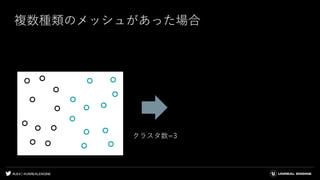
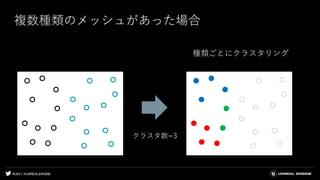
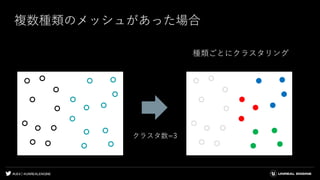
#メッシュの種類毎にクラスタリングするため、アクタのリストからメッシュの種類がいくつあるかを求める
list_unique = np.array([])
for lsm in list_static_mesh_actors:
static_mesh = lsm.get_component_by_class(unreal.StaticMeshComponent).get_editor_property("StaticMesh")
list_unique = np.append(list_unique,static_mesh)
list_unique = np.unique(list_unique)
#インスタンスに追加するトランスフォームリストと、クラスタリングに使うための位置リストを作成
for lu in list_unique:
list_transform = np.array([])
list_locations = np.array([[0,0,0]])](https://image.slidesharecdn.com/gtmf2019-190717090215/85/GTMF2019-Python-Blueprint-Unreal-Engine-85-320.jpg)
![#UE4 | @UNREALENGINE
解説 3/5
#インスタンスに追加するトランスフォームリストと、クラスタリングに使うための位置リストを作成
for lsm in list_static_mesh_actors:
if lsm.get_component_by_class(unreal.StaticMeshComponent).get_editor_property("StaticMesh") == lu:
list_transform = np.append(list_transform,lsm.get_actor_transform())
location = np.array([[lsm.get_actor_location().x,lsm.get_actor_location().y,lsm.get_actor_location().z]])
list_locations = np.append(list_locations,location,axis=0)
list_locations = np.delete(list_locations,0,axis=0)
#クラスタリング
num_clusters = 3
pred = KMeans(n_clusters=num_clusters).fit_predict(list_locations)](https://image.slidesharecdn.com/gtmf2019-190717090215/85/GTMF2019-Python-Blueprint-Unreal-Engine-90-320.jpg)
![#UE4 | @UNREALENGINE
解説 3/5
#インスタンスに追加するトランスフォームリストと、クラスタリングに使うための位置リストを作成
for lsm in list_static_mesh_actors:
if lsm.get_component_by_class(unreal.StaticMeshComponent).get_editor_property("StaticMesh") == lu:
list_transform = np.append(list_transform,lsm.get_actor_transform())
location = np.array([[lsm.get_actor_location().x,lsm.get_actor_location().y,lsm.get_actor_location().z]])
list_locations = np.append(list_locations,location,axis=0)
list_locations = np.delete(list_locations,0,axis=0)
#クラスタリング
num_clusters = 3
pred = KMeans(n_clusters=num_clusters).fit_predict(list_locations)](https://image.slidesharecdn.com/gtmf2019-190717090215/85/GTMF2019-Python-Blueprint-Unreal-Engine-91-320.jpg)
![#UE4 | @UNREALENGINE
解説 3/5
#インスタンスに追加するトランスフォームリストと、クラスタリングに使うための位置リストを作成
for lsm in list_static_mesh_actors:
if lsm.get_component_by_class(unreal.StaticMeshComponent).get_editor_property("StaticMesh") == lu:
list_transform = np.append(list_transform,lsm.get_actor_transform())
location = np.array([[lsm.get_actor_location().x,lsm.get_actor_location().y,lsm.get_actor_location().z]])
list_locations = np.append(list_locations,location,axis=0)
list_locations = np.delete(list_locations,0,axis=0)
#クラスタリング
num_clusters = 3
pred = KMeans(n_clusters=num_clusters).fit_predict(list_locations)
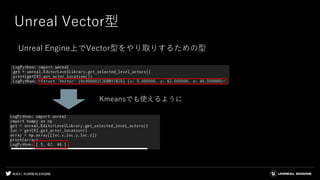
Get_actor_location() ・・・Unreal Vector型を返す](https://image.slidesharecdn.com/gtmf2019-190717090215/85/GTMF2019-Python-Blueprint-Unreal-Engine-92-320.jpg)
![#UE4 | @UNREALENGINE
解説 3/5
#インスタンスに追加するトランスフォームリストと、クラスタリングに使うための位置リストを作成
for lsm in list_static_mesh_actors:
if lsm.get_component_by_class(unreal.StaticMeshComponent).get_editor_property("StaticMesh") == lu:
list_transform = np.append(list_transform,lsm.get_actor_transform())
location = np.array([[lsm.get_actor_location().x,lsm.get_actor_location().y,lsm.get_actor_location().z]])
list_locations = np.append(list_locations,location,axis=0)
list_locations = np.delete(list_locations,0,axis=0)
#クラスタリング
num_clusters = 3
pred = KMeans(n_clusters=num_clusters).fit_predict(list_locations)](https://image.slidesharecdn.com/gtmf2019-190717090215/85/GTMF2019-Python-Blueprint-Unreal-Engine-94-320.jpg)
![#UE4 | @UNREALENGINE
解説 3/5
#インスタンスに追加するトランスフォームリストと、クラスタリングに使うための位置リストを作成
for lsm in list_static_mesh_actors:
if lsm.get_component_by_class(unreal.StaticMeshComponent).get_editor_property("StaticMesh") == lu:
list_transform = np.append(list_transform,lsm.get_actor_transform())
location = np.array([[lsm.get_actor_location().x,lsm.get_actor_location().y,lsm.get_actor_location().z]])
list_locations = np.append(list_locations,location,axis=0)
list_locations = np.delete(list_locations,0,axis=0)
#クラスタリング
num_clusters = 5
pred = KMeans(n_clusters=num_clusters).fit_predict(list_locations)
n_clusters = 5](https://image.slidesharecdn.com/gtmf2019-190717090215/85/GTMF2019-Python-Blueprint-Unreal-Engine-95-320.jpg)
![#UE4 | @UNREALENGINE
解説 3/5
#インスタンスに追加するトランスフォームリストと、クラスタリングに使うための位置リストを作成
for lsm in list_static_mesh_actors:
if lsm.get_component_by_class(unreal.StaticMeshComponent).get_editor_property("StaticMesh") == lu:
list_transform = np.append(list_transform,lsm.get_actor_transform())
location = np.array([[lsm.get_actor_location().x,lsm.get_actor_location().y,lsm.get_actor_location().z]])
list_locations = np.append(list_locations,location,axis=0)
list_locations = np.delete(list_locations,0,axis=0)
#クラスタリング
num_clusters = 5
pred = KMeans(n_clusters=num_clusters).fit_predict(list_locations)
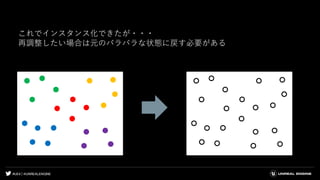
0
1
2
3
4
0
0
0
1
1
1
2
2
2
2
3
3
3
4
4
4
fit_predict](https://image.slidesharecdn.com/gtmf2019-190717090215/85/GTMF2019-Python-Blueprint-Unreal-Engine-96-320.jpg)
![#UE4 | @UNREALENGINE
解説 4/5
#コンポーネントのリストを作成
instanced_components = np.array([])
#クラスタ毎にアクタをスポーン、コンポーネントをリストに入れる
for i in range(num_clusters):
instanced_actor = unreal.EditorLevelLibrary.spawn_actor_from_class(bp_instance,(0,0,0),(0,0,0))
instanced_component = instanced_actor.get_component_by_class(unreal.InstancedStaticMeshComponent)
instanced_components = np.append(instanced_components,instanced_component)](https://image.slidesharecdn.com/gtmf2019-190717090215/85/GTMF2019-Python-Blueprint-Unreal-Engine-97-320.jpg)
![#UE4 | @UNREALENGINE
解説 4/5
#コンポーネントのリストを作成
instanced_components = np.array([])
#クラスタ毎にアクタをスポーン、コンポーネントをリストに入れる
for i in range(num_clusters):
instanced_actor = unreal.EditorLevelLibrary.spawn_actor_from_class(bp_instance,(0,0,0),(0,0,0))
instanced_component = instanced_actor.get_component_by_class(unreal.InstancedStaticMeshComponent)
instanced_components = np.append(instanced_components,instanced_component)](https://image.slidesharecdn.com/gtmf2019-190717090215/85/GTMF2019-Python-Blueprint-Unreal-Engine-98-320.jpg)
![#UE4 | @UNREALENGINE
解説 4/5
#コンポーネントのリストを作成
instanced_components = np.array([])
#クラスタ毎にアクタをスポーン、コンポーネントをリストに入れる
for i in range(num_clusters):
instanced_actor = unreal.EditorLevelLibrary.spawn_actor_from_class(bp_instance,(0,0,0),(0,0,0))
instanced_component = instanced_actor.get_component_by_class(unreal.InstancedStaticMeshComponent)
instanced_components = np.append(instanced_components,instanced_component)](https://image.slidesharecdn.com/gtmf2019-190717090215/85/GTMF2019-Python-Blueprint-Unreal-Engine-99-320.jpg)
![#UE4 | @UNREALENGINE
解説 4/5
#コンポーネントのリストを作成
instanced_components = np.array([])
#クラスタ毎にアクタをスポーン、コンポーネントをリストに入れる
for i in range(num_clusters):
instanced_actor = unreal.EditorLevelLibrary.spawn_actor_from_class(bp_instance,(0,0,0),(0,0,0))
instanced_component = instanced_actor.get_component_by_class(unreal.InstancedStaticMeshComponent)
instanced_components = np.append(instanced_components,instanced_component)
スポーンするアクタは
あらかじめ用意しておく
Blueprintを作成し
Instanced Static Meshを追加](https://image.slidesharecdn.com/gtmf2019-190717090215/85/GTMF2019-Python-Blueprint-Unreal-Engine-100-320.jpg)
![#UE4 | @UNREALENGINE
解説 4/5
#コンポーネントのリストを作成
instanced_components = np.array([])
#クラスタ毎にアクタをスポーン、コンポーネントをリストに入れる
for i in range(num_clusters):
instanced_actor = unreal.EditorLevelLibrary.spawn_actor_from_class(bp_instance,(0,0,0),(0,0,0))
instanced_component = instanced_actor.get_component_by_class(unreal.InstancedStaticMeshComponent)
instanced_components = np.append(instanced_components,instanced_component)](https://image.slidesharecdn.com/gtmf2019-190717090215/85/GTMF2019-Python-Blueprint-Unreal-Engine-101-320.jpg)
![#UE4 | @UNREALENGINE
解説 5/5
#クラスタ番号を元に親となるインスタンスを選択し、トランスフォームを追加
for j, pd in enumerate(pred):
instanced_components[pd].add_instance(list_transform[j])
#スタティックメッシュを割り当て
for k in range(num_clusters):
instanced_components[k].set_editor_property("StaticMesh",lu)
#最初に選択していたアクタを削除
for lsm in list_static_mesh_actors:
lsm.destroy_actor()](https://image.slidesharecdn.com/gtmf2019-190717090215/85/GTMF2019-Python-Blueprint-Unreal-Engine-102-320.jpg)
![#UE4 | @UNREALENGINE
解説 5/5
#クラスタ番号を元に親となるインスタンスを選択し、トランスフォームを追加
for j, pd in enumerate(pred):
instanced_components[pd].add_instance(list_transform[j])
#スタティックメッシュを割り当て
for k in range(num_clusters):
instanced_components[k].set_editor_property("StaticMesh",lu)
#最初に選択していたアクタを削除
for lsm in list_static_mesh_actors:
lsm.destroy_actor()](https://image.slidesharecdn.com/gtmf2019-190717090215/85/GTMF2019-Python-Blueprint-Unreal-Engine-103-320.jpg)
![#UE4 | @UNREALENGINE
解説 5/5
#クラスタ番号を元に親となるインスタンスを選択し、トランスフォームを追加
for j, pd in enumerate(pred):
instanced_components[pd].add_instance(list_transform[j])
#スタティックメッシュを割り当て
for k in range(num_clusters):
instanced_components[k].set_editor_property("StaticMesh",lu)
#最初に選択していたアクタを削除
for lsm in list_static_mesh_actors:
lsm.destroy_actor()
空のインスタンス](https://image.slidesharecdn.com/gtmf2019-190717090215/85/GTMF2019-Python-Blueprint-Unreal-Engine-104-320.jpg)
![#UE4 | @UNREALENGINE
解説 5/5
#クラスタ番号を元に親となるインスタンスを選択し、トランスフォームを追加
for j, pd in enumerate(pred):
instanced_components[pd].add_instance(list_transform[j])
#スタティックメッシュを割り当て
for k in range(num_clusters):
instanced_components[k].set_editor_property("StaticMesh",lu)
#最初に選択していたアクタを削除
for lsm in list_static_mesh_actors:
lsm.destroy_actor()](https://image.slidesharecdn.com/gtmf2019-190717090215/85/GTMF2019-Python-Blueprint-Unreal-Engine-105-320.jpg)
![#UE4 | @UNREALENGINE
解説 5/5
#クラスタ番号を元に親となるインスタンスを選択し、トランスフォームを追加
for j, pd in enumerate(pred):
instanced_components[pd].add_instance(list_transform[j])
#スタティックメッシュを割り当て
for k in range(num_clusters):
instanced_components[k].set_editor_property("StaticMesh",lu)
#最初に選択していたアクタを削除
for lsm in list_static_mesh_actors:
lsm.destroy_actor()](https://image.slidesharecdn.com/gtmf2019-190717090215/85/GTMF2019-Python-Blueprint-Unreal-Engine-106-320.jpg)
![#UE4 | @UNREALENGINE
解説 5/5
#クラスタ番号を元に親となるインスタンスを選択し、トランスフォームを追加
for j, pd in enumerate(pred):
instanced_components[pd].add_instance(list_transform[j])
#スタティックメッシュを割り当て
for k in range(num_clusters):
instanced_components[k].set_editor_property("StaticMesh",lu)
#最初に選択していたアクタを削除
for lsm in list_static_mesh_actors:
lsm.destroy_actor()](https://image.slidesharecdn.com/gtmf2019-190717090215/85/GTMF2019-Python-Blueprint-Unreal-Engine-107-320.jpg)
![#UE4 | @UNREALENGINE
コード
import unreal
import numpy as np
selected_actors = unreal.EditorLevelLibrary.get_selected_level_actors()
for sa in selected_actors:
instanced_components = np.array([])
instanced_component = sa.get_components_by_class(unreal.InstancedStaticMeshComponent)
instanced_components = np.append(instanced_components,instanced_component)
for ic in instanced_components:
instance_transform = np.array([])
instance_count = ic.get_instance_count()
for j in range(instance_count):
instance_transform = np.append(instance_transform,ic.get_instance_transform(j,1))
spawned_actor = unreal.EditorLevelLibrary.spawn_actor_from_class(unreal.StaticMeshActor,(0,0,0),(0,0,0))
spawned_actor.set_actor_transform(instance_transform[j],0,0)
smc = spawned_actor.get_component_by_class(unreal.StaticMeshComponent)
smc.set_editor_property("StaticMesh",ic.get_editor_property("StaticMesh"))
for sa in selected_actors:
sa.destroy_actor()](https://image.slidesharecdn.com/gtmf2019-190717090215/85/GTMF2019-Python-Blueprint-Unreal-Engine-111-320.jpg)
![#UE4 | @UNREALENGINE
解説 2/3
#インスタンスコンポーネントを配列に入れる
for sa in selected_actors:
instanced_components = np.array([])
instanced_component = sa.get_components_by_class(unreal.InstancedStaticMeshComponent)
instanced_components = np.append(instanced_components,instanced_component)
#インスタンス数を取得
for ic in instanced_components:
instance_transform = np.array([])
instance_count = ic.get_instance_count()](https://image.slidesharecdn.com/gtmf2019-190717090215/85/GTMF2019-Python-Blueprint-Unreal-Engine-115-320.jpg)
![#UE4 | @UNREALENGINE
解説 2/3
#インスタンスコンポーネントを配列に入れる
for sa in selected_actors:
instanced_components = np.array([])
instanced_component = sa.get_components_by_class(unreal.InstancedStaticMeshComponent)
instanced_components = np.append(instanced_components,instanced_component)
#インスタンス数を取得
for ic in instanced_components:
instance_transform = np.array([])
instance_count = ic.get_instance_count()](https://image.slidesharecdn.com/gtmf2019-190717090215/85/GTMF2019-Python-Blueprint-Unreal-Engine-116-320.jpg)
![#UE4 | @UNREALENGINE
解説 2/3
#インスタンスコンポーネントを配列に入れる
for sa in selected_actors:
instanced_components = np.array([])
instanced_component = sa.get_components_by_class(unreal.InstancedStaticMeshComponent)
instanced_components = np.append(instanced_components,instanced_component)
#インスタンス数を取得
for ic in instanced_components:
instance_transform = np.array([])
instance_count = ic.get_instance_count()](https://image.slidesharecdn.com/gtmf2019-190717090215/85/GTMF2019-Python-Blueprint-Unreal-Engine-117-320.jpg)
![#UE4 | @UNREALENGINE
解説 2/3
#インスタンスコンポーネントを配列に入れる
for sa in selected_actors:
instanced_components = np.array([])
instanced_component = sa.get_components_by_class(unreal.InstancedStaticMeshComponent)
instanced_components = np.append(instanced_components,instanced_component)
#インスタンス数を取得
for ic in instanced_components:
instance_transform = np.array([])
instance_count = ic.get_instance_count()
インスタンスがいくつあるか取得し、
その数分新たにアクタをスポーンしていく](https://image.slidesharecdn.com/gtmf2019-190717090215/85/GTMF2019-Python-Blueprint-Unreal-Engine-118-320.jpg)
![#UE4 | @UNREALENGINE
解説 3/3
#インスタンス数の分だけトランスフォーム値を取得
for j in range(instance_count):
instance_transform = np.append(instance_transform,ic.get_instance_transform(j,1))
#スポーンしてトランスフォームを適用
spawned_actor = unreal.EditorLevelLibrary.spawn_actor_from_class(unreal.StaticMeshActor,(0,0,0),(0,0,0))
spawned_actor.set_actor_transform(instance_transform[j],0,0)
smc = spawned_actor.get_component_by_class(unreal.StaticMeshComponent)
#スタティックメッシュを割り当て
smc.set_editor_property("StaticMesh",ic.get_editor_property("StaticMesh"))
#最初に選択していたアクタを削除
for sa in selected_actors:
sa.destroy_actor()](https://image.slidesharecdn.com/gtmf2019-190717090215/85/GTMF2019-Python-Blueprint-Unreal-Engine-119-320.jpg)
![#UE4 | @UNREALENGINE
解説 3/3
#インスタンス数の分だけトランスフォーム値を取得
for j in range(instance_count):
instance_transform = np.append(instance_transform,ic.get_instance_transform(j,1))
#スポーンしてトランスフォームを適用
spawned_actor = unreal.EditorLevelLibrary.spawn_actor_from_class(unreal.StaticMeshActor,(0,0,0),(0,0,0))
spawned_actor.set_actor_transform(instance_transform[j],0,0)
smc = spawned_actor.get_component_by_class(unreal.StaticMeshComponent)
#スタティックメッシュを割り当て
smc.set_editor_property("StaticMesh",ic.get_editor_property("StaticMesh"))
#最初に選択していたアクタを削除
for sa in selected_actors:
sa.destroy_actor()](https://image.slidesharecdn.com/gtmf2019-190717090215/85/GTMF2019-Python-Blueprint-Unreal-Engine-120-320.jpg)
![#UE4 | @UNREALENGINE
解説 3/3
#インスタンス数の分だけトランスフォーム値を取得
for j in range(instance_count):
instance_transform = np.append(instance_transform,ic.get_instance_transform(j,1))
#スポーンしてトランスフォームを適用
spawned_actor = unreal.EditorLevelLibrary.spawn_actor_from_class(unreal.StaticMeshActor,(0,0,0),(0,0,0))
spawned_actor.set_actor_transform(instance_transform[j],0,0)
#スタティックメッシュを割り当て
smc = spawned_actor.get_component_by_class(unreal.StaticMeshComponent)
smc.set_editor_property("StaticMesh",ic.get_editor_property("StaticMesh"))
#最初に選択していたアクタを削除
for sa in selected_actors:
sa.destroy_actor()](https://image.slidesharecdn.com/gtmf2019-190717090215/85/GTMF2019-Python-Blueprint-Unreal-Engine-121-320.jpg)
![#UE4 | @UNREALENGINE
解説 3/3
#インスタンス数の分だけトランスフォーム値を取得
for j in range(instance_count):
instance_transform = np.append(instance_transform,ic.get_instance_transform(j,1))
#スポーンしてトランスフォームを適用
spawned_actor = unreal.EditorLevelLibrary.spawn_actor_from_class(unreal.StaticMeshActor,(0,0,0),(0,0,0))
spawned_actor.set_actor_transform(instance_transform[j],0,0)
#スタティックメッシュを割り当て
smc = spawned_actor.get_component_by_class(unreal.StaticMeshComponent)
smc.set_editor_property("StaticMesh",ic.get_editor_property("StaticMesh"))
#最初に選択していたアクタを削除
for sa in selected_actors:
sa.destroy_actor()](https://image.slidesharecdn.com/gtmf2019-190717090215/85/GTMF2019-Python-Blueprint-Unreal-Engine-122-320.jpg)
![#UE4 | @UNREALENGINE
解説 3/3
#インスタンス数の分だけトランスフォーム値を取得
for j in range(instance_count):
instance_transform = np.append(instance_transform,ic.get_instance_transform(j,1))
#スポーンしてトランスフォームを適用
spawned_actor = unreal.EditorLevelLibrary.spawn_actor_from_class(unreal.StaticMeshActor,(0,0,0),(0,0,0))
spawned_actor.set_actor_transform(instance_transform[j],0,0)
#スタティックメッシュを割り当て
smc = spawned_actor.get_component_by_class(unreal.StaticMeshComponent)
smc.set_editor_property("StaticMesh",ic.get_editor_property("StaticMesh"))
#最初に選択していたアクタを削除
for sa in selected_actors:
sa.destroy_actor()](https://image.slidesharecdn.com/gtmf2019-190717090215/85/GTMF2019-Python-Blueprint-Unreal-Engine-123-320.jpg)




![[UE4]自動テストでもっと楽したい!](https://cdn.slidesharecdn.com/ss_thumbnails/ue4automationtest-190527101956-thumbnail.jpg?width=640&height=640&fit=bounds)


![[UE4]マテリアルの注意すべきこと!~テクスチャロードとSwitch~](https://cdn.slidesharecdn.com/ss_thumbnails/ue4materialcaution-190309153116-thumbnail.jpg?width=640&height=640&fit=bounds)


![[GTMF2019]Unreal Engine 4の2019年上半期 アップデート情報まとめ](https://cdn.slidesharecdn.com/ss_thumbnails/tokyogtmf2019sawada-190718080113-thumbnail.jpg?width=640&height=640&fit=bounds)


