Dr. S. L. Sangam
Professor and Chairman
Department of Library and Information
Science
Karnatak University Dharwad
Introduction:
 The internet consists of terms of interconnected packet
switched networks world wide all of which use the internet
protocols (IP).
 The internet has developed largely without any central plan,
and no single entity can control or speak for the entire
system.
 The technology of the internet allows new type of services to
be layered on top of existing protocols. Numerous users can
share physical facilities and the traffic mix through any
point changes constantly through the actions of a distributed
network of thousands of routers.
History of Internet
 The routers of the current internet can be traced to ARPANET,
(Advance Research Projects Agency) a network developed in the late
1960 with founding from the advanced research projects admistration
of United States Department of Defense (DOD).
 ARPANET linked together computers at major Universities at these
institutions to exchange data.
 As ARPANET grew during the 1970 , and early 1980 several similar
networks were established primilarly between universities.
 The transmission Control Protocol/Internet Protocol (TCP/IP) were
adopted as a standard to allow these networks comprised of many
different types of computers to interconnect.
Cont..
 In the mid 1980 the National Science Foundation (NSF) founded the
establishment of NSFNET. A TCP/IP network that initially connected Six NSF
founded national super computing centers at a data rate 56 Kbps.. NSF
subsequently awarded a contract to partnership of merit.
 The military portion of ARPANET was interacted into the defense data
network in1980 and civilian ARPANET was taken out of services in 1990.By
that NSFNET had supplemented ARPANET as a backbone for world wide
interconnected networks.
 In 1992 the NSF announced its intention to phase out federal support for the
internet backbones and encourage commercial entities.
 Very High Speed Network Services (VBNS) a non commercial research oriented
backbone operating at the OC3 rate of 15.5 mbps over optical fiber.
Definitions
 According to International encyclopedia of Library and information
science “Internet is the meta-network or network of networks which
links up a global agglomeration of computers resource for public
access”
 According to Dictionary of Computers “ Any time you connect two or
more networks together you have an internet as in international or
interstate”
 The term internet is called as
1) . Network of Networks, 2). Information supper highway
3).World wide Channel communication,
4).A large store of information
Internet Technologies
 Internet Technologies covers a broad range
TCP/IP (Transmission Control Protocol/Internet Protocol)
1. It is the basic communication language or protocol of the Internet. It can
also be used as a communications protocol in a private network .
2. When you are set up with direct access to Internet, your
computer is provided with a copy of TCP/IP program just as every other
computer.
3. TCP/IP uses the client/server model of communication in which a
computer user requests and is provided a services by another computer
in the network.
4. TCP/IP communication is point to point.
5. Higher layer application protocols that use TCP/IP are HTTP,FTP,
Telnet, SMPT, SLIP or point to point protocol
IP Address
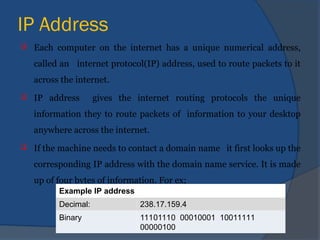
 Each computer on the internet has a unique numerical address,
called an internet protocol(IP) address, used to route packets to it
across the internet.
 IP address gives the internet routing protocols the unique
information they to route packets of information to your desktop
anywhere across the internet.
 If the machine needs to contact a domain name it first looks up the
corresponding IP address with the domain name service. It is made
up of four bytes of information. For ex;
Example IP address
Decimal: 238.17.159.4
Binary 11101110 00010001 10011111
00000100
Internet Connectivity
Following are the Hardware and software requirements to
establish the Internet connection.
 Pentium III or above
 Modem with speed as 14,000 bps to 56,000 bps
 Internet Browser Software: Netscape or Internet explorer
 ISP e.g.VSNL
 Telephone lines with telephonic instrument/ISDN/Dial-up
line/Leased line.
Search Engines
 Search engine is a tool designed to search for information
on the World Wide Web .The search results are usually
presented in the list and are called hits.
 The information may consists of web pages images,
information and other types of files.
 Some search engine also mine data available in news
books,database,or open directories.
 Search engine operate algorithmically or are a mixture of
algorithmic and human input.
Services of Internet
E-mail: E-mail was originally designed for communication
between a pair of individuals, it has been extended to provided
communication among a group with a computer program.
Definitions: According to Acharyya –E-mail refers to a
combination of data communication system and word
processing system.
ARL defines E-mail as “a system which has the capacity of
transmitting and receiving messages documents using an
intelligent medium composed of electronic devices.
Generally: Intelligence furnished by a computer, The
transmission medium electrical wire or cable and the
input/output devices are terminals printers, or word
processors.
E-Mail Scope
 E-mail system are extensively used across WAN ,that covers both
National and International geographical area and also popular
LAN that interconnect communication systems within a single
building or group of buildings.
 Prof Saffady accepted E-mail in a positive and wider spectrum.
Telephone can also be considered as a form of E-mail and
message system.
 Scope of E-mail is usually limited to those systems which
transmits written message generated by handwritten, typewriter,
and word processors.
E-Mail Ingredients
 There must be mail-box for storing forwarding and accessing
messages electronically.
 Each user in the E-mail system must know the other’s identification
number.
 Mail service must be instantaneous unless and otherwise controlled.
 Message that are converted to electronic signals for the purpose of
transmission.
 Systems were paper as the medium of the messages composition,
messages dispatch and messages receiving.
 Communication that is made electronically must be interactive in
nature
Advantages of E-mail
 Simple to Operate
 Cost effective
 Timeliness
 Document delivery
 Effective for one to many corresponds
 One can work anytime, anywhere, and can reach every
one, every where
File Transfer Protocol(FTP)
 FTP permits a user to transfer a copy of data file across the internet
from one computer to another. When , using FTP ,a user established
communication with a remote computer and authorization by
sending a login and a password. The user can list files available on
remote computer.
 An FTP site is like a large filing cabinet. With a traditional filing
cabinet the person who does the filing has the option to label and
organize the files. They also decide which files to keep locked and
which remain public .It is the same with an FTP site.
cont..
Objectives of FTP
 To promote sharing of files
 To encourage in direct or implicit use of remote computers
 To shield a user from variations in file storage systems among different hosts
 To transfer data reliably and efficiently.
An FTP client is a software that is designed to transfer
files back-and-forth between two computers over internet. It
needs to be installed and can only be used with connection to
internet.
Remote Login(Telnet)
 Remote login occurs when a user connects to an Internet host to use its
native user interface.
 Protocols such as TELNET and RLOGIN were developed for terminal users
to use their terminals as if they were directly connected to a remote system.
 In the late 1980,as graphical, window-oriented user interface became
popular, protocols were developed to allow remote windowing operations
much as earlier protocol allowed remote terminal operation.
 Definition: Rlogin is a UNIX command that allows an authorized user to
login to other UNIX machines(hosts) on a network and to interact as if the
user were physically at the host computer.
 The internet’s remote login service is called a telnet.
Method of Remote login
 Once you have logged into the system, you can log into other
machines or on other networks with the telnet and rlognin
commands.
 Telnet: The format for the telnet command is :
Telnet <hostname>
 The command rlogin has the advantage over telnet in that you can
specify a username on command line, and can set it up that when you
rlogin to a host you will not be promoted for a password.
 Rlogin assumes you wish to login to an account with the same name
as the account you are presently logged in as
 The format for the rlogin command is ; Rlogin < hostname>
Teleconference
 A teleconference is a telephone meeting among two or more
participants involving sophisticated technology than in a simple two-
way phone.
 A teleconference can be an audio conference with one or both ends
sharing speaker phone.
 One of the special projects of Internet 2 is to explore the possibility
of having teleconferences in which all the participants actually
appear to be in the same room together.
 Today audio teleconferences are sometimes arranged over dial-up
phone lines using bridging services that provides the necessary
equipment for call.
Video conference
 Video Conference is a set of interactive telecommunication technologies
which allows two or more locations to interact via two - way video and
audio transmission simultaneously.
 Video conferencing uses telecommunication of audio and video to bring
people at different sites together for a meeting .This can be simple as
conversation between two people in private office(point-to-point) or
involve several sites(multi-point) with more than one person person in
large rooms at different sites. It can used to share documents,
computer-displayed information, and white boards.
 The core technology used in Video conferencing is system is digital
compression of audio and video called “codec”.
Bulletin Board Service(Network News)
 A BBS (Bulletin Board Service) is a “place” in cyberspace where you
can “meet” people with similar interests, and hold forth on your
favorite topics.
 There may be several discussions areas, called forums, within the
BBS where different topics of interest are discussed. They range
from computing topics, new recepics,debating,burning issues of the
day & reviews of films or plays.
 A BBS consists of people who’re from all geographical location.
 BBS can be viewed as an open electronic clubhouse where callers can
share their experience and seek answers to their queries.
Browsing The World Wide Web
 The World Wide Web is an elaborate set of interlinked hypertext
documents accessed via internet. With a web browser ,one can view web
pages that contain .text, images, videos, and multimedia .
 WWW was started by Sir Tim Berners Lee and has played an active role in
guiding the development of web standard. It is a collection of
interconnected documents and resources, linked by hyperlinks & URL.
 In terms of security as it relates to the “physical” portion of WWW, the
“distributed” nature of Internet provides security against attacks as there
is no single “focus point "through which Internet traffic is directed .
 Any attempt to “cripple” the internet would disable a small portion of
whole and connecting computers would simply direct the affected traffic.
Data Base Service
 There are databases on almost on all subjects like agriculture,
nutrition, geography etc Online information on a wide range of topics
are also available. Most of these database are perhaps the on-line
public access catalogs (OPACs) of different academic libraries.
 Some of them are Library of Congress Database, Harvard library
Database, Yale Library Database.
 Libraries are striving to collect enough information to satisfy the
needs of the users, but problems are related to communication ,
computers, different formats and as we get used to work with these
we can do much better.
Document Delivery Service (DDS)
 Document Delivery Service is one of the new services. Under this
services deliver, on demand the papers from learned journals,
conference proceedings and other material available in the collection.
 This services is provided on No Profit-No Loss Basis.
 The material can be ordered with complete bibliographical information
by using E-mail, Normal Letter, Fax, Telephone, or Requests in
person.
 Materials are delivered using any one of the following option
depending on your need and payment i.e. E-mail, Normal Letter, Fax,
Speed post/courier, By hand if user personally visits the Document
Delivery Counter.
Advantages of Internet
 Internet enables large volume of communication
 Internet enables worldwide search
 Interactive nature
 Support for multimedia information exchange
 Low cost operation and maintenance
 Open standards and few rules
 It will save funds in the organization
 It will save space in library
 High quality information produced which exists on internet is
helpful in research purpose.
Disadvantages of Internet
 Lack of expertise to use the technology
 Lack of single protocol, uniformity and proper indexing etc
 Slow response time
 Noise in telecommunication
 Poor quality of data and poor organization of information is lost of
information.
Conclusion
As the internet continues to grow with information
every moment as day progress, it becomes an
indispensable tool for conducting research especially for
Library and Information Science Professionals, since it
is an integral part of library and it is very much helpful
in providing services to the users of library with
different needs.
Internetpresentation Internetpresentation.ppt

Internetpresentation Internetpresentation.ppt

  • 1.
    Dr. S. L.Sangam Professor and Chairman Department of Library and Information Science Karnatak University Dharwad
  • 2.
    Introduction:  The internetconsists of terms of interconnected packet switched networks world wide all of which use the internet protocols (IP).  The internet has developed largely without any central plan, and no single entity can control or speak for the entire system.  The technology of the internet allows new type of services to be layered on top of existing protocols. Numerous users can share physical facilities and the traffic mix through any point changes constantly through the actions of a distributed network of thousands of routers.
  • 3.
    History of Internet The routers of the current internet can be traced to ARPANET, (Advance Research Projects Agency) a network developed in the late 1960 with founding from the advanced research projects admistration of United States Department of Defense (DOD).  ARPANET linked together computers at major Universities at these institutions to exchange data.  As ARPANET grew during the 1970 , and early 1980 several similar networks were established primilarly between universities.  The transmission Control Protocol/Internet Protocol (TCP/IP) were adopted as a standard to allow these networks comprised of many different types of computers to interconnect.
  • 4.
    Cont..  In themid 1980 the National Science Foundation (NSF) founded the establishment of NSFNET. A TCP/IP network that initially connected Six NSF founded national super computing centers at a data rate 56 Kbps.. NSF subsequently awarded a contract to partnership of merit.  The military portion of ARPANET was interacted into the defense data network in1980 and civilian ARPANET was taken out of services in 1990.By that NSFNET had supplemented ARPANET as a backbone for world wide interconnected networks.  In 1992 the NSF announced its intention to phase out federal support for the internet backbones and encourage commercial entities.  Very High Speed Network Services (VBNS) a non commercial research oriented backbone operating at the OC3 rate of 15.5 mbps over optical fiber.
  • 5.
    Definitions  According toInternational encyclopedia of Library and information science “Internet is the meta-network or network of networks which links up a global agglomeration of computers resource for public access”  According to Dictionary of Computers “ Any time you connect two or more networks together you have an internet as in international or interstate”  The term internet is called as 1) . Network of Networks, 2). Information supper highway 3).World wide Channel communication, 4).A large store of information
  • 6.
    Internet Technologies  InternetTechnologies covers a broad range TCP/IP (Transmission Control Protocol/Internet Protocol) 1. It is the basic communication language or protocol of the Internet. It can also be used as a communications protocol in a private network . 2. When you are set up with direct access to Internet, your computer is provided with a copy of TCP/IP program just as every other computer. 3. TCP/IP uses the client/server model of communication in which a computer user requests and is provided a services by another computer in the network. 4. TCP/IP communication is point to point. 5. Higher layer application protocols that use TCP/IP are HTTP,FTP, Telnet, SMPT, SLIP or point to point protocol
  • 7.
    IP Address  Eachcomputer on the internet has a unique numerical address, called an internet protocol(IP) address, used to route packets to it across the internet.  IP address gives the internet routing protocols the unique information they to route packets of information to your desktop anywhere across the internet.  If the machine needs to contact a domain name it first looks up the corresponding IP address with the domain name service. It is made up of four bytes of information. For ex; Example IP address Decimal: 238.17.159.4 Binary 11101110 00010001 10011111 00000100
  • 8.
    Internet Connectivity Following arethe Hardware and software requirements to establish the Internet connection.  Pentium III or above  Modem with speed as 14,000 bps to 56,000 bps  Internet Browser Software: Netscape or Internet explorer  ISP e.g.VSNL  Telephone lines with telephonic instrument/ISDN/Dial-up line/Leased line.
  • 9.
    Search Engines  Searchengine is a tool designed to search for information on the World Wide Web .The search results are usually presented in the list and are called hits.  The information may consists of web pages images, information and other types of files.  Some search engine also mine data available in news books,database,or open directories.  Search engine operate algorithmically or are a mixture of algorithmic and human input.
  • 10.
    Services of Internet E-mail:E-mail was originally designed for communication between a pair of individuals, it has been extended to provided communication among a group with a computer program. Definitions: According to Acharyya –E-mail refers to a combination of data communication system and word processing system. ARL defines E-mail as “a system which has the capacity of transmitting and receiving messages documents using an intelligent medium composed of electronic devices. Generally: Intelligence furnished by a computer, The transmission medium electrical wire or cable and the input/output devices are terminals printers, or word processors.
  • 11.
    E-Mail Scope  E-mailsystem are extensively used across WAN ,that covers both National and International geographical area and also popular LAN that interconnect communication systems within a single building or group of buildings.  Prof Saffady accepted E-mail in a positive and wider spectrum. Telephone can also be considered as a form of E-mail and message system.  Scope of E-mail is usually limited to those systems which transmits written message generated by handwritten, typewriter, and word processors.
  • 12.
    E-Mail Ingredients  Theremust be mail-box for storing forwarding and accessing messages electronically.  Each user in the E-mail system must know the other’s identification number.  Mail service must be instantaneous unless and otherwise controlled.  Message that are converted to electronic signals for the purpose of transmission.  Systems were paper as the medium of the messages composition, messages dispatch and messages receiving.  Communication that is made electronically must be interactive in nature
  • 13.
    Advantages of E-mail Simple to Operate  Cost effective  Timeliness  Document delivery  Effective for one to many corresponds  One can work anytime, anywhere, and can reach every one, every where
  • 14.
    File Transfer Protocol(FTP) FTP permits a user to transfer a copy of data file across the internet from one computer to another. When , using FTP ,a user established communication with a remote computer and authorization by sending a login and a password. The user can list files available on remote computer.  An FTP site is like a large filing cabinet. With a traditional filing cabinet the person who does the filing has the option to label and organize the files. They also decide which files to keep locked and which remain public .It is the same with an FTP site.
  • 15.
    cont.. Objectives of FTP To promote sharing of files  To encourage in direct or implicit use of remote computers  To shield a user from variations in file storage systems among different hosts  To transfer data reliably and efficiently. An FTP client is a software that is designed to transfer files back-and-forth between two computers over internet. It needs to be installed and can only be used with connection to internet.
  • 16.
    Remote Login(Telnet)  Remotelogin occurs when a user connects to an Internet host to use its native user interface.  Protocols such as TELNET and RLOGIN were developed for terminal users to use their terminals as if they were directly connected to a remote system.  In the late 1980,as graphical, window-oriented user interface became popular, protocols were developed to allow remote windowing operations much as earlier protocol allowed remote terminal operation.  Definition: Rlogin is a UNIX command that allows an authorized user to login to other UNIX machines(hosts) on a network and to interact as if the user were physically at the host computer.  The internet’s remote login service is called a telnet.
  • 17.
    Method of Remotelogin  Once you have logged into the system, you can log into other machines or on other networks with the telnet and rlognin commands.  Telnet: The format for the telnet command is : Telnet <hostname>  The command rlogin has the advantage over telnet in that you can specify a username on command line, and can set it up that when you rlogin to a host you will not be promoted for a password.  Rlogin assumes you wish to login to an account with the same name as the account you are presently logged in as  The format for the rlogin command is ; Rlogin < hostname>
  • 18.
    Teleconference  A teleconferenceis a telephone meeting among two or more participants involving sophisticated technology than in a simple two- way phone.  A teleconference can be an audio conference with one or both ends sharing speaker phone.  One of the special projects of Internet 2 is to explore the possibility of having teleconferences in which all the participants actually appear to be in the same room together.  Today audio teleconferences are sometimes arranged over dial-up phone lines using bridging services that provides the necessary equipment for call.
  • 19.
    Video conference  VideoConference is a set of interactive telecommunication technologies which allows two or more locations to interact via two - way video and audio transmission simultaneously.  Video conferencing uses telecommunication of audio and video to bring people at different sites together for a meeting .This can be simple as conversation between two people in private office(point-to-point) or involve several sites(multi-point) with more than one person person in large rooms at different sites. It can used to share documents, computer-displayed information, and white boards.  The core technology used in Video conferencing is system is digital compression of audio and video called “codec”.
  • 20.
    Bulletin Board Service(NetworkNews)  A BBS (Bulletin Board Service) is a “place” in cyberspace where you can “meet” people with similar interests, and hold forth on your favorite topics.  There may be several discussions areas, called forums, within the BBS where different topics of interest are discussed. They range from computing topics, new recepics,debating,burning issues of the day & reviews of films or plays.  A BBS consists of people who’re from all geographical location.  BBS can be viewed as an open electronic clubhouse where callers can share their experience and seek answers to their queries.
  • 21.
    Browsing The WorldWide Web  The World Wide Web is an elaborate set of interlinked hypertext documents accessed via internet. With a web browser ,one can view web pages that contain .text, images, videos, and multimedia .  WWW was started by Sir Tim Berners Lee and has played an active role in guiding the development of web standard. It is a collection of interconnected documents and resources, linked by hyperlinks & URL.  In terms of security as it relates to the “physical” portion of WWW, the “distributed” nature of Internet provides security against attacks as there is no single “focus point "through which Internet traffic is directed .  Any attempt to “cripple” the internet would disable a small portion of whole and connecting computers would simply direct the affected traffic.
  • 22.
    Data Base Service There are databases on almost on all subjects like agriculture, nutrition, geography etc Online information on a wide range of topics are also available. Most of these database are perhaps the on-line public access catalogs (OPACs) of different academic libraries.  Some of them are Library of Congress Database, Harvard library Database, Yale Library Database.  Libraries are striving to collect enough information to satisfy the needs of the users, but problems are related to communication , computers, different formats and as we get used to work with these we can do much better.
  • 23.
    Document Delivery Service(DDS)  Document Delivery Service is one of the new services. Under this services deliver, on demand the papers from learned journals, conference proceedings and other material available in the collection.  This services is provided on No Profit-No Loss Basis.  The material can be ordered with complete bibliographical information by using E-mail, Normal Letter, Fax, Telephone, or Requests in person.  Materials are delivered using any one of the following option depending on your need and payment i.e. E-mail, Normal Letter, Fax, Speed post/courier, By hand if user personally visits the Document Delivery Counter.
  • 24.
    Advantages of Internet Internet enables large volume of communication  Internet enables worldwide search  Interactive nature  Support for multimedia information exchange  Low cost operation and maintenance  Open standards and few rules  It will save funds in the organization  It will save space in library  High quality information produced which exists on internet is helpful in research purpose.
  • 25.
    Disadvantages of Internet Lack of expertise to use the technology  Lack of single protocol, uniformity and proper indexing etc  Slow response time  Noise in telecommunication  Poor quality of data and poor organization of information is lost of information.
  • 26.
    Conclusion As the internetcontinues to grow with information every moment as day progress, it becomes an indispensable tool for conducting research especially for Library and Information Science Professionals, since it is an integral part of library and it is very much helpful in providing services to the users of library with different needs.