JUNIPER JNCI
JUNIPER FLOATING STATIC ROUTE CONFIGURATION
A S M E D U C AT I O N A L C E N T E R I N C . ( A S M )
WHERETRAINING,TECHNOLOGY&SERVICECONVERGE
CHECKOUTOURJUNIPERTRAININGVIDEOS:WWW.ASMED.COM/J1
JUNIPER FLOATING STATIC ROUTE CONFIGURATION
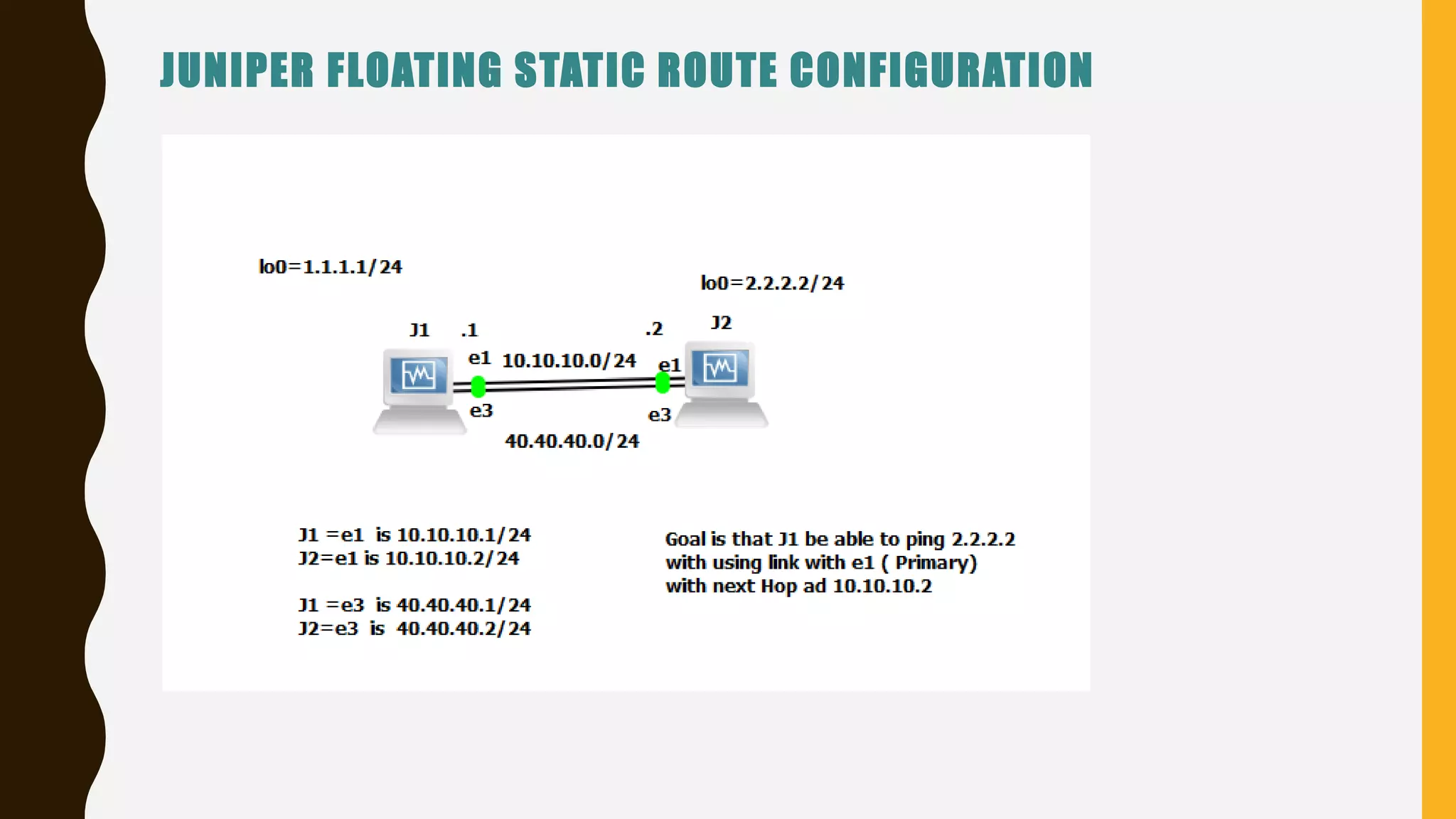
In here R1 and R2 are connected via two cables
e1 to e1 is 10.10.10.1/24
10.10.10.2/24
e3 to e3 is 40.40.40.1/24
40.40.40.2/24
Goal is to that R1 will be able go to Loopback address of R2=2.2.2.2 via Link e1=10.10.10.1
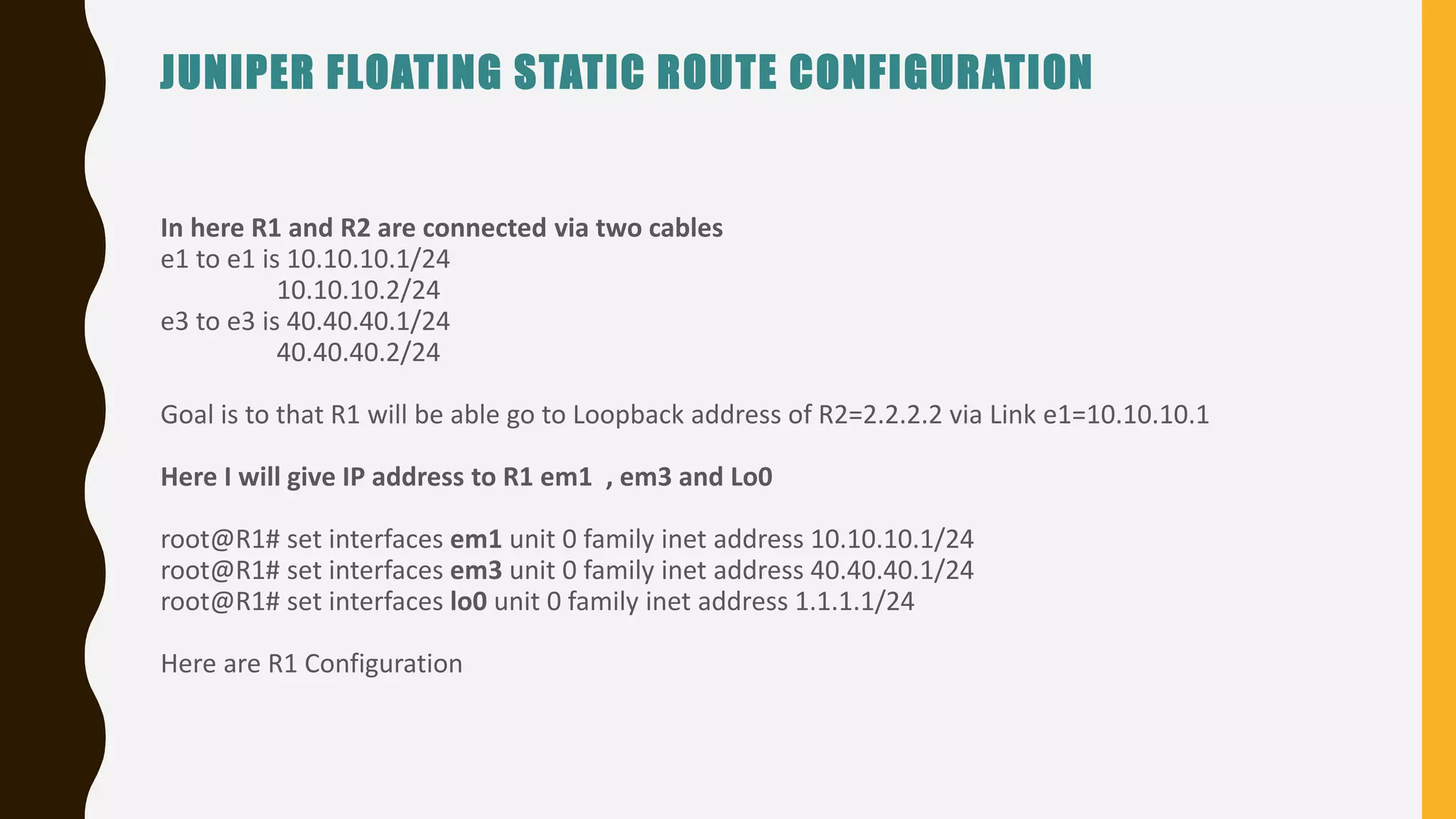
Here I will give IP address to R1 em1 , em3 and Lo0
root@R1# set interfaces em1 unit 0 family inet address 10.10.10.1/24
root@R1# set interfaces em3 unit 0 family inet address 40.40.40.1/24
root@R1# set interfaces lo0 unit 0 family inet address 1.1.1.1/24
Here are R1 Configuration
JUNIPER FLOATING STATIC ROUTE CONFIGURATION
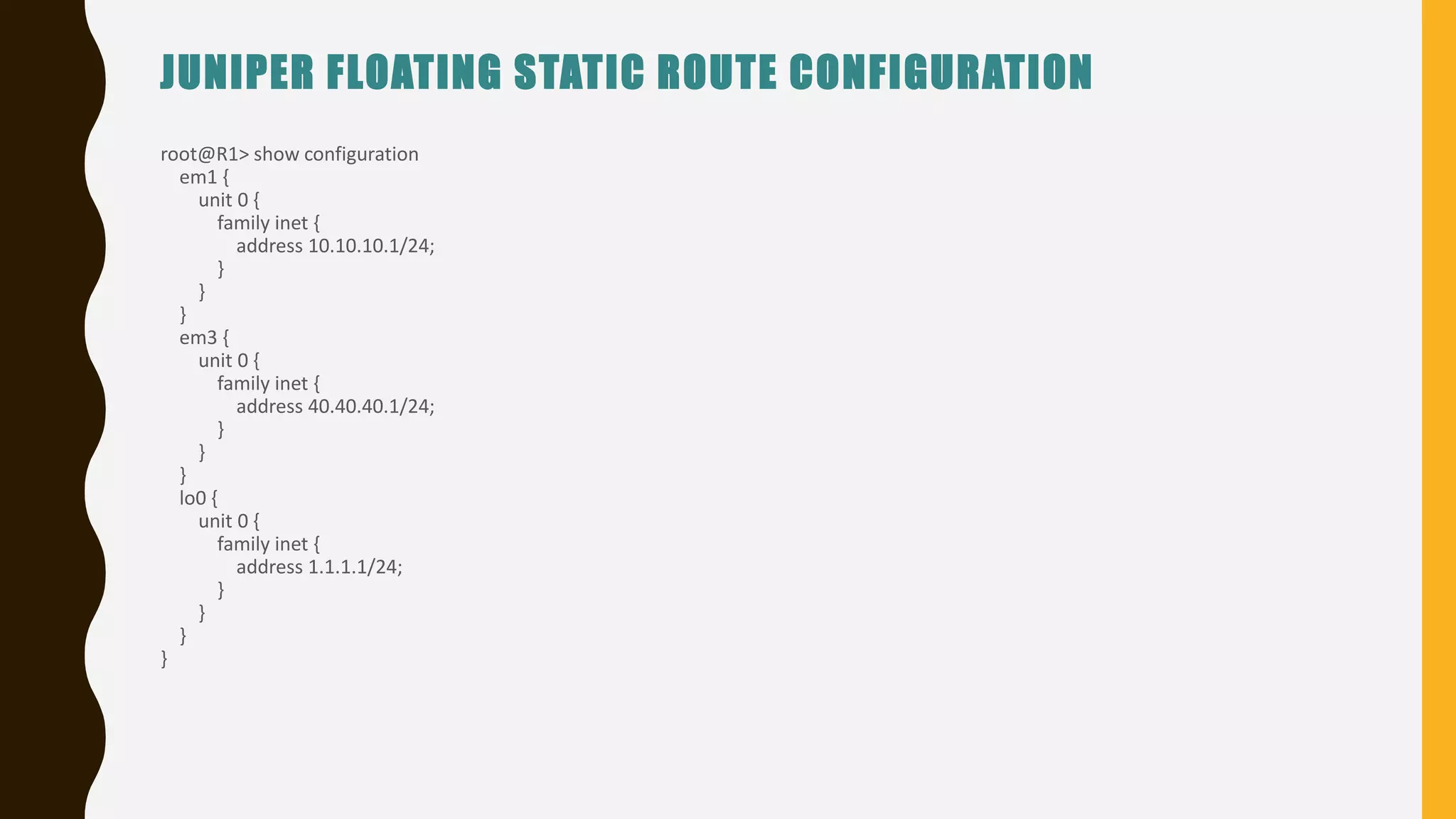
root@R1> show configuration
em1 {
unit 0 {
family inet {
address 10.10.10.1/24;
}
}
}
em3 {
unit 0 {
family inet {
address 40.40.40.1/24;
}
}
}
lo0 {
unit 0 {
family inet {
address 1.1.1.1/24;
}
}
}
}
JUNIPER FLOATING STATIC ROUTE CONFIGURATION
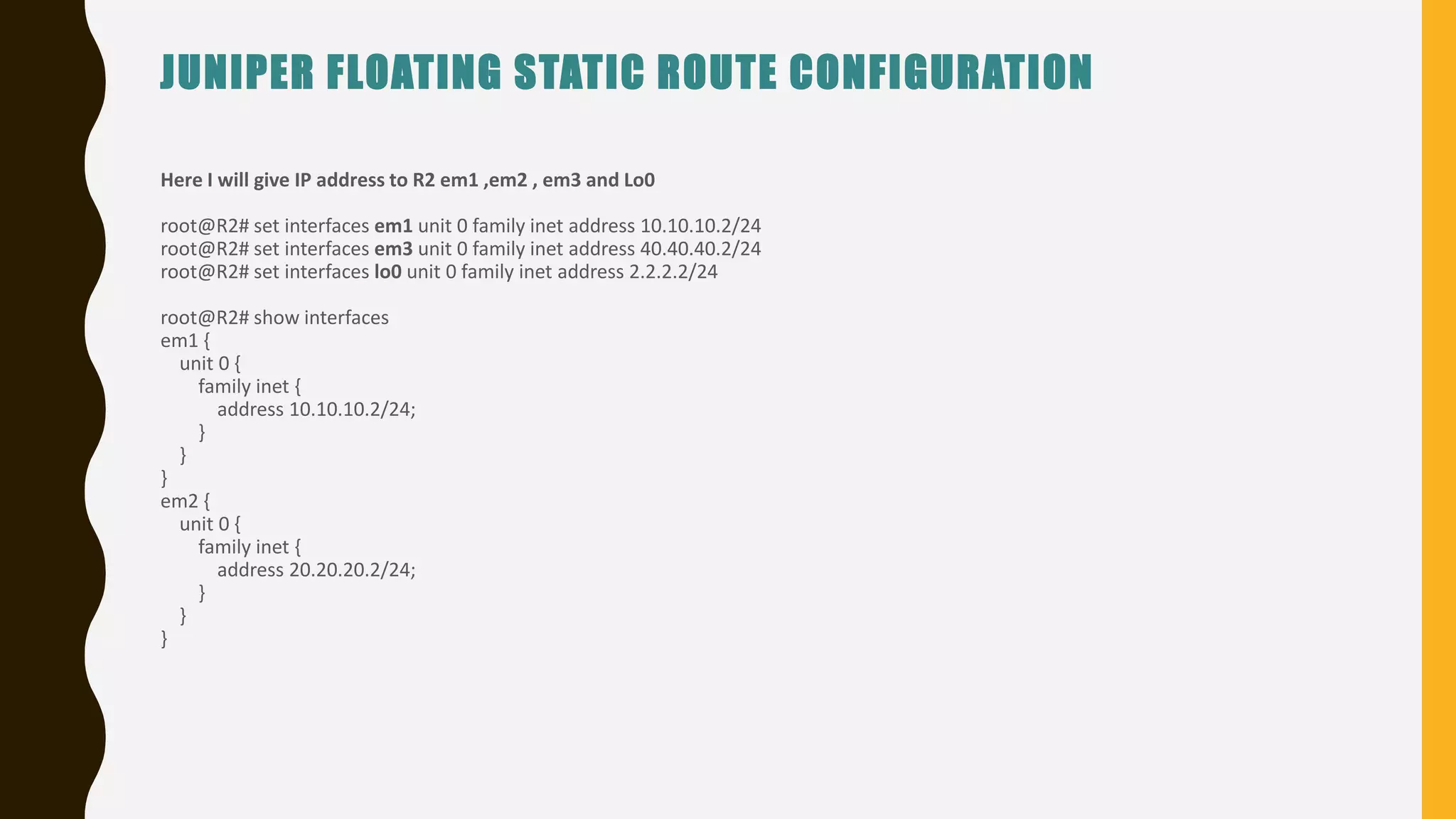
Here I will give IP address to R2 em1 ,em2 , em3 and Lo0
root@R2# set interfaces em1 unit 0 family inet address 10.10.10.2/24
root@R2# set interfaces em3 unit 0 family inet address 40.40.40.2/24
root@R2# set interfaces lo0 unit 0 family inet address 2.2.2.2/24
root@R2# show interfaces
em1 {
unit 0 {
family inet {
address 10.10.10.2/24;
}
}
}
em2 {
unit 0 {
family inet {
address 20.20.20.2/24;
}
}
}
JUNIPER FLOATING STATIC ROUTE CONFIGURATION
em3 {
unit 0 {
family inet {
address 40.40.40.2/24;
}
}
}
lo0 {
unit 0 {
family inet {
address 2.2.2.2/24;
}
}
}
[edit]
root@R2#
Now In order R1 be able to Ping 2.2.2.2 using the Link e1 (that is next hop is 10.10.10.2) we need to use the commands: qualified-next-
hop 10.10.10.2 preference 25 (remember the default preference for Static route=5) so I want other link to have a higher Preference
JUNIPER FLOATING STATIC ROUTE CONFIGURATION
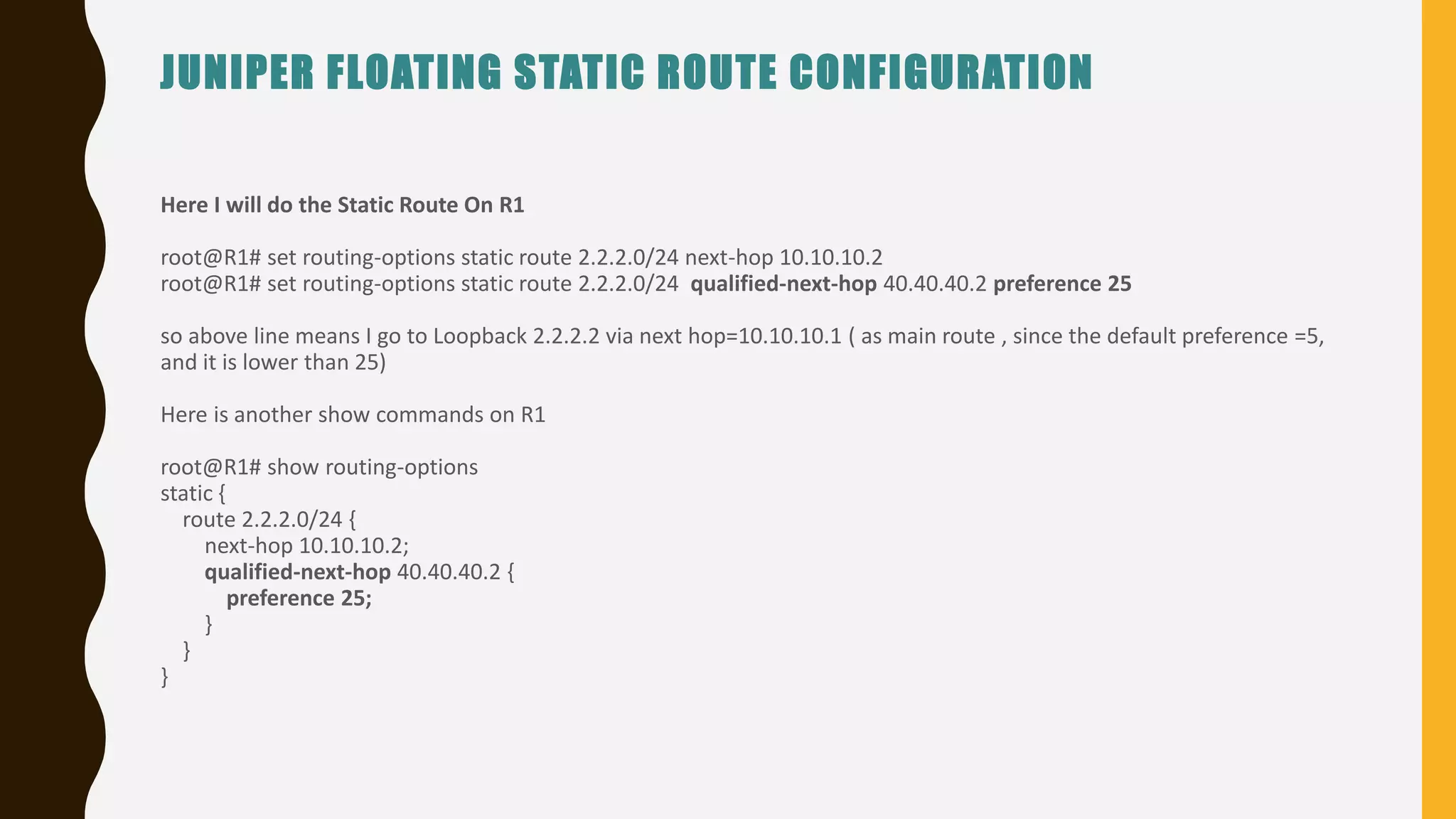
Here I will do the Static Route On R1
root@R1# set routing-options static route 2.2.2.0/24 next-hop 10.10.10.2
root@R1# set routing-options static route 2.2.2.0/24 qualified-next-hop 40.40.40.2 preference 25
so above line means I go to Loopback 2.2.2.2 via next hop=10.10.10.1 ( as main route , since the default preference =5,
and it is lower than 25)
Here is another show commands on R1
root@R1# show routing-options
static {
route 2.2.2.0/24 {
next-hop 10.10.10.2;
qualified-next-hop 40.40.40.2 {
preference 25;
}
}
}
JUNIPER FLOATING STATIC ROUTE CONFIGURATION
Here is my routing table for R1
root@R1> show route protocol static
inet.0: 7 destinations, 8 routes (7 active, 0 holddown, 0 hidden)
+ = Active Route, - = Last Active, * = Both
2.2.2.0/24 *[Static/5] 00:01:45
> to 10.10.10.2 via em1.0
[Static/25] 00:09:07
> to 40.40.40.2 via em3.0
The asterisks (*) in the routing tables show the active routes. The backup routes are listed next.
Since R2 has a static back to R1 ; I will be able ping 2.2.2.2
Now I will do the Static Route on R2
root@R2# set routing-options static route 1.1.1.0/24 next-hop 10.10.10.1
JUNIPER FLOATING STATIC ROUTE CONFIGURATION
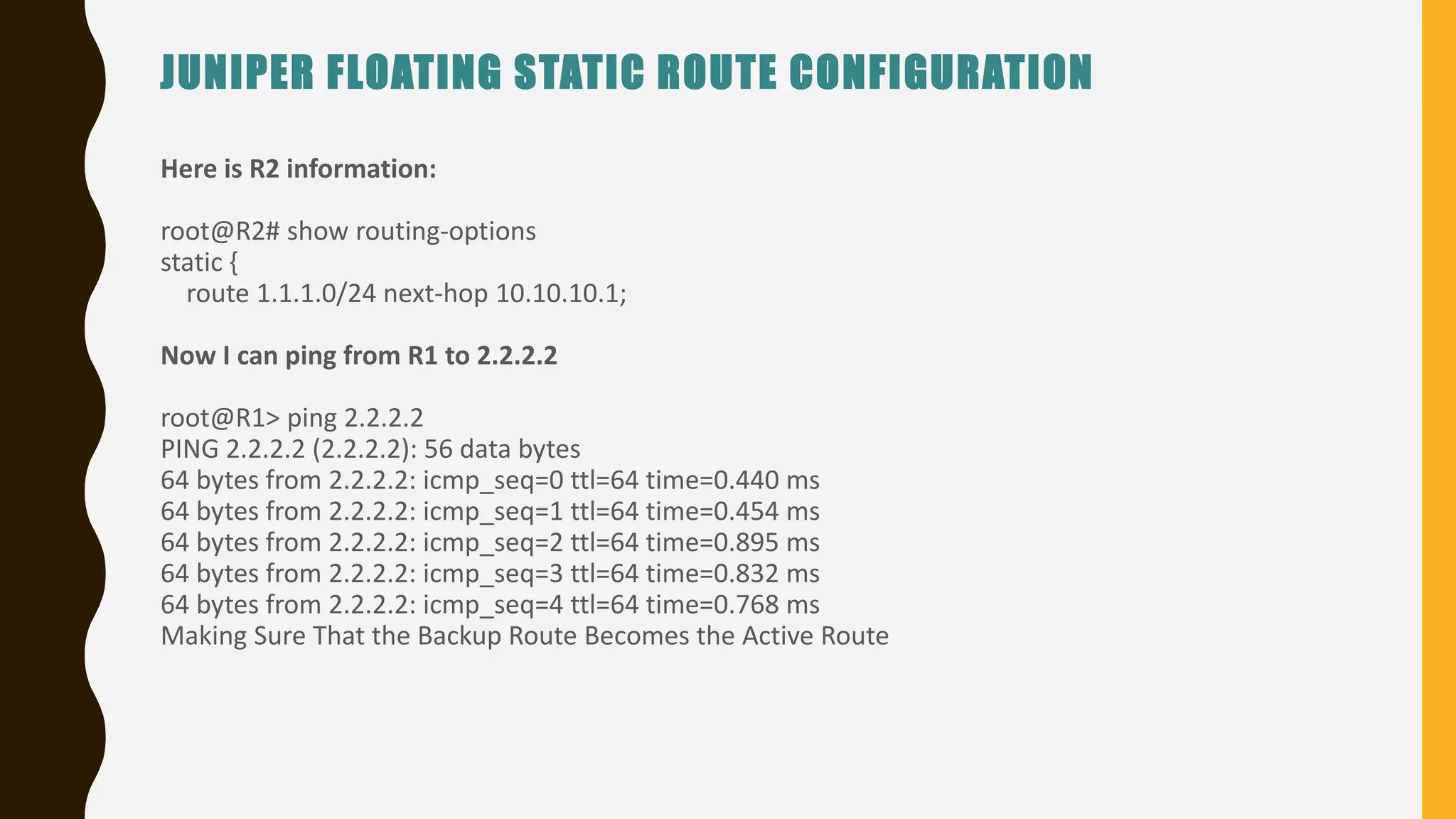
Here is R2 information:
root@R2# show routing-options
static {
route 1.1.1.0/24 next-hop 10.10.10.1;
Now I can ping from R1 to 2.2.2.2
root@R1> ping 2.2.2.2
PING 2.2.2.2 (2.2.2.2): 56 data bytes
64 bytes from 2.2.2.2: icmp_seq=0 ttl=64 time=0.440 ms
64 bytes from 2.2.2.2: icmp_seq=1 ttl=64 time=0.454 ms
64 bytes from 2.2.2.2: icmp_seq=2 ttl=64 time=0.895 ms
64 bytes from 2.2.2.2: icmp_seq=3 ttl=64 time=0.832 ms
64 bytes from 2.2.2.2: icmp_seq=4 ttl=64 time=0.768 ms
Making Sure That the Backup Route Becomes the Active Route
JUNIPER FLOATING STATIC ROUTE CONFIGURATION
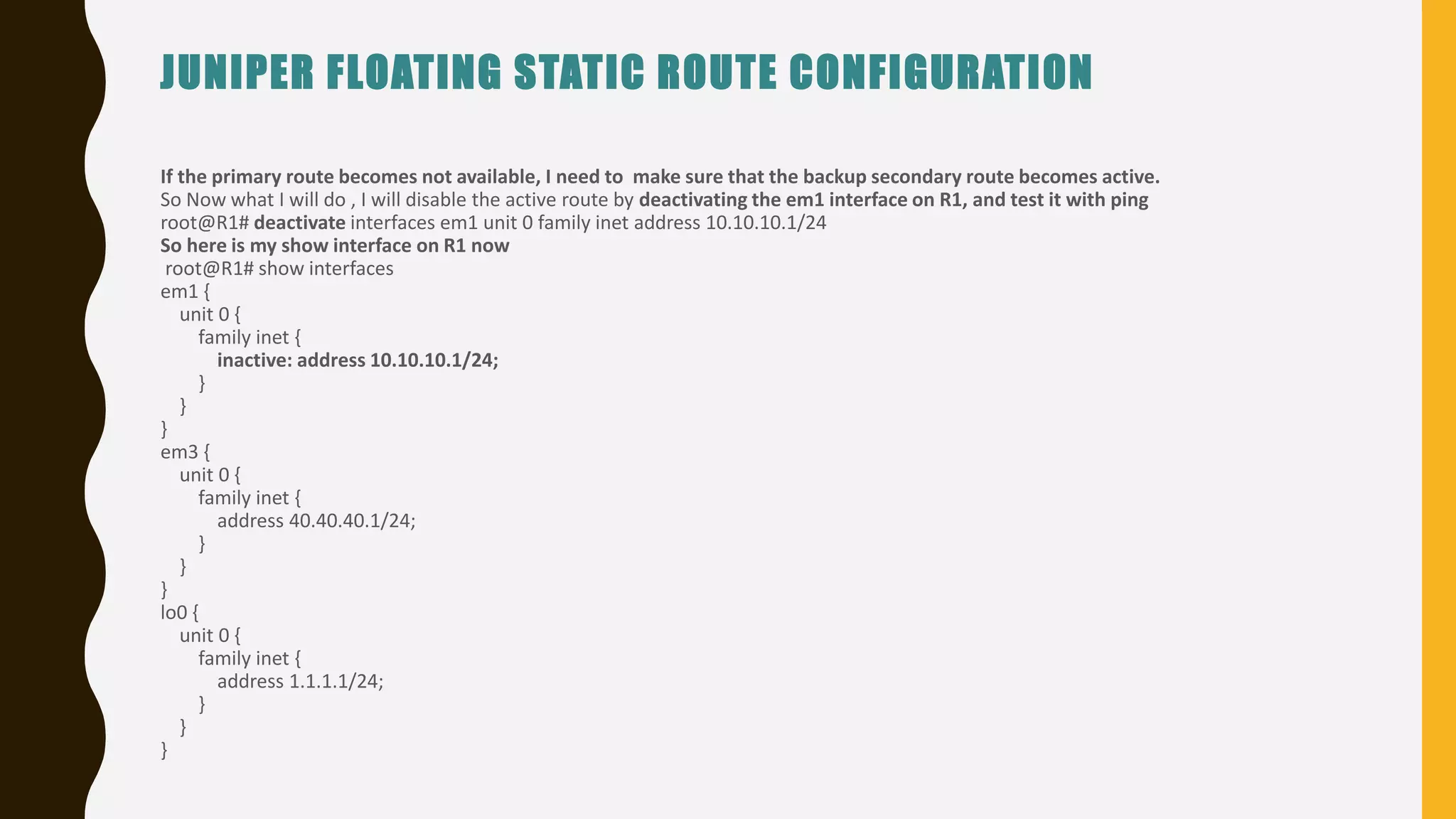
If the primary route becomes not available, I need to make sure that the backup secondary route becomes active.
So Now what I will do , I will disable the active route by deactivating the em1 interface on R1, and test it with ping
root@R1# deactivate interfaces em1 unit 0 family inet address 10.10.10.1/24
So here is my show interface on R1 now
root@R1# show interfaces
em1 {
unit 0 {
family inet {
inactive: address 10.10.10.1/24;
}
}
}
em3 {
unit 0 {
family inet {
address 40.40.40.1/24;
}
}
}
lo0 {
unit 0 {
family inet {
address 1.1.1.1/24;
}
}
}
JUNIPER FLOATING STATIC ROUTE CONFIGURATION
As we see from above this has been deactivated for em1 , now according this commands I should be able ping 2.2.2.2 via 40.40.40.2
root@R1# show routing-options
static {
route 2.2.2.0/24 {
next-hop 10.10.10.2;
qualified-next-hop 40.40.40.2 {
preference 25;
}
}
}
But let’s look at routing table in R1#
root@R1> show route protocol static
inet.0: 5 destinations, 5 routes (5 active, 0 holddown, 0 hidden)
+ = Active Route, - = Last Active, * = Both
2.2.2.0/24 *[Static/25] 01:10:58
> to 40.40.40.2 via em3.0
root@R1>
JUNIPER FLOATING STATIC ROUTE CONFIGURATION
Here in above we see that R1 will go to 2.2.2.2 via 40.40.40.2
root@R1> ping 2.2.2.2
PING 2.2.2.2 (2.2.2.2): 56 data bytes
64 bytes from 2.2.2.2: icmp_seq=0 ttl=64 time=0.583 ms
64 bytes from 2.2.2.2: icmp_seq=1 ttl=64 time=0.530 ms
64 bytes from 2.2.2.2: icmp_seq=2 ttl=64 time=0.576 ms
64 bytes from 2.2.2.2: icmp_seq=3 ttl=64 time=0.499 ms
So in Summary; for the Floating static route you need to have these commands:
root@R1# set routing-options static route 2.2.2.0/24 next-hop 10.10.10.2
root@R1# set routing-options static route 2.2.2.0/24 qualified-next-hop 40.40.40.2 preference 25
lets activate the interface em1
root@R1# activate interfaces em1 unit 0 family inet address 10.10.10.1/24
Here is my routing table which is back to normal;
root@R1> show route protocol static
inet.0: 7 destinations, 8 routes (7 active, 0 holddown, 0 hidden)
+ = Active Route, - = Last Active, * = Both
2.2.2.0/24 *[Static/5] 00:00:37
> to 10.10.10.2 via em1.0
[Static/25] 01:15:31
> to 40.40.40.2 via em3.0
A S M E D U C AT I O N A L C E N T E R I N C . ( A S M )
WHERETRAINING,TECHNOLOGY&SERVICECONVERGE
W W W. A S M E D . C O M

Juniper JNCIA – Juniper Floating Static Route Configuration

  • 1.
    JUNIPER JNCI JUNIPER FLOATINGSTATIC ROUTE CONFIGURATION A S M E D U C AT I O N A L C E N T E R I N C . ( A S M ) WHERETRAINING,TECHNOLOGY&SERVICECONVERGE CHECKOUTOURJUNIPERTRAININGVIDEOS:WWW.ASMED.COM/J1
  • 2.
    JUNIPER FLOATING STATICROUTE CONFIGURATION
  • 3.
    JUNIPER FLOATING STATICROUTE CONFIGURATION In here R1 and R2 are connected via two cables e1 to e1 is 10.10.10.1/24 10.10.10.2/24 e3 to e3 is 40.40.40.1/24 40.40.40.2/24 Goal is to that R1 will be able go to Loopback address of R2=2.2.2.2 via Link e1=10.10.10.1 Here I will give IP address to R1 em1 , em3 and Lo0 root@R1# set interfaces em1 unit 0 family inet address 10.10.10.1/24 root@R1# set interfaces em3 unit 0 family inet address 40.40.40.1/24 root@R1# set interfaces lo0 unit 0 family inet address 1.1.1.1/24 Here are R1 Configuration
  • 4.
    JUNIPER FLOATING STATICROUTE CONFIGURATION root@R1> show configuration em1 { unit 0 { family inet { address 10.10.10.1/24; } } } em3 { unit 0 { family inet { address 40.40.40.1/24; } } } lo0 { unit 0 { family inet { address 1.1.1.1/24; } } } }
  • 5.
    JUNIPER FLOATING STATICROUTE CONFIGURATION Here I will give IP address to R2 em1 ,em2 , em3 and Lo0 root@R2# set interfaces em1 unit 0 family inet address 10.10.10.2/24 root@R2# set interfaces em3 unit 0 family inet address 40.40.40.2/24 root@R2# set interfaces lo0 unit 0 family inet address 2.2.2.2/24 root@R2# show interfaces em1 { unit 0 { family inet { address 10.10.10.2/24; } } } em2 { unit 0 { family inet { address 20.20.20.2/24; } } }
  • 6.
    JUNIPER FLOATING STATICROUTE CONFIGURATION em3 { unit 0 { family inet { address 40.40.40.2/24; } } } lo0 { unit 0 { family inet { address 2.2.2.2/24; } } } [edit] root@R2# Now In order R1 be able to Ping 2.2.2.2 using the Link e1 (that is next hop is 10.10.10.2) we need to use the commands: qualified-next- hop 10.10.10.2 preference 25 (remember the default preference for Static route=5) so I want other link to have a higher Preference
  • 7.
    JUNIPER FLOATING STATICROUTE CONFIGURATION Here I will do the Static Route On R1 root@R1# set routing-options static route 2.2.2.0/24 next-hop 10.10.10.2 root@R1# set routing-options static route 2.2.2.0/24 qualified-next-hop 40.40.40.2 preference 25 so above line means I go to Loopback 2.2.2.2 via next hop=10.10.10.1 ( as main route , since the default preference =5, and it is lower than 25) Here is another show commands on R1 root@R1# show routing-options static { route 2.2.2.0/24 { next-hop 10.10.10.2; qualified-next-hop 40.40.40.2 { preference 25; } } }
  • 8.
    JUNIPER FLOATING STATICROUTE CONFIGURATION Here is my routing table for R1 root@R1> show route protocol static inet.0: 7 destinations, 8 routes (7 active, 0 holddown, 0 hidden) + = Active Route, - = Last Active, * = Both 2.2.2.0/24 *[Static/5] 00:01:45 > to 10.10.10.2 via em1.0 [Static/25] 00:09:07 > to 40.40.40.2 via em3.0 The asterisks (*) in the routing tables show the active routes. The backup routes are listed next. Since R2 has a static back to R1 ; I will be able ping 2.2.2.2 Now I will do the Static Route on R2 root@R2# set routing-options static route 1.1.1.0/24 next-hop 10.10.10.1
  • 9.
    JUNIPER FLOATING STATICROUTE CONFIGURATION Here is R2 information: root@R2# show routing-options static { route 1.1.1.0/24 next-hop 10.10.10.1; Now I can ping from R1 to 2.2.2.2 root@R1> ping 2.2.2.2 PING 2.2.2.2 (2.2.2.2): 56 data bytes 64 bytes from 2.2.2.2: icmp_seq=0 ttl=64 time=0.440 ms 64 bytes from 2.2.2.2: icmp_seq=1 ttl=64 time=0.454 ms 64 bytes from 2.2.2.2: icmp_seq=2 ttl=64 time=0.895 ms 64 bytes from 2.2.2.2: icmp_seq=3 ttl=64 time=0.832 ms 64 bytes from 2.2.2.2: icmp_seq=4 ttl=64 time=0.768 ms Making Sure That the Backup Route Becomes the Active Route
  • 10.
    JUNIPER FLOATING STATICROUTE CONFIGURATION If the primary route becomes not available, I need to make sure that the backup secondary route becomes active. So Now what I will do , I will disable the active route by deactivating the em1 interface on R1, and test it with ping root@R1# deactivate interfaces em1 unit 0 family inet address 10.10.10.1/24 So here is my show interface on R1 now root@R1# show interfaces em1 { unit 0 { family inet { inactive: address 10.10.10.1/24; } } } em3 { unit 0 { family inet { address 40.40.40.1/24; } } } lo0 { unit 0 { family inet { address 1.1.1.1/24; } } }
  • 11.
    JUNIPER FLOATING STATICROUTE CONFIGURATION As we see from above this has been deactivated for em1 , now according this commands I should be able ping 2.2.2.2 via 40.40.40.2 root@R1# show routing-options static { route 2.2.2.0/24 { next-hop 10.10.10.2; qualified-next-hop 40.40.40.2 { preference 25; } } } But let’s look at routing table in R1# root@R1> show route protocol static inet.0: 5 destinations, 5 routes (5 active, 0 holddown, 0 hidden) + = Active Route, - = Last Active, * = Both 2.2.2.0/24 *[Static/25] 01:10:58 > to 40.40.40.2 via em3.0 root@R1>
  • 12.
    JUNIPER FLOATING STATICROUTE CONFIGURATION Here in above we see that R1 will go to 2.2.2.2 via 40.40.40.2 root@R1> ping 2.2.2.2 PING 2.2.2.2 (2.2.2.2): 56 data bytes 64 bytes from 2.2.2.2: icmp_seq=0 ttl=64 time=0.583 ms 64 bytes from 2.2.2.2: icmp_seq=1 ttl=64 time=0.530 ms 64 bytes from 2.2.2.2: icmp_seq=2 ttl=64 time=0.576 ms 64 bytes from 2.2.2.2: icmp_seq=3 ttl=64 time=0.499 ms So in Summary; for the Floating static route you need to have these commands: root@R1# set routing-options static route 2.2.2.0/24 next-hop 10.10.10.2 root@R1# set routing-options static route 2.2.2.0/24 qualified-next-hop 40.40.40.2 preference 25 lets activate the interface em1 root@R1# activate interfaces em1 unit 0 family inet address 10.10.10.1/24 Here is my routing table which is back to normal; root@R1> show route protocol static inet.0: 7 destinations, 8 routes (7 active, 0 holddown, 0 hidden) + = Active Route, - = Last Active, * = Both 2.2.2.0/24 *[Static/5] 00:00:37 > to 10.10.10.2 via em1.0 [Static/25] 01:15:31 > to 40.40.40.2 via em3.0
  • 13.
    A S ME D U C AT I O N A L C E N T E R I N C . ( A S M ) WHERETRAINING,TECHNOLOGY&SERVICECONVERGE W W W. A S M E D . C O M