Cisco CCNA/CCNP VACL Configuration
To watch our Cisco CCNA Video Trainings Please Check out the link below:
www.asmed.com/c1
ASM Educational Center Inc. (ASM)
Where Training, Technology & Service Converge
Phone: (301) 984-7400
Cisco CCNA/CCNP VACL Configuration
Now I will do small Lab:
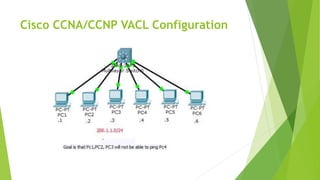
In This Lab I have 6 host connected to a Switch, with Ip address
as follow 200.1.1.x where x=Router number,
I will go to my multi-layer switch and configure VACL=VLAN Access-list
My host in here act as router:
R1=200.1.1.1
R2=200.1.1.2
R3=200.1.1.3
R4=200.1.1.4
R5=200.1.1.5
R6=200.1.1.6
Cisco CCNA/CCNP VACL Configuration
At the beginning since all router are in same subnets they can ping each other:
But
Goal is that the R1, R2,R3, will not be able to ping R4
in same VlAN,
This concept is same as Route-map that will be covered later on,
Here is what it will look like when I finish; it will read it from top to bottom as we see I can
have VLAN-access map with no match ( it means all other traffic)
Cisco CCNA/CCNP VACL Configuration
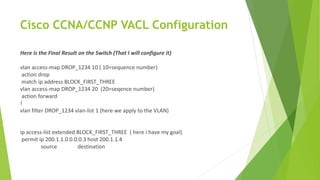
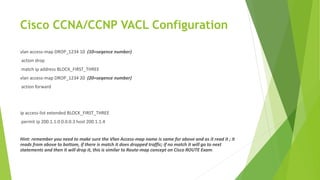
Here is the Final Result on the Switch (That I will configure it)
vlan access-map DROP_1234 10 ( 10=sequence number)
action drop
match ip address BLOCK_FIRST_THREE
vlan access-map DROP_1234 20 (20=seqence number)
action forward
!
vlan filter DROP_1234 vlan-list 1 (here we apply to the VLAN)
ip access-list extended BLOCK_FIRST_THREE ( here i have my goal)
permit ip 200.1.1.0 0.0.0.3 host 200.1.1.4
source destination
Cisco CCNA/CCNP VACL Configuration
Here is the Final Result on the Switch (That I will configure it)
vlan access-map DROP_1234 10 ( 10=sequence number)
action drop
match ip address BLOCK_FIRST_THREE
vlan access-map DROP_1234 20 (20=seqence number)
action forward
!
vlan filter DROP_1234 vlan-list 1 (here we apply to the VLAN)
ip access-list extended BLOCK_FIRST_THREE ( here i have my goal)
permit ip 200.1.1.0 0.0.0.3 host 200.1.1.4
source destination
Cisco CCNA/CCNP VACL Configuration
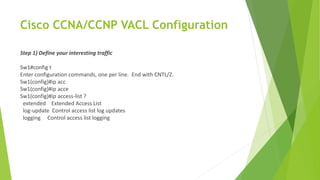
Step 1) Define your interesting traffic
Sw1#config t
Enter configuration commands, one per line. End with CNTL/Z.
Sw1(config)#ip acc
Sw1(config)#ip acce
Sw1(config)#ip access-list ?
extended Extended Access List
log-update Control access list log updates
logging Control access list logging
Cisco CCNA/CCNP VACL Configuration
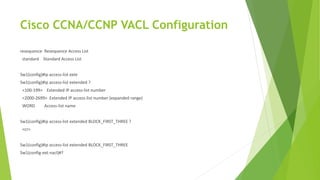
resequence Resequence Access List
standard Standard Access List
Sw1(config)#ip access-list exte
Sw1(config)#ip access-list extended ?
<100-199> Extended IP access-list number
<2000-2699> Extended IP access-list number (expanded range)
WORD Access-list name
Sw1(config)#ip access-list extended BLOCK_FIRST_THREE ?
<cr>
Sw1(config)#ip access-list extended BLOCK_FIRST_THREE
Sw1(config-ext-nacl)#?
Cisco CCNA/CCNP VACL Configuration
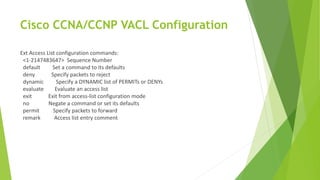
Ext Access List configuration commands:
<1-2147483647> Sequence Number
default Set a command to its defaults
deny Specify packets to reject
dynamic Specify a DYNAMIC list of PERMITs or DENYs
evaluate Evaluate an access list
exit Exit from access-list configuration mode
no Negate a command or set its defaults
permit Specify packets to forward
remark Access list entry comment
Cisco CCNA/CCNP VACL Configuration
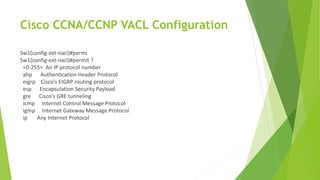
Sw1(config-ext-nacl)#permi
Sw1(config-ext-nacl)#permit ?
<0-255> An IP protocol number
ahp Authentication Header Protocol
eigrp Cisco's EIGRP routing protocol
esp Encapsulation Security Payload
gre Cisco's GRE tunneling
icmp Internet Control Message Protocol
igmp Internet Gateway Message Protocol
ip Any Internet Protocol
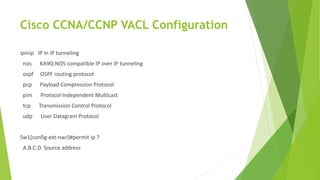
Cisco CCNA/CCNP VACL Configuration
ipinip IP in IP tunneling
nos KA9Q NOS compatible IP over IP tunneling
ospf OSPF routing protocol
pcp Payload Compression Protocol
pim Protocol Independent Multicast
tcp Transmission Control Protocol
udp User Datagram Protocol
Sw1(config-ext-nacl)#permit ip ?
A.B.C.D Source address
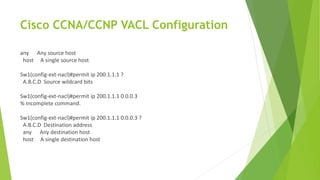
Cisco CCNA/CCNP VACL Configuration
any Any source host
host A single source host
Sw1(config-ext-nacl)#permit ip 200.1.1.1 ?
A.B.C.D Source wildcard bits
Sw1(config-ext-nacl)#permit ip 200.1.1.1 0.0.0.3
% Incomplete command.
Sw1(config-ext-nacl)#permit ip 200.1.1.1 0.0.0.3 ?
A.B.C.D Destination address
any Any destination host
host A single destination host
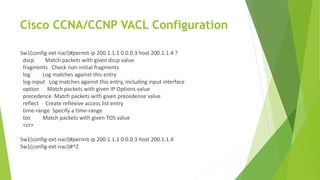
Cisco CCNA/CCNP VACL Configuration
Sw1(config-ext-nacl)#permit ip 200.1.1.1 0.0.0.3 host 200.1.1.4 ?
dscp Match packets with given dscp value
fragments Check non-initial fragments
log Log matches against this entry
log-input Log matches against this entry, including input interface
option Match packets with given IP Options value
precedence Match packets with given precedence value
reflect Create reflexive access list entry
time-range Specify a time-range
tos Match packets with given TOS value
<cr>
Sw1(config-ext-nacl)#permit ip 200.1.1.1 0.0.0.3 host 200.1.1.4
Sw1(config-ext-nacl)#^Z
Cisco CCNA/CCNP VACL Configuration
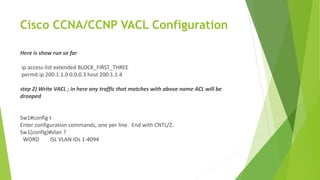
Here is show run so far
ip access-list extended BLOCK_FIRST_THREE
permit ip 200.1.1.0 0.0.0.3 host 200.1.1.4
step 2) Write VACL ; in here any traffic that matches with above name ACL will be
drooped
Sw1#config t
Enter configuration commands, one per line. End with CNTL/Z.
Sw1(config)#vlan ?
WORD ISL VLAN IDs 1-4094
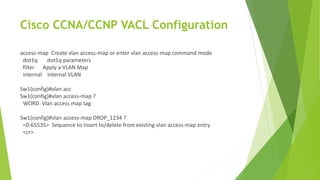
Cisco CCNA/CCNP VACL Configuration
access-map Create vlan access-map or enter vlan access-map command mode
dot1q dot1q parameters
filter Apply a VLAN Map
internal internal VLAN
Sw1(config)#vlan acc
Sw1(config)#vlan access-map ?
WORD Vlan access map tag
Sw1(config)#vlan access-map DROP_1234 ?
<0-65535> Sequence to insert to/delete from existing vlan access-map entry
<cr>
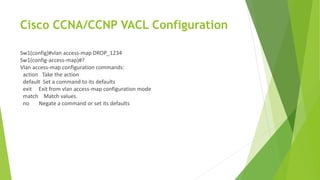
Cisco CCNA/CCNP VACL Configuration
Sw1(config)#vlan access-map DROP_1234
Sw1(config-access-map)#?
Vlan access-map configuration commands:
action Take the action
default Set a command to its defaults
exit Exit from vlan access-map configuration mode
match Match values.
no Negate a command or set its defaults
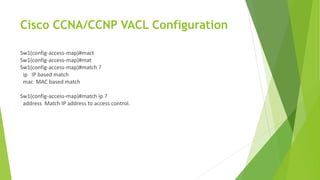
Cisco CCNA/CCNP VACL Configuration
Sw1(config-access-map)#mact
Sw1(config-access-map)#mat
Sw1(config-access-map)#match ?
ip IP based match
mac MAC based match
Sw1(config-access-map)#match ip ?
address Match IP address to access control.
Cisco CCNA/CCNP VACL Configuration
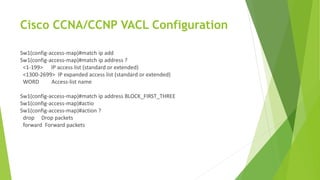
Sw1(config-access-map)#match ip add
Sw1(config-access-map)#match ip address ?
<1-199> IP access list (standard or extended)
<1300-2699> IP expanded access list (standard or extended)
WORD Access-list name
Sw1(config-access-map)#match ip address BLOCK_FIRST_THREE
Sw1(config-access-map)#actio
Sw1(config-access-map)#action ?
drop Drop packets
forward Forward packets
Cisco CCNA/CCNP VACL Configuration
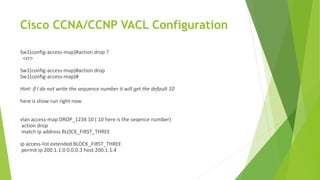
Sw1(config-access-map)#action drop ?
<cr>
Sw1(config-access-map)#action drop
Sw1(config-access-map)#
Hint: if I do not write the sequence number it will get the default 10
here is show run right now
vlan access-map DROP_1234 10 ( 10 here is the seqence number)
action drop
match ip address BLOCK_FIRST_THREE
ip access-list extended BLOCK_FIRST_THREE
permit ip 200.1.1.0 0.0.0.3 host 200.1.1.4
Cisco CCNA/CCNP VACL Configuration
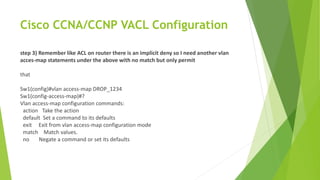
step 3) Remember like ACL on router there is an implicit deny so I need another vlan
acces-map statements under the above with no match but only permit
that
Sw1(config)#vlan access-map DROP_1234
Sw1(config-access-map)#?
Vlan access-map configuration commands:
action Take the action
default Set a command to its defaults
exit Exit from vlan access-map configuration mode
match Match values.
no Negate a command or set its defaults
Cisco CCNA/CCNP VACL Configuration
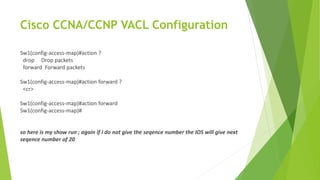
Sw1(config-access-map)#action ?
drop Drop packets
forward Forward packets
Sw1(config-access-map)#action forward ?
<cr>
Sw1(config-access-map)#action forward
Sw1(config-access-map)#
so here is my show run ; again if I do not give the seqence number the IOS will give next
seqence number of 20
Cisco CCNA/CCNP VACL Configuration
vlan access-map DROP_1234 10 (10=seqence number)
action drop
match ip address BLOCK_FIRST_THREE
vlan access-map DROP_1234 20 (20=seqence number)
action forward
ip access-list extended BLOCK_FIRST_THREE
permit ip 200.1.1.0 0.0.0.3 host 200.1.1.4
Hint: remember you need to make sure the Vlan Access-map name is same for above and as it read it ; it
reads from above to bottom, if there is match it does dropped traffic; if no match it will go to next
statements and then it will drop it, this is similar to Route-map concept on Cisco ROUTE Exam.
Cisco CCNA/CCNP VACL Configuration
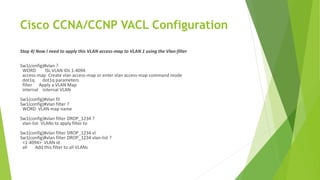
Step 4) Now I need to apply this VLAN access-map to VLAN 1 using the Vlan-filter
Sw1(config)#vlan ?
WORD ISL VLAN IDs 1-4094
access-map Create vlan access-map or enter vlan access-map command mode
dot1q dot1q parameters
filter Apply a VLAN Map
internal internal VLAN
Sw1(config)#vlan fil
Sw1(config)#vlan filter ?
WORD VLAN map name
Sw1(config)#vlan filter DROP_1234 ?
vlan-list VLANs to apply filter to
Sw1(config)#vlan filter DROP_1234 vl
Sw1(config)#vlan filter DROP_1234 vlan-list ?
<1-4094> VLAN id
all Add this filter to all VLANs
Cisco CCNA/CCNP VACL Configuration
Sw1(config)#vlan filter DROP_1234 vlan-list 1 ?
, comma
- hyphen
<cr>
Sw1(config)#vlan filter DROP_1234 vlan-list 1
Sw1(config)#
here is show run so far
vlan access-map DROP_1234 10
action drop
match ip address BLOCK_FIRST_THREE
vlan access-map DROP_1234 20
action forward
!
vlan filter DROP_1234 vlan-list 1
ip access-list extended BLOCK_FIRST_THREE
permit ip 200.1.1.0 0.0.0.3 host 200.1.1.4
Cisco CCNA/CCNP VACL Configuration
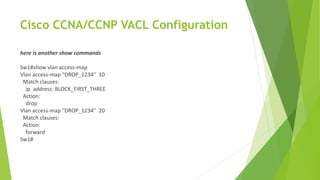
here is another show commands
Sw1#show vlan access-map
Vlan access-map "DROP_1234" 10
Match clauses:
ip address: BLOCK_FIRST_THREE
Action:
drop
Vlan access-map "DROP_1234" 20
Match clauses:
Action:
forward
Sw1#
Cisco CCNA/CCNP VACL Configuration
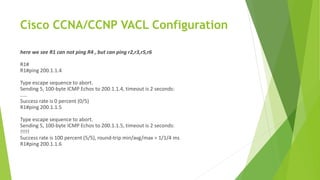
here we see R1 can not ping R4 , but can ping r2,r3,r5,r6
R1#
R1#ping 200.1.1.4
Type escape sequence to abort.
Sending 5, 100-byte ICMP Echos to 200.1.1.4, timeout is 2 seconds:
.....
Success rate is 0 percent (0/5)
R1#ping 200.1.1.5
Type escape sequence to abort.
Sending 5, 100-byte ICMP Echos to 200.1.1.5, timeout is 2 seconds:
!!!!!
Success rate is 100 percent (5/5), round-trip min/avg/max = 1/1/4 ms
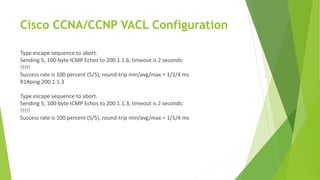
R1#ping 200.1.1.6
Cisco CCNA/CCNP VACL Configuration
Type escape sequence to abort.
Sending 5, 100-byte ICMP Echos to 200.1.1.6, timeout is 2 seconds:
!!!!!
Success rate is 100 percent (5/5), round-trip min/avg/max = 1/2/4 ms
R1#ping 200.1.1.3
Type escape sequence to abort.
Sending 5, 100-byte ICMP Echos to 200.1.1.3, timeout is 2 seconds:
!!!!!
Success rate is 100 percent (5/5), round-trip min/avg/max = 1/1/4 ms
Cisco CCNA/CCNP VACL Configuration
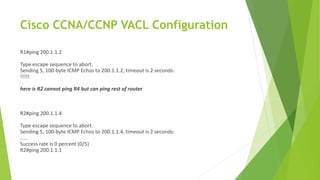
R1#ping 200.1.1.2
Type escape sequence to abort.
Sending 5, 100-byte ICMP Echos to 200.1.1.2, timeout is 2 seconds:
!!!!!
here is R2 cannot ping R4 but can ping rest of router
R2#ping 200.1.1.4
Type escape sequence to abort.
Sending 5, 100-byte ICMP Echos to 200.1.1.4, timeout is 2 seconds:
.....
Success rate is 0 percent (0/5)
R2#ping 200.1.1.1
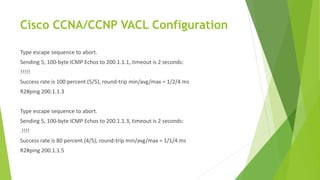
Cisco CCNA/CCNP VACL Configuration
Type escape sequence to abort.
Sending 5, 100-byte ICMP Echos to 200.1.1.1, timeout is 2 seconds:
!!!!!
Success rate is 100 percent (5/5), round-trip min/avg/max = 1/2/4 ms
R2#ping 200.1.1.3
Type escape sequence to abort.
Sending 5, 100-byte ICMP Echos to 200.1.1.3, timeout is 2 seconds:
.!!!!
Success rate is 80 percent (4/5), round-trip min/avg/max = 1/1/4 ms
R2#ping 200.1.1.5
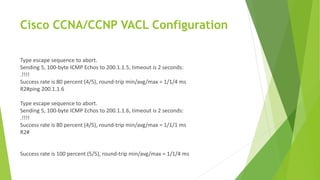
Cisco CCNA/CCNP VACL Configuration
Type escape sequence to abort.
Sending 5, 100-byte ICMP Echos to 200.1.1.5, timeout is 2 seconds:
.!!!!
Success rate is 80 percent (4/5), round-trip min/avg/max = 1/1/4 ms
R2#ping 200.1.1.6
Type escape sequence to abort.
Sending 5, 100-byte ICMP Echos to 200.1.1.6, timeout is 2 seconds:
.!!!!
Success rate is 80 percent (4/5), round-trip min/avg/max = 1/1/1 ms
R2#
Success rate is 100 percent (5/5), round-trip min/avg/max = 1/1/4 ms
Cisco CCNA/CCNP VACL Configuration
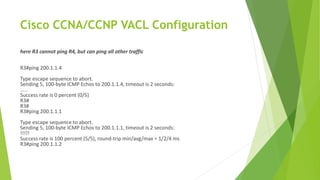
here R3 cannot ping R4, but can ping all other traffic
R3#ping 200.1.1.4
Type escape sequence to abort.
Sending 5, 100-byte ICMP Echos to 200.1.1.4, timeout is 2 seconds:
.....
Success rate is 0 percent (0/5)
R3#
R3#
R3#ping 200.1.1.1
Type escape sequence to abort.
Sending 5, 100-byte ICMP Echos to 200.1.1.1, timeout is 2 seconds:
!!!!!
Success rate is 100 percent (5/5), round-trip min/avg/max = 1/2/4 ms
R3#ping 200.1.1.2
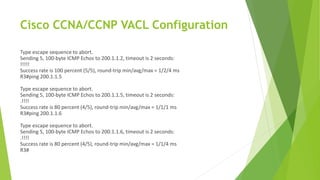
Cisco CCNA/CCNP VACL Configuration
Type escape sequence to abort.
Sending 5, 100-byte ICMP Echos to 200.1.1.2, timeout is 2 seconds:
!!!!!
Success rate is 100 percent (5/5), round-trip min/avg/max = 1/2/4 ms
R3#ping 200.1.1.5
Type escape sequence to abort.
Sending 5, 100-byte ICMP Echos to 200.1.1.5, timeout is 2 seconds:
.!!!!
Success rate is 80 percent (4/5), round-trip min/avg/max = 1/1/1 ms
R3#ping 200.1.1.6
Type escape sequence to abort.
Sending 5, 100-byte ICMP Echos to 200.1.1.6, timeout is 2 seconds:
.!!!!
Success rate is 80 percent (4/5), round-trip min/avg/max = 1/1/4 ms
R3#
Cisco CCNA/CCNP VACL Configuration
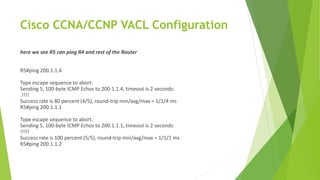
here we see R5 can ping R4 and rest of the Router
R5#ping 200.1.1.4
Type escape sequence to abort.
Sending 5, 100-byte ICMP Echos to 200.1.1.4, timeout is 2 seconds:
.!!!!
Success rate is 80 percent (4/5), round-trip min/avg/max = 1/1/4 ms
R5#ping 200.1.1.1
Type escape sequence to abort.
Sending 5, 100-byte ICMP Echos to 200.1.1.1, timeout is 2 seconds:
!!!!!
Success rate is 100 percent (5/5), round-trip min/avg/max = 1/1/1 ms
R5#ping 200.1.1.2
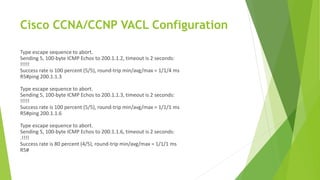
Cisco CCNA/CCNP VACL Configuration
Type escape sequence to abort.
Sending 5, 100-byte ICMP Echos to 200.1.1.2, timeout is 2 seconds:
!!!!!
Success rate is 100 percent (5/5), round-trip min/avg/max = 1/1/4 ms
R5#ping 200.1.1.3
Type escape sequence to abort.
Sending 5, 100-byte ICMP Echos to 200.1.1.3, timeout is 2 seconds:
!!!!!
Success rate is 100 percent (5/5), round-trip min/avg/max = 1/1/1 ms
R5#ping 200.1.1.6
Type escape sequence to abort.
Sending 5, 100-byte ICMP Echos to 200.1.1.6, timeout is 2 seconds:
.!!!!
Success rate is 80 percent (4/5), round-trip min/avg/max = 1/1/1 ms
R5#
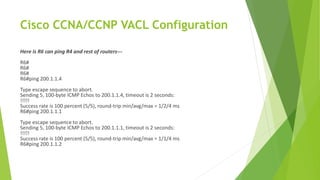
Cisco CCNA/CCNP VACL Configuration
Here is R6 can ping R4 and rest of routers---
R6#
R6#
R6#
R6#ping 200.1.1.4
Type escape sequence to abort.
Sending 5, 100-byte ICMP Echos to 200.1.1.4, timeout is 2 seconds:
!!!!!
Success rate is 100 percent (5/5), round-trip min/avg/max = 1/2/4 ms
R6#ping 200.1.1.1
Type escape sequence to abort.
Sending 5, 100-byte ICMP Echos to 200.1.1.1, timeout is 2 seconds:
!!!!!
Success rate is 100 percent (5/5), round-trip min/avg/max = 1/1/4 ms
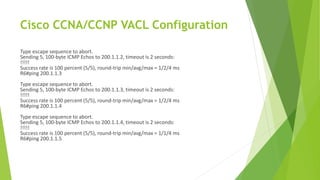
R6#ping 200.1.1.2
Cisco CCNA/CCNP VACL Configuration
Type escape sequence to abort.
Sending 5, 100-byte ICMP Echos to 200.1.1.2, timeout is 2 seconds:
!!!!!
Success rate is 100 percent (5/5), round-trip min/avg/max = 1/2/4 ms
R6#ping 200.1.1.3
Type escape sequence to abort.
Sending 5, 100-byte ICMP Echos to 200.1.1.3, timeout is 2 seconds:
!!!!!
Success rate is 100 percent (5/5), round-trip min/avg/max = 1/2/4 ms
R6#ping 200.1.1.4
Type escape sequence to abort.
Sending 5, 100-byte ICMP Echos to 200.1.1.4, timeout is 2 seconds:
!!!!!
Success rate is 100 percent (5/5), round-trip min/avg/max = 1/1/4 ms
R6#ping 200.1.1.5
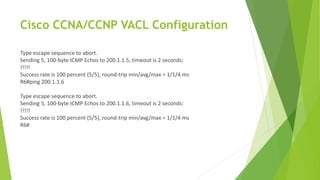
Cisco CCNA/CCNP VACL Configuration
Type escape sequence to abort.
Sending 5, 100-byte ICMP Echos to 200.1.1.5, timeout is 2 seconds:
!!!!!
Success rate is 100 percent (5/5), round-trip min/avg/max = 1/1/4 ms
R6#ping 200.1.1.6
Type escape sequence to abort.
Sending 5, 100-byte ICMP Echos to 200.1.1.6, timeout is 2 seconds:
!!!!!
Success rate is 100 percent (5/5), round-trip min/avg/max = 1/1/4 ms
R6#
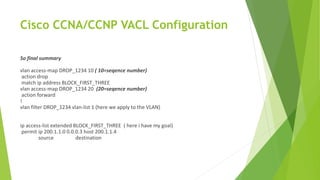
Cisco CCNA/CCNP VACL Configuration
So final summary
vlan access-map DROP_1234 10 ( 10=seqence number)
action drop
match ip address BLOCK_FIRST_THREE
vlan access-map DROP_1234 20 (20=seqence number)
action forward
!
vlan filter DROP_1234 vlan-list 1 (here we apply to the VLAN)
ip access-list extended BLOCK_FIRST_THREE ( here i have my goal)
permit ip 200.1.1.0 0.0.0.3 host 200.1.1.4
source destination
ASM Educational Center Inc. (ASM)
Where Training, Technology & Service Converge
To watch our Cisco CCNA Video Trainings Please Check out the link below:
www.asmed.com/c1
Phone: (301) 984-7400

Cisco CCNA CCNP VACL Configuration

  • 1.
    Cisco CCNA/CCNP VACLConfiguration To watch our Cisco CCNA Video Trainings Please Check out the link below: www.asmed.com/c1 ASM Educational Center Inc. (ASM) Where Training, Technology & Service Converge Phone: (301) 984-7400
  • 2.
    Cisco CCNA/CCNP VACLConfiguration
  • 3.
    Cisco CCNA/CCNP VACLConfiguration Now I will do small Lab: In This Lab I have 6 host connected to a Switch, with Ip address as follow 200.1.1.x where x=Router number, I will go to my multi-layer switch and configure VACL=VLAN Access-list My host in here act as router: R1=200.1.1.1 R2=200.1.1.2 R3=200.1.1.3 R4=200.1.1.4 R5=200.1.1.5 R6=200.1.1.6
  • 4.
    Cisco CCNA/CCNP VACLConfiguration At the beginning since all router are in same subnets they can ping each other: But Goal is that the R1, R2,R3, will not be able to ping R4 in same VlAN, This concept is same as Route-map that will be covered later on, Here is what it will look like when I finish; it will read it from top to bottom as we see I can have VLAN-access map with no match ( it means all other traffic)
  • 5.
    Cisco CCNA/CCNP VACLConfiguration Here is the Final Result on the Switch (That I will configure it) vlan access-map DROP_1234 10 ( 10=sequence number) action drop match ip address BLOCK_FIRST_THREE vlan access-map DROP_1234 20 (20=seqence number) action forward ! vlan filter DROP_1234 vlan-list 1 (here we apply to the VLAN) ip access-list extended BLOCK_FIRST_THREE ( here i have my goal) permit ip 200.1.1.0 0.0.0.3 host 200.1.1.4 source destination
  • 6.
    Cisco CCNA/CCNP VACLConfiguration Here is the Final Result on the Switch (That I will configure it) vlan access-map DROP_1234 10 ( 10=sequence number) action drop match ip address BLOCK_FIRST_THREE vlan access-map DROP_1234 20 (20=seqence number) action forward ! vlan filter DROP_1234 vlan-list 1 (here we apply to the VLAN) ip access-list extended BLOCK_FIRST_THREE ( here i have my goal) permit ip 200.1.1.0 0.0.0.3 host 200.1.1.4 source destination
  • 7.
    Cisco CCNA/CCNP VACLConfiguration Step 1) Define your interesting traffic Sw1#config t Enter configuration commands, one per line. End with CNTL/Z. Sw1(config)#ip acc Sw1(config)#ip acce Sw1(config)#ip access-list ? extended Extended Access List log-update Control access list log updates logging Control access list logging
  • 8.
    Cisco CCNA/CCNP VACLConfiguration resequence Resequence Access List standard Standard Access List Sw1(config)#ip access-list exte Sw1(config)#ip access-list extended ? <100-199> Extended IP access-list number <2000-2699> Extended IP access-list number (expanded range) WORD Access-list name Sw1(config)#ip access-list extended BLOCK_FIRST_THREE ? <cr> Sw1(config)#ip access-list extended BLOCK_FIRST_THREE Sw1(config-ext-nacl)#?
  • 9.
    Cisco CCNA/CCNP VACLConfiguration Ext Access List configuration commands: <1-2147483647> Sequence Number default Set a command to its defaults deny Specify packets to reject dynamic Specify a DYNAMIC list of PERMITs or DENYs evaluate Evaluate an access list exit Exit from access-list configuration mode no Negate a command or set its defaults permit Specify packets to forward remark Access list entry comment
  • 10.
    Cisco CCNA/CCNP VACLConfiguration Sw1(config-ext-nacl)#permi Sw1(config-ext-nacl)#permit ? <0-255> An IP protocol number ahp Authentication Header Protocol eigrp Cisco's EIGRP routing protocol esp Encapsulation Security Payload gre Cisco's GRE tunneling icmp Internet Control Message Protocol igmp Internet Gateway Message Protocol ip Any Internet Protocol
  • 11.
    Cisco CCNA/CCNP VACLConfiguration ipinip IP in IP tunneling nos KA9Q NOS compatible IP over IP tunneling ospf OSPF routing protocol pcp Payload Compression Protocol pim Protocol Independent Multicast tcp Transmission Control Protocol udp User Datagram Protocol Sw1(config-ext-nacl)#permit ip ? A.B.C.D Source address
  • 12.
    Cisco CCNA/CCNP VACLConfiguration any Any source host host A single source host Sw1(config-ext-nacl)#permit ip 200.1.1.1 ? A.B.C.D Source wildcard bits Sw1(config-ext-nacl)#permit ip 200.1.1.1 0.0.0.3 % Incomplete command. Sw1(config-ext-nacl)#permit ip 200.1.1.1 0.0.0.3 ? A.B.C.D Destination address any Any destination host host A single destination host
  • 13.
    Cisco CCNA/CCNP VACLConfiguration Sw1(config-ext-nacl)#permit ip 200.1.1.1 0.0.0.3 host 200.1.1.4 ? dscp Match packets with given dscp value fragments Check non-initial fragments log Log matches against this entry log-input Log matches against this entry, including input interface option Match packets with given IP Options value precedence Match packets with given precedence value reflect Create reflexive access list entry time-range Specify a time-range tos Match packets with given TOS value <cr> Sw1(config-ext-nacl)#permit ip 200.1.1.1 0.0.0.3 host 200.1.1.4 Sw1(config-ext-nacl)#^Z
  • 14.
    Cisco CCNA/CCNP VACLConfiguration Here is show run so far ip access-list extended BLOCK_FIRST_THREE permit ip 200.1.1.0 0.0.0.3 host 200.1.1.4 step 2) Write VACL ; in here any traffic that matches with above name ACL will be drooped Sw1#config t Enter configuration commands, one per line. End with CNTL/Z. Sw1(config)#vlan ? WORD ISL VLAN IDs 1-4094
  • 15.
    Cisco CCNA/CCNP VACLConfiguration access-map Create vlan access-map or enter vlan access-map command mode dot1q dot1q parameters filter Apply a VLAN Map internal internal VLAN Sw1(config)#vlan acc Sw1(config)#vlan access-map ? WORD Vlan access map tag Sw1(config)#vlan access-map DROP_1234 ? <0-65535> Sequence to insert to/delete from existing vlan access-map entry <cr>
  • 16.
    Cisco CCNA/CCNP VACLConfiguration Sw1(config)#vlan access-map DROP_1234 Sw1(config-access-map)#? Vlan access-map configuration commands: action Take the action default Set a command to its defaults exit Exit from vlan access-map configuration mode match Match values. no Negate a command or set its defaults
  • 17.
    Cisco CCNA/CCNP VACLConfiguration Sw1(config-access-map)#mact Sw1(config-access-map)#mat Sw1(config-access-map)#match ? ip IP based match mac MAC based match Sw1(config-access-map)#match ip ? address Match IP address to access control.
  • 18.
    Cisco CCNA/CCNP VACLConfiguration Sw1(config-access-map)#match ip add Sw1(config-access-map)#match ip address ? <1-199> IP access list (standard or extended) <1300-2699> IP expanded access list (standard or extended) WORD Access-list name Sw1(config-access-map)#match ip address BLOCK_FIRST_THREE Sw1(config-access-map)#actio Sw1(config-access-map)#action ? drop Drop packets forward Forward packets
  • 19.
    Cisco CCNA/CCNP VACLConfiguration Sw1(config-access-map)#action drop ? <cr> Sw1(config-access-map)#action drop Sw1(config-access-map)# Hint: if I do not write the sequence number it will get the default 10 here is show run right now vlan access-map DROP_1234 10 ( 10 here is the seqence number) action drop match ip address BLOCK_FIRST_THREE ip access-list extended BLOCK_FIRST_THREE permit ip 200.1.1.0 0.0.0.3 host 200.1.1.4
  • 20.
    Cisco CCNA/CCNP VACLConfiguration step 3) Remember like ACL on router there is an implicit deny so I need another vlan acces-map statements under the above with no match but only permit that Sw1(config)#vlan access-map DROP_1234 Sw1(config-access-map)#? Vlan access-map configuration commands: action Take the action default Set a command to its defaults exit Exit from vlan access-map configuration mode match Match values. no Negate a command or set its defaults
  • 21.
    Cisco CCNA/CCNP VACLConfiguration Sw1(config-access-map)#action ? drop Drop packets forward Forward packets Sw1(config-access-map)#action forward ? <cr> Sw1(config-access-map)#action forward Sw1(config-access-map)# so here is my show run ; again if I do not give the seqence number the IOS will give next seqence number of 20
  • 22.
    Cisco CCNA/CCNP VACLConfiguration vlan access-map DROP_1234 10 (10=seqence number) action drop match ip address BLOCK_FIRST_THREE vlan access-map DROP_1234 20 (20=seqence number) action forward ip access-list extended BLOCK_FIRST_THREE permit ip 200.1.1.0 0.0.0.3 host 200.1.1.4 Hint: remember you need to make sure the Vlan Access-map name is same for above and as it read it ; it reads from above to bottom, if there is match it does dropped traffic; if no match it will go to next statements and then it will drop it, this is similar to Route-map concept on Cisco ROUTE Exam.
  • 23.
    Cisco CCNA/CCNP VACLConfiguration Step 4) Now I need to apply this VLAN access-map to VLAN 1 using the Vlan-filter Sw1(config)#vlan ? WORD ISL VLAN IDs 1-4094 access-map Create vlan access-map or enter vlan access-map command mode dot1q dot1q parameters filter Apply a VLAN Map internal internal VLAN Sw1(config)#vlan fil Sw1(config)#vlan filter ? WORD VLAN map name Sw1(config)#vlan filter DROP_1234 ? vlan-list VLANs to apply filter to Sw1(config)#vlan filter DROP_1234 vl Sw1(config)#vlan filter DROP_1234 vlan-list ? <1-4094> VLAN id all Add this filter to all VLANs
  • 24.
    Cisco CCNA/CCNP VACLConfiguration Sw1(config)#vlan filter DROP_1234 vlan-list 1 ? , comma - hyphen <cr> Sw1(config)#vlan filter DROP_1234 vlan-list 1 Sw1(config)# here is show run so far vlan access-map DROP_1234 10 action drop match ip address BLOCK_FIRST_THREE vlan access-map DROP_1234 20 action forward ! vlan filter DROP_1234 vlan-list 1 ip access-list extended BLOCK_FIRST_THREE permit ip 200.1.1.0 0.0.0.3 host 200.1.1.4
  • 25.
    Cisco CCNA/CCNP VACLConfiguration here is another show commands Sw1#show vlan access-map Vlan access-map "DROP_1234" 10 Match clauses: ip address: BLOCK_FIRST_THREE Action: drop Vlan access-map "DROP_1234" 20 Match clauses: Action: forward Sw1#
  • 26.
    Cisco CCNA/CCNP VACLConfiguration here we see R1 can not ping R4 , but can ping r2,r3,r5,r6 R1# R1#ping 200.1.1.4 Type escape sequence to abort. Sending 5, 100-byte ICMP Echos to 200.1.1.4, timeout is 2 seconds: ..... Success rate is 0 percent (0/5) R1#ping 200.1.1.5 Type escape sequence to abort. Sending 5, 100-byte ICMP Echos to 200.1.1.5, timeout is 2 seconds: !!!!! Success rate is 100 percent (5/5), round-trip min/avg/max = 1/1/4 ms R1#ping 200.1.1.6
  • 27.
    Cisco CCNA/CCNP VACLConfiguration Type escape sequence to abort. Sending 5, 100-byte ICMP Echos to 200.1.1.6, timeout is 2 seconds: !!!!! Success rate is 100 percent (5/5), round-trip min/avg/max = 1/2/4 ms R1#ping 200.1.1.3 Type escape sequence to abort. Sending 5, 100-byte ICMP Echos to 200.1.1.3, timeout is 2 seconds: !!!!! Success rate is 100 percent (5/5), round-trip min/avg/max = 1/1/4 ms
  • 28.
    Cisco CCNA/CCNP VACLConfiguration R1#ping 200.1.1.2 Type escape sequence to abort. Sending 5, 100-byte ICMP Echos to 200.1.1.2, timeout is 2 seconds: !!!!! here is R2 cannot ping R4 but can ping rest of router R2#ping 200.1.1.4 Type escape sequence to abort. Sending 5, 100-byte ICMP Echos to 200.1.1.4, timeout is 2 seconds: ..... Success rate is 0 percent (0/5) R2#ping 200.1.1.1
  • 29.
    Cisco CCNA/CCNP VACLConfiguration Type escape sequence to abort. Sending 5, 100-byte ICMP Echos to 200.1.1.1, timeout is 2 seconds: !!!!! Success rate is 100 percent (5/5), round-trip min/avg/max = 1/2/4 ms R2#ping 200.1.1.3 Type escape sequence to abort. Sending 5, 100-byte ICMP Echos to 200.1.1.3, timeout is 2 seconds: .!!!! Success rate is 80 percent (4/5), round-trip min/avg/max = 1/1/4 ms R2#ping 200.1.1.5
  • 30.
    Cisco CCNA/CCNP VACLConfiguration Type escape sequence to abort. Sending 5, 100-byte ICMP Echos to 200.1.1.5, timeout is 2 seconds: .!!!! Success rate is 80 percent (4/5), round-trip min/avg/max = 1/1/4 ms R2#ping 200.1.1.6 Type escape sequence to abort. Sending 5, 100-byte ICMP Echos to 200.1.1.6, timeout is 2 seconds: .!!!! Success rate is 80 percent (4/5), round-trip min/avg/max = 1/1/1 ms R2# Success rate is 100 percent (5/5), round-trip min/avg/max = 1/1/4 ms
  • 31.
    Cisco CCNA/CCNP VACLConfiguration here R3 cannot ping R4, but can ping all other traffic R3#ping 200.1.1.4 Type escape sequence to abort. Sending 5, 100-byte ICMP Echos to 200.1.1.4, timeout is 2 seconds: ..... Success rate is 0 percent (0/5) R3# R3# R3#ping 200.1.1.1 Type escape sequence to abort. Sending 5, 100-byte ICMP Echos to 200.1.1.1, timeout is 2 seconds: !!!!! Success rate is 100 percent (5/5), round-trip min/avg/max = 1/2/4 ms R3#ping 200.1.1.2
  • 32.
    Cisco CCNA/CCNP VACLConfiguration Type escape sequence to abort. Sending 5, 100-byte ICMP Echos to 200.1.1.2, timeout is 2 seconds: !!!!! Success rate is 100 percent (5/5), round-trip min/avg/max = 1/2/4 ms R3#ping 200.1.1.5 Type escape sequence to abort. Sending 5, 100-byte ICMP Echos to 200.1.1.5, timeout is 2 seconds: .!!!! Success rate is 80 percent (4/5), round-trip min/avg/max = 1/1/1 ms R3#ping 200.1.1.6 Type escape sequence to abort. Sending 5, 100-byte ICMP Echos to 200.1.1.6, timeout is 2 seconds: .!!!! Success rate is 80 percent (4/5), round-trip min/avg/max = 1/1/4 ms R3#
  • 33.
    Cisco CCNA/CCNP VACLConfiguration here we see R5 can ping R4 and rest of the Router R5#ping 200.1.1.4 Type escape sequence to abort. Sending 5, 100-byte ICMP Echos to 200.1.1.4, timeout is 2 seconds: .!!!! Success rate is 80 percent (4/5), round-trip min/avg/max = 1/1/4 ms R5#ping 200.1.1.1 Type escape sequence to abort. Sending 5, 100-byte ICMP Echos to 200.1.1.1, timeout is 2 seconds: !!!!! Success rate is 100 percent (5/5), round-trip min/avg/max = 1/1/1 ms R5#ping 200.1.1.2
  • 34.
    Cisco CCNA/CCNP VACLConfiguration Type escape sequence to abort. Sending 5, 100-byte ICMP Echos to 200.1.1.2, timeout is 2 seconds: !!!!! Success rate is 100 percent (5/5), round-trip min/avg/max = 1/1/4 ms R5#ping 200.1.1.3 Type escape sequence to abort. Sending 5, 100-byte ICMP Echos to 200.1.1.3, timeout is 2 seconds: !!!!! Success rate is 100 percent (5/5), round-trip min/avg/max = 1/1/1 ms R5#ping 200.1.1.6 Type escape sequence to abort. Sending 5, 100-byte ICMP Echos to 200.1.1.6, timeout is 2 seconds: .!!!! Success rate is 80 percent (4/5), round-trip min/avg/max = 1/1/1 ms R5#
  • 35.
    Cisco CCNA/CCNP VACLConfiguration Here is R6 can ping R4 and rest of routers--- R6# R6# R6# R6#ping 200.1.1.4 Type escape sequence to abort. Sending 5, 100-byte ICMP Echos to 200.1.1.4, timeout is 2 seconds: !!!!! Success rate is 100 percent (5/5), round-trip min/avg/max = 1/2/4 ms R6#ping 200.1.1.1 Type escape sequence to abort. Sending 5, 100-byte ICMP Echos to 200.1.1.1, timeout is 2 seconds: !!!!! Success rate is 100 percent (5/5), round-trip min/avg/max = 1/1/4 ms R6#ping 200.1.1.2
  • 36.
    Cisco CCNA/CCNP VACLConfiguration Type escape sequence to abort. Sending 5, 100-byte ICMP Echos to 200.1.1.2, timeout is 2 seconds: !!!!! Success rate is 100 percent (5/5), round-trip min/avg/max = 1/2/4 ms R6#ping 200.1.1.3 Type escape sequence to abort. Sending 5, 100-byte ICMP Echos to 200.1.1.3, timeout is 2 seconds: !!!!! Success rate is 100 percent (5/5), round-trip min/avg/max = 1/2/4 ms R6#ping 200.1.1.4 Type escape sequence to abort. Sending 5, 100-byte ICMP Echos to 200.1.1.4, timeout is 2 seconds: !!!!! Success rate is 100 percent (5/5), round-trip min/avg/max = 1/1/4 ms R6#ping 200.1.1.5
  • 37.
    Cisco CCNA/CCNP VACLConfiguration Type escape sequence to abort. Sending 5, 100-byte ICMP Echos to 200.1.1.5, timeout is 2 seconds: !!!!! Success rate is 100 percent (5/5), round-trip min/avg/max = 1/1/4 ms R6#ping 200.1.1.6 Type escape sequence to abort. Sending 5, 100-byte ICMP Echos to 200.1.1.6, timeout is 2 seconds: !!!!! Success rate is 100 percent (5/5), round-trip min/avg/max = 1/1/4 ms R6#
  • 38.
    Cisco CCNA/CCNP VACLConfiguration So final summary vlan access-map DROP_1234 10 ( 10=seqence number) action drop match ip address BLOCK_FIRST_THREE vlan access-map DROP_1234 20 (20=seqence number) action forward ! vlan filter DROP_1234 vlan-list 1 (here we apply to the VLAN) ip access-list extended BLOCK_FIRST_THREE ( here i have my goal) permit ip 200.1.1.0 0.0.0.3 host 200.1.1.4 source destination
  • 39.
    ASM Educational CenterInc. (ASM) Where Training, Technology & Service Converge To watch our Cisco CCNA Video Trainings Please Check out the link below: www.asmed.com/c1 Phone: (301) 984-7400