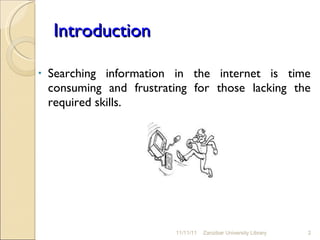
Introduction Searching information in the internet is time consuming and frustrating for those lacking the required skills. 11/11/11 Zanzibar University Library
We love Google Many students love and rely on Google search engine but few of them know how to use full search capabilities.  11/11/11 Zanzibar University Library
Objectives At the end of this session, participants should be able to: Formulate  search queries wisely Use search operators Use query modifiers Filter search result Use advance search Utilize Google education apps 11/11/11 Zanzibar University Library
What is Google search? Google Search is a full-text and most-used search engine which uses computerized spider/robot to index million of pages on the web. The search results are generally presented in a list of results and the information may consist of web pages, images, videos and other types of files. 11/11/11 Zanzibar University Library
Examples of search engines www.google.com www.altavista.com   www.alltheweb.com www.ask.com www.mamma.com   www.yahoo.com   www.bing.com   11/11/11 Zanzibar University Library
Analysis of your topic/question is crucial before entering into the search exercise.  The analysis of your topic/question should lead you to obtain subject headings and terms to be searched. 11/11/11 Zanzibar University Library
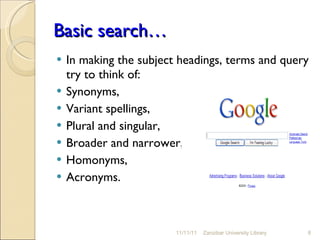
Basic search… In making the subject headings, terms and query try to think of: Synonyms,  Variant spellings,  Plural and singular,  Broader and narrower,  Homonyms, Acronyms.  11/11/11 Zanzibar University Library
Search is always cAsE insensitive. Search operators  are  case sensitive: Generally, all the words you put in the query will be used.  Words that are commonly used, like 'the' 'a' ‘which’ ‘when’ 'for’ ‘of’and alike are usually ignored (these are called stop words).  A search engine is not a human, it is a program that matches the words you give to pages on the web . 11/11/11 Zanzibar University Library
Describe what you need with as few terms as possible. The broader the terms, the greater are the chances of getting both information relevant and irrelevant  Narrower terms usually give fewer result but most relevant 11/11/11 Zanzibar University Library
Phrase search ("") By putting double quotes around a set of words, you are telling Google to consider the exact words in that exact order without any change. 11/11/11 Zanzibar University Library
The * or wildcard operator If you include  *  within a query, it tells Google to try to treat the star as a placeholder for any unknown term(s) and then find the best matches.  For example, the search [ Google * ] will give you results about many of Google's products  11/11/11 Zanzibar University Library
~ tilde operator The tilde functions as a synonym search, returning not only the search term you specified, but also terms that Google “thinks” are synonymous with the term.  For example, the search [ Google trics~ ] will give you following results google trics, tips.. techniques..guide..  11/11/11 Zanzibar University Library
Information searching in most database is based on the principle of Boolean logic (the logic of relationship among terms)  ( AND, OR, NOT) Boolean operators improve search result by broadening, narrowing and excluding search results 11/11/11 Zanzibar University Library
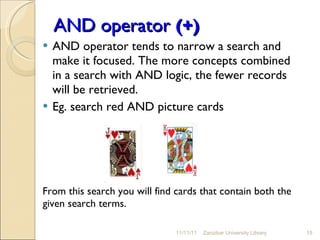
AND operator  (+) AND operator tends to narrow a search and make it focused. The more concepts combined in a search with AND logic, the fewer records will be retrieved. Eg. search red AND picture cards From this search you will find cards that contain both the given search terms. 11/11/11 Zanzibar University Library
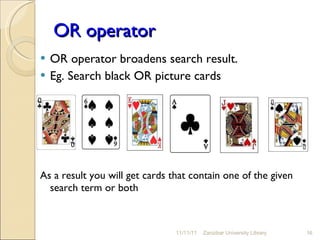
OR operator OR operator broadens search result.  Eg. Search black OR picture cards As a result you will get cards that contain one of the given search term or both 11/11/11 Zanzibar University Library
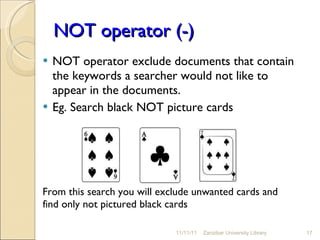
NOT operator (-) NOT operator exclude documents that contain the keywords a searcher would not like to appear in the documents. Eg. Search black NOT picture cards From this search you will exclude unwanted cards and find only not pictured black cards  11/11/11 Zanzibar University Library
Query modifiers are query words that have special meaning to Google. Typically these operators modify the search in some way, or even tell Google to do a totally different type of search. Use the following commands in your search 11/11/11 Zanzibar University Library
  allinurl: If you start a query with [allinurl:], Google will restrict the results to those with all of the query words in the url.  For instance, [allinurl:digital library] will return only documents that have both “digital" and “library" in the URL. 11/11/11 Zanzibar University Library
allintitle :   If you start a query with [allintitle:], Google will restrict the results to those with all of the query words in the title. For instance, [allintitle: digital library] will return only documents that have both “digital" and “library" in the title. 11/11/11 Zanzibar University Library
define: The query [define:] will provide a definition of the words you enter after it, gathered from various online sources. The definition will be for the entire phrase entered (example [define:digital library]) Google will include all the words in the exact order you typed them) 11/11/11 Zanzibar University Library
filetype:  Specify a type of document to search.  Example; doc, pdf, ppt, mp3, mpg, mp4 etc 11/11/11 Zanzibar University Library
site: If you include [site:] in your query, Google will restrict the results to the given domain.  For instance, [JK site:www.ippmedia.com] will find pages about JK within www.ippmedia.com.  [law site:edu] will find pages about law within .edu urls. [com, org, gov, net, ac.tz, etc] 11/11/11 Zanzibar University Library
related: The query [related:] will list web pages that are "similar" to a specified web page.  For instance, [related:www.google.com] will list web pages that are similar to the Google homepage.  11/11/11 Zanzibar University Library
Search result components appear  in font of deferent colors. Page title (blue) URL (green) Page content (black) 11/11/11 Zanzibar University Library
Search results options...  If you want to filter and customize the search results you see, use the options along the side of the results page.  Click  More  to see all the available filters and views you can apply to that search.  11/11/11 Zanzibar University Library
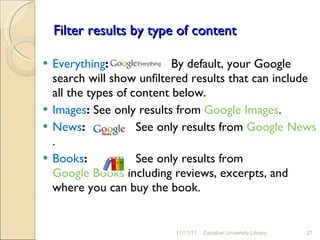
Filter results by type of content Everything :  By default, your Google search will show unfiltered results that can include all the types of content below. Images :  See only results from  Google Images . News :   See only results from  Google News . Books :   See only results from  Google Books  including reviews, excerpts, and where you can buy the book.  11/11/11 Zanzibar University Library
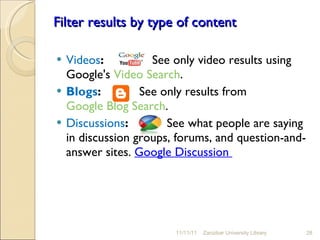
Filter results by type of content Videos :     See only video results using Google's  Video Search . Blogs :   See only results from  Google Blog Search . Discussions :     See what people are saying in discussion groups, forums, and question-and-answer sites.  Google Discussion  11/11/11 Zanzibar University Library
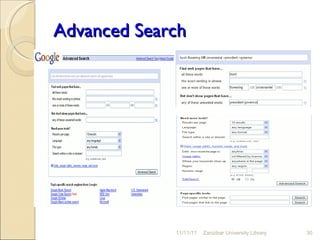
When you don’t find what you’re seeking, consider specifying more accurately what you want by using Google’s Advanced Search feature. Don’t be worried by the name “Advanced Search”; it’s easy to use, and it allows you to select or exclude pages with more precision than Google’s standard search box. 11/11/11 Zanzibar University Library
Advanced Search 11/11/11 Zanzibar University Library
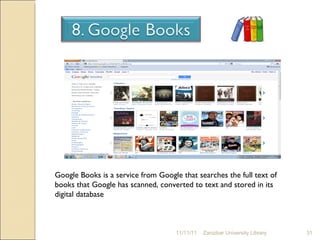
11/11/11 Zanzibar University Library Google Books is a service from Google that searches the full text of books that Google has scanned, converted to text and stored in its digital database
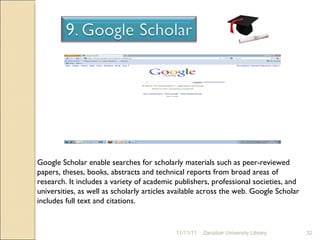
11/11/11 Zanzibar University Library Google Scholar enable searches for scholarly materials such as peer-reviewed papers, theses, books, abstracts and technical reports from broad areas of research. It includes a variety of academic publishers, professional societies, and universities, as well as scholarly articles available across the web. Google Scholar includes full text and citations.
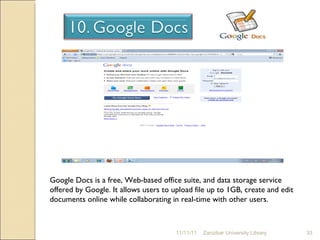
11/11/11 Zanzibar University Library Google Docs is a free, Web-based office suite, and data storage service offered by Google. It allows users to upload file up to 1GB, create and edit documents online while collaborating in real-time with other users.
When you find a useful web site  recording  the document information for future  so you can always easily return to the source. Making a browser bookmark  Use social bookmark  pages  www.delicious.com   You can save web pages  by coping and paste the web addresses 11/11/11 Zanzibar University Library
Things learnt Basic Google search tips Some basic facts about Google Google search operators  Query modifiers Filter search result options Advanced search Google books, scholar & docs Bookmaking  11/11/11 Zanzibar University Library
Reference Google Guide  http://www.googleguide.com/ 11/11/11 Zanzibar University Library
11/11/11 Zanzibar University Library
11/11/11 Zanzibar University Library Any Question?

Google searching techniques

  • 1.
  • 2.
    Introduction Searching informationin the internet is time consuming and frustrating for those lacking the required skills. 11/11/11 Zanzibar University Library
  • 3.
    We love GoogleMany students love and rely on Google search engine but few of them know how to use full search capabilities. 11/11/11 Zanzibar University Library
  • 4.
    Objectives At theend of this session, participants should be able to: Formulate search queries wisely Use search operators Use query modifiers Filter search result Use advance search Utilize Google education apps 11/11/11 Zanzibar University Library
  • 5.
    What is Googlesearch? Google Search is a full-text and most-used search engine which uses computerized spider/robot to index million of pages on the web. The search results are generally presented in a list of results and the information may consist of web pages, images, videos and other types of files. 11/11/11 Zanzibar University Library
  • 6.
    Examples of searchengines www.google.com www.altavista.com www.alltheweb.com www.ask.com www.mamma.com www.yahoo.com www.bing.com 11/11/11 Zanzibar University Library
  • 7.
    Analysis of yourtopic/question is crucial before entering into the search exercise. The analysis of your topic/question should lead you to obtain subject headings and terms to be searched. 11/11/11 Zanzibar University Library
  • 8.
    Basic search… Inmaking the subject headings, terms and query try to think of: Synonyms, Variant spellings, Plural and singular, Broader and narrower, Homonyms, Acronyms. 11/11/11 Zanzibar University Library
  • 9.
    Search is alwayscAsE insensitive. Search operators are case sensitive: Generally, all the words you put in the query will be used. Words that are commonly used, like 'the' 'a' ‘which’ ‘when’ 'for’ ‘of’and alike are usually ignored (these are called stop words). A search engine is not a human, it is a program that matches the words you give to pages on the web . 11/11/11 Zanzibar University Library
  • 10.
    Describe what youneed with as few terms as possible. The broader the terms, the greater are the chances of getting both information relevant and irrelevant Narrower terms usually give fewer result but most relevant 11/11/11 Zanzibar University Library
  • 11.
    Phrase search ("")By putting double quotes around a set of words, you are telling Google to consider the exact words in that exact order without any change. 11/11/11 Zanzibar University Library
  • 12.
    The * orwildcard operator If you include * within a query, it tells Google to try to treat the star as a placeholder for any unknown term(s) and then find the best matches. For example, the search [ Google * ] will give you results about many of Google's products 11/11/11 Zanzibar University Library
  • 13.
    ~ tilde operatorThe tilde functions as a synonym search, returning not only the search term you specified, but also terms that Google “thinks” are synonymous with the term. For example, the search [ Google trics~ ] will give you following results google trics, tips.. techniques..guide.. 11/11/11 Zanzibar University Library
  • 14.
    Information searching inmost database is based on the principle of Boolean logic (the logic of relationship among terms) ( AND, OR, NOT) Boolean operators improve search result by broadening, narrowing and excluding search results 11/11/11 Zanzibar University Library
  • 15.
    AND operator (+) AND operator tends to narrow a search and make it focused. The more concepts combined in a search with AND logic, the fewer records will be retrieved. Eg. search red AND picture cards From this search you will find cards that contain both the given search terms. 11/11/11 Zanzibar University Library
  • 16.
    OR operator ORoperator broadens search result. Eg. Search black OR picture cards As a result you will get cards that contain one of the given search term or both 11/11/11 Zanzibar University Library
  • 17.
    NOT operator (-)NOT operator exclude documents that contain the keywords a searcher would not like to appear in the documents. Eg. Search black NOT picture cards From this search you will exclude unwanted cards and find only not pictured black cards 11/11/11 Zanzibar University Library
  • 18.
    Query modifiers arequery words that have special meaning to Google. Typically these operators modify the search in some way, or even tell Google to do a totally different type of search. Use the following commands in your search 11/11/11 Zanzibar University Library
  • 19.
    allinurl:If you start a query with [allinurl:], Google will restrict the results to those with all of the query words in the url. For instance, [allinurl:digital library] will return only documents that have both “digital" and “library" in the URL. 11/11/11 Zanzibar University Library
  • 20.
    allintitle : If you start a query with [allintitle:], Google will restrict the results to those with all of the query words in the title. For instance, [allintitle: digital library] will return only documents that have both “digital" and “library" in the title. 11/11/11 Zanzibar University Library
  • 21.
    define: The query[define:] will provide a definition of the words you enter after it, gathered from various online sources. The definition will be for the entire phrase entered (example [define:digital library]) Google will include all the words in the exact order you typed them) 11/11/11 Zanzibar University Library
  • 22.
    filetype: Specifya type of document to search. Example; doc, pdf, ppt, mp3, mpg, mp4 etc 11/11/11 Zanzibar University Library
  • 23.
    site: If youinclude [site:] in your query, Google will restrict the results to the given domain. For instance, [JK site:www.ippmedia.com] will find pages about JK within www.ippmedia.com. [law site:edu] will find pages about law within .edu urls. [com, org, gov, net, ac.tz, etc] 11/11/11 Zanzibar University Library
  • 24.
    related: The query[related:] will list web pages that are "similar" to a specified web page. For instance, [related:www.google.com] will list web pages that are similar to the Google homepage. 11/11/11 Zanzibar University Library
  • 25.
    Search result componentsappear in font of deferent colors. Page title (blue) URL (green) Page content (black) 11/11/11 Zanzibar University Library
  • 26.
    Search results options... If you want to filter and customize the search results you see, use the options along the side of the results page. Click More to see all the available filters and views you can apply to that search. 11/11/11 Zanzibar University Library
  • 27.
    Filter results bytype of content Everything : By default, your Google search will show unfiltered results that can include all the types of content below. Images : See only results from Google Images . News : See only results from Google News . Books : See only results from Google Books including reviews, excerpts, and where you can buy the book. 11/11/11 Zanzibar University Library
  • 28.
    Filter results bytype of content Videos : See only video results using Google's Video Search . Blogs : See only results from Google Blog Search . Discussions : See what people are saying in discussion groups, forums, and question-and-answer sites. Google Discussion 11/11/11 Zanzibar University Library
  • 29.
    When you don’tfind what you’re seeking, consider specifying more accurately what you want by using Google’s Advanced Search feature. Don’t be worried by the name “Advanced Search”; it’s easy to use, and it allows you to select or exclude pages with more precision than Google’s standard search box. 11/11/11 Zanzibar University Library
  • 30.
    Advanced Search 11/11/11Zanzibar University Library
  • 31.
    11/11/11 Zanzibar UniversityLibrary Google Books is a service from Google that searches the full text of books that Google has scanned, converted to text and stored in its digital database
  • 32.
    11/11/11 Zanzibar UniversityLibrary Google Scholar enable searches for scholarly materials such as peer-reviewed papers, theses, books, abstracts and technical reports from broad areas of research. It includes a variety of academic publishers, professional societies, and universities, as well as scholarly articles available across the web. Google Scholar includes full text and citations.
  • 33.
    11/11/11 Zanzibar UniversityLibrary Google Docs is a free, Web-based office suite, and data storage service offered by Google. It allows users to upload file up to 1GB, create and edit documents online while collaborating in real-time with other users.
  • 34.
    When you finda useful web site recording the document information for future so you can always easily return to the source. Making a browser bookmark Use social bookmark pages www.delicious.com You can save web pages by coping and paste the web addresses 11/11/11 Zanzibar University Library
  • 35.
    Things learnt BasicGoogle search tips Some basic facts about Google Google search operators Query modifiers Filter search result options Advanced search Google books, scholar & docs Bookmaking 11/11/11 Zanzibar University Library
  • 36.
    Reference Google Guide http://www.googleguide.com/ 11/11/11 Zanzibar University Library
  • 37.
  • 38.
    11/11/11 Zanzibar UniversityLibrary Any Question?