Using Google’s Forms To
Gather Data from a Group
       by N4FTD, Paul
Start Here...

• start by looking at a completed form (a sample)
 at the URL below

• open this form in a separate browser window, so
 you have this presentation and the sample form
 opened side-by-side

• here’s the sample form’s URL (click on it):
 https://spreadsheets.google.com:443/a/smls5.com/viewform?formkey=dG82UzduNXI2dDRZdjd0bVAycVFabmc6MA..
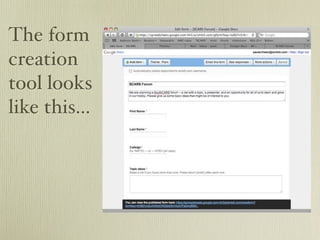
The form
creation
tool looks
like this...
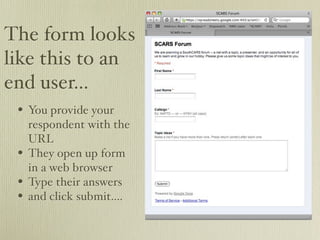
The form looks
like this to an
end user...
 • You provide your
     respondent with the
     URL
 •   They open up form
     in a web browser
 •   Type their answers
 •   and click submit....
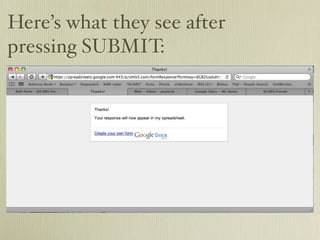
Here’s what they see after
pressing SUBMIT:
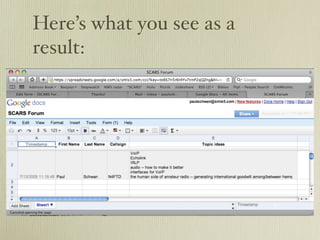
Here’s what you see as a
result:
Why would I use this?
• Every new respondent who puts in their name,
 callsign, and topic ideas generates a new line in
 the spreadsheet

• You can sort the spreadsheet by callsign
• You can extract their ideas (copy/paste into
 another document if needed)

• Unlimited use for data mining on a variety of
 topics
How to get this started

• Create a google account (begin with a free
 gmail account)

• All the other google apps comes with your free
 account

• Best of all, you can “collaborate” in the creation
 of google apps (or, google docs) with other
 google account holders -- each of you can be
 working on the same doc simultaneously!
Have fun!

• click here to learn more about google docs
•   https://www.google.com/accounts/ServiceLogin?service=writely&passive=true&nui=1&continue=http%3A
    %2F%2Fdocs.google.com%2F&followup=http%3A%2F%2Fdocs.google.com
    %2F&ltmpl=homepage&rm=false

Google Forms

  • 1.
    Using Google’s FormsTo Gather Data from a Group by N4FTD, Paul
  • 2.
    Start Here... • startby looking at a completed form (a sample) at the URL below • open this form in a separate browser window, so you have this presentation and the sample form opened side-by-side • here’s the sample form’s URL (click on it): https://spreadsheets.google.com:443/a/smls5.com/viewform?formkey=dG82UzduNXI2dDRZdjd0bVAycVFabmc6MA..
  • 3.
  • 4.
    The form looks likethis to an end user... • You provide your respondent with the URL • They open up form in a web browser • Type their answers • and click submit....
  • 5.
    Here’s what theysee after pressing SUBMIT:
  • 6.
    Here’s what yousee as a result:
  • 7.
    Why would Iuse this? • Every new respondent who puts in their name, callsign, and topic ideas generates a new line in the spreadsheet • You can sort the spreadsheet by callsign • You can extract their ideas (copy/paste into another document if needed) • Unlimited use for data mining on a variety of topics
  • 8.
    How to getthis started • Create a google account (begin with a free gmail account) • All the other google apps comes with your free account • Best of all, you can “collaborate” in the creation of google apps (or, google docs) with other google account holders -- each of you can be working on the same doc simultaneously!
  • 9.
    Have fun! • clickhere to learn more about google docs • https://www.google.com/accounts/ServiceLogin?service=writely&passive=true&nui=1&continue=http%3A %2F%2Fdocs.google.com%2F&followup=http%3A%2F%2Fdocs.google.com %2F&ltmpl=homepage&rm=false