Maps on a Spreadsheet and Other Google Collaboration ToolsMark FrydenbergComputer Information Systems Department Bentley University, Waltham, MAStudent Assistant:  Brandon Schug
Ten things Google has found to be trueFocus on the user and all else will follow.It's best to do one thing really, really well. Fast is better than slow.Democracy on the web works.You don't need to be at your desk to need an answer.You can make money without doing evil.There's always more information out there.The need for information crosses all borders.You can be serious without a suit. Great just isn't good enough.
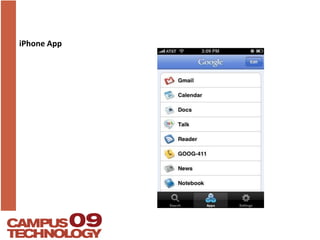
iPhone App
Google Docs and SpreadsheetsCreate a Doc or Presentation (or upload a document from your computer)Share it with a partner.Edit at the same time.Add as a post to your blog or on a Google site page.
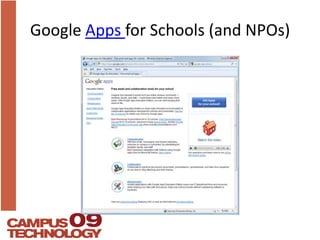
Google Apps for Schools (and NPOs)
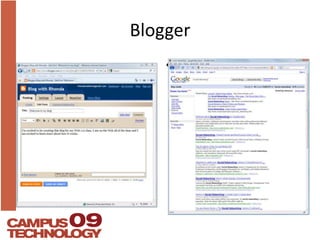
BloggerBlog settings
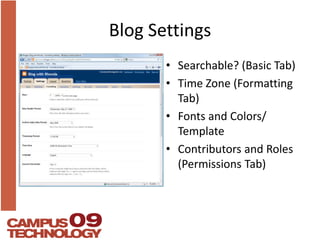
Blog SettingsSearchable? (Basic Tab) Time Zone (Formatting Tab)Fonts and Colors/ TemplateContributors and Roles (Permissions Tab)
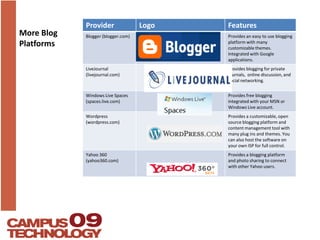
More Blog Platforms
Blogs in EducationClass blogs to promote discussionIndividual student blogs for writing, e-portfolio, or as a web site alternativeDepartment blogs to promote transparency  and visibility
Blogger ChecklistCreate a blogAdd and edit a postAdd a Sidebar gadgetAdd users and rolesEmbed a YouTube Video in a postAdd Subscription Links Gadget, add your blog’s feed to Google ReaderAdd a Feed Gadget to the sidebar, importing any feed’s content
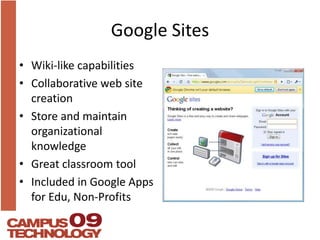
Google SitesWiki-like capabilitiesCollaborative web site creationStore and maintain organizational knowledgeGreat classroom toolIncluded in Google Apps for Edu, Non-Profits
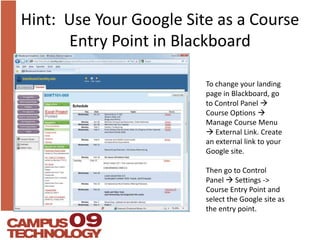
Hint:  Use Your Google Site as a Course Entry Point in BlackboardTo change your landing page in Blackboard, go to Control Panel Course Options  Manage Course Menu  External Link. Create an external link to your Google site.Then go to Control Panel  Settings -> Course Entry Point and select the Google site as the entry point.
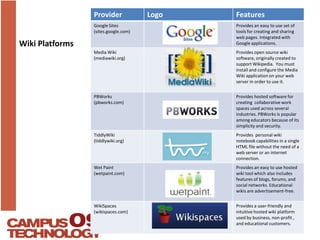
Wiki Platforms
Google Sites ChecklistCreate a Google SiteShare it with peopleAdd a pageAdd a page under a pageAdd a file cabinet page and upload a fileAdd a table pageEdit the sidebar for navigationContribute to the Google Site for this WorkshopEdit a page while someone else also editing, to experience lock out
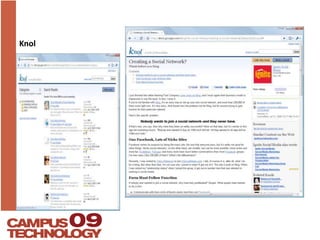
Knol
Knol ChecklistCompare with Wikipedia. Will Knol catch on?Find, edit, or create a knolGood for external use
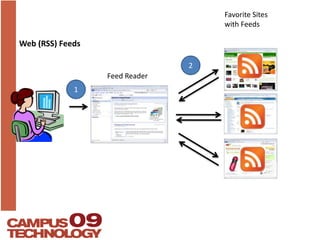
Web (RSS) FeedsFavorite Sites with Feeds2Feed Reader1
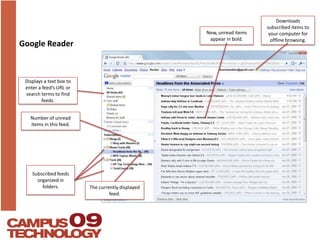
Google ReaderDownloads subscribed items to your computer for offline browsing.New, unread items appear in bold.Displays a text box to enter a feed’s URL or search terms to find feeds.Number of unread items in this feed.Subscribed feeds organized in folders.The currently displayed feed.
Google Reader ChecklistSubscribe to a feed whose URL you know.Use Google Reader to find and subscribe to feeds on topics of interest.Organize your feeds into different folders.Add a Subscription Links gadget to your blog.Subscribe to your blog’s feed in Google Reader using the gadget on your blog’s sidebar.
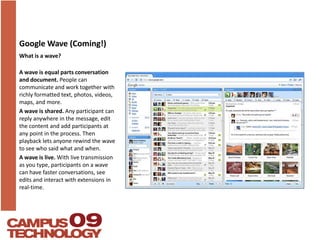
Google Wave (Coming!)What is a wave?A wave is equal parts conversation and document. People can communicate and work together with richly formatted text, photos, videos, maps, and more. A wave is shared. Any participant can reply anywhere in the message, edit the content and add participants at any point in the process. Then playback lets anyone rewind the wave to see who said what and when.A wave is live. With live transmission as you type, participants on a wave can have faster conversations, see edits and interact with extensions in real-time.
Google Spreadsheets ChecklistCreate a spreadsheet (or import an existing one).Try some familiar spreadsheet tasks.Share the spreadsheet with a partner.Chat while simultaneously editing.Embed the spreadsheet on your blog or Google site.
Google Docs, Spreadsheets, and PresentationsApps run within the browserHave students share assignments with you – makes for easy grading and returnCollaborative writing and reports
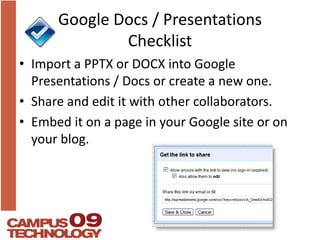
Google Docs / Presentations ChecklistImport a PPTX or DOCX into Google Presentations / Docs or create a new one.Share and edit it with other collaborators.Embed it on a page in your Google site or on your blog.
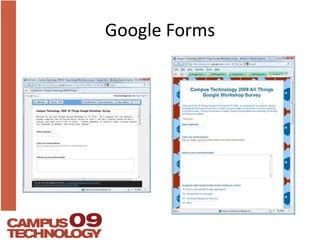
Google Forms
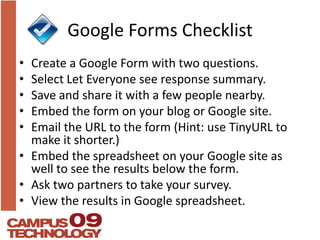
Google Forms ChecklistCreate a Google Form with two questions.Select Let Everyone see response summary.Save and share it with a few people nearby.Embed the form on your blog or Google site.Email the URL to the form (Hint: use TinyURL to make it shorter.)Embed the spreadsheet on your Google site as well to see the results below the form.Ask two partners to take your survey.View the results in Google spreadsheet.
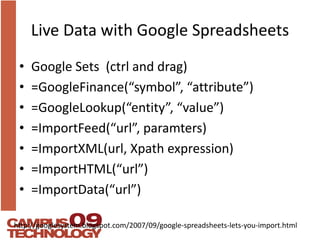
Live Data with Google SpreadsheetsGoogle Sets  (ctrl and drag)=GoogleFinance(“symbol”, “attribute”)=GoogleLookup(“entity”, “value”)=ImportFeed(“url”, paramters)=ImportXML(url, Xpath expression)=ImportHTML(“url”)=ImportData(“url”) http://googlesystem.blogspot.com/2007/09/google-spreadsheets-lets-you-import.html
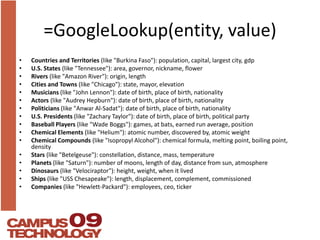
=GoogleLookup(entity, value)Countries and Territories (like "Burkina Faso"): population, capital, largest city, gdpU.S. States (like "Tennessee"): area, governor, nickname, flower Rivers(like "Amazon River"): origin, length Cities and Towns (like "Chicago"): state, mayor, elevation Musicians(like "John Lennon"): date of birth, place of birth, nationality Actors(like "Audrey Hepburn"): date of birth, place of birth, nationality Politicians(like "Anwar Al-Sadat"): date of birth, place of birth, nationality U.S. Presidents (like "Zachary Taylor"): date of birth, place of birth, political party Baseball Players (like "Wade Boggs"): games, at bats, earned run average, position Chemical Elements (like "Helium"): atomic number, discovered by, atomic weight Chemical Compounds (like "Isopropyl Alcohol"): chemical formula, melting point, boiling point, density Stars(like "Betelgeuse"): constellation, distance, mass, temperature Planets(like "Saturn"): number of moons, length of day, distance from sun, atmosphere Dinosaurs(like "Velociraptor"): height, weight, when it lived Ships(like "USS Chesapeake"): length, displacement, complement, commissioned Companies (like "Hewlett-Packard"): employees, ceo, ticker
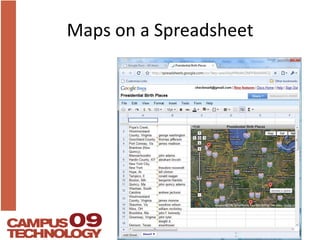
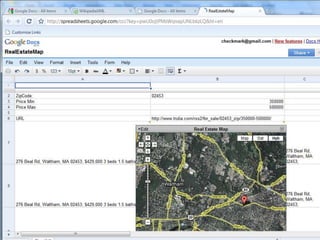
Maps on a Spreadsheet
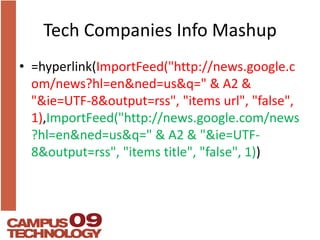
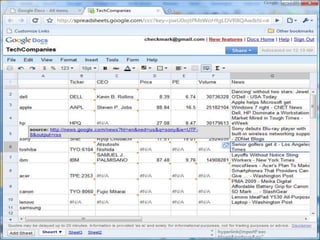
Tech Companies Info Mashup=hyperlink(ImportFeed("http://news.google.com/news?hl=en&ned=us&q=" & A2 & "&ie=UTF-8&output=rss", "items url", "false", 1),ImportFeed("http://news.google.com/news?hl=en&ned=us&q=" & A2 & "&ie=UTF-8&output=rss", "items title", "false", 1))
Live Data ChecklistImport an RSS Feed into Google SpreadsheetsImport  XML from your twitter friends and the number of followers each has. See the API for suggestions of how to do it.
Questions?

All Things Google Ct09

  • 1.
    Maps on aSpreadsheet and Other Google Collaboration ToolsMark FrydenbergComputer Information Systems Department Bentley University, Waltham, MAStudent Assistant: Brandon Schug
  • 2.
    Ten things Googlehas found to be trueFocus on the user and all else will follow.It's best to do one thing really, really well. Fast is better than slow.Democracy on the web works.You don't need to be at your desk to need an answer.You can make money without doing evil.There's always more information out there.The need for information crosses all borders.You can be serious without a suit. Great just isn't good enough.
  • 3.
  • 4.
    Google Docs andSpreadsheetsCreate a Doc or Presentation (or upload a document from your computer)Share it with a partner.Edit at the same time.Add as a post to your blog or on a Google site page.
  • 5.
    Google Apps forSchools (and NPOs)
  • 6.
  • 7.
    Blog SettingsSearchable? (BasicTab) Time Zone (Formatting Tab)Fonts and Colors/ TemplateContributors and Roles (Permissions Tab)
  • 8.
  • 9.
    Blogs in EducationClassblogs to promote discussionIndividual student blogs for writing, e-portfolio, or as a web site alternativeDepartment blogs to promote transparency and visibility
  • 10.
    Blogger ChecklistCreate ablogAdd and edit a postAdd a Sidebar gadgetAdd users and rolesEmbed a YouTube Video in a postAdd Subscription Links Gadget, add your blog’s feed to Google ReaderAdd a Feed Gadget to the sidebar, importing any feed’s content
  • 11.
    Google SitesWiki-like capabilitiesCollaborativeweb site creationStore and maintain organizational knowledgeGreat classroom toolIncluded in Google Apps for Edu, Non-Profits
  • 12.
    Hint: UseYour Google Site as a Course Entry Point in BlackboardTo change your landing page in Blackboard, go to Control Panel Course Options  Manage Course Menu  External Link. Create an external link to your Google site.Then go to Control Panel  Settings -> Course Entry Point and select the Google site as the entry point.
  • 13.
  • 14.
    Google Sites ChecklistCreatea Google SiteShare it with peopleAdd a pageAdd a page under a pageAdd a file cabinet page and upload a fileAdd a table pageEdit the sidebar for navigationContribute to the Google Site for this WorkshopEdit a page while someone else also editing, to experience lock out
  • 15.
  • 16.
    Knol ChecklistCompare withWikipedia. Will Knol catch on?Find, edit, or create a knolGood for external use
  • 17.
    Web (RSS) FeedsFavoriteSites with Feeds2Feed Reader1
  • 18.
    Google ReaderDownloads subscribeditems to your computer for offline browsing.New, unread items appear in bold.Displays a text box to enter a feed’s URL or search terms to find feeds.Number of unread items in this feed.Subscribed feeds organized in folders.The currently displayed feed.
  • 19.
    Google Reader ChecklistSubscribeto a feed whose URL you know.Use Google Reader to find and subscribe to feeds on topics of interest.Organize your feeds into different folders.Add a Subscription Links gadget to your blog.Subscribe to your blog’s feed in Google Reader using the gadget on your blog’s sidebar.
  • 20.
    Google Wave (Coming!)Whatis a wave?A wave is equal parts conversation and document. People can communicate and work together with richly formatted text, photos, videos, maps, and more. A wave is shared. Any participant can reply anywhere in the message, edit the content and add participants at any point in the process. Then playback lets anyone rewind the wave to see who said what and when.A wave is live. With live transmission as you type, participants on a wave can have faster conversations, see edits and interact with extensions in real-time.
  • 21.
    Google Spreadsheets ChecklistCreatea spreadsheet (or import an existing one).Try some familiar spreadsheet tasks.Share the spreadsheet with a partner.Chat while simultaneously editing.Embed the spreadsheet on your blog or Google site.
  • 22.
    Google Docs, Spreadsheets,and PresentationsApps run within the browserHave students share assignments with you – makes for easy grading and returnCollaborative writing and reports
  • 23.
    Google Docs /Presentations ChecklistImport a PPTX or DOCX into Google Presentations / Docs or create a new one.Share and edit it with other collaborators.Embed it on a page in your Google site or on your blog.
  • 24.
  • 25.
    Google Forms ChecklistCreatea Google Form with two questions.Select Let Everyone see response summary.Save and share it with a few people nearby.Embed the form on your blog or Google site.Email the URL to the form (Hint: use TinyURL to make it shorter.)Embed the spreadsheet on your Google site as well to see the results below the form.Ask two partners to take your survey.View the results in Google spreadsheet.
  • 26.
    Live Data withGoogle SpreadsheetsGoogle Sets (ctrl and drag)=GoogleFinance(“symbol”, “attribute”)=GoogleLookup(“entity”, “value”)=ImportFeed(“url”, paramters)=ImportXML(url, Xpath expression)=ImportHTML(“url”)=ImportData(“url”) http://googlesystem.blogspot.com/2007/09/google-spreadsheets-lets-you-import.html
  • 27.
    =GoogleLookup(entity, value)Countries andTerritories (like "Burkina Faso"): population, capital, largest city, gdpU.S. States (like "Tennessee"): area, governor, nickname, flower Rivers(like "Amazon River"): origin, length Cities and Towns (like "Chicago"): state, mayor, elevation Musicians(like "John Lennon"): date of birth, place of birth, nationality Actors(like "Audrey Hepburn"): date of birth, place of birth, nationality Politicians(like "Anwar Al-Sadat"): date of birth, place of birth, nationality U.S. Presidents (like "Zachary Taylor"): date of birth, place of birth, political party Baseball Players (like "Wade Boggs"): games, at bats, earned run average, position Chemical Elements (like "Helium"): atomic number, discovered by, atomic weight Chemical Compounds (like "Isopropyl Alcohol"): chemical formula, melting point, boiling point, density Stars(like "Betelgeuse"): constellation, distance, mass, temperature Planets(like "Saturn"): number of moons, length of day, distance from sun, atmosphere Dinosaurs(like "Velociraptor"): height, weight, when it lived Ships(like "USS Chesapeake"): length, displacement, complement, commissioned Companies (like "Hewlett-Packard"): employees, ceo, ticker
  • 28.
    Maps on aSpreadsheet
  • 29.
    Tech Companies InfoMashup=hyperlink(ImportFeed("http://news.google.com/news?hl=en&ned=us&q=" & A2 & "&ie=UTF-8&output=rss", "items url", "false", 1),ImportFeed("http://news.google.com/news?hl=en&ned=us&q=" & A2 & "&ie=UTF-8&output=rss", "items title", "false", 1))
  • 32.
    Live Data ChecklistImportan RSS Feed into Google SpreadsheetsImport XML from your twitter friends and the number of followers each has. See the API for suggestions of how to do it.
  • 33.