Ivano Malavolta
Collaborative software development
with Git
Roadmap
Concepts & workflow
Commands
Branching
GitHub
Lab
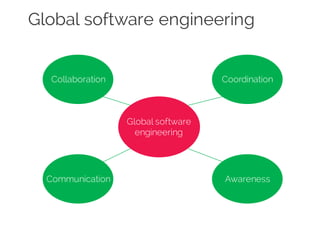
Global software engineering
Global software
engineering
Collaboration Coordination
Communication Awareness
Global software engineering
Collaboration
When the technology brings improvements to the shared space or to the
way users interact with shared artifacts synchronously or asynchronously
Coordination
When the technology brings improvements to the support offered for
people managing themselves, or themselves within a team
Communication
When the technology brings improvements to the way messages and
information are exchanged among people, reducing gaps, ambiguity, or
the effort needed to understand, establish, or continue a conversation
Awareness
An understanding of the activities of others, which provides a context for
yourown activity
Version control
“A systemthat records changes to a file or set
of files over time so that you can recall specific
versions later”
Files can refer to anything:
• source files
• images
• Powerpoint slides
• documents
à more concretely,if you screw things up or lose files, you can
easily recover!
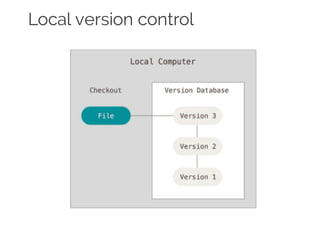
Local version control
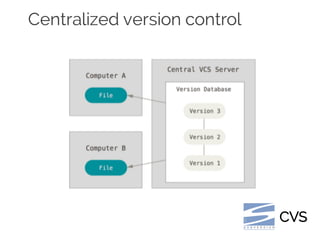
Centralized version control
CVS
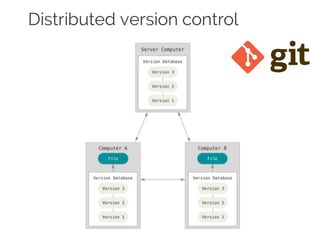
Distributed version control
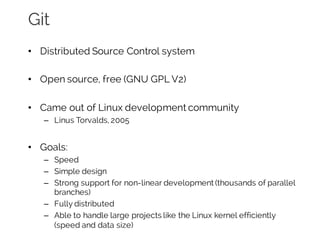
Git
• Distributed Source Control system
• Open source, free (GNU GPL V2)
• Came out of Linux development community
– Linus Torvalds, 2005
• Goals:
– Speed
– Simple design
– Strong support for non-linear development (thousands of parallel
branches)
– Fully distributed
– Able to handle large projects like the Linux kernel efficiently
(speed and data size)
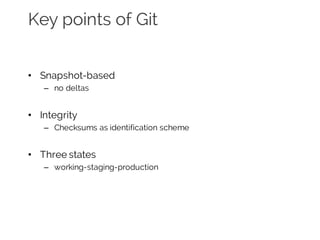
Key points of Git
• Snapshot-based
– no deltas
• Integrity
– Checksums as identification scheme
• Three states
– working-staging-production
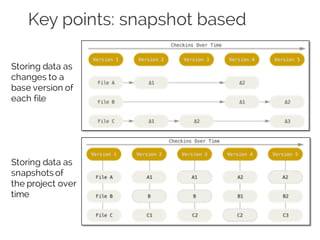
Key points: snapshot based
Storing data as
changes to a
base version of
each file
Storing data as
snapshots of
the project over
time
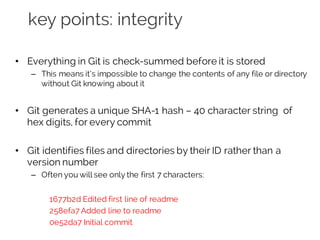
key points: integrity
• Everything in Git is check-summed before it is stored
– This means it’s impossible to change the contents of any file or directory
without Git knowing about it
• Git generates a unique SHA-1 hash – 40 character string of
hex digits, for every commit
• Git identifies files and directories by their ID rather than a
version number
– Often you will see only the first 7 characters:
1677b2d Edited first line of readme
258efa7 Added line to readme
0e52da7 Initial commit
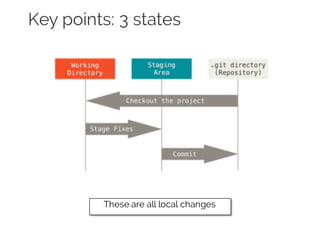
Key points: 3 states
These are all local changes
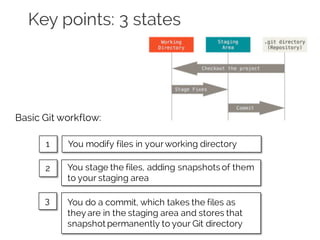
Key points: 3 states
You modify files in yourworking directory
Basic Git workflow:
You stage the files, adding snapshots of them
to your staging area
You do a commit, which takes the files as
they are in the staging area and stores that
snapshot permanently to your Git directory
1
2
3
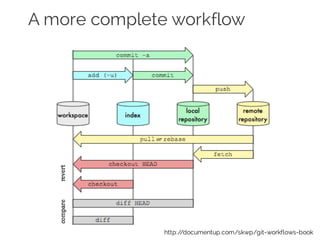
A more complete workflow
http://documentup.com/skwp/git-workflows-book
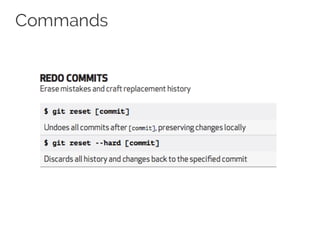
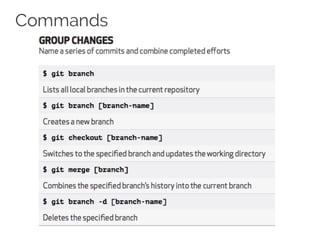
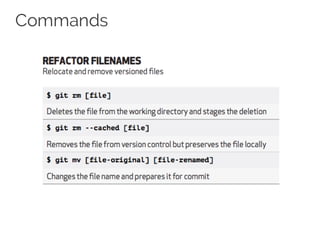
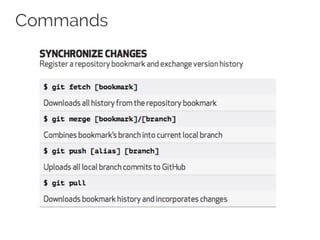
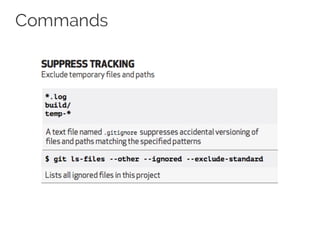
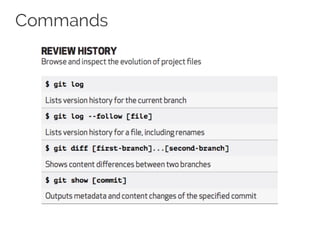
Commands
Contents of this part of lecture coming from
https://training.github.com/kit/downloads/github-git-cheat-sheet.pdf
Commands
Commands
Commands
Commands
Commands
Commands
Commands
Commands
Branching
Branching
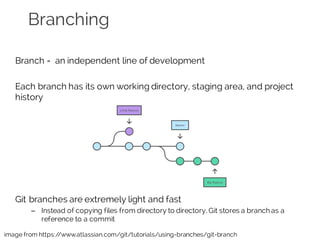
Branch = an independent line of development
Each branch has its own working directory, staging area, and project
history
Git branches are extremely light and fast
– Instead of copying files from directory to directory, Git stores a branch as a
reference to a commit
image from https://www.atlassian.com/git/tutorials/using-branches/git-branch
Branching workflow
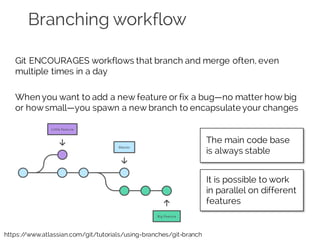
Git ENCOURAGES workflows that branch and merge often, even
multiple times in a day
When you want to add a new feature or fix a bug—no matter how big
or howsmall—you spawn a new branch to encapsulate your changes
https://www.atlassian.com/git/tutorials/using-branches/git-branch
The main code base
is always stable
It is possible to work
in parallel on different
features
Branching and merging
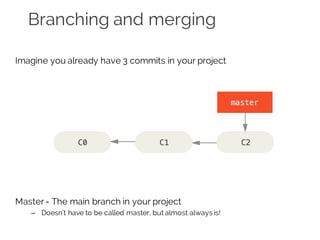
Imagine you already have 3 commits in your project
Master= The main branch in your project
– Doesn’t have to be called master, but almost always is!
Creating branches
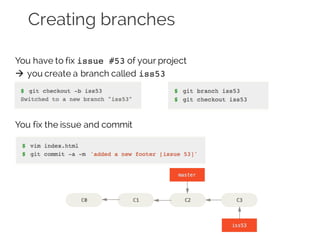
You have to fix issue #53 of your project
à you create a branch called iss53
You fix the issue and commit
Switching branches
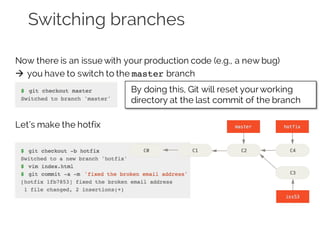
Now there is an issue with your production code (e.g., a new bug)
à you have to switch to the master branch
Let’s make the hotfix
By doing this, Git will reset yourworking
directory at the last commit of the branch
Merging branches
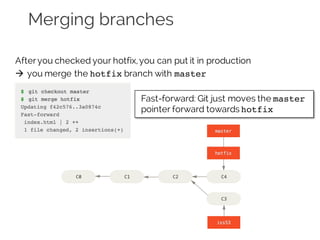
Afteryou checked your hotfix,you can put it in production
à you merge the hotfix branch with master
Let’s make the hotfix
Fast-forward: Git just moves the master
pointer forward towards hotfix
Deleting branches
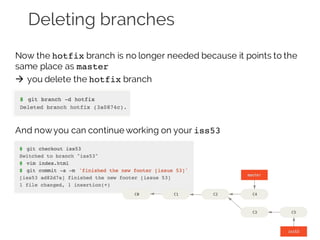
Now the hotfix branch is no longer needed because it points to the
same place as master
à you delete the hotfix branch
And nowyou can continue working on your iss53
Merging branches
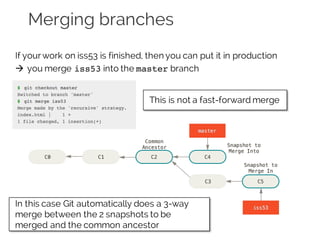
If yourwork on iss53 is finished, then you can put it in production
à you merge iss53 into the master branch
This is not a fast-forward merge
In this case Git automatically does a 3-way
merge between the 2 snapshots to be
merged and the common ancestor
Merging branches 1
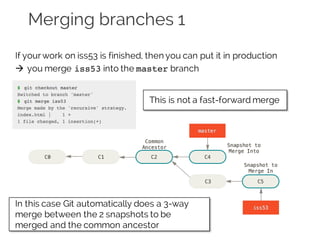
If yourwork on iss53 is finished, then you can put it in production
à you merge iss53 into the master branch
This is not a fast-forward merge
In this case Git automatically does a 3-way
merge between the 2 snapshots to be
merged and the common ancestor
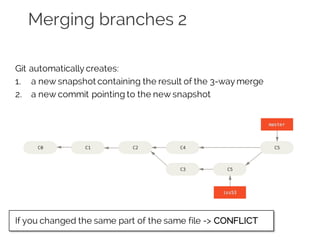
Merging branches 2
Git automatically creates:
1. a new snapshot containing the result of the 3-way merge
2. a new commit pointing to the new snapshot
If you changed the same part of the same file -> CONFLICT
GitHub
A site for online storage of Git repositories
– You can get free space for open source projects
– or you can pay for private projects
Adds extra functionalities, like:
– web UI
– documentation
– bug tracking (issues)
– feature requests, pull requests
– social interactions among developers
• following, check activities, discover new repos
It is not mandatory, you can:
• use Git locally
• setup a private Git server
Lab
1. Register to GitHub
2. fork this repo: https://github.com/iivanoo/rest-biter
3. create a Python script your_name.py
4. in the script, add a simple function definition that does something
(even just a print statement)
5. in restBiter.py add:
– an import statement for importing your Python script of step 4
– a statement for calling the function defined in your Python script
6. test the main function by running the script in the terminal:
python restBiter.py http://www.google.com 2 0 500 1000
7. do commit and push your changes to your repo
8. [optional] open a newpull request to merge your changes with the
original repo
References
• Official git site and tutorials
– https://git-scm.com
• GitHub guides
– https://guides.github.com
• Commands cheatsheet
– https://training.github.com/kit/downloads/github-git-cheat-sheet.pdf
Contact
Ivano Malavolta |
Post-doc researcher
Gran Sasso Science Institute
iivanoo
ivano.malavolta@gssi.infn.it
www.ivanomalavolta.com

[2015/2016] Collaborative software development with Git

  • 1.
  • 3.
  • 4.
    Global software engineering Globalsoftware engineering Collaboration Coordination Communication Awareness
  • 5.
    Global software engineering Collaboration Whenthe technology brings improvements to the shared space or to the way users interact with shared artifacts synchronously or asynchronously Coordination When the technology brings improvements to the support offered for people managing themselves, or themselves within a team Communication When the technology brings improvements to the way messages and information are exchanged among people, reducing gaps, ambiguity, or the effort needed to understand, establish, or continue a conversation Awareness An understanding of the activities of others, which provides a context for yourown activity
  • 6.
    Version control “A systemthatrecords changes to a file or set of files over time so that you can recall specific versions later” Files can refer to anything: • source files • images • Powerpoint slides • documents à more concretely,if you screw things up or lose files, you can easily recover!
  • 7.
  • 8.
  • 9.
  • 10.
    Git • Distributed SourceControl system • Open source, free (GNU GPL V2) • Came out of Linux development community – Linus Torvalds, 2005 • Goals: – Speed – Simple design – Strong support for non-linear development (thousands of parallel branches) – Fully distributed – Able to handle large projects like the Linux kernel efficiently (speed and data size)
  • 11.
    Key points ofGit • Snapshot-based – no deltas • Integrity – Checksums as identification scheme • Three states – working-staging-production
  • 12.
    Key points: snapshotbased Storing data as changes to a base version of each file Storing data as snapshots of the project over time
  • 13.
    key points: integrity •Everything in Git is check-summed before it is stored – This means it’s impossible to change the contents of any file or directory without Git knowing about it • Git generates a unique SHA-1 hash – 40 character string of hex digits, for every commit • Git identifies files and directories by their ID rather than a version number – Often you will see only the first 7 characters: 1677b2d Edited first line of readme 258efa7 Added line to readme 0e52da7 Initial commit
  • 14.
    Key points: 3states These are all local changes
  • 15.
    Key points: 3states You modify files in yourworking directory Basic Git workflow: You stage the files, adding snapshots of them to your staging area You do a commit, which takes the files as they are in the staging area and stores that snapshot permanently to your Git directory 1 2 3
  • 16.
    A more completeworkflow http://documentup.com/skwp/git-workflows-book
  • 17.
    Commands Contents of thispart of lecture coming from https://training.github.com/kit/downloads/github-git-cheat-sheet.pdf
  • 18.
  • 19.
  • 21.
  • 22.
  • 23.
  • 24.
  • 25.
  • 26.
  • 27.
  • 28.
    Branching Branch = anindependent line of development Each branch has its own working directory, staging area, and project history Git branches are extremely light and fast – Instead of copying files from directory to directory, Git stores a branch as a reference to a commit image from https://www.atlassian.com/git/tutorials/using-branches/git-branch
  • 29.
    Branching workflow Git ENCOURAGESworkflows that branch and merge often, even multiple times in a day When you want to add a new feature or fix a bug—no matter how big or howsmall—you spawn a new branch to encapsulate your changes https://www.atlassian.com/git/tutorials/using-branches/git-branch The main code base is always stable It is possible to work in parallel on different features
  • 30.
    Branching and merging Imagineyou already have 3 commits in your project Master= The main branch in your project – Doesn’t have to be called master, but almost always is!
  • 31.
    Creating branches You haveto fix issue #53 of your project à you create a branch called iss53 You fix the issue and commit
  • 32.
    Switching branches Now thereis an issue with your production code (e.g., a new bug) à you have to switch to the master branch Let’s make the hotfix By doing this, Git will reset yourworking directory at the last commit of the branch
  • 33.
    Merging branches Afteryou checkedyour hotfix,you can put it in production à you merge the hotfix branch with master Let’s make the hotfix Fast-forward: Git just moves the master pointer forward towards hotfix
  • 34.
    Deleting branches Now thehotfix branch is no longer needed because it points to the same place as master à you delete the hotfix branch And nowyou can continue working on your iss53
  • 35.
    Merging branches If yourworkon iss53 is finished, then you can put it in production à you merge iss53 into the master branch This is not a fast-forward merge In this case Git automatically does a 3-way merge between the 2 snapshots to be merged and the common ancestor
  • 36.
    Merging branches 1 Ifyourwork on iss53 is finished, then you can put it in production à you merge iss53 into the master branch This is not a fast-forward merge In this case Git automatically does a 3-way merge between the 2 snapshots to be merged and the common ancestor
  • 37.
    Merging branches 2 Gitautomatically creates: 1. a new snapshot containing the result of the 3-way merge 2. a new commit pointing to the new snapshot If you changed the same part of the same file -> CONFLICT
  • 38.
    GitHub A site foronline storage of Git repositories – You can get free space for open source projects – or you can pay for private projects Adds extra functionalities, like: – web UI – documentation – bug tracking (issues) – feature requests, pull requests – social interactions among developers • following, check activities, discover new repos It is not mandatory, you can: • use Git locally • setup a private Git server
  • 39.
    Lab 1. Register toGitHub 2. fork this repo: https://github.com/iivanoo/rest-biter 3. create a Python script your_name.py 4. in the script, add a simple function definition that does something (even just a print statement) 5. in restBiter.py add: – an import statement for importing your Python script of step 4 – a statement for calling the function defined in your Python script 6. test the main function by running the script in the terminal: python restBiter.py http://www.google.com 2 0 500 1000 7. do commit and push your changes to your repo 8. [optional] open a newpull request to merge your changes with the original repo
  • 40.
    References • Official gitsite and tutorials – https://git-scm.com • GitHub guides – https://guides.github.com • Commands cheatsheet – https://training.github.com/kit/downloads/github-git-cheat-sheet.pdf
  • 41.
    Contact Ivano Malavolta | Post-docresearcher Gran Sasso Science Institute iivanoo ivano.malavolta@gssi.infn.it www.ivanomalavolta.com