GANTT CHART
 A GANTT chart is a type of bar chart that illustrates a project schedule.
 GANTT charts have become a common technique for representing the phases and
activities of a project work breakdown structure.
 It was introduced by Henry Gantt around 1910 – 1915.
 Characteristics:
 The bar in each row identifies the corresponding task
 The horizontal position of the bar identifies start and end times of the task
 Bar length represents the duration of the task
 Task durations can be compared easily
 Good for allocating resources and re-scheduling
 Precedence relationships can be represented using arrows
 Critical activities are usually highlighted
 Slack times are represented using bars with doted lines
 The bar of each activity begins at the activity earliest start time (ES)
 The bar of each activity ends at the activity latest finish time (LF).
 Advantages
 Simple
 Good visual communication to others
 Task durations can be compared easily
 Good for scheduling resources
 Disadvantages
 Dependencies are more difficult to visualise
 Minor changes in data can cause major changes in the chart
 Constructing Gantt Chart
The steps to construct a GANTT chart from the information obtained by PERT/CPM
are:
1. Schedule the critical tasks in the correct position.
2. Place the time windows in which the non-critical tasks can be scheduled.
3. Schedule the non-critical tasks according to their earliest starting times.
4. Indicate precedence relationships between tasks.
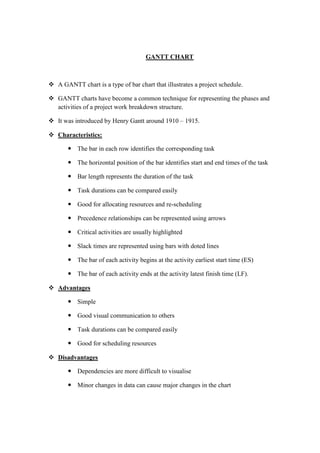
 Example of an early GANTT chart construction:
Step 1. Schedule critical tasks:
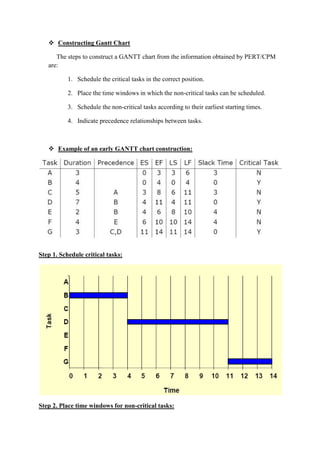
Step 2. Place time windows for non-critical tasks:
Step 3. Schedule non-critical tasks
Step 4. Indicate precedence relationships:

Ghant chart

  • 1.
    GANTT CHART  AGANTT chart is a type of bar chart that illustrates a project schedule.  GANTT charts have become a common technique for representing the phases and activities of a project work breakdown structure.  It was introduced by Henry Gantt around 1910 – 1915.  Characteristics:  The bar in each row identifies the corresponding task  The horizontal position of the bar identifies start and end times of the task  Bar length represents the duration of the task  Task durations can be compared easily  Good for allocating resources and re-scheduling  Precedence relationships can be represented using arrows  Critical activities are usually highlighted  Slack times are represented using bars with doted lines  The bar of each activity begins at the activity earliest start time (ES)  The bar of each activity ends at the activity latest finish time (LF).  Advantages  Simple  Good visual communication to others  Task durations can be compared easily  Good for scheduling resources  Disadvantages  Dependencies are more difficult to visualise  Minor changes in data can cause major changes in the chart
  • 2.
     Constructing GanttChart The steps to construct a GANTT chart from the information obtained by PERT/CPM are: 1. Schedule the critical tasks in the correct position. 2. Place the time windows in which the non-critical tasks can be scheduled. 3. Schedule the non-critical tasks according to their earliest starting times. 4. Indicate precedence relationships between tasks.  Example of an early GANTT chart construction: Step 1. Schedule critical tasks: Step 2. Place time windows for non-critical tasks:
  • 3.
    Step 3. Schedulenon-critical tasks Step 4. Indicate precedence relationships: