Virtual 
Machines
Azure Virtual Machines 
 Launch Windows Server and Linux in minutes 
 Scale from 1 to 1000s of VM Instances 
 Save money with per-minute billing 
 Open and extensible
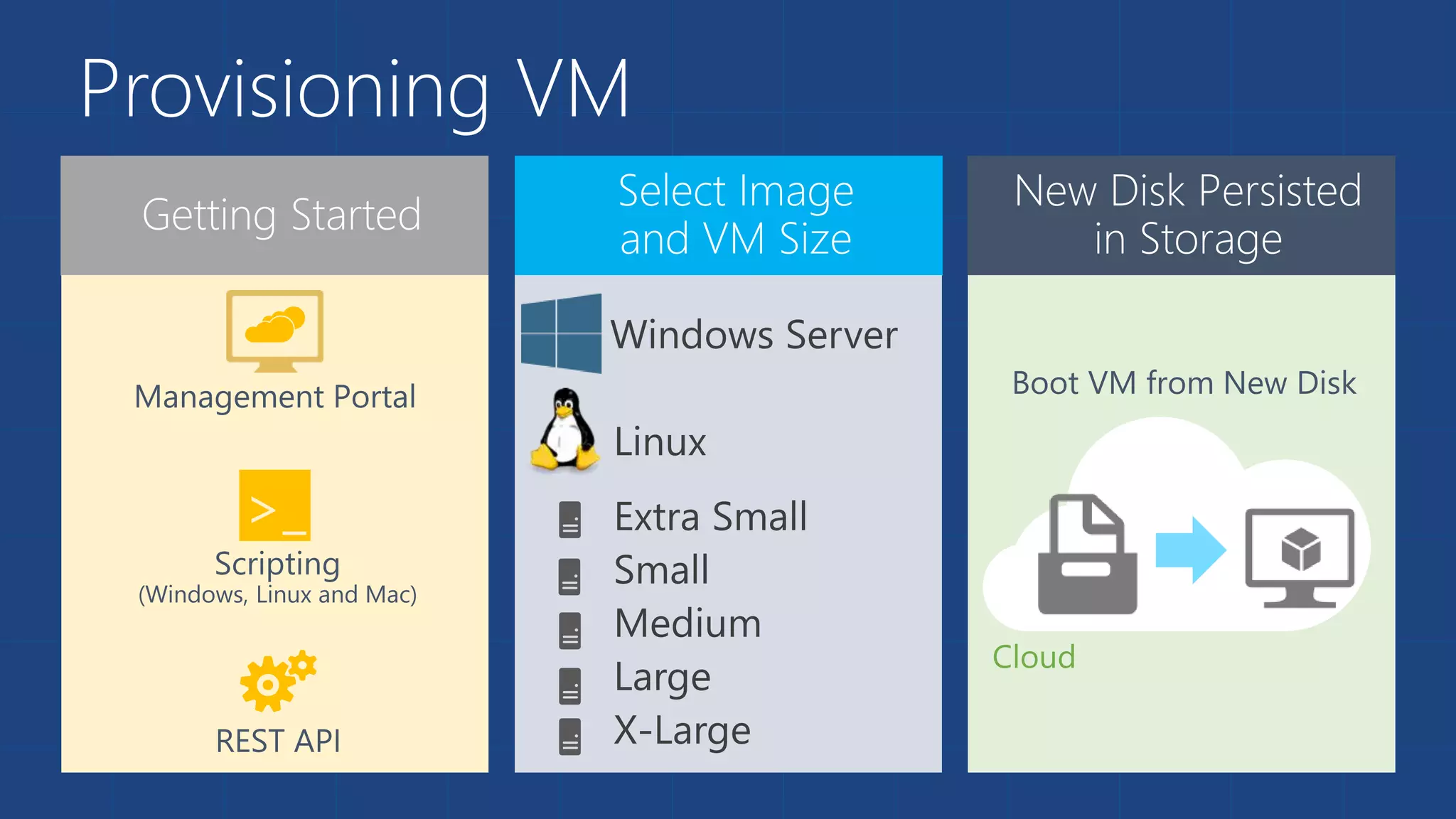
Provisioning VM 
>_
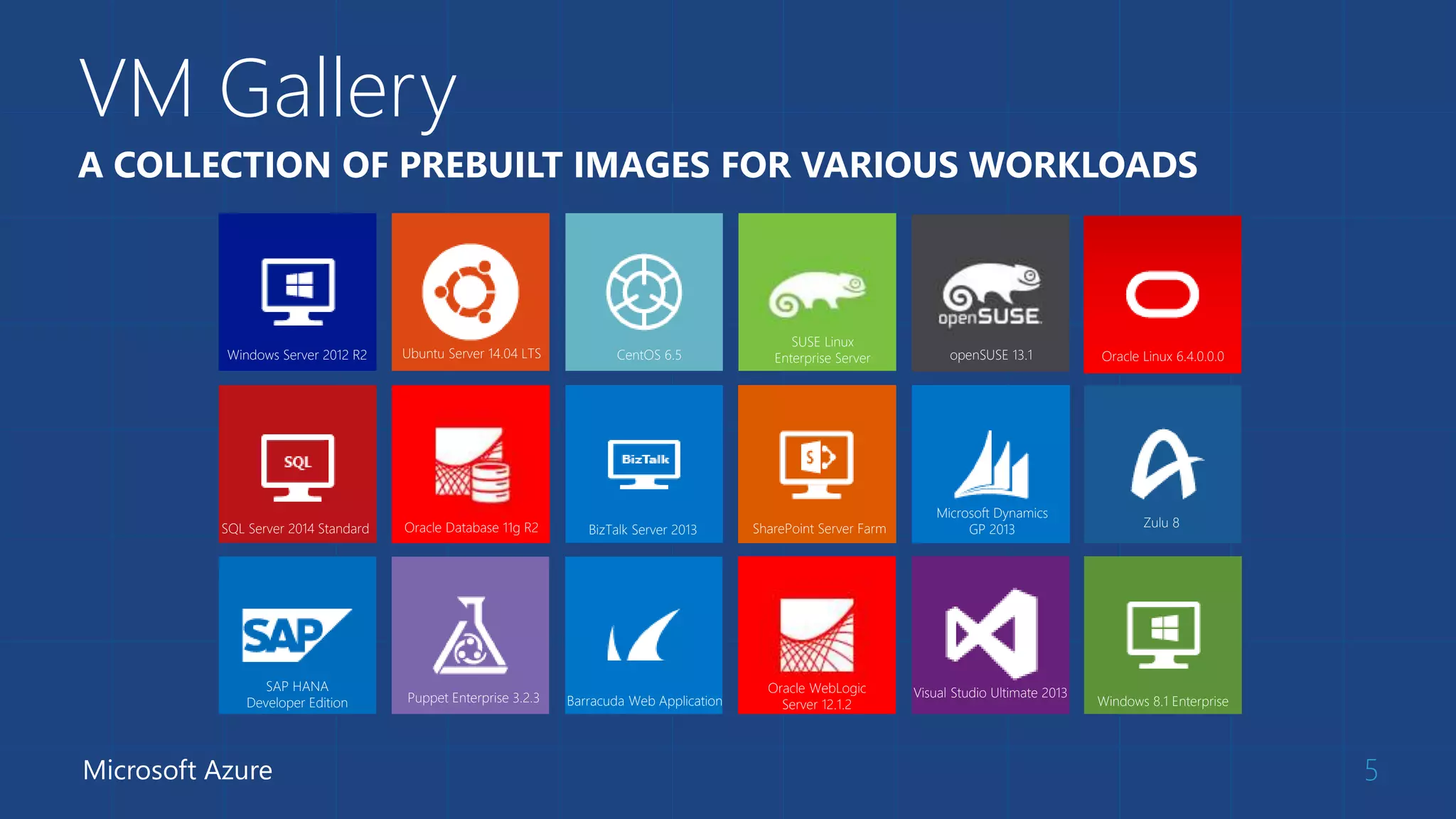
VM Gallery 
5 
A COLLECTION OF PREBUILT IMAGES FOR VARIOUS WORKLOADS 
Windows Server 2012 R2 Ubuntu Server 14.04 LTS CentOS 6.5 
Microsoft Azure 
SUSE Linux 
openSUSE 13.1 
Enterprise Server Oracle Linux 6.4.0.0.0 
Windows 8.1 Enterprise 
SQL Server 2014 Standard Oracle Database 11g R2 BizTalk Server 2013 SharePoint Server Farm 
Microsoft Dynamics 
GP 2013 
Zulu 8 
SAP HANA 
Developer Edition Puppet Enterprise 3.2.3 Barracuda Web Application 
Oracle WebLogic 
Server 12.1.2 
Visual Studio Ultimate 2013
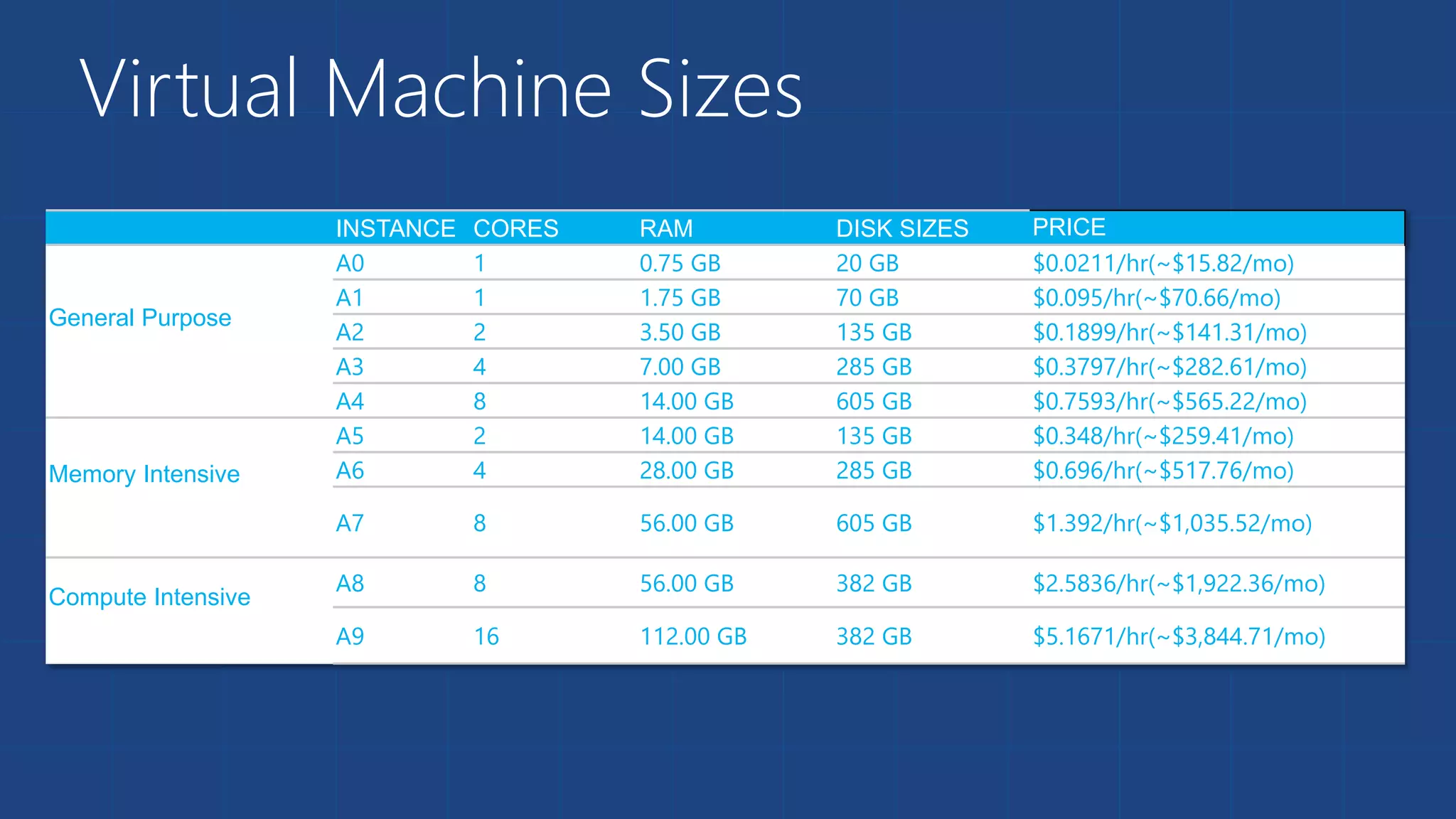
Virtual Machine Sizes 
INSTANCE CORES RAM DISK SIZES PRICE 
General Purpose 
A0 1 0.75 GB 20 GB $0.0211/hr(~$15.82/mo) 
A1 1 1.75 GB 70 GB $0.095/hr(~$70.66/mo) 
A2 2 3.50 GB 135 GB $0.1899/hr(~$141.31/mo) 
A3 4 7.00 GB 285 GB $0.3797/hr(~$282.61/mo) 
A4 8 14.00 GB 605 GB $0.7593/hr(~$565.22/mo) 
Memory Intensive 
A5 2 14.00 GB 135 GB $0.348/hr(~$259.41/mo) 
A6 4 28.00 GB 285 GB $0.696/hr(~$517.76/mo) 
A7 8 56.00 GB 605 GB $1.392/hr(~$1,035.52/mo) 
Compute Intensive 
A8 8 56.00 GB 382 GB $2.5836/hr(~$1,922.36/mo) 
A9 16 112.00 GB 382 GB $5.1671/hr(~$3,844.71/mo)
Demo: Provisioning VM 
Managing VMs using Azure portal
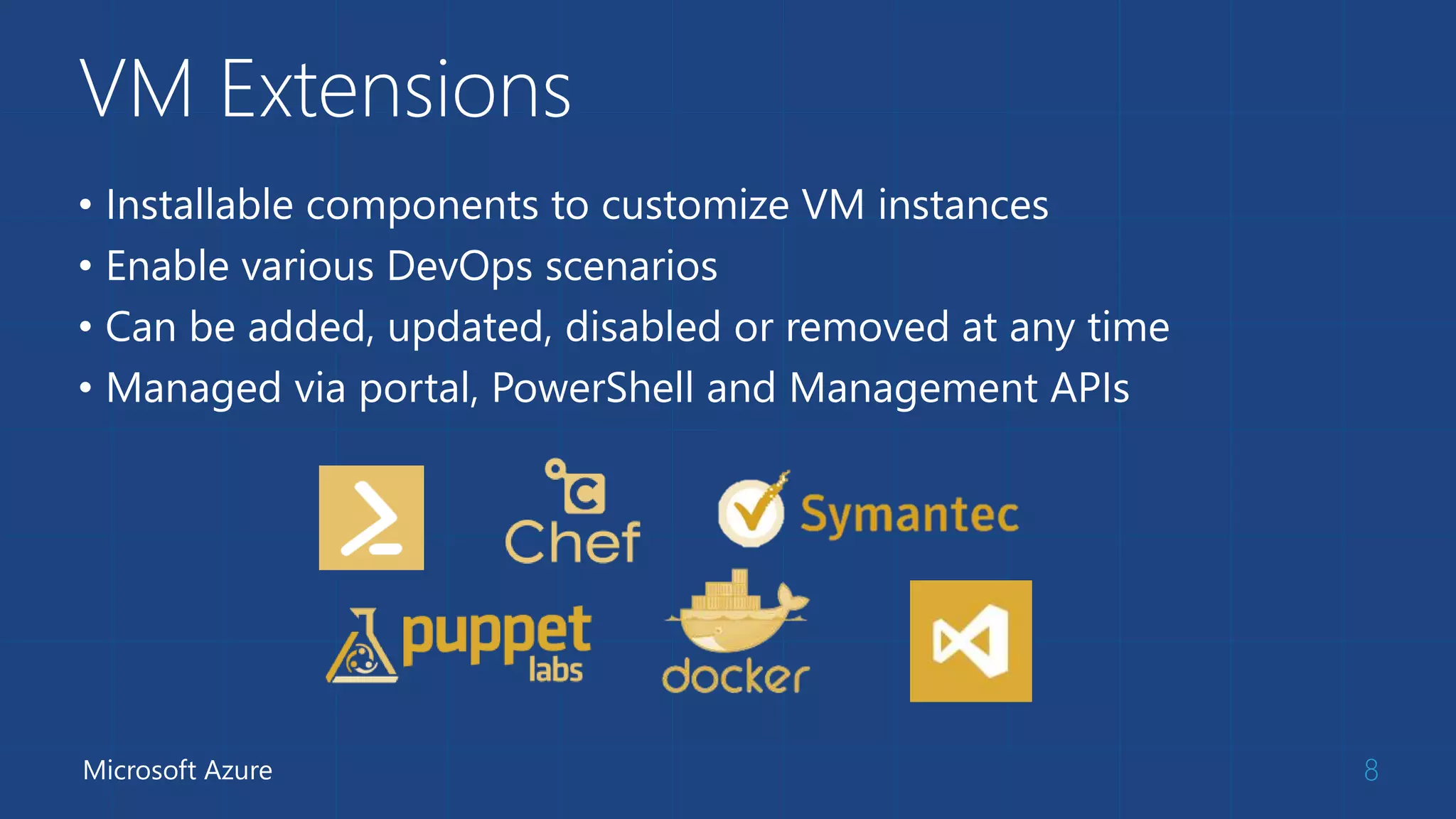
VM Extensions 
• Installable components to customize VM instances 
• Enable various DevOps scenarios 
• Can be added, updated, disabled or removed at any time 
• Managed via portal, PowerShell and Management APIs 
Microsoft Azure 8
Data Persistence 
 Data Disks 
 Azure Files
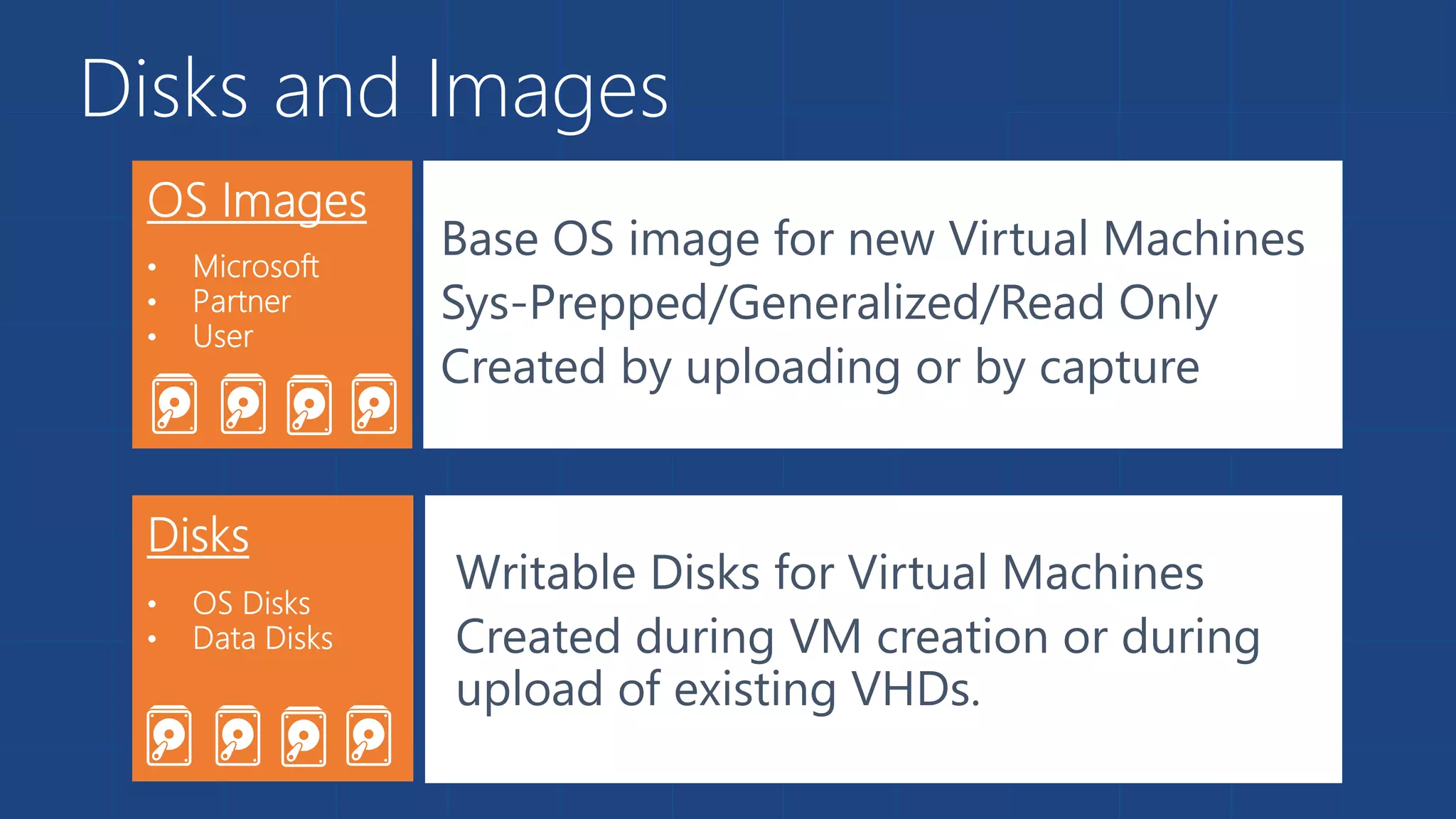
Disks and Images 
Base OS image for new Virtual Machines 
Sys-Prepped/Generalized/Read Only 
Created by uploading or by capture 
Writable Disks for Virtual Machines 
Created during VM creation or during 
upload of existing VHDs.
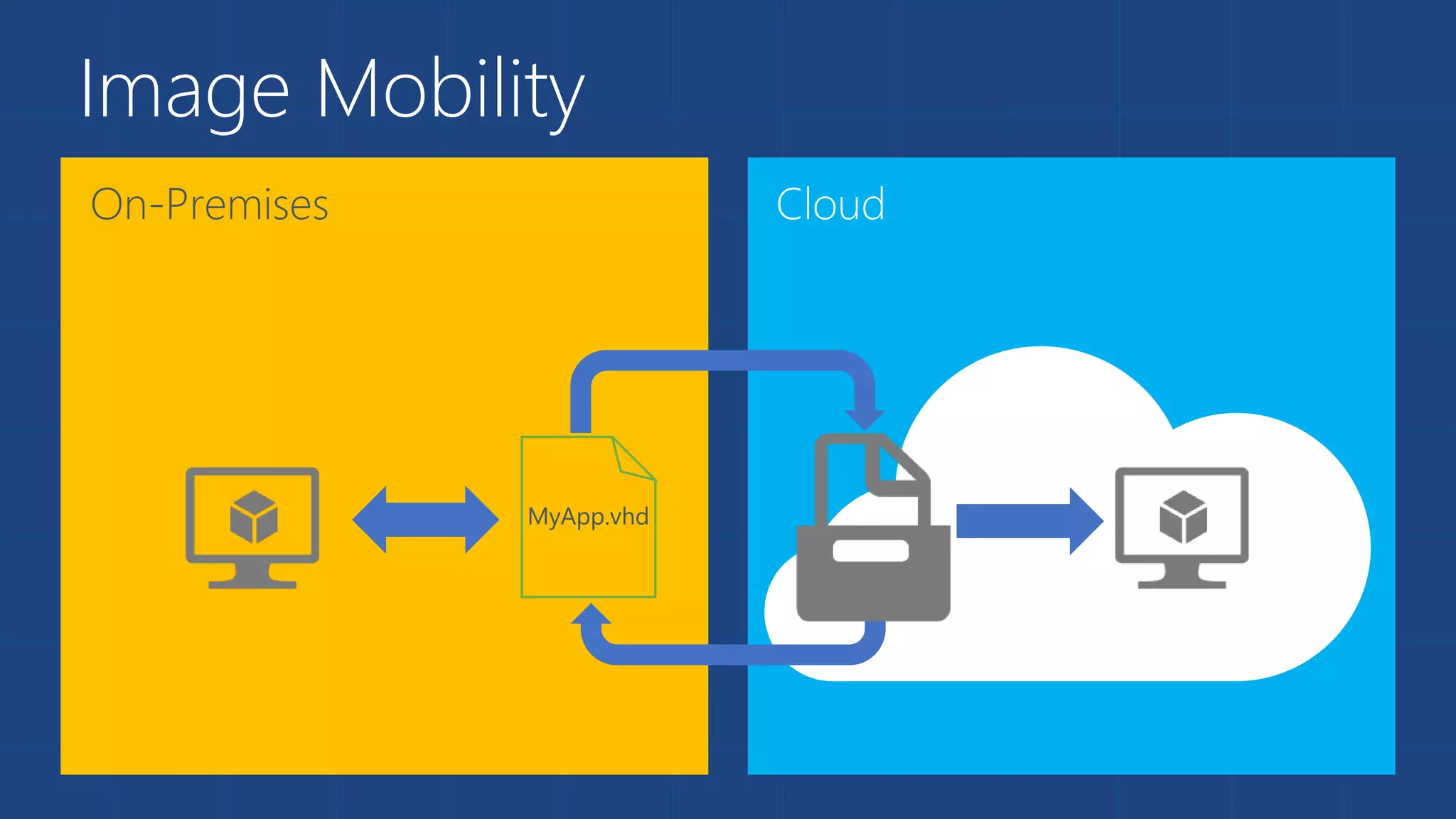
Image Mobility
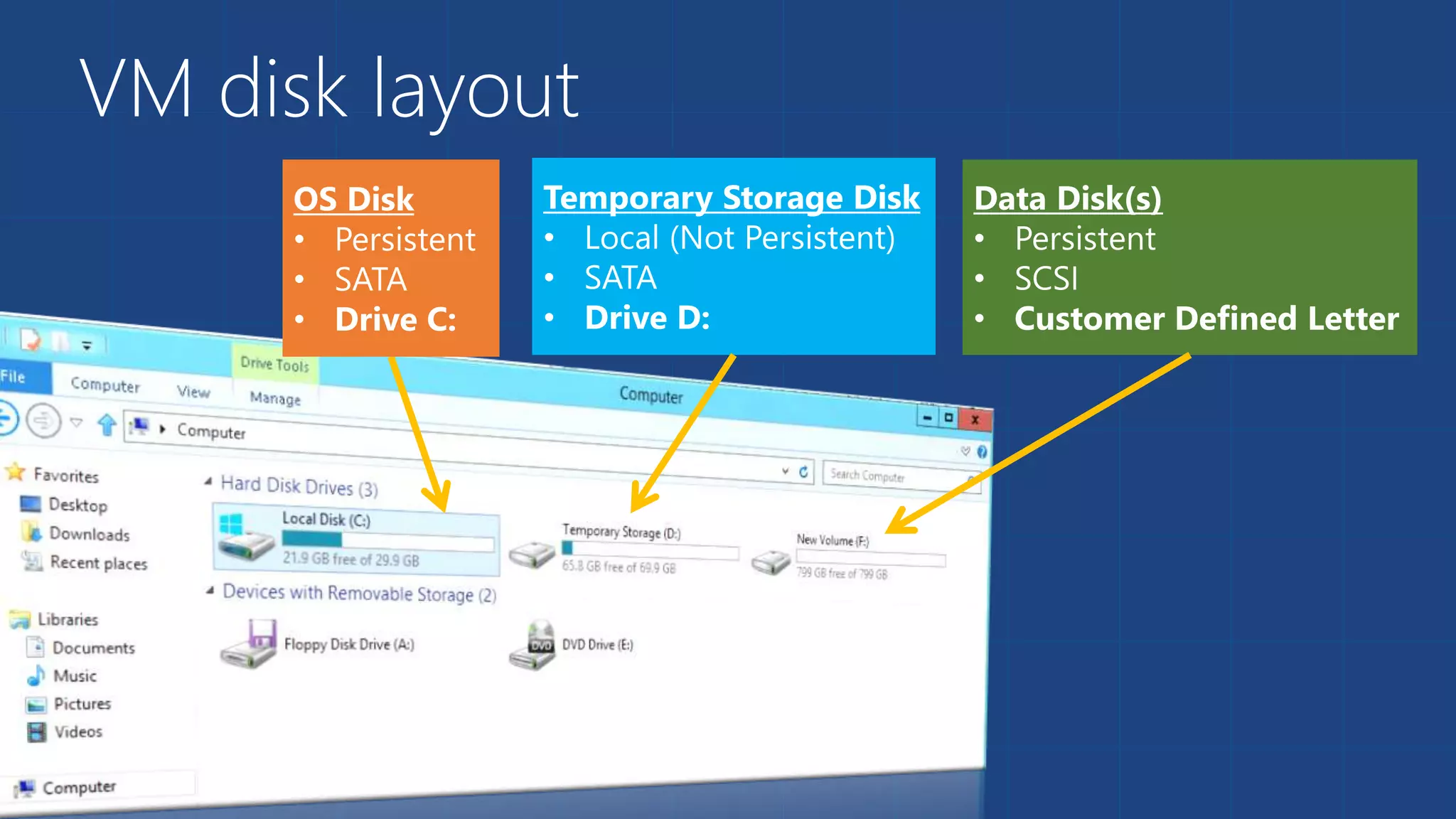
VM disk layout
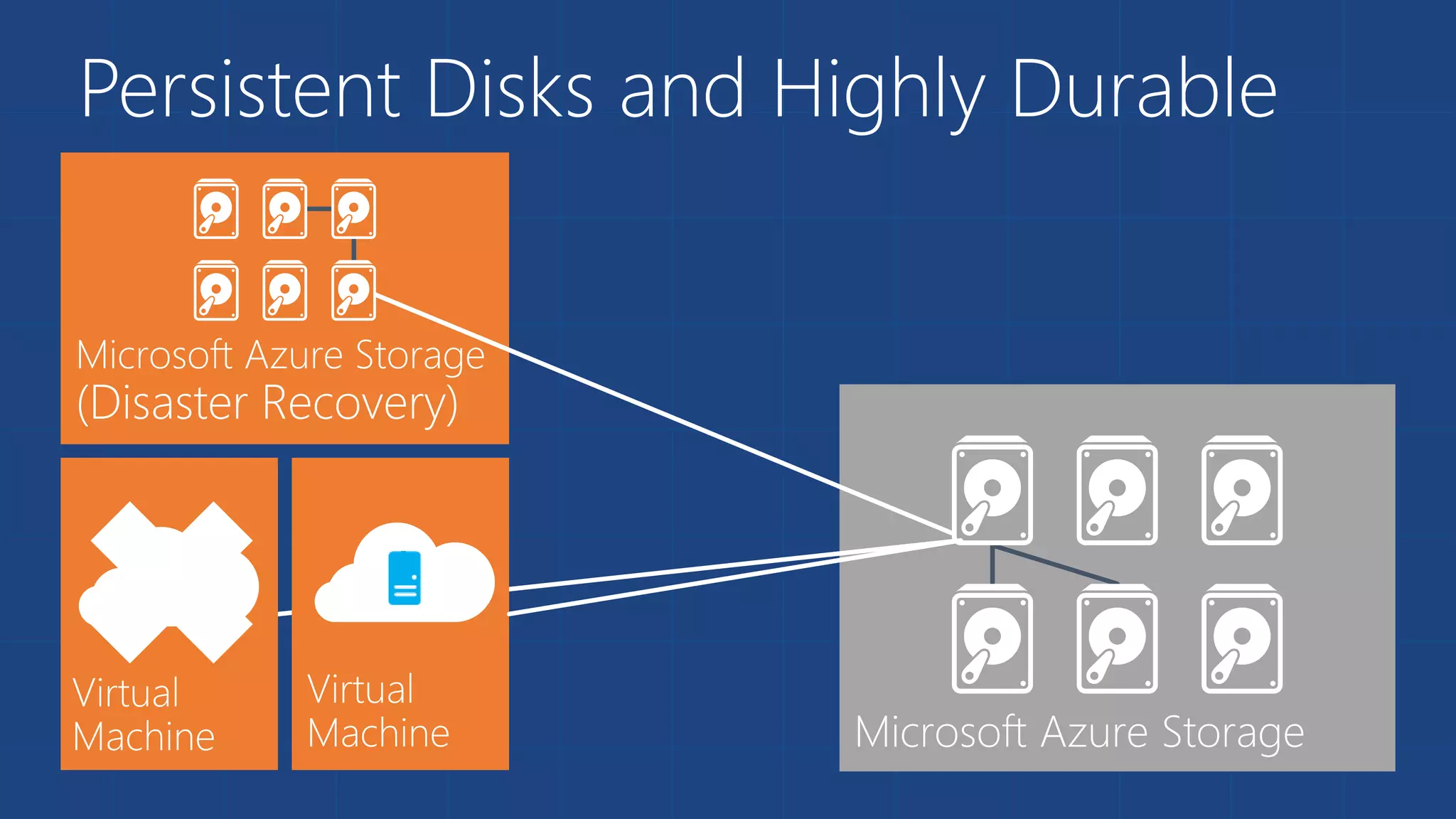
Persistent Disks and Highly Durable
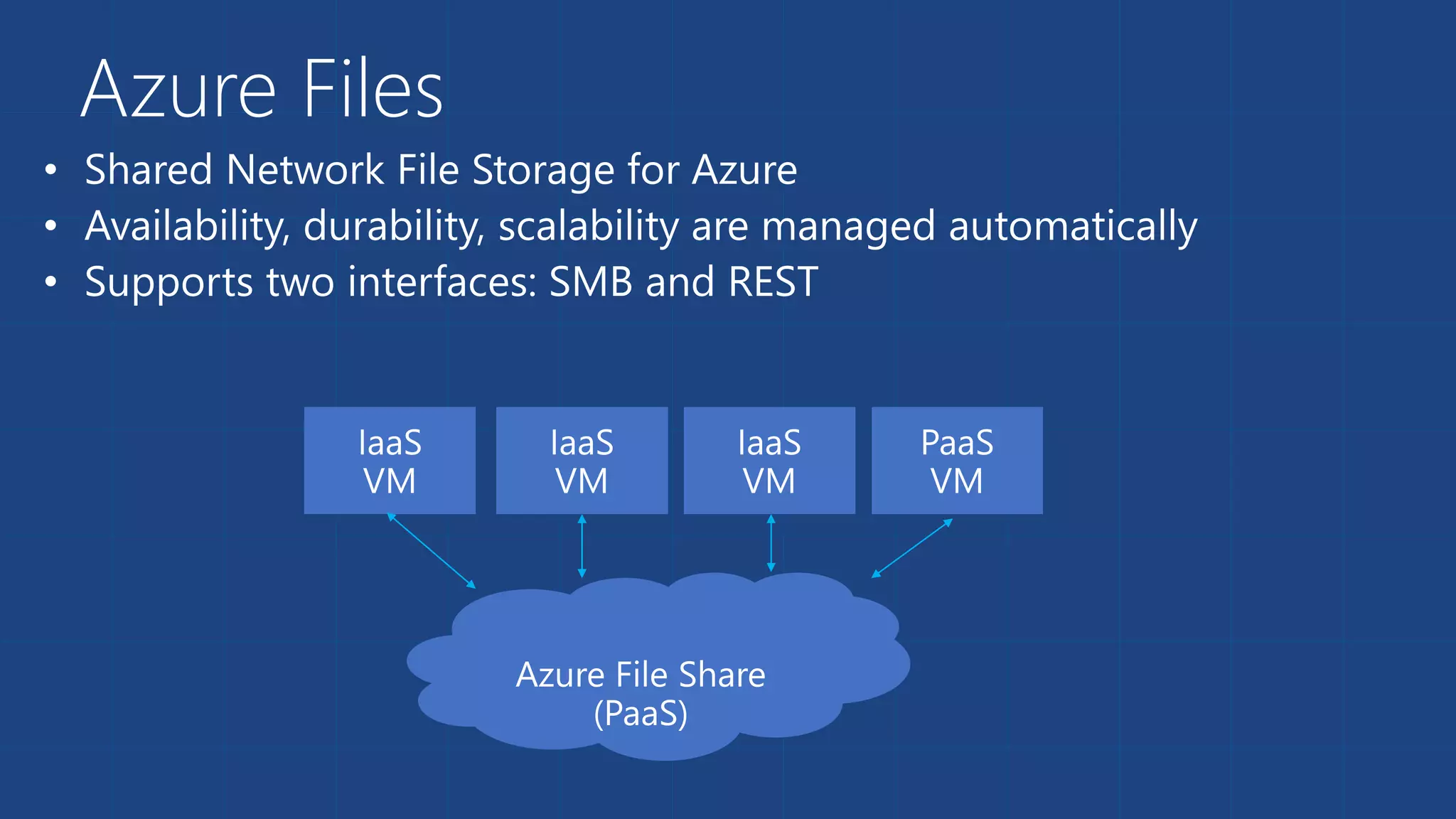
Azure Files 
• 
• 
•
Azure Files - Scenarios 
• Share data across VMs and applications 
• Multiple writers, multiple readers using standard file system 
semantics. 
• Share settings throughout services 
• VMs can read settings and files from a common, shared 
location. These can be updated externally via REST. 
• Dev/Test/Debug 
• Very useful to have a shared location for installing applications, 
setting up VMs, running tools, and keeping notes while 
developing, testing, and debugging cloud services.
Virtual Machine Availability 
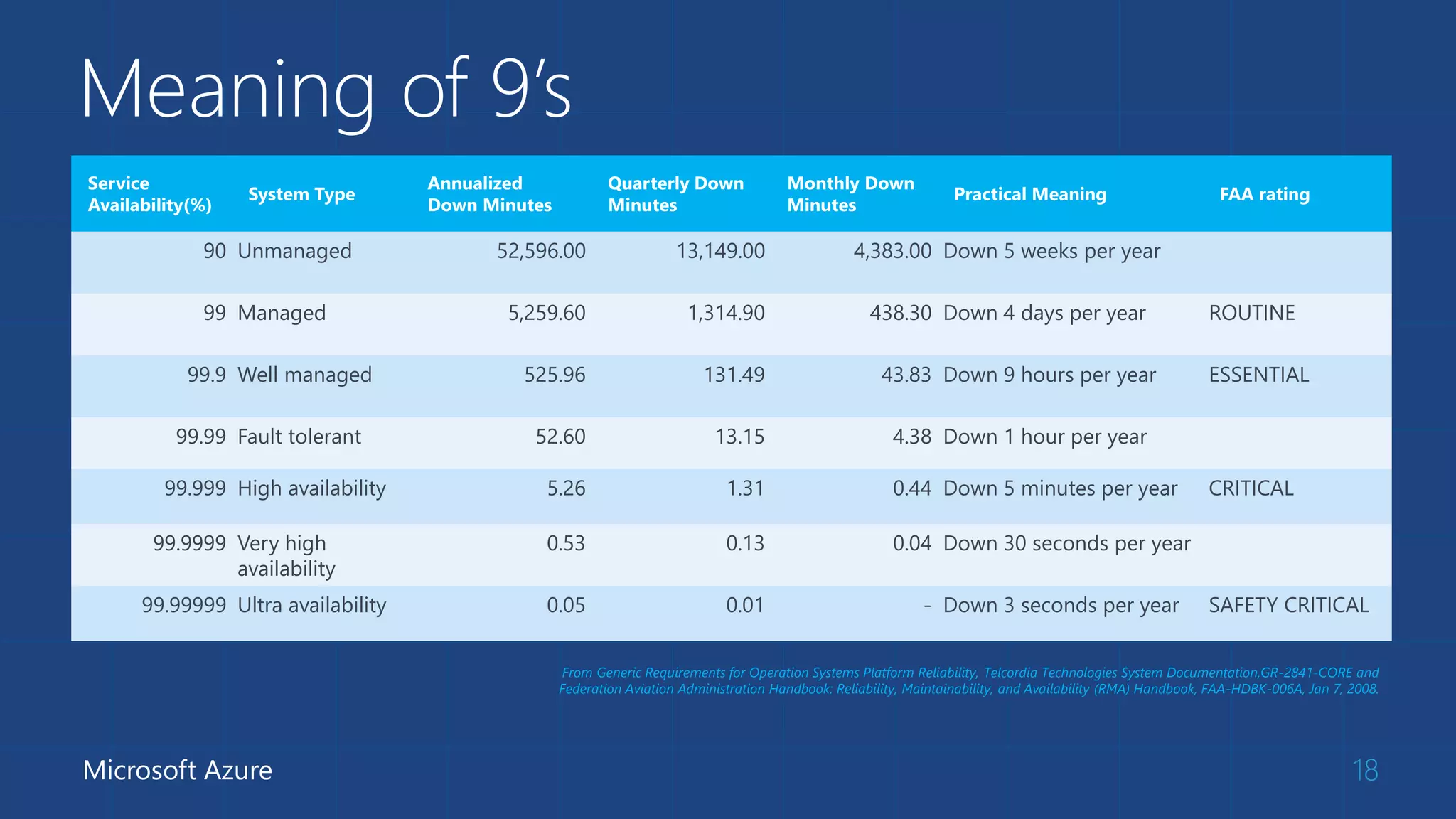
 Meaning of 9’s 
 Fault domains, update domains and availability sets 
 Load balancing
Meaning of 9’s 
18 
Service 
Availability(%) 
System Type 
Annualized 
Down Minutes 
Quarterly Down 
Minutes 
Monthly Down 
Minutes 
Practical Meaning FAA rating 
90 Unmanaged 52,596.00 13,149.00 4,383.00 Down 5 weeks per year 
99 Managed 5,259.60 1,314.90 438.30 Down 4 days per year ROUTINE 
99.9 Well managed 525.96 131.49 43.83 Down 9 hours per year ESSENTIAL 
99.99 Fault tolerant 52.60 13.15 4.38 Down 1 hour per year 
99.999 High availability 5.26 1.31 0.44 Down 5 minutes per year CRITICAL 
99.9999 Very high 
availability 
0.53 0.13 0.04 Down 30 seconds per year 
99.99999 Ultra availability 0.05 0.01 - Down 3 seconds per year SAFETY CRITICAL 
Microsoft Azure 
From Generic Requirements for Operation Systems Platform Reliability, Telcordia Technologies System Documentation,GR-2841-CORE and 
Federation Aviation Administration Handbook: Reliability, Maintainability, and Availability (RMA) Handbook, FAA-HDBK-006A, Jan 7, 2008.
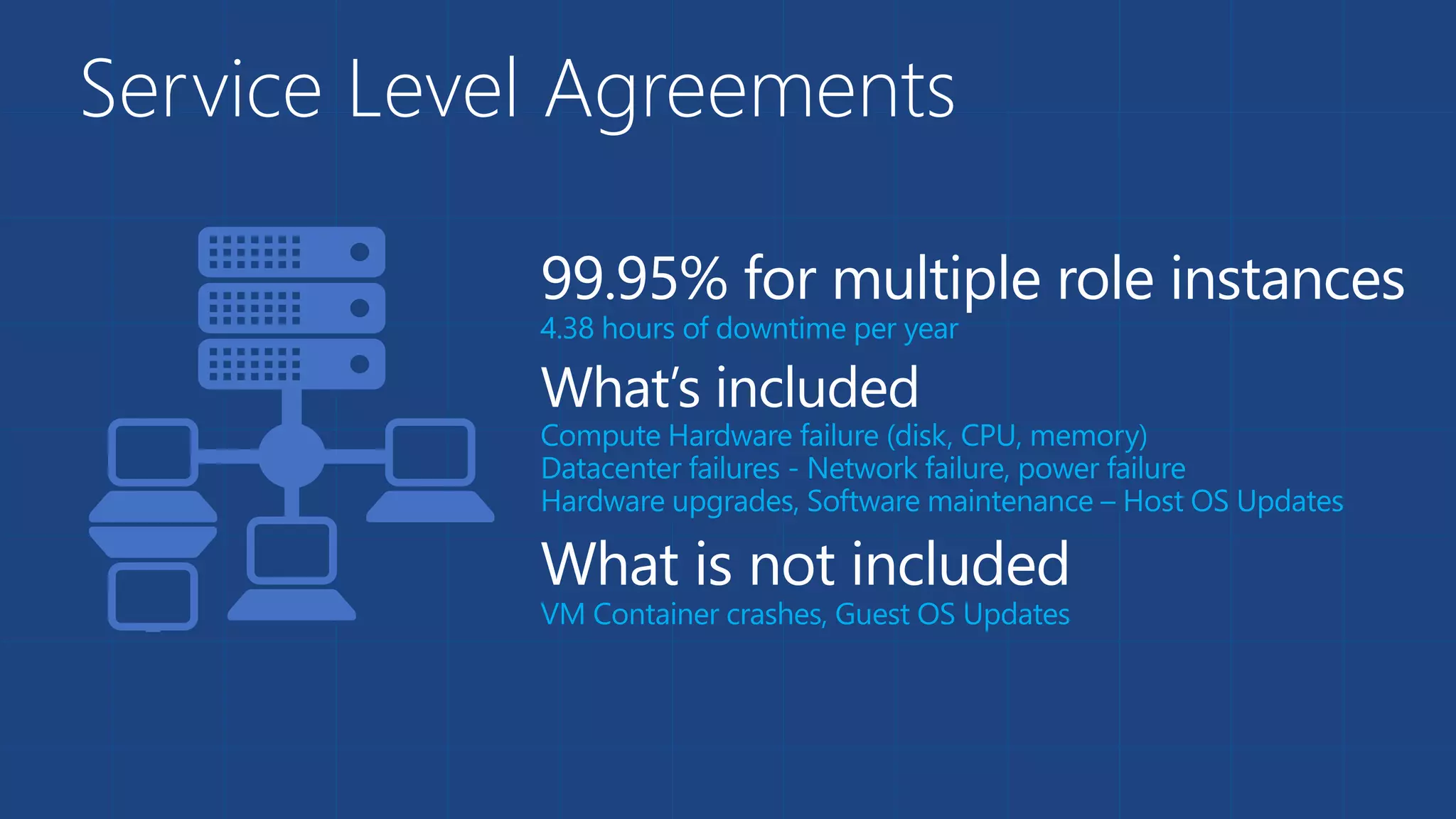
Service Level Agreements
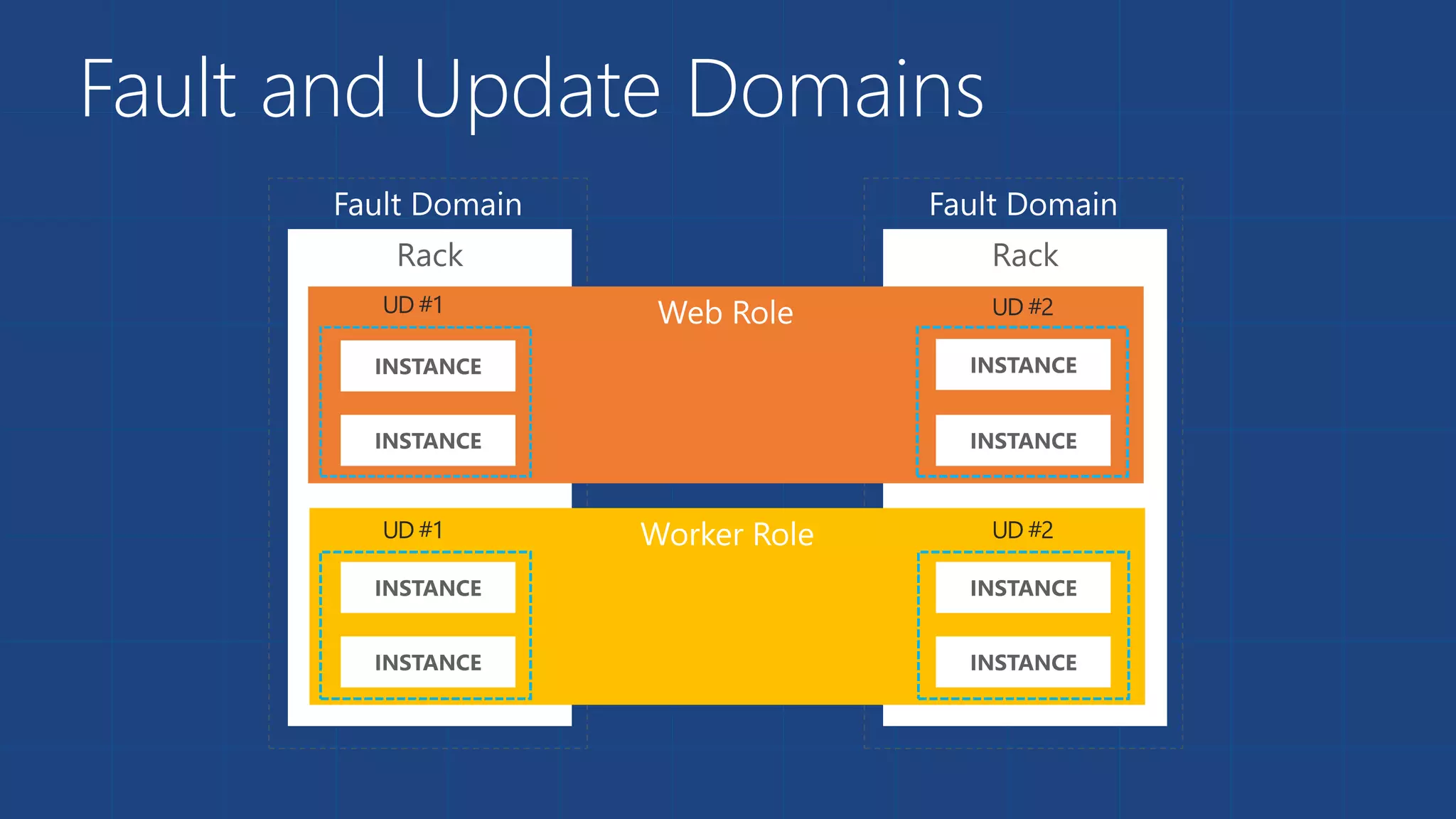
Fault and Update Domains
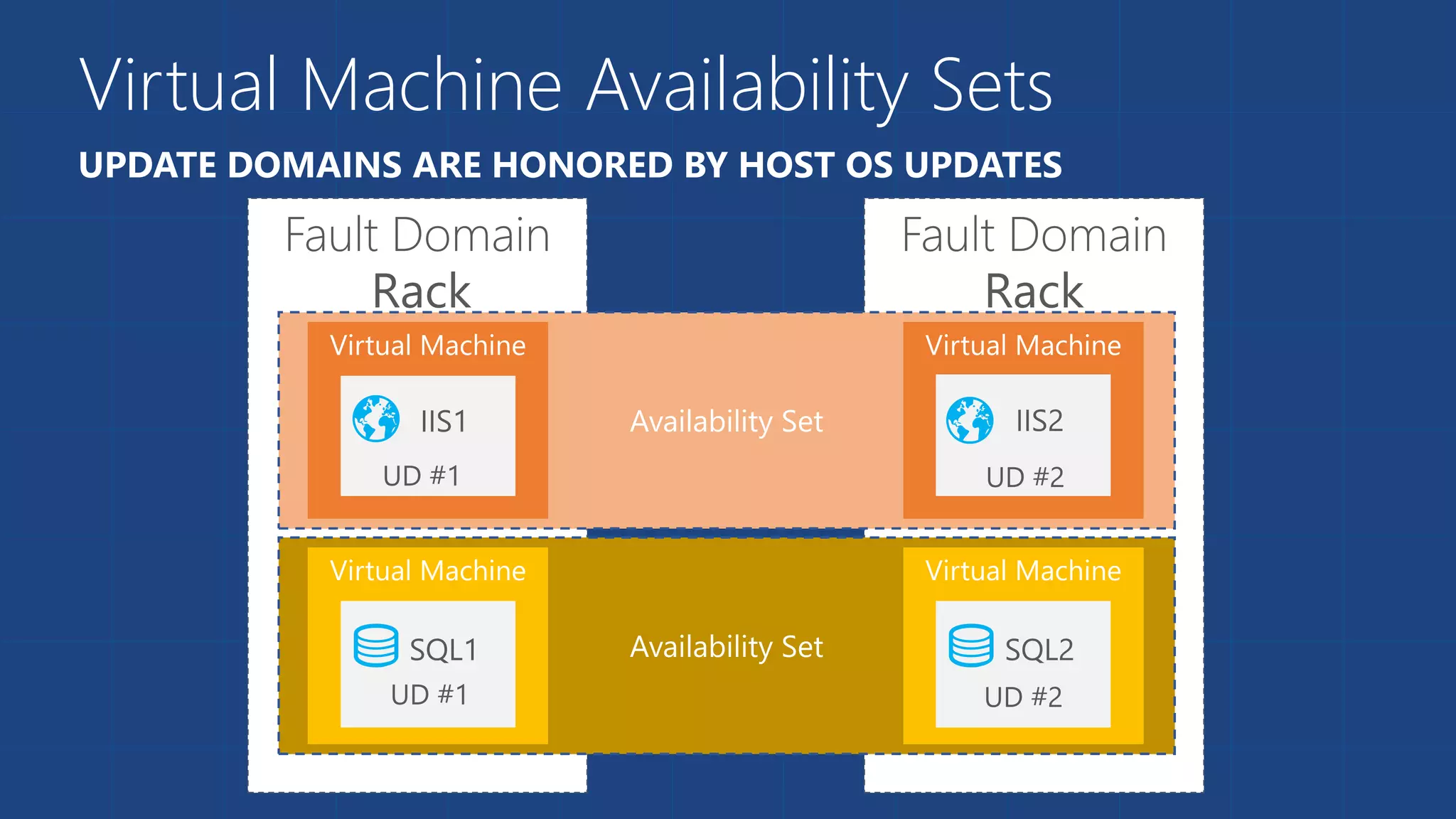
Virtual Machine Availability Sets 
UPDATE DOMAINS ARE HONORED BY HOST OS UPDATES
Load balancing 
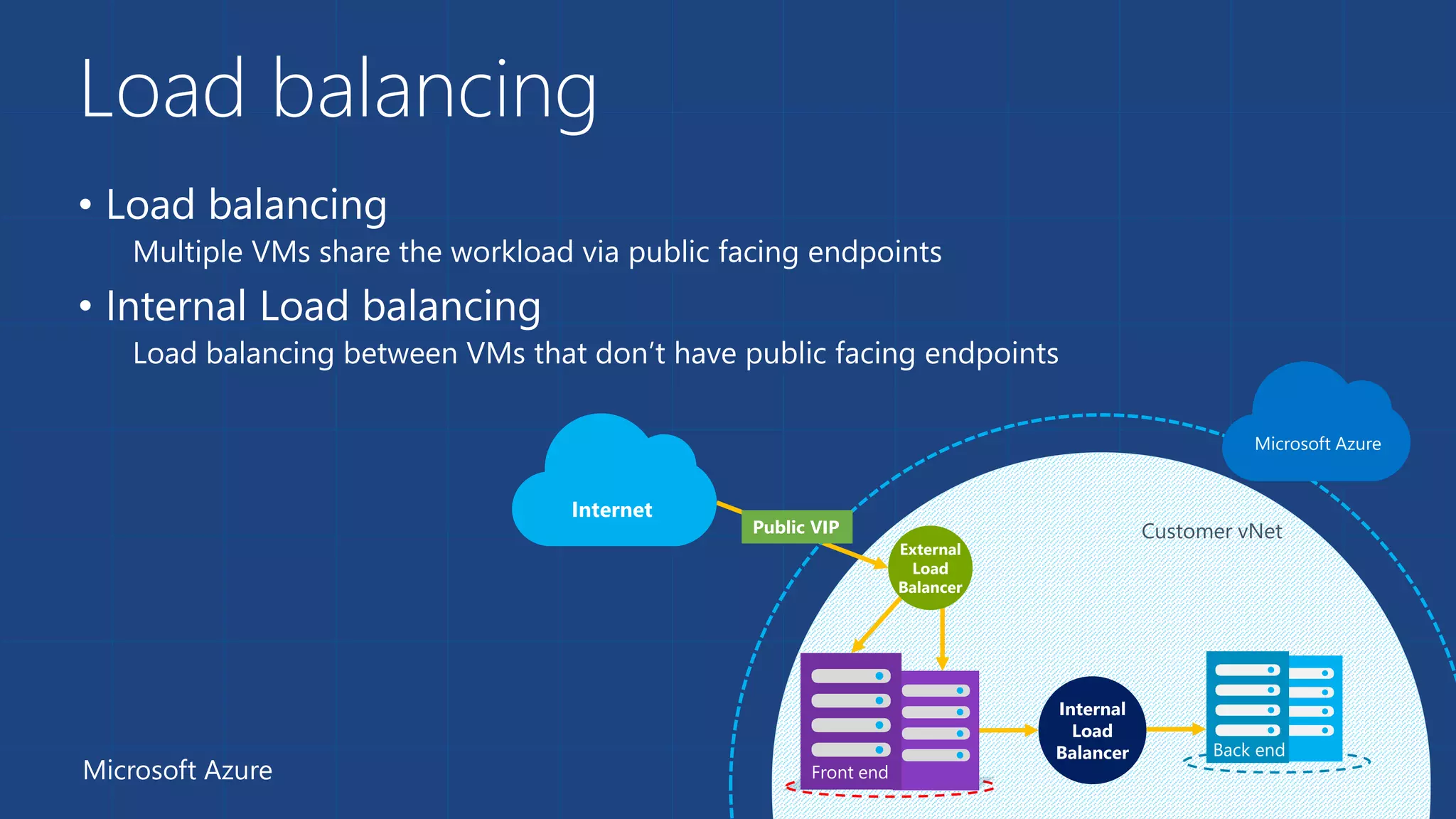
• Load balancing 
Multiple VMs share the workload via public facing endpoints 
• Internal Load balancing 
Load balancing between VMs that don’t have public facing endpoints 
External 
Load 
Balancer 
Customer vNet 
Internal 
Load 
Balancer Back end 
Microsoft Azure Front end 
22 
Internet 
Microsoft Azure 
Public VIP
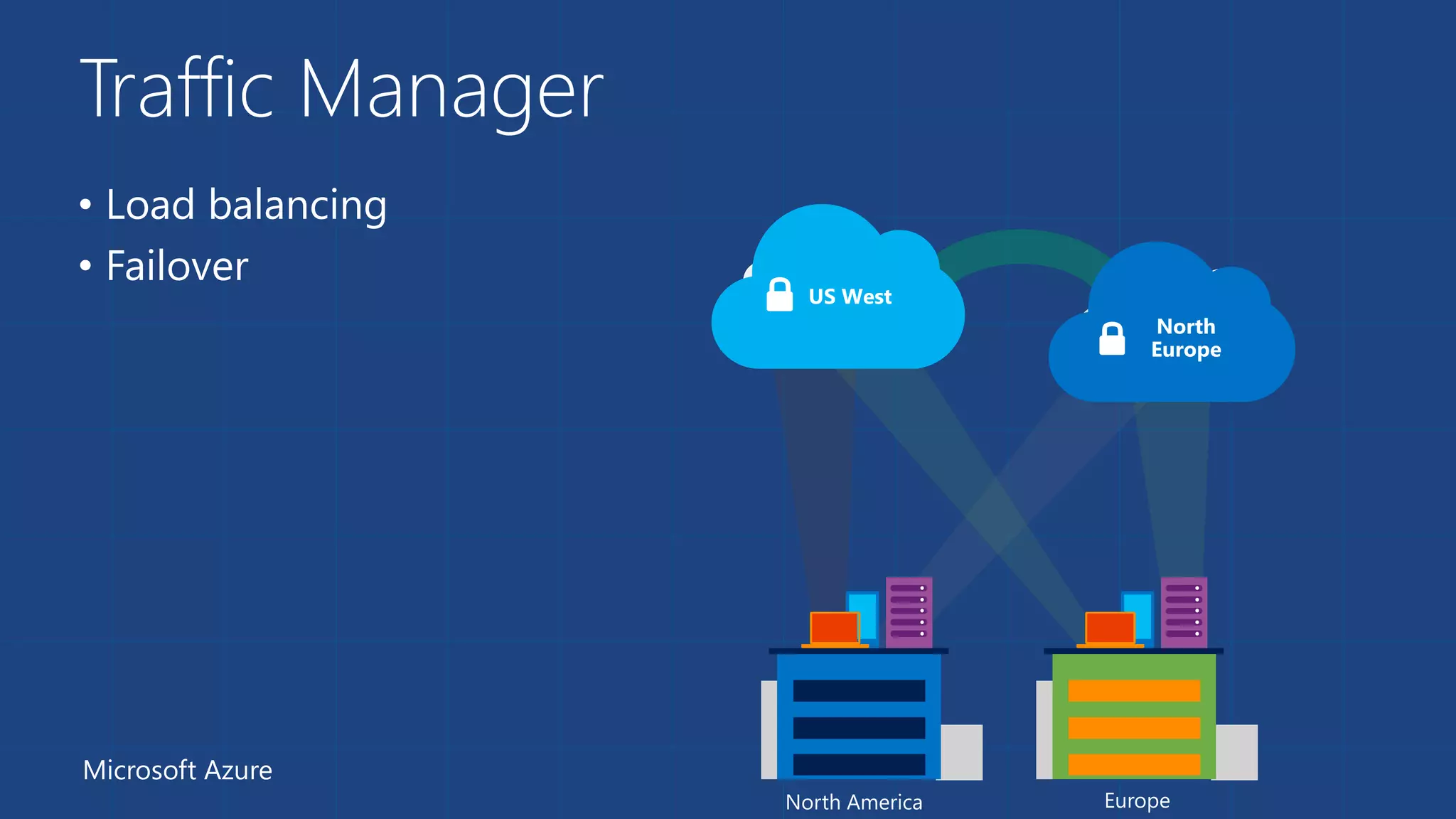
Traffic Manager 
• Load balancing 
• Failover 
Microsoft Azure 
North 
Europe 
US West 
North America Europe
Virtual 
Networks
Azure Virtual Networks 
 A protected private virtual network in cloud 
 Extend enterprise networks into Azure 
 Cross-premises connectivity
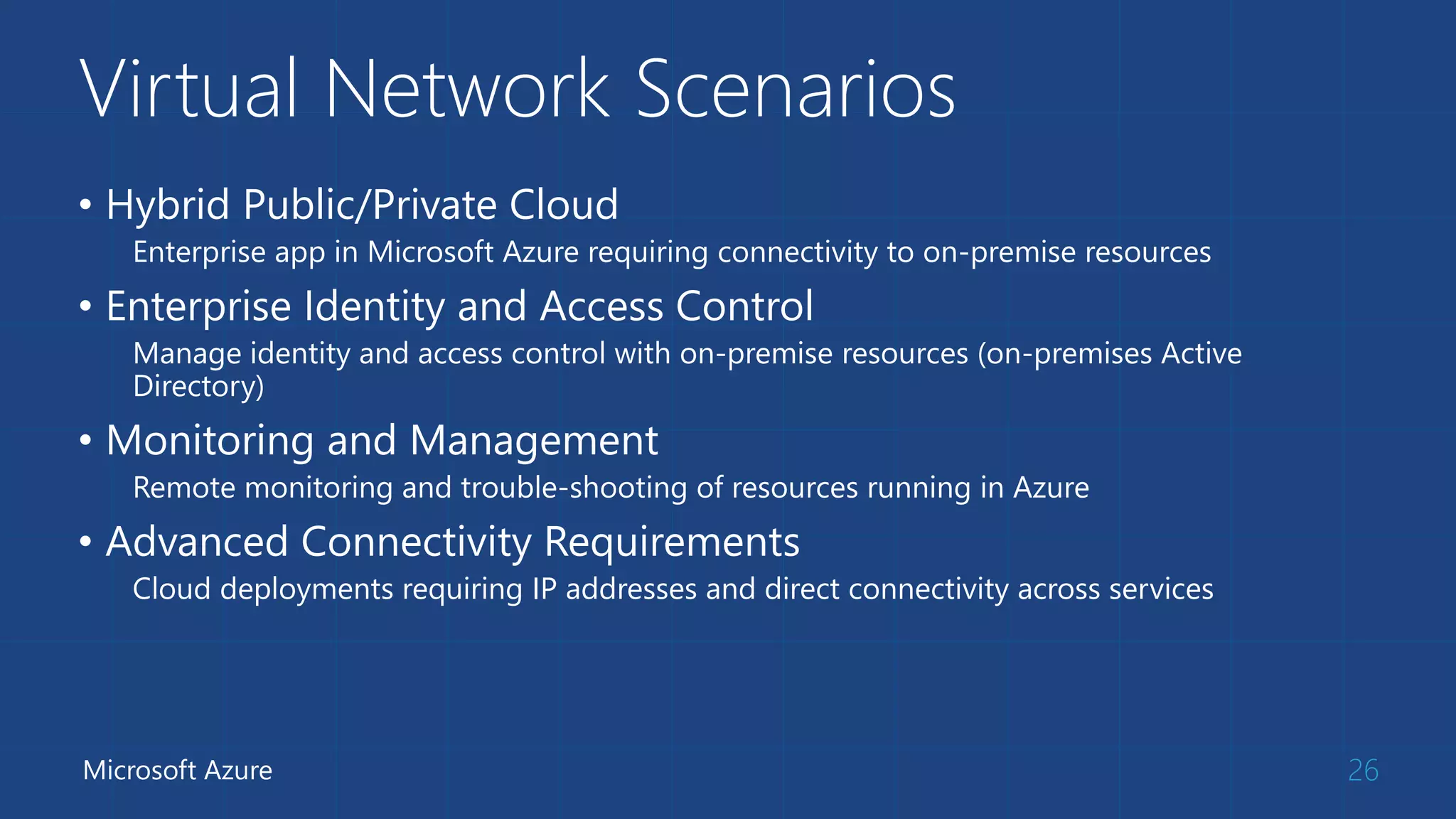
Virtual Network Scenarios 
• Hybrid Public/Private Cloud 
Enterprise app in Microsoft Azure requiring connectivity to on-premise resources 
• Enterprise Identity and Access Control 
Manage identity and access control with on-premise resources (on-premises Active 
Directory) 
• Monitoring and Management 
Remote monitoring and trouble-shooting of resources running in Azure 
• Advanced Connectivity Requirements 
Cloud deployments requiring IP addresses and direct connectivity across services 
Microsoft Azure 26
Questions?

Azure IaaS

  • 1.
  • 3.
    Azure Virtual Machines  Launch Windows Server and Linux in minutes  Scale from 1 to 1000s of VM Instances  Save money with per-minute billing  Open and extensible
  • 4.
  • 5.
    VM Gallery 5 A COLLECTION OF PREBUILT IMAGES FOR VARIOUS WORKLOADS Windows Server 2012 R2 Ubuntu Server 14.04 LTS CentOS 6.5 Microsoft Azure SUSE Linux openSUSE 13.1 Enterprise Server Oracle Linux 6.4.0.0.0 Windows 8.1 Enterprise SQL Server 2014 Standard Oracle Database 11g R2 BizTalk Server 2013 SharePoint Server Farm Microsoft Dynamics GP 2013 Zulu 8 SAP HANA Developer Edition Puppet Enterprise 3.2.3 Barracuda Web Application Oracle WebLogic Server 12.1.2 Visual Studio Ultimate 2013
  • 6.
    Virtual Machine Sizes INSTANCE CORES RAM DISK SIZES PRICE General Purpose A0 1 0.75 GB 20 GB $0.0211/hr(~$15.82/mo) A1 1 1.75 GB 70 GB $0.095/hr(~$70.66/mo) A2 2 3.50 GB 135 GB $0.1899/hr(~$141.31/mo) A3 4 7.00 GB 285 GB $0.3797/hr(~$282.61/mo) A4 8 14.00 GB 605 GB $0.7593/hr(~$565.22/mo) Memory Intensive A5 2 14.00 GB 135 GB $0.348/hr(~$259.41/mo) A6 4 28.00 GB 285 GB $0.696/hr(~$517.76/mo) A7 8 56.00 GB 605 GB $1.392/hr(~$1,035.52/mo) Compute Intensive A8 8 56.00 GB 382 GB $2.5836/hr(~$1,922.36/mo) A9 16 112.00 GB 382 GB $5.1671/hr(~$3,844.71/mo)
  • 7.
    Demo: Provisioning VM Managing VMs using Azure portal
  • 8.
    VM Extensions •Installable components to customize VM instances • Enable various DevOps scenarios • Can be added, updated, disabled or removed at any time • Managed via portal, PowerShell and Management APIs Microsoft Azure 8
  • 9.
    Data Persistence Data Disks  Azure Files
  • 10.
    Disks and Images Base OS image for new Virtual Machines Sys-Prepped/Generalized/Read Only Created by uploading or by capture Writable Disks for Virtual Machines Created during VM creation or during upload of existing VHDs.
  • 11.
  • 12.
  • 13.
    Persistent Disks andHighly Durable
  • 14.
  • 15.
    Azure Files -Scenarios • Share data across VMs and applications • Multiple writers, multiple readers using standard file system semantics. • Share settings throughout services • VMs can read settings and files from a common, shared location. These can be updated externally via REST. • Dev/Test/Debug • Very useful to have a shared location for installing applications, setting up VMs, running tools, and keeping notes while developing, testing, and debugging cloud services.
  • 16.
    Virtual Machine Availability  Meaning of 9’s  Fault domains, update domains and availability sets  Load balancing
  • 17.
    Meaning of 9’s 18 Service Availability(%) System Type Annualized Down Minutes Quarterly Down Minutes Monthly Down Minutes Practical Meaning FAA rating 90 Unmanaged 52,596.00 13,149.00 4,383.00 Down 5 weeks per year 99 Managed 5,259.60 1,314.90 438.30 Down 4 days per year ROUTINE 99.9 Well managed 525.96 131.49 43.83 Down 9 hours per year ESSENTIAL 99.99 Fault tolerant 52.60 13.15 4.38 Down 1 hour per year 99.999 High availability 5.26 1.31 0.44 Down 5 minutes per year CRITICAL 99.9999 Very high availability 0.53 0.13 0.04 Down 30 seconds per year 99.99999 Ultra availability 0.05 0.01 - Down 3 seconds per year SAFETY CRITICAL Microsoft Azure From Generic Requirements for Operation Systems Platform Reliability, Telcordia Technologies System Documentation,GR-2841-CORE and Federation Aviation Administration Handbook: Reliability, Maintainability, and Availability (RMA) Handbook, FAA-HDBK-006A, Jan 7, 2008.
  • 18.
  • 19.
  • 20.
    Virtual Machine AvailabilitySets UPDATE DOMAINS ARE HONORED BY HOST OS UPDATES
  • 21.
    Load balancing •Load balancing Multiple VMs share the workload via public facing endpoints • Internal Load balancing Load balancing between VMs that don’t have public facing endpoints External Load Balancer Customer vNet Internal Load Balancer Back end Microsoft Azure Front end 22 Internet Microsoft Azure Public VIP
  • 22.
    Traffic Manager •Load balancing • Failover Microsoft Azure North Europe US West North America Europe
  • 23.
  • 24.
    Azure Virtual Networks  A protected private virtual network in cloud  Extend enterprise networks into Azure  Cross-premises connectivity
  • 25.
    Virtual Network Scenarios • Hybrid Public/Private Cloud Enterprise app in Microsoft Azure requiring connectivity to on-premise resources • Enterprise Identity and Access Control Manage identity and access control with on-premise resources (on-premises Active Directory) • Monitoring and Management Remote monitoring and trouble-shooting of resources running in Azure • Advanced Connectivity Requirements Cloud deployments requiring IP addresses and direct connectivity across services Microsoft Azure 26
  • 26.

Editor's Notes

  • #4 Slide Objectives: High-level selling points of virtual machines. Speaker Notes: Both Linux and Windows are supported. It’s important to reiterate on this as many developers are still not aware of this. Mention scaling at enterprise level using DSC, Puppet or Chef. Emphasize on the openness – we are not forcing your to lock on Microsoft technologies. Instead, Azure is more open than ever. You can leverage your existing skills, tools and services, and Azure is providing more and more first-class supports for them.
  • #5 Slide Objective: Explain workflow for provisioning VMs in the cloud Speaker Notes: You have three methods of starting this process: Build a VM from the portal, from the command line OR programmatically calling the REST API. Once your choice of provisioning is made you will need to select the image and instance size to start from. The newly created disk will be stored in blob storage and your machine will boot.
  • #6 Slide Objective: Explain a wide variety of images that you can choose from. Speaker Notes: First of all, you can choose from different Windows Servers and a variety of Linux implementations. [Click] As well as pre-built images for different flavors of SQL Database and Oracle databases. [Click] You can also choose from a number of first-party and certified third-party images for various application servers and infrastructural components. [Click] And last but not least, if you are a MSDN subscriber, you also have access to Visual Studio images and client Windows systems such as Windows 7 and Windows 8.1 for your DevTest purposes.
  • #7 Slide Objective: Introduce different virtual machine sizes. Speaker Notes: Different VM sizes allow different number of data disks (more on data disks later). A5-A7 are high-memory instances A8-A9 are for compute-intensive workloads http://azure.microsoft.com/en-us/pricing/details/virtual-machines/
  • #8 Demo: Provisioning VM Prerequisites: A Windows Server 2012 is already provisioned. Steps: Open Ibiza portal and click the NEW button at the lower-left corner. Show the short list of resources. Explain that I can directly create popular resources here such as a Windows Server 2012. Click on the Everything link. In Gallery blade, open the Virtual machines category. Scroll down the view and show images of different types (refer back to slide 9). Click on Windows Server 2012 R2, and then click the Create button in the overview blade. For non-Microsoft focused audience, consider to pick a Linux image instead. Fill in the Create VM form and click on the Create button to provision the VM. Explain this will take a few minutes. Open the already provisioned VM. Scroll down the blade to show various of information available on the blade. Click on the Extensions tile. On the Extensions blade, click on the ADD icon to bring up the extension list. Introduce that VM extensions are installable components to customize VM instances. Switch to slides to continue with VM extension introduction.
  • #9 Slide Objective: Introduce VM extensions. Speaker Notes: No matter how big the image gallery is, your projects may have specific needs that can’t be satisfied by standard images. Some components such as anti-virus, configuration management agents are required on most machines for compliance and management purposes. This allows use to innovate faster to meet with your project needs. And you have flexibility to pick and combine extensions for your goals. Point out some of existing extensions: Custom Script Extension, which allows you to download and execute PowerShell scripts. Chef Extension and Puppet Extension for automated management at scale. Symantec Endpoint Protection etc. for protection. Docker (Linux only). Visual Studio Remote Debugger.
  • #11 Slide Objective: Explain the differences between disks and images with VMs
  • #12 Slide Objective: Explain the benefits of image mobility Notes: One of the key benefits of IaaS is flexibility and control. The Windows Azure solution provides the capability of not only moving VHDs TO the cloud but also allows you to copy the VHD back down and run it locally or on another cloud provider. Great for testing out production issues or any other need where you require a copy of the production server.
  • #14 Slide Objective: Explain how disks are durable and how Windows Azure storage works Notes: The OS and Data Disks are stored in Windows Azure storage. So in addition to the data being persistent you also get the benefits of storage which means your VHD is replicated 3X’s locally and also 3X’s in a separate data center in the same region (geo-replication)
  • #17 Speaker Notes: Unhide to add more details if necessary
  • #21 Slide Objective: Provide a graphical view of fault and upgrade domains for existing web and worker roles. Use to contrast existing skills with availability sets. Notes: You can see that our service is well spread out across both fault and upgrade domains The loss of a fault domain will not cause a failure of our service nor will the restart or change of an upgrade domain cause a failure of our service Notes Useful pre-reading here. http://blog.toddysm.com/2010/04/upgrade-domains-and-fault-domains-in-windows-azure.html
  • #22 Slide Objective: Explain availability sets Notes: Availability sets tell the Fabric Controller to place VMs in the same set on different racks for faults and in separate upgrade domains for updates. This essentially tells the FC not to take the guest OS down of all VMs in the same set for host updates.