Template designed by
From On-premise to the Hybrid
Cloud with Microsoft Azure
Nicola Ferrini
IT PRO Trainer – Virtualization Expert
Slide con sponsor che arriva a
qualche giorno dalla conferenza
sponsor
IT PRO Trainer
Technical Writer
Technet Speaker
Server, Desktop & Application Virtualization Expert
Microsoft Most Valuable Professional (MVP)
More on:
•http://www.nicolaferrini.it
•http://www.windowserver.it
•http://windowsazurecommunity.it
Who Am I ?
NICOLA FERRINI
AZURE IAAS MODEL
HOW TO CREATE VM
CUSTOMIZE VM
CLOUD SERVICES
HYBRID CLOUD
Agenda
OPTIMIZED DATA CENTER
Well Managed
Infrastructure & Applications
CLOUD
Service Oriented
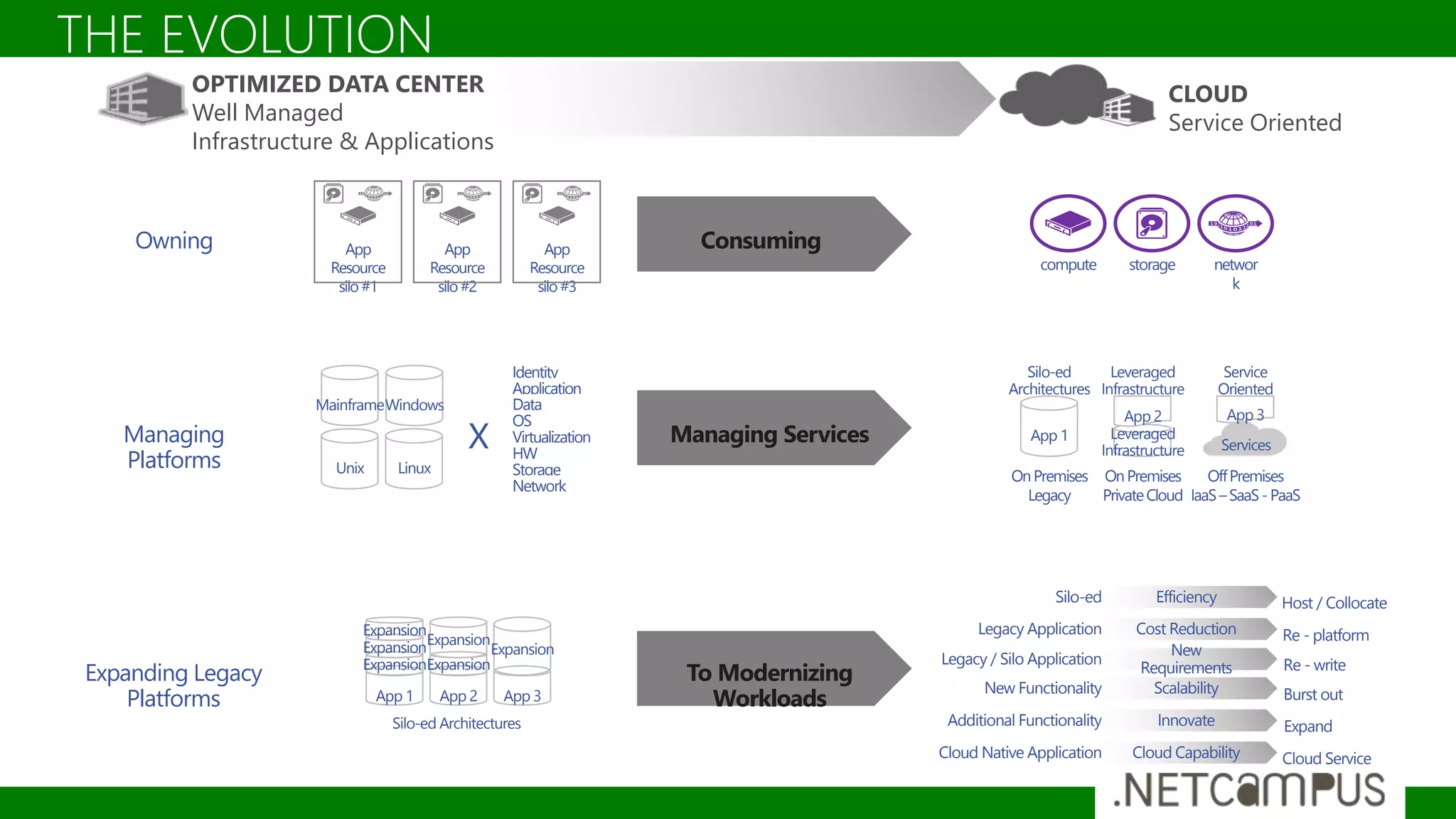
THE EVOLUTION
Silo-ed Efficiency Host / Collocate
Legacy Application Cost Reduction Re - platform
Legacy / Silo Application
New
Requirements Re - write
Additional Functionality Innovate Expand
New Functionality Scalability Burst out
Cloud Native Application Cloud Capability Cloud Service
Expanding Legacy
Platforms
To Modernizing
Workloads
Silo-ed Architectures
App 1
Expansion
Expansion
Expansion
App 2
Expansion
Expansion
App 3
Expansion
Managing
Platforms
Managing Services
OnPremises
Legacy
App 1
Silo-ed
Architectures
OnPremises
PrivateCloud
Leveraged
Infrastructure
App 2
Leveraged
Infrastructure
OffPremises
IaaS–SaaS-PaaS
Services
Service
Oriented
App 3
Identity
Application
Data
OS
Virtualization
HW
Storage
Network
Unix Linux
MainframeWindows
X
Owning
compute storage networ
k
ConsumingApp
Resource
silo#1
App
Resource
silo#2
App
Resource
silo#3
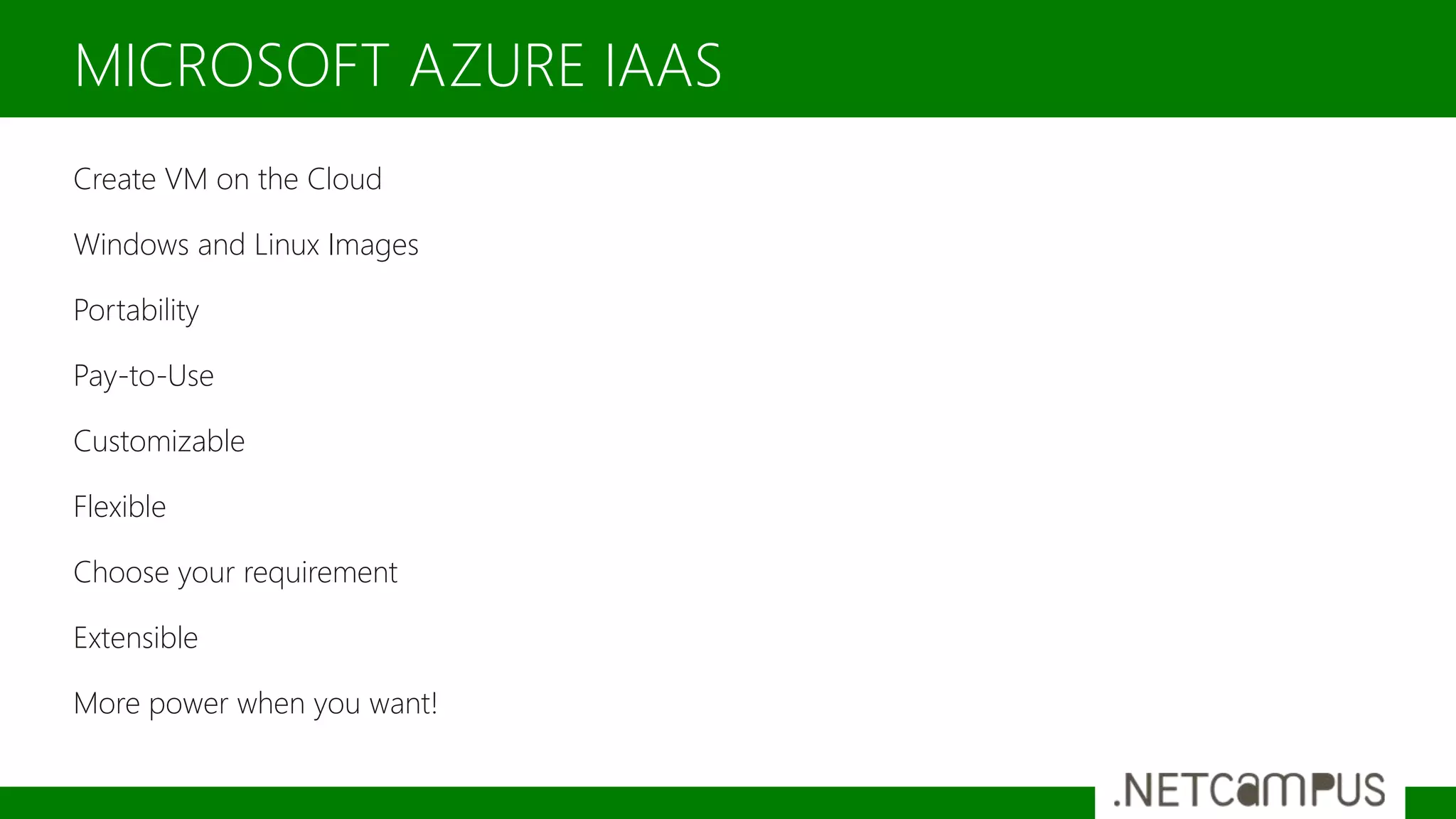
Create VM on the Cloud
Windows and Linux Images
Portability
Pay-to-Use
Customizable
Flexible
Choose your requirement
Extensible
More power when you want!
MICROSOFT AZURE IAAS
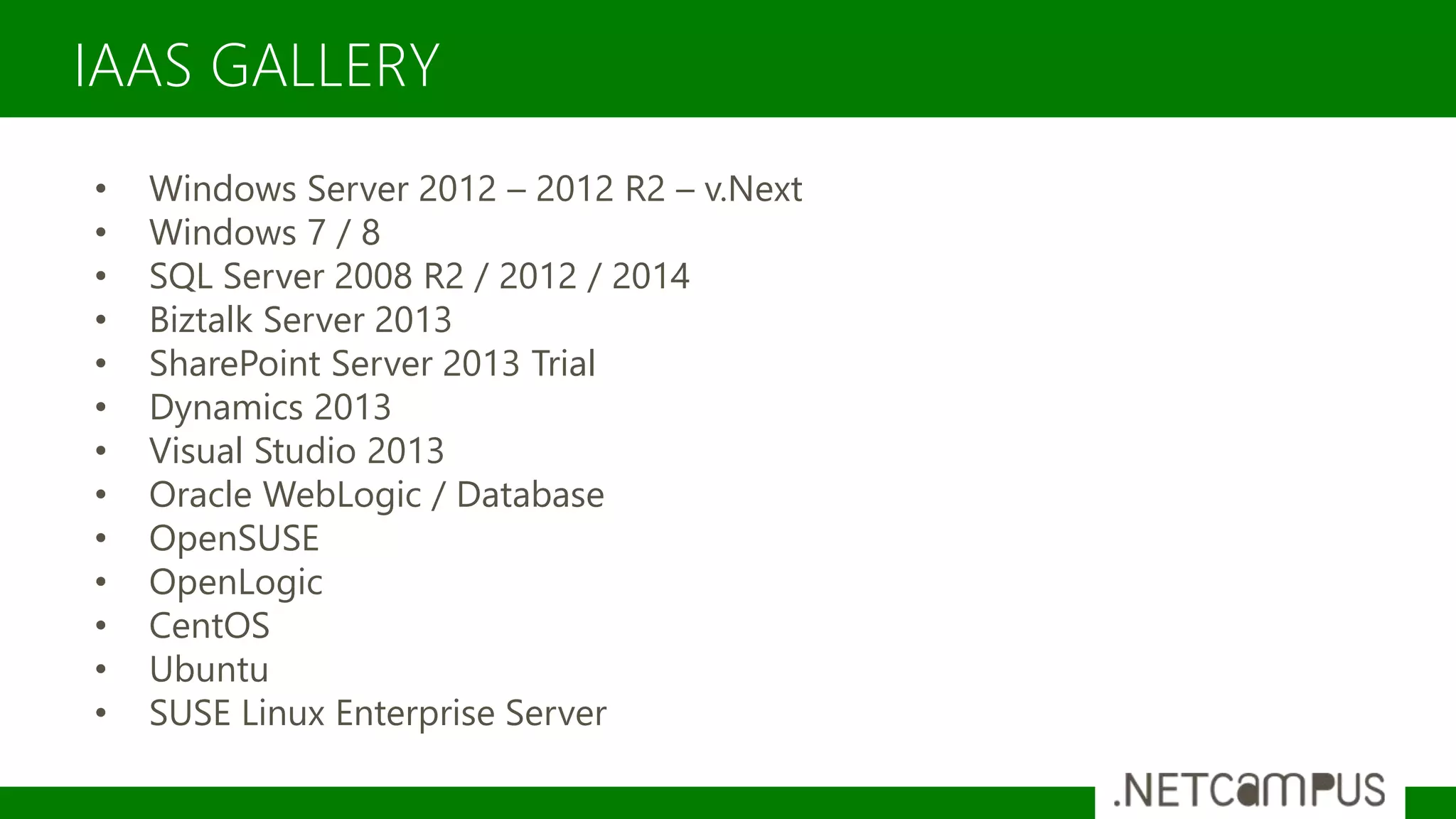
IAAS GALLERY
• Windows Server 2012 – 2012 R2 – v.Next
• Windows 7 / 8
• SQL Server 2008 R2 / 2012 / 2014
• Biztalk Server 2013
• SharePoint Server 2013 Trial
• Dynamics 2013
• Visual Studio 2013
• Oracle WebLogic / Database
• OpenSUSE
• OpenLogic
• CentOS
• Ubuntu
• SUSE Linux Enterprise Server
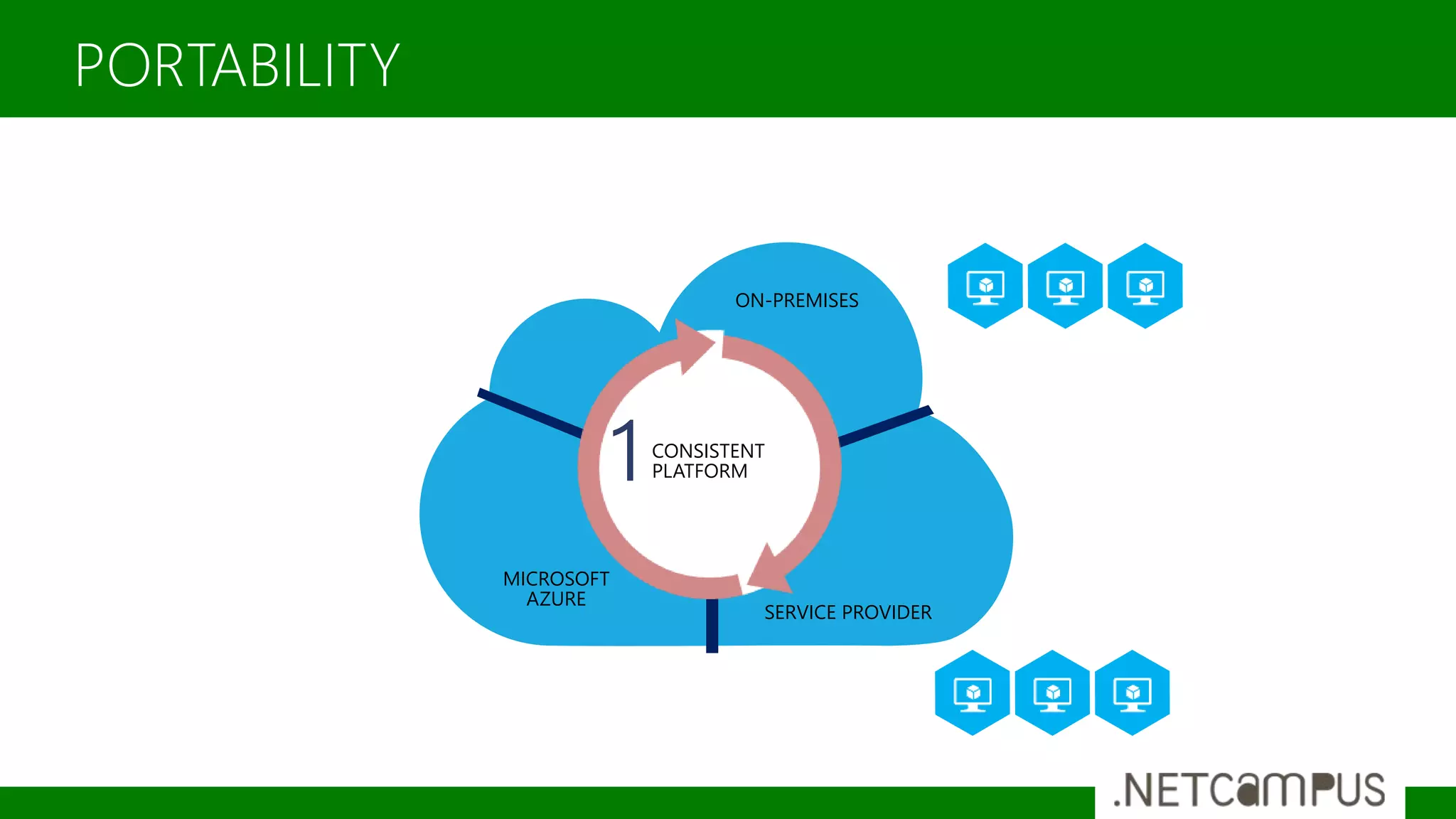
PORTABILITY
ON-PREMISES
SERVICE PROVIDER
MICROSOFT
AZURE
CONSISTENT
PLATFORM1
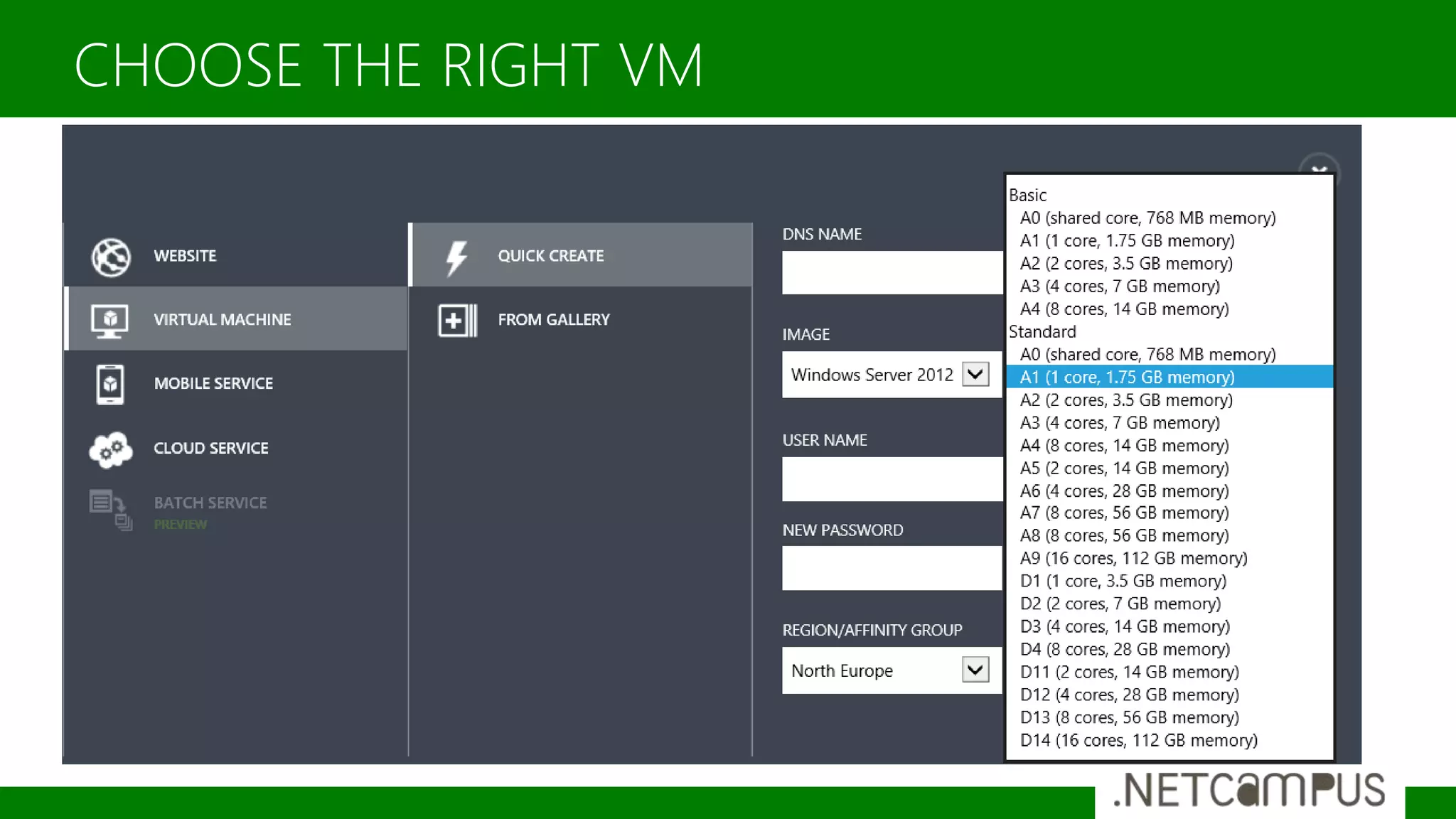
CHOOSE THE RIGHT VM
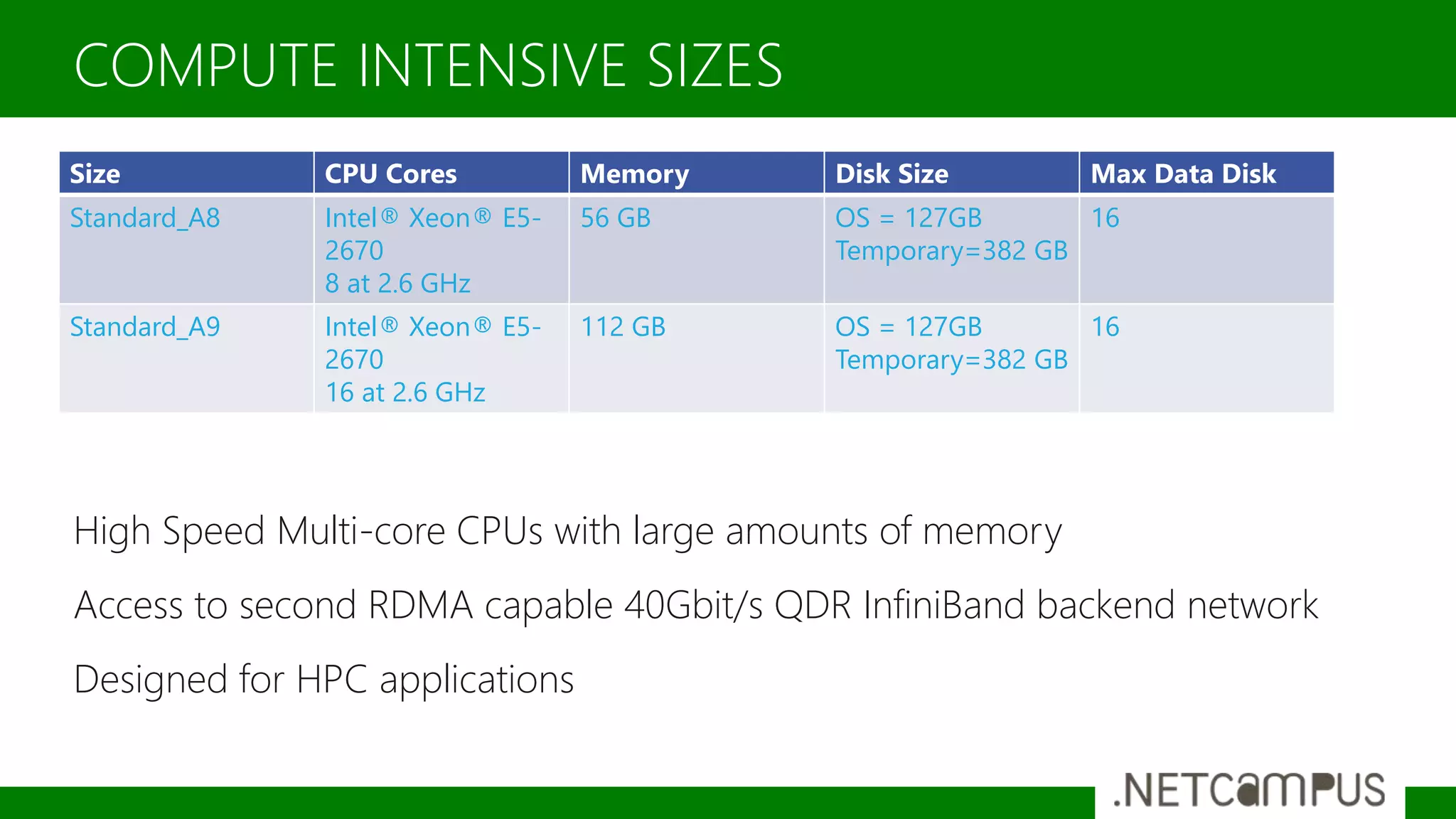
High Speed Multi-core CPUs with large amounts of memory
Access to second RDMA capable 40Gbit/s QDR InfiniBand backend network
Designed for HPC applications
COMPUTE INTENSIVE SIZES
Size CPU Cores Memory Disk Size Max Data Disk
Standard_A8 Intel® Xeon® E5-
2670
8 at 2.6 GHz
56 GB OS = 127GB
Temporary=382 GB
16
Standard_A9 Intel® Xeon® E5-
2670
16 at 2.6 GHz
112 GB OS = 127GB
Temporary=382 GB
16
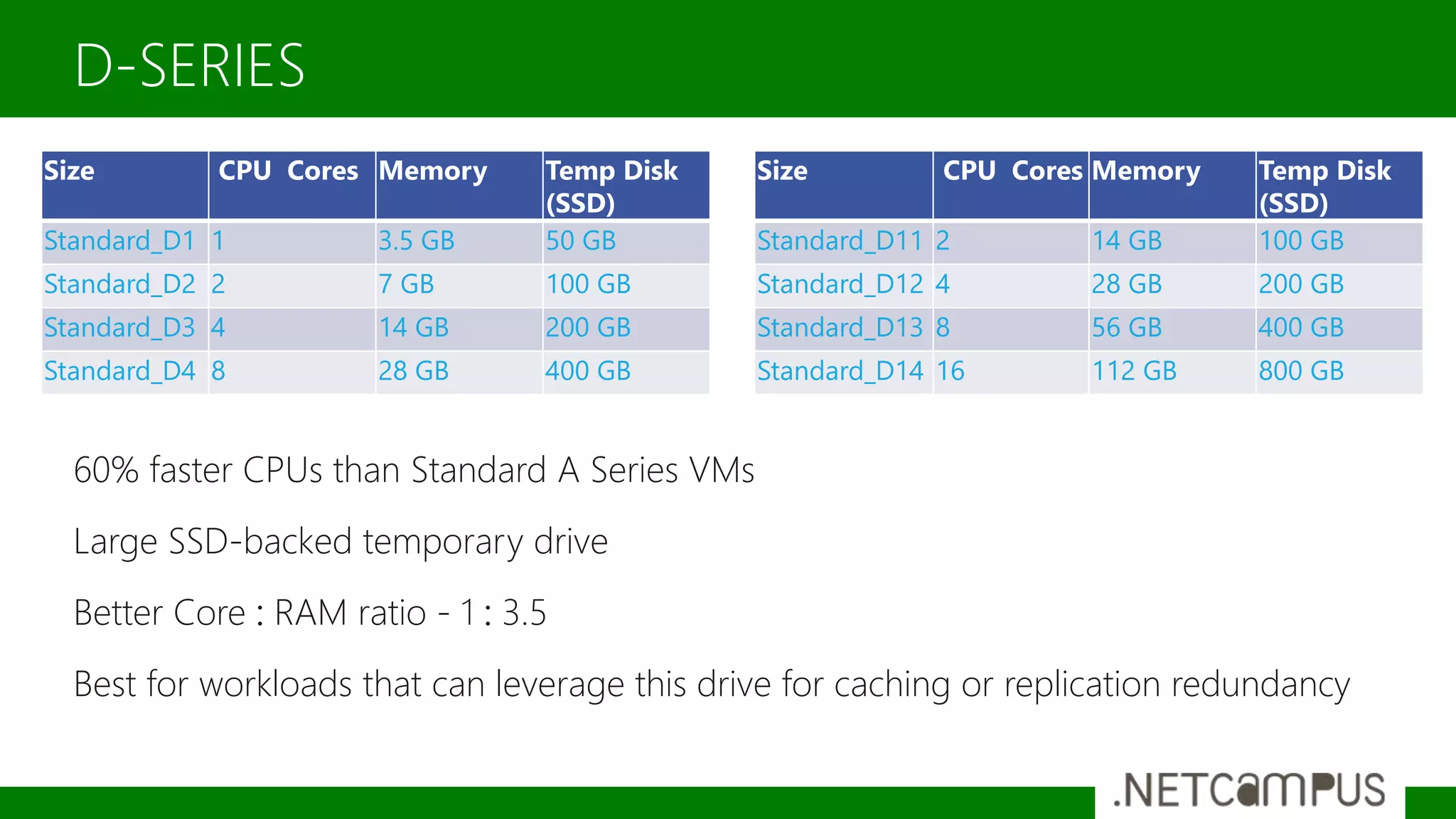
60% faster CPUs than Standard A Series VMs
Large SSD-backed temporary drive
Better Core : RAM ratio - 1 : 3.5
Best for workloads that can leverage this drive for caching or replication redundancy
D-SERIES
Size CPU Cores Memory Temp Disk
(SSD)
Standard_D1 1 3.5 GB 50 GB
Standard_D2 2 7 GB 100 GB
Standard_D3 4 14 GB 200 GB
Standard_D4 8 28 GB 400 GB
Size CPU Cores Memory Temp Disk
(SSD)
Standard_D11 2 14 GB 100 GB
Standard_D12 4 28 GB 200 GB
Standard_D13 8 56 GB 400 GB
Standard_D14 16 112 GB 800 GB
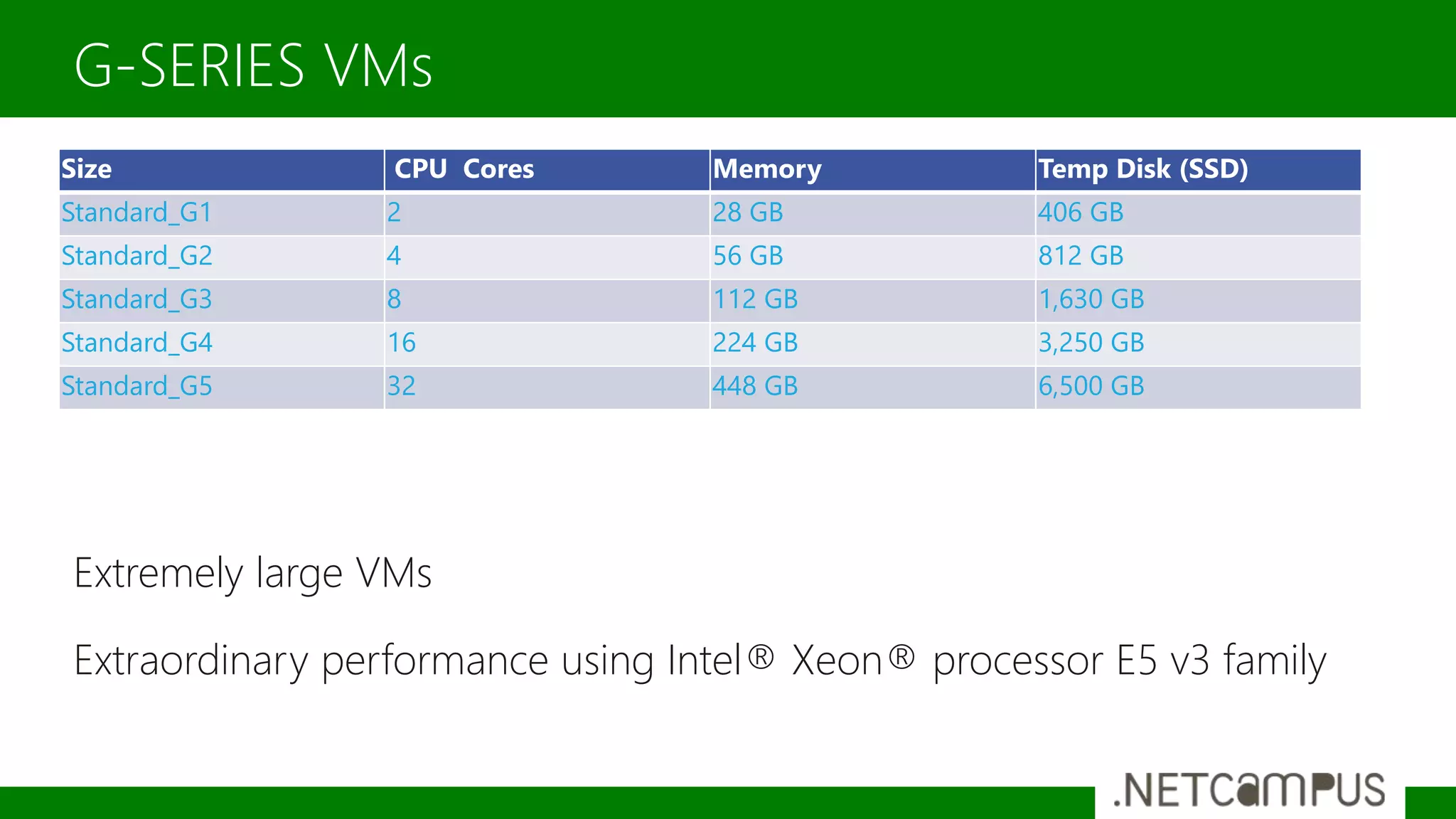
Extremely large VMs
Extraordinary performance using Intel® Xeon® processor E5 v3 family
G-SERIES VMs
Size CPU Cores Memory Temp Disk (SSD)
Standard_G1 2 28 GB 406 GB
Standard_G2 4 56 GB 812 GB
Standard_G3 8 112 GB 1,630 GB
Standard_G4 16 224 GB 3,250 GB
Standard_G5 32 448 GB 6,500 GB
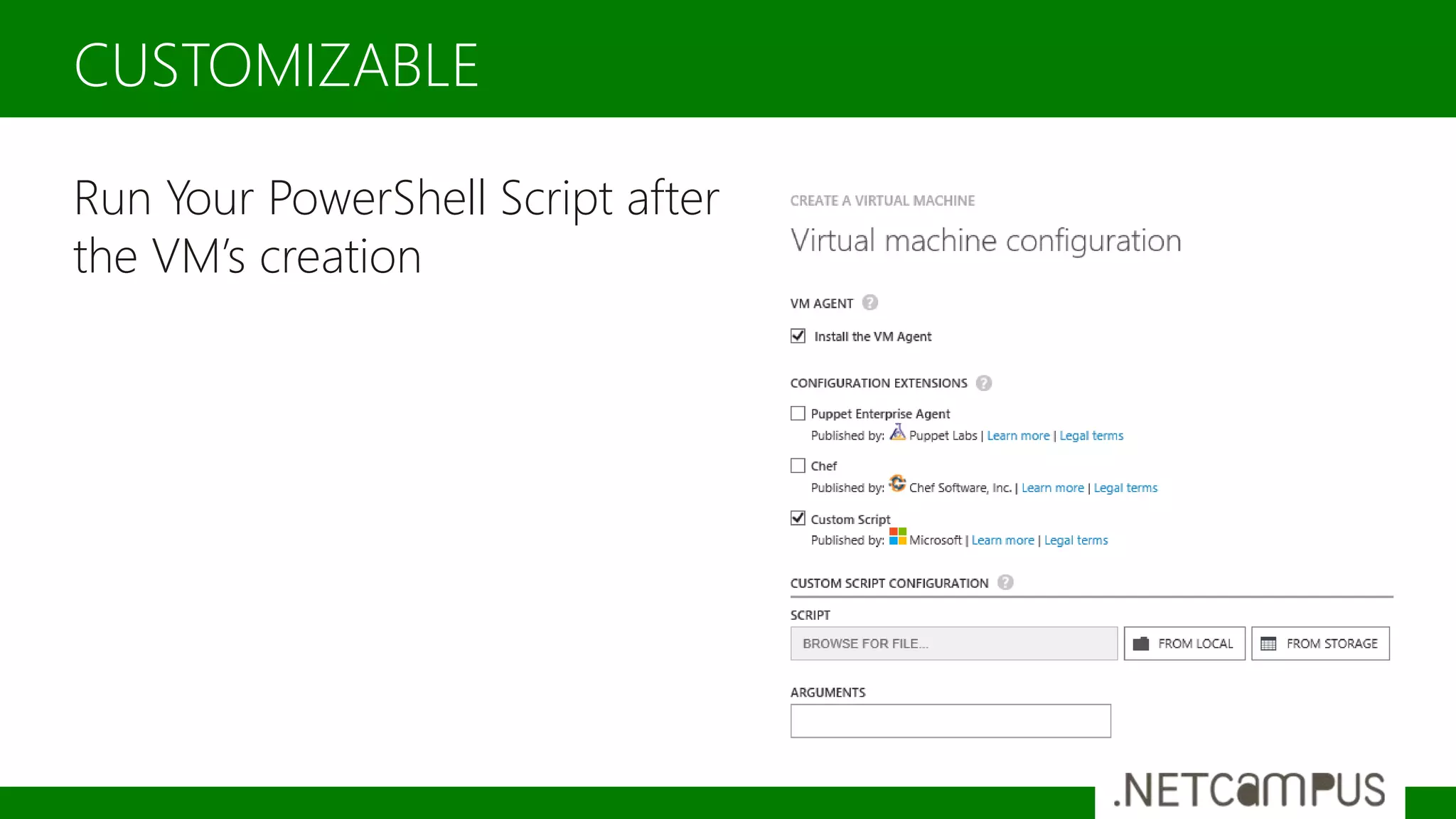
Run Your PowerShell Script after
the VM’s creation
CUSTOMIZABLE
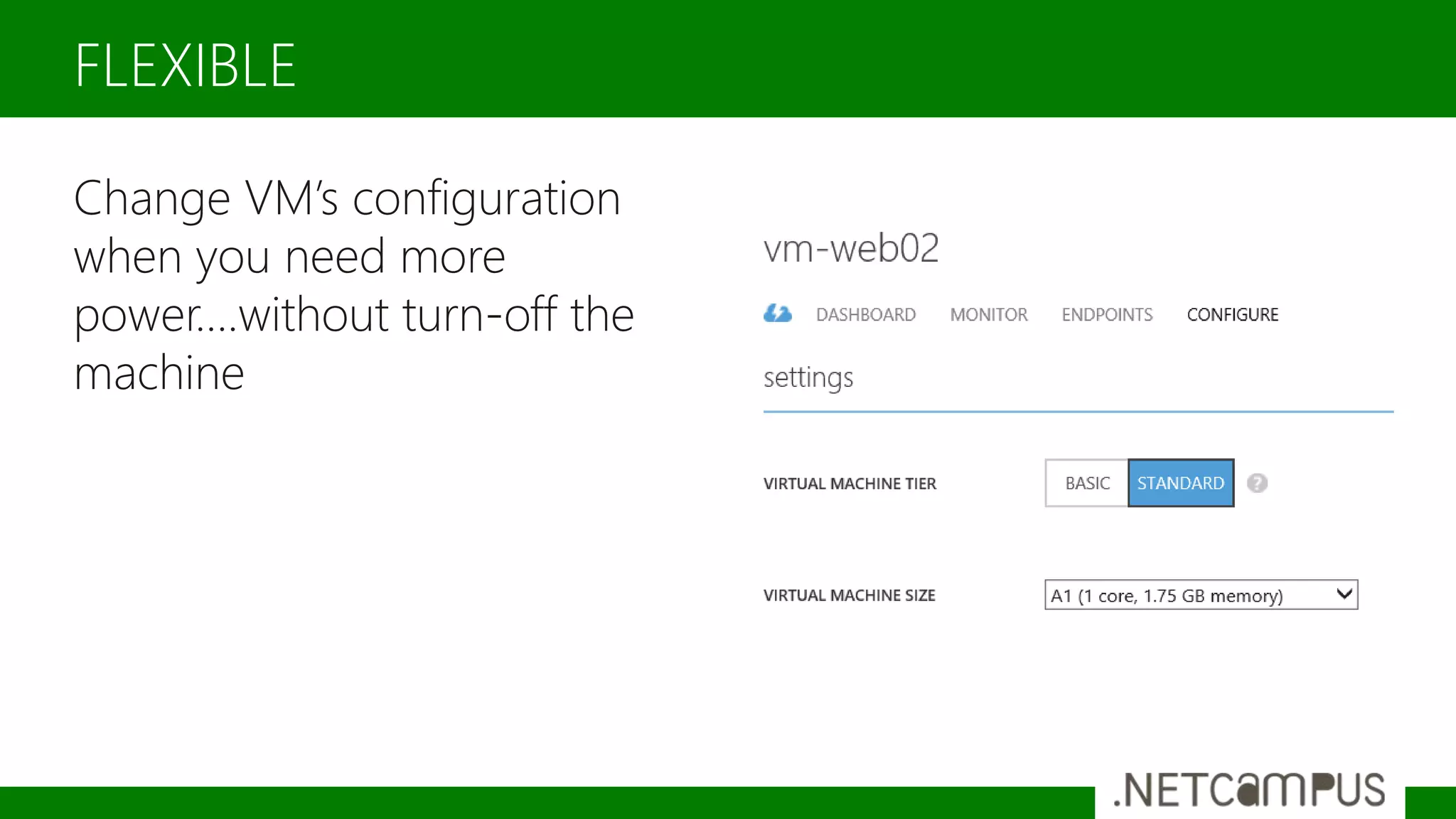
Change VM’s configuration
when you need more
power….without turn-off the
machine
FLEXIBLE
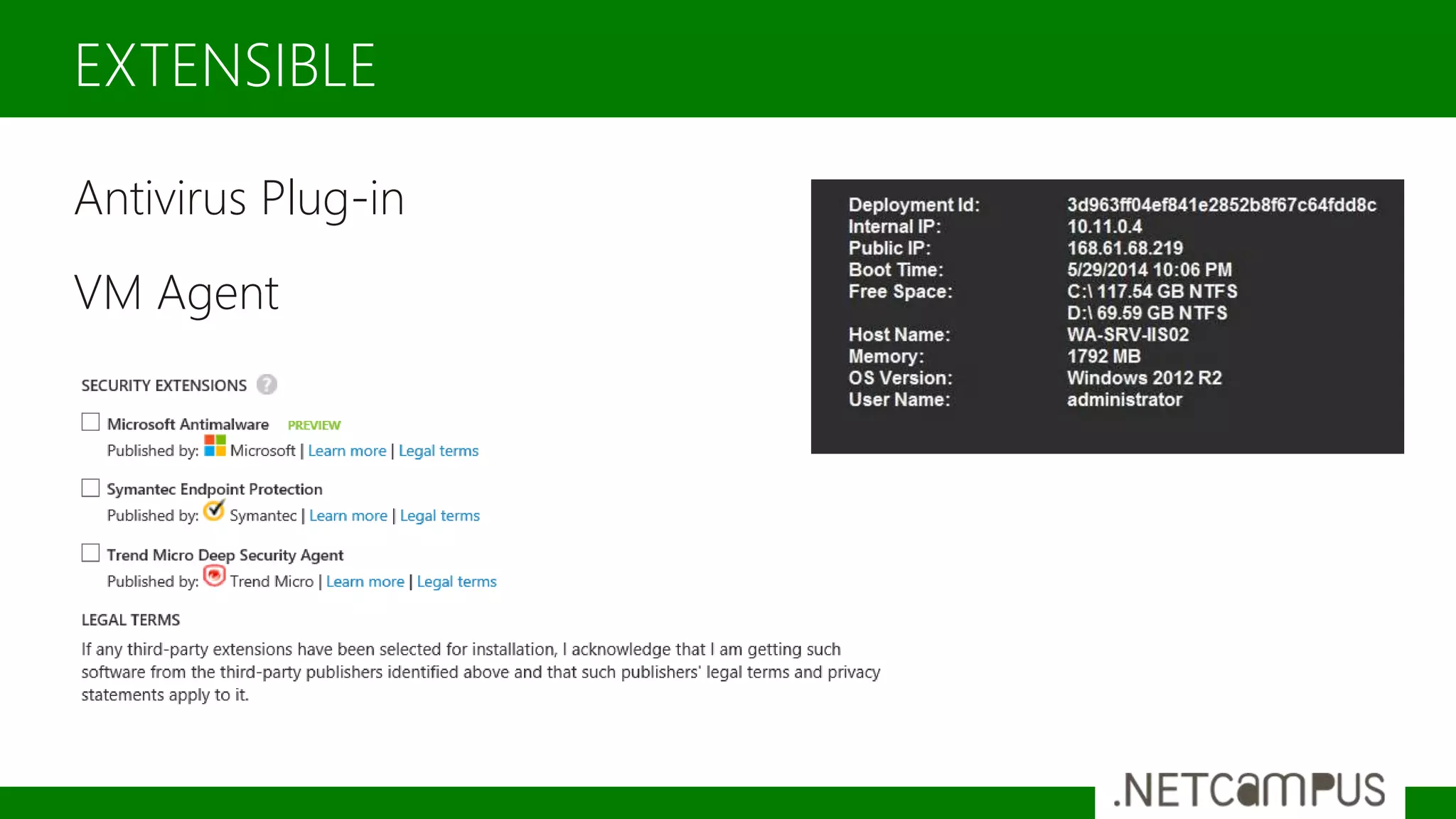
Antivirus Plug-in
VM Agent
EXTENSIBLE
Create a G5 VM
Template designed by
ARCHITECTURE
Public IP Address
Public DNS Name
Internet Firewall
Load Balancing Boundary
CLOUD SERVICES
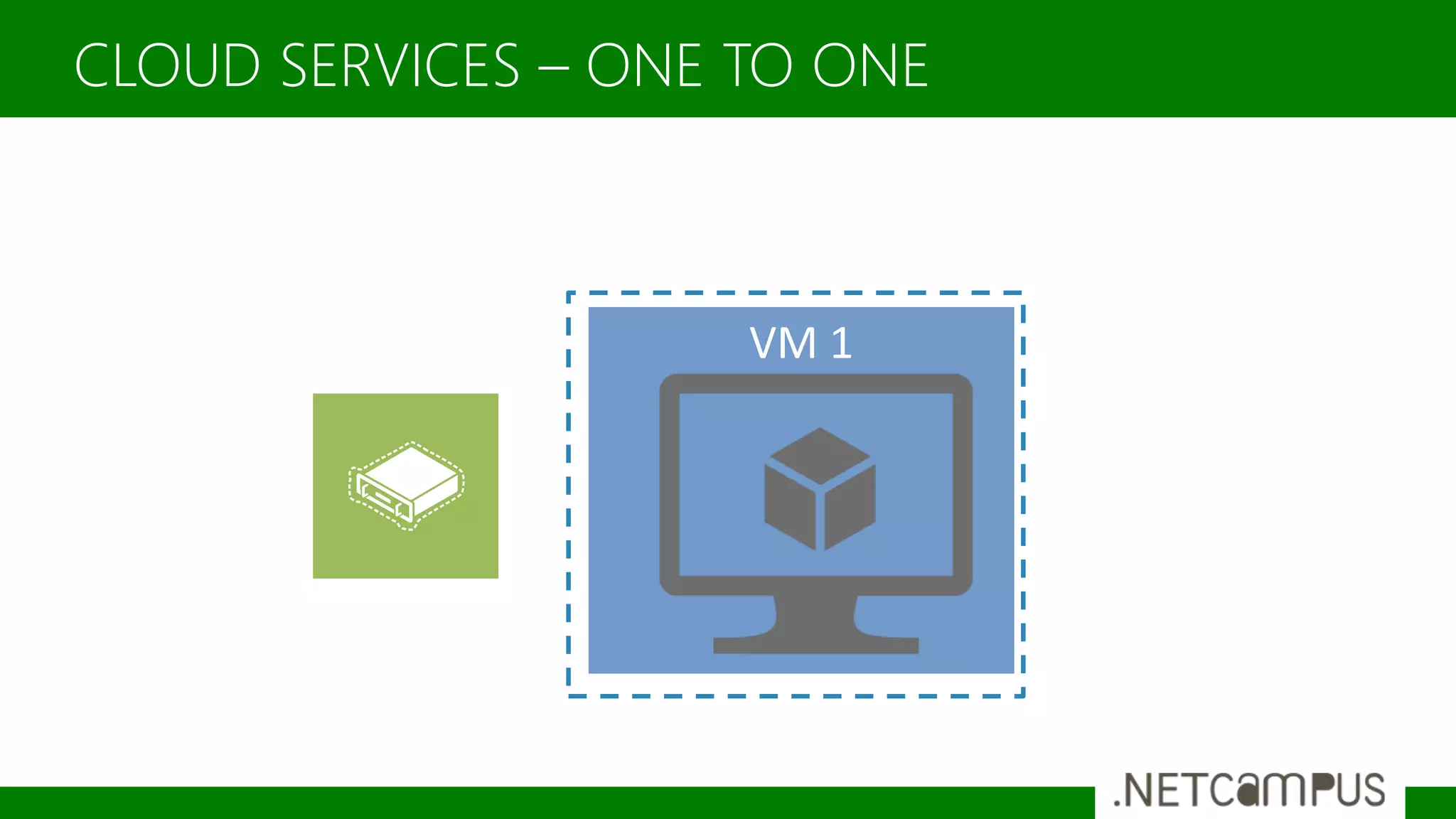
CLOUD SERVICES – ONE TO ONE
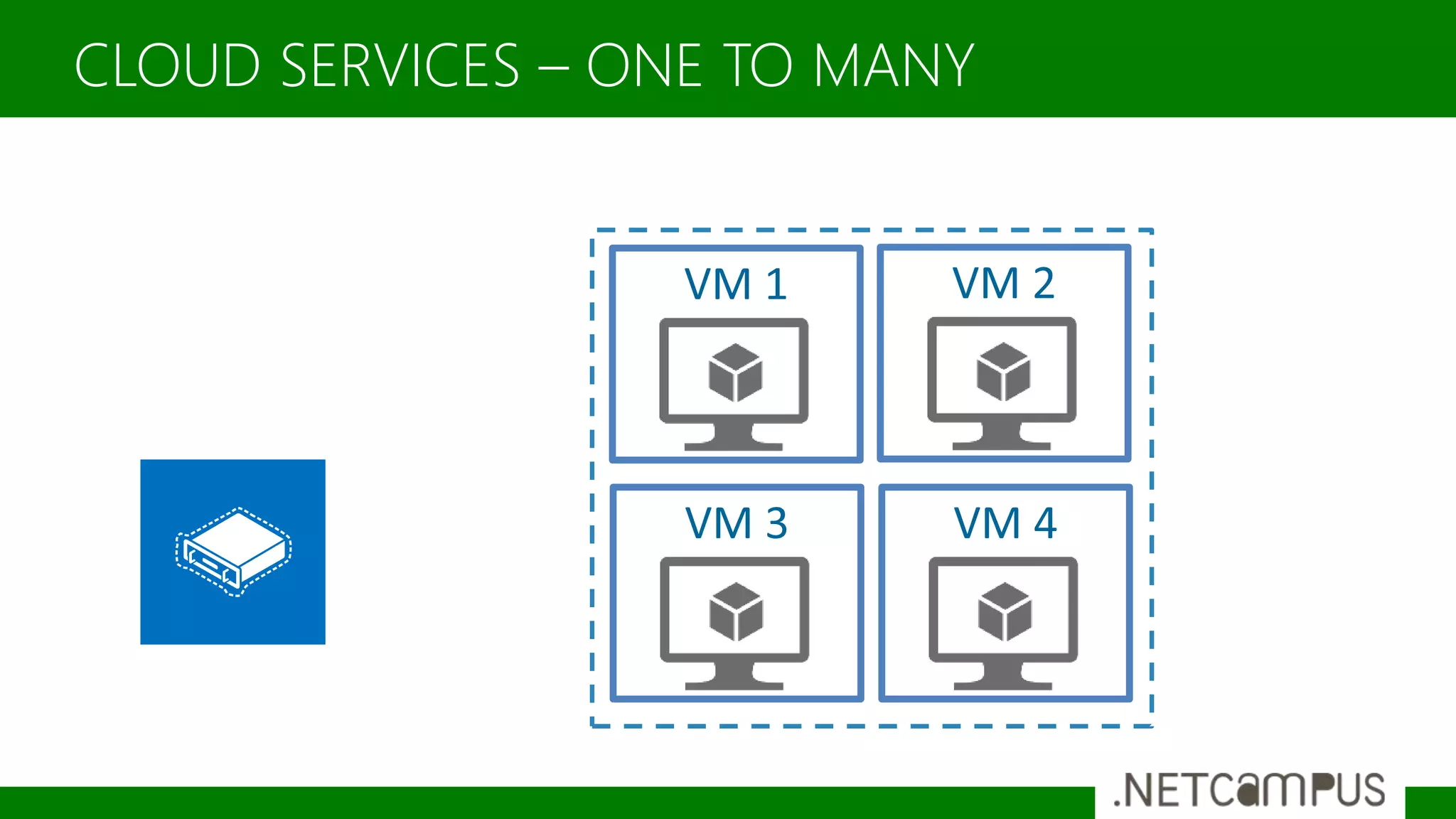
CLOUD SERVICES – ONE TO MANY
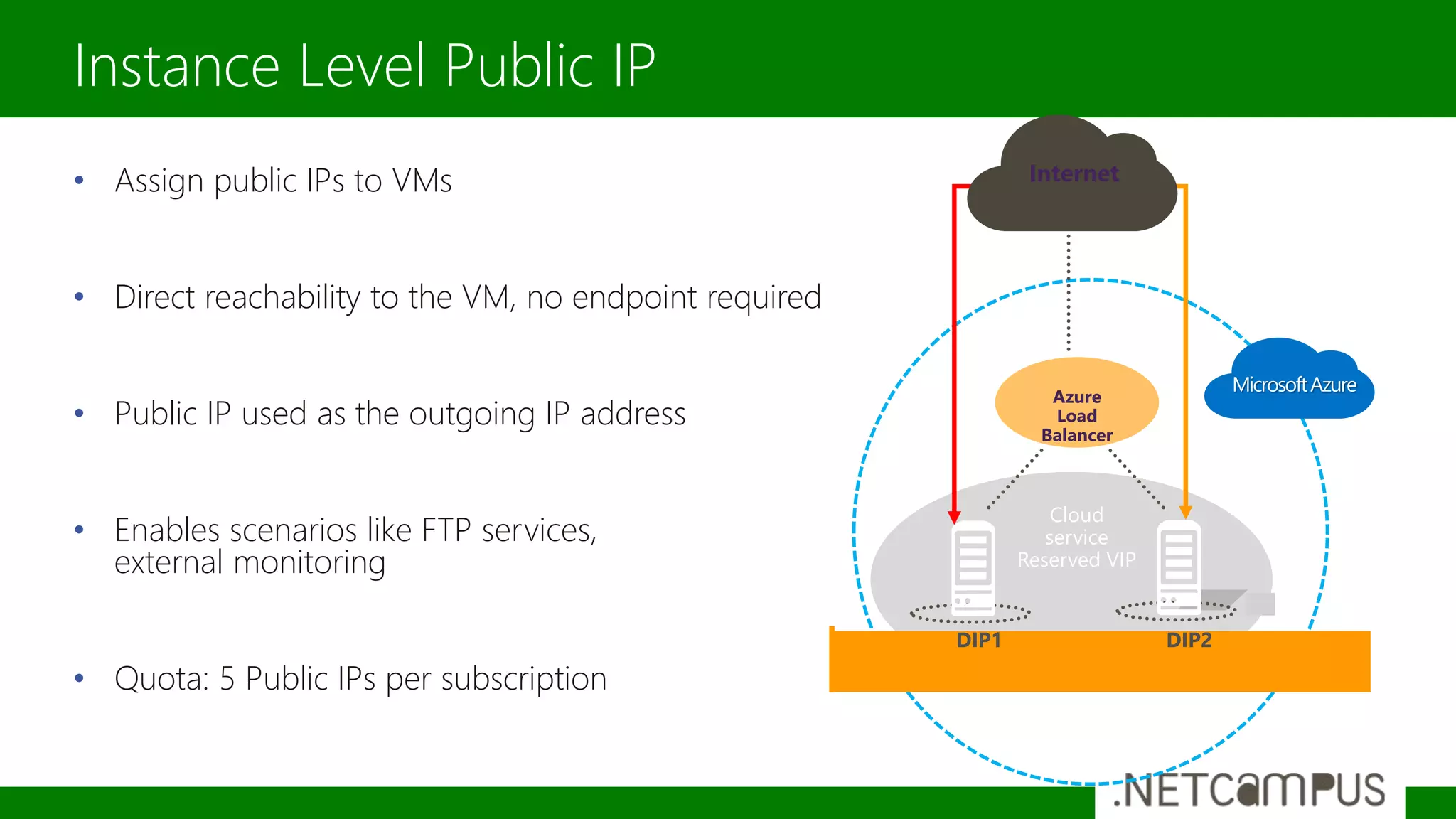
• Assign public IPs to VMs
• Direct reachability to the VM, no endpoint required
• Public IP used as the outgoing IP address
• Enables scenarios like FTP services,
external monitoring
• Quota: 5 Public IPs per subscription
Instance Level Public IP
Internet
DIP1 DIP2
Cloud
service
Reserved VIP
Azure
Load
Balancer
Internet
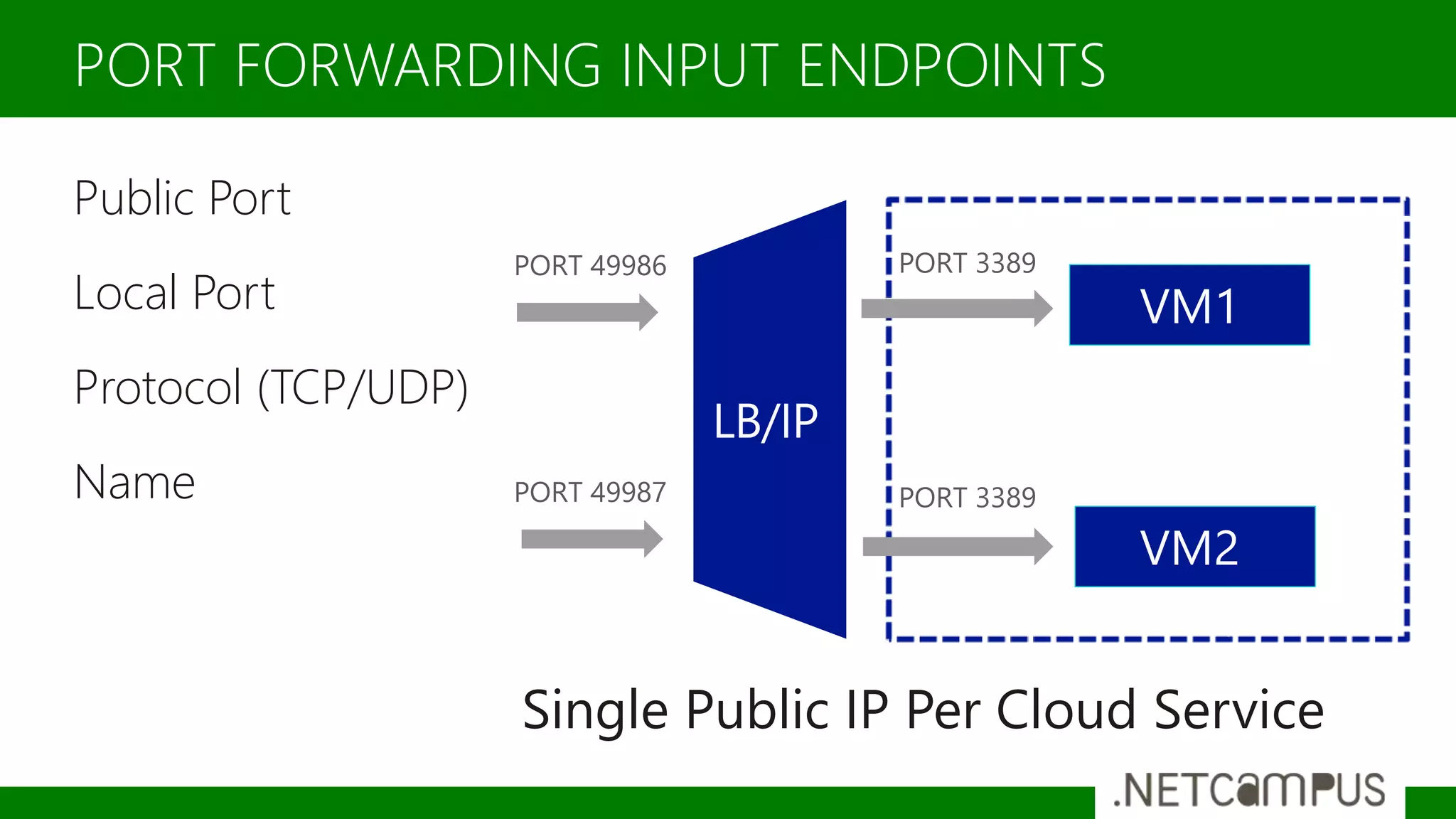
Public Port
Local Port
Protocol (TCP/UDP)
Name
PORT FORWARDING INPUT ENDPOINTS
Single Public IP Per Cloud Service
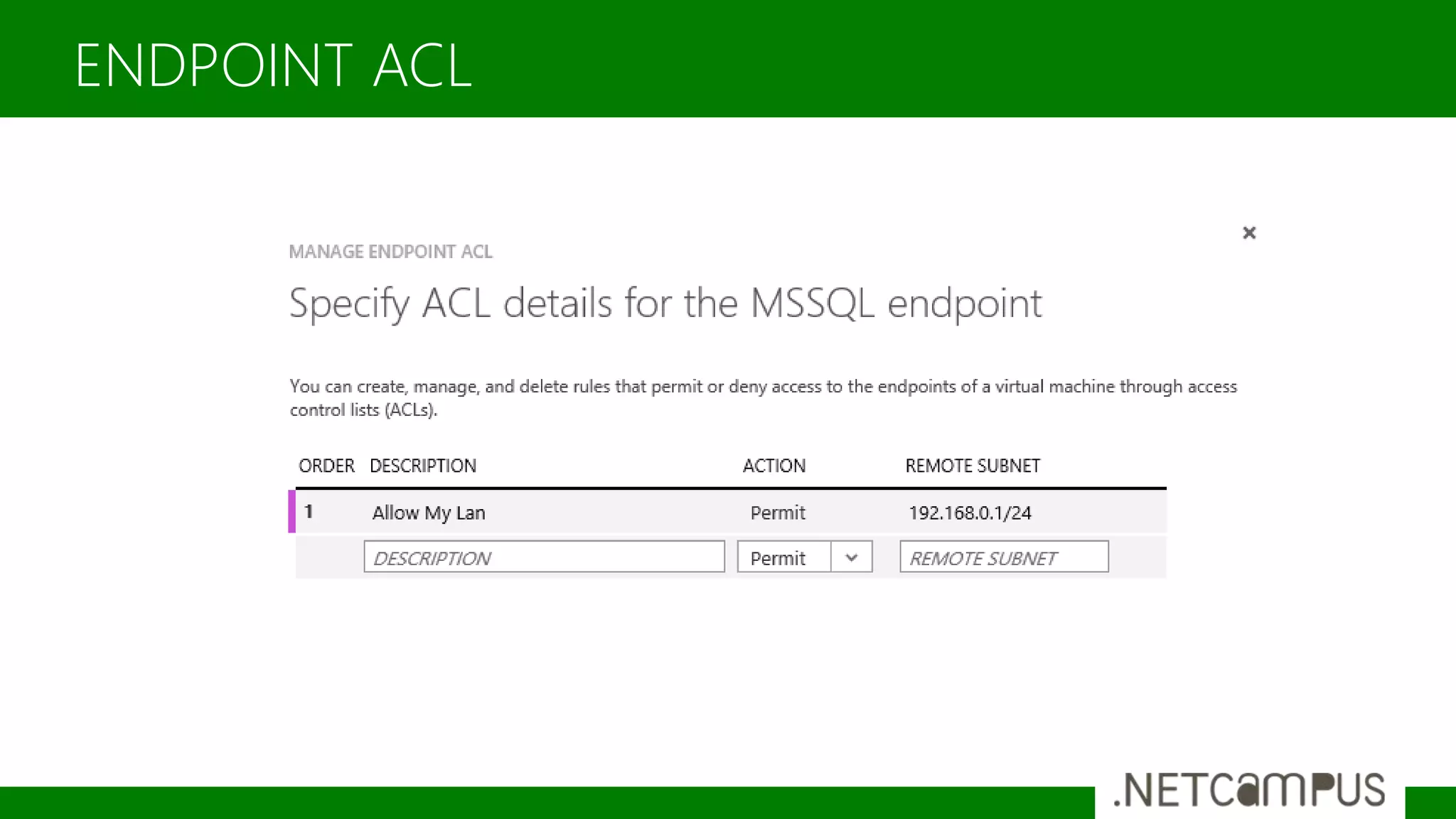
ENDPOINT ACL
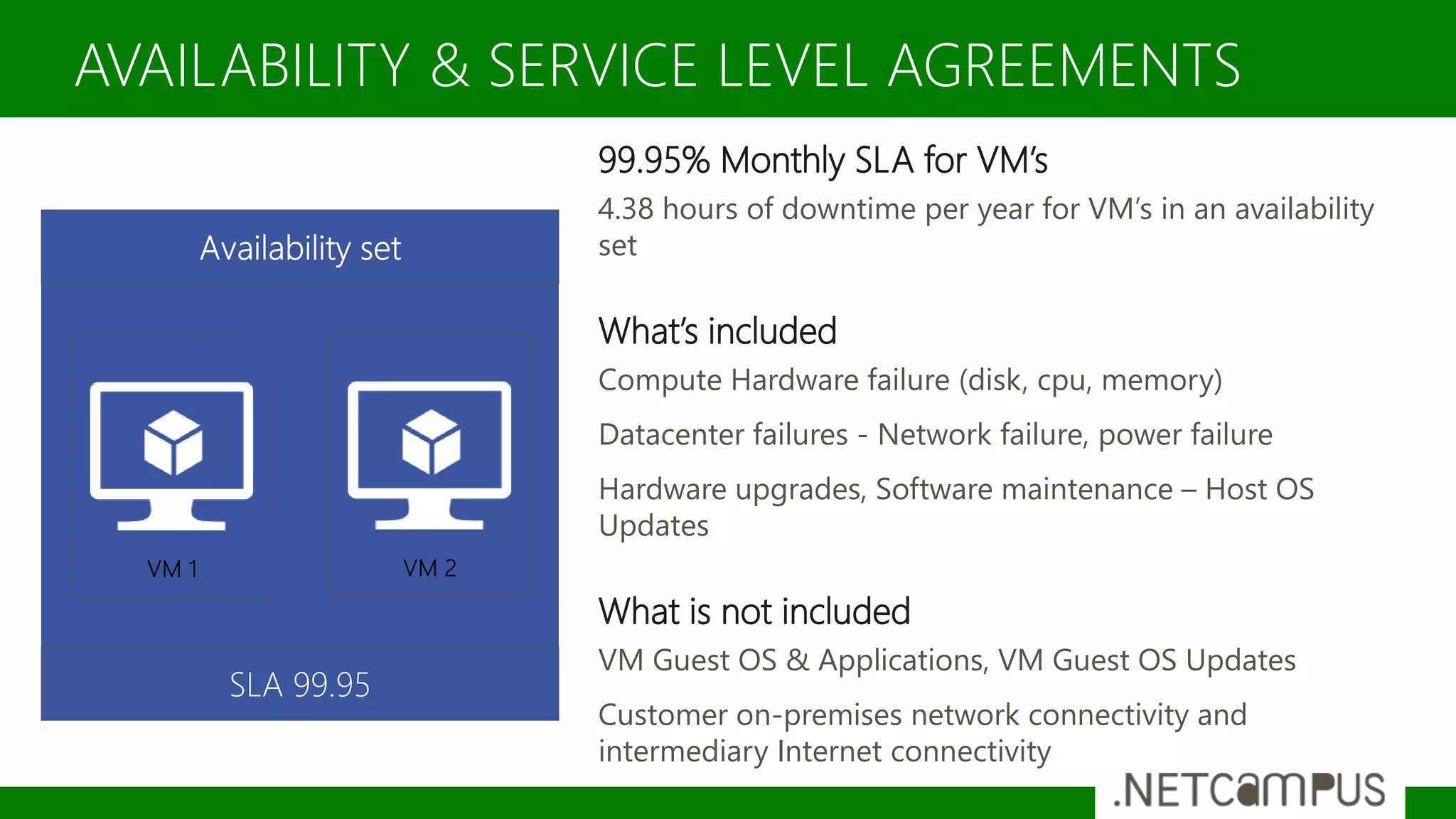
99.95% Monthly SLA for VM’s
4.38 hours of downtime per year for VM’s in an availability
set
What’s included
Compute Hardware failure (disk, cpu, memory)
Datacenter failures - Network failure, power failure
Hardware upgrades, Software maintenance – Host OS
Updates
What is not included
VM Guest OS & Applications, VM Guest OS Updates
Customer on-premises network connectivity and
intermediary Internet connectivity
AVAILABILITY & SERVICE LEVEL AGREEMENTS
Template designed by
DISK ARCHITECTURE
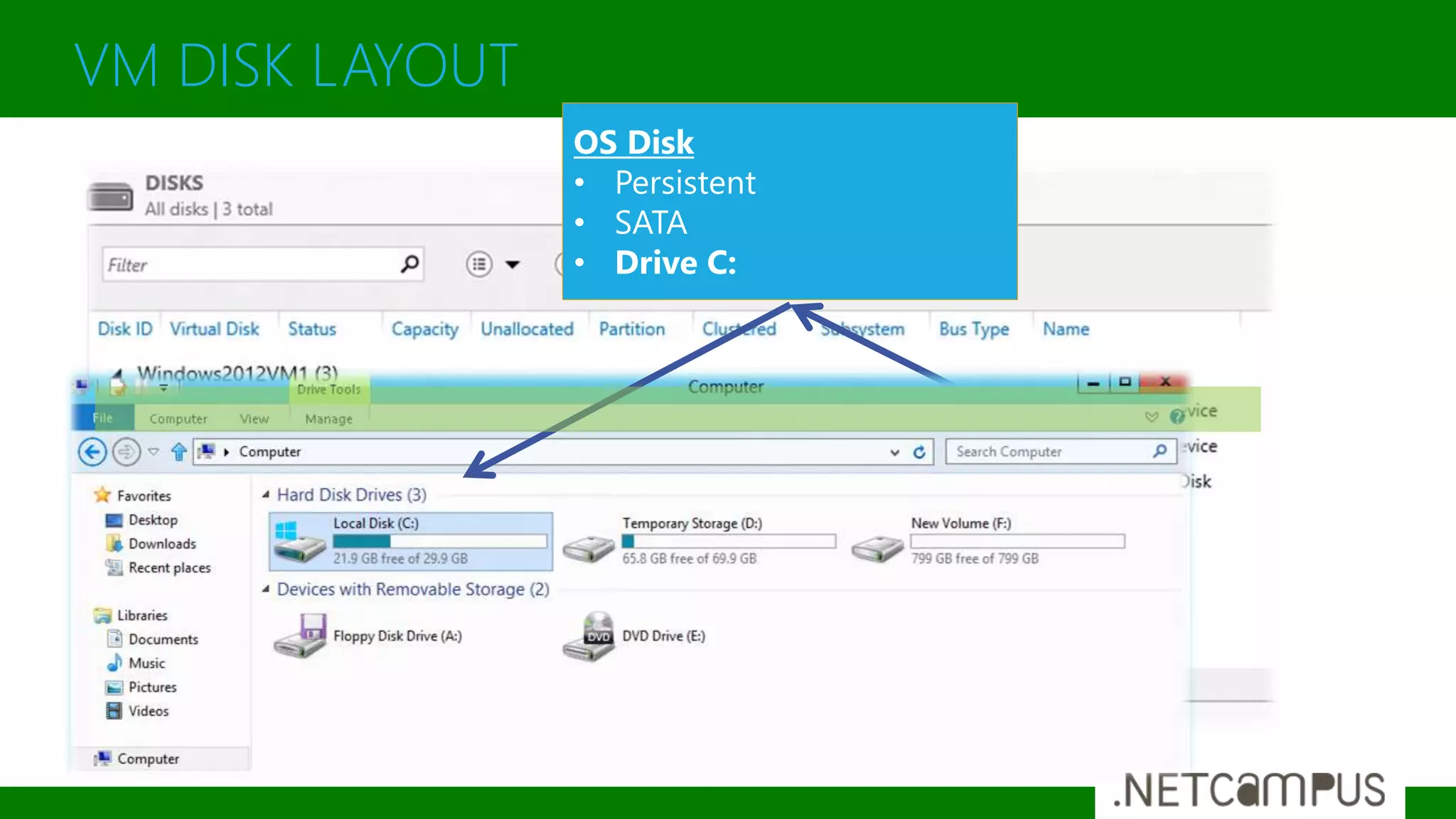
VM DISK LAYOUT
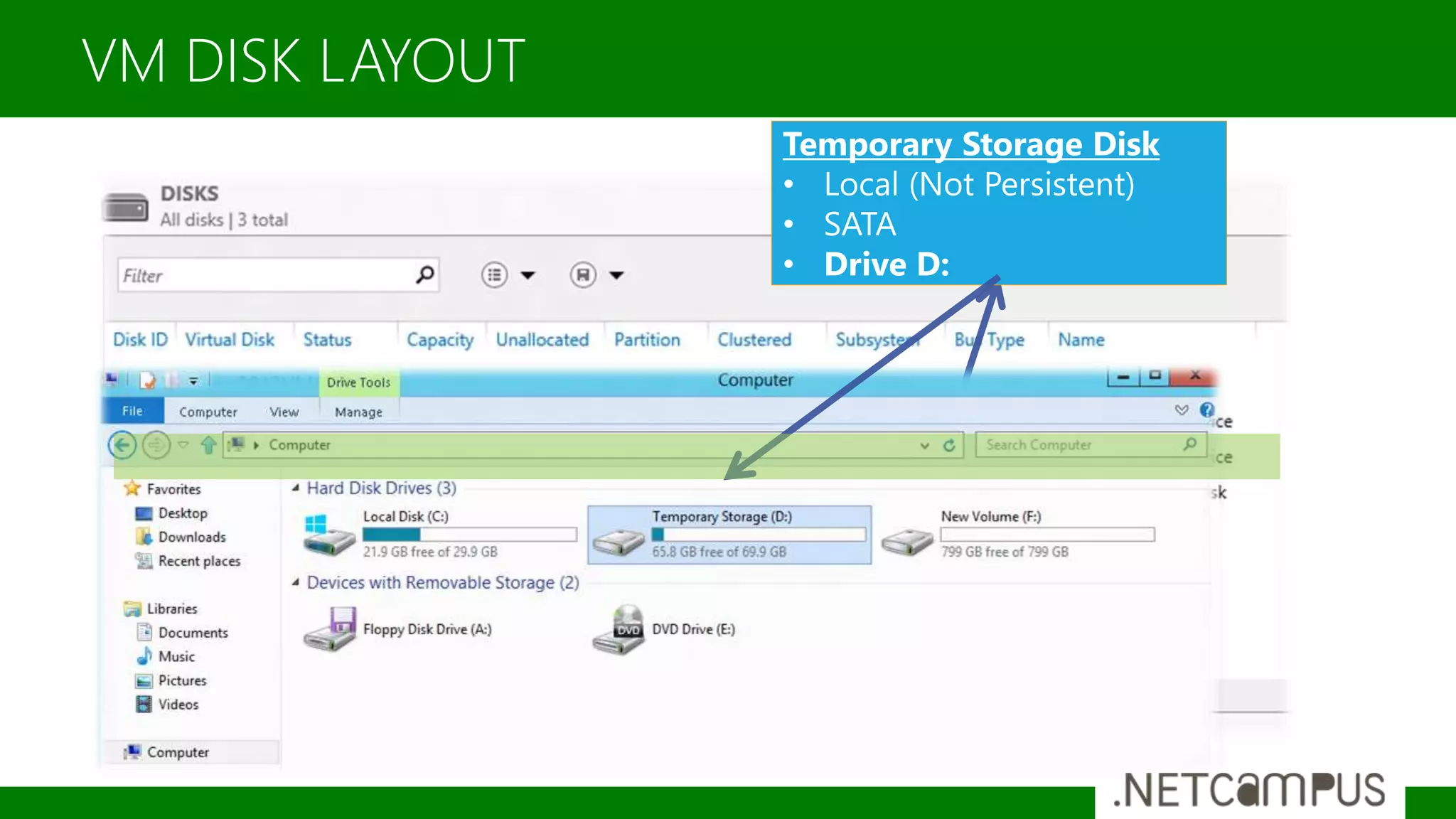
VM DISK LAYOUT
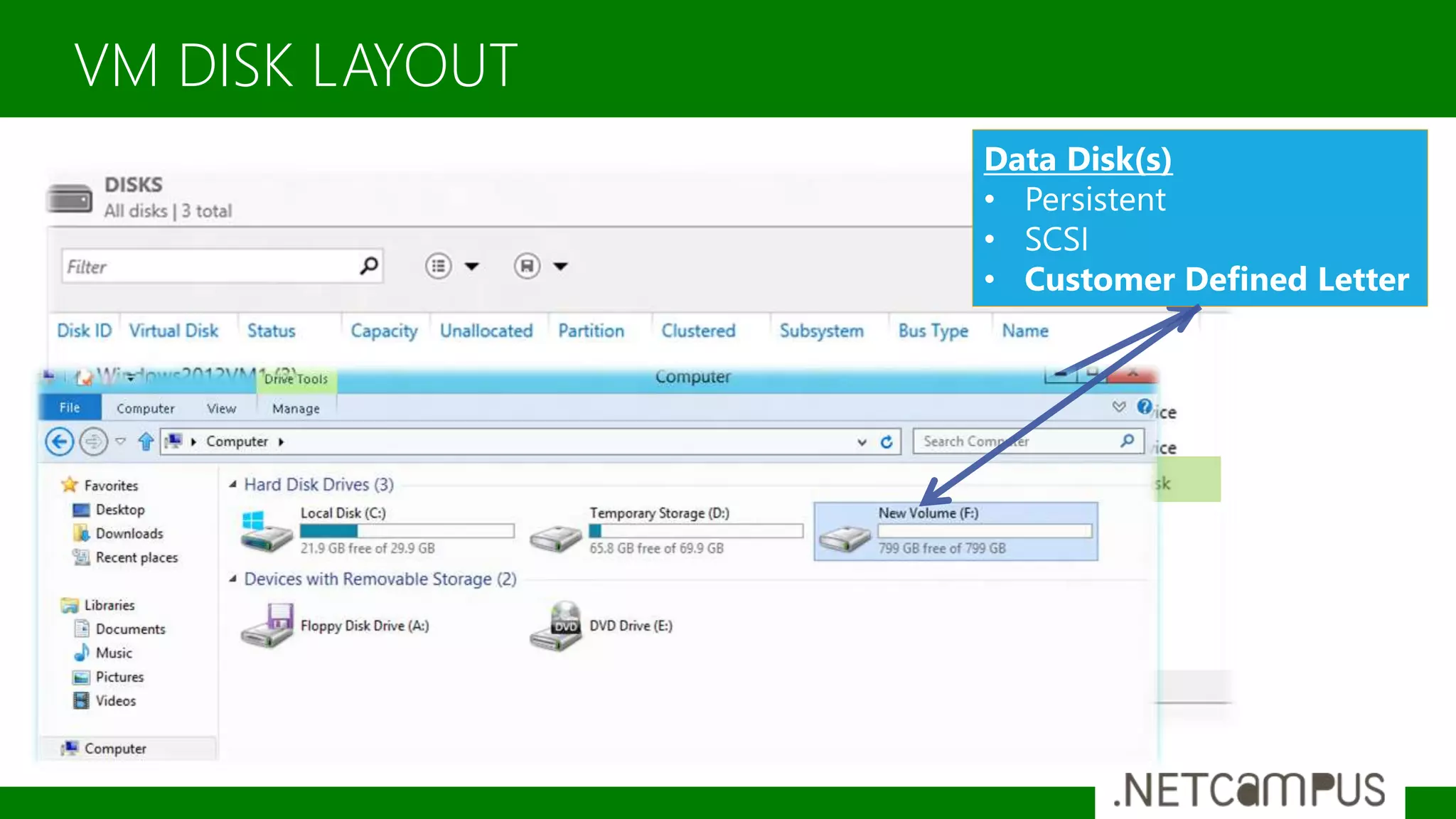
VM DISK LAYOUT
Manage Storage
Template designed by
NETWORKING
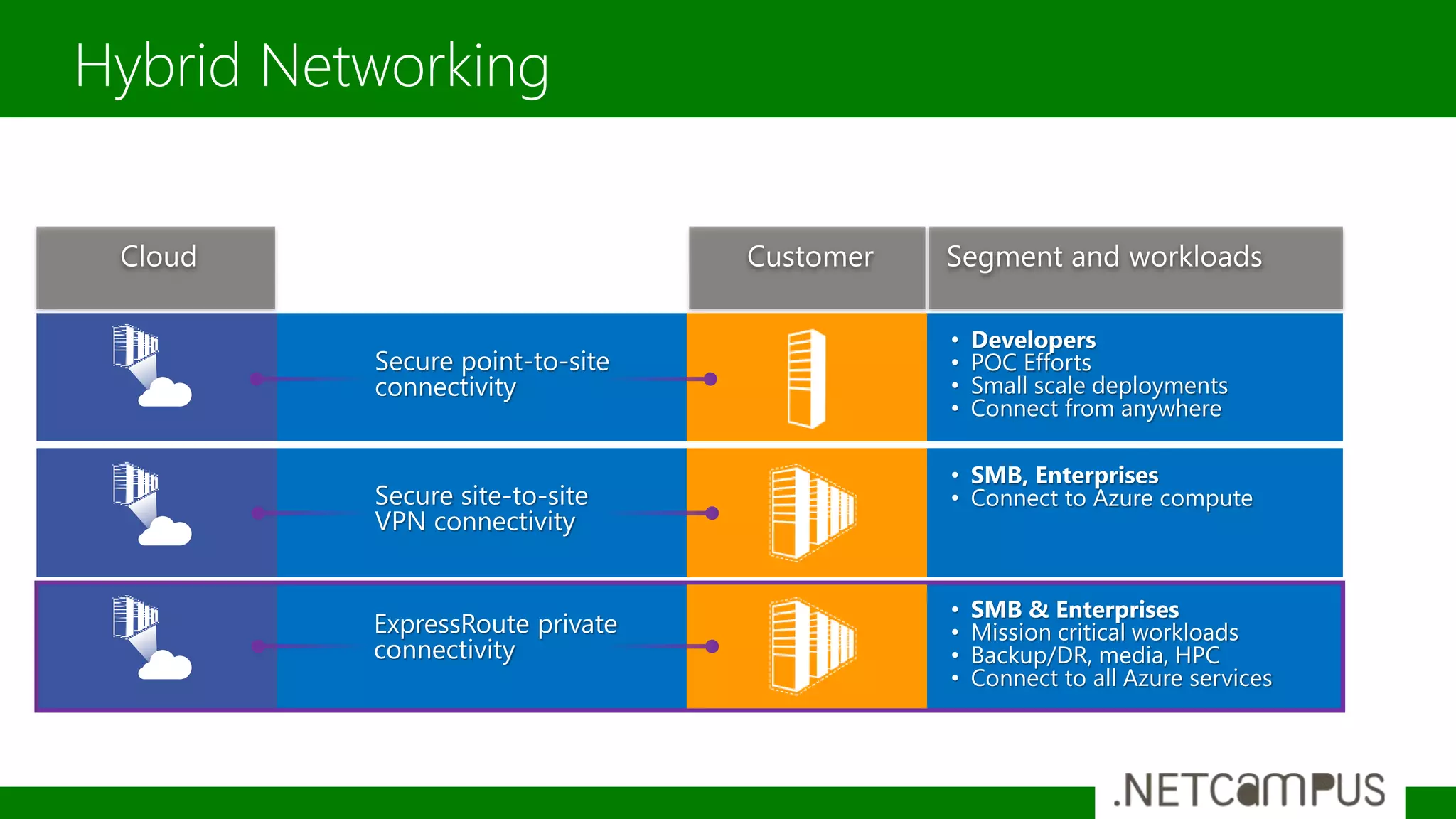
Hybrid Networking
Secure point-to-site
connectivity
• Developers
• POC Efforts
• Small scale deployments
• Connect from anywhere
Secure site-to-site
VPN connectivity
• SMB, Enterprises
• Connect to Azure compute
ExpressRoute private
connectivity
• SMB & Enterprises
• Mission critical workloads
• Backup/DR, media, HPC
• Connect to all Azure services
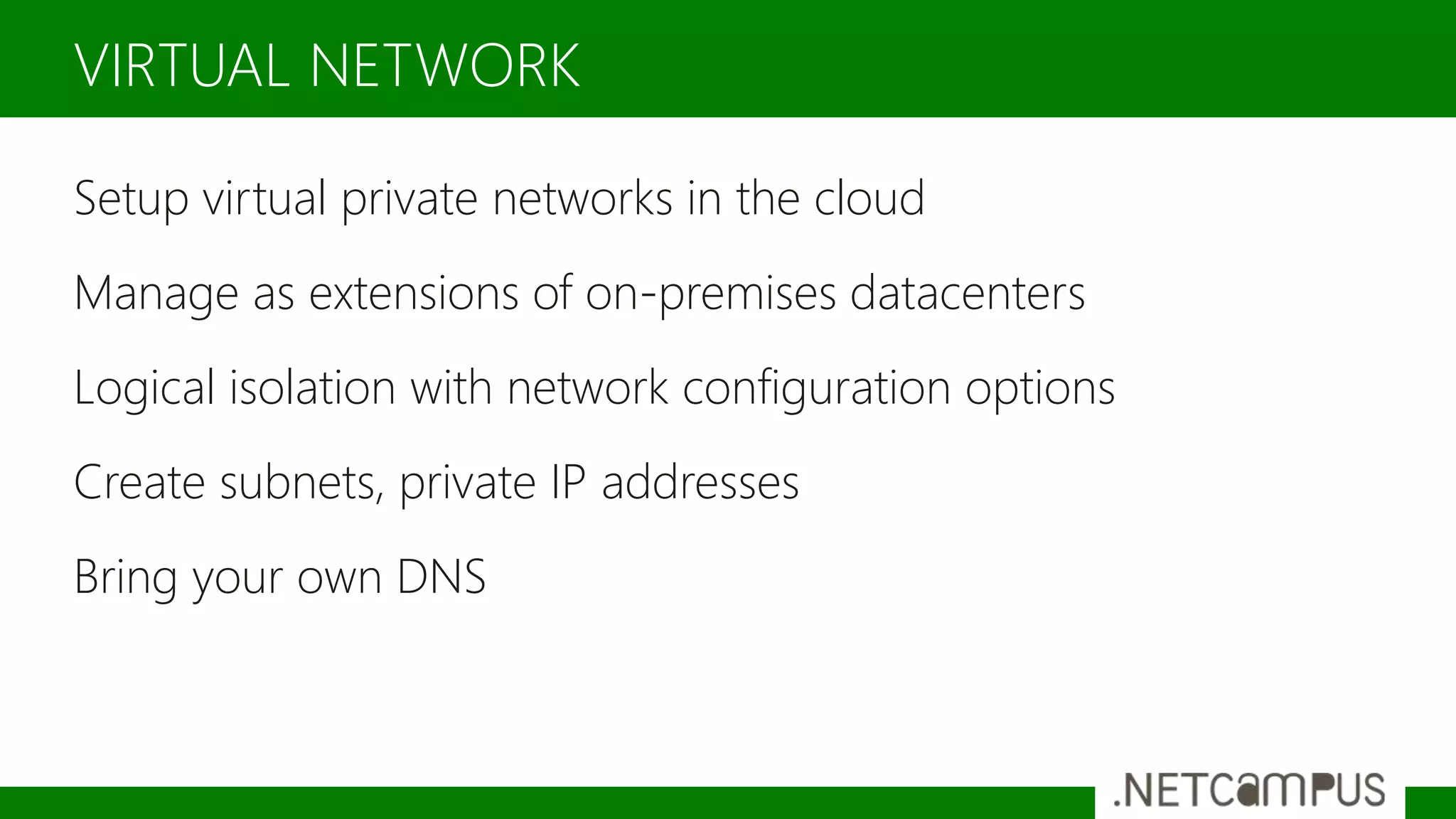
Setup virtual private networks in the cloud
Manage as extensions of on-premises datacenters
Logical isolation with network configuration options
Create subnets, private IP addresses
Bring your own DNS
VIRTUAL NETWORK
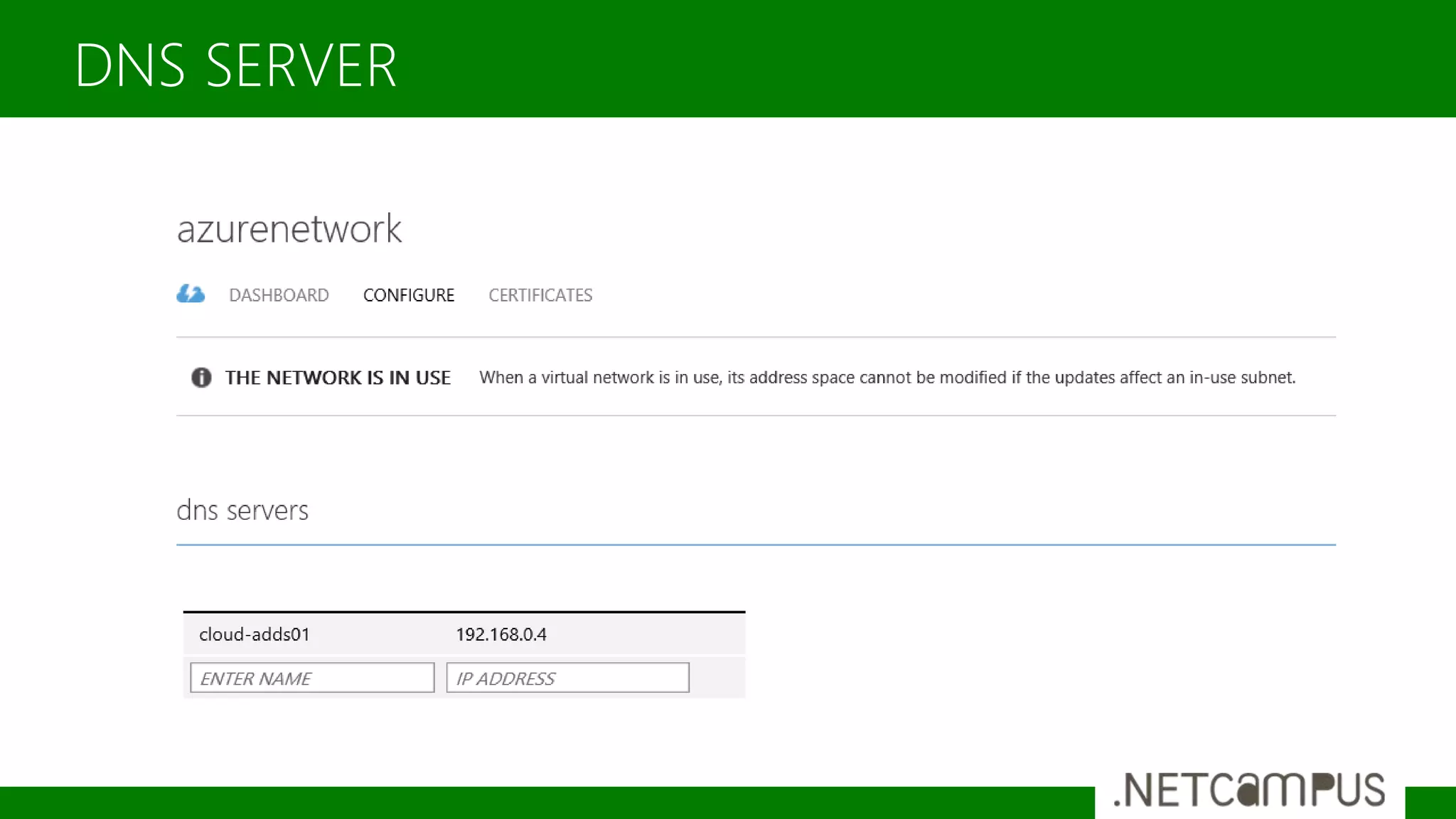
DNS SERVER
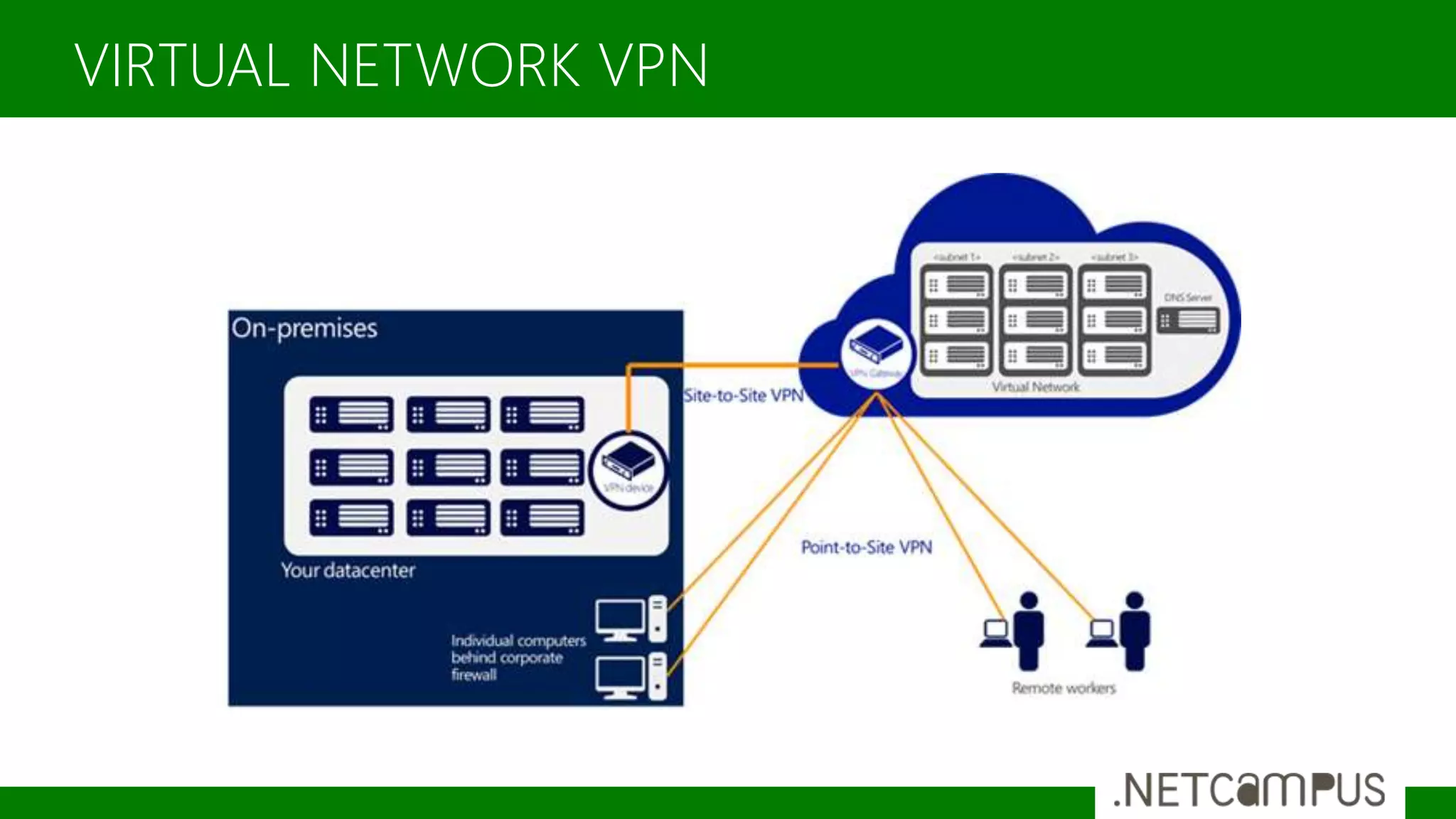
VIRTUAL NETWORK VPN
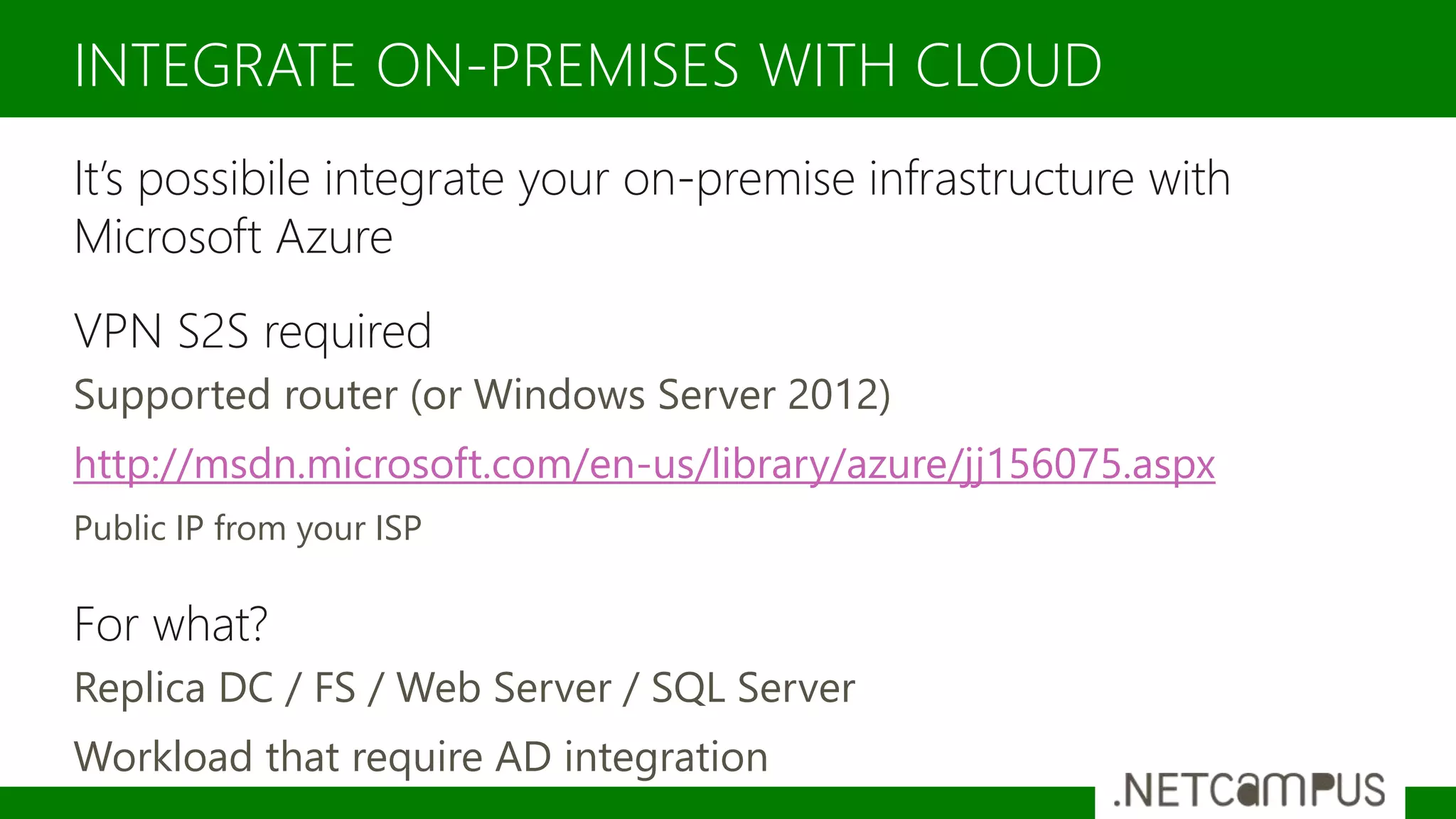
It’s possibile integrate your on-premise infrastructure with
Microsoft Azure
VPN S2S required
Supported router (or Windows Server 2012)
http://msdn.microsoft.com/en-us/library/azure/jj156075.aspx
Public IP from your ISP
For what?
Replica DC / FS / Web Server / SQL Server
Workload that require AD integration
INTEGRATE ON-PREMISES WITH CLOUD
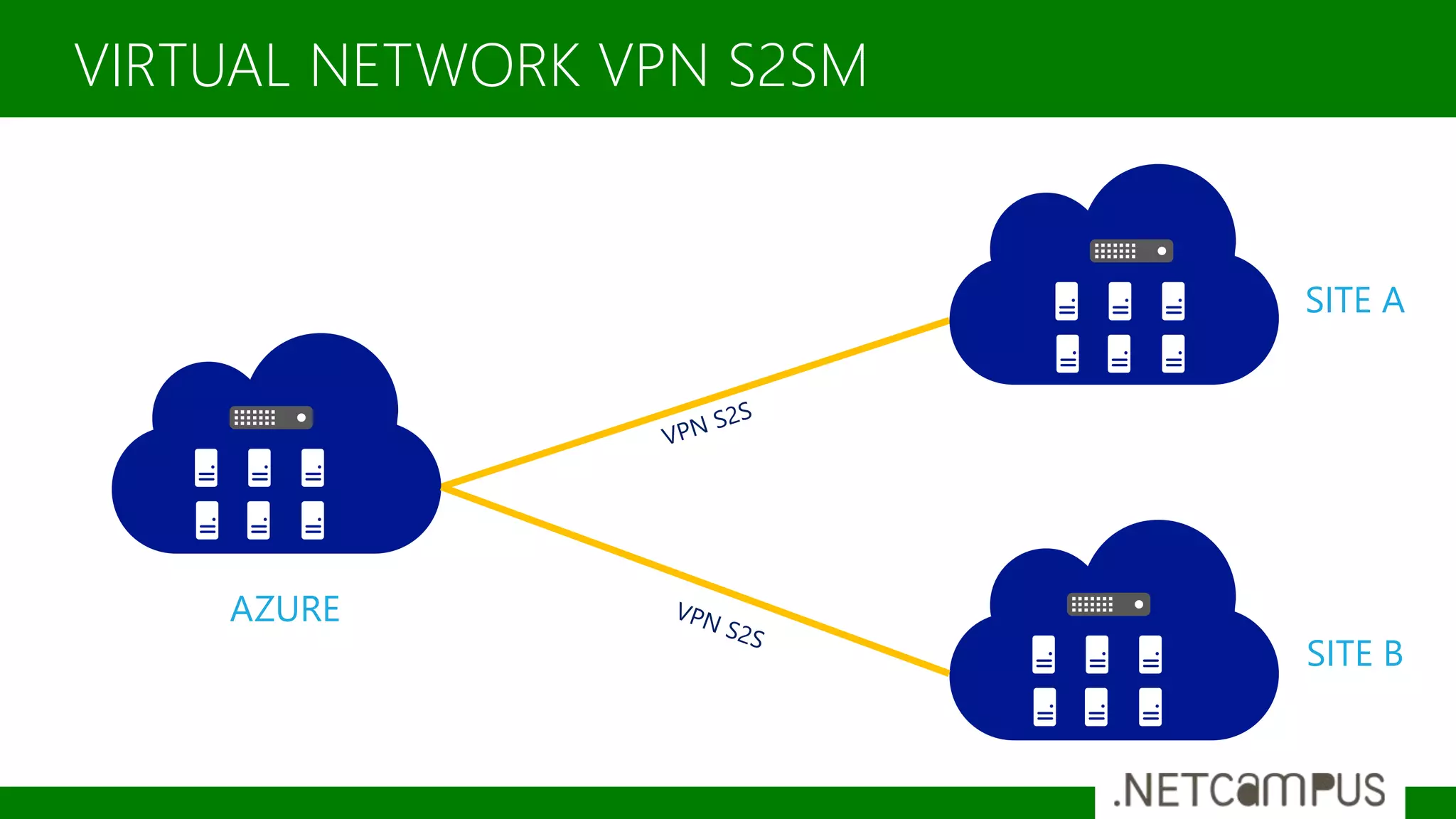
VIRTUAL NETWORK VPN S2SM
AZURE
SITE A
SITE B
VIRTUAL NETWORK VPN AZURE TO AZURE
VPN VNET-VNET
West
Europe
West
US
Networking
Template designed by
MIGRATE VM TO AZURE
Consolidate Infrastructure
Reduce costs
Maintain the existing configuration of VMs
WHY MIGRATE?
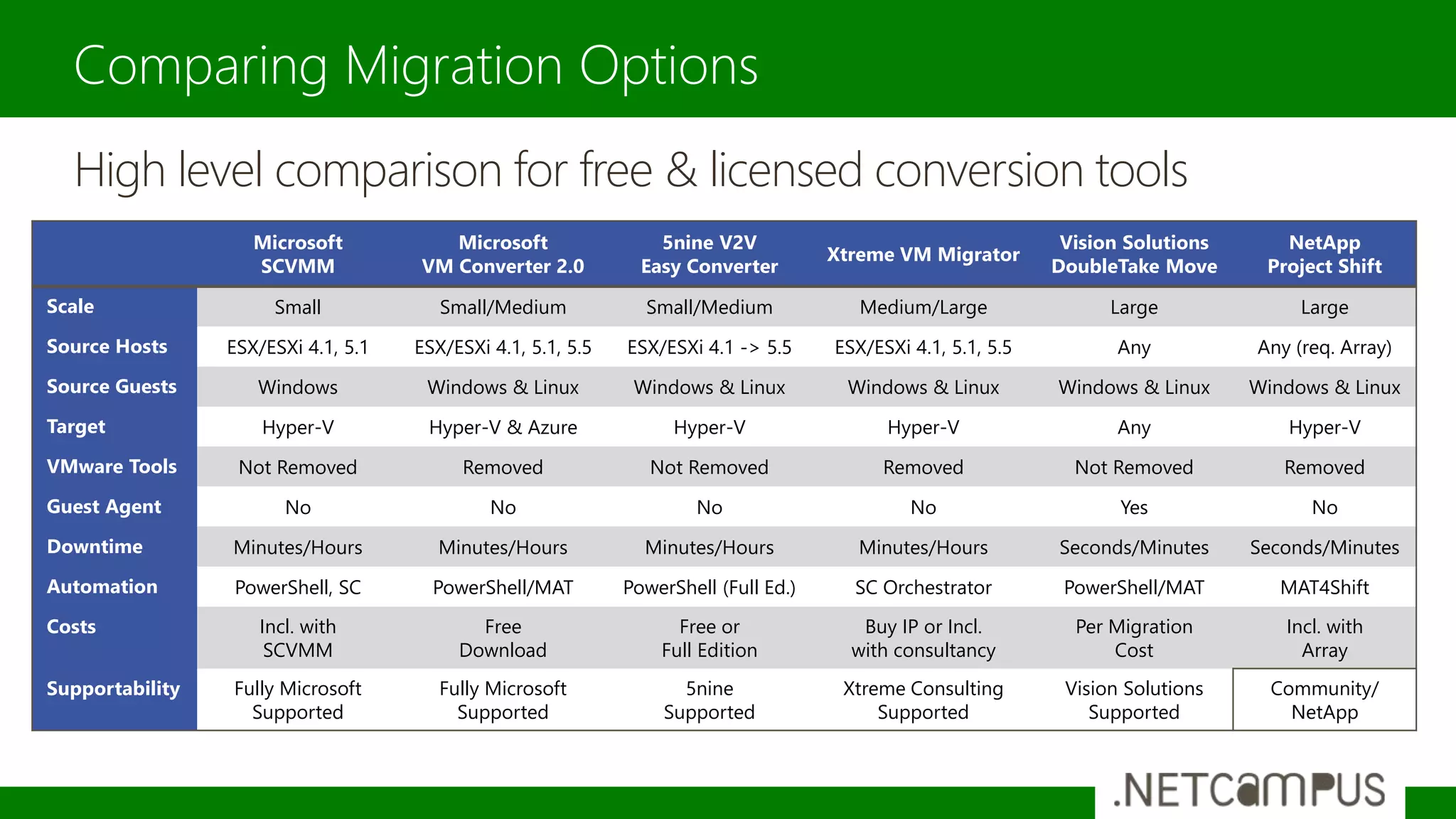
Comparing Migration Options
Microsoft
SCVMM
Microsoft
VM Converter 2.0
5nine V2V
Easy Converter
Xtreme VM Migrator
Vision Solutions
DoubleTake Move
NetApp
Project Shift
Scale Small Small/Medium Small/Medium Medium/Large Large Large
Source Hosts ESX/ESXi 4.1, 5.1 ESX/ESXi 4.1, 5.1, 5.5 ESX/ESXi 4.1 -> 5.5 ESX/ESXi 4.1, 5.1, 5.5 Any Any (req. Array)
Source Guests Windows Windows & Linux Windows & Linux Windows & Linux Windows & Linux Windows & Linux
Target Hyper-V Hyper-V & Azure Hyper-V Hyper-V Any Hyper-V
VMware Tools Not Removed Removed Not Removed Removed Not Removed Removed
Guest Agent No No No No Yes No
Downtime Minutes/Hours Minutes/Hours Minutes/Hours Minutes/Hours Seconds/Minutes Seconds/Minutes
Automation PowerShell, SC PowerShell/MAT PowerShell (Full Ed.) SC Orchestrator PowerShell/MAT MAT4Shift
Costs Incl. with
SCVMM
Free
Download
Free or
Full Edition
Buy IP or Incl.
with consultancy
Per Migration
Cost
Incl. with
Array
Supportability Fully Microsoft
Supported
Fully Microsoft
Supported
5nine
Supported
Xtreme Consulting
Supported
Vision Solutions
Supported
Community/
NetApp
High level comparison for free & licensed conversion tools
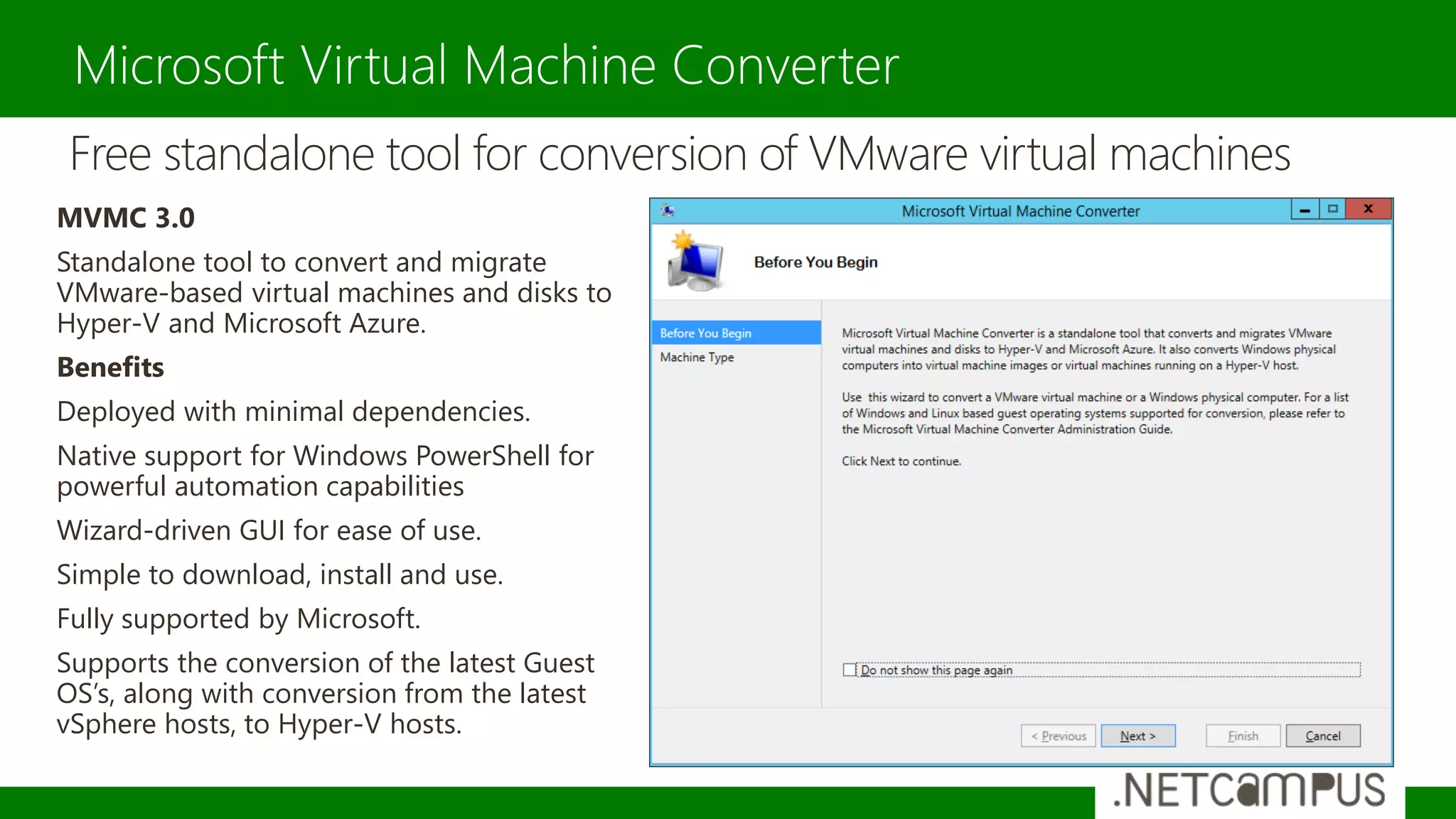
Microsoft Virtual Machine Converter
Free standalone tool for conversion of VMware virtual machines
MVMC 3.0
Standalone tool to convert and migrate
VMware-based virtual machines and disks to
Hyper-V and Microsoft Azure.
Benefits
Deployed with minimal dependencies.
Native support for Windows PowerShell for
powerful automation capabilities
Wizard-driven GUI for ease of use.
Simple to download, install and use.
Fully supported by Microsoft.
Supports the conversion of the latest Guest
OS’s, along with conversion from the latest
vSphere hosts, to Hyper-V hosts.
Microsoft Virtual Machine Converter
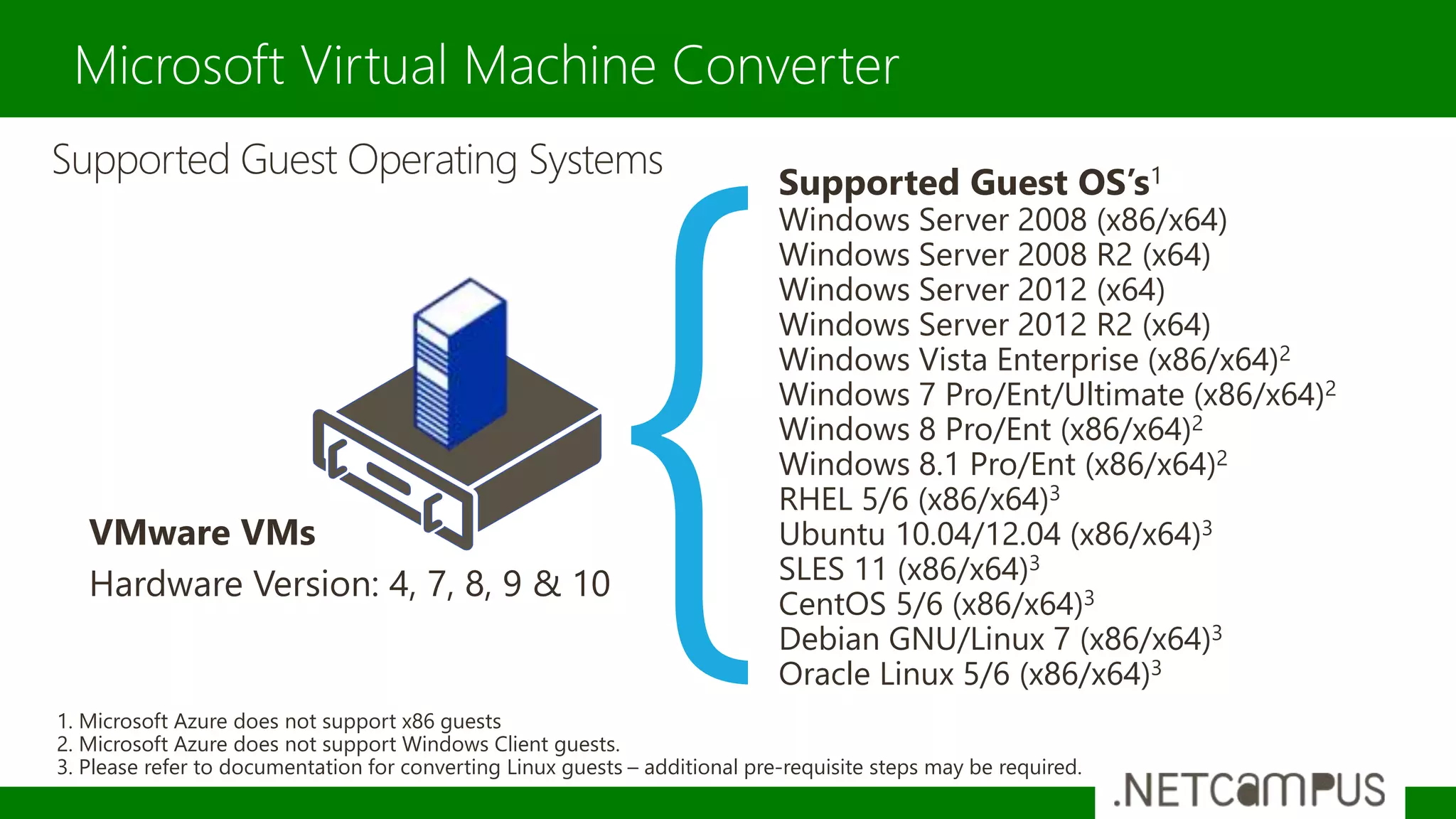
Supported Guest Operating Systems Supported Guest OS’s1
Windows Server 2008 (x86/x64)
Windows Server 2008 R2 (x64)
Windows Server 2012 (x64)
Windows Server 2012 R2 (x64)
Windows Vista Enterprise (x86/x64)2
Windows 7 Pro/Ent/Ultimate (x86/x64)2
Windows 8 Pro/Ent (x86/x64)2
Windows 8.1 Pro/Ent (x86/x64)2
RHEL 5/6 (x86/x64)3
Ubuntu 10.04/12.04 (x86/x64)3
SLES 11 (x86/x64)3
CentOS 5/6 (x86/x64)3
Debian GNU/Linux 7 (x86/x64)3
Oracle Linux 5/6 (x86/x64)3
VMware VMs
Hardware Version: 4, 7, 8, 9 & 10
1. Microsoft Azure does not support x86 guests
2. Microsoft Azure does not support Windows Client guests.
3. Please refer to documentation for converting Linux guests – additional pre-requisite steps may be required.
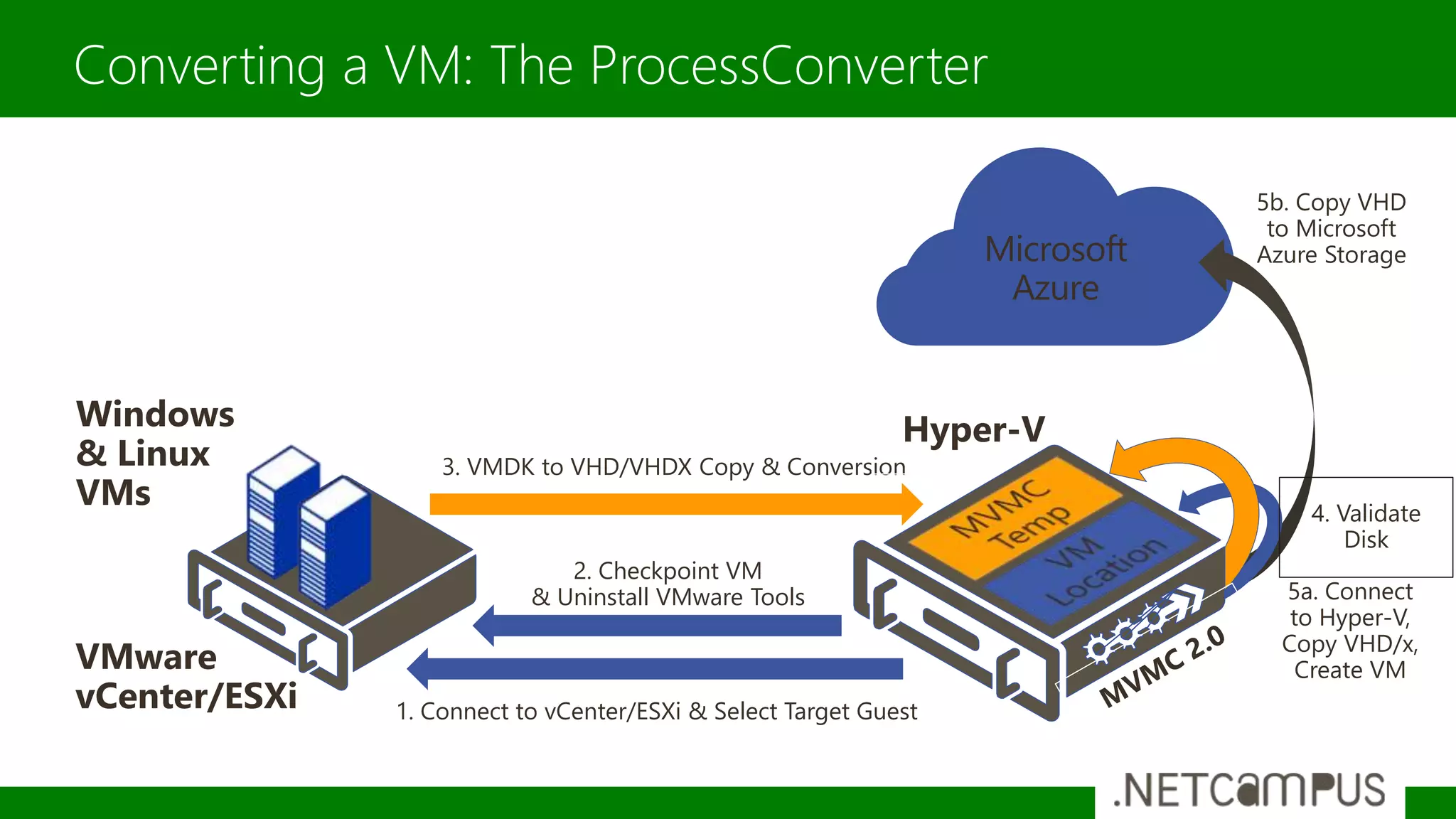
Microsoft
Azure
5b. Copy VHD
to Microsoft
Azure Storage
5a. Connect
to Hyper-V,
Copy VHD/x,
Create VM
4. Validate
Disk
3. VMDK to VHD/VHDX Copy & Conversion
Converting a VM: The ProcessConverter
Hyper-V
VMware
vCenter/ESXi
Windows
& Linux
VMs
1. Connect to vCenter/ESXi & Select Target Guest
2. Checkpoint VM
& Uninstall VMware Tools
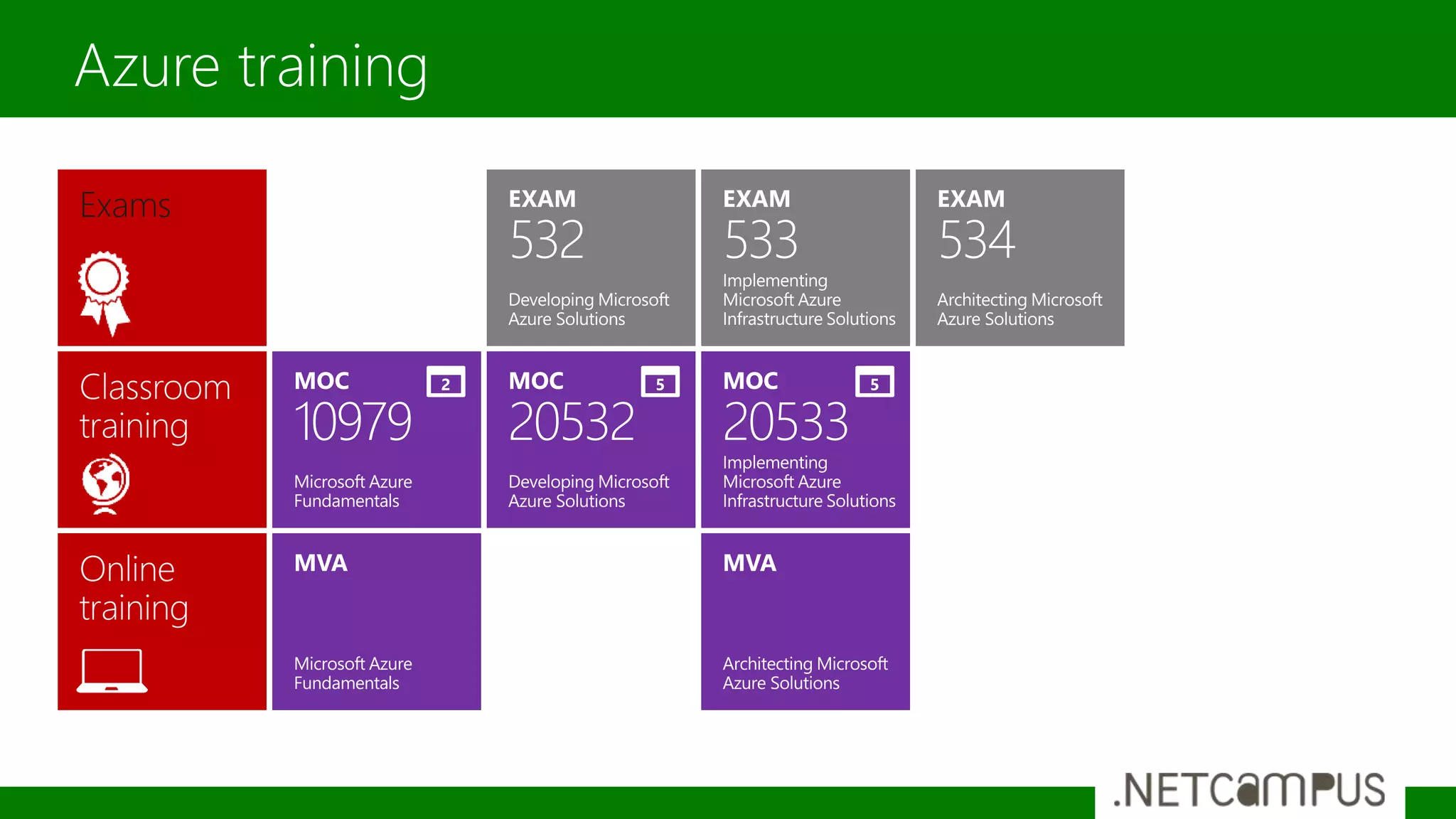
Azure training
Exams
Grazie a tutti per la partecipazione
Riceverete il link per il download a slide e demo via email nei
prossimi giorni
Maggiori informazioni e approfondimenti
www.windowsazurecommunity.it
Grazie

From on premise to the hybrid cloud with microsoft azure

  • 1.
    Template designed by FromOn-premise to the Hybrid Cloud with Microsoft Azure Nicola Ferrini IT PRO Trainer – Virtualization Expert
  • 2.
    Slide con sponsorche arriva a qualche giorno dalla conferenza sponsor
  • 3.
    IT PRO Trainer TechnicalWriter Technet Speaker Server, Desktop & Application Virtualization Expert Microsoft Most Valuable Professional (MVP) More on: •http://www.nicolaferrini.it •http://www.windowserver.it •http://windowsazurecommunity.it Who Am I ? NICOLA FERRINI
  • 4.
    AZURE IAAS MODEL HOWTO CREATE VM CUSTOMIZE VM CLOUD SERVICES HYBRID CLOUD Agenda
  • 5.
    OPTIMIZED DATA CENTER WellManaged Infrastructure & Applications CLOUD Service Oriented THE EVOLUTION Silo-ed Efficiency Host / Collocate Legacy Application Cost Reduction Re - platform Legacy / Silo Application New Requirements Re - write Additional Functionality Innovate Expand New Functionality Scalability Burst out Cloud Native Application Cloud Capability Cloud Service Expanding Legacy Platforms To Modernizing Workloads Silo-ed Architectures App 1 Expansion Expansion Expansion App 2 Expansion Expansion App 3 Expansion Managing Platforms Managing Services OnPremises Legacy App 1 Silo-ed Architectures OnPremises PrivateCloud Leveraged Infrastructure App 2 Leveraged Infrastructure OffPremises IaaS–SaaS-PaaS Services Service Oriented App 3 Identity Application Data OS Virtualization HW Storage Network Unix Linux MainframeWindows X Owning compute storage networ k ConsumingApp Resource silo#1 App Resource silo#2 App Resource silo#3
  • 6.
    Create VM onthe Cloud Windows and Linux Images Portability Pay-to-Use Customizable Flexible Choose your requirement Extensible More power when you want! MICROSOFT AZURE IAAS
  • 7.
    IAAS GALLERY • WindowsServer 2012 – 2012 R2 – v.Next • Windows 7 / 8 • SQL Server 2008 R2 / 2012 / 2014 • Biztalk Server 2013 • SharePoint Server 2013 Trial • Dynamics 2013 • Visual Studio 2013 • Oracle WebLogic / Database • OpenSUSE • OpenLogic • CentOS • Ubuntu • SUSE Linux Enterprise Server
  • 8.
  • 9.
  • 10.
    High Speed Multi-coreCPUs with large amounts of memory Access to second RDMA capable 40Gbit/s QDR InfiniBand backend network Designed for HPC applications COMPUTE INTENSIVE SIZES Size CPU Cores Memory Disk Size Max Data Disk Standard_A8 Intel® Xeon® E5- 2670 8 at 2.6 GHz 56 GB OS = 127GB Temporary=382 GB 16 Standard_A9 Intel® Xeon® E5- 2670 16 at 2.6 GHz 112 GB OS = 127GB Temporary=382 GB 16
  • 11.
    60% faster CPUsthan Standard A Series VMs Large SSD-backed temporary drive Better Core : RAM ratio - 1 : 3.5 Best for workloads that can leverage this drive for caching or replication redundancy D-SERIES Size CPU Cores Memory Temp Disk (SSD) Standard_D1 1 3.5 GB 50 GB Standard_D2 2 7 GB 100 GB Standard_D3 4 14 GB 200 GB Standard_D4 8 28 GB 400 GB Size CPU Cores Memory Temp Disk (SSD) Standard_D11 2 14 GB 100 GB Standard_D12 4 28 GB 200 GB Standard_D13 8 56 GB 400 GB Standard_D14 16 112 GB 800 GB
  • 12.
    Extremely large VMs Extraordinaryperformance using Intel® Xeon® processor E5 v3 family G-SERIES VMs Size CPU Cores Memory Temp Disk (SSD) Standard_G1 2 28 GB 406 GB Standard_G2 4 56 GB 812 GB Standard_G3 8 112 GB 1,630 GB Standard_G4 16 224 GB 3,250 GB Standard_G5 32 448 GB 6,500 GB
  • 13.
    Run Your PowerShellScript after the VM’s creation CUSTOMIZABLE
  • 14.
    Change VM’s configuration whenyou need more power….without turn-off the machine FLEXIBLE
  • 15.
  • 16.
  • 17.
  • 18.
    Public IP Address PublicDNS Name Internet Firewall Load Balancing Boundary CLOUD SERVICES
  • 19.
  • 20.
    CLOUD SERVICES –ONE TO MANY
  • 21.
    • Assign publicIPs to VMs • Direct reachability to the VM, no endpoint required • Public IP used as the outgoing IP address • Enables scenarios like FTP services, external monitoring • Quota: 5 Public IPs per subscription Instance Level Public IP Internet DIP1 DIP2 Cloud service Reserved VIP Azure Load Balancer Internet
  • 22.
    Public Port Local Port Protocol(TCP/UDP) Name PORT FORWARDING INPUT ENDPOINTS Single Public IP Per Cloud Service
  • 23.
  • 24.
    99.95% Monthly SLAfor VM’s 4.38 hours of downtime per year for VM’s in an availability set What’s included Compute Hardware failure (disk, cpu, memory) Datacenter failures - Network failure, power failure Hardware upgrades, Software maintenance – Host OS Updates What is not included VM Guest OS & Applications, VM Guest OS Updates Customer on-premises network connectivity and intermediary Internet connectivity AVAILABILITY & SERVICE LEVEL AGREEMENTS
  • 25.
  • 26.
  • 27.
  • 28.
  • 29.
  • 30.
  • 31.
    Hybrid Networking Secure point-to-site connectivity •Developers • POC Efforts • Small scale deployments • Connect from anywhere Secure site-to-site VPN connectivity • SMB, Enterprises • Connect to Azure compute ExpressRoute private connectivity • SMB & Enterprises • Mission critical workloads • Backup/DR, media, HPC • Connect to all Azure services
  • 32.
    Setup virtual privatenetworks in the cloud Manage as extensions of on-premises datacenters Logical isolation with network configuration options Create subnets, private IP addresses Bring your own DNS VIRTUAL NETWORK
  • 33.
  • 34.
  • 35.
    It’s possibile integrateyour on-premise infrastructure with Microsoft Azure VPN S2S required Supported router (or Windows Server 2012) http://msdn.microsoft.com/en-us/library/azure/jj156075.aspx Public IP from your ISP For what? Replica DC / FS / Web Server / SQL Server Workload that require AD integration INTEGRATE ON-PREMISES WITH CLOUD
  • 36.
    VIRTUAL NETWORK VPNS2SM AZURE SITE A SITE B
  • 37.
    VIRTUAL NETWORK VPNAZURE TO AZURE VPN VNET-VNET West Europe West US
  • 38.
  • 39.
  • 40.
    Consolidate Infrastructure Reduce costs Maintainthe existing configuration of VMs WHY MIGRATE?
  • 41.
    Comparing Migration Options Microsoft SCVMM Microsoft VMConverter 2.0 5nine V2V Easy Converter Xtreme VM Migrator Vision Solutions DoubleTake Move NetApp Project Shift Scale Small Small/Medium Small/Medium Medium/Large Large Large Source Hosts ESX/ESXi 4.1, 5.1 ESX/ESXi 4.1, 5.1, 5.5 ESX/ESXi 4.1 -> 5.5 ESX/ESXi 4.1, 5.1, 5.5 Any Any (req. Array) Source Guests Windows Windows & Linux Windows & Linux Windows & Linux Windows & Linux Windows & Linux Target Hyper-V Hyper-V & Azure Hyper-V Hyper-V Any Hyper-V VMware Tools Not Removed Removed Not Removed Removed Not Removed Removed Guest Agent No No No No Yes No Downtime Minutes/Hours Minutes/Hours Minutes/Hours Minutes/Hours Seconds/Minutes Seconds/Minutes Automation PowerShell, SC PowerShell/MAT PowerShell (Full Ed.) SC Orchestrator PowerShell/MAT MAT4Shift Costs Incl. with SCVMM Free Download Free or Full Edition Buy IP or Incl. with consultancy Per Migration Cost Incl. with Array Supportability Fully Microsoft Supported Fully Microsoft Supported 5nine Supported Xtreme Consulting Supported Vision Solutions Supported Community/ NetApp High level comparison for free & licensed conversion tools
  • 42.
    Microsoft Virtual MachineConverter Free standalone tool for conversion of VMware virtual machines MVMC 3.0 Standalone tool to convert and migrate VMware-based virtual machines and disks to Hyper-V and Microsoft Azure. Benefits Deployed with minimal dependencies. Native support for Windows PowerShell for powerful automation capabilities Wizard-driven GUI for ease of use. Simple to download, install and use. Fully supported by Microsoft. Supports the conversion of the latest Guest OS’s, along with conversion from the latest vSphere hosts, to Hyper-V hosts.
  • 43.
    Microsoft Virtual MachineConverter Supported Guest Operating Systems Supported Guest OS’s1 Windows Server 2008 (x86/x64) Windows Server 2008 R2 (x64) Windows Server 2012 (x64) Windows Server 2012 R2 (x64) Windows Vista Enterprise (x86/x64)2 Windows 7 Pro/Ent/Ultimate (x86/x64)2 Windows 8 Pro/Ent (x86/x64)2 Windows 8.1 Pro/Ent (x86/x64)2 RHEL 5/6 (x86/x64)3 Ubuntu 10.04/12.04 (x86/x64)3 SLES 11 (x86/x64)3 CentOS 5/6 (x86/x64)3 Debian GNU/Linux 7 (x86/x64)3 Oracle Linux 5/6 (x86/x64)3 VMware VMs Hardware Version: 4, 7, 8, 9 & 10 1. Microsoft Azure does not support x86 guests 2. Microsoft Azure does not support Windows Client guests. 3. Please refer to documentation for converting Linux guests – additional pre-requisite steps may be required.
  • 44.
    Microsoft Azure 5b. Copy VHD toMicrosoft Azure Storage 5a. Connect to Hyper-V, Copy VHD/x, Create VM 4. Validate Disk 3. VMDK to VHD/VHDX Copy & Conversion Converting a VM: The ProcessConverter Hyper-V VMware vCenter/ESXi Windows & Linux VMs 1. Connect to vCenter/ESXi & Select Target Guest 2. Checkpoint VM & Uninstall VMware Tools
  • 45.
  • 46.
    Grazie a tuttiper la partecipazione Riceverete il link per il download a slide e demo via email nei prossimi giorni Maggiori informazioni e approfondimenti www.windowsazurecommunity.it Grazie