Building the Intelligent Cloud with
Microsoft Azure
Notes:
 If you experience audio issues during the webinar, you can dial in through telephone details provided to you in
your registration confirmation email.
 Please feel free to post questions in the questions dialog & we will try to answer as many as we can at the end.
 Recording of this session will be shared in next 24-48 hours.
 You can also write to us at marketing@winwire.com for any clarifications or information.
Session Speaker
David Armstrong
VP – Technology Solutions
WinWire Technologies
1. What is Windows Azure
2. Virtual Machines
3. Azure Storage
4. Azure SQL
5. Network Connectivity to Azure
6. Virtual Networks (VNets)
Agenda
7. Q&A
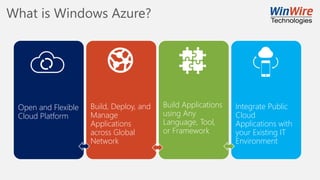
What is Windows Azure?
Open and Flexible
Cloud Platform
Build, Deploy, and
Manage
Applications
across Global
Network
Build Applications
using Any
Language, Tool,
or Framework
Integrate Public
Cloud
Applications with
your Existing IT
Environment
Why use the Cloud?
Speed
• Faster than Traditional
Application
Development
Economics
• Lower Cost
Scale
• Scale out Quickly
• Provide Global Scale
Hyper scale Infrastructure is the enabler
Operational
Central US
Iowa
West US
California
East US
Virginia
US Gov
Virginia
North Central US
Illinois
US Gov
Iowa
South Central US
Texas
Brazil South
Sao Paulo State
West Europe
Netherlands
China North *
Beijing
China South *
Shanghai
Japan East
Tokyo, Saitama
Japan West
Osaka
India South
Chennai
East Asia
Hong Kong
SE Asia
Singapore
Australia South East
Victoria
Australia East
New South Wales
India Central
Pune
Canada East
Quebec City
Canada Central
Toronto
India West
Mumbai
Germany North East **
Magdeburg
Germany Central **
Frankfurt
North Europe
Ireland
East US 2
Virginia
United Kingdom
Regions
 100+ datacenters
 Top 3 networks in the world
 2x AWS, 7x Google DC Regions
 G Series – Largest VM in World, 32 cores, 448GB Ram, SSD…
Announced/Not Operational
* Operated by 21Vianet ** Data Stewardship by Deutsche Telekom
28 Regions Worldwide, 22 ONLINE…huge capacity around the world…growing every year
Platform Services
Infrastructure Services
Datacenter Infrastructure (28 Regions, 22 Online)
Web Apps
Infrastructure
Mobile
Backends
API
Management
API App
Infrastructure
Business Process
Automation
Push
Notifications
Content
Delivery
Network (CDN)
Live & OD
Media
Streaming
B2B
Integration
Hybrid
Connections
Pub/Sub
Queuing
Simple
Queuing
Hybrid
Operations
Server Data
Backup
Hybrid/Intelligent
Data Backup
Disaster
Recovery
Bulk Data Import
And Export
Relational
SQL Database
Document
Database
Service
Distributed
In-Memory
Cache
Search
Simple
Key/Value
Store
Data
Warehouse
Directory
Health Monitoring
Privileged
Identity
Management
Operational
Analytics
Stateless
Compute
Scheduled
Compute
Jobs
Virtual App
Streaming
Distributed
Compute
Development
Tools
Application
Instrumentation
Software
Development
Kits
Software Lifecycle
Management
Domain Join &
Policy Management
Big Data
Analytics
Predictive
Analytics
Data Stream
Analytics
Data
Pipelines
Device Data
Collection
Mobile
Analytics
Big Data
Storage
IoT Device
Management
Data Source
Management
Security &
Management
User/Group
Directory Store
Multi-Factor
Authentication
Scheduled Service
Management
Service Creation
& Configuration
Encryption Key
Store
Software/Solution
Marketplace
Pre-Build VM
Images
Identity Sign-Up
and sign-in
Task
Scheduler
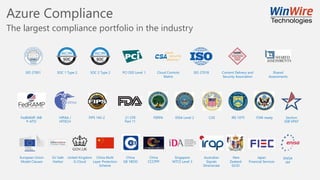
Azure Compliance
The largest compliance portfolio in the industry
HIPAA /
HITECH
FedRAMP JAB
P-ATO
FIPS 140-2 FERPA DISA Level 2 ITAR-readyCJIS21 CFR
Part 11
IRS 1075 Section
508 VPAT
ISO 27001 PCI DSS Level 1SOC 1 Type 2 SOC 2 Type 2 ISO 27018Cloud Controls
Matrix
Content Delivery and
Security Association
Shared
Assessments
European Union
Model Clauses
United Kingdom
G-Cloud
Singapore
MTCS Level 3
Australian
Signals
Directorate
Japan
Financial Services
China Multi
Layer Protection
Scheme
China
CCCPPF
New
Zealand
GCIO
China
GB 18030
EU Safe
Harbor
ENISA
IAF
Azure is an open cloud
Applications
Clients
Infrastructure
Management
Databases &
Middleware
App Frameworks
& Tools
DevOps
PaaS &
DevOps
Cloud Models Revisited
Higher cost/More Control Lower Cost/More Agility
How do you use Azure?
Azure Management
Portal
Visual Studio / VS
Code
PowerShell or Azure
CLI
Custom Code calling
ARM API
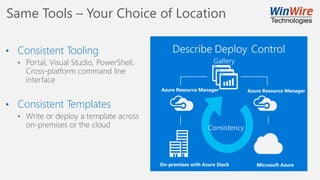
Same Tools – Your Choice of Location
• Consistent Tooling
• Consistent Templates
1. What is Windows Azure
2. Virtual Machines
3. Azure Storage
4. Azure SQL
5. Network Connectivity to Azure
6. Virtual Networks (VNets)
Agenda
7. Q&A
Azure Virtual Machines
• Deploy on-demand
• Easily scale up (or down)
• Pay for what you use
• Availability Sets with 99.95% SLA
• Most flexible option to run workloads in Azure
• Support from 1 to 32 CPUs and up to 448 GBs of memory
• Supports Windows and Linux operating systems
• Supports high-performance low-latency SSD backed storage
Provision Machines Demo
https://azure.microsoft.com/en-us/pricing/
Windows VM Configuration A Series Specifications
Windows VM Configuration D Series Specifications
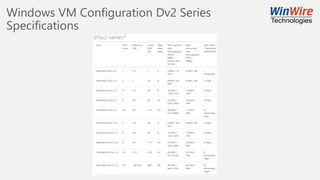
Windows VM Configuration Dv2 Series
Specifications
1. What is Windows Azure
2. Virtual Machines
3. Azure Storage
4. Azure SQL
5. Network Connectivity to Azure
6. Virtual Networks (VNets)
Agenda
7. Q&A
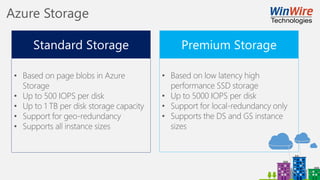
Azure Storage Abstractions
Azure Storage
• Based on page blobs in Azure
Storage
• Up to 500 IOPS per disk
• Up to 1 TB per disk storage capacity
• Support for geo-redundancy
• Supports all instance sizes
• Based on low latency high
performance SSD storage
• Up to 5000 IOPS per disk
• Support for local-redundancy only
• Supports the DS and GS instance
sizes
Azure Standard Storage
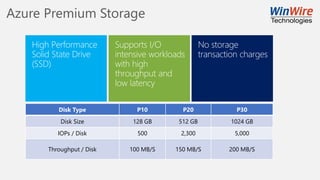
Azure Premium Storage
Disk Type P10 P20 P30
Disk Size 128 GB 512 GB 1024 GB
IOPs / Disk 500 2,300 5,000
Throughput / Disk 100 MB/S 150 MB/S 200 MB/S
1. What is Windows Azure
2. Virtual Machines
3. Azure Storage
4. Azure SQL
5. Network Connectivity to Azure
6. Virtual Networks (VNets)
Agenda
7. Q&A
Azure SQL
• Store SQL (RDMS) data in the cloud
• Available in Basic, Standard and Premium Service Tiers
Azure SQL Limitations
1 No Windows Authentication. Use
Azure AD Authentication
2 Cross Database Queries using 3 or 4
part names
3 Database Diagrams and Mail
4 EXECUTE As Logins
5 FILESTREAMS
6 Global Temporary Tables
7 SQL Agent
8 SQL Server Profiler
9 SQL Server trace
10 Transact-SQL debugging
https://azure.microsoft.com/en-us/documentation/articles/sql-database-transact-sql-information/
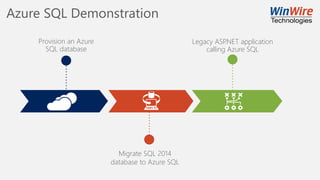
Azure SQL Demonstration
Provision an Azure
SQL database
Migrate SQL 2014
database to Azure SQL
Legacy ASP.NET application
calling Azure SQL
Azure SQL Database Transaction Unit
Azure SQL Elastic Pools
• Manage multiple databases sharing a common set of resources
• Available in Basic, Standard and Premium Service Tiers
Azure SQL Elastic Pools
1. What is Windows Azure
2. Virtual Machines
3. Azure Storage
4. Azure SQL
5. Network Connectivity to Azure
6. Virtual Networks (VNets)
Agenda
7. Q&A
Planning for Connectivity
Microsoft Azure
ExpressRoute: up to 10 Gbps
Site-to-Site VPN: up to 200 Mbps
On-Premises Datacenter
ExpressRoute
• Dedicated Connection
• Predictable Performance
• High Throughput
• Bandwidth: 50 Mbps to 10 Gbps
Site-to-Site VPN
• Uses existing Internet connection
• IPSEC / Encrypted Traffic
• Bandwidth: 100 Mbps to 200 Mbps
Planning for Connectivity Continued
P2S – Point-to-Site
S2S – Site-to-Site
VPN connects a single computer to the Azure Network using VPN
VPN creates a persistent connection to the Azure Network
• Requires additional hardware
• Static IP Address (NO NAT)
• Authentication completed using pre-shared key (PSK) over IPSec
• Connection less than 200 Mbps
Express Route
Offered in partnership with several providers
• Connect directly to Azure without traversing public internet
• Speeds range from 50Mbps to 10Gbps
• Great for off-site backup of large files, DR, business critical apps with high traffic
• Private peering extends company infrastructure into Azure transparently
• Public peering provides a fast connection to Azure services
• Microsoft Peering applies to O365 and other traffic not related to Private / Public
• https://azure.microsoft.com/en-us/documentation/articles/expressroute-locations/#partners
1. What is Windows Azure
2. Virtual Machines
3. Azure Storage
4. Azure SQL
5. Network Connectivity to Azure
6. Virtual Networks (VNETs)
Agenda
7. Q&A
Azure Virtual Networks
Virtual Network
VPN
GW
Frontend
10.1/16
Mid-tier
10.2/16
Backend
10.3/16
Internet
On-premises
10.0/16
VPN and
ExpressRoute
Azure
Direct Internet
connectivity
• Bring your own network
• Create subnets with your
private or public IP addresses
• Bring your own DNS or use
Azure-provided DNS
• Hybrid connectivity with VPNs
and/or ExpressRoute
• Supports custom routing
• Network Isolation
Azure Virtual Network Comparison
On Premise vs Azure implementation
• Azure Infrastructure replaces router
• NSGs replace firewalls.
• Azure load balancers replace physical load balancers
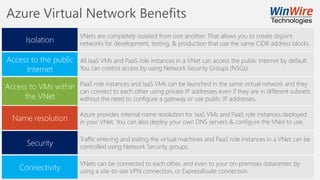
Azure Virtual Network Benefits
Isolation
Access to the public
Internet
VNets are completely isolated from one another. That allows you to create disjoint
networks for development, testing, & production that use the same CIDR address blocks.
All IaaS VMs and PaaS role instances in a VNet can access the public Internet by default.
You can control access by using Network Security Groups (NSGs).
Access to VMs within
the VNet
Name resolution
PaaS role instances and IaaS VMs can be launched in the same virtual network and they
can connect to each other using private IP addresses even if they are in different subnets
without the need to configure a gateway or use public IP addresses.
Azure provides internal name resolution for IaaS VMs and PaaS role instances deployed
in your VNet. You can also deploy your own DNS servers & configure the VNet to use.
Security
Traffic entering and exiting the virtual machines and PaaS role instances in a VNet can be
controlled using Network Security groups.
Connectivity
VNets can be connected to each other, and even to your on-premises datacenter, by
using a site-to-site VPN connection, or ExpressRoute connection
Q & A
http://www.winwire.com/blog-winsights/
www.twitter.com/winwire
marketing@winwire.com
www.winwire.com

Building Intelligent Cloud with Microsoft Azure

  • 1.
    Building the IntelligentCloud with Microsoft Azure Notes:  If you experience audio issues during the webinar, you can dial in through telephone details provided to you in your registration confirmation email.  Please feel free to post questions in the questions dialog & we will try to answer as many as we can at the end.  Recording of this session will be shared in next 24-48 hours.  You can also write to us at marketing@winwire.com for any clarifications or information.
  • 2.
    Session Speaker David Armstrong VP– Technology Solutions WinWire Technologies
  • 3.
    1. What isWindows Azure 2. Virtual Machines 3. Azure Storage 4. Azure SQL 5. Network Connectivity to Azure 6. Virtual Networks (VNets) Agenda 7. Q&A
  • 4.
    What is WindowsAzure? Open and Flexible Cloud Platform Build, Deploy, and Manage Applications across Global Network Build Applications using Any Language, Tool, or Framework Integrate Public Cloud Applications with your Existing IT Environment
  • 5.
    Why use theCloud? Speed • Faster than Traditional Application Development Economics • Lower Cost Scale • Scale out Quickly • Provide Global Scale
  • 6.
    Hyper scale Infrastructureis the enabler Operational Central US Iowa West US California East US Virginia US Gov Virginia North Central US Illinois US Gov Iowa South Central US Texas Brazil South Sao Paulo State West Europe Netherlands China North * Beijing China South * Shanghai Japan East Tokyo, Saitama Japan West Osaka India South Chennai East Asia Hong Kong SE Asia Singapore Australia South East Victoria Australia East New South Wales India Central Pune Canada East Quebec City Canada Central Toronto India West Mumbai Germany North East ** Magdeburg Germany Central ** Frankfurt North Europe Ireland East US 2 Virginia United Kingdom Regions  100+ datacenters  Top 3 networks in the world  2x AWS, 7x Google DC Regions  G Series – Largest VM in World, 32 cores, 448GB Ram, SSD… Announced/Not Operational * Operated by 21Vianet ** Data Stewardship by Deutsche Telekom 28 Regions Worldwide, 22 ONLINE…huge capacity around the world…growing every year
  • 7.
    Platform Services Infrastructure Services DatacenterInfrastructure (28 Regions, 22 Online) Web Apps Infrastructure Mobile Backends API Management API App Infrastructure Business Process Automation Push Notifications Content Delivery Network (CDN) Live & OD Media Streaming B2B Integration Hybrid Connections Pub/Sub Queuing Simple Queuing Hybrid Operations Server Data Backup Hybrid/Intelligent Data Backup Disaster Recovery Bulk Data Import And Export Relational SQL Database Document Database Service Distributed In-Memory Cache Search Simple Key/Value Store Data Warehouse Directory Health Monitoring Privileged Identity Management Operational Analytics Stateless Compute Scheduled Compute Jobs Virtual App Streaming Distributed Compute Development Tools Application Instrumentation Software Development Kits Software Lifecycle Management Domain Join & Policy Management Big Data Analytics Predictive Analytics Data Stream Analytics Data Pipelines Device Data Collection Mobile Analytics Big Data Storage IoT Device Management Data Source Management Security & Management User/Group Directory Store Multi-Factor Authentication Scheduled Service Management Service Creation & Configuration Encryption Key Store Software/Solution Marketplace Pre-Build VM Images Identity Sign-Up and sign-in Task Scheduler
  • 8.
    Azure Compliance The largestcompliance portfolio in the industry HIPAA / HITECH FedRAMP JAB P-ATO FIPS 140-2 FERPA DISA Level 2 ITAR-readyCJIS21 CFR Part 11 IRS 1075 Section 508 VPAT ISO 27001 PCI DSS Level 1SOC 1 Type 2 SOC 2 Type 2 ISO 27018Cloud Controls Matrix Content Delivery and Security Association Shared Assessments European Union Model Clauses United Kingdom G-Cloud Singapore MTCS Level 3 Australian Signals Directorate Japan Financial Services China Multi Layer Protection Scheme China CCCPPF New Zealand GCIO China GB 18030 EU Safe Harbor ENISA IAF
  • 9.
    Azure is anopen cloud Applications Clients Infrastructure Management Databases & Middleware App Frameworks & Tools DevOps PaaS & DevOps
  • 10.
    Cloud Models Revisited Highercost/More Control Lower Cost/More Agility
  • 11.
    How do youuse Azure? Azure Management Portal Visual Studio / VS Code PowerShell or Azure CLI Custom Code calling ARM API
  • 12.
    Same Tools –Your Choice of Location • Consistent Tooling • Consistent Templates
  • 13.
    1. What isWindows Azure 2. Virtual Machines 3. Azure Storage 4. Azure SQL 5. Network Connectivity to Azure 6. Virtual Networks (VNets) Agenda 7. Q&A
  • 14.
    Azure Virtual Machines •Deploy on-demand • Easily scale up (or down) • Pay for what you use • Availability Sets with 99.95% SLA • Most flexible option to run workloads in Azure • Support from 1 to 32 CPUs and up to 448 GBs of memory • Supports Windows and Linux operating systems • Supports high-performance low-latency SSD backed storage
  • 15.
  • 16.
    Windows VM ConfigurationA Series Specifications
  • 17.
    Windows VM ConfigurationD Series Specifications
  • 18.
    Windows VM ConfigurationDv2 Series Specifications
  • 19.
    1. What isWindows Azure 2. Virtual Machines 3. Azure Storage 4. Azure SQL 5. Network Connectivity to Azure 6. Virtual Networks (VNets) Agenda 7. Q&A
  • 20.
  • 21.
    Azure Storage • Basedon page blobs in Azure Storage • Up to 500 IOPS per disk • Up to 1 TB per disk storage capacity • Support for geo-redundancy • Supports all instance sizes • Based on low latency high performance SSD storage • Up to 5000 IOPS per disk • Support for local-redundancy only • Supports the DS and GS instance sizes
  • 22.
  • 23.
    Azure Premium Storage DiskType P10 P20 P30 Disk Size 128 GB 512 GB 1024 GB IOPs / Disk 500 2,300 5,000 Throughput / Disk 100 MB/S 150 MB/S 200 MB/S
  • 24.
    1. What isWindows Azure 2. Virtual Machines 3. Azure Storage 4. Azure SQL 5. Network Connectivity to Azure 6. Virtual Networks (VNets) Agenda 7. Q&A
  • 25.
    Azure SQL • StoreSQL (RDMS) data in the cloud • Available in Basic, Standard and Premium Service Tiers
  • 26.
    Azure SQL Limitations 1No Windows Authentication. Use Azure AD Authentication 2 Cross Database Queries using 3 or 4 part names 3 Database Diagrams and Mail 4 EXECUTE As Logins 5 FILESTREAMS 6 Global Temporary Tables 7 SQL Agent 8 SQL Server Profiler 9 SQL Server trace 10 Transact-SQL debugging https://azure.microsoft.com/en-us/documentation/articles/sql-database-transact-sql-information/
  • 27.
    Azure SQL Demonstration Provisionan Azure SQL database Migrate SQL 2014 database to Azure SQL Legacy ASP.NET application calling Azure SQL
  • 28.
    Azure SQL DatabaseTransaction Unit
  • 29.
    Azure SQL ElasticPools • Manage multiple databases sharing a common set of resources • Available in Basic, Standard and Premium Service Tiers
  • 30.
  • 31.
    1. What isWindows Azure 2. Virtual Machines 3. Azure Storage 4. Azure SQL 5. Network Connectivity to Azure 6. Virtual Networks (VNets) Agenda 7. Q&A
  • 32.
    Planning for Connectivity MicrosoftAzure ExpressRoute: up to 10 Gbps Site-to-Site VPN: up to 200 Mbps On-Premises Datacenter ExpressRoute • Dedicated Connection • Predictable Performance • High Throughput • Bandwidth: 50 Mbps to 10 Gbps Site-to-Site VPN • Uses existing Internet connection • IPSEC / Encrypted Traffic • Bandwidth: 100 Mbps to 200 Mbps
  • 33.
    Planning for ConnectivityContinued P2S – Point-to-Site S2S – Site-to-Site VPN connects a single computer to the Azure Network using VPN VPN creates a persistent connection to the Azure Network • Requires additional hardware • Static IP Address (NO NAT) • Authentication completed using pre-shared key (PSK) over IPSec • Connection less than 200 Mbps Express Route Offered in partnership with several providers • Connect directly to Azure without traversing public internet • Speeds range from 50Mbps to 10Gbps • Great for off-site backup of large files, DR, business critical apps with high traffic • Private peering extends company infrastructure into Azure transparently • Public peering provides a fast connection to Azure services • Microsoft Peering applies to O365 and other traffic not related to Private / Public • https://azure.microsoft.com/en-us/documentation/articles/expressroute-locations/#partners
  • 34.
    1. What isWindows Azure 2. Virtual Machines 3. Azure Storage 4. Azure SQL 5. Network Connectivity to Azure 6. Virtual Networks (VNETs) Agenda 7. Q&A
  • 35.
    Azure Virtual Networks VirtualNetwork VPN GW Frontend 10.1/16 Mid-tier 10.2/16 Backend 10.3/16 Internet On-premises 10.0/16 VPN and ExpressRoute Azure Direct Internet connectivity • Bring your own network • Create subnets with your private or public IP addresses • Bring your own DNS or use Azure-provided DNS • Hybrid connectivity with VPNs and/or ExpressRoute • Supports custom routing • Network Isolation
  • 36.
    Azure Virtual NetworkComparison On Premise vs Azure implementation • Azure Infrastructure replaces router • NSGs replace firewalls. • Azure load balancers replace physical load balancers
  • 37.
    Azure Virtual NetworkBenefits Isolation Access to the public Internet VNets are completely isolated from one another. That allows you to create disjoint networks for development, testing, & production that use the same CIDR address blocks. All IaaS VMs and PaaS role instances in a VNet can access the public Internet by default. You can control access by using Network Security Groups (NSGs). Access to VMs within the VNet Name resolution PaaS role instances and IaaS VMs can be launched in the same virtual network and they can connect to each other using private IP addresses even if they are in different subnets without the need to configure a gateway or use public IP addresses. Azure provides internal name resolution for IaaS VMs and PaaS role instances deployed in your VNet. You can also deploy your own DNS servers & configure the VNet to use. Security Traffic entering and exiting the virtual machines and PaaS role instances in a VNet can be controlled using Network Security groups. Connectivity VNets can be connected to each other, and even to your on-premises datacenter, by using a site-to-site VPN connection, or ExpressRoute connection
  • 38.