GEOPROCESSING –Build Your Own Tools
using Python Script
GEOSTATISTICAL ANALYSIS in Arc GIS
using python: An Introduction
Group Members:
Bibek Karki(13)
Upendra Oli(19)
Uttam Pudasaini(22)
 Simple tool using python script
 Iteration in script tool
 Geostatistical Analysis(arcpy.ga Introduction )
GEOPROCESSING :For everyone that uses ArcGIS
 The fundamental purpose of Geoprocessing is to
Provide tools and a framework for performing analysis and managing
geographic data.
 Geoprocessing provides a large suite of tools for performing GIS tasks that
range from
Simple buffers and polygon overlays to Complex regression analysis and
Image classification.
 All geo-processing tools are available as Python through the “ArcPy”
module that ships with ArcGIS 10
 A script tool that you create is an integral part of geoprocessing, just
like a system tool
 To create a script tool in a custom toolbox, you need three things:
 A script
 A custom toolbox
 A precise definition of the parameters of your script
GetParameterAsText()
GetParameter()
Os.path
AddMessage()
GetMessages()
ValidateTableName()
Os.path.join()
GetParameterAsText()
GetParameterAsText reads the user input for the output file
location (for example) as a text string.
…String = arcpy.GetParameterAsText(index)
GetParameter()
GetParameter reads user input and returns an object
(e.g., Boolean).
…..Object = arcpy.GetParameter(0)
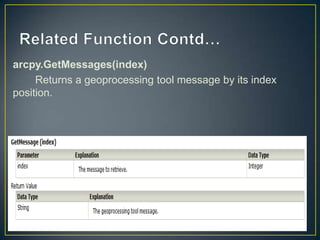
arcpy.GetMessages(index)
Returns a geoprocessing tool message by its index
position.
arcpy.AddMessage()
Creates a geoprocessing informative message that can be
accessed with any of the GetMessages functions.
arcpy.AddMessage(arcpy.GetMessages(index))
Import Os
The Os module contain functions the script will need for
working with files on disk.
• Os.path.join()
Joins the two input arguments to a single string
ValidateTableName (name, {workspace})
Takes a table name and a workspace path and returns a valid table
name for the workspace.
An underscore "_" will replace any invalid character found in the table
name
NAME AND WORKSPACE-string
RETURN TYPE-string
DEMO 1:SIMPLE SRCIPT TOOL
DEMO 2:ITERATION ON SCRIPT TOOL
Geostatistical Analysis
ArcPy is supported by a series of modules, including a
 Mapping module(arcpy. mapping),
Spatial Analyst module(arcpy.sa),
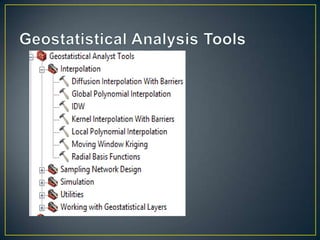
Geostatistical Analyst module(arcpy.ga).
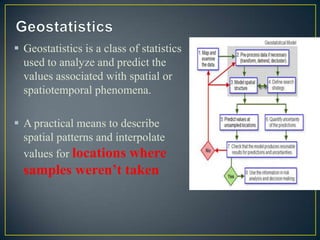
 Geostatistics is a class of statistics
used to analyze and predict the
values associated with spatial or
spatiotemporal phenomena.
 A practical means to describe
spatial patterns and interpolate
values for locations where
samples weren’t taken
Geostatistical Analyst classes are used for defining parameters
for Geostatistical Analyst tools that may have a varying number
of arguments depending on the parameter type selected
Classes
Cross ValidationResult
SearchNeighbourhoodSmooth
SearchNeighbourhoodStandard
 To compare the predicted value to the observed value in
order to obtain useful information about model
parameters.
 Removes one data location and then predicts the associated data
using the data at the rest of the locations.
Takes Geostatistical Layer as Input
• DEMO
• Cross Validation Result
• Create Geostatistical Layer From XML of your model
It is used to define the search neighbourhood for
IDW,
 Local Polynomial Interpolation,
 and Radial Basis Functions.
Takes following Arguments
majorSemiaxis:
The distance, in map units, specifying the length of the
major semi axis of the ellipse within which data is selected
from.
minorSemiaxis:
The distance, in map units, specifying the length of the
minor semi axis of the ellipse within which data is selected
from.
Angle:
The angle of the search ellipse.
nbrMax:
Maximum number of neighbors, within the search ellipse, to
use when making the prediction.
nbrMin:
Minimum number of neighbors, within the search ellipse, to
use when making the prediction.
sectorType:
 The searching ellipse can be divided into 1, 4, 4 with an
offset of 45º, or 8 sectors.
• DEMO[With Change in Ellipse Parameters]
Used to define the search neighborhood for IDW,
Local Polynomial Interpolation,
and Radial Basis Functions
(only when the INVERSE_MULTIQUADRIC_FUNCTION
keyword is used).
 majorSemiaxis:
 The distance, in map units, specifying the length of the major
semi axis of the ellipse within which data is selected from.
minorSemiaxis:
The distance, in map units, specifying the length of the minor semi
axis of the ellipse within which data is selected from.
Angle:
The angle of the search ellipse.
smoothFactor
 Determines how much smoothing will be performed. 0 is no
smoothing; 1 is the maximum amount of smoothing.
• Demo
Geoprocessing(Building Your Own Tool)  and Geostatistical Analysis(An Introduction) Using Python Scripts

Geoprocessing(Building Your Own Tool) and Geostatistical Analysis(An Introduction) Using Python Scripts

  • 1.
    GEOPROCESSING –Build YourOwn Tools using Python Script GEOSTATISTICAL ANALYSIS in Arc GIS using python: An Introduction Group Members: Bibek Karki(13) Upendra Oli(19) Uttam Pudasaini(22)
  • 2.
     Simple toolusing python script  Iteration in script tool  Geostatistical Analysis(arcpy.ga Introduction )
  • 3.
    GEOPROCESSING :For everyonethat uses ArcGIS  The fundamental purpose of Geoprocessing is to Provide tools and a framework for performing analysis and managing geographic data.  Geoprocessing provides a large suite of tools for performing GIS tasks that range from Simple buffers and polygon overlays to Complex regression analysis and Image classification.  All geo-processing tools are available as Python through the “ArcPy” module that ships with ArcGIS 10
  • 4.
     A scripttool that you create is an integral part of geoprocessing, just like a system tool  To create a script tool in a custom toolbox, you need three things:  A script  A custom toolbox  A precise definition of the parameters of your script
  • 5.
  • 6.
    GetParameterAsText() GetParameterAsText reads theuser input for the output file location (for example) as a text string. …String = arcpy.GetParameterAsText(index)
  • 7.
    GetParameter() GetParameter reads userinput and returns an object (e.g., Boolean). …..Object = arcpy.GetParameter(0)
  • 8.
    arcpy.GetMessages(index) Returns a geoprocessingtool message by its index position.
  • 9.
    arcpy.AddMessage() Creates a geoprocessinginformative message that can be accessed with any of the GetMessages functions. arcpy.AddMessage(arcpy.GetMessages(index))
  • 10.
    Import Os The Osmodule contain functions the script will need for working with files on disk. • Os.path.join() Joins the two input arguments to a single string
  • 11.
    ValidateTableName (name, {workspace}) Takesa table name and a workspace path and returns a valid table name for the workspace. An underscore "_" will replace any invalid character found in the table name NAME AND WORKSPACE-string RETURN TYPE-string
  • 12.
    DEMO 1:SIMPLE SRCIPTTOOL DEMO 2:ITERATION ON SCRIPT TOOL
  • 13.
  • 14.
    ArcPy is supportedby a series of modules, including a  Mapping module(arcpy. mapping), Spatial Analyst module(arcpy.sa), Geostatistical Analyst module(arcpy.ga).
  • 15.
     Geostatistics isa class of statistics used to analyze and predict the values associated with spatial or spatiotemporal phenomena.  A practical means to describe spatial patterns and interpolate values for locations where samples weren’t taken
  • 17.
    Geostatistical Analyst classesare used for defining parameters for Geostatistical Analyst tools that may have a varying number of arguments depending on the parameter type selected Classes Cross ValidationResult SearchNeighbourhoodSmooth SearchNeighbourhoodStandard
  • 18.
     To comparethe predicted value to the observed value in order to obtain useful information about model parameters.  Removes one data location and then predicts the associated data using the data at the rest of the locations. Takes Geostatistical Layer as Input
  • 19.
    • DEMO • CrossValidation Result • Create Geostatistical Layer From XML of your model
  • 20.
    It is usedto define the search neighbourhood for IDW,  Local Polynomial Interpolation,  and Radial Basis Functions.
  • 21.
    Takes following Arguments majorSemiaxis: Thedistance, in map units, specifying the length of the major semi axis of the ellipse within which data is selected from. minorSemiaxis: The distance, in map units, specifying the length of the minor semi axis of the ellipse within which data is selected from. Angle: The angle of the search ellipse.
  • 22.
    nbrMax: Maximum number ofneighbors, within the search ellipse, to use when making the prediction. nbrMin: Minimum number of neighbors, within the search ellipse, to use when making the prediction. sectorType:  The searching ellipse can be divided into 1, 4, 4 with an offset of 45º, or 8 sectors.
  • 23.
    • DEMO[With Changein Ellipse Parameters]
  • 24.
    Used to definethe search neighborhood for IDW, Local Polynomial Interpolation, and Radial Basis Functions (only when the INVERSE_MULTIQUADRIC_FUNCTION keyword is used).
  • 25.
     majorSemiaxis:  Thedistance, in map units, specifying the length of the major semi axis of the ellipse within which data is selected from. minorSemiaxis: The distance, in map units, specifying the length of the minor semi axis of the ellipse within which data is selected from. Angle: The angle of the search ellipse. smoothFactor  Determines how much smoothing will be performed. 0 is no smoothing; 1 is the maximum amount of smoothing.
  • 26.