By
A.Sujatha M.Sc.,M.Phil.,PGDCA.,
Department of Mathematics
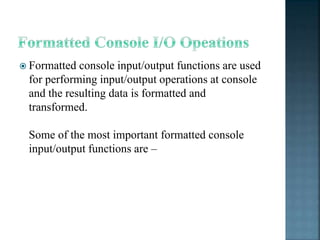
 Formatted console input/output functions are used
for performing input/output operations at console
and the resulting data is formatted and
transformed.
Some of the most important formatted console
input/output functions are –
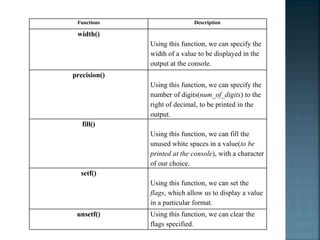
Functions Description
width()
Using this function, we can specify the
width of a value to be displayed in the
output at the console.
precision()
Using this function, we can specify the
number of digits(num_of_digits) to the
right of decimal, to be printed in the
output.
fill()
Using this function, we can fill the
unused white spaces in a value(to be
printed at the console), with a character
of our choice.
setf()
Using this function, we can set the
flags, which allow us to display a value
in a particular format.
unsetf() Using this function, we can clear the
flags specified.
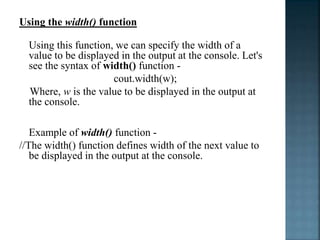
Using the width() function
Using this function, we can specify the width of a
value to be displayed in the output at the console. Let's
see the syntax of width() function -
cout.width(w);
Where, w is the value to be displayed in the output at
the console.
Example of width() function -
//The width() function defines width of the next value to
be displayed in the output at the console.
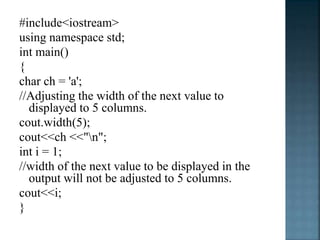
#include<iostream>
using namespace std;
int main()
{
char ch = 'a';
//Adjusting the width of the next value to
displayed to 5 columns.
cout.width(5);
cout<<ch <<"n";
int i = 1;
//width of the next value to be displayed in the
output will not be adjusted to 5 columns.
cout<<i;
}
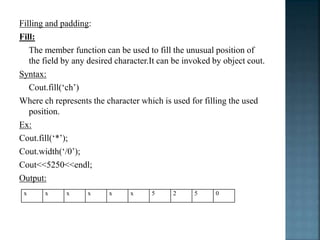
Filling and padding:
Fill:
The member function can be used to fill the unusual position of
the field by any desired character.It can be invoked by object cout.
Syntax:
Cout.fill(‘ch’)
Where ch represents the character which is used for filling the used
position.
Ex:
Cout.fill(‘*’);
Cout.width(‘/0’);
Cout<<5250<<endl;
Output:
x x x x x x 5 2 5 0
#include<iostream.h>
#include<conio.h>
Using name space std;
Void main( )
{
Cout.full(‘<’);
Cout.precision(3);
For(int n=1;n<=6;n++)
{
Cout.width(5);
Cout<<n;
Cout.width(10);
Cout<<1.0/float(n)<<endl;
If(n==3)
Cout.fill(‘>’);
}
Cout<<”/n padding changed/n”;
Cout.fill(‘#’); //fill( )reset
Cout.width(15);
Cout<<12.345678<<endl;
}
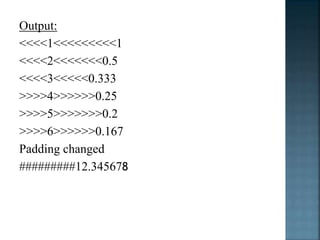
Output:
<<<<1<<<<<<<<<1
<<<<2<<<<<<<0.5
<<<<3<<<<<0.333
>>>>4>>>>>>0.25
>>>>5>>>>>>>0.2
>>>>6>>>>>>0.167
Padding changed
#########12.345678
Setf( )
It is a member function of ios class.It is used to set
flags. It can be invoked by using the object cout.
Syntax:
Cout.setf(arg1,arg2);
Where arg1 is one of the formatting flags define in the class
ios arg2 is nothing but a bitfield. Hence formatting flag says
the format action for her output.
ios::skipus 5.skip white space on input
ios::unitpuf 6.flush all stream after all insertion
ios::stdio 7.flush stdout and stderr after insertion
Note:
The flags set by setup( ) remain effective until they are
reset.
A format flag can be reset any no. of time in a programme.
Managing output with manipulators:
The header file iomanip provides a set of
functions called manipulators. They are used to
manipulate the output formats.
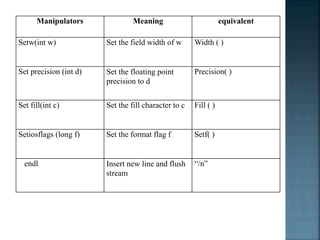
Manipulators and their meanings:
Manipulators Meaning equivalent
Setw(int w) Set the field width of w Width ( )
Set precision (int d) Set the floating point
precision to d
Precision( )
Set fill(int c) Set the fill character to c Fill ( )
Setiosflags (long f) Set the format flag f Setf( )
endl Insert new line and flush
stream
“/n”
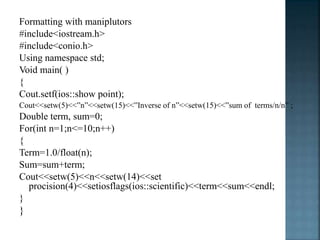
Formatting with maniplutors
#include<iostream.h>
#include<conio.h>
Using namespace std;
Void main( )
{
Cout.setf(ios::show point);
Cout<<setw(5)<<”n”<<setw(15)<<”Inverse of n”<<setw(15)<<”sum of terms/n/n” ;
Double term, sum=0;
For(int n=1;n<=10;n++)
{
Term=1.0/float(n);
Sum=sum+term;
Cout<<setw(5)<<n<<setw(14)<<set
procision(4)<<setiosflags(ios::scientific)<<term<<sum<<endl;
}
}
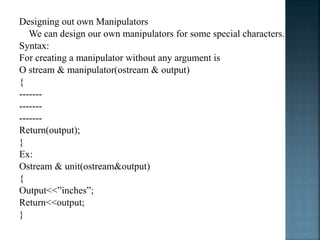
Designing out own Manipulators
We can design our own manipulators for some special characters.
Syntax:
For creating a manipulator without any argument is
O stream & manipulator(ostream & output)
{
-------
-------
-------
Return(output);
}
Ex:
Ostream & unit(ostream&output)
{
Output<<”inches”;
Return<<output;
}
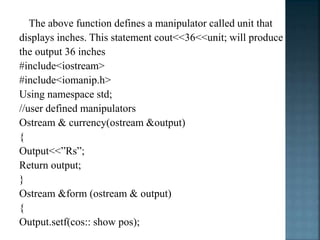
The above function defines a manipulator called unit that
displays inches. This statement cout<<36<<unit; will produce
the output 36 inches
#include<iostream>
#include<iomanip.h>
Using namespace std;
//user defined manipulators
Ostream & currency(ostream &output)
{
Output<<”Rs”;
Return output;
}
Ostream &form (ostream & output)
{
Output.setf(cos:: show pos);
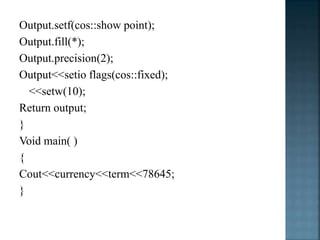
Output.setf(cos::show point);
Output.fill(*);
Output.precision(2);
Output<<setio flags(cos::fixed);
<<setw(10);
Return output;
}
Void main( )
{
Cout<<currency<<term<<78645;
}

Formatted Console I/O Operations in C++

  • 1.
  • 2.
     Formatted consoleinput/output functions are used for performing input/output operations at console and the resulting data is formatted and transformed. Some of the most important formatted console input/output functions are –
  • 3.
    Functions Description width() Using thisfunction, we can specify the width of a value to be displayed in the output at the console. precision() Using this function, we can specify the number of digits(num_of_digits) to the right of decimal, to be printed in the output. fill() Using this function, we can fill the unused white spaces in a value(to be printed at the console), with a character of our choice. setf() Using this function, we can set the flags, which allow us to display a value in a particular format. unsetf() Using this function, we can clear the flags specified.
  • 4.
    Using the width()function Using this function, we can specify the width of a value to be displayed in the output at the console. Let's see the syntax of width() function - cout.width(w); Where, w is the value to be displayed in the output at the console. Example of width() function - //The width() function defines width of the next value to be displayed in the output at the console.
  • 5.
    #include<iostream> using namespace std; intmain() { char ch = 'a'; //Adjusting the width of the next value to displayed to 5 columns. cout.width(5); cout<<ch <<"n"; int i = 1; //width of the next value to be displayed in the output will not be adjusted to 5 columns. cout<<i; }
  • 6.
    Filling and padding: Fill: Themember function can be used to fill the unusual position of the field by any desired character.It can be invoked by object cout. Syntax: Cout.fill(‘ch’) Where ch represents the character which is used for filling the used position. Ex: Cout.fill(‘*’); Cout.width(‘/0’); Cout<<5250<<endl; Output: x x x x x x 5 2 5 0
  • 7.
    #include<iostream.h> #include<conio.h> Using name spacestd; Void main( ) { Cout.full(‘<’); Cout.precision(3); For(int n=1;n<=6;n++) { Cout.width(5); Cout<<n; Cout.width(10); Cout<<1.0/float(n)<<endl; If(n==3) Cout.fill(‘>’); } Cout<<”/n padding changed/n”; Cout.fill(‘#’); //fill( )reset Cout.width(15); Cout<<12.345678<<endl; }
  • 8.
  • 9.
    Setf( ) It isa member function of ios class.It is used to set flags. It can be invoked by using the object cout. Syntax: Cout.setf(arg1,arg2); Where arg1 is one of the formatting flags define in the class ios arg2 is nothing but a bitfield. Hence formatting flag says the format action for her output. ios::skipus 5.skip white space on input ios::unitpuf 6.flush all stream after all insertion ios::stdio 7.flush stdout and stderr after insertion Note: The flags set by setup( ) remain effective until they are reset. A format flag can be reset any no. of time in a programme.
  • 10.
    Managing output withmanipulators: The header file iomanip provides a set of functions called manipulators. They are used to manipulate the output formats. Manipulators and their meanings:
  • 11.
    Manipulators Meaning equivalent Setw(intw) Set the field width of w Width ( ) Set precision (int d) Set the floating point precision to d Precision( ) Set fill(int c) Set the fill character to c Fill ( ) Setiosflags (long f) Set the format flag f Setf( ) endl Insert new line and flush stream “/n”
  • 12.
    Formatting with maniplutors #include<iostream.h> #include<conio.h> Usingnamespace std; Void main( ) { Cout.setf(ios::show point); Cout<<setw(5)<<”n”<<setw(15)<<”Inverse of n”<<setw(15)<<”sum of terms/n/n” ; Double term, sum=0; For(int n=1;n<=10;n++) { Term=1.0/float(n); Sum=sum+term; Cout<<setw(5)<<n<<setw(14)<<set procision(4)<<setiosflags(ios::scientific)<<term<<sum<<endl; } }
  • 13.
    Designing out ownManipulators We can design our own manipulators for some special characters. Syntax: For creating a manipulator without any argument is O stream & manipulator(ostream & output) { ------- ------- ------- Return(output); } Ex: Ostream & unit(ostream&output) { Output<<”inches”; Return<<output; }
  • 14.
    The above functiondefines a manipulator called unit that displays inches. This statement cout<<36<<unit; will produce the output 36 inches #include<iostream> #include<iomanip.h> Using namespace std; //user defined manipulators Ostream & currency(ostream &output) { Output<<”Rs”; Return output; } Ostream &form (ostream & output) { Output.setf(cos:: show pos);
  • 15.