Contents
 Managing I/O console
 C++ Stream Classes
 Formatted and Unformatted Console I/O
 Usage of Manipulators
Managing I/O console
 C++ supports a rich set of I/O functions and
operations.
 It uses the concept of stream and stream classes to
implement its I/O operations with the console and
disk files.
C++ Streams
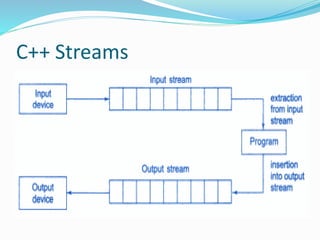
 The I/O system supplies an interface to the programmer
that is independent of the actual device being accessed.
 This interface is known as stream.
 A stream is a sequence of bytes.
 The source stream that provides data to the program is
called the input stream.
 The destination stream that receives output from the
program is called the output stream.
C++ Streams
C++ Stream Classes
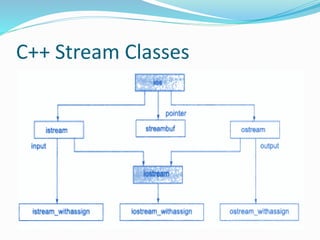
 The C++ I/O system contains a hierarchy of classes
that are used to define various streams to deal with
both the console and disk files.
 These classes are called stream classes.
 These classes are declared in the header file iostream.
C++ Stream Classes
C++ Stream Classes
 The class ios provides the basic support for formatted and
unformatted I/O operations.
 The class istream provides the facilities for formatted and
unformatted input while the class ostream provides the facilities
for formatted output.
 The class iostream provides the facilities for handling both input
and output streams.
 Three classes istream_withassign, ostream_withassign and
iostream_withassign add assignment opreators to these classes.
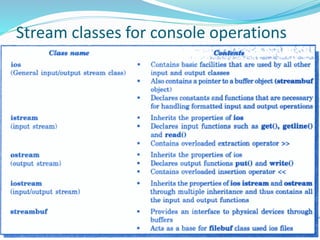
Stream classes for console operations
Unformatted I/O Operations
 Overloaded Operators >> and <<
 put() and get() functions
 getline() and write() functions
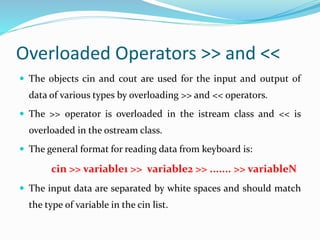
Overloaded Operators >> and <<
 The objects cin and cout are used for the input and output of
data of various types by overloading >> and << operators.
 The >> operator is overloaded in the istream class and << is
overloaded in the ostream class.
 The general format for reading data from keyboard is:
cin >> variable1 >> variable2 >> ....... >> variableN
 The input data are separated by white spaces and should match
the type of variable in the cin list.
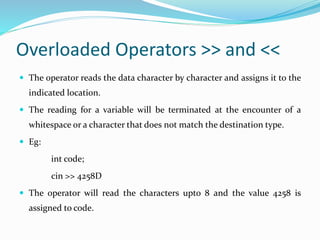
Overloaded Operators >> and <<
 The operator reads the data character by character and assigns it to the
indicated location.
 The reading for a variable will be terminated at the encounter of a
whitespace or a character that does not match the destination type.
 Eg:
int code;
cin >> 4258D
 The operator will read the characters upto 8 and the value 4258 is
assigned to code.
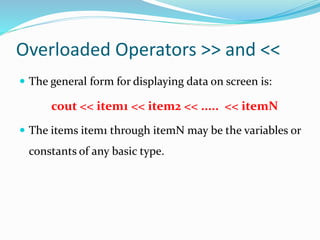
Overloaded Operators >> and <<
 The general form for displaying data on screen is:
cout << item1 << item2 << ..... << itemN
 The items item1 through itemN may be the variables or
constants of any basic type.
put () and get () Functions
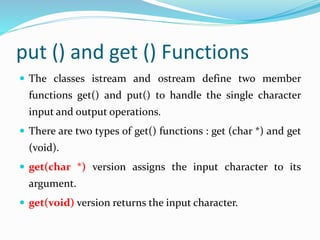
 The classes istream and ostream define two member
functions get() and put() to handle the single character
input and output operations.
 There are two types of get() functions : get (char *) and get
(void).
 get(char *) version assigns the input character to its
argument.
 get(void) version returns the input character.
put () and get () Functions
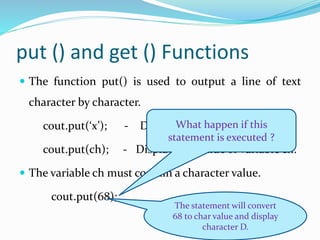
 The function put() is used to output a line of text
character by character.
cout.put(‘x’); - Displays the character x
cout.put(ch); - Displays the value of variable ch.
 The variable ch must contain a character value.
cout.put(68);
What happen if this
statement is executed ?
The statement will convert
68 to char value and display
character D.
getline() and write () Functions
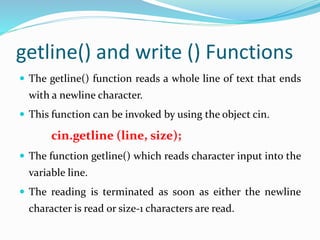
 The getline() function reads a whole line of text that ends
with a newline character.
 This function can be invoked by using the object cin.
cin.getline (line, size);
 The function getline() which reads character input into the
variable line.
 The reading is terminated as soon as either the newline
character is read or size-1 characters are read.
getline() and write () Functions
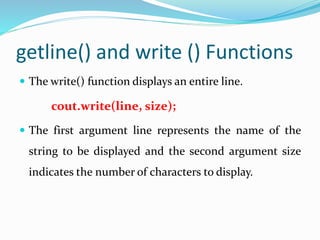
 The write() function displays an entire line.
cout.write(line, size);
 The first argument line represents the name of the
string to be displayed and the second argument size
indicates the number of characters to display.
Formatted I/O Operations
 C++ supports a number of features that could be used
for formatting the output.
 ios class functions and flags
 Manipulators
 User-defined output functions.
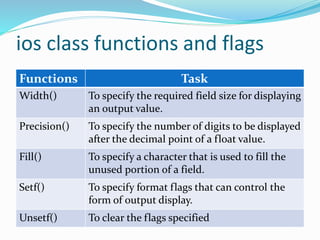
ios class functions and flags
Functions Task
Width() To specify the required field size for displaying
an output value.
Precision() To specify the number of digits to be displayed
after the decimal point of a float value.
Fill() To specify a character that is used to fill the
unused portion of a field.
Setf() To specify format flags that can control the
form of output display.
Unsetf() To clear the flags specified
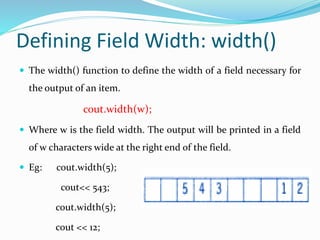
Defining Field Width: width()
 The width() function to define the width of a field necessary for
the output of an item.
cout.width(w);
 Where w is the field width. The output will be printed in a field
of w characters wide at the right end of the field.
 Eg: cout.width(5);
cout<< 543;
cout.width(5);
cout << 12;
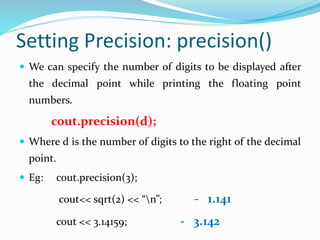
Setting Precision: precision()
 We can specify the number of digits to be displayed after
the decimal point while printing the floating point
numbers.
cout.precision(d);
 Where d is the number of digits to the right of the decimal
point.
 Eg: cout.precision(3);
cout<< sqrt(2) << “n”; - 1.141
cout << 3.14159; - 3.142
Filling and Padding: fill()
 The unused positions of the field are filled with white spaces.
 However, the fill() function can be used to fill the unused
positions by any desired character.
cout.fill(ch);
 Where ch represents the character which is used for filling the
unused positions.
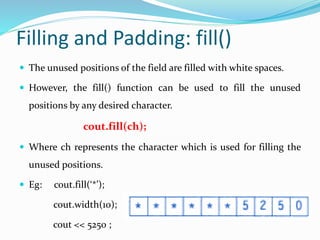
 Eg: cout.fill(‘*’);
cout.width(10);
cout << 5250 ;
Formatting Flags, Bit-fields and
setf()
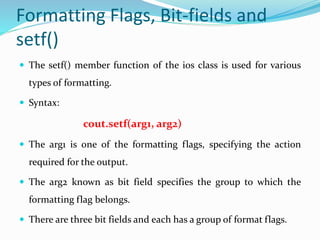
 The setf() member function of the ios class is used for various
types of formatting.
 Syntax:
cout.setf(arg1, arg2)
 The arg1 is one of the formatting flags, specifying the action
required for the output.
 The arg2 known as bit field specifies the group to which the
formatting flag belongs.
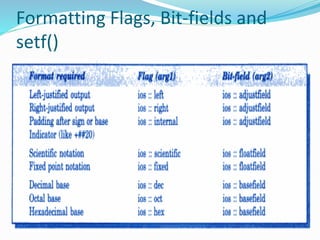
 There are three bit fields and each has a group of format flags.
Formatting Flags, Bit-fields and
setf()
Formatting Flags, Bit-fields and
setf()
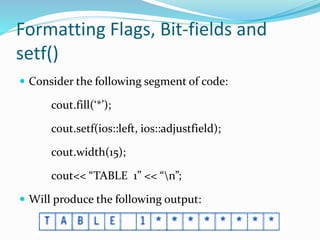
 Consider the following segment of code:
cout.fill(‘*’);
cout.setf(ios::left, ios::adjustfield);
cout.width(15);
cout<< “TABLE 1” << “n”;
 Will produce the following output:
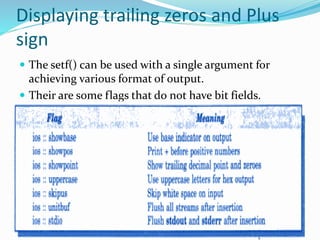
Displaying trailing zeros and Plus
sign
 The setf() can be used with a single argument for
achieving various format of output.
 Their are some flags that do not have bit fields.
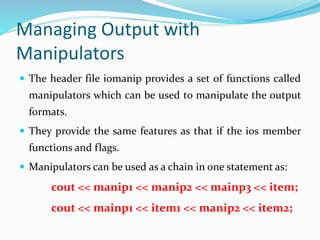
Managing Output with
Manipulators
 The header file iomanip provides a set of functions called
manipulators which can be used to manipulate the output
formats.
 They provide the same features as that if the ios member
functions and flags.
 Manipulators can be used as a chain in one statement as:
cout << manip1 << manip2 << mainp3 << item;
cout << mainp1 << item1 << manip2 << item2;
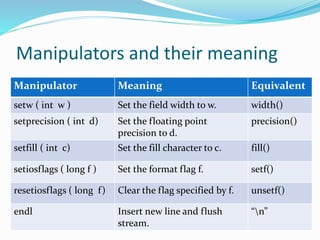
Manipulators and their meaning
Manipulator Meaning Equivalent
setw ( int w ) Set the field width to w. width()
setprecision ( int d) Set the floating point
precision to d.
precision()
setfill ( int c) Set the fill character to c. fill()
setiosflags ( long f ) Set the format flag f. setf()
resetiosflags ( long f) Clear the flag specified by f. unsetf()
endl Insert new line and flush
stream.
“n”
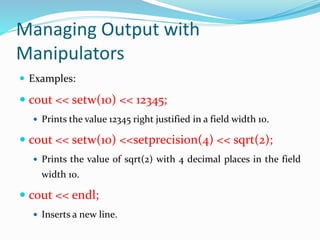
Managing Output with
Manipulators
 Examples:
 cout << setw(10) << 12345;
 Prints the value 12345 right justified in a field width 10.
 cout << setw(10) <<setprecision(4) << sqrt(2);
 Prints the value of sqrt(2) with 4 decimal places in the field
width 10.
 cout << endl;
 Inserts a new line.
User-defined output functions
 The programmer can also define his own manipulator
according to the requirement of the program.
 Syntax:
ostream & m_name (ostream & o)
{
statement 1;
statement 2;
return 0;
}
 The m_name is the name of the manipulator.
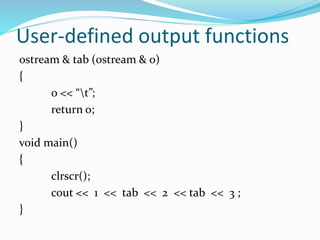
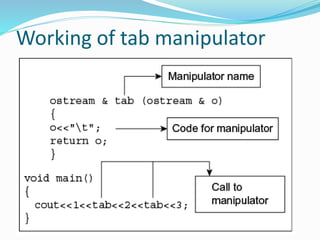
User-defined output functions
ostream & tab (ostream & o)
{
o << “t”;
return o;
}
void main()
{
clrscr();
cout << 1 << tab << 2 << tab << 3 ;
}
Working of tab manipulator
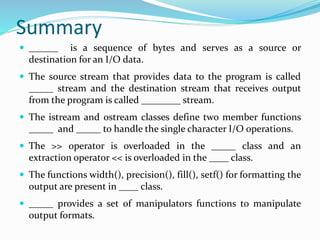
Summary
 ______ is a sequence of bytes and serves as a source or
destination for an I/O data.
 The source stream that provides data to the program is called
_____ stream and the destination stream that receives output
from the program is called ________ stream.
 The istream and ostream classes define two member functions
_____ and _____ to handle the single character I/O operations.
 The >> operator is overloaded in the _____ class and an
extraction operator << is overloaded in the ____ class.
 The functions width(), precision(), fill(), setf() for formatting the
output are present in ____ class.
 _____ provides a set of manipulators functions to manipulate
output formats.
Short Answer Questions
 Discuss the various forms of get() functions supported
by the input stream. How are they used?
 There are two types of get() functions : get (char *) and
get (void).
 get(char *) version assigns the input character to its
argument.
 get(void) version returns the input character.
Short Answer Questions
 How do the following two statements differ in operation?
cin >> c;
cin.get(c);
 The first statement using the overloaded >> operator will skip
the white spaces and newline character.
 The second statement will fetch a character including the
blank space, tab and newline character.
Short Answer Questions
 What does the following statement do?
cout.write(s1,m).write(s2,n);
 The above statement is used to concatenate two strings using
the write() function.
 What is the difference between put() and write() ?
 The put() is used to output a line of test character by
character.
 The write() is used to display an entire line.
Short Answer Questions
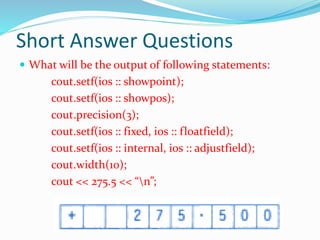
 What will be the output of following statements:
cout.setf(ios :: showpoint);
cout.setf(ios :: showpos);
cout.precision(3);
cout.setf(ios :: fixed, ios :: floatfield);
cout.setf(ios :: internal, ios :: adjustfield);
cout.width(10);
cout << 275.5 << “n”;
Short Answer Questions
 What is the basic difference between manipulators
and ios member functions in implementation? Give
examples.
 Manipulators are more convenient to use than compare
to ios member functions.
 The manipulators cab ne used as a chain in one
statement as:
cout << manip1 << manip2 << manip3 << item;
References
 Object Oriented Programming with C++ by E.
Balagurusamy.
Managing I/O in c++

Managing I/O in c++

  • 2.
    Contents  Managing I/Oconsole  C++ Stream Classes  Formatted and Unformatted Console I/O  Usage of Manipulators
  • 3.
    Managing I/O console C++ supports a rich set of I/O functions and operations.  It uses the concept of stream and stream classes to implement its I/O operations with the console and disk files.
  • 4.
    C++ Streams  TheI/O system supplies an interface to the programmer that is independent of the actual device being accessed.  This interface is known as stream.  A stream is a sequence of bytes.  The source stream that provides data to the program is called the input stream.  The destination stream that receives output from the program is called the output stream.
  • 5.
  • 6.
    C++ Stream Classes The C++ I/O system contains a hierarchy of classes that are used to define various streams to deal with both the console and disk files.  These classes are called stream classes.  These classes are declared in the header file iostream.
  • 7.
  • 8.
    C++ Stream Classes The class ios provides the basic support for formatted and unformatted I/O operations.  The class istream provides the facilities for formatted and unformatted input while the class ostream provides the facilities for formatted output.  The class iostream provides the facilities for handling both input and output streams.  Three classes istream_withassign, ostream_withassign and iostream_withassign add assignment opreators to these classes.
  • 9.
    Stream classes forconsole operations
  • 10.
    Unformatted I/O Operations Overloaded Operators >> and <<  put() and get() functions  getline() and write() functions
  • 11.
    Overloaded Operators >>and <<  The objects cin and cout are used for the input and output of data of various types by overloading >> and << operators.  The >> operator is overloaded in the istream class and << is overloaded in the ostream class.  The general format for reading data from keyboard is: cin >> variable1 >> variable2 >> ....... >> variableN  The input data are separated by white spaces and should match the type of variable in the cin list.
  • 12.
    Overloaded Operators >>and <<  The operator reads the data character by character and assigns it to the indicated location.  The reading for a variable will be terminated at the encounter of a whitespace or a character that does not match the destination type.  Eg: int code; cin >> 4258D  The operator will read the characters upto 8 and the value 4258 is assigned to code.
  • 13.
    Overloaded Operators >>and <<  The general form for displaying data on screen is: cout << item1 << item2 << ..... << itemN  The items item1 through itemN may be the variables or constants of any basic type.
  • 14.
    put () andget () Functions  The classes istream and ostream define two member functions get() and put() to handle the single character input and output operations.  There are two types of get() functions : get (char *) and get (void).  get(char *) version assigns the input character to its argument.  get(void) version returns the input character.
  • 15.
    put () andget () Functions  The function put() is used to output a line of text character by character. cout.put(‘x’); - Displays the character x cout.put(ch); - Displays the value of variable ch.  The variable ch must contain a character value. cout.put(68); What happen if this statement is executed ? The statement will convert 68 to char value and display character D.
  • 16.
    getline() and write() Functions  The getline() function reads a whole line of text that ends with a newline character.  This function can be invoked by using the object cin. cin.getline (line, size);  The function getline() which reads character input into the variable line.  The reading is terminated as soon as either the newline character is read or size-1 characters are read.
  • 17.
    getline() and write() Functions  The write() function displays an entire line. cout.write(line, size);  The first argument line represents the name of the string to be displayed and the second argument size indicates the number of characters to display.
  • 18.
    Formatted I/O Operations C++ supports a number of features that could be used for formatting the output.  ios class functions and flags  Manipulators  User-defined output functions.
  • 19.
    ios class functionsand flags Functions Task Width() To specify the required field size for displaying an output value. Precision() To specify the number of digits to be displayed after the decimal point of a float value. Fill() To specify a character that is used to fill the unused portion of a field. Setf() To specify format flags that can control the form of output display. Unsetf() To clear the flags specified
  • 20.
    Defining Field Width:width()  The width() function to define the width of a field necessary for the output of an item. cout.width(w);  Where w is the field width. The output will be printed in a field of w characters wide at the right end of the field.  Eg: cout.width(5); cout<< 543; cout.width(5); cout << 12;
  • 21.
    Setting Precision: precision() We can specify the number of digits to be displayed after the decimal point while printing the floating point numbers. cout.precision(d);  Where d is the number of digits to the right of the decimal point.  Eg: cout.precision(3); cout<< sqrt(2) << “n”; - 1.141 cout << 3.14159; - 3.142
  • 22.
    Filling and Padding:fill()  The unused positions of the field are filled with white spaces.  However, the fill() function can be used to fill the unused positions by any desired character. cout.fill(ch);  Where ch represents the character which is used for filling the unused positions.  Eg: cout.fill(‘*’); cout.width(10); cout << 5250 ;
  • 23.
    Formatting Flags, Bit-fieldsand setf()  The setf() member function of the ios class is used for various types of formatting.  Syntax: cout.setf(arg1, arg2)  The arg1 is one of the formatting flags, specifying the action required for the output.  The arg2 known as bit field specifies the group to which the formatting flag belongs.  There are three bit fields and each has a group of format flags.
  • 24.
  • 25.
    Formatting Flags, Bit-fieldsand setf()  Consider the following segment of code: cout.fill(‘*’); cout.setf(ios::left, ios::adjustfield); cout.width(15); cout<< “TABLE 1” << “n”;  Will produce the following output:
  • 26.
    Displaying trailing zerosand Plus sign  The setf() can be used with a single argument for achieving various format of output.  Their are some flags that do not have bit fields.
  • 27.
    Managing Output with Manipulators The header file iomanip provides a set of functions called manipulators which can be used to manipulate the output formats.  They provide the same features as that if the ios member functions and flags.  Manipulators can be used as a chain in one statement as: cout << manip1 << manip2 << mainp3 << item; cout << mainp1 << item1 << manip2 << item2;
  • 28.
    Manipulators and theirmeaning Manipulator Meaning Equivalent setw ( int w ) Set the field width to w. width() setprecision ( int d) Set the floating point precision to d. precision() setfill ( int c) Set the fill character to c. fill() setiosflags ( long f ) Set the format flag f. setf() resetiosflags ( long f) Clear the flag specified by f. unsetf() endl Insert new line and flush stream. “n”
  • 29.
    Managing Output with Manipulators Examples:  cout << setw(10) << 12345;  Prints the value 12345 right justified in a field width 10.  cout << setw(10) <<setprecision(4) << sqrt(2);  Prints the value of sqrt(2) with 4 decimal places in the field width 10.  cout << endl;  Inserts a new line.
  • 30.
    User-defined output functions The programmer can also define his own manipulator according to the requirement of the program.  Syntax: ostream & m_name (ostream & o) { statement 1; statement 2; return 0; }  The m_name is the name of the manipulator.
  • 31.
    User-defined output functions ostream& tab (ostream & o) { o << “t”; return o; } void main() { clrscr(); cout << 1 << tab << 2 << tab << 3 ; }
  • 32.
    Working of tabmanipulator
  • 33.
    Summary  ______ isa sequence of bytes and serves as a source or destination for an I/O data.  The source stream that provides data to the program is called _____ stream and the destination stream that receives output from the program is called ________ stream.  The istream and ostream classes define two member functions _____ and _____ to handle the single character I/O operations.  The >> operator is overloaded in the _____ class and an extraction operator << is overloaded in the ____ class.  The functions width(), precision(), fill(), setf() for formatting the output are present in ____ class.  _____ provides a set of manipulators functions to manipulate output formats.
  • 34.
    Short Answer Questions Discuss the various forms of get() functions supported by the input stream. How are they used?  There are two types of get() functions : get (char *) and get (void).  get(char *) version assigns the input character to its argument.  get(void) version returns the input character.
  • 35.
    Short Answer Questions How do the following two statements differ in operation? cin >> c; cin.get(c);  The first statement using the overloaded >> operator will skip the white spaces and newline character.  The second statement will fetch a character including the blank space, tab and newline character.
  • 36.
    Short Answer Questions What does the following statement do? cout.write(s1,m).write(s2,n);  The above statement is used to concatenate two strings using the write() function.  What is the difference between put() and write() ?  The put() is used to output a line of test character by character.  The write() is used to display an entire line.
  • 37.
    Short Answer Questions What will be the output of following statements: cout.setf(ios :: showpoint); cout.setf(ios :: showpos); cout.precision(3); cout.setf(ios :: fixed, ios :: floatfield); cout.setf(ios :: internal, ios :: adjustfield); cout.width(10); cout << 275.5 << “n”;
  • 38.
    Short Answer Questions What is the basic difference between manipulators and ios member functions in implementation? Give examples.  Manipulators are more convenient to use than compare to ios member functions.  The manipulators cab ne used as a chain in one statement as: cout << manip1 << manip2 << manip3 << item;
  • 39.
    References  Object OrientedProgramming with C++ by E. Balagurusamy.