FOAF: Friend of a Friend


   Rajendra Akerkar
   Western Norway Research Institute
   Sogndal, Norway


                  R. Akerkar           1
   Real world
    Real-world examples
   How the Semantic Web looks like, especially
    in the area of social networking
   A chance to practice what we have learned
    about RDF, RDFS and OWL
           RDF


                       R. Akerkar                 2
Simple social networking

   Tons of millions of personal Web pages on
    the Web
   The author often provides some personal
    information
   The author may also include some links to
    his/her friends
   With this network we can answer questions
               network,
    such as “who has the same interest as I do?”,

                       R. Akerkar               3
Motivation

   To make these personal web documents
    understandable to an application, two major
    steps have to be accomplished:
       p                   p
       a machine-readable ontology about person has to
        be created
       each personal home page has to be marked up,
        i.e., it has to be connected to some RDF
        statement document written by using this
          t t       td        t itt b      i thi
        ontology.


                           R. Akerkar                     4
Birth

   Founded by Dan Brickley and Libby Miller in
    the mid 2000
   FOAF is an open community-lead initiative
    with the goal of creating a machine-readable
    Web of data in the area of personal home
    pages and social networking.


                       R. Akerkar                  5
Machine-readable Web of data

   Just like the HTML version of your home
    page,
   FOAF documents can be linked together to
    form a Web of data.
   The difference is that this web of data is
    formed with well-defined semantics,
    expressed in the person ontology
                               ontology.


                       R. Akerkar                6
FOAF = Vocabulary

   (or, ontology) which includes the basic terms
    to describe personal information, such as
       who you are?
       what you do?
       and who your friends are?

   It serves as a standard for everyone who
    wants to mark up their home pages and turn
    them into the documents that can be
    p
    processed by machines.
                 y
                           R. Akerkar               7
   Official Web site can be found at
       http://www.foaf-project.org/


   An official definition of FOAF:
       The Friend of a Friend (FOAF) project is creating
        a Web of machine-readable pages describing
        people, the links between them and the things
        they create and do.


                             R. Akerkar                     8
   FOAF ontology is not a standard fromW3C; it is
    managed by following the style of an Open
    Source or Free Software project standards and
    maintained b a community of d
      i i d by               i   f developers.
                                       l

   However, FOAF does depend on W3C
    standards, such as RDF and OWL
       FOAF ontology is written in OWL.
             ontolog      ritten OWL
       FOAF documents must be well-formed RDF
        documents.

                          R. Akerkar             9
Specifications

   FOAF ontology s official specification can be
          ontology’s
    found at the location
       http://xmlns.com/foaf/spec/
   the FOAF ontology itself can be found (and
    downloaded) from the following URL:
       http://xmlns.com/foaf/spec/index.rdf
   A wiki site for FOAF project
       http://wiki.foaf-project.org/w/Main_Page


                             R. Akerkar             10
   FOAF ontology is a collection of terms and all
    these terms are identified by pre-defined
    URIs, which all share the following leading
    string:
       i
       http://xmlns.com/foaf/0.1/

   and by convention, this URI prefix string is
    associated with namespace prefix foaf: and
    is typically used in RDF/XML format with the
    p
    prefix foaf.

                             R. Akerkar          11
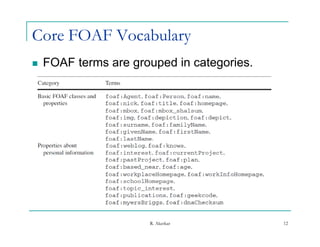
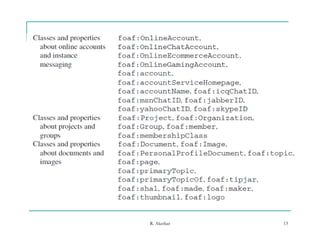
Core FOAF Vocabulary
   FOAF terms are grouped in categories.


                      R. Akerkar            12
R. Akerkar   13
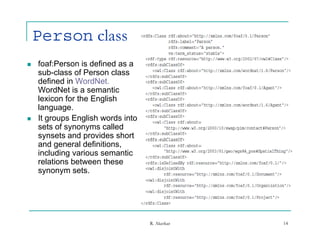
Person class
   foaf:Person is defined as a
    sub-class of Person class
    defined in WordNet.
    WordNet is a semantic
    lexicon for the English
    language.
    language
   It groups English words into
    sets of synonyms called
    synsets and p
      y           provides short
    and general definitions,
    including various semantic
    relations between these
    synonym sets
              sets.


                                   R. Akerkar   14
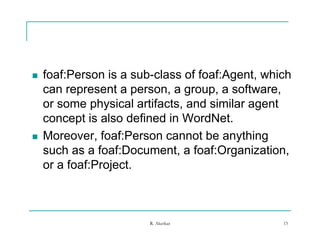
   foaf:Person is a sub-class of foaf:Agent which
                      sub class foaf:Agent,
    can represent a person, a group, a software,
    or some physical artifacts, and similar agent
              p y              ,             g
    concept is also defined in WordNet.
   Moreover, foaf:Person cannot be anything
    such as a foaf:Document, a foaf:Organization,
    or a foaf:Project.
                  j


                       R. Akerkar               15
Properties
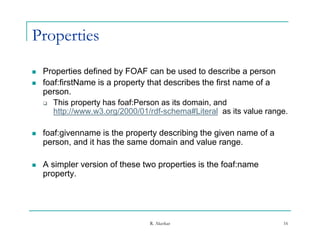
   Properties defined by FOAF can be used to describe a person
   foaf:firstName is a property that describes the first name of a
    person.
     This property has foaf:Person as its domain, and
       http://www.w3.org/2000/01/rdf-schema#Literal as its value range.

   foaf:givenname is the property describing the given name of a
    person, and it h th same d
               d has the        domain and value range.
                                      i    d l

   A simpler version of these two properties is the foaf:name
    property.


                                 R. Akerkar                          16
Properties

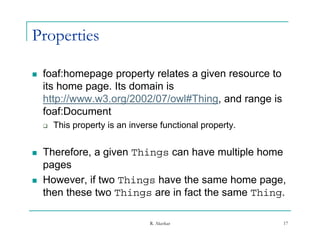
   foaf:homepage property relates a given resource to
    its home page. Its domain is
    http://www.w3.org/2002/07/owl#Thing, and range is
    foaf:Document
    f fD         t
       This property is an inverse functional property.


   Therefore, a given Things can have multiple home
    p g
    pages
   However, if two Things have the same home page,
    then these two Things are in fact the same Thing.

                                 R. Akerkar                17
Properties

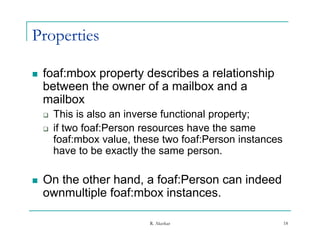
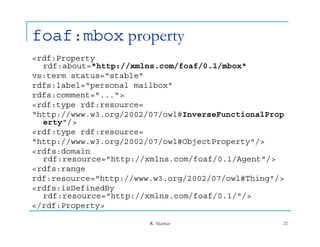
   foaf:mbox property describes a relationship
    between the owner of a mailbox and a
    mailbox
       This is also an inverse functional property;
       if two foaf:Person resources have the same
        foaf:mbox value, these two foaf:Person instances
                    value
        have to be exactly the same person.

   On the other hand, a foaf:Person can indeed
    ownmultiple foaf:mbox instances.

                            R. Akerkar                     18
Example of using foaf:Person
1: <rdf:RDF
1a: xmlns:rdf="http://www.w3.org/1999/02/22-rdf-syntax-
                     //          /    / /
   ns#"
2: xmlns:foaf="http://xmlns.com/foaf/0.1/">
3:
4: <foaf:Person>
5: <foaf:name>Rajendra Akerkar</foaf:name>
6: <foaf:mbox
   rdf:resource="mailto:akerkar8@gmail.com"/>
   rdf reso rce "mailto akerkar8@gmail com"/
7: </foaf:Person>
8:
9:</rdf:RDF>
    /

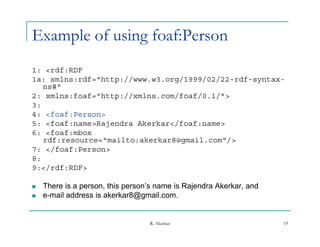
   There is a person, this person’s name is Rajendra Akerkar, and
   e-mail address is akerkar8@gmail.com.


                                  R. Akerkar                         19
Broken one of the most important SW
rules
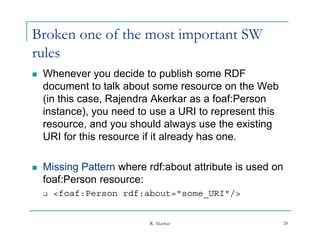
   Whenever you decide to publish some RDF
    document to talk about some resource on the Web
    (in this case, Rajendra Akerkar as a foaf:Person
    instance), you need t use a URI t represent thi
    i t       )        d to              to       t this
    resource, and you should always use the existing
    URI for this resource if it already has one.

   Missing Pattern where rdf:about attribute is used on
    foaf:Person resource:
       <foaf:Person rdf:about="some_URI"/>


                           R. Akerkar                      20
foaf:mbox property
<rdf:Property
   rdf:about="http://xmlns.com/foaf/0.1/mbox"
vs:term status="stable"
          status= stable
rdfs:label="personal mailbox"
rdfs:comment="...">
<rdf:type rdf:resource=
       yp
"http://www.w3.org/2002/07/owl#InverseFunctionalProp
   erty"/>
<rdf:type rdf:resource=
"http://www.w3.org/2002/07/owl#ObjectProperty"/>
 h     //           /    / / l# bj             /
<rdfs:domain
   rdf:resource="http://xmlns.com/foaf/0.1/Agent"/>
<rdfs:range
rdf:resource="http://www.w3.org/2002/07/owl#Thing"/>
<rdfs:isDefinedBy
   rdf:resource="http://xmlns.com/foaf/0.1/"/>
</rdf:Property>

                        R. Akerkar                 21
My friend’s FAOF document

 <foaf:Person>
 <foaf:nick>Raj Akerkar</foaf:nick>
 <foaf:title>Professor</foaf:title>
 <foaf:mbox
   rdf:resource="mailto:akerkar8@gmail.com"/>
 </foaf:Person>
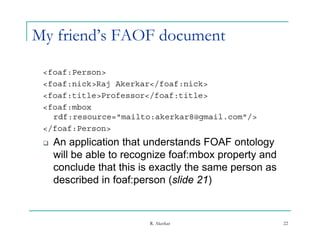
    An
     A application th t understands FOAF ontology
             li ti that d t d                  t l
     will be able to recognize foaf:mbox property and
     conclude that this is exactly the same person as
     described in foaf:person (slide 21)


                         R. Akerkar                     22
foaf:knows property
 1: <foaf:Person>
 2:
 2  <foaf:name>Rajendra Ak k
     f f       R j d    Akerkar</foaf:name>
                                /f f
 3: <foaf:mbox rdf:resource="mailto:akerkar8@gmail.com"/>
 4: <foaf:knows>
 5: <foaf:Person>
 6: <foaf:mbox
   rdf:resource="mailto:john.park@yahoo.com"/>
 7: </foaf:Person>
 8: </foaf:knows>
 9: </foaf:Person>

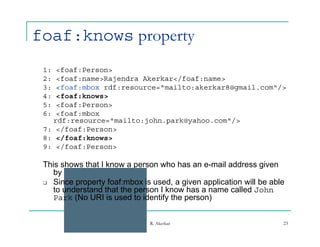
 This shows that I know a person who has an e-mail address given
    by john.park@yahoo.com
    b j
  Since property foaf:mbox is used, a given application will be able
    to understand that the person I know has a name called John
    Park (No URI is used to identify the p
          (                         y    person)
                                               )


                               R. Akerkar                           23
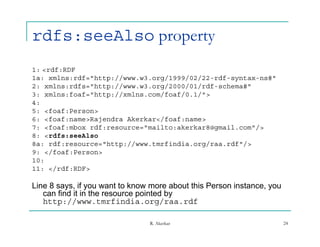
rdfs:seeAlso property
1: <rdf:RDF
1a: xmlns:rdf="http://www.w3.org/1999/02/22-rdf-syntax-ns#"
1      l    df "htt //     3    /1999/02/22 df     t     #"
2: xmlns:rdfs="http://www.w3.org/2000/01/rdf-schema#"
3: xmlns:foaf="http://xmlns.com/foaf/0.1/">
4:
5: <foaf:Person>
6: <foaf:name>Rajendra Akerkar</foaf:name>
7: <foaf:mbox rdf:resource="mailto:akerkar8@gmail.com"/>
8: <rdfs:seeAlso
8a: rdf:resource="http://www.tmrfindia.org/raa.rdf"/>
9: </foaf:Person>
10:
11: </rdf:RDF>

Line 8 says, if you want to know more about this Person instance, you
   can find it in the resource pointed by
   http://www.tmrfindia.org/raa.rdf
   http://www tmrfindia org/raa rdf

                                R. Akerkar                              24
foaf:knows and rdfs:seeAlso to
link RDF documents together
   1: <rdf:RDF
   1a: xmlns:rdf="http://www w3 org/1999/02/22-rdf-syntax-ns#"
        xmlns:rdf= http://www.w3.org/1999/02/22 rdf syntax ns#
   2: xmlns:rdfs="http://www.w3.org/2000/01/rdf-schema#"
   3: xmlns:foaf="http://xmlns.com/foaf/0.1/">
   4:
   5: <foaf:Person>
   6: <foaf:name>Rajendra Akerkar</foaf:name>
                                   /
   7: <foaf:mbox rdf:resource="mailto:akerkar8@gmail.com"/>
   8: <rdfs:seeAlso
   8a: rdf:resource="http://www.tmrfindia.org/raa.rdf"/>
   9: <foaf:knows>
   10: <foaf:Person>
   11: <foaf:mbox rdf:resource="mailto:john.park@yahoo.com"/>
   12: <rdfs:seeAlso
   12a: rdf:resource="http://www.infsys.com/john.rdf"/>
   13: /foaf Person
    13 </foaf:Person>
   14: </foaf:knows>
   15: </foaf:Person>
   16:
   17:</rdf:RDF>


                                   R. Akerkar                     25
   In previous example, an application sees the
    document will move on to access the document
    identified by the following URI:
       http://www.infsys.com/john.rdf
           p           y      j

   By doing so, FOAF aggregators can be built without
    the need for a centrally managed directory of FOAF
    files.

   Thus,
    Thus property rdfs:seeAlso is treated by the
                   df      Al
    FOAF community as the hyperlink of the FOAF
    documents.

                          R. Akerkar                 26
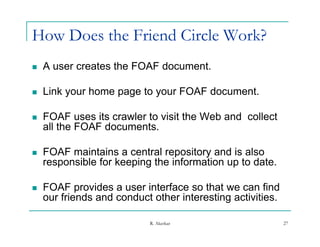
How Does the Friend Circle Work?
   A user creates the FOAF document.

   Link your home page to your FOAF document.

   FOAF uses its crawler to visit the Web and collect
    all the FOAF documents.

   FOAF maintains a central repository and is also
    responsible for keeping the information up to date.

   FOAF provides a user interface so that we can find
    our friends and conduct other interesting activities.
                                            g

                           R. Akerkar                       27
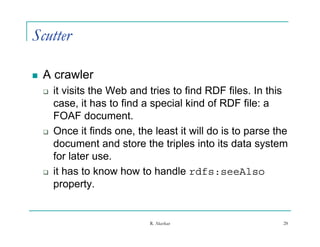
Scutter

   A crawler
       it visits the Web and tries to find RDF files. In this
        case, it has to find a special kind of RDF file: a
              ,                 p
        FOAF document.
       Once it finds one, the least it will do is to parse the
        document and store the triples into its data system
        for later use.
       it has to know how to handle rdfs seeAlso
                                         rdfs:seeAlso
        property.


                              R. Akerkar                     28
A user interface

   FOAF offers some tools one can use to view
    the friends in the circle, which further defines
    the look and feel of the FOAF project. Among
                                     p j           g
    these tools, FOAF explorer is quite popular,
    and you can find this tool as the following
         y                                     g
    location:
       http://xml.mfd-consult.dk/foaf/explorer/


                             R. Akerkar            29
Create Your FOAF Document

   Use a simple text editor
   Or use tools to create FOAF document
       FOAF-a-matic (http://www.ldodds.com/foaf/foaf-a-
        FOAF a matic (http://www ldodds com/foaf/foaf a
        matic.html)


                           R. Akerkar                  30
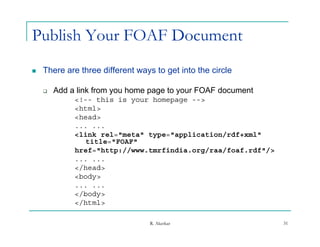
Publish Your FOAF Document
   There are three different ways to get into the circle

       Add a link from you home page to your FOAF document
             <!-- this is your homepage -->
             <html>
             <head>
             ... ...
             <link rel="meta" type="application/rdf+xml"
                title="FOAF"
             href="http://www.tmrfindia.org/raa/foaf.rdf"/>
             ... ...
             </head>
              /
             <body>
             ... ...
             </body>
             </html>
              /ht l

                                  R. Akerkar                  31
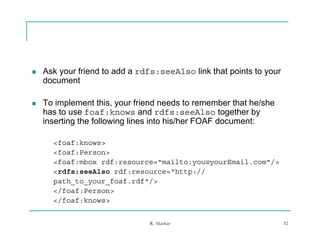
   Ask your friend to add a rdfs:seeAlso link that points to your
    document

   To implement this, your friend needs to remember that he/she
    has to use foaf:knows and rdfs:seeAlso together by
    inserting the following lines into his/her FOAF document:

      <foaf:knows>
      <foaf:Person>
      <foaf:mbox rdf:resource="mailto:you@yourEmail.com"/>
      <rdfs:seeAlso rdf:resource="http://
        df     Al    df          "htt //
      path_to_your_foaf.rdf"/>
      </foaf:Person>
      </foaf:knows>


                               R. Akerkar                            32
   Use the “FOAF Bulletin Board”
             FOAF          Board

   Instead of waiting for FOAF network to find
    you, you can report to it voluntarily.

   You can also use the following URL to
    directly
    di tl access th page:
                  the
       http://wiki.foaf-project.org/w/FOAFBulletinBoard


                            R. Akerkar                     33
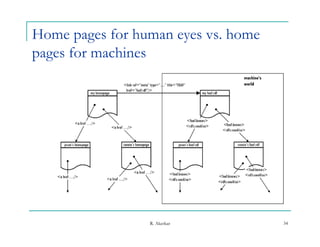
Home pages for human eyes vs. home
pages for machines


                 R. Akerkar          34
R. Akerkar   35

FOAF

  • 1.
    FOAF: Friend ofa Friend Rajendra Akerkar Western Norway Research Institute Sogndal, Norway R. Akerkar 1
  • 2.
    Real world Real-world examples  How the Semantic Web looks like, especially in the area of social networking  A chance to practice what we have learned about RDF, RDFS and OWL RDF R. Akerkar 2
  • 3.
    Simple social networking  Tons of millions of personal Web pages on the Web  The author often provides some personal information  The author may also include some links to his/her friends  With this network we can answer questions network, such as “who has the same interest as I do?”, R. Akerkar 3
  • 4.
    Motivation  To make these personal web documents understandable to an application, two major steps have to be accomplished: p p  a machine-readable ontology about person has to be created  each personal home page has to be marked up, i.e., it has to be connected to some RDF statement document written by using this t t td t itt b i thi ontology. R. Akerkar 4
  • 5.
    Birth  Founded by Dan Brickley and Libby Miller in the mid 2000  FOAF is an open community-lead initiative with the goal of creating a machine-readable Web of data in the area of personal home pages and social networking. R. Akerkar 5
  • 6.
    Machine-readable Web ofdata  Just like the HTML version of your home page,  FOAF documents can be linked together to form a Web of data.  The difference is that this web of data is formed with well-defined semantics, expressed in the person ontology ontology. R. Akerkar 6
  • 7.
    FOAF = Vocabulary  (or, ontology) which includes the basic terms to describe personal information, such as  who you are?  what you do?  and who your friends are?  It serves as a standard for everyone who wants to mark up their home pages and turn them into the documents that can be p processed by machines. y R. Akerkar 7
  • 8.
    Official Web site can be found at  http://www.foaf-project.org/  An official definition of FOAF:  The Friend of a Friend (FOAF) project is creating a Web of machine-readable pages describing people, the links between them and the things they create and do. R. Akerkar 8
  • 9.
    FOAF ontology is not a standard fromW3C; it is managed by following the style of an Open Source or Free Software project standards and maintained b a community of d i i d by i f developers. l  However, FOAF does depend on W3C standards, such as RDF and OWL  FOAF ontology is written in OWL. ontolog ritten OWL  FOAF documents must be well-formed RDF documents. R. Akerkar 9
  • 10.
    Specifications  FOAF ontology s official specification can be ontology’s found at the location  http://xmlns.com/foaf/spec/  the FOAF ontology itself can be found (and downloaded) from the following URL:  http://xmlns.com/foaf/spec/index.rdf  A wiki site for FOAF project  http://wiki.foaf-project.org/w/Main_Page R. Akerkar 10
  • 11.
    FOAF ontology is a collection of terms and all these terms are identified by pre-defined URIs, which all share the following leading string: i  http://xmlns.com/foaf/0.1/  and by convention, this URI prefix string is associated with namespace prefix foaf: and is typically used in RDF/XML format with the p prefix foaf. R. Akerkar 11
  • 12.
    Core FOAF Vocabulary  FOAF terms are grouped in categories. R. Akerkar 12
  • 13.
  • 14.
    Person class  foaf:Person is defined as a sub-class of Person class defined in WordNet. WordNet is a semantic lexicon for the English language. language  It groups English words into sets of synonyms called synsets and p y provides short and general definitions, including various semantic relations between these synonym sets sets. R. Akerkar 14
  • 15.
    foaf:Person is a sub-class of foaf:Agent which sub class foaf:Agent, can represent a person, a group, a software, or some physical artifacts, and similar agent p y , g concept is also defined in WordNet.  Moreover, foaf:Person cannot be anything such as a foaf:Document, a foaf:Organization, or a foaf:Project. j R. Akerkar 15
  • 16.
    Properties  Properties defined by FOAF can be used to describe a person  foaf:firstName is a property that describes the first name of a person.  This property has foaf:Person as its domain, and http://www.w3.org/2000/01/rdf-schema#Literal as its value range.  foaf:givenname is the property describing the given name of a person, and it h th same d d has the domain and value range. i d l  A simpler version of these two properties is the foaf:name property. R. Akerkar 16
  • 17.
    Properties  foaf:homepage property relates a given resource to its home page. Its domain is http://www.w3.org/2002/07/owl#Thing, and range is foaf:Document f fD t  This property is an inverse functional property.  Therefore, a given Things can have multiple home p g pages  However, if two Things have the same home page, then these two Things are in fact the same Thing. R. Akerkar 17
  • 18.
    Properties  foaf:mbox property describes a relationship between the owner of a mailbox and a mailbox  This is also an inverse functional property;  if two foaf:Person resources have the same foaf:mbox value, these two foaf:Person instances value have to be exactly the same person.  On the other hand, a foaf:Person can indeed ownmultiple foaf:mbox instances. R. Akerkar 18
  • 19.
    Example of usingfoaf:Person 1: <rdf:RDF 1a: xmlns:rdf="http://www.w3.org/1999/02/22-rdf-syntax- // / / / ns#" 2: xmlns:foaf="http://xmlns.com/foaf/0.1/"> 3: 4: <foaf:Person> 5: <foaf:name>Rajendra Akerkar</foaf:name> 6: <foaf:mbox rdf:resource="mailto:akerkar8@gmail.com"/> rdf reso rce "mailto akerkar8@gmail com"/ 7: </foaf:Person> 8: 9:</rdf:RDF> /  There is a person, this person’s name is Rajendra Akerkar, and  e-mail address is akerkar8@gmail.com. R. Akerkar 19
  • 20.
    Broken one ofthe most important SW rules  Whenever you decide to publish some RDF document to talk about some resource on the Web (in this case, Rajendra Akerkar as a foaf:Person instance), you need t use a URI t represent thi i t ) d to to t this resource, and you should always use the existing URI for this resource if it already has one.  Missing Pattern where rdf:about attribute is used on foaf:Person resource:  <foaf:Person rdf:about="some_URI"/> R. Akerkar 20
  • 21.
    foaf:mbox property <rdf:Property rdf:about="http://xmlns.com/foaf/0.1/mbox" vs:term status="stable" status= stable rdfs:label="personal mailbox" rdfs:comment="..."> <rdf:type rdf:resource= yp "http://www.w3.org/2002/07/owl#InverseFunctionalProp erty"/> <rdf:type rdf:resource= "http://www.w3.org/2002/07/owl#ObjectProperty"/> h // / / / l# bj / <rdfs:domain rdf:resource="http://xmlns.com/foaf/0.1/Agent"/> <rdfs:range rdf:resource="http://www.w3.org/2002/07/owl#Thing"/> <rdfs:isDefinedBy rdf:resource="http://xmlns.com/foaf/0.1/"/> </rdf:Property> R. Akerkar 21
  • 22.
    My friend’s FAOFdocument <foaf:Person> <foaf:nick>Raj Akerkar</foaf:nick> <foaf:title>Professor</foaf:title> <foaf:mbox rdf:resource="mailto:akerkar8@gmail.com"/> </foaf:Person>  An A application th t understands FOAF ontology li ti that d t d t l will be able to recognize foaf:mbox property and conclude that this is exactly the same person as described in foaf:person (slide 21) R. Akerkar 22
  • 23.
    foaf:knows property 1:<foaf:Person> 2: 2 <foaf:name>Rajendra Ak k f f R j d Akerkar</foaf:name> /f f 3: <foaf:mbox rdf:resource="mailto:akerkar8@gmail.com"/> 4: <foaf:knows> 5: <foaf:Person> 6: <foaf:mbox rdf:resource="mailto:john.park@yahoo.com"/> 7: </foaf:Person> 8: </foaf:knows> 9: </foaf:Person> This shows that I know a person who has an e-mail address given by john.park@yahoo.com b j  Since property foaf:mbox is used, a given application will be able to understand that the person I know has a name called John Park (No URI is used to identify the p ( y person) ) R. Akerkar 23
  • 24.
    rdfs:seeAlso property 1: <rdf:RDF 1a:xmlns:rdf="http://www.w3.org/1999/02/22-rdf-syntax-ns#" 1 l df "htt // 3 /1999/02/22 df t #" 2: xmlns:rdfs="http://www.w3.org/2000/01/rdf-schema#" 3: xmlns:foaf="http://xmlns.com/foaf/0.1/"> 4: 5: <foaf:Person> 6: <foaf:name>Rajendra Akerkar</foaf:name> 7: <foaf:mbox rdf:resource="mailto:akerkar8@gmail.com"/> 8: <rdfs:seeAlso 8a: rdf:resource="http://www.tmrfindia.org/raa.rdf"/> 9: </foaf:Person> 10: 11: </rdf:RDF> Line 8 says, if you want to know more about this Person instance, you can find it in the resource pointed by http://www.tmrfindia.org/raa.rdf http://www tmrfindia org/raa rdf R. Akerkar 24
  • 25.
    foaf:knows and rdfs:seeAlsoto link RDF documents together  1: <rdf:RDF  1a: xmlns:rdf="http://www w3 org/1999/02/22-rdf-syntax-ns#" xmlns:rdf= http://www.w3.org/1999/02/22 rdf syntax ns#  2: xmlns:rdfs="http://www.w3.org/2000/01/rdf-schema#"  3: xmlns:foaf="http://xmlns.com/foaf/0.1/">  4:  5: <foaf:Person>  6: <foaf:name>Rajendra Akerkar</foaf:name> /  7: <foaf:mbox rdf:resource="mailto:akerkar8@gmail.com"/>  8: <rdfs:seeAlso  8a: rdf:resource="http://www.tmrfindia.org/raa.rdf"/>  9: <foaf:knows>  10: <foaf:Person>  11: <foaf:mbox rdf:resource="mailto:john.park@yahoo.com"/>  12: <rdfs:seeAlso  12a: rdf:resource="http://www.infsys.com/john.rdf"/>  13: /foaf Person 13 </foaf:Person>  14: </foaf:knows>  15: </foaf:Person>  16:  17:</rdf:RDF> R. Akerkar 25
  • 26.
    In previous example, an application sees the document will move on to access the document identified by the following URI:  http://www.infsys.com/john.rdf p y j  By doing so, FOAF aggregators can be built without the need for a centrally managed directory of FOAF files.  Thus, Thus property rdfs:seeAlso is treated by the df Al FOAF community as the hyperlink of the FOAF documents. R. Akerkar 26
  • 27.
    How Does theFriend Circle Work?  A user creates the FOAF document.  Link your home page to your FOAF document.  FOAF uses its crawler to visit the Web and collect all the FOAF documents.  FOAF maintains a central repository and is also responsible for keeping the information up to date.  FOAF provides a user interface so that we can find our friends and conduct other interesting activities. g R. Akerkar 27
  • 28.
    Scutter  A crawler  it visits the Web and tries to find RDF files. In this case, it has to find a special kind of RDF file: a , p FOAF document.  Once it finds one, the least it will do is to parse the document and store the triples into its data system for later use.  it has to know how to handle rdfs seeAlso rdfs:seeAlso property. R. Akerkar 28
  • 29.
    A user interface  FOAF offers some tools one can use to view the friends in the circle, which further defines the look and feel of the FOAF project. Among p j g these tools, FOAF explorer is quite popular, and you can find this tool as the following y g location:  http://xml.mfd-consult.dk/foaf/explorer/ R. Akerkar 29
  • 30.
    Create Your FOAFDocument  Use a simple text editor  Or use tools to create FOAF document  FOAF-a-matic (http://www.ldodds.com/foaf/foaf-a- FOAF a matic (http://www ldodds com/foaf/foaf a matic.html) R. Akerkar 30
  • 31.
    Publish Your FOAFDocument  There are three different ways to get into the circle  Add a link from you home page to your FOAF document <!-- this is your homepage --> <html> <head> ... ... <link rel="meta" type="application/rdf+xml" title="FOAF" href="http://www.tmrfindia.org/raa/foaf.rdf"/> ... ... </head> / <body> ... ... </body> </html> /ht l R. Akerkar 31
  • 32.
    Ask your friend to add a rdfs:seeAlso link that points to your document  To implement this, your friend needs to remember that he/she has to use foaf:knows and rdfs:seeAlso together by inserting the following lines into his/her FOAF document: <foaf:knows> <foaf:Person> <foaf:mbox rdf:resource="mailto:you@yourEmail.com"/> <rdfs:seeAlso rdf:resource="http:// df Al df "htt // path_to_your_foaf.rdf"/> </foaf:Person> </foaf:knows> R. Akerkar 32
  • 33.
    Use the “FOAF Bulletin Board” FOAF Board  Instead of waiting for FOAF network to find you, you can report to it voluntarily.  You can also use the following URL to directly di tl access th page: the  http://wiki.foaf-project.org/w/FOAFBulletinBoard R. Akerkar 33
  • 34.
    Home pages forhuman eyes vs. home pages for machines R. Akerkar 34
  • 35.