Continuous Integration
—An Overview
Dr. Robert Burnett
Director, Software Engineering
This presentation consists of L -3 Communications Corporation general capabilities
and administrative information that does not contain controlled technical data as
defined within the International Traffic in Arms (ITAR) Part 120.10 or Export
Administration Regulations (EAR) Part 734.7-11.
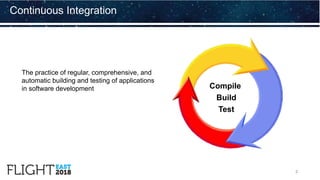
The practice of regular, comprehensive, and
automatic building and testing of applications
in software development
Continuous Integration
Compile
Build
Test
2
Reliance on manual processes to build
and test software is problematic.
• Error prone.
• Lack of consistency
• Build and integration processes have become
more complex
• Static testing is a critical step in the process
• Quick turnaround on validating changes is now
required to:
• Reduce cost associated with finding defects late
• Reduce time to deploy changes/updates
Why is Continuous Integration (CI) so important?
3
Continuous Integration is a development practice
that requires developers to integrate code into a
shared repository several times a day. Each
commit is then verified by an automated build,
allowing teams to detect problems early.
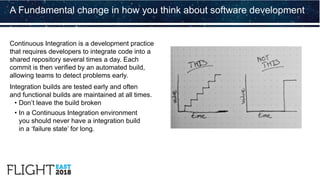
Integration builds are tested early and often
and functional builds are maintained at all times.
• Don’t leave the build broken
• In a Continuous Integration environment
you should never have a integration build
in a ‘failure state’ for long.
A Fundamental change in how you think about software development
Martin Fowler’s “original” principles of Continuous Deployment
1. Configuration
control single code
repository
2. Automate the
build process
3. Automate
testing
4. Developers
commit changes
to the baseline
daily
5. Build every
commit (to
baseline)
6. Keep the build
fast
7. Test in a clone
of the production
environment
8. Make it easy to
get executable
code
9. Give everyone
full visibility to the
results of the
latest build
10. Automate
deployment
Continuous Integration
5
The CI Build System
Developers
Workspace
CI server
Dashboard
Version Controlled
Repository
Poll
Commit
Changes
Results
Build and Test
Servers
6
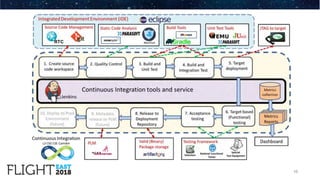
Continuous Integration - Basic steps
• Developers load the project source code into their
private workspaces. When done, commit the changes
to the repository
• The CI server monitors the repository and processes
changes when they occur. The CI server:
• Builds the system and runs unit and integration tests
• Releases deployable artifacts for testing
• Assigns a build label to the version of the code it just built
• Informs the team of the successful build
• Alerts the team if the build (or individual tests) fail
• The team fixes the issue at the earliest opportunity
• Report nightly build status on Dashboard
7
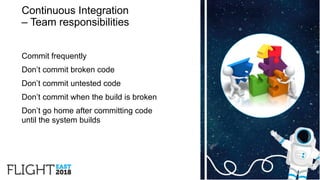
Continuous Integration
– Team responsibilities
Commit frequently
Don’t commit broken code
Don’t commit untested code
Don’t commit when the build is broken
Don’t go home after committing code
until the system builds
8
1. Before committing changes, check to see if a build is currently in the "Successful"
status. If not, you should assist in fixing a build before committing new code.
2. If the status is currently "Successful", you should update your personal workspace
to this configuration.
3. Build and test locally to ensure the update doesn't break functionality.
4. If Successful, commit the changes to the repository.
5. Allow CI to complete with new changes.
6. If build fails, stop and fix on your machine. Return to step 3.
7. If build passes, continue to work on the next item.
Continuous Integration checklist
9
10
Adding BlackDuck to our Continuous code inspection
11
Cause for caution
Not all Open-Source Software is Free
Open-Source Software (Free or other wise)
may have security vulnerabilities.
Sandwich from The Linux Foundation, Flight 2017
Free and Open-Source Software
(FOSS)
FOSS is a major part of the software
development landscape which cannot
be ignored.
FOSS provides software developers with a
significant advantage of not having to reinvent
the wheel (or re “implement” the wheel) for
their project.
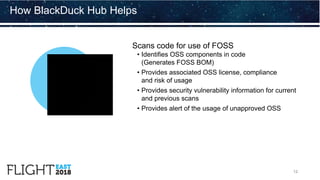
Scans code for use of FOSS
• Identifies OSS components in code
(Generates FOSS BOM)
• Provides associated OSS license, compliance
and risk of usage
• Provides security vulnerability information for current
and previous scans
• Provides alert of the usage of unapproved OSS
How BlackDuck Hub Helps
12
Complex software development environments supporting multiple targets.
• Embedded ( C/C++,Python, etc.), Application (Java, JavaScript, etc.)
Significant variation in the software development processes
• Agile , Waterfall, and every thing in between
Significant variation in the developers level of engagement and buy-in with CI.
• First impression is this is “extra work”
Our experience at L3
13
14
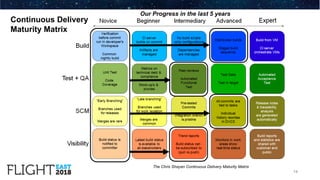
The Chris Shayan Continuous Delivery Maturity Matrix
Our Progress in the last 5 years
Continuous Delivery
Maturity Matrix
Results of using the Test Automation (TA) on pilot Project A
Test automation in support of Continuous integration
15
Before TA After TA % Improvement
Time to write tests and perform
dry-runs per requirement
4 hrs/req 1.8 hrs/req 55%
Time to test each requirement
in formal test
5 mins/req 0.34 mins/req 93%
Total execution time 12 hours
35 mins auto
+ 1 hrs manual
87%
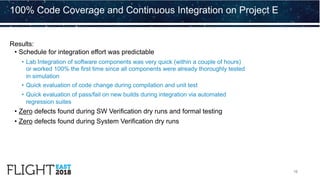
Results:
• Schedule for integration effort was predictable
• Lab Integration of software components was very quick (within a couple of hours)
or worked 100% the first time since all components were already thoroughly tested
in simulation
• Quick evaluation of code change during compilation and unit test
• Quick evaluation of pass/fail on new builds during integration via automated
regression suites
• Zero defects found during SW Verification dry runs and formal testing
• Zero defects found during System Verification dry runs
100% Code Coverage and Continuous Integration on Project E
16
Other examples
17
Project A2-L:
After implementing core pieces of CI (Build
automation and Test automation), the cycle
time for a new build release (tested &
verified) was reduced from and manually
intensive 3+ day effort to 4 hours.
Project A3-M:
After implementing core pieces of CI time for
incremental release (built, tested & verified)
was reduced from 146 hours to 38 hours
Main reasons for Continuous
Integration to fail
Infrequent check-ins, which lead to delayed integrations
Broken builds, which prevent teams from moving
on to other tasks
Minimal feedback, which prevents action from occurring
Receiving spam feedback, which causes people
to ignore messages
Possessing a slow machine, which delays feedback
Relying on a bloated build, which reduces rapid feedback
18
Thank you!

Flight East 2018 Presentation–Continuous Integration––An Overview

  • 1.
    Continuous Integration —An Overview Dr.Robert Burnett Director, Software Engineering This presentation consists of L -3 Communications Corporation general capabilities and administrative information that does not contain controlled technical data as defined within the International Traffic in Arms (ITAR) Part 120.10 or Export Administration Regulations (EAR) Part 734.7-11.
  • 2.
    The practice ofregular, comprehensive, and automatic building and testing of applications in software development Continuous Integration Compile Build Test 2
  • 3.
    Reliance on manualprocesses to build and test software is problematic. • Error prone. • Lack of consistency • Build and integration processes have become more complex • Static testing is a critical step in the process • Quick turnaround on validating changes is now required to: • Reduce cost associated with finding defects late • Reduce time to deploy changes/updates Why is Continuous Integration (CI) so important? 3
  • 4.
    Continuous Integration isa development practice that requires developers to integrate code into a shared repository several times a day. Each commit is then verified by an automated build, allowing teams to detect problems early. Integration builds are tested early and often and functional builds are maintained at all times. • Don’t leave the build broken • In a Continuous Integration environment you should never have a integration build in a ‘failure state’ for long. A Fundamental change in how you think about software development
  • 5.
    Martin Fowler’s “original”principles of Continuous Deployment 1. Configuration control single code repository 2. Automate the build process 3. Automate testing 4. Developers commit changes to the baseline daily 5. Build every commit (to baseline) 6. Keep the build fast 7. Test in a clone of the production environment 8. Make it easy to get executable code 9. Give everyone full visibility to the results of the latest build 10. Automate deployment Continuous Integration 5
  • 6.
    The CI BuildSystem Developers Workspace CI server Dashboard Version Controlled Repository Poll Commit Changes Results Build and Test Servers 6
  • 7.
    Continuous Integration -Basic steps • Developers load the project source code into their private workspaces. When done, commit the changes to the repository • The CI server monitors the repository and processes changes when they occur. The CI server: • Builds the system and runs unit and integration tests • Releases deployable artifacts for testing • Assigns a build label to the version of the code it just built • Informs the team of the successful build • Alerts the team if the build (or individual tests) fail • The team fixes the issue at the earliest opportunity • Report nightly build status on Dashboard 7
  • 8.
    Continuous Integration – Teamresponsibilities Commit frequently Don’t commit broken code Don’t commit untested code Don’t commit when the build is broken Don’t go home after committing code until the system builds 8
  • 9.
    1. Before committingchanges, check to see if a build is currently in the "Successful" status. If not, you should assist in fixing a build before committing new code. 2. If the status is currently "Successful", you should update your personal workspace to this configuration. 3. Build and test locally to ensure the update doesn't break functionality. 4. If Successful, commit the changes to the repository. 5. Allow CI to complete with new changes. 6. If build fails, stop and fix on your machine. Return to step 3. 7. If build passes, continue to work on the next item. Continuous Integration checklist 9
  • 10.
  • 11.
    Adding BlackDuck toour Continuous code inspection 11 Cause for caution Not all Open-Source Software is Free Open-Source Software (Free or other wise) may have security vulnerabilities. Sandwich from The Linux Foundation, Flight 2017 Free and Open-Source Software (FOSS) FOSS is a major part of the software development landscape which cannot be ignored. FOSS provides software developers with a significant advantage of not having to reinvent the wheel (or re “implement” the wheel) for their project.
  • 12.
    Scans code foruse of FOSS • Identifies OSS components in code (Generates FOSS BOM) • Provides associated OSS license, compliance and risk of usage • Provides security vulnerability information for current and previous scans • Provides alert of the usage of unapproved OSS How BlackDuck Hub Helps 12
  • 13.
    Complex software developmentenvironments supporting multiple targets. • Embedded ( C/C++,Python, etc.), Application (Java, JavaScript, etc.) Significant variation in the software development processes • Agile , Waterfall, and every thing in between Significant variation in the developers level of engagement and buy-in with CI. • First impression is this is “extra work” Our experience at L3 13
  • 14.
    14 The Chris ShayanContinuous Delivery Maturity Matrix Our Progress in the last 5 years Continuous Delivery Maturity Matrix
  • 15.
    Results of usingthe Test Automation (TA) on pilot Project A Test automation in support of Continuous integration 15 Before TA After TA % Improvement Time to write tests and perform dry-runs per requirement 4 hrs/req 1.8 hrs/req 55% Time to test each requirement in formal test 5 mins/req 0.34 mins/req 93% Total execution time 12 hours 35 mins auto + 1 hrs manual 87%
  • 16.
    Results: • Schedule forintegration effort was predictable • Lab Integration of software components was very quick (within a couple of hours) or worked 100% the first time since all components were already thoroughly tested in simulation • Quick evaluation of code change during compilation and unit test • Quick evaluation of pass/fail on new builds during integration via automated regression suites • Zero defects found during SW Verification dry runs and formal testing • Zero defects found during System Verification dry runs 100% Code Coverage and Continuous Integration on Project E 16
  • 17.
    Other examples 17 Project A2-L: Afterimplementing core pieces of CI (Build automation and Test automation), the cycle time for a new build release (tested & verified) was reduced from and manually intensive 3+ day effort to 4 hours. Project A3-M: After implementing core pieces of CI time for incremental release (built, tested & verified) was reduced from 146 hours to 38 hours
  • 18.
    Main reasons forContinuous Integration to fail Infrequent check-ins, which lead to delayed integrations Broken builds, which prevent teams from moving on to other tasks Minimal feedback, which prevents action from occurring Receiving spam feedback, which causes people to ignore messages Possessing a slow machine, which delays feedback Relying on a bloated build, which reduces rapid feedback 18
  • 19.