Continuous Integration: A case study Vaibhav Kothari Talentica Software (I) Pvt ltd
Abstract Developer’s dilemma QA’s dilemma Continuous Integration ? Case study What is accomplished ? Benefits of CI Recommended Practices Other Tools Available Q&A
Developer’s dilemma Will my changes integrate successfully with all versions of code? How much time/effort it will take to build and deploy from different source repository branches? Why can’t QA take this up!!
QA’s dilemma How much time/effort it will take to build and deploy from different source repository branches? How much time/effort will it take test builds from different sources? I can't build that often!
Continuous Integration ?? As wiki says “  Continuous integration involves integrating early and often, so as to avoid the pitfalls of " integration hell ". The practice aims to reduce rework and thus reduce cost and time.”
Continuous Integration….
Continuous Integration…. Integrating the build process with continuous development. Concurrent build preparation from different branches. Integrating build system with deployment and test automation. Monitoring build and test.
CI in agile development
Case Study Current Product development Lifecycle
Case Study Where does integration server stands ?
Features to look out for Basic Continuous Integration Build Triggering options Support for tools Set ups and usability Build logs and metrics Notifications Plugins, Extensions Case Study
Hudson CI Open source tool available as deployable war file. Each build and deployment process can be set up as a separate project and run concurrently or subsequently. Supports distributed builds The most used CI server in an informal developer survey! Case Study
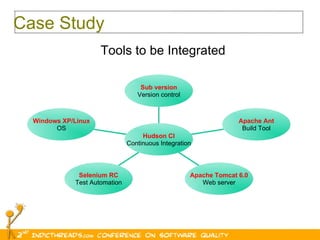
Case Study Tools to be Integrated Windows XP/Linux OS Selenium RC Test Automation Apache Tomcat 6.0 Web server Apache Ant Build Tool Sub version Version control Hudson CI Continuous Integration
Case Study… Setting up a build Job
Case Study….. Defining build triggers
Post build tasks Automate build and deployment process and server restart. Integrate Hudson with test automation suite Remote deployment of multiple builds and test suite invocation Case Study
Case Study… Post   build tasks
Distributed Builds Build distribution using Single Hudson installation.  Single click using Master/Slave mode. Concurrency in largely distributed projects. Case Study
Case Study… Building Remotely
Case Study… Slave set up in Hudson
Case Study…. What’s achieved?
Nobody minds it! Single click process. Early identification of build issues. Early identification of bugs. Incremental development. Constant availability of sane build. Efficient use of Test Automation. More time for Quality improvement. Benefits of CI
Maintain a code repository Automate the build and Deployment Make your build self-testing Everyone commits every day Every commit (to mainline) should be built Keep the build fast Test in a clone of the production environment Make it easy to get the latest deliverables Everyone can see the results of the latest build Recommended Practices
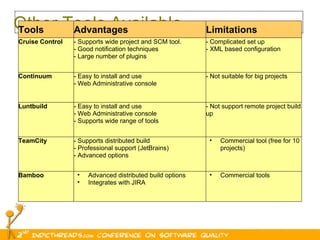
Other Tools Available Tools Advantages Limitations Cruise Control - Supports wide project and SCM tool. - Good notification techniques - Large number of plugins - Complicated set up - XML based configuration Continuum - Easy to install and use - Web Administrative console - Not suitable for big projects Luntbuild - Easy to install and use - Web Administrative console - Supports wide range of tools - Not support remote project build up TeamCity - Supports distributed build - Professional support (JetBrains) - Advanced options Commercial tool (free for 10 projects) Bamboo Advanced distributed build options Integrates with JIRA Commercial tools
Q&A

Continuous Integration: A Case Study

  • 1.
    Continuous Integration: Acase study Vaibhav Kothari Talentica Software (I) Pvt ltd
  • 2.
    Abstract Developer’s dilemmaQA’s dilemma Continuous Integration ? Case study What is accomplished ? Benefits of CI Recommended Practices Other Tools Available Q&A
  • 3.
    Developer’s dilemma Willmy changes integrate successfully with all versions of code? How much time/effort it will take to build and deploy from different source repository branches? Why can’t QA take this up!!
  • 4.
    QA’s dilemma Howmuch time/effort it will take to build and deploy from different source repository branches? How much time/effort will it take test builds from different sources? I can't build that often!
  • 5.
    Continuous Integration ??As wiki says “ Continuous integration involves integrating early and often, so as to avoid the pitfalls of " integration hell ". The practice aims to reduce rework and thus reduce cost and time.”
  • 6.
  • 7.
    Continuous Integration…. Integratingthe build process with continuous development. Concurrent build preparation from different branches. Integrating build system with deployment and test automation. Monitoring build and test.
  • 8.
    CI in agiledevelopment
  • 9.
    Case Study CurrentProduct development Lifecycle
  • 10.
    Case Study Wheredoes integration server stands ?
  • 11.
    Features to lookout for Basic Continuous Integration Build Triggering options Support for tools Set ups and usability Build logs and metrics Notifications Plugins, Extensions Case Study
  • 12.
    Hudson CI Opensource tool available as deployable war file. Each build and deployment process can be set up as a separate project and run concurrently or subsequently. Supports distributed builds The most used CI server in an informal developer survey! Case Study
  • 13.
    Case Study Toolsto be Integrated Windows XP/Linux OS Selenium RC Test Automation Apache Tomcat 6.0 Web server Apache Ant Build Tool Sub version Version control Hudson CI Continuous Integration
  • 14.
    Case Study… Settingup a build Job
  • 15.
  • 16.
    Post build tasksAutomate build and deployment process and server restart. Integrate Hudson with test automation suite Remote deployment of multiple builds and test suite invocation Case Study
  • 17.
    Case Study… Post build tasks
  • 18.
    Distributed Builds Builddistribution using Single Hudson installation. Single click using Master/Slave mode. Concurrency in largely distributed projects. Case Study
  • 19.
  • 20.
    Case Study… Slaveset up in Hudson
  • 21.
  • 22.
    Nobody minds it!Single click process. Early identification of build issues. Early identification of bugs. Incremental development. Constant availability of sane build. Efficient use of Test Automation. More time for Quality improvement. Benefits of CI
  • 23.
    Maintain a coderepository Automate the build and Deployment Make your build self-testing Everyone commits every day Every commit (to mainline) should be built Keep the build fast Test in a clone of the production environment Make it easy to get the latest deliverables Everyone can see the results of the latest build Recommended Practices
  • 24.
    Other Tools AvailableTools Advantages Limitations Cruise Control - Supports wide project and SCM tool. - Good notification techniques - Large number of plugins - Complicated set up - XML based configuration Continuum - Easy to install and use - Web Administrative console - Not suitable for big projects Luntbuild - Easy to install and use - Web Administrative console - Supports wide range of tools - Not support remote project build up TeamCity - Supports distributed build - Professional support (JetBrains) - Advanced options Commercial tool (free for 10 projects) Bamboo Advanced distributed build options Integrates with JIRA Commercial tools
  • 25.