CONTINUOUS INTEGRATION
PRESENTATION PLAN
1.

State of the practice
1.
2.
3.
4.

5.
6.
7.
8.

2.
3.
4.
5.
6.

What is continuous integration?
Why do development teams need continuous integration?
Prerequisites for continuous integration process
General CI workflow
How does continuous integration affect development process?
When CI is not effective?
Short tools overview
Benefits of using CI

Problems with current state of the practice
Research ideas
Future of CI
CI and COPE
Recommended readings

2
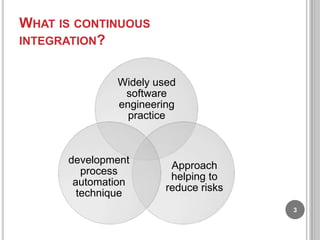
WHAT IS CONTINUOUS
INTEGRATION?
Widely used
software
engineering
practice

development
process
automation
technique

Approach
helping to
reduce risks
3
WHY DO TEAMS NEED CONTINUOUS
INTEGRATION?
 Martin

Fowler:

… team integrate their work frequently,
… leading to multiple integrations per day.
… this approach leads to significantly reduced integration
problems and allows a team to
develop cohesive software more rapidly.
 CI

is the one of the XP practices
 Allows team to get fresh latest build
regularly
4
PREREQUISITES FOR CONTINUOUS
INTEGRATION

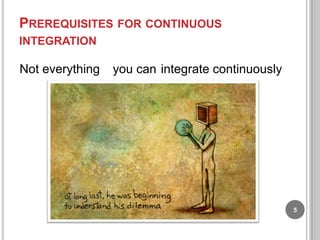
Not everything

you can integrate continuously

5
PREREQUISITES FOR CONTINUOUS
INTEGRATION

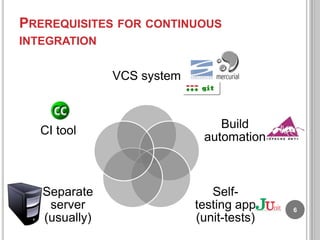
VCS system

CI tool

Separate
server
(usually)

Build
automation

Selftesting app
(unit-tests)

6
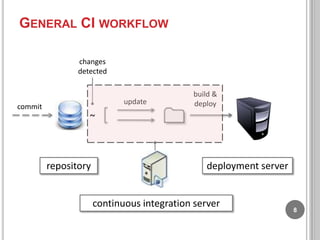
GENERAL CI WORKFLOW

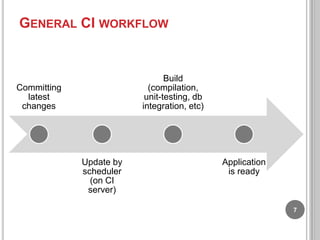
Build
(compilation,
unit-testing, db
integration, etc)

Committing
latest
changes

Update by
scheduler
(on CI
server)

Application
is ready

7
GENERAL CI WORKFLOW
changes
detected

update

commit

build &
deploy

~

repository

deployment server

continuous integration server

8
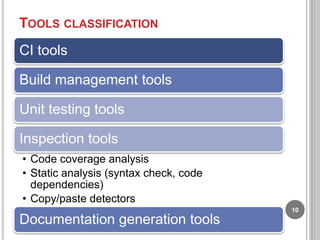
TOOLS CLASSIFICATION
CI tools
Build management tools
Unit testing tools
Inspection tools
• Code coverage analysis
• Static analysis (syntax check, code
dependencies)
• Copy/paste detectors
10

Documentation generation tools
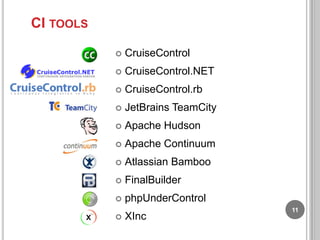
CI TOOLS


CruiseControl



CruiseControl.NET



CruiseControl.rb



JetBrains TeamCity



Apache Hudson



Apache Continuum



Atlassian Bamboo



FinalBuilder



phpUnderControl



XInc

11
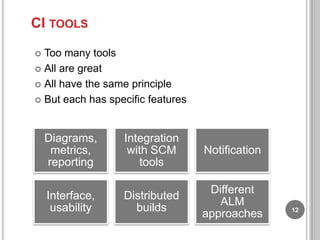
CI TOOLS
Too many tools
 All are great
 All have the same principle
 But each has specific features


Diagrams,
metrics,
reporting
Interface,
usability

Integration
with SCM
tools

Notification

Distributed
builds

Different
ALM
approaches

12
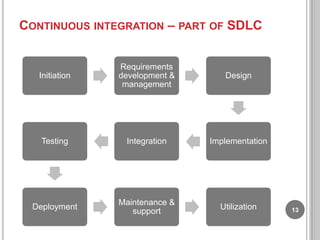
CONTINUOUS INTEGRATION – PART OF SDLC

Initiation

Requirements
development &
management

Design

Testing

Integration

Implementation

Deployment

Maintenance &
support

Utilization

13
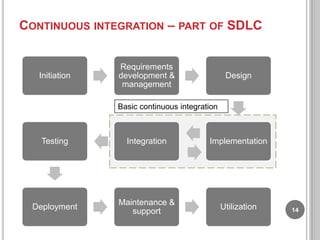
CONTINUOUS INTEGRATION – PART OF SDLC

Initiation

Requirements
development &
management

Design

Basic continuous integration

Testing

Integration

Implementation

Deployment

Maintenance &
support

Utilization

14
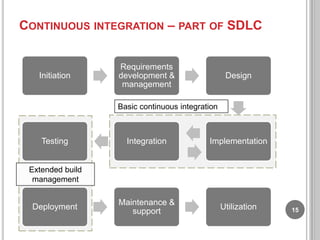
CONTINUOUS INTEGRATION – PART OF SDLC

Initiation

Requirements
development &
management

Design

Basic continuous integration

Testing

Integration

Implementation

Maintenance &
support

Utilization

Extended build
management

Deployment

15
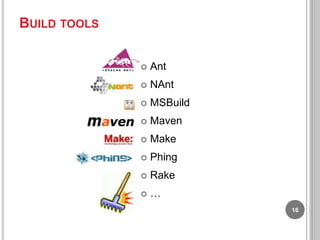
BUILD TOOLS


Ant



NAnt



MSBuild



Maven



Make



Phing



Rake



…
16
UNIT TESTING TOOLS


Junit



NUnit



CppUnit



PHPUnit



SimpleTest



JSUnit



J3Unit

17
INSPECTIONS TOOLS.
TEST COVERAGE
Cobertura
 Atlassian Clover
 jTest
 JCoverage
 CodeCover
 EMMA
 Parasoft Insure++
 Ncover
 Xdebug
 Coverage.py


18
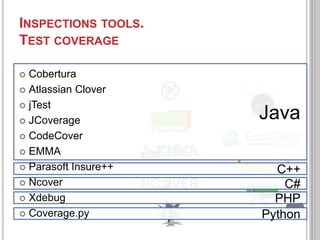
INSPECTIONS TOOLS.
TEST COVERAGE
Cobertura
 Atlassian Clover
 jTest
 JCoverage
 CodeCover
 EMMA
 Parasoft Insure++
 Ncover
 Xdebug
 Coverage.py


Java
C++
C#
PHP
19
Python
INSPECTIONS TOOLS.
STATIC ANALYSIS
 PMD
 FindBugs
 JLint

 FxCop
 Checkstyle
 ReSharper

 PHP_CodeSniffer
 Yasca
 NDepend

20
INSPECTIONS TOOLS.
COPY/PASTE DETECTORS
CPD

(Copy paste detector)
Checkstyle
Simian
Jplag
Atomiq
Clone digger
PBA

21
DOCUMENTATION GENERATION
TOOLS
Doxygen
JavaDoc
NDoc
CppDoc
phpDocumentor

pyDoc
RDoc

22
OTHER TOOLS

Source code
metrics (loc)

Dead code
detectors

Profiling

…
23
BENEFITS OF USING CI












Reduces risks of problems with source code integration
by stimulating team members to perform integration
early and often.
Provides automated reports about code quality.
Increases visibility of current project status and project
progress by providing shared reports available to all
team members.
Provides historical data on source code quality and
metrics.
Always contains last fresh build that could be used for
deployment, testing or other purposes.
Reduces number of routine repetitive activities by
automating part of development lifecycle.
Runs costly inspections on the server (in contrast to
inspections available in modern IDEs)
Stimulates developers to write better source code

24
BENEFITS OF USING CI FOR RESEARCH

Reproducible results of research

25
PROBLEMS


“Don‟t break the build” obsession.
This rule undermines cooperation, transparency and trust
between team members
 Root cause of the problem is failure to draw apply different
CI practices for different SDLC stages (development and
release)




Necessity to instantiate CI build plan for separate
branch/codebase
Some branches require instantiation of CI build plan, some
don‟t
 Usually there is no rule specifying whether branch should
have its own CI build plan configuration


Benefits of CI are different for different SDLC stages
 Necessity to write and support build scripts




Very often it happens that activity of supporting build scripts
is not a priority.

26
PROBLEMS
Even though builds run automatically, somebody needs
to support and configure CI server if project grows in
size.
 Continuous deployment and continuous release seem
to be a good idea, but do not usually occur in practice
due to lack of flexibility and configuration complexity.
 Teams that use CI are forced to make some premature
commitments that are difficult to change later (project
structure, deployments configuration, etc).


27
WHEN CI IS NOT EFFECTIVE?
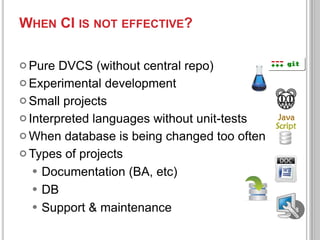
 Pure

DVCS (without central repo)
 Experimental development
 Small projects
 Interpreted languages without unit-tests
 When database is being changed too often
 Types of projects
 Documentation (BA, etc)
 DB
 Support & maintenance

28
WHY SHOULD WE USE CI IF IDES
ALREADY HAS EVERYTHING WE NEED?


Modern IDEs already have:








embedded build systems
unit-tests
static inspections
dynamic inspections
code coverage metrics
documentation generation
…

29
WHY SHOULD WE USE CI IF IDE ALREADY
HAS EVERYTHING WE NEED?
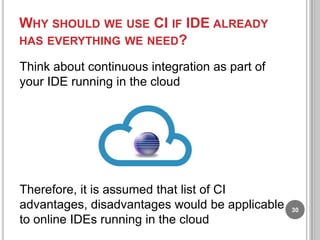
Think about continuous integration as part of
your IDE running in the cloud

Therefore, it is assumed that list of CI
advantages, disadvantages would be applicable
to online IDEs running in the cloud

30
POTENTIAL AREAS OF RESEARCH


Smart CI
suggestion of the most important code quality issues
 prioritization of code quality report items




Inclusion of refactorings suggestion into CI builds
API refactorings
 Automatic migration to next versions of libraries




Increase adaptability of CI tools
automatic configuration of inspections
 detect when it is optimal to perform incremental build
and when it is optimal to perform full build


Detect when separate branch should be created to
configure separate CI build plan.
 “Refactor” CI practices for better scalability


31
MOST IMPORTANT RESEARCH PROBLEM


What is the problem?









Too much time and effort spent on "optimal configuration“ of
CI builds.
Even though there is a high chance that optimal
configuration exists, development teams are usually far from
optimal solution.
As a result, every team invents its own configuration, which
in vast majority of cases is not optimal enough for future
scaling.
Even though CI is good at saving effort and reducing risk for
teams of medium size, large projects have certain threshold
after which support of CI tools becomes too complex and
ambiguous.
After reaching certain project size CI does not scale
anymore (“Tailspin effect”)
32
MOST IMPORTANT RESEARCH PROBLEM


Why is it important?







Software become inherently complex
Software projects grow in size
But there is a certain cap for large projects when development
process cannot be effectively automated.
Therefore, more time, effort and resources are spent on
ambiguous routine activities causing problems with software
quality.
As projects grow in size, spending on software development
and support increase when project size reaches certain
threshold.
33
MOST IMPORTANT RESEARCH PROBLEM
 Possible

solutions:

Development of common rules and practices for effective
scalability and embedding those practices into CI tools.
 “Refactoring” of existing CI practices to common practice that
makes project scalable.
 …


34
RECOMMENDED READING
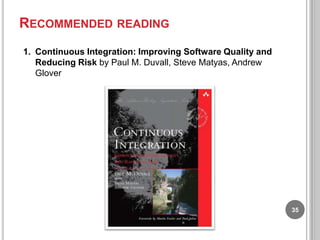
1. Continuous Integration: Improving Software Quality and
Reducing Risk by Paul M. Duvall, Steve Matyas, Andrew
Glover

35
RECOMMENDED READING
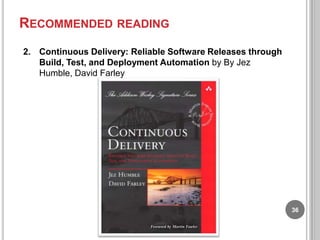
2. Continuous Delivery: Reliable Software Releases through
Build, Test, and Deployment Automation by By Jez
Humble, David Farley

36
RECOMMENDED READING
3. Release It!: Design and Deploy Production-Ready
Software by Michael T. Nygard

37
RECOMMENDED READING
4. Pragmatic Project Automation: How to Build, Deploy, and
Monitor Java Applications by Mark Clark

38
USEFUL LINKS
http://martinfowler.com/articles/continuousIntegratio
n.html - the main article about CI from Martin
Fowler
 http://www.infoq.com/news/2009/03/ContinuousDeployment - Beyond Continuous Integration:
Continuous Deployment
 http://radar.oreilly.com/2009/03/continuousdeployment-5-eas.html - Continuous Deployment in
5 easy steps
 http://www.proudlyserving.com/archives/2007/10/fe
ar_of_a_broke.html - „fear of the broken build‟ effect
 http://www.youbrokethebuild.com/ - great posters
created with the purpose of motivation people avoid
breaking the build


39

Continuous integration for se group meeting

  • 1.
  • 2.
    PRESENTATION PLAN 1. State ofthe practice 1. 2. 3. 4. 5. 6. 7. 8. 2. 3. 4. 5. 6. What is continuous integration? Why do development teams need continuous integration? Prerequisites for continuous integration process General CI workflow How does continuous integration affect development process? When CI is not effective? Short tools overview Benefits of using CI Problems with current state of the practice Research ideas Future of CI CI and COPE Recommended readings 2
  • 3.
    WHAT IS CONTINUOUS INTEGRATION? Widelyused software engineering practice development process automation technique Approach helping to reduce risks 3
  • 4.
    WHY DO TEAMSNEED CONTINUOUS INTEGRATION?  Martin Fowler: … team integrate their work frequently, … leading to multiple integrations per day. … this approach leads to significantly reduced integration problems and allows a team to develop cohesive software more rapidly.  CI is the one of the XP practices  Allows team to get fresh latest build regularly 4
  • 5.
    PREREQUISITES FOR CONTINUOUS INTEGRATION Noteverything you can integrate continuously 5
  • 6.
    PREREQUISITES FOR CONTINUOUS INTEGRATION VCSsystem CI tool Separate server (usually) Build automation Selftesting app (unit-tests) 6
  • 7.
    GENERAL CI WORKFLOW Build (compilation, unit-testing,db integration, etc) Committing latest changes Update by scheduler (on CI server) Application is ready 7
  • 8.
    GENERAL CI WORKFLOW changes detected update commit build& deploy ~ repository deployment server continuous integration server 8
  • 9.
    TOOLS CLASSIFICATION CI tools Buildmanagement tools Unit testing tools Inspection tools • Code coverage analysis • Static analysis (syntax check, code dependencies) • Copy/paste detectors 10 Documentation generation tools
  • 10.
    CI TOOLS  CruiseControl  CruiseControl.NET  CruiseControl.rb  JetBrains TeamCity  ApacheHudson  Apache Continuum  Atlassian Bamboo  FinalBuilder  phpUnderControl  XInc 11
  • 11.
    CI TOOLS Too manytools  All are great  All have the same principle  But each has specific features  Diagrams, metrics, reporting Interface, usability Integration with SCM tools Notification Distributed builds Different ALM approaches 12
  • 12.
    CONTINUOUS INTEGRATION –PART OF SDLC Initiation Requirements development & management Design Testing Integration Implementation Deployment Maintenance & support Utilization 13
  • 13.
    CONTINUOUS INTEGRATION –PART OF SDLC Initiation Requirements development & management Design Basic continuous integration Testing Integration Implementation Deployment Maintenance & support Utilization 14
  • 14.
    CONTINUOUS INTEGRATION –PART OF SDLC Initiation Requirements development & management Design Basic continuous integration Testing Integration Implementation Maintenance & support Utilization Extended build management Deployment 15
  • 15.
  • 16.
  • 17.
    INSPECTIONS TOOLS. TEST COVERAGE Cobertura Atlassian Clover  jTest  JCoverage  CodeCover  EMMA  Parasoft Insure++  Ncover  Xdebug  Coverage.py  18
  • 18.
    INSPECTIONS TOOLS. TEST COVERAGE Cobertura Atlassian Clover  jTest  JCoverage  CodeCover  EMMA  Parasoft Insure++  Ncover  Xdebug  Coverage.py  Java C++ C# PHP 19 Python
  • 19.
    INSPECTIONS TOOLS. STATIC ANALYSIS PMD  FindBugs  JLint  FxCop  Checkstyle  ReSharper  PHP_CodeSniffer  Yasca  NDepend 20
  • 20.
    INSPECTIONS TOOLS. COPY/PASTE DETECTORS CPD (Copypaste detector) Checkstyle Simian Jplag Atomiq Clone digger PBA 21
  • 21.
  • 22.
    OTHER TOOLS Source code metrics(loc) Dead code detectors Profiling … 23
  • 23.
    BENEFITS OF USINGCI         Reduces risks of problems with source code integration by stimulating team members to perform integration early and often. Provides automated reports about code quality. Increases visibility of current project status and project progress by providing shared reports available to all team members. Provides historical data on source code quality and metrics. Always contains last fresh build that could be used for deployment, testing or other purposes. Reduces number of routine repetitive activities by automating part of development lifecycle. Runs costly inspections on the server (in contrast to inspections available in modern IDEs) Stimulates developers to write better source code 24
  • 24.
    BENEFITS OF USINGCI FOR RESEARCH Reproducible results of research 25
  • 25.
    PROBLEMS  “Don‟t break thebuild” obsession. This rule undermines cooperation, transparency and trust between team members  Root cause of the problem is failure to draw apply different CI practices for different SDLC stages (development and release)   Necessity to instantiate CI build plan for separate branch/codebase Some branches require instantiation of CI build plan, some don‟t  Usually there is no rule specifying whether branch should have its own CI build plan configuration  Benefits of CI are different for different SDLC stages  Necessity to write and support build scripts   Very often it happens that activity of supporting build scripts is not a priority. 26
  • 26.
    PROBLEMS Even though buildsrun automatically, somebody needs to support and configure CI server if project grows in size.  Continuous deployment and continuous release seem to be a good idea, but do not usually occur in practice due to lack of flexibility and configuration complexity.  Teams that use CI are forced to make some premature commitments that are difficult to change later (project structure, deployments configuration, etc).  27
  • 27.
    WHEN CI ISNOT EFFECTIVE?  Pure DVCS (without central repo)  Experimental development  Small projects  Interpreted languages without unit-tests  When database is being changed too often  Types of projects  Documentation (BA, etc)  DB  Support & maintenance 28
  • 28.
    WHY SHOULD WEUSE CI IF IDES ALREADY HAS EVERYTHING WE NEED?  Modern IDEs already have:        embedded build systems unit-tests static inspections dynamic inspections code coverage metrics documentation generation … 29
  • 29.
    WHY SHOULD WEUSE CI IF IDE ALREADY HAS EVERYTHING WE NEED? Think about continuous integration as part of your IDE running in the cloud Therefore, it is assumed that list of CI advantages, disadvantages would be applicable to online IDEs running in the cloud 30
  • 30.
    POTENTIAL AREAS OFRESEARCH  Smart CI suggestion of the most important code quality issues  prioritization of code quality report items   Inclusion of refactorings suggestion into CI builds API refactorings  Automatic migration to next versions of libraries   Increase adaptability of CI tools automatic configuration of inspections  detect when it is optimal to perform incremental build and when it is optimal to perform full build  Detect when separate branch should be created to configure separate CI build plan.  “Refactor” CI practices for better scalability  31
  • 31.
    MOST IMPORTANT RESEARCHPROBLEM  What is the problem?      Too much time and effort spent on "optimal configuration“ of CI builds. Even though there is a high chance that optimal configuration exists, development teams are usually far from optimal solution. As a result, every team invents its own configuration, which in vast majority of cases is not optimal enough for future scaling. Even though CI is good at saving effort and reducing risk for teams of medium size, large projects have certain threshold after which support of CI tools becomes too complex and ambiguous. After reaching certain project size CI does not scale anymore (“Tailspin effect”) 32
  • 32.
    MOST IMPORTANT RESEARCHPROBLEM  Why is it important?      Software become inherently complex Software projects grow in size But there is a certain cap for large projects when development process cannot be effectively automated. Therefore, more time, effort and resources are spent on ambiguous routine activities causing problems with software quality. As projects grow in size, spending on software development and support increase when project size reaches certain threshold. 33
  • 33.
    MOST IMPORTANT RESEARCHPROBLEM  Possible solutions: Development of common rules and practices for effective scalability and embedding those practices into CI tools.  “Refactoring” of existing CI practices to common practice that makes project scalable.  …  34
  • 34.
    RECOMMENDED READING 1. ContinuousIntegration: Improving Software Quality and Reducing Risk by Paul M. Duvall, Steve Matyas, Andrew Glover 35
  • 35.
    RECOMMENDED READING 2. ContinuousDelivery: Reliable Software Releases through Build, Test, and Deployment Automation by By Jez Humble, David Farley 36
  • 36.
    RECOMMENDED READING 3. ReleaseIt!: Design and Deploy Production-Ready Software by Michael T. Nygard 37
  • 37.
    RECOMMENDED READING 4. PragmaticProject Automation: How to Build, Deploy, and Monitor Java Applications by Mark Clark 38
  • 38.
    USEFUL LINKS http://martinfowler.com/articles/continuousIntegratio n.html -the main article about CI from Martin Fowler  http://www.infoq.com/news/2009/03/ContinuousDeployment - Beyond Continuous Integration: Continuous Deployment  http://radar.oreilly.com/2009/03/continuousdeployment-5-eas.html - Continuous Deployment in 5 easy steps  http://www.proudlyserving.com/archives/2007/10/fe ar_of_a_broke.html - „fear of the broken build‟ effect  http://www.youbrokethebuild.com/ - great posters created with the purpose of motivation people avoid breaking the build  39

Editor's Notes

  • #2 Рад приветствовать вас на очередном тренинге серии, посвященной конфигурационному менеджменту. И мы будем рассматривать Continuous integration.Continuous integration – очень заезженная тема. Об этом говорят все, кому не лень. Практика continuous integration стала практически незаменимой в большинстве проектов и вместе с этим приобрела привкус «попсовости» и обсосанности со всех сторон. Но тем не менее, всё равно встречаются такие люди, которые не знают об этой практике. Дошли слухи о том, что в Днепропетровске НИКТО кроме того, что вообще не использует CI, так еще и не знает о том, что это такое! Если кто-то среди присутствующих есть из Днепропетровска, можете поднять руку и сказать пару слов в свою защиту. Кроме того, что я рассказываю о том же, о чем и практически все остальные пропагандисты (инструменты, workflow), я еще и попробую вдохнуть новую жизнь в понятие непрерывной интеграции показав некоторую доселе невидимую грань. екОсобенностью данного тренинга является то, что я его провожу впервые. Остальные тренинги серии в том или ином виде уже достигали внимания слушателей. Этот же тренинг я подготовил совсем недавно. Так что должен предупредить о том, что я не уверен насчет того, вложимся ли мы в отведенные 1.5 часа времени.
  • #3 Мы рассмотрим следующие вопросы:Что такое CIЗачем это вообще надоБез чего CI невозможенСамый общий workflow – действия, входящие в число стандартных при организации процесса непрерывной интеграции Как CI влияет на весь процесс разработкиИнструменты и их особенностиОписание случаев, когда CI не нужен или неэффективенНовая грань непрерывной интеграции – чего не хватает в функциональности и базовых идеях существующих инструментовСвязь непрерывной интеграции и модели зрелости процессов.
  • #4 Есть несколько смежных формулировок что такое непрерывная интеграция. В первой лекции я говорил пару слов об инженерных практиках и о том, что это объединение двух вещей: 1) идей по поводу того, как разрабатывать ПО эффективно, 2) инструментов, реализующих эти идеи. Непрерывная интеграция – это как раз такая инженерная практика. Это также подход, помогающий уменьшить риски при разработке ПО. В списке рекомендованной литературы есть книга o CI, которая так и называется – Improve software quality and reducing risksНепрерывная интеграция – это еще один шаг на пути к автоматизации процессов разработки. Этот шаг следующий после автоматизации сборок.
  • #5 Главным идеологом непрерывной интеграции является Мартин Фаулер. Поэтому на вопрос зачем нам нужна непрерывная интеграция я отвечу его словами:Мартин плавно подводит к ответу, говоря о том, в той ситуации, когда команда интегрирует свою работу часто, причем когда частота эта достигает иногда нескольких интеграций в деньнепрерывная интеграция позволяет избежать интеграционных проблем, что ведет кразработке целостного ПО быстрееКроме того, CI – это одна из практик экстремального программирования, идеологом которого также является Мартин Фаулер. Причем, это единственная практика ХР, которая входит в число практик конфигурационного менеджмента. Так как экстремальное программирование претендует на то, чтобы быть полноценной методологией разработки, факт упоминания CI среди практик указывает на ее важность. Опустив из рассмотрения, риски, качество и прочую невидимую лабудень, которую сложно пощупать, перейдем к тому, что же будет видимым результатом непрерывной интеграции. И таким видимым результатом является постоянное наличие свежих сборок приложения. Без нашего вмешательства.
  • #6 Не всё можно совместить так, чтобы составные части успешно работали вместе. Причем даже если это можно сделать вручную, не всегда процесс интеграции можно автоматизировать. Как мы уже знаем, автоматизация интеграции – это ключ к возможности выполнять интеграцию непрерывно (continuously).
  • #7 нужно выполнить несколько условий для того, чтобы практика непрерывной интеграции успешно и (что немаловажно) полноценно выполнялась, соответствуя изначальной идее и концепции.Исходный код должен храниться в системе контроля версий.Сборки должны быть автоматизированы. Кроме этого, довольно общего условия, я рекомендовал бы использовать специальный тип сборок – интеграционный. К сожалению, я не смог подробно на этом моменте остановиться во время рассказа об автоматизации сборок. Очень часто сборки автоматизируются единственно с целью именно непрерывной интеграции. Но нужно этот тип сборок отдельно выделять и не путать с остальными, ведь не единой непрерывной интеграцией жив разработчик. В идеалетакжедолжноиспользоватьсяюнит-тестирование, непосредственное выполнение которого входит в задачу автоматизации сборок.Совершенно замечательно, если для выполнения интеграции используется отдельная рабочая станция. И, конечно же, нам понадобится инструмент для выполнения непрерывной интеграции. Такой инструмент будет называться сервером непрерывной интеграции. Хотя, нужно заметить, что это не обязательно должна быть отдельная рабочая станция. (Server, serve – обслуживать)
  • #8 Как же работает непрерывная интеграция? Как этот процесс организуется и что сюда входит? Процесс начинается тогда, когда разработчики добавляют изменения в репозиторий исходного кода. Сервер непрерывной интеграции отслеживает то, что произошли изменения в репозитории и автоматически последняя актуальная версия исходного кода попадает в рабочую директорию CI-сервера. Предполагается, что CI-сервер знает, где среди всей кучи исходников искать билд-скрипт. Он находит его и запускает. После выполнения всех действий, входящих в автоматизированную сборку приложение оказывается готовым для использования/тестирования/еще чего-то. (Опрос: для чего готово приложение после выполнения непрерывной интеграции?)
  • #10 Те же яйца – вид сбоку. На первом изображении - репозиторий исходного кода. На втором – файловая система сервера непрерывной интеграции. Это рабочая копия. Исходники обновляются именно здесь. Средибольшогоколичествафайлов находится билд-скрипт. Который используется для запуска сборки и развертывания. Приложение попадает в некоторую директорию на сервере развертывания. Можно запутаться в обилии мест в которых можно найти ресурсы нашего проекта. Но суть в том, что все эти места нужны для разных целей. Вот
  • #16 Расширенная непрерывная интеграция и управление сборками означают, что инструменты облегчают кроме всего прочего еще и тестирование (для разных платформ), а также развертывание приложения. Тоже на разные платформы. Это то, что касается подходу к управлению жц приложения. Разные инструменты по разному покрывают фазы жц. ОПРОС на тему использования инструментов непрерывной интеграции
  • #19 First 5 – java Insure –c++Ncover - .netXdebug – phpCoverage.py - pythonThere are code coverage tools embedded into the IDE: Netbeans, IntelliJ IDEA, eclipse, VS (CTC++, TestDriven.NET, etc)
  • #20 First 5 – java Insure –c++Ncover - .netXdebug – phpCoverage.py - pythonThere are code coverage tools embedded into the IDE: Netbeans, IntelliJ IDEA, eclipse, VS (CTC++, TestDriven.NET, etc)
  • #21 Other tools:Jdepend, PHP_Depend, PHP-sat, LintPyLintPyCheckerRATS – multilingual
  • #22 CPD is the plugin for PMDCloneAnalyzerCloneDRConQATCPMinerCCFinder
  • #29 Непрерывная интеграция – замечательная практика, решает кучу проблем.Но, тем не менее, есть случаи, когда использование CI оказывается не совсем эффективным. Такими случаями являются:Использование распределенных систем контроля версий. DVCS предполагают, что иногда один из репозиториев выделяется в качестве центрального. Но кроме того, что это происходит не всегда, в центральный изменения могут поступать не так часто (вспомним принцип commit every day).CI часто бывает совсем не нужна для экспериментальной разработки (одно из проявлений экспериментальных разработок – это использование распределенного контроля версий, а мы уже сказали, что для DVCS CI не совсем эффективен)И для маленьких проектов. В этих двух случаях CI требует несопоставимо много накладных расходов на поддержку и организацию.Из тренинга, посвященного управлению сборками и развертываниями вы помните о том, что приложение делится на функциональную часть и часть данных. Для данных используется совершенно другой подход к конфигурационному менеджменту, нежели для функциональной части – используется интеграция баз данных. И совершенно бессмысленным становится использование CI для интеграции баз данных.Для некоторых типов проектов, не связанных с разработкой, CI не нужен.