FIX Protocol
One Day Course
      By
  Khader Shaik


                 1
Agenda – Part 1
• FIX Protocol Introduction
  – Overview
  – History
  – Usage / Players
  – Message Types
  – Message Format
  – Communication Model
  – Anatomy of sample message
  – Sample Flow
  – Understandng Specs
                                2
Agenda – Part 2
• FIX Protocol & Equity Trading
  – Electronic Trading Overview
  – Types of FIX Messages
  – Trading Scenarios


                                  3
Agenda – Part 3
• Technical Implementation
  – Architecture
  – Buy-side Vs Sell-Side
  – Integration Methods
  – Commercial Engines
  – Free Engines
  – Implementation Steps
  – Testing Tips
  – Troubleshooting Production Issues
  – Roles & Responsibilities
                                        4
Part - 1


           5
What is FIX?
• FIX - Financial Information Exchange
• FIX Protocol is an industry driven messaging
  standard for exchange of Trading related
  information between financial institutions.
• FIX Protocol specification provides format for
  electronic messages and communication model
• FIX can be used by financial institutions like
  Broker-dealers, exchanges, Institutional
  investors and others in the industry to
  communicate among each other
• It is widely used protocol in the Financial
  Markets Industry today

                                                   6
FIX History
• FIX Protocol introduced in 1992
• FIX Specifications are developed and
  managed by the members of organization
  known as "FIX Protocol Limited (FPL)“
  – http://www.fixprotocol.org
• FPL is formed by major industry players
• FIX Versions:
  – Latest FIX version is 5.0
  – Most of the current production versions are
    4.1 to 4.4

                                                  7
Benefits of FIX Protocol
• FIX is Open Protocol – brings all players
  together
• Electronic protocol – streamlines and
  increases the efficiency of communication
  among industry players
• Wide support and software packages
  availability – easy to get on board
• Simple and platform independent protocol
• Designed by users and extensible –
  addresses all industry needs

                                              8
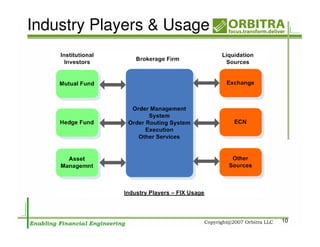
Industry Players & Usage
• Exchanges
   – Use FIX to receive trades from their members and
     send executions back and other trading related
     messages
• Buys-side firms
   – Use FIX to send and receive pre-trade, trade and
     post-trade messages to and from Sell-side firms
• Sell-side firms
   – Use FIX to receive and send pre-trade, trading, post-
     trade messages from and to buy-side firms
   – Use to communicate with Exchanges and other OTC
     markets

                                                             9
Industry Players & Usage


                           10
Supported Product Classes
• Equities
• Fixed Income
• Derivatives (Options, Futures, IR
  Swaps etc)
• FX etc.


                                      11
Message Categories
• Admin Messages
  – Used to maintain the different aspects of
    FIX session (connection)


• Application Messages
  – Messages used for transmission
    business messages


                                            12
Admin Messages
• Logon – Client Authentication Message
• Logout – Normal Termination of Session
• Heartbeat- Used to check communication link between
  two parties
• Test Request – used to test the health of the
  communication link
• Resend Request – Request to retransmit the certain
  application messages
• Reject (Session Level) – session level validation failure
  (different from application level validation)
   – Example invalid version, msg type etc
   – RejectReason is populated with error info
• Sequence Reset/Gap Fill
   – In case of communication problems missing messages
     recovered or sequence is reset to ignore the missing messages
                                                                     13
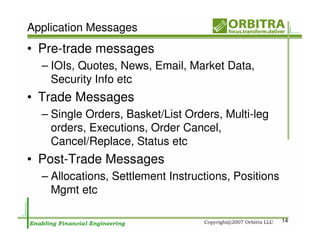
Application Messages
• Pre-trade messages
  – IOIs, Quotes, News, Email, Market Data,
    Security Info etc
• Trade Messages
  – Single Orders, Basket/List Orders, Multi-leg
    orders, Executions, Order Cancel,
    Cancel/Replace, Status etc
• Post-Trade Messages
  – Allocations, Settlement Instructions, Positions
    Mgmt etc

                                                      14
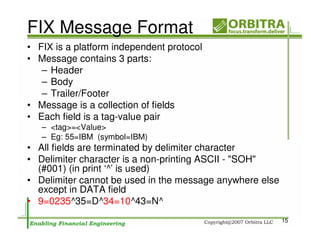
FIX Message Format
• FIX is a platform independent protocol
• Message contains 3 parts:
   – Header
   – Body
   – Trailer/Footer
• Message is a collection of fields
• Each field is a tag-value pair
   – <tag>=<Value>
   – Eg: 55=IBM (symbol=IBM)
• All fields are terminated by delimiter character
• Delimiter character is a non-printing ASCII - "SOH"
  (#001) (in print ‘^’ is used)
• Delimiter cannot be used in the message anywhere else
  except in DATA field
• 9=0235^35=D^34=10^43=N^
                                                          15
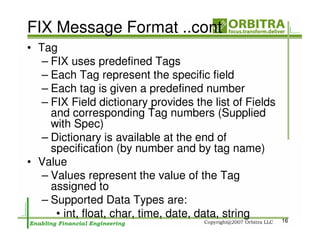
FIX Message Format ..cont
• Tag
   – FIX uses predefined Tags
   – Each Tag represent the specific field
   – Each tag is given a predefined number
   – FIX Field dictionary provides the list of Fields
     and corresponding Tag numbers (Supplied
     with Spec)
   – Dictionary is available at the end of
     specification (by number and by tag name)
• Value
   – Values represent the value of the Tag
     assigned to
   – Supported Data Types are:
      • int, float, char, time, date, data, string      16
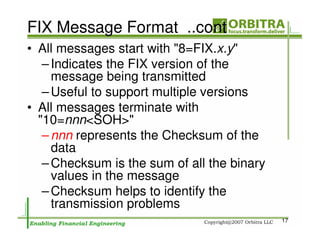
FIX Message Format ..cont
• All messages start with "8=FIX.x.y"
   – Indicates the FIX version of the
     message being transmitted
   – Useful to support multiple versions
• All messages terminate with
  "10=nnn<SOH>"
   – nnn represents the Checksum of the
     data
   – Checksum is the sum of all the binary
     values in the message
   – Checksum helps to identify the
     transmission problems
                                             17
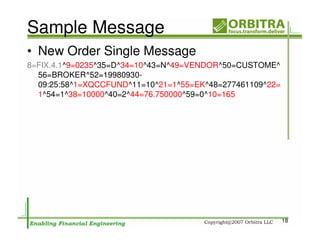
Sample Message
• New Order Single Message
8=FIX.4.1^9=0235^35=D^34=10^43=N^49=VENDOR^50=CUSTOME^
  56=BROKER^52=19980930-
  09:25:58^1=XQCCFUND^11=10^21=1^55=EK^48=277461109^22=
  1^54=1^38=10000^40=2^44=76.750000^59=0^10=165


                                                          18
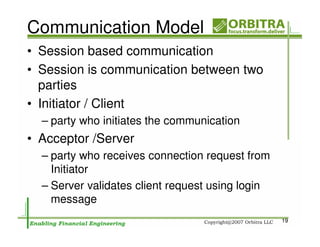
Communication Model
• Session based communication
• Session is communication between two
  parties
• Initiator / Client
  – party who initiates the communication
• Acceptor /Server
  – party who receives connection request from
    Initiator
  – Server validates client request using login
    message
                                                  19
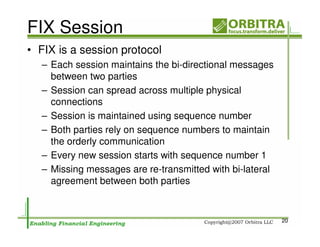
FIX Session
• FIX is a session protocol
  – Each session maintains the bi-directional messages
    between two parties
  – Session can spread across multiple physical
    connections
  – Session is maintained using sequence number
  – Both parties rely on sequence numbers to maintain
    the orderly communication
  – Every new session starts with sequence number 1
  – Missing messages are re-transmitted with bi-lateral
    agreement between both parties


                                                          20
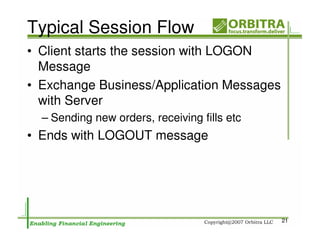
Typical Session Flow
• Client starts the session with LOGON
  Message
• Exchange Business/Application Messages
  with Server
  – Sending new orders, receiving fills etc
• Ends with LOGOUT message


                                              21
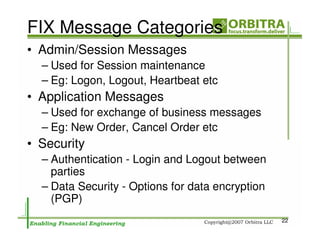
FIX Message Categories
• Admin/Session Messages
  – Used for Session maintenance
  – Eg: Logon, Logout, Heartbeat etc
• Application Messages
  – Used for exchange of business messages
  – Eg: New Order, Cancel Order etc
• Security
  – Authentication - Login and Logout between
    parties
  – Data Security - Options for data encryption
    (PGP)
                                                  22
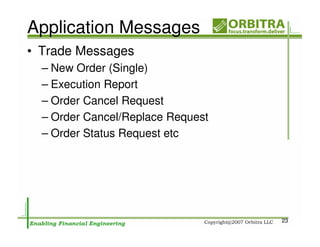
Application Messages
• Trade Messages
  – New Order (Single)
  – Execution Report
  – Order Cancel Request
  – Order Cancel/Replace Request
  – Order Status Request etc


                                   23
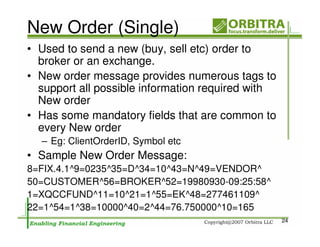
New Order (Single)
• Used to send a new (buy, sell etc) order to
  broker or an exchange.
• New order message provides numerous tags to
  support all possible information required with
  New order
• Has some mandatory fields that are common to
  every New order
  – Eg: ClientOrderID, Symbol etc
• Sample New Order Message:
8=FIX.4.1^9=0235^35=D^34=10^43=N^49=VENDOR^
50=CUSTOMER^56=BROKER^52=19980930-09:25:58^
1=XQCCFUND^11=10^21=1^55=EK^48=277461109^
22=1^54=1^38=10000^40=2^44=76.750000^10=165
                                                   24
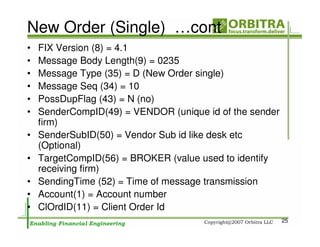
New Order (Single) …cont
•   FIX Version (8) = 4.1
•   Message Body Length(9) = 0235
•   Message Type (35) = D (New Order single)
•   Message Seq (34) = 10
•   PossDupFlag (43) = N (no)
•   SenderCompID(49) = VENDOR (unique id of the sender
    firm)
•   SenderSubID(50) = Vendor Sub id like desk etc
    (Optional)
•   TargetCompID(56) = BROKER (value used to identify
    receiving firm)
•   SendingTime (52) = Time of message transmission
•   Account(1) = Account number
•   ClOrdID(11) = Client Order Id
                                                         25
New Order (Single) …cont
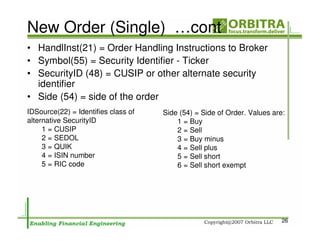
• HandlInst(21) = Order Handling Instructions to Broker
• Symbol(55) = Security Identifier - Ticker
• SecurityID (48) = CUSIP or other alternate security
  identifier
• Side (54) = side of the order
IDSource(22) = Identifies class of   Side (54) = Side of Order. Values are:
alternative SecurityID                   1 = Buy
     1 = CUSIP                           2 = Sell
     2 = SEDOL                           3 = Buy minus
     3 = QUIK                            4 = Sell plus
     4 = ISIN number                     5 = Sell short
     5 = RIC code                        6 = Sell short exempt


                                                                          26
New Order (Single) …cont
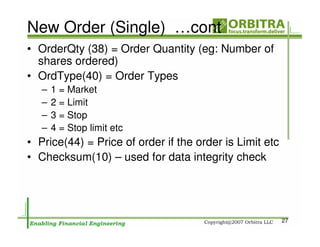
• OrderQty (38) = Order Quantity (eg: Number of
  shares ordered)
• OrdType(40) = Order Types
   –   1 = Market
   –   2 = Limit
   –   3 = Stop
   –   4 = Stop limit etc
• Price(44) = Price of order if the order is Limit etc
• Checksum(10) – used for data integrity check


                                                         27
Few Other Application Messages
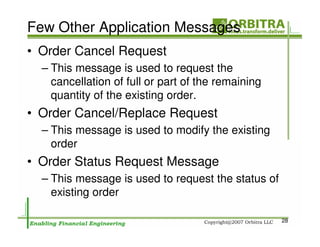
• Order Cancel Request
  – This message is used to request the
    cancellation of full or part of the remaining
    quantity of the existing order.
• Order Cancel/Replace Request
  – This message is used to modify the existing
    order
• Order Status Request Message
  – This message is used to request the status of
    existing order

                                                    28
Execution Report
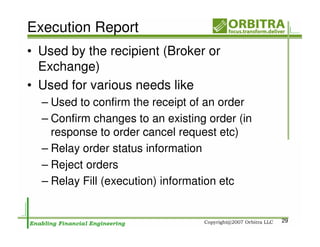
• Used by the recipient (Broker or
  Exchange)
• Used for various needs like
  – Used to confirm the receipt of an order
  – Confirm changes to an existing order (in
    response to order cancel request etc)
  – Relay order status information
  – Reject orders
  – Relay Fill (execution) information etc


                                               29
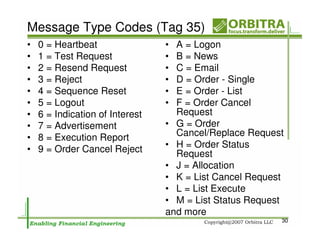
Message Type Codes (Tag 35)
•   0 = Heartbeat                • A = Logon
•   1 = Test Request             • B = News
•   2 = Resend Request           • C = Email
•   3 = Reject                   • D = Order - Single
•   4 = Sequence Reset           • E = Order - List
•   5 = Logout                   • F = Order Cancel
•   6 = Indication of Interest     Request
•   7 = Advertisement            • G = Order
•   8 = Execution Report           Cancel/Replace Request
•   9 = Order Cancel Reject      • H = Order Status
                                   Request
                                 • J = Allocation
                                 • K = List Cancel Request
                                 • L = List Execute
                                 • M = List Status Request
                                 and more
                                                         30
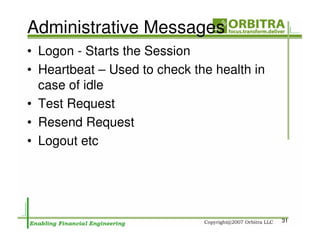
Administrative Messages
• Logon - Starts the Session
• Heartbeat – Used to check the health in
  case of idle
• Test Request
• Resend Request
• Logout etc


                                            31
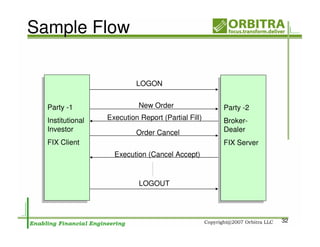
Sample Flow

                           LOGON


  Party -1                  New Order               Party -2
 Party -1                                           Party -2
  Institutional   Execution Report (Partial Fill)   Broker-
 Institutional                                      Broker-
  Investor
 Investor                  Order Cancel             Dealer
                                                    Dealer
  FIX Client
 FIX Client                                          FIX Server
                                                    FIX Server
                    Execution (Cancel Accept)


                            LOGOUT


                                                                  32
Part - 2


 FIX Protocol
Equity Trading
      By
  Khader Shaik


                 33
Agenda
• Electronic Trading Overview
• Types of FIX Messages
• Trading Scenarios


                                34
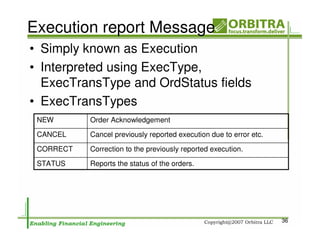
Trade Life Cycle
• Pre-Trade – Trade prep
  – IOI – Market the Interest/positions
  – Quote Request and Quote
• Trade
  – Trading Activity Messages
• Post-Trade – Settlement etc
  – Allocations – Distribution of executions etc
  – Settlement Instructions
  – Street Side reporting (contra/counterparty
    info)
                                                   35
Execution report Message
• Simply known as Execution
• Interpreted using ExecType,
  ExecTransType and OrdStatus fields
• ExecTransTypes
 NEW       Order Acknowledgement
 CANCEL    Cancel previously reported execution due to error etc.

 CORRECT   Correction to the previously reported execution.
 STATUS    Reports the status of the orders.


                                                                    36
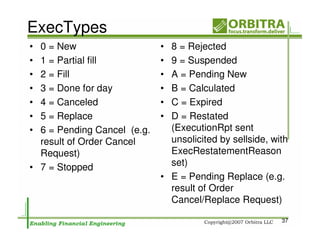
ExecTypes
• 0 = New                    • 8 = Rejected
• 1 = Partial fill           • 9 = Suspended
• 2 = Fill                   • A = Pending New
• 3 = Done for day           • B = Calculated
• 4 = Canceled               • C = Expired
• 5 = Replace                • D = Restated
• 6 = Pending Cancel (e.g.     (ExecutionRpt sent
  result of Order Cancel       unsolicited by sellside, with
  Request)                     ExecRestatementReason
• 7 = Stopped                  set)
                             • E = Pending Replace (e.g.
                               result of Order
                               Cancel/Replace Request)

                                                          37
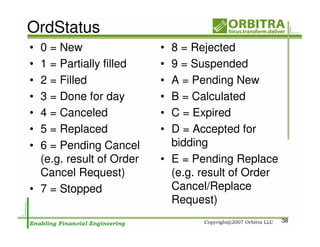
OrdStatus
• 0 = New                 • 8 = Rejected
• 1 = Partially filled    • 9 = Suspended
• 2 = Filled              • A = Pending New
• 3 = Done for day        • B = Calculated
• 4 = Canceled            • C = Expired
• 5 = Replaced            • D = Accepted for
• 6 = Pending Cancel        bidding
  (e.g. result of Order   • E = Pending Replace
  Cancel Request)           (e.g. result of Order
• 7 = Stopped               Cancel/Replace
                            Request)
                                                    38
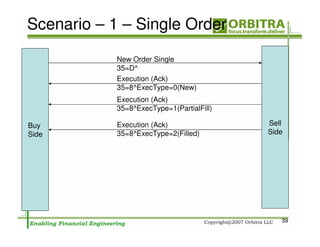
Scenario – 1 – Single Order
            New Order Single
            35=D^
            Execution (Ack)
            35=8^ExecType=0(New)
            Execution (Ack)
            35=8^ExecType=1(PartialFill)

Buy         Execution (Ack)                Sell
Side        35=8^ExecType=2(Filled)        Side


                                              39
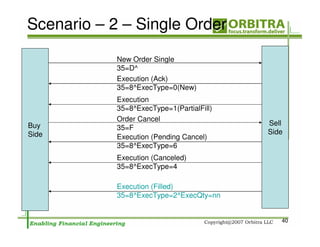
Scenario – 2 – Single Order
            New Order Single
            35=D^
            Execution (Ack)
            35=8^ExecType=0(New)
            Execution
            35=8^ExecType=1(PartialFill)
            Order Cancel
Buy                                        Sell
            35=F
Side                                       Side
            Execution (Pending Cancel)
            35=8^ExecType=6
            Execution (Canceled)
            35=8^ExecType=4

            Execution (Filled)
            35=8^ExecType=2^ExecQty=nn


                                              40
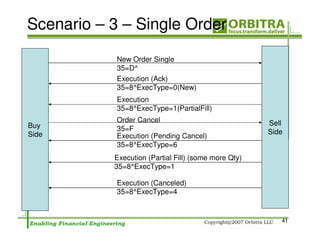
Scenario – 3 – Single Order
            New Order Single
            35=D^
            Execution (Ack)
            35=8^ExecType=0(New)
            Execution
            35=8^ExecType=1(PartialFill)
            Order Cancel                              Sell
Buy         35=F
Side                                                  Side
            Execution (Pending Cancel)
            35=8^ExecType=6
           Execution (Partial Fill) (some more Qty)
           35=8^ExecType=1

            Execution (Canceled)
            35=8^ExecType=4


                                                         41
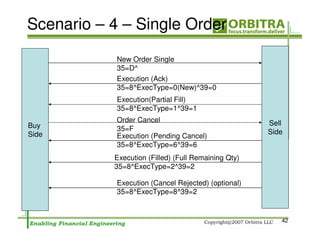
Scenario – 4 – Single Order
            New Order Single
            35=D^
            Execution (Ack)
            35=8^ExecType=0(New)^39=0
            Execution(Partial Fill)
            35=8^ExecType=1^39=1
            Order Cancel                             Sell
Buy         35=F
Side                                                 Side
            Execution (Pending Cancel)
            35=8^ExecType=6^39=6
           Execution (Filled) (Full Remaining Qty)
           35=8^ExecType=2^39=2

            Execution (Cancel Rejected) (optional)
            35=8^ExecType=8^39=2


                                                        42
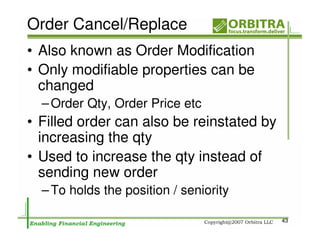
Order Cancel/Replace
• Also known as Order Modification
• Only modifiable properties can be
  changed
  – Order Qty, Order Price etc
• Filled order can also be reinstated by
  increasing the qty
• Used to increase the qty instead of
  sending new order
  – To holds the position / seniority

                                           43
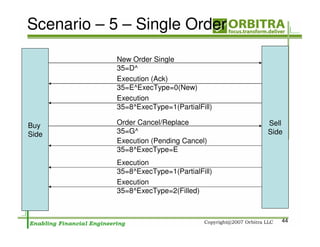
Scenario – 5 – Single Order
            New Order Single
            35=D^
            Execution (Ack)
            35=E^ExecType=0(New)
            Execution
            35=8^ExecType=1(PartialFill)

Buy         Order Cancel/Replace           Sell
Side        35=G^                          Side
            Execution (Pending Cancel)
            35=8^ExecType=E
            Execution
            35=8^ExecType=1(PartialFill)
            Execution
            35=8^ExecType=2(Filled)


                                              44
Key Fields
• OrderID – unique id used to identify the
  order
• ClOrdId – OrderID used to identify the
  order in all communication
• Order Type - Day Order Vs GTC (good till
  cancel)
• FK (FillOrKill) Vs IOC (Immediate or
  Cancel)
• Trade Bust – canceling previously issued
  execution (can be send by executing
  party)
                                             45
ExecType Vs Order Status
• ExecType(150) – States the
  Execution Message type
  – New, Filled etc
  – Response to the request
• OrdStatus(39) – States the current
  orders status
  – New, Filled etc
  – May hold the same value as ExecType

                                          46
Allocation
• Allocation and AllocationAck
• Used for
  – Distribution of executions/Orders among
    clients
  – Commission Calculations etc
• Also used in pre-trade to transmit the
  client allocation information


                                              47
Part - 3


  FIX Protocol
Technical Section
       By
   Khader Shaik


                    48
Agenda
•   Architecture
•   Buy-side Vs Sell-Side
•   Integration Methods
•   Commercial Engines
•   Free Engines
•   Implementation Steps
•   Testing Tips
•   Troubleshooting Production Issues
•   Roles & Responsibilities
                                        49
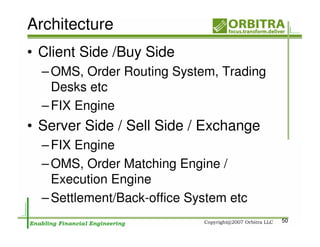
Architecture
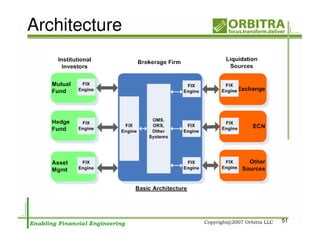
• Client Side /Buy Side
  – OMS, Order Routing System, Trading
    Desks etc
  – FIX Engine
• Server Side / Sell Side / Exchange
  – FIX Engine
  – OMS, Order Matching Engine /
    Execution Engine
  – Settlement/Back-office System etc
                                         50
Architecture


               51
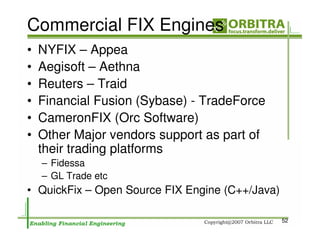
Commercial FIX Engines
•   NYFIX – Appea
•   Aegisoft – Aethna
•   Reuters – Traid
•   Financial Fusion (Sybase) - TradeForce
•   CameronFIX (Orc Software)
•   Other Major vendors support as part of
    their trading platforms
    – Fidessa
    – GL Trade etc
• QuickFix – Open Source FIX Engine (C++/Java)

                                                 52
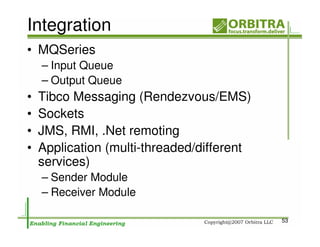
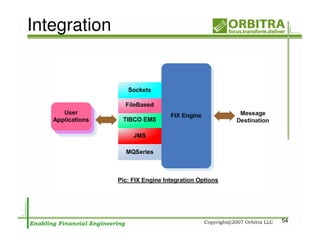
Integration
• MQSeries
    – Input Queue
    – Output Queue
•   Tibco Messaging (Rendezvous/EMS)
•   Sockets
•   JMS, RMI, .Net remoting
•   Application (multi-threaded/different
    services)
    – Sender Module
    – Receiver Module

                                            53
Integration


              54
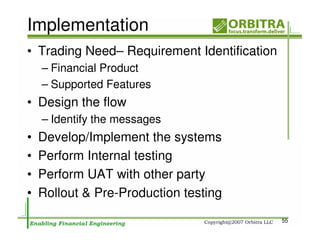
Implementation
• Trading Need– Requirement Identification
    – Financial Product
    – Supported Features
• Design the flow
    – Identify the messages
•   Develop/Implement the systems
•   Perform Internal testing
•   Perform UAT with other party
•   Rollout & Pre-Production testing
                                             55
UAT
• Testing with other party testing is the must
  – Each client Implementation could be different
  – Messages are built using multiple tags, hence
    every tag is important
  – Create all scenarios and test


                                                    56
Production Issues
       and
 Troubleshooting


                    57
Message Validation
• Session Level
  – Invalid Protocol Level data
  – Eg: Invalid Message Type, Invalid
    TargetCompId etc
  – Rejected by FIX Engine
  – Will not be send to application
  – REJECT FIX message will be sent back
• Users may not see any sign; watch log
  files
• File watchers are used to monitor such
  errors
                                           58
Message Validation
• Application Level
  – Validated by application (not FIX
    Engine)
  – Any missing or invalid custom fields
  – Rejected by application
  – BusinessReject FIX message will be
    sent back as response with a reason
• Applications must process these
  messages and appropriate actions
  – Displaying in the front end or send emails etc

                                                     59
Message Recovery
• Rarely happening situations, but expect couple
  of times a year at least
  – Transmission problems may occur some times
  – Messages may go out of sequence
  – FIX Engine will keep rejecting messages until
    sequence is fixed – serious issues
  – Usually manual intervention required to coordinate
    and fix the issues
• Very important to have measures in place to
  identify the situation the earliest possible
• Since its between FIX Engines, client application
  may not see any problem other than no flow of
  messages
• Using File Watchers is a standard solution
                                                         60
File Watchers
• Simple File Watcher – Shell or Batch script
  looking for certain text patterns in FIX
  Engine Log file
• Commercial Tools (Veritas and other) to
  monitor process log files


                                            61
Application Level Rejects
• Developers must take care to avoid as
  much as possible
• Thorough UAT is required to identify these
  scenarios
• Must handle it gracefully
  – Generate BusinessReject message with clear
    RejectReason and send out to other party
  – Inform to the message originator the best
    possible way
  – Try to avoid dropping Business Reject
    Messages

                                                 62
Process Monitoring tools
• Veritas
• Tivoli
• CA – scheduler etc


                           63
Roles & Responsibilities
•   Business Analysts
•   Developers
•   QA
•   UAT
•   Production Support – Level 1
•   Production Support – Level 2


                                   64
Business Analyst
• Understanding of Product Trading
• Understanding of the FIX protocol
  Design
• Understanding of the each FIX
  message and the usage of tags
• Development of detailed Test Cases
• Helping the
  Implementation/Development Team
• Coordination of UATs etc
                                       65
Developers
• Must understand the Integration with
  FIX Engine
• Understand the various messages
  and tags to be used
• Flow of messages in various trading
  scenarios


                                         66
QA
• Must be as good as BAs
• Must understand the operations of
  FIX Engines
• Must read and understand the log
  files
• Must be able to interpret format and
  different tag combinations etc


                                         67
UAT
• Business Users
• Must understand the Trading
  (scenarios)


                                68
Production Support – Level 1
• Receives Calls from users
• Try to troubleshoot and identify the
  issues
• Pass on the issue to Level 2 as
  needed


                                         69
Reading FIX Specification Doc
• FIX Version 4.2
  – One Volume
• FIX Version 4.3 and above
  – Multi-volume
• Walk-through of one of these version for
  basic understanding
• Current FIX Version is 5.0


                                             70
Thank You
   Khader Shaik
khader@orbitra.com
        or
khaderv@yahoo.com
  www.ksvali.com

                     71

FIX Protocol Overview.

  • 1.
    FIX Protocol One DayCourse By Khader Shaik 1
  • 2.
    Agenda – Part1 • FIX Protocol Introduction – Overview – History – Usage / Players – Message Types – Message Format – Communication Model – Anatomy of sample message – Sample Flow – Understandng Specs 2
  • 3.
    Agenda – Part2 • FIX Protocol & Equity Trading – Electronic Trading Overview – Types of FIX Messages – Trading Scenarios 3
  • 4.
    Agenda – Part3 • Technical Implementation – Architecture – Buy-side Vs Sell-Side – Integration Methods – Commercial Engines – Free Engines – Implementation Steps – Testing Tips – Troubleshooting Production Issues – Roles & Responsibilities 4
  • 5.
  • 6.
    What is FIX? •FIX - Financial Information Exchange • FIX Protocol is an industry driven messaging standard for exchange of Trading related information between financial institutions. • FIX Protocol specification provides format for electronic messages and communication model • FIX can be used by financial institutions like Broker-dealers, exchanges, Institutional investors and others in the industry to communicate among each other • It is widely used protocol in the Financial Markets Industry today 6
  • 7.
    FIX History • FIXProtocol introduced in 1992 • FIX Specifications are developed and managed by the members of organization known as "FIX Protocol Limited (FPL)“ – http://www.fixprotocol.org • FPL is formed by major industry players • FIX Versions: – Latest FIX version is 5.0 – Most of the current production versions are 4.1 to 4.4 7
  • 8.
    Benefits of FIXProtocol • FIX is Open Protocol – brings all players together • Electronic protocol – streamlines and increases the efficiency of communication among industry players • Wide support and software packages availability – easy to get on board • Simple and platform independent protocol • Designed by users and extensible – addresses all industry needs 8
  • 9.
    Industry Players &Usage • Exchanges – Use FIX to receive trades from their members and send executions back and other trading related messages • Buys-side firms – Use FIX to send and receive pre-trade, trade and post-trade messages to and from Sell-side firms • Sell-side firms – Use FIX to receive and send pre-trade, trading, post- trade messages from and to buy-side firms – Use to communicate with Exchanges and other OTC markets 9
  • 10.
  • 11.
    Supported Product Classes •Equities • Fixed Income • Derivatives (Options, Futures, IR Swaps etc) • FX etc. 11
  • 12.
    Message Categories • AdminMessages – Used to maintain the different aspects of FIX session (connection) • Application Messages – Messages used for transmission business messages 12
  • 13.
    Admin Messages • Logon– Client Authentication Message • Logout – Normal Termination of Session • Heartbeat- Used to check communication link between two parties • Test Request – used to test the health of the communication link • Resend Request – Request to retransmit the certain application messages • Reject (Session Level) – session level validation failure (different from application level validation) – Example invalid version, msg type etc – RejectReason is populated with error info • Sequence Reset/Gap Fill – In case of communication problems missing messages recovered or sequence is reset to ignore the missing messages 13
  • 14.
    Application Messages • Pre-trademessages – IOIs, Quotes, News, Email, Market Data, Security Info etc • Trade Messages – Single Orders, Basket/List Orders, Multi-leg orders, Executions, Order Cancel, Cancel/Replace, Status etc • Post-Trade Messages – Allocations, Settlement Instructions, Positions Mgmt etc 14
  • 15.
    FIX Message Format •FIX is a platform independent protocol • Message contains 3 parts: – Header – Body – Trailer/Footer • Message is a collection of fields • Each field is a tag-value pair – <tag>=<Value> – Eg: 55=IBM (symbol=IBM) • All fields are terminated by delimiter character • Delimiter character is a non-printing ASCII - "SOH" (#001) (in print ‘^’ is used) • Delimiter cannot be used in the message anywhere else except in DATA field • 9=0235^35=D^34=10^43=N^ 15
  • 16.
    FIX Message Format..cont • Tag – FIX uses predefined Tags – Each Tag represent the specific field – Each tag is given a predefined number – FIX Field dictionary provides the list of Fields and corresponding Tag numbers (Supplied with Spec) – Dictionary is available at the end of specification (by number and by tag name) • Value – Values represent the value of the Tag assigned to – Supported Data Types are: • int, float, char, time, date, data, string 16
  • 17.
    FIX Message Format..cont • All messages start with "8=FIX.x.y" – Indicates the FIX version of the message being transmitted – Useful to support multiple versions • All messages terminate with "10=nnn<SOH>" – nnn represents the Checksum of the data – Checksum is the sum of all the binary values in the message – Checksum helps to identify the transmission problems 17
  • 18.
    Sample Message • NewOrder Single Message 8=FIX.4.1^9=0235^35=D^34=10^43=N^49=VENDOR^50=CUSTOME^ 56=BROKER^52=19980930- 09:25:58^1=XQCCFUND^11=10^21=1^55=EK^48=277461109^22= 1^54=1^38=10000^40=2^44=76.750000^59=0^10=165 18
  • 19.
    Communication Model • Sessionbased communication • Session is communication between two parties • Initiator / Client – party who initiates the communication • Acceptor /Server – party who receives connection request from Initiator – Server validates client request using login message 19
  • 20.
    FIX Session • FIXis a session protocol – Each session maintains the bi-directional messages between two parties – Session can spread across multiple physical connections – Session is maintained using sequence number – Both parties rely on sequence numbers to maintain the orderly communication – Every new session starts with sequence number 1 – Missing messages are re-transmitted with bi-lateral agreement between both parties 20
  • 21.
    Typical Session Flow •Client starts the session with LOGON Message • Exchange Business/Application Messages with Server – Sending new orders, receiving fills etc • Ends with LOGOUT message 21
  • 22.
    FIX Message Categories •Admin/Session Messages – Used for Session maintenance – Eg: Logon, Logout, Heartbeat etc • Application Messages – Used for exchange of business messages – Eg: New Order, Cancel Order etc • Security – Authentication - Login and Logout between parties – Data Security - Options for data encryption (PGP) 22
  • 23.
    Application Messages • TradeMessages – New Order (Single) – Execution Report – Order Cancel Request – Order Cancel/Replace Request – Order Status Request etc 23
  • 24.
    New Order (Single) •Used to send a new (buy, sell etc) order to broker or an exchange. • New order message provides numerous tags to support all possible information required with New order • Has some mandatory fields that are common to every New order – Eg: ClientOrderID, Symbol etc • Sample New Order Message: 8=FIX.4.1^9=0235^35=D^34=10^43=N^49=VENDOR^ 50=CUSTOMER^56=BROKER^52=19980930-09:25:58^ 1=XQCCFUND^11=10^21=1^55=EK^48=277461109^ 22=1^54=1^38=10000^40=2^44=76.750000^10=165 24
  • 25.
    New Order (Single)…cont • FIX Version (8) = 4.1 • Message Body Length(9) = 0235 • Message Type (35) = D (New Order single) • Message Seq (34) = 10 • PossDupFlag (43) = N (no) • SenderCompID(49) = VENDOR (unique id of the sender firm) • SenderSubID(50) = Vendor Sub id like desk etc (Optional) • TargetCompID(56) = BROKER (value used to identify receiving firm) • SendingTime (52) = Time of message transmission • Account(1) = Account number • ClOrdID(11) = Client Order Id 25
  • 26.
    New Order (Single)…cont • HandlInst(21) = Order Handling Instructions to Broker • Symbol(55) = Security Identifier - Ticker • SecurityID (48) = CUSIP or other alternate security identifier • Side (54) = side of the order IDSource(22) = Identifies class of Side (54) = Side of Order. Values are: alternative SecurityID 1 = Buy 1 = CUSIP 2 = Sell 2 = SEDOL 3 = Buy minus 3 = QUIK 4 = Sell plus 4 = ISIN number 5 = Sell short 5 = RIC code 6 = Sell short exempt 26
  • 27.
    New Order (Single)…cont • OrderQty (38) = Order Quantity (eg: Number of shares ordered) • OrdType(40) = Order Types – 1 = Market – 2 = Limit – 3 = Stop – 4 = Stop limit etc • Price(44) = Price of order if the order is Limit etc • Checksum(10) – used for data integrity check 27
  • 28.
    Few Other ApplicationMessages • Order Cancel Request – This message is used to request the cancellation of full or part of the remaining quantity of the existing order. • Order Cancel/Replace Request – This message is used to modify the existing order • Order Status Request Message – This message is used to request the status of existing order 28
  • 29.
    Execution Report • Usedby the recipient (Broker or Exchange) • Used for various needs like – Used to confirm the receipt of an order – Confirm changes to an existing order (in response to order cancel request etc) – Relay order status information – Reject orders – Relay Fill (execution) information etc 29
  • 30.
    Message Type Codes(Tag 35) • 0 = Heartbeat • A = Logon • 1 = Test Request • B = News • 2 = Resend Request • C = Email • 3 = Reject • D = Order - Single • 4 = Sequence Reset • E = Order - List • 5 = Logout • F = Order Cancel • 6 = Indication of Interest Request • 7 = Advertisement • G = Order • 8 = Execution Report Cancel/Replace Request • 9 = Order Cancel Reject • H = Order Status Request • J = Allocation • K = List Cancel Request • L = List Execute • M = List Status Request and more 30
  • 31.
    Administrative Messages • Logon- Starts the Session • Heartbeat – Used to check the health in case of idle • Test Request • Resend Request • Logout etc 31
  • 32.
    Sample Flow LOGON Party -1 New Order Party -2 Party -1 Party -2 Institutional Execution Report (Partial Fill) Broker- Institutional Broker- Investor Investor Order Cancel Dealer Dealer FIX Client FIX Client FIX Server FIX Server Execution (Cancel Accept) LOGOUT 32
  • 33.
    Part - 2 FIX Protocol Equity Trading By Khader Shaik 33
  • 34.
    Agenda • Electronic TradingOverview • Types of FIX Messages • Trading Scenarios 34
  • 35.
    Trade Life Cycle •Pre-Trade – Trade prep – IOI – Market the Interest/positions – Quote Request and Quote • Trade – Trading Activity Messages • Post-Trade – Settlement etc – Allocations – Distribution of executions etc – Settlement Instructions – Street Side reporting (contra/counterparty info) 35
  • 36.
    Execution report Message •Simply known as Execution • Interpreted using ExecType, ExecTransType and OrdStatus fields • ExecTransTypes NEW Order Acknowledgement CANCEL Cancel previously reported execution due to error etc. CORRECT Correction to the previously reported execution. STATUS Reports the status of the orders. 36
  • 37.
    ExecTypes • 0 =New • 8 = Rejected • 1 = Partial fill • 9 = Suspended • 2 = Fill • A = Pending New • 3 = Done for day • B = Calculated • 4 = Canceled • C = Expired • 5 = Replace • D = Restated • 6 = Pending Cancel (e.g. (ExecutionRpt sent result of Order Cancel unsolicited by sellside, with Request) ExecRestatementReason • 7 = Stopped set) • E = Pending Replace (e.g. result of Order Cancel/Replace Request) 37
  • 38.
    OrdStatus • 0 =New • 8 = Rejected • 1 = Partially filled • 9 = Suspended • 2 = Filled • A = Pending New • 3 = Done for day • B = Calculated • 4 = Canceled • C = Expired • 5 = Replaced • D = Accepted for • 6 = Pending Cancel bidding (e.g. result of Order • E = Pending Replace Cancel Request) (e.g. result of Order • 7 = Stopped Cancel/Replace Request) 38
  • 39.
    Scenario – 1– Single Order New Order Single 35=D^ Execution (Ack) 35=8^ExecType=0(New) Execution (Ack) 35=8^ExecType=1(PartialFill) Buy Execution (Ack) Sell Side 35=8^ExecType=2(Filled) Side 39
  • 40.
    Scenario – 2– Single Order New Order Single 35=D^ Execution (Ack) 35=8^ExecType=0(New) Execution 35=8^ExecType=1(PartialFill) Order Cancel Buy Sell 35=F Side Side Execution (Pending Cancel) 35=8^ExecType=6 Execution (Canceled) 35=8^ExecType=4 Execution (Filled) 35=8^ExecType=2^ExecQty=nn 40
  • 41.
    Scenario – 3– Single Order New Order Single 35=D^ Execution (Ack) 35=8^ExecType=0(New) Execution 35=8^ExecType=1(PartialFill) Order Cancel Sell Buy 35=F Side Side Execution (Pending Cancel) 35=8^ExecType=6 Execution (Partial Fill) (some more Qty) 35=8^ExecType=1 Execution (Canceled) 35=8^ExecType=4 41
  • 42.
    Scenario – 4– Single Order New Order Single 35=D^ Execution (Ack) 35=8^ExecType=0(New)^39=0 Execution(Partial Fill) 35=8^ExecType=1^39=1 Order Cancel Sell Buy 35=F Side Side Execution (Pending Cancel) 35=8^ExecType=6^39=6 Execution (Filled) (Full Remaining Qty) 35=8^ExecType=2^39=2 Execution (Cancel Rejected) (optional) 35=8^ExecType=8^39=2 42
  • 43.
    Order Cancel/Replace • Alsoknown as Order Modification • Only modifiable properties can be changed – Order Qty, Order Price etc • Filled order can also be reinstated by increasing the qty • Used to increase the qty instead of sending new order – To holds the position / seniority 43
  • 44.
    Scenario – 5– Single Order New Order Single 35=D^ Execution (Ack) 35=E^ExecType=0(New) Execution 35=8^ExecType=1(PartialFill) Buy Order Cancel/Replace Sell Side 35=G^ Side Execution (Pending Cancel) 35=8^ExecType=E Execution 35=8^ExecType=1(PartialFill) Execution 35=8^ExecType=2(Filled) 44
  • 45.
    Key Fields • OrderID– unique id used to identify the order • ClOrdId – OrderID used to identify the order in all communication • Order Type - Day Order Vs GTC (good till cancel) • FK (FillOrKill) Vs IOC (Immediate or Cancel) • Trade Bust – canceling previously issued execution (can be send by executing party) 45
  • 46.
    ExecType Vs OrderStatus • ExecType(150) – States the Execution Message type – New, Filled etc – Response to the request • OrdStatus(39) – States the current orders status – New, Filled etc – May hold the same value as ExecType 46
  • 47.
    Allocation • Allocation andAllocationAck • Used for – Distribution of executions/Orders among clients – Commission Calculations etc • Also used in pre-trade to transmit the client allocation information 47
  • 48.
    Part - 3 FIX Protocol Technical Section By Khader Shaik 48
  • 49.
    Agenda • Architecture • Buy-side Vs Sell-Side • Integration Methods • Commercial Engines • Free Engines • Implementation Steps • Testing Tips • Troubleshooting Production Issues • Roles & Responsibilities 49
  • 50.
    Architecture • Client Side/Buy Side – OMS, Order Routing System, Trading Desks etc – FIX Engine • Server Side / Sell Side / Exchange – FIX Engine – OMS, Order Matching Engine / Execution Engine – Settlement/Back-office System etc 50
  • 51.
  • 52.
    Commercial FIX Engines • NYFIX – Appea • Aegisoft – Aethna • Reuters – Traid • Financial Fusion (Sybase) - TradeForce • CameronFIX (Orc Software) • Other Major vendors support as part of their trading platforms – Fidessa – GL Trade etc • QuickFix – Open Source FIX Engine (C++/Java) 52
  • 53.
    Integration • MQSeries – Input Queue – Output Queue • Tibco Messaging (Rendezvous/EMS) • Sockets • JMS, RMI, .Net remoting • Application (multi-threaded/different services) – Sender Module – Receiver Module 53
  • 54.
  • 55.
    Implementation • Trading Need–Requirement Identification – Financial Product – Supported Features • Design the flow – Identify the messages • Develop/Implement the systems • Perform Internal testing • Perform UAT with other party • Rollout & Pre-Production testing 55
  • 56.
    UAT • Testing withother party testing is the must – Each client Implementation could be different – Messages are built using multiple tags, hence every tag is important – Create all scenarios and test 56
  • 57.
    Production Issues and Troubleshooting 57
  • 58.
    Message Validation • SessionLevel – Invalid Protocol Level data – Eg: Invalid Message Type, Invalid TargetCompId etc – Rejected by FIX Engine – Will not be send to application – REJECT FIX message will be sent back • Users may not see any sign; watch log files • File watchers are used to monitor such errors 58
  • 59.
    Message Validation • ApplicationLevel – Validated by application (not FIX Engine) – Any missing or invalid custom fields – Rejected by application – BusinessReject FIX message will be sent back as response with a reason • Applications must process these messages and appropriate actions – Displaying in the front end or send emails etc 59
  • 60.
    Message Recovery • Rarelyhappening situations, but expect couple of times a year at least – Transmission problems may occur some times – Messages may go out of sequence – FIX Engine will keep rejecting messages until sequence is fixed – serious issues – Usually manual intervention required to coordinate and fix the issues • Very important to have measures in place to identify the situation the earliest possible • Since its between FIX Engines, client application may not see any problem other than no flow of messages • Using File Watchers is a standard solution 60
  • 61.
    File Watchers • SimpleFile Watcher – Shell or Batch script looking for certain text patterns in FIX Engine Log file • Commercial Tools (Veritas and other) to monitor process log files 61
  • 62.
    Application Level Rejects •Developers must take care to avoid as much as possible • Thorough UAT is required to identify these scenarios • Must handle it gracefully – Generate BusinessReject message with clear RejectReason and send out to other party – Inform to the message originator the best possible way – Try to avoid dropping Business Reject Messages 62
  • 63.
    Process Monitoring tools •Veritas • Tivoli • CA – scheduler etc 63
  • 64.
    Roles & Responsibilities • Business Analysts • Developers • QA • UAT • Production Support – Level 1 • Production Support – Level 2 64
  • 65.
    Business Analyst • Understandingof Product Trading • Understanding of the FIX protocol Design • Understanding of the each FIX message and the usage of tags • Development of detailed Test Cases • Helping the Implementation/Development Team • Coordination of UATs etc 65
  • 66.
    Developers • Must understandthe Integration with FIX Engine • Understand the various messages and tags to be used • Flow of messages in various trading scenarios 66
  • 67.
    QA • Must beas good as BAs • Must understand the operations of FIX Engines • Must read and understand the log files • Must be able to interpret format and different tag combinations etc 67
  • 68.
    UAT • Business Users •Must understand the Trading (scenarios) 68
  • 69.
    Production Support –Level 1 • Receives Calls from users • Try to troubleshoot and identify the issues • Pass on the issue to Level 2 as needed 69
  • 70.
    Reading FIX SpecificationDoc • FIX Version 4.2 – One Volume • FIX Version 4.3 and above – Multi-volume • Walk-through of one of these version for basic understanding • Current FIX Version is 5.0 70
  • 71.
    Thank You Khader Shaik khader@orbitra.com or khaderv@yahoo.com www.ksvali.com 71