ITMP T-4-3-1-24A Template Version 1.2 1
MX 3.1 Pre-Post Trade
workflows
Murugesan Prabhakaran
15th Aug 2013
ITMP T-4-3-1-24A Template Version 1.2 2
Agenda
• Key Differences between 2.11 & 3.1
• Pre Trade workflow
• Post Trade workflow
ITMP T-4-3-1-24A Template Version 1.2 3
Key difference between 2.11 & 3.1
• Trade Repository
 Trades Hierarchy & Design
 Events
 Versioning
• Exception based management
• GUI Integration framework
ITMP T-4-3-1-24A Template Version 1.2 4
Key difference between 2.11 & 3.1 – Trade Repository
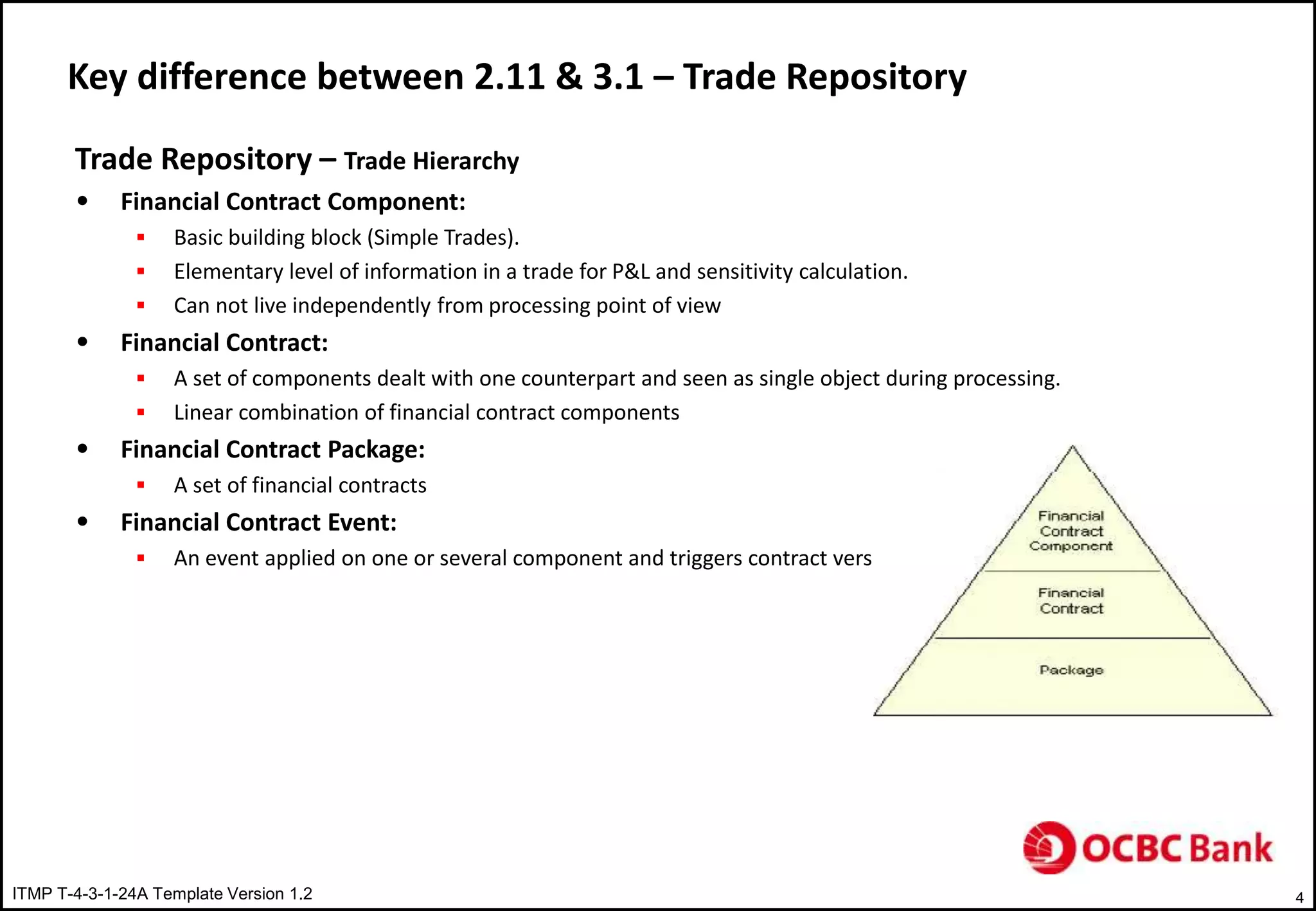
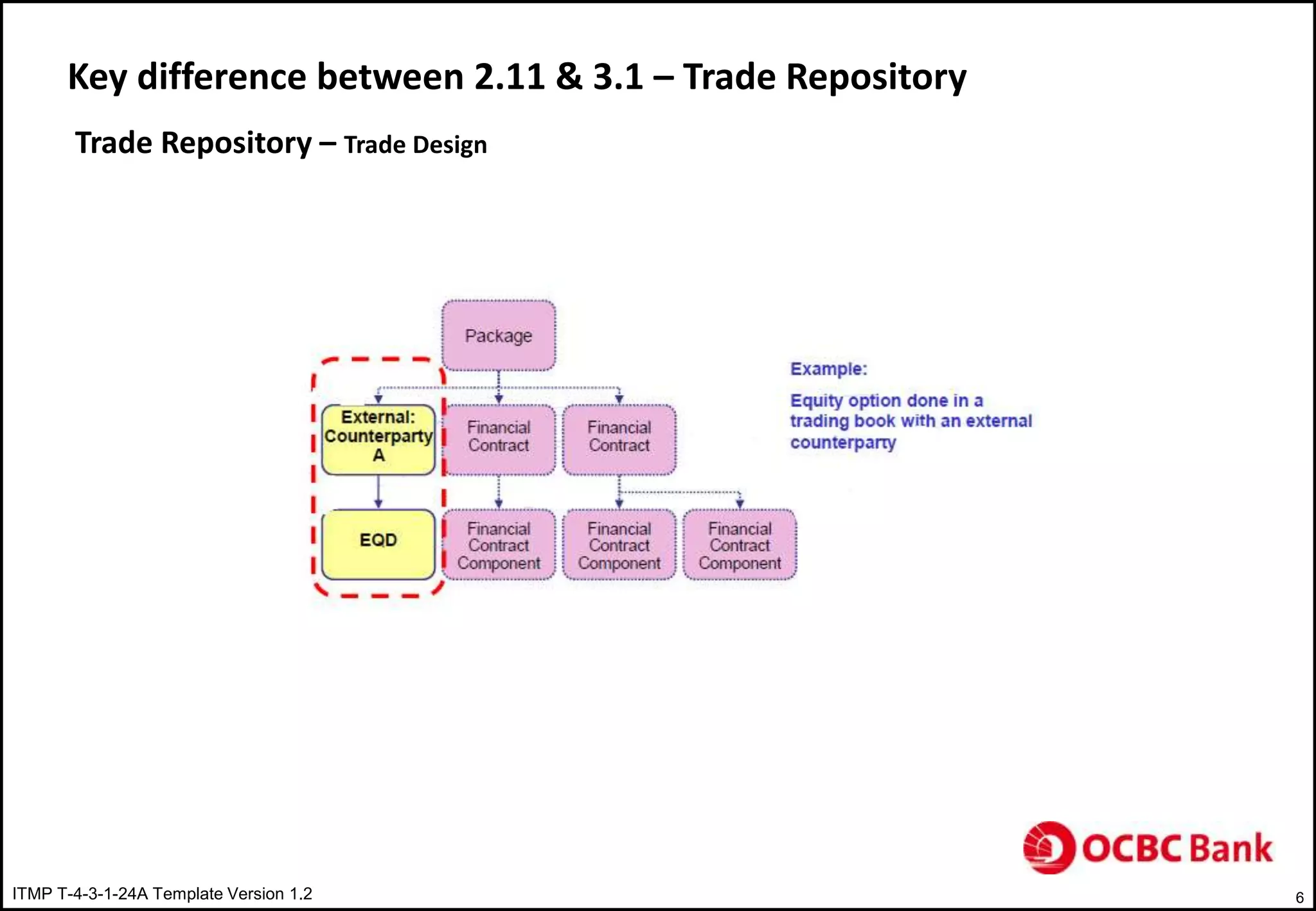
Trade Repository – Trade Hierarchy
• Financial Contract Component:
 Basic building block (Simple Trades).
 Elementary level of information in a trade for P&L and sensitivity calculation.
 Can not live independently from processing point of view
• Financial Contract:
 A set of components dealt with one counterpart and seen as single object during processing.
 Linear combination of financial contract components
• Financial Contract Package:
 A set of financial contracts
• Financial Contract Event:
 An event applied on one or several component and triggers contract versioning.
ITMP T-4-3-1-24A Template Version 1.2 5
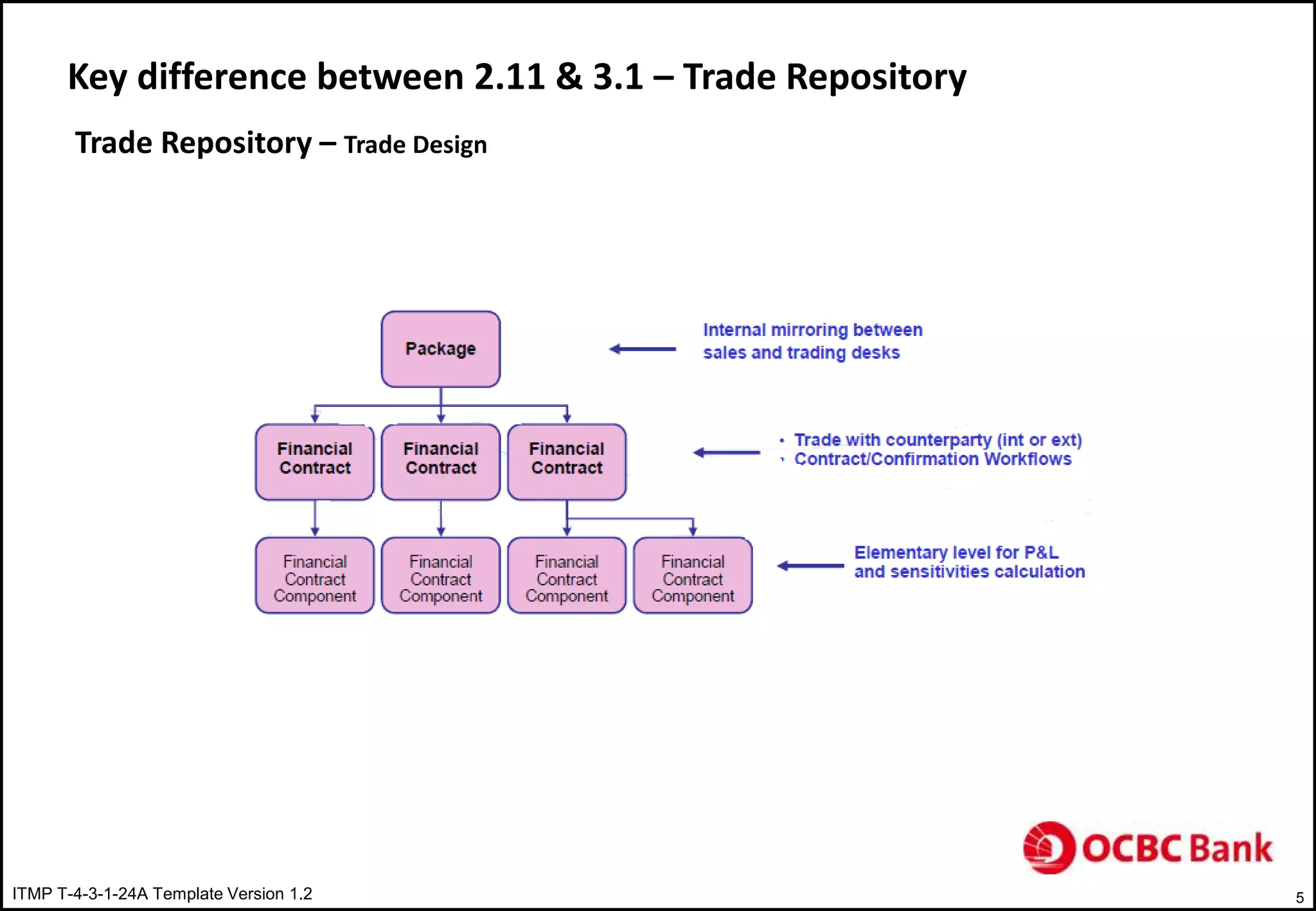
Key difference between 2.11 & 3.1 – Trade Repository
Trade Repository – Trade Design
ITMP T-4-3-1-24A Template Version 1.2 6
Key difference between 2.11 & 3.1 – Trade Repository
Trade Repository – Trade Design
ITMP T-4-3-1-24A Template Version 1.2 7
Key difference between 2.11 & 3.1 – Trade Repository
Trade Repository – Trade Design
ITMP T-4-3-1-24A Template Version 1.2 8
Key difference between 2.11 & 3.1 – Trade Repository
Trade Repository – Trade Design
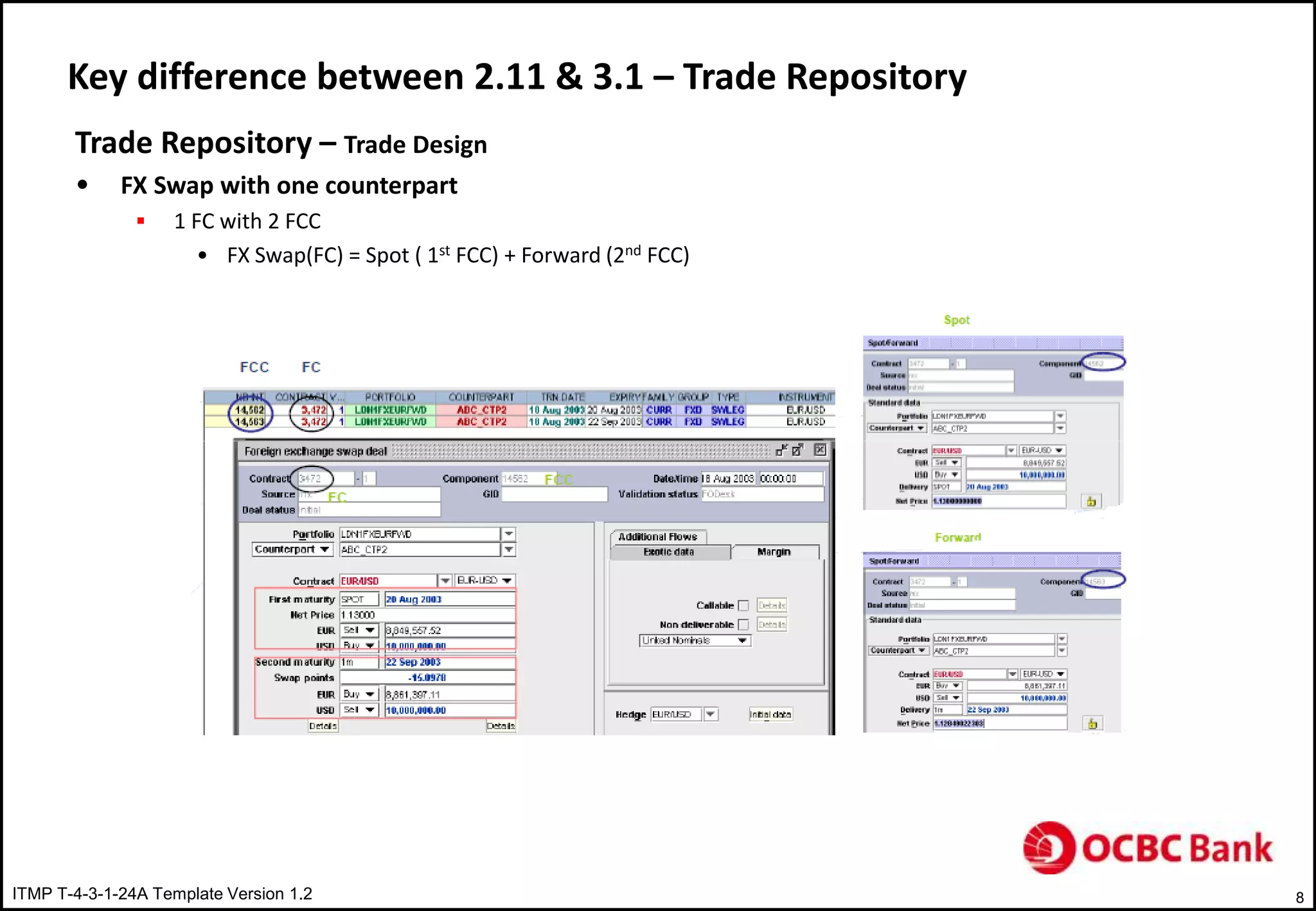
• FX Swap with one counterpart
 1 FC with 2 FCC
• FX Swap(FC) = Spot ( 1st FCC) + Forward (2nd FCC)
ITMP T-4-3-1-24A Template Version 1.2 9
Key difference between 2.11 & 3.1 – Trade Repository
Trade Repository – Trade Design
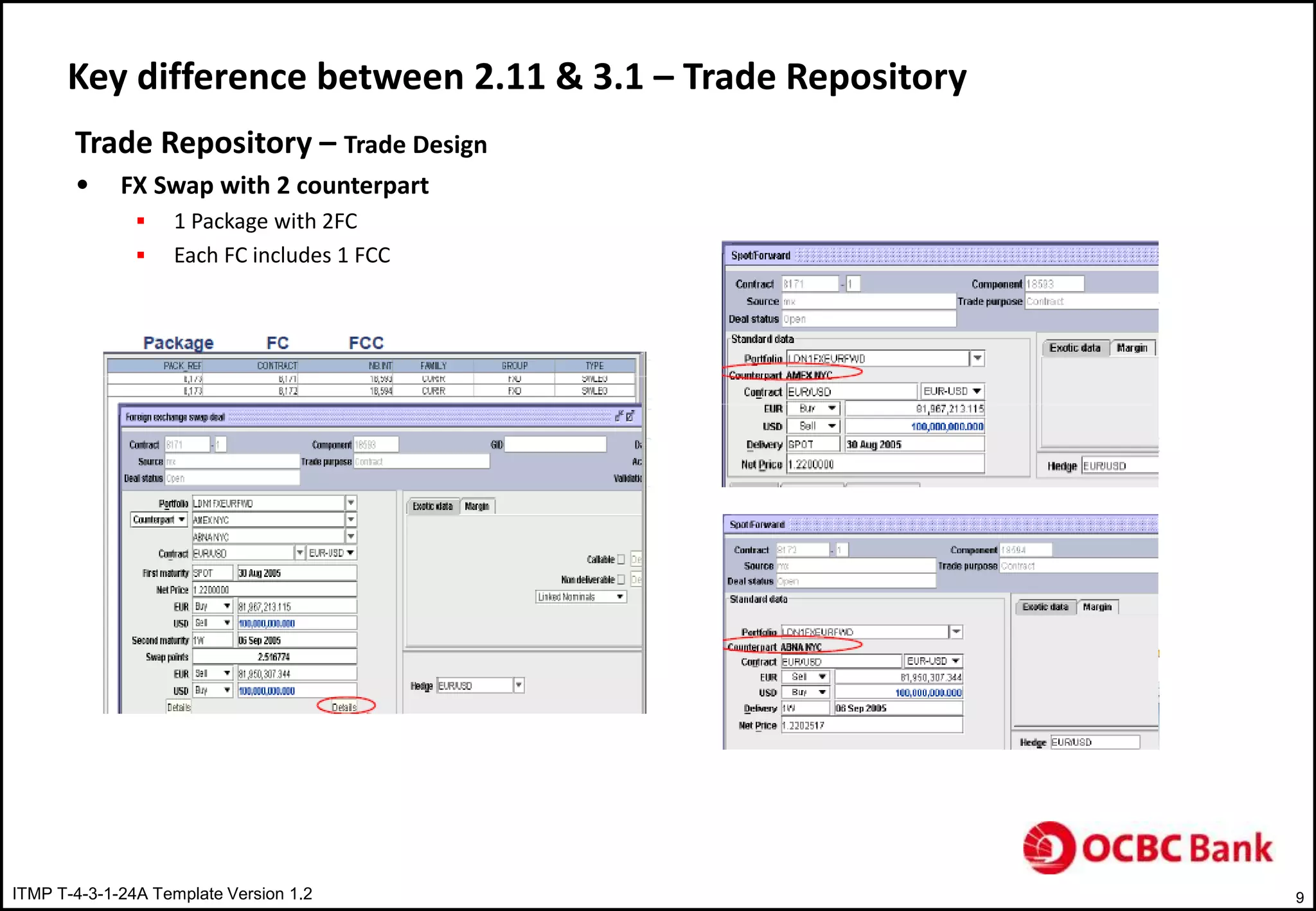
• FX Swap with 2 counterpart
 1 Package with 2FC
 Each FC includes 1 FCC
ITMP T-4-3-1-24A Template Version 1.2 10
Key difference between 2.11 & 3.1 – Trade Repository
Trade Repository – Trade Events
• Business event on Financial Contract or Package
• Event Characteristics
 Impact on the Financial Contract
 Generates new financial Contracts
 Generates cash flow
ITMP T-4-3-1-24A Template Version 1.2 11
Key difference between 2.11 & 3.1 – Trade Repository
Trade Events
• Graphical Representation
 Tree structure summarizes the successive events and indicating respective reference numbers
ITMP T-4-3-1-24A Template Version 1.2 12
Key difference between 2.11 & 3.1 – Trade Repository
Versioning
• Purpose
 Easier reconciliation and confirmation with counterpart after trade amendment
• Contract number is fixed
• Number indicating the version number
ITMP T-4-3-1-24A Template Version 1.2 13
Key difference between 2.11 & 3.1 – Trade Repository
Versioning
• Mechanism
 Every event publishes its impact in the contract workflow
• Impact on existing & new transactions
 A copy of initial trade is generated
• Impact occur on the copy
• Generated cash flow are attached to the copy
• Event on Trade
Example: Counterpart allocation
ITMP T-4-3-1-24A Template Version 1.2 14
Key difference between 2.11 & 3.1 – Trade Repository
Versioning
• Cancel of an event
 Copy is cancelled and initial deal is versioned
 Cancel of any new trade generated by an event
 Cancelled trades are published in contract workflow
ITMP T-4-3-1-24A Template Version 1.2 15
Key difference between 2.11 & 3.1 – Trade Repository
Versioning
• Events and relation to versioning
 Event that does not generate a new deal – Fixing
 Event that generates new deal
ITMP T-4-3-1-24A Template Version 1.2 16
Key difference between 2.11 & 3.1- Exception based management
ITMP T-4-3-1-24A Template Version 1.2 17
Key difference between 2.11 & 3.1- OSP
ITMP T-4-3-1-24A Template Version 1.2 18
Key difference between 2.11 & 3.1 – GUI Integration framework
 Third party software displayed in murex window like Excel
ITMP T-4-3-1-24A Template Version 1.2 19
Pre Trade Workflow
• Overview
• Pre-Trade Cycle & Organization
• Pre-Trade or Post-Trade
• Pre-Trade Sequences
• Scripting Language
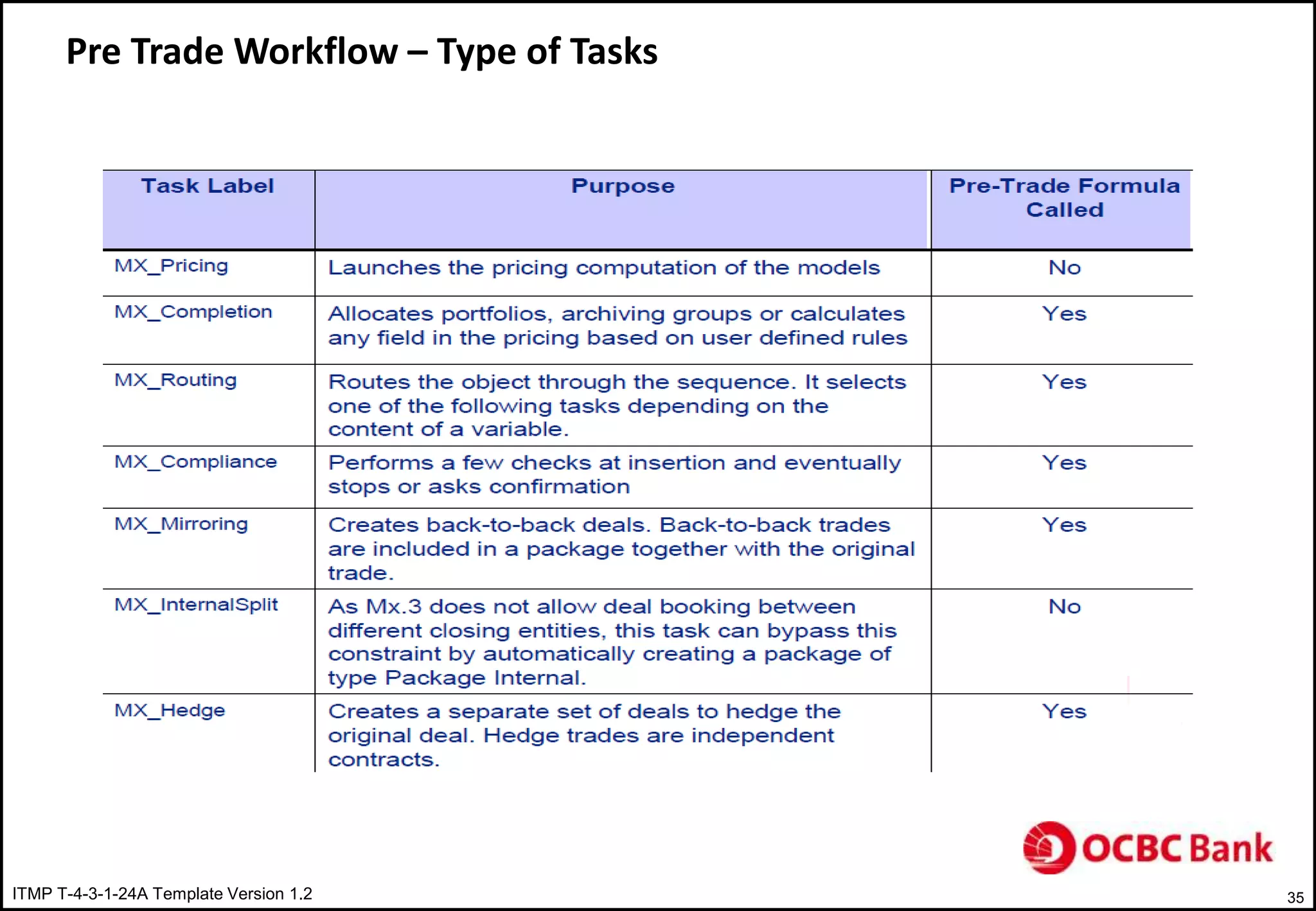
• Type of Tasks
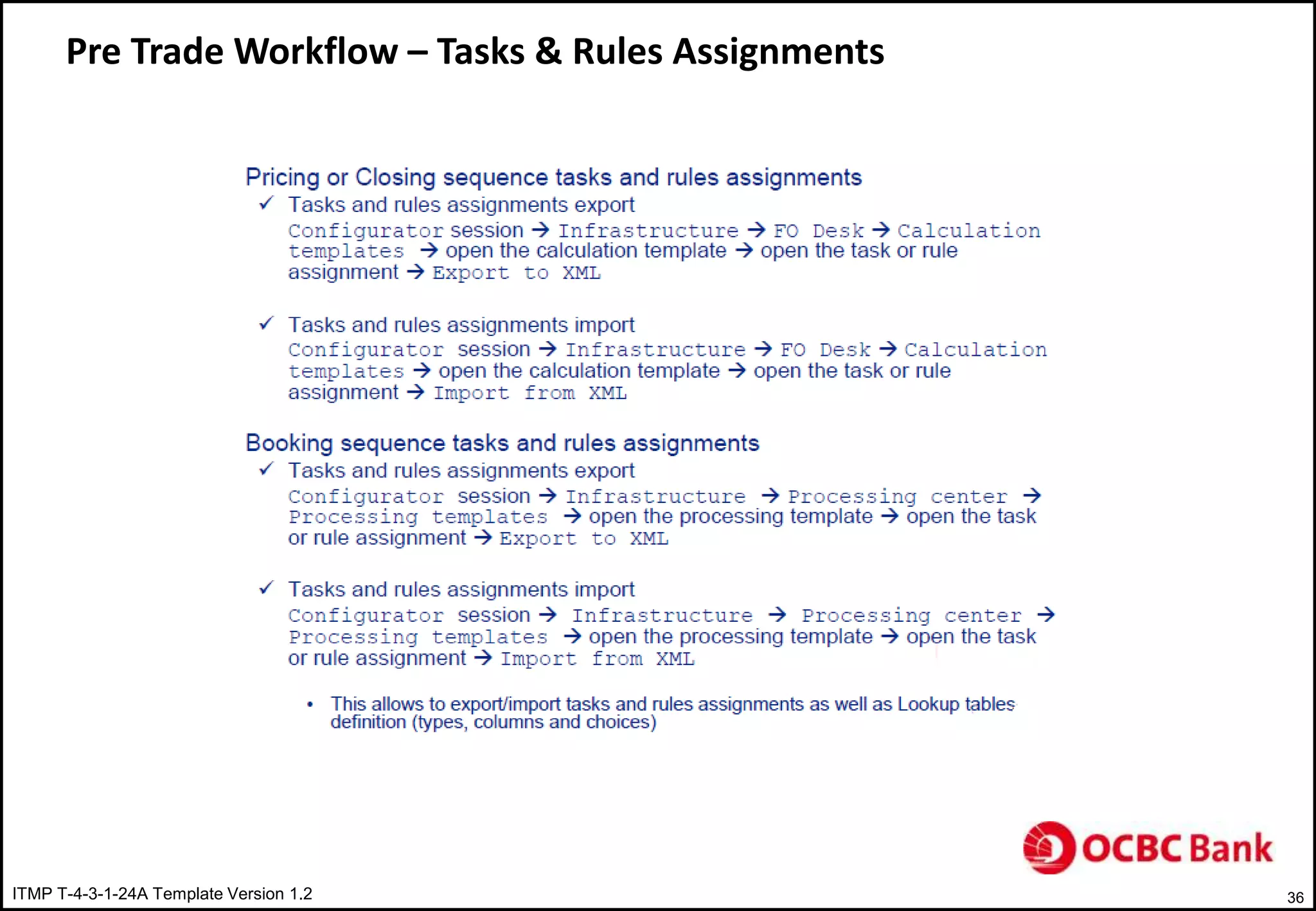
• Tasks & Rules Assignments
ITMP T-4-3-1-24A Template Version 1.2 20
Pre Trade Workflow - Overview
 Automation logic for achieving higher STP rate
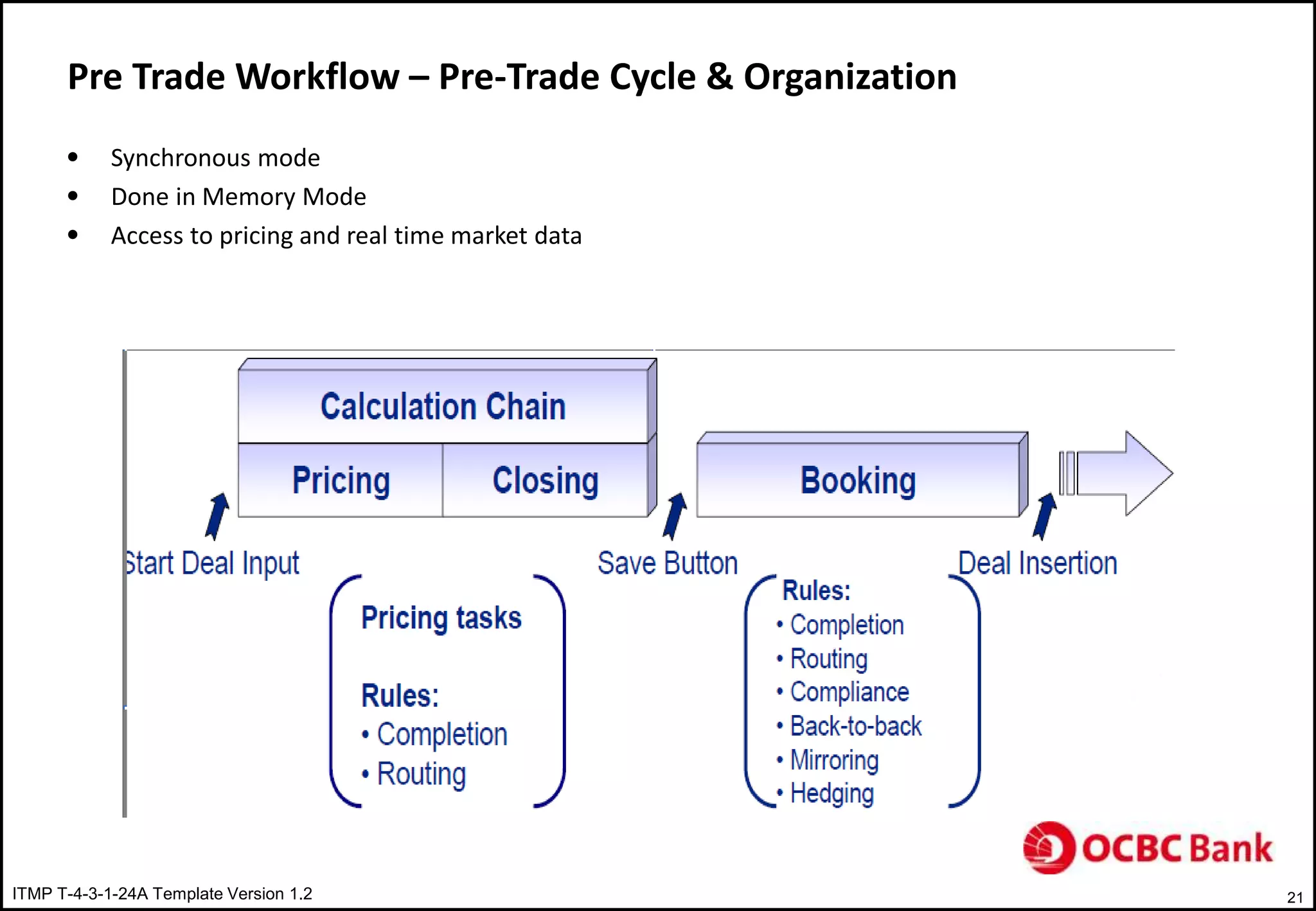
ITMP T-4-3-1-24A Template Version 1.2 21
Pre Trade Workflow – Pre-Trade Cycle & Organization
• Synchronous mode
• Done in Memory Mode
• Access to pricing and real time market data
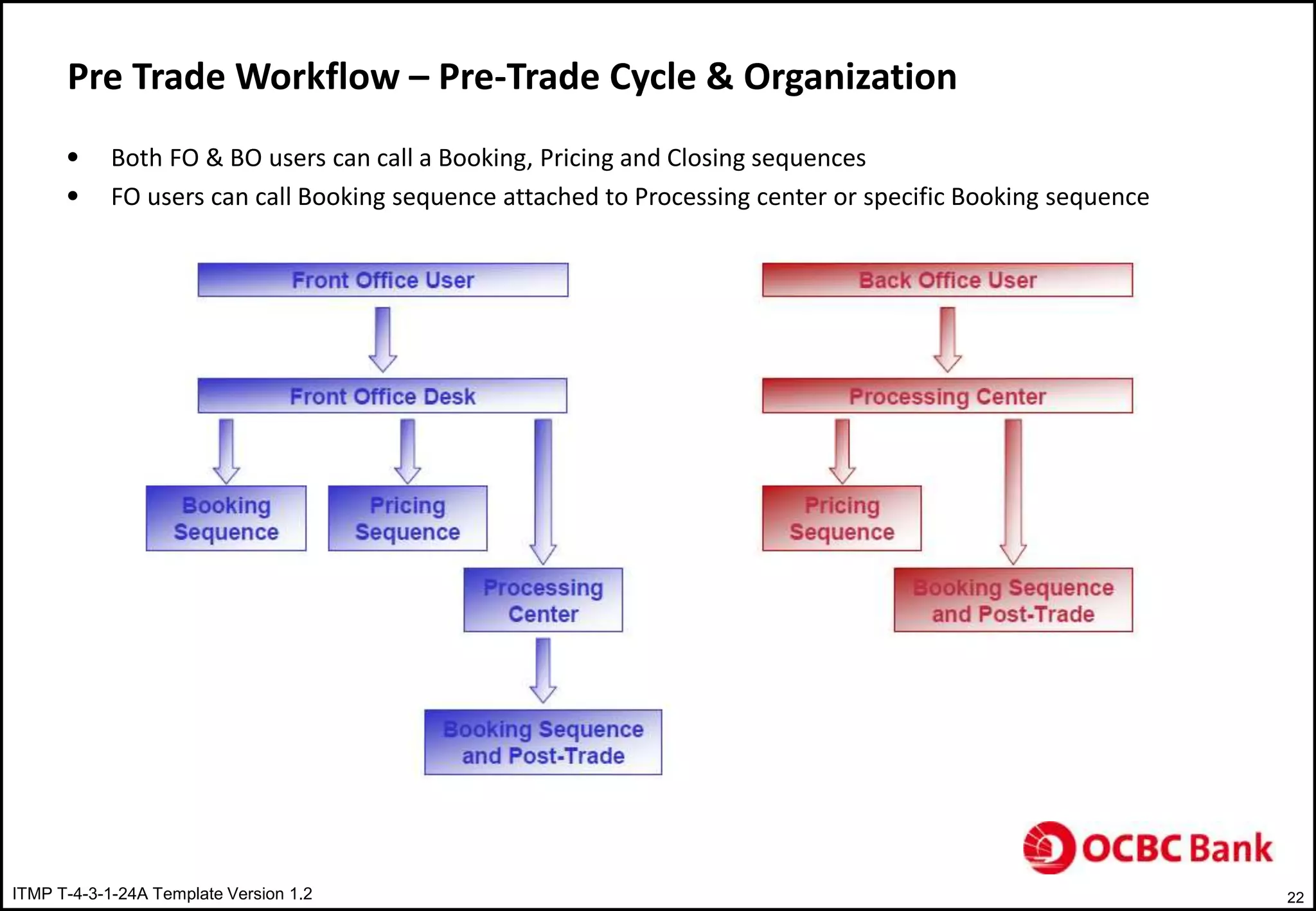
ITMP T-4-3-1-24A Template Version 1.2 22
Pre Trade Workflow – Pre-Trade Cycle & Organization
• Both FO & BO users can call a Booking, Pricing and Closing sequences
• FO users can call Booking sequence attached to Processing center or specific Booking sequence
ITMP T-4-3-1-24A Template Version 1.2 23
Pre Trade Workflow – Pre-Trade or Post-Trade
• Most of the automation logic should be covered with in Pre-Trade rules rather than with in Post-Trade
workflows. This will help in reaching higher STP rate.
• Pre-Trade rules are considered as an initiation phase for Post-Trade workflows
• Financial checks can easily be done in Pre-Trade workflows and the result check can be stored in a UDF
and reused in Post-Trade workflows
ITMP T-4-3-1-24A Template Version 1.2 24
Pre Trade Workflow – Pre-Trade Sequences
• Calculation Chain ( Pricing & Closing Sequences)
 Pricing Sequence
• Set of rules automatically executed in order to customize the pricing of each time
 User enters a field in deal ticket, pricing, e-TradePad or FDI
 Trade is generated by MOP
 Trade is imported from an external system
• Represented in a flow sheet connecting several tasks
 Typical flow sheet contains completion task to fill-in inputs, pricing task
• Typical tasks:
 Completion Rules: automatic fill-in one or several fields in deal ticket based on condition
 Pricing tasks: Trigger actual pricing models
 Routing tasks: Route to another branch of flow sheet
• Closing Sequence
 Set of rules automatically executed just after pricing sequence
• Executed only once
• Not supposed to modify pricing input
 Represented in a flow sheet connecting several tasks
• Typical flow sheet contains several completion tasks with routing tasks
 Typical tasks:
• Completion rules: Typology, portfolio assignments, Tradability status
• Routing tasks: Router to another branch of flow sheet
ITMP T-4-3-1-24A Template Version 1.2 25
Pre Trade Workflow – Pre-Trade Sequences
• Booking Sequence
 Set of rules automatically executed in order to customize the trade insertion each time
• User hits the save button
• A trade is generated by MOP
• A trade is imported from an external system
 Rules are applied in a sequence of tasks which are executed before trade is saved physically in to system
 Typical Rules
• Completion Rules: Broker allocation and fees calculation, SSI allocation
• Routing rules: Route to specific branch of flow sheet
• Compliance Rules: Sanity checks using trade characteristics. Warning or error messages
• Mirroring & Hedging rules: BTB & generation of hedges
ITMP T-4-3-1-24A Template Version 1.2 26
Pre Trade Workflow – Pre-Trade Sequences
• Calculation chain or Booking sequence
 Calculation chain
• Rule will be executed at each computation in calculation chain
• Calculation chain has to be used if an interaction with the end user before the trade insertion is required
 Booking Sequence
• Booking sequence should be used as the rule will be applied only once
• Sanity Checks (Compliance) have to be performed in Booking sequence
 Users will be disturbed by warnings and error messages during calculation chain
 Checks on computed data such as NPV, market value and prices sensitivities should be done
• Mirroring rules should be done in booking sequence
ITMP T-4-3-1-24A Template Version 1.2 27
Pre Trade Workflow – Pre-Trade Sequences
• Sequence construction Steps
 Pre-trade sequences are executed in following order
• Tasks Assignment selects the flow sheet
• Flow sheet defines the succession of tasks to be executed
• Rules Assignment selects the rule to be applied for each task
• Selected rules are executed in the order specified in the flow sheet
ITMP T-4-3-1-24A Template Version 1.2 28
Pre Trade Workflow – Scripting Language
• MSL ( Murex Scripting Language) being used to build pre-trade rules
• Generic Functions
 Integer legGetNumberOfComponents(Pointer)
• Returns number of FCC within a FC or Package
• Parameters: FC or Package Pointer
 Pointer legGetComponentAt(Pointer, i)
• Returns a FCC pointer
• Parameters:
 A FC or Package pointer
 FCC number with in FC or Package
 Pointer legGetMainComponent(Pointer)
• Returns a FCC pointer
• Parameters: A FC or Package pointer
 At Package/FC level, loop is required as number and the nature of the legs is not known in advance
ITMP T-4-3-1-24A Template Version 1.2 29
Pre Trade Workflow – Scripting Language
• Generic Functions
 At Single Contract level, it is not mandatory to use a loop
 List of functions and key words can be find using:
• Press F9 to access Key words list
• Press Shift+F9 to access functions list
ITMP T-4-3-1-24A Template Version 1.2 30
Pre Trade Workflow – Pre-Trade Sequences
Contract Sequence
 Warning to popup when the user saves IRS trade when nominal amount is greater that 100 000 000
 Example of compliance rule
ITMP T-4-3-1-24A Template Version 1.2 31
Pre Trade Workflow – Pre-Trade Sequences
Event Sequence
 The sequence is triggered when a market operation is performed ( Cancel, C&R, EXR,EXT,ET.. Etc)
 Completion and/or compliance rules can be applied on the initial deal, the event and generated/cancelled deals
 Example:
• Field portfolio of the initial deal has to be copied in UDF INIT_PTF of the reissued deal while performing C&R
• Below completion rule can be used
ITMP T-4-3-1-24A Template Version 1.2 32
Pre Trade Workflow – Pre-Trade Sequences
Deliverable Sequence
 The sequence is triggered whenever a deliverable is generated if deliverable module is activated
 Generation of deliverables occurs when:
• Deliverable value date is with in the deliverable window period
• Contracts are inserted with schedules including known flows
• Events are performed. Example: Fixing
 Deliverables would enter the pre-trade sequence after Settlement / Deliverable template has been applied
 Deliverable sequence can be used for pre-netting/MM Rollovers
 Only Booking sequence is triggered every time deliverables are generated
 Events may impact deliverable directly or indirectly
 Events on deliverables
• Deliverables can be cancelled, C&R, Split  Not advisable
• Netted
ITMP T-4-3-1-24A Template Version 1.2 33
Pre Trade Workflow – Pre-Trade Sequences
Deliverable Sequence
 Example:
• Completion rule to delete flows generated from SCF, Null cash flows, FX cash having typology starts FX_
ITMP T-4-3-1-24A Template Version 1.2 34
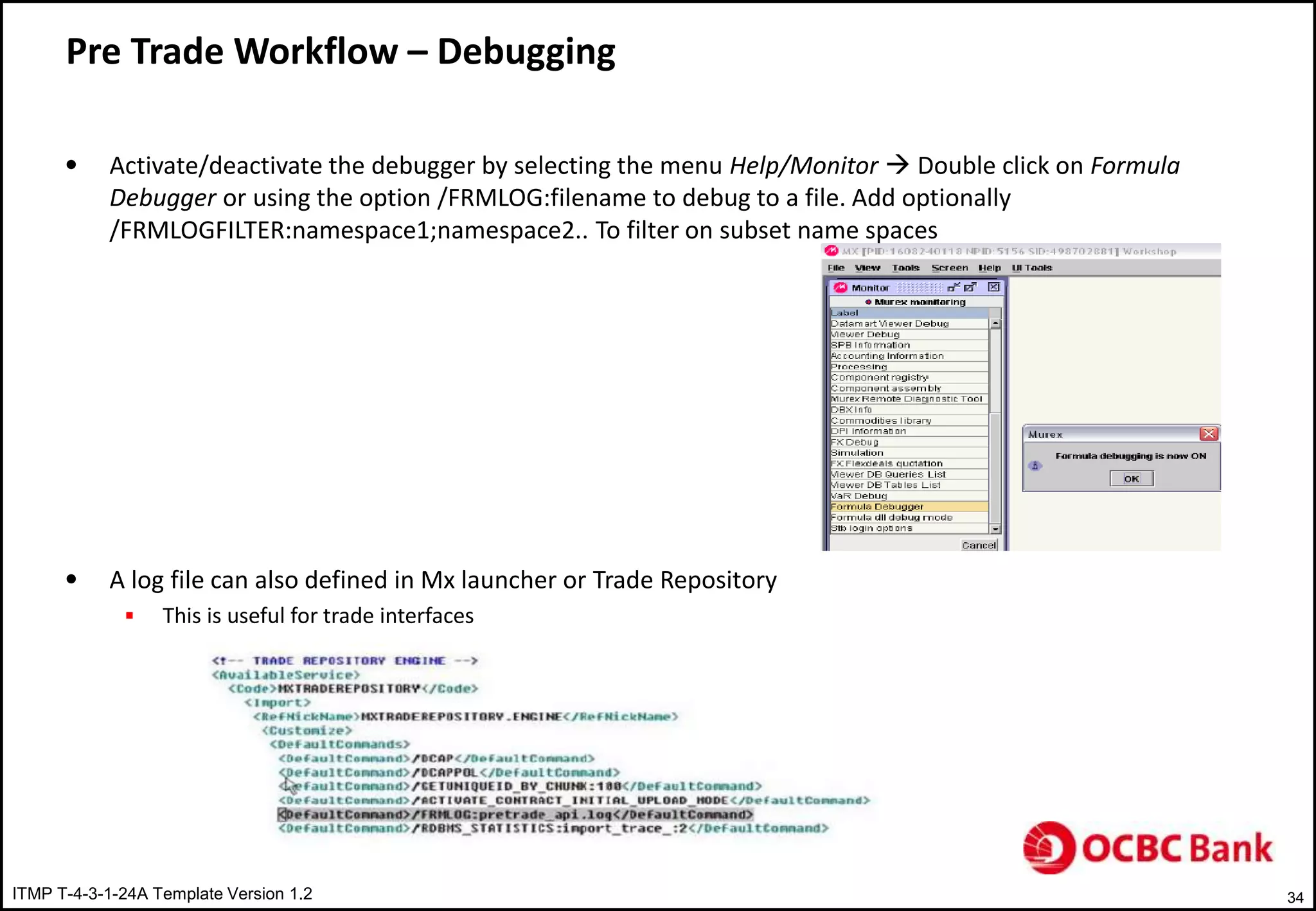
Pre Trade Workflow – Debugging
• Activate/deactivate the debugger by selecting the menu Help/Monitor  Double click on Formula
Debugger or using the option /FRMLOG:filename to debug to a file. Add optionally
/FRMLOGFILTER:namespace1;namespace2.. To filter on subset name spaces
• A log file can also defined in Mx launcher or Trade Repository
 This is useful for trade interfaces
ITMP T-4-3-1-24A Template Version 1.2 35
Pre Trade Workflow – Type of Tasks
ITMP T-4-3-1-24A Template Version 1.2 36
Pre Trade Workflow – Tasks & Rules Assignments
ITMP T-4-3-1-24A Template Version 1.2 37
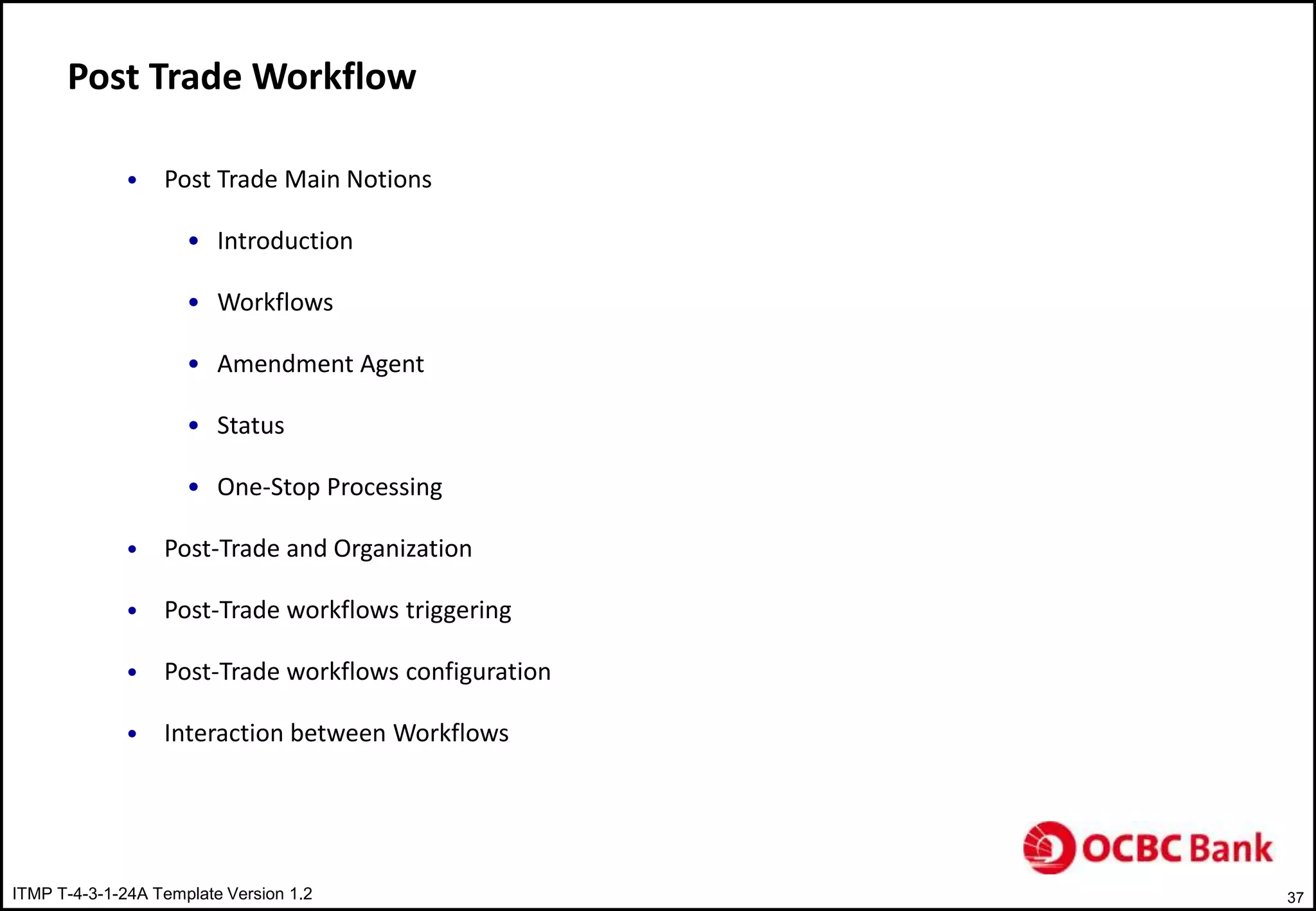
Post Trade Workflow
• Post Trade Main Notions
• Introduction
• Workflows
• Amendment Agent
• Status
• One-Stop Processing
• Post-Trade and Organization
• Post-Trade workflows triggering
• Post-Trade workflows configuration
• Interaction between Workflows
ITMP T-4-3-1-24A Template Version 1.2 38
Post Trade Main Notions
Introduction
 Post-Trade is a set of workflow automatically initiated whenever an event is performed on business
object (contract, package, deliverables, static data.. Etc)
 It groups all actions performed in an asynchronous way in order to manage statuses, perform validations,
generate confirmation and communicate to external systems
ITMP T-4-3-1-24A Template Version 1.2 39
Post Trade Main Notions
Workflows
 A workflow is a set of auto & manual tasks connected together representing a given business process
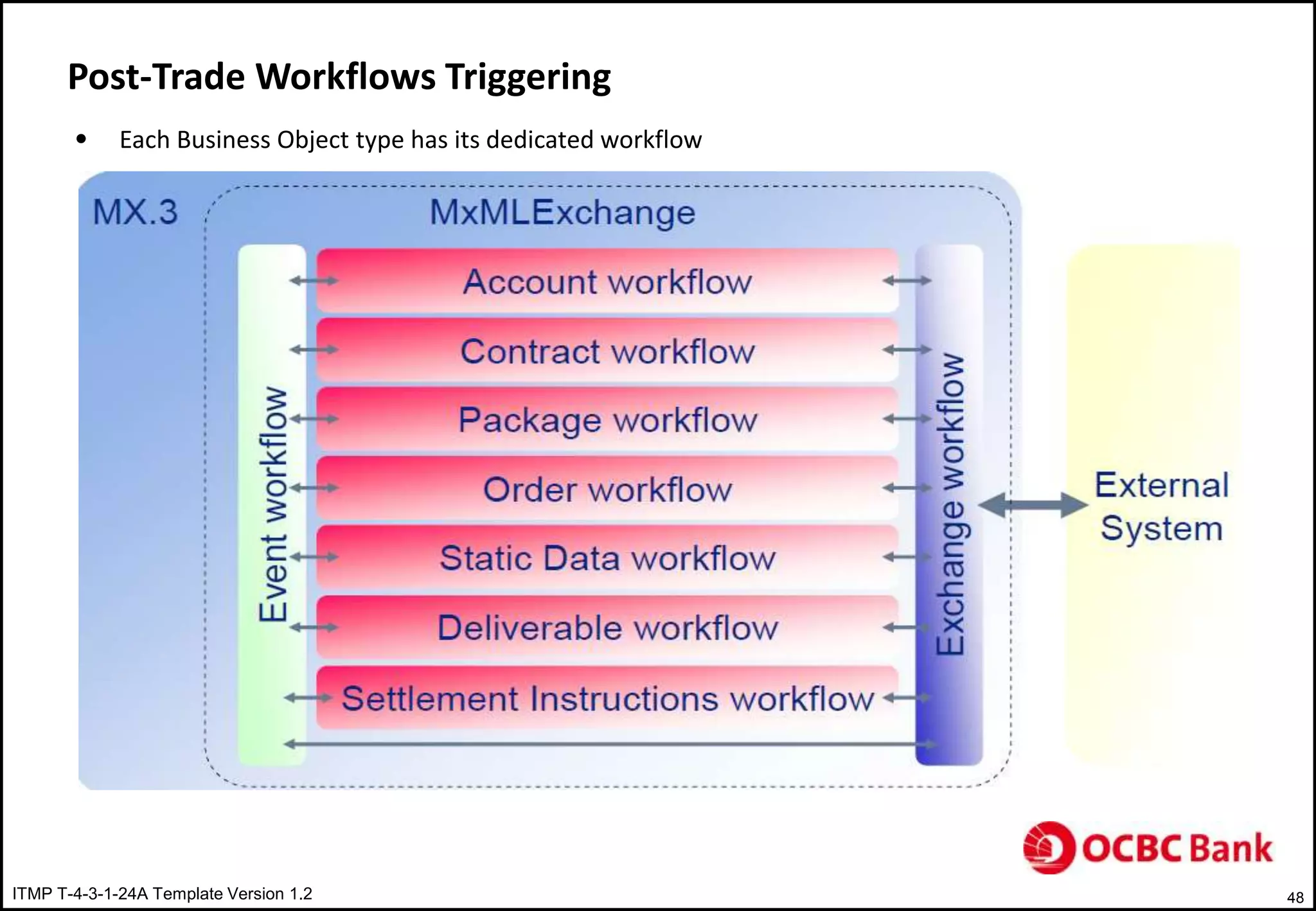
 Each business object has its dedicated workflow
 Contract
 Event
 Deliverable
 Exchange
 Package
 SSI
 Workflow optimize the entire processing by providing STP mechanism based on:
 Automatic tasks for automatic jobs
 Manual tasks to handle exception
ITMP T-4-3-1-24A Template Version 1.2 40
Post Trade Main Notions – Amendment Agent
 Amendment is responsible for connection between MX and MxML Exchange services
 Entry Point of a workflow working as routing matrix. Any business object represented in MX is exported
in to MxML Exchange where it follows a designated workflow.
 Example for contract workflow
ITMP T-4-3-1-24A Template Version 1.2 41
Post Trade Main Notions - Status
 To identify current validation or processing state of an object
 Definition of object rights depends on object validation status
 Two types of statuses:
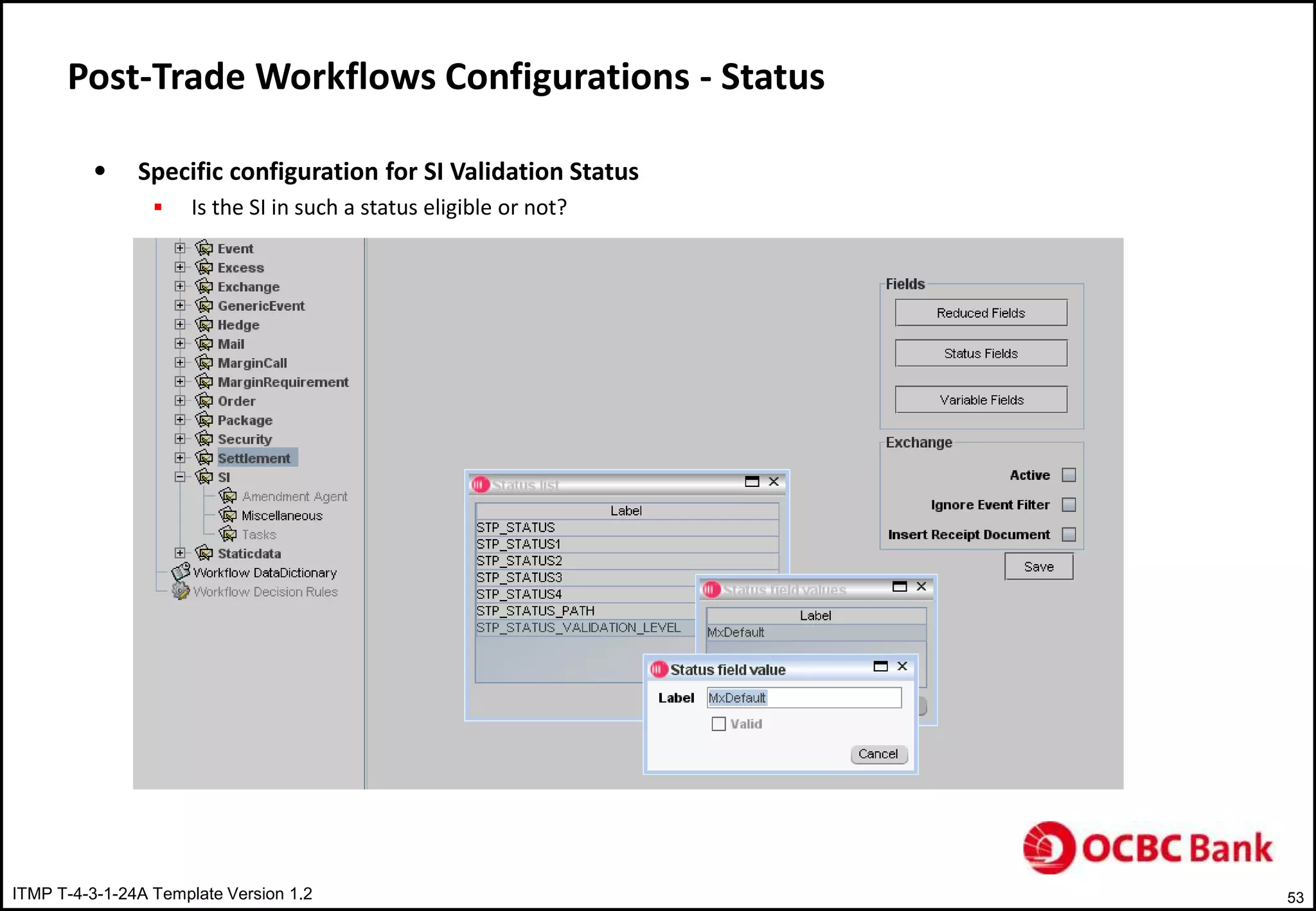
 Validation Status ( STP_VALIDATION_LEVEL) of the object
 Mandatory
 Used to set access rights on the objects ( STP rights)
 Additional Status
 Optional
 Not linked to access rights
 Only used inside the workflow
ITMP T-4-3-1-24A Template Version 1.2 42
Post Trade Main Notions – One-Stop-Processing
 STP mechanism where every task is automatic with manual management of exception
 Centralized and generic tool allows end-users to process (validate/reject) business objects waiting in
manual tasks
 Access to manual tasks are allocated to groups of end-users in charge of validating contracts, processing
payments and generating confirmations
ITMP T-4-3-1-24A Template Version 1.2 43
Post Trade Main Notions – One-Stop-Processing
 Ability to define specific layout with customized views and filters can be used depends on the business
object users need to validate
 Example for document/conformation processing
 Example of payment processing
ITMP T-4-3-1-24A Template Version 1.2 44
Post Trade & Organization – Processing Center
 Responsible of managing the processing of set of legal entities
 Must be linked to a Processing Template ( a set of workflows)
ITMP T-4-3-1-24A Template Version 1.2 45
Post Trade & Organization – Front Office Desk
 Front office Desk & Processing Center
 Every FO Desk must be attached to a processing centre. This will use underlying processing template
 An FO Desk group uses the Processing template to manage it own workflows
ITMP T-4-3-1-24A Template Version 1.2 46
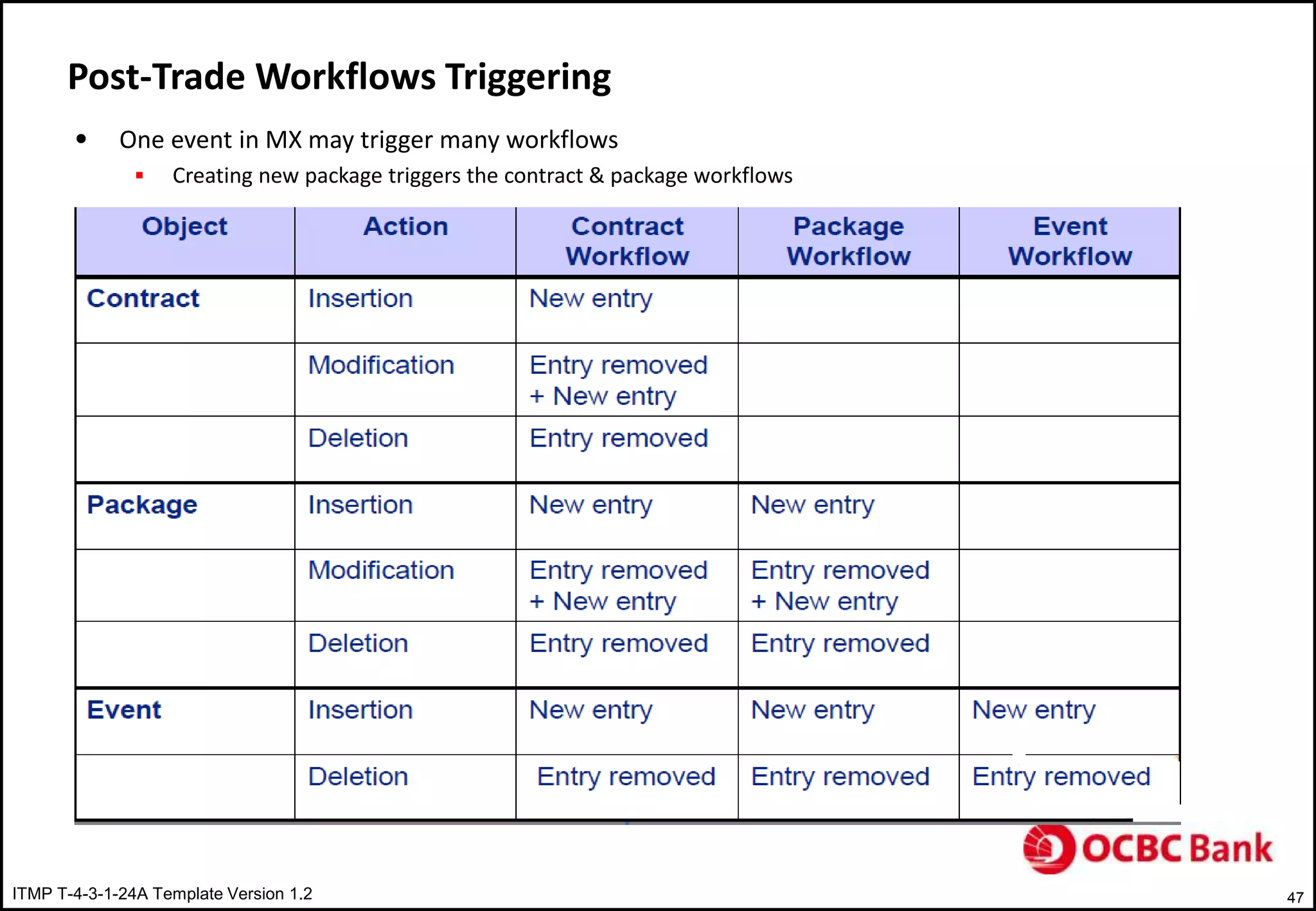
Post-Trade Workflows Triggering
• Workflows are triggered by creation, amendment or any other event on their corresponding BO
 Insertion of contract triggers contract workflow and may also impact the deliverable workflow
ITMP T-4-3-1-24A Template Version 1.2 47
Post-Trade Workflows Triggering
• One event in MX may trigger many workflows
 Creating new package triggers the contract & package workflows
ITMP T-4-3-1-24A Template Version 1.2 48
Post-Trade Workflows Triggering
• Each Business Object type has its dedicated workflow
ITMP T-4-3-1-24A Template Version 1.2 49
Post-Trade Workflows Triggering
• MxML Format
 Business Objects are represented in MxML format inside the workflow
 Murex proprietary XML format used to publish and to transfer the data between MX.3 and Post trade workflows
 MxML file depends on object and event represented
 <events> node is added whenever MxML file is sent to exchange workflow
ITMP T-4-3-1-24A Template Version 1.2 50
Post-Trade Workflows Configurations - Status
• Status
 One building block of the workflows
• Status assignment
 Field Overwrite functionality at node level
• Workflows are action driven, not status driven
ITMP T-4-3-1-24A Template Version 1.2 51
Post-Trade Workflows Configurations - Status
• Status inherited at node level can be:
 Static : Same status for all objects going through this node
 Dynamic : A formula returns the correct status depends on object characteristics
ITMP T-4-3-1-24A Template Version 1.2 52
Post-Trade Workflows Configurations - Status
• Specific configuration for Contract
 Trade acceptance can be based on Contract status when PL control pre-selection mode is set to Status
 Only contracts in status “ candidate for official P&L” are selected will be part of official P&L of the bank for the
closing entities.
• Specific configuration for Settlements
 Settlement Validation Status
• Cancel Strategy
• Accounting configurations
• Nostro balance configurations
• Specific rights
ITMP T-4-3-1-24A Template Version 1.2 53
Post-Trade Workflows Configurations - Status
• Specific configuration for SI Validation Status
 Is the SI in such a status eligible or not?
ITMP T-4-3-1-24A Template Version 1.2 54
Post-Trade Workflows Configurations – STP Rights
• Proper access rights by status (STP Rights) must be granted to each group of users in SUPERVISOR
session.
• STP Rights
Each group has specific access /modification rights to each class of object and event depends on status
 Deal entry – Deal Modification
 Event entry - Event Modification
 SI entry – SI Modification
ITMP T-4-3-1-24A Template Version 1.2 55
Post-Trade Workflows Configurations – STP Rights
ITMP T-4-3-1-24A Template Version 1.2 56
Post-Trade Workflows Configurations – Amendment Agent
• Possibility to identify the underlying event and handle the flow
• MxML Exchange Spaces – Specific to business Object being handled
Object Space Name Specific Fields
Contract STPFC_ENTRY_TABLE FC_ID,FC_ORIGIN_ID
Document STPFC_ENTRY_TABLE DOC_ID, DOC_PARENT_ID
Event STPEVT_ENTRY_TABLE EVENT_ID
Deliverable STPDLV_ENTRY_TABLE /
STPSTL_ENTRY_SPACE
DLV_ID
ITMP T-4-3-1-24A Template Version 1.2 57
Post-Trade Workflows Configurations – Amendment Agent
• Spaces Main Fields – Common to all Spaces
 REFERENCE ID
 STATUS_TAKEN
 XMLFLOW_STATUS
 FC_ID
 FC_PACKAGE_ID
 FC_POERFOLIO
 STP_LAST_VALIDATOR
 STP_STATUS1,2,3,4
 STP_STATUS_VALIDATION_LEVEL
• Amendment agent service should be up and running to publish the object in to specific workflow
ITMP T-4-3-1-24A Template Version 1.2 58
Post-Trade Workflows Configurations – OSP Rights
• Access rights are granted by manual task
ITMP T-4-3-1-24A Template Version 1.2 59
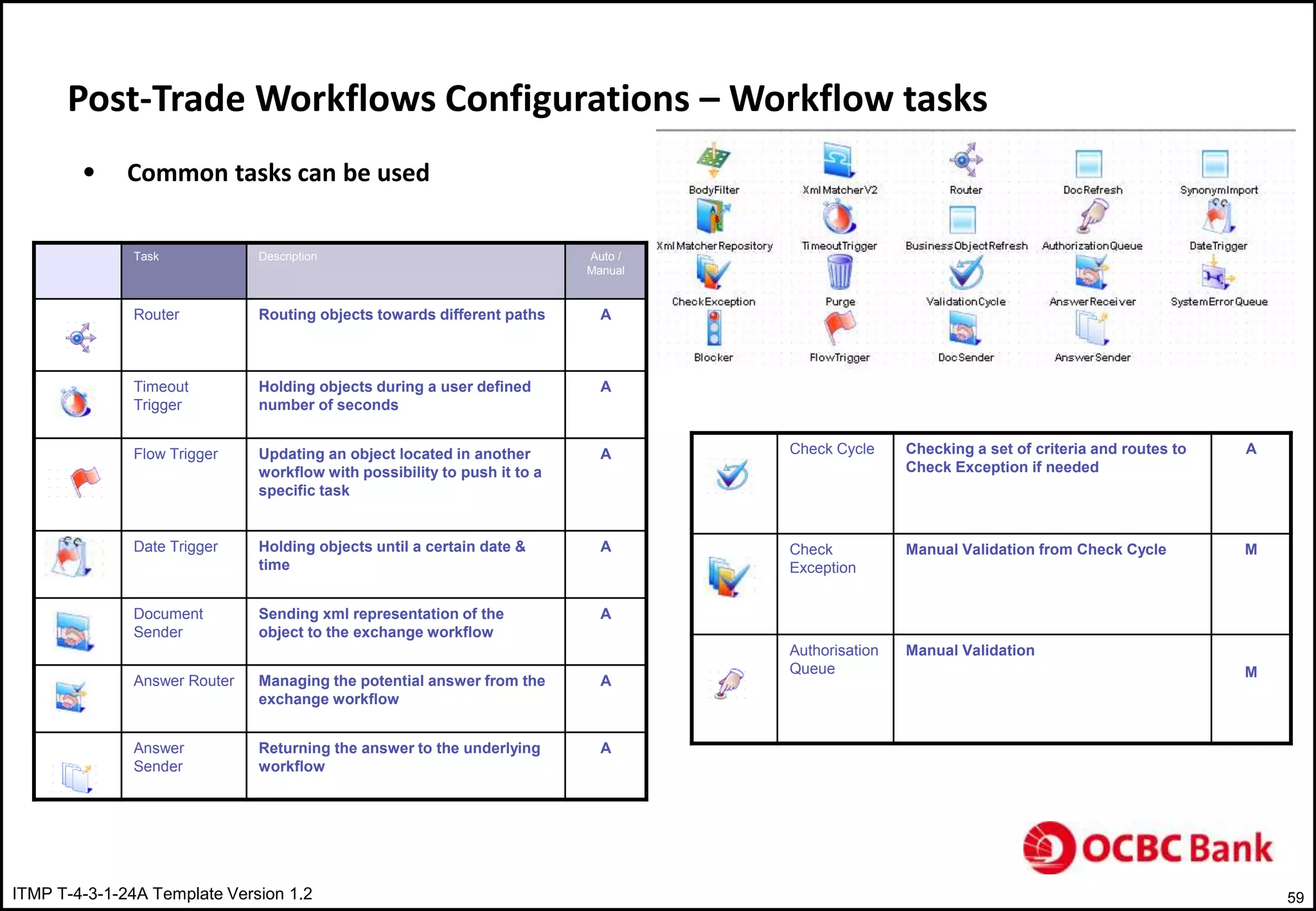
Post-Trade Workflows Configurations – Workflow tasks
Task Description Auto /
Manual
Router Routing objects towards different paths A
Timeout
Trigger
Holding objects during a user defined
number of seconds
A
Flow Trigger Updating an object located in another
workflow with possibility to push it to a
specific task
A
Date Trigger Holding objects until a certain date &
time
A
Document
Sender
Sending xml representation of the
object to the exchange workflow
A
Answer Router Managing the potential answer from the
exchange workflow
A
Answer
Sender
Returning the answer to the underlying
workflow
A
• Common tasks can be used
Check Cycle Checking a set of criteria and routes to
Check Exception if needed
A
Check
Exception
Manual Validation from Check Cycle M
Authorisation
Queue
Manual Validation
M
ITMP T-4-3-1-24A Template Version 1.2 60
Post-Trade Workflows Configurations – Workflow Tasks
• Manual Validation Task
 Possible actions for example we have it Phase 1- Contract Validation in Python
• Accept
• Route it to exception
• Validation Cycle
 Check missing SI
 Check CI
 Check back dated trade
 Check MISC counterpart
ITMP T-4-3-1-24A Template Version 1.2 61
Post-Trade Workflows Configurations – Workflow Example
• Validation Cycle
 Exception Found  Entry sent TO_VALIDATE
 If Exception manually accepted contract will be send back to validation cycle task and check other exception
defined
 No More exception found, entry will be sent to VALIDATED
ITMP T-4-3-1-24A Template Version 1.2 62
Post-Trade Workflows Configurations – Workflow Example
• Timeout Trigger
 Objects remains specified in the status
• Date Trigger
 Deliverables can be further processed only X dates before the release date
 Deliverables messages can be sent only X minutes before the cut-off time.
• Flow Trigger
 Deliverables are routed in to the waiting queue in the workflow
 Deliverables will be released from waiting queue from initial phase to validation phase once the contract is
confirmed and status is CON/CFM
• Doc Sender
 Contract MxML document will be sent to document workflow in order to produce contract confirmation
 Amendment agent of the workflow is impacted
ITMP T-4-3-1-24A Template Version 1.2 63
Post-Trade Workflows Configurations – Workflow Example
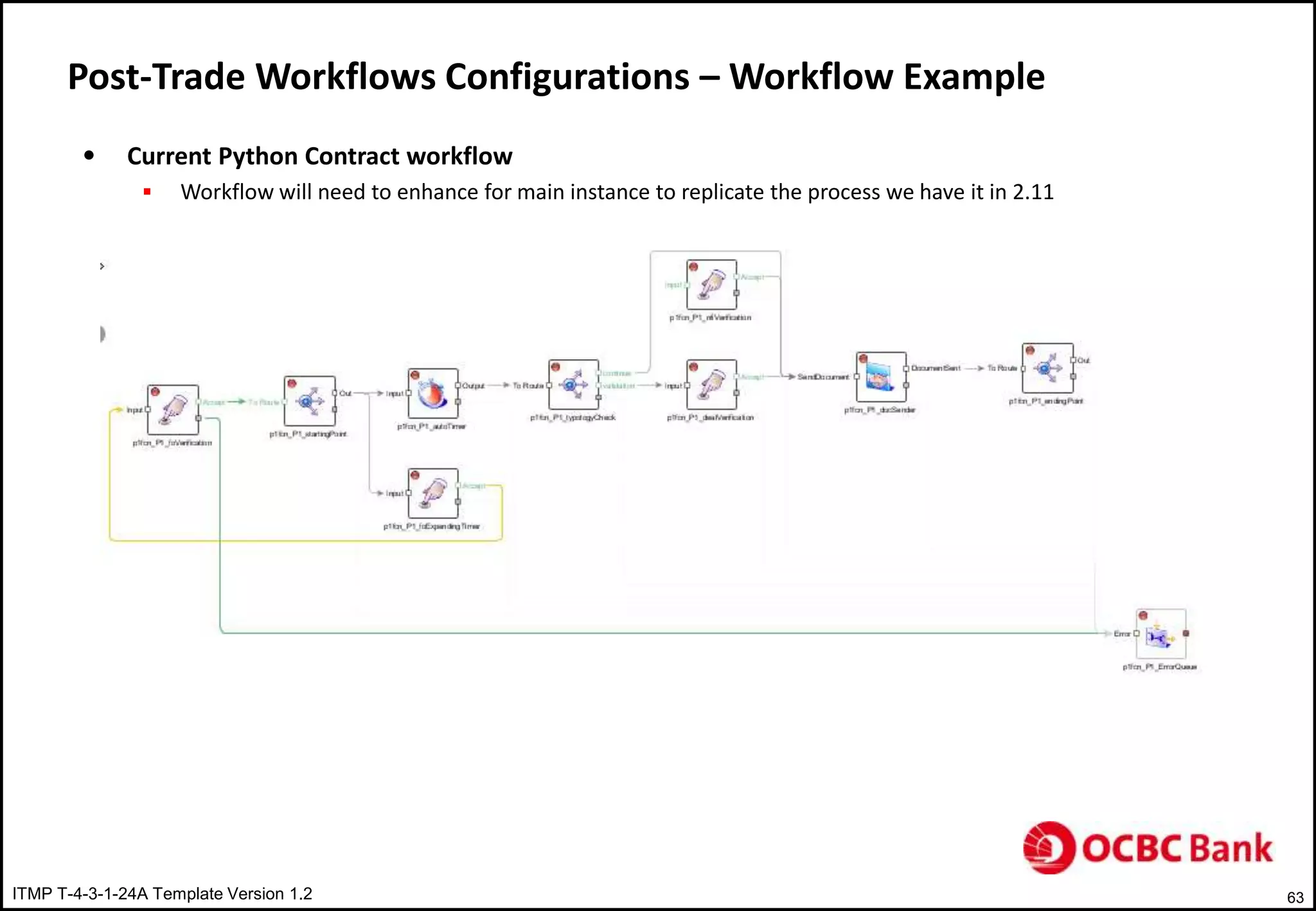
• Current Python Contract workflow
 Workflow will need to enhance for main instance to replicate the process we have it in 2.11
ITMP T-4-3-1-24A Template Version 1.2 64
Interaction between Workflows
• Real and wide communication between workflows
• An event occurring in one specific workflow can have an impact on other workflows
 Validation of a contract : Contract workflow triggers the exchange workflow in order to create confirmation once
contract has reached confirmation initiation phase
 Amendment of contract : Contract is re inserted in to contract workflow and the exchanges belongs to this
contract are re-injected in exchange workflow ( Automatic and non customizable)
 Processing of payments : Possibility to force the payments to wait at a specific phase in settlement workflow and
automatically release them from the contract workflow once contract has reached confirmed status using Mx
Trigger task
ITMP T-4-3-1-24A Template Version 1.2 65
Interaction between Workflows
ITMP T-4-3-1-24A Template Version 1.2 66
Questions ?
ITMP T-4-3-1-24A Template Version 1.2 67
Thank You!

OCBC_MX-3.1Pre-Post-Trade-Walk-Through.ppt

  • 1.
    ITMP T-4-3-1-24A TemplateVersion 1.2 1 MX 3.1 Pre-Post Trade workflows Murugesan Prabhakaran 15th Aug 2013
  • 2.
    ITMP T-4-3-1-24A TemplateVersion 1.2 2 Agenda • Key Differences between 2.11 & 3.1 • Pre Trade workflow • Post Trade workflow
  • 3.
    ITMP T-4-3-1-24A TemplateVersion 1.2 3 Key difference between 2.11 & 3.1 • Trade Repository  Trades Hierarchy & Design  Events  Versioning • Exception based management • GUI Integration framework
  • 4.
    ITMP T-4-3-1-24A TemplateVersion 1.2 4 Key difference between 2.11 & 3.1 – Trade Repository Trade Repository – Trade Hierarchy • Financial Contract Component:  Basic building block (Simple Trades).  Elementary level of information in a trade for P&L and sensitivity calculation.  Can not live independently from processing point of view • Financial Contract:  A set of components dealt with one counterpart and seen as single object during processing.  Linear combination of financial contract components • Financial Contract Package:  A set of financial contracts • Financial Contract Event:  An event applied on one or several component and triggers contract versioning.
  • 5.
    ITMP T-4-3-1-24A TemplateVersion 1.2 5 Key difference between 2.11 & 3.1 – Trade Repository Trade Repository – Trade Design
  • 6.
    ITMP T-4-3-1-24A TemplateVersion 1.2 6 Key difference between 2.11 & 3.1 – Trade Repository Trade Repository – Trade Design
  • 7.
    ITMP T-4-3-1-24A TemplateVersion 1.2 7 Key difference between 2.11 & 3.1 – Trade Repository Trade Repository – Trade Design
  • 8.
    ITMP T-4-3-1-24A TemplateVersion 1.2 8 Key difference between 2.11 & 3.1 – Trade Repository Trade Repository – Trade Design • FX Swap with one counterpart  1 FC with 2 FCC • FX Swap(FC) = Spot ( 1st FCC) + Forward (2nd FCC)
  • 9.
    ITMP T-4-3-1-24A TemplateVersion 1.2 9 Key difference between 2.11 & 3.1 – Trade Repository Trade Repository – Trade Design • FX Swap with 2 counterpart  1 Package with 2FC  Each FC includes 1 FCC
  • 10.
    ITMP T-4-3-1-24A TemplateVersion 1.2 10 Key difference between 2.11 & 3.1 – Trade Repository Trade Repository – Trade Events • Business event on Financial Contract or Package • Event Characteristics  Impact on the Financial Contract  Generates new financial Contracts  Generates cash flow
  • 11.
    ITMP T-4-3-1-24A TemplateVersion 1.2 11 Key difference between 2.11 & 3.1 – Trade Repository Trade Events • Graphical Representation  Tree structure summarizes the successive events and indicating respective reference numbers
  • 12.
    ITMP T-4-3-1-24A TemplateVersion 1.2 12 Key difference between 2.11 & 3.1 – Trade Repository Versioning • Purpose  Easier reconciliation and confirmation with counterpart after trade amendment • Contract number is fixed • Number indicating the version number
  • 13.
    ITMP T-4-3-1-24A TemplateVersion 1.2 13 Key difference between 2.11 & 3.1 – Trade Repository Versioning • Mechanism  Every event publishes its impact in the contract workflow • Impact on existing & new transactions  A copy of initial trade is generated • Impact occur on the copy • Generated cash flow are attached to the copy • Event on Trade Example: Counterpart allocation
  • 14.
    ITMP T-4-3-1-24A TemplateVersion 1.2 14 Key difference between 2.11 & 3.1 – Trade Repository Versioning • Cancel of an event  Copy is cancelled and initial deal is versioned  Cancel of any new trade generated by an event  Cancelled trades are published in contract workflow
  • 15.
    ITMP T-4-3-1-24A TemplateVersion 1.2 15 Key difference between 2.11 & 3.1 – Trade Repository Versioning • Events and relation to versioning  Event that does not generate a new deal – Fixing  Event that generates new deal
  • 16.
    ITMP T-4-3-1-24A TemplateVersion 1.2 16 Key difference between 2.11 & 3.1- Exception based management
  • 17.
    ITMP T-4-3-1-24A TemplateVersion 1.2 17 Key difference between 2.11 & 3.1- OSP
  • 18.
    ITMP T-4-3-1-24A TemplateVersion 1.2 18 Key difference between 2.11 & 3.1 – GUI Integration framework  Third party software displayed in murex window like Excel
  • 19.
    ITMP T-4-3-1-24A TemplateVersion 1.2 19 Pre Trade Workflow • Overview • Pre-Trade Cycle & Organization • Pre-Trade or Post-Trade • Pre-Trade Sequences • Scripting Language • Type of Tasks • Tasks & Rules Assignments
  • 20.
    ITMP T-4-3-1-24A TemplateVersion 1.2 20 Pre Trade Workflow - Overview  Automation logic for achieving higher STP rate
  • 21.
    ITMP T-4-3-1-24A TemplateVersion 1.2 21 Pre Trade Workflow – Pre-Trade Cycle & Organization • Synchronous mode • Done in Memory Mode • Access to pricing and real time market data
  • 22.
    ITMP T-4-3-1-24A TemplateVersion 1.2 22 Pre Trade Workflow – Pre-Trade Cycle & Organization • Both FO & BO users can call a Booking, Pricing and Closing sequences • FO users can call Booking sequence attached to Processing center or specific Booking sequence
  • 23.
    ITMP T-4-3-1-24A TemplateVersion 1.2 23 Pre Trade Workflow – Pre-Trade or Post-Trade • Most of the automation logic should be covered with in Pre-Trade rules rather than with in Post-Trade workflows. This will help in reaching higher STP rate. • Pre-Trade rules are considered as an initiation phase for Post-Trade workflows • Financial checks can easily be done in Pre-Trade workflows and the result check can be stored in a UDF and reused in Post-Trade workflows
  • 24.
    ITMP T-4-3-1-24A TemplateVersion 1.2 24 Pre Trade Workflow – Pre-Trade Sequences • Calculation Chain ( Pricing & Closing Sequences)  Pricing Sequence • Set of rules automatically executed in order to customize the pricing of each time  User enters a field in deal ticket, pricing, e-TradePad or FDI  Trade is generated by MOP  Trade is imported from an external system • Represented in a flow sheet connecting several tasks  Typical flow sheet contains completion task to fill-in inputs, pricing task • Typical tasks:  Completion Rules: automatic fill-in one or several fields in deal ticket based on condition  Pricing tasks: Trigger actual pricing models  Routing tasks: Route to another branch of flow sheet • Closing Sequence  Set of rules automatically executed just after pricing sequence • Executed only once • Not supposed to modify pricing input  Represented in a flow sheet connecting several tasks • Typical flow sheet contains several completion tasks with routing tasks  Typical tasks: • Completion rules: Typology, portfolio assignments, Tradability status • Routing tasks: Router to another branch of flow sheet
  • 25.
    ITMP T-4-3-1-24A TemplateVersion 1.2 25 Pre Trade Workflow – Pre-Trade Sequences • Booking Sequence  Set of rules automatically executed in order to customize the trade insertion each time • User hits the save button • A trade is generated by MOP • A trade is imported from an external system  Rules are applied in a sequence of tasks which are executed before trade is saved physically in to system  Typical Rules • Completion Rules: Broker allocation and fees calculation, SSI allocation • Routing rules: Route to specific branch of flow sheet • Compliance Rules: Sanity checks using trade characteristics. Warning or error messages • Mirroring & Hedging rules: BTB & generation of hedges
  • 26.
    ITMP T-4-3-1-24A TemplateVersion 1.2 26 Pre Trade Workflow – Pre-Trade Sequences • Calculation chain or Booking sequence  Calculation chain • Rule will be executed at each computation in calculation chain • Calculation chain has to be used if an interaction with the end user before the trade insertion is required  Booking Sequence • Booking sequence should be used as the rule will be applied only once • Sanity Checks (Compliance) have to be performed in Booking sequence  Users will be disturbed by warnings and error messages during calculation chain  Checks on computed data such as NPV, market value and prices sensitivities should be done • Mirroring rules should be done in booking sequence
  • 27.
    ITMP T-4-3-1-24A TemplateVersion 1.2 27 Pre Trade Workflow – Pre-Trade Sequences • Sequence construction Steps  Pre-trade sequences are executed in following order • Tasks Assignment selects the flow sheet • Flow sheet defines the succession of tasks to be executed • Rules Assignment selects the rule to be applied for each task • Selected rules are executed in the order specified in the flow sheet
  • 28.
    ITMP T-4-3-1-24A TemplateVersion 1.2 28 Pre Trade Workflow – Scripting Language • MSL ( Murex Scripting Language) being used to build pre-trade rules • Generic Functions  Integer legGetNumberOfComponents(Pointer) • Returns number of FCC within a FC or Package • Parameters: FC or Package Pointer  Pointer legGetComponentAt(Pointer, i) • Returns a FCC pointer • Parameters:  A FC or Package pointer  FCC number with in FC or Package  Pointer legGetMainComponent(Pointer) • Returns a FCC pointer • Parameters: A FC or Package pointer  At Package/FC level, loop is required as number and the nature of the legs is not known in advance
  • 29.
    ITMP T-4-3-1-24A TemplateVersion 1.2 29 Pre Trade Workflow – Scripting Language • Generic Functions  At Single Contract level, it is not mandatory to use a loop  List of functions and key words can be find using: • Press F9 to access Key words list • Press Shift+F9 to access functions list
  • 30.
    ITMP T-4-3-1-24A TemplateVersion 1.2 30 Pre Trade Workflow – Pre-Trade Sequences Contract Sequence  Warning to popup when the user saves IRS trade when nominal amount is greater that 100 000 000  Example of compliance rule
  • 31.
    ITMP T-4-3-1-24A TemplateVersion 1.2 31 Pre Trade Workflow – Pre-Trade Sequences Event Sequence  The sequence is triggered when a market operation is performed ( Cancel, C&R, EXR,EXT,ET.. Etc)  Completion and/or compliance rules can be applied on the initial deal, the event and generated/cancelled deals  Example: • Field portfolio of the initial deal has to be copied in UDF INIT_PTF of the reissued deal while performing C&R • Below completion rule can be used
  • 32.
    ITMP T-4-3-1-24A TemplateVersion 1.2 32 Pre Trade Workflow – Pre-Trade Sequences Deliverable Sequence  The sequence is triggered whenever a deliverable is generated if deliverable module is activated  Generation of deliverables occurs when: • Deliverable value date is with in the deliverable window period • Contracts are inserted with schedules including known flows • Events are performed. Example: Fixing  Deliverables would enter the pre-trade sequence after Settlement / Deliverable template has been applied  Deliverable sequence can be used for pre-netting/MM Rollovers  Only Booking sequence is triggered every time deliverables are generated  Events may impact deliverable directly or indirectly  Events on deliverables • Deliverables can be cancelled, C&R, Split  Not advisable • Netted
  • 33.
    ITMP T-4-3-1-24A TemplateVersion 1.2 33 Pre Trade Workflow – Pre-Trade Sequences Deliverable Sequence  Example: • Completion rule to delete flows generated from SCF, Null cash flows, FX cash having typology starts FX_
  • 34.
    ITMP T-4-3-1-24A TemplateVersion 1.2 34 Pre Trade Workflow – Debugging • Activate/deactivate the debugger by selecting the menu Help/Monitor  Double click on Formula Debugger or using the option /FRMLOG:filename to debug to a file. Add optionally /FRMLOGFILTER:namespace1;namespace2.. To filter on subset name spaces • A log file can also defined in Mx launcher or Trade Repository  This is useful for trade interfaces
  • 35.
    ITMP T-4-3-1-24A TemplateVersion 1.2 35 Pre Trade Workflow – Type of Tasks
  • 36.
    ITMP T-4-3-1-24A TemplateVersion 1.2 36 Pre Trade Workflow – Tasks & Rules Assignments
  • 37.
    ITMP T-4-3-1-24A TemplateVersion 1.2 37 Post Trade Workflow • Post Trade Main Notions • Introduction • Workflows • Amendment Agent • Status • One-Stop Processing • Post-Trade and Organization • Post-Trade workflows triggering • Post-Trade workflows configuration • Interaction between Workflows
  • 38.
    ITMP T-4-3-1-24A TemplateVersion 1.2 38 Post Trade Main Notions Introduction  Post-Trade is a set of workflow automatically initiated whenever an event is performed on business object (contract, package, deliverables, static data.. Etc)  It groups all actions performed in an asynchronous way in order to manage statuses, perform validations, generate confirmation and communicate to external systems
  • 39.
    ITMP T-4-3-1-24A TemplateVersion 1.2 39 Post Trade Main Notions Workflows  A workflow is a set of auto & manual tasks connected together representing a given business process  Each business object has its dedicated workflow  Contract  Event  Deliverable  Exchange  Package  SSI  Workflow optimize the entire processing by providing STP mechanism based on:  Automatic tasks for automatic jobs  Manual tasks to handle exception
  • 40.
    ITMP T-4-3-1-24A TemplateVersion 1.2 40 Post Trade Main Notions – Amendment Agent  Amendment is responsible for connection between MX and MxML Exchange services  Entry Point of a workflow working as routing matrix. Any business object represented in MX is exported in to MxML Exchange where it follows a designated workflow.  Example for contract workflow
  • 41.
    ITMP T-4-3-1-24A TemplateVersion 1.2 41 Post Trade Main Notions - Status  To identify current validation or processing state of an object  Definition of object rights depends on object validation status  Two types of statuses:  Validation Status ( STP_VALIDATION_LEVEL) of the object  Mandatory  Used to set access rights on the objects ( STP rights)  Additional Status  Optional  Not linked to access rights  Only used inside the workflow
  • 42.
    ITMP T-4-3-1-24A TemplateVersion 1.2 42 Post Trade Main Notions – One-Stop-Processing  STP mechanism where every task is automatic with manual management of exception  Centralized and generic tool allows end-users to process (validate/reject) business objects waiting in manual tasks  Access to manual tasks are allocated to groups of end-users in charge of validating contracts, processing payments and generating confirmations
  • 43.
    ITMP T-4-3-1-24A TemplateVersion 1.2 43 Post Trade Main Notions – One-Stop-Processing  Ability to define specific layout with customized views and filters can be used depends on the business object users need to validate  Example for document/conformation processing  Example of payment processing
  • 44.
    ITMP T-4-3-1-24A TemplateVersion 1.2 44 Post Trade & Organization – Processing Center  Responsible of managing the processing of set of legal entities  Must be linked to a Processing Template ( a set of workflows)
  • 45.
    ITMP T-4-3-1-24A TemplateVersion 1.2 45 Post Trade & Organization – Front Office Desk  Front office Desk & Processing Center  Every FO Desk must be attached to a processing centre. This will use underlying processing template  An FO Desk group uses the Processing template to manage it own workflows
  • 46.
    ITMP T-4-3-1-24A TemplateVersion 1.2 46 Post-Trade Workflows Triggering • Workflows are triggered by creation, amendment or any other event on their corresponding BO  Insertion of contract triggers contract workflow and may also impact the deliverable workflow
  • 47.
    ITMP T-4-3-1-24A TemplateVersion 1.2 47 Post-Trade Workflows Triggering • One event in MX may trigger many workflows  Creating new package triggers the contract & package workflows
  • 48.
    ITMP T-4-3-1-24A TemplateVersion 1.2 48 Post-Trade Workflows Triggering • Each Business Object type has its dedicated workflow
  • 49.
    ITMP T-4-3-1-24A TemplateVersion 1.2 49 Post-Trade Workflows Triggering • MxML Format  Business Objects are represented in MxML format inside the workflow  Murex proprietary XML format used to publish and to transfer the data between MX.3 and Post trade workflows  MxML file depends on object and event represented  <events> node is added whenever MxML file is sent to exchange workflow
  • 50.
    ITMP T-4-3-1-24A TemplateVersion 1.2 50 Post-Trade Workflows Configurations - Status • Status  One building block of the workflows • Status assignment  Field Overwrite functionality at node level • Workflows are action driven, not status driven
  • 51.
    ITMP T-4-3-1-24A TemplateVersion 1.2 51 Post-Trade Workflows Configurations - Status • Status inherited at node level can be:  Static : Same status for all objects going through this node  Dynamic : A formula returns the correct status depends on object characteristics
  • 52.
    ITMP T-4-3-1-24A TemplateVersion 1.2 52 Post-Trade Workflows Configurations - Status • Specific configuration for Contract  Trade acceptance can be based on Contract status when PL control pre-selection mode is set to Status  Only contracts in status “ candidate for official P&L” are selected will be part of official P&L of the bank for the closing entities. • Specific configuration for Settlements  Settlement Validation Status • Cancel Strategy • Accounting configurations • Nostro balance configurations • Specific rights
  • 53.
    ITMP T-4-3-1-24A TemplateVersion 1.2 53 Post-Trade Workflows Configurations - Status • Specific configuration for SI Validation Status  Is the SI in such a status eligible or not?
  • 54.
    ITMP T-4-3-1-24A TemplateVersion 1.2 54 Post-Trade Workflows Configurations – STP Rights • Proper access rights by status (STP Rights) must be granted to each group of users in SUPERVISOR session. • STP Rights Each group has specific access /modification rights to each class of object and event depends on status  Deal entry – Deal Modification  Event entry - Event Modification  SI entry – SI Modification
  • 55.
    ITMP T-4-3-1-24A TemplateVersion 1.2 55 Post-Trade Workflows Configurations – STP Rights
  • 56.
    ITMP T-4-3-1-24A TemplateVersion 1.2 56 Post-Trade Workflows Configurations – Amendment Agent • Possibility to identify the underlying event and handle the flow • MxML Exchange Spaces – Specific to business Object being handled Object Space Name Specific Fields Contract STPFC_ENTRY_TABLE FC_ID,FC_ORIGIN_ID Document STPFC_ENTRY_TABLE DOC_ID, DOC_PARENT_ID Event STPEVT_ENTRY_TABLE EVENT_ID Deliverable STPDLV_ENTRY_TABLE / STPSTL_ENTRY_SPACE DLV_ID
  • 57.
    ITMP T-4-3-1-24A TemplateVersion 1.2 57 Post-Trade Workflows Configurations – Amendment Agent • Spaces Main Fields – Common to all Spaces  REFERENCE ID  STATUS_TAKEN  XMLFLOW_STATUS  FC_ID  FC_PACKAGE_ID  FC_POERFOLIO  STP_LAST_VALIDATOR  STP_STATUS1,2,3,4  STP_STATUS_VALIDATION_LEVEL • Amendment agent service should be up and running to publish the object in to specific workflow
  • 58.
    ITMP T-4-3-1-24A TemplateVersion 1.2 58 Post-Trade Workflows Configurations – OSP Rights • Access rights are granted by manual task
  • 59.
    ITMP T-4-3-1-24A TemplateVersion 1.2 59 Post-Trade Workflows Configurations – Workflow tasks Task Description Auto / Manual Router Routing objects towards different paths A Timeout Trigger Holding objects during a user defined number of seconds A Flow Trigger Updating an object located in another workflow with possibility to push it to a specific task A Date Trigger Holding objects until a certain date & time A Document Sender Sending xml representation of the object to the exchange workflow A Answer Router Managing the potential answer from the exchange workflow A Answer Sender Returning the answer to the underlying workflow A • Common tasks can be used Check Cycle Checking a set of criteria and routes to Check Exception if needed A Check Exception Manual Validation from Check Cycle M Authorisation Queue Manual Validation M
  • 60.
    ITMP T-4-3-1-24A TemplateVersion 1.2 60 Post-Trade Workflows Configurations – Workflow Tasks • Manual Validation Task  Possible actions for example we have it Phase 1- Contract Validation in Python • Accept • Route it to exception • Validation Cycle  Check missing SI  Check CI  Check back dated trade  Check MISC counterpart
  • 61.
    ITMP T-4-3-1-24A TemplateVersion 1.2 61 Post-Trade Workflows Configurations – Workflow Example • Validation Cycle  Exception Found  Entry sent TO_VALIDATE  If Exception manually accepted contract will be send back to validation cycle task and check other exception defined  No More exception found, entry will be sent to VALIDATED
  • 62.
    ITMP T-4-3-1-24A TemplateVersion 1.2 62 Post-Trade Workflows Configurations – Workflow Example • Timeout Trigger  Objects remains specified in the status • Date Trigger  Deliverables can be further processed only X dates before the release date  Deliverables messages can be sent only X minutes before the cut-off time. • Flow Trigger  Deliverables are routed in to the waiting queue in the workflow  Deliverables will be released from waiting queue from initial phase to validation phase once the contract is confirmed and status is CON/CFM • Doc Sender  Contract MxML document will be sent to document workflow in order to produce contract confirmation  Amendment agent of the workflow is impacted
  • 63.
    ITMP T-4-3-1-24A TemplateVersion 1.2 63 Post-Trade Workflows Configurations – Workflow Example • Current Python Contract workflow  Workflow will need to enhance for main instance to replicate the process we have it in 2.11
  • 64.
    ITMP T-4-3-1-24A TemplateVersion 1.2 64 Interaction between Workflows • Real and wide communication between workflows • An event occurring in one specific workflow can have an impact on other workflows  Validation of a contract : Contract workflow triggers the exchange workflow in order to create confirmation once contract has reached confirmation initiation phase  Amendment of contract : Contract is re inserted in to contract workflow and the exchanges belongs to this contract are re-injected in exchange workflow ( Automatic and non customizable)  Processing of payments : Possibility to force the payments to wait at a specific phase in settlement workflow and automatically release them from the contract workflow once contract has reached confirmed status using Mx Trigger task
  • 65.
    ITMP T-4-3-1-24A TemplateVersion 1.2 65 Interaction between Workflows
  • 66.
    ITMP T-4-3-1-24A TemplateVersion 1.2 66 Questions ?
  • 67.
    ITMP T-4-3-1-24A TemplateVersion 1.2 67 Thank You!