DSE‐FlexTP System    Rev. 201603DMAndroid 


DSE‐Mobile for Android 
(VIP & Trader) 
Manual 


   DSE‐Mobile @Dhaka Stock Exchange 
   Quick‐start guide 
    Page 2 of 20 
 
DSE‐FlexTP  System  ‐  Information  in  this  manual  is  general  in  nature.  We  recommend  to  seek 
independent financial advice and ensure you fully understand the risks involved before trading. 
Table of content: 
1  INTRODUCTION ................................................................................................................. 3 
2  INSTALL DSE‐MOBILE ON ANDROID ................................................................................... 4 
3  LOGIN TO APP ................................................................................................................... 5 
4  OVERVIEW OF THE APP ..................................................................................................... 6 
5  MARKET DATA ................................................................................................................... 6 
5.1  PORTFOLIO SUMMARY ..................................................................................................................... 6 
5.2  SEARCH SECURITIES & BUILD WATCH‐LIST .......................................................................................... 6 
5.3  WATCH‐LIST FILTERS ........................................................................................................................ 7 
5.4  SECURITIES & INDEX MARKET DATA ................................................................................................. 10 
5.5  SET AND MANAGE PRICE ALERTS ..................................................................................................... 13 
5.6  NOTIFICATIONS ............................................................................................................................. 13 
6  TRADING ......................................................................................................................... 15 
6.1  PLACE ORDER ............................................................................................................................... 15 
6.2  MY ORDERS ‐ CHECK INTRADAY ORDERS AND EXECUTIONS .................................................................... 15 
6.3  ORDER DETAILS & CANCELLATION .................................................................................................... 16 
7  ACCOUNT DETAILS .......................................................................................................... 17 
8  SERVICE AVAILABILITY ..................................................................................................... 18 
8.1  WARNING INDICATORS ................................................................................................................... 18 
8.2  TROUBLESHOOTING ....................................................................................................................... 19 
9  SUPPORT INFORMATION ................................................................................................. 20 
10  MORE INFORMATION ONLINE ......................................................................................... 20 
 
   
   DSE‐Mobile @Dhaka Stock Exchange 
   Quick‐start guide 
    Page 3 of 20 
 
DSE‐FlexTP  System  ‐  Information  in  this  manual  is  general  in  nature.  We  recommend  to  seek 
independent financial advice and ensure you fully understand the risks involved before trading. 
1 Introduction 
Dhaka Stock Exchange (DSE) has implemented Centralized Order Management System ‘DSE‐FlexTP’ for the 
TREC  holders of the Exchange to manage  their orders. The  Mobile App,  is  to leverage the  DSE‐FlexTP 
architecture to make trading available to investors from mobile device. This will connect investors to the 
state‐of‐the‐art technology of trading. DSE‐Mobile will be facilitate to bring new dimension of business 
opportunities in the capital market. 
 
DSE‐Mobile Features: 
 
 Intuitive design 
 Access to market information 
 Order submission in real‐time (Only available in “DSE‐Mobile Trader”) 
 Portfolio value and executions 
 Real‐time P&L 
 Investor account & portfolio information 
 Market opportunities on favorites 
 Real time notifications on business opportunities 
 
Three different accessibility in DSE‐Mobile: 
 DSE‐Mobile VIP – Allows you to be aware of your portfolio and favorites without efforts, keep in 
touch  with  professional  trader  to  get  high‐end  services.  Trader  will  professionally  manage  best 
execution of your orders. 
 DSE‐Mobile Trader – Allows you to be aware of your portfolio and favorites without efforts, keep in 
touch with professional trader to get high‐end services while availing ability to place orders yourself. 
 DSE‐Mobile Biz Owner ‐ Allows business owner to be aware of activities of their broking business 
status. This is only for TREC holder. 
 
Minimum requirements to use the DSE‐Mobile: 
 Android version: Android 4.4 or higher 
 Phone viewport size (screen resolution): over 320px 
 Internet data connectivity: 3G or Wi‐Fi 
 
Access to DSE‐Mobile: 
 Contact your broker for registration and subscription for your desired DSE Mobility product. 
 
   
   DSE‐Mobile @Dhaka Stock Exchange 
   Quick‐start guide 
    Page 4 of 20 
 
DSE‐FlexTP  System  ‐  Information  in  this  manual  is  general  in  nature.  We  recommend  to  seek 
independent financial advice and ensure you fully understand the risks involved before trading. 
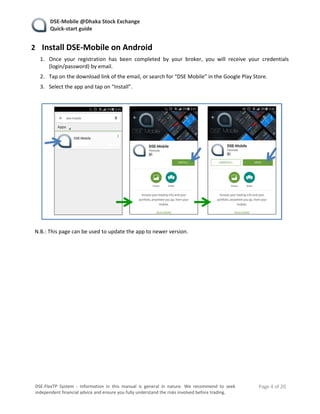
2 Install DSE‐Mobile on Android 
1. Once  your  registration  has  been  completed  by  your  broker,  you  will  receive  your  credentials 
(login/password) by email. 
2. Tap on the download link of the email, or search for “DSE Mobile” in the Google Play Store. 
3. Select the app and tap on “Install”. 


N.B.: This page can be used to update the app to newer version. 
 
   
   DSE‐Mobile @Dhaka Stock Exchange 
   Quick‐start guide 
    Page 5 of 20 
 
DSE‐FlexTP  System  ‐  Information  in  this  manual  is  general  in  nature.  We  recommend  to  seek 
independent financial advice and ensure you fully understand the risks involved before trading. 
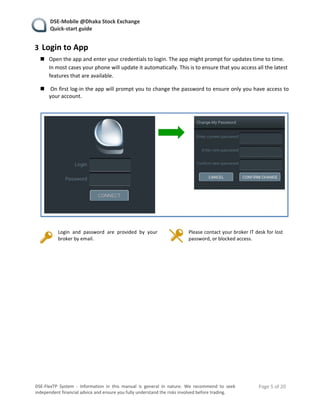
3 Login to App 
 Open the app and enter your credentials to login. The app might prompt for updates time to time. 
In most cases your phone will update it automatically. This is to ensure that you access all the latest 
features that are available. 
  On first log‐in the app will prompt you to change the password to ensure only you have access to 
your account. 
 
 
  Login  and  password  are  provided  by  your 
broker by email. 
  Please contact your broker IT desk for lost 
password, or blocked access. 


   DSE‐Mobile @Dhaka Stock Exchange 
   Quick‐start guide 
    Page 6 of 20 
 
DSE‐FlexTP  System  ‐  Information  in  this  manual  is  general  in  nature.  We  recommend  to  seek 
independent financial advice and ensure you fully understand the risks involved before trading. 
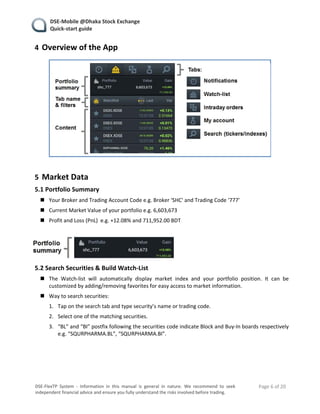
4 Overview of the App 
 
 
5 Market Data 
5.1 Portfolio Summary 
 Your Broker and Trading Account Code e.g. Broker ‘SHC' and Trading Code ‘777’ 
 Current Market Value of your portfolio e.g. 6,603,673 
 Profit and Loss (PnL)  e.g. +12.08% and 711,952.00 BDT 
 
 
5.2 Search Securities & Build Watch‐List 
 The  Watch‐list  will  automatically  display  market  index  and  your  portfolio  position.  It  can  be 
customized by adding/removing favorites for easy access to market information. 
 Way to search securities: 
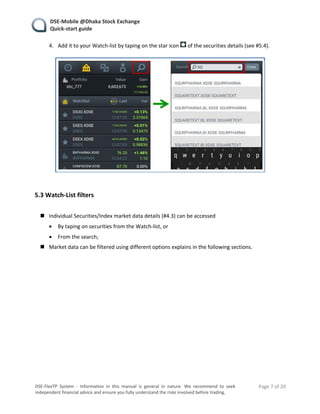
1. Tap on the search tab and type security’s name or trading code. 
2. Select one of the matching securities. 
3. “BL” and “BI” postfix following the securities code indicate Block and Buy‐In boards respectively 
e.g. “SQURPHARMA.BL”, “SQURPHARMA.BI”. 
   
   DSE‐Mobile @Dhaka Stock Exchange 
   Quick‐start guide 
    Page 7 of 20 
 
DSE‐FlexTP  System  ‐  Information  in  this  manual  is  general  in  nature.  We  recommend  to  seek 
independent financial advice and ensure you fully understand the risks involved before trading. 
4. Add it to your Watch‐list by taping on the star icon   of the securities details (see #5.4). 


5.3 Watch‐List filters 
 
 Individual Securities/Index market data details (#4.3) can be accessed 
 By taping on securities from the Watch‐list, or 
 From the search; 
 Market data can be filtered using different options explains in the following sections. 
   
   DSE‐Mobile @Dhaka Stock Exchange 
   Quick‐start guide 
    Page 8 of 20 
 
DSE‐FlexTP  System  ‐  Information  in  this  manual  is  general  in  nature.  We  recommend  to  seek 
independent financial advice and ensure you fully understand the risks involved before trading. 
5.3.1 Switch Watch‐List Type 
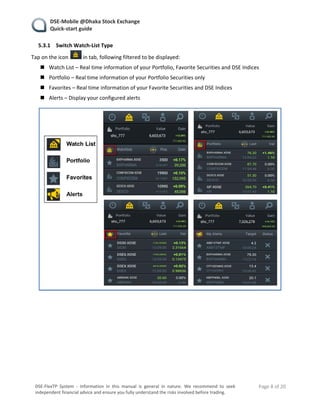
Tap on the icon   in tab, following filtered to be displayed: 
 Watch List – Real time information of your Portfolio, Favorite Securities and DSE Indices 
 Portfolio – Real time information of your Portfolio Securities only 
 Favorites – Real time information of your Favorite Securities and DSE Indices 
 Alerts – Display your configured alerts 


   DSE‐Mobile @Dhaka Stock Exchange 
   Quick‐start guide 
    Page 9 of 20 
 
DSE‐FlexTP  System  ‐  Information  in  this  manual  is  general  in  nature.  We  recommend  to  seek 
independent financial advice and ensure you fully understand the risks involved before trading. 
 
5.3.2 Switch Watch‐List Columns View 
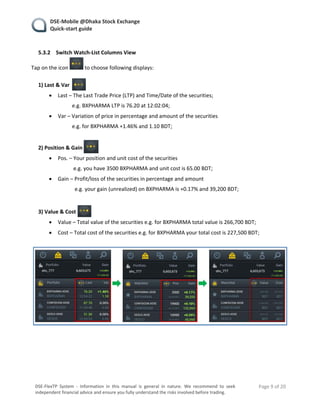
Tap on the icon   to choose following displays: 
 
 
1) Last & Var   
 Last – The Last Trade Price (LTP) and Time/Date of the securities; 
    e.g. BXPHARMA LTP is 76.20 at 12:02:04; 
 Var – Variation of price in percentage and amount of the securities  
    e.g. for BXPHARMA +1.46% and 1.10 BDT; 
 
2) Position & Gain   
 Pos. – Your position and unit cost of the securities  
     e.g. you have 3500 BXPHARMA and unit cost is 65.00 BDT; 
 Gain – Profit/loss of the securities in percentage and amount  
      e.g. your gain (unrealized) on BXPHARMA is +0.17% and 39,200 BDT; 
 
3) Value & Cost   
 Value – Total value of the securities e.g. for BXPHARMA total value is 266,700 BDT; 
 Cost – Total cost of the securities e.g. for BXPHARMA your total cost is 227,500 BDT; 


   DSE‐Mobile @Dhaka Stock Exchange 
   Quick‐start guide 
    Page 10 of 20 
 
DSE‐FlexTP  System  ‐  Information  in  this  manual  is  general  in  nature.  We  recommend  to  seek 
independent financial advice and ensure you fully understand the risks involved before trading. 
5.4 Securities & Index Market Data 
Individual Securities/Index market data details can be accessed by taping on a securities 
 From the Watch‐list   , or 
 From the search   
 
 
5.4.1 Securities Details 
The following features are available from the individual Securities market data pages: 
 
 
 Market Data ‐ It gives you Intraday/Monthly/Yearly statistics. To change tap on   icon. Following 
information will be displayed based on your tap” 
 High & Low price of the securities e.g. BXPHARMA High 76.20 and Low 74.90; 
 Time –  Last Trade time/date e.g. BXPHARMA at 12:02:22; 
 Var% –  Variation in percentage e.g. BXPHARMA +1.46% 
 Last Trade Price (LTP) e.g. BXPHARMA 76.20; 
 Var – Variation in amount e.g. BXPHARMA 1.10; 
 
   DSE‐Mobile @Dhaka Stock Exchange 
   Quick‐start guide 
    Page 11 of 20 
 
DSE‐FlexTP  System  ‐  Information  in  this  manual  is  general  in  nature.  We  recommend  to  seek 
independent financial advice and ensure you fully understand the risks involved before trading. 
 Chart – Standard chart in concise form. Details in the section 5.4.3; 
 Portfolio Position – Your portfolio position and average unit cost of the securities e.g. you have 3500 
BXPHARMA and average unit cost is 65.00 BDT. Note that, the quantity and avg. unit cost based on 
BOS data uploaded by broker; 
 Buy‐Sell – You can place Buy or Sell order if your broker allow; 
 Bid‐Ask – The best bid and ask information or Market Depth; 
 Last Transaction – Last two transactions; 
 News – The news title of the securities. For details please visit www.dsebd.org; 
 
5.4.2 Market Index Details 
The following features are available from the individual Index market data pages (eg: tap on a index form 
the watchlist   ): 
 
 Market Data ‐ It gives you Intraday/Monthly/Yearly statistics. To change tap on   icon. 
Following information will be displayed based on your tap: 
 High‐Low value of the index e.g. DS30 High 1746.89311 and Low 1742.08684; 
 Time – Last updated time/date e.g. DSE30 at 22:20:00; 
 Var% – Variation in percentage e.g. DS30 +0.11%; 
 Current Index Value e.g. DS30 1745.35844; 
 Var – Variation e.g. DS30 2.04716; 
 Leaders – Top 10 leaders on the selected index e.g. UNITEDAIR, UCB, POWERGRID; 
 Laggards – Top 10 laggards on the selected index e.g. UTTARABANK, PRIMEBANK, PUBALIBANK; 
 
   DSE‐Mobile @Dhaka Stock Exchange 
   Quick‐start guide 
    Page 12 of 20 
 
DSE‐FlexTP  System  ‐  Information  in  this  manual  is  general  in  nature.  We  recommend  to  seek 
independent financial advice and ensure you fully understand the risks involved before trading. 
5.4.3 Chart on Securities/Index 
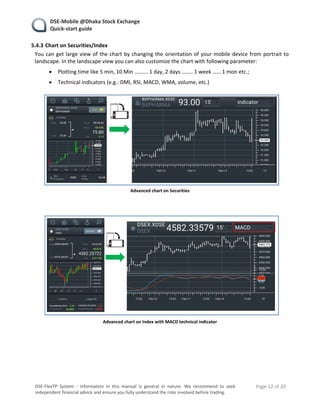
You can get large view of the chart by changing the orientation of your mobile device from portrait to 
landscape. In the landscape view you can also customize the chart with following parameter: 
 Plotting time like 5 min, 10 Min ………. 1 day, 2 days …….. 1 week …… 1 mon etc.; 
 Technical indicators (e.g.: DMI, RSI, MACD, WMA, volume, etc.) 
  
 
Advanced chart on Securities 


Advanced chart on Index with MACD technical indicator 
 
   
   DSE‐Mobile @Dhaka Stock Exchange 
   Quick‐start guide 
    Page 13 of 20 
 
DSE‐FlexTP  System  ‐  Information  in  this  manual  is  general  in  nature.  We  recommend  to  seek 
independent financial advice and ensure you fully understand the risks involved before trading. 
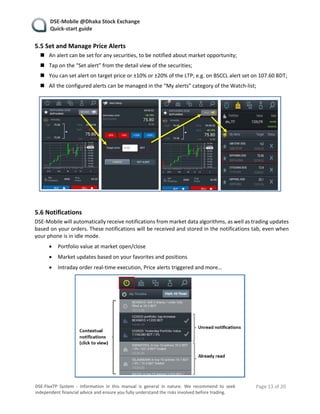
5.5 Set and Manage Price Alerts 
 An alert can be set for any securities, to be notified about market opportunity; 
 Tap on the “Set alert” from the detail view of the securities; 
 You can set alert on target price or ±10% or ±20% of the LTP; e.g. on BSCCL alert set on 107.60 BDT; 
 All the configured alerts can be managed in the “My alerts” category of the Watch‐list; 


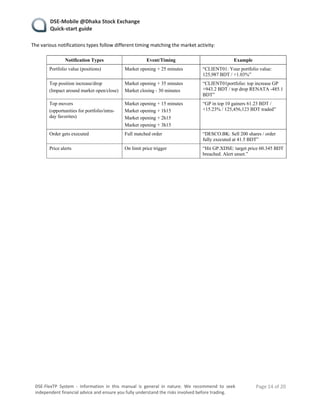
5.6 Notifications 
DSE‐Mobile will automatically receive notifications from market data algorithms, as well as trading updates 
based on your orders. These notifications will be received and stored in the notifications tab, even when 
your phone is in idle mode.  
 Portfolio value at market open/close 
 Market updates based on your favorites and positions 
 Intraday order real‐time execution, Price alerts triggered and more… 
 
 
   DSE‐Mobile @Dhaka Stock Exchange 
   Quick‐start guide 
    Page 14 of 20 
 
DSE‐FlexTP  System  ‐  Information  in  this  manual  is  general  in  nature.  We  recommend  to  seek 
independent financial advice and ensure you fully understand the risks involved before trading. 
The various notifications types follow different timing matching the market activity: 
 
Notification Types Event/Timing Example
Portfolio value (positions) Market opening + 25 minutes “CLIENT01: Your portfolio value:
125,987 BDT / +1.03%”
Top position increase/drop
(Impact around market open/close)
Market opening + 35 minutes
Market closing - 30 minutes
“CLIENT01portfolio: top increase GP
+943.2 BDT / top drop RENATA -485.1
BDT”
Top movers
(opportunities for portfolio/intra-
day favorites)
Market opening + 15 minutes
Market opening + 1h15
Market opening + 2h15
Market opening + 3h15
“GP in top 10 gainers 61.23 BDT /
+15.23% / 125,456,123 BDT traded”
Order gets executed Full matched order “DESCO.BK: Sell 200 shares / order
fully executed at 41.5 BDT”
Price alerts On limit price trigger “Hit GP.XDSE: target price 60.345 BDT
breached. Alert unset.”
   
   
   DSE‐Mobile @Dhaka Stock Exchange 
   Quick‐start guide 
    Page 15 of 20 
 
DSE‐FlexTP  System  ‐  Information  in  this  manual  is  general  in  nature.  We  recommend  to  seek 
independent financial advice and ensure you fully understand the risks involved before trading. 
6 Trading 
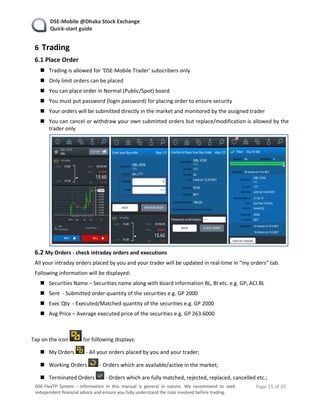
6.1 Place Order 
 Trading is allowed for ‘DSE‐Mobile Trader’ subscribers only 
 Only limit orders can be placed 
 You can place order in Normal (Public/Spot) board 
 You must put password (login password) for placing order to ensure security 
 Your orders will be submitted directly in the market and monitored by the assigned trader 
 You can cancel or withdraw your own submitted orders but replace/modification is allowed by the 
trader only 
 
 
6.2 My Orders ‐ check intraday orders and executions 
All your intraday orders placed by you and your trader will be updated in real‐time in “my orders” tab.  
Following information will be displayed: 
 Securities Name – Securities name along with board information BL, BI etc. e.g. GP, ACI.BL 
 Sent  ‐ Submitted order quantity of the securities e.g. GP 2000 
 Exec Qty  ‐ Executed/Matched quantity of the securities e.g. GP 2000 
 Avg Price – Average executed price of the securities e.g. GP 263.6000 
 
Tap on the icon   for following displays: 
 My Orders   ‐ All your orders placed by you and your trader; 
 Working Orders   ‐ Orders which are available/active in the market; 
 Terminated Orders   ‐ Orders which are fully matched, rejected, replaced, cancelled etc.; 
   DSE‐Mobile @Dhaka Stock Exchange 
   Quick‐start guide 
    Page 16 of 20 
 
DSE‐FlexTP  System  ‐  Information  in  this  manual  is  general  in  nature.  We  recommend  to  seek 
independent financial advice and ensure you fully understand the risks involved before trading. 


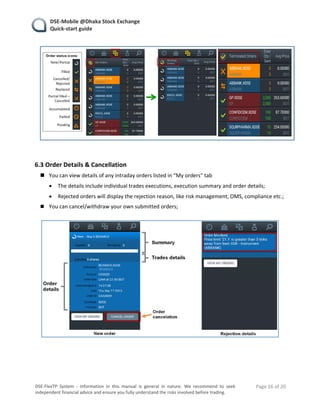
6.3 Order Details & Cancellation 
 You can view details of any intraday orders listed in “My orders” tab 
 The details include individual trades executions, execution summary and order details; 
 Rejected orders will display the rejection reason, like risk management, OMS, compliance etc.; 
 You can cancel/withdraw your own submitted orders; 


   DSE‐Mobile @Dhaka Stock Exchange 
   Quick‐start guide 
    Page 17 of 20 
 
DSE‐FlexTP  System  ‐  Information  in  this  manual  is  general  in  nature.  We  recommend  to  seek 
independent financial advice and ensure you fully understand the risks involved before trading. 
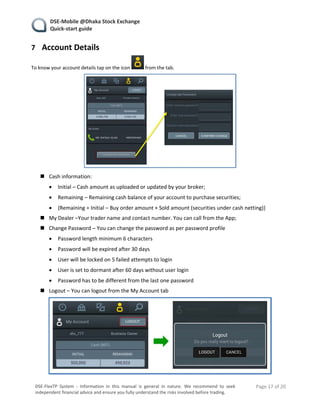
7 Account Details 
To know your account details tap on the icon   from the tab. 
 
 Cash information: 
 Initial – Cash amount as uploaded or updated by your broker; 
 Remaining – Remaining cash balance of your account to purchase securities; 
 {Remaining = Initial – Buy order amount + Sold amount (securities under cash netting)} 
 My Dealer –Your trader name and contact number. You can call from the App; 
 Change Password – You can change the password as per password profile 
 Password length minimum 6 characters 
 Password will be expired after 30 days 
 User will be locked on 5 failed attempts to login 
 User is set to dormant after 60 days without user login 
 Password has to be different from the last one password 
 Logout – You can logout from the My Account tab 
 
 
   DSE‐Mobile @Dhaka Stock Exchange 
   Quick‐start guide 
    Page 18 of 20 
 
DSE‐FlexTP  System  ‐  Information  in  this  manual  is  general  in  nature.  We  recommend  to  seek 
independent financial advice and ensure you fully understand the risks involved before trading. 
8 Service Availability 
DSE‐Mobile service will be available all the time with: 
 Healthy network 
 Recommended mobile OS (Android) and official firmware 
 Sufficient free resources e.g. memory, processor, etc. 
 
You may experience service disruption in following scenario: 
 Session Timeout – User session will be expired after 10 minutes of idle session. You would have to 
re‐login in that case. 
 The App will be logged out, if you have login from other device with the same ID. 
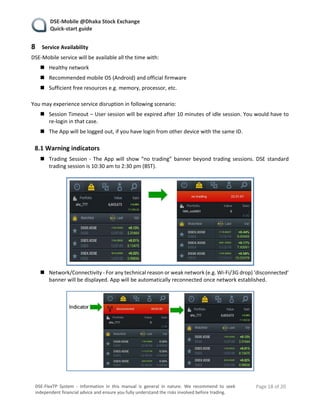
8.1 Warning indicators 
 Trading Session ‐ The App will show “no trading” banner beyond trading sessions. DSE standard 
trading session is 10:30 am to 2:30 pm (BST). 
 
 
 Network/Connectivity ‐ For any technical reason or weak network (e.g. Wi‐Fi/3G drop) ‘disconnected’ 
banner will be displayed. App will be automatically reconnected once network established. 
 
 
   DSE‐Mobile @Dhaka Stock Exchange 
   Quick‐start guide 
    Page 19 of 20 
 
DSE‐FlexTP  System  ‐  Information  in  this  manual  is  general  in  nature.  We  recommend  to  seek 
independent financial advice and ensure you fully understand the risks involved before trading. 
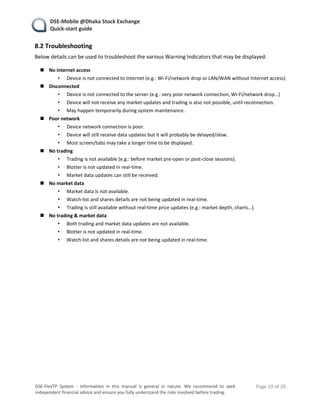
8.2 Troubleshooting 
Below details can be used to troubleshoot the various Warning Indicators that may be displayed: 
 
 No internet access 
• Device is not connected to Internet (e.g.: Wi‐Fi/network drop or LAN/WAN without Internet access) 
 Disconnected  
• Device is not connected to the server (e.g.: very poor network connection, Wi‐Fi/network drop…) 
• Device will not receive any market updates and trading is also not possible, until reconnection. 
• May happen temporarily during system maintenance. 
 Poor network 
• Device network connection is poor.  
• Device will still receive data updates but it will probably be delayed/slow. 
• Most screen/tabs may take a longer time to be displayed. 
 No trading  
• Trading is not available (e.g.: before market pre‐open or post‐close sessions). 
• Blotter is not updated in real‐time. 
• Market data updates can still be received. 
 No market data  
• Market data is not available.  
• Watch‐list and shares details are not being updated in real‐time. 
• Trading is still available without real‐time price updates (e.g.: market depth, charts…). 
 No trading & market data 
• Both trading and market data updates are not available.  
• Blotter is not updated in real‐time. 
• Watch‐list and shares details are not being updated in real‐time. 


   DSE‐Mobile @Dhaka Stock Exchange 
   Quick‐start guide 
    Page 20 of 20 
 
DSE‐FlexTP  System  ‐  Information  in  this  manual  is  general  in  nature.  We  recommend  to  seek 
independent financial advice and ensure you fully understand the risks involved before trading. 
9 Support Information 
 Your  portfolio  information  may  differ  from  the  information  provided  by  the  broker,  due  to 
commission, charges etc. 
 Be updated with the latest version of DSE‐Mobile for smooth operation. 
 Contact your broker if your account become blocked, dormant, suspended etc. 
 Contact your broker if forget the password. 
 User  credentials  and  reset  password  will  be  sent  through  system  generated  email.  The  sender 
address is dftpprod@dsebd.org. Please check your junk box if the email is not available in the inbox. 
 Please contact your broker for any query, or technical issues. 
 
 
10 More information online 
 
 Visit  corner in the www.dsebd.org to get up‐to‐date information.  
 You can also visit DSE‐Mobile’s   page at https://www.facebook.com/DSEMobileInvestor/timeline 
or search “DSE‐Mobile” in  . 
 

Dse mobile user manual

  • 1.
  • 2.
       DSE‐Mobile @Dhaka Stock Exchange     Quick‐start guide     Page 2 of 20    DSE‐FlexTP  System  ‐  Information  in  this  manual  is  general  in  nature.  We  recommend  to  seek  independent financial advice and ensure you fully understand the risks involved before trading.  Table of content:  1  INTRODUCTION ................................................................................................................. 3  2  INSTALL DSE‐MOBILE ON ANDROID ................................................................................... 4  3  LOGIN TO APP ................................................................................................................... 5  4  OVERVIEW OF THE APP ..................................................................................................... 6  5  MARKET DATA ................................................................................................................... 6  5.1  PORTFOLIO SUMMARY ..................................................................................................................... 6  5.2  SEARCH SECURITIES & BUILD WATCH‐LIST .......................................................................................... 6  5.3  WATCH‐LIST FILTERS ........................................................................................................................ 7  5.4  SECURITIES & INDEX MARKET DATA ................................................................................................. 10  5.5  SET AND MANAGE PRICE ALERTS ..................................................................................................... 13  5.6  NOTIFICATIONS ............................................................................................................................. 13  6  TRADING ......................................................................................................................... 15  6.1  PLACE ORDER ............................................................................................................................... 15  6.2  MY ORDERS ‐ CHECK INTRADAY ORDERS AND EXECUTIONS .................................................................... 15  6.3  ORDER DETAILS & CANCELLATION .................................................................................................... 16  7  ACCOUNT DETAILS .......................................................................................................... 17  8  SERVICE AVAILABILITY ..................................................................................................... 18  8.1  WARNING INDICATORS ................................................................................................................... 18  8.2  TROUBLESHOOTING ....................................................................................................................... 19  9  SUPPORT INFORMATION ................................................................................................. 20  10  MORE INFORMATION ONLINE ......................................................................................... 20       
  • 3.
       DSE‐Mobile @Dhaka Stock Exchange     Quick‐start guide     Page 3 of 20    DSE‐FlexTP  System  ‐  Information  in  this  manual  is  general  in  nature.  We  recommend  to  seek  independent financial advice and ensure you fully understand the risks involved before trading.  1 Introduction  Dhaka Stock Exchange (DSE) has implemented Centralized Order Management System ‘DSE‐FlexTP’ for the  TREC  holders of the Exchange to manage  their orders. The  Mobile App,  is  to leverage the  DSE‐FlexTP  architecture to make trading available to investors from mobile device. This will connect investors to the  state‐of‐the‐art technology of trading. DSE‐Mobile will be facilitate to bring new dimension of business  opportunities in the capital market.    DSE‐Mobile Features:     Intuitive design   Access to market information   Order submission in real‐time (Only available in “DSE‐Mobile Trader”)   Portfolio value and executions   Real‐time P&L   Investor account & portfolio information   Market opportunities on favorites   Real time notifications on business opportunities    Three different accessibility in DSE‐Mobile:   DSE‐Mobile VIP – Allows you to be aware of your portfolio and favorites without efforts, keep in  touch  with  professional  trader  to  get  high‐end  services.  Trader  will  professionally  manage  best  execution of your orders.   DSE‐Mobile Trader – Allows you to be aware of your portfolio and favorites without efforts, keep in  touch with professional trader to get high‐end services while availing ability to place orders yourself.   DSE‐Mobile Biz Owner ‐ Allows business owner to be aware of activities of their broking business  status. This is only for TREC holder.    Minimum requirements to use the DSE‐Mobile:   Android version: Android 4.4 or higher   Phone viewport size (screen resolution): over 320px   Internet data connectivity: 3G or Wi‐Fi    Access to DSE‐Mobile:   Contact your broker for registration and subscription for your desired DSE Mobility product.       
  • 4.
       DSE‐Mobile @Dhaka Stock Exchange     Quick‐start guide     Page 4 of 20    DSE‐FlexTP  System  ‐  Information  in  this  manual  is  general  in  nature.  We  recommend  to  seek  independent financial advice and ensure you fully understand the risks involved before trading.  2 Install DSE‐Mobile on Android  1. Once  your  registration  has  been  completed  by  your  broker,  you  will  receive  your  credentials  (login/password) by email.  2. Tap on the download link of the email, or search for “DSE Mobile” in the Google Play Store.  3. Select the app and tap on “Install”.        N.B.: This page can be used to update the app to newer version.       
  • 5.
       DSE‐Mobile @Dhaka Stock Exchange     Quick‐start guide     Page 5 of 20    DSE‐FlexTP  System  ‐  Information  in  this  manual  is  general  in  nature.  We  recommend  to  seek  independent financial advice and ensure you fully understand the risks involved before trading.  3 Login to App   Open the app and enter your credentials to login. The app might prompt for updates time to time.  In most cases your phone will update it automatically. This is to ensure that you access all the latest  features that are available.    On first log‐in the app will prompt you to change the password to ensure only you have access to  your account.        Login  and  password  are  provided  by  your  broker by email.    Please contact your broker IT desk for lost  password, or blocked access.         
  • 6.
       DSE‐Mobile @Dhaka Stock Exchange     Quick‐start guide     Page 6 of 20    DSE‐FlexTP  System  ‐  Information  in  this  manual  is  general  in  nature.  We  recommend  to  seek  independent financial advice and ensure you fully understand the risks involved before trading.  4 Overview of the App      5 Market Data  5.1 Portfolio Summary   Your Broker and Trading Account Code e.g. Broker ‘SHC' and Trading Code ‘777’   Current Market Value of your portfolio e.g. 6,603,673   Profit and Loss (PnL)  e.g. +12.08% and 711,952.00 BDT      5.2 Search Securities & Build Watch‐List   The  Watch‐list  will  automatically  display  market  index  and  your  portfolio  position.  It  can  be  customized by adding/removing favorites for easy access to market information.   Way to search securities:  1. Tap on the search tab and type security’s name or trading code.  2. Select one of the matching securities.  3. “BL” and “BI” postfix following the securities code indicate Block and Buy‐In boards respectively  e.g. “SQURPHARMA.BL”, “SQURPHARMA.BI”.     
  • 7.
       DSE‐Mobile @Dhaka Stock Exchange     Quick‐start guide     Page 7 of 20    DSE‐FlexTP  System  ‐  Information  in  this  manual  is  general  in  nature.  We  recommend  to  seek  independent financial advice and ensure you fully understand the risks involved before trading.  4. Add it to your Watch‐list by taping on the star icon   of the securities details (see #5.4).          5.3 Watch‐List filters     Individual Securities/Index market data details (#4.3) can be accessed   By taping on securities from the Watch‐list, or   From the search;   Market data can be filtered using different options explains in the following sections.     
  • 8.
       DSE‐Mobile @Dhaka Stock Exchange     Quick‐start guide     Page 8 of 20    DSE‐FlexTP  System  ‐  Information  in  this  manual  is  general  in  nature.  We  recommend  to  seek  independent financial advice and ensure you fully understand the risks involved before trading.  5.3.1 Switch Watch‐List Type  Tap on the icon   in tab, following filtered to be displayed:   Watch List – Real time information of your Portfolio, Favorite Securities and DSE Indices   Portfolio – Real time information of your Portfolio Securities only   Favorites – Real time information of your Favorite Securities and DSE Indices   Alerts – Display your configured alerts         
  • 9.
       DSE‐Mobile @Dhaka Stock Exchange     Quick‐start guide     Page 9 of 20    DSE‐FlexTP  System  ‐  Information  in  this  manual  is  general  in  nature.  We  recommend  to  seek  independent financial advice and ensure you fully understand the risks involved before trading.    5.3.2 Switch Watch‐List Columns View  Tap on the icon   to choose following displays:      1) Last & Var     Last – The Last Trade Price (LTP) and Time/Date of the securities;      e.g. BXPHARMA LTP is 76.20 at 12:02:04;   Var – Variation of price in percentage and amount of the securities       e.g. for BXPHARMA +1.46% and 1.10 BDT;    2) Position & Gain     Pos. – Your position and unit cost of the securities        e.g. you have 3500 BXPHARMA and unit cost is 65.00 BDT;   Gain – Profit/loss of the securities in percentage and amount         e.g. your gain (unrealized) on BXPHARMA is +0.17% and 39,200 BDT;    3) Value & Cost     Value – Total value of the securities e.g. for BXPHARMA total value is 266,700 BDT;   Cost – Total cost of the securities e.g. for BXPHARMA your total cost is 227,500 BDT;           
  • 10.
       DSE‐Mobile @Dhaka Stock Exchange     Quick‐start guide     Page 10 of 20    DSE‐FlexTP  System  ‐  Information  in  this  manual  is  general  in  nature.  We  recommend  to  seek  independent financial advice and ensure you fully understand the risks involved before trading.  5.4 Securities & Index Market Data  Individual Securities/Index market data details can be accessed by taping on a securities   From the Watch‐list   , or   From the search        5.4.1 Securities Details  The following features are available from the individual Securities market data pages:       Market Data ‐ It gives you Intraday/Monthly/Yearly statistics. To change tap on   icon. Following  information will be displayed based on your tap”   High & Low price of the securities e.g. BXPHARMA High 76.20 and Low 74.90;   Time –  Last Trade time/date e.g. BXPHARMA at 12:02:22;   Var% –  Variation in percentage e.g. BXPHARMA +1.46%   Last Trade Price (LTP) e.g. BXPHARMA 76.20;   Var – Variation in amount e.g. BXPHARMA 1.10;   
  • 11.
       DSE‐Mobile @Dhaka Stock Exchange     Quick‐start guide     Page 11 of 20    DSE‐FlexTP  System  ‐  Information  in  this  manual  is  general  in  nature.  We  recommend  to  seek  independent financial advice and ensure you fully understand the risks involved before trading.   Chart – Standard chart in concise form. Details in the section 5.4.3;   Portfolio Position – Your portfolio position and average unit cost of the securities e.g. you have 3500  BXPHARMA and average unit cost is 65.00 BDT. Note that, the quantity and avg. unit cost based on  BOS data uploaded by broker;   Buy‐Sell – You can place Buy or Sell order if your broker allow;   Bid‐Ask – The best bid and ask information or Market Depth;   Last Transaction – Last two transactions;   News – The news title of the securities. For details please visit www.dsebd.org;    5.4.2 Market Index Details  The following features are available from the individual Index market data pages (eg: tap on a index form  the watchlist   ):     Market Data ‐ It gives you Intraday/Monthly/Yearly statistics. To change tap on   icon.  Following information will be displayed based on your tap:   High‐Low value of the index e.g. DS30 High 1746.89311 and Low 1742.08684;   Time – Last updated time/date e.g. DSE30 at 22:20:00;   Var% – Variation in percentage e.g. DS30 +0.11%;   Current Index Value e.g. DS30 1745.35844;   Var – Variation e.g. DS30 2.04716;   Leaders – Top 10 leaders on the selected index e.g. UNITEDAIR, UCB, POWERGRID;   Laggards – Top 10 laggards on the selected index e.g. UTTARABANK, PRIMEBANK, PUBALIBANK;   
  • 12.
       DSE‐Mobile @Dhaka Stock Exchange     Quick‐start guide     Page 12 of 20    DSE‐FlexTP  System  ‐  Information  in  this  manual  is  general  in  nature.  We  recommend  to  seek  independent financial advice and ensure you fully understand the risks involved before trading.  5.4.3 Chart on Securities/Index  You can get large view of the chart by changing the orientation of your mobile device from portrait to  landscape. In the landscape view you can also customize the chart with following parameter:   Plotting time like 5 min, 10 Min ………. 1 day, 2 days …….. 1 week …… 1 mon etc.;   Technical indicators (e.g.: DMI, RSI, MACD, WMA, volume, etc.)       Advanced chart on Securities        Advanced chart on Index with MACD technical indicator       
  • 13.
       DSE‐Mobile @Dhaka Stock Exchange     Quick‐start guide     Page 13 of 20    DSE‐FlexTP  System  ‐  Information  in  this  manual  is  general  in  nature.  We  recommend  to  seek  independent financial advice and ensure you fully understand the risks involved before trading.  5.5 Set and Manage Price Alerts   An alert can be set for any securities, to be notified about market opportunity;   Tap on the “Set alert” from the detail view of the securities;   You can set alert on target price or ±10% or ±20% of the LTP; e.g. on BSCCL alert set on 107.60 BDT;   All the configured alerts can be managed in the “My alerts” category of the Watch‐list;        5.6 Notifications  DSE‐Mobile will automatically receive notifications from market data algorithms, as well as trading updates  based on your orders. These notifications will be received and stored in the notifications tab, even when  your phone is in idle mode.    Portfolio value at market open/close   Market updates based on your favorites and positions   Intraday order real‐time execution, Price alerts triggered and more…     
  • 14.
       DSE‐Mobile @Dhaka Stock Exchange     Quick‐start guide     Page 14 of 20    DSE‐FlexTP  System  ‐  Information  in  this  manual  is  general  in  nature.  We  recommend  to  seek  independent financial advice and ensure you fully understand the risks involved before trading.  The various notifications types follow different timing matching the market activity:    Notification Types Event/Timing Example Portfolio value (positions) Market opening + 25 minutes “CLIENT01: Your portfolio value: 125,987 BDT / +1.03%” Top position increase/drop (Impact around market open/close) Market opening + 35 minutes Market closing - 30 minutes “CLIENT01portfolio: top increase GP +943.2 BDT / top drop RENATA -485.1 BDT” Top movers (opportunities for portfolio/intra- day favorites) Market opening + 15 minutes Market opening + 1h15 Market opening + 2h15 Market opening + 3h15 “GP in top 10 gainers 61.23 BDT / +15.23% / 125,456,123 BDT traded” Order gets executed Full matched order “DESCO.BK: Sell 200 shares / order fully executed at 41.5 BDT” Price alerts On limit price trigger “Hit GP.XDSE: target price 60.345 BDT breached. Alert unset.”        
  • 15.
       DSE‐Mobile @Dhaka Stock Exchange     Quick‐start guide     Page 15 of 20    DSE‐FlexTP  System  ‐  Information  in  this  manual  is  general  in  nature.  We  recommend  to  seek  independent financial advice and ensure you fully understand the risks involved before trading.  6 Trading  6.1 Place Order   Trading is allowed for ‘DSE‐Mobile Trader’ subscribers only   Only limit orders can be placed   You can place order in Normal (Public/Spot) board   You must put password (login password) for placing order to ensure security   Your orders will be submitted directly in the market and monitored by the assigned trader   You can cancel or withdraw your own submitted orders but replace/modification is allowed by the  trader only      6.2 My Orders ‐ check intraday orders and executions  All your intraday orders placed by you and your trader will be updated in real‐time in “my orders” tab.   Following information will be displayed:   Securities Name – Securities name along with board information BL, BI etc. e.g. GP, ACI.BL   Sent  ‐ Submitted order quantity of the securities e.g. GP 2000   Exec Qty  ‐ Executed/Matched quantity of the securities e.g. GP 2000   Avg Price – Average executed price of the securities e.g. GP 263.6000    Tap on the icon   for following displays:   My Orders   ‐ All your orders placed by you and your trader;   Working Orders   ‐ Orders which are available/active in the market;   Terminated Orders   ‐ Orders which are fully matched, rejected, replaced, cancelled etc.; 
  • 16.
       DSE‐Mobile @Dhaka Stock Exchange     Quick‐start guide     Page 16 of 20    DSE‐FlexTP  System  ‐  Information  in  this  manual  is  general  in  nature.  We  recommend  to  seek  independent financial advice and ensure you fully understand the risks involved before trading.        6.3 Order Details & Cancellation   You can view details of any intraday orders listed in “My orders” tab   The details include individual trades executions, execution summary and order details;   Rejected orders will display the rejection reason, like risk management, OMS, compliance etc.;   You can cancel/withdraw your own submitted orders;           
  • 17.
       DSE‐Mobile @Dhaka Stock Exchange     Quick‐start guide     Page 17 of 20    DSE‐FlexTP  System  ‐  Information  in  this  manual  is  general  in  nature.  We  recommend  to  seek  independent financial advice and ensure you fully understand the risks involved before trading.  7 Account Details  To know your account details tap on the icon   from the tab.     Cash information:   Initial – Cash amount as uploaded or updated by your broker;   Remaining – Remaining cash balance of your account to purchase securities;   {Remaining = Initial – Buy order amount + Sold amount (securities under cash netting)}   My Dealer –Your trader name and contact number. You can call from the App;   Change Password – You can change the password as per password profile   Password length minimum 6 characters   Password will be expired after 30 days   User will be locked on 5 failed attempts to login   User is set to dormant after 60 days without user login   Password has to be different from the last one password   Logout – You can logout from the My Account tab     
  • 18.
       DSE‐Mobile @Dhaka Stock Exchange     Quick‐start guide     Page 18 of 20    DSE‐FlexTP  System  ‐  Information  in  this  manual  is  general  in  nature.  We  recommend  to  seek  independent financial advice and ensure you fully understand the risks involved before trading.  8 Service Availability  DSE‐Mobile service will be available all the time with:   Healthy network   Recommended mobile OS (Android) and official firmware   Sufficient free resources e.g. memory, processor, etc.    You may experience service disruption in following scenario:   Session Timeout – User session will be expired after 10 minutes of idle session. You would have to  re‐login in that case.   The App will be logged out, if you have login from other device with the same ID.  8.1 Warning indicators   Trading Session ‐ The App will show “no trading” banner beyond trading sessions. DSE standard  trading session is 10:30 am to 2:30 pm (BST).       Network/Connectivity ‐ For any technical reason or weak network (e.g. Wi‐Fi/3G drop) ‘disconnected’  banner will be displayed. App will be automatically reconnected once network established.     
  • 19.
       DSE‐Mobile @Dhaka Stock Exchange     Quick‐start guide     Page 19 of 20    DSE‐FlexTP  System  ‐  Information  in  this  manual  is  general  in  nature.  We  recommend  to  seek  independent financial advice and ensure you fully understand the risks involved before trading.  8.2 Troubleshooting  Below details can be used to troubleshoot the various Warning Indicators that may be displayed:     No internet access  • Device is not connected to Internet (e.g.: Wi‐Fi/network drop or LAN/WAN without Internet access)   Disconnected   • Device is not connected to the server (e.g.: very poor network connection, Wi‐Fi/network drop…)  • Device will not receive any market updates and trading is also not possible, until reconnection.  • May happen temporarily during system maintenance.   Poor network  • Device network connection is poor.   • Device will still receive data updates but it will probably be delayed/slow.  • Most screen/tabs may take a longer time to be displayed.   No trading   • Trading is not available (e.g.: before market pre‐open or post‐close sessions).  • Blotter is not updated in real‐time.  • Market data updates can still be received.   No market data   • Market data is not available.   • Watch‐list and shares details are not being updated in real‐time.  • Trading is still available without real‐time price updates (e.g.: market depth, charts…).   No trading & market data  • Both trading and market data updates are not available.   • Blotter is not updated in real‐time.  • Watch‐list and shares details are not being updated in real‐time.         
  • 20.
       DSE‐Mobile @Dhaka Stock Exchange     Quick‐start guide     Page 20 of 20    DSE‐FlexTP  System  ‐  Information  in  this  manual  is  general  in  nature.  We  recommend  to  seek  independent financial advice and ensure you fully understand the risks involved before trading.  9 Support Information   Your  portfolio  information  may  differ  from  the  information  provided  by  the  broker,  due  to  commission, charges etc.   Be updated with the latest version of DSE‐Mobile for smooth operation.   Contact your broker if your account become blocked, dormant, suspended etc.   Contact your broker if forget the password.   User  credentials  and  reset  password  will  be  sent  through  system  generated  email.  The  sender  address is dftpprod@dsebd.org. Please check your junk box if the email is not available in the inbox.   Please contact your broker for any query, or technical issues.      10 More information online     Visit  corner in the www.dsebd.org to get up‐to‐date information.    You can also visit DSE‐Mobile’s   page at https://www.facebook.com/DSEMobileInvestor/timeline  or search “DSE‐Mobile” in  .