FIX PROTOCOL
AN INTRODUCTION TO THE FIX PROTOCOL
AGENDA

 FIX General Overview.

 FIX in Detail.

 Session layer.

 Application Layer.

 FIX engine.

 FIX versions.
What is FIX?
Financial information eXchange.

Protocol created by Fidelity and Salomon 1992.

A standard way to communicate trading information electronically
between brokers, buy-side institutions, and markets.

An industry driven messaging standard for the exchange of trading
related information between financial institutions.
 Platform independent.

 Flexible.

 Open (free) protocol.
Growth of FIX
Began as IOI (Indication of Interest) - Bid/Offers.

Moved to Orders and Executions:

Actual Orders to buy and sell shares in securities, and responses from
the counterparty about how those Orders were executed.

FIX has become the most commonly used protocol for electronic
financial transactions.

Used by – ECNs, Brokers, Portfolio Managers, Exchanges.

Covers major asset classes – Equities, Derivatives, FX, Fixed Income.

Supports Pre-Trade, Trade, and Post-Trade messaging.
What is a FIX message?
FIX message contains three parts:

- Header

- Body

- Trailer

FIX message is a collection of fields e.g. Symbol, Order ID, Price,
Order Quantity.

Each field is a tag-value pair. <tag>=<value>    e.g. 55=IBM.

Two types of FIX messages:

- Application Level

- Session Level
What do you mean by tag value pair?
Tag:
FIX uses predefined Tags.
Each Tag represents a specific Field.
Each Tag is given a predefined number.
FIX dictionary provides the list of Fields and corresponding Tag
numbers.


Value:
Values represent the value the Tag is assigned to.
Supported data types are: int, float, Qty, Price, char, Boolean (Y/N),
Currency, timestamp, string.


e.g. Symbol is tag55. If there was a FIX order for Intel, it would look like
55=INTC
What are the parts of a FIX message?
Three parts:

Header – contains administrative information about the message – who
sent the message, who the message is going to, what time it was sent.

Body – contains the actual financial information – fields like Symbol,
Shares, Price.

Trailer – usually there is only one field set in here – the Checksum for
the message – to ensure message integrity.
Message Header
All administrative fields:
Who sent the message.
Who the message was sent to.
Who was the trader that sent the message (if applicable).
What version of FIX is being used in the message.
What type of message it is.
Where the message is to be routed to (if applicable).
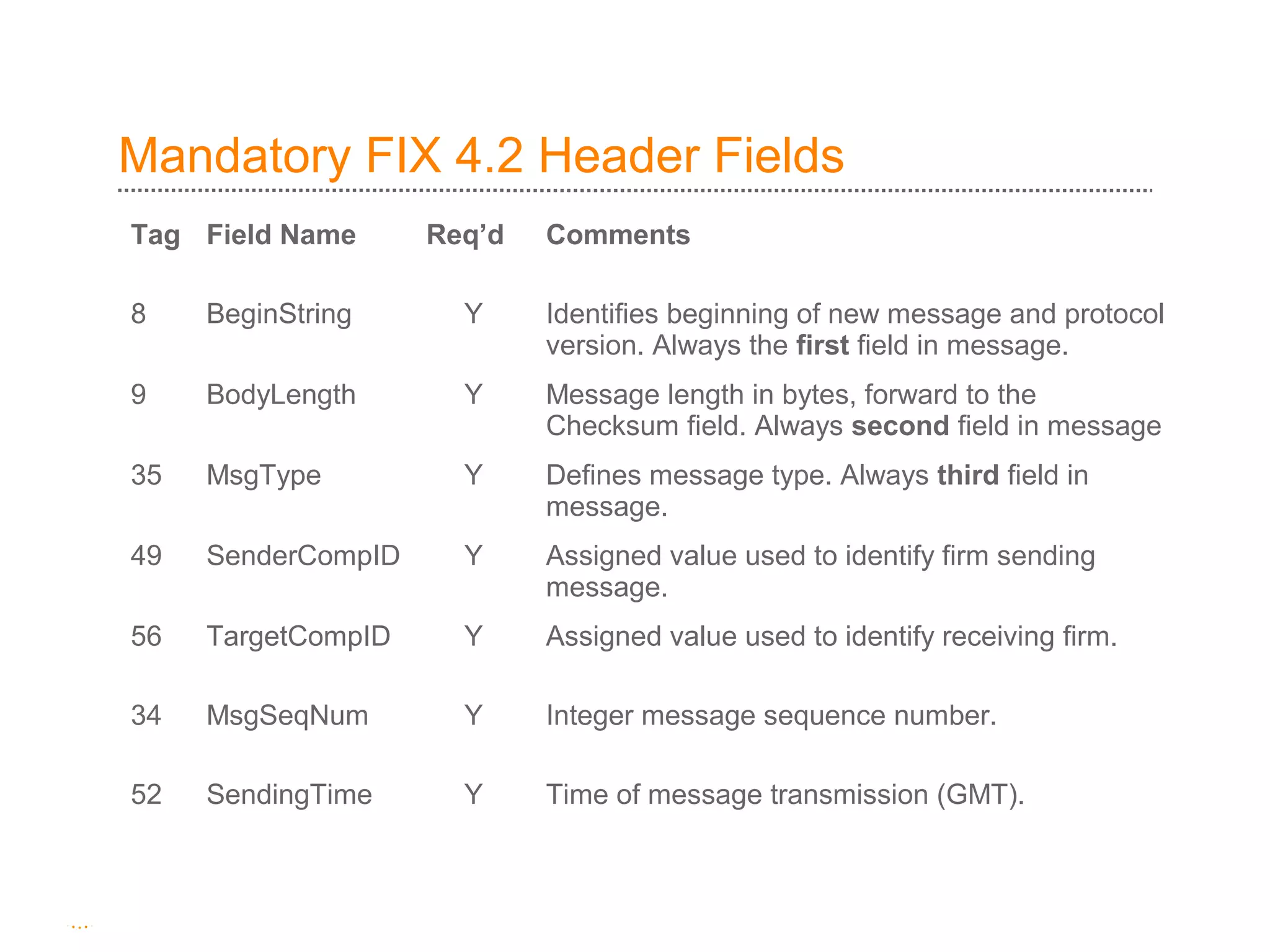
Mandatory FIX 4.2 Header Fields
Tag Field Name      Req’d   Comments

8    BeginString      Y     Identifies beginning of new message and protocol
                            version. Always the first field in message.
9    BodyLength       Y     Message length in bytes, forward to the
                            Checksum field. Always second field in message
35   MsgType          Y     Defines message type. Always third field in
                            message.
49   SenderCompID     Y     Assigned value used to identify firm sending
                            message.
56   TargetCompID     Y     Assigned value used to identify receiving firm.

34   MsgSeqNum        Y     Integer message sequence number.

52   SendingTime      Y     Time of message transmission (GMT).
Header Field Examples
8=FIX 4.2 Message is using Version 4.2 of FIX protocol (BeginString).
52=20090724-13:40:24 What time the message was sent (GMT)
(SendingTime).
49=Fidelity Fidelity is sending the message, specified in the header using the
SenderCompID field.
56=ML Message being sent to Merril Lynch, specified in the TargetCompID
field.
35=D Fidelity sending Merril Lynch an Order, specified in the MsgType field.
D signifies an Order. Other values for MsgType include:
- 8 (Execution Report).
- 6 (Indication of Interest).
- A (FIX logon message).
Message Body
The Body of a FIX message contains the actual financial
information that will be important to the receiver of the message.
Important fields that could be in the body of a FIX Order
message are:
• Symbol (tag 55).
• Order Quantity (tag 38).
• Order Type (tag 40).
• Price (tag 44).
• Side (tag 54).
• TimeInForce (tag 59).
Message Body Example
I want to create an order to buy 10000 shares of Yahoo at the
Market, and have it be Good Till Cancelled.
OrderQty – 10000      38=10000
Symbol – Yahoo        55=YHOO
Order Type – Market Order 40=1 (1 indicates Market Order).
Time In Force – Good until cancelled 59=1 (1 indicates Good Until
cancelled).

Side – buy 54=1 (1 indicates buy).
Message Trailer
The Trailer of a FIX message usually contains only one field – tag 10
the CheckSum.


The Checksum in a FIX message provides a simple message integrity
check. The Checksum is the sum of all the binary values in the
message. E.g. 10=193


Upon receiving a message, a FIX engine will compute the checksum of
the message, and make sure it matches the checksum in the actual
message, this helps to identify transmission problems.
Example FIX messages
A FIX 4.2 message that would be seen in a FIX engine log file for an
Order for 10000 shares of IBM.
8=FIX4.2|9=0132|35=D|57=Simulator|34=2|49=SLGM0|56=SB10|52=20100315-
13:45:28|55=IBM|40=2|38=1000|21=2|11=order 0|60=20100315-17:45:20|54=1|
44=110.5|10=097

The message fields are delimited using the ASCII 01 <start of header>
character.
Tag 8 FIX version     Tag 55 Symbol

Tag 49 SenderCompID   Tag 54 Side

Tag 35 MessageType    Tag 38 OrderQty
Two types of FIX messages
Application level message.

Session level message.

Both are constructed the same way (tag/value pairs) but the functionality of
the two types is different.
An application level message contains the actual financial data that a user
will care about.
Application level messages include Orders, Execution Reports, Indications of
Interest, Order Cancels, Allocations.
Session level messages are used for administrative functionality, and
connectivity between FIX engines,
Session level messages include – FIX Login messages (establish a
connection to a remote FIX engine), FIX Logoff messages, FIX Resend
Request messages.
Session Layer
A session layer of any protocol defines how two sides using that
protocol communicate.

The FIX session layer handles all the administrative functionality
of the FIX protocol.

Session layer – handles communication between the two
counterparties, and also makes sure that no messages are
missed, and bad messages are rejected.
What type of messages are in the FIX Session Layer?
  Session level messages:
  Logon (35=A) – handshake to authenticate counterparty.
  Resend Requests (35=2) - used to request missed messages
  after detecting a message gap
  Heartbeats (35=0) /Test Requests (35=1) - keep alive packets
  used to detect problems during slow message traffic periods.
  Reject (35=3)
  Sequence Reset (35=4)
  Logout (35=5)
What is a sequence number?
The FIX protocol also specifies the use of Sequence numbers in the
Session layer for all FIX messages.

It is a unique identifier for each incoming and outgoing message, and is
used by the FIX engine to keep track of how many messages have
come in and gone out.

It is an incrementing number.

Normally, at the beginning of a trading day, the first message sent out
by both sides would be sequence number 1, and would increase by one
every time a new message is sent out.

Sequence numbers are unique for each connection, and for each
incoming and outgoing message.
So how does it all get started?
The side that has agreed to initiate the connection (the Initiator) first
makes a socket connection to the counterparty’s FIX engine and then
sends a FIX Logon message.

Upon receiving that FIX Logon message, the Acceptor counterparty
must acknowledge that FIX Logon message with its own FIX Logon
acknowledgement message.

Once the ack has been received, the connection has been established
and trading can begin.
Sample FIX Message – Logon and Logon Ack


     8=FIX4.2|9=0060|35=A|34=1|49=PGB10|56=PXY11|
     52=20090713-14:48:20|98=0|108=30|10=008


  PGB10                                    PXY11


     8=FIX4.2|9=0060|35=A|34=1|49=PXY11|56=PGB10|
     52=20090713-14:48:21|98=0|108=30|10=009
Application Layer
Contains the actual useful financial data.

e.g. Orders, Execution Reports, Indications of Interest, Allocations,
Quotes, Cancel Requests.

e.g. How do I create an Order in FIX 4.2

FIX. 4.2 specifies these fields are required:

Client Order ID, Handling Instructions, Symbol, Side, Transaction Time,
Order Quantity, Order Type.
Application Layer
ClOrdID (tag 11) (Client Order ID) is a unique identifier for any order.

HandlInst (tag 21) (Handling Instructions ) allows you to specify
whether you want this order to be automatically executed or want broker
intervention.

Symbol (tag 55) – the stock symbol for that security.

Side (tag 54) – represents whether or not stock is being bought (1) or
sold (2).

TransactTime (tag 60) – time the order was created by the trader or
trading system.

OrderQty (tag 38) – the number of shares in that order.

OrderType (tag 40) – type of order.
FIX Customer / Broker Example:
Step 1: Customer A’s Order

FIX Order
Symbol = 0001.HK, Side = Sell, OrderQty = 1000, OrdType = Market
[35=D;55=0001.HK;54=2;38=1000;40=1]                                Broker
                                            Sell
                                           1000
                                        Cheung Kong


                                     Accept Sell
                                        1000
                                    Cheung Kong


 Customer A
FIX Order Accept (Execution Report)
Symbol = 0001.HK
Side = Sell
OrderQty = 1000, OrdType = Market
OrdStatus = New
[35=8;55=0001.HK;54=2;38=1000;40=1;39=0]
Step 2 - Sending an IOI


                            Seller of
FIX Network                  1000
                            Cheung
                             Kong                              Broker/
                                                            Position Trader

              Customers


                                        FIX IOI
                                        Symbol = 0001.HK
                                        Side = Sell
                                        IOIShares = 1000
                                        Price = 101
                                        IOINaturalFlag = Y
                                        [35=6;55=0001.HK;54=2;27=1000;44=101;130=Y;]
Step 3 - Filter IOIs, Cust B’s Order

                             FIX Order
                             Symbol = 0001.HK
                             Side = Buy
                             OrderQty = 1000
                             OrdType = Market
                             [35=D;55=0001.HK;54=1;38=1000;40=1]
                                  Buy 1000
                                Cheung Kong

                           Accept Buy 1000                        Broker/
     Customer B             Cheung Kong                         Sales Trader

                                 FIX Order Accept (Execution Report)
                                 Symbol = 0001.HK
                                 Side = Buy
                                 OrderQty = 1000, OrdType = Market
                                 OrdStatus = New
                                 [35=8;55=0001.HK;54=1;38=1000;40=1;39=0]
Step 4 - Traded, Execution Rpts

     FIX Execution Report (Filled)
     Symbol = 0001.HK, Side = Buy, OrderQty = 1000,
     OrdStatus = Filled, LastShares=1000, LastPx=101
     [35=8;55=0001.HK;54=1;38=1000;39=2;32=1000;31=101]


                                         Bought 1000
                                         Cheung Kong

 Customer B                                                                Broker
                                                           Sold 1000    Sales Trader
                                                          Cheung Kong


 Customer A
FIX Execution Report (Filled)
Symbol = 0001.HK, Side = Sell, OrderQty = 1000,
OrdStatus = Filled, LastShares=1000, LastPx=101
[35=8;55=0001.HK;54=2;38=1000;39=2;32=1000;31=101]
FIX Engine
A FIX engine is a piece of software that manages
 the “FIX session” (external network connection) to counterparties.
 - Sequence Number maintenance.
 - Resend Requests.
 - Establishing, maintaining, and breaking connections.
 - Session layer messages – heartbeats, test requests, logons/logoffs.
 FIX message formatting and validation (rejection of invalid
messages) both inbound and outbound.
FIX Versions
Version:            3.0       4.0       4.1   4.2    4.3     4.4        5.0
Rel. date:        Sep95 Jan97 Apr98 Mar00 Apr01 Apr03 Oct06
Business Msgs. 17            20       21      39    61      86      94
Fields:             112    138        208     396   641     914     1139
http://www.fixprotocol.org/specifications/


Version has significant impact on application-level business processing –
messages have different field contents between versions, and are not as a
rule backward compatible.

Trading counterparties must use the same version of the FIX protocol.
Useful Websites
http://www.fixprotocol.org

Central repository & authority for all specification documents.
Discussion forums, presentations.

http://fixglobal.com

FIXGlobal Journal, the FIX Protocol’s official journal.

http://www.fixprotocol.org/FIXimate3.0

FIX interactive message and tag explorer Tool – access and navigate
the FIX specification.

Fix protocol an introduction (r motie)

  • 1.
    FIX PROTOCOL AN INTRODUCTIONTO THE FIX PROTOCOL
  • 2.
    AGENDA  FIX GeneralOverview.  FIX in Detail.  Session layer.  Application Layer.  FIX engine.  FIX versions.
  • 3.
    What is FIX? Financialinformation eXchange. Protocol created by Fidelity and Salomon 1992. A standard way to communicate trading information electronically between brokers, buy-side institutions, and markets. An industry driven messaging standard for the exchange of trading related information between financial institutions.  Platform independent.  Flexible.  Open (free) protocol.
  • 4.
    Growth of FIX Beganas IOI (Indication of Interest) - Bid/Offers. Moved to Orders and Executions: Actual Orders to buy and sell shares in securities, and responses from the counterparty about how those Orders were executed. FIX has become the most commonly used protocol for electronic financial transactions. Used by – ECNs, Brokers, Portfolio Managers, Exchanges. Covers major asset classes – Equities, Derivatives, FX, Fixed Income. Supports Pre-Trade, Trade, and Post-Trade messaging.
  • 5.
    What is aFIX message? FIX message contains three parts: - Header - Body - Trailer FIX message is a collection of fields e.g. Symbol, Order ID, Price, Order Quantity. Each field is a tag-value pair. <tag>=<value> e.g. 55=IBM. Two types of FIX messages: - Application Level - Session Level
  • 6.
    What do youmean by tag value pair? Tag: FIX uses predefined Tags. Each Tag represents a specific Field. Each Tag is given a predefined number. FIX dictionary provides the list of Fields and corresponding Tag numbers. Value: Values represent the value the Tag is assigned to. Supported data types are: int, float, Qty, Price, char, Boolean (Y/N), Currency, timestamp, string. e.g. Symbol is tag55. If there was a FIX order for Intel, it would look like 55=INTC
  • 7.
    What are theparts of a FIX message? Three parts: Header – contains administrative information about the message – who sent the message, who the message is going to, what time it was sent. Body – contains the actual financial information – fields like Symbol, Shares, Price. Trailer – usually there is only one field set in here – the Checksum for the message – to ensure message integrity.
  • 8.
    Message Header All administrativefields: Who sent the message. Who the message was sent to. Who was the trader that sent the message (if applicable). What version of FIX is being used in the message. What type of message it is. Where the message is to be routed to (if applicable).
  • 9.
    Mandatory FIX 4.2Header Fields Tag Field Name Req’d Comments 8 BeginString Y Identifies beginning of new message and protocol version. Always the first field in message. 9 BodyLength Y Message length in bytes, forward to the Checksum field. Always second field in message 35 MsgType Y Defines message type. Always third field in message. 49 SenderCompID Y Assigned value used to identify firm sending message. 56 TargetCompID Y Assigned value used to identify receiving firm. 34 MsgSeqNum Y Integer message sequence number. 52 SendingTime Y Time of message transmission (GMT).
  • 10.
    Header Field Examples 8=FIX4.2 Message is using Version 4.2 of FIX protocol (BeginString). 52=20090724-13:40:24 What time the message was sent (GMT) (SendingTime). 49=Fidelity Fidelity is sending the message, specified in the header using the SenderCompID field. 56=ML Message being sent to Merril Lynch, specified in the TargetCompID field. 35=D Fidelity sending Merril Lynch an Order, specified in the MsgType field. D signifies an Order. Other values for MsgType include: - 8 (Execution Report). - 6 (Indication of Interest). - A (FIX logon message).
  • 11.
    Message Body The Bodyof a FIX message contains the actual financial information that will be important to the receiver of the message. Important fields that could be in the body of a FIX Order message are: • Symbol (tag 55). • Order Quantity (tag 38). • Order Type (tag 40). • Price (tag 44). • Side (tag 54). • TimeInForce (tag 59).
  • 12.
    Message Body Example Iwant to create an order to buy 10000 shares of Yahoo at the Market, and have it be Good Till Cancelled. OrderQty – 10000 38=10000 Symbol – Yahoo 55=YHOO Order Type – Market Order 40=1 (1 indicates Market Order). Time In Force – Good until cancelled 59=1 (1 indicates Good Until cancelled). Side – buy 54=1 (1 indicates buy).
  • 13.
    Message Trailer The Trailerof a FIX message usually contains only one field – tag 10 the CheckSum. The Checksum in a FIX message provides a simple message integrity check. The Checksum is the sum of all the binary values in the message. E.g. 10=193 Upon receiving a message, a FIX engine will compute the checksum of the message, and make sure it matches the checksum in the actual message, this helps to identify transmission problems.
  • 14.
    Example FIX messages AFIX 4.2 message that would be seen in a FIX engine log file for an Order for 10000 shares of IBM. 8=FIX4.2|9=0132|35=D|57=Simulator|34=2|49=SLGM0|56=SB10|52=20100315- 13:45:28|55=IBM|40=2|38=1000|21=2|11=order 0|60=20100315-17:45:20|54=1| 44=110.5|10=097 The message fields are delimited using the ASCII 01 <start of header> character. Tag 8 FIX version Tag 55 Symbol Tag 49 SenderCompID Tag 54 Side Tag 35 MessageType Tag 38 OrderQty
  • 15.
    Two types ofFIX messages Application level message. Session level message. Both are constructed the same way (tag/value pairs) but the functionality of the two types is different. An application level message contains the actual financial data that a user will care about. Application level messages include Orders, Execution Reports, Indications of Interest, Order Cancels, Allocations. Session level messages are used for administrative functionality, and connectivity between FIX engines, Session level messages include – FIX Login messages (establish a connection to a remote FIX engine), FIX Logoff messages, FIX Resend Request messages.
  • 16.
    Session Layer A sessionlayer of any protocol defines how two sides using that protocol communicate. The FIX session layer handles all the administrative functionality of the FIX protocol. Session layer – handles communication between the two counterparties, and also makes sure that no messages are missed, and bad messages are rejected.
  • 17.
    What type ofmessages are in the FIX Session Layer? Session level messages: Logon (35=A) – handshake to authenticate counterparty. Resend Requests (35=2) - used to request missed messages after detecting a message gap Heartbeats (35=0) /Test Requests (35=1) - keep alive packets used to detect problems during slow message traffic periods. Reject (35=3) Sequence Reset (35=4) Logout (35=5)
  • 18.
    What is asequence number? The FIX protocol also specifies the use of Sequence numbers in the Session layer for all FIX messages. It is a unique identifier for each incoming and outgoing message, and is used by the FIX engine to keep track of how many messages have come in and gone out. It is an incrementing number. Normally, at the beginning of a trading day, the first message sent out by both sides would be sequence number 1, and would increase by one every time a new message is sent out. Sequence numbers are unique for each connection, and for each incoming and outgoing message.
  • 19.
    So how doesit all get started? The side that has agreed to initiate the connection (the Initiator) first makes a socket connection to the counterparty’s FIX engine and then sends a FIX Logon message. Upon receiving that FIX Logon message, the Acceptor counterparty must acknowledge that FIX Logon message with its own FIX Logon acknowledgement message. Once the ack has been received, the connection has been established and trading can begin.
  • 20.
    Sample FIX Message– Logon and Logon Ack 8=FIX4.2|9=0060|35=A|34=1|49=PGB10|56=PXY11| 52=20090713-14:48:20|98=0|108=30|10=008 PGB10 PXY11 8=FIX4.2|9=0060|35=A|34=1|49=PXY11|56=PGB10| 52=20090713-14:48:21|98=0|108=30|10=009
  • 21.
    Application Layer Contains theactual useful financial data. e.g. Orders, Execution Reports, Indications of Interest, Allocations, Quotes, Cancel Requests. e.g. How do I create an Order in FIX 4.2 FIX. 4.2 specifies these fields are required: Client Order ID, Handling Instructions, Symbol, Side, Transaction Time, Order Quantity, Order Type.
  • 22.
    Application Layer ClOrdID (tag11) (Client Order ID) is a unique identifier for any order. HandlInst (tag 21) (Handling Instructions ) allows you to specify whether you want this order to be automatically executed or want broker intervention. Symbol (tag 55) – the stock symbol for that security. Side (tag 54) – represents whether or not stock is being bought (1) or sold (2). TransactTime (tag 60) – time the order was created by the trader or trading system. OrderQty (tag 38) – the number of shares in that order. OrderType (tag 40) – type of order.
  • 23.
    FIX Customer /Broker Example: Step 1: Customer A’s Order FIX Order Symbol = 0001.HK, Side = Sell, OrderQty = 1000, OrdType = Market [35=D;55=0001.HK;54=2;38=1000;40=1] Broker Sell 1000 Cheung Kong Accept Sell 1000 Cheung Kong Customer A FIX Order Accept (Execution Report) Symbol = 0001.HK Side = Sell OrderQty = 1000, OrdType = Market OrdStatus = New [35=8;55=0001.HK;54=2;38=1000;40=1;39=0]
  • 24.
    Step 2 -Sending an IOI Seller of FIX Network 1000 Cheung Kong Broker/ Position Trader Customers FIX IOI Symbol = 0001.HK Side = Sell IOIShares = 1000 Price = 101 IOINaturalFlag = Y [35=6;55=0001.HK;54=2;27=1000;44=101;130=Y;]
  • 25.
    Step 3 -Filter IOIs, Cust B’s Order FIX Order Symbol = 0001.HK Side = Buy OrderQty = 1000 OrdType = Market [35=D;55=0001.HK;54=1;38=1000;40=1] Buy 1000 Cheung Kong Accept Buy 1000 Broker/ Customer B Cheung Kong Sales Trader FIX Order Accept (Execution Report) Symbol = 0001.HK Side = Buy OrderQty = 1000, OrdType = Market OrdStatus = New [35=8;55=0001.HK;54=1;38=1000;40=1;39=0]
  • 26.
    Step 4 -Traded, Execution Rpts FIX Execution Report (Filled) Symbol = 0001.HK, Side = Buy, OrderQty = 1000, OrdStatus = Filled, LastShares=1000, LastPx=101 [35=8;55=0001.HK;54=1;38=1000;39=2;32=1000;31=101] Bought 1000 Cheung Kong Customer B Broker Sold 1000 Sales Trader Cheung Kong Customer A FIX Execution Report (Filled) Symbol = 0001.HK, Side = Sell, OrderQty = 1000, OrdStatus = Filled, LastShares=1000, LastPx=101 [35=8;55=0001.HK;54=2;38=1000;39=2;32=1000;31=101]
  • 27.
    FIX Engine A FIXengine is a piece of software that manages  the “FIX session” (external network connection) to counterparties. - Sequence Number maintenance. - Resend Requests. - Establishing, maintaining, and breaking connections. - Session layer messages – heartbeats, test requests, logons/logoffs.  FIX message formatting and validation (rejection of invalid messages) both inbound and outbound.
  • 28.
    FIX Versions Version: 3.0 4.0 4.1 4.2 4.3 4.4 5.0 Rel. date: Sep95 Jan97 Apr98 Mar00 Apr01 Apr03 Oct06 Business Msgs. 17 20 21 39 61 86 94 Fields: 112 138 208 396 641 914 1139 http://www.fixprotocol.org/specifications/ Version has significant impact on application-level business processing – messages have different field contents between versions, and are not as a rule backward compatible. Trading counterparties must use the same version of the FIX protocol.
  • 30.
    Useful Websites http://www.fixprotocol.org Central repository& authority for all specification documents. Discussion forums, presentations. http://fixglobal.com FIXGlobal Journal, the FIX Protocol’s official journal. http://www.fixprotocol.org/FIXimate3.0 FIX interactive message and tag explorer Tool – access and navigate the FIX specification.