Seminar On Computer
Worms, Viruses & It’s Prevention
Submitted to:
* Prof.Umesh Gadhave
(H.O.D Department of Computer Science)
* Prof. Shubhangi Wawre Mam
(Department of Computer Science)
Submitted By:
Pratimesh Pathak
B.Sc II year
I have made this presentation file on the topic COMPUTER
WORMS AND VIRUSES and it’s prevention. I have tried my best to
present all the details and difference Between Computer worms and
viruses. In the beginning I have tried to give you general information
on this topic.
I express my sincere gratitude to Prof.Umesh Gadhve
sir & Prof.Shubhangi Wawre Mam who assisting me throughout the
preparation of this topic. I thank him for providing me the confidence
performing act and most importantly the track of the topic whenever I
needed it.
preface
Introduction
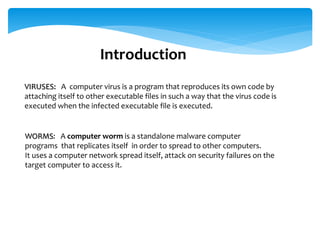
VIRUSES: A computer virus is a program that reproduces its own code by
attaching itself to other executable files in such a way that the virus code is
executed when the infected executable file is executed.
WORMS: A computer worm is a standalone malware computer
programs that replicates itself in order to spread to other computers.
It uses a computer network spread itself, attack on security failures on the
target computer to access it.
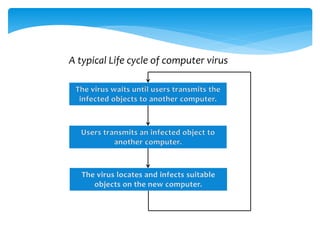
A typical Life cycle of computer virus
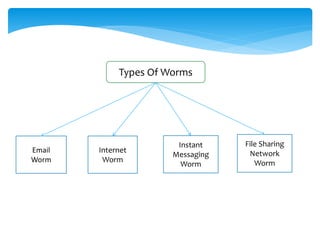
Types Of Worms
Email
Worm
Internet
Worm
Instant
Messaging
Worm
File Sharing
Network
Worm
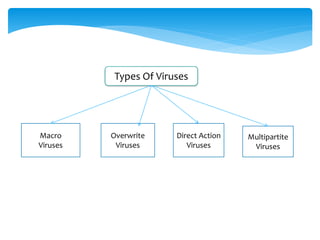
Types Of Viruses
Macro
Viruses
Overwrite
Viruses
Direct Action
Viruses
Multipartite
Viruses
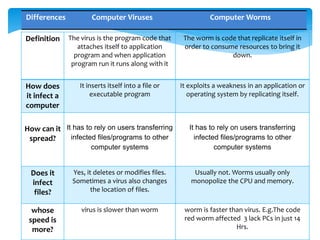
Definition The virus is the program code that
attaches itself to application
program and when application
program run it runs along with it
The worm is code that replicate itself in
order to consume resources to bring it
down.
How does
it infect a
computer
It inserts itself into a file or
executable program
It exploits a weakness in an application or
operating system by replicating itself.
How can it
spread?
It has to rely on users transferring
infected files/programs to other
computer systems
It has to rely on users transferring
infected files/programs to other
computer systems
Does it
infect
files?
Yes, it deletes or modifies files.
Sometimes a virus also changes
the location of files.
Usually not. Worms usually only
monopolize the CPU and memory.
whose
speed is
more?
virus is slower than worm worm is faster than virus. E.g.The code
red worm affected 3 lack PCs in just 14
Hrs.
Differences Computer Viruses Computer Worms
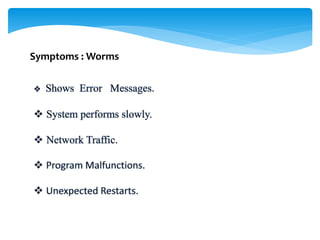
Symptoms : Worms
Symptoms : Viruses
 Regularly update the program.
 Open E-mail attachment files only if you are expecting the attachment
files, or the sender is known and has confirmed sending the files.
 Try to avoid downloading and installing the illegal software from the
Internet.
 Install only registered copies of software the system.
 Install an Antivirus Software.
• There are types of antivirus software for
different computers.
1. Some are designed for persnal computers.
2.Some are for servers and other for enterprises
• There are mainly two types of antivirus
software:
Specific & Generic.
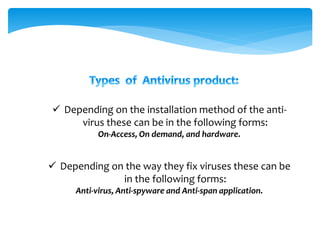
 Depending on the installation method of the anti-
virus these can be in the following forms:
On-Access, On demand, and hardware.
 Depending on the way they fix viruses these can be
in the following forms:
Anti-virus, Anti-spyware and Anti-span application.
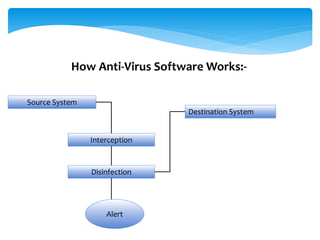
Source System
Interception
Disinfection
Destination System
Alert
How Anti-Virus Software Works:-
Some Anti-virus Software
1.Norton Anti-virus:
Norton Antivirus Is a product of symantec cooperation
founded in 1982.
Norton checks following program:
I. Boot records.
II. Programs( all the time you used them)
III. All local Hard Disk.
IV. Files download from internet.
V. Usb (when in use)
MacAfee is an antivirus software and computer security
company head quartered in santa Clara, California.
It markets MacAfee virus scan and related security products
and services, including the intercept and found stone
brands.
2.MaCFee Virus Scan
3.Kaspersky Anti-virus
• Kaspersky is product of kaspersky lab.
• A Russian computer security company.
• Co-founded by Natalya Kaspersky antivirus, do
the following thing.
• Invite virus scan by opening the Kaspersky
Antivirus window.
Conclusion.
 If virus And Worms Attack on our Computer it
disturb our System, corrupts data, Some time
deletes data and make harm to our computer.
 Hence, we need to keep safe our computer or any
device by using various antivirus software's.
 Do smart surfing on the Internet
 For better and Safe computation Anti-Virus software
should be installed and be helpful for global
network system.
Computer worms viruses and Prevention

Computer worms viruses and Prevention

  • 1.
    Seminar On Computer Worms,Viruses & It’s Prevention Submitted to: * Prof.Umesh Gadhave (H.O.D Department of Computer Science) * Prof. Shubhangi Wawre Mam (Department of Computer Science) Submitted By: Pratimesh Pathak B.Sc II year
  • 2.
    I have madethis presentation file on the topic COMPUTER WORMS AND VIRUSES and it’s prevention. I have tried my best to present all the details and difference Between Computer worms and viruses. In the beginning I have tried to give you general information on this topic. I express my sincere gratitude to Prof.Umesh Gadhve sir & Prof.Shubhangi Wawre Mam who assisting me throughout the preparation of this topic. I thank him for providing me the confidence performing act and most importantly the track of the topic whenever I needed it. preface
  • 3.
    Introduction VIRUSES: A computervirus is a program that reproduces its own code by attaching itself to other executable files in such a way that the virus code is executed when the infected executable file is executed. WORMS: A computer worm is a standalone malware computer programs that replicates itself in order to spread to other computers. It uses a computer network spread itself, attack on security failures on the target computer to access it.
  • 4.
    A typical Lifecycle of computer virus
  • 5.
  • 6.
  • 7.
    Definition The virusis the program code that attaches itself to application program and when application program run it runs along with it The worm is code that replicate itself in order to consume resources to bring it down. How does it infect a computer It inserts itself into a file or executable program It exploits a weakness in an application or operating system by replicating itself. How can it spread? It has to rely on users transferring infected files/programs to other computer systems It has to rely on users transferring infected files/programs to other computer systems Does it infect files? Yes, it deletes or modifies files. Sometimes a virus also changes the location of files. Usually not. Worms usually only monopolize the CPU and memory. whose speed is more? virus is slower than worm worm is faster than virus. E.g.The code red worm affected 3 lack PCs in just 14 Hrs. Differences Computer Viruses Computer Worms
  • 8.
  • 9.
  • 11.
     Regularly updatethe program.  Open E-mail attachment files only if you are expecting the attachment files, or the sender is known and has confirmed sending the files.  Try to avoid downloading and installing the illegal software from the Internet.  Install only registered copies of software the system.  Install an Antivirus Software.
  • 12.
    • There aretypes of antivirus software for different computers. 1. Some are designed for persnal computers. 2.Some are for servers and other for enterprises • There are mainly two types of antivirus software: Specific & Generic.
  • 13.
     Depending onthe installation method of the anti- virus these can be in the following forms: On-Access, On demand, and hardware.  Depending on the way they fix viruses these can be in the following forms: Anti-virus, Anti-spyware and Anti-span application.
  • 14.
  • 15.
    Some Anti-virus Software 1.NortonAnti-virus: Norton Antivirus Is a product of symantec cooperation founded in 1982. Norton checks following program: I. Boot records. II. Programs( all the time you used them) III. All local Hard Disk. IV. Files download from internet. V. Usb (when in use)
  • 16.
    MacAfee is anantivirus software and computer security company head quartered in santa Clara, California. It markets MacAfee virus scan and related security products and services, including the intercept and found stone brands. 2.MaCFee Virus Scan
  • 17.
    3.Kaspersky Anti-virus • Kasperskyis product of kaspersky lab. • A Russian computer security company. • Co-founded by Natalya Kaspersky antivirus, do the following thing. • Invite virus scan by opening the Kaspersky Antivirus window.
  • 18.
    Conclusion.  If virusAnd Worms Attack on our Computer it disturb our System, corrupts data, Some time deletes data and make harm to our computer.  Hence, we need to keep safe our computer or any device by using various antivirus software's.  Do smart surfing on the Internet  For better and Safe computation Anti-Virus software should be installed and be helpful for global network system.