Creating and maintaining
a usable intranet
Fiona Caldwell, Tatts Group
Tatts Group


•   Provider of gaming, wagering and lottery leisure and
    entertainment products and services.
•   Brands include TattsLotto, Golden Casket, NSW Lotteries,
    TattsBet (previously Unitab), Tatts Pokies, Maxgaming,
    Bytecraft, and Centre Racing in Australia, and Talarius in the
    UK.
•   Originated in 1881 when founder George Adams organized a
    public sweep on the Sydney Cup horse race, and in 1897 it
    began operating the first government-endorsed lottery.
•   2,500 employees across Australia and UK
About Me

•   Group Manager, Business Systems at Tatts Group.
•   Wide portfolio – Projects and support for:
     •   Corporate Systems (Intranet, Phone Book, Collaboration Tools)
     •   Shared Services Systems (eg Finance and HR systems, CRM
         systems, Marketing systems, Service Management and Call
         Centre systems)
     •   Middleware
     •   Business Process Automation
     •   Data Warehouse and Business Intelligence
     •   Database Administration.
•   Specialties: Applications Management, Intranets, Business
    Intelligence and Information Management
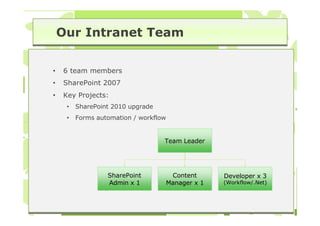
Our Intranet Team


•   6 team members
•   SharePoint 2007
•   Key Projects:
     •   SharePoint 2010 upgrade
     •   Forms automation / workflow


                                   Team Leader


                  SharePoint        Content      Developer x 3
                  Admin x 1        Manager x 1   (Workflow/.Net)
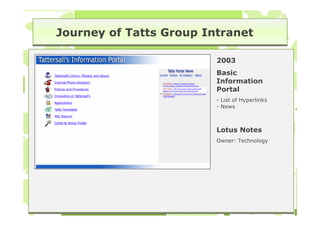
Journey of Tatts Group Intranet

                         2003
                         Basic
                         Information
                         Portal
                         - List of Hyperlinks
                         - News


                         Lotus Notes
                         Owner: Technology
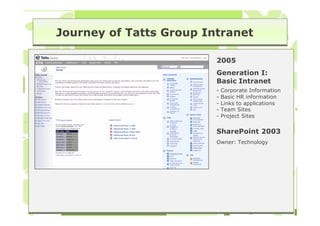
Journey of Tatts Group Intranet

                         2005
                         Generation I:
                         Basic Intranet
                         -   Corporate Information
                         -   Basic HR information
                         -   Links to applications
                         -   Team Sites
                         -   Project Sites

                         SharePoint 2003
                         Owner: Technology
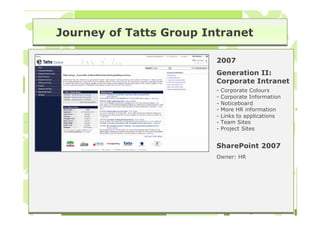
Journey of Tatts Group Intranet

                         2007
                         Generation II:
                         Corporate Intranet
                         -   Corporate Colours
                         -   Corporate Information
                         -   Noticeboard
                         -   More HR information
                         -   Links to applications
                         -   Team Sites
                         -   Project Sites


                         SharePoint 2007
                         Owner: HR
Journey of Tatts Group Intranet

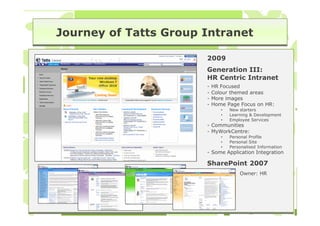
                       2009
                       Generation III:
                       HR Centric Intranet
                       -   HR Focused
                       -   Colour themed areas
                       -   More images
                       -   Home Page Focus on HR:
                              •   New starters
                              •   Learning & Development
                              •   Employee Services
                       - Communities
                       - MyWorkCentre:
                              •   Personal Profile
                              •   Personal Site
                              •   Personalised Information
                       - Some Application Integration

                       SharePoint 2007
                                      Owner: HR
Journey of Tatts Group Intranet

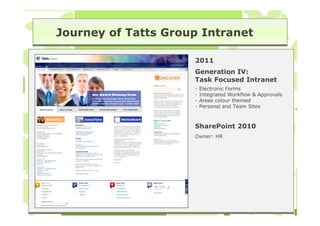
                     2011
                     Generation IV:
                     Task Focused Intranet
                     -   Electronic Forms
                     -   Integrated Workflow & Approvals
                     -   Areas colour themed
                     -   Personal and Team Sites


                     SharePoint 2010
                     Owner: HR
Useful & Usable

•       More than marketing and promotion:


    •    Professional appearance                •   Content up to date
    •    Consistent design & layout             •   Information you cant get
         across different areas                     anywhere else
          •   Standard page templates           •   Level of content detail
          •   Consistent font, navigation,          consistent between sections
              graphic design, page structure.
                                                •   Content owners actively
    •    Easily distinguishable from                managing content & don’t
         public facing website                      require HMTL knowledge
    •    Ease of finding information
                                                •   No bottlenecks in publishing
    •    Effectiveness of search engine             process
    •    Ease of use of processes               •   Accessibility
    •    Cross links between different          •   Interactive features
         sections of the site
Finding out user needs

1. Stakeholder Interviews (one-on-one)
   •   Discuss what their job involves and how they currently use
       (or don’t use) the intranet – ask them to show you.
   •   You may learn about:
        • Work-arounds for tasks
        • Different paths staff follow to information (navigation, search)
        • Parts of the screen or information that staff miss
        • Areas of the intranet that staff don’t understand
        • Sections of the intranet that staff don’t know exist

   •   Discuss future intranet requirements to support work
       needs.
Finding out user needs

2. Walk through key tasks
   •   Prepare an extensive set of scenarios – what tasks do staff
       attempt on the intranet?
        • User Stories: As a <role> I Want <some Business
          Functionality> So That <Some Business Value or Justification>.
          The acceptance criteria describes the criteria by which
          stakeholders will determine whether the product meets their
          needs – in this case tasks that need to be completed.
        • Eg. As an employee I want to book travel so that I can travel
          to Brisbane next week. Acceptance Criteria:
             •   I need to know what forms need to be filled out request travel
             •   I need to seek approval
             •   I need to book travel and accommodation

             •   I need to find out where our Brisbane office is located
             •   I need to know about cab charges, what else I can claim back as expenses and
                 how to claim expenses. Etc…
Finding out user needs

•   Walk through key tasks (contd):
    •   Identify all activities that make up the task
         • What needs to be done to complete a task?
         • What actions are inside the intranet or outside the intranet?

    •   Walk through the scenario (yourself or with the team).
         • Pay attention to the decisions you make and the reasons for
           your decisions. For example, do you choose a particular
           navigation because you already know where the information is?
           Do you use search? How else could the same task be done?

    •   Look for content that may need to be reorganised or
        grouped with other content.
Finding out user needs

3. Review logs and feedback
   •   Look for patterns in logs and feedback:
        • Frequently accessed pages: What pages are accessed most
          frequently?
        • Search logs: What terms are users typing into the intranet?
        • Page Feedback Links: What feedback is being received?
        • Help Desk Requests: What are the common questions and
          requests?

   •   Use patterns found to:
        • Create scenarios (user stories) for task walk throughs
        • Add quick links to home page for frequent actions
        • Remove content that is not needed
        • Create content that doesn’t exist
Finding out user needs

4. Observing staff using the intranet (usability test)
   •   Create realistic scenarios to evaluate core tasks
   •   Recruit participants that are representative of the user
       group
   •   Observe the participants attempting the scenarios
   •   Note what happens
   •   Look for repeated behaviours – if a problem occurs multiple
       times then its worth investigating
   •   Key difference between this and stakeholder interviews is
       that all participants working through the same scenarios.
Maintaining Content

•   To keep Intranet content up to date, consider:
     •   Authoring and Publishing Models
     •   Easy to use Content Management System
     •   Training & Support
     •   Regular communications
     •   Content Reviews
     •   Action user feedback
Maintaining Content

1. Authoring and Publishing Models
   •   Consider authoring and publishing models used:
        • Fully centralised
        • Decentralised
        • Publishing with review
        • Federated publishing
        • End-user content contribution

   •   No one model is right – mix and match different models
Maintaining Content


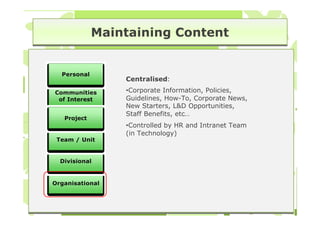
  Personal
                 Centralised:

Communities      •Corporate Information, Policies,
 of Interest     Guidelines, How-To, Corporate News,
                 New Starters, L&D Opportunities,
                 Staff Benefits, etc…
   Project
                 •Controlled by HR and Intranet Team
                 (in Technology)
 Team / Unit


  Divisional


Organisational
Maintaining Content


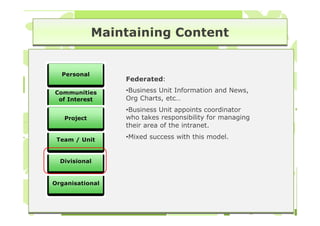
  Personal
                 Federated:

Communities      •Business Unit Information and News,
 of Interest     Org Charts, etc…
                 •Business Unit appoints coordinator
   Project       who takes responsibility for managing
                 their area of the intranet.

 Team / Unit     •Mixed success with this model.


  Divisional


Organisational
Maintaining Content


  Personal
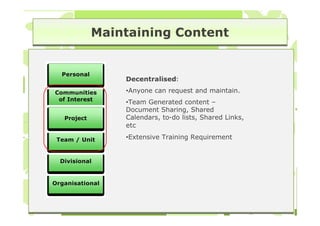
                 Decentralised:

Communities      •Anyone can request and maintain.
 of Interest
                 •Team Generated content –
                 Document Sharing, Shared
   Project       Calendars, to-do lists, Shared Links,
                 etc

 Team / Unit     •Extensive Training Requirement


  Divisional


Organisational
Maintaining Content


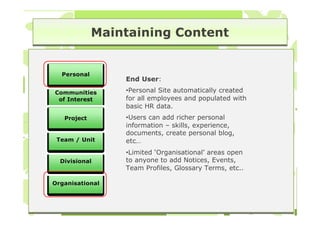
  Personal
                 End User:

Communities      •Personal Site automatically created
 of Interest     for all employees and populated with
                 basic HR data.
   Project       •Users can add richer personal
                 information – skills, experience,
                 documents, create personal blog,
 Team / Unit     etc…
                 •Limited ‘Organisational’ areas open
  Divisional     to anyone to add Notices, Events,
                 Team Profiles, Glossary Terms, etc..

Organisational
Maintaining Content

2. Content Management System
   •   Content Management System should be easy to use
   •   Provide a style guide – but don’t expect people to read it
   •   Use templates and style sheets for consistent formatting
   •   Provide spell checking functionality
   •   Use workflow to manage content approvals (if needed)
   •   Add review and expiry dates to content
Maintaining Content

3. Training, Support and Guidelines
   •   Offer continual training, support and guidelines
        • All employees are potentially content authors
   •   Different levels of training is required for different needs
        • Employee Induction:
             •   Induction eLearning provides introduction to Intranet
             •   Quick Tours highlight where all employees can contribute
        • Online Help                    3
                                         3
             •   Overviews, Quick Tours, Quick Ref Guides, Governance, where to
                 store information, how to write for the web, FAQs
        • Formal Training
             •   Content Contributors: Roles & responsibilities, CMS basic features
                 (eg. SharePoint document libraries and lists, revision control, etc)
             •   Site Owners: Roles and responsibilities, CMS advanced features
                 (eg. Creating SharePoint sites, managing permissions, etc)
Maintaining Content

4. Communicate, Communicate, Communicate:
   •   Community of Power Users
   •   Regular Emails / Newsletters
        • Monthly Newsletters, Tips and Tricks

5. Regular Content Reviews
   •   Target highest value content – don’t try and fix everything!
   •   Remove redundant, out dated, or trivial content
6. Intranet Feedback
   •   Provide feedback mechanism on all pages
   •   Address feedback in timely manner (or you will stop getting
       feedback)

Fiona caldwell

  • 1.
    Creating and maintaining ausable intranet Fiona Caldwell, Tatts Group
  • 2.
    Tatts Group • Provider of gaming, wagering and lottery leisure and entertainment products and services. • Brands include TattsLotto, Golden Casket, NSW Lotteries, TattsBet (previously Unitab), Tatts Pokies, Maxgaming, Bytecraft, and Centre Racing in Australia, and Talarius in the UK. • Originated in 1881 when founder George Adams organized a public sweep on the Sydney Cup horse race, and in 1897 it began operating the first government-endorsed lottery. • 2,500 employees across Australia and UK
  • 3.
    About Me • Group Manager, Business Systems at Tatts Group. • Wide portfolio – Projects and support for: • Corporate Systems (Intranet, Phone Book, Collaboration Tools) • Shared Services Systems (eg Finance and HR systems, CRM systems, Marketing systems, Service Management and Call Centre systems) • Middleware • Business Process Automation • Data Warehouse and Business Intelligence • Database Administration. • Specialties: Applications Management, Intranets, Business Intelligence and Information Management
  • 4.
    Our Intranet Team • 6 team members • SharePoint 2007 • Key Projects: • SharePoint 2010 upgrade • Forms automation / workflow Team Leader SharePoint Content Developer x 3 Admin x 1 Manager x 1 (Workflow/.Net)
  • 5.
    Journey of TattsGroup Intranet 2003 Basic Information Portal - List of Hyperlinks - News Lotus Notes Owner: Technology
  • 6.
    Journey of TattsGroup Intranet 2005 Generation I: Basic Intranet - Corporate Information - Basic HR information - Links to applications - Team Sites - Project Sites SharePoint 2003 Owner: Technology
  • 7.
    Journey of TattsGroup Intranet 2007 Generation II: Corporate Intranet - Corporate Colours - Corporate Information - Noticeboard - More HR information - Links to applications - Team Sites - Project Sites SharePoint 2007 Owner: HR
  • 8.
    Journey of TattsGroup Intranet 2009 Generation III: HR Centric Intranet - HR Focused - Colour themed areas - More images - Home Page Focus on HR: • New starters • Learning & Development • Employee Services - Communities - MyWorkCentre: • Personal Profile • Personal Site • Personalised Information - Some Application Integration SharePoint 2007 Owner: HR
  • 9.
    Journey of TattsGroup Intranet 2011 Generation IV: Task Focused Intranet - Electronic Forms - Integrated Workflow & Approvals - Areas colour themed - Personal and Team Sites SharePoint 2010 Owner: HR
  • 10.
    Useful & Usable • More than marketing and promotion: • Professional appearance • Content up to date • Consistent design & layout • Information you cant get across different areas anywhere else • Standard page templates • Level of content detail • Consistent font, navigation, consistent between sections graphic design, page structure. • Content owners actively • Easily distinguishable from managing content & don’t public facing website require HMTL knowledge • Ease of finding information • No bottlenecks in publishing • Effectiveness of search engine process • Ease of use of processes • Accessibility • Cross links between different • Interactive features sections of the site
  • 11.
    Finding out userneeds 1. Stakeholder Interviews (one-on-one) • Discuss what their job involves and how they currently use (or don’t use) the intranet – ask them to show you. • You may learn about: • Work-arounds for tasks • Different paths staff follow to information (navigation, search) • Parts of the screen or information that staff miss • Areas of the intranet that staff don’t understand • Sections of the intranet that staff don’t know exist • Discuss future intranet requirements to support work needs.
  • 12.
    Finding out userneeds 2. Walk through key tasks • Prepare an extensive set of scenarios – what tasks do staff attempt on the intranet? • User Stories: As a <role> I Want <some Business Functionality> So That <Some Business Value or Justification>. The acceptance criteria describes the criteria by which stakeholders will determine whether the product meets their needs – in this case tasks that need to be completed. • Eg. As an employee I want to book travel so that I can travel to Brisbane next week. Acceptance Criteria: • I need to know what forms need to be filled out request travel • I need to seek approval • I need to book travel and accommodation • I need to find out where our Brisbane office is located • I need to know about cab charges, what else I can claim back as expenses and how to claim expenses. Etc…
  • 13.
    Finding out userneeds • Walk through key tasks (contd): • Identify all activities that make up the task • What needs to be done to complete a task? • What actions are inside the intranet or outside the intranet? • Walk through the scenario (yourself or with the team). • Pay attention to the decisions you make and the reasons for your decisions. For example, do you choose a particular navigation because you already know where the information is? Do you use search? How else could the same task be done? • Look for content that may need to be reorganised or grouped with other content.
  • 14.
    Finding out userneeds 3. Review logs and feedback • Look for patterns in logs and feedback: • Frequently accessed pages: What pages are accessed most frequently? • Search logs: What terms are users typing into the intranet? • Page Feedback Links: What feedback is being received? • Help Desk Requests: What are the common questions and requests? • Use patterns found to: • Create scenarios (user stories) for task walk throughs • Add quick links to home page for frequent actions • Remove content that is not needed • Create content that doesn’t exist
  • 15.
    Finding out userneeds 4. Observing staff using the intranet (usability test) • Create realistic scenarios to evaluate core tasks • Recruit participants that are representative of the user group • Observe the participants attempting the scenarios • Note what happens • Look for repeated behaviours – if a problem occurs multiple times then its worth investigating • Key difference between this and stakeholder interviews is that all participants working through the same scenarios.
  • 16.
    Maintaining Content • To keep Intranet content up to date, consider: • Authoring and Publishing Models • Easy to use Content Management System • Training & Support • Regular communications • Content Reviews • Action user feedback
  • 17.
    Maintaining Content 1. Authoringand Publishing Models • Consider authoring and publishing models used: • Fully centralised • Decentralised • Publishing with review • Federated publishing • End-user content contribution • No one model is right – mix and match different models
  • 18.
    Maintaining Content Personal Centralised: Communities •Corporate Information, Policies, of Interest Guidelines, How-To, Corporate News, New Starters, L&D Opportunities, Staff Benefits, etc… Project •Controlled by HR and Intranet Team (in Technology) Team / Unit Divisional Organisational
  • 19.
    Maintaining Content Personal Federated: Communities •Business Unit Information and News, of Interest Org Charts, etc… •Business Unit appoints coordinator Project who takes responsibility for managing their area of the intranet. Team / Unit •Mixed success with this model. Divisional Organisational
  • 20.
    Maintaining Content Personal Decentralised: Communities •Anyone can request and maintain. of Interest •Team Generated content – Document Sharing, Shared Project Calendars, to-do lists, Shared Links, etc Team / Unit •Extensive Training Requirement Divisional Organisational
  • 21.
    Maintaining Content Personal End User: Communities •Personal Site automatically created of Interest for all employees and populated with basic HR data. Project •Users can add richer personal information – skills, experience, documents, create personal blog, Team / Unit etc… •Limited ‘Organisational’ areas open Divisional to anyone to add Notices, Events, Team Profiles, Glossary Terms, etc.. Organisational
  • 22.
    Maintaining Content 2. ContentManagement System • Content Management System should be easy to use • Provide a style guide – but don’t expect people to read it • Use templates and style sheets for consistent formatting • Provide spell checking functionality • Use workflow to manage content approvals (if needed) • Add review and expiry dates to content
  • 23.
    Maintaining Content 3. Training,Support and Guidelines • Offer continual training, support and guidelines • All employees are potentially content authors • Different levels of training is required for different needs • Employee Induction: • Induction eLearning provides introduction to Intranet • Quick Tours highlight where all employees can contribute • Online Help 3 3 • Overviews, Quick Tours, Quick Ref Guides, Governance, where to store information, how to write for the web, FAQs • Formal Training • Content Contributors: Roles & responsibilities, CMS basic features (eg. SharePoint document libraries and lists, revision control, etc) • Site Owners: Roles and responsibilities, CMS advanced features (eg. Creating SharePoint sites, managing permissions, etc)
  • 24.
    Maintaining Content 4. Communicate,Communicate, Communicate: • Community of Power Users • Regular Emails / Newsletters • Monthly Newsletters, Tips and Tricks 5. Regular Content Reviews • Target highest value content – don’t try and fix everything! • Remove redundant, out dated, or trivial content 6. Intranet Feedback • Provide feedback mechanism on all pages • Address feedback in timely manner (or you will stop getting feedback)