Internship Overview
Presented By Sai & Maryam
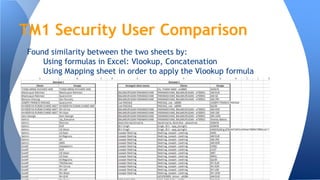
Found similarity between the two sheets by:
Using formulas in Excel: Vlookup, Concatenation
Using Mapping sheet in order to apply the Vlookup formula
TM1 Security User Comparison
● Excel reports by connecting to SQL Server for Tables
● Used Pivot Tables and Slicers
● Created Static Tables mapping to the Pivot Tables using formulas
● Created Pivot Charts linked to the Static Tables
● Generated reports in excel by using images/excel files and connecting to
the database server
Reports
Wrote queries in SQL for BOM/BOR scenarios
Refined the queries according to the changes
Learnt about query optimization
APS Project
Migrated content of SharePoint site to Google site
Used gadgets such as Iframes and Awesome Table in order to enhance the
functionality of the site
Used html coding to enhance the Design of the site
Converted the .eml and .msg files to pdf and uploaded them
Obtained access to the Sharepoint distribution lists for the PLC site for
Google site’s sharing and permissions
Google Sites
Compared Google Drive and Google Cloud Storage
https://docs.google.com/spreadsheets/d/1DamqTCSIOhhIXfJG4xuCDEzaS4Md
QmkXkjcdHLY72G4/edit#gid=0
Google Cloud Storage
Gained better insight regarding company’s processes and BI Tools by
attending workshops/reading assigned articles
Connecting to SQL Server to generate Excel Reports
Vlookup and concat formulas in Excel
CASES in SQL
Query optimization techniques
Google Gadgets and html
What We Learnt
Thank You!!!!!!

Final Presentation

  • 1.
  • 2.
    Found similarity betweenthe two sheets by: Using formulas in Excel: Vlookup, Concatenation Using Mapping sheet in order to apply the Vlookup formula TM1 Security User Comparison
  • 3.
    ● Excel reportsby connecting to SQL Server for Tables ● Used Pivot Tables and Slicers ● Created Static Tables mapping to the Pivot Tables using formulas ● Created Pivot Charts linked to the Static Tables ● Generated reports in excel by using images/excel files and connecting to the database server Reports
  • 5.
    Wrote queries inSQL for BOM/BOR scenarios Refined the queries according to the changes Learnt about query optimization APS Project
  • 6.
    Migrated content ofSharePoint site to Google site Used gadgets such as Iframes and Awesome Table in order to enhance the functionality of the site Used html coding to enhance the Design of the site Converted the .eml and .msg files to pdf and uploaded them Obtained access to the Sharepoint distribution lists for the PLC site for Google site’s sharing and permissions Google Sites
  • 8.
    Compared Google Driveand Google Cloud Storage https://docs.google.com/spreadsheets/d/1DamqTCSIOhhIXfJG4xuCDEzaS4Md QmkXkjcdHLY72G4/edit#gid=0 Google Cloud Storage
  • 9.
    Gained better insightregarding company’s processes and BI Tools by attending workshops/reading assigned articles Connecting to SQL Server to generate Excel Reports Vlookup and concat formulas in Excel CASES in SQL Query optimization techniques Google Gadgets and html What We Learnt
  • 10.