
FILE SYSTEM IMPLEMENTATION
&
LINUX SECURITY
(Operating System)
Geo S. Mariyan
Master of Computer Science
University of Mumbai
File System Layout
 File systems usually are stored on disks.
 To review this material briefly, most disks can be divided up
into partitions, with independent file systems on each
partition.
 Sector 0 of the disk is called the MBR (Master Boot Record)
and is used to boot the computer. The end of the MBR
contains the partition table.
 This table gives the starting and ending addresses of each
partition. One of the partitions in the table may be marked as
active.
•The first thing the MBR program does is locate the active partition,
read in its first block, called the boot block, and execute it.
• The program in the boot block loads the operating system
contained in that partition.
• For uniformity, every partition starts with a boot block, even if it
does not contain a bootable operating system.
• Besides, it might contain one in the some time in the future, so
reserving a boot block is a good idea anyway.
•When the computer is booted, the BIOS reads in and executes the
code in the MBR.
On PC-compatible systems there can be no more than four primary
partitions because there is only room for a four-element array of partition
descriptors between the master boot record and the end of the first 512-byte
sector.
This makes it possible to have any number of additional partitions. The
BIOS cannot start an operating system from a logical partition, so initial startup
from a primary partition is required to load code that can manage logical
partitions.
Implementing File System Operation
 Create a file:
 Find space in the file system, add directory entry.
 Open a file:
 System call specifying name of file.
 System searches directory structure to find file.
 System keeps current file position pointer to the location
where next write/read occurs
 System call returns file descriptor (a handle) to user process.
 Reading a file:
 System call specifying file descriptor and number of bytes to
read (and possibly where in memory to stick contents).
 Writing in a file:
 System call specifying file descriptor and information to be written
 Writes information at location pointed by the files current pointer
 Repositioning within a file:
 System call specifying file descriptor and new location of current
pointer
 (also called a file seek even though does not interact with disk)
 Closing a file:
 System call specifying file descriptor
 Call removes current file position pointer and file descriptor
associated with process and file
 Deleting a file:
 Search directory structure for named file, release associated file
space and erase directory entry
Allocation Methods
 An allocation method refers to how disk
blocks are allocated for files:
 Contiguous allocation
 Linked allocation
 Indexed allocation
Contiguous Allocation
 Each file occupies a set of contiguous blocks on the disk
 Simple – only starting location (block #) and length
(number of blocks) are required
 Random access
 Wasteful of space (dynamic storage-allocation problem)
 Files cannot grow
 Each file occupies a set of contiguous blocks
on the disk
 Simple – only starting location (block #) and
length (number of blocks) are required
 Random access
 Wasteful of space (dynamic storage-allocation
problem)
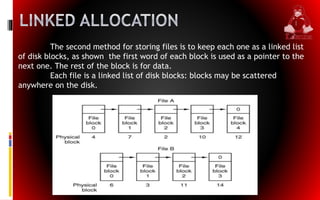
The second method for storing files is to keep each one as a linked list
of disk blocks, as shown the first word of each block is used as a pointer to the
next one. The rest of the block is for data.
Each file is a linked list of disk blocks: blocks may be scattered
anywhere on the disk.
•Unlike contiguous allocation, every disk block can be used in this
method.
•No space is lost to disk fragmentation (except for internal
fragmentation in the last block of each file).
• Also, it is sufficient for the directory entry to merely store the disk
address of the first block.
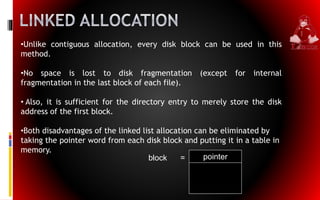
•Both disadvantages of the linked list allocation can be eliminated by
taking the pointer word from each disk block and putting it in a table in
memory.
pointerblock =
Threats:
 From a security perspective, computer systems have three general
goals, with corresponding threats to them, as listed in.
 The first one, data confidentiality, is concerned with having secret
data remain secret.
 More specifically, if the owner of some data has decided that these
data are only to be made available to certain people and no others,
the system should guarantee that release of the data to unauthorized
people does not occur.
 As a bare minimum, the owner should be able to specify who can see
what, and the system should enforce these specifications.
Intruders
 Casual prying by nontechnical users. Many people have personal
computers on their desks that are connected to a shared file server,
and human nature.
 Snooping by insiders. Students, system programmers, operators, and
other technical personnel often consider it to be a personal
challenge to break the security of the local computer system.
 Determined attempts to make money. Some bank programmers have
attempted to steal from the bank they were working for. Schemes
have varied from changing the software to truncate rather than
round interest, keeping the fraction of a cent for themselves, or to
blackmail.
Malicious Programs
 Another category of security pest is malicious programs, sometimes
called malware. In a sense, a writer of malware is also an intruder, often
with high technical skills.
 Another category of malware is the Trojan horse. This is a program that
apparently performs a valid function perhaps it is a game or a
supposedly "improved" version of a useful utility.
 Another kind of malware is the logic bomb. This device is a piece of
code written by one of an company's (currently employed) programmers
and secretly inserted into the production operating system.
Generic Security Attacks
 1. Request memory pages, disk space, or tapes and just read them.
Many systems do not erase them before allocating them, and they may
be full of interesting information written by the previous owner.
 2. Try illegal system calls, or legal system calls with illegal
parameters, or even legal system calls with legal but unreasonable
parameters. Many systems can easily be confused.
 3. Start logging in and then hit DEL, RUBOUT or BREAK halfway
through the login sequence.
 In some systems, the password checking program will be killed and the
login considered successful.
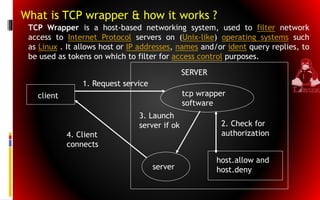
client
SERVER
tcp wrapper
software
host.allow and
host.deny
2. Check for
authorization
1. Request service
server
3. Launch
server if ok
4. Client
connects
What is TCP wrapper & how it works ?
TCP Wrapper is a host-based networking system, used to filter network
access to Internet Protocol servers on (Unix-like) operating systems such
as Linux . It allows host or IP addresses, names and/or ident query replies, to
be used as tokens on which to filter for access control purposes.
Conclusion
 Linux is not secure in default configuration
 Security can be added to a very high level, but must be
balanced with functionality
 The correct Linux distribution must be chosen, and
minimum installation done
 Patches must be diligently applied
 Syslog logs must be exported and analyzed periodically
 Network Services must be kept to a minimum
 User and groups must be periodically audited
 File/folder access control lists must be set
 File Integrity software may be used in high-security
installations
File System Implementation & Linux Security

File System Implementation & Linux Security

  • 1.
    FILE SYSTEM IMPLEMENTATION & LINUXSECURITY (Operating System) Geo S. Mariyan Master of Computer Science University of Mumbai
  • 2.
    File System Layout File systems usually are stored on disks.  To review this material briefly, most disks can be divided up into partitions, with independent file systems on each partition.  Sector 0 of the disk is called the MBR (Master Boot Record) and is used to boot the computer. The end of the MBR contains the partition table.  This table gives the starting and ending addresses of each partition. One of the partitions in the table may be marked as active.
  • 3.
    •The first thingthe MBR program does is locate the active partition, read in its first block, called the boot block, and execute it. • The program in the boot block loads the operating system contained in that partition. • For uniformity, every partition starts with a boot block, even if it does not contain a bootable operating system. • Besides, it might contain one in the some time in the future, so reserving a boot block is a good idea anyway. •When the computer is booted, the BIOS reads in and executes the code in the MBR.
  • 4.
    On PC-compatible systemsthere can be no more than four primary partitions because there is only room for a four-element array of partition descriptors between the master boot record and the end of the first 512-byte sector. This makes it possible to have any number of additional partitions. The BIOS cannot start an operating system from a logical partition, so initial startup from a primary partition is required to load code that can manage logical partitions.
  • 5.
    Implementing File SystemOperation  Create a file:  Find space in the file system, add directory entry.  Open a file:  System call specifying name of file.  System searches directory structure to find file.  System keeps current file position pointer to the location where next write/read occurs  System call returns file descriptor (a handle) to user process.  Reading a file:  System call specifying file descriptor and number of bytes to read (and possibly where in memory to stick contents).
  • 6.
     Writing ina file:  System call specifying file descriptor and information to be written  Writes information at location pointed by the files current pointer  Repositioning within a file:  System call specifying file descriptor and new location of current pointer  (also called a file seek even though does not interact with disk)  Closing a file:  System call specifying file descriptor  Call removes current file position pointer and file descriptor associated with process and file  Deleting a file:  Search directory structure for named file, release associated file space and erase directory entry
  • 7.
    Allocation Methods  Anallocation method refers to how disk blocks are allocated for files:  Contiguous allocation  Linked allocation  Indexed allocation
  • 8.
    Contiguous Allocation  Eachfile occupies a set of contiguous blocks on the disk  Simple – only starting location (block #) and length (number of blocks) are required  Random access  Wasteful of space (dynamic storage-allocation problem)  Files cannot grow
  • 9.
     Each fileoccupies a set of contiguous blocks on the disk  Simple – only starting location (block #) and length (number of blocks) are required  Random access  Wasteful of space (dynamic storage-allocation problem)
  • 10.
    The second methodfor storing files is to keep each one as a linked list of disk blocks, as shown the first word of each block is used as a pointer to the next one. The rest of the block is for data. Each file is a linked list of disk blocks: blocks may be scattered anywhere on the disk.
  • 11.
    •Unlike contiguous allocation,every disk block can be used in this method. •No space is lost to disk fragmentation (except for internal fragmentation in the last block of each file). • Also, it is sufficient for the directory entry to merely store the disk address of the first block. •Both disadvantages of the linked list allocation can be eliminated by taking the pointer word from each disk block and putting it in a table in memory. pointerblock =
  • 12.
    Threats:  From asecurity perspective, computer systems have three general goals, with corresponding threats to them, as listed in.  The first one, data confidentiality, is concerned with having secret data remain secret.  More specifically, if the owner of some data has decided that these data are only to be made available to certain people and no others, the system should guarantee that release of the data to unauthorized people does not occur.  As a bare minimum, the owner should be able to specify who can see what, and the system should enforce these specifications.
  • 13.
    Intruders  Casual pryingby nontechnical users. Many people have personal computers on their desks that are connected to a shared file server, and human nature.  Snooping by insiders. Students, system programmers, operators, and other technical personnel often consider it to be a personal challenge to break the security of the local computer system.  Determined attempts to make money. Some bank programmers have attempted to steal from the bank they were working for. Schemes have varied from changing the software to truncate rather than round interest, keeping the fraction of a cent for themselves, or to blackmail.
  • 14.
    Malicious Programs  Anothercategory of security pest is malicious programs, sometimes called malware. In a sense, a writer of malware is also an intruder, often with high technical skills.  Another category of malware is the Trojan horse. This is a program that apparently performs a valid function perhaps it is a game or a supposedly "improved" version of a useful utility.  Another kind of malware is the logic bomb. This device is a piece of code written by one of an company's (currently employed) programmers and secretly inserted into the production operating system.
  • 15.
    Generic Security Attacks 1. Request memory pages, disk space, or tapes and just read them. Many systems do not erase them before allocating them, and they may be full of interesting information written by the previous owner.  2. Try illegal system calls, or legal system calls with illegal parameters, or even legal system calls with legal but unreasonable parameters. Many systems can easily be confused.  3. Start logging in and then hit DEL, RUBOUT or BREAK halfway through the login sequence.  In some systems, the password checking program will be killed and the login considered successful.
  • 16.
    client SERVER tcp wrapper software host.allow and host.deny 2.Check for authorization 1. Request service server 3. Launch server if ok 4. Client connects What is TCP wrapper & how it works ? TCP Wrapper is a host-based networking system, used to filter network access to Internet Protocol servers on (Unix-like) operating systems such as Linux . It allows host or IP addresses, names and/or ident query replies, to be used as tokens on which to filter for access control purposes.
  • 17.
    Conclusion  Linux isnot secure in default configuration  Security can be added to a very high level, but must be balanced with functionality  The correct Linux distribution must be chosen, and minimum installation done  Patches must be diligently applied  Syslog logs must be exported and analyzed periodically  Network Services must be kept to a minimum  User and groups must be periodically audited  File/folder access control lists must be set  File Integrity software may be used in high-security installations