BIM in the Lean Operating SystemSouth ColeJan Reinhardt1LinbeckADEPT Project Deliveryscole@linbeck.comjan.reinhardt@adeptpd.com
OutlineMotivationLean PrinciplesImplementation of BIM in a 		Lean Operating SystemConclusion2
Motivation – contextAdoption of BIMExperimentation with processes around BIMChallenges in BIMSize of modelsManagement of the BIM processAccuracy of informationLevel of completeness of informationCurrent information3
Motivation – How will the team use BIM tools?Team performance in BIM implementationScenario 1:BIM is used merely as a substitution for a drawingThe traditional process is being followedScenario 2:BIM tools are used in a creative way to improve the current process in support of LeanCan Lean be a guide for “designing processes”?4
Motivation – OpportunityReference: The Toyota Way (J. K. Liker)BIM facilitates “definition” (vs. vagueness) in the construction processPrinciples from lean manufacturing become more and more applicable to the construction process5
Motivation – ConnectionResponse to the Question:			“How is this all connected”6			BIMVision		IPD	Lean  	        Architect	A3	      Engineer	Value					               Owner	        	Flow	       Last Planner					Builder	Process               Level of Detail End Goal			Scope
What is Lean?A Means of Operation:7Lean Operating System The Lean Operating System (LOS) is founded on a philosophy and set of principles that add value by creating reliability and producing consistent results in the day-to-day running of organizations and in the delivery of construction projects. Elimination of wasteful processes and operations results.
What is Lean?What is Waste?Any Process or Action that does not add Value8What is Value?
What the customer needs at the end of the ProcessExternalInternal
What is Lean?9WASTEDefects in products:Rework, Field orders & Punch Lists
Overproduction:Fabricating material or ordering it too soon, JIC thinking
Inventory:Material stored at site or yard, work in process, unused tools & parts, forms and stashes
Unnecessary processing: unnecessary reporting, any non-value added steps
Unnecessary movement of people:Treasure hunts, looking for files, poor layout of work area (ergonomics)
Transport of goods: moving material; unnecessary hand-off work
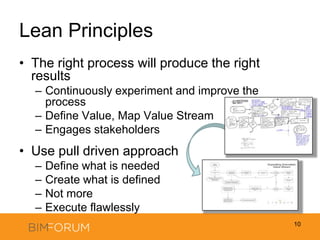
Waiting:waiting for equipment, plans, info, orders, or materialThe right process will produce the right resultsContinuously experiment and improve the processDefine Value, Map Value StreamEngages stakeholdersUse pull driven approachDefine what is neededCreate what is definedNot moreExecute flawlesslyLean Principles10
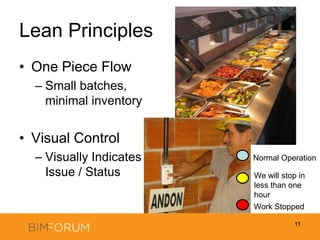
Lean PrinciplesOne Piece FlowSmall batches, minimal inventoryVisual ControlVisually Indicates Issue / Status11Normal OperationWe will stop in less than one hourWork Stopped
Lean Principles Just in timeNo inventoryCorrect sequenceStop the process to fix problems immediatelyIt is okay to stop the process for the right reasonsNo short cuts12
Lean PrinciplesStandardize work processesIncrease reliabilityIncrease efficiencyUse reliable, tested technologyDeliberate decision making, fast and decisive implementation13
Lean PrinciplesMinimize movementMovement of material does not create valueSteps in process to create “buildable” designEngage the extended network of collaboratorsLeverage expertiseCreate buy-inEnable and develop your people14
Lean PrinciplesRedundant checksMeasure twice, cut onceBe aware of the costs of re-workMultiple Disciplines involved / engaged15
Process Development & DeploymentA3, Planning/Research, Interviewing StakeholdersDeliberate Decision Making (research & stakeholders), fast & decisive implementation16Implementation of BIM in the LOS
Implementation of BIM in the LOSCharacteristics of modelsStructureContentLevel of DetailAccuracyStatus of the model (current or old)Who created it for what purposeFile FormatsReliability of the model – 	can the model be trustedStandardization = efficienciesVagueness = friction, inefficienciesLevel of Definition17
AIA – E202Content, accuracyFrequency of updates? Structure?18Implementation of BIM in the LOS
Content of ModelsFurniture, Architectural detailsAbstractions can work very wellMisleading Level of Detail vs. Level of DefinitionJohn Tobin: “Atomic BIM” http://www.aecbytes.com/buildingthefuture/2008/atomicBIM.html19Implementation of BIM in the LOS
20Implementation of BIM in the LOSFast feedbackEstimatingE.g.: GSF, Exterior Wall Areas, Number of doorsDefining Value CoordinationVisual Controls to identify problems earlyCommunicationRedundant Checks, one piece flowOptimumOptimumSpectrumSpectrumOne Detailed ModelDetailed Model – Long Longer CyclesMany Less Detailed ModelsLighter Model-Shorter Cycles
Breakout of model into manageable piecesOne file per floor per tradeSupports the flowFormalize the processDefinition of naming conventionsDefinition of model break-upOne piece flowReliable, tested technologyJust in time21Implementation of BIM in the LOSCCMC-NG_SSR_DES_MPIPE_L06_ALL_050_V0003_2010-01-19.dwg
Who participates in the BIM effort?Exclusive vs. inclusivePrescriptive vs. evolutionaryEnable the teamProject based team planning sessionsProject based team training sessionsEnable and empower the team22Implementation of BIM in the LOS
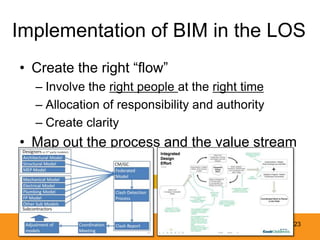
Implementation of BIM in the LOSCreate the right “flow”Involve the right people at the right timeAllocation of responsibility and authorityCreate clarityMap out the process and the value stream		“WHAT”				“HOW”23
MeetingsFine tune efficiency of meetings; processes and tools24Implementation of BIM in the LOS
Meetings:Class Room StyleFocus on the problemLaser pointersInvolve and enable your peopleSmartBoardsVisual ControlInvolvement of the extended networkMake deliberate decisions25Implementation of BIM in the LOS
Clash Reports26

BIM Implementation in a Lean Operating System

  • 1.
    BIM in theLean Operating SystemSouth ColeJan Reinhardt1LinbeckADEPT Project Deliveryscole@linbeck.comjan.reinhardt@adeptpd.com
  • 2.
    OutlineMotivationLean PrinciplesImplementation ofBIM in a Lean Operating SystemConclusion2
  • 3.
    Motivation – contextAdoptionof BIMExperimentation with processes around BIMChallenges in BIMSize of modelsManagement of the BIM processAccuracy of informationLevel of completeness of informationCurrent information3
  • 4.
    Motivation – Howwill the team use BIM tools?Team performance in BIM implementationScenario 1:BIM is used merely as a substitution for a drawingThe traditional process is being followedScenario 2:BIM tools are used in a creative way to improve the current process in support of LeanCan Lean be a guide for “designing processes”?4
  • 5.
    Motivation – OpportunityReference:The Toyota Way (J. K. Liker)BIM facilitates “definition” (vs. vagueness) in the construction processPrinciples from lean manufacturing become more and more applicable to the construction process5
  • 6.
    Motivation – ConnectionResponseto the Question: “How is this all connected”6 BIMVision IPD Lean Architect A3 Engineer Value Owner Flow Last Planner Builder Process Level of Detail End Goal Scope
  • 7.
    What is Lean?AMeans of Operation:7Lean Operating System The Lean Operating System (LOS) is founded on a philosophy and set of principles that add value by creating reliability and producing consistent results in the day-to-day running of organizations and in the delivery of construction projects. Elimination of wasteful processes and operations results.
  • 8.
    What is Lean?Whatis Waste?Any Process or Action that does not add Value8What is Value?
  • 9.
    What the customerneeds at the end of the ProcessExternalInternal
  • 10.
    What is Lean?9WASTEDefectsin products:Rework, Field orders & Punch Lists
  • 11.
    Overproduction:Fabricating material orordering it too soon, JIC thinking
  • 12.
    Inventory:Material stored atsite or yard, work in process, unused tools & parts, forms and stashes
  • 13.
    Unnecessary processing: unnecessaryreporting, any non-value added steps
  • 14.
    Unnecessary movement ofpeople:Treasure hunts, looking for files, poor layout of work area (ergonomics)
  • 15.
    Transport of goods:moving material; unnecessary hand-off work
  • 16.
    Waiting:waiting for equipment,plans, info, orders, or materialThe right process will produce the right resultsContinuously experiment and improve the processDefine Value, Map Value StreamEngages stakeholdersUse pull driven approachDefine what is neededCreate what is definedNot moreExecute flawlesslyLean Principles10
  • 17.
    Lean PrinciplesOne PieceFlowSmall batches, minimal inventoryVisual ControlVisually Indicates Issue / Status11Normal OperationWe will stop in less than one hourWork Stopped
  • 18.
    Lean Principles Justin timeNo inventoryCorrect sequenceStop the process to fix problems immediatelyIt is okay to stop the process for the right reasonsNo short cuts12
  • 19.
    Lean PrinciplesStandardize workprocessesIncrease reliabilityIncrease efficiencyUse reliable, tested technologyDeliberate decision making, fast and decisive implementation13
  • 20.
    Lean PrinciplesMinimize movementMovementof material does not create valueSteps in process to create “buildable” designEngage the extended network of collaboratorsLeverage expertiseCreate buy-inEnable and develop your people14
  • 21.
    Lean PrinciplesRedundant checksMeasuretwice, cut onceBe aware of the costs of re-workMultiple Disciplines involved / engaged15
  • 22.
    Process Development &DeploymentA3, Planning/Research, Interviewing StakeholdersDeliberate Decision Making (research & stakeholders), fast & decisive implementation16Implementation of BIM in the LOS
  • 23.
    Implementation of BIMin the LOSCharacteristics of modelsStructureContentLevel of DetailAccuracyStatus of the model (current or old)Who created it for what purposeFile FormatsReliability of the model – can the model be trustedStandardization = efficienciesVagueness = friction, inefficienciesLevel of Definition17
  • 24.
    AIA – E202Content,accuracyFrequency of updates? Structure?18Implementation of BIM in the LOS
  • 25.
    Content of ModelsFurniture,Architectural detailsAbstractions can work very wellMisleading Level of Detail vs. Level of DefinitionJohn Tobin: “Atomic BIM” http://www.aecbytes.com/buildingthefuture/2008/atomicBIM.html19Implementation of BIM in the LOS
  • 26.
    20Implementation of BIMin the LOSFast feedbackEstimatingE.g.: GSF, Exterior Wall Areas, Number of doorsDefining Value CoordinationVisual Controls to identify problems earlyCommunicationRedundant Checks, one piece flowOptimumOptimumSpectrumSpectrumOne Detailed ModelDetailed Model – Long Longer CyclesMany Less Detailed ModelsLighter Model-Shorter Cycles
  • 27.
    Breakout of modelinto manageable piecesOne file per floor per tradeSupports the flowFormalize the processDefinition of naming conventionsDefinition of model break-upOne piece flowReliable, tested technologyJust in time21Implementation of BIM in the LOSCCMC-NG_SSR_DES_MPIPE_L06_ALL_050_V0003_2010-01-19.dwg
  • 28.
    Who participates inthe BIM effort?Exclusive vs. inclusivePrescriptive vs. evolutionaryEnable the teamProject based team planning sessionsProject based team training sessionsEnable and empower the team22Implementation of BIM in the LOS
  • 29.
    Implementation of BIMin the LOSCreate the right “flow”Involve the right people at the right timeAllocation of responsibility and authorityCreate clarityMap out the process and the value stream “WHAT” “HOW”23
  • 30.
    MeetingsFine tune efficiencyof meetings; processes and tools24Implementation of BIM in the LOS
  • 31.
    Meetings:Class Room StyleFocuson the problemLaser pointersInvolve and enable your peopleSmartBoardsVisual ControlInvolvement of the extended networkMake deliberate decisions25Implementation of BIM in the LOS
  • 32.

Editor's Notes

  • #2 (Jan’s slide)
  • #3 (South’s slide)Motivation: “Why”Lean Principles: “What”Get through this part rather quickly… we’ll start with the definition of Lean and echo what you’ve heard from Dennis and othersThen Jan and I will discuss some Lean principles that will show up in the next portion of our material.We know that, here, you’ll be hearing material you’ve already heard – that’s intentional – we’d like you to hear some of these concepts several times from different perspectiveso they’ll sink inImplementation: “How”Spend the bulk of our time here… The “Application” portion – we’ll discuss the implementation of BIM tools in a Lean Operating SystemConclusion: Tie our materialtogether with a few closing thoughts. We’ll finish our session with time for Take Aways and Questions
  • #4 (Jan’s slide)
  • #5 (South’s slide)Challenge / Question: How will the team use BIM tools?Scenario 1: “Add-on” to an existing process – not being used as the effective tool that it is. “BIM off the shelf” – BIM for marketing / so we can “check the box” in RFPs / RFQsScenario 2: In the context of Lean system, BIM is implemented to support lean operation. tools are used in a creative way to refine, augment and further develop process… or change it all togetherLean a guide for Designing Processes?  Lean MUST!!! be used for designing processes – not just for construction, but for design, for the entire project delivery! NEXT SLIDE(Times are changing – yes, use Lean approach for D-B-B, D/B and IPD, but know that lines are being blurred between Design and Construction – The only way to adjust is through Lean Op Sys)
  • #6 (Jan’s slide)
  • #7 (South’s slide)Motivated by desire to determine connections… their significance, and where the value moves from ONE action, concept or component to the next(slide fades from chaotic mind map to value stream)Then… we map that value stream.. We’ll talk a bit more about that laterObviously – we won’t address every connection – this is a start; this is a part of our motivation, the “why” behind the material you’re seeing hereFinally, before we move forward:*** Learner vs Knower*** Trade Contractor vs Sub Contractor
  • #8 (South’s slide)A Means Of Operation L O S-----------------l Philosophy l Add Elimination l & l  Value  of l Principles l Waste----------------- l results l Reliable Flow & Consistent Resultselimination of wasteful processes and operations to
  • #9 (South’s slide)Back track through concepts to define “Lean” again
  • #10 (South’s slide)I won’t read these – you can skim the list and examples. The most common one, though, is the rework….Like the way waste is defined categorically:** Muda – work/effort that is unproductive, that simply is not necessary for adding value** Mura – Unevenness / inconsistency ** Muri – results from work that is not standardizedDefine types of Waste; use clear examples (Rework: “Have you ever seen a sleeve misplaced?”)
  • #11 (South’s slide)
  • #12 (South’s slide)*** One Piece Flow:One piece of work, moving from one stage to the next. One Piece Flow not as easy to comprehend as it may sound – Conceptually, “Easy” – In practice, takes serious consideration to connect to daily job functions*** Visual Control: This IS as easy as it sounds – but so easy that we can miss significance. What looks simplistic and silly, is actually exactly what we need to optimize the flow of our work
  • #13 (Jan’s slide)
  • #14 (Jan’s slide)
  • #15 (Jan’s slide)
  • #16 (Jan & South slide)Multiple disciplines involved / engaged: This applies to Communication and Human Interaction as well… 5 minutes of the Architect’s eyes on an issue with the builder WILL save 5 hours one month down the line
  • #17 (South’s slide)Kicking off new project – establishing process for coordination and collaboration – this project is a complex MOB, connected to a patient tower, supported by services connecting through the adjacent tower; it has an ambulatory surgery center (with unique support requirements); and design is evolving (yes, we’re building this from DD drawings with a well defined GMP)Therefore, we really need a sound approach to this challengeHistory/Context; Current Conditions/Issues; Goals/Targets; Root Cause Analysis; Counter measures / Plan of Action; Follow-up / Controls (Accountability & Application of metrics); Timeline – When???Countermeasures / plan of action refers to (1) feed back cycle, (2) general spatial coordination guidelines, (3) weekly schedule for file sharing, meeting and coordination; the material in this document is supported by several value streams that indicate process flow – there is a significant amount of information, process, procedure and expectation condensed into this document – this summarizes our collaborative effort, this is out reference and our North starPrinciples: Deliberate Decision Making (significant research & engaging all stakeholders); fast & decisive implementation; continuous improvement
  • #18 (Jan’s slide)
  • #19 (Jan’s slide)Comments on appropriate “Content” vs. correct process/accuracy created to utilize the model
  • #20 (Jan’s slide)Misaligned “level of detail” to “level of definition” (here, valves are modeled, but stub-up is totally in the wrong place)
  • #21 (South slide)We use this tool as a visual control to COMMUNICATE – For example: trade contractors are now empowered like never before to communicate issues and solutions upstream and down stream: The CM and the Mechanical Contractor are able to identify, illustrate and explain their concern rather than just communicating verbally or through written word (which isn’t always great) – able to do this VERY FAST – in time to actually save cost and scheduleThis model ends up in the field – whether it’s RFIDs or a print of the 3D electrical room that’s getting panels installed this week, VALUE is Added
  • #22 (South’s slide)Breakdown of the model / we see this in the File Naming Convention  Speaks to how “WORK” is broken up In this case, per building, per floor, per area, per trade, per systemAble to understand, visualize, and discuss our work in manageable pieces This is a formalized process, with buy-in from team members; this convention allows data to be identified, stored, accessed and discussed with Minimal Support (e.g. we don’t need to WAIT for someone to tell us the significance of a particular file – it’s all in the file name)One-Piece-Flow  process “work” in well defined, manageable piecesReliable  we know what we’re getting (and it’s very simple orgaization) Just in Time  not waiting for the Entire set data to be completed, each piece is completed one at a time, base on requirements of schedule
  • #23 (Jan’s slide)
  • #24 (South’s slide)Define “What” - Define “How” Be willing to Fix the Constraint (rather than apply a “work around”)
  • #25 (South’s slide)Clash Avoidance vs. Clash DetectionLet’s Focus on the “Coordination Meeting” Meetings:Class Room StyleFocus on the problemLaser pointersInvolve and enable your peopleSmartBoardsVisual ControlInvolvement of the extended networkMake deliberate decisions
  • #26 (South’s slide)Document Issues (Clash Reports)  effective documentation = issues cannot be ignored, actionable items WILL be addressedBECAUSE “Peer pressure is a free tool” learned early in life – every participant is aware of everyone else’s contributions, successes and failures Meetings:Class Room StyleFocus on the problemLaser pointersInvolve and enable your peopleSmartBoardsVisual ControlInvolvement of the extended networkMake deliberate decisions
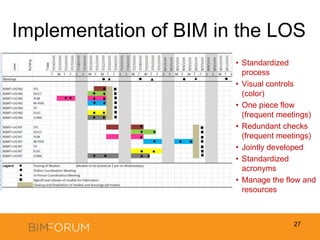
  • #27 (Jan’s slide)Description of Clash Report as: visual control, redundant check, continuous improvement, one piece flow, stop to fix problems
  • #28 (Jan’s slide)(Lean concepts in red)
  • #29 (South’s slide)The place where we get our information – where files are shared, stored and retrieved – this should also serve as the archive for all of our work (we want to be able to define when, why and how a decisions was made at any given point in the past  continuous learning)This file storage and organization is tied directly to the Breakout of the Model and the File Naming Conventions – the organization “fits” these files, the whole system “fits” how we use these files… we would say that the FIT is perfect, but the File Sharing Platform is constantly “learning” (we’re constantly finding the refinement, the optimization that brings it to the next level of usefulness) Transparency – sets course for a sort of “auto-correction” – this recalls the discussion about “drive” – what drives us? We want to have purpose; for most of us, there is purpose behind the quality of our work – in a transparent environment, our purpose is front and center, our drive is allowed to push us in the right direction
  • #30 Jan
  • #31 (South’s slide)Compare implementation of BIM tools on two similar projects (Cook North Tower and Cook MOB)Project A: No significant “buy-in” from external coordinator; Poor pulse on needs of project (pull) – lack of project knowledge/familiarity – results in possible implementation of non-value adding actions/stepsProject B: Buy-in from team “Internal” coordinator is project’s PE and/or Eng - have significant project and people knowledge – Heavily engaged in project details/intricacies and deep in relationships with stakeholders (architects, engineers, trade contractors, owner’s rep); Excellent pulse of project needs, expectations, etc. – understand “feelings” of participants (who’s stretched too thin, who has capacity, who’s struggling, who’s succeeding) and much better positioned to react accordinglyNOTE Significant growth from Project A to Project B, Lessons Learned
  • #32 (South’s slide)