Exploring the Word Window  COMPUTER LITERACY FORM 1
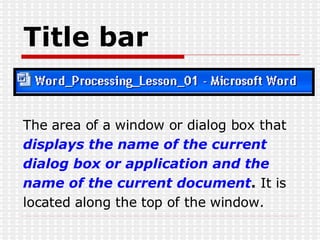
Title bar The area of a window or dialog box that  displays the name of the current dialog box or application and the name of the current document .  It is located along the top of the window.
Menu bar The area that  lists the names of the  menus available in Word . A  menu  is a collection of related commands from  which you can make a selection. The  menu bar is located just below the title  bar.
Standard toolbar A toolbar that  provides quick access to the  editing functions you use frequently . For  example, on the Standard toolbar, the  button  that you use to save a document  contains an  icon  of a floppy disk. The  Standard toolbar is located just below the  menu bar.
Formatting toolbar A toolbar that  provides quick access  to the formatting functions that you use frequently . The names of buttons are displayed in  ScreenTips  when you  position the  mouse pointer  over the  buttons.
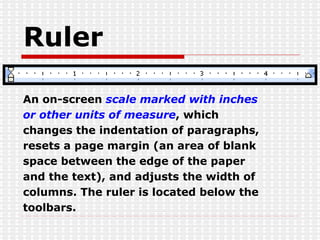
Ruler An on-screen  scale marked with inches  or other units of measure , which  changes the indentation of paragraphs,  resets a page margin (an area of blank  space between the edge of the paper  and the text), and adjusts the width of  columns. The ruler is located below the  toolbars.
Scroll bars Bars that are  used for moving the view of the document . The vertical scroll bar is located along the right side of the window, and the horizontal scroll bar is located along the lower portion of the window, just above the status bar.
Drawing toolbar A drawing object such as a rectangle,  oval, line, arrow, or polygon can be  drawn directly in a document to enhance  it.  Drawing objects are created using the buttons on the Drawing toolbar .
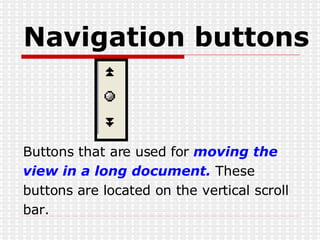
Navigation buttons Buttons that are used for  moving the  view in a long document.  These buttons are located on the vertical scroll bar.
Minimize button A button that  reduces a window to a  button on the Windows taskbar . It appears as a button with a horizontal line and is located in the group of three buttons at the upper-right corner of the window.
Maximize/Restore Down button A button that  switches back  and forth, or   toggles (alternately turns an option on or off  each time that the option is selected) between  displaying a window in its maximum size  and  restoring a window to its previous size . It is  located in the group of three buttons at the  upper-right corner of the window.
Close button A button that  closes the current window or application . It is located in the group of three buttons at the upper right corner of the window.

Exploring The Word Window

  • 1.
    Exploring the WordWindow COMPUTER LITERACY FORM 1
  • 2.
    Title bar Thearea of a window or dialog box that displays the name of the current dialog box or application and the name of the current document . It is located along the top of the window.
  • 3.
    Menu bar Thearea that lists the names of the menus available in Word . A menu is a collection of related commands from which you can make a selection. The menu bar is located just below the title bar.
  • 4.
    Standard toolbar Atoolbar that provides quick access to the editing functions you use frequently . For example, on the Standard toolbar, the button that you use to save a document contains an icon of a floppy disk. The Standard toolbar is located just below the menu bar.
  • 5.
    Formatting toolbar Atoolbar that provides quick access to the formatting functions that you use frequently . The names of buttons are displayed in ScreenTips when you position the mouse pointer over the buttons.
  • 6.
    Ruler An on-screen scale marked with inches or other units of measure , which changes the indentation of paragraphs, resets a page margin (an area of blank space between the edge of the paper and the text), and adjusts the width of columns. The ruler is located below the toolbars.
  • 7.
    Scroll bars Barsthat are used for moving the view of the document . The vertical scroll bar is located along the right side of the window, and the horizontal scroll bar is located along the lower portion of the window, just above the status bar.
  • 8.
    Drawing toolbar Adrawing object such as a rectangle, oval, line, arrow, or polygon can be drawn directly in a document to enhance it. Drawing objects are created using the buttons on the Drawing toolbar .
  • 9.
    Navigation buttons Buttonsthat are used for moving the view in a long document. These buttons are located on the vertical scroll bar.
  • 10.
    Minimize button Abutton that reduces a window to a button on the Windows taskbar . It appears as a button with a horizontal line and is located in the group of three buttons at the upper-right corner of the window.
  • 11.
    Maximize/Restore Down buttonA button that switches back and forth, or toggles (alternately turns an option on or off each time that the option is selected) between displaying a window in its maximum size and restoring a window to its previous size . It is located in the group of three buttons at the upper-right corner of the window.
  • 12.
    Close button Abutton that closes the current window or application . It is located in the group of three buttons at the upper right corner of the window.