VB.NET FORM
TOOL/COMPONENT
MENUSTRIP
Presentation Developed
By:
Kavankumar N. Solanki
MENUSTRI
P
18.
In Visual Basic, the MenuStrip Control represents the container
for the menu structure of a form; you can assign a control of this
type of form’s Menu property at run time.
Menus are made up of MenuItem objects that represent the
individual part of menu(MenuItems can be parent menu or menu
Item in menu).
Slide 7- 3
INTRODUCTION OF TOPIC
•MenuStrip
•What is Menu?
• Creating a menu system
• Use functions of Menu by commands
and submenus that the user may
select from Menu Item.
COMPONENTS OF A MENU
SYSTEM
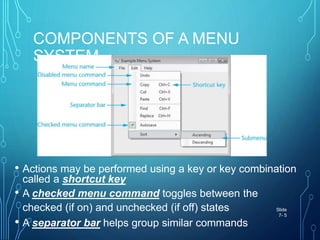
• Each drop-down menu has a menu name
• Each drop-down menu has a list of actions or menu
commands that can be performed
• Some commands may lead to a submenu Slide
7- 4
COMPONENTS OF A MENU
SYSTEM
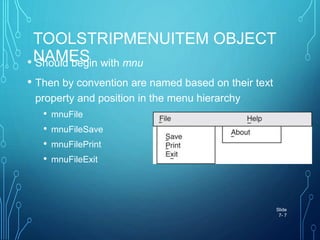
• Actions may be performed using a key or key combination
called a shortcut key
• A checked menu command toggles between the
checked (if on) and unchecked (if off) states
• A separator bar helps group similar commands
Slide
7- 5
MENUSTRIP CONTROL
• A MenuStrip control adds a menu to a form
• Double-click on the MenuStrip icon in the Menus & Toolbars
section of the Toolbox
• The MenuStrip control is displayed in the component
tray (bottom of Design window)
• A MenuStrip can have many ToolStripMenuItem objects:
• Each represents a single menu command
• Name property - used by VB to identify it
• Text property – text displayed to the user
Slide
7- 6
TOOLSTRIPMENUITEM OBJECT
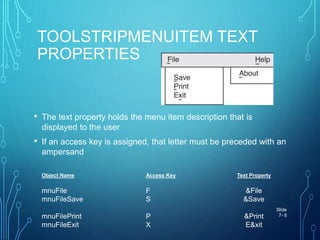
NAMES• Should begin with mnu
• Then by convention are named based on their text
property and position in the menu hierarchy
• mnuFile
• mnuFileSave
• mnuFilePrint
• mnuFileExit
Slide
7- 7
TOOLSTRIPMENUITEM TEXT
PROPERTIES
• The text property holds the menu item description that is
displayed to the user
• If an access key is assigned, that letter must be preceded with an
ampersand
Object Name Access Key Text Property
mnuFile F &File
mnuFileSave S &Save
mnuFilePrint P &Print
mnuFileExit X E&xit
Slide
7- 8
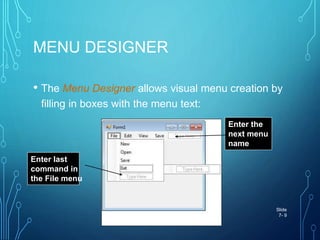
MENU DESIGNER
• The Menu Designer allows visual menu creation by
filling in boxes with the menu text:
Slide
7- 9
Enter last
command in
the File menu
Enter the
next menu
name
SHORTCUT KEYS
• Keyboard based shortcuts that execute menu commands
without using the menu system
• For example, ctrl-c to Copy to the clipboard
• These are set via the Shortcut property of each menu
item
• A shortcut is displayed to the user only if the
ShowShortcut property is set to true
Slide
7- 10
CHECKED MENU ITEMS
• Some menu items just turn a feature on or off
• For example, an alarm for a clock
• To create a checked menu item:
• Set CheckOnClick property to true
• Set Checked property to True if feature should be on
when the form is initially displayed
• Can test a checked menu item in code
If mnuSettingsAlarm.Checked = True Then
MessageBox.Show(“Wake UP!”)
End If Slide
7- 11
DISABLED MENU ITEMS
• A menu item is grayed out (disabled) with the
Enabled property
• Paste option is initially disabled and only enabled
after something is cut or copied
• Code initially disables the Paste option
• Following a cut or copy, Paste is enabled
Slide
7- 12
mnuEditPaste.Enabled = True
mnuEditPaste.Enabled = False
ADDING SEPARATOR BARS
• Right-click menu item, select Insert Separator
• Separator inserted above the menu item
• Or create a menu item with one hyphen (-) as the text
property
Slide
7- 13
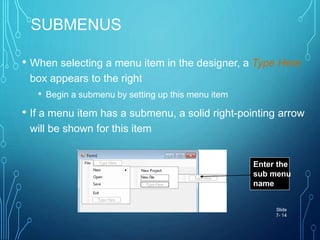
SUBMENUS
• When selecting a menu item in the designer, a Type Here
box appears to the right
• Begin a submenu by setting up this menu item
• If a menu item has a submenu, a solid right-pointing arrow
will be shown for this item
Slide
7- 14
Enter the
sub menu
name
INSERTING, DELETING, &
REARRANGING
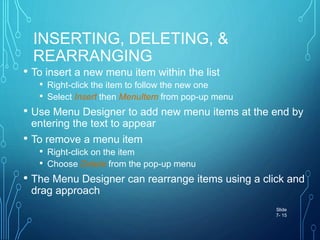
• To insert a new menu item within the list
• Right-click the item to follow the new one
• Select Insert then MenuItem from pop-up menu
• Use Menu Designer to add new menu items at the end by
entering the text to appear
• To remove a menu item
• Right-click on the item
• Choose Delete from the pop-up menu
• The Menu Designer can rearrange items using a click and
drag approach
Slide
7- 15
TOOLSTRIPMENUITEM CLICK
EVENTS• Menus and submenus require no code
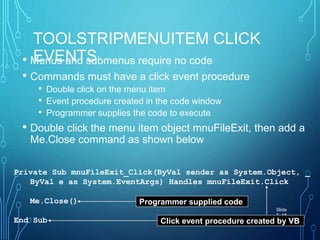
• Commands must have a click event procedure
• Double click on the menu item
• Event procedure created in the code window
• Programmer supplies the code to execute
• Double click the menu item object mnuFileExit, then add a
Me.Close command as shown below
Slide
7- 16
Private Sub mnuFileExit_Click(ByVal sender as System.Object, _
ByVal e as System.EventArgs) Handles mnuFileExit.Click
Me.Close()
End Sub
Programmer supplied code
Click event procedure created by VB
STANDARD MENU ITEMS
• In general follow the conventions that most application
menu systems use
• File is leftmost item with access key Alt-F
• File item has Exit command, access key Alt-X
• Help is the rightmost item
• Help menu has an About command
Slide
7- 17
PRACTICAL EXAMPLE:-
Open Visual Studio by Clicking
Here.
Menu stripe
Menu stripe

Menu stripe

  • 1.
  • 2.
    MENUSTRI P 18. In Visual Basic,the MenuStrip Control represents the container for the menu structure of a form; you can assign a control of this type of form’s Menu property at run time. Menus are made up of MenuItem objects that represent the individual part of menu(MenuItems can be parent menu or menu Item in menu).
  • 3.
    Slide 7- 3 INTRODUCTIONOF TOPIC •MenuStrip •What is Menu? • Creating a menu system • Use functions of Menu by commands and submenus that the user may select from Menu Item.
  • 4.
    COMPONENTS OF AMENU SYSTEM • Each drop-down menu has a menu name • Each drop-down menu has a list of actions or menu commands that can be performed • Some commands may lead to a submenu Slide 7- 4
  • 5.
    COMPONENTS OF AMENU SYSTEM • Actions may be performed using a key or key combination called a shortcut key • A checked menu command toggles between the checked (if on) and unchecked (if off) states • A separator bar helps group similar commands Slide 7- 5
  • 6.
    MENUSTRIP CONTROL • AMenuStrip control adds a menu to a form • Double-click on the MenuStrip icon in the Menus & Toolbars section of the Toolbox • The MenuStrip control is displayed in the component tray (bottom of Design window) • A MenuStrip can have many ToolStripMenuItem objects: • Each represents a single menu command • Name property - used by VB to identify it • Text property – text displayed to the user Slide 7- 6
  • 7.
    TOOLSTRIPMENUITEM OBJECT NAMES• Shouldbegin with mnu • Then by convention are named based on their text property and position in the menu hierarchy • mnuFile • mnuFileSave • mnuFilePrint • mnuFileExit Slide 7- 7
  • 8.
    TOOLSTRIPMENUITEM TEXT PROPERTIES • Thetext property holds the menu item description that is displayed to the user • If an access key is assigned, that letter must be preceded with an ampersand Object Name Access Key Text Property mnuFile F &File mnuFileSave S &Save mnuFilePrint P &Print mnuFileExit X E&xit Slide 7- 8
  • 9.
    MENU DESIGNER • TheMenu Designer allows visual menu creation by filling in boxes with the menu text: Slide 7- 9 Enter last command in the File menu Enter the next menu name
  • 10.
    SHORTCUT KEYS • Keyboardbased shortcuts that execute menu commands without using the menu system • For example, ctrl-c to Copy to the clipboard • These are set via the Shortcut property of each menu item • A shortcut is displayed to the user only if the ShowShortcut property is set to true Slide 7- 10
  • 11.
    CHECKED MENU ITEMS •Some menu items just turn a feature on or off • For example, an alarm for a clock • To create a checked menu item: • Set CheckOnClick property to true • Set Checked property to True if feature should be on when the form is initially displayed • Can test a checked menu item in code If mnuSettingsAlarm.Checked = True Then MessageBox.Show(“Wake UP!”) End If Slide 7- 11
  • 12.
    DISABLED MENU ITEMS •A menu item is grayed out (disabled) with the Enabled property • Paste option is initially disabled and only enabled after something is cut or copied • Code initially disables the Paste option • Following a cut or copy, Paste is enabled Slide 7- 12 mnuEditPaste.Enabled = True mnuEditPaste.Enabled = False
  • 13.
    ADDING SEPARATOR BARS •Right-click menu item, select Insert Separator • Separator inserted above the menu item • Or create a menu item with one hyphen (-) as the text property Slide 7- 13
  • 14.
    SUBMENUS • When selectinga menu item in the designer, a Type Here box appears to the right • Begin a submenu by setting up this menu item • If a menu item has a submenu, a solid right-pointing arrow will be shown for this item Slide 7- 14 Enter the sub menu name
  • 15.
    INSERTING, DELETING, & REARRANGING •To insert a new menu item within the list • Right-click the item to follow the new one • Select Insert then MenuItem from pop-up menu • Use Menu Designer to add new menu items at the end by entering the text to appear • To remove a menu item • Right-click on the item • Choose Delete from the pop-up menu • The Menu Designer can rearrange items using a click and drag approach Slide 7- 15
  • 16.
    TOOLSTRIPMENUITEM CLICK EVENTS• Menusand submenus require no code • Commands must have a click event procedure • Double click on the menu item • Event procedure created in the code window • Programmer supplies the code to execute • Double click the menu item object mnuFileExit, then add a Me.Close command as shown below Slide 7- 16 Private Sub mnuFileExit_Click(ByVal sender as System.Object, _ ByVal e as System.EventArgs) Handles mnuFileExit.Click Me.Close() End Sub Programmer supplied code Click event procedure created by VB
  • 17.
    STANDARD MENU ITEMS •In general follow the conventions that most application menu systems use • File is leftmost item with access key Alt-F • File item has Exit command, access key Alt-X • Help is the rightmost item • Help menu has an About command Slide 7- 17
  • 18.
    PRACTICAL EXAMPLE:- Open VisualStudio by Clicking Here.