QWERTYUIOP?

TYPEWRITER
KEYBOARD
Parts & Layout
of the
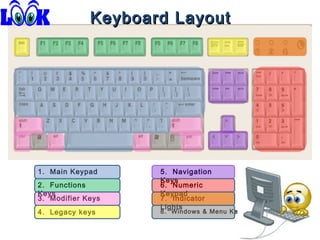
Keyboard Layout

1. Main Keypad
2. Functions
Keys
3. Modifier Keys
4. Legacy keys

5. Navigation
Keys
6. Numeric
Keypad
7. Indicator
Lights

8. Windows & Menu Key
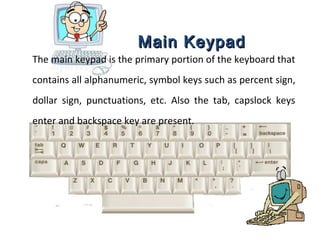
Main Keypad
The main keypad is the primary portion of the keyboard that
contains all alphanumeric, symbol keys such as percent sign,
dollar sign, punctuations, etc. Also the tab, capslock keys
enter and backspace key are present.
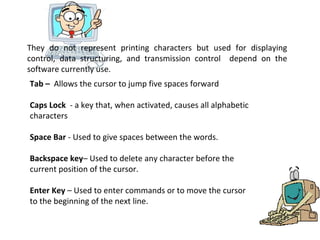
They do not represent printing characters but used for displaying
control, data structuring, and transmission control depend on the
software currently use.
Tab – Allows the cursor to jump five spaces forward
Caps Lock - a key that, when activated, causes all alphabetic
characters
Space Bar - Used to give spaces between the words.
Backspace key– Used to delete any character before the
current position of the cursor.
Enter Key – Used to enter commands or to move the cursor
to the beginning of the next line.
Functions Keys
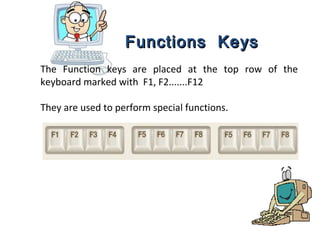
The Function keys are placed at the top row of the
keyboard marked with F1, F2.......F12
They are used to perform special functions.
Modifier Keys
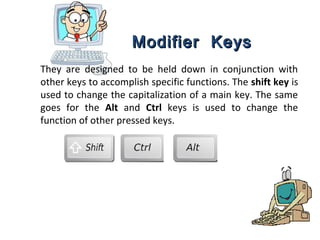
They are designed to be held down in conjunction with
other keys to accomplish specific functions. The shift key is
used to change the capitalization of a main key. The same
goes for the Alt and Ctrl keys is used to change the
function of other pressed keys.
Legacy Keys
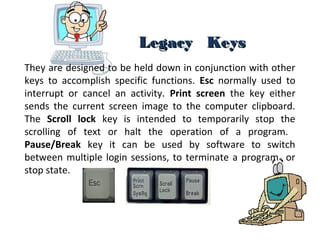
They are designed to be held down in conjunction with other
keys to accomplish specific functions. Esc normally used to
interrupt or cancel an activity. Print screen the key either
sends the current screen image to the computer clipboard.
The Scroll lock key is intended to temporarily stop the
scrolling of text or halt the operation of a program.
Pause/Break key it can be used by software to switch
between multiple login sessions, to terminate a program or
stop state.
Navigation Keys
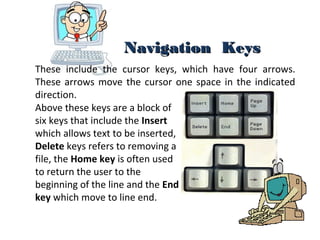
These include the cursor keys, which have four arrows.
These arrows move the cursor one space in the indicated
direction.
Above these keys are a block of
six keys that include the Insert
which allows text to be inserted,
Delete keys refers to removing a
file, the Home key is often used
to return the user to the
beginning of the line and the End
key which move to line end.
Numeric Keys
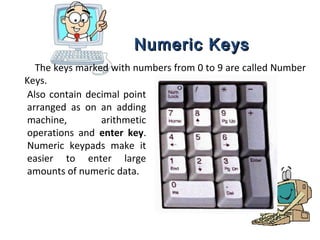
The keys marked with numbers from 0 to 9 are called Number
Keys.
Also contain decimal point
arranged as on an adding
machine,
arithmetic
operations and enter key.
Numeric keypads make it
easier to enter large
amounts of numeric data.
Indicator Lights
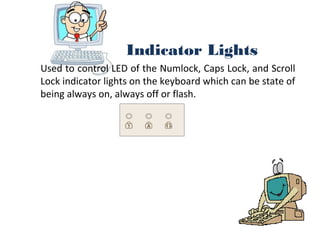
Used to control LED of the Numlock, Caps Lock, and Scroll
Lock indicator lights on the keyboard which can be state of
being always on, always off or flash.
Windows and Menu Key
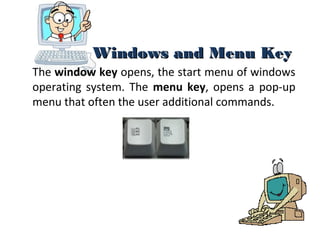
The window key opens, the start menu of windows
operating system. The menu key, opens a pop-up
menu that often the user additional commands.
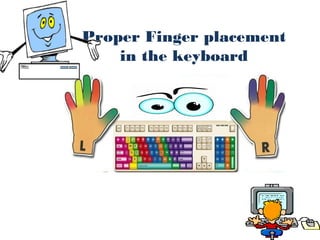
Proper Finger placement
in the keyboard
Finger Placement

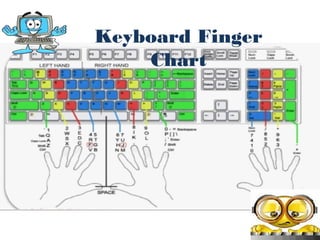
•Fingers placed on home row (ASDF JKL;)

•Fingers curved in a scratch-like position and the thumb
positioned close to the center of the space bar.
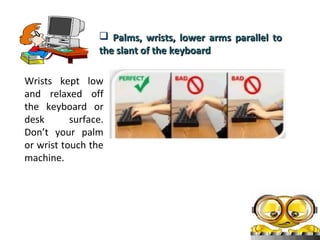
•Palms, wrists, lower arms parallel to the slant of the
keyboard
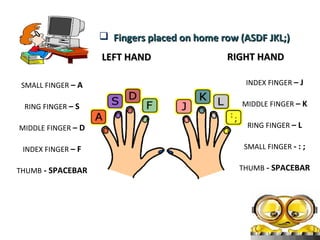
 Fingers placed on home row (ASDF JKL;)
LEFT HAND

RIGHT HAND

SMALL FINGER – A

INDEX FINGER – J

RING FINGER – S

MIDDLE FINGER – K

MIDDLE FINGER – D

RING FINGER – L

INDEX FINGER – F

SMALL FINGER - : ;

THUMB - SPACEBAR

THUMB - SPACEBAR
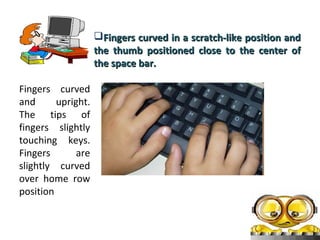
Fingers curved in a scratch-like position and
the thumb positioned close to the center of
the space bar.
Fingers curved
and
upright.
The tips of
fingers slightly
touching keys.
Fingers
are
slightly curved
over home row
position
 Palms, wrists, lower arms parallel to
the slant of the keyboard
Wrists kept low
and relaxed off
the keyboard or
desk
surface.
Don’t your palm
or wrist touch the
machine.
Keyboard Finger
Chart
I. Enumerate the 8 parts of a typical computer keyboard.
II. Answer the following. The keys on a computer keyboard are laid out in group.
Tell in which group the following keys belong, base on your answer above.

_________1. Equal Key
_________2. Esc Key
_________3. Crtl Key
_________4. F8 Key
_________5.Enter Key

_________6. Caps Lock Key
_________7. Left Arrow Key
_________8. 9 Key
_________9. Space bar Key
_________10. Del Key

Using Computer Keyboard

  • 1.
  • 2.
  • 3.
  • 4.
    Keyboard Layout 1. MainKeypad 2. Functions Keys 3. Modifier Keys 4. Legacy keys 5. Navigation Keys 6. Numeric Keypad 7. Indicator Lights 8. Windows & Menu Key
  • 5.
    Main Keypad The mainkeypad is the primary portion of the keyboard that contains all alphanumeric, symbol keys such as percent sign, dollar sign, punctuations, etc. Also the tab, capslock keys enter and backspace key are present.
  • 6.
    They do notrepresent printing characters but used for displaying control, data structuring, and transmission control depend on the software currently use. Tab – Allows the cursor to jump five spaces forward Caps Lock - a key that, when activated, causes all alphabetic characters Space Bar - Used to give spaces between the words. Backspace key– Used to delete any character before the current position of the cursor. Enter Key – Used to enter commands or to move the cursor to the beginning of the next line.
  • 7.
    Functions Keys The Functionkeys are placed at the top row of the keyboard marked with F1, F2.......F12 They are used to perform special functions.
  • 8.
    Modifier Keys They aredesigned to be held down in conjunction with other keys to accomplish specific functions. The shift key is used to change the capitalization of a main key. The same goes for the Alt and Ctrl keys is used to change the function of other pressed keys.
  • 9.
    Legacy Keys They aredesigned to be held down in conjunction with other keys to accomplish specific functions. Esc normally used to interrupt or cancel an activity. Print screen the key either sends the current screen image to the computer clipboard. The Scroll lock key is intended to temporarily stop the scrolling of text or halt the operation of a program. Pause/Break key it can be used by software to switch between multiple login sessions, to terminate a program or stop state.
  • 10.
    Navigation Keys These includethe cursor keys, which have four arrows. These arrows move the cursor one space in the indicated direction. Above these keys are a block of six keys that include the Insert which allows text to be inserted, Delete keys refers to removing a file, the Home key is often used to return the user to the beginning of the line and the End key which move to line end.
  • 11.
    Numeric Keys The keysmarked with numbers from 0 to 9 are called Number Keys. Also contain decimal point arranged as on an adding machine, arithmetic operations and enter key. Numeric keypads make it easier to enter large amounts of numeric data.
  • 12.
    Indicator Lights Used tocontrol LED of the Numlock, Caps Lock, and Scroll Lock indicator lights on the keyboard which can be state of being always on, always off or flash.
  • 13.
    Windows and MenuKey The window key opens, the start menu of windows operating system. The menu key, opens a pop-up menu that often the user additional commands.
  • 14.
  • 15.
    Finger Placement •Fingers placedon home row (ASDF JKL;) •Fingers curved in a scratch-like position and the thumb positioned close to the center of the space bar. •Palms, wrists, lower arms parallel to the slant of the keyboard
  • 16.
     Fingers placedon home row (ASDF JKL;) LEFT HAND RIGHT HAND SMALL FINGER – A INDEX FINGER – J RING FINGER – S MIDDLE FINGER – K MIDDLE FINGER – D RING FINGER – L INDEX FINGER – F SMALL FINGER - : ; THUMB - SPACEBAR THUMB - SPACEBAR
  • 17.
    Fingers curved ina scratch-like position and the thumb positioned close to the center of the space bar. Fingers curved and upright. The tips of fingers slightly touching keys. Fingers are slightly curved over home row position
  • 18.
     Palms, wrists,lower arms parallel to the slant of the keyboard Wrists kept low and relaxed off the keyboard or desk surface. Don’t your palm or wrist touch the machine.
  • 19.
  • 22.
    I. Enumerate the8 parts of a typical computer keyboard. II. Answer the following. The keys on a computer keyboard are laid out in group. Tell in which group the following keys belong, base on your answer above. _________1. Equal Key _________2. Esc Key _________3. Crtl Key _________4. F8 Key _________5.Enter Key _________6. Caps Lock Key _________7. Left Arrow Key _________8. 9 Key _________9. Space bar Key _________10. Del Key