PROJECT WORK
ON
MS-EXCEL
• Submitted by:
• MUHAMMAD ZAMAN( )
• MARYAM( )
• AFIFA( )
• HAMZA ALI( )
• ABUZER GAFARI( )
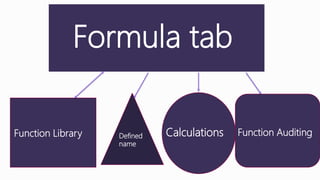
Formula tab
Function Library Calculations Function AuditingDefined
name
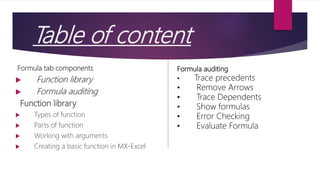
Table of content
Formula tab components
 Function library
 Formula auditing
Function library
 Types of function
 Parts of function
 Working with arguments
 Creating a basic function in MX-Excel
Formula auditing
• Trace precedents
• Remove Arrows
• Trace Dependents
• Show formulas
• Error Checking
• Evaluate Formula
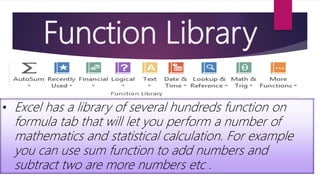
Function Library
• Excel has a library of several hundreds function on
formula tab that will let you perform a number of
mathematics and statistical calculation. For example
you can use sum function to add numbers and
subtract two are more numbers etc .
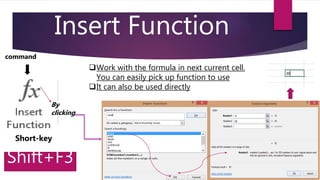
Insert Function
command
Short-key
Shift+F3
Work with the formula in next current cell.
You can easily pick up function to use
It can also be used directly
By
clicking
AUTO-SUM
example
Automatically add a quick
calculation to your worksheet such
as sum and average
define
Short-key
Sum ALT+=
• SUM
• AVERG
• MAX
• MIN
• COUNT
click
icon
Logical
click
• AND
• IF
• NOT
• OR
• FALSE
• IF
• OR
ok
 In logical function we use logical function like IF,AND,TRUE,FALSE
etc
 If we use AND function then click ok and put our logic1 and
logic2
 AND(logic1,logic2,) then show the result
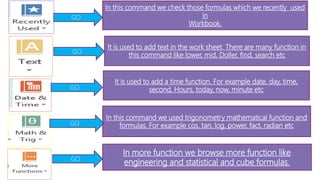
In this command we check those formulas which we recently used
in
Workbook.
It is used to add text in the work sheet. There are many function in
this command like lower, mid, Doller, find, search etc
It is used to add a time function. For example date, day, time,
second, Hours, today, now, minute etc
In this command we used trigonometry mathematical function and
formulas. For example cos, tan, log, power, fact, radian etc
In more function we browse more function like
engineering and statistical and cube formulas.
GO
GO
GO
GO
GO
Trace precedent
Show arrows that
indicate which cells
affected the value of
current selected cell.
Example
Define:
Trace dependent
Show arrows that
indicate which
cells is affected by
currently selected
cell
Define:

MS Excel formula tab slides

  • 1.
    PROJECT WORK ON MS-EXCEL • Submittedby: • MUHAMMAD ZAMAN( ) • MARYAM( ) • AFIFA( ) • HAMZA ALI( ) • ABUZER GAFARI( )
  • 2.
    Formula tab Function LibraryCalculations Function AuditingDefined name
  • 3.
    Table of content Formulatab components  Function library  Formula auditing Function library  Types of function  Parts of function  Working with arguments  Creating a basic function in MX-Excel Formula auditing • Trace precedents • Remove Arrows • Trace Dependents • Show formulas • Error Checking • Evaluate Formula
  • 4.
    Function Library • Excelhas a library of several hundreds function on formula tab that will let you perform a number of mathematics and statistical calculation. For example you can use sum function to add numbers and subtract two are more numbers etc .
  • 5.
    Insert Function command Short-key Shift+F3 Work withthe formula in next current cell. You can easily pick up function to use It can also be used directly By clicking
  • 6.
    AUTO-SUM example Automatically add aquick calculation to your worksheet such as sum and average define Short-key Sum ALT+= • SUM • AVERG • MAX • MIN • COUNT click icon
  • 9.
    Logical click • AND • IF •NOT • OR • FALSE • IF • OR ok  In logical function we use logical function like IF,AND,TRUE,FALSE etc  If we use AND function then click ok and put our logic1 and logic2  AND(logic1,logic2,) then show the result
  • 10.
    In this commandwe check those formulas which we recently used in Workbook. It is used to add text in the work sheet. There are many function in this command like lower, mid, Doller, find, search etc It is used to add a time function. For example date, day, time, second, Hours, today, now, minute etc In this command we used trigonometry mathematical function and formulas. For example cos, tan, log, power, fact, radian etc In more function we browse more function like engineering and statistical and cube formulas. GO GO GO GO GO
  • 11.
    Trace precedent Show arrowsthat indicate which cells affected the value of current selected cell. Example Define:
  • 12.
    Trace dependent Show arrowsthat indicate which cells is affected by currently selected cell Define: