Practical Workbook
Logic Design & Switching Theory I


          Name       : _____________________________
          Year       : __________ Batch: ____________
          Roll No.   : _____________________________
          Group No. : ____________________________
          Department : ____________________________


 Dept. of Computer & Information Systems Engineering
 NED University of Engineering & Technology,
            Karachi – 75270, Pakistan
Practical Workbook
 Logic Design & Switching Theory I


Prepared By:   M. Anwar Ali Khan (Asst. Professor) &
               Muhammad Mazher Alam (Ex - Asst. Professor)

Revised By:    Maria Waqas (Lecturer)


                             Second Edition
                          Fourth Reprint – 2010


   Dept. of Computer & Information Systems Engineering
   NED University of Engineering & Technology,
              Karachi – 75270, Pakistan
THE BITS AND PIECES

PART       CIRCUIT       WHAT IT DOES
           SIGN

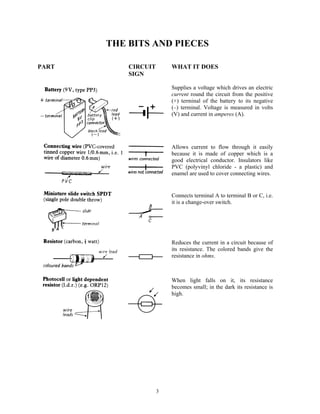
                         Supplies a voltage which drives an electric
                         current round the circuit from the positive
                         (+) terminal of the battery to its negative
                         (–) terminal. Voltage is measured in volts
                         (V) and current in amperes (A).


                         Allows current to flow through it easily
                         because it is made of copper which is a
                         good electrical conductor. Insulators like
                         PVC (polyvinyl chloride - a plastic) and
                         enamel are used to cover connecting wires.


                         Connects terminal A to terminal B or C, i.e.
                         it is a change-over switch.


                         Reduces the current in a circuit because of
                         its resistance. The colored bands give the
                         resistance in ohms.


                         When light falls on it, its resistance
                         becomes small; in the dark its resistance is
                         high.


                     3
PART   CIRCUIT       WHAT IT DOES
       SIGN

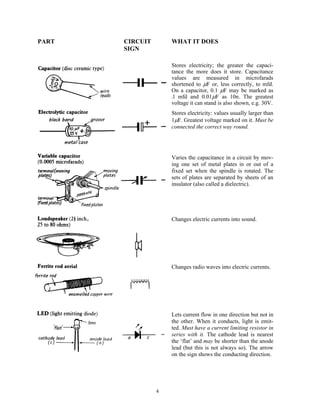
                     Stores electricity; the greater the capaci-
                     tance the more does it store. Capacitance
                     values are measured in microfarads
                     shortened to μF or, less correctly, to mfd.
                     On a capacitor, 0.1 μF may be marked as
                     .l mfd and 0.01μF as 10n. The greatest
                     voltage it can stand is also shown, e.g. 30V.
                     Stores electricity: values usually larger than
                     1μF. Greatest voltage marked on it. Must be
                     connected the correct way round.


                     Varies the capacitance in a circuit by mov-
                     ing one set of metal plates in or out of a
                     fixed set when the spindle is rotated. The
                     sets of plates are separated by sheets of an
                     insulator (also called a dielectric).


                     Changes electric currents into sound.


                     Changes radio waves into electric currents.


                     Lets current flow in one direction but not in
                     the other. When it conducts, light is emit-
                     ted. Must have a current limiting resistor in
                     series with it. The cathode lead is nearest
                     the ‘flat’ and may be shorter than the anode
                     lead (but this is not always so). The arrow
                     on the sign shows the conducting direction.


                 4
PART                                CIRCUIT              WHAT IT DOES
                                    SIGN

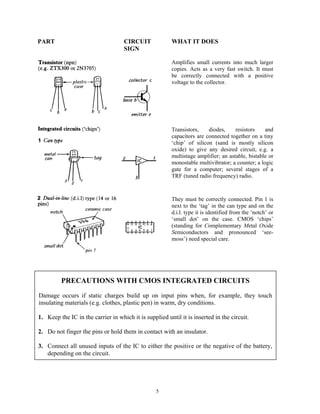
                                                         Amplifies small currents into much larger
                                                         copies. Acts as a very fast switch. It must
                                                         be correctly connected with a positive
                                                         voltage to the collector.


                                                         Transistors,    diodes,     resistors    and
                                                         capacitors are connected together on a tiny
                                                         ‘chip’ of silicon (sand is mostly silicon
                                                         oxide) to give any desired circuit, e.g. a
                                                         multistage amplifier; an astable, bistable or
                                                         monostable multivibrator; a counter; a logic
                                                         gate for a computer; several stages of a
                                                         TRF (tuned radio frequency) radio.


                                                         They must be correctly connected. Pin 1 is
                                                         next to the ‘tag’ in the can type and on the
                                                         d.i.l. type it is identified from the ‘notch’ or
                                                         ‘small dot’ on the case. CMOS ‘chips’
                                                         (standing for Complementary Metal Oxide
                                                         Semiconductors and pronounced ‘see-
                                                         moss’) need special care.


         PRECAUTIONS WITH CMOS INTEGRATED CIRCUITS
Damage occurs if static charges build up on input pins when, for example, they touch
insulating materials (e.g. clothes, plastic pen) in warm, dry conditions.

1. Keep the IC in the carrier in which it is supplied until it is inserted in the circuit.

2. Do not finger the pins or hold them in contact with an insulator.

3. Connect all unused inputs of the IC to either the positive or the negative of the battery,
   depending on the circuit.


                                                  5
BUILDING CIRCUITS


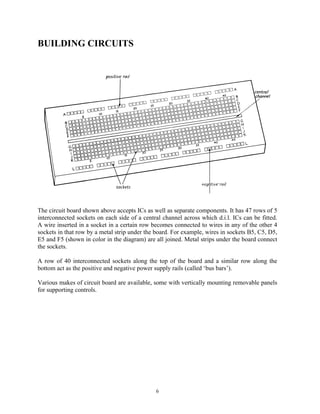
The circuit board shown above accepts ICs as well as separate components. It has 47 rows of 5
interconnected sockets on each side of a central channel across which d.i.l. ICs can be fitted.
A wire inserted in a socket in a certain row becomes connected to wires in any of the other 4
sockets in that row by a metal strip under the board. For example, wires in sockets B5, C5, D5,
E5 and F5 (shown in color in the diagram) are all joined. Metal strips under the board connect
the sockets.

A row of 40 interconnected sockets along the top of the board and a similar row along the
bottom act as the positive and negative power supply rails (called ‘bus bars’).

Various makes of circuit board are available, some with vertically mounting removable panels
for supporting controls.


                                              6
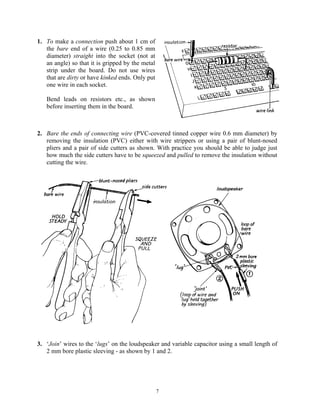
1. To make a connection push about 1 cm of
   the bare end of a wire (0.25 to 0.85 mm
   diameter) straight into the socket (not at
   an angle) so that it is gripped by the metal
   strip under the board. Do not use wires
   that are dirty or have kinked ends. Only put
   one wire in each socket.

   Bend leads on resistors etc., as shown
   before inserting them in the board.


2. Bare the ends of connecting wire (PVC-covered tinned copper wire 0.6 mm diameter) by
   removing the insulation (PVC) either with wire strippers or using a pair of blunt-nosed
   pliers and a pair of side cutters as shown. With practice you should be able to judge just
   how much the side cutters have to be squeezed and pulled to remove the insulation without
   cutting the wire.


3. ‘Join’ wires to the ‘lugs’ on the loudspeaker and variable capacitor using a small length of
   2 mm bore plastic sleeving - as shown by 1 and 2.


                                                  7
RESISTOR COLOUR CODE

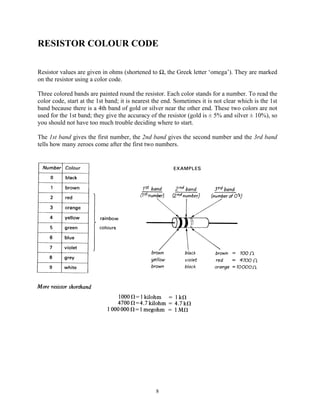
Resistor values are given in ohms (shortened to Ω, the Greek letter ‘omega’). They are marked
on the resistor using a color code.

Three colored bands are painted round the resistor. Each color stands for a number. To read the
color code, start at the 1st band; it is nearest the end. Sometimes it is not clear which is the 1st
band because there is a 4th band of gold or silver near the other end. These two colors are not
used for the 1st band; they give the accuracy of the resistor (gold is ± 5% and silver ± 10%), so
you should not have too much trouble deciding where to start.

The 1st band gives the first number, the 2nd band gives the second number and the 3rd band
tells how many zeroes come after the first two numbers.


                                                 8
INTRODUCTION
Digital Logic Design is concerned with the interconnection among digital components
and modules and the area of Switching Theory that can be identified between circuit
design and system formulation. Logic design is the base of any computer system, as
every digital system consists of different IC’S and ICs contain a large number of
interconnected digital circuits within a small package. MSI devices provide digital
function while LSI device cover a complete computer modules. These circuitries are
widely used in digital system like digital voltmeter, frequency meter, calculating
machines, telephone-switching system etc.

In this Practical Workbook, laboratory sessions based on both combinational and
sequential logic are covered. First laboratory session gives an introduction to the basic
logic gates and fundamentals of circuit building.

The second laboratory session covers a CAD software – Electronics Workbench (EWB).
EWB is excellent simulation software, where circuits can be designed and tested before
physical implementation. Various laboratory sessions of this workbook provide activities
and exercises on EWB.

Next eight laboratory sessions are based on combinational logic. Here various MSI
circuits, like adders, converters, multiplexers, decoders, encoders, etc, are designed.
Some of these laboratory sessions also include testing of MSI ICs.

Next four laboratory sessions help in exploring various designs based on sequential logic.
Here a variety of circuits are designed, form the testing of basic flip-flop ICs to registers
and different types of counters.

Last laboratory session demonstrates how digital hardware can be interfaced with a
personal computer via parallel port and can be controlled by software.

All laboratory sessions of this workbook incorporate brief theoretical backgrounds, as
details may be covered in the respective theory classes. Exercises / activities are included
with almost all the sessions for the students to practice.

Two appendices are also included in this workbook. The first one provides pin diagrams
for all the ICs required for the laboratory work provided in this workbook. It will help the
students in preparing the pin diagrams for the circuits. Second appendix discusses a
hardware debouncing circuit for mechanical switches as such switches are extensively
used for input purpose in logic circuits.


                                             9
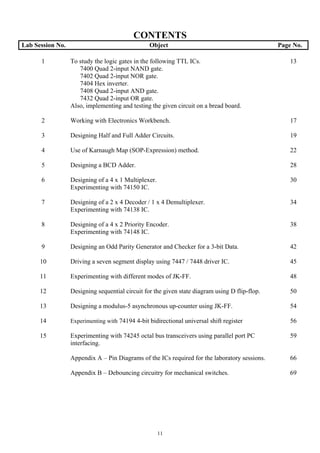
CONTENTS
Lab Session No.                                  Object                                         Page No.

      1           To study the logic gates in the following TTL ICs.                                13
                     7400 Quad 2-input NAND gate.
                     7402 Quad 2-input NOR gate.
                     7404 Hex inverter.
                     7408 Quad 2-input AND gate.
                     7432 Quad 2-input OR gate.
                  Also, implementing and testing the given circuit on a bread board.

      2           Working with Electronics Workbench.                                               17

      3           Designing Half and Full Adder Circuits.                                           19

      4           Use of Karnaugh Map (SOP-Expression) method.                                      22

      5           Designing a BCD Adder.                                                            28

      6           Designing of a 4 x 1 Multiplexer.                                                 30
                  Experimenting with 74150 IC.

      7           Designing of a 2 x 4 Decoder / 1 x 4 Demultiplexer.                               34
                  Experimenting with 74138 IC.

      8           Designing of a 4 x 2 Priority Encoder.                                            38
                  Experimenting with 74148 IC.

      9           Designing an Odd Parity Generator and Checker for a 3-bit Data.                   42

      10          Driving a seven segment display using 7447 / 7448 driver IC.                      45

      11          Experimenting with different modes of JK-FF.                                      48

      12          Designing sequential circuit for the given state diagram using D flip-flop.       50

      13          Designing a modulus-5 asynchronous up-counter using JK-FF.                        54

      14          Experimenting with 74194 4-bit bidirectional universal shift register             56

      15          Experimenting with 74245 octal bus transceivers using parallel port PC            59
                  interfacing.

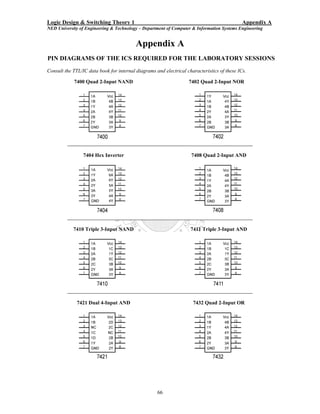
                  Appendix A – Pin Diagrams of the ICs required for the laboratory sessions.        66

                  Appendix B – Debouncing circuitry for mechanical switches.                        69


                                                      11
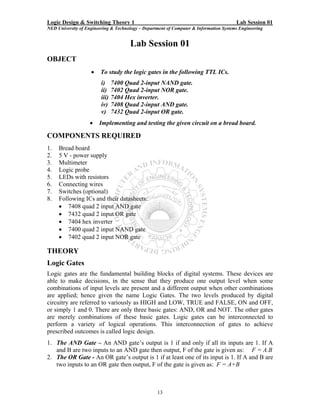
Logic Design & Switching Theory 1                                                       Lab Session 01
NED University of Engineering & Technology – Department of Computer & Information Systems Engineering


                                      Lab Session 01
OBJECT
                    •    To study the logic gates in the following TTL ICs.
                         i)     7400 Quad 2-input NAND gate.
                         ii)    7402 Quad 2-input NOR gate.
                         iii)   7404 Hex inverter.
                         iv)    7408 Quad 2-input AND gate.
                         v)     7432 Quad 2-input OR gate.
                    •   Implementing and testing the given circuit on a bread board.

COMPONENTS REQUIRED
1.   Bread board
2.   5 V - power supply
3.   Multimeter
4.   Logic probe
5.   LEDs with resistors
6.   Connecting wires
7.   Switches (optional)
8.   Following ICs and their datasheets:
     • 7408 quad 2 input AND gate
     • 7432 quad 2 input OR gate
     • 7404 hex inverter
     • 7400 quad 2 input NAND gate
     • 7402 quad 2 input NOR gate

THEORY
Logic Gates
Logic gates are the fundamental building blocks of digital systems. These devices are
able to make decisions, in the sense that they produce one output level when some
combinations of input levels are present and a different output when other combinations
are applied; hence given the name Logic Gates. The two levels produced by digital
circuitry are referred to variously as HIGH and LOW, TRUE and FALSE, ON and OFF,
or simply 1 and 0. There are only three basic gates: AND, OR and NOT. The other gates
are merely combinations of these basic gates. Logic gates can be interconnected to
perform a variety of logical operations. This interconnection of gates to achieve
prescribed outcomes is called logic design.
1. The AND Gate – An AND gate’s output is 1 if and only if all its inputs are 1. If A
   and B are two inputs to an AND gate then output, F of the gate is given as: F = A.B
2. The OR Gate - An OR gate’s output is 1 if at least one of its input is 1. If A and B are
   two inputs to an OR gate then output, F of the gate is given as: F = A+B


                                                   13
Logic Design & Switching Theory 1                                                       Lab Session 01
NED University of Engineering & Technology – Department of Computer & Information Systems Engineering

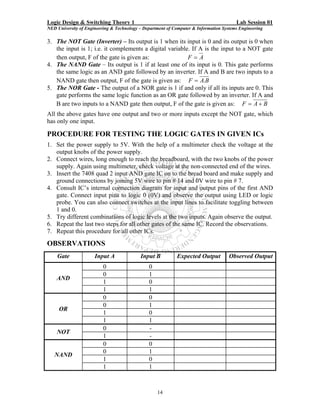
3. The NOT Gate (Inverter) – Its output is 1 when its input is 0 and its output is 0 when
   the input is 1; i.e. it complements a digital variable. If A is the input to a NOT gate
   then output, F of the gate is given as:               F=A
4. The NAND Gate – Its output is 1 if at least one of its input is 0. This gate performs
   the same logic as an AND gate followed by an inverter. If A and B are two inputs to a
   NAND gate then output, F of the gate is given as: F = A.B
5. The NOR Gate - The output of a NOR gate is 1 if and only if all its inputs are 0. This
   gate performs the same logic function as an OR gate followed by an inverter. If A and
   B are two inputs to a NAND gate then output, F of the gate is given as: F = A + B
All the above gates have one output and two or more inputs except the NOT gate, which
has only one input.

PROCEDURE FOR TESTING THE LOGIC GATES IN GIVEN ICs
1. Set the power supply to 5V. With the help of a multimeter check the voltage at the
   output knobs of the power supply.
2. Connect wires, long enough to reach the breadboard, with the two knobs of the power
   supply. Again using multimeter, check voltage at the non-connected end of the wires.
3. Insert the 7408 quad 2 input AND gate IC on to the bread board and make supply and
   ground connections by joining 5V wire to pin # 14 and 0V wire to pin # 7.
4. Consult IC’s internal connection diagram for input and output pins of the first AND
   gate. Connect input pins to logic 0 (0V) and observe the output using LED or logic
   probe. You can also connect switches at the input lines to facilitate toggling between
   1 and 0.
5. Try different combinations of logic levels at the two inputs. Again observe the output.
6. Repeat the last two steps for all other gates of the same IC. Record the observations.
7. Repeat this procedure for all other ICs.
OBSERVATIONS
    Gate              Input A              Input B          Expected Output          Observed Output
                          0                    0
                          0                    1
    AND
                          1                    0
                          1                    1
                          0                    0
                          0                    1
     OR
                          1                    0
                          1                    1
                          0                    -
    NOT
                          1                    -
                          0                    0
                          0                    1
   NAND
                          1                    0
                          1                    1


                                                   14
Logic Design & Switching Theory 1                                                       Lab Session 01
NED University of Engineering & Technology – Department of Computer & Information Systems Engineering


                          0                    0
                          0                    1
    NOR
                          1                    0
                          1                    1

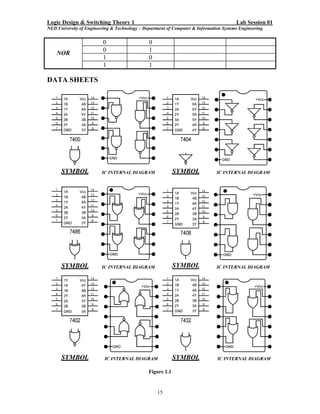
DATA SHEETS


                                               Figure 1.1


                                                   15
Logic Design & Switching Theory 1                                                       Lab Session 01
NED University of Engineering & Technology – Department of Computer & Information Systems Engineering


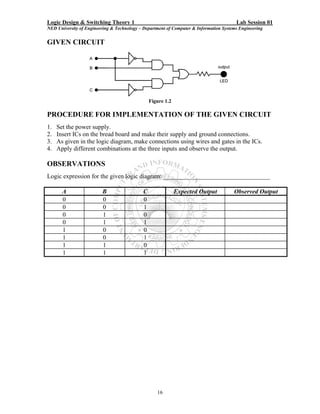
GIVEN CIRCUIT


                                                 Figure 1.2

PROCEDURE FOR IMPLEMENTATION OF THE GIVEN CIRCUIT
1.   Set the power supply.
2.   Insert ICs on the bread board and make their supply and ground connections.
3.   As given in the logic diagram, make connections using wires and gates in the ICs.
4.   Apply different combinations at the three inputs and observe the output.

OBSERVATIONS
Logic expression for the given logic diagram: __________________________________

       A                 B                   C                Expected Output          Observed Output
       0                 0                   0
       0                 0                   1
       0                 1                   0
       0                 1                   1
       1                 0                   0
       1                 0                   1
       1                 1                   0
       1                 1                   1


                                                    16
Logic Design & Switching Theory 1                                                       Lab Session 02
NED University of Engineering & Technology – Department of Computer & Information Systems Engineering


                                      Lab Session 02
OBJECT
                              Working with Electronics Workbench

ELECTRONICS WORKBENCH - EWB
Electronics Workbench is a computer aided design tool that provides you with all the
components and instruments necessary to create board-level designs. It has complete
mixed analog and digital simulation and graphical waveform analysis, allowing you to
design your circuit and then analyze it using different simulated instruments and analysis
options. It is fully integrated and interactive, thus you can change your circuits quickly,
allowing fast and repeated what-if analysis.
Electronics Workbench provides the following kind of components:
• Sources parts bin (AC voltage source, Vcc source, ground, battery, etc)
• Basic parts bin (resistors, capacitors, transformers, switches, etc)
• Diodes parts bin
• Transistors parts bin
• Analog ICs parts bin (op-amps, etc)
• Mixed ICs parts bin (ADCs, DACs, 555 timers, etc)
• Digital ICs parts bin (AND, OR, adders, multiplexers, etc)
• Indicators parts bin (voltmeter, ammeter, probe, displays, etc)
• Controls parts bin (voltage differentiator, multiplier, etc)
• Instruments parts bin (multimeter, oscilloscope, function generator, etc)
• Miscellaneous parts bin (write data, textbox, etc)
   o Write data: This component allows you to save simulation results as an ASCII file.
   o Text Box: Use this to add descriptive text anywhere in a circuit.

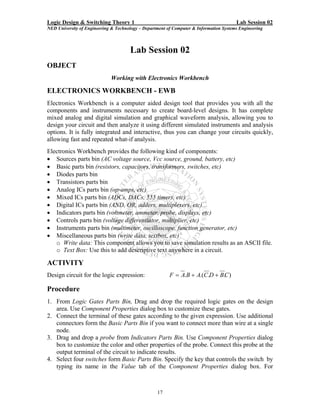
ACTIVITY
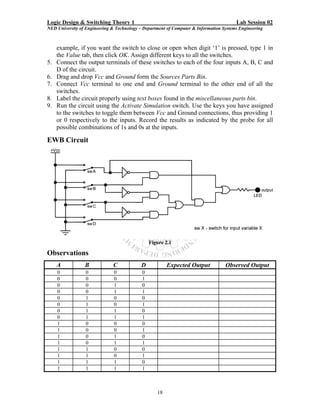
Design circuit for the logic expression:                 F = A.B + A.(C.D + B.C )

Procedure
1. From Logic Gates Parts Bin, Drag and drop the required logic gates on the design
   area. Use Component Properties dialog box to customize these gates.
2. Connect the terminal of these gates according to the given expression. Use additional
   connectors form the Basic Parts Bin if you want to connect more than wire at a single
   node.
3. Drag and drop a probe from Indicators Parts Bin. Use Component Properties dialog
   box to customize the color and other properties of the probe. Connect this probe at the
   output terminal of the circuit to indicate results.
4. Select four switches form Basic Parts Bin. Specify the key that controls the switch by
   typing its name in the Value tab of the Component Properties dialog box. For


                                                   17
Logic Design & Switching Theory 1                                                       Lab Session 02
NED University of Engineering & Technology – Department of Computer & Information Systems Engineering


     example, if you want the switch to close or open when digit ‘1’ is pressed, type 1 in
     the Value tab, then click OK. Assign different keys to all the switches.
5.   Connect the output terminals of these switches to each of the four inputs A, B, C and
     D of the circuit.
6.   Drag and drop Vcc and Ground form the Sources Parts Bin.
7.   Connect Vcc terminal to one end and Ground terminal to the other end of all the
     switches.
8.   Label the circuit properly using text boxes found in the miscellaneous parts bin.
9.   Run the circuit using the Activate Simulation switch. Use the keys you have assigned
     to the switches to toggle them between Vcc and Ground connections, thus providing 1
     or 0 respectively to the inputs. Record the results as indicated by the probe for all
     possible combinations of 1s and 0s at the inputs.

EWB Circuit


                                                Figure 2.1

Observations
     A           B            C             D           Expected Output            Observed Output
     0            0            0            0
     0            0            0            1
     0            0            1            0
     0            0            1            1
     0            1            0            0
     0            1            0            1
     0            1            1            0
     0            1            1            1
     1            0            0            0
     1            0            0            1
     1            0            1            0
     1            0            1            1
     1            1            0            0
     1            1            0            1
     1            1            1            0
     1            1            1            1


                                                   18
Logic Design & Switching Theory 1                                                       Lab Session 03
NED University of Engineering & Technology – Department of Computer & Information Systems Engineering


                                      Lab Session 03
OBJECT
                            Designing Half and Full Adder Circuits.

COMPONENTS AND APPARATUS REQUIRED
1. Following ICs and their Datasheets:
   • 7408 Quad 2-input AND Gate
   • 7432 Quad 2-input OR Gate
   • 7486 Quad 2-input XOR Gate
2. Digital Trainer DT-01 or the following components:
   Bread board, 5 V - Power Supply, Multimeter, Logic Probe, LEDs with Resistors,
   Connecting wires, Switches

THEORY
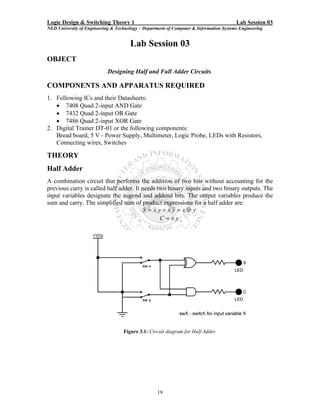
Half Adder
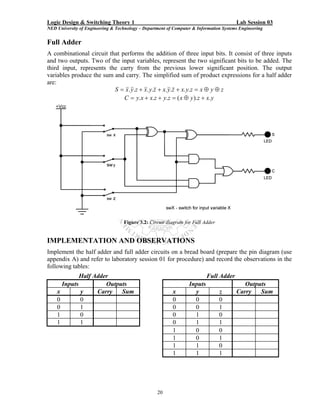
A combination circuit that performs the addition of two bits without accounting for the
previous carry is called half adder. It needs two binary inputs and two binary outputs. The
input variables designate the augend and addend bits. The output variables produce the
sum and carry. The simplified sum of product expressions for a half adder are:
                                         S = x. y + x. y = x ⊕ y
                                                C = x. y


                                   Figure 3.1: Circuit diagram for Half Adder


                                                   19
Logic Design & Switching Theory 1                                                       Lab Session 03
NED University of Engineering & Technology – Department of Computer & Information Systems Engineering


Full Adder
A combinational circuit that performs the addition of three input bits. It consist of three inputs
and two outputs. Two of the input variables, represent the two significant bits to be added. The
third input, represents the carry from the previous lower significant position. The output
variables produce the sum and carry. The simplified sum of product expressions for a half adder
are:
                          S = x. y.z + x. y.z + x. y.z + x. y.z = x ⊕ y ⊕ z
                              C = y.x + x.z + y.z = ( x ⊕ y ).z + x. y


                                   Figure 3.2: Circuit diagram for Full Adder


IMPLEMENTATION AND OBSERVATIONS
Implement the half adder and full adder circuits on a bread board (prepare the pin diagram (use
appendix A) and refer to laboratory session 01 for procedure) and record the observations in the
following tables:
             Half Adder                                                    Full Adder
      Inputs          Outputs                                     Inputs                   Outputs
    x        y     Carry   Sum                            x         y           z       Carry   Sum
    0        0                                            0         0           0
    0        1                                            0         0           1
    1        0                                            0         1           0
    1        1                                            0         1           1
                                                          1         0           0
                                                          1         0           1
                                                          1         1           0
                                                          1         1           1


                                                   20
Logic Design & Switching Theory 1                                                       Lab Session 03
NED University of Engineering & Technology – Department of Computer & Information Systems Engineering


 ACTIVITY
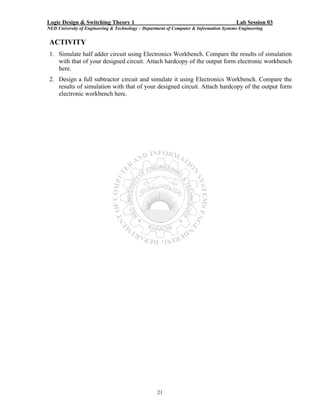
 1. Simulate half adder circuit using Electronics Workbench. Compare the results of simulation
    with that of your designed circuit. Attach hardcopy of the output form electronic workbench
    here.
 2. Design a full subtractor circuit and simulate it using Electronics Workbench. Compare the
    results of simulation with that of your designed circuit. Attach hardcopy of the output form
    electronic workbench here.


                                                   21
Logic Design & Switching Theory 1                                                       Lab Session 04
NED University of Engineering & Technology – Department of Computer & Information Systems Engineering


                                      Lab Session 04
OBJECT
                      Use of Karnaugh Map (SOP-Expression) method.

GIVEN LOGIC EXPRESSION
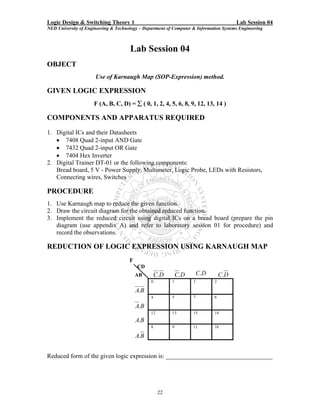
                     F (A, B, C, D) = ∑ ( 0, 1, 2, 4, 5, 6, 8, 9, 12, 13, 14 )

COMPONENTS AND APPARATUS REQUIRED
1. Digital ICs and their Datasheets
   • 7408 Quad 2-input AND Gate
   • 7432 Quad 2-input OR Gate
   • 7404 Hex Inverter
2. Digital Trainer DT-01 or the following components:
   Bread board, 5 V - Power Supply, Multimeter, Logic Probe, LEDs with Resistors,
   Connecting wires, Switches

PROCEDURE
1. Use Karnaugh map to reduce the given function.
2. Draw the circuit diagram for the obtained reduced function.
3. Implement the reduced circuit using digital ICs on a bread board (prepare the pin
   diagram (use appendix A) and refer to laboratory session 01 for procedure) and
   record the observations.

REDUCTION OF LOGIC EXPRESSION USING KARNAUGH MAP
                                      F
                                          CD
                                          AB        C.D       C.D       C.D       C.D
                                                0         1         3         2

                                          A.B
                                                4         5         7         6

                                          A.B
                                                12        13        15        14
                                          A.B
                                                8         9         11        10

                                          A.B


Reduced form of the given logic expression is: __________________________________


                                                     22
Logic Design & Switching Theory 1                                                       Lab Session 04
NED University of Engineering & Technology – Department of Computer & Information Systems Engineering


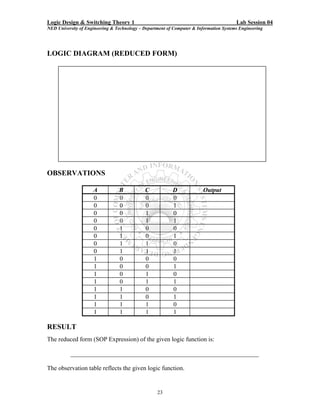
LOGIC DIAGRAM (REDUCED FORM)


OBSERVATIONS

                     A           B           C            D              Output
                     0           0           0            0
                     0           0           0            1
                     0           0           1            0
                     0           0           1            1
                     0           1           0            0
                     0           1           0            1
                     0           1           1            0
                     0           1           1            1
                     1           0           0            0
                     1           0           0            1
                     1           0           1            0
                     1           0           1            1
                     1           1           0            0
                     1           1           0            1
                     1           1           1            0
                     1           1           1            1

RESULT
The reduced form (SOP Expression) of the given logic function is:

           ____________________________________________________________

The observation table reflects the given logic function.


                                                   23
Logic Design & Switching Theory 1                                                       Lab Session 04
NED University of Engineering & Technology – Department of Computer & Information Systems Engineering


ACTIVITY 1

Using Electronics Workbench, derive a truth table and logic circuit for the
following logic expression:
                                             F = A + A.B

Procedure

1. From the Instruments Parts Bin, drag and drop Logic Converter on the design area.
2. Double click the Logic Converter to reveal Logic Converter dialog box. This dialog
   box shows various conversion options between truth table, logic expression and logic
   circuit.
3. Enter the given logic expression in the edit box found at the end of the dialog box.
   Use ‘ to represent invert of a variable. For example, A is written as A’.
4. Click the Boolean Expression to Truth Table button. The truth table appears in the
   logic converter's display.
5. Now click the Boolean Expression to Circuit button. This creates the logic circuit for
   the given expression in the design area. Label the diagram if needed.

Resulting Logic Circuit

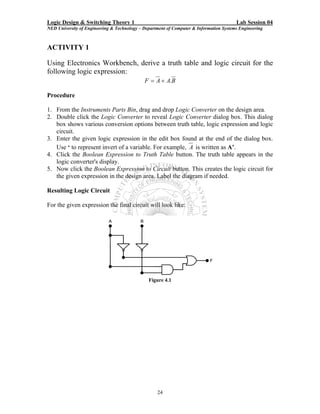
For the given expression the final circuit will look like:


                                               Figure 4.1


                                                   24
Logic Design & Switching Theory 1                                                       Lab Session 04
NED University of Engineering & Technology – Department of Computer & Information Systems Engineering


ACTIVITY 2
Using Electronics Workbench, find a simplified logic expression and circuit
for the following truth table
                                   A       B       C         Output
                                   0       0       0           1
                                   0       0       1           1
                                   0       1       0           0
                                   0       1       1           1
                                   1       0       0           0
                                   1       0       1           0
                                   1       1       0           0
                                   1       1       1           1
Procedure

1. Click three input channels from A to H, across the top of the logic converter. The
   display area below the terminals fills up with the necessary combinations of ones and
   zeros to fulfill the input conditions. The values in the output column on the right are
   initially set to 0.
2. Edit the output column to specify the desired output for each input condition. To
   change an output value, select it and type a new value: 1, 0 or x. An x indicates a
   don’t care condition.
3. To convert this truth table to a Boolean expression, click the Truth Table to Boolean
   Expression button. The Boolean expression will be displayed at the bottom of the
   logic converter.
4. Simplify the expression by clicking the Simplify button.
5. Now click the Boolean Expression to Circuit button. This creates the logic circuit for
   the given expression in the design area.

Resulting Logic Circuit

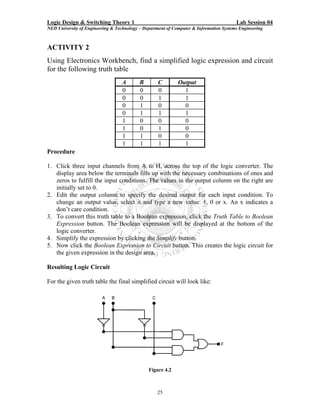
For the given truth table the final simplified circuit will look like:


                                               Figure 4.2


                                                   25
Logic Design & Switching Theory 1                                                       Lab Session 04
NED University of Engineering & Technology – Department of Computer & Information Systems Engineering


ACTIVITY 3
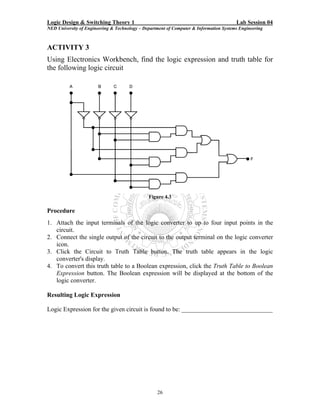
Using Electronics Workbench, find the logic expression and truth table for
the following logic circuit


                                               Figure 4.3

Procedure
1. Attach the input terminals of the logic converter to up to four input points in the
   circuit.
2. Connect the single output of the circuit to the output terminal on the logic converter
   icon.
3. Click the Circuit to Truth Table button. The truth table appears in the logic
   converter's display.
4. To convert this truth table to a Boolean expression, click the Truth Table to Boolean
   Expression button. The Boolean expression will be displayed at the bottom of the
   logic converter.

Resulting Logic Expression

Logic Expression for the given circuit is found to be: _____________________________


                                                   26
Logic Design & Switching Theory 1                                                       Lab Session 04
NED University of Engineering & Technology – Department of Computer & Information Systems Engineering


For activities 1, 2 and 3, attach hardcopy of the output (truth table, logic expression and
logic circuit) form electronic workbench here.


                                                   27
Logic Design & Switching Theory 1                                                           Lab Session 05
NED University of Engineering & Technology – Department of Computer & Information Systems Engineering


                                         Lab Session 05
OBJECT
                                        Designing a BCD Adder

COMPONENTS AND APPARATUS REQUIRED
1. Following ICs and their Datasheets:
   • 7408 Quad 2-input AND Gate
   • 7432 Quad 2-input OR Gate
   • 7483 4-bit Binary Adder
2. Digital Trainer DT-01 or the following components:
   Bread board, 5 V - Power Supply, Multimeter, Logic Probe, LEDs with Resistors
   (100 Ω), Connecting wires, Switches

THEORY
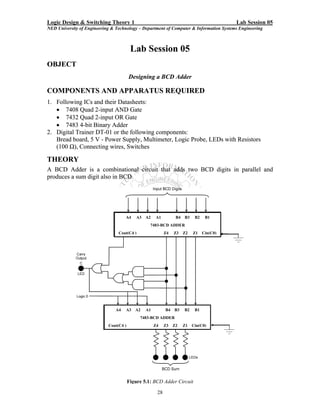
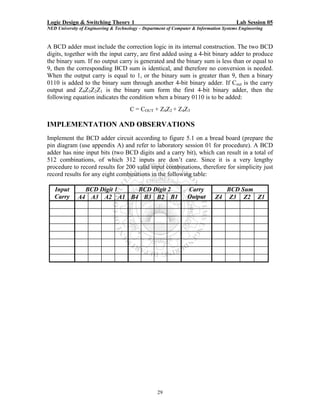
A BCD Adder is a combinational circuit that adds two BCD digits in parallel and
produces a sum digit also in BCD.


                                     A4     A3   A2    A1         B4   B3    B2    B1
                                                  7483-BCD ADDER
                                 Cout(C4 )                  Z4   Z3    Z2   Z1    Cin(C0)


                                A4   A3    A2    A1         B4   B3    B2    B1
                                             7483-BCD ADDER
                            Cout(C4 )                 Z4    Z3   Z2    Z1   Cin(C0)


                                        Figure 5.1: BCD Adder Circuit

                                                       28
Logic Design & Switching Theory 1                                                       Lab Session 05
NED University of Engineering & Technology – Department of Computer & Information Systems Engineering


A BCD adder must include the correction logic in its internal construction. The two BCD
digits, together with the input carry, are first added using a 4-bit binary adder to produce
the binary sum. If no output carry is generated and the binary sum is less than or equal to
9, then the corresponding BCD sum is identical, and therefore no conversion is needed.
When the output carry is equal to 1, or the binary sum is greater than 9, then a binary
0110 is added to the binary sum through another 4-bit binary adder. If Cout is the carry
output and Z4Z3Z2Z1 is the binary sum form the first 4-bit binary adder, then the
following equation indicates the condition when a binary 0110 is to be added:
                                      C = COUT + Z4Z2 + Z4Z3

IMPLEMENTATION AND OBSERVATIONS
Implement the BCD adder circuit according to figure 5.1 on a bread board (prepare the
pin diagram (use appendix A) and refer to laboratory session 01 for procedure). A BCD
adder has nine input bits (two BCD digits and a carry bit), which can result in a total of
512 combinations, of which 312 inputs are don’t care. Since it is a very lengthy
procedure to record results for 200 valid input combinations, therefore for simplicity just
record results for any eight combinations in the following table:

   Input        BCD Digit 1 BCD Digit 2                          Carry           BCD Sum
   Carry      A4 A3 A2 A1 B4 B3 B2 B1                            Output       Z4 Z3 Z2 Z1


                                                   29
Logic Design & Switching Theory 1                                                       lab Session 06
NED University of Engineering & Technology – Department of Computer & Information Systems Engineering


                                      Lab Session 06
OBJECT
                                • Designing of a 4 x 1 Multiplexer
                                 • Experimenting with 74150 IC.

COMPONENTS AND APPARATUS REQUIRED
1. Following ICs and their Datasheets:
   • 7408 Quad 2-input AND Gates or 7411 Triple 3-input AND Gates
   • 7432 Quad 2-input OR Gates
   • 7404 Hex Inverter
   • 74150 16 x 1 MUX
2. Digital Trainer DT-01 or the following components:
   Bread board, 5 V - Power Supply, Multimeter, Logic Probe, LEDs with Resistors,
   Connecting wires, Switches

THEORY
Multiplexers
A digital data Multiplexer (MUX) is a combinational circuit having several data inputs
and a single output. A set of data-select inputs is used to control which of the data inputs
is routed to the single output. A multiplexer is also called a data selector because of this
ability to select which data input is connected o the output. Normally there are 2n input
lines and n selection lines whose bit combination determine which input is selected.

DESIGN OF A 4 x 1 MULTIPLEXER
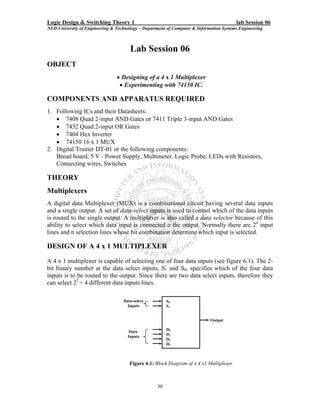
A 4 x 1 multiplexer is capable of selecting one of four data inputs (see figure 6.1). The 2-
bit binary number at the data select inputs, S1 and S0, specifies which of the four data
inputs is to be routed to the output. Since there are two data select inputs, therefore they
can select 22 = 4 different data inputs lines.

                                   Data-select          S0
                                     Inputs             S1


                                                                            Output

                                      Data              D0
                                     Inputs             D1
                                                        D2
                                                        D3


                                      Figure 6.1: Block Diagram of a 4 x1 Multiplexer


                                                   30
Logic Design & Switching Theory 1                                                       lab Session 06
NED University of Engineering & Technology – Department of Computer & Information Systems Engineering


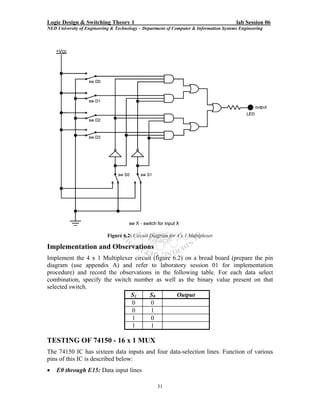
                            Figure 6.2: Circuit Diagram for 4 x 1 Multiplexer

Implementation and Observations
Implement the 4 x 1 Multiplexer circuit (figure 6.2) on a bread board (prepare the pin
diagram (use appendix A) and refer to laboratory session 01 for implementation
procedure) and record the observations in the following table. For each data select
combination, specify the switch number as well as the binary value present on that
selected switch.
                               S1     S0          Output
                               0       0
                               0       1
                               1       0
                               1       1

TESTING OF 74150 - 16 x 1 MUX
The 74150 IC has sixteen data inputs and four data-selection lines. Function of various
pins of this IC is described below:
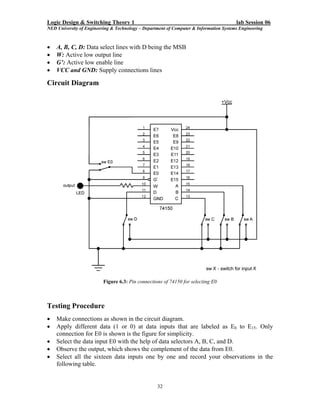
•   E0 through E15: Data input lines

                                                   31
Logic Design & Switching Theory 1                                                       lab Session 06
NED University of Engineering & Technology – Department of Computer & Information Systems Engineering


•   A, B, C, D: Data select lines with D being the MSB
•   W: Active low output line
•   G’: Active low enable line
•   VCC and GND: Supply connections lines

Circuit Diagram


                          Figure 6.3: Pin connections of 74150 for selecting E0


Testing Procedure
•   Make connections as shown in the circuit diagram.
•   Apply different data (1 or 0) at data inputs that are labeled as E0 to E15. Only
    connection for E0 is shown is the figure for simplicity.
•   Select the data input E0 with the help of data selectors A, B, C, and D.
•   Observe the output, which shows the complement of the data from E0.
•   Select all the sixteen data inputs one by one and record your observations in the
    following table.


                                                   32
Logic Design & Switching Theory 1                                                       lab Session 06
NED University of Engineering & Technology – Department of Computer & Information Systems Engineering


Observations
 G’        D        C        B        A        W        G’       D          C      B        A           W
 0         0        0        0        0                 0        1          0      0        0
 0         0        0        0        1                 0        1          0      0        1
 0         0        0        1        0                 0        1          0      1        0
 0         0        0        1        1                 0        1          0      1        1
 0         0        1        0        0                 0        1          1      0        0
 0         0        1        0        1                 0        1          1      0        1
 0         0        1        1        0                 0        1          1      1        0
 0         0        1        1        1                 0        1          1      1        1
ACTIVITY
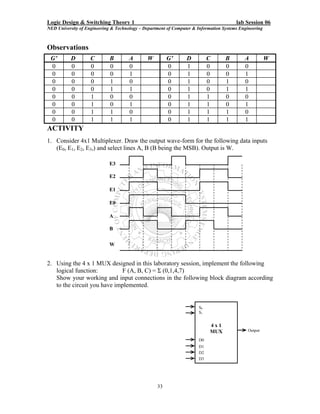
1. Consider 4x1 Multiplexer. Draw the output wave-form for the following data inputs
   (E0, E1, E2, E3,) and select lines A, B (B being the MSB). Output is W.

                             E3

                             E2

                             E1

                             E0

                             A

                             B


                             W


2. Using the 4 x 1 MUX designed in this laboratory session, implement the following
   logical function:          F (A, B, C) = Σ (0,1,4,7)
   Show your working and input connections in the following block diagram according
   to the circuit you have implemented.


                                                                       S0
                                                                       S1


                                                                            4x1
                                                                            MUX               Output

                                                                       D0
                                                                       D1
                                                                       D2
                                                                       D3


                                                   33
Logic Design & Switching Theory 1                                                       Lab Session 07
NED University of Engineering & Technology – Department of Computer & Information Systems Engineering


                                       Lab Session 07
OBJECT
                   •    Designing of a 2 x 4 Decoder / 1 x 4 Demultiplexer
                              • Experimenting with 74138 IC.

COMPONENTS AND APPARATUS REQUIRED
1. Following ICs and their Datasheets:
   • 7408 Quad 2-input or 7411 Triple 3-input AND Gates
   • 7404 Hex Inverter
   • 74138 3 x 8 Decoder
2. Digital Trainer DT-01 or the following components:
   Bread board, 5 V - Power Supply, Multimeter, Logic Probe, LEDs with Resistors,
   Connecting wires, Switches

THEORY
Decoder
A Decoder is a combinational circuit that converts binary information form n input lines
to a maximum of 2n unique output lines. In practical applications, decoders are often used
for selecting one of several devices.

Demultiplexer
A decoder with an enable input can function as a Demultiplexer. A Demultiplexer
(DMUX) id a circuit that receives information on a single line and transmits this
information on one of 2n possible output lines. The selection of a specific output line is
controlled by the bit values of n selection lines.

DESIGN OF A 2 x 4 DECODER / 1 x 4 DEMULTIPLEXER
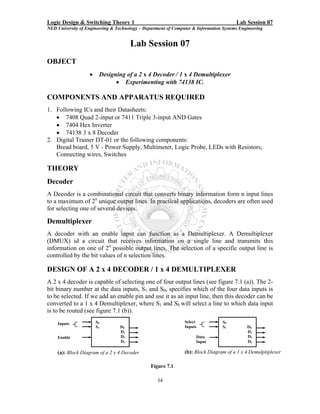
A 2 x 4 decoder is capable of selecting one of four output lines (see figure 7.1 (a)). The 2-
bit binary number at the data inputs, S1 and S0, specifies which of the four data inputs is
to be selected. If we add an enable pin and use it as an input line, then this decoder can be
converted to a 1 x 4 Demultiplexer, where S1 and S0 will select a line to which data input
is to be routed (see figure 7.1 (b)).
    Inputs             S0                                       Select            S0
                       S1         D0                            Inputs            S1         D0
                                  D1                                                         D1
    Enable                        D2                                 Data                    D2
                                  D3                                 Input                   D3

    (a): Block Diagram of a 2 x 4 Decoder                       (b): Block Diagram of a 1 x 4 Demulptiplexer

                                                Figure 7.1

                                                   34
Logic Design & Switching Theory 1                                                        Lab Session 07
NED University of Engineering & Technology – Department of Computer & Information Systems Engineering


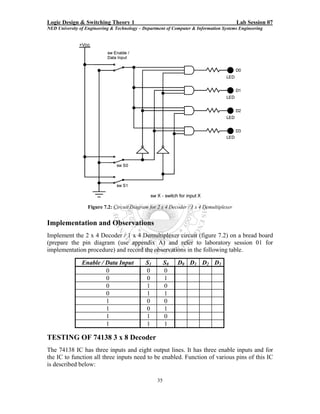
                   Figure 7.2: Circuit Diagram for 2 x 4 Decoder / 1 x 4 Demultiplexer


Implementation and Observations
Implement the 2 x 4 Decoder / 1 x 4 Demultiplexer circuit (figure 7.2) on a bread board
(prepare the pin diagram (use appendix A) and refer to laboratory session 01 for
implementation procedure) and record the observations in the following table.

                Enable / Data Input           S1        S0   D0 D1 D2 D3
                         0                    0         0
                         0                    0         1
                         0                    1         0
                         0                    1         1
                         1                    0         0
                         1                    0         1
                         1                    1         0
                         1                    1         1

TESTING OF 74138 3 x 8 Decoder
The 74138 IC has three inputs and eight output lines. It has three enable inputs and for
the IC to function all three inputs need to be enabled. Function of various pins of this IC
is described below:

                                                   35
Logic Design & Switching Theory 1                                                       Lab Session 07
NED University of Engineering & Technology – Department of Computer & Information Systems Engineering

•   Y0 through Y7: Active low data outputs
•   A, B, C: Input / select lines with C being the MSB
•   G1: Active high enable Input
•   G2A’ and G2B’: Active low enable Inputs
•   VCC and GND: Supply connections lines

Circuit Diagram


                                  Figure 7.3: Pin connections of 74138

Testing Procedure
•   Make connections as shown in the circuit diagram.
•   Apply different combinations of 1s and 0s at data inputs.
•   Observe the output and record your observations in the following table.

Observations
     C        B        A        Y0       Y1       Y2       Y3       Y4       Y5       Y6       Y7
     0        0        0
     0        0        1
     0        1        0
     0        1        1
     1        0        0
     1        0        1
     1        1        0
     1        1        1


                                                   36
Logic Design & Switching Theory 1                                                       Lab Session 07
NED University of Engineering & Technology – Department of Computer & Information Systems Engineering


ACTIVITY
1. What will be the binary values at the outputs, Y0 through Y7, of 74138 if:
   • All three enable pins are connected to ground?
   _____________________________________________________________________
   _____________________________________________________________________
   _____________________________________________________________________
    • All three enable pins are connected to VCC?
    _____________________________________________________________________
    _____________________________________________________________________
    _____________________________________________________________________

2. Show connections for 74138 in order to use it as a 1 x 8 Demultiplexer.


3. Consider a 2 x 4 Decoder with two enable inputs (one active high - G and one active
   low – G’). Draw the output wave-forms for D0, D1, D2 and D3, if the two select
   inputs are A and B (B being the MSB). All outputs are active low.


                      G’
                      G


                      A

                      B


                      D0


                      D1


                      D2


                      D3

                                                   37
Logic Design & Switching Theory 1                                                       Lab Session 08
NED University of Engineering & Technology – Department of Computer & Information Systems Engineering


                                      Lab Session 08
OBJECT
                             • Designing of a 4 x 2 Priority Encoder
                               • Experimenting with 74148 IC.

COMPONENTS AND APPARATUS REQUIRED
1. Following ICs and their Datasheets:
   • 7408 Quad 2-input or 7421 Dual 4-input AND Gates
   • 7432 Quad 2-input OR Gates
   • 7404 Hex Inverter
   • 74148 Encoder
2. Digital Trainer DT-01 or the following components:
   Bread board, 5 V - Power Supply, Multimeter, Logic Probe, LEDs with Resistors,
   Connecting wires, Switches

THEORY
Encoder
An Encoder is a digital function that produces a reverse operation from that of a decoder.
An Encoder has 2n (or less) input lines and n output lines. The output lines generate the
binary code for the 2n input variables.

Priority Encoder
A simple encoder may produce an erroneous output if more than one of its inputs is high.
A Priority Encoder is one that responds to just one input among those that may be
simultaneously high, in accordance with some priority system. The most common
priority system is based on the relative magnitudes of the inputs: whichever decimal input
is largest is the one that is encoded.

DESIGN OF A 4 x 2 Priority Encoder
The following equations represent the outputs of a 4 x 2 priority encoder:
                                          A = D 2 + D3
                                        B = D1.D 2 + D3
As can be seen from the equations that input D0, which has a binary code 00, is not used
in any equation. A binary code 00 at the output indicates two conditions: Either D0 is
selected or no input is selected. In order to differentiate these two conditions, we will
provide an additional output, Z to indicate if at least one of the inputs is a 1. The equation
for Z will be:
                                       Z = D1.D 2.D3.D 4
If Z is 0, then the binary code 00 at the output indicates that D0 is selected and if Z is 1,
then it indicates that no input line is selected.

                                                   38
Logic Design & Switching Theory 1                                                       Lab Session 08
NED University of Engineering & Technology – Department of Computer & Information Systems Engineering


                         Figure 8.1: Circuit Diagram for 4 x 2 Priority Encoder


Implementation and Observations
Implement the 4 x 2 Priority Encoder circuit (figure 8.1) on a bread board (prepare the
pin diagram (use appendix A) and refer to laboratory session 01 for implementation
procedure) and record the observations in the following table.

                                D3      D2      D1      D0     A     B
                                0        0       0      1
                                0        0       1      x
                                0        1       x      x
                                1        x       x      x

TESTING OF 74148 8 x 3 Octal Priority Encoder
The 74148 is a priority encoder with active-Low input for decimal digits. There are nine
inputs lines (including an enable input) and five output lines, of which three represents
the binary code for the octal digit. Function of various pins of this IC is described below:
•   0 through 7: Active low data inputs representing the octal digits
•   A2, A1, A0: Active low output lines representing the binary code
•   E1: Active low enable Input
•   E0: Active low output indicating none of the inputs is high
•   GS: Active low output indicating any of the inputs is high
•   VCC and GND: Supply connections lines
Therefore if GS, A2, A1, and A0 are all low, then it shows that line 0 is selected and if
E0, A2, A1, and A0 are all low, then it shows that none of the inputs selected. E0 and GS
cannot be in the same state provided that E1 is enabled.


                                                   39
Logic Design & Switching Theory 1                                                        Lab Session 08
NED University of Engineering & Technology – Department of Computer & Information Systems Engineering


Circuit Diagram


                                  Figure 8.2: Pin connections of 74148

Testing Procedure
•   Make connections as shown in the circuit diagram.
•   Apply different combinations of 1s and 0s at data inputs.
•   Observe the output and record your observations in the following table.

Observations
     0       1       2       3       4       5          6     7      A2     A1      A0      GS          E0
     1       1       1       1       1       1          1     1
     x       x       x       x       x       x          x     0
     x       x       x       x       x       x          0     1
     x       x       x       x       x       0          1     1
     x       x       x       x       0       1          1     1
     x       x       x       0       1       1          1     1
     x       x       0       1       1       1          1     1
     x       0       1       1       1       1          1     1
     0       1       1       1       1       1          1     1


                                                   40
Logic Design & Switching Theory 1                                                       Lab Session 08
NED University of Engineering & Technology – Department of Computer & Information Systems Engineering


ACTIVITY
1. Cascade the following two 74148 8 x 3 Priority Encoders to form 16 x 4 Priority
   Encoder.


                                                   41
Logic Design & Switching Theory 1                                                         Lab Session 09
NED University of Engineering & Technology – Department of Computer & Information Systems Engineering
                                                                                                        `


                                        Lab Session 09
OBJECT
                      Designing an Odd Parity Generator and Checker for a 3-bit Data

COMPONENTS AND APPARATUS REQUIRED
1. Following ICs and their Datasheets:
   • 7486 Quad 2-input Exclusive-OR Gates
   • 7404 Hex Inverter
2. Digital Trainer DT-01 or the following components:
   Bread board, 5 V - Power Supply, Multimeter, Logic Probe, LEDs with Resistors,
   Connecting wires, Switches

THEORY
Parity Generator
When binary data is transmitted and processed, it is – as are all electrical signals –
susceptible to noise that can either alter or distort its contents. 1s may be effectively changed
to 0s and 0s to 1s. To overcome this problem one or more bits are often added to the data as
an aid in detecting errors caused by noise. The most common of these is a Parity bit that
signifies whether the total number of 1s in a code group is odd or even. In an Odd Parity
system, the parity bit is made 0 or 1 as necessary to make the total number 1s odd (counting
the parity bit itself). In an Even Parity system, the parity bit is chosen to make the total
number of 1s even. Table 9.1 shows how parity bits would be added to BCD code group in
both systems.

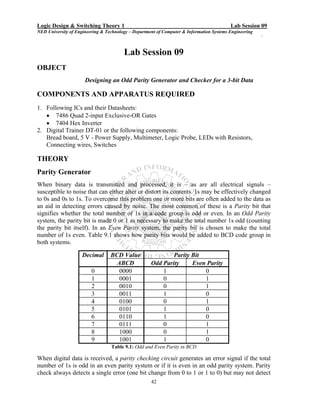
                     Decimal      BCD Value                  Parity Bit
                                    ABCD             Odd Parity     Even Parity
                         0           0000                1              0
                         1           0001                0              1
                         2           0010                0              1
                         3           0011                1              0
                         4           0100                0              1
                         5           0101                1              0
                         6           0110                1              0
                         7           0111                0              1
                         8           1000                0              1
                         9           1001                1              0
                                  Table 9.1: Odd and Even Parity in BCD

When digital data is received, a parity checking circuit generates an error signal if the total
number of 1s is odd in an even parity system or if it is even in an odd parity system. Parity
check always detects a single error (one bit change from 0 to 1 or 1 to 0) but may not detect
                                                     42
Logic Design & Switching Theory 1                                                         Lab Session 09
NED University of Engineering & Technology – Department of Computer & Information Systems Engineering
                                                                                                        `

two or more errors. Odd parity is used more often than even parity because even parity does
not detect a situation where all 0s are created due to short circuit or other fault condition.

DESIGN OF A 3-BIT ODD PARITY GENERATOR AND CHECKER
Let x, y, and z be the three bits that constitute the message and are the input to the Odd
Parity Generator Circuit. Since it is an odd parity system, the bit P is generated so as to
make the total number of 1s odd (including P). The function P can be expressed as follows:
                                          .                 .
                               P = x ⊕ y Ο z or P = x Ο y ⊕ z
Since the IC available is 7486, which is quad 2input XOR IC, therefore we will convert
XNOR also to XOR.
                                                      .
                                           P = x ⊕ y Ο z
                                                    .
                                      P = ( x ⊕ y ) Ο z
Since, for even number of variables,           ______
                                        XOR = XNOR
Therefore,                                 ___________   _________
                                      P=(x ⊕y)⊕z = x ⊕y⊕z
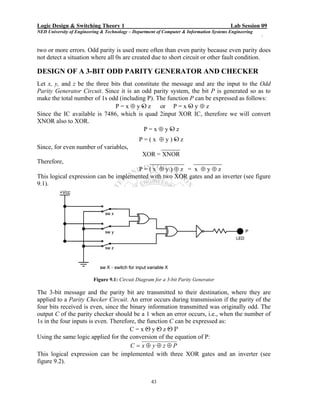
This logical expression can be implemented with two XOR gates and an inverter (see figure
9.1).


                          Figure 9.1: Circuit Diagram for a 3-bit Parity Generator

The 3-bit message and the parity bit are transmitted to their destination, where they are
applied to a Parity Checker Circuit. An error occurs during transmission if the parity of the
four bits received is even, since the binary information transmitted was originally odd. The
output C of the parity checker should be a 1 when an error occurs, i.e., when the number of
1s in the four inputs is even. Therefore, the function C can be expressed as:
                                              . . .
                                      C = x Ο y Ο z Ο P
Using the same logic applied for the conversion of the equation of P:
                                      C = x⊕ y⊕z⊕P
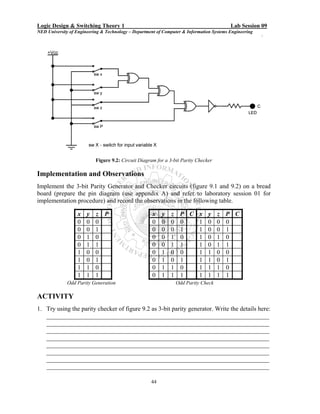
This logical expression can be implemented with three XOR gates and an inverter (see
figure 9.2).


                                                     43
Logic Design & Switching Theory 1                                                         Lab Session 09
NED University of Engineering & Technology – Department of Computer & Information Systems Engineering
                                                                                                        `


                           Figure 9.2: Circuit Diagram for a 3-bit Parity Checker

Implementation and Observations
Implement the 3-bit Parity Generator and Checker circuits (figure 9.1 and 9.2) on a bread
board (prepare the pin diagram (use appendix A) and refer to laboratory session 01 for
implementation procedure) and record the observations in the following table.

                  x    y   z P                        x   y   z    P C x y z P C
                  0    0   0                          0   0   0    0   1 0 0 0
                  0    0   1                          0   0   0    1   1 0 0 1
                  0    1   0                          0   0   1    0   1 0 1 0
                  0    1   1                          0   0   1    1   1 0 1 1
                  1    0   0                          0   1   0    0   1 1 0 0
                  1    0   1                          0   1   0    1   1 1 0 1
                  1    1   0                          0   1   1    0   1 1 1 0
                  1    1   1                          0   1   1    1   1 1 1 1
              Odd Parity Generation                               Odd Parity Check

ACTIVITY
1. Try using the parity checker of figure 9.2 as 3-bit parity generator. Write the details here:
   _______________________________________________________________________
   _______________________________________________________________________
   _______________________________________________________________________
   _______________________________________________________________________
   _______________________________________________________________________
   _______________________________________________________________________
   _______________________________________________________________________
   _______________________________________________________________________

                                                     44
Logic Design & Switching Theory 1                                                       Lab Session 10
NED University of Engineering & Technology – Department of Computer & Information Systems Engineering


                                           Lab Session 10
OBJECT
                    Driving a seven segment display using 7447 / 7448 driver IC.

COMPONENTS AND APPARATUS REQUIRED
1. Following ICs and their Datasheets:
   • Seven Segment Displays (Common Anode / Common Cathode)
   • 7447 / 7448 BCD to Seven Segment Driver
2. Digital Trainer DT-01 or the following components:
   Bread board, 5 V - Power Supply, Multimeter, Logic Probe, LEDs with Resistors,
   Connecting wires, Switches

THEORY
Seven Segment Displays
 A Seven Segment Display consists of seven light-emitting segments. The segments are
designated by letters a through g (see figure 10.1). By illuminating various combinations of
segments, the numerals 0 through 9 can be displayed. Seven Segment Displays are commonly
constructed with light-emitting diodes (LEDs) and with liquid-crystal displays (LCDs). LEDs
generally provide greater illumination levels but require much greater power than LCDs.

An LED display can be a common-anode type or common cathode type. In common anode type,
a high voltage is applied at the common terminal of the display and low voltage is applied at a
segment’s terminal for illumination. In the common-cathode type, a low voltage is applied at the
common terminal of the display and high voltage is applied at a segment’s terminal for
illumination.

                                                          a

                                                 f             b
                                                          g

                                                 e             c


                                                       d
                                       Figure 10.1: Seven Segment Display

7447 / 7448 BCD to Seven Segment Driver
7447 / 7448 IC is particularly used to drive Seven Segment. Its input is a BCD number
and output drives a seven segment display. 7447 is used to drive common-anode displays
whereas 7448 is used to drive common cathode displays. 7447 / 7448 is a 16 pin IC.
Function of various pins of these ICs is described below:
•   A, B, C, D: Inputs representing BCD digits (D being the MSB).

                                                     45
Logic Design & Switching Theory 1                                                       Lab Session 10
NED University of Engineering & Technology – Department of Computer & Information Systems Engineering

•   OA through OG: Outputs to drive segments a through g of the display. (Active low
    in 7447 and active high in 7448).
•   RBI: Ripple Blanking Input. Turns off all the segments if kept low, provided that LT
    is kept high and all other inputs (A, B, C, D, BI) are kept low. Should be kept high
    otherwise.
•   BI / RBO: Wire-AND logic serving as a Blanking Input and / or Ripple Blanking
    Output.
        o BI: Turns off all the segments if low.
        o RBO: Goes to a low level (response condition) along with other outputs, when
            RBI and inputs A, B, C, and D are low with LT input at high level.
•   LT: Lamp Test input. Tests whether all segments are working or not. Illuminates all
    segments if kept low, provided that BI is kept high. Should be kept high otherwise.
•   VCC and GND: Supply connections lines

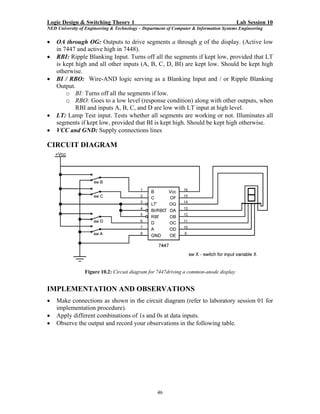
CIRCUIT DIAGRAM


                 Figure 10.2: Circuit diagram for 7447driving a common-anode display


IMPLEMENTATION AND OBSERVATIONS
•   Make connections as shown in the circuit diagram (refer to laboratory session 01 for
    implementation procedure).
•   Apply different combinations of 1s and 0s at data inputs.
•   Observe the output and record your observations in the following table.


                                                   46
Logic Design & Switching Theory 1                                                       Lab Session 10
NED University of Engineering & Technology – Department of Computer & Information Systems Engineering


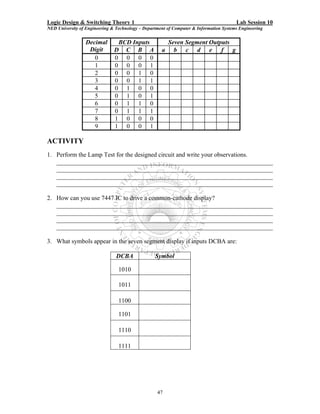
                  Decimal       BCD Inputs               Seven Segment Outputs
                   Digit       D C B A               a     b c d e f g
                     0         0 0 0 0
                     1         0 0 0 1
                     2         0 0 1 0
                     3         0 0 1 1
                     4         0 1 0 0
                     5         0 1 0 1
                     6         0 1 1 0
                     7         0 1 1 1
                     8         1 0 0 0
                     9         1 0 0 1

ACTIVITY
1. Perform the Lamp Test for the designed circuit and write your observations.
   _____________________________________________________________________
   _____________________________________________________________________
   _____________________________________________________________________
   _____________________________________________________________________

2. How can you use 7447 IC to drive a common-cathode display?
   _____________________________________________________________________
   _____________________________________________________________________
   _____________________________________________________________________
   _____________________________________________________________________

3. What symbols appear in the seven segment display if inputs DCBA are:

                                DCBA              Symbol

                                 1010

                                 1011

                                 1100

                                 1101

                                 1110

                                 1111


                                                   47
Logic Design & Switching Theory 1                                                       Lab Session 11
NED University of Engineering & Technology – Department of Computer & Information Systems Engineering


                                      Lab Session 11
OBJECT
                                Testing different modes of JK-FF

COMPONENTS AND APPARATUS REQUIRED
1. Following ICs and their Datasheets:
   • 7473 / 7476 JK Flip-Flop
2. Digital Trainer DT-01 or the following components:
   Bread board, 5 V - Power Supply, Multimeter, Logic Probe, LEDs with Resistors,
   Connecting wires, Switches

THEORY
Flip-Flop
A flip-flop circuit can maintain a binary state indefinitely (as long as the power is
delivered to the circuit) until directed by an input signal to switch states. The major
differences among various types of flip-flops are in the number of inputs they possess and
in the manner in which the inputs affect the binary state.

JK Flip-Flop
JK flip flop is an edge triggered device. A typical JK flip flop has three inputs: J, K and a
clock input. The flip-flop can be either positive or negative edge triggered. The output Q
is available in complemented form as well.
Beside the usual inputs and output, most of the flip-flop IC also possess two
asynchronous inputs, namely Preset and Clear. These inputs are usually active low. If
used Preset and Clear inputs keep the flip-flop in set and reset state respectively,
irrespective of the other inputs. Both of these inputs cannot be used simultaneously,
otherwise they will bring the flip-flop in unstable state.


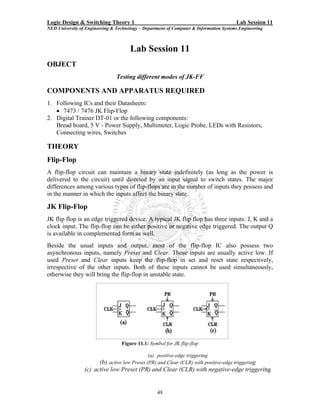
                                   Figure 11.1: Symbol for JK flip-flop

                                               (a) positive-edge triggering
                        (b) active low Preset (PR) and Clear (CLR) with positive-edge triggering
                 (c) active low Preset (PR) and Clear (CLR) with negative-edge triggering


                                                   48
Logic Design & Switching Theory 1                                                       Lab Session 11
NED University of Engineering & Technology – Department of Computer & Information Systems Engineering


TESTING OF 7473 / 7476 DUAL JK FLIP-FLOP
Both the ICs 7473 and 7476 are similar in functionality except for one difference. The
flip-flops in 7473 have only one type of active low asynchronous input, which is the
Clear input, whereas the flip-flops in 7476 have both Preset and Clear inputs. Both these
ICs have negative edge triggered flip-flops.

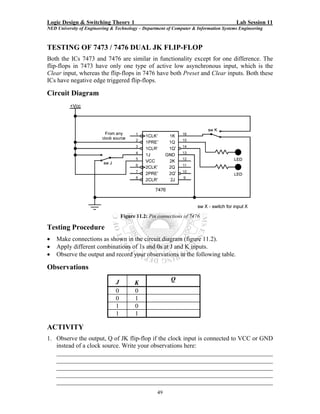
Circuit Diagram


                                    Figure 11.2: Pin connections of 7476

Testing Procedure
•   Make connections as shown in the circuit diagram (figure 11.2).
•   Apply different combinations of 1s and 0s at J and K inputs.
•   Observe the output and record your observations in the following table.

Observations

                                J                         Q
                                          K
                                0         0
                                0         1
                                1         0
                                1         1

ACTIVITY
1. Observe the output, Q of JK flip-flop if the clock input is connected to VCC or GND
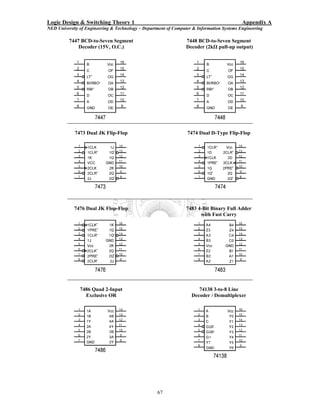
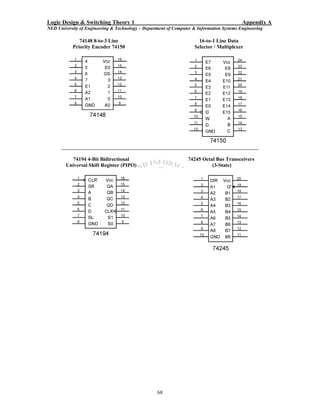
   instead of a clock source. Write your observations here:
   _____________________________________________________________________
   _____________________________________________________________________
   _____________________________________________________________________
   _____________________________________________________________________
   _____________________________________________________________________
                                                    49
Logic Design & Switching Theory 1                                                       Lab Session 12
NED University of Engineering & Technology – Department of Computer & Information Systems Engineering


                                        Lab Session 12
OBJECT
        Designing sequential circuit for the given state diagram using D flip-flop.

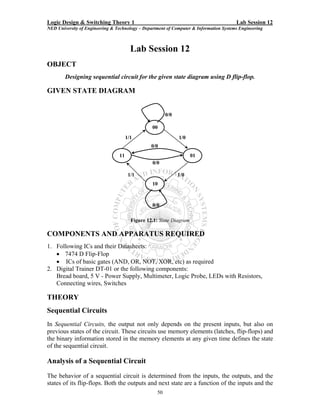
GIVEN STATE DIAGRAM


                                                        0/0

                                                 00
                                      1/1                     1/0
                                                 0/0
                                 11                                  01
                                                 0/0

                                       1/1                    1/0
                                                 10


                                                 0/0

                                        Figure 12.1: State Diagram

COMPONENTS AND APPARATUS REQUIRED
1. Following ICs and their Datasheets:
   • 7474 D Flip-Flop
   • ICs of basic gates (AND, OR, NOT, XOR, etc) as required
2. Digital Trainer DT-01 or the following components:
   Bread board, 5 V - Power Supply, Multimeter, Logic Probe, LEDs with Resistors,
   Connecting wires, Switches

THEORY
Sequential Circuits
In Sequential Circuits, the output not only depends on the present inputs, but also on
previous states of the circuit. These circuits use memory elements (latches, flip-flops) and
the binary information stored in the memory elements at any given time defines the state
of the sequential circuit.

Analysis of a Sequential Circuit
The behavior of a sequential circuit is determined from the inputs, the outputs, and the
states of its flip-flops. Both the outputs and next state are a function of the inputs and the
                                                   50
Logic Design & Switching Theory 1                                                        Lab Session 12
NED University of Engineering & Technology – Department of Computer & Information Systems Engineering


present state. The analysis of a sequential circuit form a state diagram comprises of the
following:
• Selecting a particular flip-flop to design the circuit
• Obtaining state table from the state diagram
• Finding input equations for the selected flip-flop
• Finding state equations (not required for the construction of circuit)
• Implementing the circuit using selected flip-flops and their input equations

ANALYZING THE GIVEN STATE DIAGRAM

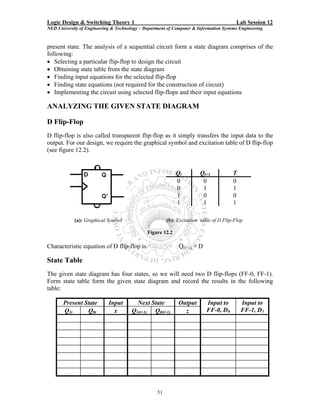
D Flip-Flop
D flip-flop is also called transparent flip-flop as it simply transfers the input data to the
output. For our design, we require the graphical symbol and excitation table of D flip-flop
(see figure 12.2).


                                                            Qt         Qt+1            T
                                                            0           0              0
                                                            0           1              1
                                                            1           0              0
                                                            1           1              1

            (a): Graphical Symbol                       (b): Excitation table of D Flip-Flop

                                              Figure 12.2

Characteristic equation of D flip-flop is:                   Q(t+1) = D

State Table
The given state diagram has four states, so we will need two D flip-flops (FF-0, FF-1).
Form state table form the given state diagram and record the results in the following
table:

       Present State        Input        Next State          Output       Input to         Input to
       Q1t      Q0t           x        Q1(t+1) Q0(t+1)         z          FF-0, D0         FF-1, D1


                                                   51
Logic Design & Switching Theory 1                                                       Lab Session 12
NED University of Engineering & Technology – Department of Computer & Information Systems Engineering


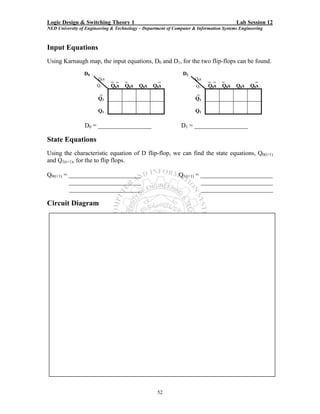
Input Equations
Using Karnaugh map, the input equations, D0 and D1, for the two flip-flops can be found.
                 D0                                            D1
                        Q0x   _ _   _               _                Q0x   _ _    _              _
                       Q1     Q0x   Q0x    Q0x   Q 0x                Q1    Q0x    Q0x   Q0x    Q0x
                       _                                             _
                       Q1                                            Q1

                       Q1                                            Q1

                 D0 = _________________                       D1 = _________________

State Equations
Using the characteristic equation of D flip-flop, we can find the state equations, Q0(t+1)
and Q1(t+1), for the to flip flops.

Q0(t+1) = _______________________                            Q1(t+1) = _______________________
          _______________________                                      _______________________
          _______________________                                      _______________________

Circuit Diagram


                                                   52
Logic Design & Switching Theory 1                                                         Lab Session 12
NED University of Engineering & Technology – Department of Computer & Information Systems Engineering


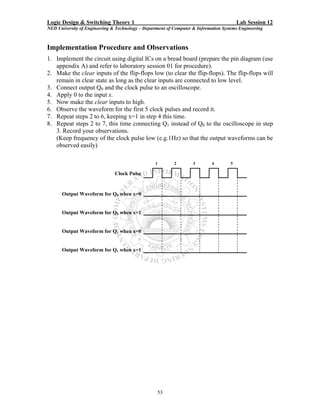
Implementation Procedure and Observations
1. Implement the circuit using digital ICs on a bread board (prepare the pin diagram (use
   appendix A) and refer to laboratory session 01 for procedure).
2. Make the clear inputs of the flip-flops low (to clear the flip-flops). The flip-flops will
   remain in clear state as long as the clear inputs are connected to low level.
3. Connect output Q0 and the clock pulse to an oscilloscope.
4. Apply 0 to the input x.
5. Now make the clear inputs to high.
6. Observe the waveform for the first 5 clock pulses and record it.
7. Repeat steps 2 to 6, keeping x=1 in step 4 this time.
8. Repeat steps 2 to 7, this time connecting Q1 instead of Q0 to the oscilloscope in step
   3. Record your observations.
   (Keep frequency of the clock pulse low (e.g.1Hz) so that the output waveforms can be
   observed easily)

                                                  1        2        3        4        5

                               Clock Pulse


      Output Waveform for Q0 when x=0


      Output Waveform for Q0 when x=1


      Output Waveform for Q1 when x=0


      Output Waveform for Q1 when x=1


                                                   53
Logic Design & Switching Theory 1                                                       Lab Session 13
NED University of Engineering & Technology – Department of Computer & Information Systems Engineering


                                      Lab Session 13
OBJECT
               Designing a modulo-5 asynchronous up-counter using JK-FF

COMPONENTS AND APPARATUS REQUIRED
1. Following ICs and their Datasheets:
   • 7400 Quad 2-input or 7410 Triple 3-input NAND Gates
   • 7476 / 7473 JK Flip-Flop
2. Digital Trainer DT-01 or the following components:
   Bread board, 5 V - Power Supply, Multimeter, Logic Probe, LEDs with Resistors,
   Connecting wires, Switches

THEORY
Digital Counters
A digital counter is a set of flip-flops whose states change in response to pulses applied at
the input to the counter. The flip-flops are interconnected so that their combined state at
any time is the binary equivalent of the total number of pulses that have occurred up to
that time. Every counter resets after a certain number of clock pulses. Thus, as it name
implies, a counter is used to count pulses. An n stage counter can count up to a maximum
of 2n states. n is equal to the number of flip-flops required for the construction of counter.

Modulus Counters
The number of input pulses that causes a counter to reset to its initial count is called the
modulus of the counter. Thus, the modulus equals to total number of distinct states
(counts), including zero that a counter can store. A binary counter with n stages is a
modulo-2n (or mod-2n) counter. The largest count a mod-N counter can achieve is N-1, i.e.
a mod-N counter never reaches the binary number equal to its modulus. N is always equal
to or less than 2n.
Counters can be classified as:
• Synchronous Counters, which are clock driven. All the flip-flops are driven by a
   single clock.
• Asynchronous Counters, which are event driven. Clock input is given to the first
   flip-flop only. Rest of the flip-flops are driven by their preceding flip-flops.

DESIGN OF A MOD-5 ASYNCHRONOUS UP COUNTER
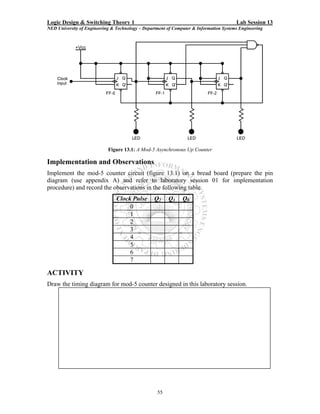
The number of flip-flops required to construct a mod-5 counter is 3, because 5 should be
less than or equal to 2n. This counter will count from 0 to 4, a total of 5 distinct states.
Since a 3-stage counter can count up to 8 states at maximum, a NAND gate is used to
reset it after 5 clock pulses. Figure 13.1 shows the logic diagram.


                                                   54
Logic Design & Switching Theory 1                                                       Lab Session 13
NED University of Engineering & Technology – Department of Computer & Information Systems Engineering


                            Figure 13.1: A Mod-5 Asynchronous Up Counter

Implementation and Observations
Implement the mod-5 counter circuit (figure 13.1) on a bread board (prepare the pin
diagram (use appendix A) and refer to laboratory session 01 for implementation
procedure) and record the observations in the following table.
                                Clock Pulse       Q2    Q1     Q0
                                     0
                                     1
                                     2
                                     3
                                     4
                                     5
                                     6
                                     7

ACTIVITY
Draw the timing diagram for mod-5 counter designed in this laboratory session.


                                                   55
Logic Design & Switching Theory 1                                                       Lab Session 14
NED University of Engineering & Technology – Department of Computer & Information Systems Engineering


                                        Lab Session 14
OBJECT
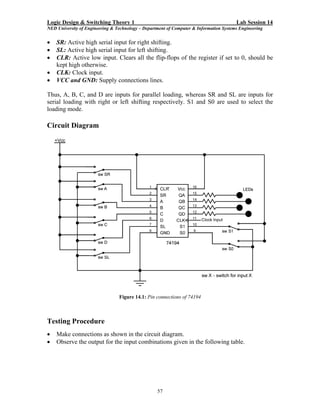
           Experimenting with 74194 4-bit bidirectional universal shift register

COMPONENTS AND APPARATUS REQUIRED
1. Following ICs and their Datasheets:
   • 74194 4-bit bidirectional universal shift register
2. Digital Trainer DT-01 or the following components:
   Bread board, 5 V - Power Supply, Multimeter, Logic Probe, LEDs with Resistors,
   Connecting wires, Switches

THEORY
Shift Registers
A Register is a set of flip-flops used to store binary data. A register, which is capable of
shifting its binary information either to the right or left, is called a shift register. The
logical configuration of a register consists of a chain of flip-flops connected in cascade,
with the output of one flip-flop connected to the input of next flip-flop. All flip-flops
receive a common clock pulse, which causes the shift from one stage to the next.

Bidirectional Shift Registers
A bi-directional shift register is one whose bits can be shifted from left to right or from
right to left.

Universal Shift Registers
A universal shift register is a bi-directional register whose input can be in either serial or
parallel form and whose output can be in either serial or parallel form.

74194 4-BIT BIDIRECTIONAL UNIVERSAL SHIFT REGISTER
The 74194 register provides parallel as well as serial loading in both directions. Function
of various pins of this IC is described below:
•   A, B, C and D: Active high inputs for parallel loading.
•   QA, QB, QC and QD: Active high outputs.
•   S0 and S1: Active high mode control inputs. The following table shows combinations
    of S1 and S0 to enable various modes.
                                   S1        S0   Clock      Action
                                    0        0      x      No change
                                    0        1      ↑      Shift right
                                    1        0      ↑       Shift left
                                    1        1      ↑     Parallel load
↑ shows the rising edge of the clock pulse
                                                     56
Logic Design & Switching Theory 1                                                       Lab Session 14
NED University of Engineering & Technology – Department of Computer & Information Systems Engineering


•   SR: Active high serial input for right shifting.
•   SL: Active high serial input for left shifting.
•   CLR: Active low input. Clears all the flip-flops of the register if set to 0, should be
    kept high otherwise.
•   CLK: Clock input.
•   VCC and GND: Supply connections lines.

Thus, A, B, C, and D are inputs for parallel loading, whereas SR and SL are inputs for
serial loading with right or left shifting respectively. S1 and S0 are used to select the
loading mode.

Circuit Diagram


                                 Figure 14.1: Pin connections of 74194


Testing Procedure
•   Make connections as shown in the circuit diagram.
•   Observe the output for the input combinations given in the following table.


                                                   57
Logic Design & Switching Theory 1                                                        Lab Session 14
NED University of Engineering & Technology – Department of Computer & Information Systems Engineering


Observations
    S1      S0      SL      SR       A       B       C        D      QA     QB      QC      QD
     0       0       0       1       0       0       0        0
     0       1       1       0       0       0       0        1
     1       0       0       0       0       0       1        0
     1       1       0       0       0       0       1        1
     0       0       1       1       0       1       0        0
     0       1       1       1       0       1       0        1
     1       0       1       0       0       1       1        0
     1       1       1       0       0       1       1        1
     1       1       0       0       1       1       1        1

ACTIVITY
1. Show connections of 74194 to convert it into a ring counter with right shifting.


                                                   58
Logic Design & Switching Theory 1                                                       Lab Session 15
NED University of Engineering & Technology – Department of Computer & Information Systems Engineering


                                      Lab Session 15
OBJECT
    Experimenting with 74245 octal bus transceivers using parallel port PC interfacing

COMPONENTS AND APPARATUS REQUIRED
1. Parallel Port Connectors (DB-25) with Cable
2. Personal Computer with Windows 98 and TurboC Compiler Installed
3. Following ICs and their Datasheets:
   • 74245 Octal Bus Transceivers with 3-State Outputs
4. Digital Trainer DT-01 or the following components:
   Bread board, 5 V - Power Supply, Multimeter, Logic Probe, LEDs with Resistors,
   Connecting wires, Switches

THEORY
3-State Logic
Sometimes it is necessary to isolate one part of circuit from the other part. For this
purpose some TTL ICs are designed with 3-state logic. Such devices have three possible
output states: high, low and high impedance. The device can be put into high impedance
state by a control signal applied to an appropriate pin. When such a device is in high
impedance state, there is very high impedance at its output, effectively isolating the
device from whatever circuitry the output normally drives.

74245 Octal Bus Transceivers
A bus is any conducting path or set of paths having electrical connections to one or more
devices. 74245 octal bus transceivers are mainly used to control connectivity between
two devices or circuits. It also provides direction control for signal flow. Function of
various pin of this IC is given below:
•    A1 through A8: Bus A.
•    B1 through B8: Bus B.
•    G΄: Active low enable input. When high, sets all the bus pins to high impedance state.
•    DIR: Direction control for signal flow. When set to high logic level, transfers bus A
     data to B bus. When set to low logic level, transfers bus B data to A bus.
•    VCC and GND: Supply connections lines.

Serial and Parallel Port Connectors
A Parallel Port can consist of only 25 pin port adapter called a DB-25 and a serial port
can consist of either a 25 pin port adapter called a DB-25 or 9 pin adapter called a DB-9
port adapter. Whether the port is a 9 pin or 25 pin it can accomplish all of the same tasks
that serial port communications have been designed for.


                                                   59
Logic Design & Switching Theory 1                                                       Lab Session 15
NED University of Engineering & Technology – Department of Computer & Information Systems Engineering


Each adapter can be a male type connector with pins or a female type adapter with tiny
holes. Generally a PRINTER port (called LPT1) on the back of a computer is female type
adapter and we need to use MALE DB-25 pin cable on it for PRINTER connection or for
parallel LAPLINK cable. And a COM port on the back of a computer is male for the
serial ports but it may not necessarily be.

Parallel Port Connector – DB-25
The DB-25 connector (named for its "B"-size "D"-shaped shell and 25 pins) is practically
ubiquitous in the electronics industry. The DB-25 connector is used for a variety of
purposes. Two common applications are RS-232/EIA-232 (serial) connections, and the
parallel printer interface on the IBM PC. The DB-25 connector is also used for SCSI
connections.
Normally the parallel port is used for output to a printer or other device. It sends data 8-
bits or one byte at a time in parallel. The other lines available on the DB-25 connector are
a combination of status lines, control lines, and ground lines. The status and control lines
are used for handshaking, commands, and feedback when we are talking to a printer.


           Figure 15.1: DB-25 Male                                 Figure 15.2: DB-25 Female


                                   Figure 15.3: Pin Layout for DB-25

As can be seen form figure 15.3, there are four types of pins in this connector:
•   Data pins (8 pins - D0 to D7): Active high bidirectional lines.


                                                   60
Logic Design & Switching Theory 1                                                       Lab Session 15
NED University of Engineering & Technology – Department of Computer & Information Systems Engineering

•    Control pins (4 pins - C0 to C3): C0, C1 and C3 are active low, whereas C2 is active
     high. These lines also are bidirectional.
•    Status pins (5 pins – S3 to S7): Only S7 is active low, rest are active high input lines.
•    Ground pins (8 pins): Used as a reference signal for the low (below 0.5 volts) charge.

Parallel Port Addresses
A DB-25 connector at a parallel port has three address, one for each kind of pins /
register: data, status and control. The first or base address generally refers to data register.
Second address is for status register and the third one is for control register. In Windows
98, the base address is usually found to be 278H, 378H, or 3BCH. Now if 378H is the
base address then it refers to the data register, whereas addresses for status and control
register are respectively 379H and 37AH. For Windows 98 the base address can be found
as follows:
1.   On your Desktop, right-click on My Computer and select Properties.
2.   Click on the Device Manager tab and find LPT1 under Plug and Play BIOS.
3.   After selecting LPT1, click the Properties button.
4.   Next select the Resources tab and the address should then appear next to Input/Output
     Range.

Accessing parallel port through C Language Programming
There are multiple functions in C Language for accessing external ports. The most
commonly used are listed below.

•    unsigned char inportb(int portid);
     inportb reads a byte from a hardware port

•    int inport(int portid);
     reads a word from a hardware port

•    void outportb(int portid, unsigned char value);
     outputs a byte to a hardware port

•    void outport(int portid, int value);
     outputs a word to a hardware port
portid refers to the port address, whereas value refers to the data to be sent

TESTING 74245 USING PARALLEL PORT PC INTERFACING
At one end the parallel port connector will be connected to the PC via parallel port cable
and another connector (to be plugged into the PC parallel port slot). At the other end it
will be connected to the buffer IC 74245. Data lines of the connector will be used to
transfer 8-bit data between the PC and the buffer. Out of the 8-bits of 74245, 4-bits will
be used to enter data, which will be displayed at the monitor through a C language


                                                   61
Logic Design & Switching Theory 1                                                       Lab Session 15
NED University of Engineering & Technology – Department of Computer & Information Systems Engineering

program. The remaining 4-bits will receive data from PC as entered by the user via
keyboard.
Circuit Diagram


                             Figure 15.4: Interface of 74245 to PC via Parallel Port

Procedure
1. Connect the DB-25 connector to the PC at one end and solder it to the circuit board at
   the other end.
2. Connect various pins of the connector and 74245 according to the circuit diagram
   shown in figure 15.2
3. Using the functions listed in the previous section, write a program in C language to
   operate various pins of the buffer. The user interface of the program should provide
   option to the user whether to send or receive data from the port.
4. Set DIR switch to 1.
5. Try sending some data bits to the port. The result should be displayed at the LEDs.
6. Set DIR switch to 0.
7. Set some binary 4-bit value through the switches. Try reading it via parallel port.
C Language Program
/* A program to access parallel port for data transfers */
/* use header file*/
#include <stdio.h>

/* main program */
void main()
{
    /* define variable */


                                                   62
Logic Design & Switching Theory 1                                                       Lab Session 15
NED University of Engineering & Technology – Department of Computer & Information Systems Engineering

     unsigned int data=0;
     char choice;

     while(1)
     {
       //printing option menu
       clrscr();
       printf("This program will send or receive a BCD digit from the
               parallel portn");
       printf("nPress your choice numbern");
       printf("n1. Send Data");
       printf("n2. Receive Data");
       printf("n3. Exitn");

         choice = getch();

         //sending entered digit to the port
         if(choice == '1')
         {
             //input BCD digit
             printf("nEnter BCD digit to be sent to the port:");
             data = getche();

              //masking the first four bits
              data = data & 0x0f;

              //sending to the port
              outportb(0x378,data);
              printf("nThe BCD digit %c has been sent to the port", data);
         }

         //printing on screen the data received from the port
         else if(choice == '2')
         {
             //receiving data from the port
             data = inportb(0x378);

              //masking the last four bits
              data = data & 0xf0;                                                              

              //shifting first four bits to make them the last four bits
              data>>=4;
              printf("nThe BCD digit set at the port is: %c", data);
         }
         //exit
         else if(choice == '3')
             break;

         //key pressed is not in the menu
         else
             printf("nEnter valid choice number");

             printf("nnPress any key to continue");
         getch();
     }
}


                                                   63
Logic Design & Switching Theory 1                                                       Lab Session 15
NED University of Engineering & Technology – Department of Computer & Information Systems Engineering


ACTIVITY
1. In the above circuit, DIR and G΄ inputs are hardwired. Connect them to status or
   control pins of the parallel port connector and control their function through your
   software program.

    Circuit Diagram


    Program Code
    _________________________________________________
    _________________________________________________
    _________________________________________________
    _________________________________________________
    _________________________________________________
    _________________________________________________
    _________________________________________________
    _________________________________________________
    _________________________________________________
    _________________________________________________
    _________________________________________________
    _________________________________________________
    _________________________________________________
    _________________________________________________
    _________________________________________________
    _________________________________________________
    _________________________________________________
    _________________________________________________


                                                   64
Logic Design & Switching Theory 1                                                       Lab Session 15
NED University of Engineering & Technology – Department of Computer & Information Systems Engineering

    _________________________________________________
    _________________________________________________
    _________________________________________________
    _________________________________________________
    _________________________________________________
    _________________________________________________
    _________________________________________________
    _________________________________________________
    _________________________________________________
    _________________________________________________
    _________________________________________________
    _________________________________________________
    _________________________________________________
    _________________________________________________
    _________________________________________________
    _________________________________________________
    _________________________________________________
    _________________________________________________
    _________________________________________________
    _________________________________________________
    _________________________________________________
    _________________________________________________
    _________________________________________________
    _________________________________________________
    _________________________________________________
    _________________________________________________
    _________________________________________________
    _________________________________________________
    _________________________________________________
    _________________________________________________
    _________________________________________________
    _________________________________________________
    _________________________________________________
    _________________________________________________
    _________________________________________________
    _________________________________________________
    _________________________________________________
    _________________________________________________
    _________________________________________________
    _________________________________________________


                                                   65
Logic Design & Switching Theory 1                                                            Appendix A
NED University of Engineering & Technology – Department of Computer & Information Systems Engineering


                                          Appendix A
PIN DIAGRAMS OF THE ICS REQUIRED FOR THE LABORATORY SESSIONS
Consult the TTL/IC data book for internal diagrams and electrical characteristics of these ICs.

            7400 Quad 2-Input NAND                                 7402 Quad 2-Input NOR


                 7404 Hex Inverter                                  7408 Quad 2-Input AND


            7410 Triple 3-Input NAND                                7411 Triple 3-Input AND


              7421 Dual 4-Input AND                                  7432 Quad 2-Input OR


                                                    66
Logic Design & Switching Theory 1                                                          Appendix A
NED University of Engineering & Technology – Department of Computer & Information Systems Engineering

          7447 BCD-to-Seven Segment                              7448 BCD-to-Seven Segment
              Decoder (15V, O.C.)                                Decoder (2kΩ pull-up output)


             7473 Dual JK Flip-Flop                              7474 Dual D-Type Flip-Flop


            7476 Dual JK Flop-Flop                               7483 4-Bit Binary Full Adder
                                                                       with Fast Carry


               7486 Quad 2-Input                                      74138 3-to-8 Line
                 Exclusive OR                                      Decoder / Demultiplexer


                                                   67
Logic Design & Switching Theory 1                                                          Appendix A
NED University of Engineering & Technology – Department of Computer & Information Systems Engineering

               74148 8-to-3 Line                                       16-to-1 Line Data
            Priority Encoder 74150                                   Selector / Multiplexer


           74194 4-Bit Bidirectional                              74245 Octal Bus Transceivers
        Universal Shift Register (PIPO)                                     (3-State)


                                                   68
Logic Design & Switching Theory 1                                                           Appendix B
NED University of Engineering & Technology – Department of Computer & Information Systems Engineering


                                         Appendix B
           DEBOUNCING CIRCUITRY FOR MECHANICAL SWITCHES

Mechanical switches form the interface between human beings and computers or other
digital systems. For example, a keyboard is a matrix of switches used to supply
alphanumeric data to a computer. Whatever the switch design, it is a potential source of
problems due to contact bounce. The contact bounce creates a sense of narrow pulses
when a switch is opened or closed. An example of device whose operation would be
adversely affected by contact bounce is a digital counter used to count the number of
times a switch is depressed. Eliminating the effects of contact bounce is called
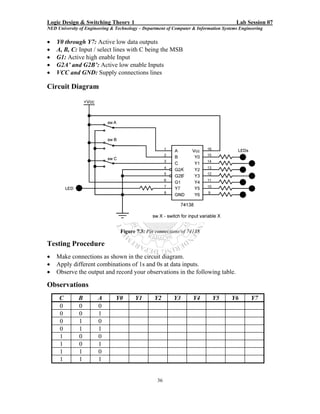
debouncing.
When data is entered into a computer via a keyboard, a software debounce is often used.
This type of debouncing is a program that causes the computer to sample the switch
terminal (i.e., to input data from it) many times in succession during the interval of time
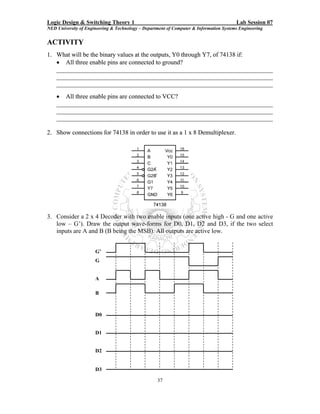
that contact bounce occurs. If the data is sensed to be 1s (or 0s) for a specific number of
consecutive samples, then it is assumed that contact bounce has ended and the last value
sensed is valid.
Hardware debouncing is the use of electronic circuitry to eliminate the effects of contact
bounce. There are numerous versions of such circuitry, including those that use
monostable multivibrators (one-shots), but the most straightforward is simply an RS
latch. Figure B.1 shows the circuit. When the switch is in position 1, R = 0 and S = 1, so
the latch is set and the output (Q) is 1. When the switch is in position 0, R = 1and S = 0,
so the latch is reset and the output is 0. When the switch is moved form one position to
the other, the latch changes state and bouncing occurs at either the R or the S input. The
bouncing does not affect the latch after it has change state. An RS latch will remain set,
for example, when its R input is 0 and its S input is alternately changed form 1 to 0.


                      Figure B.1: Use of RS latch to debounce a mechanical switch


                                                   69

EWB practical workbook

  • 1.
    Practical Workbook Logic Design& Switching Theory I Name : _____________________________ Year : __________ Batch: ____________ Roll No. : _____________________________ Group No. : ____________________________ Department : ____________________________ Dept. of Computer & Information Systems Engineering NED University of Engineering & Technology, Karachi – 75270, Pakistan
  • 2.
    Practical Workbook LogicDesign & Switching Theory I Prepared By: M. Anwar Ali Khan (Asst. Professor) & Muhammad Mazher Alam (Ex - Asst. Professor) Revised By: Maria Waqas (Lecturer) Second Edition Fourth Reprint – 2010 Dept. of Computer & Information Systems Engineering NED University of Engineering & Technology, Karachi – 75270, Pakistan
  • 3.
    THE BITS ANDPIECES PART CIRCUIT WHAT IT DOES SIGN Supplies a voltage which drives an electric current round the circuit from the positive (+) terminal of the battery to its negative (–) terminal. Voltage is measured in volts (V) and current in amperes (A). Allows current to flow through it easily because it is made of copper which is a good electrical conductor. Insulators like PVC (polyvinyl chloride - a plastic) and enamel are used to cover connecting wires. Connects terminal A to terminal B or C, i.e. it is a change-over switch. Reduces the current in a circuit because of its resistance. The colored bands give the resistance in ohms. When light falls on it, its resistance becomes small; in the dark its resistance is high. 3
  • 4.
    PART CIRCUIT WHAT IT DOES SIGN Stores electricity; the greater the capaci- tance the more does it store. Capacitance values are measured in microfarads shortened to μF or, less correctly, to mfd. On a capacitor, 0.1 μF may be marked as .l mfd and 0.01μF as 10n. The greatest voltage it can stand is also shown, e.g. 30V. Stores electricity: values usually larger than 1μF. Greatest voltage marked on it. Must be connected the correct way round. Varies the capacitance in a circuit by mov- ing one set of metal plates in or out of a fixed set when the spindle is rotated. The sets of plates are separated by sheets of an insulator (also called a dielectric). Changes electric currents into sound. Changes radio waves into electric currents. Lets current flow in one direction but not in the other. When it conducts, light is emit- ted. Must have a current limiting resistor in series with it. The cathode lead is nearest the ‘flat’ and may be shorter than the anode lead (but this is not always so). The arrow on the sign shows the conducting direction. 4
  • 5.
    PART CIRCUIT WHAT IT DOES SIGN Amplifies small currents into much larger copies. Acts as a very fast switch. It must be correctly connected with a positive voltage to the collector. Transistors, diodes, resistors and capacitors are connected together on a tiny ‘chip’ of silicon (sand is mostly silicon oxide) to give any desired circuit, e.g. a multistage amplifier; an astable, bistable or monostable multivibrator; a counter; a logic gate for a computer; several stages of a TRF (tuned radio frequency) radio. They must be correctly connected. Pin 1 is next to the ‘tag’ in the can type and on the d.i.l. type it is identified from the ‘notch’ or ‘small dot’ on the case. CMOS ‘chips’ (standing for Complementary Metal Oxide Semiconductors and pronounced ‘see- moss’) need special care. PRECAUTIONS WITH CMOS INTEGRATED CIRCUITS Damage occurs if static charges build up on input pins when, for example, they touch insulating materials (e.g. clothes, plastic pen) in warm, dry conditions. 1. Keep the IC in the carrier in which it is supplied until it is inserted in the circuit. 2. Do not finger the pins or hold them in contact with an insulator. 3. Connect all unused inputs of the IC to either the positive or the negative of the battery, depending on the circuit. 5
  • 6.
    BUILDING CIRCUITS The circuitboard shown above accepts ICs as well as separate components. It has 47 rows of 5 interconnected sockets on each side of a central channel across which d.i.l. ICs can be fitted. A wire inserted in a socket in a certain row becomes connected to wires in any of the other 4 sockets in that row by a metal strip under the board. For example, wires in sockets B5, C5, D5, E5 and F5 (shown in color in the diagram) are all joined. Metal strips under the board connect the sockets. A row of 40 interconnected sockets along the top of the board and a similar row along the bottom act as the positive and negative power supply rails (called ‘bus bars’). Various makes of circuit board are available, some with vertically mounting removable panels for supporting controls. 6
  • 7.
    1. To makea connection push about 1 cm of the bare end of a wire (0.25 to 0.85 mm diameter) straight into the socket (not at an angle) so that it is gripped by the metal strip under the board. Do not use wires that are dirty or have kinked ends. Only put one wire in each socket. Bend leads on resistors etc., as shown before inserting them in the board. 2. Bare the ends of connecting wire (PVC-covered tinned copper wire 0.6 mm diameter) by removing the insulation (PVC) either with wire strippers or using a pair of blunt-nosed pliers and a pair of side cutters as shown. With practice you should be able to judge just how much the side cutters have to be squeezed and pulled to remove the insulation without cutting the wire. 3. ‘Join’ wires to the ‘lugs’ on the loudspeaker and variable capacitor using a small length of 2 mm bore plastic sleeving - as shown by 1 and 2. 7
  • 8.
    RESISTOR COLOUR CODE Resistorvalues are given in ohms (shortened to Ω, the Greek letter ‘omega’). They are marked on the resistor using a color code. Three colored bands are painted round the resistor. Each color stands for a number. To read the color code, start at the 1st band; it is nearest the end. Sometimes it is not clear which is the 1st band because there is a 4th band of gold or silver near the other end. These two colors are not used for the 1st band; they give the accuracy of the resistor (gold is ± 5% and silver ± 10%), so you should not have too much trouble deciding where to start. The 1st band gives the first number, the 2nd band gives the second number and the 3rd band tells how many zeroes come after the first two numbers. 8

  • 9.
    INTRODUCTION Digital Logic Designis concerned with the interconnection among digital components and modules and the area of Switching Theory that can be identified between circuit design and system formulation. Logic design is the base of any computer system, as every digital system consists of different IC’S and ICs contain a large number of interconnected digital circuits within a small package. MSI devices provide digital function while LSI device cover a complete computer modules. These circuitries are widely used in digital system like digital voltmeter, frequency meter, calculating machines, telephone-switching system etc. In this Practical Workbook, laboratory sessions based on both combinational and sequential logic are covered. First laboratory session gives an introduction to the basic logic gates and fundamentals of circuit building. The second laboratory session covers a CAD software – Electronics Workbench (EWB). EWB is excellent simulation software, where circuits can be designed and tested before physical implementation. Various laboratory sessions of this workbook provide activities and exercises on EWB. Next eight laboratory sessions are based on combinational logic. Here various MSI circuits, like adders, converters, multiplexers, decoders, encoders, etc, are designed. Some of these laboratory sessions also include testing of MSI ICs. Next four laboratory sessions help in exploring various designs based on sequential logic. Here a variety of circuits are designed, form the testing of basic flip-flop ICs to registers and different types of counters. Last laboratory session demonstrates how digital hardware can be interfaced with a personal computer via parallel port and can be controlled by software. All laboratory sessions of this workbook incorporate brief theoretical backgrounds, as details may be covered in the respective theory classes. Exercises / activities are included with almost all the sessions for the students to practice. Two appendices are also included in this workbook. The first one provides pin diagrams for all the ICs required for the laboratory work provided in this workbook. It will help the students in preparing the pin diagrams for the circuits. Second appendix discusses a hardware debouncing circuit for mechanical switches as such switches are extensively used for input purpose in logic circuits. 9
  • 10.
    CONTENTS Lab Session No. Object Page No. 1 To study the logic gates in the following TTL ICs. 13 7400 Quad 2-input NAND gate. 7402 Quad 2-input NOR gate. 7404 Hex inverter. 7408 Quad 2-input AND gate. 7432 Quad 2-input OR gate. Also, implementing and testing the given circuit on a bread board. 2 Working with Electronics Workbench. 17 3 Designing Half and Full Adder Circuits. 19 4 Use of Karnaugh Map (SOP-Expression) method. 22 5 Designing a BCD Adder. 28 6 Designing of a 4 x 1 Multiplexer. 30 Experimenting with 74150 IC. 7 Designing of a 2 x 4 Decoder / 1 x 4 Demultiplexer. 34 Experimenting with 74138 IC. 8 Designing of a 4 x 2 Priority Encoder. 38 Experimenting with 74148 IC. 9 Designing an Odd Parity Generator and Checker for a 3-bit Data. 42 10 Driving a seven segment display using 7447 / 7448 driver IC. 45 11 Experimenting with different modes of JK-FF. 48 12 Designing sequential circuit for the given state diagram using D flip-flop. 50 13 Designing a modulus-5 asynchronous up-counter using JK-FF. 54 14 Experimenting with 74194 4-bit bidirectional universal shift register 56 15 Experimenting with 74245 octal bus transceivers using parallel port PC 59 interfacing. Appendix A – Pin Diagrams of the ICs required for the laboratory sessions. 66 Appendix B – Debouncing circuitry for mechanical switches. 69 11
  • 11.
    Logic Design &Switching Theory 1 Lab Session 01 NED University of Engineering & Technology – Department of Computer & Information Systems Engineering Lab Session 01 OBJECT • To study the logic gates in the following TTL ICs. i) 7400 Quad 2-input NAND gate. ii) 7402 Quad 2-input NOR gate. iii) 7404 Hex inverter. iv) 7408 Quad 2-input AND gate. v) 7432 Quad 2-input OR gate. • Implementing and testing the given circuit on a bread board. COMPONENTS REQUIRED 1. Bread board 2. 5 V - power supply 3. Multimeter 4. Logic probe 5. LEDs with resistors 6. Connecting wires 7. Switches (optional) 8. Following ICs and their datasheets: • 7408 quad 2 input AND gate • 7432 quad 2 input OR gate • 7404 hex inverter • 7400 quad 2 input NAND gate • 7402 quad 2 input NOR gate THEORY Logic Gates Logic gates are the fundamental building blocks of digital systems. These devices are able to make decisions, in the sense that they produce one output level when some combinations of input levels are present and a different output when other combinations are applied; hence given the name Logic Gates. The two levels produced by digital circuitry are referred to variously as HIGH and LOW, TRUE and FALSE, ON and OFF, or simply 1 and 0. There are only three basic gates: AND, OR and NOT. The other gates are merely combinations of these basic gates. Logic gates can be interconnected to perform a variety of logical operations. This interconnection of gates to achieve prescribed outcomes is called logic design. 1. The AND Gate – An AND gate’s output is 1 if and only if all its inputs are 1. If A and B are two inputs to an AND gate then output, F of the gate is given as: F = A.B 2. The OR Gate - An OR gate’s output is 1 if at least one of its input is 1. If A and B are two inputs to an OR gate then output, F of the gate is given as: F = A+B 13
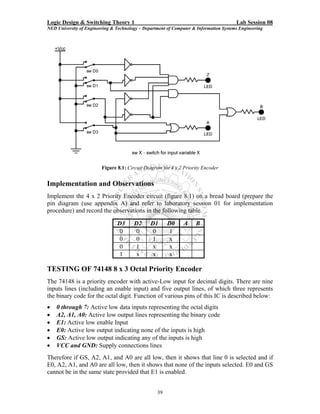
  • 12.
    Logic Design &Switching Theory 1 Lab Session 01 NED University of Engineering & Technology – Department of Computer & Information Systems Engineering 3. The NOT Gate (Inverter) – Its output is 1 when its input is 0 and its output is 0 when the input is 1; i.e. it complements a digital variable. If A is the input to a NOT gate then output, F of the gate is given as: F=A 4. The NAND Gate – Its output is 1 if at least one of its input is 0. This gate performs the same logic as an AND gate followed by an inverter. If A and B are two inputs to a NAND gate then output, F of the gate is given as: F = A.B 5. The NOR Gate - The output of a NOR gate is 1 if and only if all its inputs are 0. This gate performs the same logic function as an OR gate followed by an inverter. If A and B are two inputs to a NAND gate then output, F of the gate is given as: F = A + B All the above gates have one output and two or more inputs except the NOT gate, which has only one input. PROCEDURE FOR TESTING THE LOGIC GATES IN GIVEN ICs 1. Set the power supply to 5V. With the help of a multimeter check the voltage at the output knobs of the power supply. 2. Connect wires, long enough to reach the breadboard, with the two knobs of the power supply. Again using multimeter, check voltage at the non-connected end of the wires. 3. Insert the 7408 quad 2 input AND gate IC on to the bread board and make supply and ground connections by joining 5V wire to pin # 14 and 0V wire to pin # 7. 4. Consult IC’s internal connection diagram for input and output pins of the first AND gate. Connect input pins to logic 0 (0V) and observe the output using LED or logic probe. You can also connect switches at the input lines to facilitate toggling between 1 and 0. 5. Try different combinations of logic levels at the two inputs. Again observe the output. 6. Repeat the last two steps for all other gates of the same IC. Record the observations. 7. Repeat this procedure for all other ICs. OBSERVATIONS Gate Input A Input B Expected Output Observed Output 0 0 0 1 AND 1 0 1 1 0 0 0 1 OR 1 0 1 1 0 - NOT 1 - 0 0 0 1 NAND 1 0 1 1 14
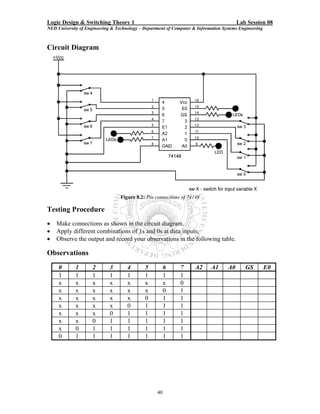
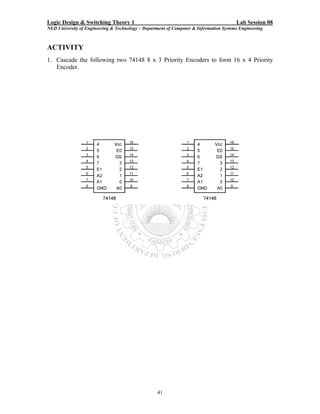
  • 13.
    Logic Design &Switching Theory 1 Lab Session 01 NED University of Engineering & Technology – Department of Computer & Information Systems Engineering 0 0 0 1 NOR 1 0 1 1 DATA SHEETS Figure 1.1 15
  • 14.
    Logic Design &Switching Theory 1 Lab Session 01 NED University of Engineering & Technology – Department of Computer & Information Systems Engineering GIVEN CIRCUIT Figure 1.2 PROCEDURE FOR IMPLEMENTATION OF THE GIVEN CIRCUIT 1. Set the power supply. 2. Insert ICs on the bread board and make their supply and ground connections. 3. As given in the logic diagram, make connections using wires and gates in the ICs. 4. Apply different combinations at the three inputs and observe the output. OBSERVATIONS Logic expression for the given logic diagram: __________________________________ A B C Expected Output Observed Output 0 0 0 0 0 1 0 1 0 0 1 1 1 0 0 1 0 1 1 1 0 1 1 1 16
  • 15.
    Logic Design &Switching Theory 1 Lab Session 02 NED University of Engineering & Technology – Department of Computer & Information Systems Engineering Lab Session 02 OBJECT Working with Electronics Workbench ELECTRONICS WORKBENCH - EWB Electronics Workbench is a computer aided design tool that provides you with all the components and instruments necessary to create board-level designs. It has complete mixed analog and digital simulation and graphical waveform analysis, allowing you to design your circuit and then analyze it using different simulated instruments and analysis options. It is fully integrated and interactive, thus you can change your circuits quickly, allowing fast and repeated what-if analysis. Electronics Workbench provides the following kind of components: • Sources parts bin (AC voltage source, Vcc source, ground, battery, etc) • Basic parts bin (resistors, capacitors, transformers, switches, etc) • Diodes parts bin • Transistors parts bin • Analog ICs parts bin (op-amps, etc) • Mixed ICs parts bin (ADCs, DACs, 555 timers, etc) • Digital ICs parts bin (AND, OR, adders, multiplexers, etc) • Indicators parts bin (voltmeter, ammeter, probe, displays, etc) • Controls parts bin (voltage differentiator, multiplier, etc) • Instruments parts bin (multimeter, oscilloscope, function generator, etc) • Miscellaneous parts bin (write data, textbox, etc) o Write data: This component allows you to save simulation results as an ASCII file. o Text Box: Use this to add descriptive text anywhere in a circuit. ACTIVITY Design circuit for the logic expression: F = A.B + A.(C.D + B.C ) Procedure 1. From Logic Gates Parts Bin, Drag and drop the required logic gates on the design area. Use Component Properties dialog box to customize these gates. 2. Connect the terminal of these gates according to the given expression. Use additional connectors form the Basic Parts Bin if you want to connect more than wire at a single node. 3. Drag and drop a probe from Indicators Parts Bin. Use Component Properties dialog box to customize the color and other properties of the probe. Connect this probe at the output terminal of the circuit to indicate results. 4. Select four switches form Basic Parts Bin. Specify the key that controls the switch by typing its name in the Value tab of the Component Properties dialog box. For 17
  • 16.
    Logic Design &Switching Theory 1 Lab Session 02 NED University of Engineering & Technology – Department of Computer & Information Systems Engineering example, if you want the switch to close or open when digit ‘1’ is pressed, type 1 in the Value tab, then click OK. Assign different keys to all the switches. 5. Connect the output terminals of these switches to each of the four inputs A, B, C and D of the circuit. 6. Drag and drop Vcc and Ground form the Sources Parts Bin. 7. Connect Vcc terminal to one end and Ground terminal to the other end of all the switches. 8. Label the circuit properly using text boxes found in the miscellaneous parts bin. 9. Run the circuit using the Activate Simulation switch. Use the keys you have assigned to the switches to toggle them between Vcc and Ground connections, thus providing 1 or 0 respectively to the inputs. Record the results as indicated by the probe for all possible combinations of 1s and 0s at the inputs. EWB Circuit Figure 2.1 Observations A B C D Expected Output Observed Output 0 0 0 0 0 0 0 1 0 0 1 0 0 0 1 1 0 1 0 0 0 1 0 1 0 1 1 0 0 1 1 1 1 0 0 0 1 0 0 1 1 0 1 0 1 0 1 1 1 1 0 0 1 1 0 1 1 1 1 0 1 1 1 1 18
  • 17.
    Logic Design &Switching Theory 1 Lab Session 03 NED University of Engineering & Technology – Department of Computer & Information Systems Engineering Lab Session 03 OBJECT Designing Half and Full Adder Circuits. COMPONENTS AND APPARATUS REQUIRED 1. Following ICs and their Datasheets: • 7408 Quad 2-input AND Gate • 7432 Quad 2-input OR Gate • 7486 Quad 2-input XOR Gate 2. Digital Trainer DT-01 or the following components: Bread board, 5 V - Power Supply, Multimeter, Logic Probe, LEDs with Resistors, Connecting wires, Switches THEORY Half Adder A combination circuit that performs the addition of two bits without accounting for the previous carry is called half adder. It needs two binary inputs and two binary outputs. The input variables designate the augend and addend bits. The output variables produce the sum and carry. The simplified sum of product expressions for a half adder are: S = x. y + x. y = x ⊕ y C = x. y Figure 3.1: Circuit diagram for Half Adder 19
  • 18.
    Logic Design &Switching Theory 1 Lab Session 03 NED University of Engineering & Technology – Department of Computer & Information Systems Engineering Full Adder A combinational circuit that performs the addition of three input bits. It consist of three inputs and two outputs. Two of the input variables, represent the two significant bits to be added. The third input, represents the carry from the previous lower significant position. The output variables produce the sum and carry. The simplified sum of product expressions for a half adder are: S = x. y.z + x. y.z + x. y.z + x. y.z = x ⊕ y ⊕ z C = y.x + x.z + y.z = ( x ⊕ y ).z + x. y Figure 3.2: Circuit diagram for Full Adder IMPLEMENTATION AND OBSERVATIONS Implement the half adder and full adder circuits on a bread board (prepare the pin diagram (use appendix A) and refer to laboratory session 01 for procedure) and record the observations in the following tables: Half Adder Full Adder Inputs Outputs Inputs Outputs x y Carry Sum x y z Carry Sum 0 0 0 0 0 0 1 0 0 1 1 0 0 1 0 1 1 0 1 1 1 0 0 1 0 1 1 1 0 1 1 1 20
  • 19.
    Logic Design &Switching Theory 1 Lab Session 03 NED University of Engineering & Technology – Department of Computer & Information Systems Engineering ACTIVITY 1. Simulate half adder circuit using Electronics Workbench. Compare the results of simulation with that of your designed circuit. Attach hardcopy of the output form electronic workbench here. 2. Design a full subtractor circuit and simulate it using Electronics Workbench. Compare the results of simulation with that of your designed circuit. Attach hardcopy of the output form electronic workbench here. 21
  • 20.
    Logic Design &Switching Theory 1 Lab Session 04 NED University of Engineering & Technology – Department of Computer & Information Systems Engineering Lab Session 04 OBJECT Use of Karnaugh Map (SOP-Expression) method. GIVEN LOGIC EXPRESSION F (A, B, C, D) = ∑ ( 0, 1, 2, 4, 5, 6, 8, 9, 12, 13, 14 ) COMPONENTS AND APPARATUS REQUIRED 1. Digital ICs and their Datasheets • 7408 Quad 2-input AND Gate • 7432 Quad 2-input OR Gate • 7404 Hex Inverter 2. Digital Trainer DT-01 or the following components: Bread board, 5 V - Power Supply, Multimeter, Logic Probe, LEDs with Resistors, Connecting wires, Switches PROCEDURE 1. Use Karnaugh map to reduce the given function. 2. Draw the circuit diagram for the obtained reduced function. 3. Implement the reduced circuit using digital ICs on a bread board (prepare the pin diagram (use appendix A) and refer to laboratory session 01 for procedure) and record the observations. REDUCTION OF LOGIC EXPRESSION USING KARNAUGH MAP F CD AB C.D C.D C.D C.D 0 1 3 2 A.B 4 5 7 6 A.B 12 13 15 14 A.B 8 9 11 10 A.B Reduced form of the given logic expression is: __________________________________ 22
  • 21.
    Logic Design &Switching Theory 1 Lab Session 04 NED University of Engineering & Technology – Department of Computer & Information Systems Engineering LOGIC DIAGRAM (REDUCED FORM) OBSERVATIONS A B C D Output 0 0 0 0 0 0 0 1 0 0 1 0 0 0 1 1 0 1 0 0 0 1 0 1 0 1 1 0 0 1 1 1 1 0 0 0 1 0 0 1 1 0 1 0 1 0 1 1 1 1 0 0 1 1 0 1 1 1 1 0 1 1 1 1 RESULT The reduced form (SOP Expression) of the given logic function is: ____________________________________________________________ The observation table reflects the given logic function. 23
  • 22.
    Logic Design &Switching Theory 1 Lab Session 04 NED University of Engineering & Technology – Department of Computer & Information Systems Engineering ACTIVITY 1 Using Electronics Workbench, derive a truth table and logic circuit for the following logic expression: F = A + A.B Procedure 1. From the Instruments Parts Bin, drag and drop Logic Converter on the design area. 2. Double click the Logic Converter to reveal Logic Converter dialog box. This dialog box shows various conversion options between truth table, logic expression and logic circuit. 3. Enter the given logic expression in the edit box found at the end of the dialog box. Use ‘ to represent invert of a variable. For example, A is written as A’. 4. Click the Boolean Expression to Truth Table button. The truth table appears in the logic converter's display. 5. Now click the Boolean Expression to Circuit button. This creates the logic circuit for the given expression in the design area. Label the diagram if needed. Resulting Logic Circuit For the given expression the final circuit will look like: Figure 4.1 24
  • 23.
    Logic Design &Switching Theory 1 Lab Session 04 NED University of Engineering & Technology – Department of Computer & Information Systems Engineering ACTIVITY 2 Using Electronics Workbench, find a simplified logic expression and circuit for the following truth table A B C Output 0 0 0 1 0 0 1 1 0 1 0 0 0 1 1 1 1 0 0 0 1 0 1 0 1 1 0 0 1 1 1 1 Procedure 1. Click three input channels from A to H, across the top of the logic converter. The display area below the terminals fills up with the necessary combinations of ones and zeros to fulfill the input conditions. The values in the output column on the right are initially set to 0. 2. Edit the output column to specify the desired output for each input condition. To change an output value, select it and type a new value: 1, 0 or x. An x indicates a don’t care condition. 3. To convert this truth table to a Boolean expression, click the Truth Table to Boolean Expression button. The Boolean expression will be displayed at the bottom of the logic converter. 4. Simplify the expression by clicking the Simplify button. 5. Now click the Boolean Expression to Circuit button. This creates the logic circuit for the given expression in the design area. Resulting Logic Circuit For the given truth table the final simplified circuit will look like: Figure 4.2 25
  • 24.
    Logic Design &Switching Theory 1 Lab Session 04 NED University of Engineering & Technology – Department of Computer & Information Systems Engineering ACTIVITY 3 Using Electronics Workbench, find the logic expression and truth table for the following logic circuit Figure 4.3 Procedure 1. Attach the input terminals of the logic converter to up to four input points in the circuit. 2. Connect the single output of the circuit to the output terminal on the logic converter icon. 3. Click the Circuit to Truth Table button. The truth table appears in the logic converter's display. 4. To convert this truth table to a Boolean expression, click the Truth Table to Boolean Expression button. The Boolean expression will be displayed at the bottom of the logic converter. Resulting Logic Expression Logic Expression for the given circuit is found to be: _____________________________ 26
  • 25.
    Logic Design &Switching Theory 1 Lab Session 04 NED University of Engineering & Technology – Department of Computer & Information Systems Engineering For activities 1, 2 and 3, attach hardcopy of the output (truth table, logic expression and logic circuit) form electronic workbench here. 27
  • 26.
    Logic Design &Switching Theory 1 Lab Session 05 NED University of Engineering & Technology – Department of Computer & Information Systems Engineering Lab Session 05 OBJECT Designing a BCD Adder COMPONENTS AND APPARATUS REQUIRED 1. Following ICs and their Datasheets: • 7408 Quad 2-input AND Gate • 7432 Quad 2-input OR Gate • 7483 4-bit Binary Adder 2. Digital Trainer DT-01 or the following components: Bread board, 5 V - Power Supply, Multimeter, Logic Probe, LEDs with Resistors (100 Ω), Connecting wires, Switches THEORY A BCD Adder is a combinational circuit that adds two BCD digits in parallel and produces a sum digit also in BCD. A4 A3 A2 A1 B4 B3 B2 B1 7483-BCD ADDER Cout(C4 ) Z4 Z3 Z2 Z1 Cin(C0) A4 A3 A2 A1 B4 B3 B2 B1 7483-BCD ADDER Cout(C4 ) Z4 Z3 Z2 Z1 Cin(C0) Figure 5.1: BCD Adder Circuit 28
  • 27.
    Logic Design &Switching Theory 1 Lab Session 05 NED University of Engineering & Technology – Department of Computer & Information Systems Engineering A BCD adder must include the correction logic in its internal construction. The two BCD digits, together with the input carry, are first added using a 4-bit binary adder to produce the binary sum. If no output carry is generated and the binary sum is less than or equal to 9, then the corresponding BCD sum is identical, and therefore no conversion is needed. When the output carry is equal to 1, or the binary sum is greater than 9, then a binary 0110 is added to the binary sum through another 4-bit binary adder. If Cout is the carry output and Z4Z3Z2Z1 is the binary sum form the first 4-bit binary adder, then the following equation indicates the condition when a binary 0110 is to be added: C = COUT + Z4Z2 + Z4Z3 IMPLEMENTATION AND OBSERVATIONS Implement the BCD adder circuit according to figure 5.1 on a bread board (prepare the pin diagram (use appendix A) and refer to laboratory session 01 for procedure). A BCD adder has nine input bits (two BCD digits and a carry bit), which can result in a total of 512 combinations, of which 312 inputs are don’t care. Since it is a very lengthy procedure to record results for 200 valid input combinations, therefore for simplicity just record results for any eight combinations in the following table: Input BCD Digit 1 BCD Digit 2 Carry BCD Sum Carry A4 A3 A2 A1 B4 B3 B2 B1 Output Z4 Z3 Z2 Z1 29
  • 28.
    Logic Design &Switching Theory 1 lab Session 06 NED University of Engineering & Technology – Department of Computer & Information Systems Engineering Lab Session 06 OBJECT • Designing of a 4 x 1 Multiplexer • Experimenting with 74150 IC. COMPONENTS AND APPARATUS REQUIRED 1. Following ICs and their Datasheets: • 7408 Quad 2-input AND Gates or 7411 Triple 3-input AND Gates • 7432 Quad 2-input OR Gates • 7404 Hex Inverter • 74150 16 x 1 MUX 2. Digital Trainer DT-01 or the following components: Bread board, 5 V - Power Supply, Multimeter, Logic Probe, LEDs with Resistors, Connecting wires, Switches THEORY Multiplexers A digital data Multiplexer (MUX) is a combinational circuit having several data inputs and a single output. A set of data-select inputs is used to control which of the data inputs is routed to the single output. A multiplexer is also called a data selector because of this ability to select which data input is connected o the output. Normally there are 2n input lines and n selection lines whose bit combination determine which input is selected. DESIGN OF A 4 x 1 MULTIPLEXER A 4 x 1 multiplexer is capable of selecting one of four data inputs (see figure 6.1). The 2- bit binary number at the data select inputs, S1 and S0, specifies which of the four data inputs is to be routed to the output. Since there are two data select inputs, therefore they can select 22 = 4 different data inputs lines. Data-select S0 Inputs S1 Output Data D0 Inputs D1 D2 D3 Figure 6.1: Block Diagram of a 4 x1 Multiplexer 30
  • 29.
    Logic Design &Switching Theory 1 lab Session 06 NED University of Engineering & Technology – Department of Computer & Information Systems Engineering Figure 6.2: Circuit Diagram for 4 x 1 Multiplexer Implementation and Observations Implement the 4 x 1 Multiplexer circuit (figure 6.2) on a bread board (prepare the pin diagram (use appendix A) and refer to laboratory session 01 for implementation procedure) and record the observations in the following table. For each data select combination, specify the switch number as well as the binary value present on that selected switch. S1 S0 Output 0 0 0 1 1 0 1 1 TESTING OF 74150 - 16 x 1 MUX The 74150 IC has sixteen data inputs and four data-selection lines. Function of various pins of this IC is described below: • E0 through E15: Data input lines 31
  • 30.
    Logic Design &Switching Theory 1 lab Session 06 NED University of Engineering & Technology – Department of Computer & Information Systems Engineering • A, B, C, D: Data select lines with D being the MSB • W: Active low output line • G’: Active low enable line • VCC and GND: Supply connections lines Circuit Diagram Figure 6.3: Pin connections of 74150 for selecting E0 Testing Procedure • Make connections as shown in the circuit diagram. • Apply different data (1 or 0) at data inputs that are labeled as E0 to E15. Only connection for E0 is shown is the figure for simplicity. • Select the data input E0 with the help of data selectors A, B, C, and D. • Observe the output, which shows the complement of the data from E0. • Select all the sixteen data inputs one by one and record your observations in the following table. 32
  • 31.
    Logic Design &Switching Theory 1 lab Session 06 NED University of Engineering & Technology – Department of Computer & Information Systems Engineering Observations G’ D C B A W G’ D C B A W 0 0 0 0 0 0 1 0 0 0 0 0 0 0 1 0 1 0 0 1 0 0 0 1 0 0 1 0 1 0 0 0 0 1 1 0 1 0 1 1 0 0 1 0 0 0 1 1 0 0 0 0 1 0 1 0 1 1 0 1 0 0 1 1 0 0 1 1 1 0 0 0 1 1 1 0 1 1 1 1 ACTIVITY 1. Consider 4x1 Multiplexer. Draw the output wave-form for the following data inputs (E0, E1, E2, E3,) and select lines A, B (B being the MSB). Output is W. E3 E2 E1 E0 A B W 2. Using the 4 x 1 MUX designed in this laboratory session, implement the following logical function: F (A, B, C) = Σ (0,1,4,7) Show your working and input connections in the following block diagram according to the circuit you have implemented. S0 S1 4x1 MUX Output D0 D1 D2 D3 33
  • 32.
    Logic Design &Switching Theory 1 Lab Session 07 NED University of Engineering & Technology – Department of Computer & Information Systems Engineering Lab Session 07 OBJECT • Designing of a 2 x 4 Decoder / 1 x 4 Demultiplexer • Experimenting with 74138 IC. COMPONENTS AND APPARATUS REQUIRED 1. Following ICs and their Datasheets: • 7408 Quad 2-input or 7411 Triple 3-input AND Gates • 7404 Hex Inverter • 74138 3 x 8 Decoder 2. Digital Trainer DT-01 or the following components: Bread board, 5 V - Power Supply, Multimeter, Logic Probe, LEDs with Resistors, Connecting wires, Switches THEORY Decoder A Decoder is a combinational circuit that converts binary information form n input lines to a maximum of 2n unique output lines. In practical applications, decoders are often used for selecting one of several devices. Demultiplexer A decoder with an enable input can function as a Demultiplexer. A Demultiplexer (DMUX) id a circuit that receives information on a single line and transmits this information on one of 2n possible output lines. The selection of a specific output line is controlled by the bit values of n selection lines. DESIGN OF A 2 x 4 DECODER / 1 x 4 DEMULTIPLEXER A 2 x 4 decoder is capable of selecting one of four output lines (see figure 7.1 (a)). The 2- bit binary number at the data inputs, S1 and S0, specifies which of the four data inputs is to be selected. If we add an enable pin and use it as an input line, then this decoder can be converted to a 1 x 4 Demultiplexer, where S1 and S0 will select a line to which data input is to be routed (see figure 7.1 (b)). Inputs S0 Select S0 S1 D0 Inputs S1 D0 D1 D1 Enable D2 Data D2 D3 Input D3 (a): Block Diagram of a 2 x 4 Decoder (b): Block Diagram of a 1 x 4 Demulptiplexer Figure 7.1 34
  • 33.
    Logic Design &Switching Theory 1 Lab Session 07 NED University of Engineering & Technology – Department of Computer & Information Systems Engineering Figure 7.2: Circuit Diagram for 2 x 4 Decoder / 1 x 4 Demultiplexer Implementation and Observations Implement the 2 x 4 Decoder / 1 x 4 Demultiplexer circuit (figure 7.2) on a bread board (prepare the pin diagram (use appendix A) and refer to laboratory session 01 for implementation procedure) and record the observations in the following table. Enable / Data Input S1 S0 D0 D1 D2 D3 0 0 0 0 0 1 0 1 0 0 1 1 1 0 0 1 0 1 1 1 0 1 1 1 TESTING OF 74138 3 x 8 Decoder The 74138 IC has three inputs and eight output lines. It has three enable inputs and for the IC to function all three inputs need to be enabled. Function of various pins of this IC is described below: 35
  • 34.
    Logic Design &Switching Theory 1 Lab Session 07 NED University of Engineering & Technology – Department of Computer & Information Systems Engineering • Y0 through Y7: Active low data outputs • A, B, C: Input / select lines with C being the MSB • G1: Active high enable Input • G2A’ and G2B’: Active low enable Inputs • VCC and GND: Supply connections lines Circuit Diagram Figure 7.3: Pin connections of 74138 Testing Procedure • Make connections as shown in the circuit diagram. • Apply different combinations of 1s and 0s at data inputs. • Observe the output and record your observations in the following table. Observations C B A Y0 Y1 Y2 Y3 Y4 Y5 Y6 Y7 0 0 0 0 0 1 0 1 0 0 1 1 1 0 0 1 0 1 1 1 0 1 1 1 36
  • 35.
    Logic Design &Switching Theory 1 Lab Session 07 NED University of Engineering & Technology – Department of Computer & Information Systems Engineering ACTIVITY 1. What will be the binary values at the outputs, Y0 through Y7, of 74138 if: • All three enable pins are connected to ground? _____________________________________________________________________ _____________________________________________________________________ _____________________________________________________________________ • All three enable pins are connected to VCC? _____________________________________________________________________ _____________________________________________________________________ _____________________________________________________________________ 2. Show connections for 74138 in order to use it as a 1 x 8 Demultiplexer. 3. Consider a 2 x 4 Decoder with two enable inputs (one active high - G and one active low – G’). Draw the output wave-forms for D0, D1, D2 and D3, if the two select inputs are A and B (B being the MSB). All outputs are active low. G’ G A B D0 D1 D2 D3 37
  • 36.
    Logic Design &Switching Theory 1 Lab Session 08 NED University of Engineering & Technology – Department of Computer & Information Systems Engineering Lab Session 08 OBJECT • Designing of a 4 x 2 Priority Encoder • Experimenting with 74148 IC. COMPONENTS AND APPARATUS REQUIRED 1. Following ICs and their Datasheets: • 7408 Quad 2-input or 7421 Dual 4-input AND Gates • 7432 Quad 2-input OR Gates • 7404 Hex Inverter • 74148 Encoder 2. Digital Trainer DT-01 or the following components: Bread board, 5 V - Power Supply, Multimeter, Logic Probe, LEDs with Resistors, Connecting wires, Switches THEORY Encoder An Encoder is a digital function that produces a reverse operation from that of a decoder. An Encoder has 2n (or less) input lines and n output lines. The output lines generate the binary code for the 2n input variables. Priority Encoder A simple encoder may produce an erroneous output if more than one of its inputs is high. A Priority Encoder is one that responds to just one input among those that may be simultaneously high, in accordance with some priority system. The most common priority system is based on the relative magnitudes of the inputs: whichever decimal input is largest is the one that is encoded. DESIGN OF A 4 x 2 Priority Encoder The following equations represent the outputs of a 4 x 2 priority encoder: A = D 2 + D3 B = D1.D 2 + D3 As can be seen from the equations that input D0, which has a binary code 00, is not used in any equation. A binary code 00 at the output indicates two conditions: Either D0 is selected or no input is selected. In order to differentiate these two conditions, we will provide an additional output, Z to indicate if at least one of the inputs is a 1. The equation for Z will be: Z = D1.D 2.D3.D 4 If Z is 0, then the binary code 00 at the output indicates that D0 is selected and if Z is 1, then it indicates that no input line is selected. 38
  • 37.
    Logic Design &Switching Theory 1 Lab Session 08 NED University of Engineering & Technology – Department of Computer & Information Systems Engineering Figure 8.1: Circuit Diagram for 4 x 2 Priority Encoder Implementation and Observations Implement the 4 x 2 Priority Encoder circuit (figure 8.1) on a bread board (prepare the pin diagram (use appendix A) and refer to laboratory session 01 for implementation procedure) and record the observations in the following table. D3 D2 D1 D0 A B 0 0 0 1 0 0 1 x 0 1 x x 1 x x x TESTING OF 74148 8 x 3 Octal Priority Encoder The 74148 is a priority encoder with active-Low input for decimal digits. There are nine inputs lines (including an enable input) and five output lines, of which three represents the binary code for the octal digit. Function of various pins of this IC is described below: • 0 through 7: Active low data inputs representing the octal digits • A2, A1, A0: Active low output lines representing the binary code • E1: Active low enable Input • E0: Active low output indicating none of the inputs is high • GS: Active low output indicating any of the inputs is high • VCC and GND: Supply connections lines Therefore if GS, A2, A1, and A0 are all low, then it shows that line 0 is selected and if E0, A2, A1, and A0 are all low, then it shows that none of the inputs selected. E0 and GS cannot be in the same state provided that E1 is enabled. 39
  • 38.
    Logic Design &Switching Theory 1 Lab Session 08 NED University of Engineering & Technology – Department of Computer & Information Systems Engineering Circuit Diagram Figure 8.2: Pin connections of 74148 Testing Procedure • Make connections as shown in the circuit diagram. • Apply different combinations of 1s and 0s at data inputs. • Observe the output and record your observations in the following table. Observations 0 1 2 3 4 5 6 7 A2 A1 A0 GS E0 1 1 1 1 1 1 1 1 x x x x x x x 0 x x x x x x 0 1 x x x x x 0 1 1 x x x x 0 1 1 1 x x x 0 1 1 1 1 x x 0 1 1 1 1 1 x 0 1 1 1 1 1 1 0 1 1 1 1 1 1 1 40
  • 39.
    Logic Design &Switching Theory 1 Lab Session 08 NED University of Engineering & Technology – Department of Computer & Information Systems Engineering ACTIVITY 1. Cascade the following two 74148 8 x 3 Priority Encoders to form 16 x 4 Priority Encoder. 41
  • 40.
    Logic Design &Switching Theory 1 Lab Session 09 NED University of Engineering & Technology – Department of Computer & Information Systems Engineering ` Lab Session 09 OBJECT Designing an Odd Parity Generator and Checker for a 3-bit Data COMPONENTS AND APPARATUS REQUIRED 1. Following ICs and their Datasheets: • 7486 Quad 2-input Exclusive-OR Gates • 7404 Hex Inverter 2. Digital Trainer DT-01 or the following components: Bread board, 5 V - Power Supply, Multimeter, Logic Probe, LEDs with Resistors, Connecting wires, Switches THEORY Parity Generator When binary data is transmitted and processed, it is – as are all electrical signals – susceptible to noise that can either alter or distort its contents. 1s may be effectively changed to 0s and 0s to 1s. To overcome this problem one or more bits are often added to the data as an aid in detecting errors caused by noise. The most common of these is a Parity bit that signifies whether the total number of 1s in a code group is odd or even. In an Odd Parity system, the parity bit is made 0 or 1 as necessary to make the total number 1s odd (counting the parity bit itself). In an Even Parity system, the parity bit is chosen to make the total number of 1s even. Table 9.1 shows how parity bits would be added to BCD code group in both systems. Decimal BCD Value Parity Bit ABCD Odd Parity Even Parity 0 0000 1 0 1 0001 0 1 2 0010 0 1 3 0011 1 0 4 0100 0 1 5 0101 1 0 6 0110 1 0 7 0111 0 1 8 1000 0 1 9 1001 1 0 Table 9.1: Odd and Even Parity in BCD When digital data is received, a parity checking circuit generates an error signal if the total number of 1s is odd in an even parity system or if it is even in an odd parity system. Parity check always detects a single error (one bit change from 0 to 1 or 1 to 0) but may not detect 42
  • 41.
    Logic Design &Switching Theory 1 Lab Session 09 NED University of Engineering & Technology – Department of Computer & Information Systems Engineering ` two or more errors. Odd parity is used more often than even parity because even parity does not detect a situation where all 0s are created due to short circuit or other fault condition. DESIGN OF A 3-BIT ODD PARITY GENERATOR AND CHECKER Let x, y, and z be the three bits that constitute the message and are the input to the Odd Parity Generator Circuit. Since it is an odd parity system, the bit P is generated so as to make the total number of 1s odd (including P). The function P can be expressed as follows: . . P = x ⊕ y Ο z or P = x Ο y ⊕ z Since the IC available is 7486, which is quad 2input XOR IC, therefore we will convert XNOR also to XOR. . P = x ⊕ y Ο z . P = ( x ⊕ y ) Ο z Since, for even number of variables, ______ XOR = XNOR Therefore, ___________ _________ P=(x ⊕y)⊕z = x ⊕y⊕z This logical expression can be implemented with two XOR gates and an inverter (see figure 9.1). Figure 9.1: Circuit Diagram for a 3-bit Parity Generator The 3-bit message and the parity bit are transmitted to their destination, where they are applied to a Parity Checker Circuit. An error occurs during transmission if the parity of the four bits received is even, since the binary information transmitted was originally odd. The output C of the parity checker should be a 1 when an error occurs, i.e., when the number of 1s in the four inputs is even. Therefore, the function C can be expressed as: . . . C = x Ο y Ο z Ο P Using the same logic applied for the conversion of the equation of P: C = x⊕ y⊕z⊕P This logical expression can be implemented with three XOR gates and an inverter (see figure 9.2). 43
  • 42.
    Logic Design &Switching Theory 1 Lab Session 09 NED University of Engineering & Technology – Department of Computer & Information Systems Engineering ` Figure 9.2: Circuit Diagram for a 3-bit Parity Checker Implementation and Observations Implement the 3-bit Parity Generator and Checker circuits (figure 9.1 and 9.2) on a bread board (prepare the pin diagram (use appendix A) and refer to laboratory session 01 for implementation procedure) and record the observations in the following table. x y z P x y z P C x y z P C 0 0 0 0 0 0 0 1 0 0 0 0 0 1 0 0 0 1 1 0 0 1 0 1 0 0 0 1 0 1 0 1 0 0 1 1 0 0 1 1 1 0 1 1 1 0 0 0 1 0 0 1 1 0 0 1 0 1 0 1 0 1 1 1 0 1 1 1 0 0 1 1 0 1 1 1 0 1 1 1 0 1 1 1 1 1 1 1 Odd Parity Generation Odd Parity Check ACTIVITY 1. Try using the parity checker of figure 9.2 as 3-bit parity generator. Write the details here: _______________________________________________________________________ _______________________________________________________________________ _______________________________________________________________________ _______________________________________________________________________ _______________________________________________________________________ _______________________________________________________________________ _______________________________________________________________________ _______________________________________________________________________ 44
  • 43.
    Logic Design &Switching Theory 1 Lab Session 10 NED University of Engineering & Technology – Department of Computer & Information Systems Engineering Lab Session 10 OBJECT Driving a seven segment display using 7447 / 7448 driver IC. COMPONENTS AND APPARATUS REQUIRED 1. Following ICs and their Datasheets: • Seven Segment Displays (Common Anode / Common Cathode) • 7447 / 7448 BCD to Seven Segment Driver 2. Digital Trainer DT-01 or the following components: Bread board, 5 V - Power Supply, Multimeter, Logic Probe, LEDs with Resistors, Connecting wires, Switches THEORY Seven Segment Displays A Seven Segment Display consists of seven light-emitting segments. The segments are designated by letters a through g (see figure 10.1). By illuminating various combinations of segments, the numerals 0 through 9 can be displayed. Seven Segment Displays are commonly constructed with light-emitting diodes (LEDs) and with liquid-crystal displays (LCDs). LEDs generally provide greater illumination levels but require much greater power than LCDs. An LED display can be a common-anode type or common cathode type. In common anode type, a high voltage is applied at the common terminal of the display and low voltage is applied at a segment’s terminal for illumination. In the common-cathode type, a low voltage is applied at the common terminal of the display and high voltage is applied at a segment’s terminal for illumination. a f b g e c d Figure 10.1: Seven Segment Display 7447 / 7448 BCD to Seven Segment Driver 7447 / 7448 IC is particularly used to drive Seven Segment. Its input is a BCD number and output drives a seven segment display. 7447 is used to drive common-anode displays whereas 7448 is used to drive common cathode displays. 7447 / 7448 is a 16 pin IC. Function of various pins of these ICs is described below: • A, B, C, D: Inputs representing BCD digits (D being the MSB). 45
  • 44.
    Logic Design &Switching Theory 1 Lab Session 10 NED University of Engineering & Technology – Department of Computer & Information Systems Engineering • OA through OG: Outputs to drive segments a through g of the display. (Active low in 7447 and active high in 7448). • RBI: Ripple Blanking Input. Turns off all the segments if kept low, provided that LT is kept high and all other inputs (A, B, C, D, BI) are kept low. Should be kept high otherwise. • BI / RBO: Wire-AND logic serving as a Blanking Input and / or Ripple Blanking Output. o BI: Turns off all the segments if low. o RBO: Goes to a low level (response condition) along with other outputs, when RBI and inputs A, B, C, and D are low with LT input at high level. • LT: Lamp Test input. Tests whether all segments are working or not. Illuminates all segments if kept low, provided that BI is kept high. Should be kept high otherwise. • VCC and GND: Supply connections lines CIRCUIT DIAGRAM Figure 10.2: Circuit diagram for 7447driving a common-anode display IMPLEMENTATION AND OBSERVATIONS • Make connections as shown in the circuit diagram (refer to laboratory session 01 for implementation procedure). • Apply different combinations of 1s and 0s at data inputs. • Observe the output and record your observations in the following table. 46
  • 45.
    Logic Design &Switching Theory 1 Lab Session 10 NED University of Engineering & Technology – Department of Computer & Information Systems Engineering Decimal BCD Inputs Seven Segment Outputs Digit D C B A a b c d e f g 0 0 0 0 0 1 0 0 0 1 2 0 0 1 0 3 0 0 1 1 4 0 1 0 0 5 0 1 0 1 6 0 1 1 0 7 0 1 1 1 8 1 0 0 0 9 1 0 0 1 ACTIVITY 1. Perform the Lamp Test for the designed circuit and write your observations. _____________________________________________________________________ _____________________________________________________________________ _____________________________________________________________________ _____________________________________________________________________ 2. How can you use 7447 IC to drive a common-cathode display? _____________________________________________________________________ _____________________________________________________________________ _____________________________________________________________________ _____________________________________________________________________ 3. What symbols appear in the seven segment display if inputs DCBA are: DCBA Symbol 1010 1011 1100 1101 1110 1111 47
  • 46.
    Logic Design &Switching Theory 1 Lab Session 11 NED University of Engineering & Technology – Department of Computer & Information Systems Engineering Lab Session 11 OBJECT Testing different modes of JK-FF COMPONENTS AND APPARATUS REQUIRED 1. Following ICs and their Datasheets: • 7473 / 7476 JK Flip-Flop 2. Digital Trainer DT-01 or the following components: Bread board, 5 V - Power Supply, Multimeter, Logic Probe, LEDs with Resistors, Connecting wires, Switches THEORY Flip-Flop A flip-flop circuit can maintain a binary state indefinitely (as long as the power is delivered to the circuit) until directed by an input signal to switch states. The major differences among various types of flip-flops are in the number of inputs they possess and in the manner in which the inputs affect the binary state. JK Flip-Flop JK flip flop is an edge triggered device. A typical JK flip flop has three inputs: J, K and a clock input. The flip-flop can be either positive or negative edge triggered. The output Q is available in complemented form as well. Beside the usual inputs and output, most of the flip-flop IC also possess two asynchronous inputs, namely Preset and Clear. These inputs are usually active low. If used Preset and Clear inputs keep the flip-flop in set and reset state respectively, irrespective of the other inputs. Both of these inputs cannot be used simultaneously, otherwise they will bring the flip-flop in unstable state. Figure 11.1: Symbol for JK flip-flop (a) positive-edge triggering (b) active low Preset (PR) and Clear (CLR) with positive-edge triggering (c) active low Preset (PR) and Clear (CLR) with negative-edge triggering 48
  • 47.
    Logic Design &Switching Theory 1 Lab Session 11 NED University of Engineering & Technology – Department of Computer & Information Systems Engineering TESTING OF 7473 / 7476 DUAL JK FLIP-FLOP Both the ICs 7473 and 7476 are similar in functionality except for one difference. The flip-flops in 7473 have only one type of active low asynchronous input, which is the Clear input, whereas the flip-flops in 7476 have both Preset and Clear inputs. Both these ICs have negative edge triggered flip-flops. Circuit Diagram Figure 11.2: Pin connections of 7476 Testing Procedure • Make connections as shown in the circuit diagram (figure 11.2). • Apply different combinations of 1s and 0s at J and K inputs. • Observe the output and record your observations in the following table. Observations J Q K 0 0 0 1 1 0 1 1 ACTIVITY 1. Observe the output, Q of JK flip-flop if the clock input is connected to VCC or GND instead of a clock source. Write your observations here: _____________________________________________________________________ _____________________________________________________________________ _____________________________________________________________________ _____________________________________________________________________ _____________________________________________________________________ 49
  • 48.
    Logic Design &Switching Theory 1 Lab Session 12 NED University of Engineering & Technology – Department of Computer & Information Systems Engineering Lab Session 12 OBJECT Designing sequential circuit for the given state diagram using D flip-flop. GIVEN STATE DIAGRAM 0/0 00 1/1 1/0 0/0 11 01 0/0 1/1 1/0 10 0/0 Figure 12.1: State Diagram COMPONENTS AND APPARATUS REQUIRED 1. Following ICs and their Datasheets: • 7474 D Flip-Flop • ICs of basic gates (AND, OR, NOT, XOR, etc) as required 2. Digital Trainer DT-01 or the following components: Bread board, 5 V - Power Supply, Multimeter, Logic Probe, LEDs with Resistors, Connecting wires, Switches THEORY Sequential Circuits In Sequential Circuits, the output not only depends on the present inputs, but also on previous states of the circuit. These circuits use memory elements (latches, flip-flops) and the binary information stored in the memory elements at any given time defines the state of the sequential circuit. Analysis of a Sequential Circuit The behavior of a sequential circuit is determined from the inputs, the outputs, and the states of its flip-flops. Both the outputs and next state are a function of the inputs and the 50
  • 49.
    Logic Design &Switching Theory 1 Lab Session 12 NED University of Engineering & Technology – Department of Computer & Information Systems Engineering present state. The analysis of a sequential circuit form a state diagram comprises of the following: • Selecting a particular flip-flop to design the circuit • Obtaining state table from the state diagram • Finding input equations for the selected flip-flop • Finding state equations (not required for the construction of circuit) • Implementing the circuit using selected flip-flops and their input equations ANALYZING THE GIVEN STATE DIAGRAM D Flip-Flop D flip-flop is also called transparent flip-flop as it simply transfers the input data to the output. For our design, we require the graphical symbol and excitation table of D flip-flop (see figure 12.2). Qt Qt+1 T 0 0 0 0 1 1 1 0 0 1 1 1 (a): Graphical Symbol (b): Excitation table of D Flip-Flop Figure 12.2 Characteristic equation of D flip-flop is: Q(t+1) = D State Table The given state diagram has four states, so we will need two D flip-flops (FF-0, FF-1). Form state table form the given state diagram and record the results in the following table: Present State Input Next State Output Input to Input to Q1t Q0t x Q1(t+1) Q0(t+1) z FF-0, D0 FF-1, D1 51
  • 50.
    Logic Design &Switching Theory 1 Lab Session 12 NED University of Engineering & Technology – Department of Computer & Information Systems Engineering Input Equations Using Karnaugh map, the input equations, D0 and D1, for the two flip-flops can be found. D0 D1 Q0x _ _ _ _ Q0x _ _ _ _ Q1 Q0x Q0x Q0x Q 0x Q1 Q0x Q0x Q0x Q0x _ _ Q1 Q1 Q1 Q1 D0 = _________________ D1 = _________________ State Equations Using the characteristic equation of D flip-flop, we can find the state equations, Q0(t+1) and Q1(t+1), for the to flip flops. Q0(t+1) = _______________________ Q1(t+1) = _______________________ _______________________ _______________________ _______________________ _______________________ Circuit Diagram 52
  • 51.
    Logic Design &Switching Theory 1 Lab Session 12 NED University of Engineering & Technology – Department of Computer & Information Systems Engineering Implementation Procedure and Observations 1. Implement the circuit using digital ICs on a bread board (prepare the pin diagram (use appendix A) and refer to laboratory session 01 for procedure). 2. Make the clear inputs of the flip-flops low (to clear the flip-flops). The flip-flops will remain in clear state as long as the clear inputs are connected to low level. 3. Connect output Q0 and the clock pulse to an oscilloscope. 4. Apply 0 to the input x. 5. Now make the clear inputs to high. 6. Observe the waveform for the first 5 clock pulses and record it. 7. Repeat steps 2 to 6, keeping x=1 in step 4 this time. 8. Repeat steps 2 to 7, this time connecting Q1 instead of Q0 to the oscilloscope in step 3. Record your observations. (Keep frequency of the clock pulse low (e.g.1Hz) so that the output waveforms can be observed easily) 1 2 3 4 5 Clock Pulse Output Waveform for Q0 when x=0 Output Waveform for Q0 when x=1 Output Waveform for Q1 when x=0 Output Waveform for Q1 when x=1 53
  • 52.
    Logic Design &Switching Theory 1 Lab Session 13 NED University of Engineering & Technology – Department of Computer & Information Systems Engineering Lab Session 13 OBJECT Designing a modulo-5 asynchronous up-counter using JK-FF COMPONENTS AND APPARATUS REQUIRED 1. Following ICs and their Datasheets: • 7400 Quad 2-input or 7410 Triple 3-input NAND Gates • 7476 / 7473 JK Flip-Flop 2. Digital Trainer DT-01 or the following components: Bread board, 5 V - Power Supply, Multimeter, Logic Probe, LEDs with Resistors, Connecting wires, Switches THEORY Digital Counters A digital counter is a set of flip-flops whose states change in response to pulses applied at the input to the counter. The flip-flops are interconnected so that their combined state at any time is the binary equivalent of the total number of pulses that have occurred up to that time. Every counter resets after a certain number of clock pulses. Thus, as it name implies, a counter is used to count pulses. An n stage counter can count up to a maximum of 2n states. n is equal to the number of flip-flops required for the construction of counter. Modulus Counters The number of input pulses that causes a counter to reset to its initial count is called the modulus of the counter. Thus, the modulus equals to total number of distinct states (counts), including zero that a counter can store. A binary counter with n stages is a modulo-2n (or mod-2n) counter. The largest count a mod-N counter can achieve is N-1, i.e. a mod-N counter never reaches the binary number equal to its modulus. N is always equal to or less than 2n. Counters can be classified as: • Synchronous Counters, which are clock driven. All the flip-flops are driven by a single clock. • Asynchronous Counters, which are event driven. Clock input is given to the first flip-flop only. Rest of the flip-flops are driven by their preceding flip-flops. DESIGN OF A MOD-5 ASYNCHRONOUS UP COUNTER The number of flip-flops required to construct a mod-5 counter is 3, because 5 should be less than or equal to 2n. This counter will count from 0 to 4, a total of 5 distinct states. Since a 3-stage counter can count up to 8 states at maximum, a NAND gate is used to reset it after 5 clock pulses. Figure 13.1 shows the logic diagram. 54
  • 53.
    Logic Design &Switching Theory 1 Lab Session 13 NED University of Engineering & Technology – Department of Computer & Information Systems Engineering Figure 13.1: A Mod-5 Asynchronous Up Counter Implementation and Observations Implement the mod-5 counter circuit (figure 13.1) on a bread board (prepare the pin diagram (use appendix A) and refer to laboratory session 01 for implementation procedure) and record the observations in the following table. Clock Pulse Q2 Q1 Q0 0 1 2 3 4 5 6 7 ACTIVITY Draw the timing diagram for mod-5 counter designed in this laboratory session. 55
  • 54.
    Logic Design &Switching Theory 1 Lab Session 14 NED University of Engineering & Technology – Department of Computer & Information Systems Engineering Lab Session 14 OBJECT Experimenting with 74194 4-bit bidirectional universal shift register COMPONENTS AND APPARATUS REQUIRED 1. Following ICs and their Datasheets: • 74194 4-bit bidirectional universal shift register 2. Digital Trainer DT-01 or the following components: Bread board, 5 V - Power Supply, Multimeter, Logic Probe, LEDs with Resistors, Connecting wires, Switches THEORY Shift Registers A Register is a set of flip-flops used to store binary data. A register, which is capable of shifting its binary information either to the right or left, is called a shift register. The logical configuration of a register consists of a chain of flip-flops connected in cascade, with the output of one flip-flop connected to the input of next flip-flop. All flip-flops receive a common clock pulse, which causes the shift from one stage to the next. Bidirectional Shift Registers A bi-directional shift register is one whose bits can be shifted from left to right or from right to left. Universal Shift Registers A universal shift register is a bi-directional register whose input can be in either serial or parallel form and whose output can be in either serial or parallel form. 74194 4-BIT BIDIRECTIONAL UNIVERSAL SHIFT REGISTER The 74194 register provides parallel as well as serial loading in both directions. Function of various pins of this IC is described below: • A, B, C and D: Active high inputs for parallel loading. • QA, QB, QC and QD: Active high outputs. • S0 and S1: Active high mode control inputs. The following table shows combinations of S1 and S0 to enable various modes. S1 S0 Clock Action 0 0 x No change 0 1 ↑ Shift right 1 0 ↑ Shift left 1 1 ↑ Parallel load ↑ shows the rising edge of the clock pulse 56
  • 55.
    Logic Design &Switching Theory 1 Lab Session 14 NED University of Engineering & Technology – Department of Computer & Information Systems Engineering • SR: Active high serial input for right shifting. • SL: Active high serial input for left shifting. • CLR: Active low input. Clears all the flip-flops of the register if set to 0, should be kept high otherwise. • CLK: Clock input. • VCC and GND: Supply connections lines. Thus, A, B, C, and D are inputs for parallel loading, whereas SR and SL are inputs for serial loading with right or left shifting respectively. S1 and S0 are used to select the loading mode. Circuit Diagram Figure 14.1: Pin connections of 74194 Testing Procedure • Make connections as shown in the circuit diagram. • Observe the output for the input combinations given in the following table. 57
  • 56.
    Logic Design &Switching Theory 1 Lab Session 14 NED University of Engineering & Technology – Department of Computer & Information Systems Engineering Observations S1 S0 SL SR A B C D QA QB QC QD 0 0 0 1 0 0 0 0 0 1 1 0 0 0 0 1 1 0 0 0 0 0 1 0 1 1 0 0 0 0 1 1 0 0 1 1 0 1 0 0 0 1 1 1 0 1 0 1 1 0 1 0 0 1 1 0 1 1 1 0 0 1 1 1 1 1 0 0 1 1 1 1 ACTIVITY 1. Show connections of 74194 to convert it into a ring counter with right shifting. 58
  • 57.
    Logic Design &Switching Theory 1 Lab Session 15 NED University of Engineering & Technology – Department of Computer & Information Systems Engineering Lab Session 15 OBJECT Experimenting with 74245 octal bus transceivers using parallel port PC interfacing COMPONENTS AND APPARATUS REQUIRED 1. Parallel Port Connectors (DB-25) with Cable 2. Personal Computer with Windows 98 and TurboC Compiler Installed 3. Following ICs and their Datasheets: • 74245 Octal Bus Transceivers with 3-State Outputs 4. Digital Trainer DT-01 or the following components: Bread board, 5 V - Power Supply, Multimeter, Logic Probe, LEDs with Resistors, Connecting wires, Switches THEORY 3-State Logic Sometimes it is necessary to isolate one part of circuit from the other part. For this purpose some TTL ICs are designed with 3-state logic. Such devices have three possible output states: high, low and high impedance. The device can be put into high impedance state by a control signal applied to an appropriate pin. When such a device is in high impedance state, there is very high impedance at its output, effectively isolating the device from whatever circuitry the output normally drives. 74245 Octal Bus Transceivers A bus is any conducting path or set of paths having electrical connections to one or more devices. 74245 octal bus transceivers are mainly used to control connectivity between two devices or circuits. It also provides direction control for signal flow. Function of various pin of this IC is given below: • A1 through A8: Bus A. • B1 through B8: Bus B. • G΄: Active low enable input. When high, sets all the bus pins to high impedance state. • DIR: Direction control for signal flow. When set to high logic level, transfers bus A data to B bus. When set to low logic level, transfers bus B data to A bus. • VCC and GND: Supply connections lines. Serial and Parallel Port Connectors A Parallel Port can consist of only 25 pin port adapter called a DB-25 and a serial port can consist of either a 25 pin port adapter called a DB-25 or 9 pin adapter called a DB-9 port adapter. Whether the port is a 9 pin or 25 pin it can accomplish all of the same tasks that serial port communications have been designed for. 59
  • 58.
    Logic Design &Switching Theory 1 Lab Session 15 NED University of Engineering & Technology – Department of Computer & Information Systems Engineering Each adapter can be a male type connector with pins or a female type adapter with tiny holes. Generally a PRINTER port (called LPT1) on the back of a computer is female type adapter and we need to use MALE DB-25 pin cable on it for PRINTER connection or for parallel LAPLINK cable. And a COM port on the back of a computer is male for the serial ports but it may not necessarily be. Parallel Port Connector – DB-25 The DB-25 connector (named for its "B"-size "D"-shaped shell and 25 pins) is practically ubiquitous in the electronics industry. The DB-25 connector is used for a variety of purposes. Two common applications are RS-232/EIA-232 (serial) connections, and the parallel printer interface on the IBM PC. The DB-25 connector is also used for SCSI connections. Normally the parallel port is used for output to a printer or other device. It sends data 8- bits or one byte at a time in parallel. The other lines available on the DB-25 connector are a combination of status lines, control lines, and ground lines. The status and control lines are used for handshaking, commands, and feedback when we are talking to a printer. Figure 15.1: DB-25 Male Figure 15.2: DB-25 Female Figure 15.3: Pin Layout for DB-25 As can be seen form figure 15.3, there are four types of pins in this connector: • Data pins (8 pins - D0 to D7): Active high bidirectional lines. 60
  • 59.
    Logic Design &Switching Theory 1 Lab Session 15 NED University of Engineering & Technology – Department of Computer & Information Systems Engineering • Control pins (4 pins - C0 to C3): C0, C1 and C3 are active low, whereas C2 is active high. These lines also are bidirectional. • Status pins (5 pins – S3 to S7): Only S7 is active low, rest are active high input lines. • Ground pins (8 pins): Used as a reference signal for the low (below 0.5 volts) charge. Parallel Port Addresses A DB-25 connector at a parallel port has three address, one for each kind of pins / register: data, status and control. The first or base address generally refers to data register. Second address is for status register and the third one is for control register. In Windows 98, the base address is usually found to be 278H, 378H, or 3BCH. Now if 378H is the base address then it refers to the data register, whereas addresses for status and control register are respectively 379H and 37AH. For Windows 98 the base address can be found as follows: 1. On your Desktop, right-click on My Computer and select Properties. 2. Click on the Device Manager tab and find LPT1 under Plug and Play BIOS. 3. After selecting LPT1, click the Properties button. 4. Next select the Resources tab and the address should then appear next to Input/Output Range. Accessing parallel port through C Language Programming There are multiple functions in C Language for accessing external ports. The most commonly used are listed below. • unsigned char inportb(int portid); inportb reads a byte from a hardware port • int inport(int portid); reads a word from a hardware port • void outportb(int portid, unsigned char value); outputs a byte to a hardware port • void outport(int portid, int value); outputs a word to a hardware port portid refers to the port address, whereas value refers to the data to be sent TESTING 74245 USING PARALLEL PORT PC INTERFACING At one end the parallel port connector will be connected to the PC via parallel port cable and another connector (to be plugged into the PC parallel port slot). At the other end it will be connected to the buffer IC 74245. Data lines of the connector will be used to transfer 8-bit data between the PC and the buffer. Out of the 8-bits of 74245, 4-bits will be used to enter data, which will be displayed at the monitor through a C language 61
  • 60.
    Logic Design &Switching Theory 1 Lab Session 15 NED University of Engineering & Technology – Department of Computer & Information Systems Engineering program. The remaining 4-bits will receive data from PC as entered by the user via keyboard. Circuit Diagram Figure 15.4: Interface of 74245 to PC via Parallel Port Procedure 1. Connect the DB-25 connector to the PC at one end and solder it to the circuit board at the other end. 2. Connect various pins of the connector and 74245 according to the circuit diagram shown in figure 15.2 3. Using the functions listed in the previous section, write a program in C language to operate various pins of the buffer. The user interface of the program should provide option to the user whether to send or receive data from the port. 4. Set DIR switch to 1. 5. Try sending some data bits to the port. The result should be displayed at the LEDs. 6. Set DIR switch to 0. 7. Set some binary 4-bit value through the switches. Try reading it via parallel port. C Language Program /* A program to access parallel port for data transfers */ /* use header file*/ #include <stdio.h> /* main program */ void main() { /* define variable */ 62
  • 61.
    Logic Design &Switching Theory 1 Lab Session 15 NED University of Engineering & Technology – Department of Computer & Information Systems Engineering unsigned int data=0; char choice; while(1) { //printing option menu clrscr(); printf("This program will send or receive a BCD digit from the parallel portn"); printf("nPress your choice numbern"); printf("n1. Send Data"); printf("n2. Receive Data"); printf("n3. Exitn"); choice = getch(); //sending entered digit to the port if(choice == '1') { //input BCD digit printf("nEnter BCD digit to be sent to the port:"); data = getche(); //masking the first four bits data = data & 0x0f; //sending to the port outportb(0x378,data); printf("nThe BCD digit %c has been sent to the port", data); } //printing on screen the data received from the port else if(choice == '2') { //receiving data from the port data = inportb(0x378); //masking the last four bits data = data & 0xf0; //shifting first four bits to make them the last four bits data>>=4; printf("nThe BCD digit set at the port is: %c", data); } //exit else if(choice == '3') break; //key pressed is not in the menu else printf("nEnter valid choice number"); printf("nnPress any key to continue"); getch(); } } 63
  • 62.
    Logic Design &Switching Theory 1 Lab Session 15 NED University of Engineering & Technology – Department of Computer & Information Systems Engineering ACTIVITY 1. In the above circuit, DIR and G΄ inputs are hardwired. Connect them to status or control pins of the parallel port connector and control their function through your software program. Circuit Diagram Program Code _________________________________________________ _________________________________________________ _________________________________________________ _________________________________________________ _________________________________________________ _________________________________________________ _________________________________________________ _________________________________________________ _________________________________________________ _________________________________________________ _________________________________________________ _________________________________________________ _________________________________________________ _________________________________________________ _________________________________________________ _________________________________________________ _________________________________________________ _________________________________________________ 64
  • 63.
    Logic Design &Switching Theory 1 Lab Session 15 NED University of Engineering & Technology – Department of Computer & Information Systems Engineering _________________________________________________ _________________________________________________ _________________________________________________ _________________________________________________ _________________________________________________ _________________________________________________ _________________________________________________ _________________________________________________ _________________________________________________ _________________________________________________ _________________________________________________ _________________________________________________ _________________________________________________ _________________________________________________ _________________________________________________ _________________________________________________ _________________________________________________ _________________________________________________ _________________________________________________ _________________________________________________ _________________________________________________ _________________________________________________ _________________________________________________ _________________________________________________ _________________________________________________ _________________________________________________ _________________________________________________ _________________________________________________ _________________________________________________ _________________________________________________ _________________________________________________ _________________________________________________ _________________________________________________ _________________________________________________ _________________________________________________ _________________________________________________ _________________________________________________ _________________________________________________ _________________________________________________ _________________________________________________ 65
  • 64.
    Logic Design &Switching Theory 1 Appendix A NED University of Engineering & Technology – Department of Computer & Information Systems Engineering Appendix A PIN DIAGRAMS OF THE ICS REQUIRED FOR THE LABORATORY SESSIONS Consult the TTL/IC data book for internal diagrams and electrical characteristics of these ICs. 7400 Quad 2-Input NAND 7402 Quad 2-Input NOR 7404 Hex Inverter 7408 Quad 2-Input AND 7410 Triple 3-Input NAND 7411 Triple 3-Input AND 7421 Dual 4-Input AND 7432 Quad 2-Input OR 66
  • 65.
    Logic Design &Switching Theory 1 Appendix A NED University of Engineering & Technology – Department of Computer & Information Systems Engineering 7447 BCD-to-Seven Segment 7448 BCD-to-Seven Segment Decoder (15V, O.C.) Decoder (2kΩ pull-up output) 7473 Dual JK Flip-Flop 7474 Dual D-Type Flip-Flop 7476 Dual JK Flop-Flop 7483 4-Bit Binary Full Adder with Fast Carry 7486 Quad 2-Input 74138 3-to-8 Line Exclusive OR Decoder / Demultiplexer 67
  • 66.
    Logic Design &Switching Theory 1 Appendix A NED University of Engineering & Technology – Department of Computer & Information Systems Engineering 74148 8-to-3 Line 16-to-1 Line Data Priority Encoder 74150 Selector / Multiplexer 74194 4-Bit Bidirectional 74245 Octal Bus Transceivers Universal Shift Register (PIPO) (3-State) 68
  • 67.
    Logic Design &Switching Theory 1 Appendix B NED University of Engineering & Technology – Department of Computer & Information Systems Engineering Appendix B DEBOUNCING CIRCUITRY FOR MECHANICAL SWITCHES Mechanical switches form the interface between human beings and computers or other digital systems. For example, a keyboard is a matrix of switches used to supply alphanumeric data to a computer. Whatever the switch design, it is a potential source of problems due to contact bounce. The contact bounce creates a sense of narrow pulses when a switch is opened or closed. An example of device whose operation would be adversely affected by contact bounce is a digital counter used to count the number of times a switch is depressed. Eliminating the effects of contact bounce is called debouncing. When data is entered into a computer via a keyboard, a software debounce is often used. This type of debouncing is a program that causes the computer to sample the switch terminal (i.e., to input data from it) many times in succession during the interval of time that contact bounce occurs. If the data is sensed to be 1s (or 0s) for a specific number of consecutive samples, then it is assumed that contact bounce has ended and the last value sensed is valid. Hardware debouncing is the use of electronic circuitry to eliminate the effects of contact bounce. There are numerous versions of such circuitry, including those that use monostable multivibrators (one-shots), but the most straightforward is simply an RS latch. Figure B.1 shows the circuit. When the switch is in position 1, R = 0 and S = 1, so the latch is set and the output (Q) is 1. When the switch is in position 0, R = 1and S = 0, so the latch is reset and the output is 0. When the switch is moved form one position to the other, the latch changes state and bouncing occurs at either the R or the S input. The bouncing does not affect the latch after it has change state. An RS latch will remain set, for example, when its R input is 0 and its S input is alternately changed form 1 to 0. Figure B.1: Use of RS latch to debounce a mechanical switch 69